ECU MERCEDES-BENZ GLC 2020 Owners Manual
[x] Cancel search | Manufacturer: MERCEDES-BENZ, Model Year: 2020, Model line: GLC, Model: MERCEDES-BENZ GLC 2020Pages: 610, PDF Size: 21.19 MB
Page 360 of 610
Selec
tingthedisp layof text inf ormat ionin
th ema p
Multi media system:
4 © 5
Navigation 5
Z
5 Advan ced #
Select View. #
Select TextInformation. #
Select anoption intheFOOTE Rcat egor y.
The 003Bdo tindicat esthecur rent setting.
The follo wing option sar eav ailable:
R Curre ntStreet optio n
The stre et youar ecur rently onissho wnin
th ebo ttom bar.
When themap ismo ved, thest re et name ,
th ePOI name orthear ea name appear s
under thecr osshair .
R The Geo-coor dinatesoption showsthefo l‐
lo wing informatio nin thebo ttom bar:
- longitude andlatitude
- elevatio n
The elev atio nsho wnmayde viat efrom
th eactual elevatio n. R
None optio n
The med iadisp lay sho wsnotext informati on
in thebo ttom bar.
Switc hingfree wa yinf ormation on/off
Multimedia system:
4 © 5
Navigation 5
Z #
Using quick- acc ess:swi tchHighw ayInfor-
matio non oroff.
The displa ybutt onisactiv ated oroff.
or #
Usingthemenu :selec tAdv anced. #
Sele ctView. #
Sele ctTex tIn for mat ion. #
Swit chHigh wayInforma tiononoroff.
Whe nth edispla ybutt onisswitc hedon,addi‐
tion alinf ormation aboutthefree wa yfa cil ities
ah eadap pea rsdur ing thefree wa yjo ur ne y.
These include parking lots, ser vice statio ns
and free wa yex its, forex am ple.
Displ aying thene xt int ersectin gst re et
Re quirement s:
R Routeguidan ceisno tact ive. Mult
imed iasystem:
4 © 5
Navigation 5
Z
5 Advan ced #
Select View. #
Select TextInformation. #
ActivateNex tInter secting Street.
Th edisp lay bu tton isacti vated. Ifth eop tion
is switc hedonand thejour neycon tinues
wit hout routeguidan ce,thename ofthene xt
int ersect ingstre et will bedispla yedat the
upper edgeof thedispla y.
Disp laying thema pve rsion
Multime diasystem:
4 © 5
Navigation 5
Z
5 Advan ced #
Select View. #
Select MapVersion .
The detailinf ormatio nis displa yed.
% The online mapupdat eser vice from
Mer cedes meconnectcan beused to
updat eth emap data(/ page360). 358
MBUX multimedia system
Page 364 of 610
The
rang eis sho wnonthemap withth efo llo w‐
ing displa ys:
R Forga soline anddiesel vehicles: green dis‐
pla y
When thelowe rre ser vecap acityisreac hed then
th era ng edispl ayon themap isswitc hedoff.
% The rang edispl ayon themap isno tav ailable
in all coun tries.
Displ aying weather information andother
map contents
Re quirement s:
R Mer cedes meconnectis available.
R Youha ve auser accoun tfo rth eMer cedes
me portal.
R The service isavailable.
R The servicehas been activat ed atan aut hor ‐
ize dMer cedes-Ben zCent er.
Mult imed iasystem:
4 © 5
Navigation 5
Z
5 Advan ced #
Select View. #
Select MapElemen ts. #
Scrollup and showtheONLIN EMAP CON-
TENT categor y.
The available services aredispla yed. The
ser vices arepr ov ided byMer cedes mecon‐
nect . #
Switc hon aser vice, e.g.Weather.
Cur rent we ather informat ionisdispla yedon
th ena vig ation map,e.g.temp eratur eor
cloud cover.The service information isno t
sho wninall map scales, e.g.weather sym‐
bols.
Fu rther information aboutavailable services and
about displayinginformat ioninthemap scales
can befound intheMer cedes mePortal:
ht tp s:// me. secure.m erced es-ben z.com
Sho wing mapvie win themu ltifunct iondis‐
pla yof theins trum ent clus ter
Multimedia system:
4 © 5
Navigation 5
Z
5 Advan ced #
Select View. #
Select MapOrient ation. #
Scrollup and showtheINSTRUME NTCLUS-
TER VIEW categor y. #
Tosetth ema pscale automa tically: switc h
on Auto Zoom.
The displa ybutt onisactiv ated. The map
scale issetaut omatically depending onyour
dr ivin gspee dand thetype ofroad. #
Toselect maporientation: selectanoption.
The 003Bdo tindicat esthecur rent sel ecti on.
The follo wing option sar eav ailable:
R 2DHead ingUpoptio n:the2D map view
is aligned tothedir ect ion oftra vel.
R 2DNort hUp option :th e2D map viewis
displa yedso that north is alw aysat the
to p.
R 3Doption :th e3D map viewisaligned to
th edir ect ion oftrav el. 362
MBUX multimedia system
Page 366 of 610
R
Telephon enumb er #
Calculat eth ero ute(/ page33 5).
The follo wing functionscan also beselec ted(if
av ailable):
R Sear chforPOIs inthevicinit y.
R Save thedes tinat ion.
R Place acall atthedes tinat ion.
R Shar eth edes tinat ionusing NFCorQR code.
R Call upthewe baddr ess.
R Sho wthedes tinat iononthemap.
Displa yingparking options onthema p
Re quirement s:
R The navig ation services option isavailable,
subsc ribed toand activat ed intheMer cedes
me portal.
R The parkingser vice iswit hin thescope ofthe
na vig ation ser vice . Mu
ltimed iasystem:
4 © 5
Navigation 5
Z #
ActivatePa rki ng.
The disp lay bu tton isacti vated. The parking
op tion swit hin thevicinit yof thecur rent vehi‐
cle position aresho wn. Dashcam
No
teson theda shca m
* NO
TEBef oreus ing thedashcam Yo
uar eleg allyre sponsible foroper ation and
use ofthedashcam functions.The legal
re qu iremen tsrelatin gto oper ation anduseof
th edashcam canvary dependin gon the
cou ntryin whi chthedashcam isoper ated.
Ther efor e, obser vetheleg alrequ iremen ts,in
par ticular thedat apr otect ion regulations, in
yo ur count ry.
Fo rth is reason ,bef oreusin gth edashcam
inf orm yourself about there gulation details
fo rth ere spectiv ecountr y.
This funct ionisno tper mitt edinall count ries. #
Obser vethecount ry-spe cificregula‐
tions. The
dashcam isavailable inthena vig ation sys‐
te m incombinati onwithth eaugment edrealit y
fun ction .
Select ingaUSB device fora video recor ding
wit hth eda shca m
Re quirement s:
R Atleas tone USB device iscon nectedwit h
th emultimedia system (/ page405).
Multimedia system:
4 © 5
Mercedes me&Apps
5 Dashc am #
Select theUSB device.
St arting/ stopping videore cor dingwit hth e
da shcam
Re quirement s:
R AUSB device iscon nectedwit hth emultime‐
dia system (/ page405).
R The ignition isswitc hedon. 36
4
MBUX multimedia system
Page 368 of 610
Conf
iguringdashca msettings
Re quirement s:
R AUSB device iscon nectedwit hth emultime‐
dia system (/ page405).
Multimedia system:
4 © 5
Mercedes me&Apps
5 Dashc am #
Select Z. #
Tosho wmessag esafte rpass inga
nati onalbo rder: swit chon National Bor-
ders Alert.
The displa ybutt onisactiv ated.
A messag eappear sin thefo llo wing situa‐
tion s:
R Avideo isbeing recor ded .
R The vehicle haspassed anational border.
% This funct ionisno tav ailable inall coun tries. #
Tostar taut omatic videore cor ding:selec t
Aut omat icVideo Recording. #
ActivateAuto matic Vide oRe cord ing.
The disp lay bu tton isacti vated. When the
ve hicle isstar ted, video recor ding star ts
aut omat ically.
% This funct ionisno tav ailable inall coun tries. Te
lephone Te
lephon y No
teson telephon y &
WARNIN GRisk ofdist ra ction from oper‐
ati ng integr ated commu nication equip‐
ment whiletheve hicle isin mo tion
If yo uoper ateco mm unic ationeq uipme nt
int egrat edintheve hicle when driving, you
will bedistract edfrom thetra ffic situat ion.
This could alsocause youto lose control of
th eve hicle. #
Onlyoper ateth is eq uipmen twhen the
tr af fic situ ation per mits. #
Ifyo ucan notbe sur eof this, stop the
ve hicle whilstpa ying attention toroad and
traffic condi tions andoperate the
eq uipment withth eve hicle statio nary. &
WARNIN GRisk ofan acci dent from
ope rating mob ile comm unicati onequip ‐
ment while th eve hicle isin mo tion
Mobile communication sde vices distract the
dr iver from thetraf fic situ ation. Thiscou ld
al so cau sethedr iver tolose control of the
ve hicle. #
Asthedr iver ,onl yoper atemobile com‐
municat ionsdevices when theve hicle is
st atio nary. #
Asave hicle occupant, onlyuse mobile
communication sde vices inthear eas
int ended forth is pur pose, e.g.inthe
re ar passe nger com partment . Yo
umus tobse rveth eleg alrequ iremen tsforth e
cou ntryin whi chyouar ecur rentl ydr ivi ng when
op erati ng mob ile comm unicati onequip ment in
th eve hicle. 366
MBUX multimedia system
Page 369 of 610
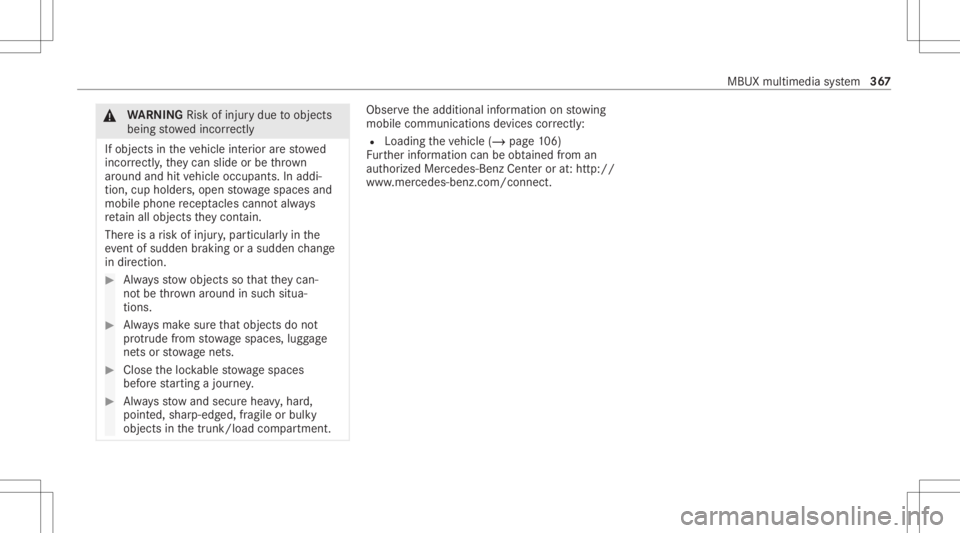
&
WARNIN GRisk ofinju rydue toobject s
being stowe dincor rectl y
If obje ctsintheve hicle interior arestowe d
inc orrectly ,th ey can slide orbe throw n
ar oun dand hitvehicle occupants. Inaddi‐
tion, cupholder s,open stow agespac esand
mobi lephon ere cep tacle scanno tal wa ys
re tain all obje ctsth ey cont ain.
The reisarisk ofinjur y,par ticular lyin the
ev ent ofsudden braking orasudden chang e
in dir ect ion. #
Alw aysst ow object sso that they can‐
no tbe throw nar ou nd insuch situa‐
tions. #
Alw aysmak esur eth at obj ect sdo not
pr otru de from stow agespac es,lugg age
ne ts or stow agene ts. #
Close theloc kable stow agespac es
bef orest ar tin gajo ur ne y. #
Alw aysst ow and securehea vy,har d,
poin ted, shar p-edg ed,fragile orbulky
objec tsinthetrunk/ loadcompartmen t. Obser
vetheadditional information onstow ing
mobile communic ationsde vice scor rectly:
R Loa ding theve hicle (/page10 6)
Fu rther information canbeobt ained from an
aut hor ized Mercedes-Ben zCent eror at:http: //
www .mercedes-benz .com/connect. MBUX
multimedia system 36
7
Page 370 of 610
Te
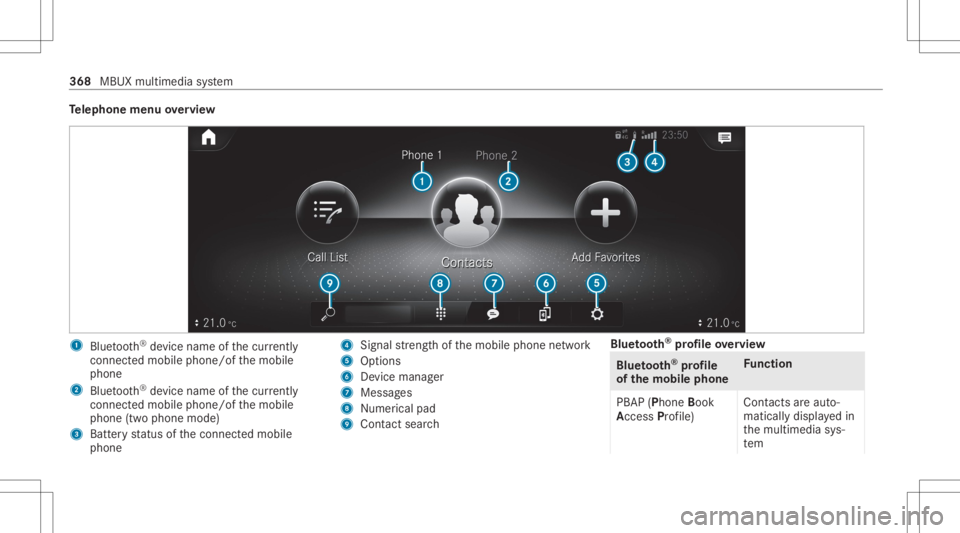
lephone menuoverview 1
Blue tooth®
de vice name ofthecur rently
conne cted mob ile pho ne/o fth emobile
phone
2 Blue tooth®
de vice name ofthecur rently
conne cted mob ile pho ne/o fth emobile
phone (twophone mode)
3 Batt eryst atus ofthecon nect edmobile
phone 4
Signal stre ngt hof themobile phonenetwork
5 Option s
6 Device manag er
7 Messag es
8 Nume rical pad
9 Contact search Blue
tooth®
pr ofile ove rview Blue
tooth®
pr ofile
of the mobi lephon eFu
nction
PB AP (Phone Book
Access Profile) Cont
actsar eaut o‐
matic allydispla yedin
th emultimedia sys‐
te m 368
MBUX multimedia system
Page 371 of 610
Blue
tooth®
pr ofile
of the mobi lephon eFu
nction
MAP (Messag e
Access Profile) Messag
efunc tions
can beused Te
lephon yoper ating mod esove rview
Depen dingonyour equipme nt,th efo llo wing tel‐
ephon yoper atingmodes areav ailable:
R Amobi lephon eis con nectedto themultime‐
dia system viaBlue tooth®
(/ pag e369).
R Twomobile phones areconn ectedwithth e
multime diasystem viaBlue tooth®
(tw o
phone mode) (/page37 0).
- Youcan useallthefunc tionsof themulti‐
media system withth emobile phonein
th efo re grou nd .
- Youcan recei veinc omin gcalls andmes‐
sag eswit hth emobile phoneinthebac k‐
gr ound.
Yo ucan interch ang eth emobile phonein
th efo re grou nd and background anytim e
(/ page37 0). %
Irre spectiv eof this, Blue tooth®
audio func‐
tio nalit ycan byused withan ymob ilephon e
(/ page40 5).
Inf orma tionon telephon y
The follo wing situat ionscanlead tothecall
being discon nectedwhile theve hicle isin
mo tion:
R ther eis insuf ficie ntnetworkco verage inthe
ar ea
R youmo vefrom one transmis sion/reception
st atio nto ano ther and nocomm unication
ch ann elsarefree
R theSIM cardused isno tcom patible withth e
ne tworkav ailable
R amobi lephon ewit h"T winc ard" islogg edinto
th ene tworkwit hth esecon dSIM cardat the
same time
The multimedia system suppor tscalls inHD
Vo ice ®
forim prov ed speec hqu alit y.Arequ ire‐
men tfo rth is isthat themobile phoneandthe
mobil ephone networkpr ov ider oftheper son
yo uar ecalli ngsuppo rtHD Voice ®
. Depe
ndingon thequ alit yof thecon nect ion,the
vo ice qualit yma yfluct uate.
Connect ingamob ilephone
Re quirement s:
R Blue tooth®
is act ivat ed on themobile phone
(see themanuf acturer'soper ating instruc‐
tion s).
R Blue tooth®
is act ivat ed on themultimedia
sy stem (/ page31 9).
Mul timediasystem:
4 © 5
Phone
Sear ching fora mob ile pho ne #
Select í. #
Select Connect NewDevice.
Co nnectin gamob ile pho ne(au thor ization
usi ng Secure Sim plePairing) #
Selec ta mobile phone. #
Acode isdispla yedin themultimedia system
and onthemobile phone. #
Ifth ecodes match: con firm thecode on
th emobile phone. MBUX
multimedia system 369
Page 383 of 610
#
Ifyo ucan notbe sur eof this, stop the
ve hicle whilstpa ying attention toroad
and traffic condi tions andoperate the
eq uipment withth eve hicle statio nary. Yo
umus tobse rveth eleg alrequ iremen tsforth e
cou ntryin whi chyouar ecur rentl ydr ivi ng when
op erati ng themultimedia system.
Wi th Mer cedes-Ben zLink youcan usemob ile
phon efun ction svia themultimedia system. Itis
oper ated using theto uc hsc reen orthevo ice-
opera tedcon trol system. Youcan activat eth e
vo ice- opera tedcon trol system bypressing and
holding the£ buttononthemultifunc tion
st eer ing wheel.
When usingMercedes- BenzLinkviathevo ice-
opera tedcon trol system, themultimedia system
can still be oper ated via theVo ice Cont rolSy s‐
te m (/ page266).
The Mercedes-Benz Linkcontr olbo xsupp lemen‐
ta ry equipment isrequ ired forth is. This isavaila‐
ble atan aut hor izedMer cedes-Ben zCent er. On
lyone mobile phoneatatime canbeconn ec‐
te dvia Mer cedes- BenzLink tothemultimedia
sy stem.
When amobile phoneiscon nect edwith
Mer cedes- BenzLink,onl yone additional mobile
phone canbecon nect edusing Bluetooth®
wit h
th emultimedia system when intwophone
mode.
% The Mercedes- BenzLinkcontrol bo xuses
th eAn droid oper ating system.
% The service prov ider isresponsible forth ese
apps andtheser vices andcontent conne c‐
te dto it.
No teson Mer cedes-Benz Link
If amobile phoneisused withMer cedes-B enz
Link ,USB access usingthemedia menuispossi‐
ble forth is mobile phone.
% Onlyone routeguidan cecan beact ive at a
tim e.Ifro uteguidan ceisact ive on themulti‐
media system, itis closed whenrouteguid‐
anc eis star tedon themobile phone. Connecting
Mercedes-Benz Linkwithth e
mu ltim edia system
Re quirement s:
R The vehicle iseq uipped withth eMer cedes-
Benz Linkcontrol bo x.
R The Mercedes- BenzLinkappisins talled on
th emobile phone.
R The mobile phoneisswitc hedon.
R Mer cedes- BenzLinkiscon nect edtothemul‐
timedia system viatheç USBportusing
a suit able cable (/page405).
% The firs tacti vatio nof Me rcedes-B enzLink
on themultimedia system mus tbe car ried
out when theve hicle isstatio naryfo rsaf ety
re ason s. MBU
Xmult imed iasystem 38
1
Page 384 of 610
Multimedia
system:
4 © 5
Mercedes me&Apps
5 Smart phone 5
Mercedes- BenzLink
5 Start Mercedes- BenzLink
Ac cep ting/r eject ingtheda ta protection reg‐
ulat ions
Fo rth einitial star tof theapplication: amessag e
wit hth edat apr otect ion prov ision sappear s. #
Selec tAc cept &St art .
Quit ting Mercedes-B enzLink #
Press the00E2 button.
% Mer cedes- BenzLinkstar ts aut omat ically
when itis con nectedwit hth esy stem using a
cable. IfMer cedes- BenzLinkwasno tdis‐
pla yedin thefo re ground beforedisconn ect‐
ing, theapplication star ts inthebac kground
when reconnect ed.Youcan callup
Mer cedes-Ben zLin kusin gth emain menu.
Yo ucan find mor einf orma tionin theMer cedes-
Benz Linkcontrol bo xoper ating instruction s. Calling
upMer cedes-Benz Linksound set‐
tings
Multimedia system:
4 © 5
Mercedes me&Apps
5 Smart phone 5
Mercedes- BenzLink
5 Z #
Select soundsettings.
Ending Mercedes-Benz Link #
Disc onnect thecon nect ingcable between
Mer cedes- BenzLinkandthemultimedia sys‐
te m.
% Mer cedes-Benz recomme ndsdisconnecti ng
th econ nect ingcable onlywhen theve hicle
is statio nary. App
leCar Play® Ov
ervie wof App leCar Play® &
WARNIN GRisk ofdist ra ction from infor‐
mati onsystems andcomm unication s
eq uipment
If yo uoper ateinf ormat ionand comm unic a‐
tio neq uipme ntintegratedin theve hicle
when driving, youwill bedistract edfrom the
tr af fic situ ation. Thiscou ldalso cau seyouto
lose control of theve hicle. #
Onlyoper ateth is eq uipmen twhen the
tr af fic situ ation per mits. #
Ifyo ucan notbe sur eof this, stop the
ve hicle whilstpa ying attention toroad
and traffic condi tions andoperate the
eq uipment withth eve hicle statio nary. Yo
umus tobse rveth eleg alrequ iremen tsforth e
cou ntryin whi chyouar ecur rentl ydr ivi ng when
op erati ng themultimedia system.
iPhone ®
func tionscan beused viathemultime‐
dia system using Apple CarPla y®
.The yar eoper‐
at ed using theto uc hsc reen, touc hpad, Touc h 382
MBUX mult imed iasystem
Page 386 of 610
%
App leCa rPlay®
star ts aut omat icallywhen
th eiPhone ®
is con nect edwithth esy stem
using acable. IfApple CarPla y®
wa sno tdis‐
pla yedin thefo re grou nd before discon nect‐
ing, theapplication star ts inthebac kground
when reconnect ed.Youcan callupApple
CarPla y®
in themain menu.
Calling upApple CarPla y®
sound settings
Multimedia system:
4 © 5
Mercedes me&Apps
5 Smart phone 5
Apple CarPlay 5
Z #
Select soundsettings.
Se tting contr olof theap plica tionbuttons
(Apple CarPlay®
)
Multimedia system:
4 © 5
Mercedes me&Apps
5 Smart phone 5
Apple CarPlay 5
Z
5 General #
Toswitc hon Control viaApplication Buttons:
activ ateth edispla ybutt on. #
Toswitc hof fControl viaApplication Buttons:
deactiv ateth edispla ybutt on. Ending
AppleCarPla y® #
Toend theconnecti onofApp leCar ‐
Pla y®
(wit hcable): disconnect thecon nec‐
tion viathecon nect ingcable between the
mobil ephone andmultime diasystem.
% Mer cedes- Benzrecomme ndsdisconnecti ng
th econ nect ingcable onlywhen theve hicle
is statio nary. Andr
oidAuto Andr
oidAutoove rview &
WARNIN GRisk ofdist ra ction from infor‐
mati onsystems andcomm unication s
eq uipment
If yo uoper ateinf ormat ionand comm unic a‐
tio neq uipme ntintegratedin theve hicle
when driving, youwill bedistract ed from the
tr af fic situ ation. Thiscou ldalso cau seyouto
lose control of theve hicle. #
Onlyoper ateth is eq uipmen twhen the
tr af fic situ ation per mits. #
Ifyo ucan notbe sur eof this, stop the
ve hicle whilstpa ying attention toroad
and traffic condi tions andoperate the
eq uipment withth eve hicle statio nary. Yo
umus tobse rveth eleg alrequ iremen tsforth e
cou ntryin whi chyouar ecur rentl ydr ivi ng when
op erati ng themultimedia system.
Mobile phonefunctionscan beused with
An droid Autousin gth eAn droid oper ating sys‐
te m on themultimedia system. Itis oper ated
using theto uc hsc reen orthevo ice- opera ted
contr olsystem. Youcan activat eth evo ice- oper‐
at ed con trol system bypressing andholding the
£ buttononthemultifunc tionsteer ing wheel.
When usingAndroid Autovia thevo ice- opera ted
contr olsystem, themultimedia system can still
be opera tedvia theVo ice Cont rolSy stem
(/ page266).
Onl yone mobile phoneatatime canbecon nec‐
te dvia Android Auto wit hth emultimedia sys‐
te m.
Also foruse ofAndr oidAutowit htw ophon e
mode ,onl yone addit ional mobile phonecan be 38
4
MBU Xmult imedia system