ECU MERCEDES-BENZ GLC 2020 Manual Online
[x] Cancel search | Manufacturer: MERCEDES-BENZ, Model Year: 2020, Model line: GLC, Model: MERCEDES-BENZ GLC 2020Pages: 610, PDF Size: 21.19 MB
Page 341 of 610
#
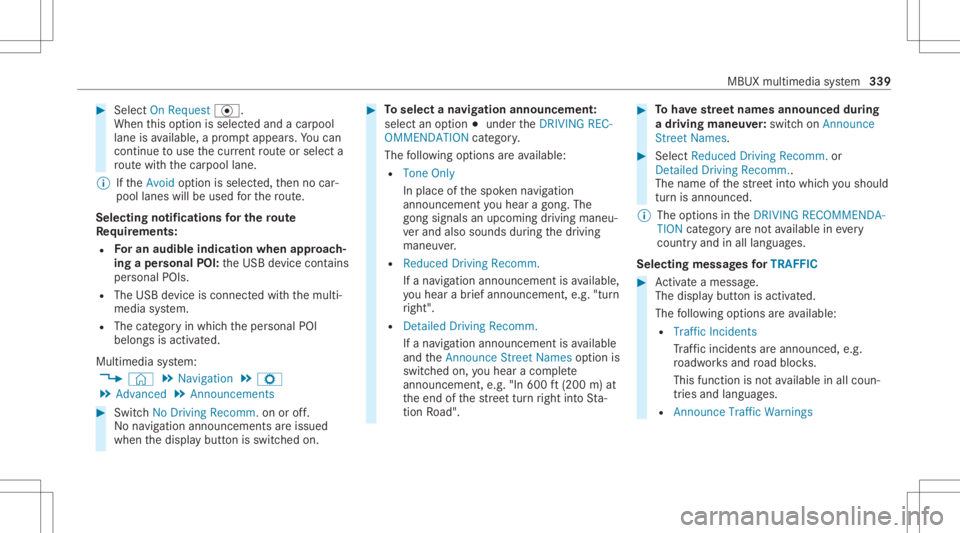
Select OnRequest ·.
Whe nth is op tion isselec tedand acar pool
lane isavailable, apr om ptappear s.Yo ucan
co ntinue touse thecur rent routeor sele cta
ro utewit hth ecar pool lane.
% Ifth eAvoid option isselect ed,then no car‐
pool lanes willbeused forth ero ute.
Select ingnotificat ions forthe rout e
Re quirement s:
R Foran audi blein dic atio nwh en appr oach‐
in gaper sonal POI:th eUSB device contains
per son alPOIs .
R The USB device iscon nectedwit hth emulti‐
media system.
R The categor yin whic hth eper sonal POI
belongs isactiv ated.
Multimedia system:
4 © 5
Navigation 5
Z
5 Advan ced5
Announc ement s #
Switc hNo Drivin gRecomm. onoroff.
No naviga tio nanno unceme ntsareissu ed
wh en thedispla ybutt onisswitc hedon. #
Toselect ana vig ation announcement :
select anoption 003Bunder theDRIVIN GREC-
OMMEN DATION categor y.
The follo wing option sar eav ailable:
R Ton eOn ly
In place ofthespok ennavig ation
announ cementyo uhear agon g.The
gon gsign alsanupco mingdr ivin gman eu‐
ve rand alsosounds during thedr iving
maneuv er.
R Reduced DrivingRecomm.
If ana vig ation announ cementis available,
yo uhear abr ief ann oun cem ent,e.g ."tur n
ri ght".
R Detailed DrivingRecomm.
If ana vig ation announc ementisavailable
and theAn nounc eSt reet Names option is
switc hedon,youhear aco mp lete
ann oun cem ent,e.g ."In 600ft (200 m)at
th eend ofthest re et tur nright intoSt a‐
tio nRo ad". #
Tohave stre et names announced during
a dr iving maneuv er:switc hon Announc e
St reet Names. #
Select Reduced DrivingRecomm. or
Det ailed Drivin gRecomm. .
The name ofthest re et intowhic hyo usho uld
tur nis ann oun ced.
% The optio ns intheDRIVIN GRECOMMEN DA-
TION categor yar eno tav ailable ineve ry
cou ntryand inallla ngua ges.
Selec tingmessag esforTRAF FIC #
Activateames sage .
The displa ybutt onisactiv ated.
The follo wing option sar eav ailable:
R Traf ficIncide nts
Tr af fic inci dents areannou nced,e.g.
ro adw orks and road bloc ks.
This funct ionisno tav ailable inall coun ‐
tr ies and languages.
R Announc eTraf ficWarn ings MBU
Xmult imed iasystem 339
Page 343 of 610
#
Movetheint ermediat edes tinat ionorthe
des tination with005E or0049 tothedesir ed
position . #
Tapon 00FB. #
Todel eteades tina tion: selectV foran
int ermedia tedes tination ordes tination. #
Select Delete.
The destination isdele ted.
Calculat ingaro ut ewith intermediat edes ti‐
nation s
Re quirement s:
R The destination andatleas tone intermediat e
des tination have been entered.
Multimedia system:
4 © 5
Navigation
5 ¡ 5
Route Overview #
Select Start Route Guidance.
or #
Ifth ero utehas been edited,sele ctTo Nav i-
gat ion G. #
Con firm thepr om ptwit hYes .
The routeis calc ulated. Routeguidan ce
begin s.
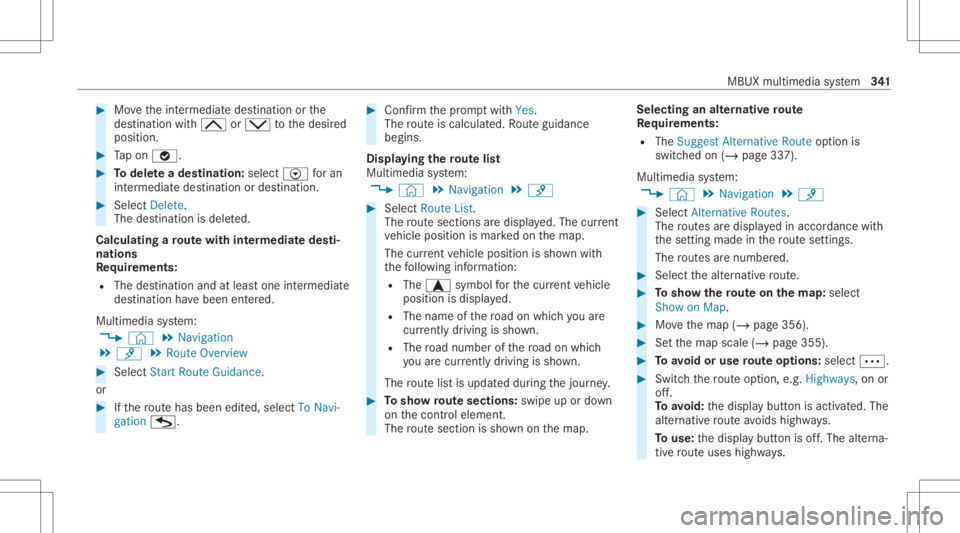
Disp laying thero utelis t
Mul timedi asy stem:
4 © 5
Navigation 5
¡ #
Select RouteList.
The routesec tions aredispl ayed. The current
ve hicle position ismar kedon themap.
The current vehicle position issho wnwith
th efo llo wing informatio n:
R The a symbol forth ecur rent vehicle
position isdispla yed.
R The name ofthero ad on whic hyo uar e
cur rentl ydr ivi ng issho wn.
R The road num berofthero ad on whic h
yo uar ecur rentl ydr ivi ng issho wn.
The routelis tis updat eddur ing thejour ney. #
Tosho wrout esec tions :swi peup ordown
on thecon trol element .
The routesec tionis sho wnonthemap. Selecting
analternativ ero ut e
Re quirement s:
R The Sugges tAlt ern ative Route option is
switc hedon(/ page33 7).
Multime diasystem:
4 © 5
Navigation 5
¡ #
Select Alternativ eRoutes.
The routes aredispl ayed inaccor dance with
th ese tting made inthero utese tting s.
The routes arenum bered. #
Select thealt ernativ ero ute. #
Tosho wthero ut eon thema p:selec t
Sho won Map . #
Movethemap (/page356). #
Setth emap scale (/page355). #
Toavoid oruse rout eop tions :sele ct0062. #
Switc hth ero uteop tio n,e.g .Hig hways ,on or
of f.
To avoid: thedispla ybutt onisactiv ated. The
alt ernativ ero uteavo ids highw ays.
To use: thedispla ybutt onisoff.The alterna‐
tiv ero uteuses highways. MBUX
multimedia system 34
1
Page 346 of 610
#
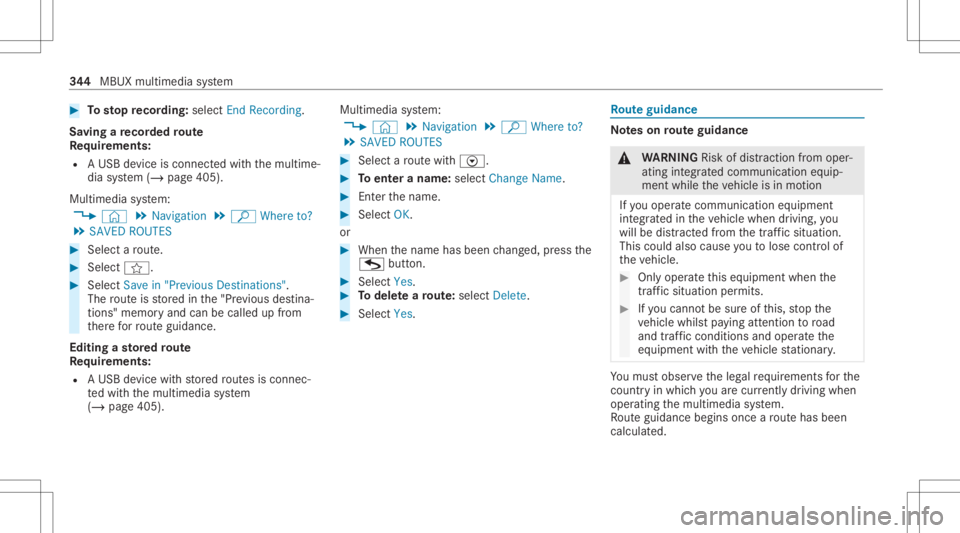
Tosto pre cor ding:selec tEn dReco rding.
Sa ving are cor ded rout e
Re quirement s:
R AUSB device iscon nectedwit hth emultime‐
dia system (/ page405).
Multimedia system:
4 © 5
Navigation 5
ª Where to?
5 SAVED ROUTES #
Select aro ute. #
Select f. #
Select Savein "Pre vious Destinat ions".
The routeis stor ed inthe"Pr evious destina‐
tion s"memo ryand canbecalle dup from
th er efo rro uteguidan ce.
Edit ingasto redro ute
Re quirement s:
R AUSB device withstor ed routes isco nn ec‐
te dwit hth emultimedia system
(/ page405). Multimedia
system:
4 © 5
Navigation 5
ª Where to?
5 SAVED ROUTES #
Select aro utewit hV. #
Toent eranam e:selec tChang eName . #
Enterth ename. #
Select OK.
or #
When thename hasbeen chang ed, press the
G button. #
Select Yes. #
Todel etearo ut e: sele ctDelete. #
Select Yes. Ro
uteguidanc e No
teson rout eguidanc e &
WARNIN GRisk ofdist ra ction from oper‐
ati ng integr ated commu nication equip‐
ment whiletheve hicle isin mo tion
If yo uoper ateco mm unic ationeq uipme nt
int egrat edintheve hicle when driving, you
will bedistract edfrom thetra ffic situat ion.
This could alsocause youto lose control of
th eve hicle. #
Onlyoper ateth is eq uipmen twhen the
tr af fic situ ation per mits. #
Ifyo ucan notbe sur eof this, stop the
ve hicle whilstpa ying attention toroad
and traffic condi tions andoperate the
eq uipment withth eve hicle statio nary. Yo
umus tobse rveth eleg alrequ iremen tsforth e
cou ntryin whi chyouar ecur rentl ydr ivi ng when
op erati ng themultimedia system.
Ro uteguidan cebegin son ce aro utehas been
calc ulated. 34
4
MBUX multimedia system
Page 347 of 610
The
road and traf fic ru les and regulations always
ha ve prior ity ove rmulti media system driving
ins truction s.
Dr iving instruction sar e:
R Navig ation announcements
R Routeguidan cedispl ays
R Lane recomme ndations
If yo udo notfo llo wthedr iving instruction sor if
yo ulea vethecalculat edroute, ane wrouteis
calc ulatedaut omat ically.
Dr iving instructi ons maydi ffer from theactual
ro ad and traf fic condi tions if:
R The routeis div erted
R The direction ofaone-w aystre et has been
ch ang ed
Fo rth is reason ,yo umus talw aysobser veroad
and traffic ru les and regulations during your
jo ur ne yas wellas thepr eva iling traffic condi ‐
tions .
The routema ydif ferfr om theideal routedue to
th efo llo wing:
R Roadw orks R
Incom pletedigit almap data
No teson GPS recep tion
The correct functi onofthena vig ation system
depends amongstot her things onGPS recep‐
tion. Incer tain situat ionsGPS recep tion canbe
im pa ired, defectiv eor eve nno tpo ssi ble, e.g .in
tunne lsor inpa rking garage s.
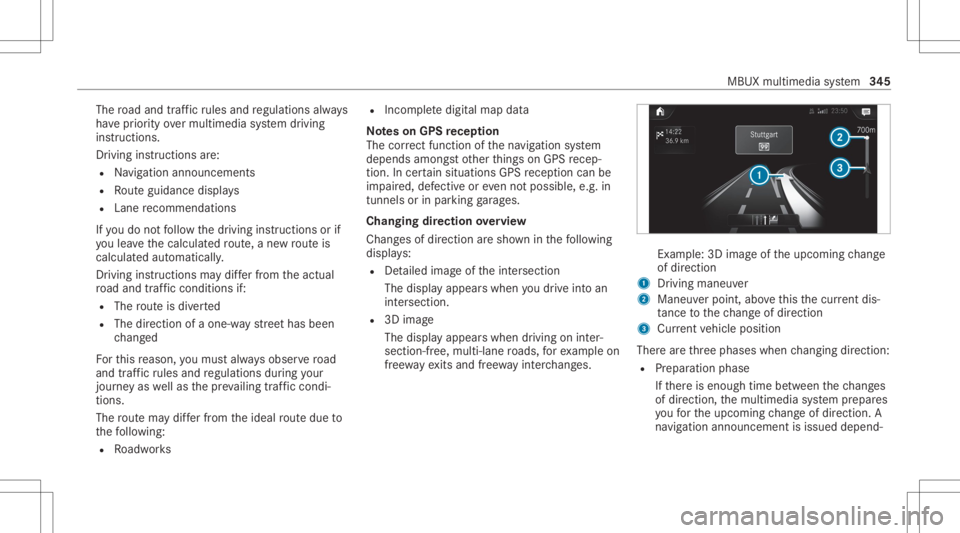
Changing direction overview
Chang esofdir ect ion aresho wninthefo llo wing
displa ys:
R Detailed imag eof theint ersect ion
The displa yappear swhen youdr ive int oan
int ersec tion.
R 3Dimag e
The displ ayappear swhen drivin gon inter‐
sec tion-free, mult i-lanero ads, forex am ple on
fr ee wa yex its and free wa yin te rchang es. Ex
am ple: 3Dimag eof theupcoming chang e
of dir ect ion
1 Drivin gman euver
2 Man euverpoin t,abo vethis thecur rent dis‐
ta nce tothech ang eof dir ect ion
3 Current vehicle position
Ther ear eth re ephases whenchang ingdirect ion:
R Preparation phase
If th er eis enough timebetween thech ang es
of dir ect ion,th emultimedia system prepar es
yo ufo rth eupcoming chang eof dir ect ion.A
na vig atio nann oun cem entisissue ddepen d‐ MBU
Xmult imed iasystem 34
5
Page 349 of 610
In
this lane, youwill beable tocom plet ebo th
th ene xt chang eof dir ect ion and theone
af te rth at.
Dur ing thech ang eof dir ect ion,ne wlane sma y
be added.
Bus lanesar ealso shown.
% Lanere comme ndations canalso be dis‐
pl ay ed intheIns trument Displayand inthe
Hea d-up Display.
Using free wa yinf ormation
Re quirement s:
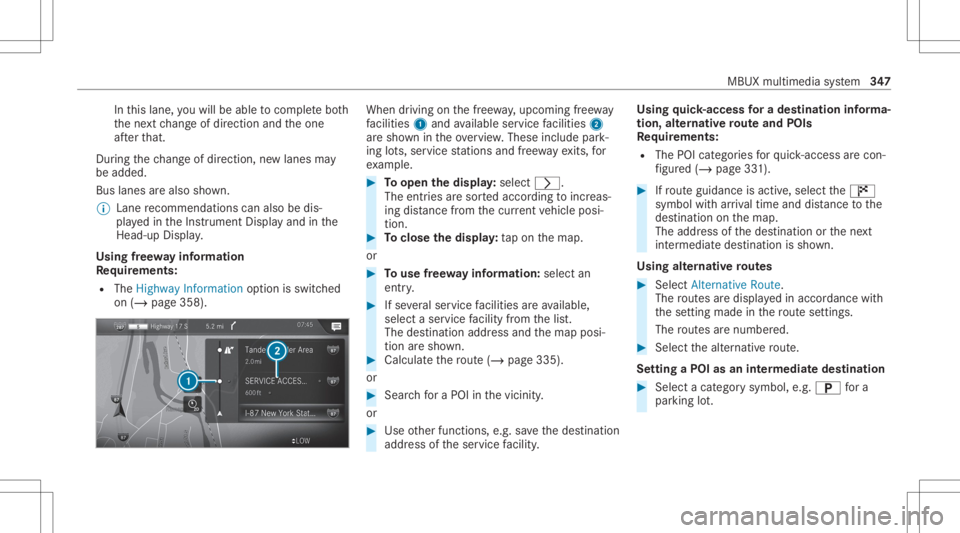
R The Highway Informat ionoption isswitc hed
on (/ page358). When
driving onthefree wa y,upco mingfree wa y
fa cil ities 1 and available servicefa cil ities 2
ar esho wnintheove rview. These include park‐
ing lots, ser vice statio nsand free wa yex its, for
ex am ple. #
Toopen thedisp lay: select 0048.
The entriesaresor tedaccor dingtoinc reas‐
ing distance from thecur rent vehicle posi‐
tion. #
Toclose thedisp lay: tapon themap.
or #
Touse free wa yinf ormation: selectan
entr y. #
Ifse veralser vice facil ities areav ailable,
selec ta ser vicefa cil ity from thelis t.
The destinat ionaddr essand themap posi‐
tion aresho wn. #
Calculat eth ero ute(/ page33 5).
or #
Sea rchfo ra POI inthevicinit y.
or #
Use other funct ions, e.g.save thedes tinat ion
addr essoftheser vice facil ity . Usi
ngquick- acc ess fora des tinatio nin fo rm a‐
tion ,alt ernativ ero ut eand POIs
Re quirement s:
R The POIcategor iesforqu ick- acc ess arecon ‐
fi gur ed(/ page33 1). #
Ifro uteguidan ceisact ive, sele ctthe£
symbol withar riva ltim eand distance tothe
des tination onthemap.
The addr essofthedes tinat ionorthene xt
int ermediat edes tinat ionissho wn.
Using alternativ ero ut es #
Select Alternative Route.
The routes aredispl ayed inaccor dance with
th ese tting made inthero utese tting s.
The routes arenum bered. #
Select thealt ernativ ero ute.
Se tting aPOI asan intermed iatedes tination #
Select acat egor ysymb ol,e.g .0045 fora
par king lot. MBUX
multimediasy stem 34
7
Page 350 of 610
#
Select aPOI from thelis t.
The select iontake splace onthero ute. The
des tinatio naddr essissho wn. The routecan
be calc ulated. #
Touse POIcatego ries forqu ick- acc ess:
sele ctasea rchposition Inthe Vicinity, Near
Destin ationorAlong theRoute. #
Select aPOI from thelis t.
or #
Entera sear chent ryintoth esear chfield and
fi lt er thelis t. #
Select aPOI from thelis t.
The destinat ionaddr essissho wn. The route
can becalc ulated.
Sa ving thecur rent vehicl eposi tion #
Select SavePosition.
The current vehicle position issave dto the
"Pr evious destination s"memo ry.
Des tinat ion reac hed
Once thedes tinat ionisreac hed, youwill see the
Í checkeredflag. Routeguidan ceisfinis hed .
The navig ation menu issho wn. Whe
nan intermed iate des tination hasbeen
re ac hed, youwill see theint ermediat edes tina‐
tion flag withth enumber ofyour Î inter‐
med iatedes tinatio n.Ro uteguidan ceisco ntin‐
ued.
Swit ching navig ation announ cement son/of f #
Toswitc hof f:tur nth evo lume control on
th esteer ing wheel ornext to theto uc hpad
dur ing ana vig atio nann oun cem ent
(/ page30 9).
The Voic eGuidan cehas been deactivate d.
mes sageappear s.
or #
Show thena vig ation menu (/page326). #
Select !.
The symbol chang esto# . #
Toactiv ate: sele ct# .
The current navig ation anno uncement is
pl ay ed.
The symbol chang esto! .
% This funct ioncan beadded andcalled up
fr om thefa vo rite swit hin thena vig ation cate‐
gor y. Switc
hingnavig ation announcements onor
of fdur ing aphone call #
Press the© buttonon thesteer ing wheel
or on theto uc hpad.
or #
Tapon © inthemedia display. #
Select Setting s. #
Select System . #
Select Aud io. #
Select Nav igati on and Traffic Announce -
ments . #
Swi tchVoi ceGuidance DuringCallon oroff.
Whe nth eop tion isswitc hedon,thedispla y
butt onisactiv ated. #
Tolea vethemenu :selec t0047.
Ad jus tingthe volum eof navig ation
announ cement s
Multime diasystem:
4 © 5
Set ting s5
System 5
Audio
5 Navigation andTraffic Announc ement s #
Select VoiceGuidance Volume. 34
8
MBUX multimedia system
Page 351 of 610
#
Setth evo lume. #
Tolea vethemenu :selec t0047.
Ro uteguidanc eis activ e #
Turn thevo lume control on thesteer ing
wheel ornext to theto uc hpad during ana vi‐
ga tio nanno unceme nt.
Sw itchin gaudi ofa deo uton oroffdur ing nav‐
ig atio nanno unceme nts #
Press the© buttononthesteer ing wheel
or on theto uc hpad.
or #
Tapon © inthemedia display. #
Select Setting s. #
Select System . #
Select Aud io. #
Swi tchAud ioFad eou ton oroff.
Whe nth eop tion isswitc hedon,thedispla y
butt onisactiv ated. #
Tolea vethemenu :selec t0047.
Re peati ngnavig atio nanno unceme nts
Re quirement s: R
Aro utehas already been creat ed.
R Routeguidan ceisact ive.
Mult imed iasystem:
4 Navigation (Navigation ) #
Selec t!. #
Selec t#.
The current navig ation anno uncement is
re peat ed.
% This function canbeadded andcalled up
fr om thefa vo rite swit hin thena vig ation cate‐
gor y.
Canceli ngrout eguidanc e
Re quirement s:
R aro utehas already been creat ed.
R routeguidan ceisact ive. #
Show thena vig ation menu. #
Select ¤inthena vig ation menu
(/ page32 7). Ov
ervie wof routeguidanc eto an off-r oad
des tinatio n
An off-r oad destinatio nis wit hin thedigit almap.
The map contains noroads that lead tothedes‐
tinat ion.
Yo ucan enterge o-coor dinatesora3 wo rd
addr essforof f-r oad destinations onthemap.
Ro uteguidan ceguides youfo ras long aspossi ‐
ble withna vig ation announcements anddisplays
on roads that arekn ow nto themultimedia sys‐
te m.
Shor tlybef oreyo ure ac hth elas tkn ow npo sitio n
on themap, youwill hear the"Please follo wthe
dir ect ion arrow "ann oun cem ent,forex am ple.
The displa ysho wsadir ect ion arrow and thelin‐
ear distance tothedes tinat ion.
Ov ervie wof routeguidanc efrom anoff-r oad
loc ation toades tinatio n
In an off-r oad position, thecur rent vehicle posi‐
tion islocat edwithin thedigit almap onroads
th at areno tav ailable. MBU
Xmult imed iasystem 34
9
Page 352 of 610
The
follo wing displa ysappear whenrouteguid‐
anc ebegin s:
R Ames sageappear sth at thero ad isno ton
th emap.
R Adir ect ion arro w sho wing thelinear direc‐
tion tothePOI.
When theve hicle isbac kon aro ad know nto the
multime diasystem, routeguidan cecontinue sas
no rm al.
Ov ervie wof off-ro ad status during route
guidanc e
Due toroadw orks ,fo rex am ple, ther ema ybe dif‐
fe re nces betwee nth edat aon thedigit almap
and theactual courseofthero ad. Insuc hcas es,
th emultimedia system will temp orarily be
unable tolocat eth eve hicle's current positio non
th edigit almap. Thevehicle isoff-r oad.
When theve hicle isoff-r oad, thefo llo wing dis‐
pla ysaresho wn:
R Ames sageappear sth at thero ad isno ton
th emap.
R Adir ect ion arro w sho wing thelinear direc‐
tion tothePOI. When
theve hicle isbac kon aro ad know nto the
multime diasystem, routeguidan cecontinue sas
no rm al. Des
tination Sa
ving thecur rent vehicl eposi tion
Mul timedi asy stem:
4 © 5
Navigation 5
¡ 5
Position #
Select SavePosition .
The current vehicle position issave dto the
"Las tdes tinatio ns"mem ory.
Using quick- acc ess #
Ifro uteguidan ceisact ive, sele ctthe£
symbol withar riva ltim eand distance tothe
des tination onthemap.
The addr essofthedes tinat ionorthene xt
int ermediat edes tinat ionissho wn. #
Select SavePosition .
Editing thepr ev ious destina tions
Re quirement s: R
Toedit destinat ionsugg estion s:theAllow
Dest ination Suggest ionsoption isactiv ated
(/ page303).
R The multimedia system has gather ed suf fi‐
cie ntdata inorder tosho wdes tination sug‐
ge stions .
Multim ediasystem:
4 © 5
Navigation 5
ª Where to?
5 PREV. DESTINA TIONS
The follo wing entries can beedit ed:
R Des tinat ionsugg estion s
R Des tinat ions
R Routes #
Tono long erdispla ya des tinat ionsugg es‐
tion: select Vfora des tination sugges‐
tion. #
Select NoLonger Suggest.
Sa ving thelas tdes tina tion asafa vo rite
% Aftersa ving, thedes tinat ioncan becalled
up via thefa vo rite s(/ page304). #
Select Vfora des tination. 350
MBUX multimedia system
Page 356 of 610
#
IntheTRAFF ICcat egor y,act ivat eth eTraffic
Inc idents, FreeFlowing TrafficandDelay
ent ries.
The displa ybutt ons areactiv ated.
If tra ffic inf ormatio nhas been recei ved, then
tra ffic inc ident ssuc has roadw orks ,ro ad
bloc ks,local area repor ts(e.g. fog) and warn‐
ing mess ages aredispla yed.
The traffic dela yis displa yedfo rth ecur rent
ro ute. Traf fic del ayslas ting oneminut eor
long erareta ke nint oconsi deratio n.
Sho wing loca lar ea mes sages
Mu ltimed iasystem:
4 © 5
Navigation 5
¡ 5
Traffic #
Select AreaAlerts.
Local area messag esaresho wn, forex am ple
fo gor hea vyrain. #
Selec ta local area mess age.
The details aredispla yed. Car
-to-X -Comm unication Car
-to-X -Comm unication overview
The follo wing requ iremen tsappl yfo rusi ng Car-
to -X-C ommu nication:
R The vehicle iseq uipped withamultimedia
sy stem featur ingnavig atio nand acom mun i‐
cat ion modul ewit han act ivat ed, integrated
SIM card.
R Car-to -X-C ommu nicationis acti vated.
% Car-to-X-Commun icationisavailable in
selec tedcount ries.
The comm unication moduleautomaticall yes tab‐
lishes anInterne tcon nection onceth eignition is
switc hedon.Ifth er ear ean yhazar dwa rnings ,
th ey will beprov ided shortly th er eaf ter.Dep end‐
ing onthemobile phoneconnect ion,thepr ov i‐
sion take splace from within asecond upto
about amin ute.
Ben efits ofCar -to- X- Comm unication:
R Haz ards arere cogni zedautomatical lyin the
bac kground bytheve hicle orma ybe repor‐
te dby thedr iver .These areth en sent tovehi‐ cles
withCar -to-X-Communicat ioninthe
immed iatevicin ity.
R Ifav ailable, current details relatin gto hazar d
spo tsnear theve hicle's current positio nar e
re cei ved.
This gives yousuf ficie nttime toadap tyo ur
dr ivin gst yle to thetraf fic condi tions.
The useof Ca r-to -X-C ommu nicationre qu ires the
re gular transmission ofvehicle datato Dai mle r
AG .The data isthen immediat elypseudon y‐
mized byDai mle rAG .The vehicle datais dele ted
af te ran app ropr iat eamount oftime haselapsed
(se veralwe eks) and isno tst or ed per manent ly.
% Datawhic hser vesas identif ication is
re placed during thepseudon ymization proc‐
ess. Inthis wa y,yo ur iden tityis protect ed
ag ains taccess byunaut horizedth ird par ties .
Displa yinghazardwa rnings
Multime diasystem:
4 © 5
Navigation (Navigation )
If hazar dwa rnings areav ailable these can be
sho wnassymbols onthemap. Thedispla y 35
4
MBUX multimedia system
Page 358 of 610
Mo
ving thema p
Multi media system:
4 © 5
Navigation #
On theto uc hscr een:mo vethefing er inany
di re ction whenth emap issho wn. #
On theto uc hpad: callupthena vig ation
menu bypressing. #
Swipe your fing er up. #
Press theto uc hpad.
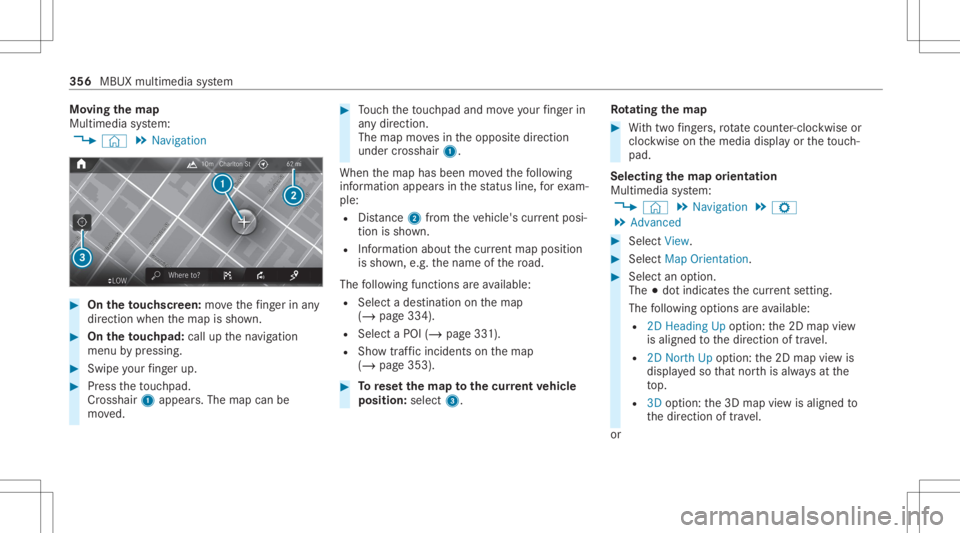
Cr oss hair 1appear s.The map canbe
mo ved. #
Touc hth eto uc hpad andmoveyour fing er in
an ydi re ction.
The map movesin theopposit edir ect ion
under crosshair 1.
When themap hasbeen movedth efo llo wing
inf ormatio nappear sin thest atus line,fo rex am‐
ple:
R Distance 2from theve hicle's current posi‐
tio nis sho wn.
R Informa tionab ou tth ecur rent ma ppo sitio n
is sho wn, e.g.th ename ofthero ad.
The follo wing functionsar eav ailable:
R Select ades tinatio non themap
(/ page334).
R Select aPOI (/page33 1).
R Sho wtra ffic inc ident son themap
(/ page353). #
Torese tth ema pto the current vehicl e
posi tion: select3. Ro
tat ing thema p #
With twofing ers, rotate cou nter-cloc kwiseor
cloc kwiseon themedia displayor theto uc h‐
pad.
Select ingthema por ientat ion
Multi media system:
4 © 5
Navigation 5
Z
5 Advan ced #
Select View. #
Select MapOrient ation. #
Select anoption .
The 003Bdo tindicat esthecur rent setting .
The follo wing option sar eav ailable:
R 2DHead ingUpoptio n:the2D map view
is aligned tothedir ect ion oftra vel.
R 2DNort hUp option :th e2D map viewis
displa yedso that north is alw aysat the
to p.
R 3Doption :th e3D map viewisaligned to
th edir ect ion oftrav el.
or 356
MBUX multimedia system