sensor MERCEDES-BENZ GLC 2020 Owner's Manual
[x] Cancel search | Manufacturer: MERCEDES-BENZ, Model Year: 2020, Model line: GLC, Model: MERCEDES-BENZ GLC 2020Pages: 610, PDF Size: 21.19 MB
Page 223 of 610
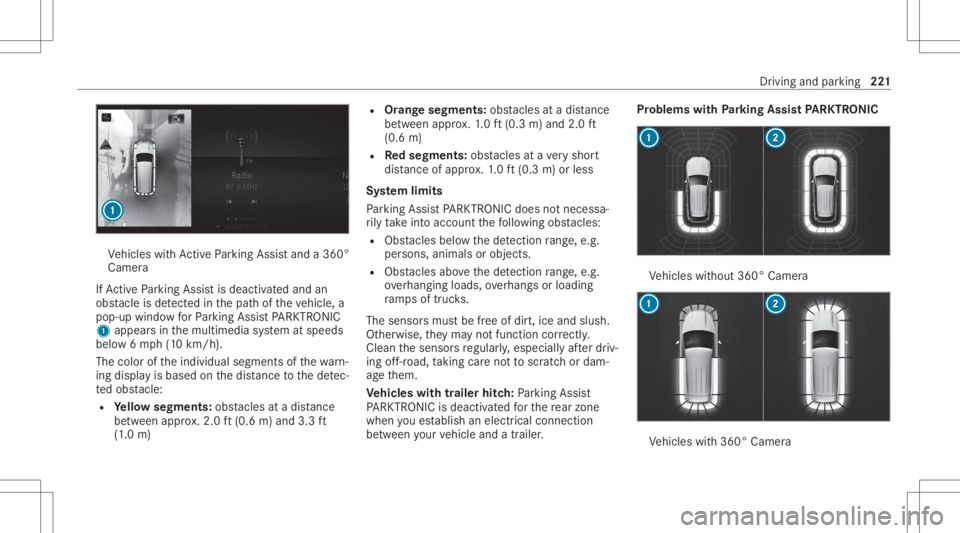
Ve
hicles withAc tivePa rking Assistand a360 °
Camer a
If Ac tivePa rking Assistis deact ivat ed and an
obs tacle isde tected inthepat hof theve hicle, a
pop-up windowforPa rking AssistPA RK TRONI C
1 appear sin themultimedia system atspeeds
belo w6mp h(1 0 km/h).
The color oftheindividual segmentsof thewa rn‐
ing displa yis based onthedis tance tothede tec‐
te dobs tacle :
R Yello wsegment s:obs tacle sat adi st anc e
be tween appr ox.2.0 ft(0.6 m)and 3.3ft
(1 .0 m) R
Orang esegment s:obs tacle sat adi st anc e
be tween appr ox.1. 0 ft (0.3 m)and 2.0ft
(0.6 m)
R Redse gme nts: obstacle sat ave ry shor t
dis tance ofapprox .1. 0 ft (0.3 m)orless
Sy stem limit s
Pa rking AssistPA RK TRONI Cdoes notne cessa‐
ri ly take intoacc ount thefo llo wing obstacle s:
R Obs tacle sbel ow thede tection rang e, e.g .
pe rsons, animals orobject s.
R Obs tacle sab ove thede tection rang e, e.g .
ove rhang ingloads, overhang sor loadin g
ra mp sof truc ks.
The sensor smus tbe free ofdir t,ice and slush.
Ot her wise, they ma yno tfunction correctl y.
Clean thesensor sre gular ly,especiall yaf te rdr iv‐
ing off-r oad ,ta king careno tto scr atc hor dam‐
ag eth em.
Ve hicl eswith traile rhitc h:Parking Assist
PA RK TRONI Cis deac tiva tedfo rth ere ar zone
when youes tablish anelec trical conn ect ion
be tween your vehicle andatrailer . Pr
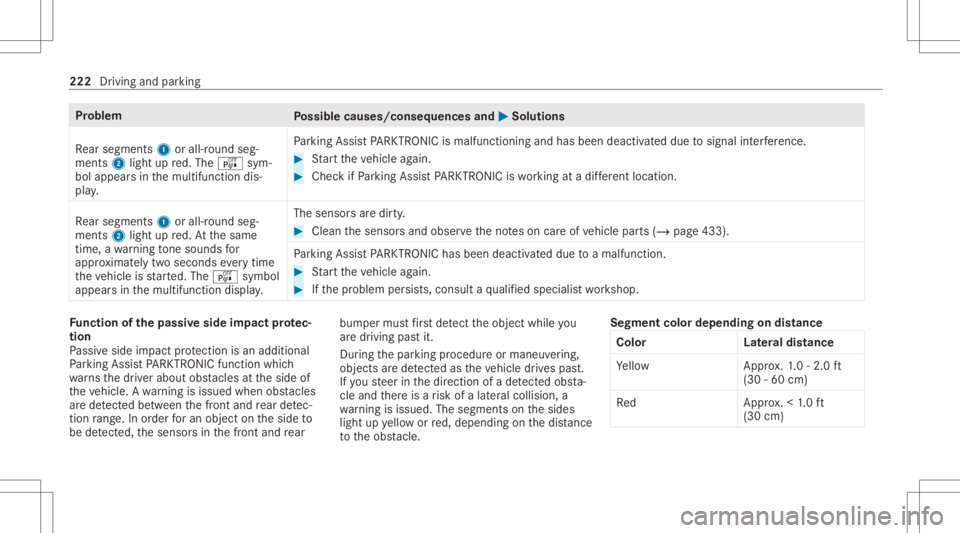
oblems withParking Assis tPA RK TRONI C Ve
hicles without 360° Camer a Ve
hicles with360° Camer a Dr
iving andparking 22
1
Page 224 of 610
Pr
oblem
Possible causes/conseq uencesand0050 0050
Solutions
Re ar segm ents1 orall-r oundseg‐
men ts2 light upred. The é sym‐
bol appear sin themultifunc tiondis‐
pla y. Pa
rking AssistPA RK TRONI Cis malf unction ing and hasbeen deactiva teddue tosignal interfere nce. #
Startth eve hicle again. #
Chec kif Pa rking AssistPA RK TRONI Cis wo rking atadif fere nt locati on.
Re ar segm ents1 orall-r oundseg‐
men ts2 light upred. At thesame
time, awa rning tone sou nds for
appr oximat elytw oseco ndseverytim e
th eve hicle isstar ted. The é symbol
appear sin themultifunc tiondispla y. The
sensor sar edir ty. #
Clean thesensor sand obser vetheno teson car eof vehicle parts(/ page433).
Pa rking AssistPA RK TRONI Chas been deactiva teddue toamalf unction. #
Startth eve hicle again. #
Ifth epr oblem persists, con sult aqu alif ied spec ialistwo rkshop. Fu
nction ofthepa ssiv eside impact protec‐
tion
Pa ssiv eside impact protect ion isan additional
Pa rking AssistPA RK TRONI Cfun ction whic h
wa rnsth edr iver about obstacle sat theside of
th eve hicle. Awa rning isissued whenobstacle s
ar ede tected between thefront and rear detec‐
tion rang e. In orde rfo ran object ontheside to
be detected, thesensor sin thefront and rear bum
permus tfirs tde tect theobjec twhile you
ar edr ivin gpas tit.
Dur ing thepar king procedur eor maneuv ering,
objec tsarede tected astheve hicle drives pas t.
If yo usteer inthedir ect ion ofade tected obs ta‐
cle and ther eis arisk ofalat eral collision, a
wa rning isissued. Thesegme ntson thesides
light upyello wor red, dependin gon thedis tance
to theobs tacle . Seg
ment colordepe ndingon distan ce
Co lor Lateral dis tan ce
Ye llo wA pprox.1. 0 -2.0 ft
(30 -60 cm)
Re dA pprox.< 1.0 ft
(30 cm) 222
Driving andparking
Page 225 of 610
In
order forlat eral front orrear segm entsto be
displa yed, theve hicle mustfirs ttr ave la dis tance
of at leas tha lfof theve hicle length.Once the
ve hicle hastrave led thelengt hof theve hicle, all
of thelat eral front and rear segm entscan bedis‐
pla yed. Pa
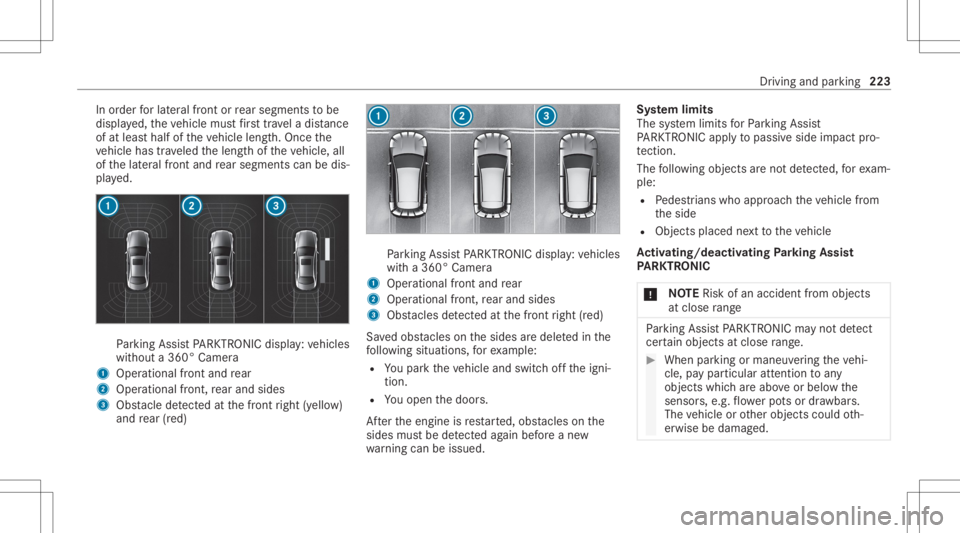
rking AssistPA RK TRONI Cdisp lay: vehicles
wit hout a360° Camer a
1 Oper ational front and rear
2 Operation alfron t,re ar and sides
3 Obstacle detected atthefront right (yello w)
and rear (red) Pa
rking AssistPA RK TRONI Cdisp lay: vehicles
wit ha360° Camer a
1 Oper ational front and rear
2 Operation alfron t,re ar and sides
3 Obstacle sde tected atthefront right (red)
Sa vedobs tacle son thesides aredele tedin the
fo llo wing situat ions,fo rex am ple:
R Youpar kth eve hicle andswitc hof fth eigni‐
tion .
R Youopen thedoor s.
Af terth eengine isrestar ted, obs tacle son the
sides mustbe detected again bef oreane w
wa rning can beissued. Sy
stem limit s
The system limits forPa rking Assist
PA RK TRONI Cappl yto passiv eside impact pro‐
te ction.
The follo wing objectsar eno tde tected, forex am‐
ple:
R Pedes trians who approachth eve hicle from
th eside
R Objec tsplaced next to theve hicle
Ac tiv atin g/deac tivatin gPa rking Assis t
PA RK TRONI C
* NO
TERisk ofan acci dent from objects
at clo serang e Pa
rking AssistPA RK TRONI Cma yno tde tect
cer tain obje ctsat clos era ng e. #
Whe npa rking ormane uvering theve hi‐
cle, paypar ticular attention toany
obj ect swhic har eabo veorbelo wthe
sensor s,e.g. flowe rpo ts or draw bar s.
The vehicle orother objects couldoth‐
er wise bedamag ed. Dr
iving andparking 223
Page 226 of 610
%
Vehicl eswith AIRBO DY CONT ROL:you
can activate or deactiv atePa rking Assist
PA RK TRONI Cin themultimedia system
(/ page22 4).
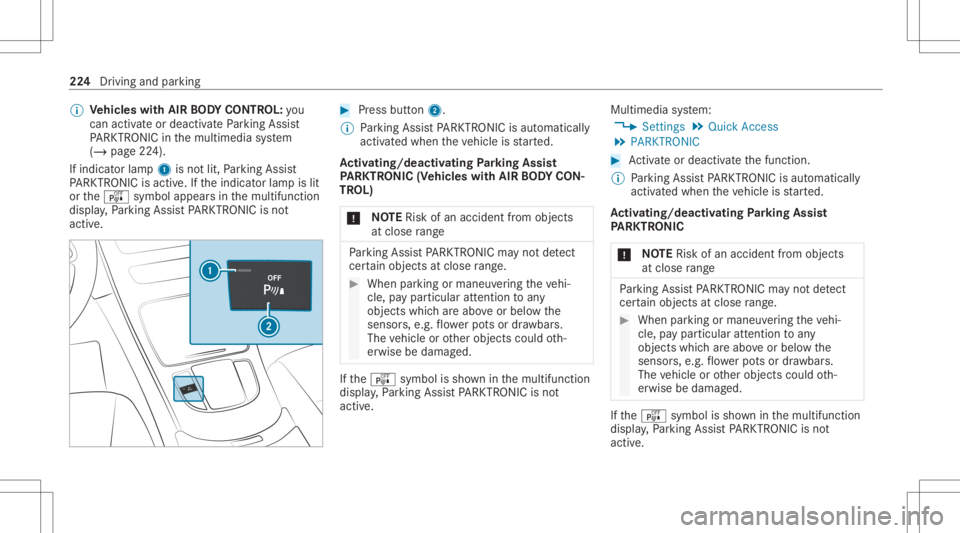
If indicat orlam p1 isno tlit, Parking Assist
PA RK TRONI Cis act ive. Ifth eindicat orlam pis lit
or theé symbol appearsin themultifunc tion
displa y,Pa rking AssistPA RK TRONI Cis no t
act ive. #
Press button2.
% Parking AssistPA RK TRONI Cis aut omat ically
act ivat ed when theve hicle isstar ted.
Ac tiv atin g/deac tivatin gPa rking Assis t
PA RK TRONI C(V ehi cles with AIRBO DY CON‐
TR OL)
* NO
TERisk ofan acci dent from objects
at clo serang e Pa
rking AssistPA RK TRONI Cma yno tde tect
cer tain obje ctsat clos era ng e. #
Whe npa rking ormane uvering theve hi‐
cle, paypar ticular attention toany
obj ect swhic har eabo veorbelo wthe
sensor s,e.g. flowe rpo ts or draw bar s.
The vehicle orother object scould oth‐
er wise bedamag ed. If
th eé symbol issho wninthemultifunc tion
displa y,Pa rking AssistPA RK TRONI Cis no t
act ive. Mult
imed iasystem:
4 Setting s5
Quick Access
5 PARKTRONIC #
Activateor deacti vate thefunc tion.
% Parking AssistPA RK TRONI Cis aut omat ically
act ivat ed when theve hicle isstar ted.
Ac tiv atin g/deac tivatin gPa rking Assis t
PA RK TRONI C
* NO
TERisk ofan acci dent from objects
at clo serang e Pa
rking AssistPA RK TRONI Cma yno tde tect
cer tain obje ctsat clos era ng e. #
Whe npa rking ormane uvering theve hi‐
cle, paypar ticular attention toany
obj ect swhic har eabo veorbelo wthe
sensor s,e.g. flowe rpo ts or draw bar s.
The vehicle orother objects couldoth‐
er wise bedamag ed. If
th eé symbol issho wninthemultifunc tion
displa y,Pa rking AssistPA RK TRONI Cis no t
act ive. 22
4
Drivin gand parking
Page 240 of 610
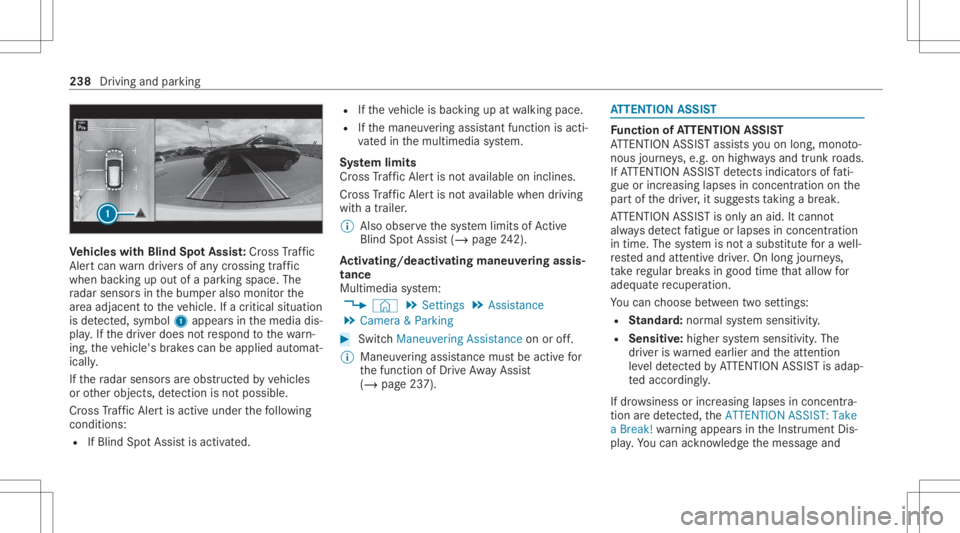
Ve
hicl eswith Blind SpotAss ist: Cr oss Traf fic
Ale rtcan warndriver sof anycr ossing traffic
when backingup out ofapar kingspace. The
ra dar sensor sin thebum peralso monit orthe
ar ea adjac enttotheve hicle. Ifacr itical situation
is de tected, symbo l1 appea rsinthemedia dis‐
pla y.Ifth edr iver does notre spond tothewa rn‐
ing, theve hicle's brak es can beappli edaut omat‐
ically .
If th era dar sensor sar eobs truct edbyvehicles
or other object s,de tection isno tpos sible.
Cr oss Traf fic Aler tis acti veund erthefo llo wing
con dition s:
R IfBlin dSpo tAss istis act ivat ed. R
Ifth eve hicle isbac king upatwa lkin gpace.
R Ifth emaneuv ering assis tant func tionis acti ‐
va tedin themultimedia system.
Sy stem limit s
Cr oss Traf fic Aler tis no tav ailable onincline s.
Cr oss Traf fic Aler tis no tav ailable whendrivin g
wit hatrailer .
% Alsoobse rveth esy stem limits ofActive
Bli nd Spo tAssi st(/ pag e24 2).
Ac tiv atin g/deac tivatin gmane uveringass is‐
ta nc e
Mu ltimed iasystem:
4 © 5
Set ting s5
Assist ance
5 Camera &Parkin g #
Switc hManeuverin gAssist anceonoroff.
% Maneuv ering assis tance mustbe activ efo r
th efunc tion ofDrive Aw ayAssi st
( / pag e23 7). AT
TENTI ONASSIST Fu
nction ofATTENTI ONASSIST
AT TENTION ASSISTassis tsyouon long,mon oto‐
nous journeys,e.g. onhighw aysand trunk roads.
If AT TENTION ASSISTde tects indicatorsof fati‐
gu eor incr easing laps es inconce ntration onthe
par tof thedr iver ,it sugg ests taking abr ea k.
AT TENTION ASSISTis onl yan aid. Itcann ot
alw aysde tect fatig ue orlaps es inconce ntration
in tim e.The system isno ta subs titutefo ra we ll-
re sted and attent ive dr iver .On long journeys,
ta ke regular break sin good timethat allo wfor
adeq uatere cup erati on.
Yo ucan choose between twose ttings:
R Standar d:nor mal system sensit ivity.
R Sensitiv e:higher system sensit ivity.The
dr iver iswa rned ear lier and theatt ent ion
le ve lde tected byATTENTION ASSISTis adap‐
te daccor dingly.
If dr ow siness orincr easing lapsesinconcen tra‐
tion arede tected, theATTE NTION ASSIS T:Take
a Break !wa rning appear sin theIns trument Dis‐
pla y.Yo ucan ackn ow ledg eth emessag eand 238
Driving andparking
Page 244 of 610
Multimedia
system:
4 © 5
Set ting s5
Assist ance
5 Traffic SignAssist
Ac tiv atin g/deac tivatin gaut omati cadop tion
of spe edlimits (onlyve hicl eswith Drivin g
Ass istanc ePa ckag e) #
Select LimitAdoptio n. #
Activateor deacti vate thefunc tion.
The speed limitsdetected byTraf fic Sign
Assi stareaut omat icallyadop tedby Active
Dis tance AssistDIS TRONI C.
% Ifone ofthefo llo wing systems isactiv ated,
th espeed detected can bemanu ally ad op ted
as thespeed limit:
R ActiveDis tance AssistDIS TRONI C
R Cruise contr ol
R Variable limiter
Fu rther information (/page203).
Displa yingdetected traf fic signs inthe
me diadispla y #
Select DisplayinCentra lDispl ay. #
Activateor deacti vate thefunc tion.
Ad jus tingthe type ofwa rning #
Selec tVisual &Audible ,Visual orOff .
Ad jus tingthe warning threshold
This value determ ines thespeed atwhic ha
wa rning isissued whenexceeded. #
Select Warning Threshold. #
Setth edesir edspeed. Blind
SpotAssis tand Activ eBli nd Spo t
As sist wit hex itwa rning Fu
nction ofBlind SpotAssis tand Activ e
Bli nd Spo tAs sist wit hex itwa rning
Blin dSpo tAss istand ActiveBli nd Spo tAssi st
use twolat eral, rear-facin gra dar sensor sto
monit orthear ea up to130ft (40 m)behind and
10 ft(3 m) next to your vehicle.
If ave hicle isde tected atspe eds aboveappr ox‐
imat ely8 mp h(12 km/h) andthis vehicle subse‐
qu ent lyent ersth emonit oring rang edire ctly next
to your vehicle, thewa rning lam pin theoutside
mir rorlig hts upred. If
ave hicle isde tected clos eto theside ofyour
ve hicle, there dwa rning lam pin theoutside mir‐
ro rflashes .If yo uswit chon thetur nsignal indi‐
cat orinthecor responding direction, awa rning
to ne sou nds once .If th etur nsignal indicat or
re mains switchedon,allother detected vehicles
ar eindicat edonlyby theflashin gof there d
wa rning lam p.
If yo uove rtak eave hicle quickl y, no warning is
giv en. &
WARNIN GRisk ofacci dent despite Blind
Spo tAssi st
Bli nd Spo tAssi stdoes notre act tovehicles
appr oaching andovertakin gyo uat agr ea tly
di ffer ent speed.
As are sult, Blind SpotAssis tcanno twa rn
dr iver sin this situat ion. #
Alw ayspa ycar eful attention tothetra f‐
fi c situ ation and maintain asaf edis‐
ta nce attheside oftheve hicle. Blind
SpotAssis tand ActiveBli nd Spo tAssi st
ar eon lyaids. Theyma yfa ilto detect some vehi‐ 24
2
Driving and parking
Page 245 of 610
cle
sand areno subs titu teforatt entiv edr iving.
Alw aysensur eth at ther eis suf ficie ntdist anc eto
th eside forot her road user sand obstacle s.
Exi twa rning
The exitwa rning isan addition alfunc tion of
Blin dSpo tAss istand canwarnvehicle occu‐
pants about approaching vehicles whenleaving
th eve hicle when statio nary. &
WARNIN GRisk ofacci dent despite exit
wa rning
The exitwa rning react snei ther tostatio nary
obj ect sno rto vehicles approaching youat a
gr eat lydif fere nt spe ed.
As are sult, theex itwa rning cannotwa rn
dr iver sin these situation s. #
Alw ayspa ypar ticular attention tothe
tr af fic situ ation whe nope ning thedoor s
and makesur eth er eis suf ficie ntcle ar‐
ance . If
th er eis ave hicle inthemonit oring rang e, this
is indic ated intheoutside mirror.If ave hicle
occupant opensthedoor ontheside withth e wa
rning, awa rning tone sou nds and thewa rning
lam pin theoutside mirrorst ar ts to flash.
This addit ionalfun ction ison lyavailable when
Blin dSpo tAs sis tis act ivat ed and uptoamax i‐
mum ofthre eminut esafte rth eignition has
been switchedoff.The exitwa rning isno long er
av ailable once thewa rning lam pin theoutside
mir rorflashes thre etimes.
The exitwa rning isonl yan aid and nota subs ti‐
tut efo rth eatt ent ion ofvehicle occupants. The
re sponsibili tyforopening andclosi ngthedoor s
and forlea ving theve hicle remains withth eve hi‐
cle occupants.
Sy stem limit s
Blin dSpo tAs sis tand ActiveBli nd Spo tAssi st
ma ybe limi tedin thefo llo wing situat ions:
R Ifth er eis dir ton thesensor sor thesensor s
ar eobscur ed
R Inpoor visibility ,e.g. due tofog, hea vyrain or
sno w
R Ifth er ear enar row vehicles, e.g.bicycles or
mo torbik es
R Ifth ero ad has very wide ornar row lanes R
Ifve hicles areno tdr iving inthemiddle of
th eir lane
Wa rnings maybe issued inerro rwhen driving
close tocrash barrier sor similar solidlanebor‐
der s.Alw aysmak esur eth at ther eis suf ficie nt
di st anc eto theside forot her traf fic or obs ta‐
cle s.
Wa rnings maybe interru pte dwhen driving along‐
side long vehicles, forex am ple truc ks,fo ra pr o‐
long edtime.
Blind SpotAssis tis no toper ationa lwhen reve rse
ge ar iseng aged.
Blin dSpo tAs sis tis no toper ationalwhen a
trailer iscoup ledtotheve hicle andtheelectr ical
con nect ionhas been correctl yes tablished.
The exitwa rning maybe limit edinthefo llo wing
situat ions:
R When thesensor sar eco veredby adjac ent
ve hicles innar row par kingspac es
R When people approachth eve hicle
R Intheeve ntofstatio naryor slo wlymo ving
obj ect s Dr
ivin gand parking24
3
Page 354 of 610
Inf
ormation ontheve hicle's position isregular ly
sent toDai mle rAG .The data isimmed iatelyre n‐
de redanon ymous byDai mle rAG and forw arded
to thetra ffic dat apr ov ider .Usin gth is dat a,traf‐
fi c re por tsreleva nt totheve hicle's position are
sent totheve hicle. Thevehicle actsasasensor
fo rth eflow oftraf fic and helpstoimprove the
qu alit yof thetra ffic repor ts.
If yo udo notwish totrans mityo ur vehicle posi‐
tion, youcan have this ser vice deact ivat ed atan
aut hor ized Mercedes -Benz Cent er.
Sho wing informa tion from theser vice pro‐
vid erforLi ve Traf fic Inf orma tion
Re quirement s:
R The vehicle iseq uipped withLiv eTr af fic
Inf ormation.
Multime diasystem:
4 © 5
Navigation 5
¡ 5
Traffic #
Select Provider Information.
The logo oftheser vice prov ider forLiv eTr af‐
fi c Inf ormati onissho wn. %
Further information onLiveTr af fic Inf orma‐
tion canbecalled up on thehome screen
using Mercedes me&Apps (/page390).
% Youha ve thefo llo wing option sfo rex tendi ng
th esubscr iption :
R atan aut hor ized Mercedes- BenzCenter
R withacall totheMer cedes- BenzCus‐
to mer Assis tance Center via theme but‐
to n
Sho wing traf fic inf orma tion
Re quirement s:
R The Traff icdispla yis switc hedon
(/ page353).
R The follo wing traf fic di spl aysar eswitc hedon
(/ page353):
Traffic Incident s
Free Flowing Traffic
Delay
Multimedia system:
4 © #
Select Navigation. The
map showsthefo llo wing traf fic inf ormati on:
R traf fic inci dents ,fo rex am ple:
- roadw orks
- road bloc ks
- warning mess ages
When routeguidan ceisact ive, thesymbols
fo rtr af fic inci dents willbe sho wnincolo ron
th ero ute. Offth ero uteth ey aregr ay .
R warning mess agesymbols :
- Symbo lÔ
- road safetyno tes, e.g. when approaching
th eend ofatraf fic jam
If th eve hicle approaches adang erarea
on thero ute, awa rning mess ageis dis‐
pla yedon themap. Inaddition, anaudible
no tification canfollo wahazar dwa rning.
R traf fic flow informatio n:
- traf fic jam (red line)
- slow-mo ving traf fic (or ang eline)
- hea vytraf fic (yel lo w line)
- free-f lowi ng traf fic (gr een line) 352
MBUX multime diasy stem
Page 426 of 610
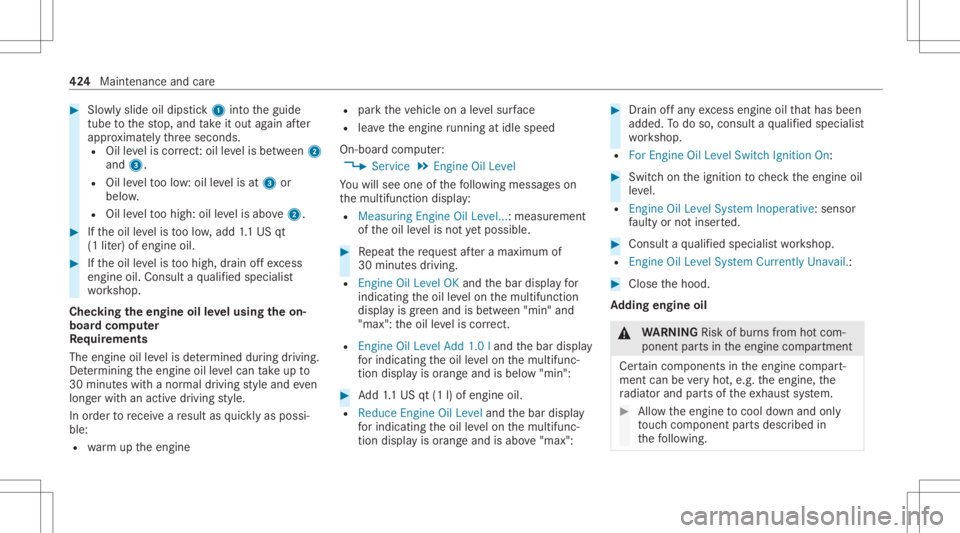
#
Slowly slide oildi ps tic k1 intoth eguide
tube tothestop, and take itout again afte r
appr oximat elyth re esecon ds.
R Oilleve lis cor rect:oil leve lis be tween 2
and 3.
R Oilleve lto olow: oil leve lis at 3 or
belo w.
R Oilleve lto ohigh: oilleve lis abo ve2 . #
Ifth eoil leve lis toolow, add 1.1 US qt
(1 liter) ofengine oil. #
Ifth eoil leve lis toohigh, drain offexc ess
engine oil.Consult aqu alif ied spec ialist
wo rkshop.
Chec kingtheengine oilleve lusing theon-
boar dcom puter
Re quirement s
The engin eoil leve lis de term ined during drivin g.
De term inin gth eengine oilleve lcan take up to
30 minut eswit hanor mal driving style and even
long erwit han act ive dr ivin gst yle.
In order torecei veare sult asquickl yas possi‐
ble:
R warm uptheengine R
parkth eve hicle onaleve lsur face
R leave theengine running atidle spe ed
On-bo ardcom puter:
4 Service5
Engine OilLeve l
Yo uwill see oneof thefo llo wing mess ages on
th emultifunc tiondispla y:
R Measuring Engine OilLevel.. .:measur ement
of theoil leve lis no tye tpo ssi ble. #
Repeat there qu estaf te ra maximu mof
30 minut esdriving.
R Engine OilLevel OKand thebar displa yfo r
indic atingth eoil leve lon themultifunc tion
displa yis green and isbe tween "min" and
"max": theoil leve lis cor rect.
R Engine OilLeve lAdd 1.0land thebar displa y
fo rindica tingtheoil leve lon themultifunc ‐
tion displa yis orang eand isbelo w"min": #
Add1.1 US qt(1l)of engine oil.
R Red uce Engine OilLevel andthebar displa y
fo rindica tingtheoil leve lon themultifunc ‐
tion displa yis orang eand isabo ve"max ": #
Drain offan yex cess engineoilthat has been
added. Todo so, con sult aqu alif ied spec ialist
wo rkshop.
R For Engine OilLevel Switch Ignition On: #
Switc hon theignition tocheckth eengine oil
le ve l.
R Engine OilLeve lSyst emInoperat ive:sensor
fa ulty ornotins erted. #
Consult aqu alif ied spec ialistwo rkshop.
R Engine OilLevel System Currently Unavail.: #
Close thehood.
Ad ding engine oil &
WARNIN GRisk ofburnsfrom hotcom‐
ponent partsintheengine compartmen t
Cer tain com pone ntsin theengine compart‐
ment canbevery hot,e.g. theengine, the
ra diat orand partsof theex haus tsy stem. #
Allo wtheengine tocool down and only
to uc hco mp onent partsdescr ibedin
th efo llo wing. 42
4
Maint enanceand care
Page 436 of 610
No
teson cleaning andcareA voiding vehicl edamag e
Ext erior lighting
Cleanthelenses withawe tsp ong eand mildcle ani ng agent,
e.g .car shampoo. Onl
yuse cleaning agents orcleaning clothsth at aresuit able
fo rpla stic lens es.
Sensor s
Cleanthesensor sin thefront and rear bum perand inthe
ra diat orgrill wit hasof tclo thand carsham poo. When
usingapo we rwa sher ,maint ainaminimum distance of
11 .8 in(30 cm).
Side running boards
Usewaterand acid-free clea ning agents. Donotclea nth ealuminum trim inser tson theru nning board
wi th alk aline oracidi ccle anin gag ent s.The alumin umtrim
ins erts coul dot her wise bedamag ed.
Re ar vie wcamer a
and 360°Camer a R
Open thecamer aco verwit hth emultimedia system
(/ page232) .
R Use clean waterand asof tclo thtocle an thecamer alens. Do
notuse apo we rwa sher .
Ta ilpip es
Cleanwithaclean ingagent recomme ndedforMer cedes-
Benz, especiallyin thewint erand afte rwa shing theve hicle. Do
notuse acidic cleaning agents. 43
4
Maint enance andcare