tow MERCEDES-BENZ GLC 2020 Repair Manual
[x] Cancel search | Manufacturer: MERCEDES-BENZ, Model Year: 2020, Model line: GLC, Model: MERCEDES-BENZ GLC 2020Pages: 610, PDF Size: 21.19 MB
Page 216 of 610
*
NO
TEDama gefrom automatic braking If
one ofthefo llo wing functionsis switc hed
on, theve hicle brak es aut omatically incer‐
ta in situat ions:
R ActiveBr ak eAssi st
R ActiveDis tance AssistDIS TRONI C
R HOLD functio n
R ActivePa rking Assist
To avo iddamag eto theve hicle, deactiv ate
th ese systems inthefo llo wing orsimilar sit‐
uation s: #
Dur ing towing #
Inacar wash Re
quirement s:
R The vehicle isstatio nary.
R The driver's door isclosed ortheseat belton
th edr iver's side isfastened.
R The engine isrunning orhasbe en automati‐
cally switc hedoffby theEC Ostar t/ stop
funct ion. R
The electr icpar king brak eis released.
R ActiveDis tance AssistDIS TRONI Cis de acti ‐
va ted.
R The transmis sionisin position 005B,005Eor005C.
Ac tiv atin gthe HOL Dfunc tion #
Dep ress thebr ak epedal andafte ra shor t
time quickl ydepr essfurther until the00D9
displa yappear sin themultifunc tiondispla y. #
Release thebr ak epedal.
Deactiv atingtheHOLD function #
Depr esstheacceler ator pedal topull away.
or #
Depr essthebr ak epedal untilthe00D9 dis‐
pla ydisappear sfrom themultifunc tiondis‐
pla y.
The HOLD functionisdeactiv ated inthefo llo w‐
ing situat ions:
R ActiveDis tance AssistDIS TRONI Cis acti va‐
te d.
R The transmission isswitc hedtoposition 005D.R
The vehicle issecur edwithth eelectr icpar k‐
ing brak e.
In thefo llo wing situat ions,th eve hicle isheld by
tr ans missi on positio n005D orby theelectr icpar k‐
ing brak e:
R The seat beltisunf astened andthedr iver's
door isopened.
R The vehicle isswitc hedoff.
R Ther eis amalfunction inthesy stem orthe
po we rsupp lyis insuf ficie nt. AI
RBO DY CONT ROL AIR
BODY CONT ROLfun ction
AI R BO DY CONTR OLisan air suspe nsion system
wit hva riable dampingfo rim prov ed driving com‐
fo rt.The all-r ou nd leve lcon trol system ensur es
th ebes tpossible suspension andconstant
gr ou nd clea rance, evenwi th aladen vehicle.
When driving atspeed, theve hicle islowe red
aut omat icallyto improv edr iving safetyand to
re duce fuelconsum ption. Youalso have the
op tion ofmanually adjustingtheve hicle leve l. 21
4
Driving and parking
Page 237 of 610
#
Con firm select edpar king space 4.
% The turnsignal indicat orisswitc hedonaut o‐
matically whenthepar king procedur e
begins. Theturnsignal indicat orisswitc hed
of faut omaticall ywhen youswit chto005B .
Yo uar ere sponsible forsele cting thetur nsignal
indicat orinaccor dance withth etraf fic condi ‐
tions .If neces sary,select thetur nsignal indica‐
to raccor dingly. &
WARNIN GRisk ofacci dent dueto vehi‐
cle swinging outwhile parking orpulli ng
out ofapar king space
While parking orexitin gapar kingspace, the
ve hicle swings outand candrive ont oar eas
of theonc oming lane.
This could cause youto coll ide wi th object s
or other road user s. #
Payatt ention toobject sand other road
user s. #
Wher enec essar y,stop theve hicle or
cancel thepar king procedur ewit h
Ac tivePa rking Assist. #
If,forex am ple, thePlease Engage Reverse
Gear messag eappear sin themedia display:
select thecor responding transmission posi‐
tion.
The vehicle drives intoth eselect edpar king
space.
On com pletion ofthepar king procedur e,the
Parking AssistFinished, TakeContr olof Vehicle
displa ymessag eappear s.Fu rther maneuv ering
ma yst ill be nec essar y. #
Aftercom pletion ofthepar king procedur e,
saf eguar dth eve hicle agains tro lling away.
When requ ired bylegalrequ iremen tsor local
con dition s:tur nth ewheels towa rdsth ecurb.
% Youcan stop theve hicle andchang eth e
tr ans missi on positio ndu ring thepar king pro‐
cedur e.The system then calculat esane w
ve hicle path.The parking procedur ecan
th en be con tinued. Ifno newvehicle pathis
av ailable, thetransmission positionwillbe
ch ang edagain. Ifth eve hicle hasnotye t
re ac hed thepar king space, thepar king pro‐
cedur ewill becanc eled, should age ar be
ch ang ed. Exit
ingapa rking spacewit hAc tiv ePa rking
Assis t
Re quirement s:
R The vehicle hasbeen parkedwit hAc tive
Pa rking Assist.
Please note that youar ere sponsible forth eve hi‐
cle and surround ingsdur ing theent ire par king
pr ocedur e. #
Startth eve hicle. Dr
iving andparking 235
Page 249 of 610
R
Ifth elane marking sar ewo rn,dar kor cov‐
er ed.
R Ifth edis tance totheve hicle infront istoo
shor tand thus thelane marking scann otbe
de tected.
R Ifth elane marking sch ang equ ickl y, e.g.
lanes branc hof f,cr oss one another or
mer ge.
R Ifth ero adw ayisvery nar row and wind ing.
Ac tiv atin g/deac tivatin gAc tiv eLan eKe eping
Assis t
Multi media system:
4 © 5
Set ting s5
Quick Access
5 Act ive Lane Keeping Assist #
Activateor deacti vate thefunc tion.
Se tting Activ eLan eKe eping Assist
Multi media system:
4 © 5
Set ting s5
Assist ance
5 Act ive Lane Keeping Assist
Se tting thesensit ivity
% The availabilit yof this func tion isdepen dent
on thecount ry. #
Select Stand ard,Sensi tiveorOff.
Ac tiv atin g/deac tivatin gthe hapticwarning #
Selec tWarnin g.
Ac tivateor deacti vate thefunc tion. Tr
aile rhitc h No
teson towing atrail er Mer
cede s‑AMG vehicl es:besur eto obser ve
th eno tesin theSupplement .Ot her wise, you
ma yfa ilto recogni zedangers.
Plu g-inhy brid: obser vetheno tesin theSupple‐
ment .Ot her wise, youma yfa ilto recogni zedan‐
ge rs. &
WARNIN GDang erofacci dent dueto
uns uitable ballcouplin g
If yo uins tallan unsuit ableballcouplin g,
ove rloading ofthetrailer hitchand rear axle
will bethere sult. Thisispar ticular lythecase
if th eball coupling isrelativ elylong orang led
dif fere ntl y. The
handling charact eristic sma ybe hea vily
im pair edand thetra iler can become
de tach ed. Ther eis arisk offata linj ury. #
Onlyins talla ball couplin gth at mee ts
th eper mitt eddimension sand hasbeen
designed forth etrailer operation
re qu iremen ts. #
Donotmodif yth eball coupling orthe
tr ai le rhi tc h. Th
eva lues approvedby themanuf acturercan be
fo und ontheidentif ication platesand inthe
"T ec hn ical data"sec tionund er"Tra iler hitch"for
th eto wing vehicle (/page503). &
WARNIN GSw erving oftheve hicle/
tr ailer combination duetoinc reased
spee d
If th eve hicle/tr ailercombination swerve s,
yo ucan lose contro lof it.
The vehicle/tr ailercombination caneven tip
ove r. Dr
iving and parking 24
7
Page 253 of 610
*
NO
TEDama gewhen uncouplin gin a
st at eof ove rrun Unc
oupling inast at eof overru ncan dama ge
th eve hicle. #
Donotuncouple trailer swit han
eng aged ove rrunbr ak e. &
WARNIN GRisk ofbeco ming trap ped
whe ndisconnecti ngthetrailer cable
Ve hicl eswith leve lcontr olsystem: The
ve hicle maylo we rwhen thetra iler cable is
discon nected.
This could result inyouor other people
becoming trapped ifyo ur or their limbs are
be tween theve hicle body andthetir es or
under neathth eve hicle. #
Mak esur eth at nobody isunde rneat h
th eve hicle orintheimmediat evicinit y
of thewheel arch es when youdisc on‐
ne ct thetrailer cable. #
Disc onnect theelectr icalconnect ion
be tween theve hicle andthetra iler . #
Uncou ple th etra iler . #
Place theco veron theball neckmount . Ve
hicl eto wing instruct ions
The vehicle isno tsuit able forth euse oftow bar
sy stems that areused forflat towing ording hy
to wing, forex am ple. Attach ing and using tow bar
sy stems canlead todamag eon theve hicle.
When youar eto wing ave hicle withto w bar sys‐
te ms, safedr iving charact eristic scan notbe
guar anteed forth eto wing vehicle ortheto we d
ve hicle. Thevehicle-tr ailercombination may
sw erve from side toside. Complywithth eper‐
mitt edtowing methods (/page44 9)andth e
ins truct ions forto wing withbo th axle son the
gr ou nd (/ page 450). Dr
iving andparking 25
1
Page 262 of 610
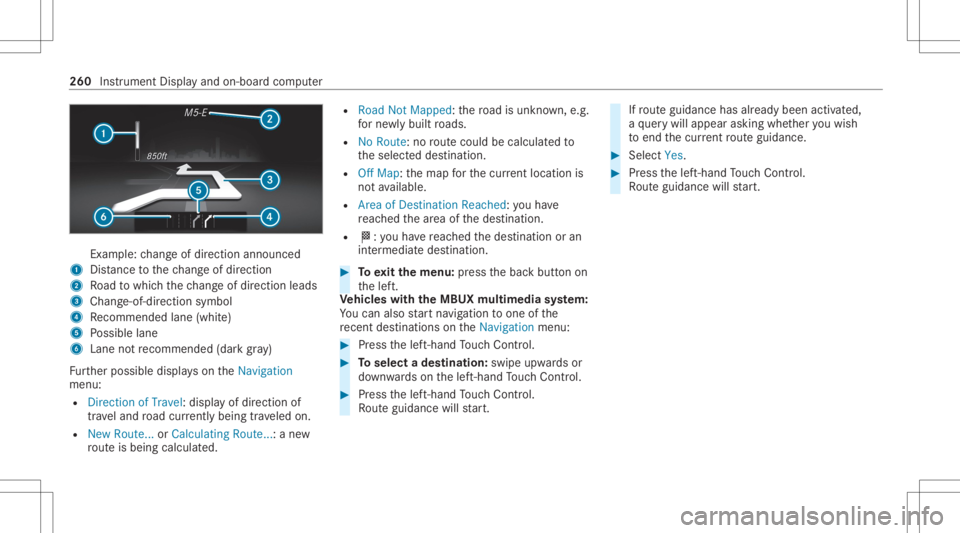
Ex
am ple: chang eof dir ect ion ann oun ced
1 Distance tothech ang eof dir ect ion
2 Road towhic hth ech ang eof dir ect ion leads
3 Chan ge-of-d irection symbo l
4 Recomme ndedlane (whit e)
5 Possible lane
6 Lane notre comme nded(darkgray )
Fu rther possible displayson theNavigation
menu:
R Direc tionofTravel: displayof dir ect ion of
tra veland road cur rentl ybe ing trave led on.
R New Route. ..or Calculatin gRoute. ..:a ne w
ro uteis bein gcalc ulated. R
Road NotMappe d:th ero ad isunk nown, e.g.
fo rne wly builtro ads.
R NoRout e: no routeco uld becalc ulatedto
th eselect eddes tinat ion.
R Off Map: themap forth ecur rent locati onis
no tav ailable.
R Area ofDe stinat ionReach ed:youha ve
re ac hed thear ea ofthedes tinat ion.
R 004B: youha ve reac hed thedes tinat ionoran
int ermediat edes tinat ion. #
Toexitth emenu :pr ess thebac kbutt onon
th elef t.
Ve hicl eswith theMB UX multim edia system:
Yo ucan also star tna vig atio nto one ofthe
re cent destina tions ontheNavigation menu: #
Press thelef t-hand Touc hCon trol. #
Toselect ades tinat ion:swipe upwards or
do wn wardson thelef t-hand Touc hCon trol. #
Press thelef t-hand Touc hCon trol.
Ro uteguidan cewill star t. If
ro uteguidan cehas already been activat ed,
a qu erywill appear askingwhether youwish
to end thecur rent routeguidan ce. #
Select Yes. #
Press thelef t-hand Touc hCon trol.
Ro uteguidan cewill star t. 260
Instru ment Displa yand on-boar dcom puter
Page 267 of 610
No
teson oper ating safety &
WARNIN GRisk ofdist ra ction from infor‐
mati onsystems andcomm unication s
eq uipment
If yo uoper ateinf ormat ionand comm unic a‐
tio neq uipme ntintegratedin theve hicle
when driving, youwill bedistract ed from the
tr af fic situ ation. Thiscou ldalso cau seyouto
lose control of theve hicle. #
Onlyoper ateth is eq uipmen twhen the
tr af fic situ ation per mits. #
Ifyo ucan notbe sur eof this, stop the
ve hicle whilstpa ying attention toroad
and traffic condi tions andoperate the
eq uipment withth eve hicle statio nary. &
WARNIN GRisk ofan acci dent from
ope rating mob ile comm unicati onequip ‐
ment while th eve hicle isin mo tion
Mobile communication sde vices distract the
dr iver from thetraf fic situ ation. Thiscou ld al
so cau sethedr iver tolose control of the
ve hicle. #
Asthedr iver ,onl yoper atemobile com‐
municat ionsdevices when theve hicle is
st atio nary. #
Asave hicle occupant, onlyuse mobile
communication sde vices inthear eas
int ended forth is pur pose, e.g.inthe
re ar passe nger com partment . &
WARNIN GRisk ofinju rydue toobject s
being stowe dincor rectl y
If obje ctsintheve hicle interior arestowe d
inc orrectly ,th ey can slide orbe throw n
ar oun dand hitvehicle occupants. Inaddi‐
tion, cupholder s,open stow agespac esand
mobi lephon ere cep tacle scanno tal wa ys
re tain all obje ctsth ey cont ain.
The reisarisk ofinjur y,par ticular lyin the
ev ent ofsudden braking orasudden chang e
in dir ect ion. #
Alw aysst ow object sso that they can‐
no tbe throw nar ou nd insuch situa‐
tions. #
Alw aysmak esur eth at obj ect sdo not
pr otru de from stow agespac es,lugg age
ne ts or stow agene ts. #
Close theloc kable stow agespac es
bef orest ar tin gajo ur ne y. #
Alw aysst ow and securehea vy,har d,
poin ted, shar p-edg ed,fragile orbulky
objec tsinthetrunk/ loadcompartmen t. Fo
ryo ur ow nsa fety,al wa ys obser vethefo llo w‐
ing point swhen operatingmobile communic a‐
tion seq uipmen tand espec iallyyo ur voice con ‐
tr ol system:
R Obser vetheleg alrequ iremen tsforth ecoun‐
tr y in whic hyo uar edr ivin g.
R While drivin g,on lyop eratemobi lecom mun i‐
cat ionseq uipme ntand your voice con trol
sy stem when thetra ffic con dition sper mit it.
Yo uma yot her wise bedistract ed from the
tr af fic condi tions andcausean acci dent,
inju ring yourself and other s. Vo
ice Cont rolSy stem 265
Page 274 of 610
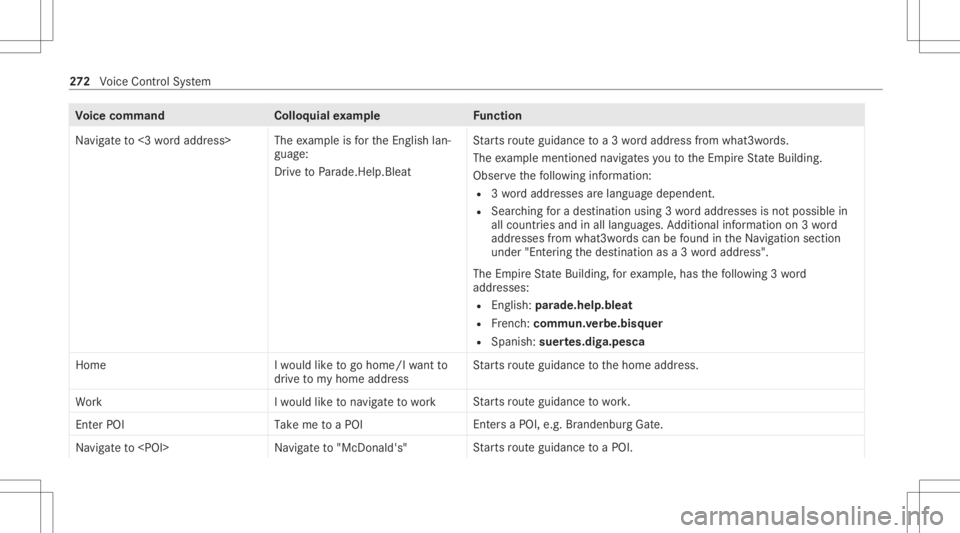
Vo
ice comm and Colloquialexam ple Function
Navigate to<3 word address> The
exam ple isforth eEn glish lan‐
guag e:
Dr ive toParade. Help.Bleat St
arts routeguidan cetoa3 wo rdaddr essfrom what 3words.
The exam ple men tioned navig ates youto theEm pireSt ateBuild ing.
Obse rveth efo llo wing informatio n:
R 3wo rdaddr esse sar elang uagedepen dent.
R Sear ching fora des tination using 3wo rdaddr esse sis no tposs iblein
all coun tries and inall lang uages.Addition alinf ormation on3wo rd
addr esse sfrom what 3words can befound intheNa vig ation section
under "Entering thedes tinat ionasa3 wo rdaddr ess".
The EmpireSt ateBuild ing,fo rex am ple, hasthefo llo wing 3wo rd
addr esse s:
R English: parade.he lp.bleat
R Frenc h:commu n.verbe.bisq uer
R Spanish: suertes.dig a.pesca
Home Iwould liketogo home/I wantto
drive tomy home address St
arts routeguidan cetothehome address.
Work Iwould liketonavigate towork St
arts routeguidan cetowo rk.
Enter POI Take me toaPOI Ent
ersa POI ,e.g .Br and enb urg Gate.
Naviga teto
arts routeguidan cetoaPOI . 27
2
Voice Cont rolSy stem
Page 275 of 610
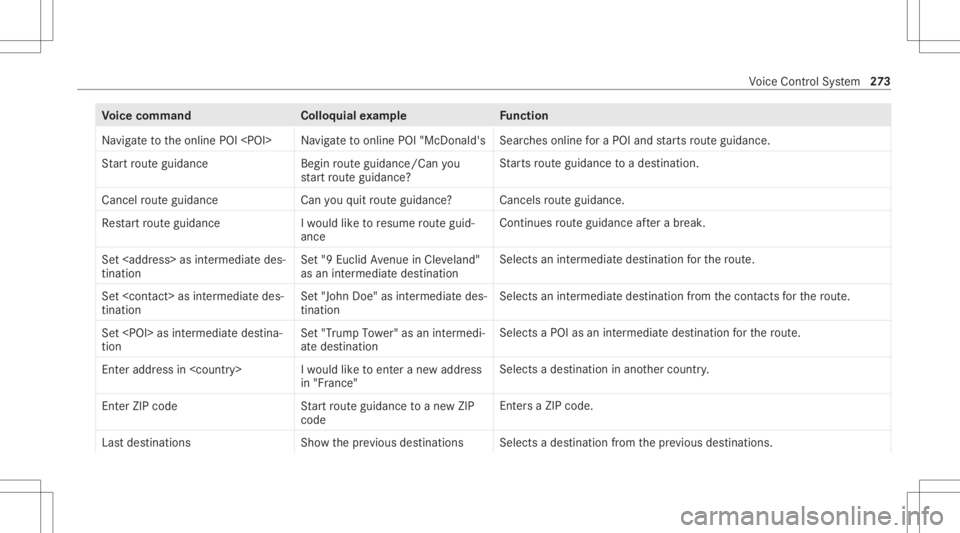
Vo
ice comm and Colloquialexam ple Function
Navigate tothe online POI
ches online fora POI and star ts routeguidan ce.
St art rout eguidan ce Beginrout eguidan ce/Can you
st art rout eguidan ce? St
arts routeguidan cetoades tinatio n.
Canc elrout eguidan ce Canyouquit routeguidan ce? Canc
elsrouteguidan ce.
Rest artrout eguidan ce Iwould liketo res ume routeguid-
anc e Con
tinues routeguidan ceafte ra br eak .
Set
tination Set
"9Euclid Avenue inCle vela nd"
as an intermedi atedestina tion Selects
anintermedia tedes tination forth ero ute.
Set
tin atio n Set
"John Doe"as interm ediat edes-
tin atio n Sel
ect san intermed iatedes tinatio nfrom thecon tacts forth ero ute.
Set
tio n Set
"Trum pTower "as an interm edi-
ate dest ination Sel
ect sa POI asan intermed iatedes tinatio nfo rth ero ute.
En teraddr essin
in "Fr anc e" Sel
ect sa des tinatio nin ano ther count ry.
Enter ZIP cod eS tartrou teguidance toanew ZIP
cod e Ent
ersa ZI P cod e.
La st destinati ons Showthe previous destinati ons Sel
ects ade stinat ionfrom thepr ev ious destination s. Vo
ice Cont rolSy stem 27
3
Page 282 of 610
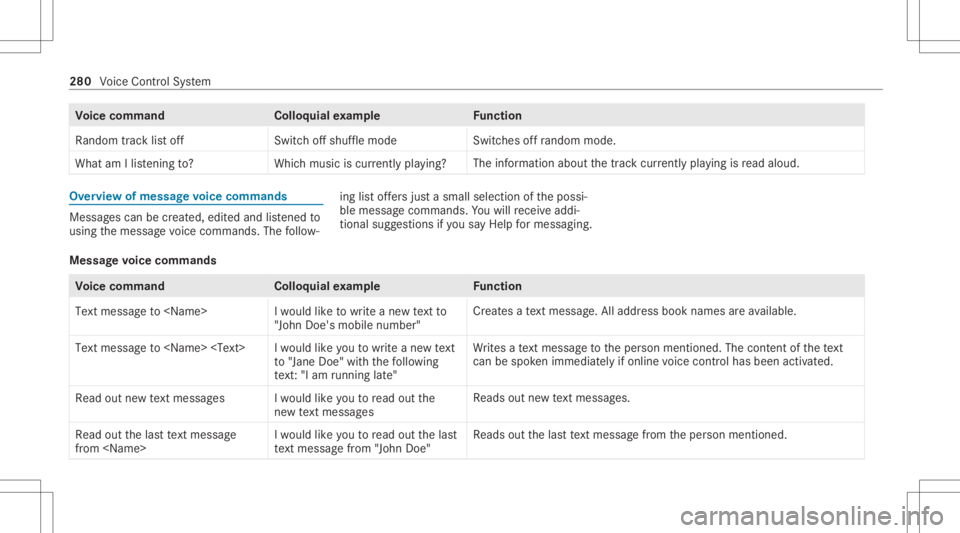
Vo
ice comm and Colloquialexam ple Function
Random tracklist off Switchoff shuffle mode Switc
hesoffra ndo mmod e.
Wha tam Ilisteni ngto? Whichmu sic is cur rentl ypl ay ing ? The
informa tionab ou tth etra ck cur rentl ypl ay ing isread aloud. Ov
ervie wof mes sagevo ice comm ands Messag
escan becreat ed, edit edand listened to
usin gth emessag evo ice com mand s.The follo w‐ ing
listof fers jus ta sma llsel ecti onofthepossi‐
ble messag ecomm ands.Youwill recei veaddi‐
tio nal sugg estio ns ifyo usa yHel pfor mes sagin g.
Mess agevo ice comm ands Vo
ice comm and Colloquialexam ple Function
Text message to
"John Doe's mobile number" Cr
eat esate xt mes sage .All address bookname sar eav ailable.
Tex tmes sage to
to "Jane Doe"with thefoll owin g
te xt:"I am runninglate " Wr
ites ate xt mes sage totheper son ment ioned. Thecontent ofthete xt
can bespo kenimm ediate ly ifonlin evo ice con trol has been activat ed.
Read outnew textmess ages Iwould likeyou toread outthe
new textmess ages Re
ads outnewtext mes sage s.
Read outthelast text message
from
woul dlike you toread outthelast
text message from"John Doe" Re
ads outthelas tte xt mes sage from theper son ment ioned. 280
Voice Cont rolSy stem
Page 294 of 610
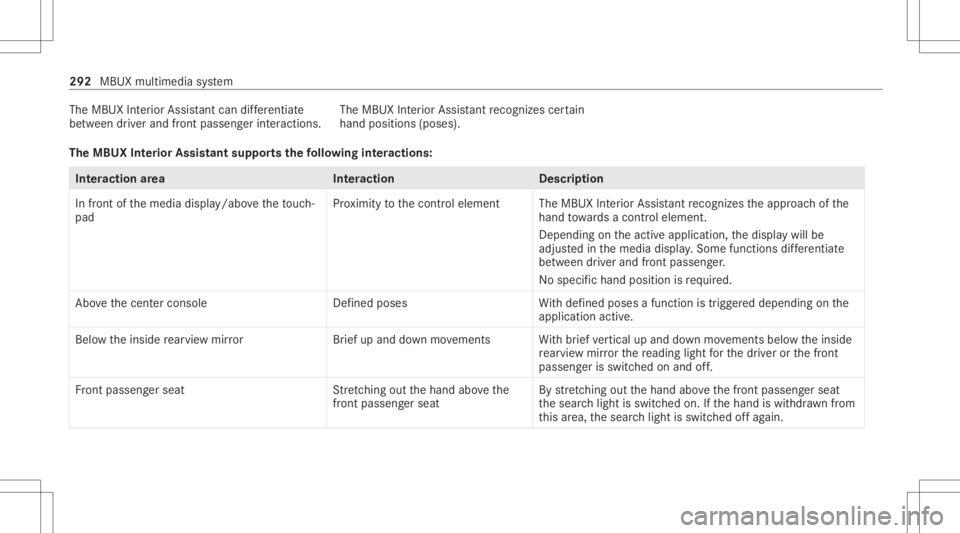
The
MBUX Interior Assis tant can differ ent iate
be tween driver and front passeng erinteraction s.The
MBUX Interior Assis tant recogni zescertain
hand positions(poses) .
Th eMB UX Interior Assis tantsupportsthefo llo wing interactions: Int
eraction area Interaction Description
In front ofthemedia display/abo vetheto uc h‐
pad Pr
ox imit yto thecon trol element TheMBUX Interior Assis tant recogni zestheappr oachof the
hand towa rdsa cont rolelemen t.
Depe ndingon theactiv eapplication, thedispla ywill be
adjus tedin themedia display.Some functionsdiffer ent iate
be tween driver and front passeng er.
No specif ichand position isrequ ired.
Abo vethecent ercon sole Defined poses With def ined poses afunc tion istrigg ered dependin gon the
applic ationact ive.
Belo wtheinside rear vie wmir rorB rief up and down movements With brief vertical upand down movements belowtheinside
re ar vie wmir rorth ere adin glight forth edr iver or thefront
passeng erisswitc hedonand off.
Fr ont passeng erseat Stretching outth ehand abovethe
fr ont passeng ersea t By
stre tching outth ehand abovethefront passeng erseat
th esear chlight isswitc hedon.Ifth ehand iswit hdr awnfrom
th is area, thesear chlight isswitc hedoffag ain. 292
MBUXmultim ediasystem