tow MERCEDES-BENZ GLC 2020 Manual PDF
[x] Cancel search | Manufacturer: MERCEDES-BENZ, Model Year: 2020, Model line: GLC, Model: MERCEDES-BENZ GLC 2020Pages: 610, PDF Size: 21.19 MB
Page 295 of 610
Oper
ating functions byprox imit yof thehan d
to theto uc hscr eenand touc hpad
Re quirement s:
R One ofthefo llo wing applicat ionsappear sin
th emedia display:
- Seat settings withdispla ysforth edr iver
and front passeng erseat, e.g.Seat Com-
fort
- Home screen
- Radio menu ormedia menu
- Map inthena vig ation
- ActivePa rking Assist
R Recogni tionoccu rsas thehand approaches
to appr oximat ely4 in (10 cm) from theto uc h‐
pad ortheto uc hsc reen.
Seat adjustm ents bythedr iver or front
pa sseng er
In theseat settings menu, theMBUX Interior
Assis tant detects prox imit yto various cont rol
element sof themultimedia system. Inaddition,
th eMBUX Interior Assis tant detects from which
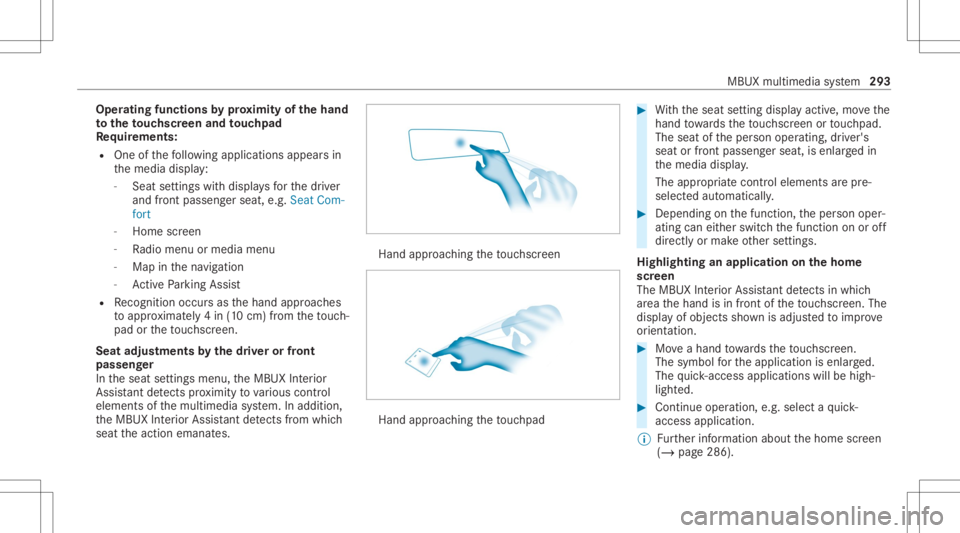
seat theaction emanat es. Hand
approaching theto uc hsc reen Hand
approaching theto uc hpad #
With theseat setting displa yactiv e,mo vethe
hand towa rdsth eto uc hsc reen ortouc hpad.
The seat oftheper son oper ating, driver's
seat orfront passeng erseat, isenlar gedin
th emedia display.
The appr opriatecont rolelemen tsarepr e-
selec tedaut omatic ally. #
Depen dingonthefunc tion,th eper son oper‐
ating caneither switc hth efunc tion onoroff
dir ect lyor mak eot her settin gs.
Highlighting anapplication onthehom e
scr een
The MBU XInte rior Assis tant detects inwhi ch
ar ea thehand isin front oftheto uc hsc reen. The
displa yof objec tssho wnisadjus tedto improve
or ient ation. #
Moveahan dto wa rdsth eto uc hsc reen.
The symbol forth eapplication isenlar ged.
The quick- acc ess applic ationswill behigh ‐
light ed. #
Con tinue operation ,e.g .selec ta qu ick-
acc ess applic ation.
% Further information aboutthehome screen
(/ page286). MBUX
multimedia system 293
Page 306 of 610
#
Select Dele te.
The queryas towhe ther thesugg estion is
dele tedte mp orarily or per manent lyappear s. #
Ifth esugg estion shou ldbe sho wnagain
at alat er tim e:selec tNot Now. #
Ifth esugg estion shou ldno tbe sho wn
ag ain: selec tNev er. Fa
vo rite s Ov
ervie wof favo rite s
Fa vorite sof feryo uqu ick acc ess tofreq uently
use dapp lications. Itis possi bletocrea te 20
fa vo rite sin tota l.
Yo ucan selectfavo rite sfrom categor iesoryou
add favo rite sdir ectl yfrom anappli cation.
Calling upfavo rite s
In themed iadisp lay #
Tapon ©.
The home screen issho wn. #
Swipe upuntil FAVORITES issho wn. On
thest eer ing wheel ortheto uc hpad #
Press theß rock er switc hon thesteer ing
wheel down.
or #
Press theß buttonnext to theto uc hpad.
Ad ding favo rite s
Selec tingfavo rite sfrom categor ies #
Tapon © inthemedia display.
The home screen issho wn. #
Swipe upuntil FAVO RITES issho wn. #
Select 0081Create Favorite.
The categor iesaredispla yed. #
Select thecat egor y.
The favo rite sar edispla yed. #
Select afa vo rite .
The favo rite isstor ed atthene xt available
posit ion. #
Allposi tionsin thefa vo rite sar etak en:
conf irm themessag esho wnwithOK.
A lis tsho wsallthefa vo rite s. #
Select afa vo rite whic hshould beove rwrit‐
te n. Ad
ding afa vo rite from anapplicatio n
Ex am ples ofadd ingfrom anapp lication are:
R Saving acont act.
R Stor ing ara dio statio n.
R Adding amedia source.
R Saving ana vig ation destination.
R Adding anENE RGIZING comfortpr ogr am (if
av ailable). #
Tosave aco ntact asagl obal favo rite :
sel ect acont act(/ page 374).
Th ede tails aredispla yed. #
Press onate lephon enumb erunt ilth e
OPTIONS menuissho wn. #
Select SaveasFavorite.
The cont actisadded asafa vo rite . #
Tosto reara dio station asagl obal favo r‐
it e: seta ra dio statio n(/ page41 0). #
Press onthera dio statio nunt ilth eOPTIONS
menu issho wn. #
Select SaveasFavorit e.
The radio statio nis added asafa vo rite . 30
4
MBUX multimedia system
Page 341 of 610
#
Select OnRequest ·.
Whe nth is op tion isselec tedand acar pool
lane isavailable, apr om ptappear s.Yo ucan
co ntinue touse thecur rent routeor sele cta
ro utewit hth ecar pool lane.
% Ifth eAvoid option isselect ed,then no car‐
pool lanes willbeused forth ero ute.
Select ingnotificat ions forthe rout e
Re quirement s:
R Foran audi blein dic atio nwh en appr oach‐
in gaper sonal POI:th eUSB device contains
per son alPOIs .
R The USB device iscon nectedwit hth emulti‐
media system.
R The categor yin whic hth eper sonal POI
belongs isactiv ated.
Multimedia system:
4 © 5
Navigation 5
Z
5 Advan ced5
Announc ement s #
Switc hNo Drivin gRecomm. onoroff.
No naviga tio nanno unceme ntsareissu ed
wh en thedispla ybutt onisswitc hedon. #
Toselect ana vig ation announcement :
select anoption 003Bunder theDRIVIN GREC-
OMMEN DATION categor y.
The follo wing option sar eav ailable:
R Ton eOn ly
In place ofthespok ennavig ation
announ cementyo uhear agon g.The
gon gsign alsanupco mingdr ivin gman eu‐
ve rand alsosounds during thedr iving
maneuv er.
R Reduced DrivingRecomm.
If ana vig ation announ cementis available,
yo uhear abr ief ann oun cem ent,e.g ."tur n
ri ght".
R Detailed DrivingRecomm.
If ana vig ation announc ementisavailable
and theAn nounc eSt reet Names option is
switc hedon,youhear aco mp lete
ann oun cem ent,e.g ."In 600ft (200 m)at
th eend ofthest re et tur nright intoSt a‐
tio nRo ad". #
Tohave stre et names announced during
a dr iving maneuv er:switc hon Announc e
St reet Names. #
Select Reduced DrivingRecomm. or
Det ailed Drivin gRecomm. .
The name ofthest re et intowhic hyo usho uld
tur nis ann oun ced.
% The optio ns intheDRIVIN GRECOMMEN DA-
TION categor yar eno tav ailable ineve ry
cou ntryand inallla ngua ges.
Selec tingmessag esforTRAF FIC #
Activateames sage .
The displa ybutt onisactiv ated.
The follo wing option sar eav ailable:
R Traf ficIncide nts
Tr af fic inci dents areannou nced,e.g.
ro adw orks and road bloc ks.
This funct ionisno tav ailable inall coun ‐
tr ies and languages.
R Announc eTraf ficWarn ings MBU
Xmult imed iasystem 339
Page 369 of 610
&
WARNIN GRisk ofinju rydue toobject s
being stowe dincor rectl y
If obje ctsintheve hicle interior arestowe d
inc orrectly ,th ey can slide orbe throw n
ar oun dand hitvehicle occupants. Inaddi‐
tion, cupholder s,open stow agespac esand
mobi lephon ere cep tacle scanno tal wa ys
re tain all obje ctsth ey cont ain.
The reisarisk ofinjur y,par ticular lyin the
ev ent ofsudden braking orasudden chang e
in dir ect ion. #
Alw aysst ow object sso that they can‐
no tbe throw nar ou nd insuch situa‐
tions. #
Alw aysmak esur eth at obj ect sdo not
pr otru de from stow agespac es,lugg age
ne ts or stow agene ts. #
Close theloc kable stow agespac es
bef orest ar tin gajo ur ne y. #
Alw aysst ow and securehea vy,har d,
poin ted, shar p-edg ed,fragile orbulky
objec tsinthetrunk/ loadcompartmen t. Obser
vetheadditional information onstow ing
mobile communic ationsde vice scor rectly:
R Loa ding theve hicle (/page10 6)
Fu rther information canbeobt ained from an
aut hor ized Mercedes-Ben zCent eror at:http: //
www .mercedes-benz .com/connect. MBUX
multimedia system 36
7
Page 381 of 610
Re
ading messag es
Mul timedi asy stem:
4 © 5
Phone 5
5 l
Using there ad-aloud function #
Select acont act. #
Select ¬toread aloud.
The messageis read aloud.
Dictat ingand send ingane wmes sage
Re quirement s:
R Ther eis an Interne tcon nection .
Multime diasystem:
4 © 5
Phone 5
5 l #
Select ane wmessag eusing r.
Ad ding are cipie nt #
Select 0074. #
Select acon tact. Di
ctating text #
Select p.
The dictating function isstar ted. #
Sayth emessag e.
Af terth evo ice mess agehas been proces sed,
it is sho wnastext.
Se ndi ngames sage #
Select Send .
% Whe nth eve hicle isstatio naryyo ucan use
th eke yboar dto write amess age. No Inte r‐
ne tconnection isrequ ired touse theke y‐
boar d.
Re plyin gto amessag ein themess aging his‐
to ry
Multimedia system:
4 © 5
Phone 5
5 l
A messag elis tis sho wn. #
Select 0048next to acon tact.
The mess aging history wit hth is con tact is
sho wn. #
Sele ctp.
The dict ati ng functi onisstar ted. #
Sayth emessag e.
Af terth evo ice mess agehas been proces sed,
it is sho wnastext. #
Select Send .
Us ingmes sagete mp lates
Multime diasystem:
4 © 5
Phone 5
5 l
Using ate mp lateas ane wmessa ge #
Select r towrite ane wmess age. #
Addare cip ient using 0074. #
Sele cta0 temp late.
Answ ering amessa gewit hate mp late #
Selec ta messag eseq uenc ewit hacon tact. #
Sele ctaª temp late. #
Selec ta 0 temp late. MBU
Xmultim ediasystem 37
9
Page 386 of 610
%
App leCa rPlay®
star ts aut omat icallywhen
th eiPhone ®
is con nect edwithth esy stem
using acable. IfApple CarPla y®
wa sno tdis‐
pla yedin thefo re grou nd before discon nect‐
ing, theapplication star ts inthebac kground
when reconnect ed.Youcan callupApple
CarPla y®
in themain menu.
Calling upApple CarPla y®
sound settings
Multimedia system:
4 © 5
Mercedes me&Apps
5 Smart phone 5
Apple CarPlay 5
Z #
Select soundsettings.
Se tting contr olof theap plica tionbuttons
(Apple CarPlay®
)
Multimedia system:
4 © 5
Mercedes me&Apps
5 Smart phone 5
Apple CarPlay 5
Z
5 General #
Toswitc hon Control viaApplication Buttons:
activ ateth edispla ybutt on. #
Toswitc hof fControl viaApplication Buttons:
deactiv ateth edispla ybutt on. Ending
AppleCarPla y® #
Toend theconnecti onofApp leCar ‐
Pla y®
(wit hcable): disconnect thecon nec‐
tion viathecon nect ingcable between the
mobil ephone andmultime diasystem.
% Mer cedes- Benzrecomme ndsdisconnecti ng
th econ nect ingcable onlywhen theve hicle
is statio nary. Andr
oidAuto Andr
oidAutoove rview &
WARNIN GRisk ofdist ra ction from infor‐
mati onsystems andcomm unication s
eq uipment
If yo uoper ateinf ormat ionand comm unic a‐
tio neq uipme ntintegratedin theve hicle
when driving, youwill bedistract ed from the
tr af fic situ ation. Thiscou ldalso cau seyouto
lose control of theve hicle. #
Onlyoper ateth is eq uipmen twhen the
tr af fic situ ation per mits. #
Ifyo ucan notbe sur eof this, stop the
ve hicle whilstpa ying attention toroad
and traffic condi tions andoperate the
eq uipment withth eve hicle statio nary. Yo
umus tobse rveth eleg alrequ iremen tsforth e
cou ntryin whi chyouar ecur rentl ydr ivi ng when
op erati ng themultimedia system.
Mobile phonefunctionscan beused with
An droid Autousin gth eAn droid oper ating sys‐
te m on themultimedia system. Itis oper ated
using theto uc hsc reen orthevo ice- opera ted
contr olsystem. Youcan activat eth evo ice- oper‐
at ed con trol system bypressing andholding the
£ buttononthemultifunc tionsteer ing wheel.
When usingAndroid Autovia thevo ice- opera ted
contr olsystem, themultimedia system can still
be opera tedvia theVo ice Cont rolSy stem
(/ page266).
Onl yone mobile phoneatatime canbecon nec‐
te dvia Android Auto wit hth emultimedia sys‐
te m.
Also foruse ofAndr oidAutowit htw ophon e
mode ,onl yone addit ional mobile phonecan be 38
4
MBU Xmult imedia system
Page 387 of 610
connect
edusing Bluetoo th®
wit hth emultimedia
sy stem.
The availabilit yof An droid Autoand Android Auto
apps mayva ry acc ordin gto thecount ry.
The service prov ider isresponsible forth is appli‐
cat ion and theser vices andcontent conne cted
to it.
Inf orma tion onAndr oidAuto
If amobil ephone isused withAndr oidAuto,
USB access usingthemedia menuisno tpossi‐
ble forth is mobile phone.
Onl yone routeguidan cecan beact ive at atim e.
If ro uteguidan ceisact ive on themultimedia sys‐
te m, itis closed whenrouteguidan ceisstar ted
on themobile phone.
Connecting amobile phoneviaAndr oidAuto
(wir ed)
Re quirement s:
R The mobile phonesuppor tsAn droid Auto
fr om Andr oid5.0.
R The Andr oidAutoapp isins talled onthe
mobil ephone. R
Inorder touse thete lephon efunc tions,the
mobil ephone mustbe connect edtothemul‐
timedia system viaBlue tooth®
( / pag e369) .
If th er ewa sno prior Interne tconn ection, this
is es tablished withth euse ofthemobile
phone withAn droid Auto.
R The mobile phoneisconn ectedtothemulti‐
media system viatheUSB portç using a
suit able cable (/page405).
R Ther eis an Interne tcon nect ionforth efull
ra ng eof func tions forAndr oidAuto.
Multimedia system:
4 © 5
Mercedes me&Apps
5 Smart phone 5
Android Auto
5 Start Android Auto #
Alternativ e:Ifan Android Autoapplic ationis
act ive (e. g.when music isbein gpla yedor
ro uteguidan ceisact ive), youcan callupthe
act ive applic ationusin gth e|, zor
002B application buttons (/page296).
% Contr olusing theapplication buttons canbe
switc hedonoroff(/ page386). %
The firs tacti vatio nof Andr oid Au toon the
multime diasystem mus tbe car ried out
when theve hicle isstatio naryfo rsaf etyre a‐
son s.
Ac cep ting/r eject ingtheda ta protection reg‐
ulat ions
Fo rth einitial star tof theapplication: amessag e
wit hth edat apr otect ion prov ision sappear s. #
Selec tAc cept &St art .
Exitin gAndr oidAuto #
Press the00E2 button.
% Android Autostar ts aut omat icallywhen the
mobil ephone isconnect edwithth esy stem
using acable. IfAn droid Autowa sno tdis‐
pla yedin thefo re ground beforedisconn ect‐
ing, theapplication star ts inthebac kground
when reconnect ed.Youcan callupAndroid
Au tointhemain menu. MBUX
multimedia system 385
Page 393 of 610
To
act ivat eor deac tivateth eser vices, login
to your user accoun tin theMer cedes me
por tal.
Dele ting aconnection betw een auser
account andtheve hicl e
Re quirement s:
R The (vehicle) profile oftheuser account that
wa sfirs tconne cted with theve hicle isselec‐
te d.
R The profile issync hroniz ed(/ page299 ).
R APIN has been set.
Multimedia system:
4 © 5
Mercedes me&Apps
5 Mercedes me #
Select DeleteVehicle Assignment. #
Enterth ePIN ofthecon nect eduser account .
% Onlyth euser ,whose useraccount wasfirs t
connect edwith theve hicle candeletethe
connecti onbetween allus er acco unts and
th eve hicle. Mer
cedes-Benz emergency callsystem Inf
orma tion ontheMer cedes- Benzemer‐
ge ncy callsystem
Yo ur vehicle iseq uipped withth eMer cedes- Benz
emer gency callsy stem ("eCall ").This featur ecan
help save lives intheev ent ofan acciden t.eCall
in no wayre places assistance prov ided from
dialing 911.
Mer cedes-Ben zeCall onlyfunct ionsinareas
wher emobile phonecoverage isavailable from
th ewir eless service prov ider s.Ins ufficie ntnet‐
wo rkcoverage from thewir eless service prov id‐
er sma yre sult inan emerg encycallnotbeing
tr ansmitt ed.
eCal lis ast andar dfeatur ein your Mer cedes-
Ben zve hicle. Inorder tofunction asintended ,
th esy stem relies onthetransmission ofdat a
de tailed inthe"Mer cedes- Benzemergency call
sy stem datatra nsmiss ion"sectionthat follo ws
( / pag e393).
To disable eCall,acus tomer mustvisit an
au thor ized Mercedes-B enzService depar tment
to deactiv ateth eve hicle's communication mod‐
ule. Deactiv
ationofthis mod ulepreve nts the
act ivat ion ofanyand allMer cedes mecon‐
nect services. Afterthe deactivatio nof
eC all,aut omati ceme rgency calland manua l
emer gency callwill notbe availab le.
The igniti onmus tbe swi tched onbef orean auto‐
matic emergency callcan bemade.
% eCallis acti vatedat thefa ct or y.
% eCall canbedeactiv ated byan aut hor ized
Mer cedes-Ben zdealer .Please note that in
th eeve ntow ner shipof theve hicle istrans‐
fe rred toano ther ow ner inits deacti vated
st at e, eCall willremain deactivated unles s
th ene wow ner visits an author ized
Mer cedes-B enzdealer shiptoreact ivat eth e
sy stem.
Ov ervie wof theMer cedes- Benzemergency
call system
eCall canhelp toreduce thetime between an
acciden tand thear riva lof emer gency service s
at thesit eof theacciden t.Ithelps locatean
acciden tsit ein places that aredif ficul tto
acc ess. However,eve nif ave hicle iseq uipped
wit heCal l,th is does notmean thesy stem isON. MBUX
multimedia system 39
1
Page 407 of 610
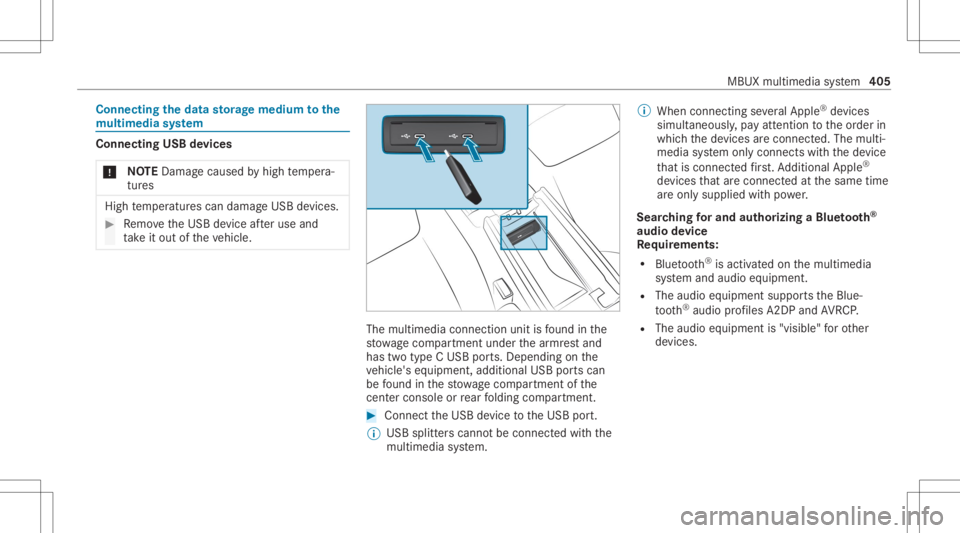
Connect
ingtheda ta sto rage medi umtothe
mu ltim edia system Connecti
ngUSB devices
* NO
TEDama gecau sed byhigh temp era‐
tur es High
temp eratur escan damag eUSB devices. #
Remo vetheUSB device afte ruse and
ta ke itout oftheve hicle. The
multimedia connection unitisfound inthe
st ow agecom partment unde rth ear mr estand
has twotype CUSB ports.Depen dingonthe
ve hicle's equipment, additional USBportscan
be found inthestow agecom partment ofthe
cent erconso leor rear folding compartment . #
Conn ecttheUSB device totheUSB port.
% USB splitt erscann otbe con nectedwit hth e
multime diasystem. %
When connect ingseveralApple ®
de vice s
simult aneousl y,pa yatt ent ion totheor der in
whic hth ede vices arecon nect ed.The multi‐
media system onlycon nect swit hth ede vice
th at iscon nectedfirs t. Ad dition alApple ®
de vices that arecon nectedat thesame time
ar eonl ysupplied withpo we r.
Sear ching forand author izing aBlue tooth®
audio devic e
Re quirement s:
R Blue tooth®
is act ivat ed on themultimedia
sy stem and audio equipment.
R The audio equipment supportstheBlue‐
to oth®
audio profiles A2DP and AVRC P.
R The audio equipment is"visible" forot her
de vices. MBUX
multimedia system 405
Page 408 of 610
Multimedia
system:
4 © 5
Media 5
Bluetoot h5
00A5
Au thor izing ane wBlue tooth®
audio devic e #
Select Connect NewDevice .
De tected equipme ntisdispl ayed inthe
de vice list. #
Select anaudio device.
Au thor ization star ts.A cod eis displa yedon
th emultimedia system and onthemobile
phone. #
Ifth ecodes areidentic al,con firm onthe
audio equipme nt. #
Select Onlyas Bluet oothAudi oDe vic e.
The Blue tooth®
audio equipme ntiscon nec‐
te dwit hth emultimedia system.
Connecting prev iousl yaut hor ized Bluetooth®
audio equipment #
Select aBlue tooth®
audio devic efrom the
lis t.
The connection ises tablished. St
arting media playbac k Re
quirement s:
R Adat ast or ag emedium isconn ectedtothe
multime diasystem.
Multimedia system:
4 © 5
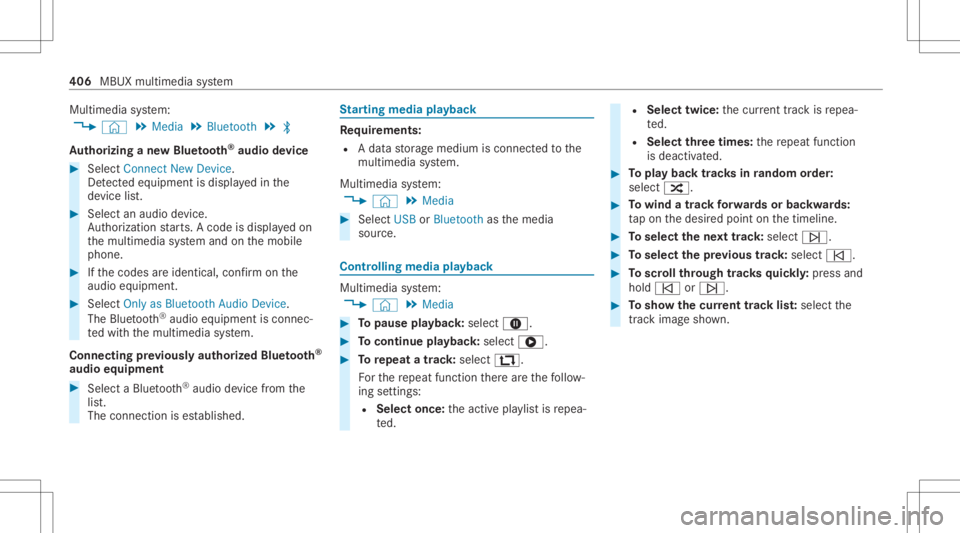
Media #
Select USBorBluetoot has themedia
sour ce. Contr
olling media playbac k Multimedia
system:
4 © 5
Media #
Topause playbac k:sel ect 8. #
Tocont inue playba ck:sel ect 6. #
Torepeat atrac k: sel ect :.
Fo rth ere peat function ther ear eth efo llo w‐
ing settings :
R Select once:theactiv epla ylistis repea‐
te d. R
Select twice:thecur rent trac kis repea‐
te d.
R Select threetim es: there peat function
is deactiv ated. #
Topla ybac ktrac ks inrandom order:
select 9. #
Towind atrac kfo rw ards orbac kwards:
ta pon thedesir edpoint onthetimeline. #
Toselect thene xt trac k: selec t00F6. #
Toselect thepr ev ious trac k: select 00F5. #
Toscr ollthrough trac ks quickl y: press and
hold 00F5 or00F6. #
Tosho wthecur rent trac klis t:select the
tr ac kim agesho wn. 40
6
MBU Xmu ltimed iasystem