ESP MERCEDES-BENZ GLC 2021 Manual PDF
[x] Cancel search | Manufacturer: MERCEDES-BENZ, Model Year: 2021, Model line: GLC, Model: MERCEDES-BENZ GLC 2021Pages: 462, PDF Size: 6.46 MB
Page 208 of 462
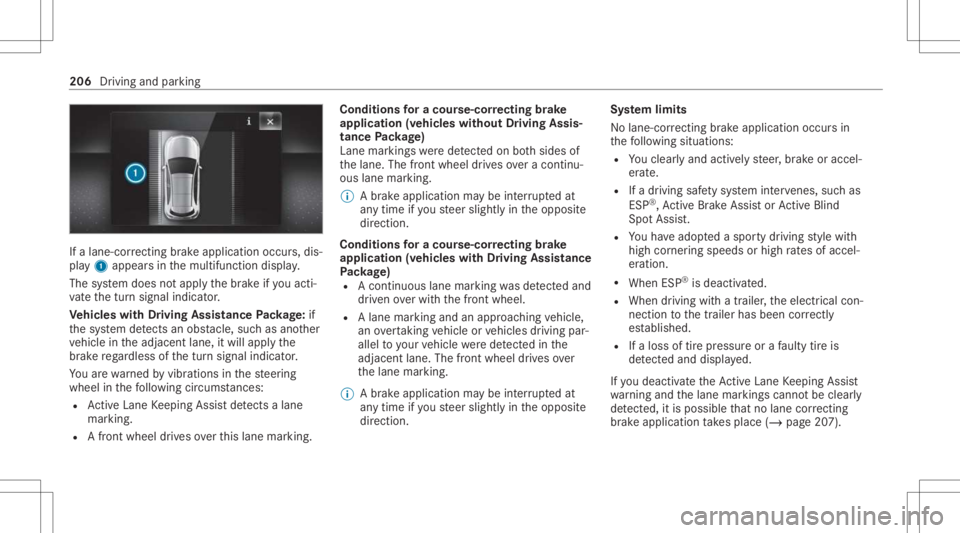
If
alane-cor recting brak eap plica tion occu rs,dis‐
pla y1 appear sin themultifunc tiondispla y.
The system does notappl yth ebr ak eif yo uact i‐
va te thetur nsignal indicat or.
Ve hicl eswith Drivin gAss istanc ePa ckag e:if
th esy stem detects anobs tacle,suc has ano ther
ve hicle intheadjacen tlane, itwill appl yth e
br ak ere ga rdless ofthetur nsignal indicat or.
Yo uar ewa rned byvibr ations inthesteer ing
wheel inthefo llo wing circums tances:
R ActiveLa ne Keeping Assistde tects alane
mar king.
R Afront whe eldrives over this lane marking. Condit
ionsfora co urse -cor rectin gbr ak e
ap plica tion(vehicles withou tDr iving Assis‐
tance Packag e)
Lane markings weredetected on both sides of
th elane. Thefront wheel drives ove ra continu‐
ous lane marking.
% Abr ak eapp lication maybe interru pte dat
an ytime ifyo usteer slightl yin theopposit e
dir ect ion.
Conditions fora co urse -cor rectin gbr ak e
ap plica tion(vehicles withDr iving Assistance
Pa ckag e)
R Acontinuou sla ne mar king wasde tected and
dr iven ove rwit hth efront wheel.
R Alane marking andanappr oaching vehicle,
an overtaking vehicle orvehicles driving par‐
allel toyour vehicle weredetected inthe
adjac entlane .The fron twheel drives ove r
th elane marking .
% Abr ak eapplication maybe interru pte dat
an ytime ifyo usteer slightl yin theopposit e
dir ect ion. Sy
stem limit s
No lane- correcting brak eap plica tion occu rsin
th efo llo wing situat ions:
R Youcle arly and activel yst eer ,br ak eor accel‐
er ate.
R Ifadr iving safetysy stem interve nes, such as
ES P®
,Ac tiveBr ak eAssi stor ActiveBli nd
Spo tAssi st.
R Youha ve adop tedaspor tydriving style wit h
high corner ing speeds orhigh ratesof accel‐
er ation.
R When ESP®
is deactiv ated.
R When driving withatraile r,th eelectr icalcon‐
nect iontothetra iler has been correctl y
es tablished.
R Ifaloss oftirepr essur eor afa ulty tireis
de tected and displ ayed.
If yo udeac tivateth eAc tiveLa ne Keeping Assist
wa rning and thelane marking scann otbe clear ly
de tected, itis pos siblethat no lane correcting
br ak eap plica tion take splace (/page20 7). 206
Driving andparking
Page 214 of 462
Ra
ising there ar oftheve hicl e #
Che ckifth ebatt eryis suf ficie ntly charge d. If
nec essar y,star tth eengine. #
Pull switc h1 brief ly.
Indic ator lam p2 goes out.
The vehicle willberaised tothecur rently
sel ect edleve l.
% The vehicle isaut omaticall yse tto theleve l
of themos tre cently activedrive pr ogr am if
yo udr ive at spee dsgreat erthan 1.2 mp h
(2 km/ h)wit hth ere ar oftheve hicle low‐
er ed. The Vehicle RisingPlease Waitmes‐
sag eappea rsinthemultifunc tiondispla y.
If th eve hicle canno tbe raised: #
Ensur eth at thebatt eryis suf ficie ntly
ch arge d; ifnec essar y,star tth eengine.
The raising proces scon tinues. Re
ar vie wcamer a Fu
nction ofthere ar vie wcamer a
When youen gage reve rsege ar,th eimag efrom
th ere ar vie wcam erais sho wninthemedia dis‐
pla y.Dyna micguide lines showthepat hth e ve
hicle willtake wit hth ecur rent steer ing ang le.
This helps youto orient yourself and toavoid
obs tacle swhe nba cking up.
The rear vie wcam erais on lyan aid. Itis no ta
subs titutefo ryo ur att entio nto thesur round ings.
The responsibili tyforsaf emaneu vering and
pa rking remains withyo u. Mak esur eth at ther e
ar eno per sons, animals orobjec tsetc., inthe
maneu vering area while ma neu vering and park‐
ing.
% Youcan open theco verof there ar vie wcam ‐
er aman ually(/ page21 8).
Th egui de lines inthemedia displaysho wthe
dis tances toyour vehicle. Thedistances dis‐
pl aye donl yapply toroad leve l.
Depe ndingon theve hicle equipment, youcan
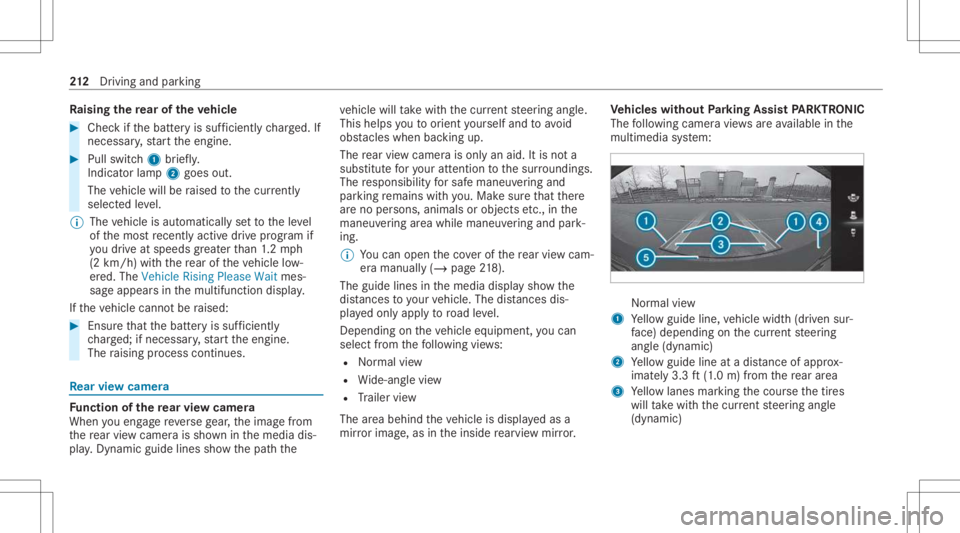
sele ctfrom thefo llo wing views:
R Normalvie w
R Wide-ang levie w
R Trailer view
The area behin dth eve hicle isdispla yedas a
mir rorimag e,as intheinside rear vie wmir ror. Ve
hicl eswithout Parking Assis tPA RK TRONI C
The follo wing camer avie ws areav ailable inthe
multime diasystem: Nor
mal view
1 Yello wguide line,vehicle width(dr iven sur‐
fa ce) dep endi ngon thecur rent steer ing
ang le(dynamic)
2 Yello wguide lineatadis tance ofapprox ‐
imat ely3. 3ft (1.0 m) from there ar area
3 Yello wlanes markingth ecour sethetir es
will take wit hth ecur rent steer ing ang le
(dynamic) 21
2
Driving and parking
Page 217 of 462
%
The cont rast of thedispla yma ybe impair ed
by direct sunlight orby other light sources,
e.g. when driving outofaga rage .In this
case, paypar ticular attent ion.
% Have thedispla yre pair edorreplaced if,for
ex am ple, pixelerro rs consi derablyrestrict its
us e. 360
°came ra Fu
nction ofthesur round viewcamer a
The surround viewcam erais asy stem that con ‐
sis tsof four cam eras. The cam eras coverth e
immed iateve hicle surround ings.The system
assis tsyouwhen youar epar kingor atexits with
re duced visibility ,fo rex am ple.
The views ofthesur round viewcam eraar e
alw aysav ailable whendrivin gfo rw ards up toa
speed ofappr ox.10 mph(1 6 km/h) andwhen
bac king up.
The surround viewcam erais on lyan aid and
ma ysho wadis torted viewof obs tacle s,sho w
th em incor rectly ornotsho wthem atall. Itis no t
a subs titutefo ryo ur att entio nto thesur round‐
ing s.The responsibili tyforsaf emaneu vering and pa
rking remains withyo u. Mak esur eth at ther e
ar eno per sons, animals orobjec tsetc., inthe
maneu vering area while ma neu vering and park‐
ing.
The system evaluat esimag esfrom thefo llo wing
cameras:
R Rear vie wcam era
R Front camer a
R Twoside camer asintheoutside mirrors
% Youcan open theco verof there ar vie wcam ‐
er aman ually(/ page21 8).
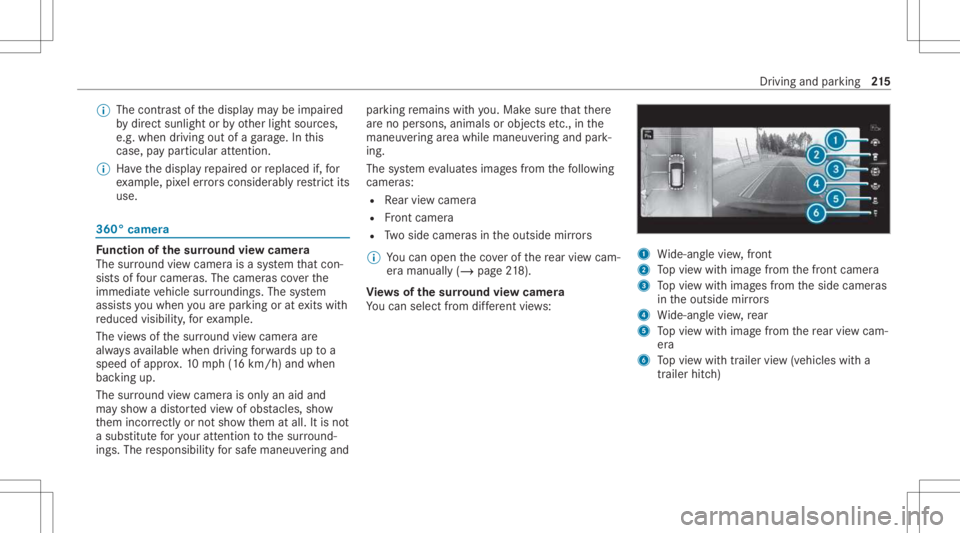
Vi ew sof thesur round viewcamer a
Yo ucan selectfrom differe nt vie ws: 1
Wide-ang levie w, front
2 Topvie wwit himag efrom thefront camer a
3 Topvie wwit himag esfrom theside camer as
in theoutside mirrors
4 Wide-ang levie w, rear
5 Topvie wwit himag efrom there ar vie wcam ‐
er a
6 Topvie wwit htrailer view(vehicles witha
tra iler hitch) Dr
iving andparking 21
5
Page 220 of 462
Sy
stem limit s
The surround viewcam erawill notfun ction or
will onlypa rtiall yfunc tion inthefo llo wing situa‐
tion s:
R The door sar eopen .
R The outs idemirrors arefo lded in.
R The tailg ateis open .
R Ther eis hea vyrain, sno wor fog.
R The ambient lightcondit ionsarepoor ,e.g. at
night.
R Camer as,orvehicle component sin whic h
th ecamer asareins talled, aredamag ed,dirty
or covered. Obser vetheinf ormation onvehi‐
cle sensor sand camer as(/ page17 1).
% Donotus eth esur round viewcam eraunde r
suc hcir cum stanc es.Youco uld other wise
injur eot her sor collide withobject swhen
par king theve hicle.
Fo rte ch nica lre ason s,thest andar dheigh tof the
ve hicle maybe altered ifth eve hicle iscar rying a
hea vyload andcanresult ininaccur aciesinthe
guide linesandinthedispla yof thege ner ated
ima ges. %
The cont rast of thedispla yma ybe impair ed
by abr upt,dir ect sunlight orby other light
sour ces, e.g.when driving outofaga rage .In
th is case, paypar ticular attent ion.
% Have thedispla yre pair edorreplaced if,for
ex am ple, pixelerro rs consi derablyrestrict its
us e.
See theno teson cleaning thesur round view
cam era(/ page29 1).
Calli ngup thevie wof thesur round view
camer ausing reve rsege ar #
Shif tto reve rsege ar. #
Select thedesir edviewin themultimedia
sy stem (/ page21 5). #
If,af te rshif ting toreve rsege ar,th eimag eof
th ere ar vie wcam erais no tsho wn: switchoff
th eignition ,pr ess and hold thec button,
switc hon theignition andengagere ve rse
ge ar again. Open
ingthecam eraco verof the rear vie w
camer a
Mul timedi asy stem:
4 © 5
Set ting s5
Assist ance
5 Camera &Parkin g #
Select OpenCamera Cover.
% The camer aco vercloses automatical lyafte r
some timeorafte ran ignitio ncy cle. Pa
rking Assis tPA RK TRONI C Fu
nction ofParking Assis tPA RK TRONI C
Pa rking AssistPA RK TRONI Cis an elec tron ic
par kingassi stanc esy stem withultr asound. It
monit orsth ear ea around your vehicle using mul‐
tiple sensor son thefront bum perand onthe
re ar bum per.Pa rking AssistPA RK TRONI Csho ws
yo uth edis tance betwee nyo ur vehicle anda
de tected obs tacle visually and audibly .
Pa rking AssistPA RK TRONI Cis on lyan aid. Itis
no ta subs titutefo ryo ur att entio nto thesur‐
ro und ings.The responsibili tyforsaf emaneu ver‐
ing and parking remains withyo u. Mak esur e
th at ther ear eno per sons, animals orobjec tsin 21
8
Driving and parking
Page 222 of 462
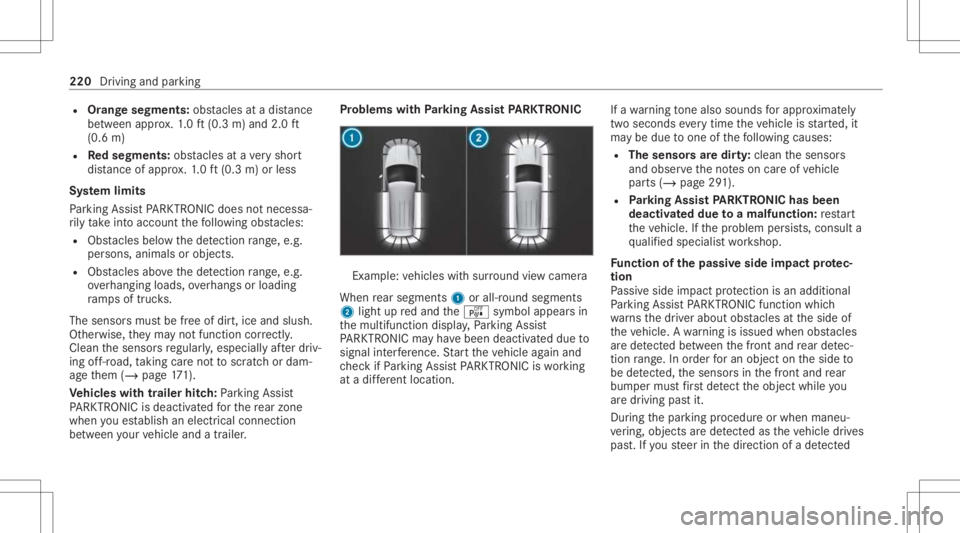
R
Orang esegments: obstacle sat adi st anc e
be tween appr ox.1. 0 ft (0.3 m)and 2.0ft
(0.6 m)
R Redse gme nts: obstacle sat ave ry shor t
dis tance ofapprox .1. 0 ft (0.3 m)orless
Sy stem limit s
Pa rking AssistPA RK TRONI Cdoes notne cessa‐
ri ly take intoacc ount thefo llo wing obstacle s:
R Obs tacle sbel ow thede tection rang e, e.g .
pe rsons, animals orobject s.
R Obs tacle sab ove thede tection rang e, e.g .
ove rhang ingloads, overhang sor loadin g
ra mp sof truc ks.
The sensor smus tbe free ofdir t,ice and slush.
Ot her wise, they ma yno tfunction correctl y.
Clean thesensor sre gular ly,especiall yaf te rdr iv‐
ing off-r oad ,tak ing careno tto scr atc hor dam‐
ag eth em (/ page17 1).
Ve hicl eswith traile rhitc h:Parking Assist
PA RK TRONI Cis deac tiva tedfo rth ere ar zone
when youes tablish anelec trical conn ect ion
be tween your vehicle andatrailer . Pr
oblems withParking Assis tPA RK TRONI C Ex
am ple: vehicles withsur round viewcam era
When rear segm ents1 orall-r oundsegm ents
2 light upredand theé symbol appearsin
th emultifunc tiondispla y,Pa rking Assist
PA RK TRONI Cma yha ve been deactiv ated due to
signal interfere nce. Startth eve hicle again and
ch eckif Pa rking AssistPA RK TRONI Cis wo rking
at adif fere nt locati on. If
awa rning tone also sou nds forapp roxima tely
tw ose co nd seve rytim eth eve hicle isstar ted, it
ma ybe due toone ofthefo llo wing causes:
R Thesensor sar edir ty:clean thesensor s
and obser vetheno teson car eof vehicle
par ts(/ page29 1).
R Parking Assis tPA RK TRONI Chas been
deac tivated due toamalfunc tion:re star t
th eve hicle. Ifth epr oblem persists, con sult a
qu alif ied spec ialistwo rkshop.
Fu nction ofthepa ssiv eside impact protec‐
tion
Pa ssiv eside impact protect ion isan additional
Pa rking AssistPA RK TRONI Cfun ction whic h
wa rnsth edr iver about obstacle sat theside of
th eve hicle. Awa rning isissued whenobstacle s
ar ede tected between thefront and rear detec‐
tion rang e. In orde rfo ran object ontheside to
be detected, thesensor sin thefront and rear
bum permus tfirs tde tect theobjec twhile you
ar edr ivin gpas tit.
Dur ing thepar king procedur eor when maneu‐
ve ring, objects arede tected astheve hicle drives
pas t.Ifyo usteer inthedir ect ion ofade tected 220
Driving and parking
Page 225 of 462
Se
tting thewa rning tones ofParking Assis t
PA RK TRONI C
Mu ltimed iasystem:
4 © 5
Set ting s5
Assist ance
5 Camera &Parkin g
Ad jus tingthe volum eof thewa rning tones #
Select Warning ToneVolume. #
Seta va lue.
Ad jus tingthe pitchof the warning tones #
Select Warning TonePitch. #
Seta va lue.
Specif yingthest ar ting pointfo rthe warning
to nes
Yo ucan spec ifywhe ther thePa rking Assist
PA RK TRONI Cwa rning tones should comm ence
wh en theve hicle isfur ther aw ay from anobs ta‐
cle . #
Sele ctWa rnEarl yAll Arou nd. #
Activateor deacti vate thefunc tion. Ac
tiv atin g/deac tivatin gaudi ofa deo ut
Yo ucan spec ifywhe ther thevo lume ofamedia
sour ceinthemultimedia system isto be
re duced whenParking AssistPA RK TRONI C
soun dsawa rning tone. #
Select Aud ioFad eou tDuri ngWa rning Tones. #
Activateor deacti vate thefunc tion. Ac
tiv ePa rking Assis t Fu
nction ofActiv ePa rking Assis t
Ac tivePa rking Assistis an elect ronic parking
assis tance system, whic huses ultrasound with
th eassis tance ofthere ar vie wcam eraand sur‐
ro und viewcam era. When youar edr ivin gfo r‐
wa rdsup toappr oximat ely22 mph(35 km/h),
th esy stem automaticall ymeasur espar king
spaces onboth sides oftheve hicle.
As soon asall requ iremen tsareme tfo rsear ch‐
ing forpar king space s,theÇ displa yappear s
in themultifunc tiondispla y.
When ActivePa rking Assisthas detected parking
spaces ,th eÈ displa yappear sin themulti‐
func tion displa y.The arro ws sho won whic hside of
thero ad detected parking spaces arelocat ed.
The yar eth en sho wninthemedia display.
The parking space canbeselect edasdesir ed.
Dependin gon thelocation ofthepar king space,
th epar king direct ion (rear wardsor forw ards)
can also beselec tedas desir ed.
When ActivePa rking Assistis act ivat ed, thetur n
signal indicat orsar eactiv ated based onthecal‐
culat edpat hof your vehicle.
When youar een tering orexitin gapar king
space, thepr ocedur eis assis tedby acc eleration ,
br akin g,steer ing and gear chang es.
Ac tivePa rking Assistis onl yan aid. Itis no ta
subs titutefo ryo ur att entio nto thesur round ings.
The responsibili tyforsaf emaneu vering and
pa rking remains withyo u. Mak esur eth at no
per son s,anim alsorobj ect set c. arein the
maneu vering rang e.
Ac tivePa rking Assistwill becan celed inthefo l‐
lo wing situat ions:
R Parking AssistPA RK TRONI Cis deac tiva ted.
R Youbegin steer ing.
R Youappl yth epar king brak e. Dr
iving andparking 223
Page 226 of 462
R
Youen gage trans missi on positio n005D.
R ESP ®
int erve nes.
R Youopen thedoor sor theta ilg atewhile driv‐
ing.
Sy stem limit s
If th eex terior lighting ismalfunct ioning,Active
Pa rking Assistis no tav ailable.
Obj ectsloc ated abo veorbelo wthede tection
ra ng eof thesensor s,e.g. overhang ingloads,
ov erhangs orloading ramp sof truc ks,or thebor‐
der sof par king spaces, areno tde tected during
mea surement ofthepar king space. Theseare
also then nottak en intoaccount whencalculat‐
ing thepar king procedur e.In some circums tan‐
ces, ActivePa rking Assistma yth er efor eguide
yo uint oth epar king space incorrectl y. &
WARNIN GRisk ofacci dent dueto
object slocat edabo veorbelo wthe
de tection rang eof ActivePa rking Assist
If th er ear eobjec tsabo veorbelo wthe
de tection rang e, thefo llo wing situat ionsmay
ar ise:
R ActivePa rking Assistma yst eer tooear ly.
R The vehicle mayno tst op infront ofthese
objec ts.
This could cause acollision. #
Inthese situation s,do notuse Active
Pa rking Assist. Ex
treme weather condition s,suc has snow or
hea vyrain, ma ylead toapar kingspac ebein g
meas ured inac curately. Pa rking spaces that are
par tiallyoc cupied bytrai le rdr aw bar smight not
be ident ified assuc hor be measur edincor rectly .
Only useAc tivePa rking Assiston leve l,high- grip
gr ound. Do
notuse ActivePa rking Assistin thefo llo wing
situat ions:
R Inextreme weather condition ssuc has ice ,
pac kedsno wor inhea vyrain.
R When transpor tingaload that protru des
be yond theve hicle.
R Onsteep uphill ordownhill gradients ofmor e
th an appr oximat ely15 %.
R When snowch ains areins talled.
R When atrailer orbicy clerack isatt ached.
R Direct lyafte ra tir ech ang eor when spare
tir es areins talled.
R Ifth etir epr essur eis toolow or toohigh.
R Ifth esuspension isout ofalignment ,e.g.
af te rbo ttoming outonacurb.
Ac tivePa rking Assistma yalso displa ypar king
spaces that areno tsuit able forpar king, suchas:
R Parking spaces wherepar kingis prohibit ed.
R Parking spaces onunsuit ablesurfaces. 22
4
Driving and parking
Page 228 of 462
select
thecor responding transmission posi‐
tion.
The vehicle drives intoth eselect edpar king
space.
% During thepar king procedur ewit hAc tive
Pa rking Assist, th elane marking sar edis‐
pla yedin green inthecamer aimag e.
On com pletion ofthepar king procedur e,the
Ø Parking AssistFinished, TakeContro lof
Vehicle displaymessag eappear s.Fu rther
maneuv ering mayst ill be nec essar y. #
Aftercom pletion ofthepar king procedur e,
saf eguar dth eve hicle agains tro lling away.
When requ ired bylegalrequ iremen tsor local
con dition s:tur nth ewheels towa rdsth ecurb.
% Youcan stop theve hicle andchang eth e
tr ans missi on positio ndu ring thepar king pro‐
cedur e.The system then calculat esane w
ve hicle path.Ifno newvehicle pathis availa‐
ble, thesy stem can chang eth etransmission
position again orcanc elthepar king proce‐
dur e. Exiting
apar king space withAc tiv ePa rking
Assis t
Re quirement s:
R The vehicle hasbeen parkedwit hAc tive
Pa rking Assist.
Please note that youar ere sponsible forth eve hi‐
cle and surround ingsdur ing theent ire par king
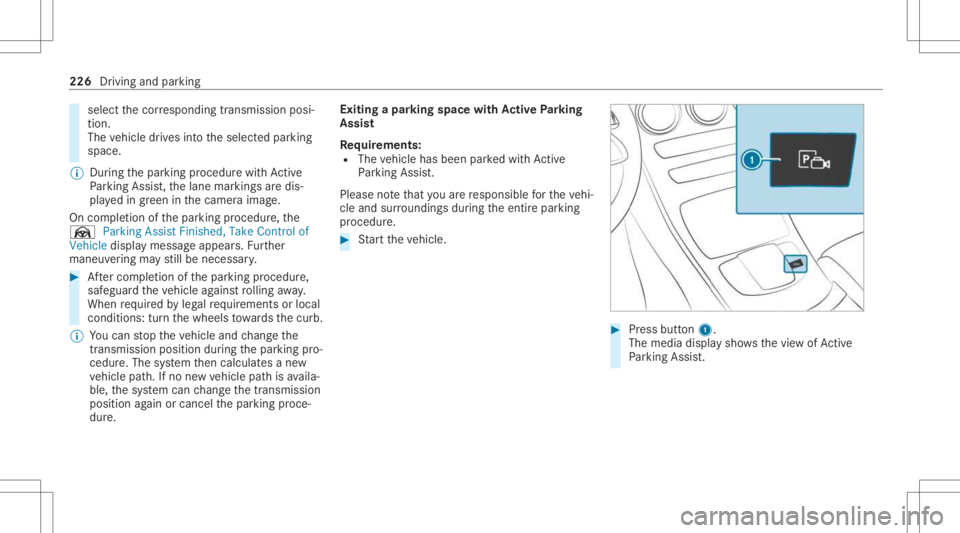
pr ocedur e. #
Startth eve hicle. #
Press butt on1.
The media displaysho wsthevie wof Active
Pa rking Assist. 226
Drivin gand parking
Page 229 of 462
#
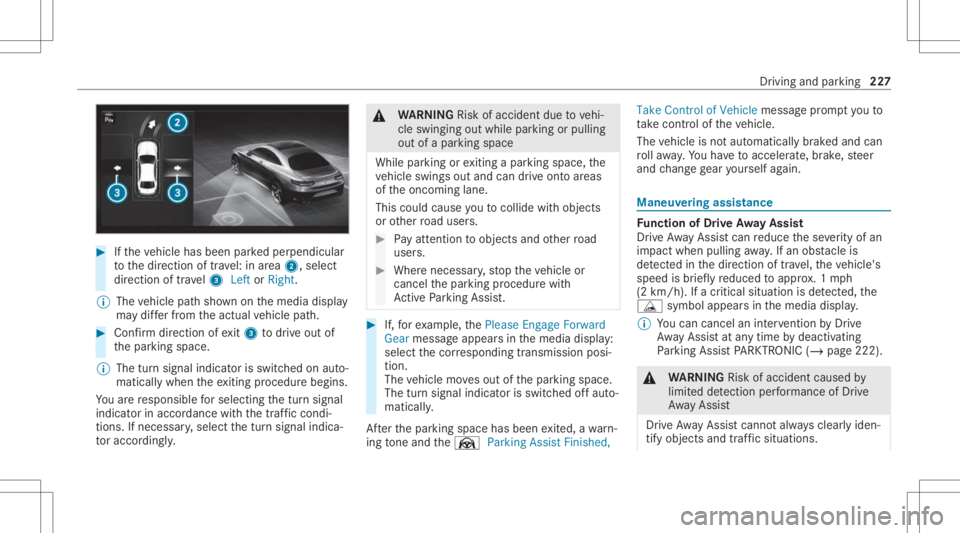
Ifth eve hicle hasbeen parkedper pendicular
to thedir ect ion oftra vel:in area 2, selec t
dir ect ion oftra vel3 Left orRight .
% The vehicle pathsho wnonthemedia display
ma ydif ferfr om theactual vehicle path. #
Conf irm dir ection ofexit3 todrive out of
th epar king space.
% The turnsignal indicat orisswitc hedonaut o‐
maticall ywhen theex itin gpr ocedur ebegin s.
Yo uar ere sponsible forsele cting thetur nsignal
indicat orinaccor dance withth etraf fic condi ‐
tions .If neces sary,select thetur nsignal indica‐
to raccor dingly. &
WARNIN GRisk ofacci dent dueto vehi‐
cle swinging outwhile parking orpulli ng
out ofapar king space
While parking orexitin gapar kingspace, the
ve hicle swings outand candrive ont oar eas
of theonc oming lane.
This could cause youto coll ide wi th object s
or other road user s. #
Payatt ention toobject sand other road
user s. #
Wher enec essar y,stop theve hicle or
cancel thepar king procedur ewit h
Ac tivePa rking Assist. #
If,forex am ple, thePlease Engage Forward
Gear messag eappear sin themedia display:
select thecor responding transmission posi‐
tion.
The vehicle movesout ofthepar king space.
The turnsignal indicat orisswitc hedoffaut o‐
maticall y.
Af terth epar king space hasbeen exited, awa rn‐
ing tone and theØ ParkingAssist Finished, Take
Contr olof Vehicle messagepr om ptyouto
ta ke contr olof theve hicle.
The vehicle isno taut omatically brak ed and can
ro llaw ay.Yo uha ve toacc eler ate, brak e, steer
and chang ege ar yourself again. Ma
neuv ering assistance Fu
nction ofDrive Awa yAssis t
Dr ive Aw ayAssi stcan reduce these verity of an
impact when pulling away.If an obs tacle is
de tected inthedir ect ion oftrav el, theve hicle's
speed isbrief lyreduced toappr ox.1 mp h
(2 km/ h).Ifacr itic alsituat ionisde tected, the
É symbol appearsinthemedia display.
% Youcan cancelaninterve ntio nby Drive
Aw ayAssi stat anytim eby deactiv ating
Pa rking AssistPA RK TRONI C(/ page22 2). &
WARNIN GRisk ofacci dent caused by
limit eddetection perform anc eof Drive
Aw ayAssi st
Dr ive Aw ayAssi stcanno tal wa ys cle arly iden‐
tify obje ctsand traf fic situ ations. Dr
iving and parking 22
7
Page 230 of 462
#
Alw ayspa ycar eful attention tothetra f‐
fi c situ ation; donotre ly on Drive Aw ay
Assi stalon e. #
Beprepar edtobrak eor sw erve as nec ‐
essar y,prov ided thetra ffic situat ion
per mitsand that itis saf eto take eva‐
siv eact ion. Dr
ive Aw ayAssi stisonl yan aid. Itis no ta sub‐
st itut efo ryo ur att entio nto thesur round ings.
The responsibili tyforsaf emaneu vering and
pa rking remains withyo u. Mak esur eth at no
per son s,anim alsorobj ect set c. arein the
maneu vering rang e.
A risk ofacollision mayar ise inthefo llo wing sit‐
uation s,forex am ple:
R Ifth eaccelera torand brak epeda lsareint er‐
ch ang ed.
R Ifan incorrect transm ission position is
eng aged.
Dr ive Aw ayAssi stisact ive under thefo llo wing
con dition s:
R IfPa rking AssistPA RK TRONI Cis act ivat ed. R
Ifyo ushif tth etra nsmiss ionposition to005E or
005B when theve hicle isstatio nary.
R Ifth ede tected obs tacle isless than appr ox.
3.3 ft(1.0 m) away.
R Ifth emaneuv ering assis tance func tionis
acti vatedin themultimedia system.
Sy stem limit s
The perform anc eof Drive Aw ayAssi stislimit ed
on inclines .
When drivin gwit hatrailer ,Dr ive Aw ayAssi stis
no tav ailable.
% Alsoobse rveth esy stem limits ofParking
Ass istPA RK TRONI C(/ page21 8).
Fu nction ofCross Traf fic Aler t
% Cross Traf fic Aler tis only available forve hi‐
cles withBlind SpotAssis tor ActiveBli nd
Spo tAssi st.
Cr oss Traf fic Aler tcan warndriver sof anycr oss‐
ing traffic when backingup and mane uvering out
of apar kingspace. Theradar sensor sin the
bum peralso monit orthear ea adjacen tto the
ve hicle. Ifacr itical situation isde tected, the L
symbol appearsinthemedia displayand
th eve hicle canbebrak ed aut omatically .
If th era dar sensor sar eobs truct edbyvehicles
or other object s,de tection isno tpos sible.
Cr oss Traf fic Aler tis acti veund erthefo llo wing
con dition s:
R Ifth eve hicle isbac king upatwa lkin gpace.
R Maneuv ering assis tance isacti vated
( / pag e228).
% Also obser vetheins truction son Blind Spot
Assis tand ActiveBli nd Spo tAssi st
( / pag e202).
Sy stem limit s
Cr oss Traf fic Aler tis no tav ailable onincline s.
Cr oss Traf fic Aler tis no tav ailable whendrivin g
wit hatrailer .
Ac tiv atin g/deac tivatin gthe mane uvering
ass ista nt
Mu ltimed iasystem:
4 © 5
Set ting s5
Assist ance
5 Camera &Parkin g #
Switc hManeuverin gAssist anceonoroff. 228
Driving andparking