audio MERCEDES-BENZ GLC-Class 2016 X253 User Guide
[x] Cancel search | Manufacturer: MERCEDES-BENZ, Model Year: 2016, Model line: GLC-Class, Model: MERCEDES-BENZ GLC-Class 2016 X253Pages: 418, PDF Size: 9.23 MB
Page 85 of 418
SmartKey functions
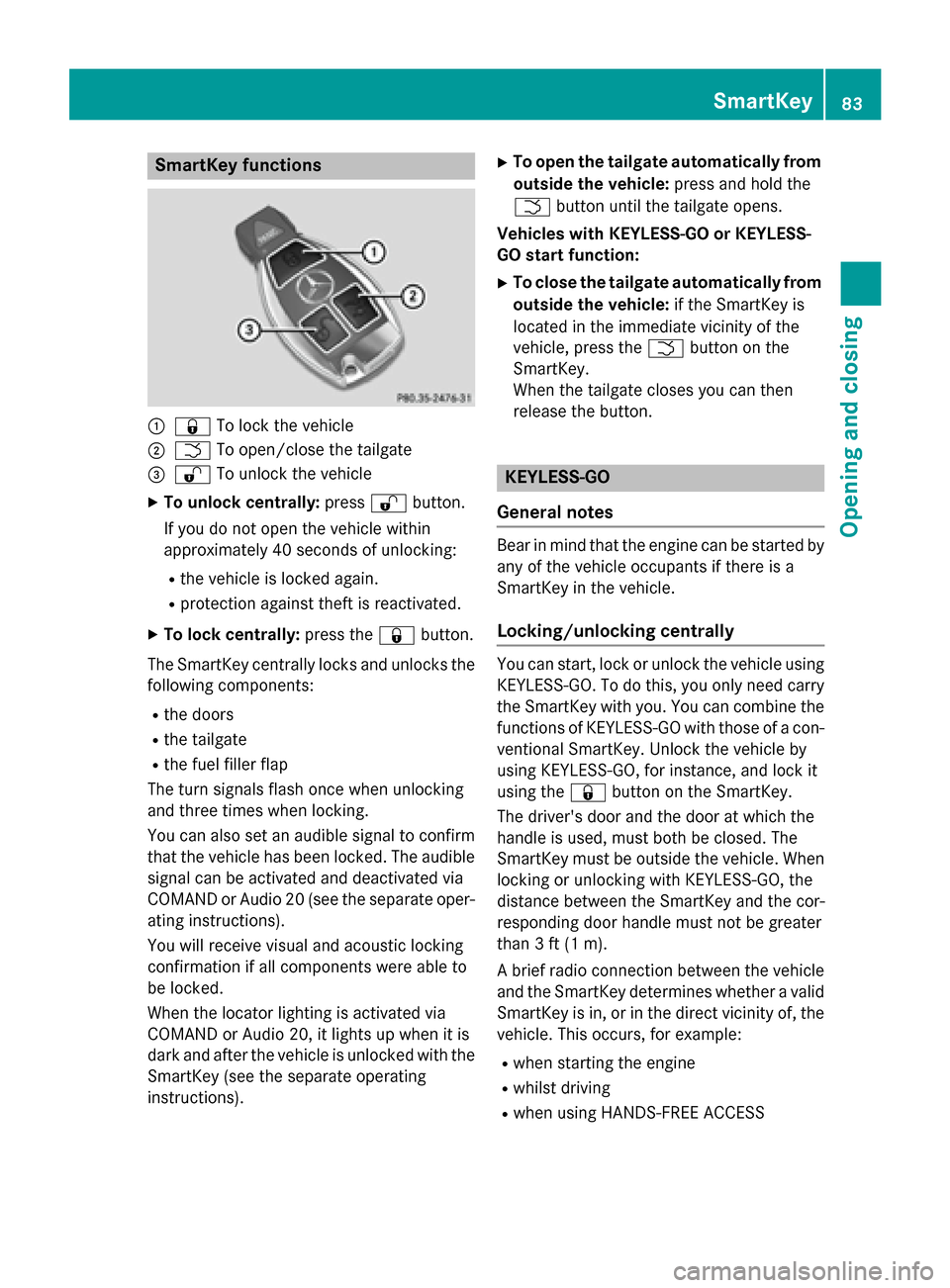
:&To lock the vehicle
;FTo open/close the tailgate
=%To unlock the vehicle
XTo unlock centrally: press%button.
If you do not open the vehicle within
approximately 40 seconds of unlocking:
Rthe vehicle is locked again.
Rprotection against theft is reactivated.
XTo lock centrally: press the&button.
The SmartKey centrally locks and unlocks the following components:
Rthe doors
Rthe tailgate
Rthe fuel filler flap
The turn signals flash once when unlocking
and three times when locking.
You can also set an audible signal to confirm
that the vehicle has been locked. The audible
signal can be activated and deactivated via
COMAND or Audio 20 (see the separate oper-
ating instructions).
You will receive visual and acoustic locking
confirmation if all components were able to
be locked.
When the locator lighting is activated via
COMAND or Audio 20, it lights up when it is
dark and after the vehicle is unlocked with the
SmartKey (see the separate operating
instructions).
XTo open the tailgate automatically from outside the vehicle: press and hold the
F button until the tailgate opens.
Vehicles with KEYLESS-GO or KEYLESS-
GO start function:
XTo close the tailgate automatically from
outside the vehicle: if the SmartKey is
located in the immediate vicinity of the
vehicle, press the Fbutton on the
SmartKey.
When the tailgate closes you can then
release the button.
KEYLESS-GO
General notes
Bear in mind that the engine can be started by
any of the vehicle occupants if there is a
SmartKey in the vehicle.
Locking/unlocking centrally
You can start, lock or unlock the vehicle using KEYLESS-GO. To do this, you only need carry
the SmartKey with you. You can combine the
functions of KEYLESS-GO with those of a con-ventional SmartKey. Unlock the vehicle by
using KEYLESS-GO, for instance, and lock it
using the &button on the SmartKey.
The driver's door and the door at which the
handle is used, must both be closed. The
SmartKey must be outside the vehicle. When
locking or unlocking with KEYLESS-GO, the
distance between the SmartKey and the cor-
responding door handle must not be greater
than 3 ft (1 m).
A brief radio connection between the vehicle
and the SmartKey determines whether a valid
SmartKey is in, or in the direct vicinity of, the
vehicle. This occurs, for example:
Rwhen starting the engine
Rwhilst driving
Rwhen using HANDS-FREE ACCESS
SmartKey83
Opening and closing
Z
Page 92 of 418
Meanwhile, the fuel filler flap will not be
locked or unlocked.
You cannot unlock the vehicle centrally from
the inside if the vehicle has been locked with
the SmartKey or KEYLESS-GO.
If the vehicle has been locked with the Smart-
Key or with KEYLESS-GO, opening a door from the inside will trigger the anti-theft alarm sys-
tem. Switch off the alarm (
Ypage 78).
When a locked door is opened from inside the
vehicle, the previous unlocking process will
be acknowledged if the vehicle:
Rhas been locked with the locking button for
the central locking or
Rhas been locked automatically
The vehicle will be fully unlocked if it had pre-
viously been fully unlocked. If only the driver's
door had been previously unlocked, only the
door which has been opened from the inside
is unlocked.
Automatic locking feature
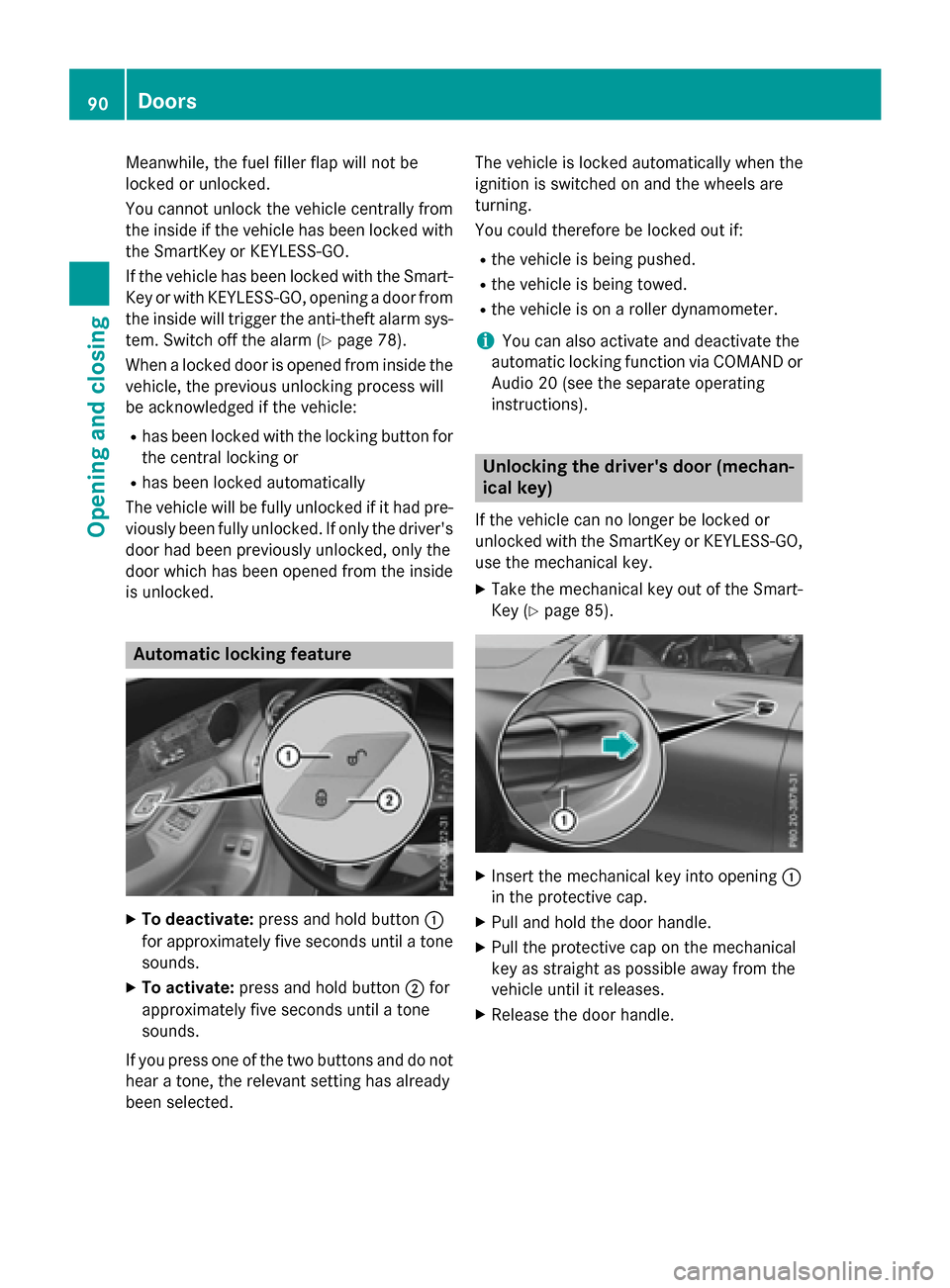
XTo deactivate: press and hold button :
for approximately five seconds until a tone sounds.
XTo activate: press and hold button ;for
approximately five seconds until a tone
sounds.
If you press one of the two buttons and do not
hear a tone, the relevant setting has already
been selected. The vehicle is locked automatically when the
ignition is switched on and the wheels are
turning.
You could therefore be locked out if:
Rthe vehicle is being pushed.
Rthe vehicle is being towed.
Rthe vehicle is on a roller dynamometer.
iYou can also activate and deactivate the
automatic locking function via COMAND or
Audio 20 (see the separate operating
instructions).
Unlocking the driver's door (mechan-
ical key)
If the vehicle can no longer be locked or
unlocked with the SmartKey or KEYLESS-GO,
use the mechanical key.
XTake the mechanical key out of the Smart-
Key (
Ypage 85).
XInsert the mechanical key into opening :
in the protective cap.
XPull and hold the door handle.
XPull the protective cap on the mechanical
key as straight as possible away from the
vehicle until it releases.
XRelease the door handle.
90Doors
Opening and closing
Page 119 of 418
Problems with the steering wheel heating
ProblemPossible causes/consequences andMSolutions
The steering wheel
heating has switched
off prematurely or can-
not be switched on.The on-board voltage is too low because too many electrical con-
sumers are switched on.
XSwitch off electrical consumers that you do not need, such as
the rear window defroster or interior lighting.
EASY-ENTRY/EXIT feature
Important safety notes
GWARNING
When the EASY-ENTRY/EXIT feature adjusts
the steering wheel, you and other vehicle
occupants – particularly children – could
become trapped. There is a risk of injury.
While the EASY-ENTRY/EXIT feature is mak-
ing adjustments, make sure that no one has
any body parts in the sweep of the steering
wheel.
Move the steering wheel adjustment lever if
there is a risk of entrapment by the steering
wheel. The adjustment process is stopped.
Press one of the memory function position
buttons. The adjustment process is stopped.
This function is only available on vehicles with
memory function.
GWARNING
If children activate the EASY-ENTRY/EXIT fea-
ture, they can become trapped, particularly
when unattended. There is a risk of injury.
When leaving the vehicle, always take the
SmartKey with you and lock the vehicle. Never
leave children unsupervised in the vehicle.
GWARNING
If you drive off while the EASY-ENTRY/EXIT
feature is making adjustments, you could lose
control of the vehicle. There is a risk of an
accident.
Always wait until the adjustment process is
complete before driving off.
The EASY-ENTRY/EXIT feature makes getting
in and out of your vehicle easier.
You can activate and deactivate the EASY-
ENTRY/EXIT feature using Audio 20/
COMAND; see the separate Audio 20/
COMAND operating instructions.
Position of the steering wheel when the
EASY-ENTRY/EXIT feature is active
The steering wheel swings upwards when
you:
Rremove the SmartKey from the ignition lock
Rwith KEYLESS-GO: open the driver's door;
KEYLESS-GO must be in position 1
Rwith the SmartKey:open the driver's
door; the SmartKey must be in position 0or
1 in the ignition lock (
Ypage 153)
Ropen the driver's door when the ignition is
switched off
iThe steering wheel only tilts upwards if
the driving position is stored after the seat
or steering wheel has been adjusted
(
Ypage 122).
The most recent driving position of the steer-
ing wheel is stored if:
Rthe ignition is switched off
Rthe setting is stored with the memory func-
tion (
Ypage 122).
iThe steering wheel only moves upwards if
it has not already reached the upper steer-
ing limiter.
Steering wheel117
Seats, steering wheel and mirrors
Z
Page 120 of 418
Position of the steering wheel for driv-
ing
The steering wheel is moved to the last selec-
ted position when:
Rthe driver's door is closed and you insert
the SmartKey into the ignition lock
Ryou close the driver's door when the igni-
tion is switched on
Ryou press the Start/Stop button once on
vehicles with KEYLESS-GO
iThe steering wheel only returns to the last
set position if the driving position is stored
after the seat or steering column has been adjusted (
Ypage 122).
The most recent driving position of the steer-
ing wheel is stored if:
Rthe ignition is switched off
Rthe setting is stored with the memory func-
tion (
Ypage 122).
Crash-responsive EASY-EXIT feature
If the crash-responsive EASY-EXIT feature is
triggered in an accident, the steering column
will move upwards when the driver's door is
opened or the SmartKey is removed from the ignition lock. This makes it easier to exit the
vehicle and rescue the occupants.
The crash-responsive EASY-EXIT feature is
only operational if the EASY-EXIT/ENTRY fea-
ture is activated in Audio 20/COMAND; see
the separate Audio 20/COMAND operating
instructions.
Mirrors
Rear-view mirror
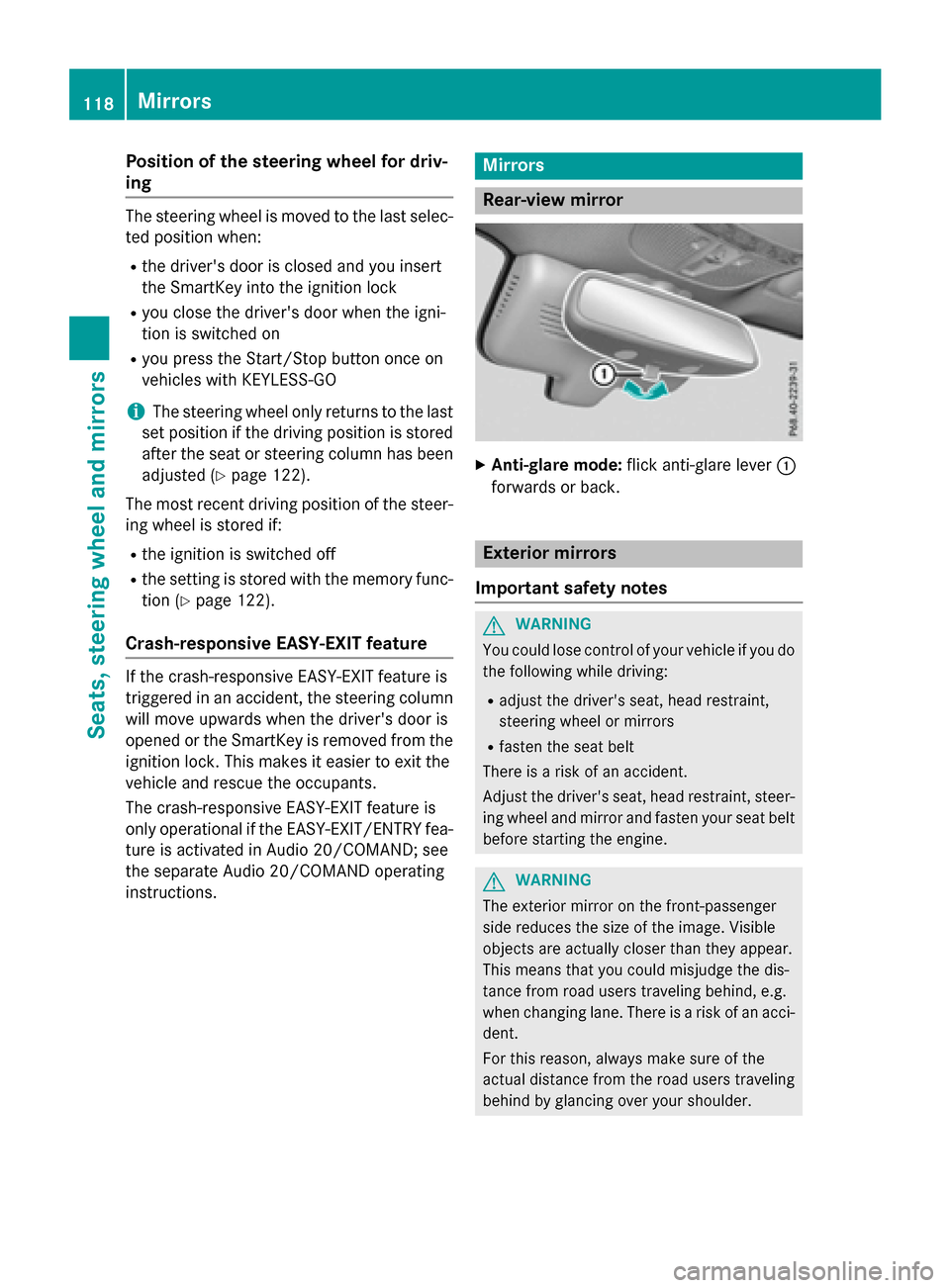
XAnti-glare mode: flick anti-glare lever :
forwards or back.
Exterior mirrors
Important safety notes
GWARNING
You could lose control of your vehicle if you do the following while driving:
Radjust the driver's seat, head restraint,
steering wheel or mirrors
Rfasten the seat belt
There is a risk of an accident.
Adjust the driver's seat, head restraint, steer-
ing wheel and mirror and fasten your seat belt before starting the engine.
GWARNING
The exterior mirror on the front-passenger
side reduces the size of the image. Visible
objects are actually closer than they appear.
This means that you could misjudge the dis-
tance from road users traveling behind, e.g.
when changing lane. There is a risk of an acci-
dent.
For this reason, always make sure of the
actual distance from the road users traveling
behind by glancing over your shoulder.
118Mirrors
Seats, steering wheel and mirrors
Page 121 of 418
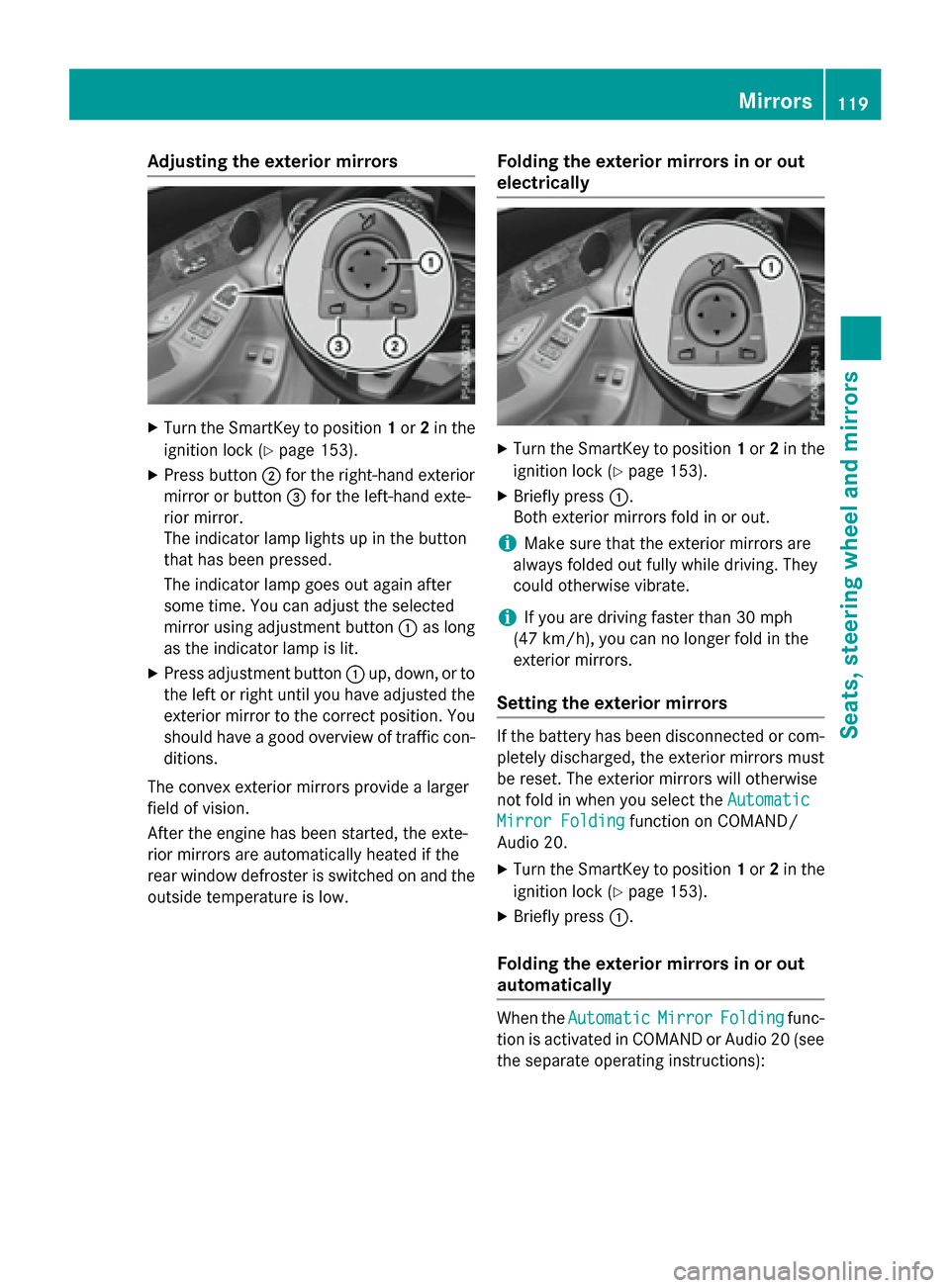
Adjusting the exterior mirrors
XTurn theSmartKey to position 1or 2in th e
ignition loc k (
Ypage 153).
XPress butto n; for th eright-hand exterio r
mirror or butto n= for th eleft-han dexte -
rio rmirror .
The indicator lamp lights up in th ebutto n
that has been pressed.
The indicator lamp goes out again after
som etime. You can adjust th eselected
mirror usin gadjustmen tbutto n: as lon g
as th eindicator lamp is lit .
XPress adjustmentbutto n: up, down ,or to
th elef tor right until you hav eadjusted th e
exterio rmirror to th ecorrec tposition .You
should hav e agoo doverview of traffic con-
ditions.
The convex exterio rmirror sprovide alarger
field of vision .
Afte rth eengin ehas been started, th eexte -
rio rmirror sare automatically heated if th e
rear window defroste ris switched on and th e
outside temperature is low.
Folding the exteri or mirrorsinor out
electri cally
XTurn th eSmartKey to position 1or 2in th e
ignition loc k (
Ypage 153).
XBriefly press :.
Both exterio rmirror sfol din or out .
iMakesur ethat th eexterio rmirror sare
always folded out fully while driving .The y
could otherwise vibrate .
iIf you are driving fasterthan 30 mph
(47 km/ h), you can no longer fold in the
exterior mirrors.
Setting the exterior mirrors
If the battery has been disconnected or com-
pletely discharged, the exterior mirrors must
be reset. The exterior mirrors will otherwise
not fold in when you select the Automatic
Mirror Foldingfunction on COMAND/
Audio 20.
XTurn the SmartKey to position 1or 2in the
ignition lock (
Ypage 153).
XBriefly press :.
Folding the exterior mirrors in or out
automatically
When theAutomaticMirrorFoldingfunc-
tion is activated in COMAND or Audio 20 (see
the separate operating instructions):
Mirrors119
Seats, steering wheel and mirrors
Z
Page 143 of 418
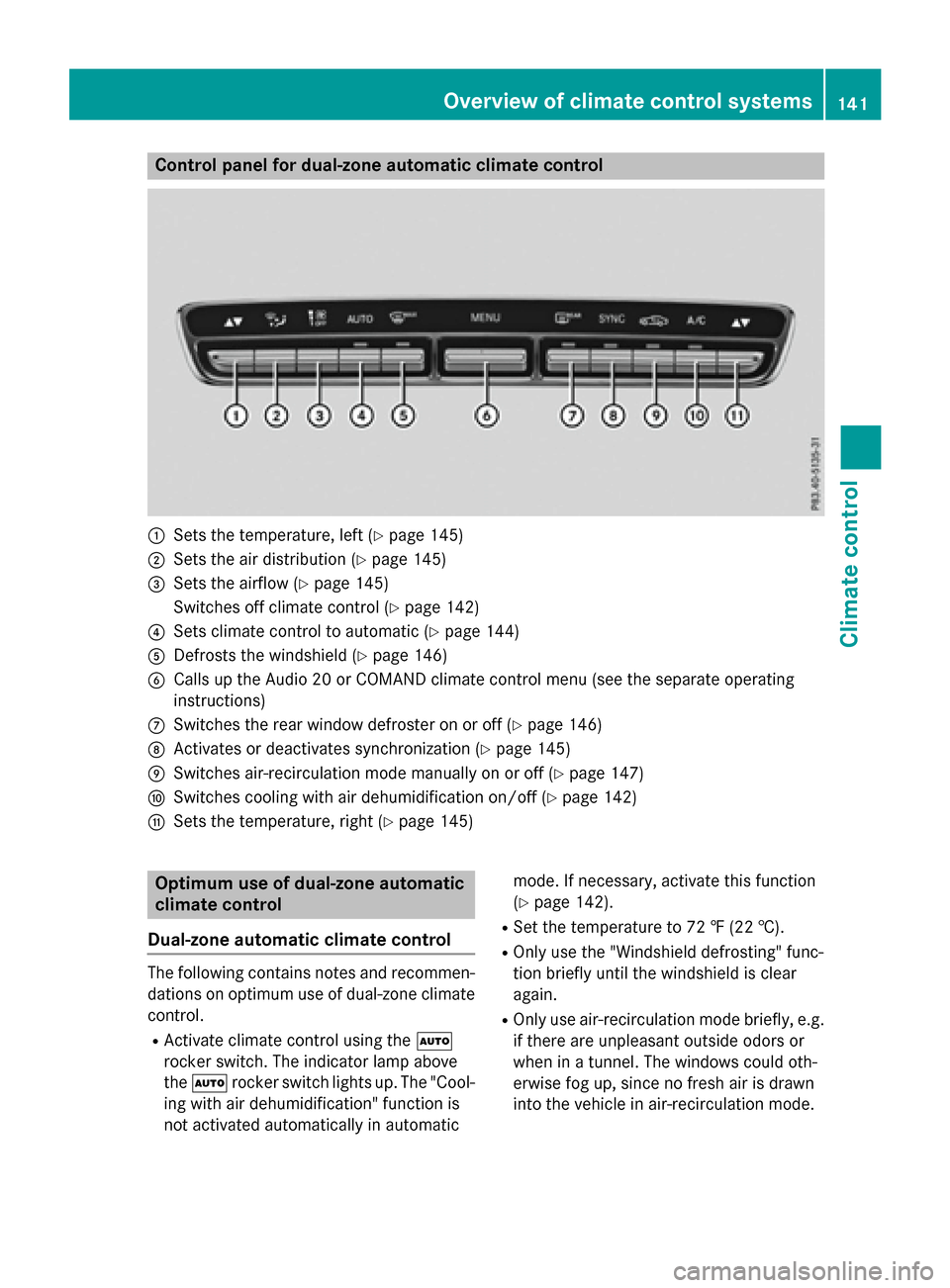
Control panel for dual-zone automatic climate control
:Sets the temperature, left (Ypage 145)
;Sets the air distribution (Ypage 145)
=Sets the airflow (Ypage 145)
Switches off climate control (
Ypage 142)
?Sets climate control to automatic (Ypage 144)
ADefrosts the windshield (Ypage 146)
BCalls up the Audio 20 or COMAND climate control menu (see the separate operating
instructions)
CSwitches the rear window defroster on or off (Ypage 146)
DActivates or deactivates synchronization (Ypage 145)
ESwitches air-recirculation mode manually on or off (Ypage 147)
FSwitches cooling with air dehumidification on/off (Ypage 142)
GSets the temperature, right (Ypage 145)
Optimum use of dual-zone automatic
climate control
Dual-zone automatic climate control
The following contains notes and recommen-
dations on optimum use of dual-zone climate
control.
RActivate climate control using the Ã
rocker switch. The indicator lamp above
the à rocker switch lights up. The "Cool-
ing with air dehumidification" function is
not activated automatically in automatic mode. If necessary, activate this function
(
Ypage 142).
RSet the temperature to 72 ‡ (22 †).
ROnly use the "Windshield defrosting" func-
tion briefly until the windshield is clear
again.
ROnly use air-recirculation mode briefly, e.g.
if there are unpleasant outside odors or
when in a tunnel. The windows could oth-
erwise fog up, since no fresh air is drawn
into the vehicle in air-recirculation mode.
Overview of climate control systems141
Climate control
Page 144 of 418
DYNAMIC SELECT switch
You can choosebetween various drive pro -
grams wit hth eDYNAMI CSELECT switch
(
Ypage 161).
If you hav eselecte ddrive program E:
Rth ecoolin goutput is reduce dwhen coolin g
Rwhen heating, th eelectrical heater booster
is deactivated and heat output is reduce d
as aresult
Rth erea rwindow defroster running time is
reduce d
If you hav eselecte ddrive program C,Sor S+ ,
th ecurren tclimat esetting sare maintained.
ECO start/stop function
Durin gautomatic engin eswitch-off ,th ecli-
mat econtro lsystem only operates at a
reduce dcapacity. If you require th efull cli-
mat econtro loutput ,you can switch of fth e
EC Ostart/sto pfunction by pressing th eEC O
butto n (
Ypage 159).
Operating th eclimat econtro lsys -
tems
Activating/deactivating climat econ-
trol
General notes
Whe nth eclimat econtro lis switched off, th e
air supply and air circulation are also
switched off. The windows could fo gup.
Therefore, switch of fclimat econtro lonly
briefly
Switc hon climat econtro lprimarily usin gth e
à rocker switch (
Ypage 144).
Activating or deactivating
XTurnth eSmartKey to position 2in th eigni-
tion loc k (
Ypage 153).
XTo switch on: press thet or!
rocker switch up or down .
The Audio 20 or COMAN Dclimat econtro l
men uopens .
XSwitchon th eclimat econtro lvia th eair-
conditionin gfunction bar ,see th eseparat e
operatin ginstructions.
or
XSe tth eairflow to level 1or higher usin gth e
H rocker switch .
XTo switch off :press th et or!
rocker switch up or down .
The Audio 20 or COMAN Dclimat econtro l
men uopens .
XSwitchof fth eclimat econtro lvia th eair-
conditionin gfunction bar ,see th eseparat e
operatin ginstructions.
or
XSe tth eairflow to level 0usin gth eH
rocker switch .
Switchingcoolin gwit hair dehumidi-
fication on/of f
General notes
If you deactivat eth e"Coolin gwit hair-dehu-
midification "function ,th eair insid eth evehi-
cl e will no tbe cooled .The air insid eth evehi-
cl e will also no tbe dehumidified. The win -
dows can fo gup more quickly. Therefore,
deactivat eth ecoolin gwit hair-dehumidifica-
tion function only briefly.
The "Coolin gwit hair dehumidification "func-
tion is only available when th eengin eis run -
ning .The air insid eth evehicle is cooled and
dehumidified accordin gto th etemperature
selected.
Condensation may dri pfrom th eunderside of
th evehicle when it is in coolin gmode. Thi sis
normal and no t asignthat there is amalfunc -
tion .
142Operating the climate control systems
Climate control
Page 145 of 418
Activating/deactivating
XTo activate:press th e¿ rockerswitch
up or down .
The indicator lamp abov eth erocke rswitch
lights up.
or
XActivat eth ecoolin gwit hair dehumidifica-
tion function via Audio 20 or COMAND (see
th eseparat eoperating instructions).
XTo deacti vate:press th e¿ rocker
switch up or down .
The indicator lamp abov eth erocke rswitch
goes out .
or
XDeactivat eth ecoolin gwit hair dehumidifi-
cation function via Audio 20 or COMAND
(see th eseparat eoperating instructions).
Operating the climate control systems143
Climate control
Page 146 of 418
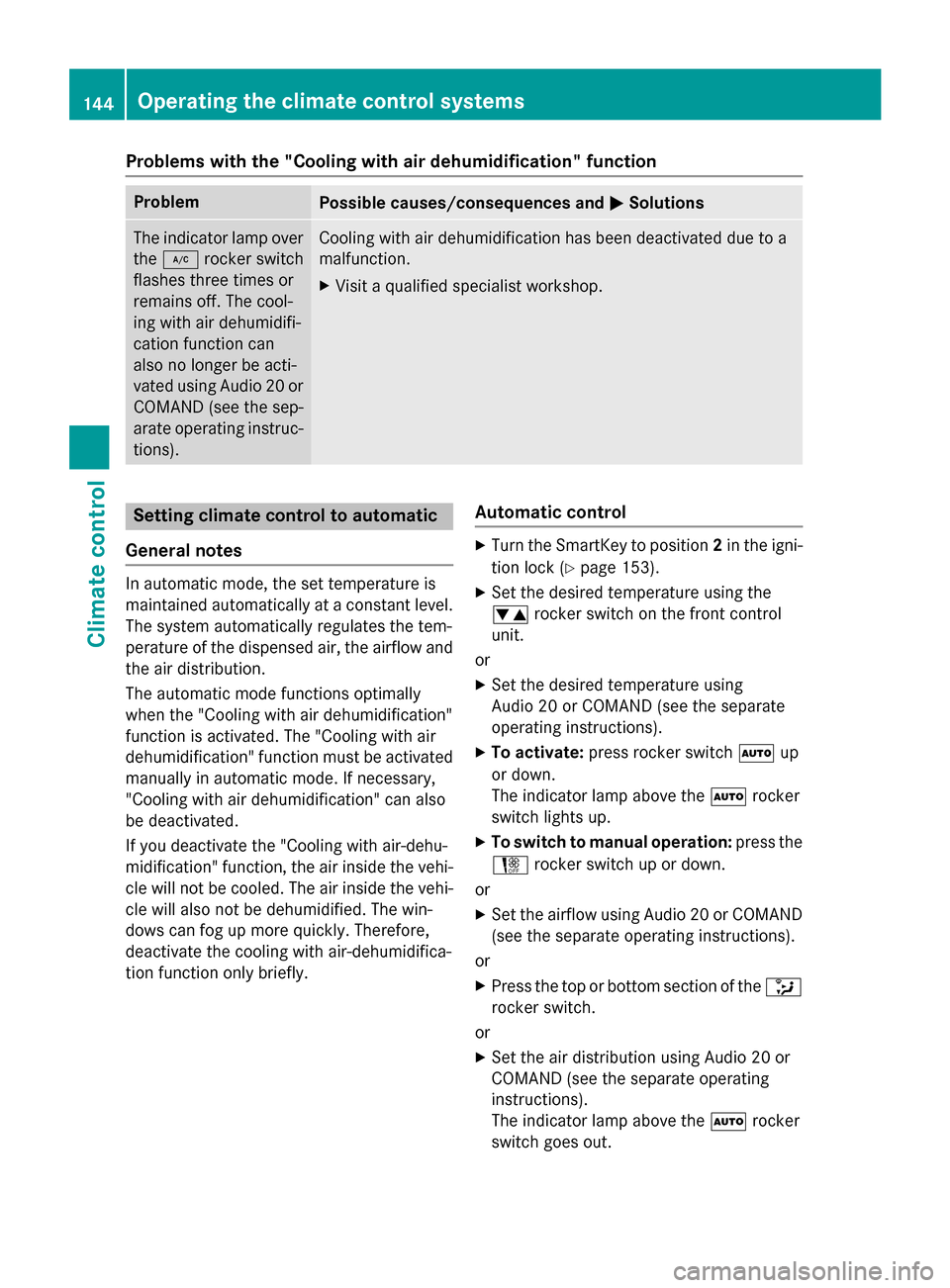
Problems with the "Cooling with air dehumidification" function
ProblemPossible causes/consequences andMSolutions
The indicator lamp over
the¿ rocker switch
flashes three times or
remains off. The cool-
ing with air dehumidifi-
cation function can
also no longer be acti-
vated using Audio 20 or
COMAND (see the sep-
arate operating instruc-
tions).Cooling with air dehumidification has been deactivated due to a
malfunction.
XVisit a qualified specialist workshop.
Setting climate control to automatic
General notes
In automatic mode, the set temperature is
maintained automatically at a constant level.
The system automatically regulates the tem-
perature of the dispensed air, the airflow and
the air distribution.
The automatic mode functions optimally
when the "Cooling with air dehumidification"
function is activated. The "Cooling with air
dehumidification" function must be activated
manually in automatic mode. If necessary,
"Cooling with air dehumidification" can also
be deactivated.
If you deactivate the "Cooling with air-dehu-
midification" function, the air inside the vehi- cle will not be cooled. The air inside the vehi-
cle will also not be dehumidified. The win-
dows can fog up more quickly. Therefore,
deactivate the cooling with air-dehumidifica-
tion function only briefly.
Automatic control
XTurn the SmartKey to position 2in the igni-
tion lock (
Ypage 153).
XSet the desired temperature using the
w rocker switch on the front control
unit.
or
XSet the desired temperature using
Audio 20 or COMAND (see the separate
operating instructions).
XTo activate: press rocker switch Ãup
or down.
The indicator lamp above the Ãrocker
switch lights up.
XTo switch to manual operation: press the
H rocker switch up or down.
or
XSet the airflow using Audio 20 or COMAND
(see the separate operating instructions).
or
XPress the top or bottom section of the _
rocker switch.
or
XSet the air distribution using Audio 20 or
COMAND (see the separate operating
instructions).
The indicator lamp above the Ãrocker
switch goes out.
144Operating the climate control systems
Climate control
Page 147 of 418
In automatic mode, if you adjust the airflow or
air distribution manually, the indicator lamp
above theÃrocker switch goes out. The
function which has not been changed man-
ually, however, continues to be controlled
automatically. When the manually set func-
tion switches back to automatic mode, the
indicator lamp above the Ãrocker switch
lights up again.
Setting the temperature
Different temperatures can be set for the
driver's and front-passenger sides.
XTurn the SmartKey to position 2in the igni-
tion lock (
Ypage 153).
XTo increase or reduce: press thew
rocker switch up or down.
or
XSet the temperature using Audio 20 or
COMAND (see the separate operating
instructions).
Only change the temperature setting in
small increments. Start at 72 ‡ (22 †).
Setting the air distribution
Air distribution settings
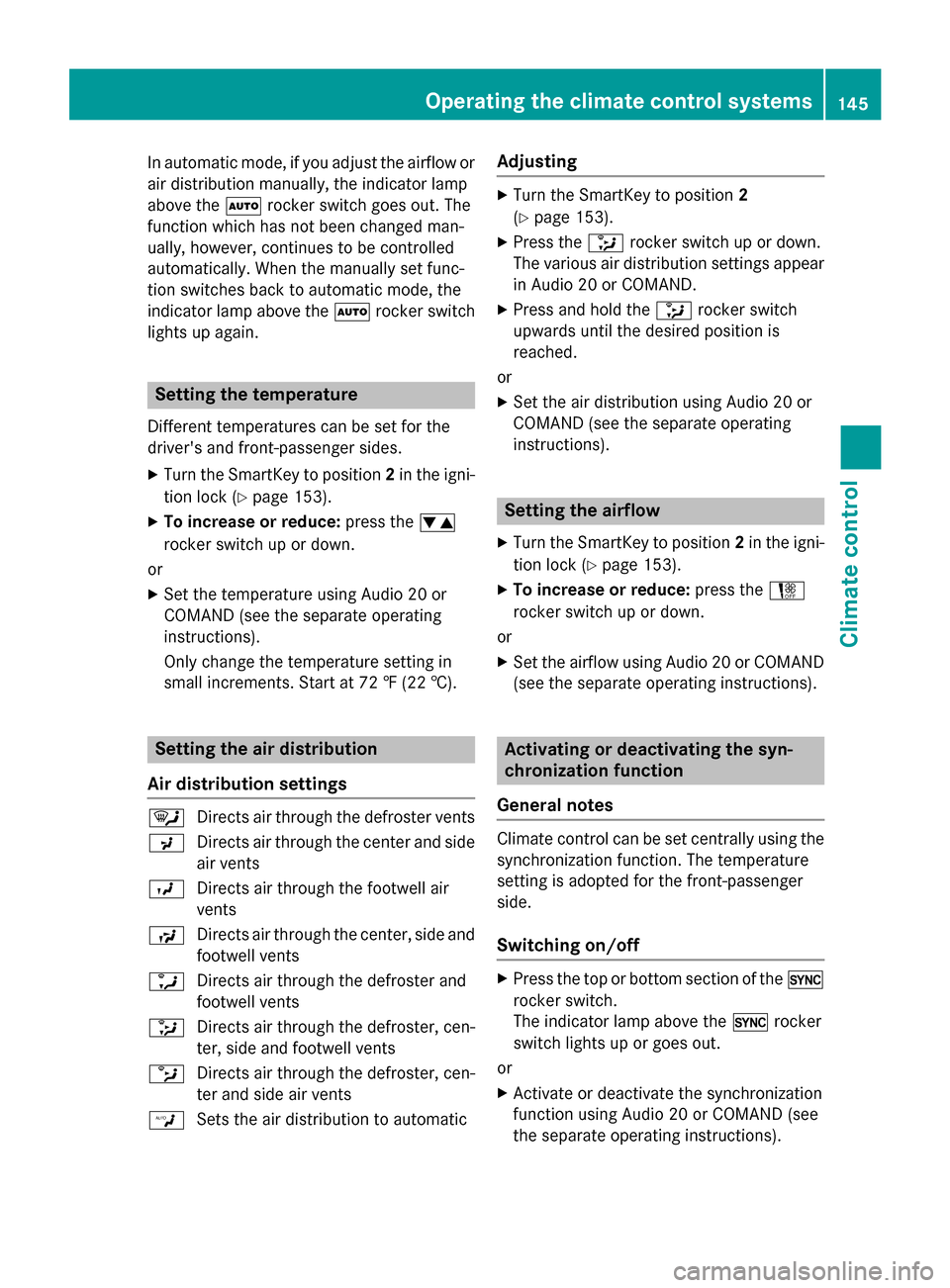
¯ Directs air through the defroster vents
P Directs air through the center and side
air vents
O Directs air through the footwell air
vents
S Directs air through the center, side and
footwell vents
a Directs air through the defroster and
footwell vents
_ Directs air through the defroster, cen-
ter, side and footwell vents
b Directs air through the defroster, cen-
ter and side air vents
W Sets the air distribution to automatic
Adjusting
XTurn the SmartKey to position 2
(
Ypage 153).
XPress the _rocker switch up or down.
The various air distribution settings appear
in Audio 20 or COMAND.
XPress and hold the _rocker switch
upwards until the desired position is
reached.
or
XSet the air distribution using Audio 20 or
COMAND (see the separate operating
instructions).
Setting the airflow
XTurn the SmartKey to position 2in the igni-
tion lock (
Ypage 153).
XTo increase or reduce: press theH
rocker switch up or down.
or
XSet the airflow using Audio 20 or COMAND
(see the separate operating instructions).
Activating or deactivating the syn-
chronization function
General notes
Climate control can be set centrally using the
synchronization function. The temperature
setting is adopted for the front-passenger
side.
Switching on/off
XPress the top or bottom section of the 0
rocker switch.
The indicator lamp above the 0rocker
switch lights up or goes out.
or
XActivate or deactivate the synchronization
function using Audio 20 or COMAND (see
the separate operating instructions).
Operating the climate control systems145
Climate control