towing MERCEDES-BENZ GLC-Class 2016 X253 Owner's Manual
[x] Cancel search | Manufacturer: MERCEDES-BENZ, Model Year: 2016, Model line: GLC-Class, Model: MERCEDES-BENZ GLC-Class 2016 X253Pages: 418, PDF Size: 9.23 MB
Page 7 of 418
Driving abroad ............................... 343
Hiding a service message .............. 342
Resetting the service interval dis-
play ................................................ 343
Service message ............................ 342
Special service requirements ......... 343
ATA (Anti-Theft Alarm system)
Activating/deactivating ................... 78
Function ........................................... 78
Switching off the alarm .................... 78
ATTENTION ASSIST
Activating/deactivating ................. 253
Display message ............................ 279
Function/notes ............................. 214
Authorized Mercedes-Benz Center
see Qualified specialist workshop
AUTO lights
Display message ............................ 275
see Lights
Automatic car wash (care) ............... 344
Automatic engine start (ECO start/
stop function) .................................... 159
Automatic engine switch-off (ECO
start/stop function) .......................... 158
Automatic headlamp mode .............. 124
Automatic transmission
Accelerator pedal position ............. 165
Changing gear ............................... 165
DIRECT SELECT lever ..................... 162
Display message ............................ 287
Double-clutch function .................. 165
Drive program ................................ 166
Drive program display .................... 163
Driving tips .................................... 165
DYNAMIC SELECT switch .............. 161
Emergency running mode .............. 169
Engaging drive position .................. 163
Engaging neutral ............................ 163
Engaging park position automati-
cally ............................................... 162
Engaging reverse gear ................... 162
Engaging the park position ............ 162
Kickdown ....................................... 165
Manual shifting .............................. 167
Overview ........................................ 161
Problem (malfunction) ................... 169
Pulling away ................................... 157
Rocking the vehicle free ................ 165 Starting the engine
........................ 155
Ste
ering wheel paddle shifters ...... 167
Trailer towing ................................. 165
Transmission position display
(DIRECT SELECT lever) ................... 163
Transmission positions .................. 164
Automatic transmission emer-
gency mode ....................................... 169
Axle load, permissible (trailer tow-
ing) ...................................................... 416
B
Backup lamp
Changing bulbs .............................. 132
Bag hook ............................................ 313
Ball coupling
Installing ........................................ 230
Removing ....................................... 234
BAS (Brake Assist System) ................. 68
BAS PLUS with Cross-Traffic Assist
(Brake Assist PLUS with Cross-
Traffic Assist)
Function/notes ................................ 68
Important safety notes .................... 68
Battery (SmartKey)
Checking .......................................... 86
Important safety notes .................... 85
Replacing ......................................... 86
Battery (vehicle)
Charging ........................................ 363
Display message ............................ 277
Important safety notes .................. 361
Jump starting ................................. 365
Blind Spot Assist
Activating/deactivating (on-
board computer) ............................ 253
Display message ............................ 281
Notes/function .............................. 217
see Active Blind Spot Assist
Brake fluid
Display message ............................ 264
Notes ............................................. 412
Brake force distribution
see EBD (electronic brake force
distribution)
Brake lamps
Display message ............................ 273
Index5
Page 8 of 418
BrakesABS .................................................. 67
Adaptive Brake Assist ...................... 72
BAS .................................................. 68
BAS PLUS with Cross-Traffic
Assist ............................................... 68
Brake fluid (notes) ......................... 412
Display message ............................ 258
EBD .................................................. 75
Hill start assist ............................... 157
HOLD function ............................... 194
Important safety notes .................. 178
Maintenance .................................. 179
Parking brake ................................ 174
Riding tips ...................................... 178
Warning lamp ................................. 293
Breakdown
Where will I find...? ........................ 354
see Flat tire
see Towing away
Brightness control (instrument
cluster lighting) ................................... 32
Buttons on the steering wheel ......... 239
C
California
Important notice for retail cus-
tomers and lessees .......................... 24
Calling up a malfunction
see Display messages
Care
360° camera ................................. 349
Car wash ........................................ 344
Carpets .......................................... 352
Display ........................................... 350
Exhaust pipe .................................. 349
Exterior lights ................................ 348
Gear or selector lever .................... 350
Interior ........................................... 350
Matte finish ................................... 346
Notes ............................................. 343
Paint .............................................. 346
Plastic trim .................................... 350
Power washer ................................ 345
Rear view camera .......................... 348
Roof lining ...................................... 352
Seat belt ........................................ 351 Seat cover ..................................... 351
Sensors ......................................... 348
Side running board ........................ 348
Steering wheel ............................... 350
Trim pieces .................................... 350
Washing by hand ........................... 345
Wheels ........................................... 347
Windows ........................................ 347
Wiper blades .................................. 347
Wooden trim .................................. 350
Cargo compartment
Opening/closing (from outside,
HANDS-FREE ACCESS) .................... 94
Cargo compartment cover
Important safety notes .................. 313
Notes/how to use ......................... 313
Cargo compartment enlarge-
ment ................................................... 309
Cargo compartment floor
Important safety notes .................. 316
Opening/closing ............................ 316
Stowage well (under) ..................... 316
Cargo net
Attaching ....................................... 314
Important safety information ......... 314
Cargo tie down rings ......................... 312
CD player (on-board computer) ........ 249
Center console
Lower section .................................. 38
Upper section .................................. 37
Central locking
Locking/unlocking (SmartKey) ........ 83
Changing bulbs
High-beam headlamps ................... 131
Low-beam headlamps .................... 131
Opening and closing the side trim
panels ............................................ 132
Reversing lamps ............................ 132
Turn si
gnals (front) ......................... 132
Changing the media source ............. 248
Child
Restraint system .............................. 62
Child seat
Forward-facing restraint system ...... 65
LATCH-type (ISOFIX) child seat
anchors ............................................ 63
On the front-passenger seat ............ 64
Rearward-facing restraint system .... 65
6Index
Page 11 of 418
STEER CONTROL ............................. 78
Driving system
AIR BODY CONTROL ...................... 195
Driving systems
360°camera .................................. 210
Active Blind Spot Assist ................. 222
Active Lane Keeping Assist ............ 225
Active Parking Assist ..................... 201
ATTENTION ASSIST ........................ 214
Blind Spot Assist ............................ 217
Cruise control ................................ 181
Display message ............................ 279
DISTRONIC PLUS ........................... 183
DISTRONIC PLUS with Steering
Assist and Stop&Go Pilot ............... 192
Driving Assistance Plus package ... 222
HOLD function ............................... 194
Lane Keeping Assist ...................... 220
Lane Tracking package .................. 217
PARKTRONIC ................................. 198
Rear view camera .......................... 206
Traffic Sign Assist .......................... 216
Driving tips
Automatic transmission ................. 165
Brakes ........................................... 178
Break-in period .............................. 152
DISTRONIC PLUS ........................... 190
Downhill gradient ........................... 178
Drinking and driving ....................... 176
Driving in winter ............................. 180
Driving on flooded roads ................ 180
Driving on wet roads ...................... 180
Exhaust check ............................... 176
Fuel ................................................ 176
General .......................................... 176
Hydroplaning ................................. 180
Icy road surfaces ........................... 180
Limited braking efficiency on sal-
ted roads ....................................... 179
Snow chains .................................. 377
Subjecting brakes to a load ........... 178
The first 1000 miles (1500 km) ..... 152
Towing a trailer .............................. 228
Wet road surface ........................... 179
DSR (Downhill Speed Regulation)
Display message ............................ 282
DVD video
Operating (on-board computer) ..... 249 DYNAMIC SELECT switch
Automatic transmission ................. 161
Climate control (dual-zone auto-
matic climate control) .................... 142
E
EASY-ENTRY featureFunction/notes ............................. 117
EASY-EXIT feature
Function/notes ............................. 117
EASY-PACK cargo compartment
management system ........................ 315
EBD (electronic brake force distri-
bution)
Display message ............................ 261
Function/notes ................................ 75
ECO display
Function/notes ............................. 177
On-board computer ....................... 244
ECO start/stop function
Automatic engine start .................. 159
Automatic engine switch-off .......... 158
Deactivating/activating ................. 159
General information ....................... 158
Important safety notes .................. 158
Introduction ................................... 158
Emergency
Automatic measures after an acci-
dent ................................................. 60
Emergency release
Driver's door .................................... 90
Vehicle ............................................. 90
Emergency Tensioning Devices
Activation ......................................... 57
Emergency unlocking
Tailgate ............................................ 97
Emissions control
Service and warranty information .... 23
Engine
Check Engine warning lamp ........... 299
Display message ............................ 276
ECO start/stop function ................ 158
Engine number ............................... 409
Irregular running ............................ 160
Jump-starting ................................. 365
Starting (important safety notes) ... 155
Starting problems .......................... 160
Index9
Page 21 of 418
Definition of terms ......................... 392
Direction of rotation ...................... 395
Display message ............................ 285
Distribution of the vehicle occu-
pants (definition) ............................ 395
DOT (Department of Transporta-
tion) (definition) ............................. 393
DOT, Tire Identification Number
(TIN) ............................................... 392
GAWR (Gross Axle Weight Rating)
(definition) ..................................... 393
General notes ................................ 399
GVW (Gross Vehicle Weight) (def-
inition) ........................................... 393
GVWR (Gross Vehicle Weight Rat-
ing) (definition) .............................. 393
Important safety notes .................. 374
Increased vehicle weight due to
optional equipment (definition) ...... 393
Information on driving .................... 374
Kilopascal (kPa) (definition) ........... 393
Labeling (overview) ........................ 389
Load bearing index (definition) ...... 394
Load index ..................................... 391
Load index (definition) ................... 393
Maximum load on a tire (defini-
tion) ............................................... 394
Maximum loaded vehicle weight
(definition) ..................................... 393
Maximum permissible tire pres-
sure (definition) ............................. 394
Maximum tire load ......................... 391
Maximum tire load (definition) ....... 394
MOExtended tires .......................... 376
Optional equipment weight (defi-
nition) ............................................ 394
PSI (pounds per square inch) (def-
inition) ........................................... 394
Replacing ....................................... 395
Service life ..................................... 376
Sidewall (definition) ....................... 394
Snow chains .................................. 377
Speed rating (definition) ................ 393
Storing ........................................... 395
Structure and characteristics
(definition) ..................................... 392
Summer tires in winter .................. 376
Temperature .................................. 388TIN (Tire Identification Number)
(definition) ..................................... 394
Tire bead (definition) ...................... 394
Tire pressure (definition) ................ 394
Tire pressures (recommended) ...... 393
Tire size (data) ............................... 399
Tire size designation, load-bearing
capacity, speed rating .................... 389
Tire tread ....................................... 375
Tire tread (definition) ..................... 394
Total load limit (definition) ............. 395
Traction ......................................... 388
Traction (definition) ....................... 394
Tread wear ..................................... 388
Uniform Tire Quality Grading
Standards ...................................... 387
Uniform Tire Quality Grading
Standards (definition) .................... 393
Wear indicator (definition) ............. 394
Wheel and tire combination ........... 401
Wheel rim (definition) .................... 393
see Flat tire
Top Tether ............................................ 63
Tow-starting
Emergency engine starting ............ 370
Important safety notes .................. 367
Towing a trailer
Axle load, permissible .................... 416
Cleaning the trailer tow hitch ......... 349
Coupling up a trailer ...................... 232
Decoupling a trailer ....................... 233
Driving tips .................................... 228
ESP
®(Electronic Stability Pro-
gram) ............................................... 75
Installing the ball coupling ............. 230
Lights display message .................. 272
Mounting dimensions .................... 415
Power supply ................................. 234
Pulling away with a trailer .............. 157
Removing the ball coupling ............ 234
Trailer loads ................................... 416
Towing away
Important safety guidelines ........... 367
Installing the towing eye ................ 368
Notes for 4MATIC vehicles ............ 370
Removing the towing eye ............... 369
T
ransporting the vehicle ................ 369
With both axles on the ground ....... 369
Index19
Page 22 of 418
Towing eye......................................... 355
Traffic Sign Assist
Display message ............................ 282
Function/notes ............................. 216
Important safety notes .................. 216
Instrument cluster display ............. 217
Trailer coupling
see Towing a trailer
Trailer loads and drawbar nose-
weights ............................................... 234
Trailer towing
Permissible trailer loads and
drawbar noseweights ..................... 234
Transfer case ..................................... 169
Transmission
see Automatic transmission
Transmission position display ......... 163
Transmission position display
(DIRECT SELECT lever) ...................... 163
Transporting the vehicle .................. 369
Trim pieces (cleaning instruc-
tions) .................................................. 350
Trip computer (on-board com-
puter) .................................................. 245
Trip odometer
Calling up ....................................... 244
Resetting (on-board computer) ...... 245
Trunk load (maximum) ...................... 415
Turn signals
Changing bulbs (front) ................... 132
Display message ............................ 273
Switching on/off ........................... 126
Two-way radio
Frequencies ................................... 406
Installation ..................................... 406
Transmission output (maximum) .... 406
Type identification plate
see Vehicle identification plate
U
UnlockingEmergency unlocking ....................... 90
From inside the vehicle (central
unlocking button) ............................. 89
V
Vanity mirror (in the sun visor) ........ 319
Vehicle
Correct use ...................................... 27
Data acquisition ............................... 28
Display message ............................ 287
Equipment ....................................... 23
Individual settings .......................... 252
Limited Warranty ............................. 28
Loading .......................................... 384
Locking (in an emergency) ............... 91
Locking (SmartKey) .......................... 83
Lowering ........................................ 399
Maintenance .................................... 24
Operating safety .............................. 25
Parking .......................................... 172
Parking for a long period ................ 176
Pulling away ................................... 157
Raising ........................................... 396
Reporting problems ......................... 27
Securing from rolling away ............ 396
Towing away .................................. 367
Transporting .................................. 369
Unlocking (in an emergency) ........... 90
Unlocking (SmartKey) ...................... 83
Vehicle data ................................... 415
Vehicle data
Roof load (maximum) ..................... 415
Trunk load (maximum) ................... 415
Vehicle dimensions ........................... 415
Vehicle emergency locking ................ 91
Vehicle identification number
see VIN
Vehicle identification plate .............. 408
Vehicle level
AIR BODY CONTROL ...................... 196
Display message ............................ 279
Vehicle tool kit .................................. 355
Video
Operating the DVD ......................... 249
VIN
Seat ............................................... 408
Type plate ...................................... 408
20Index
Page 153 of 418
Useful information............................152
Notes on breaking-in a new vehi-
cle ....................................................... 152
Driving ............................................... 152
DYNAMIC SELECT switch .................161
Automatic transmission ...................161
Refueling ............................................ 169
Parking ............................................... 172
Driving tips ........................................ 176
Driving systems ................................ 181
Towing a trailer ................................. 227
151
Driving and parking
Page 165 of 418
Shifting to neutral N
GWARNING
If children are left unsupervised in the vehicle,
they could:
Ropen the doors, thus endangering other
people or road users.
Rget out and disrupt traffic.
Roperate the vehicle's equipment.
Additionally, children could set the vehicle in
motion if, for example, they:
Rrelease the parking brake.
Rshifting the automatic transmission out of
park position P
RStart the engine.
There is a risk of an accident and injury.
When leaving the vehicle, always take the
SmartKey with you and lock the vehicle. Never
leave children or animals unattended in the
vehicle. Always keep the SmartKey out of
reach of children.
XIf the transmission is in position Dor R:
push the DIRECT SELECT lever up or down to the first point of resistance.
XIf the transmission is in position P: depress
the brake pedal and push the DIRECT
SELECT lever up or down to the first point of
resistance.
If you switch the engine off with the trans-
mission in position Ror D, the automatic
transmission shifts to Nautomatically.
With the SmartKey: if you then open the
driver's door or the front-passenger door or
remove the SmartKey from the ignition, the
automatic transmission shifts to Pautomati-
cally.
With the Start/Stop button: if you then
open the driver's door or the front-passenger door, the automatic transmission shifts to P
automatically.
If you want the automatic transmission to
remain in neutral N, e.g. when having the vehicle cleaned in an automatic car wash with
a towing system:
Using the SmartKey:
XSwitch on the ignition.
XDepress the brake pedal and keep it
depressed.
XShift to neutral
N.
XRelease the brake pedal.
XRelease the electric parking brake.
XSwitch off the ignition and leave the Smart-
Key in the ignition lock.
With the Start/Stop button:
XRemove the Start/Stop button from the
ignition lock.
XInsert the SmartKey into the ignition lock.
XSwitch on the ignition.
XDepress the brake pedal and keep it
depressed.
XShift to neutral N.
XRelease the brake pedal.
XRelease the electric parking brake.
XSwitch off the ignition and leave the Smart-
Key in the ignition lock.
Engaging drive position D
XIf the transmission is in position Ror N:
push the DIRECT SELECT lever down past
the first point of resistance.
XIf the transmission is in position P: depress
the brake pedal and push the DIRECT
SELECT lever down past the first point of
resistance.
Transmission position and drive pro-
gram display
The current transmission position and drive
program appear in the multifunction display.
Automatic transmission163
Driving and parking
Z
Page 167 of 418
ANeutral
Do not shift the transmission toN
while driving. Otherwise, the auto-
matic transmission could be dam-
aged.
No power is transmitted from the
engine to the drive wheels.
Releasing the brake pedal will allow
you to move the vehicle freely, e.g. to push it or tow it.
If ESP
®is deactivated or faulty:
shift the transmission to position N
if the vehicle is in danger of skid-
ding, e.g. on icy roads.
If you switch the engine off with the
transmission in position Ror D, the
automatic transmission shifts to N
automatically.
!Rolling in neutral Ncan damage
the drive train.
7Drive
The automatic transmission
changes gear automatically. All
forward gears are available.
Driving tips
Changing gear
The automatic transmission shifts to the indi-
vidual gears automatically when it is in trans-
mission position D. This automatic gear shift-
ing behavior is determined by:
Rthe selected drive program
Rthe position of the accelerator pedal
Rthe road speed
Accelerator pedal position
Your style of driving influences how the auto- matic transmission shifts gear:
Rlittle throttle: early upshifts
Rmore throttle: late upshifts
Double-clutch function
When shifting down, the double-clutch func-
tion is active regardless of the currently selec-
ted drive program. The double-clutch function
reduces load change reactions and is condu-
cive to a sporty driving style. The sound gen-
erated by the double-clutch function depends
on the drive program selected.
Kickdown
Use kickdown for maximum acceleration.
XDepress the accelerator pedal beyond the
pressure point.
The automatic transmission shifts to a
lower gear depending on the engine speed.
XEase off the accelerator pedal once the
desired speed is reached.
The automatic transmission shifts back up.
Rocking the vehicle free
Rocking the vehicle free by shifting back and
forth between transmission positions Dand R
can help to free a vehicle that has become
stuck in mud or snow.
The vehicle's engine management restricts
switching between transmission positions D
and Rto speeds up to a maximum of 5 mph
(9 km/h).
To shift back and forth between transmission
positions Dand R, move the DIRECT SELECT
lever up and down past the point of resist-
ance.
Towing a trailer
XDrive in the middle of the engine speed
range on uphill gradients.
XManual shifting: depending on the uphill
or downhill gradient, shift into a gear
(
Ypage 167), in which the engine will run
the middle of the engine speed range.
This also applies if cruise control or
DISTRONIC PLUS is activated.
Automatic transmission165
Driving an d parking
Z
Page 175 of 418
GWARNING
If you leave children unsupervised in the vehi-
cle, they could set it in motion by, for example:
Rrelease the parking brake.
Rshift the automatic transmission out of the
parking position P.
Rstart the engine.
In addition, they may operate vehicle equip-
ment and become trapped. There is a risk of
an accident and injury.
When leaving the vehicle, always take the
SmartKey with you and lock the vehicle. Never
leave children unsupervised in the vehicle.
!Always secure the vehicle correctly
against rolling away. Otherwise, the vehicle
or its drivetrain could be damaged.
To ensure that the vehicle is secured against
rolling away unintentionally:
Rthe electric parking brake must be applied.
Rthe transmission must be in position Pand
the SmartKey must be removed from the
ignition lock.
Rthe front wheels must be turned towards
the curb on steep uphill or downhill gradi-
ents.
Rthe empty vehicle must be secured at the
front axle with a wheel chock or similar, for
example, on uphill or downhill gradients.
Ra laden vehicle must also be secured at the
rear axle with a wheel chock or similar, for
example, on uphill or downhill gradients.
Switching off the engine
Important safety notes
GWARNING
The automatic transmission switches to neu-
tral position Nwhen you switch off the engine.
The vehicle may roll away. There is a risk of an
accident.
After switching off the engine, always switch
to parking position P. Prevent the parked vehi-
cle from rolling away by applying the parking
brake.
Vehicles with automatic transmission
XApply the electric parking brake.
XShift the transmission to position P.
XWith the SmartKey:turn the SmartKey to
position 0in the ignition lock and remove it.
The immobilizer is activated.
XWith the Start/Stop button: press the
Start/Stop button (
Ypage 153).
The engine stops and all the indicator
lamps in the instrument cluster go out.
When the driver's door is closed, this cor-
responds to SmartKey position 1. When the
driver's door is open, this corresponds to
SmartKey position 0: "SmartKey removed".
If you switch the engine off with the trans-
mission in position Ror D, the automatic
transmission shifts to Nautomatically.
With the SmartKey: if you then open the
driver's door or the front-passenger door or
remove the SmartKey from the ignition, the
automatic transmission shifts to Pautomati-
cally.
With the Start/Stop button: if you then
open the driver's door or the front-passenger
door, the automatic transmission shifts to P
automatically.
If you want the automatic transmission to
remain in neutral N, e.g. when having the
vehicle cleaned in an automatic car wash with
a towing system:
Using the SmartKey:
XSwitch on the ignition.
XDepress the brake pedal and keep it
depressed.
XShift to neutral N.
XRelease the brake pedal.
XRelease the electric parking brake.
XSwitch off the ignition and leave the Smart-
Key in the ignition lock.
Parking173
Driving and parking
Z
Page 187 of 418
!If DISTRONIC PLUS or the HOLD function
is activated, the vehicle brakes automati-
cally in certain situations.
To prevent damage to the vehicle, deacti-
vate DISTRONIC PLUS and the HOLD func-
tion in the following or other similar situa-
tions:
Rwhen towing the vehicle
Rin the car wash
If you fail to adapt your driving style,
DISTRONIC PLUS can neither reduce the risk
of accident nor override the laws of physics.
DISTRONIC PLUS cannot take into account
the road, traffic and weather conditions.
DISTRONIC PLUS is only an aid. You are
responsible for the distance to the vehicle in
front, for vehicle speed, for braking in good
time and for staying in your lane.
Do not use DISTRONIC PLUS:
Rin road and traffic conditions which do not
allow you to maintain a constant speed e.g.
in heavy traffic or on winding roads
Ron slippery road surfaces. Braking or accel-
erating could cause the drive wheels to lose
traction and the vehicle could then skid
Rwhen there is poor visibility, e.g. due to fog,
heavy rain or snow
DISTRONIC PLUS may not detect narrow
vehicles driving in front, e.g. motorcycles, or
vehicles driving on a different line.
In particular, the detection of obstacles can
be impaired if:
Rthere is dirt on the sensors or anything else
covering the sensors
Rthere is snow or heavy rain
Rthere is interference by other radar sources
Rthere are strong radar reflections, for
example, in parking garages
If DISTRONIC PLUS no longer detects a vehi- cle in front, DISTRONIC PLUS may unexpect-
edly accelerate the vehicle to the stored
speed. This speed may:
Rbe too high if you are driving in a filter lane
or an exit lane
Rbe so high in the right lane that you pass
vehicles driving on the left (left-hand drive
countries)
Rbe so high in the left lane that you pass
vehicles driving on the right (right-hand
drive countries)
If there is a change of drivers, advise the new
driver of the speed stored.
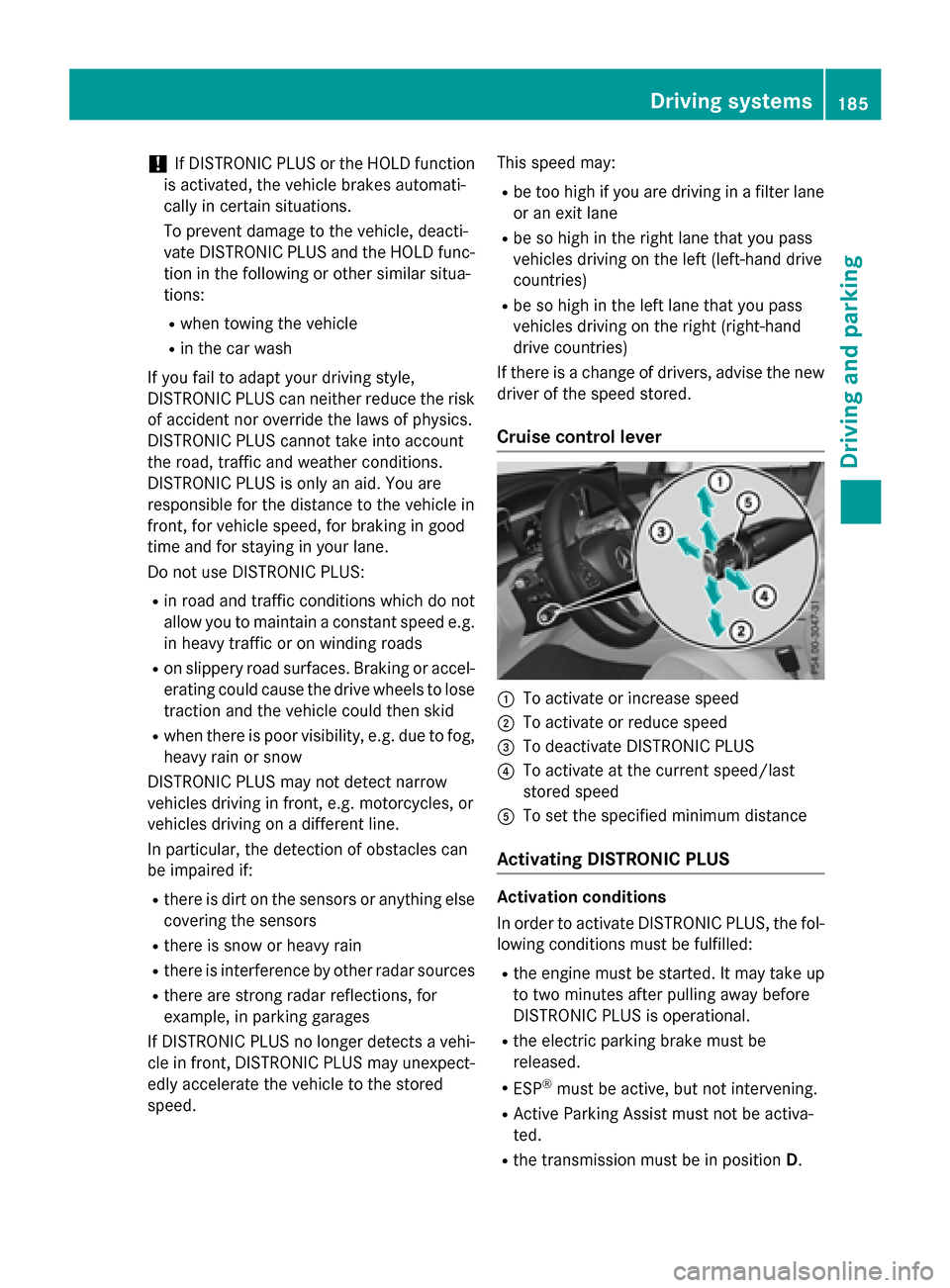
Cruise control lever
:To activate or increase speed
;To activate or reduce speed
=To deactivate DISTRONIC PLUS
?To activate at the current speed/last
stored speed
ATo set the specified minimum distance
Activating DISTRONIC PLUS
Activation conditions
In order to activate DISTRONIC PLUS, the fol-
lowing conditions must be fulfilled:
Rthe engine must be started. It may take up
to two minutes after pulling away before
DISTRONIC PLUS is operational.
Rthe electric parking brake must be
released.
RESP®must be active, but not intervening.
RActive Parking Assist must not be activa-
ted.
Rthe transmission must be in position D.
Driving systems185
Driving and parking
Z