fuel MERCEDES-BENZ GLC-Class 2016 X253 User Guide
[x] Cancel search | Manufacturer: MERCEDES-BENZ, Model Year: 2016, Model line: GLC-Class, Model: MERCEDES-BENZ GLC-Class 2016 X253Pages: 418, PDF Size: 9.23 MB
Page 35 of 418
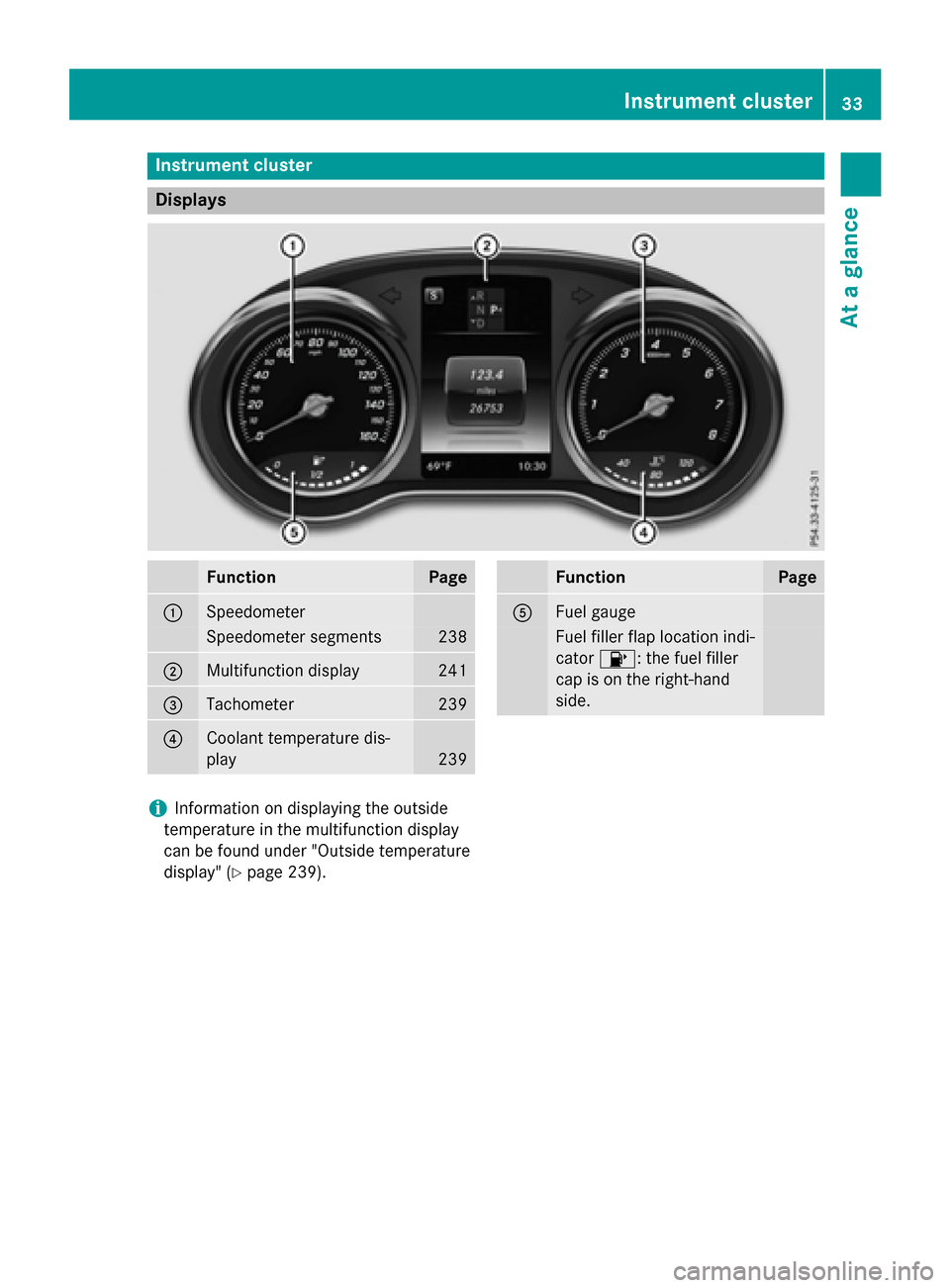
Instrument cluster
Displays
FunctionPage
:Speedometer
Speedometer segments238
;Multifunction display241
=Tachometer239
?Coolant temperature dis-
play
239
FunctionPage
AFuel gauge
Fuel filler flap location ind i-
cator 8: the fuel filler
cap ison the right-hand
side.
iIn formation on displaying the outside
temperature inthe multifunction display
can befound under "Outside temperature
disp lay" (
Ypage 239).
Instrument cluster33
At a glance
Page 36 of 418
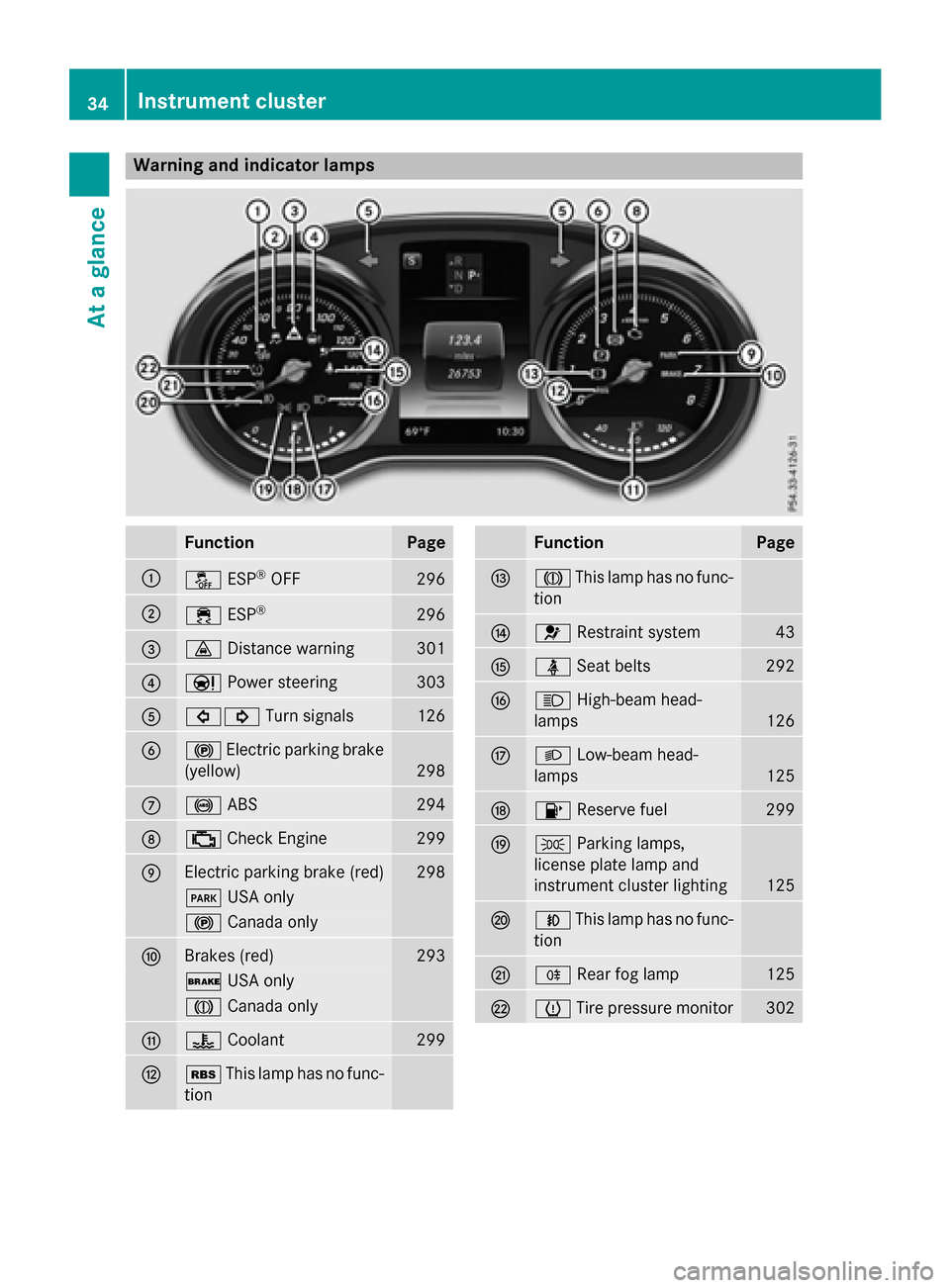
Warning and indicator lamps
FunctionPage
:åESP®OFF296
;÷ESP®296
=·Distance warning301
?ÐPower steering303
A#! Turn signals126
B!Electric parking brake
(yellow)
298
C! ABS294
D;Check Engine299
EElectric parking brake (red)298
F USA only
!Canada only
FBrakes (red)293
$USA only
JCanada only
G?Coolant299
HéThis lamp has no func-
tion
FunctionPage
IJ This lamp has no func-
tion
J6 Restraint system43
KüSeat belts292
LKHigh-beam head-
lamps
126
ML Low-beam head-
lamps
125
N8 Reserve fuel299
OTParking lamps,
license plate lamp and
instrument cluster lighting
125
PN This lamp has no func-
tion
QR Rear fog lamp125
RhTire pressure monitor302
34Instrument cluster
At a glance
Page 62 of 418
PRE-SAFE®PLUS does not intervene if the
vehicle is backing up.
When driving, or when parking or exiting a
parking space with assistance from Active
Parking Assist, PRE-SAFE
®PLUS will not
apply the brakes.
Function
PRE-SAFE®PLUS intervenes in certain situa-
tions if the radar sensor system detects an
imminent head-on or rear-end collision.
PRE-SAFE
®PLUS takes the following meas-
ures depending on the hazardous situation
detected:
Rif the radar sensor system detects that a
head-on collision is imminent, the seat
belts are pre-tensioned.
Rif the radar sensor system detects that a
rear-end collision is imminent:
-the brake pressure is increased if the
driver applies the brakes when the vehi-
cle is stationary.
-the seat belts are pre-tensioned.
The PRE-SAFE
®PLUS braking application is
canceled:
Rif the accelerator pedal is depressed when
a gear is engaged
Rif the risk of a collision passes or is no lon- ger detected
Rif DISTRONIC PLUS indicates an intention
to pull away
If the hazardous situation passes without
resulting in an accident, the original settings
are restored.
Automatic measures after an acci-
dent
Immediately after an accident, the following
measures are implemented, depending on
the type and severity of the impact:
Rthe hazard warning lamps are activated
Rthe emergency lighting is activated
Rthe vehicle doors are unlocked
Rthe front side windows are lowered
Rvehicles with a memory function: the elec-
trically adjustable steering wheel is raised
Rthe engine is switched off and the fuel sup- ply is cut off
Rvehicles with mbrace: automatic emer-
gency call
Children in the vehicle
Important safety notes
Accident statistics show that children
secured in the rear seats are safer than chil-
dren secured in the front-passenger seat. For
this reason, Mercedes-Benz strongly advises
that you install a child restraint system on a
rear seat. Children are generally better pro-
tected there.
If a child younger than twelve years old and
under 5 ft (1.50 m) in height is traveling in the
vehicle:
Ralways secure the child in a child restraint
system suitable for Mercedes-Benz vehi-
cles. The child restraint system must be
appropriate to the age, weight and size of
the child
Rbe sure to observe the instructions and
safety notes in this section in addition to
the child restraint system manufacturer's
installation instructions
Rbe sure to observe the instructions and
safety notes on the "Occupant Classifica-
tion System (OCS)" (
Ypage 51)
GWARNING
If you leave children unsupervised in the vehi-
cle, they could set it in motion by, for example:
Rrelease the parking brake.
Rshift the automatic transmission out of the
parking position P.
Rstart the engine.
60Children in the vehicle
Safety
Page 85 of 418
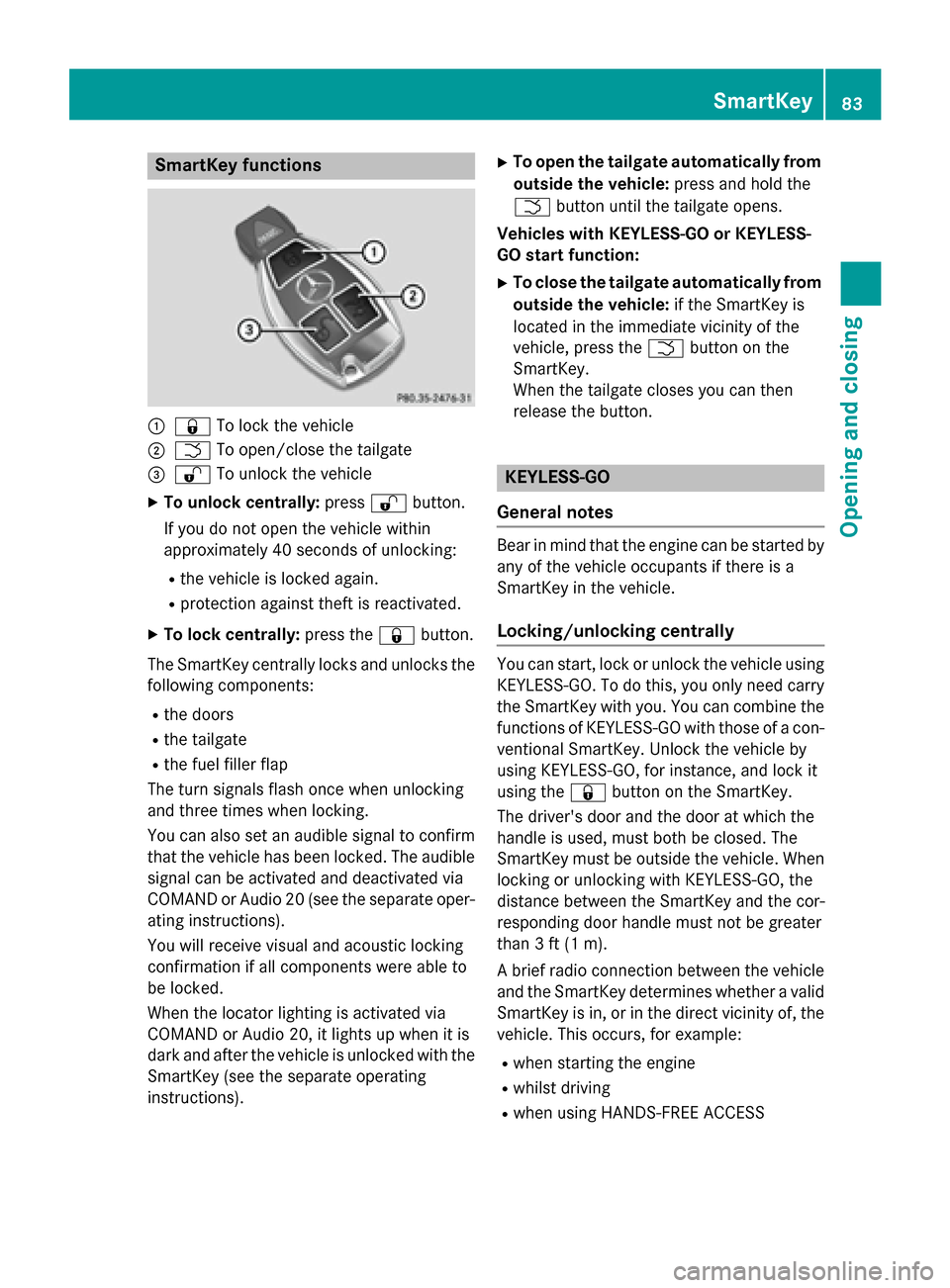
SmartKey functions
:&To lock the vehicle
;FTo open/close the tailgate
=%To unlock the vehicle
XTo unlock centrally: press%button.
If you do not open the vehicle within
approximately 40 seconds of unlocking:
Rthe vehicle is locked again.
Rprotection against theft is reactivated.
XTo lock centrally: press the&button.
The SmartKey centrally locks and unlocks the following components:
Rthe doors
Rthe tailgate
Rthe fuel filler flap
The turn signals flash once when unlocking
and three times when locking.
You can also set an audible signal to confirm
that the vehicle has been locked. The audible
signal can be activated and deactivated via
COMAND or Audio 20 (see the separate oper-
ating instructions).
You will receive visual and acoustic locking
confirmation if all components were able to
be locked.
When the locator lighting is activated via
COMAND or Audio 20, it lights up when it is
dark and after the vehicle is unlocked with the
SmartKey (see the separate operating
instructions).
XTo open the tailgate automatically from outside the vehicle: press and hold the
F button until the tailgate opens.
Vehicles with KEYLESS-GO or KEYLESS-
GO start function:
XTo close the tailgate automatically from
outside the vehicle: if the SmartKey is
located in the immediate vicinity of the
vehicle, press the Fbutton on the
SmartKey.
When the tailgate closes you can then
release the button.
KEYLESS-GO
General notes
Bear in mind that the engine can be started by
any of the vehicle occupants if there is a
SmartKey in the vehicle.
Locking/unlocking centrally
You can start, lock or unlock the vehicle using KEYLESS-GO. To do this, you only need carry
the SmartKey with you. You can combine the
functions of KEYLESS-GO with those of a con-ventional SmartKey. Unlock the vehicle by
using KEYLESS-GO, for instance, and lock it
using the &button on the SmartKey.
The driver's door and the door at which the
handle is used, must both be closed. The
SmartKey must be outside the vehicle. When
locking or unlocking with KEYLESS-GO, the
distance between the SmartKey and the cor-
responding door handle must not be greater
than 3 ft (1 m).
A brief radio connection between the vehicle
and the SmartKey determines whether a valid
SmartKey is in, or in the direct vicinity of, the
vehicle. This occurs, for example:
Rwhen starting the engine
Rwhilst driving
Rwhen using HANDS-FREE ACCESS
SmartKey83
Opening and closing
Z
Page 86 of 418
Rwhen the external door handles are
touched
Rduring convenience closing
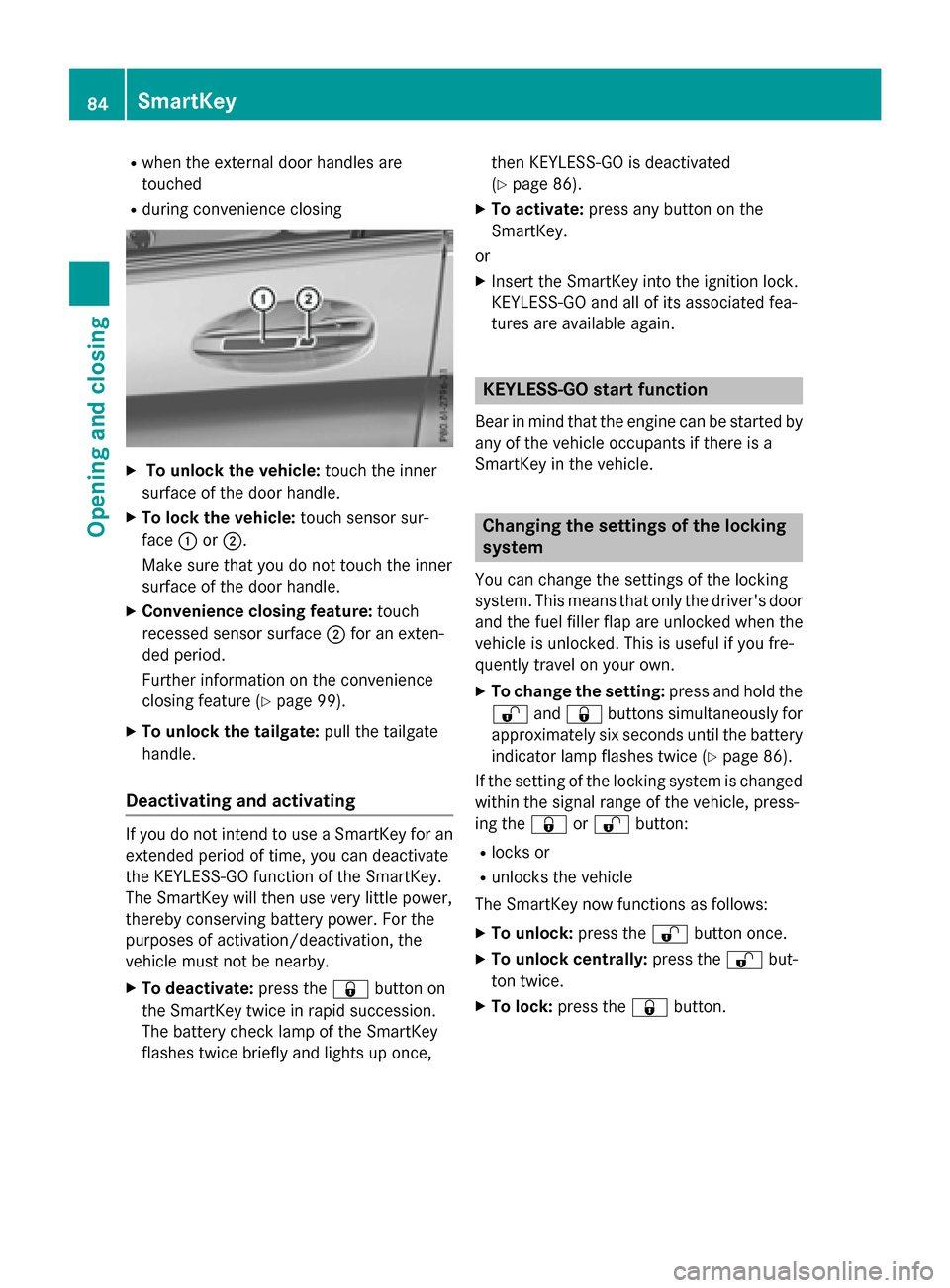
XTo unlock the vehicle:touch the inner
surface of the door handle.
XTo lock the vehicle: touch sensor sur-
face :or;.
Make sure that you do not touch the inner
surface of the door handle.
XConvenience closing feature: touch
recessed sensor surface ;for an exten-
ded period.
Further information on the convenience
closing feature (
Ypage 99).
XTo unlock the tailgate: pull the tailgate
handle.
Deactivating and activating
If you do not intend to use a SmartKey for an
extended period of time, you can deactivate
the KEYLESS-GO function of the SmartKey.
The SmartKey will then use very little power,
thereby conserving battery power. For the
purposes of activation/deactivation, the
vehicle must not be nearby.
XTo deactivate: press the&button on
the SmartKey twice in rapid succession.
The battery check lamp of the SmartKey
flashes twice briefly and lights up once, then KEYLESS-GO is deactivated
(
Ypage 86).
XTo activate:
press any button on the
SmartKey.
or
XInsert the SmartKey into the ignition lock.
KEYLESS-GO and all of its associated fea-
tures are available again.
KEYLESS-GO start function
Bear in mind that the engine can be started by
any of the vehicle occupants if there is a
SmartKey in the vehicle.
Changing the settings of the locking
system
You can change the settings of the locking
system. This means that only the driver's door
and the fuel filler flap are unlocked when the
vehicle is unlocked. This is useful if you fre-
quently travel on your own.
XTo change the setting: press and hold the
% and& buttons simultaneously for
approximately six seconds until the battery
indicator lamp flashes twice (
Ypage 86).
If the setting of the locking system is changed
within the signal range of the vehicle, press-
ing the &or% button:
Rlocks or
Runlocks the vehicle
The SmartKey now functions as follows:
XTo unlock: press the%button once.
XTo unlock centrally: press the%but-
ton twice.
XTo lock: press the &button.
84SmartKey
Opening and closing
Page 87 of 418
The KEYLESS-GO function is changed as fol-
lows:
XTo unlock the driver's door:touch the
inner surface of the door handle on the
driver's door.
XTo unlock centrally: touch the inner sur-
face of the door handle on the front-
passenger door or the rear door.
XTo lock centrally: touch the outer sensor
surface on one of the door handles.
XTo restore the factory settings: press
and hold the %and& buttons simul-
taneously for approximately six seconds
until the battery check lamp flashes twice
(
Ypage 86).
Mechanical key
General notes
If the vehicle can no longer be locked or
unlocked with the SmartKey or KEYLESS-GO,
use the mechanical key.
If you use the mechanical key to unlock and
open the driver's door, the anti-theft alarm
system will be triggered. Switch off the alarm
(
Ypage 78).
If you unlock the vehicle using the mechanical
key, the fuel filler flap will not be unlocked
automatically.
XTo unlock the fuel filler flap: insert the
SmartKey into the ignition lock.
Removing the mechanical key
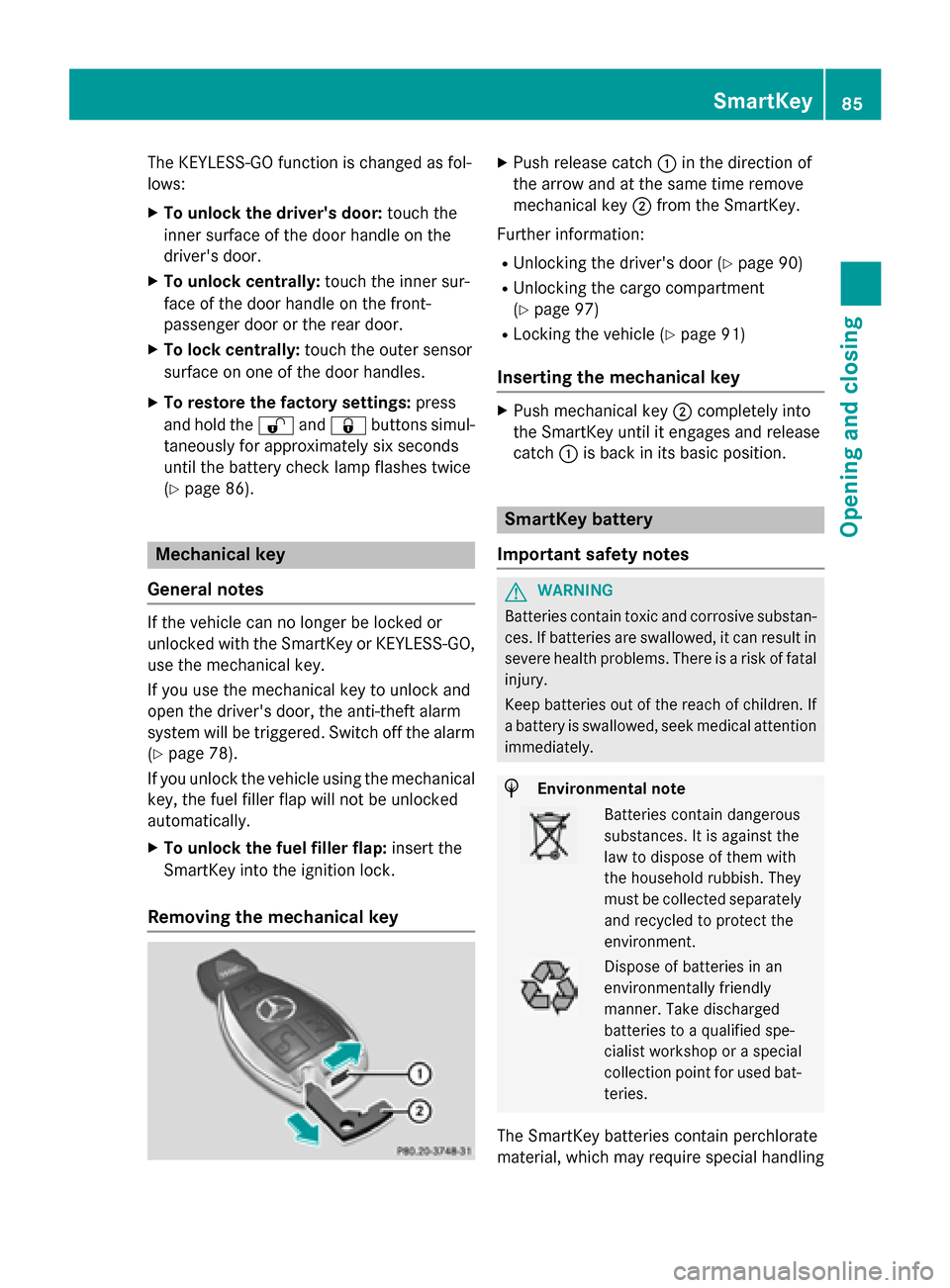
XPush release catch :in the direction of
the arrow and at the same time remove
mechanical key ;from the SmartKey.
Further information:
RUnlocking the driver's door (Ypage 90)
RUnlocking the cargo compartment
(
Ypage 97)
RLocking the vehicle (Ypage 91)
Inserting the mechanical key
XPush mechanical key ;completely into
the SmartKey until it engages and release
catch :is back in its basic position.
SmartKey battery
Important safety notes
GWARNING
Batteries contain toxic and corrosive substan- ces. If batteries are swallowed, it can result in
severe health problems. There is a risk of fatalinjury.
Keep batteries out of the reach of children. If
a battery is swallowed, seek medical attention
immediately.
HEnvironmental note
Batteries contain dangerous
substances. It is against the
law to dispose of them with
the household rubbish. They
must be collected separately and recycled to protect the
environment.
Dispose of batteries in an
environmentally friendly
manner. Take discharged
batteries to a qualified spe-
cialist workshop or a special
collection point for used bat-
teries.
The SmartKey batteries contain perchlorate
material, which may require special handling
SmartKey85
Opening and closing
Z
Page 92 of 418
Meanwhile, the fuel filler flap will not be
locked or unlocked.
You cannot unlock the vehicle centrally from
the inside if the vehicle has been locked with
the SmartKey or KEYLESS-GO.
If the vehicle has been locked with the Smart-
Key or with KEYLESS-GO, opening a door from the inside will trigger the anti-theft alarm sys-
tem. Switch off the alarm (
Ypage 78).
When a locked door is opened from inside the
vehicle, the previous unlocking process will
be acknowledged if the vehicle:
Rhas been locked with the locking button for
the central locking or
Rhas been locked automatically
The vehicle will be fully unlocked if it had pre-
viously been fully unlocked. If only the driver's
door had been previously unlocked, only the
door which has been opened from the inside
is unlocked.
Automatic locking feature
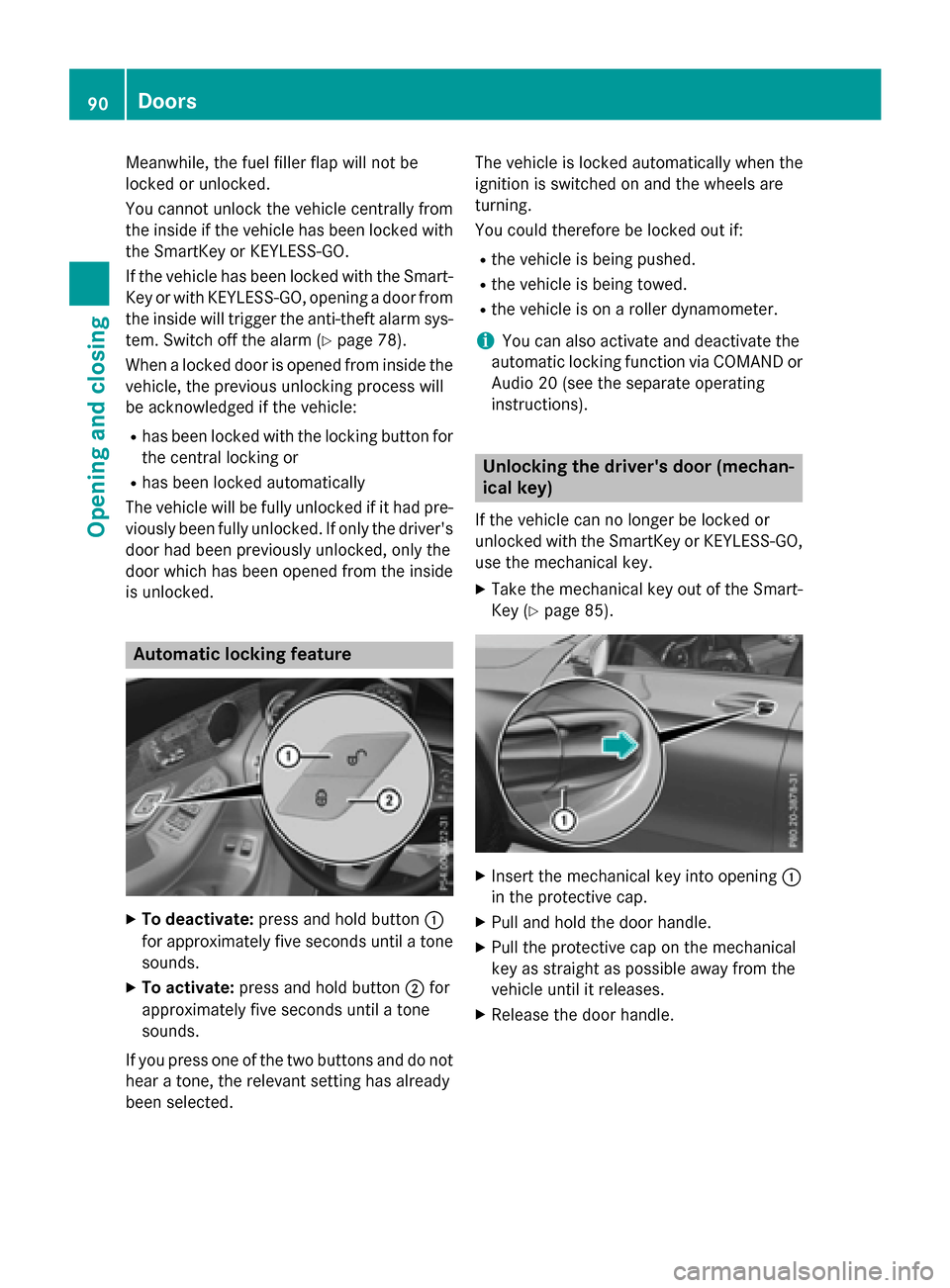
XTo deactivate: press and hold button :
for approximately five seconds until a tone sounds.
XTo activate: press and hold button ;for
approximately five seconds until a tone
sounds.
If you press one of the two buttons and do not
hear a tone, the relevant setting has already
been selected. The vehicle is locked automatically when the
ignition is switched on and the wheels are
turning.
You could therefore be locked out if:
Rthe vehicle is being pushed.
Rthe vehicle is being towed.
Rthe vehicle is on a roller dynamometer.
iYou can also activate and deactivate the
automatic locking function via COMAND or
Audio 20 (see the separate operating
instructions).
Unlocking the driver's door (mechan-
ical key)
If the vehicle can no longer be locked or
unlocked with the SmartKey or KEYLESS-GO,
use the mechanical key.
XTake the mechanical key out of the Smart-
Key (
Ypage 85).
XInsert the mechanical key into opening :
in the protective cap.
XPull and hold the door handle.
XPull the protective cap on the mechanical
key as straight as possible away from the
vehicle until it releases.
XRelease the door handle.
90Doors
Opening and closing
Page 94 of 418
XMake sure that the doors and the tailgate
are locked.
XCarefully press the protective cap onto the
lock cylinder until it engages and is seated
firmly. Do not pull the door handle when
doing so.
If you lock the vehicle as described above, the
fuel filler flap is not locked. The anti-theft
alarm system is not armed.
Cargo compartment
Important safety notes
GWARNING
Combustion engines emit poisonous exhaust
gases such as carbon monoxide. If the tailgate
is open when the engine is running, particu-
larly if the vehicle is moving, exhaust fumes
could enter the passenger compartment.
There is a risk of poisoning.
Turn off the engine before opening the tail-
gate. Never drive with the tailgate open.
GWARNING
If objects, luggage or loads are not secured or
not secured sufficiently, they could slip, tip
over or be flung around and thereby hit vehicle
occupants. There is a risk of injury, particu-
larly in the event of sudden braking or a sud-
den change in direction.
Always store objects so that they cannot be
flung around. Secure objects, luggage or
loads against slipping or tipping before the
journey.
!The tailgate swings upwards and to the
rear when opened. Therefore, make sure
that there is sufficient clearance above and
behind the tailgate.
The opening dimensions of the tailgate can be
found in the "Vehicle data" section
(
Ypage 415).
You can limit the opening angle of the tailgate
(
Ypage 97). Do not leave the SmartKey in the cargo com-
partment. You could otherwise lock yourself
out.
You should preferably place luggage or loads
in the cargo compartment. Observe the load-
ing guidelines (
Ypage 306).
Tailgate obstruction detection with
reversing feature
Vehicles with remote tailgate closing fea-
ture: the tailgate is equipped with automatic
obstacle recognition with reversing feature. If
a solid object blocks or restricts the tailgate
when automatically opening, this procedure
is stopped. If a solid object blocks or restricts
the tailgate when automatically closing, the
trunk lid automatically opens again slightly.
The automatic obstacle recognition with
reversing feature is only an aid. It is not a
substitute for your attentiveness when open-
ing and closing the tailgate.
GWARNING
The reversing feature does not react:
Rto soft, light and thin objects, e.g. small fin-
gers
Rover the last 1/3 in (8 mm) of the closing
movement
This means that the reversing feature cannot
prevent someone being trapped in these sit-
uations. There is a risk of injury.
Make sure that no body parts are in close
proximity during the closing procedure.
If somebody becomes trapped:
Rpress the Fbutton on the SmartKey, or
Rpull or press the remote operating switch
on the driver's door or
Rpress the closing or locking button on the
tailgate or
Rpull the handle on the tailgate
Vehicles with HANDS-FREE ACCESS: it is
also possible to stop the closing process by
92Cargo compartment
Opening and closing
Page 153 of 418
Useful information............................152
Notes on breaking-in a new vehi-
cle ....................................................... 152
Driving ............................................... 152
DYNAMIC SELECT switch .................161
Automatic transmission ...................161
Refueling ............................................ 169
Parking ............................................... 172
Driving tips ........................................ 176
Driving systems ................................ 181
Towing a trailer ................................. 227
151
Driving and parking
Page 158 of 418
If the engine will not start:
XRemove the SmartKey from the ignition
lock.
XReinsert the SmartKey into the ignition lock
after a short waiting period.
XTurn the SmartKey to position2in the igni-
tion lock (
Ypage 153).
The indicator lamps in the instrument clus-
ter light up (
Ypage 291).
XTurn the SmartKey to position 3
(
Ypage 153) in the ignition lock and release
it as soon as the engine is running.
Starting procedure with the Start/Stop
button
The Start/Stop button is only available on
vehicles with KEYLESS-GO or the KEYLESS-
GO start function.
The Start/Stop button can be used to start
the vehicle manually without inserting the
SmartKey into the ignition lock. The Start/
Stop button must be inserted in the ignition
lock and the SmartKey must be in the vehicle.
This mode for starting the engine operates
independently of the ECO start/stop auto-
matic engine start function.
You can start the engine if a valid SmartKey is
in the vehicle. Switch off the engine and
always take the SmartKey with you when
leaving the vehicle, even if you only leave it for
a short time. Pay attention to the important
safety notes.
XDepress the brake pedal and keep it
depressed.
XPress the Start/Stop button once
(
Ypage 153).
The engine starts.
Starting procedure via smartphone
Observe the important safety notes on start-
ing the engine (
Ypage 155).
You can also start your engine via your smart-
phone from outside the vehicle. In this case,
the previously selected climate control set- ting is activated. In this way you can cool or
heat the interior of the vehicle before starting
the journey.
Only start the engine via your smartphone if it
is safe to start and run the engine where your
vehicle is parked.
Observe the legal stipulations in the area
where your vehicle is parked. Engine start via
smartphone may be limited to certain coun-
tries or regions.
You can execute a maximum of two consec-
utive starting attempts via your smartphone.
If you insert the key into the ignition lock, you
can carry out two more starting attempts.
Once you have started the engine, you can
switch the engine off via your smartphone at
any time.
You can only start the engine via your smart- phone if:
Rthe key is in the ignition lock
Rpark position Pis selected
Rthe accelerator pedal is not depressed
Rthe anti-theft alarm system is not activated
Rthe panic alarm is not activated
Rthe hazard warning lamps are switched off
Rthe hood is closed.
Rthe doors are closed and locked
Rthe windows and sliding sunroof are closed
Also make sure that:
Rthe fuel tank is sufficiently filled
Rthe starter battery is sufficiently charged
GWARNING
Limbs could be crushed or trapped if the
engine is started unintentionally during ser-
vice or maintenance work. There is a risk of
injury.
Always secure the engine against uninten-
tional starting before carrying out mainte-
nance or repair work.
156Driving
Driving and parking