lane assist MERCEDES-BENZ GLC-Class 2016 X253 User Guide
[x] Cancel search | Manufacturer: MERCEDES-BENZ, Model Year: 2016, Model line: GLC-Class, Model: MERCEDES-BENZ GLC-Class 2016 X253Pages: 418, PDF Size: 9.23 MB
Page 194 of 418
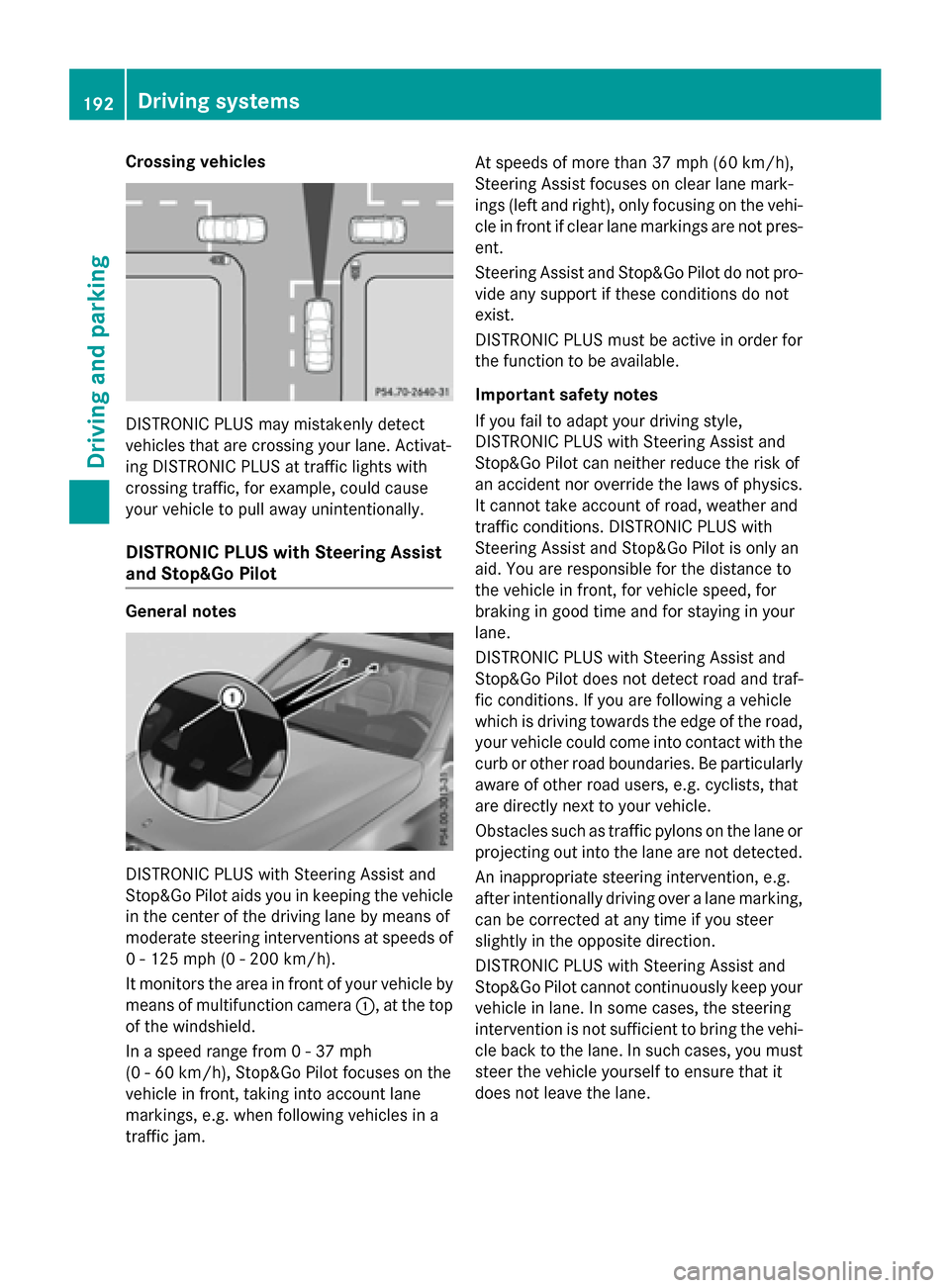
Crossing vehicles
DISTRONIC PLUS may mistakenly detect
vehicles that are crossing your lane. Activat-
ing DISTRONIC PLUS at traffic lights with
crossing traffic, for example, could cause
your vehicle to pull away unintentionally.
DISTRONIC PLUS with Steering Assist
and Stop&Go Pilot
General notes
DISTRONIC PLUS with Steering Assist and
Stop&Go Pilot aids you in keeping the vehicle
in the center of the driving lane by means of
moderate steering interventions at speeds of
0 - 125 mph (0 - 200 km/h).
It monitors the area in front of your vehicle by
means of multifunction camera:, at the top
of the windshield.
In a speed range from 0 - 37 mph
(0 - 60 km/h), Stop&Go Pilot focuses on the
vehicle in front, taking into account lane
markings, e.g. when following vehicles in a
traffic jam. At speeds of more than 37 mph (60 km/h),
Steering Assist focuses on clear lane mark-
ings (left and right), only focusing on the vehi-
cle in front if clear lane markings are not pres-
ent.
Steering Assist and Stop&Go Pilot do not pro-
vide any support if these conditions do not
exist.
DISTRONIC PLUS must be active in order for
the function to be available.
Important safety notes
If you fail to adapt your driving style,
DISTRONIC PLUS with Steering Assist and
Stop&Go Pilot can neither reduce the risk of
an accident nor override the laws of physics.
It cannot take account of road, weather and
traffic conditions. DISTRONIC PLUS with
Steering Assist and Stop&Go Pilot is only an
aid. You are responsible for the distance to
the vehicle in front, for vehicle
speed, f
or
braking in good time and for staying in your
lane.
DISTRONIC PLUS with Steering Assist and
Stop&Go Pilot does not detect road and traf-
fic conditions. If you are following a vehicle
which is driving towards the edge of the road,
your vehicle could come into contact with the
curb or other road boundaries. Be particularly aware of other road users, e.g. cyclists, that
are directly next to your vehicle.
Obstacles such as traffic pylons on the lane or
projecting out into the lane are not detected.
An inappropriate steering intervention, e.g.
after intentionally driving over a lane marking,can be corrected at any time if you steer
slightly in the opposite direction.
DISTRONIC PLUS with Steering Assist and
Stop&Go Pilot cannot continuously keep your
vehicle in lane. In some cases, the steering
intervention is not sufficient to bring the vehi-
cle back to the lane. In such cases, you must
steer the vehicle yourself to ensure that it
does not leave the lane.
192Driving systems
Driving and parking
Page 195 of 418
The system may be impaired or may not func-
tion if:
Rthere is poor visibility, e.g. due to insuffi-
cient illumination of the road, or due to
snow, rain, fog or spray
Rthere is glare, e.g. from oncoming traffic,
the sun or reflections (e.g. when the road
surface is wet)
Rthe windshield is dirty, fogged up, damaged
or covered, for instance by a sticker, in the
vicinity of the camera
Rthere are no, several or unclear lane mark-
ings for a lane, e.g. in areas with road con-struction work
Rthe lane markings are worn away, dark or
covered up, e.g. by dirt or snow
Rthe distance to the vehicle in front is too
small and the lane markings thus cannot be
detected
Rthe lane markings change quickly, e.g.
lanes branch off, cross one another or
merge
Rthe road is narrow and winding
Rthere are strong shadows cast on the road
The system is switched to passive and no lon- ger assists you by performing steering inter-
ventions if:
Ryou actively change lane
Ryou switch on the turn signal
Rtake your hands off the steering wheel or do
not steer for a prolonged period of time
iSteering Assist and Stop&Go Pilot are
activated again automatically after a lane
change is completed.
Steering Assist and Stop&Go Pilot do not pro-
vide any support:
Ron very sharp corners
Rwhen a loss of tire pressure or a defective
tire has been detected and displayed.
Pay attention also to the important safety
notes for DISTRONIC PLUS (
Ypage 184).
The steering interventions are carried out
with a limited steering moment. The system requires the driver to keep his hands on the
steering wheel and to steer himself.
If you do not steer yourself or if you take your
hands off the steering wheel for a prolonged
period of time, the system will first alert you
with a visual warning. A steering wheel sym-
bol appears in the multifunction display. If you
have still not started to steer and have not
taken hold of
the st
eering wheel after five
seconds at the latest, a warning tone also
sounds to remind you to take control of the
vehicle. Steering Assist and Stop&Go Pilot are
switched to passive. DISTRONIC PLUS
remains active.
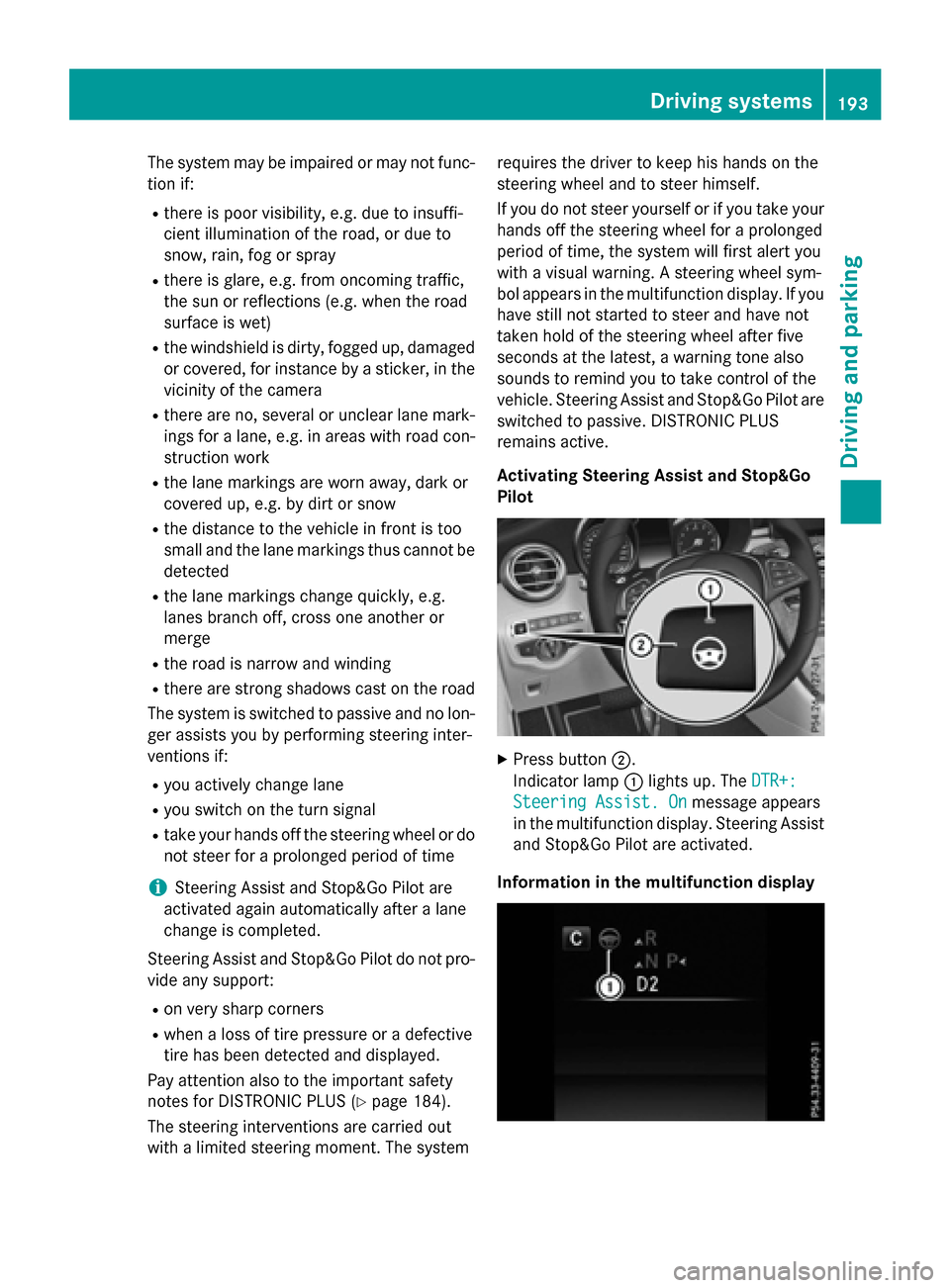
Activating Steering Assist and Stop&Go
Pilot
XPress button ;.
Indicator lamp :lights up. The DTR+:
Steering Assist. Onmessage appears
in the multifunction display. Steering Assist
and Stop&Go Pilot are activated.
Information in the multifunction display
Driving systems193
Driving and parking
Z
Page 203 of 418
Problems with PARKTRONIC
ProblemPossible causes/consequences andMSolutions
Only the red segments
in the PARKTRONIC
warning displays are lit.
You also hear a warning
tone for approximately
two seconds.
PARKTRONIC is then
deactivated and the
indicator lamp on the
PARKTRONIC button
lights up.PARKTRONIC has malfunctioned and has switched off.
XIf problems persist, have PARKTRONIC checked at a qualified
specialist workshop.
Only the red segments
in the PARKTRONIC
warning displays are lit.
PARKTRONIC is then
deactivated.The PARKTRONIC sensors are dirty or there is interference.
XClean the PARKTRONIC sensors (Ypage 348).
XSwitch the ignition back on.
The problem may be caused by an external source of radio or
ultrasound waves.
XSee if PARKTRONIC functions in a different location.
Active Parking Assist
General notes
Active Parking Assist is an electronic parking
aid with ultrasound. It measures the road on
both sides of the vehicle. A parking symbol
indicates a suitable parking space. Active
steering intervention and brake application
can assist you during parking and when exit-
ing a parking space. You may also use
PARKTRONIC (
Ypage 198).
Important safety notes
Active Parking Assist is merely an aid. It is not
a replacement for your attention to your
immediate surroundings. You are always
responsible for safe maneuvering, parking
and exiting a parking space. Make sure that
no persons, animals or objects are in the
maneuvering range.
When PARKTRONIC is switched off, Active
Parking Assist is also unavailable.
GWARNING
While parking or pulling out of a parking
space, the vehicle swings out and can drive
onto areas of the oncoming lane. This could
result in a collision with another road user.
There is a risk of an accident.
Pay attention to other road users. Stop the
vehicle if necessary or cancel the Active Park- ing Assist parking procedure.
!If unavoidable, you should drive over
obstacles such as curbs slowly and not at a
sharp angle. Otherwise, you may damage
the wheels or tires.
Active Parking Assist may also display spaces
not suitable for parking, e.g.:
Rwhere parking or stopping is prohibited
Rin front of driveways or entrances and exits
Ron unsuitable surfaces
Driving systems201
Driving and parking
Z
Page 215 of 418
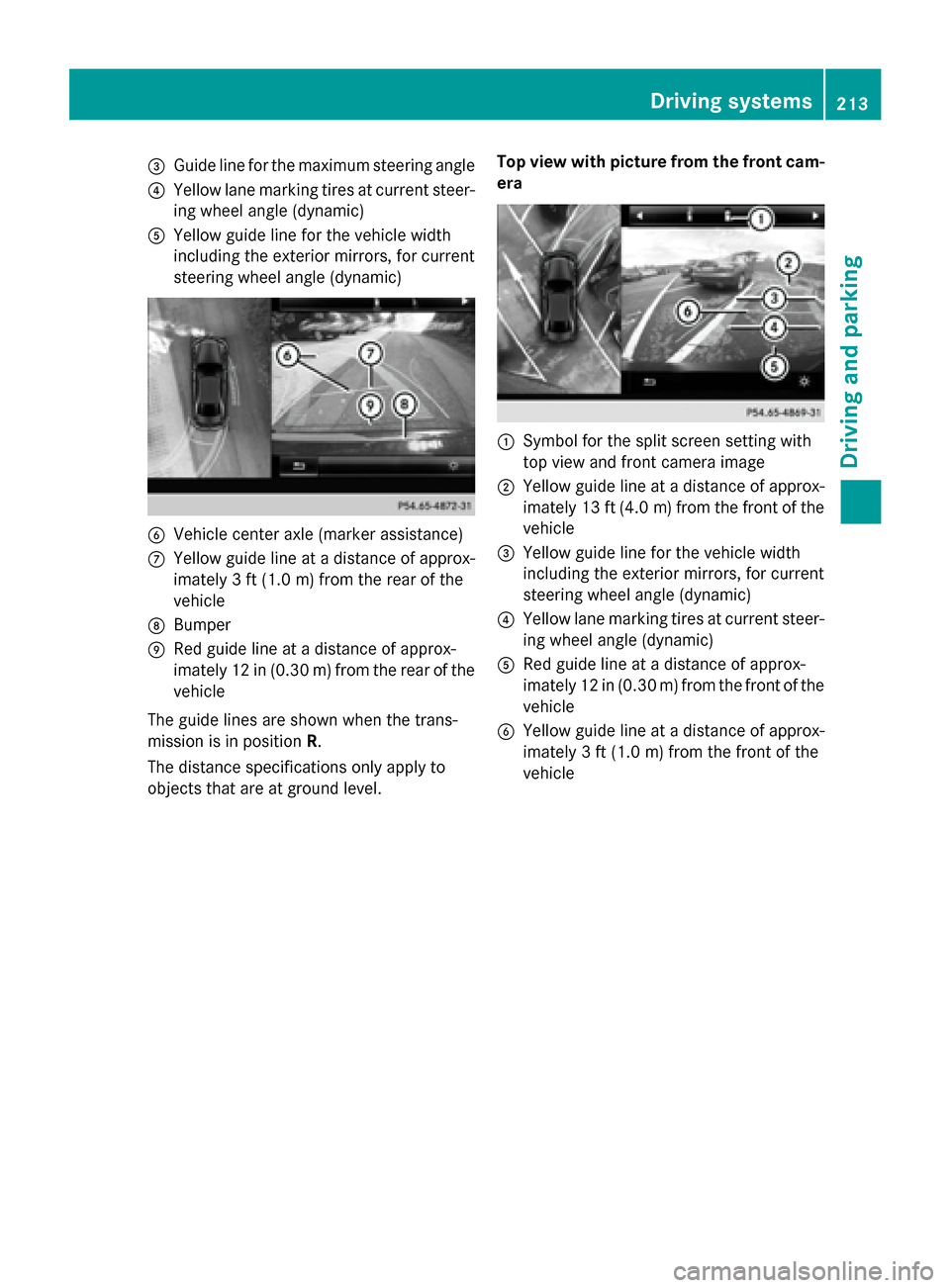
=Guide line for the maximum steering angle
?Yellow lane marking tires at current steer-
ing wheel angle (dynamic)
AYellow guide line for the vehicle width
including the exterior mirrors, for current
steering wheel angle (dynamic)
BVehicle center axle (marker assistance)
CYellow guide line at a distance of approx-
imately 3 ft(1.0m) from the rear of the
vehicle
DBumper
ERed guide line at a distance of approx-
imately 12 in (0.30 m) fromthe rear of the
vehicle
The guide lines are shown when the trans-
mission is in position R.
The distance specifications only apply to
objects that are at ground level. Top view with picture from the front cam-
era
:Symbol for the split screen setting with
top view and front camera image
;Yellow guide line at a distance of approx-
imately 13 ft (4.0
m)from the front of the
vehicle
=Yellow guide line for the vehicle width
including the exterior mirrors, for current
steering wheel angle (dynamic)
?Yellow lane marking tires at current steer-
ing wheel angle (dynamic)
ARed guide line at a distance of approx-
imately 12 in (0.30 m) from the front of the
vehicle
BYellow guide line at a distance of approx-
imately 3 ft (1.0 m) from the front of the
vehicle
Driving systems213
Driving and parking
Z
Page 217 of 418
125 mph (200 km/h) range. If ATTEN-
TION ASSIST detects typical indicators of fati-
gue or increasing lapses in concentration on
the part of the driver, it suggests taking a
break.
Important safety notes
ATTENTION ASSIST is only an aid to the
driver. It might not always recognize fatigue
or increasing inattentiveness in time or fail to
recognize them at all. The system is not a
substitute for a well-rested and attentive
driver.
The functionality of ATTENTION ASSIST is
restricted and warnings may be delayed or
not occur at all:
Rif the length of the journey is less than
approximately 30 minutes
Rif the road condition is poor, e.g. if the sur-face is uneven or if there are potholes
Rif there is a strong side wind
Rif you have adopted a sporty driving style
with high cornering speeds or high rates of
acceleration
Rif you are predominantly driving slower
than 37 mph (60 km/h) or faster than
125 mph (200 km/h)
Rif you are driving with the active Steer
Assist of DISTRONIC PLUS
Rif the time has been set incorrectly
Rin active driving situations, such as when
you change lanes or change your speed
The ATTENTION ASSIST tiredness assess-
ment is deleted and restarted when continu-
ing the journey, if:
Ryou switch off the engine
Ryou take off your seat belt and open the
driver's door, e.g. for a change of drivers or
to take a break
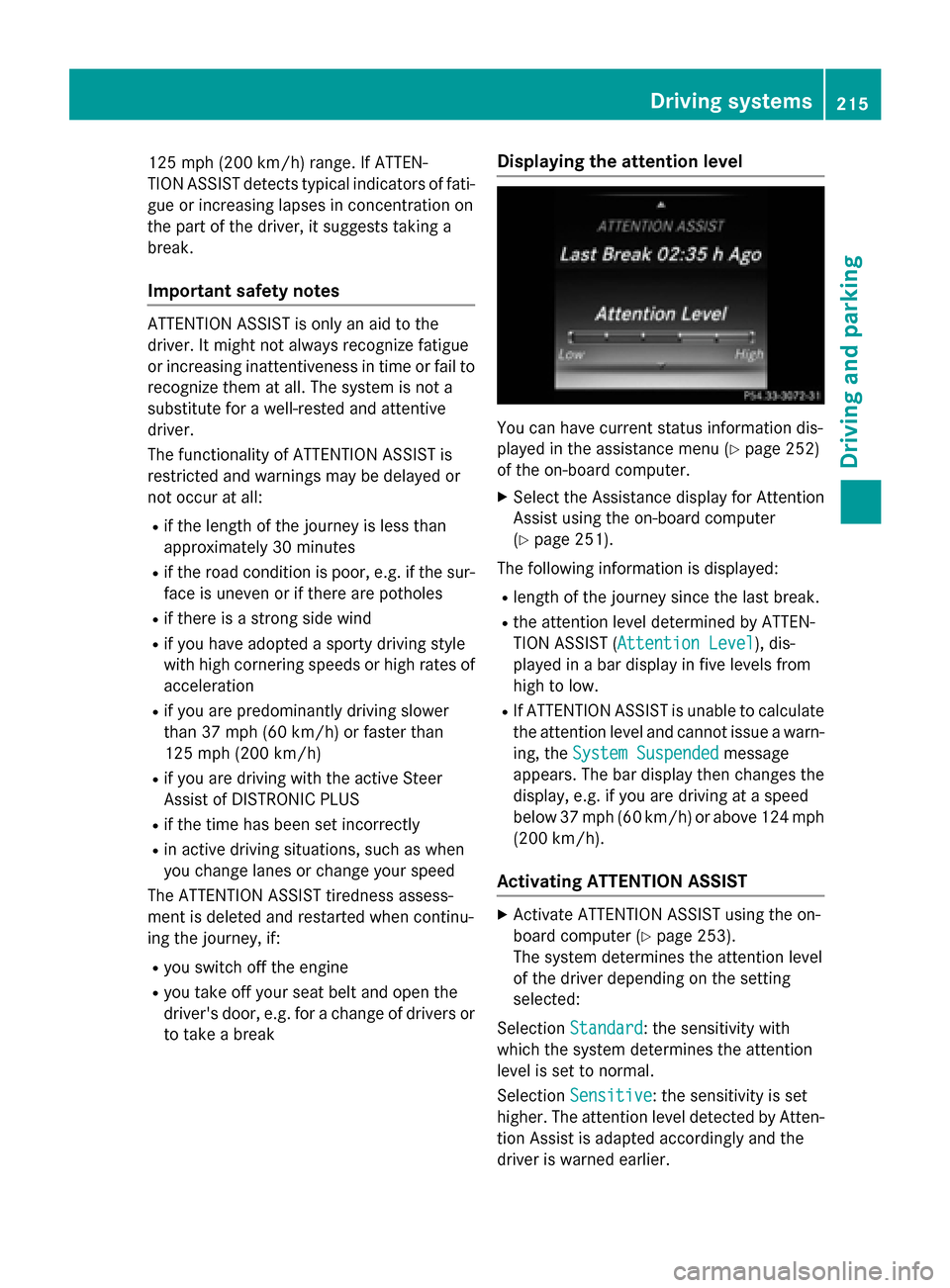
Displaying the attention level
You can have current status information dis-
played in the assistance menu (
Ypage 252)
of the on-board computer.
XSelect the Assistance display for Attention
Assist using the on-board computer
(
Ypage 251).
The following information is displayed:
Rlength of the journey since the last break.
Rthe attention level determined by ATTEN-
TION ASSIST ( Attention Level
), dis-
played in a bar display in five levels from
high to low.
RIf ATTENTION ASSIST is unable to calculate
the attention level and cannot issue a warn-
ing, the System Suspended
message
appears. The bar display then changes the
display, e.g. if you are driving at a speed
below 37 mph (60 km/h) or above 124 mph
(200 km/h).
Activating ATTENTION ASSIST
XActivate ATTENTION ASSIST using the on-
board computer (
Ypage 253).
The system determines the attention level
of the driver depending on the setting
selected:
Selection Standard
: the sensitivity with
which the system determines the attention
level is set to normal.
Selection Sensitive
: the sensitivity is set
higher. The attention level detected by Atten-
tion Assist is adapted accordingly and the
driver is warned earlier.
Driving systems215
Driving and parking
Z
Page 219 of 418
Instrument cluster display
Displaying the assistance graphic
XCallup the assistance graphics display
function using the on-board computer
(
Ypage 251).
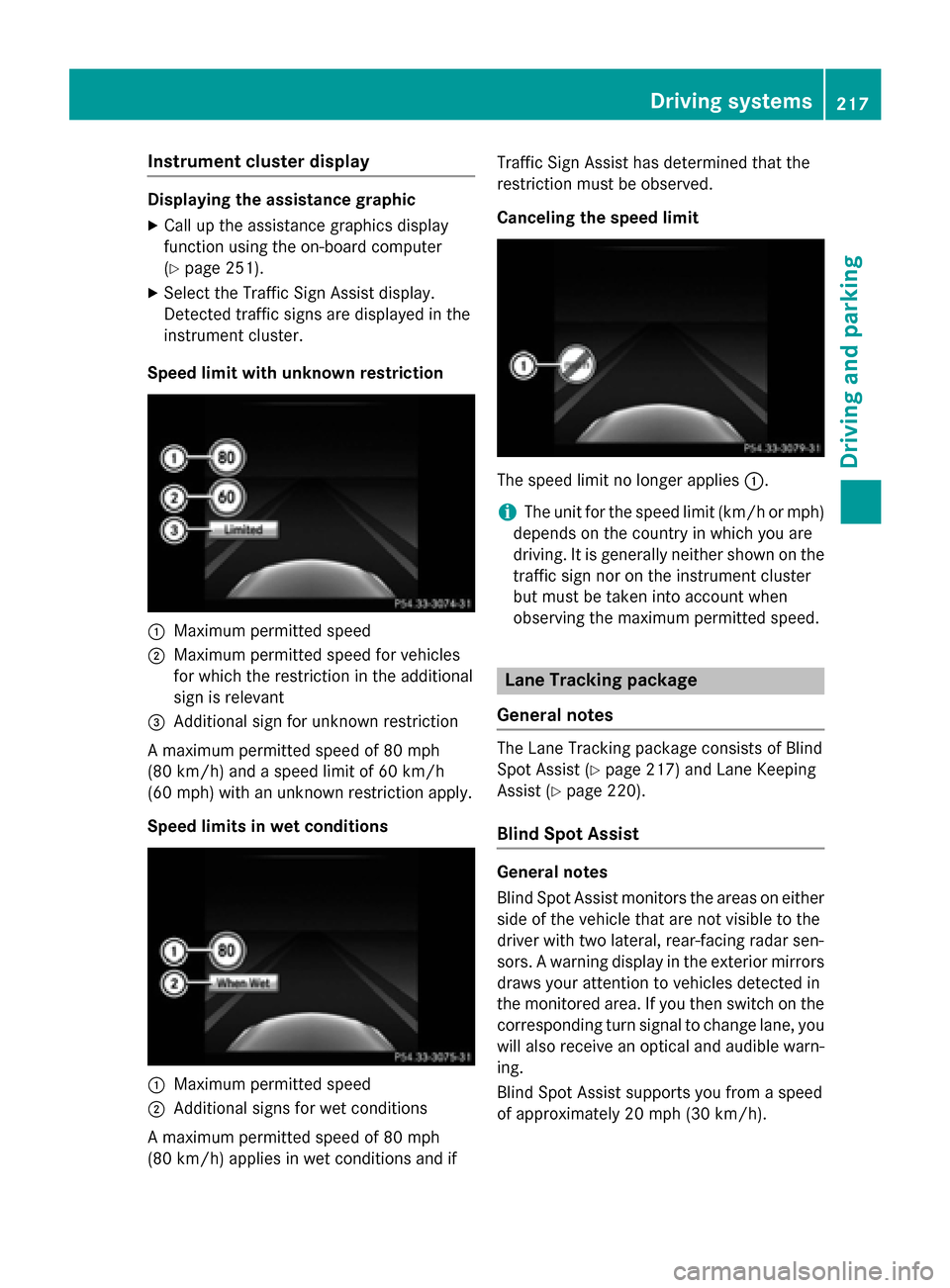
XSe lect the Traffic Sign Assist display.
Detected traff icsigns are displayed in the
instrument cluster.
Speed limit with unknown restriction
:Maximum permitted speed
;Maximum permitted speed for vehicles
for whic h the restriction inthe additional
sign isrelevant
=Ad ditional sign for unkno wnrestriction
A maximum permitted speed of 80 mph
(80 km/h) and a speed limit of 60 km /h
(60 mph) with an unkno wnrestriction apply.
Speed limits in wet conditions
:Maximum permitted speed
;Ad ditional signs for wet cond itions
A maximum permitted speed of 80 mph
(80 km/h) applies in wet cond itions and if Traffic
Sign Assist has determined that the
restriction must beobserved.
Canceling the speed limit
The speed limit no longer applies:.
iThe unit for the speed limit (km/h or mph)
depends on the country inwhich you are
driving. It isgeneral lyne ither shown on the
traff icsign nor on the instrument cluster
but must betaken into account when
observing the maximum permitted speed.
Lane Tracking package
General notes
The Lane Tracking package consists of Blind
Sp ot Assist (
Ypage 217) and Lane Keepin g
Assist (
Ypage 220).
Blind Spot Assist
Gene ral notes
Blind Spot Assist mon itors the areas on either
side of the vehicle that are not vis ibleto the
driver with two lateral, rear-facing radar sen-
sors. A warning displayinthe exterior mirrors
draws your attention to vehicles detected in
the mon itored area. Ifyou then switch on the
corresponding turn signal to change lane, you
will also receive an optical and audible warn-
ing.
Blind Spot Assist supports you from a speed
of approximately 20 mph (30 km/h).
Driving systems217
Driving and parking
Z
Page 220 of 418
Important safety notes
GWARNING
Blin dSpo t Assist does not react to:
Rvehicles overtaken too closely on the side,
plac ing them inthe blind spot area
Rvehicleswhic happr oach with a large speed
diff erential and overtake your veh icle
As a result, BlindSpo t Assist may not give
warnings insuch situations. There isa risk of
an acc ident.
Always observe the traff icconditions care-
fully, and maintain a safe lateral distance.
Blind Spot Assist is only an aid. It may fail to
detect some vehicles and is no substitute for
attentive driving. Always ensure that there is
sufficient distance to the side for other road
users and obstacles.
iUSA only:
This device has been approved by the FCC
as a "Vehicular Radar System". The radar
sensor is intended for use in an automotive
radar system only. Removing, tampering
with, or altering the device will void any
warranties, and is not permitted by the
FCC. Do not tamper with, alter, or use in
any non-approved way.
Any unauthorized modification to this
device could void the user’s authority to
operate the equipment.
Radar sensors
The radar sensors for Blind Spot Assist are
integrated into the rear bumper. Make sure
that the bumpers are free from dirt, ice or
slush. The sensors must not be covered, for
example by cycle rac ks or ov
erhanging loads.
Following a severe impact or in the event of
damage to the bumpers, have the function of
the radar sensors checked at a qualified spe-
cialist workshop. Blind Spot Assist may no
longer work properly. Monitoring area
In particular, the detection of obstacles can
be impaired if:
Rthere is dirt on the sensors or anything else
covering the sensors
Rthere is poor visibility, e.g. due to fog, heavy
rain, snow or spray
Rthere are narrow vehicles, e.g. motorcycles
or bicycles
Rthe road has very wide lanes
Rthe road has narrow lanes
Ryou are not driving in the middle of the lane
Rthere are barriers or similar lane borders
Vehicles in the monitoring range are then not indicated.
218Driving systems
Driving and parking
Page 221 of 418
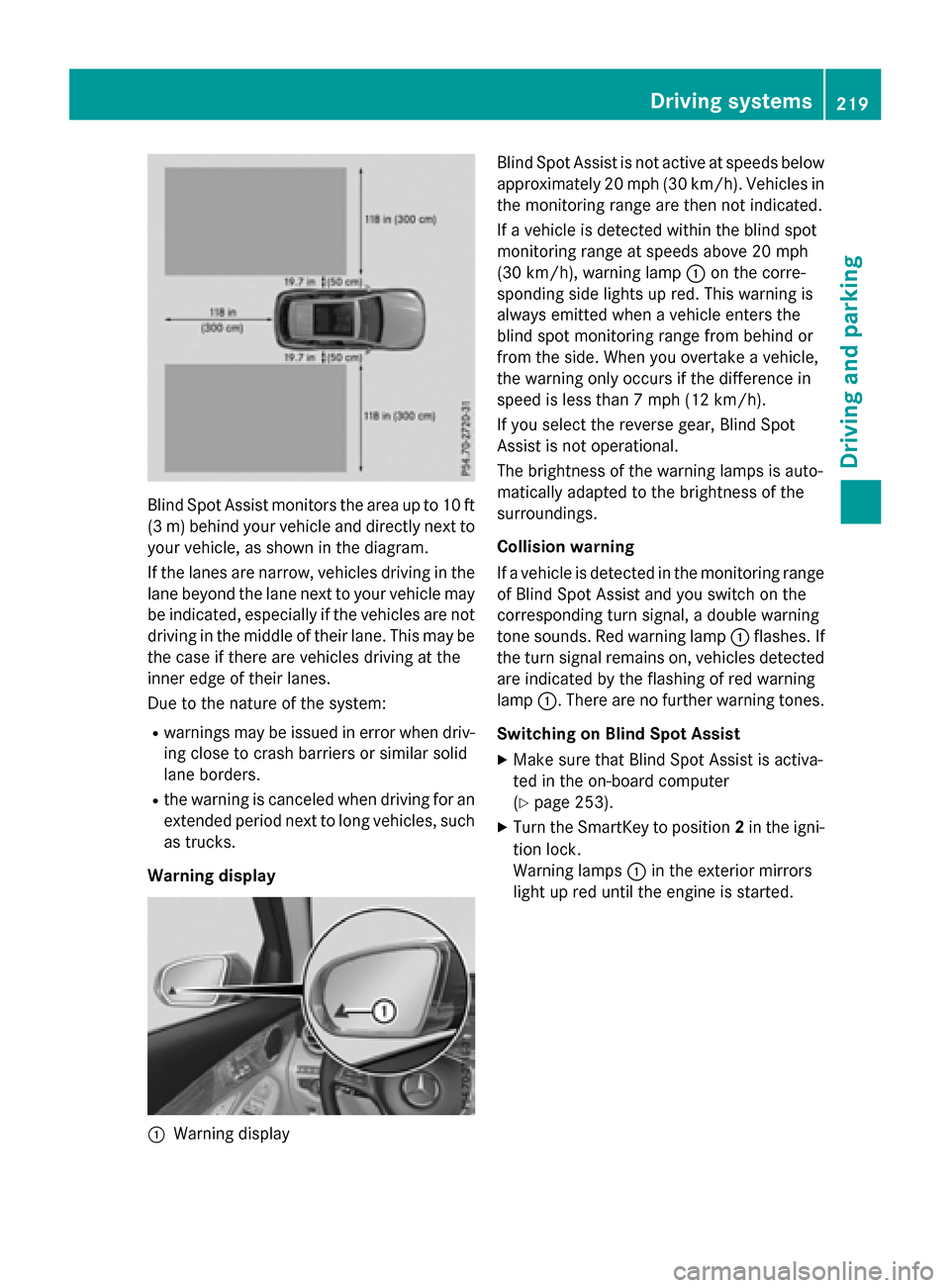
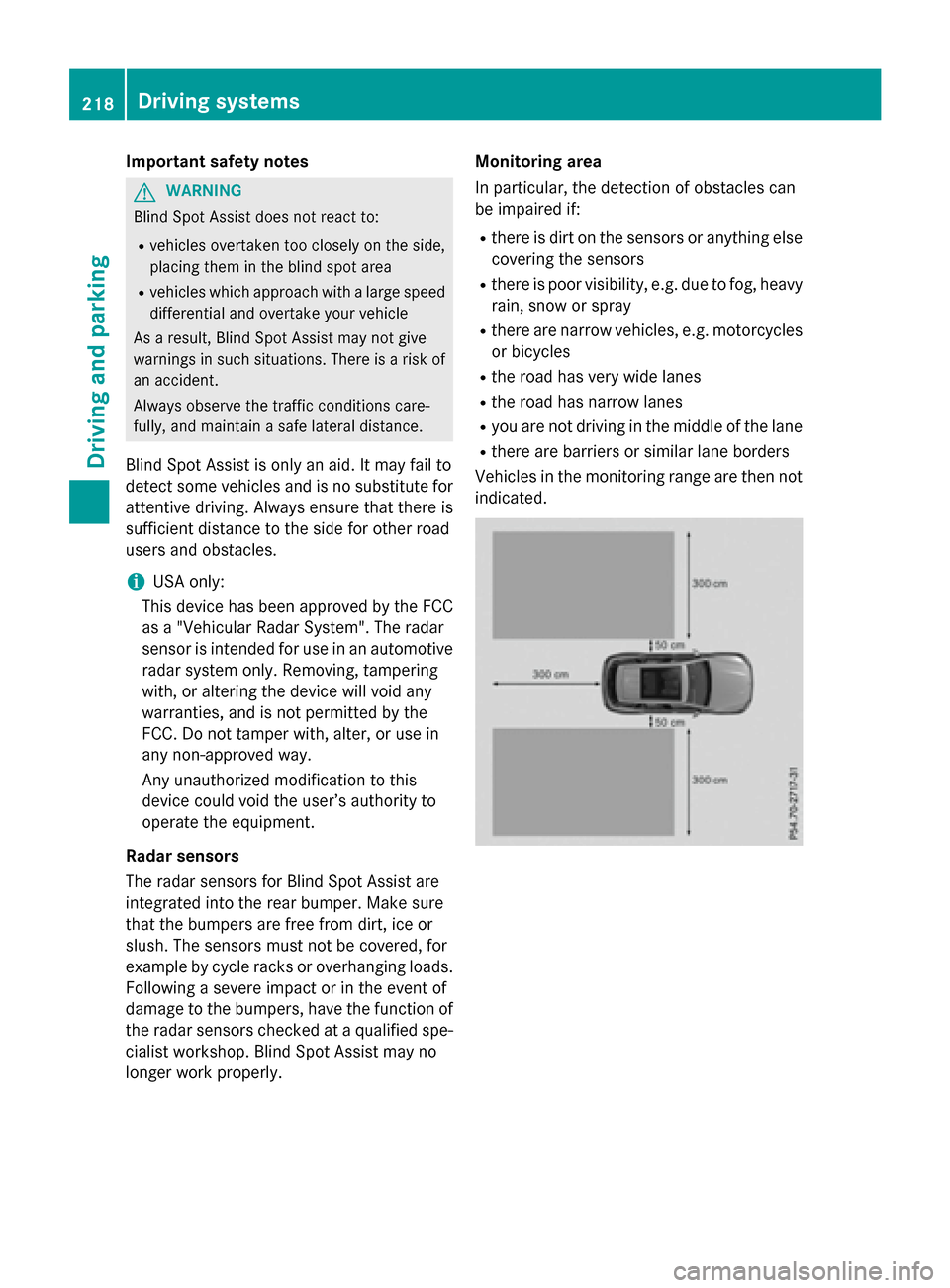
Blind Spot Assist monitors the area up to 10 ft
(3 m) behind your vehicle and directly next to
your vehicle, as shown in the diagram.
If the lanes are narrow, vehicles driving in the
lane beyond the lane next to your vehicle may
be indicated, especially if the vehicles are not
driving in the middle of their lane. This may be
the case if there are vehicles driving at the
inner edge of their lanes.
Due to the nature of the system:
Rwarnings may be issued in error when driv-
ing close to crash barriers or similar solid
lane borders.
Rthe warning is canceled when driving for an
extended period next to long vehicles, such
as trucks.
Warning display
:Warning display Blind Spot Assist is not active at speeds below
approximately 20 mph (30 km/h). Vehicles in
the monitoring range are then not indicated.
If a vehicle is detected within the blind spot
monitoring range at speeds above 20 mph
(30 km/h), warning lamp
:on the corre-
sponding side lights up red. This warning is
always emitted when a vehicle enters the
blind spot monitoring range from behind or
from the side. When you overtake a vehicle,
the warning only occurs if the difference in
speed is less than 7 mph (12 km/h).
If you select the reverse gear, Blind Spot
Assist is not operational.
The brightness of the warning lamps is auto-
matically adapted to the brightness of the
surroundings.
Collision warning
If a vehicle is detected in the monitoring range
of Blind Spot Assist and you switch on the
corresponding turn signal, a double warning
tone sounds. Red warning lamp :flashes. If
the turn signal remains on, vehicles detected
are indicated by the flashing of red warning
lamp :. There are no further warning tones.
Switching on Blind Spot Assist
XMake sure that Blind Spot Assist is activa-
ted in the on-board computer
(
Ypage 253).
XTurn the SmartKey to position 2in the igni-
tion lock.
Warning lamps :in the exterior mirrors
light up red until the engine is started.
Driving systems219
Driving and parking
Z
Page 222 of 418
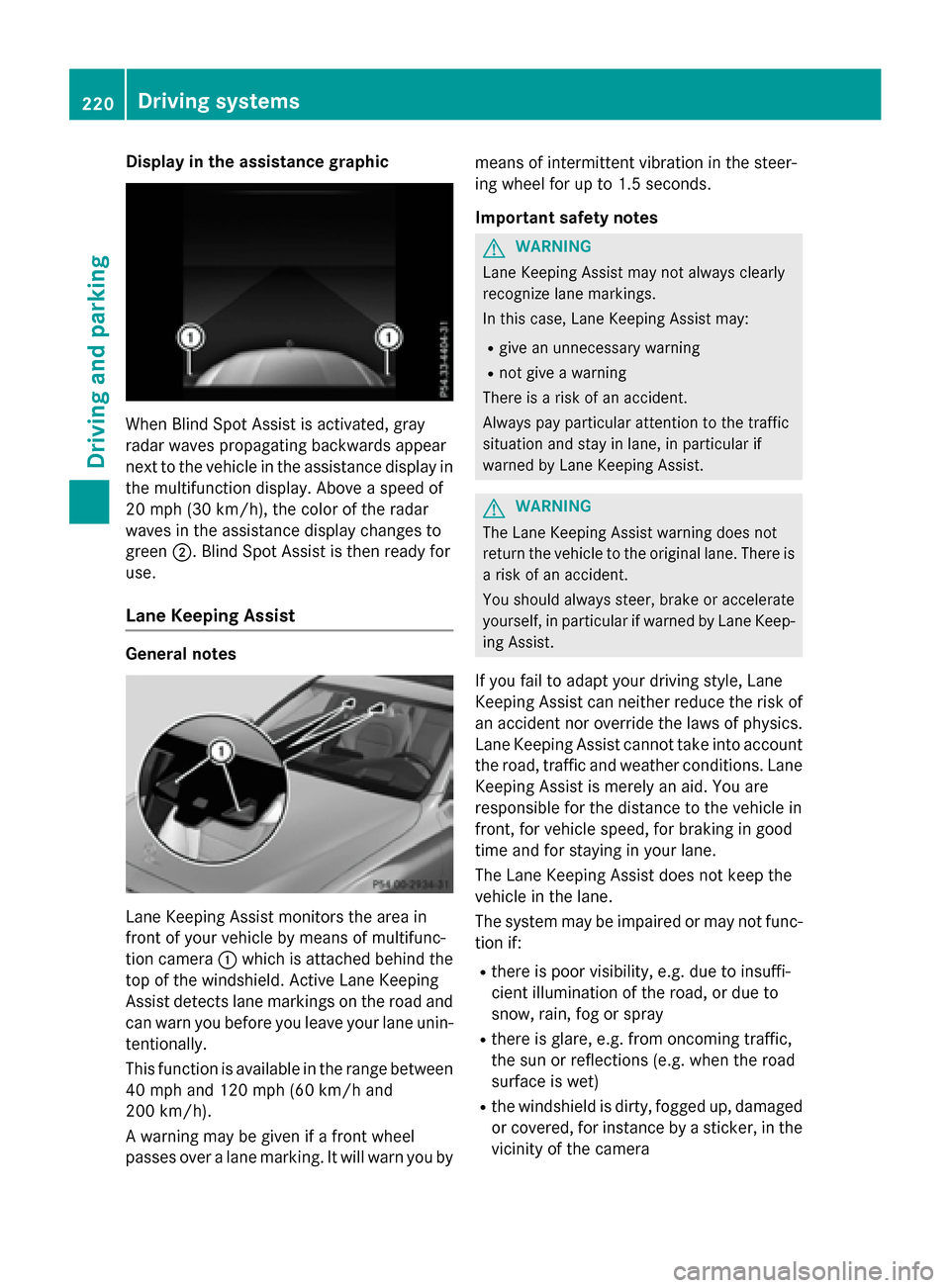
Display in theassistanc egraphic
Whe nBlind Spot Assis tis activated, gra y
rada rwave spropagatin gbackwards appea r
next to th evehicl ein th eassistanc edisplay in
th emultifunction display. Above aspeed of
20 mph (30 km/h), th ecolor of th erada r
wave sin th eassistanc edisplay changes to
green ;.Blind Spot Assis tis then read yfo r
use.
Lan eKeeping Assis t
General notes
LaneKeepin gAssis tmonitors th earea in
fron tof your vehicl eby mean sof multifunc-
tion camera :whic his attached behin dth e
to pof th ewindshield. Active Lan eKeepin g
Assis tdetects lan emarking son th eroa dand
can warn you before you leav eyour lan eunin-
tentionally.
This function is available in th erange between
40 mph and 12 0mph (60 km/h and
20 0km/h).
A warnin gmay be given if afron twhee l
passes ove r alan emarking .It will warn you by mean
sof intermittent vibration in th esteer -
in g whee lfo rup to 1. 5seconds.
Important safet ynotes
GWARNIN G
Lan eKeepin gAssis tmay no talways clearly
recogniz elan emarkings.
In this case, Lan eKeepin gAssis tmay:
Rgiv ean unnecessary warnin g
Rnotgiv e a warnin g
There is aris kof an accident.
Always pay particular attention to th etraffic
situation and stay in lane, in particular if
warned by Lan eKeepin gAssist.
GWARNIN G
The Lan eKeepin gAssis twarnin gdoe sno t
return th evehicl eto th eoriginal lane. There is
a ris kof an accident.
You should always steer ,brak eor accelerate
yourself ,in particular if warned by Lan eKeep-
in g Assist.
If you fail to adapt your drivin gstyle, Lan e
Keepin gAssis tcan neither reduce th eris kof
an acciden tno roverride th elaws of physics .
Lan eKeepin gAssis tcanno ttak einto accoun t
th eroad, traffic and weather conditions. Lan e
Keepin gAssis tis merely an aid. You are
responsibl efo rth edistanc eto th evehicl ein
front, fo rvehicl espeed, fo rbrakin gin goo d
time and fo rstayin gin your lane.
The Lan eKeepin gAssis tdoes no tkeep th e
vehicl ein th elane.
The system may be impaire dor may no tfunc-
tion if:
Rthere is poo rvisibility, e.g. due to insuffi-
cient illumination of th eroad, or due to
snow, rain ,fo gor spray
Rthere is glare, e.g. from oncomin gtraffic,
th esun or reflection s(e.g. when th eroa d
surfac eis wet )
Rthewindshield is dirty, fogge dup, damaged
or covered, fo rinstanc eby asticker, in th e
vicinit yof th ecamera
220Driving systems
Driving an d parking
Page 223 of 418
Rthere are no, several or unclear lane mark-ings for a lane, e.g. in areas with road con-
struction work
Rthe lane markings are worn away, dark or
covered up, e.g. by dirt or snow
Rthe distance to the vehicle in front is too
small and the lane markings thus cannot be
detected
Rthe lane markings change quickly, e.g.
lanes branch off, cross one another or
merge
Rthe road is narrow and winding
Rthere are strong shadows cast on the road
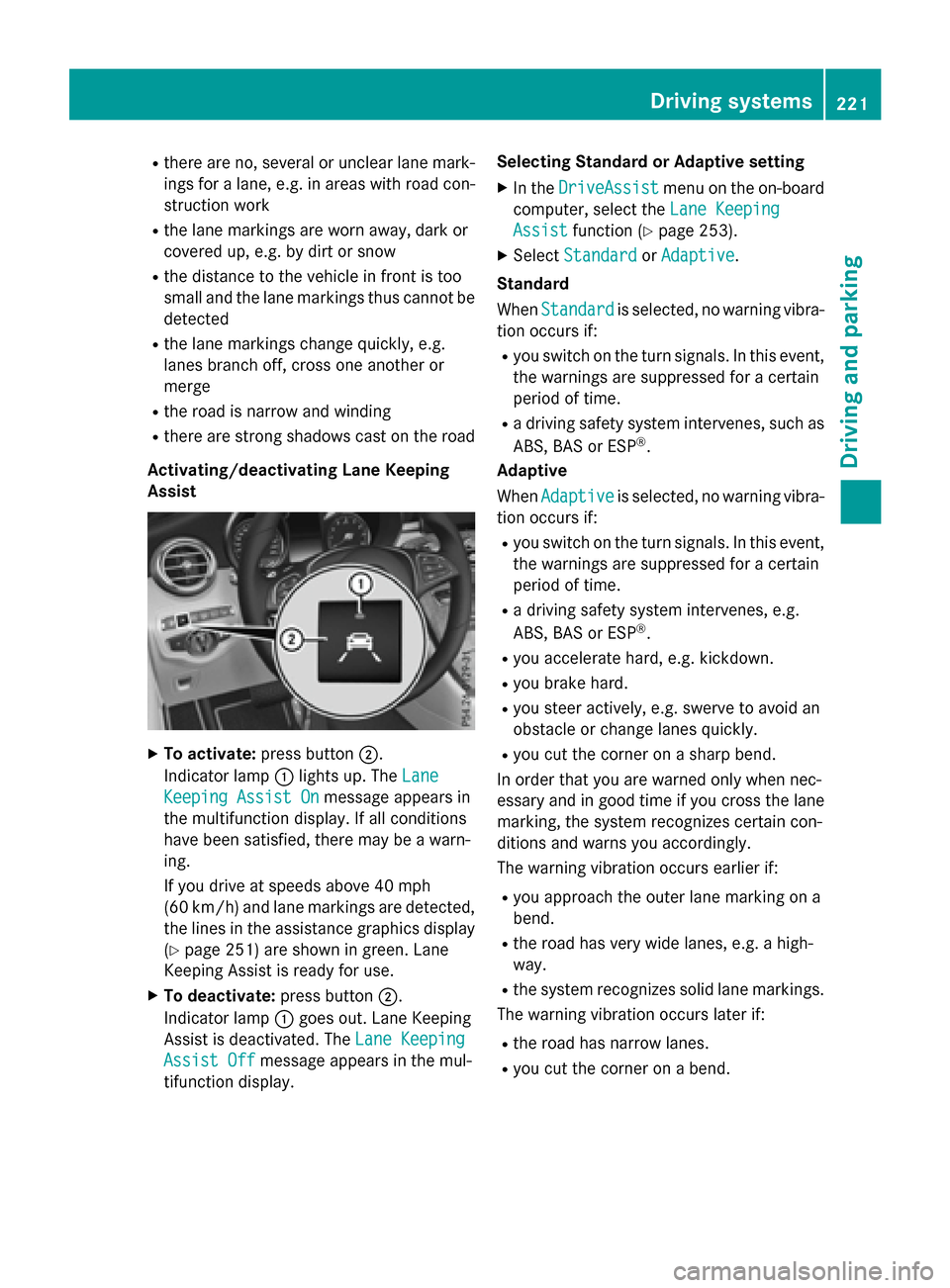
Activating/deactivating Lane Keeping
Assist
XTo activate: press button ;.
Indicator lamp :lights up. The Lane
Keeping Assist Onmessage appears in
the multifunction display. If all conditions
have been satisfied, there may be a warn-
ing.
If you drive at speeds above 40 mph
(60 km/h) and lane markings are detected, the lines in the assistance graphics display
(
Ypage 251) are shown in green. Lane
Keeping Assist is ready for use.
XTo deactivate: press button;.
Indicator lamp :goes out. Lane Keeping
Assist is deactivated. The Lane Keeping
Assist Offmessage appears in the mul-
tifunction display. Selecting Standard or Adaptive setting
XIn the
DriveAssistmenu on the on-board
computer, select the Lane Keeping
Assistfunction (Ypage 253).
XSelectStandardorAdaptive.
Standard
When Standard
is selected, no warning vibra-
tion occurs if:
Ryou switch on the turn signals. In this event,
the warnings are suppressed for a certain
period of time.
Ra driving safety system intervenes, such as
ABS, BAS or ESP®.
Adaptive
When Adaptive
is selected, no warning vibra-
tion occurs if:
Ryou switch on the turn signals. In this event,
the warnings are suppressed for a certain
period of time.
Ra driving safety system intervenes, e.g.
ABS, BAS or ESP®.
Ryou accelerate hard, e.g. kickdown.
Ryou brake hard.
Ryou steer actively, e.g. swerve to avoid an
obstacle or change lanes quickly.
Ryou cut the corner on a sharp bend.
In order that you are warned only when nec-
essary and in good time if you cross the lane
marking, the system recognizes certain con-
ditions and warns you accordingly.
The warning vibration occurs earlier if:
Ryou approach the outer lane marking on a
bend.
Rthe road has very wide lanes, e.g. a high-
way.
Rthe system recognizes solid lane markings.
The warning vibration occurs later if:
Rthe road has narrow lanes.
Ryou cut the corner on a bend.
Driving system s221
Driving an d parking
Z