light MERCEDES-BENZ GLC-Class 2016 X253 User Guide
[x] Cancel search | Manufacturer: MERCEDES-BENZ, Model Year: 2016, Model line: GLC-Class, Model: MERCEDES-BENZ GLC-Class 2016 X253Pages: 418, PDF Size: 9.23 MB
Page 20 of 418
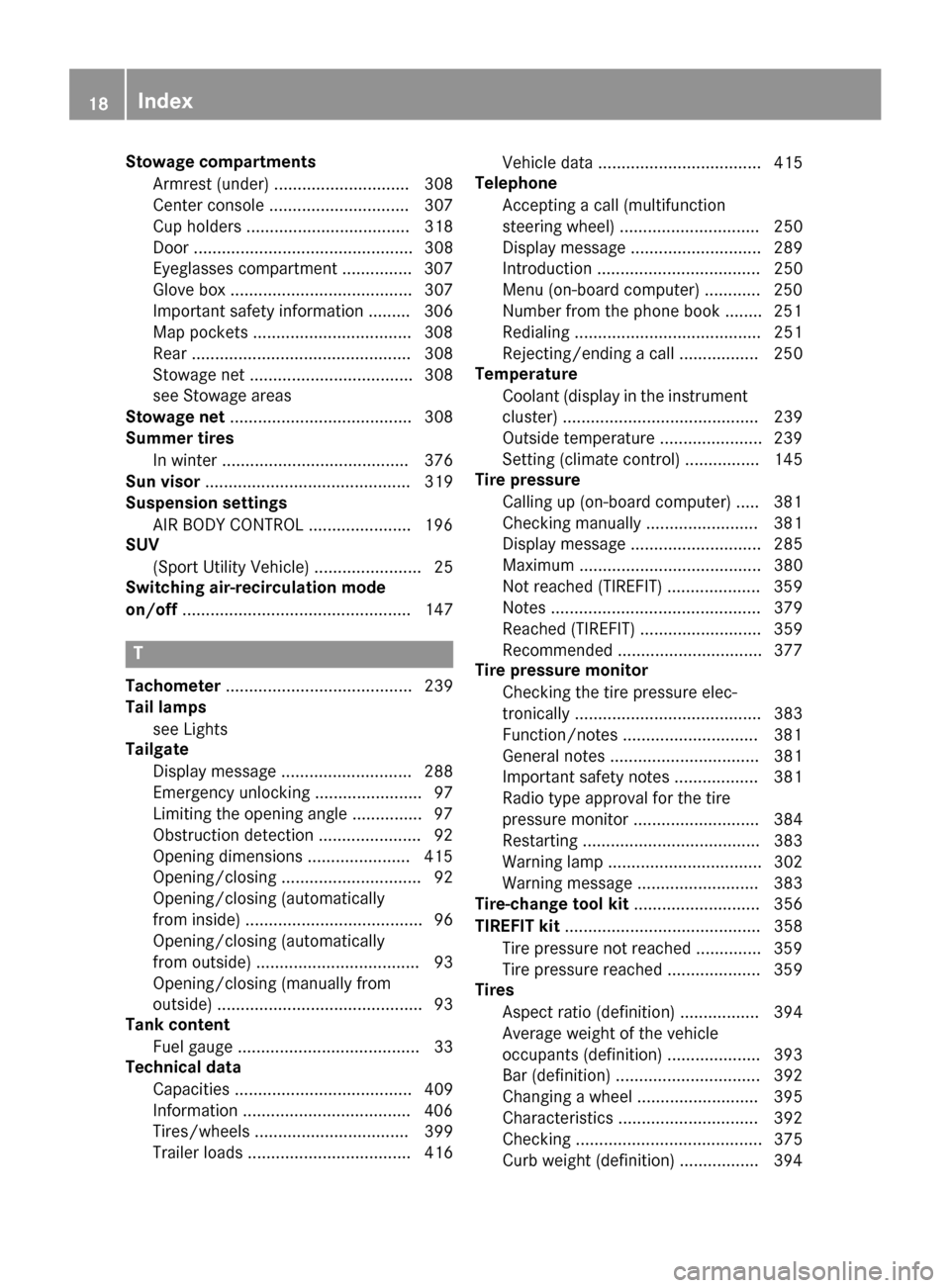
Stowage compartmentsArmrest (under) ............................. 308
Center console .............................. 307
Cup holders ................................... 318
Door ............................................... 308
Eyeglasses compartment ............... 307
Glove box ....................................... 307
Important safety information ......... 306
Map pockets ..................................3 08
Rear ............................................... 308
Stowage net ................................... 308
see Stowage areas
Stowage net ....................................... 308
Summer tires
In winter ........................................ 376
Sun visor ............................................ 319
Suspension settings
AIR BODY CONTROL ......................1 96
SUV
(Sport Utility Vehicle) ....................... 25
Switching air-recirculation mode
on/off ................................................. 147
T
Tachometer ........................................ 239
Tail lamps
see Lights
Tailgate
Display message ............................ 288
Emergency unlocking ....................... 97
Limiting the opening angle ...............9 7
Obstruction detection ......................9 2
Opening dimensions ......................4 15
Opening/closing .............................. 92
Opening/closing (automatically
from inside) ...................................... 96
Opening/closing (automatically
from outside) ................................... 93
Opening/closing (manually from
outside) ............................................ 93
Tank content
Fuel gauge ....................................... 33
Technical data
Capacities ...................................... 409
Information ....................................4 06
Tires/wheels ................................. 399
Trailer loads ................................... 416 Vehicle data ................................... 415
Telephone
Accepting a call (multifunction
steering wheel) .............................. 250
Display message ............................ 289
Introduction ................................... 250
Menu (on-board computer) ............ 250
Number from the phone book ........2 51
Redialing ........................................ 251
Rejecting/ending a call ................. 250
Temperature
Coolant (display in the instrument
cluster) .......................................... 239
Outside temperature ......................2 39
Setting (climate control) ................ 145
Tire pressure
Calling up (on-board computer) ..... 381
Checking manually ........................ 381
Display message ............................ 285
Maximum ....................................... 380
Not reached (TIREFIT) .................... 359
Notes ............................................. 379
Reached (TIREFIT) .......................... 359
Recommended ............................... 377
Tire pressure monitor
Checking the tire pressure elec-
tronically ........................................ 383
Function/notes .............................3 81
G
eneral notes ................................ 381
Important safety notes .................. 381
Radio type approval for the tire
pressure monitor ........................... 384
Restarting ...................................... 383
Warning lamp ................................. 302
Warning message .......................... 383
Tire-change tool kit ........................... 356
TIREFIT kit .......................................... 358
Tire pressure not reached .............. 359
Tire pressure reached .................... 359
Tires
Aspect ratio (definition) ................. 394
Average weight of the vehicle
occupants (definition) .................... 393
Bar (definition) ............................... 392
Changing a wheel .......................... 395
Characteristics .............................. 392
Checking ........................................ 375
Curb weight (definition) ................. 394
18Index
Page 21 of 418
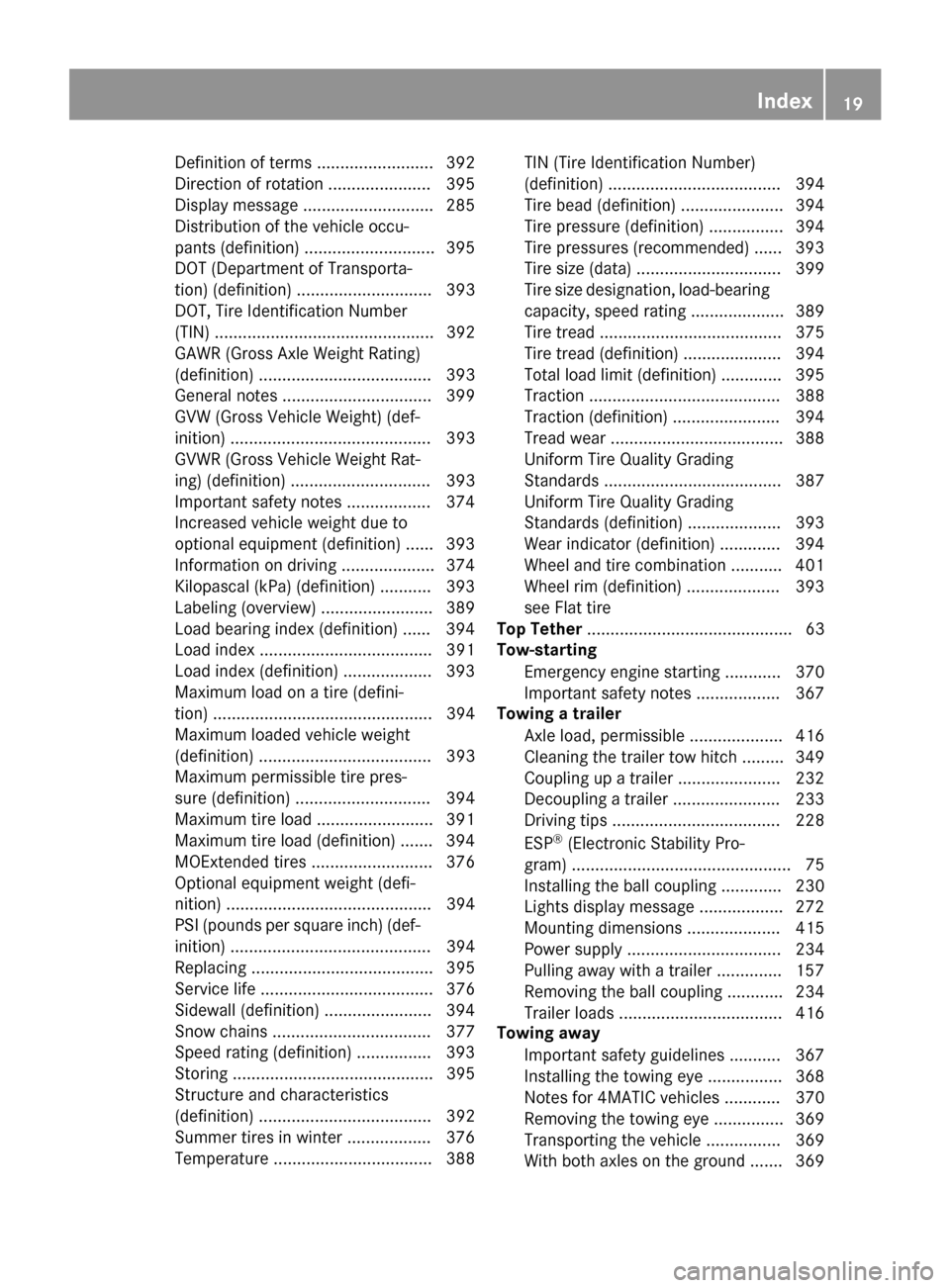
Definition of terms ......................... 392
Direction of rotation ...................... 395
Display message ............................ 285
Distribution of the vehicle occu-
pants (definition) ............................ 395
DOT (Department of Transporta-
tion) (definition) ............................. 393
DOT, Tire Identification Number
(TIN) ............................................... 392
GAWR (Gross Axle Weight Rating)
(definition) ..................................... 393
General notes ................................ 399
GVW (Gross Vehicle Weight) (def-
inition) ........................................... 393
GVWR (Gross Vehicle Weight Rat-
ing) (definition) .............................. 393
Important safety notes .................. 374
Increased vehicle weight due to
optional equipment (definition) ...... 393
Information on driving .................... 374
Kilopascal (kPa) (definition) ........... 393
Labeling (overview) ........................ 389
Load bearing index (definition) ...... 394
Load index ..................................... 391
Load index (definition) ................... 393
Maximum load on a tire (defini-
tion) ............................................... 394
Maximum loaded vehicle weight
(definition) ..................................... 393
Maximum permissible tire pres-
sure (definition) ............................. 394
Maximum tire load ......................... 391
Maximum tire load (definition) ....... 394
MOExtended tires .......................... 376
Optional equipment weight (defi-
nition) ............................................ 394
PSI (pounds per square inch) (def-
inition) ........................................... 394
Replacing ....................................... 395
Service life ..................................... 376
Sidewall (definition) ....................... 394
Snow chains .................................. 377
Speed rating (definition) ................ 393
Storing ........................................... 395
Structure and characteristics
(definition) ..................................... 392
Summer tires in winter .................. 376
Temperature .................................. 388TIN (Tire Identification Number)
(definition) ..................................... 394
Tire bead (definition) ...................... 394
Tire pressure (definition) ................ 394
Tire pressures (recommended) ...... 393
Tire size (data) ............................... 399
Tire size designation, load-bearing
capacity, speed rating .................... 389
Tire tread ....................................... 375
Tire tread (definition) ..................... 394
Total load limit (definition) ............. 395
Traction ......................................... 388
Traction (definition) ....................... 394
Tread wear ..................................... 388
Uniform Tire Quality Grading
Standards ...................................... 387
Uniform Tire Quality Grading
Standards (definition) .................... 393
Wear indicator (definition) ............. 394
Wheel and tire combination ........... 401
Wheel rim (definition) .................... 393
see Flat tire
Top Tether ............................................ 63
Tow-starting
Emergency engine starting ............ 370
Important safety notes .................. 367
Towing a trailer
Axle load, permissible .................... 416
Cleaning the trailer tow hitch ......... 349
Coupling up a trailer ...................... 232
Decoupling a trailer ....................... 233
Driving tips .................................... 228
ESP
®(Electronic Stability Pro-
gram) ............................................... 75
Installing the ball coupling ............. 230
Lights display message .................. 272
Mounting dimensions .................... 415
Power supply ................................. 234
Pulling away with a trailer .............. 157
Removing the ball coupling ............ 234
Trailer loads ................................... 416
Towing away
Important safety guidelines ........... 367
Installing the towing eye ................ 368
Notes for 4MATIC vehicles ............ 370
Removing the towing eye ............... 369
T
ransporting the vehicle ................ 369
With both axles on the ground ....... 369
Index19
Page 34 of 418
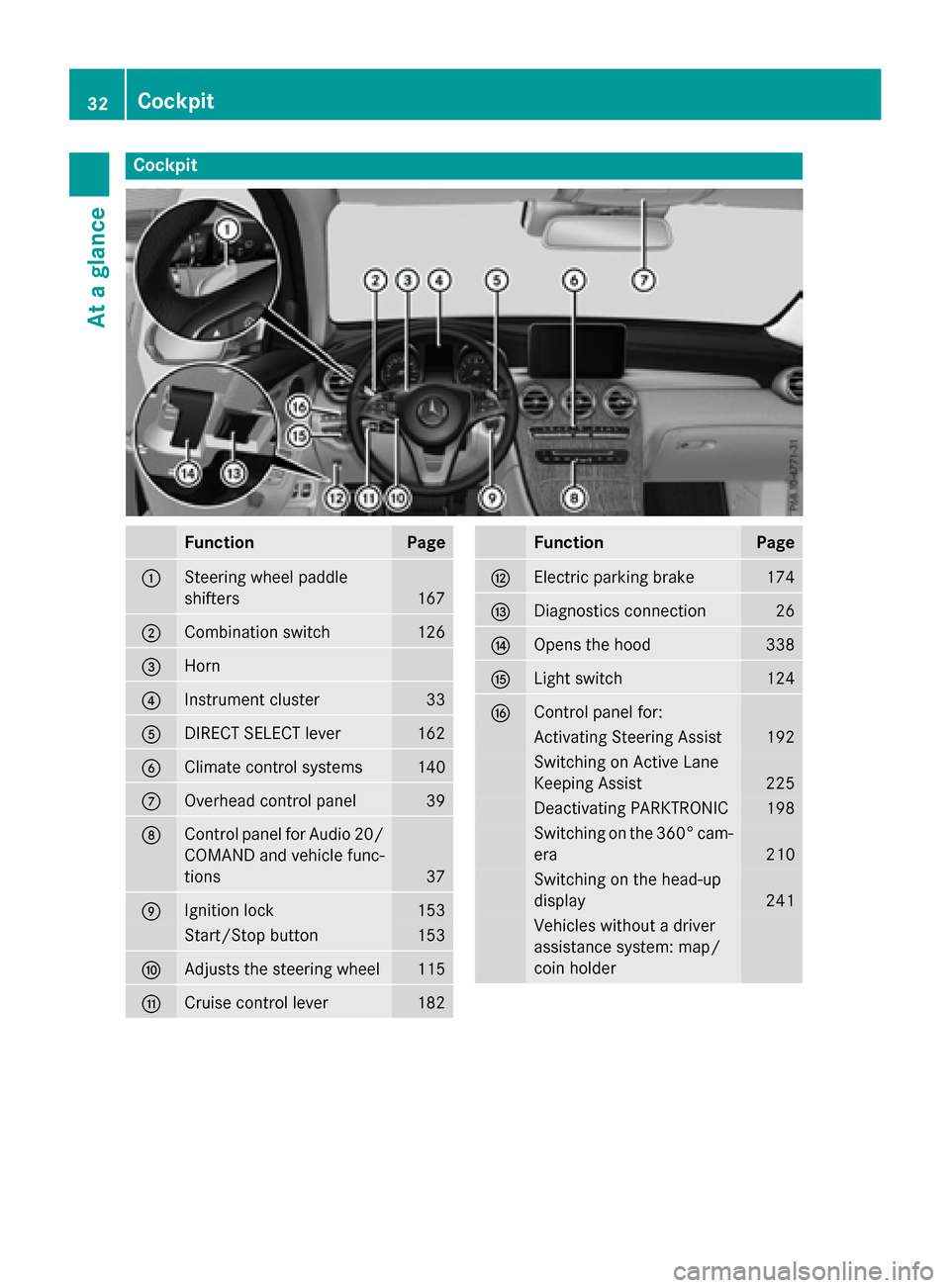
Cockpit
FunctionPage
:Steering wheel paddle
shifters
167
;Combination switch126
=Horn
?Instrument cluster33
ADIRECT SELECT lever162
BClimate control systems140
COverhead control panel39
DControl panel for Audio 20/
COMAND and vehicle func-
tions
37
EIgnition lock153
Start/Stop button153
FAdjusts the steering wheel115
GCruise control lever182
FunctionPage
HElectric parking brake174
IDiagnostics connection26
JOpens the hood338
KLight switch124
LControl panel for:
Activating Steering Assist192
Switching on Active Lane
Keeping Assist
225
Deactivating PARKTRONIC198
Switching on the 360° cam-
era
210
Switching on the head-up
display
241
Vehicles without a driver
assistance system: map/
coin holder
32Cockpit
At a glance
Page 36 of 418
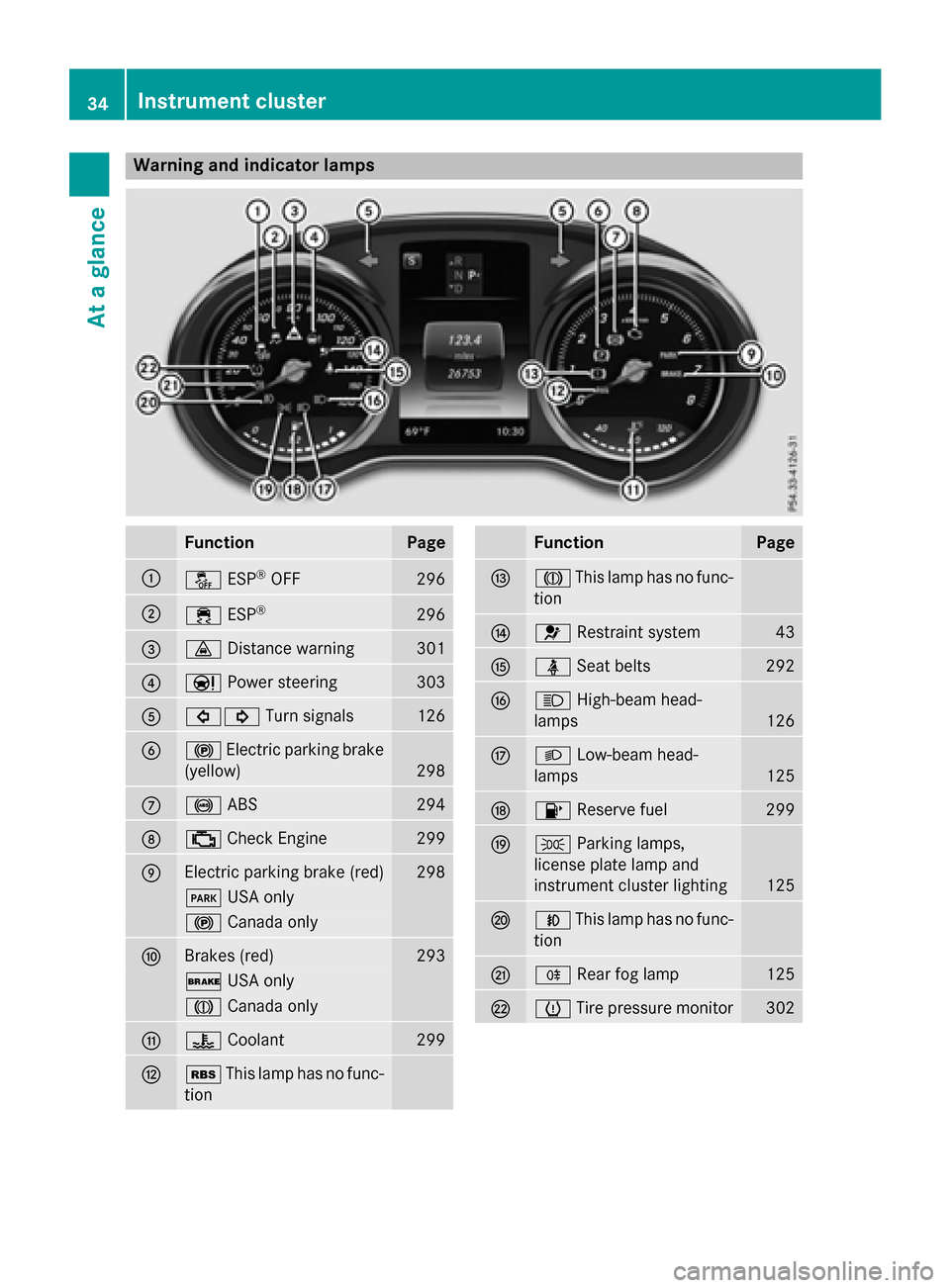
Warning and indicator lamps
FunctionPage
:åESP®OFF296
;÷ESP®296
=·Distance warning301
?ÐPower steering303
A#! Turn signals126
B!Electric parking brake
(yellow)
298
C! ABS294
D;Check Engine299
EElectric parking brake (red)298
F USA only
!Canada only
FBrakes (red)293
$USA only
JCanada only
G?Coolant299
HéThis lamp has no func-
tion
FunctionPage
IJ This lamp has no func-
tion
J6 Restraint system43
KüSeat belts292
LKHigh-beam head-
lamps
126
ML Low-beam head-
lamps
125
N8 Reserve fuel299
OTParking lamps,
license plate lamp and
instrument cluster lighting
125
PN This lamp has no func-
tion
QR Rear fog lamp125
RhTire pressure monitor302
34Instrument cluster
At a glance
Page 40 of 418
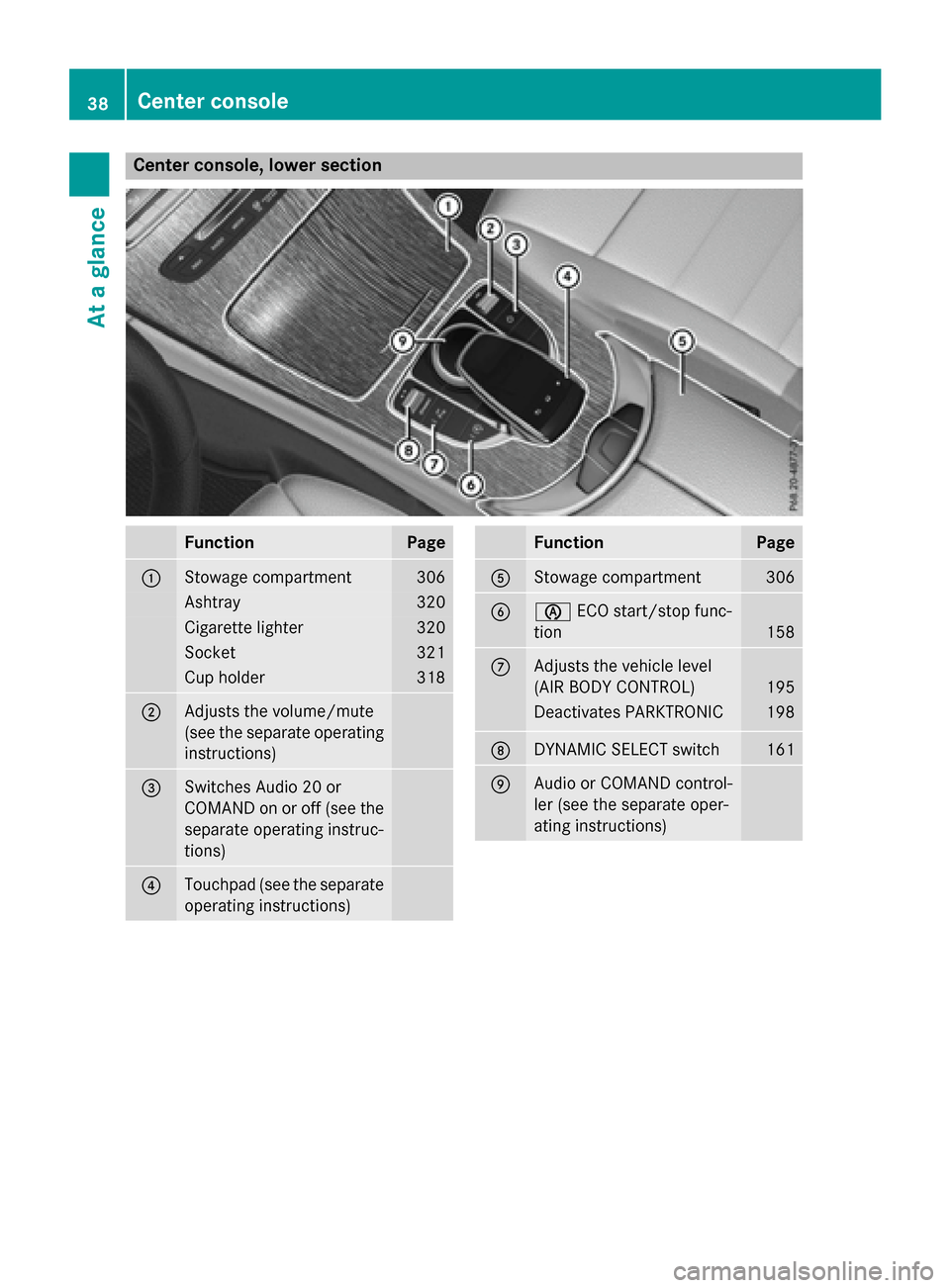
Center console, lower section
FunctionPage
:Stowage compartment306
Ashtray320
Cigarette lighter320
Socket321
Cup holder318
;Adjusts the volume/mute
(see the separate operating
instructions)
=Switches Audio 20 or
COMAND on or off (see the
separate operating instruc-
tions)
?Touchpad (see the separate
operating instructions)
FunctionPage
AStowage compartment306
BèECO start/stop func-
tion
158
CAdjusts the vehicle level
(AIR BODY CONTROL)
195
Deactivates PARKTRONIC198
DDYNAMIC SELECT switch161
EAudio or COMAND control-
ler (see the separate oper-
ating instructions)
38Center console
At a glance
Page 41 of 418
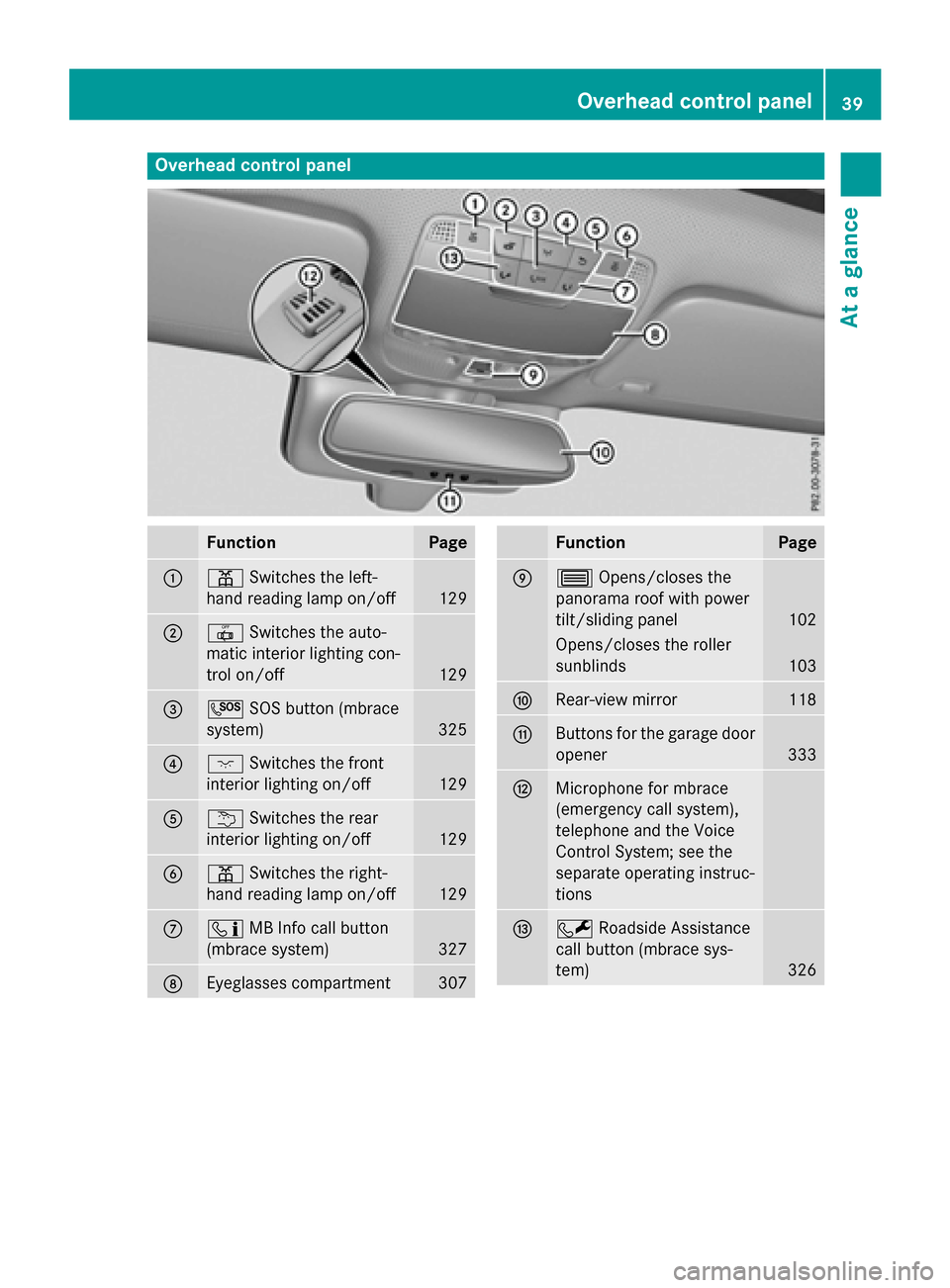
Overhead control panel
FunctionPage
:pSwitches the left-
hand reading lamp on/off
129
;| Switches the auto-
matic interior lighting con-
trol on/off
129
=G SOS button (mbrace
system)
325
?c Switches the front
interior lighting on/off
129
Au Switches the rear
interior lighting on/off
129
Bp Switches the right-
hand reading lamp on/off
129
Cï MB Info call button
(mbrace system)
327
DEyeglasses compartment307
FunctionPage
E3 Opens/closes the
panorama roof with power
tilt/sliding panel
102
Opens/closes the roller
sunblinds
103
FRear-view mirror118
GButtons for the garage door
opener
333
HMicrophone for mbrace
(emergency call system),
telephone and the Voice
Control System; see the
separate operating instruc-
tions
IF Roadside Assistance
call button (mbrace sys-
tem)
326
Overhead control panel39
At a glance
Page 45 of 418
See "Children in the vehicle" for information
on infants and children traveling with you in
the vehicle restraint systems for infants and
children (
Ypage 60).
Important safety notes
GWARNING
Modifications to the restraint system may
cause it to no longer work as intended. The
restraint system may then not perform its
intended protective function and may fail in an
accident or trigger unexpectedly, for example.
This poses an increased risk of injury or even fatal injury.
Never modify parts of the restraint system.
Never tamper with the wiring, the electronic
components or their software.
If it is necessary to modify an air bag system to
accommodate a person with disabilities, con-
tact an authorized Mercedes-Benz Center for
details. USA only: for further information con-
tact our Customer Assistance Center at
1-800-FOR-MERCedes (1‑800‑ 367‑6372).
Restraint system warning lamp
The functions of the restraint system are
checked after the ignition is switched on and
at regular intervals while the engine is run-
ning. Therefore, malfunctions can be detec-
ted in good time.
The 6 restraint system warning lamp in
the instrument cluster lights up when the igni-
tion is switched on. It goes out no later than a
few seconds after the vehicle is started. The
components of the restraint system are in
operational readiness.
A malfunction has occurred if the 6
restraint system warning lamp:
Rdoes not light up after the ignition is
switched on
Rdoes not go out after a few seconds with
the engine running
Rlights up again while the engine is running
GWARNING
If restraint system is malfunctioning, restraint
system components may be triggered unin-
tentionally or might not be triggered at all in
the event of an accident with a high rate of
vehicle deceleration. This can affect the Emer- gency Tensioning Device or air bag, for exam-
ple. This poses an increased risk of injury or
even fatal injury.
Have the restraint system checked and
repaired in a qualified specialist workshop as
soon as possible.
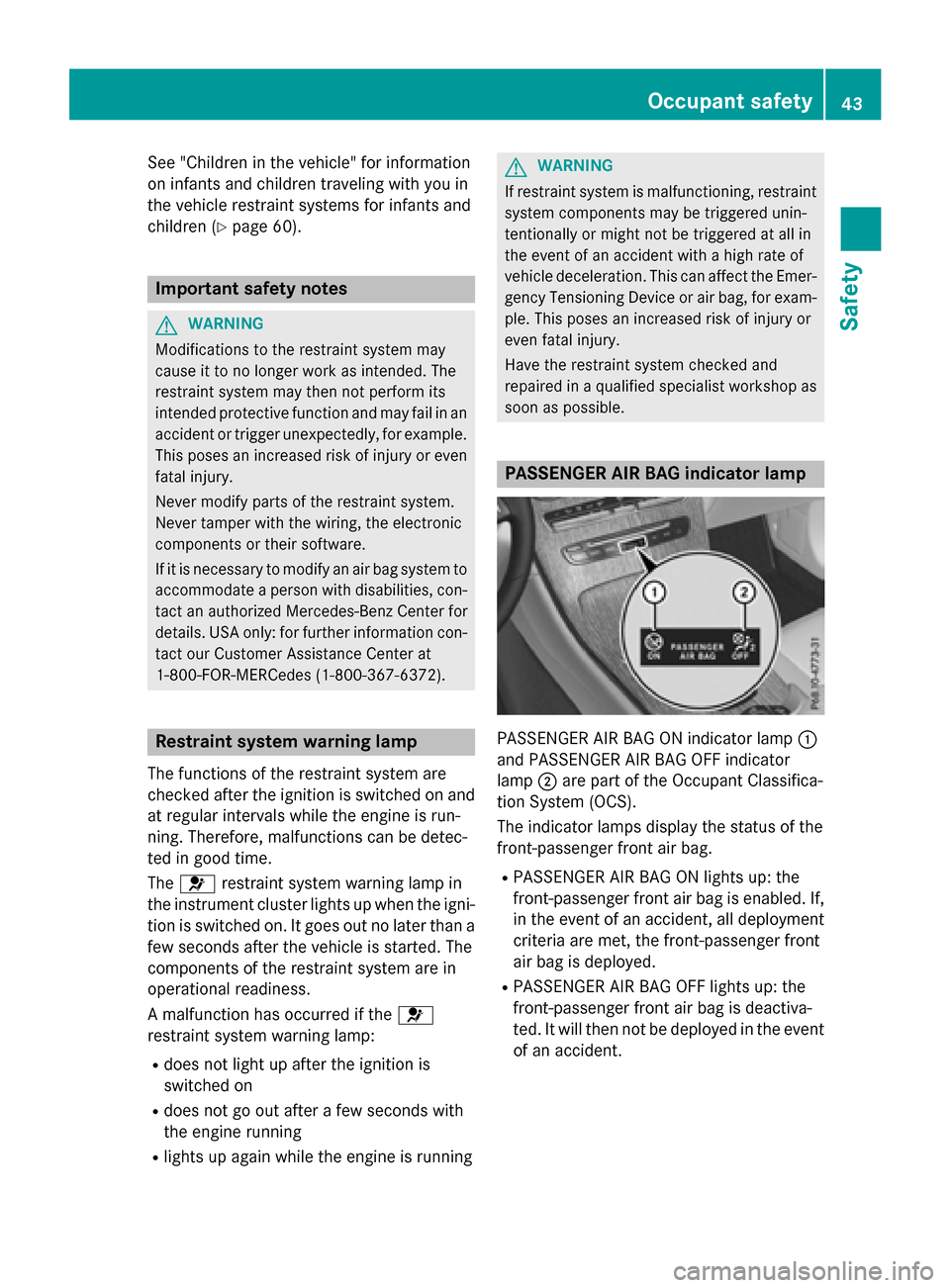
PASSENGER AIR BAG indicator lamp
PASSENGER AIR BAG ON indicator lamp :
and PASSENGER AIR BAG OFF indicator
lamp ;are part of the Occupant Classifica-
tion System (OCS).
The indicator lamps display the status of the
front-passenger front air bag.
RPASSENGER AIR BAG ON lights up: the
front-passenger front air bag is enabled. If,
in the event of an accident, all deployment
criteria are met, the front-passenger front
air bag is deployed.
RPASSENGER AIR BAG OFF lights up: the
front-passenger front air bag is deactiva-
ted. It will then not be deployed in the event of an accident.
Occupant safety43
Safety
Z
Page 49 of 418
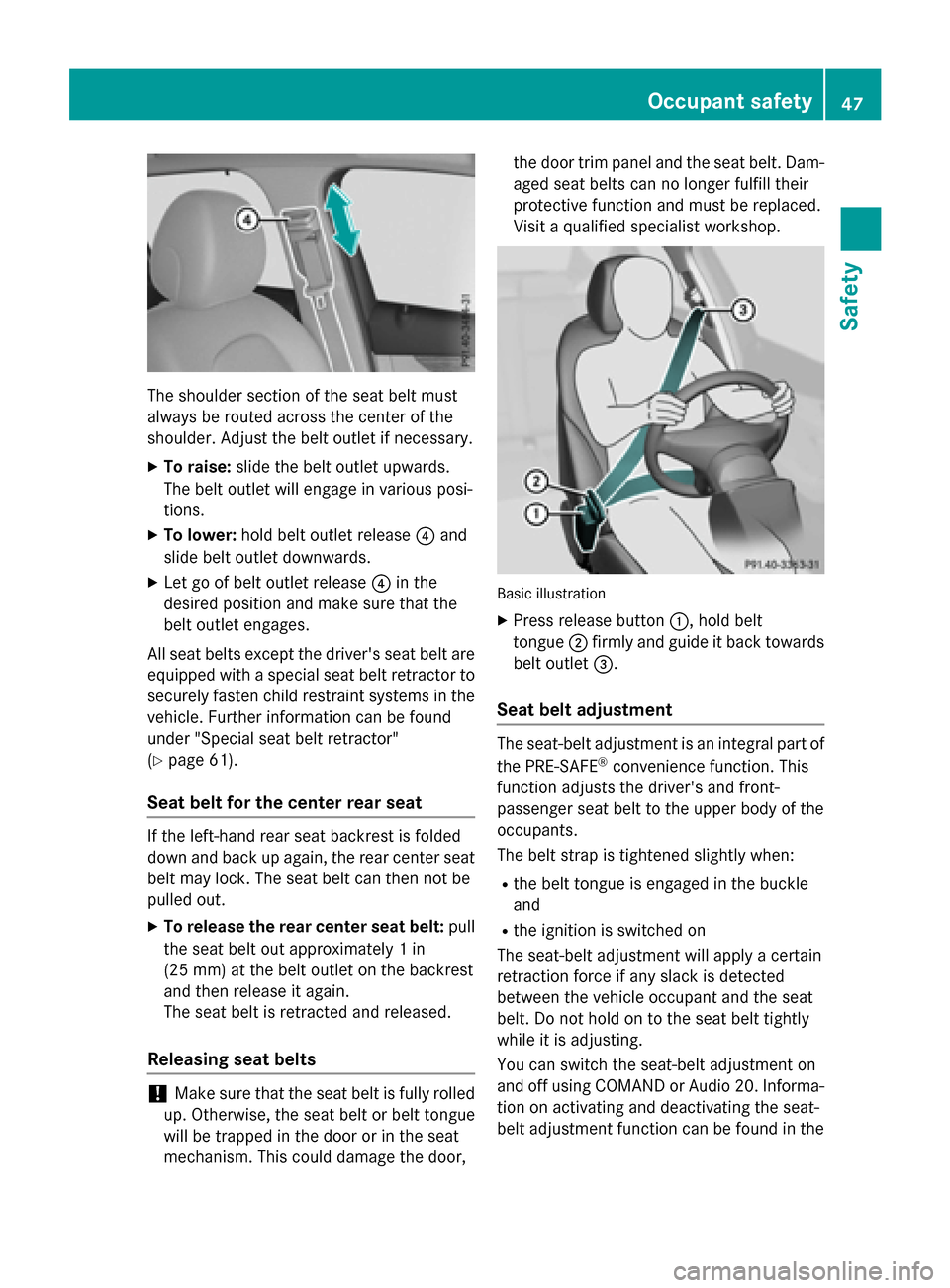
The shoulder section of the seat belt must
always be routed across the center of the
shoulder. Adjust the belt outlet if necessary.
XTo raise:slide the belt outlet upwards.
The belt outlet will engage in various posi-
tions.
XTo lower: hold belt outlet release ?and
slide belt outlet downwards.
XLet go of belt outlet release ?in the
desired position and make sure that the
belt outlet engages.
All seat belts except the driver's seat belt are
equipped with a special seat belt retractor to
securely fasten child restraint systems in the
vehicle. Further information can be found
under "Special seat belt retractor"
(
Ypage 61).
Seat belt for the center rear seat
If the left-hand rear seat backrest is folded
down and back up again, the rear center seat
belt may lock. The seat belt can then not be
pulled out.
XTo release the rear center seat belt: pull
the seat belt out approximately 1 in
(25 mm) at the belt outlet on the backrest
and then release it again.
The seat belt is retracted and released.
Releasing seat belts
!Make sure that the seat belt is fully rolled
up. Otherwise, the seat belt or belt tongue
will be trapped in the door or in the seat
mechanism. This could damage the door, the door trim panel and the seat belt. Dam-
aged seat belts can no longer fulfill their
protective function and must be replaced.
Visit a qualified specialist workshop.
Basic illustration
XPress release button
:, hold belt
tongue ;firmly and guide it back towards
belt outlet =.
Seat belt adjustment
The seat-belt adjustment is an integral part of
the PRE-SAFE®convenience function. This
function adjusts the driver's and front-
passenger seat belt to the upper body of the
occupants.
The belt strap is tightened slightly when:
Rthe belt tongue is engaged in the buckle
and
Rthe ignition is switched on
The seat-belt adjustment will apply a certain
retraction force if any slack is detected
between the vehicle occupant and the seat
belt. Do not hold on to the seat belt tightly
while it is adjusting.
You can switch the seat-belt adjustment on
and off using COMAND or Audio 20. Informa- tion on activating and deactivating the seat-
belt adjustment function can be found in the
Occupant safety47
Safety
Z
Page 50 of 418
Digital Operator's Manual or in the separate
COMAND or Audio 20 operating instructions.
Belt warning for the driver and front
passenger
The7 seat belt warning lamp in the instru-
ment cluster is a reminder that all vehicle
occupants must wear their seat belts. It may
light up continuously or flash. In addition,
there may be a warning tone.
Regardless of whether the driver's seat belt
has already been fastened, the 7seat belt
warning lamp lights up for six seconds each
time the engine is started. If, after
six seconds, the driver or front-passenger
seat belt has not been fastened and the doors
are closed, the 7seat belt warning lamp
lights up. As soon as the driver's and front-
passenger seat belts are fastened or a front
door is opened again, the 7seat belt
warning lamp goes out.
If the driver's seat belt is not fastened after
the engine is started, an additional warning
tone will sound. The warning tone switches
off after six seconds or once the driver's seat
belt is fastened.
If the vehicle's speed exceeds 15 mph
(25 km/h) once and the driver's and front-
passenger seat belts are not fastened, a
warning tone sounds. A warning tone also
sounds with increasing intensity for
60 seconds or until the driver or front
passenger have faste ned th
eir seat belts.
If the driver or front passenger unfasten their
seat belts during the journey, the seat belt
warning is activated again.
iFor more information on the 7seat
belt warning lamp, see "Warning and indi-
cator lamps in the instrument cluster, seat
belts" (
Ypage 292).
Air bags
Introduction
The installation point of an air bag can be rec- ognized by the AIR BAG symbol.
An air bag complements the correctly fas-
tened seat belt. It is no substitute for the seat
belt. The air bag provides additional protec-
tion in applicable accident situations.
Not all air bags are deployed in an accident.
The different air bag systems function inde-
pendently from one another (
Ypage 57).
However, no system available today can com-
pletely eliminate injuries and fatalities.
It is also not possible to rule out a risk of injury
caused by an air bag due to the high speed at
which the air bag must be deployed.
Important safety notes
GWARNING
If you do not sit in the correct seat position,
the air bag cannot protect as intended and
could even cause additional injury when
deployed. This poses an increased risk of
injury or even fatal injury.
To avoid hazardous situations, always make
sure that all of the vehicle's occupants:
Rhave fastened their seat belts correctly,
including pregnant women
Rare sitting correctly and maintain the great-
est possible distance to the air bags
Rfollow the following instructions
Always make sure that there are no objects
between the air bag and the vehicle's occu-
pants.
RAdjust the seats properly before beginning
your journey. Always make sure that the
seat is in an almost upright position. The
center of the head restraint must support
the head at about eye level.
RMove the driver's and front-passenger
seats as far back as possible. The driver's
seat position must allow the vehicle to be
driven safely.
48Occupant safety
Safety
Page 54 of 418
rest and the head restraint position accord-
ingly.
Only then can OCS be guaranteed to function
correctly. Always observe the child restraint
system manufacturer's installation instruc-
tions.
Occupant Classification System opera-
tion (OCS)
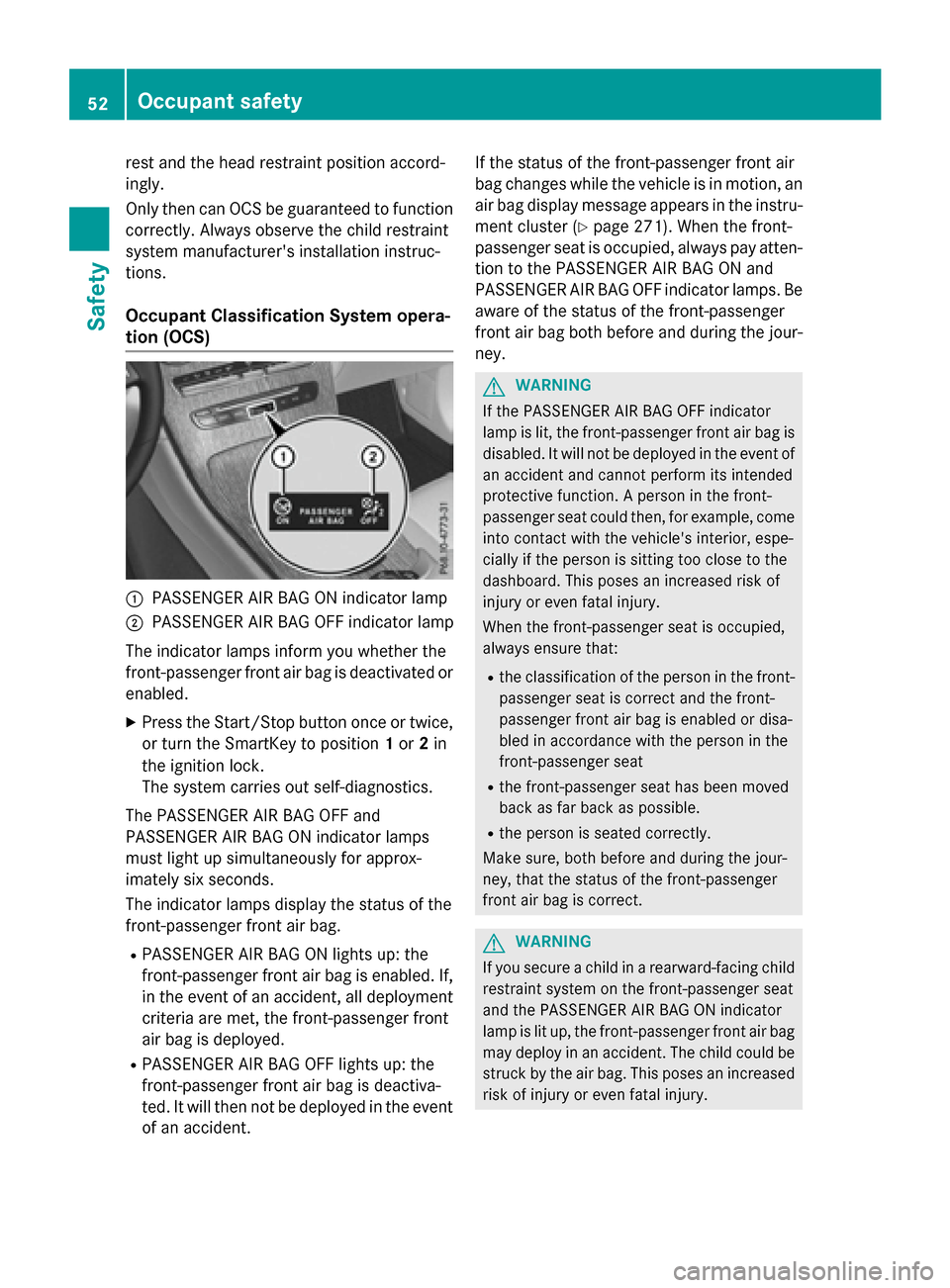
:PASSENGER AIR BAG ON indicator lamp
;PASSENGER AIR BAG OFF indicator lamp
The indicator lamps inform you whether the
front-passenger front air bag is deactivated or
enabled.
XPress the Start/Stop button once or twice,
or turn the SmartKey to position 1or 2in
the ignition lock.
The system carries out self-diagnostics.
The PASSENGER AIR BAG OFF and
PASSENGER AIR BAG ON indicator lamps
must light up simultaneously for approx-
imately six seconds.
The indicator lamps display the status of the
front-passenger front air bag.
RPASSENGER AIR BAG ON lights up: the
front-passenger front air bag is enabled. If,
in the event of an accident, all deployment
criteria are met, the front-passenger front
air bag is deployed.
RPASSENGER AIR BAG OFF lights up: the
front-passenger front air bag is deactiva-
ted. It will then not be deployed in the event of an accident. If the status of the front-passenger front air
bag changes while the vehicle is in motion, an
air bag display message appears in the instru-
ment cluster (
Ypage 271). When the front-
passenger seat is occupied, always pay atten-
tion to the PASSENGER AIR BAG ON and
PASSENGER AIR BAG OFF indicator lamps. Be
aware of the status of the front-passenger
front air bag both before and during the jour-
ney.
GWARNING
If the PASSENGER AIR BAG OFF indicator
lamp is lit, the front-passenger front air bag is
disabled. It will not be deployed in the event of
an accident and cannot perform its intended
protective function. A person in the front-
passenger seat could then, for example, come
into contact with the vehicle's interior, espe-
cially if the person is sitting too close to the
dashboard. This poses an increased risk of
injury or even fatal injury.
When the front-passenger seat is occupied,
always ensure that:
Rthe classification of the person in the front- passenger seat is correct and the front-
passenger front air bag is enabled or disa-
bled in accordance with the person in the
front-passenger seat
Rthe front-passenger seat has been moved
back as far back as possible.
Rthe person is seated correctly.
Make sure, both before and during the jour-
ney, that the status of the front-passenger
front air bag is correct.
GWARNING
If you secure a child in a rearward-facing child
restraint system on the front-passenger seat
and the PASSENGER AIR BAG ON indicator
lamp is lit up, the front-passenger front air bag may deploy in an accident. The child could be
struck by the air bag. This poses an increased
risk of injury or even fatal injury.
52Occupant safety
Safety