service indicator MERCEDES-BENZ GLC-Class 2016 X253 Owner's Manual
[x] Cancel search | Manufacturer: MERCEDES-BENZ, Model Year: 2016, Model line: GLC-Class, Model: MERCEDES-BENZ GLC-Class 2016 X253Pages: 418, PDF Size: 9.23 MB
Page 6 of 418
1, 2, 3 ...
4ETS (Electronic Traction System)see ETS/4ETS (Electronic Trac-
tion System)
4MATIC (permanent four-wheel
drive) .................................................. 197
12 V socket
see Socket (12 V)
115 V socket ...................................... 322
360° camera
Cleaning .........................................3 49
Function/notes .............................2 10
A
ABS (Anti-lock Braking System)
Display message ............................ 258
Function/notes ................................ 67
Important safety notes .................... 67
Warning lamp ................................. 294
Accident
Automatic measures after an acci-
dent ................................................. 60
Activating/deactivating cooling
with air dehumidification ................. 142
Active Blind Spot Assist
Activating/deactivating (on-
board computer) ............................ 253
Display message ............................ 281
Active Lane Keeping Assist
Activating/deactivating (on-
board computer) ............................ 253
Display message ............................ 280
Function/information .................... 225
Active Parking Assist
Canceling ....................................... 205
Detecting parking spaces .............. 202
Display message ............................ 281
Exiting a parking space .................. 204
Function/notes ............................. 201
Important safety notes .................. 201
Parking .......................................... 203
ADAPTIVE BRAKE ................................. 75
Adaptive Brake Assist
Function/notes ................................ 72
Adaptive Damping System (ADS) ..... 196Adaptive Highbeam Assist
Display message ............................ 275
Function/notes ............................. 127
Switching on/off ........................... 128
Additional speedometer ................... 255
Additives (engine oil) ........................ 412
Air bags
Deployment ..................................... 57
Display message ............................ 271
Front air bag (driver, front
passenger) ....................................... 50
Important safety notes .................... 48
Introduction ..................................... 48
Knee bag .......................................... 50
Occupant Classification System
(OCS) ............................................... 51
PASSENGER AIR BAG indicator
lamps ............................................... 43
Side impact air bag .......................... 50
Window curtain air bag .................... 51
AIR BODY CONTROL
Display message ............................ 279
Function/notes ............................. 195
Lowering the rear of the vehicl e .... 197
R
aising the rear of the vehicle ....... 197
Air vents
Important safety notes .................. 149
Rear ............................................... 150
Setting ........................................... 149
Setting the center air vents ........... 149
Setting the side air vents ............... 150
Air-conditioning system
see Climate control
Alarm
ATA (Anti-Theft Alarm system) ......... 78
Switching off (ATA) .......................... 78
Switching the function on/off
(ATA) ................................................ 78
Armrest
Stowage compartment .................. 308
Ashtray ............................................... 320
Assistance display (on-board com-
puter) .................................................. 251
Assistance menu (on-board com-
puter) .................................................. 252
ASSYST PLUS
Displaying a service message ........ 343
4Index
Page 10 of 418
Customer Assistance Center
(CAC).................................................... .27
Customer Relations Department .......2 7
D
Data
see Technica ldat a
Dat acarrier
Selecting ........................................ 24 9
Daytime runnin glamps
Displa ymessage ............................ 27 4
Function/notes ............................ .124
Switching on/off (on-board com-
puter) ............................................. 255
Declarations of conformity ................. 26
Diagnostics connection ......................26
Digital speedometer .........................245
DIRECT SELECT lever
Automatic transmission ................. 162
Display
see Display messages
see Warning and indicator lamps
Display messages
ASSYST PLUS ................................ 342
Calling up (on-board computer) ..... 257
Driving systems .............................2 79
Engine ............................................ 276
General notes ................................ 257
Hiding (on-board computer) ........... 257
Introduction ................................... 257
Lights ............................................. 272
Safety systems .............................. 258
SmartKey ....................................... 290
Tires ............................................... 285
Vehicle ...........................................2 87
Distance recorder .............................2 44
Distance warning (warning lamp) .... 301
Distance warning function
Function/notes ................................ 71
DISTRONIC PLUS
Activating ....................................... 185
Activation conditions ..................... 185
Cruise control lever ....................... 185
Deactivating ................................... 190
Display message ............................ 283
Displays in the instrument cluster .. 189
Driving tips ....................................1 90Driving with
DISTRONIC PLUS ....... 187
Fu
nction/notes .............................1 83
Important safety notes .................. 184
Setting a speed .............................. 188
Setting the specified minimum
distance ......................................... 188
Stopping ........................................ 187
with Steering Assist and Stop&Go
Pilot ............................................... 192
Doors
Automatic locking (switch) ...............9 0
Central locking/unlocking
(SmartKey) ...................................... .83
Control panel .................................. .40
Display message ............................ 289
Emergency locking ........................... 91
Emergency unlocking ....................... 90
Important safety notes .................... 89
Opening (from inside) ...................... 89
Drinking and driving ......................... 176
Drive program
Automatic transmission ................. 166
Drive programs
Display (DIRECT SELECT lever) ...... 163
Driver's door
see Doors
Driving abroad
Mercedes-Benz Service ................. 343
Driving Assistance PLUS package ... 222
Driving on flooded roads .................. 180
Driving safety systems
ABS (Anti-lock Braking System) ....... 67
ADAPTIVE BRAKE ............................. 75
Adaptive Brake Assist ...................... 72
BAS (Brake Assist System) .............. 68
BAS PLUS with Cross-Traffic
Assist ............................................... 68
COLLISION PREVENTION ASSIST
PLUS ................................................ 70
Distance warning function ............... 71
EBD (electronic brake force distri-
bution) ............................................. 75
ESP
®(Electronic Stability Pro-
gram) ............................................... 73
Important safety information ........... 67
Overview .......................................... 67
PRE-SAFE
®Brake ............................. 75
8Index
Page 16 of 418
Introduction to the restraint sys-
tem .................................................. 42
Occupant Classification System
(OCS) ............................................... 51
PASSENGER AIR BAG indicator
lamps ............................................... 43
Pets in the vehicle ........................... 66
PRE-SAFE
®(anticipatory occu-
pant protection) ............................... 59
PRE-SAFE
®PLUS (anticipatory
occupant protection PLUS) .............. 59
Restraint system warning lamp ........ 43
Seat belt .......................................... 44
OCS
Conditions ....................................... 51
Faults ............................................... 56
Operation .........................................5 2
System self-test ............................... 54
Odometer ........................................... 244
Oil
see Engine oil
On-board computer
Assistance graphic menu ............... 251
Assistance menu ........................... 252
Display messages .......................... 257
Displaying a service message ........ 343
DISTRONIC PLUS ........................... 189
Factory settings ............................. 256
Head-up display ............................. 241
Important safety notes .................. 238
Instrument cluster menu ............... 255
Lights menu ................................... 255
Media menu ................................... 248
Menu overview .............................. 243
Message memory .......................... 257
Navigation menu ............................ 246
Operation ....................................... 239
Radio menu ................................... 248
Service menu ................................. 252
Settings menu ............................... 252
Standard display ............................ 244
Telephone menu ............................ 250
Trip menu ...................................... 244
Video DVD operation ..................... 249
Opening and closing the side trim
panels ................................................. 132 Operating safety
Declaration of conformity ................ 26
Important safety notes .................... 25
Operating system
see On-board computer
Operator's Manual
Overview .......................................... 23
Vehicle equipment ........................... 23
Outside temperature displ
ay
........... 239
Overhead control panel ...................... 39
Override feature
Rear side windows ........................... 66
P
Paddle shifterssee Steering wheel paddle shifters
Paint code number ............................ 408
Paintwork (cleaning instructions) ... 346
Panic alarm .......................................... 42
Panorama roof with power tilt/
sliding panel
Important safety notes .................. 101
Opening/closing ............................ 102
Problem (malfunction) ................... 106
Resetting ....................................... 104
Parking
Important safety notes .................. 172
Parking brake ................................ 174
Position of exterior mirror, front-
passenger side ............................... 120
Rear view camera .......................... 206
Switching off the engine ................ 173
see PARKTRONIC
Parking aid
see 360° camera
see Active Parking Assist
see Exterior mirrors
see PARKTRONIC
see Rear view camera
Parking brake
Display message ............................ 261
Electric parking brake .................... 174
Warning lamp ................................. 298
Parking lamps
Switching on/off ........................... 125
PARKTRONIC
Deactivating/activating ................. 200
14Index
Page 21 of 418
Definition of terms ......................... 392
Direction of rotation ...................... 395
Display message ............................ 285
Distribution of the vehicle occu-
pants (definition) ............................ 395
DOT (Department of Transporta-
tion) (definition) ............................. 393
DOT, Tire Identification Number
(TIN) ............................................... 392
GAWR (Gross Axle Weight Rating)
(definition) ..................................... 393
General notes ................................ 399
GVW (Gross Vehicle Weight) (def-
inition) ........................................... 393
GVWR (Gross Vehicle Weight Rat-
ing) (definition) .............................. 393
Important safety notes .................. 374
Increased vehicle weight due to
optional equipment (definition) ...... 393
Information on driving .................... 374
Kilopascal (kPa) (definition) ........... 393
Labeling (overview) ........................ 389
Load bearing index (definition) ...... 394
Load index ..................................... 391
Load index (definition) ................... 393
Maximum load on a tire (defini-
tion) ............................................... 394
Maximum loaded vehicle weight
(definition) ..................................... 393
Maximum permissible tire pres-
sure (definition) ............................. 394
Maximum tire load ......................... 391
Maximum tire load (definition) ....... 394
MOExtended tires .......................... 376
Optional equipment weight (defi-
nition) ............................................ 394
PSI (pounds per square inch) (def-
inition) ........................................... 394
Replacing ....................................... 395
Service life ..................................... 376
Sidewall (definition) ....................... 394
Snow chains .................................. 377
Speed rating (definition) ................ 393
Storing ........................................... 395
Structure and characteristics
(definition) ..................................... 392
Summer tires in winter .................. 376
Temperature .................................. 388TIN (Tire Identification Number)
(definition) ..................................... 394
Tire bead (definition) ...................... 394
Tire pressure (definition) ................ 394
Tire pressures (recommended) ...... 393
Tire size (data) ............................... 399
Tire size designation, load-bearing
capacity, speed rating .................... 389
Tire tread ....................................... 375
Tire tread (definition) ..................... 394
Total load limit (definition) ............. 395
Traction ......................................... 388
Traction (definition) ....................... 394
Tread wear ..................................... 388
Uniform Tire Quality Grading
Standards ...................................... 387
Uniform Tire Quality Grading
Standards (definition) .................... 393
Wear indicator (definition) ............. 394
Wheel and tire combination ........... 401
Wheel rim (definition) .................... 393
see Flat tire
Top Tether ............................................ 63
Tow-starting
Emergency engine starting ............ 370
Important safety notes .................. 367
Towing a trailer
Axle load, permissible .................... 416
Cleaning the trailer tow hitch ......... 349
Coupling up a trailer ...................... 232
Decoupling a trailer ....................... 233
Driving tips .................................... 228
ESP
®(Electronic Stability Pro-
gram) ............................................... 75
Installing the ball coupling ............. 230
Lights display message .................. 272
Mounting dimensions .................... 415
Power supply ................................. 234
Pulling away with a trailer .............. 157
Removing the ball coupling ............ 234
Trailer loads ................................... 416
Towing away
Important safety guidelines ........... 367
Installing the towing eye ................ 368
Notes for 4MATIC vehicles ............ 370
Removing the towing eye ............... 369
T
ransporting the vehicle ................ 369
With both axles on the ground ....... 369
Index19
Page 138 of 418
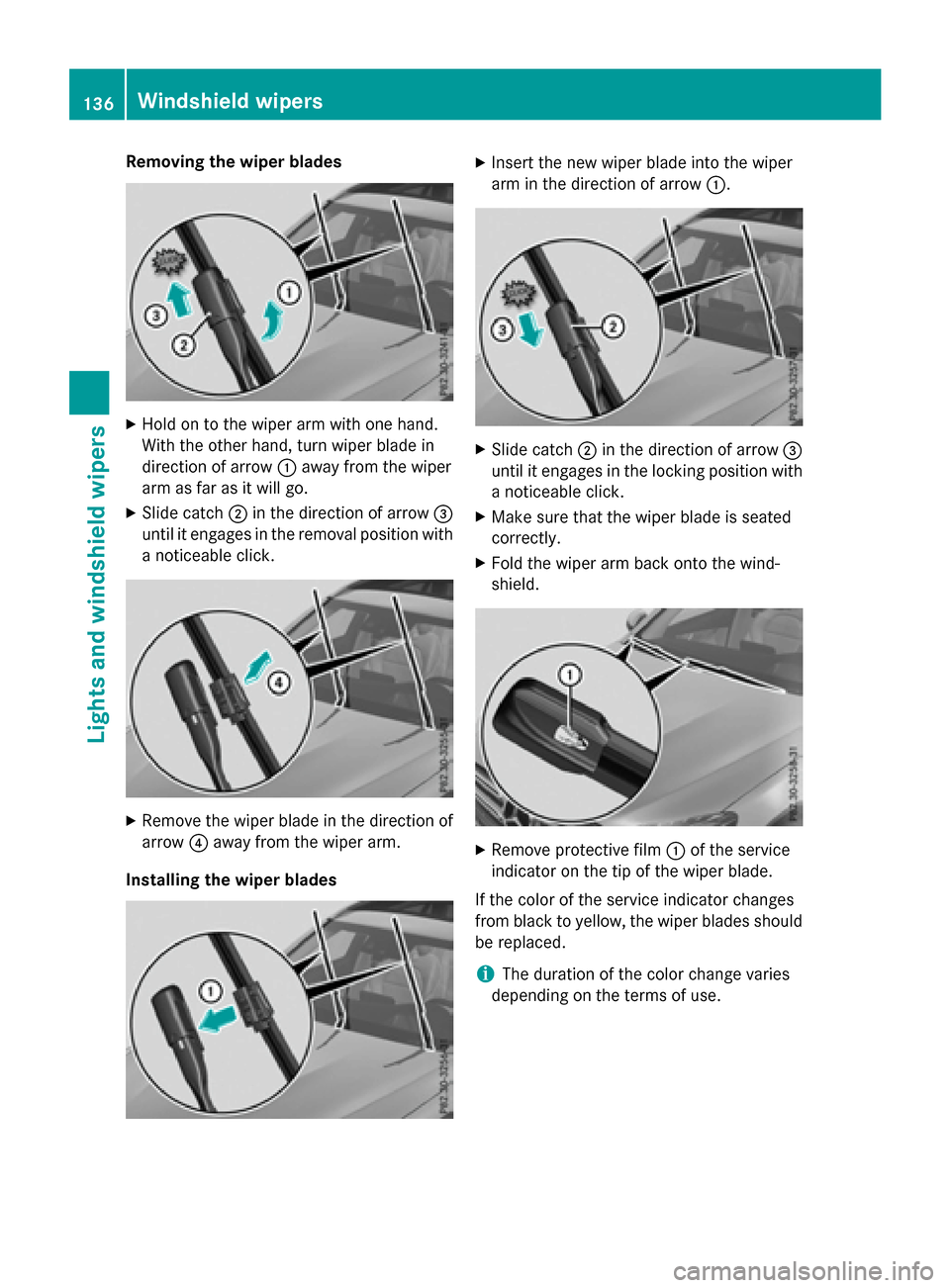
Removing the wiper blades
XHold on to the wiper arm with one hand.
With the other hand, turn wiper blade in
direction of arrow:away from the wiper
arm as far as it will go.
XSlide catch ;in the direction of arrow =
until it engages in the removal position with
a noticeable click.
XRemove the wiper blade in the direction of
arrow ?away from the wiper arm.
Installing the wiper blades
XInsert the new wiper blade into the wiper
arm in the direction of arrow :.
XSlide catch;in the direction of arrow =
until it engages in the locking position with a noticeable click.
XMake sure that the wiper blade is seated
correctly.
XFold the wiper arm back onto the wind-
shield.
XRemove protective film :of the service
indicator on the tip of the wiper blade.
If the color of the service indicator changes
from black to yellow, the wiper blades should
be replaced.
iThe duration of the color change varies
depending on the terms of use.
136Windshield wipers
Lights and windshield wipers
Page 218 of 418
When ATTENTION ASSIST is deactivated, the
ésymbol appears in the multifunction
display in the assistance graphic display.
When ATTENTION ASSIST has been deactiva-
ted, it is automatically reactivated after the
engine has been stopped. The sensitivity
selected corresponds to the last selection
activated (standard/sensitive).
Warning in the multifunction display
If fatigue or increasing lapses in concentra-
tion are detected, a warning appears in the
multifunction display: ATTENTION ASSIST
Take a Break!.
In addition to the message shown in the mul-
tifunction display, you will then hear a warn-
ing tone.
XIf necessary, take a break.
XConfirm the message by pressing the a
button on the steering wheel.
On long journeys, take regular breaks in good
time to allow yourself to rest properly. If you
do not take a break and ATTENTION ASSIST
still detects increasing lapses in concentra-
tion, you will be warned again after
15 minutes at the earliest. This will only hap-
pen if ATTENTION ASSIST still detects typical
indicators of fatigue or increasing lapses in
concentration.
If a warning is output in the multifunction dis-
play, a service station search is performed in
COMAND. You can select a service station
and navigation to this service station will then
begin. This function can be activated and
deactivated in COMAND.
Traffic Sign Assist
General notes
Traffic Sign Assist displays the maximum
speed permitted to the driver in the instru-
ment cluster. The data and general traffic reg-
ulations stored in the navigation system are
used to determine the current speed limit. Traffic Sign Assist is a map-based system,
and thus, traffic signs put up temporarily (e.g.
near roadworks) are not detected.
If a traffic sign that is relevant to your vehicle
is passed, the display of the speed limits is
updated.
Traffic signs with a restriction indicated by an
additional sign (e.g. in wet conditions) are
also shown.
The traffic signs are only displayed with the
restrictions if:
Rthe regulation must be observed with the
restriction, or
RTraffic Sign Assist is unable to determine
whether the restriction applies
If Traffic Sign Assist is unable to determine a
maximum permitted speed from any of the
available sources, no speed limit is displayed
in the instrument cluster either.
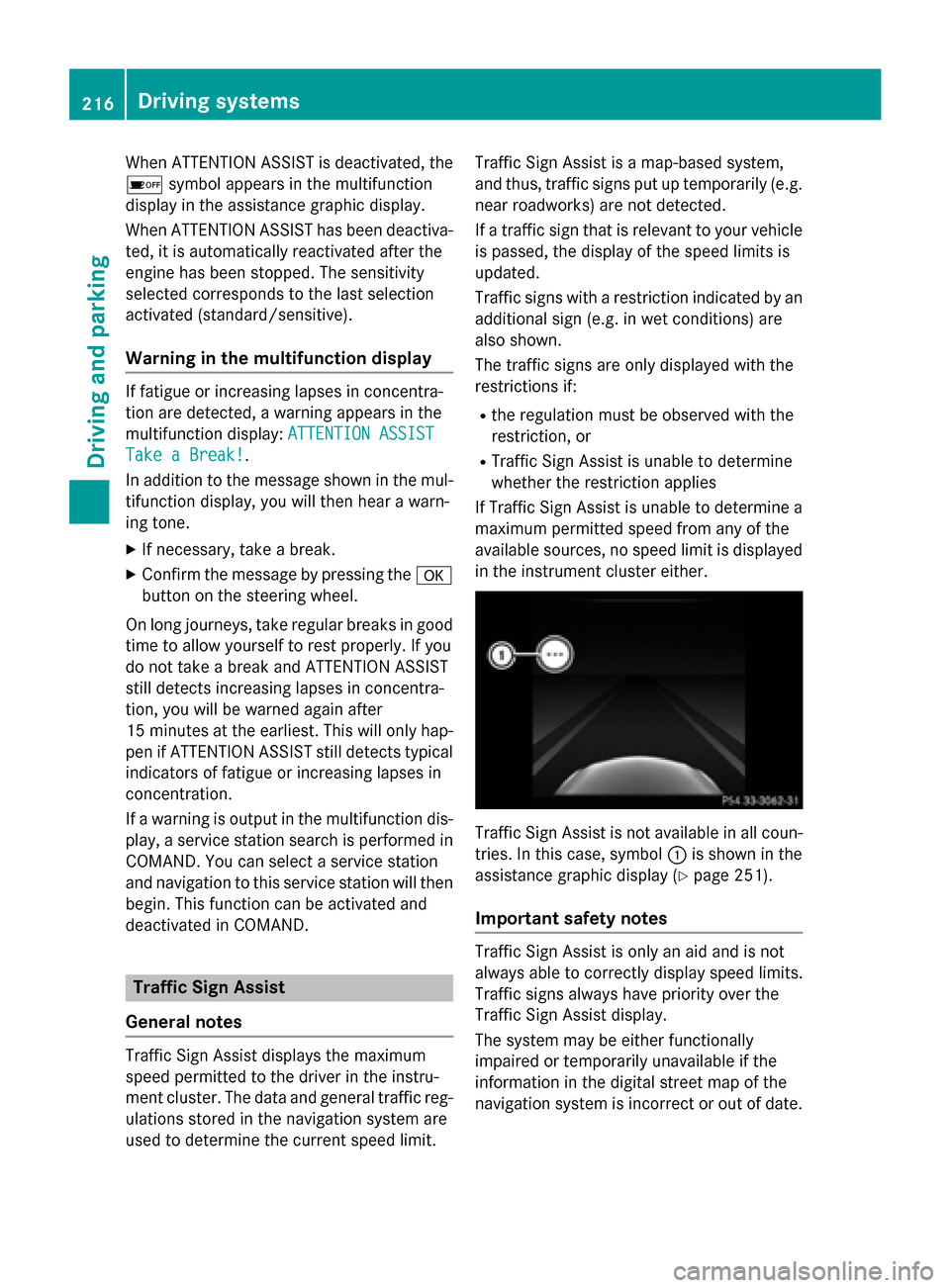
Traffic Sign Assist is not available in all coun-
tries. In this case, symbol :is shown in the
assistance graphic display (
Ypage 251).
Important safety notes
Traffic Sign Assist is only an aid and is not
always able to correctly display speed limits.
Traffic signs always have priority over the
Traffic Sign Assist display.
The system may be either functionally
impaired or temporarily unavailable if the
information in the digital street map of the
navigation system is incorrect or out of date.
216Driving systems
Driving and parking
Page 326 of 418
Problems with the 115 V power socket
ProblemPossible causes/consequences andMSolutions
The warning lamp on
the 115 V power socket
is not lit.The on-board voltage is too low because the battery is too weak.
XStart the engine.
or
XCharge the battery (Ypage 363).
If the indicator lamp still does not light up:
XVisit a qualified specialist workshop.
The temperature of the DC/AC converter is temporarily too high.
XRemove the electronic device connector from the 115 V socket.
XLet the DC/AC converter cool down.
If the indicator lamp still does not light up after cooling down the
converter:
XVisit a qualified specialist workshop.
You have connected an electronic device that has a constant
nominal power of less than 150 watts, but has a very high switch-
on current. This device will not work. If you connect such a device, the 115 V power socket will not supply it with power.
XConnect a suitable electronic device.
mbrace
General notes
The mbrace system is only available in the
USA.
You must have a license agreement to acti-
vate the mbrace service. Make sure that your system is activated and operational. To log in,
press the ïMB Info call button. If any of
the steps mentioned are not carried out, the
system may not be activated.
If you have questions about the activation,
contact one of the following telephone hot-
lines:
Mercedes-Benz Customer Assistance Center
at 1-800-FOR-MERCedes (1-800-367-6372)
or 1-866-990-9007
Shortly after successfully registering with the
mbrace service, a user ID and password will be sent to you by mail. You can use this pass-
word to log onto the mbrace area under "Own-
ers Online" at
http://www.mbusa.com.
The system is available if:
Rit has been activated and is operational
Rthe corresponding mobile phone network is
available for transmitting data to the Cus-
tomer Center
Ra service subscription is available
Rthe starter battery is sufficiently charged
Determining the location of the vehicle on a
map is only possible if:
RGPS reception is available.
Rthe vehicle position can be forwarded to
the Customer Assistance Center.
324Features
Stowage and features
Page 327 of 418
The mbrace system
To adjust the volume during a call, proceed as
follows:
XPress theWorX button on the mul-
tifunction steering wheel.
or
XUse the COMAND/Audio 20 volume con-
trol.
The system offers various services, e.g.:
RAutomatic and manual emergency call
RRoadside Assistance call
RMB Info call
You can find information and a description of
all available features under "Owners Online"
at http://www.mbusa.com.
System self-test
After you have switched on the ignition, the
system carries out a self-diagnosis.
A malfunction in the system has been detec-
ted if one of the following occurs:
RThe indicator lamp in the SOS button does
not come on during the system self-test.
RThe indicator lamp in the FRoadside
Assistance button does not light up during
self-diagnosis of the system.
RThe indicator lamp in the ïMB Info call
button does not light up during self-diag-
nosis of the system.
RThe indicator lamp in one or more of the
following buttons continues to light up red
after the system self-diagnosis:
-SOS button
-F Roadside Assistance call button
-ïMB Info call button
RTheInoperativeor the Service Not
Activatedmessage appears in the multi-
function display after the system self-diag-
nosis.
If a malfunction is indicated as outlined
above, the system may not operate as expec-
ted. In the event of an emergency, help will
have to be summoned by other means. Have the system checked at the nearest
authorized Mercedes-Benz Center or contact
the following service hotlines:
Mercedes-Benz Customer Assistance Center
at 1-800-FOR-MERCedes (1-800-367-6372)
or 1-866-990-9007
Emergency call
Important safety notes
GWARNING
It can be dangerous to remain in the vehicle,
even if you have pressed the SOS button in an emergency if:
Ryou see smoke inside or outside of the vehi-
cle, e.g. if there is a fire after an accident
Rthe vehicle is on a dangerous section of
road
Rthe vehicle is not visible or cannot easily beseen by other road users, particularly when
dark or in poor visibility conditions
There is a risk of an accident and injury.
Leave the vehicle immediately in this or simi-
lar situations as soon as it is safe to do so.
Move to a safe location along with other vehi-
cle occupants. In such situations, secure the
vehicle in accordance with national regula-
tions, e. g. with a warning triangle.
General notes
Observe the notes on system activation
(
Ypage 324).
An emergency call is dialed automatically if an
air bag or Emergency Tensioning Device is
triggered. You cannot end an automatically
triggered emergency call yourself.
An emergency call can also be initiated man-
ually.
As soon as the emergency call has been ini-
tiated, the indicator lamp in the SOS button
flashes. The Connecting Call
message
appears in the multifunction display.
The audio output is muted.
Features325
Stowag ean d features
Z
Page 329 of 418
If a mobile phone network and GPS reception
are available, the system transfers data to the
Mercedes-Benz Customer Assistance Center,
for example:
Rcurrent location of the vehicle
Rvehicle identification number
The COMAND/Audio 20 display indicates
that a call is active. During the call, you can
change to the navigation menu by pressing
the NAVI button in COMAND/Audio 20, for
example.
Voice output is not available in this case.
A voice connection is established between
the Mercedes-Benz Customer Assistance
Center and the vehicle occupants.
From the remote malfunction diagnosis, the
Mercedes-Benz Customer Assistance Center
can ascertain the nature of the problem
(
Ypage 330).
The Mercedes-Benz Customer Assistance
Center either sends a qualified Mercedes-
Benz technician or makes arrangements for
your vehicle to be transported to the nearest authorized Mercedes-Benz Center.
You may be charged for services such as
repair work and/or towing.
You can find more information in the separate
mbrace manual.
The system has not been able to initiate a
Roadside Assistance call, if:
Rthe indicator lamp for Roadside Assistance
call button Fis flashing continuously.
Rno voice connection to the Mercedes-Benz
Customer Assistance Center was estab-
lished.
This can occur if the relevant mobile phone
network is not available, for example.
The Call Failed
message appears in the
multifunction display.
XTo end a call: press the~button on the
multifunction steering wheel.
or
XPress the corresponding COMAND/Audio
20 button for ending a phone call.
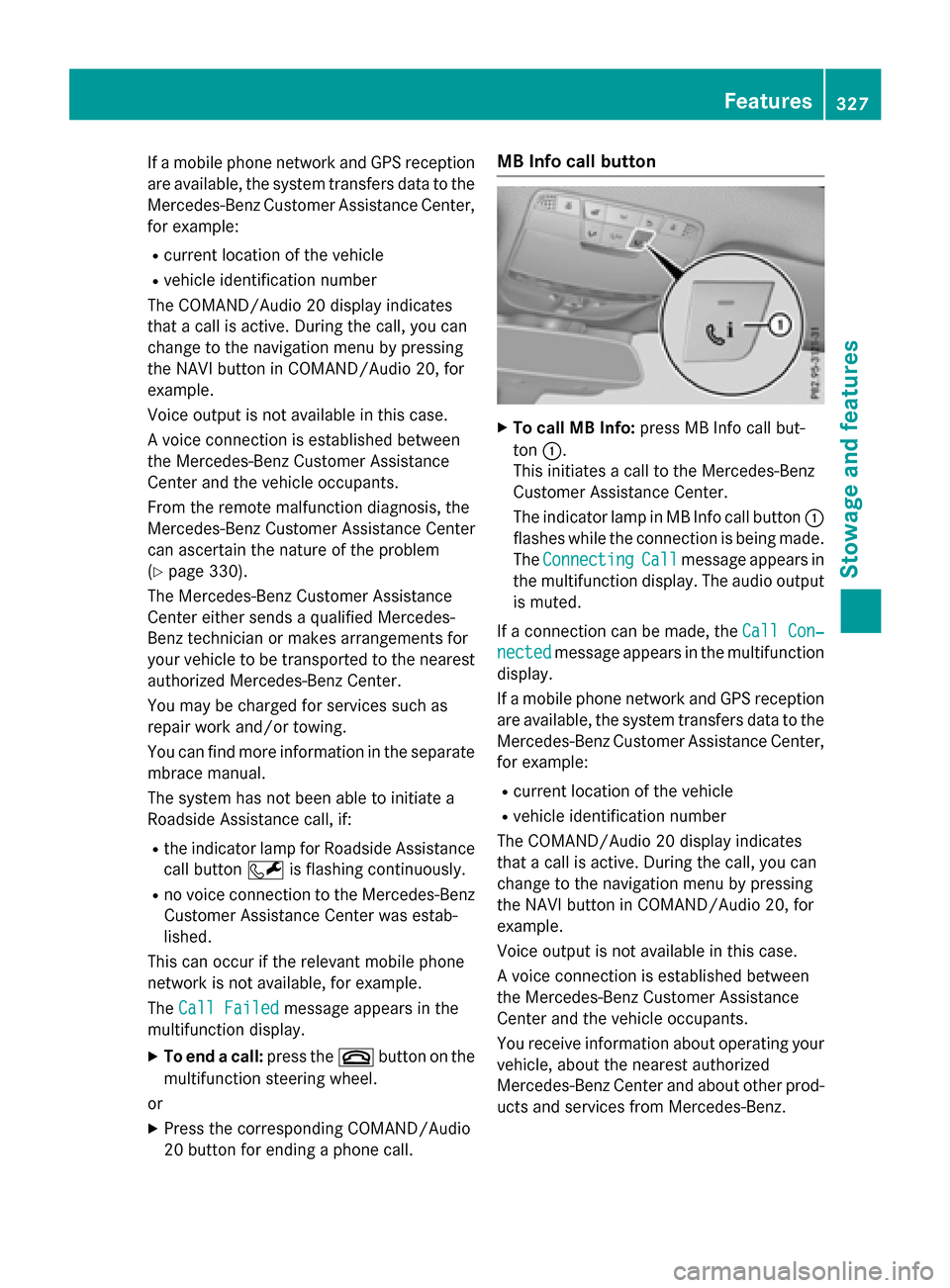
MB Info call button
XTo call MB Info: press MB Info call but-
ton :.
This initiates a call to the Mercedes-Benz
Customer Assistance Center.
The indicator lamp in MB Info call button :
flashes while the connection is being made.
The Connecting
Callmessage appears in
the multifunction display. The audio output
is muted.
If a connection can be made, the Call Con‐
nectedmessage appears in the multifunction
display.
If a mobile phone network and GPS reception
are available, the system transfers data to the
Mercedes-Benz Customer Assistance Center,
for example:
Rcurrent location of the vehicle
Rvehicle identification number
The COMAND/Audio 20 display indicates
that a call is active. During the call, you can
change to the navigation menu by pressing
the NAVI button in COMAND/Audio 20, for
example.
Voice output is not available in this case.
A voice connection is established between
the Mercedes-Benz Customer Assistance
Center and the vehicle occupants.
You receive information about operating your
vehicle, about the nearest authorized
Mercedes-Benz Center and about other prod-
ucts and services from Mercedes-Benz.
Features327
Stowage and features
Z
Page 330 of 418
You can find further information on the
mbrace system under "Owners Online" at
http://www.mbusa.com.
The system has not been able to initiate an
MB Info call, if:
Rthe indicator lamp in MB Info call button
ïis flashing continuously.
Rno voice connection to the Mercedes-Benz
Customer Assistance Center was estab-
lished.
This can occur if the relevant mobile phone
network is not available, for example.
The Call Failed
message appears in the
multifunction display.
XTo end a call: press the~button on the
multifunction steering wheel.
or
XPress the corresponding COMAND/Audio
20 button for ending a phone call.
Call priority
When service calls are active, e.g. Roadside
Assistance or MB Info calls, an emergency
call can still be initiated. In this case, an emer-
gency call will take priority and override all
other active calls.
The indicator lamp of the respective button
flashes until the call is ended.
An emergency call can only be terminated by the Mercedes-Benz Customer Assistance
Center.
All other calls can be ended by pressing:
Rthe ~ button on the multifunction steer-
ing wheel
Rthe corresponding button in COMAND/
Audio 20 to end the voice call
When a call is initiated, the audio system is
muted.
The mobile phone is no longer connected to
COMAND/Audio 20.
However, if you want to use your mobile
phone, do so only when the vehicle is station-
ary and in a safe location.
Downloading destinations
Downloading destinations
Downloading destinations gives you access
to a database with over 15 million points of
interest (POIs). These can be downloaded on
the navigation system in your vehicle. If you
know the destination, the address can be
downloaded. Alternatively, you can obtain the
location of Points of Interest (POIs)/impor-
tant destinations in the vicinity.
Furthermore, you can download routes with
up to four way points.
You are prompted to confirm route guidance
to the address entered.
XSelect Yesby turning 3or sliding 1
the controller and confirm with 7.
The system calculates the route and sub-
sequently starts the route guidance with
the address entered.
If you select No
the address can be stored in
the address book.
The destination download function is availa-
ble if:
Rthe vehicle is equipped with a navigation
system.
Rthe relevant mobile phone network is avail- able and data transfer is possible.
Route Assistance
This service is part of the mbrace PLUS Pack-
age and cannot be purchased separately.
You can use the route assistance function
even if the vehicle is not equipped with a nav-
igation system.
Within the framework of this service, you
receive a professional and reliable form of
navigation support without having to leave
your vehicle.
The customer service representative finds a
suitable route depending on your vehicle's
current position and the desired destination.
You will then be guided live through the cur-
rent route section.
328Features
Stowage and features