light MERCEDES-BENZ GLC-Class 2016 X253 Manual PDF
[x] Cancel search | Manufacturer: MERCEDES-BENZ, Model Year: 2016, Model line: GLC-Class, Model: MERCEDES-BENZ GLC-Class 2016 X253Pages: 418, PDF Size: 9.23 MB
Page 140 of 418
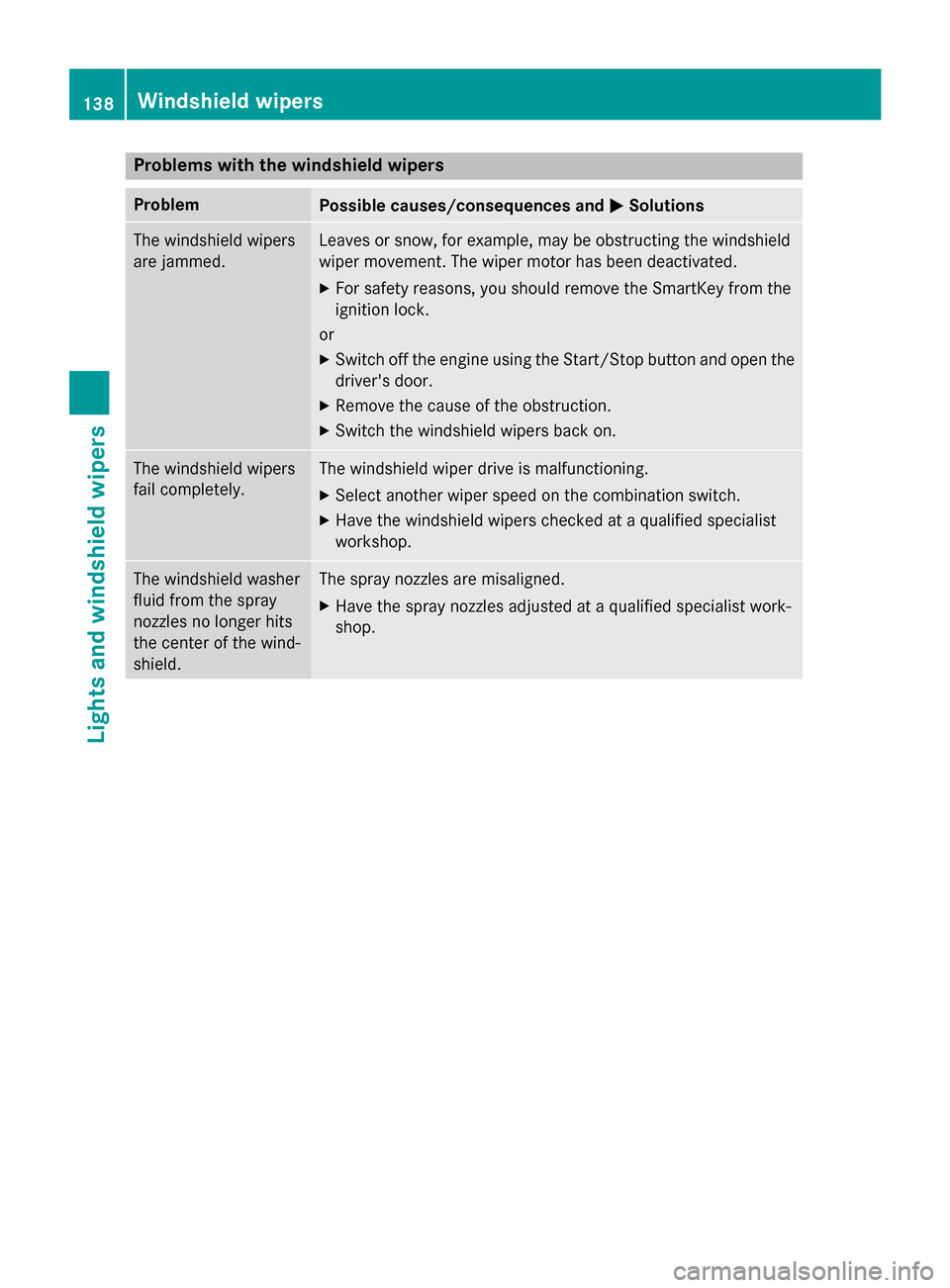
Problems with the windshield wipers
ProblemPossible causes/consequences andMSolutions
The windshield wipers
are jammed.Leaves or snow, for example, may be obstructing the windshield
wiper movement. The wiper motor has been deactivated.
XFor safety reasons, you should remove the SmartKey from the
ignition lock.
or
XSwitch off the engine using the Start/Stop button and open the driver's door.
XRemove the cause of the obstruction.
XSwitch the windshield wipers back on.
The windshield wipers
fail completely.The windshield wiper drive is malfunctioning.
XSelect another wiper speed on the combination switch.
XHave the windshield wipers checked at a qualified specialist
workshop.
The windshield washer
fluid from the spray
nozzles no longer hits
the center of the wind-
shield.The spray nozzles are misaligned.
XHave the spray nozzles adjusted at a qualified specialist work-
shop.
138Windshield wipers
Lights and windshield wipers
Page 143 of 418
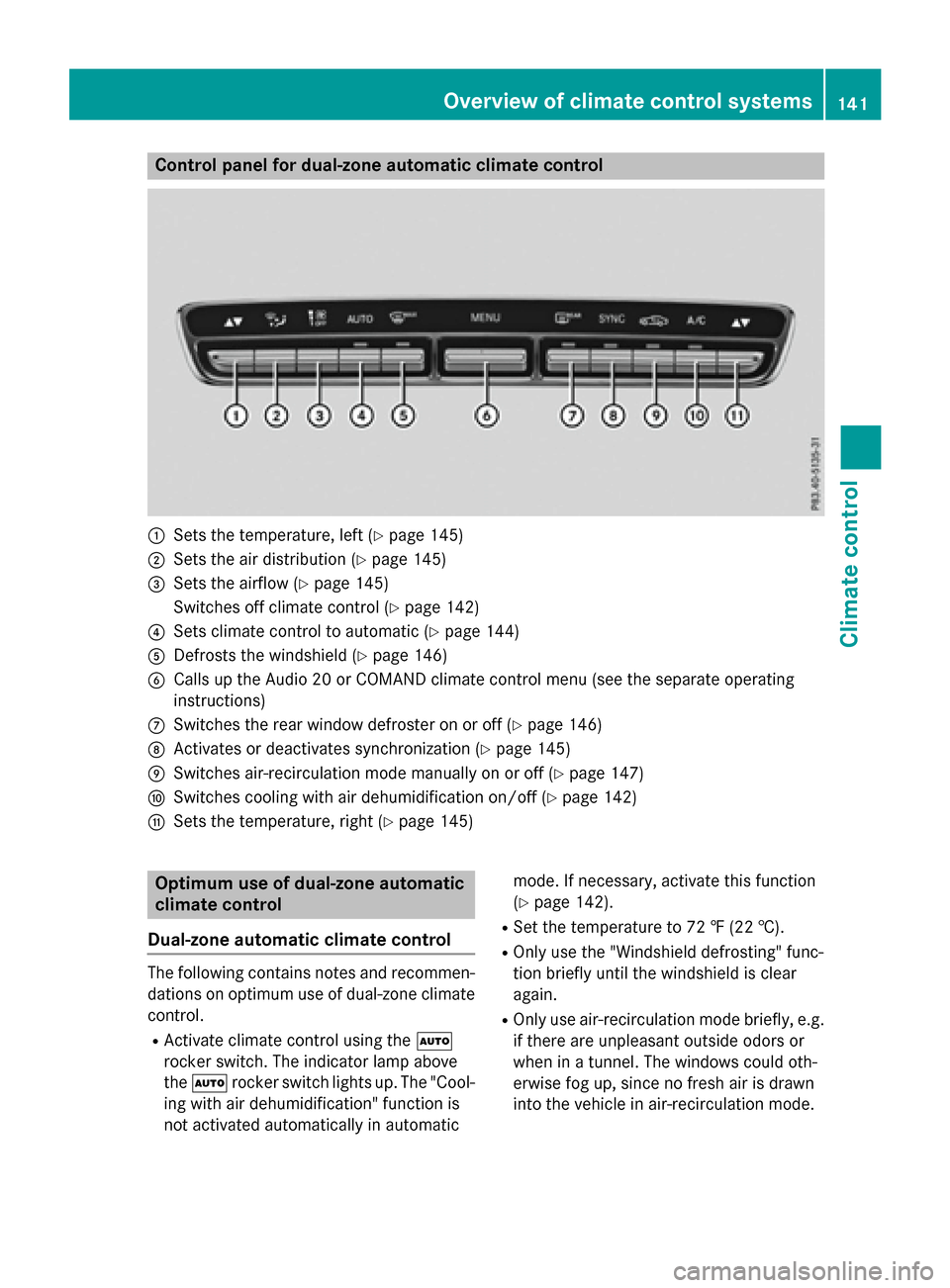
Control panel for dual-zone automatic climate control
:Sets the temperature, left (Ypage 145)
;Sets the air distribution (Ypage 145)
=Sets the airflow (Ypage 145)
Switches off climate control (
Ypage 142)
?Sets climate control to automatic (Ypage 144)
ADefrosts the windshield (Ypage 146)
BCalls up the Audio 20 or COMAND climate control menu (see the separate operating
instructions)
CSwitches the rear window defroster on or off (Ypage 146)
DActivates or deactivates synchronization (Ypage 145)
ESwitches air-recirculation mode manually on or off (Ypage 147)
FSwitches cooling with air dehumidification on/off (Ypage 142)
GSets the temperature, right (Ypage 145)
Optimum use of dual-zone automatic
climate control
Dual-zone automatic climate control
The following contains notes and recommen-
dations on optimum use of dual-zone climate
control.
RActivate climate control using the Ã
rocker switch. The indicator lamp above
the à rocker switch lights up. The "Cool-
ing with air dehumidification" function is
not activated automatically in automatic mode. If necessary, activate this function
(
Ypage 142).
RSet the temperature to 72 ‡ (22 †).
ROnly use the "Windshield defrosting" func-
tion briefly until the windshield is clear
again.
ROnly use air-recirculation mode briefly, e.g.
if there are unpleasant outside odors or
when in a tunnel. The windows could oth-
erwise fog up, since no fresh air is drawn
into the vehicle in air-recirculation mode.
Overview of climate control systems141
Climate control
Page 145 of 418
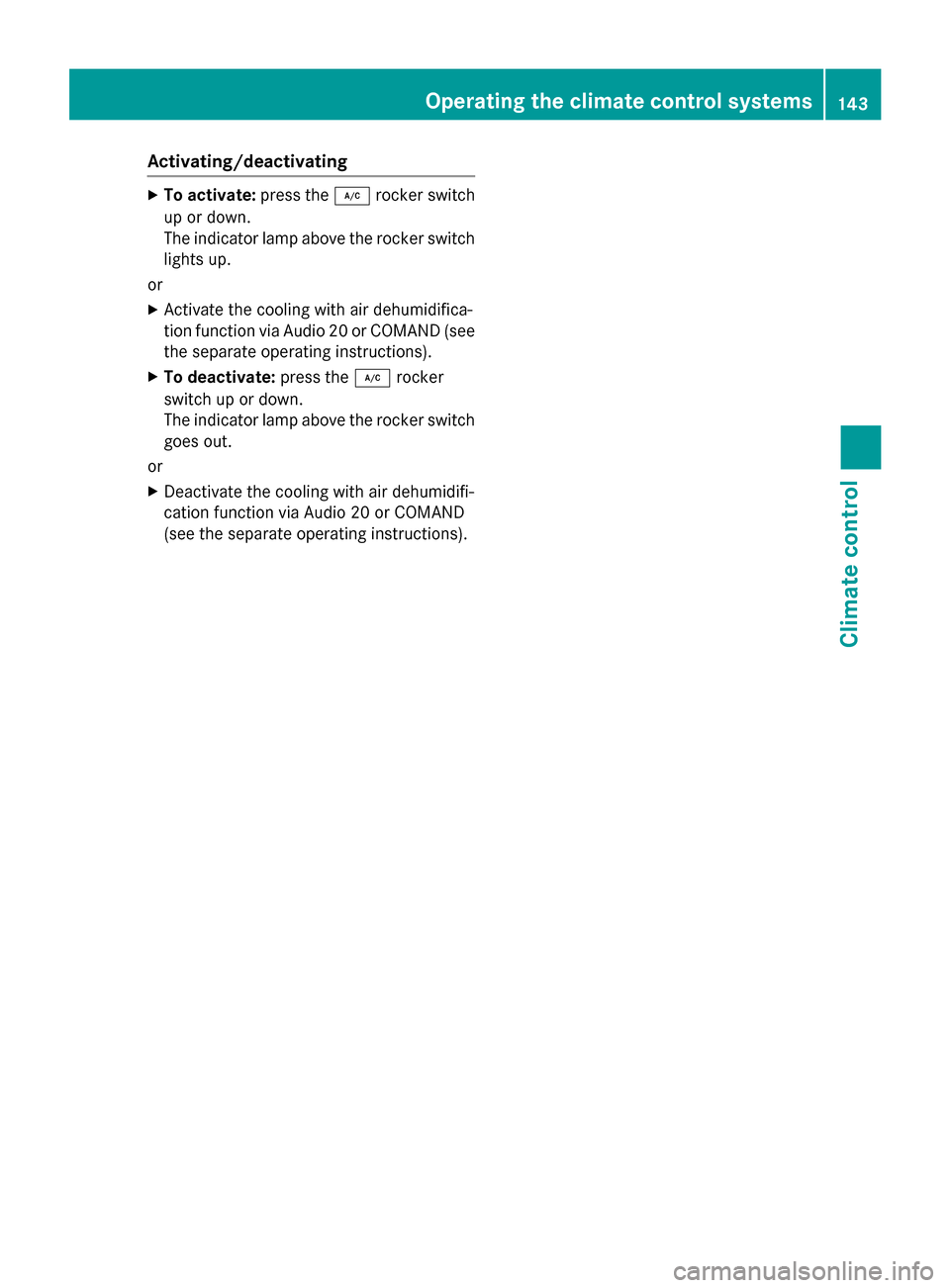
Activating/deactivating
XTo activate:press th e¿ rockerswitch
up or down .
The indicator lamp abov eth erocke rswitch
lights up.
or
XActivat eth ecoolin gwit hair dehumidifica-
tion function via Audio 20 or COMAND (see
th eseparat eoperating instructions).
XTo deacti vate:press th e¿ rocker
switch up or down .
The indicator lamp abov eth erocke rswitch
goes out .
or
XDeactivat eth ecoolin gwit hair dehumidifi-
cation function via Audio 20 or COMAND
(see th eseparat eoperating instructions).
Operating the climate control systems143
Climate control
Page 146 of 418
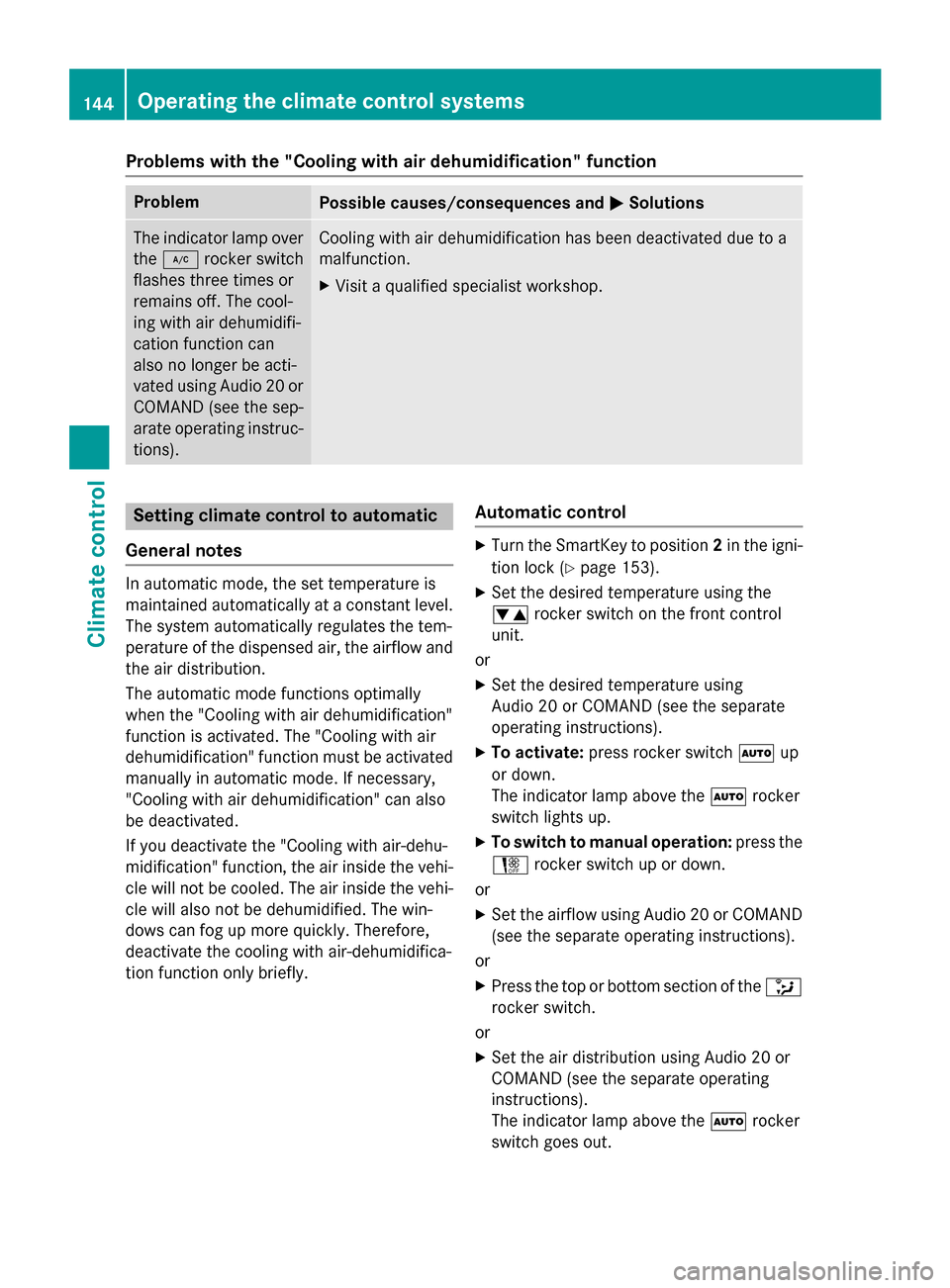
Problems with the "Cooling with air dehumidification" function
ProblemPossible causes/consequences andMSolutions
The indicator lamp over
the¿ rocker switch
flashes three times or
remains off. The cool-
ing with air dehumidifi-
cation function can
also no longer be acti-
vated using Audio 20 or
COMAND (see the sep-
arate operating instruc-
tions).Cooling with air dehumidification has been deactivated due to a
malfunction.
XVisit a qualified specialist workshop.
Setting climate control to automatic
General notes
In automatic mode, the set temperature is
maintained automatically at a constant level.
The system automatically regulates the tem-
perature of the dispensed air, the airflow and
the air distribution.
The automatic mode functions optimally
when the "Cooling with air dehumidification"
function is activated. The "Cooling with air
dehumidification" function must be activated
manually in automatic mode. If necessary,
"Cooling with air dehumidification" can also
be deactivated.
If you deactivate the "Cooling with air-dehu-
midification" function, the air inside the vehi- cle will not be cooled. The air inside the vehi-
cle will also not be dehumidified. The win-
dows can fog up more quickly. Therefore,
deactivate the cooling with air-dehumidifica-
tion function only briefly.
Automatic control
XTurn the SmartKey to position 2in the igni-
tion lock (
Ypage 153).
XSet the desired temperature using the
w rocker switch on the front control
unit.
or
XSet the desired temperature using
Audio 20 or COMAND (see the separate
operating instructions).
XTo activate: press rocker switch Ãup
or down.
The indicator lamp above the Ãrocker
switch lights up.
XTo switch to manual operation: press the
H rocker switch up or down.
or
XSet the airflow using Audio 20 or COMAND
(see the separate operating instructions).
or
XPress the top or bottom section of the _
rocker switch.
or
XSet the air distribution using Audio 20 or
COMAND (see the separate operating
instructions).
The indicator lamp above the Ãrocker
switch goes out.
144Operating the climate control systems
Climate control
Page 147 of 418
In automatic mode, if you adjust the airflow or
air distribution manually, the indicator lamp
above theÃrocker switch goes out. The
function which has not been changed man-
ually, however, continues to be controlled
automatically. When the manually set func-
tion switches back to automatic mode, the
indicator lamp above the Ãrocker switch
lights up again.
Setting the temperature
Different temperatures can be set for the
driver's and front-passenger sides.
XTurn the SmartKey to position 2in the igni-
tion lock (
Ypage 153).
XTo increase or reduce: press thew
rocker switch up or down.
or
XSet the temperature using Audio 20 or
COMAND (see the separate operating
instructions).
Only change the temperature setting in
small increments. Start at 72 ‡ (22 †).
Setting the air distribution
Air distribution settings
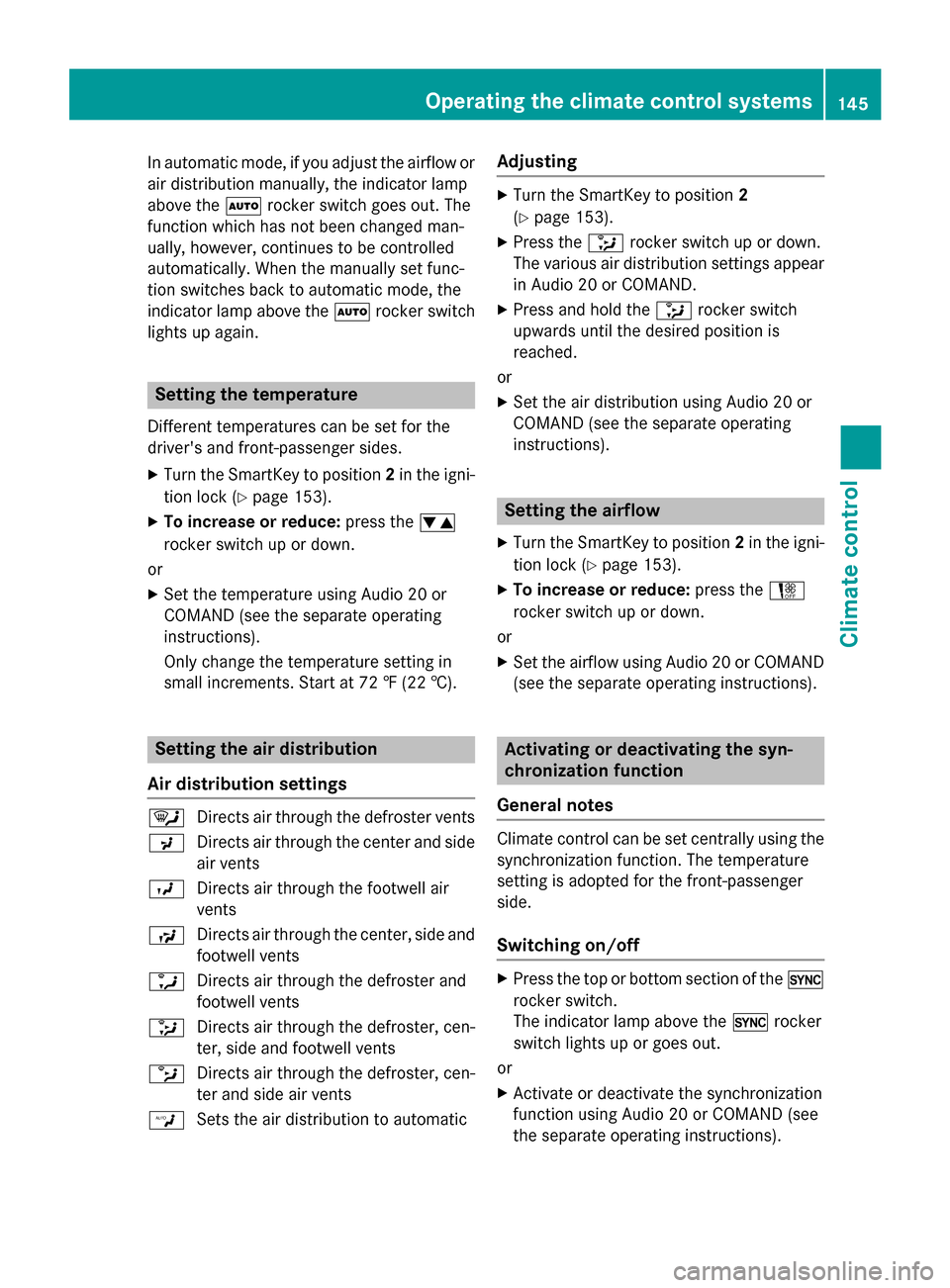
¯ Directs air through the defroster vents
P Directs air through the center and side
air vents
O Directs air through the footwell air
vents
S Directs air through the center, side and
footwell vents
a Directs air through the defroster and
footwell vents
_ Directs air through the defroster, cen-
ter, side and footwell vents
b Directs air through the defroster, cen-
ter and side air vents
W Sets the air distribution to automatic
Adjusting
XTurn the SmartKey to position 2
(
Ypage 153).
XPress the _rocker switch up or down.
The various air distribution settings appear
in Audio 20 or COMAND.
XPress and hold the _rocker switch
upwards until the desired position is
reached.
or
XSet the air distribution using Audio 20 or
COMAND (see the separate operating
instructions).
Setting the airflow
XTurn the SmartKey to position 2in the igni-
tion lock (
Ypage 153).
XTo increase or reduce: press theH
rocker switch up or down.
or
XSet the airflow using Audio 20 or COMAND
(see the separate operating instructions).
Activating or deactivating the syn-
chronization function
General notes
Climate control can be set centrally using the
synchronization function. The temperature
setting is adopted for the front-passenger
side.
Switching on/off
XPress the top or bottom section of the 0
rocker switch.
The indicator lamp above the 0rocker
switch lights up or goes out.
or
XActivate or deactivate the synchronization
function using Audio 20 or COMAND (see
the separate operating instructions).
Operating the climate control systems145
Climate control
Page 148 of 418
The synchronization function deactivates if
the settings for the front-passenger side are
changed.
Defrosting the windshield
General notes
You can use this function to defrost the wind-
shield or to clear a fogged up windshield or
front side windows on the inside.
Switch off the "Windshield defrosting" func-
tion as soon as the windshield is clear again.
Switching the "Windshield defrosting"
function on or off
XTurn the SmartKey to position 2in the igni-
tion lock (
Ypage 153).
XTo activate: press the¬rocker switch
on the front control unit up or down.
The indicator lamp above the ¬rocker
switch lights up. The current climate con-
trol settings are deactivated.
The climate control system switches to the
following functions:
Rhigh airflow
Rhigh temperature
Rair distribution to the windshield and
front side windows
Rair-recirculation mode off
iIf necessary, the "Cooling with air dehu-
midification" function is activated. In this
case, the indicator lamp above the
¿ rocker switch remains switched off.
XTo deactivate: press the¬rocker
switch up or down.
The indicator lamp above the ¬rocker
switch goes out. The previously selected
settings are restored. Air-recirculation
mode remains deactivated.
or
XPress the top or bottom section of the Ã
rocker switch.
Defrosting the windows
Windows fogged up on the inside
XActivate the cooling with air dehumidifica-
tion function with the ¿rocker switch.
or
XActivate the cooling with air dehumidifica-
tion function via Audio 20 or COMAND (see
the separate operating instructions).
XSwitch on automatic mode using the Ã
rocker switch.
XIf the windows continue to fog up, activate
the "Windshield defrosting" function using
the ¬ rocker switch.
iYou should only select this setting until
the windshield is clear again.
Windows fogged up on the outside
XActivate the windshield wipers.
XSwitch on automatic mode using the Ã
rocker switch.
iIf you clean the windows regularly, they
do not fog up so quickly.
Rear window defroster
General notes
The rear window defroster has a high current draw. You should therefore switch it off as
soon as the rear window is clear. Otherwise,
the rear window defroster switches off auto-
matically after several minutes.
If the battery voltage is too low, the rear win-
dow defroster may switch off.
Switching on/off
XTurn the SmartKey to position 2in the igni-
tion lock (
Ypage 153).
XPress the ¤rocker switch up or down.
The indicator lamp above the ¤rocker
switch lights up or goes out.
146Operating the climate control systems
Climate control
Page 149 of 418
Problems with the rear window defroster
ProblemPossible causes/consequences andMSolutions
The rear window
defroster has deactiva-
ted prematurely or can-
not be activated.The battery has not been sufficiently charged.
XSwitch off any consumers that are not required, e.g. reading
lamps, interior lighting or the seat heating.
When the battery is sufficiently charged, the rear window
defroster can be activated again.
Switching air-recirculation mode
on/off
General notes
You can also temporarily deactivate the flow
of fresh air manually if unpleasant odors are
entering the vehicle from outside. The air
already inside the vehicle will then be recir-
culated.
If you switch on air-recirculation mode, the
windows can fog up more quickly, in particu-
lar at low temperatures. Only use air-recircu-
lation mode briefly to prevent the windows
from fogging up.
Switching on/off
XTurn the SmartKey to position 2in the igni-
tion lock (
Ypage 153).
XTo activate: press thegrocker switch
up or down.
The indicator lamp above the grocker
switch lights up.
Air-recirculation mode switches on automat-
ically:
Rat high outside temperatures
Rin a tunnel (vehicles with a navigation sys-
tem only)
The indicator lamp above the grocker
switch is not lit when automatic air-recircula-
tion mode is activated. Outside air is added
after about 30 minutes.
XTo deactivate: press thegrocker
switch up or down.
The indicator lamp above the grocker
switch goes out.
Air-recirculation mode deactivates automati-
cally:
Rafter approximately five minutes at outside temperatures below approximately 41 ‡
(5 †)
Rafter approximately five minutes if cooling
with air dehumidification is deactivated
Rafter approximately 30 minutes at outside
temperatures above approximately 41 ‡
(5 †) if the "Cooling with air dehumidifica-
tion" function is activated
Perfume atomizer
Operating the perfume atomizer
GWARNING
If children open the perfume vial, they could
drink the perfume or it could come into con-
tact with their eyes. There is a risk of injury. Do not leave children unsupervised in the vehicle.
If the perfume liquid has been drunk, consult
a doctor. If perfume comes into contact with
your eyes or skin, rinse the eyes with clean
water. If you continue to experience difficul-
ties, consult a doctor.
Operating the climate control systems147
Climate control
Z
Page 156 of 418
To start the vehicle without actively using the
SmartKey:
Rthe Start/Stop button must be inserted in
the ignition lock.
Rthe SmartKey must be in the vehicle.
Rthe vehicle must not be locked with the
SmartKey or KEYLESS-GO (
Ypage 83).
Do not keep the SmartKey:
Rwith electronic devices, e.g. a mobile
phone or another SmartKey.
Rwith metallic objects, e.g. coins or metal
foil.
Rinside metallic objects, e.g. a metal case.
This can affect the functionality of the Smart-
Key.
If you lock the vehicle with the SmartKey's
remote control or with KEYLESS-GO, after a
short time:
Ryou will not be able to switch on the ignition
with the Start/Stop button.
Ryou will not be able to start the engine with
the Start/Stop button until the vehicle is
unlocked again.
If you lock the vehicle centrally using the but-
ton on the front door (
Ypage 89), you can
continue to start the engine with the Start/
Stop button.
The engine can be switched off while the vehi-
cle is in motion by pressing and holding the
Start/Stop button for three seconds. This
function operates independently of the ECO
start/stop automatic engine switch-off func-
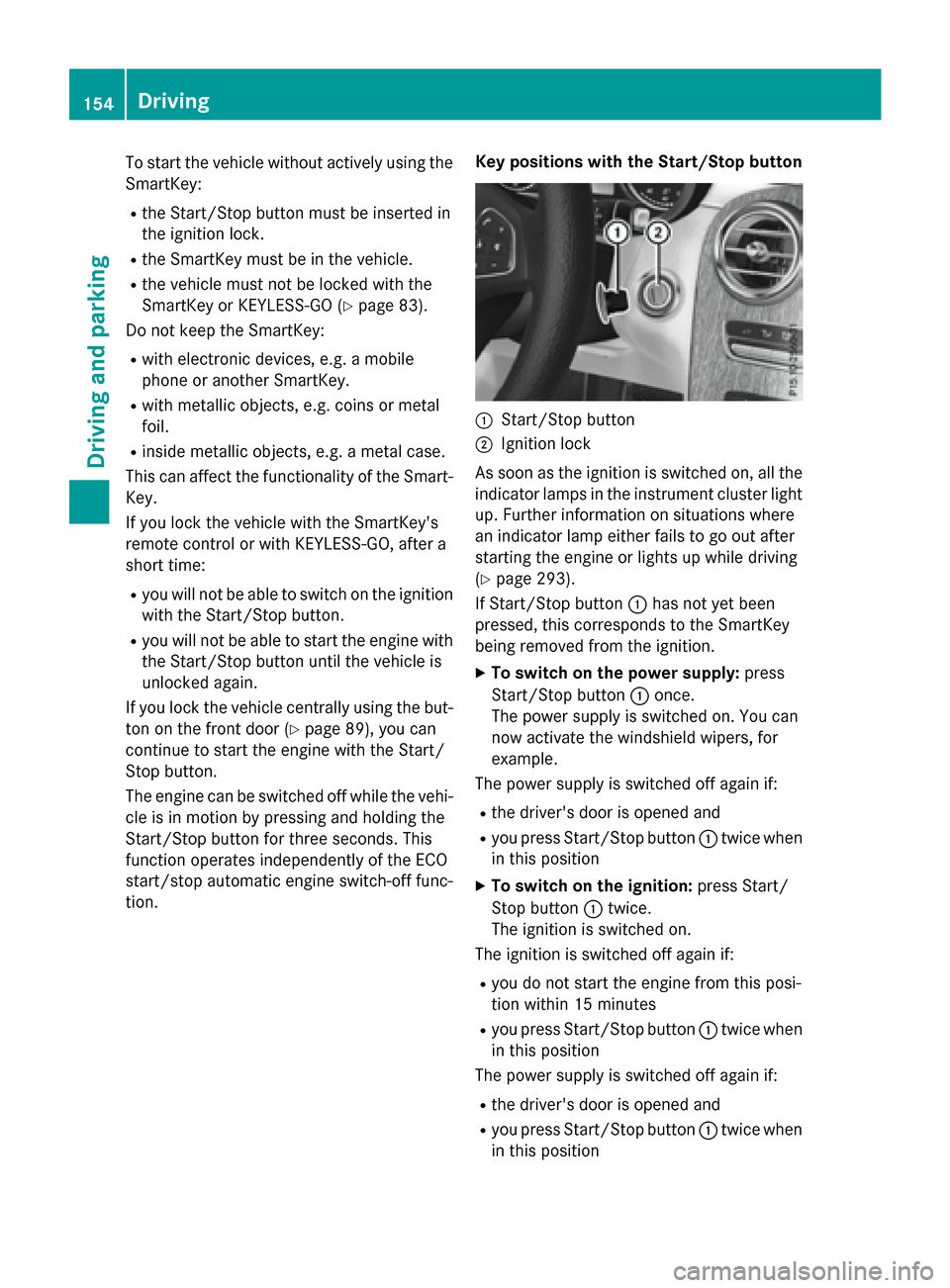
tion. Key positions with the Start/Stop button
:Start/Stop button
;Ignition lock
As soon as the ignition is switched on, all the
indicator lamps in the instrument cluster light
up. Further information on situations where
an indicator lamp either fails to go out after
starting the engine or lights up while driving
(
Ypage 293).
If Start/Stop button :has not yet been
pressed, this corresponds to the SmartKey
being removed from the ignition.
XTo switch on the power supply: press
Start/Stop button :once.
The power supply is switched on. You can
now activate the windshield wipers, for
example.
The power supply is switched off again if:
Rthe driver's door is opened and
Ryou press Start/Stop button :twice when
in this position
XTo switch on the ignition: press Start/
Stop button :twice.
The ignition is switched on.
The ignition is switched off again if:
Ryou do not start the engine from this posi-
tion within 15 minutes
Ryou press Start/Stop button :twice when
in this position
The power supply is switched off again if:
Rthe driver's door is opened and
Ryou press Start/Stop button :twice when
in this position
154Driving
Driving and parking
Page 158 of 418
If the engine will not start:
XRemove the SmartKey from the ignition
lock.
XReinsert the SmartKey into the ignition lock
after a short waiting period.
XTurn the SmartKey to position2in the igni-
tion lock (
Ypage 153).
The indicator lamps in the instrument clus-
ter light up (
Ypage 291).
XTurn the SmartKey to position 3
(
Ypage 153) in the ignition lock and release
it as soon as the engine is running.
Starting procedure with the Start/Stop
button
The Start/Stop button is only available on
vehicles with KEYLESS-GO or the KEYLESS-
GO start function.
The Start/Stop button can be used to start
the vehicle manually without inserting the
SmartKey into the ignition lock. The Start/
Stop button must be inserted in the ignition
lock and the SmartKey must be in the vehicle.
This mode for starting the engine operates
independently of the ECO start/stop auto-
matic engine start function.
You can start the engine if a valid SmartKey is
in the vehicle. Switch off the engine and
always take the SmartKey with you when
leaving the vehicle, even if you only leave it for
a short time. Pay attention to the important
safety notes.
XDepress the brake pedal and keep it
depressed.
XPress the Start/Stop button once
(
Ypage 153).
The engine starts.
Starting procedure via smartphone
Observe the important safety notes on start-
ing the engine (
Ypage 155).
You can also start your engine via your smart-
phone from outside the vehicle. In this case,
the previously selected climate control set- ting is activated. In this way you can cool or
heat the interior of the vehicle before starting
the journey.
Only start the engine via your smartphone if it
is safe to start and run the engine where your
vehicle is parked.
Observe the legal stipulations in the area
where your vehicle is parked. Engine start via
smartphone may be limited to certain coun-
tries or regions.
You can execute a maximum of two consec-
utive starting attempts via your smartphone.
If you insert the key into the ignition lock, you
can carry out two more starting attempts.
Once you have started the engine, you can
switch the engine off via your smartphone at
any time.
You can only start the engine via your smart- phone if:
Rthe key is in the ignition lock
Rpark position Pis selected
Rthe accelerator pedal is not depressed
Rthe anti-theft alarm system is not activated
Rthe panic alarm is not activated
Rthe hazard warning lamps are switched off
Rthe hood is closed.
Rthe doors are closed and locked
Rthe windows and sliding sunroof are closed
Also make sure that:
Rthe fuel tank is sufficiently filled
Rthe starter battery is sufficiently charged
GWARNING
Limbs could be crushed or trapped if the
engine is started unintentionally during ser-
vice or maintenance work. There is a risk of
injury.
Always secure the engine against uninten-
tional starting before carrying out mainte-
nance or repair work.
156Driving
Driving and parking
Page 161 of 418
When you depress the accelerator pedal, the
engine starts automatically and the braking
effect of the HOLD function is deactivated.
Automatic engine switch-off can take place a
maximum of four times in a row (initial stop,
then three subsequent stops).
Automatic engine start
The engine starts automatically if:
Ryou switch off the ECO start/stop function
by pressing the ECO button
Ryou switch to drive programS+
Rin transmission positionDor Nthe brake
pedal is released and the HOLD function is
not active
Ryou depress the accelerator pedal
Ryou engage reverse gear R
Ryou move the transmission out of position
P
Ryou unfasten your seat belt or open the
driver's door
Rthe vehicle starts to roll
Rthe brake system requires this
Rthe temperature in the vehicle interior devi-
ates from the set range
Rthe system detects moisture on the wind-
shield when the air-conditioning system is
switched on
Rthe battery's condition of charge is too low
Shifting the transmission to position Pdoes
not start the engine.
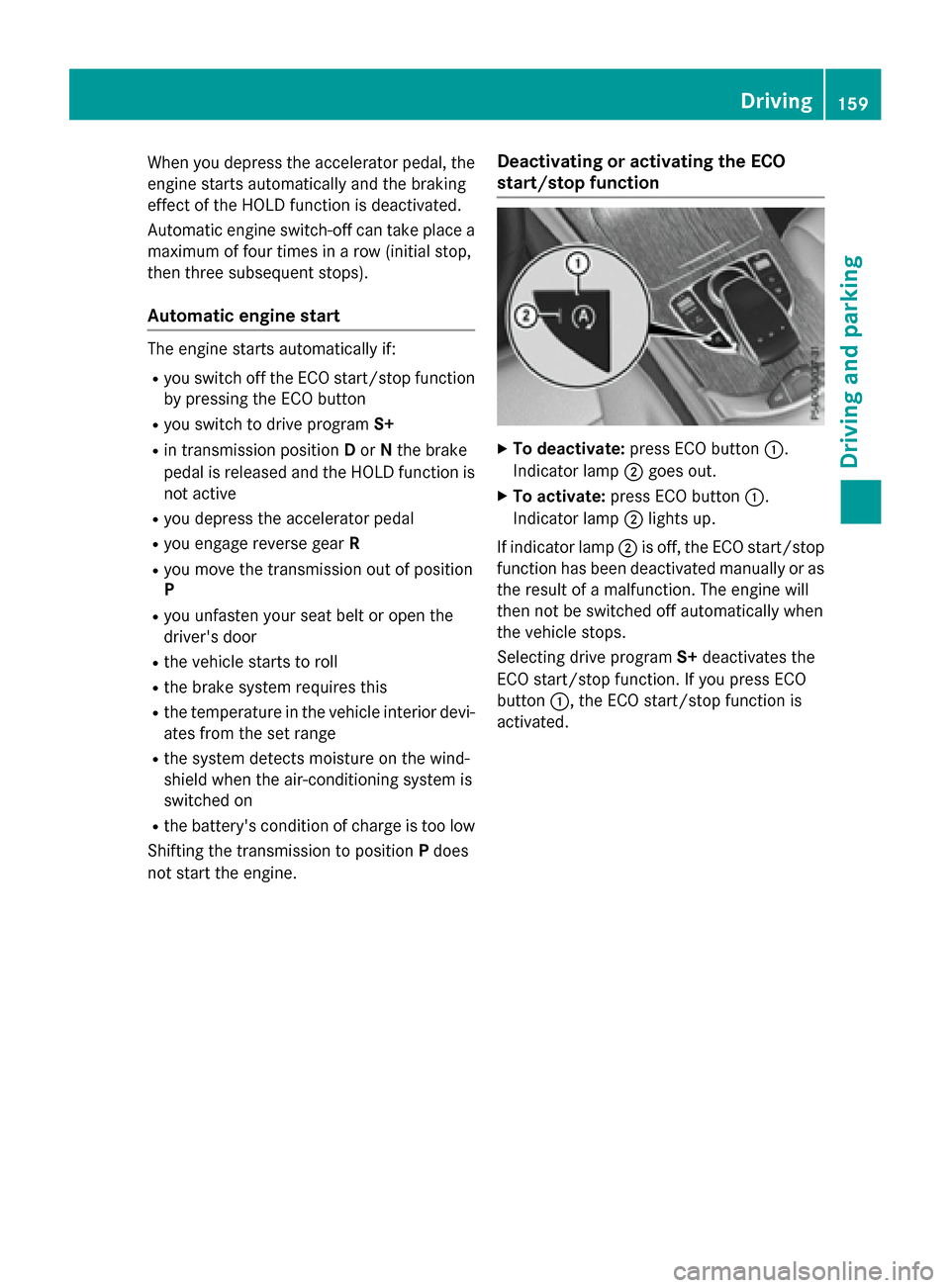
Deactivating or activating the ECO
start/stop function
XTo deactivate: press ECO button :.
Indicator lamp ;goes out.
XTo activate: press ECO button :.
Indicator lamp ;lights up.
If indicator lamp ;is off, the ECO start/stop
function has been deactivated manually or as
the result of a malfunction. The engine will
then not be switched off automatically when
the vehicle stops.
Selecting drive program S+deactivates the
ECO start/stop function. If you press ECO
button :, the ECO start/stop function is
activated.
Driving159
Driving and parking
Z