light MERCEDES-BENZ GLC-Class 2016 X253 Manual Online
[x] Cancel search | Manufacturer: MERCEDES-BENZ, Model Year: 2016, Model line: GLC-Class, Model: MERCEDES-BENZ GLC-Class 2016 X253Pages: 418, PDF Size: 9.23 MB
Page 162 of 418
Problems with the engine
ProblemPossible causes/consequences andMSolutions
The engine does not
start. The starter motor
can be heard.RThere is a malfunction in the engine electronics.
RThere is a malfunction in the fuel supply.
Before attempting to start the engine again:
XTurn the SmartKey back to position 0in the ignition lock.
or
XPress the Start/Stop button repeatedly until all indicator lamps in the instrument cluster go out.
XTry to start the engine again (Ypage 155). Avoid excessively
long and frequent attempts to start the engine as these will drain
the battery.
If the engine does not start after several attempts:
XConsult a qualified specialist workshop.
The engine does not
start. You cannot hear
the starter motor.The on-board voltage is too low because the battery is too weak or
discharged.
XJump-start the vehicle (Ypage 365).
If the engine does not start despite attempts to jump-start it:
XConsult a qualified specialist workshop.
The starter motor was exposed to a thermal load that was too high.
XTry to start the engine again (Ypage 155).
If the engine still does not start:
XConsult a qualified specialist workshop.
The engine is not run-
ning smoothly and is
misfiring.There is a malfunction in the engine electronics or in a mechanical
component of the engine management system.
XOnly depress the accelerator pedal slightly.
Otherwise, non-combusted fuel may get into the catalytic con-
verter and damage it.
XHave the cause rectified immediately at a qualified specialist
workshop.
The coolant tempera-
ture gauge shows a
value above 248 ‡
(120 †).The coolant level is too low. The coolant is too hot and the engine
is no longer being cooled sufficiently.
XStop as soon as possible and allow the engine and the coolant to
cool down.
XCheck the coolant level (Ypage 341). Observe the warning
notes as you do so and add coolant if necessary.
160Driving
Driving and parking
Page 176 of 418
With the Start/Stop button:
XSwitch on the ignition.
XDepress the brake pedal and keep it
depressed.
XRemove the Start/Stop button from the
ignition lock.
XInsert the SmartKey into the ignition lock.
XShift to neutralN.
XRelease the brake pedal.
XRelease the electric parking brake.
XSwitch off the ignition and leave the Smart-
Key in the ignition lock.
The engine can be switched off in an emer-
gency while the vehicle is in motion by press- ing and holding the Start/Stop button for
three seconds. This function operates inde-
pendently of the ECO start/stop automatic
engine switch-off function.
Electric parking brake
General notes
GWARNING
If you leave children unsupervised in the vehi-
cle, they could set it in motion by, for example:
Rrelease the parking brake.
Rshift the automatic transmission out of the
parking position P.
Rstart the engine.
In addition, they may operate vehicle equip-
ment and become trapped. There is a risk of
an accident and injury.
When leaving the vehicle, always take the
SmartKey with you and lock the vehicle. Never
leave children unsupervised in the vehicle.
The function of the electric parking brake is
dependent on the on-board voltage. If the on-
board voltage is low or there is a malfunction
in the system, it may not be possible to apply
the released parking brake.
XIf this is the case, only park the vehicle on
level ground and secure it to prevent it roll-
ing away.
XShift the automatic transmission to posi-
tion P.
It may not be possible to release an applied
parking brake if the on-board voltage is low or
there is a malfunction in the system. Contact a qualified specialist workshop.
The electric parking brake performs a func-
tion test at regular intervals while the engine
is switched off. The sounds that can be heard
while this is occurring are normal.
Applying or releasing manually
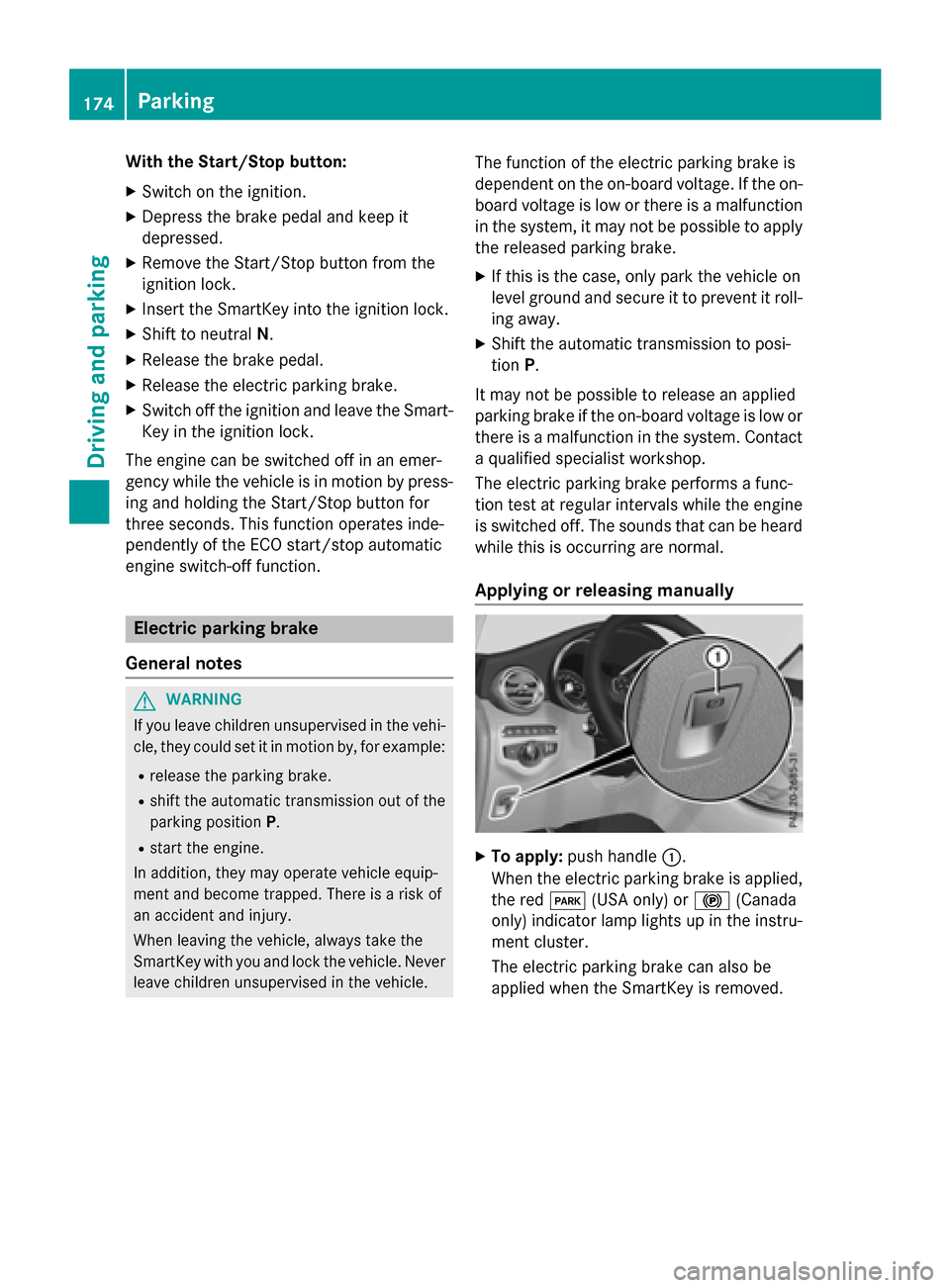
XTo apply: push handle :.
When the electric parking brake is applied, the red F(USA only) or !(Canada
only) indicator lamp lights up in the instru-
ment cluster.
The electric parking brake can also be
applied when the SmartKey is removed.
174Parking
Driving and parking
Page 177 of 418
XTo release:pull handle:.
The red F(USA only) or !(Canada
only) indicator lamp in the instrument clus- ter goes out.
The electric parking brake can only be
released:
Rwhen the SmartKey is in position 1or 2in
the ignition lock (
Ypage 153) or
Rif the ignition was switched on using the
Start/Stop button
Applying automatically
The electric parking brake is automatically
applied when the transmission is in position P
and:
Rthe engine is switched off or
Rthe driver is not wearing a seat belt and the driver's door is opened.
To prevent the electric parking brake from
being automatically applied, pull handle :.
The electric parking brake is also engaged
automatically if:
RDISTRONIC PLUS brings the vehicle to a
standstill or
Rthe HOLD function is keeping the vehicle
stationary
RActive Parking Assist is keeping the vehicle
stationary
In addition, at least one of the following con-
ditions must be fulfilled:
Rthere is a system malfunction.
Rthe power supply is insufficient.
Rthe vehicle is stationary for a lengthy
period.
The red !indicator lamp in the instrument
cluster lights up.
The electric parking brake is not automati-
cally engaged if the engine is switched off by
the ECO start/stop function.
Releasing automatically
Your vehicle's electric parking brake is auto-
matically released if all of the following con-
ditions are met:
Rthe engine is running.
Rthe transmission is in position Dor R.
Rthe seat belt has been fastened.
Ryou depress the accelerator pedal.
If the transmission is in position R, the trunk
lid must be closed.
If your seat belt is not fastened, the following
conditions must be fulfilled to automatically
release the electric parking brake:
Rthe driver's door is closed.
Ryou have shifted out of transmission posi-
tion Por you have previously driven faster
than 2 mph (3 km/h)
Ensure that you do not depress the acceler-
ator pedal unintentionally. Otherwise the
parking brake will be released and the vehicle
will start to move.
Emergency braking
The vehicle can also be braked during an
emergency by using the electric parking
brake.
XWhile driving, push handle :of the electric
parking brake (
Ypage 174).
The vehicle is braked as long as you keep
handle :of the electric parking brake
depressed. The longer electric parking
brake handle :is depressed, the greater
the braking force.
During braking:
Ra warning tone sounds
Rthe Please Release Parking Brake
message appears
Rthe red F(USA only) or !(Canada
only) indicator lamp in the instrument clus- ter flashes
When the vehicle has been braked to a stand-
still, the electric parking brake is engaged.
Parking175
Driving an d parking
Z
Page 179 of 418
is a risk of fatal injury. Therefore never leave
the engine running in enclosed spaces with-
out sufficient ventilation.
Certain engine systems are designed to keep
the level of poisonous components in exhaust
fumes within legal limits.
These systems only work at peak efficiency if
they are serviced exactly in accordance with
the manufacturer's specifications. For this
reason, all work on the engine must be carried
out by qualified and authorized Mercedes-
Benz technicians.
The engine settings must not be changed
under any circumstances. Furthermore, all
specific service work must be carried out at
regular intervals and in accordance with the
Mercedes-Benz service requirements. Details
can be found in the Maintenance Booklet.
ECO display
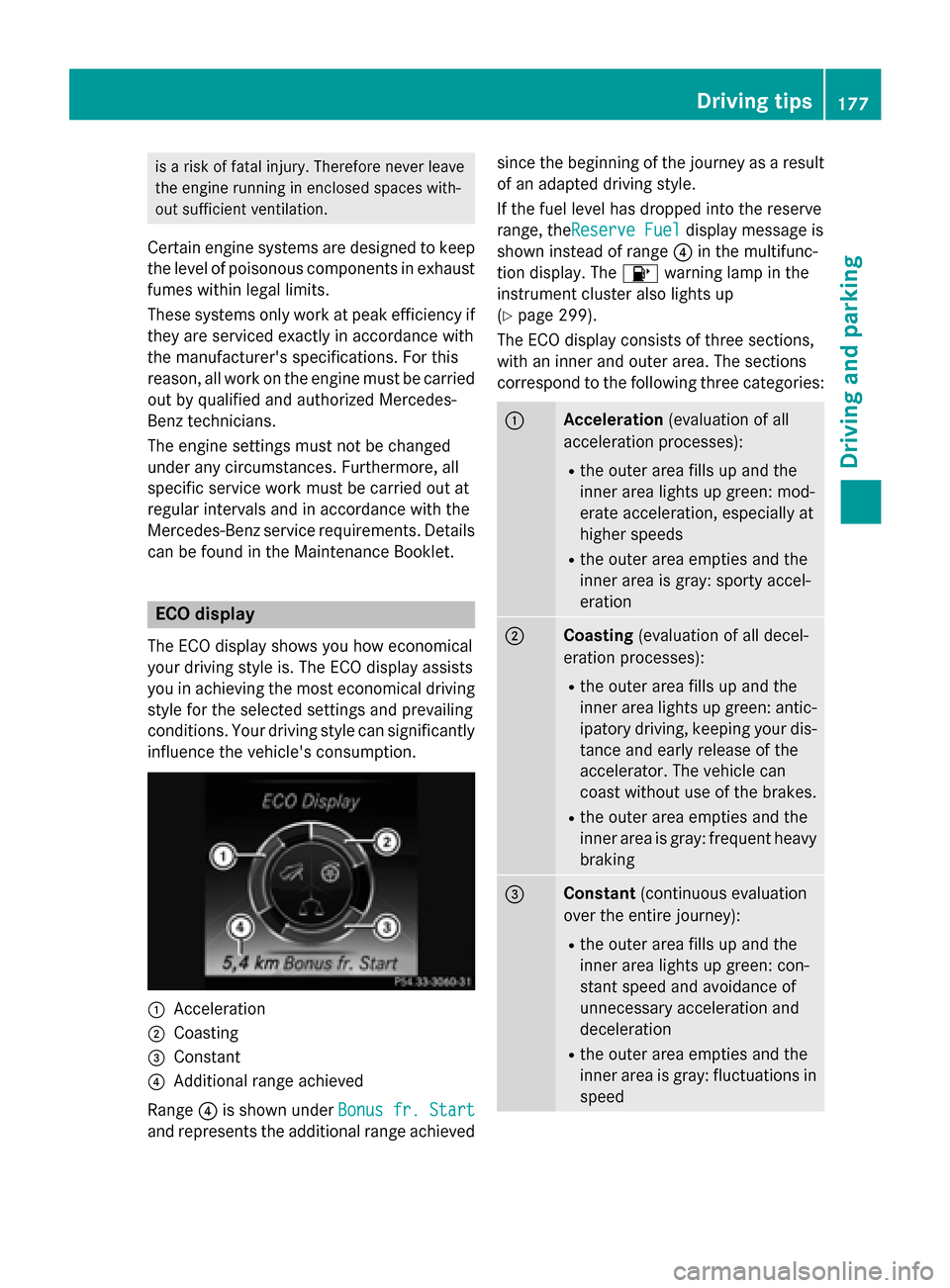
The ECO display shows you how economical
your driving style is. The ECO display assists
you in achieving the most economical driving
style for the selected settings and prevailing
conditions. Your driving style can significantly
influence the vehicle's consumption.
:Acceleration
;Coasting
=Constant
?Additional range achieved
Range ?is shown under Bonus fr. Start
and represents the additional range achieved since the beginning of the journey as a result
of an adapted driving style.
If the fuel level has dropped into the reserve
range, the
Reserve Fuel
display message is
shown instead of range ?in the multifunc-
tion display. The 8warning lamp in the
instrument cluster also lights up
(
Ypage 299).
The ECO display consists of three sections,
with an inner and outer area. The sections
correspond to the following three categories:
:Acceleration (evaluation of all
acceleration processes):
Rthe outer area fills up and the
inner area lights up green: mod-
erate acceleration, especially at
higher speeds
Rthe outer area empties and the
inner area is gray: sporty accel-
eration
;Coasting (evaluation of all decel-
eration processes):
Rthe outer area fills up and the
inner area lights up green: antic-
ipatory driving, keeping your dis-
tance and early release of the
accelerator. The vehicle can
coast without use of the brakes.
Rthe outer area empties and the
inner area is gray: frequent heavy
braking
=Constant (continuous evaluation
over the entire journey):
Rthe outer area fills up and the
inner area lights up green: con-
stant speed and avoidance of
unnecessary acceleration and
deceleration
Rthe outer area empties and the
inner area is gray: fluctuations in
speed
Driving tips177
Driving and parking
Z
Page 180 of 418
The three inner areas display the current driv-
ing style and light up green as a result of a
particularly economical driving style.
Depending on the driving situation, up to two
areas may light up simultaneously.
At the beginning of the journey, the three
outer areas are empty and fill up as a result of
economical driving. A higher level indicates a
more economical driving style. If the three
outer areas are completely filled at the same
time, the driver has adopted the most eco-
nomical driving style for the selected settings and prevailing conditions. The ECO display
border lights up.
The ECO display does not indicate the actual
fuel consumption. The additionally achieved
range displayed under Bonus fr. Start
does not indicate a fixed consumption reduc-
tion.
In addition to driving style, the actual con-
sumption is affected by other factors, such
as:
Rload
Rtire pressure
Rcold start
Rchoice of route
Relectrical consumers switched on
These factors are not included in the ECO dis-
play.
An economical driving style specially requires
driving at moderate engine speeds.
Achieving a higher value in the categories
"Acceleration" and "Constant":
Robserve the gearshift recommendations.
Rdrive in drive program E.
On long journeys at a constant speed, e.g. on the highway, only the outer area for "con-
stant" will change.
The ECO display summarizes the driving style
from the start of the journey to its completion.
Therefore, there are more marked changes in the outer areas at the start of a journey. On
longer journeys, there are fewer changes. For
more marked changes, perform a manual rest
(
Ypage 245). For further information on the ECO display,
see (
Ypage 244).
Braking
Important safety notes
GWARNING
If you shift down on a slippery road surface in an attempt to increase the engine's braking
effect, the drive wheels could lose their grip.
There is an increased danger of skidding and
accidents.
Do not shift down for additional engine brak-
ing on a slippery road surface.
Downhill gradients
!On long and steep gradients, you must
reduce the load on the brakes by shifting
early to a lower gear. This allows you to take
advantage of the engine braking effect and
helps avoid overheating and excessive
wear of the brakes.
When you take advantage of the engine
braking effect, a drive wheel may not turn
for some time, e.g. on a slippery road sur-
face. This could cause damage to the drive
train. This type of damage is not covered by
the Mercedes-Benz warranty.
Heavy and light loads
GWARNING
If you rest your foot on the brake pedal while
driving, the braking system can overheat. This increases the stopping distance and can even
cause the braking system to fail. There is a
risk of an accident.
Never use the brake pedal as a footrest. Never
depress the brake pedal and the accelerator
pedal at the same time.
!Depressing the brake pedal constantly
results in excessive and premature wear to
the brake pads.
178Driving tips
Driving and parking
Page 181 of 418
If the brakes have been subjected to a heavy
load, do not stop the vehicle immediately.
Drive on for a short while. This allows the air-
flow to cool the brakes more quickly.
Wet roads
If you have driven for a long time in heavy rain
without braking, there may be a delayed reac-
tion from the brakes when braking for the first
time. This may also occur after the vehicle has
been washed or driven through deep water.
You have to depress the brake pedal more
firmly. Maintain a greater distance from the
vehicle in front.
After driving on a wet road or having the vehi-
cle washed, brake firmly while paying atten-
tion to the traffic conditions. This will warm up
the brake discs, thereby drying them more
quickly and protecting them against corro-
sion.
Limited braking performance on salt-
treated roads
If you drive on salted roads, a layer of salt
residue may form on the brake discs and
brake pads. This can result in a significantly
longer braking distance.
RIn order to prevent any salt build-up, apply
the brakes occasionally while paying atten-
tion to the traffic conditions.
RCarefully depress the brake pedal and the
beginning and end of a journey.
RMaintain a greater distance to the vehicle
ahead.
Servicing the brakes
!The brake fluid level may be too low, if:
Rif the red brake warning lamp lights up inthe instrument cluster and
Ryou hear a warning tone while the engine
is running
Observe additional warning messages in
the multifunction display. The brake fluid level may be too low due to
brake pad wear or leaking brake lines.
Have the brake system checked immedi-
ately. Consult a qualified specialist work-
shop to arrange this.
!A function or performance test should
only be carried out on a 2-axle dynamom-
eter. If you wish to operate the vehicle on
such a dynamometer, please consult a
qualified specialist workshop in advance.
You could otherwise damage the drive train
or the brake system.
!The ESP®system operates automatically.
The engine and the ignition must therefore
be switched off (the SmartKey must be in
position 0or 1in the ignition lock or the
Start/Stop button must be in position 0or
1) if the electric parking brake is tested on
a brake dynamometer.
Braking triggered automatically by ESP
®
may cause severe damage to the brake
system.
All checks and maintenance work on the
brake system must be carried out at a quali-
fied specialist workshop.
Have brake pads installed and brake fluid
replaced at a qualified specialist workshop.
If the brake system has only been subject to
moderate loads, you should test the function-
ality of your brakes at regular intervals.
Information on BAS (Brake Assist) (
Ypage 68)
and BAS PLUS (Brake Assist PLUS)
(
Ypage 68).
For safety reasons, Mercedes-Benz recom-
mends only installing the following brake
disks and brake pads/linings:
Rbrake disks that have been approved by
Mercedes-Benz
Rbrake pads/linings that have been
approved by Mercedes-Benz or that are of
an equivalent standard of quality
Other brake disks or brake pads/linings can
compromise the safety of your vehicle.
Driving tips179
Driving and parking
Z
Page 182 of 418
Always replace all brake disks and brake
pads/linings on an axle at the same time.
Always install new brake pads/linings when
replacing brake disks.
The vehicle is equipped with lightweight
brake disks to which the wheel assembly with
rim and threaded connection is matched.
The use of brake disks other than those
approved by Mercedes-Benz can change the
track width and is subject to approval, if appli-cable.
Shock-type loads when handling the brake
disks, such as when changing wheels, can
lead to a reduction in comfort when driving
with lightweight brake disks. Avoid shock-
type loads on the lightweight brake disks,
particularly on the brake plate.
Mercedes-Benz recommends that you only
use brake fluid that has been specially
approved for your vehicle by Mercedes-Benz,
or which corresponds to an equivalent quality
standard. Brake fluid which has not been
approved for Mercedes-Benz vehicles or
which is not of an equivalent quality could
affect your vehicle's operating safety.
Driving on wet roads
Hydroplaning
If water has accumulated to a certain depth
on the road surface, there is a danger of
hydroplaning occurring, even if:
Ryou drive at low speeds.
Rthe tires have adequate tread depth.
For this reason, in the event of heavy rain or in
conditions in which hydroplaning may occur,
you must drive in the following manner:
Rlower your speed.
Ravoid ruts.
Ravoid sudden steering movements.
Rbrake carefully.
Driving on flooded roads
!Bear in mind that vehicles traveling in
front or in the opposite direction create
waves. This may cause the maximum per-
missible water depth to be exceeded.
Failure to observe these notes may result in
damage to the engine, electrical systems
and transmission.
If you have to drive on stretches of road on
which water has collected, please bear in
mind that:
Rin the case of standing water, the water
level may be no higher than the lower edge of the vehicle body
Ryou should drive no faster than at a walking
pace
Winter driving
GWARNING
If you shift down on a slippery road surface in an attempt to increase the engine's braking
effect, the drive wheels could lose their grip.
There is an increased danger of skidding and
accidents.
Do not shift down for additional engine brak-
ing on a slippery road surface.
GDANGER
If the exhaust pipe is blocked or adequate
ventilation is not possible, poisonous gases
such as carbon monoxide (CO) may enter the vehicle. This is the case, e.g. if the vehicle
becomes trapped in snow. There is a risk of
fatal injury.
If you leave the engine or the auxiliary heating
running, make sure the exhaust pipe and area
around the vehicle are clear of snow. To
ensure an adequate supply of fresh air, open a
window on the side of the vehicle that is not
facing into the wind.
Have your vehicle winter-proofed at a quali-
fied specialist workshop at the onset of win-
ter.
180Driving tips
Driving an d parking
Page 184 of 418
If there is a change of drivers, advise the new
driver of the speed stored.
iThe speed indicated in the speedometer
may differ slightly from the speed stored.
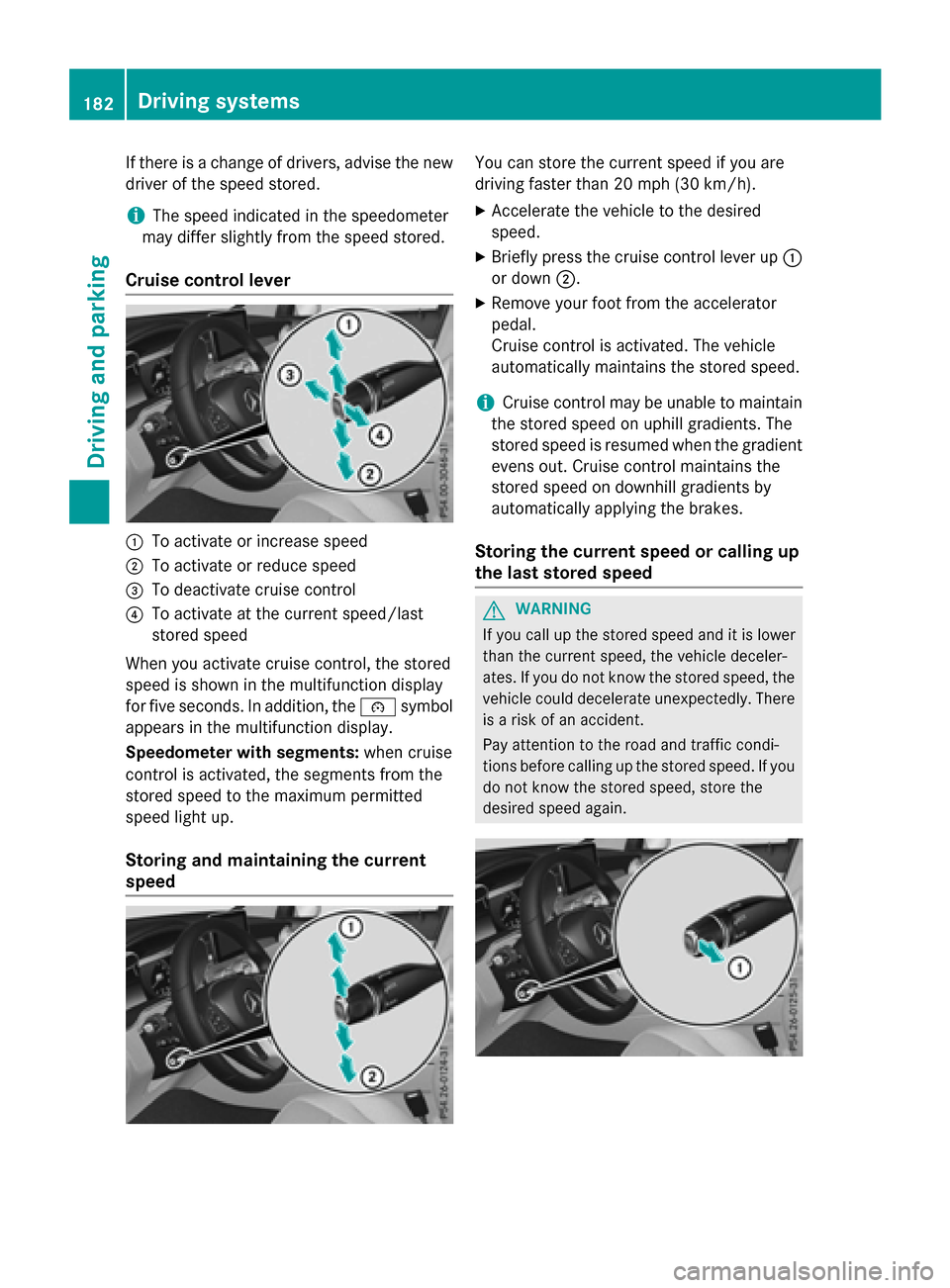
Cruise control lever
:To activate or increase speed
;To activate or reduce speed
=To deactivate cruise control
?To activate at the current speed/last
stored speed
When you activate cruise control, the stored
speed is shown in the multifunction display
for five seconds. In addition, the ésymbol
appears in the multifunction display.
Speedometer with segments: when cruise
control is activated, the segments from the
stored speed to the maximum permitted
speed light up.
Storing and maintaining the current
speed
You can store the current speed if you are
driving faster than 20 mph (30 km/h).
XAccelerate the vehicle to the desired
speed.
XBriefly press the cruise control lever up :
or down ;.
XRemove your foot from the accelerator
pedal.
Cruise control is activated. The vehicle
automatically maintains the stored speed.
iCruise control may be unable to maintain
the stored speed on uphill gradients. The
stored speed is resumed when the gradient
evens out. Cruise control maintains the
stored speed on downhill gradients by
automatically applying the brakes.
Storing the current speed or calling up
the last stored speed
GWARNING
If you call up the stored speed and it is lower
than the current speed, the vehicle deceler-
ates. If you do not know the stored speed, the vehicle could decelerate unexpectedly. There
is a risk of an accident.
Pay attention to the road and traffic condi-
tions before calling up the stored speed. If you
do not know the stored speed, store the
desired speed again.
182Driving systems
Driving and parking
Page 186 of 418
Change into a lower gear in good time on long
and steepdownhill gradients. This isespe-
cial ly impo rtantifthe vehicle is laden. By
doin g so, you willmake use of the braking
effect of the engine. This relieves the load on
the brake system and prevents the brakes
from overheating and wearing too quickly.
If DI ST RONIC PLUS detects that there isa risk
of a co llision, you will be warned visually and
acoustically. DI STRONIC PLUS cannot pre-
vent a co llisionwit hout your intervention. An
interm ittent warning tone will then sound and
the distance warning lamp will light up inthe
instrument cluster. Brake immediately in
order to increase the distance to the vehicle
in front or take evasive action provided it is
safe to doso.
DI ST RONIC PLUS operates inrange between
0 mph (0 km/h) and 120 mph (200 km/h).
Do not use DI STRONIC PLUS while driving on
roads with steep gradients.
As DI STRONIC PLUS transmits radar waves, it
can resemb lethe radar detectors of the
responsible authorities. You can refer to the
relevant chapter inthe Operator's Manual if
questions are asked about this.
iUSA only: This device has been approved
by the FCC as a "Vehicular Radar System".
The radar sensor isintended for use inan
automotive radar system on ly. Rem
oval,
tampering, or altering of the device willvoid
any warranties, and is not permitted by the
FCC. Do not tamper with, alter, or use in
any non- approved way.
Any unauthorized modification to this
device could void the user's authority to
operate the equipment.
iCanada only: This device co mplieswit h
RSS -210 of Industry Canada. Operation is
subject to the fol lowing two cond itions:
1. This device may not cause harmful inter-
ference, and
2. This device must accept any interference
receive d,inc ludin g interference that may
cause undesired operation of the device. Remo
val,tampering, or altering of the
device willvoid any warranties, and isnot
permitte d.Do not tamper with, alter, or use
in any non-approved way.
Any unauthorized mod ification to th is
device could void the user's authority to
operate the equipment.
Important safety notes
GWARNIN G
DISTRONI CPLU Sdoes no treac tto :
Rpeople or animals
Rstationary obstacle son th eroad ,e.g. stop-
ped or parked vehicles
Roncomin gand crossing traffic
As aresult ,DISTRONI CPLU Smay neither giv e
warning sno rinterven ein suc hsituations.
Ther eis aris kof an accident.
Always pay careful attentio nto th etraffic sit -
uation and be read yto brake.
GWARNIN G
DISTRONI CPLU Scanno talways clearly iden -
tif yother road user sand comple xtraffic sit -
uations.
In suc hcases, DISTRONI CPLU Smay:
Rgiv ean unnecessar ywarning and then
brak eth evehicl e
Rneither giv e awarning no rinterven e
Raccelerate or brak eune xpectedly
Ther eis aris kof an accident.
Continue to driv ecarefully and be read yto
brake, in particular when warned to do so by
DISTRONI CPLUS.
GWARNIN G
DISTRONI CPLU Sbrakes your vehicl ewit hup
to 50 %of the maximum possible deceleration.
If this braking force is insufficient, DISTRONIC
PLUS warns you visually and audibly. There is a risk of an accident.
In such cases, apply the brakes yourself and
try to take evasive action.
184Driving systems
Driving and parking
Page 191 of 418
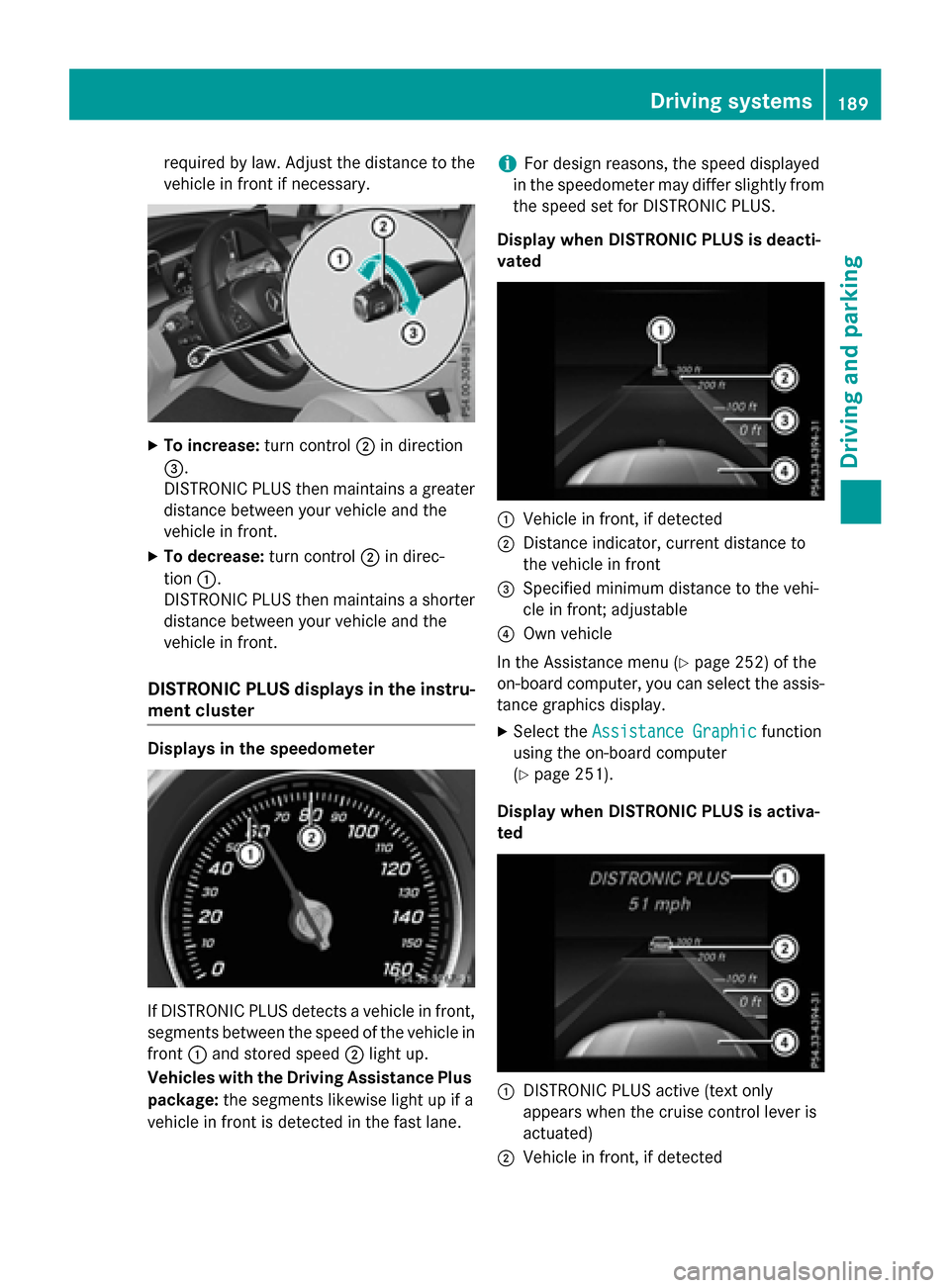
required by law. Adjust the distance to thevehicle in front if necessary.
XTo increase: turn control;in direction
=.
DISTRONIC PLUS then maintains a greater
distance between your vehicle and the
vehicle in front.
XTo decrease: turn control;in direc-
tion :.
DISTRONIC PLUS then maintains a shorter
distance between your vehicle and the
vehicle in front.
DISTRONIC PLUS displays in the instru-
ment cluster
Displays in the speedometer
If DISTRONIC PLUS detects a vehicle in front,
segments between the speed of the vehicle in
front :and stored speed ;light up.
Vehicles with the Driving Assistance Plus
package: the segments likewise light up if a
vehicle in front is detected in the fast lane.
iFor design reasons, the speed displayed
in the speedometer may differ slightly from
the speed set for DISTRONIC PLUS.
Display when DISTRONIC PLUS is deacti-
vated
:Vehicle in front, if detected
;Distance indicator, current distance to
the vehicle in front
=Specified minimum distance to the vehi-
cle in front; adjustable
?Own vehicle
In the Assistance menu (
Ypage 252) of the
on-board computer, you can select the assis- tance graphics display.
XSelect the Assistance Graphicfunction
using the on-board computer
(
Ypage 251).
Display when DISTRONIC PLUS is activa-
ted
:DISTRONIC PLUS active (text only
appears when the cruise control lever is
actuated)
;Vehicle in front, if detected
Driving systems189
Driving and parking
Z