cruise control MERCEDES-BENZ GLC-Class 2016 X253 Owner's Manual
[x] Cancel search | Manufacturer: MERCEDES-BENZ, Model Year: 2016, Model line: GLC-Class, Model: MERCEDES-BENZ GLC-Class 2016 X253Pages: 418, PDF Size: 9.23 MB
Page 9 of 418
Top Tether ....................................... 63
Child-proof locks
Important safety notes .................... 65
Rear doors ....................................... 66
Children
Special seat belt retractor ............... 61
Cigarette lighter ................................ 320
Cleaning
Mirror turn signal ........................... 348
Trailer tow hitch ............................. 349
Climate control
Control panel for dual-zone auto-
matic climate control ..................... 141
Controlling automatically ............... 144
Cooling with air dehumidification .. 142
Defrosting the windows ................. 146
Defrosting the windshield .............. 146
ECO start/stop function (dual-
zone automatic climate control) ....1 42
General notes ................................ 140
Indicator lamp ................................ 144
Information about using dual-zone
automatic climate control .............. 141
Ionization ....................................... 149
Overview of systems ......................1 40
Perfume atomizer .......................... 147
Problem with the rear window
defroster ........................................ 147
Problems with cooling with air
dehumidification ............................ 144
Refrigerant ..................................... 414
Refrigerant filling capacity ............. 414
Setting the air distribution ............. 145
Setting the air vents ......................1 49
Setting the airflow ......................... 145
Setting the temperature ................ 145
Switching air-recirculation mode
on/off ............................................ 147
Switching on/off ........................... 142
Switching the rear window
defroster on/off ............................ 146
Switching the synchronization
function on and off ........................ 145
Coat hooks ......................................... 315
Cockpit
Overview ....... ................................... 32 C
OLLISION PREVENTION ASSIST
PLUS
Activating/deactivating ................. 252
Display message ............................ 265
Operation/notes .............................. 70
COMAND display
Cleaning ......................................... 350
Combination switch .......................... 126
Consumption statistics (on-board
computer) .......................................... 245
Convenience closing feature .............. 99
Convenience opening feature ............ 99
Coolant (engine)
Checking the level ......................... 341
Display message ............................ 276
Filling capacity ............................... 413
Important safety notes .................. 412
Temperature display in the instru-
ment cluster .................................. 239
Warning lamp ................................. 299
Cooling
see Climate control
Copyright ............................................. 29
Cornering light function
Display message ............................ 272
Function/notes .............................1 27
Crash-responsive emergency light-
ing ....................................................... 130
Crosswind Assist ................................. 75
Cruise control
Cruise control lever ....................... 182
Deactivating ................................... 183
Display message ............................ 284
Driving system ............................... 181
Function/notes .............................1 81
General notes ................................ 181
Important safety notes .................. 181
Setting a speed .............................. 183
Storing and maintaining current
speed ............................................. 182
Storing the current speed or call-
ing up the last stored speed .......... 182
Cup holder
Center console .............................. 318
Important safety notes .................. 318
Rear compartment ......................... 318
Index7
Page 10 of 418
Customer Assistance Center
(CAC).................................................... .27
Customer Relations Department .......2 7
D
Data
see Technica ldat a
Dat acarrier
Selecting ........................................ 24 9
Daytime runnin glamps
Displa ymessage ............................ 27 4
Function/notes ............................ .124
Switching on/off (on-board com-
puter) ............................................. 255
Declarations of conformity ................. 26
Diagnostics connection ......................26
Digital speedometer .........................245
DIRECT SELECT lever
Automatic transmission ................. 162
Display
see Display messages
see Warning and indicator lamps
Display messages
ASSYST PLUS ................................ 342
Calling up (on-board computer) ..... 257
Driving systems .............................2 79
Engine ............................................ 276
General notes ................................ 257
Hiding (on-board computer) ........... 257
Introduction ................................... 257
Lights ............................................. 272
Safety systems .............................. 258
SmartKey ....................................... 290
Tires ............................................... 285
Vehicle ...........................................2 87
Distance recorder .............................2 44
Distance warning (warning lamp) .... 301
Distance warning function
Function/notes ................................ 71
DISTRONIC PLUS
Activating ....................................... 185
Activation conditions ..................... 185
Cruise control lever ....................... 185
Deactivating ................................... 190
Display message ............................ 283
Displays in the instrument cluster .. 189
Driving tips ....................................1 90Driving with
DISTRONIC PLUS ....... 187
Fu
nction/notes .............................1 83
Important safety notes .................. 184
Setting a speed .............................. 188
Setting the specified minimum
distance ......................................... 188
Stopping ........................................ 187
with Steering Assist and Stop&Go
Pilot ............................................... 192
Doors
Automatic locking (switch) ...............9 0
Central locking/unlocking
(SmartKey) ...................................... .83
Control panel .................................. .40
Display message ............................ 289
Emergency locking ........................... 91
Emergency unlocking ....................... 90
Important safety notes .................... 89
Opening (from inside) ...................... 89
Drinking and driving ......................... 176
Drive program
Automatic transmission ................. 166
Drive programs
Display (DIRECT SELECT lever) ...... 163
Driver's door
see Doors
Driving abroad
Mercedes-Benz Service ................. 343
Driving Assistance PLUS package ... 222
Driving on flooded roads .................. 180
Driving safety systems
ABS (Anti-lock Braking System) ....... 67
ADAPTIVE BRAKE ............................. 75
Adaptive Brake Assist ...................... 72
BAS (Brake Assist System) .............. 68
BAS PLUS with Cross-Traffic
Assist ............................................... 68
COLLISION PREVENTION ASSIST
PLUS ................................................ 70
Distance warning function ............... 71
EBD (electronic brake force distri-
bution) ............................................. 75
ESP
®(Electronic Stability Pro-
gram) ............................................... 73
Important safety information ........... 67
Overview .......................................... 67
PRE-SAFE
®Brake ............................. 75
8Index
Page 11 of 418
STEER CONTROL ............................. 78
Driving system
AIR BODY CONTROL ...................... 195
Driving systems
360°camera .................................. 210
Active Blind Spot Assist ................. 222
Active Lane Keeping Assist ............ 225
Active Parking Assist ..................... 201
ATTENTION ASSIST ........................ 214
Blind Spot Assist ............................ 217
Cruise control ................................ 181
Display message ............................ 279
DISTRONIC PLUS ........................... 183
DISTRONIC PLUS with Steering
Assist and Stop&Go Pilot ............... 192
Driving Assistance Plus package ... 222
HOLD function ............................... 194
Lane Keeping Assist ...................... 220
Lane Tracking package .................. 217
PARKTRONIC ................................. 198
Rear view camera .......................... 206
Traffic Sign Assist .......................... 216
Driving tips
Automatic transmission ................. 165
Brakes ........................................... 178
Break-in period .............................. 152
DISTRONIC PLUS ........................... 190
Downhill gradient ........................... 178
Drinking and driving ....................... 176
Driving in winter ............................. 180
Driving on flooded roads ................ 180
Driving on wet roads ...................... 180
Exhaust check ............................... 176
Fuel ................................................ 176
General .......................................... 176
Hydroplaning ................................. 180
Icy road surfaces ........................... 180
Limited braking efficiency on sal-
ted roads ....................................... 179
Snow chains .................................. 377
Subjecting brakes to a load ........... 178
The first 1000 miles (1500 km) ..... 152
Towing a trailer .............................. 228
Wet road surface ........................... 179
DSR (Downhill Speed Regulation)
Display message ............................ 282
DVD video
Operating (on-board computer) ..... 249 DYNAMIC SELECT switch
Automatic transmission ................. 161
Climate control (dual-zone auto-
matic climate control) .................... 142
E
EASY-ENTRY featureFunction/notes ............................. 117
EASY-EXIT feature
Function/notes ............................. 117
EASY-PACK cargo compartment
management system ........................ 315
EBD (electronic brake force distri-
bution)
Display message ............................ 261
Function/notes ................................ 75
ECO display
Function/notes ............................. 177
On-board computer ....................... 244
ECO start/stop function
Automatic engine start .................. 159
Automatic engine switch-off .......... 158
Deactivating/activating ................. 159
General information ....................... 158
Important safety notes .................. 158
Introduction ................................... 158
Emergency
Automatic measures after an acci-
dent ................................................. 60
Emergency release
Driver's door .................................... 90
Vehicle ............................................. 90
Emergency Tensioning Devices
Activation ......................................... 57
Emergency unlocking
Tailgate ............................................ 97
Emissions control
Service and warranty information .... 23
Engine
Check Engine warning lamp ........... 299
Display message ............................ 276
ECO start/stop function ................ 158
Engine number ............................... 409
Irregular running ............................ 160
Jump-starting ................................. 365
Starting (important safety notes) ... 155
Starting problems .......................... 160
Index9
Page 19 of 418
Fuel ................................................ 409
Important safety notes .................. 409
Refrigerant (air-conditioning sys-
tem) ............................................... 414
Washer fluid ................................... 413
Settings
Factory (on-board computer) ......... 256
On-board computer ....................... 252
Side impact air bag ............................. 50
Side marker lamp (display mes-
sage) ................................................... 274
Side windows
Cleaning ......................................... 347
Convenience closing feature ............ 99
Convenience opening feature .......... 99
Important safety information ........... 98
Opening/closing .............................. 98
Problem (malfunction) ................... 101
Resetting ....................................... 100
Reversing feature ............................. 98
Ski and snowboard bag .................... 309
Sliding sunroof
see Panorama roof with power
tilt/sliding panel
SmartKey
Changing the battery ....................... 86
Changing the programming ............. 84
Checking the battery ....................... 86
Convenience closing feature .......... 100
Convenience opening feature .......... 99
Display message ............................ 290
Door central locking/unlocking ....... 83
Important safety notes .................... 82
KEYLESS-GO start function .............. 84
Loss ................................................. 87
Mechanical key ................................ 85
Overview .......................................... 82
Positions (ignition lock) ................. 153
Problem (malfunction) ..................... 87
Starting the engine ........................ 155
Smartphone
Starting the engine ........................ 156
Snow chains ...................................... 377
Socket (12 V)
Cargo compartment ....................... 322
Center console .............................. 321
General notes ................................ 321
Rear compartment ......................... 321 Special seat belt retractor
.................. 61
Specialist workshop ............................ 27
Speed, controlling
see Cruise control
Speedometer
Activating/deactivating the addi-
tional speedometer ........................ 255
Digital ............................................ 245
In the Instrume
nt cluster ................. 33
Segments ...................................... 238
Selecting the display unit ............... 255
see Instrument cluster
Standing lamps
Display message ............................ 274
Switching on/off ........................... 126
Start/Stop button
Starting the engine ........................ 156
Start/stop function
see ECO start/stop function
Starting (engine) ................................ 155
STEER CONTROL .................................. 78
Steering
Display message ............................ 289
Warning lamps ............................... 303
Steering Assist and Stop&Go Pilot
(DISTRONIC PLUS)
Display message ............................ 284
Steering assistant STEER CON-
TROL
see STEER CONTROL
Steering wheel
Adjusting (electrically) ................... 116
Adjusting (manually) ...................... 115
Button overview ............................... 35
Buttons (on-board computer) ......... 239
Cleaning ......................................... 350
EASY ENTRY/EXIT feature ............. 117
Important safety notes .................. 115
Steering wheel heating .................. 116
Storing settings (memory func-
tion) ............................................... 122
Steering wheel heating
Problem (malfunction) ................... 117
Switching on/off ........................... 116
Steering wheel paddle shifters ........ 167
Stowage areas ................................... 306
Index17
Page 34 of 418
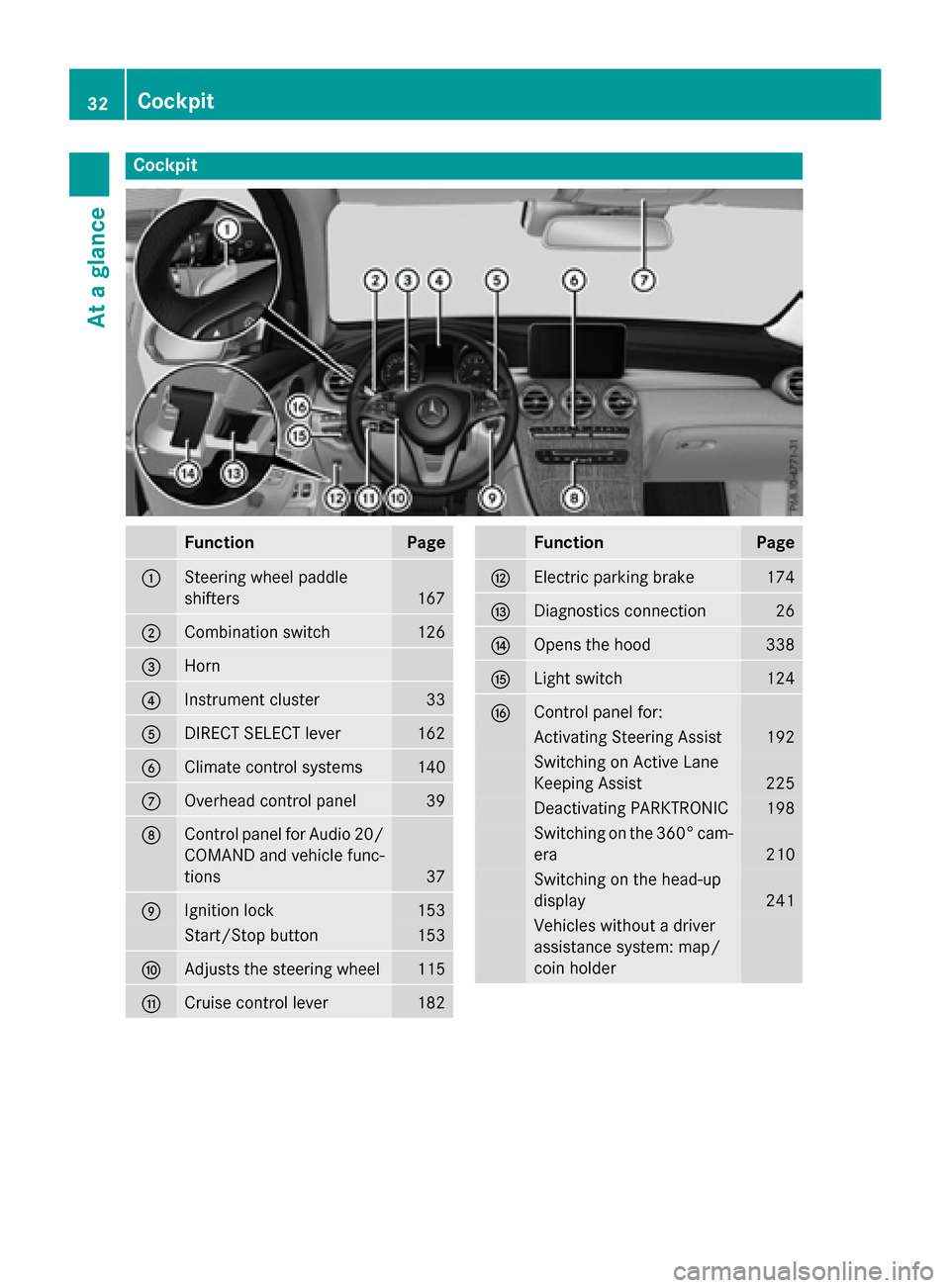
Cockpit
FunctionPage
:Steering wheel paddle
shifters
167
;Combination switch126
=Horn
?Instrument cluster33
ADIRECT SELECT lever162
BClimate control systems140
COverhead control panel39
DControl panel for Audio 20/
COMAND and vehicle func-
tions
37
EIgnition lock153
Start/Stop button153
FAdjusts the steering wheel115
GCruise control lever182
FunctionPage
HElectric parking brake174
IDiagnostics connection26
JOpens the hood338
KLight switch124
LControl panel for:
Activating Steering Assist192
Switching on Active Lane
Keeping Assist
225
Deactivating PARKTRONIC198
Switching on the 360° cam-
era
210
Switching on the head-up
display
241
Vehicles without a driver
assistance system: map/
coin holder
32Cockpit
At a glance
Page 167 of 418
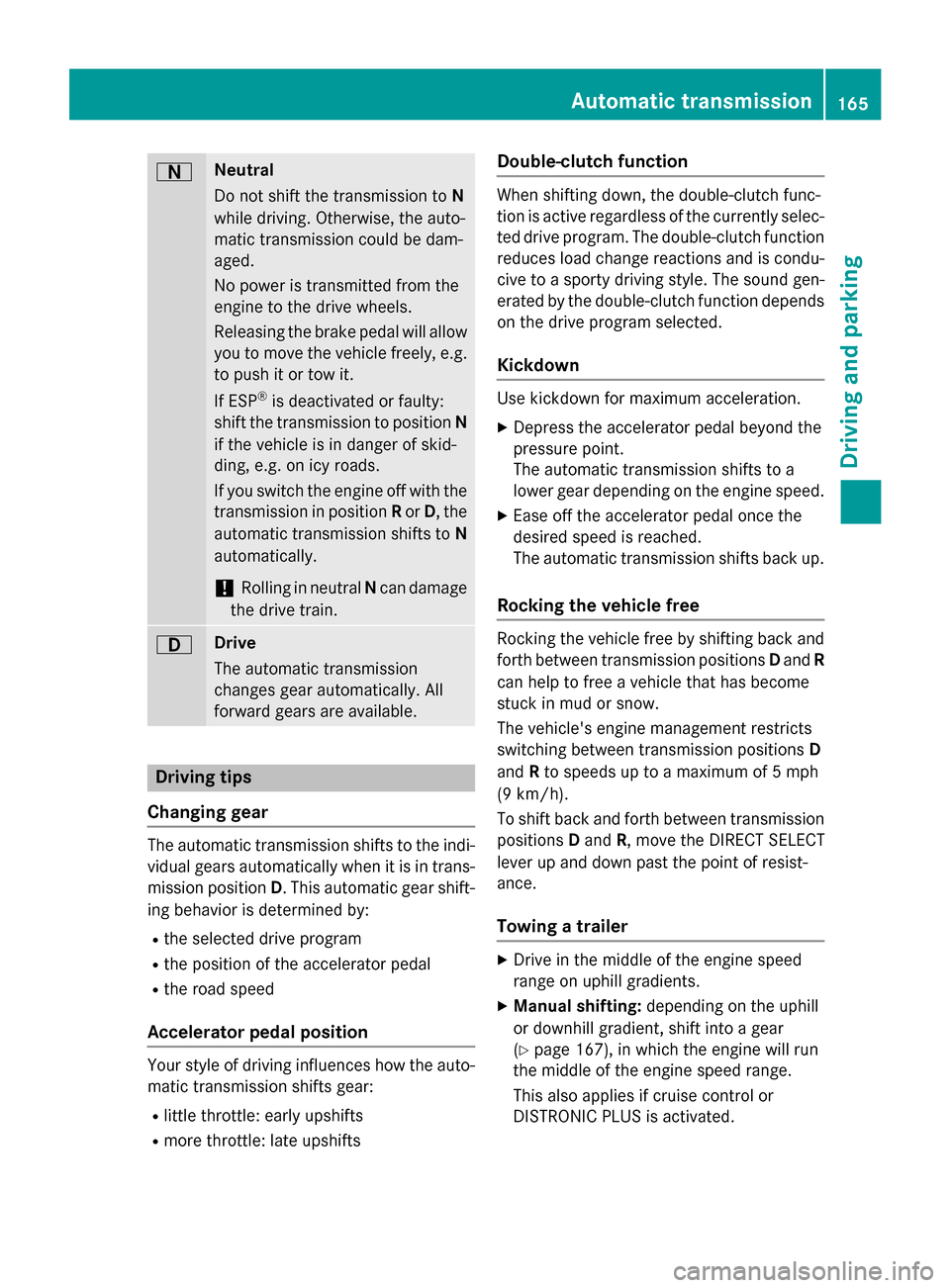
ANeutral
Do not shift the transmission toN
while driving. Otherwise, the auto-
matic transmission could be dam-
aged.
No power is transmitted from the
engine to the drive wheels.
Releasing the brake pedal will allow
you to move the vehicle freely, e.g. to push it or tow it.
If ESP
®is deactivated or faulty:
shift the transmission to position N
if the vehicle is in danger of skid-
ding, e.g. on icy roads.
If you switch the engine off with the
transmission in position Ror D, the
automatic transmission shifts to N
automatically.
!Rolling in neutral Ncan damage
the drive train.
7Drive
The automatic transmission
changes gear automatically. All
forward gears are available.
Driving tips
Changing gear
The automatic transmission shifts to the indi-
vidual gears automatically when it is in trans-
mission position D. This automatic gear shift-
ing behavior is determined by:
Rthe selected drive program
Rthe position of the accelerator pedal
Rthe road speed
Accelerator pedal position
Your style of driving influences how the auto- matic transmission shifts gear:
Rlittle throttle: early upshifts
Rmore throttle: late upshifts
Double-clutch function
When shifting down, the double-clutch func-
tion is active regardless of the currently selec-
ted drive program. The double-clutch function
reduces load change reactions and is condu-
cive to a sporty driving style. The sound gen-
erated by the double-clutch function depends
on the drive program selected.
Kickdown
Use kickdown for maximum acceleration.
XDepress the accelerator pedal beyond the
pressure point.
The automatic transmission shifts to a
lower gear depending on the engine speed.
XEase off the accelerator pedal once the
desired speed is reached.
The automatic transmission shifts back up.
Rocking the vehicle free
Rocking the vehicle free by shifting back and
forth between transmission positions Dand R
can help to free a vehicle that has become
stuck in mud or snow.
The vehicle's engine management restricts
switching between transmission positions D
and Rto speeds up to a maximum of 5 mph
(9 km/h).
To shift back and forth between transmission
positions Dand R, move the DIRECT SELECT
lever up and down past the point of resist-
ance.
Towing a trailer
XDrive in the middle of the engine speed
range on uphill gradients.
XManual shifting: depending on the uphill
or downhill gradient, shift into a gear
(
Ypage 167), in which the engine will run
the middle of the engine speed range.
This also applies if cruise control or
DISTRONIC PLUS is activated.
Automatic transmission165
Driving an d parking
Z
Page 183 of 418
Drive particularly carefully on slippery road
surfaces. Avoid sudden acceleration, steering
and braking maneuvers. Do not use the cruisecontrol or DISTRONIC PLUS.
If the vehicle threatens to skid or cannot be
stopped when moving at low speed:
XShift the transmission to position N.
The outside temperature indicator is not
designed to serve as an ice-warning device
and is therefore unsuitable for that purpose.
Changes in the outside temperature are dis-
played after a short delay.
Indicated temperatures just above the freez-
ing point do not guarantee that the road sur-
face is free of ice. The road may still be icy,
especially in wooded areas or on bridges. The
vehicle could skid if you fail to adapt your
driving style. Always adapt your driving style
and drive at a speed to suit the prevailing
weather conditions.
You should pay special attention to road con-
ditions when temperatures are around freez-
ing point.
For more information on driving with snow
chains, see (
Ypage 377).
For more information on driving with summer
tires, see (
Ypage 376).
Observe the notes in the "Wi
nter operation"
section (
Ypage 376).
Driving systems
Mercedes-Benz Intelligent Drive
Mercedes-Benz Intelligent Drive stands for
innovative driver assistance and safety sys-
tems which enhance comfort and support the driver in critical situations. With these intelli-
gent co-ordinated systems Mercedes-Benz
has set a milestone on the path towards
autonomous driving.
Mercedes-Benz Intelligent Drive embraces all
elements of active and passive safety in one
well thought out system – for the safety of the vehicle occupants and that of other road
users.
Further information on driving safety systems
(
Ypage 67).
Cruise Control
General notes
Cruise control maintains a constant road
speed for you. It brakes automatically in order to avoid exceeding the set speed. Change into
a lower gear in good time on long and steep
downhill gradients. This is especially impor-
tant if the vehicle is laden. By doing so, you
will make use of the braking effect of the
engine. This relieves the load on the brake
system and prevents the brakes from over-
heating and wearing too quickly.
Use cruise control only if road and traffic con-
ditions make it appropriate to maintain a
steady speed for a prolonged period. You can
store any road speed above 20 mph
(30 km/h).
Important safety notes
If you fail to adapt your driving style, cruise
control can neither reduce the risk of an acci-
dent nor override the laws of physics. Cruise
control cannot take into account the road,
traffic and weather conditions. Cruise control
is only an aid. You are responsible for the dis-
tance to the vehicle in front, for vehicle speed,
for braking in good time and for staying in
your lane.
Do not use cruise control:
Rin road and traffic conditions which do not
allow you to maintain a constant speed, e.g.
in heavy traffic or on winding roads
Ron slippery road surfaces. Braking or accel- erating could cause the drive wheels to lose
traction and the vehicle could then skid
Rwhen there is poor visibility, e.g. due to fog,
heavy rain or snow
Driving system s181
Driving an d parking
Z
Page 184 of 418
If there is a change of drivers, advise the new
driver of the speed stored.
iThe speed indicated in the speedometer
may differ slightly from the speed stored.
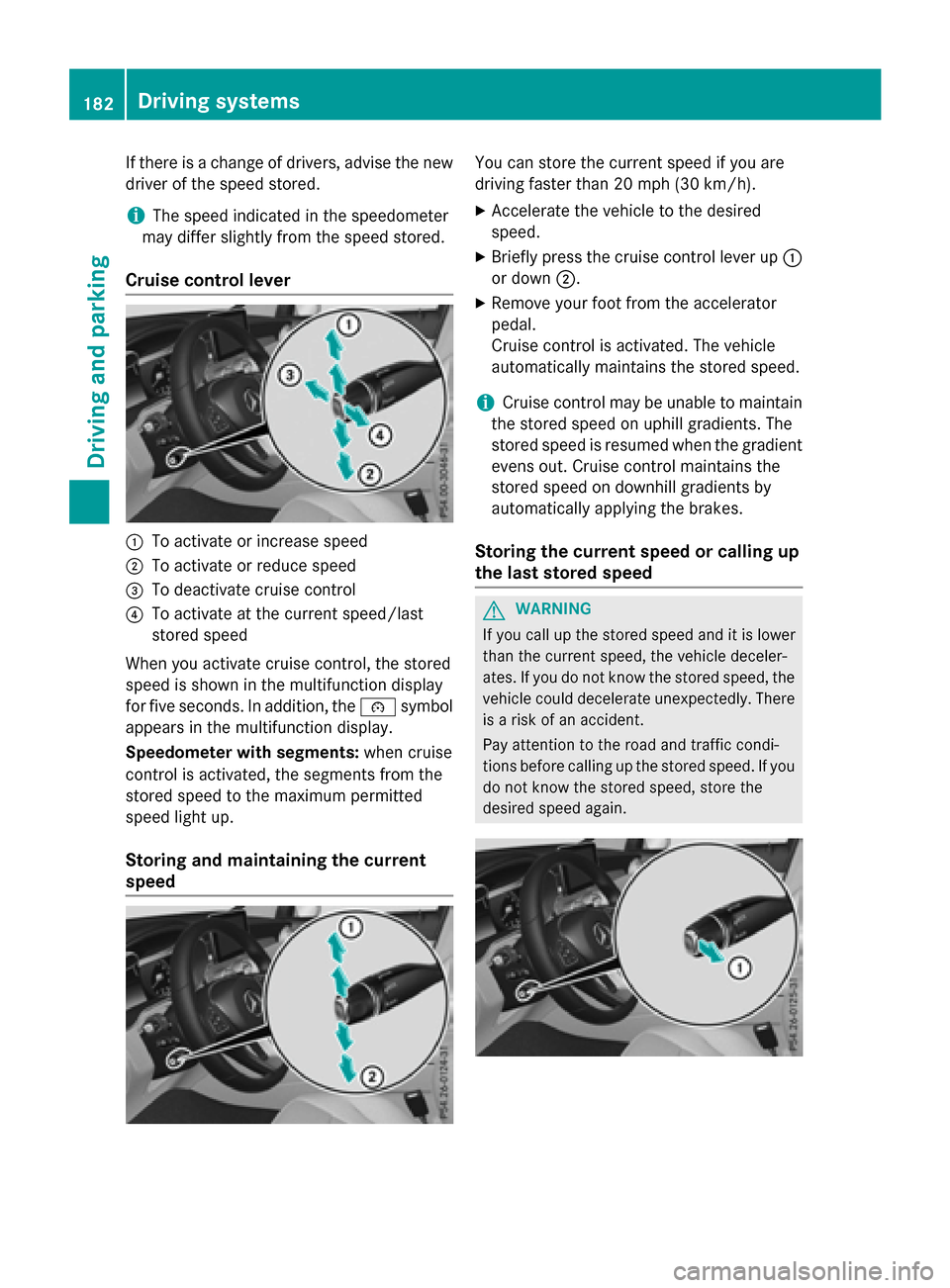
Cruise control lever
:To activate or increase speed
;To activate or reduce speed
=To deactivate cruise control
?To activate at the current speed/last
stored speed
When you activate cruise control, the stored
speed is shown in the multifunction display
for five seconds. In addition, the ésymbol
appears in the multifunction display.
Speedometer with segments: when cruise
control is activated, the segments from the
stored speed to the maximum permitted
speed light up.
Storing and maintaining the current
speed
You can store the current speed if you are
driving faster than 20 mph (30 km/h).
XAccelerate the vehicle to the desired
speed.
XBriefly press the cruise control lever up :
or down ;.
XRemove your foot from the accelerator
pedal.
Cruise control is activated. The vehicle
automatically maintains the stored speed.
iCruise control may be unable to maintain
the stored speed on uphill gradients. The
stored speed is resumed when the gradient
evens out. Cruise control maintains the
stored speed on downhill gradients by
automatically applying the brakes.
Storing the current speed or calling up
the last stored speed
GWARNING
If you call up the stored speed and it is lower
than the current speed, the vehicle deceler-
ates. If you do not know the stored speed, the vehicle could decelerate unexpectedly. There
is a risk of an accident.
Pay attention to the road and traffic condi-
tions before calling up the stored speed. If you
do not know the stored speed, store the
desired speed again.
182Driving systems
Driving and parking
Page 185 of 418
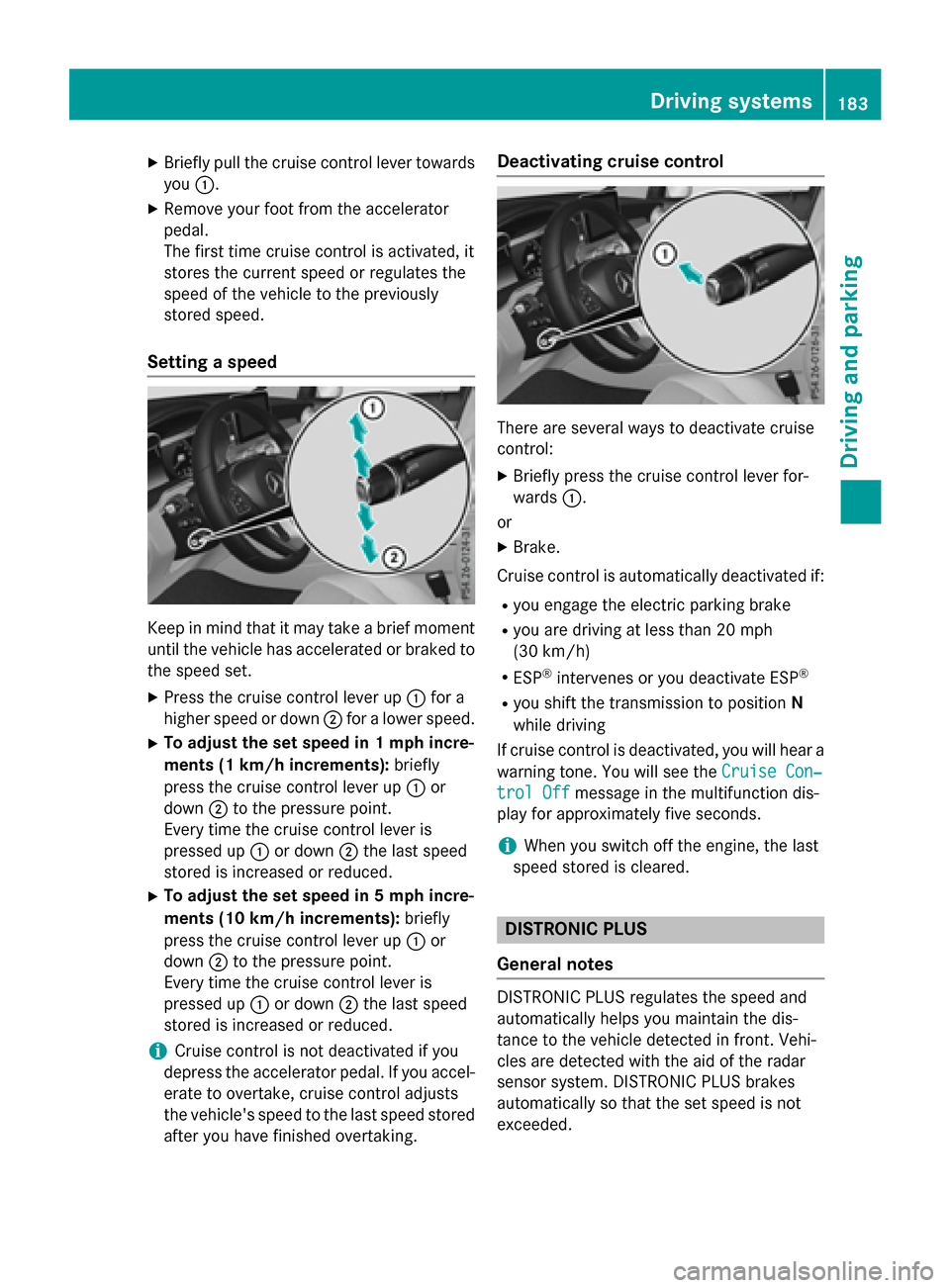
XBriefly pull the cruise control lever towardsyou :.
XRemove your foot from the accelerator
pedal.
The first time cruise control is activated, it
stores the current speed or regulates the
speed of the vehicle to the previously
stored speed.
Setting a speed
Keep in mind that it may take a brief moment
until the vehicle has accelerated or braked to
the speed set.
XPress the cruise control lever up :for a
higher speed or down ;for a lower speed.
XTo adjust the set speed in 1 mph incre-
ments (1 km/h increments): briefly
press the cruise control lever up :or
down ;to the pressure point.
Every time the cruise control lever is
pressed up :or down ;the last speed
stored is increased or reduced.
XTo adjust the set speed in 5 mph incre-
ments (10 km/h increments): briefly
press the cruise control lever up :or
down ;to the pressure point.
Every time the cruise control lever is
pressed up :or down ;the last speed
stored is increased or reduced.
iCruise control is not deactivated if you
depress the accelerator pedal. If you accel- erate to overtake, cruise control adjusts
the vehicle's speed to the last speed stored
after you have finished overtaking.
Deactivating cruise control
There are several ways to deactivate cruise
control:
XBriefly press the cruise control lever for-
wards :.
or
XBrake.
Cruise control is automatically deactivated if:
Ryou engage the electric parking brake
Ryou are driving at less than 20 mph
(30 km/h)
RESP®intervenes or you deactivate ESP®
Ryou shift the transmission to position N
while driving
If cruise control is deactivated, you will hear a
warning tone. You will see the Cruise Con‐
trol Offmessage in the multifunction dis-
play for approximately five seconds.
iWhen you switch off the engine, the last
speed stored is cleared.
DISTRONIC PLUS
General notes
DISTRONIC PLUS regulates the speed and
automatically helps you maintain the dis-
tance to the vehicle detected in front. Vehi-
cles are detected with the aid of the radar
sensor system. DISTRONIC PLUS brakes
automatically so that the set speed is not
exceeded.
Driving systems183
Driving and parking
Z
Page 187 of 418
!If DISTRONIC PLUS or the HOLD function
is activated, the vehicle brakes automati-
cally in certain situations.
To prevent damage to the vehicle, deacti-
vate DISTRONIC PLUS and the HOLD func-
tion in the following or other similar situa-
tions:
Rwhen towing the vehicle
Rin the car wash
If you fail to adapt your driving style,
DISTRONIC PLUS can neither reduce the risk
of accident nor override the laws of physics.
DISTRONIC PLUS cannot take into account
the road, traffic and weather conditions.
DISTRONIC PLUS is only an aid. You are
responsible for the distance to the vehicle in
front, for vehicle speed, for braking in good
time and for staying in your lane.
Do not use DISTRONIC PLUS:
Rin road and traffic conditions which do not
allow you to maintain a constant speed e.g.
in heavy traffic or on winding roads
Ron slippery road surfaces. Braking or accel-
erating could cause the drive wheels to lose
traction and the vehicle could then skid
Rwhen there is poor visibility, e.g. due to fog,
heavy rain or snow
DISTRONIC PLUS may not detect narrow
vehicles driving in front, e.g. motorcycles, or
vehicles driving on a different line.
In particular, the detection of obstacles can
be impaired if:
Rthere is dirt on the sensors or anything else
covering the sensors
Rthere is snow or heavy rain
Rthere is interference by other radar sources
Rthere are strong radar reflections, for
example, in parking garages
If DISTRONIC PLUS no longer detects a vehi- cle in front, DISTRONIC PLUS may unexpect-
edly accelerate the vehicle to the stored
speed. This speed may:
Rbe too high if you are driving in a filter lane
or an exit lane
Rbe so high in the right lane that you pass
vehicles driving on the left (left-hand drive
countries)
Rbe so high in the left lane that you pass
vehicles driving on the right (right-hand
drive countries)
If there is a change of drivers, advise the new
driver of the speed stored.
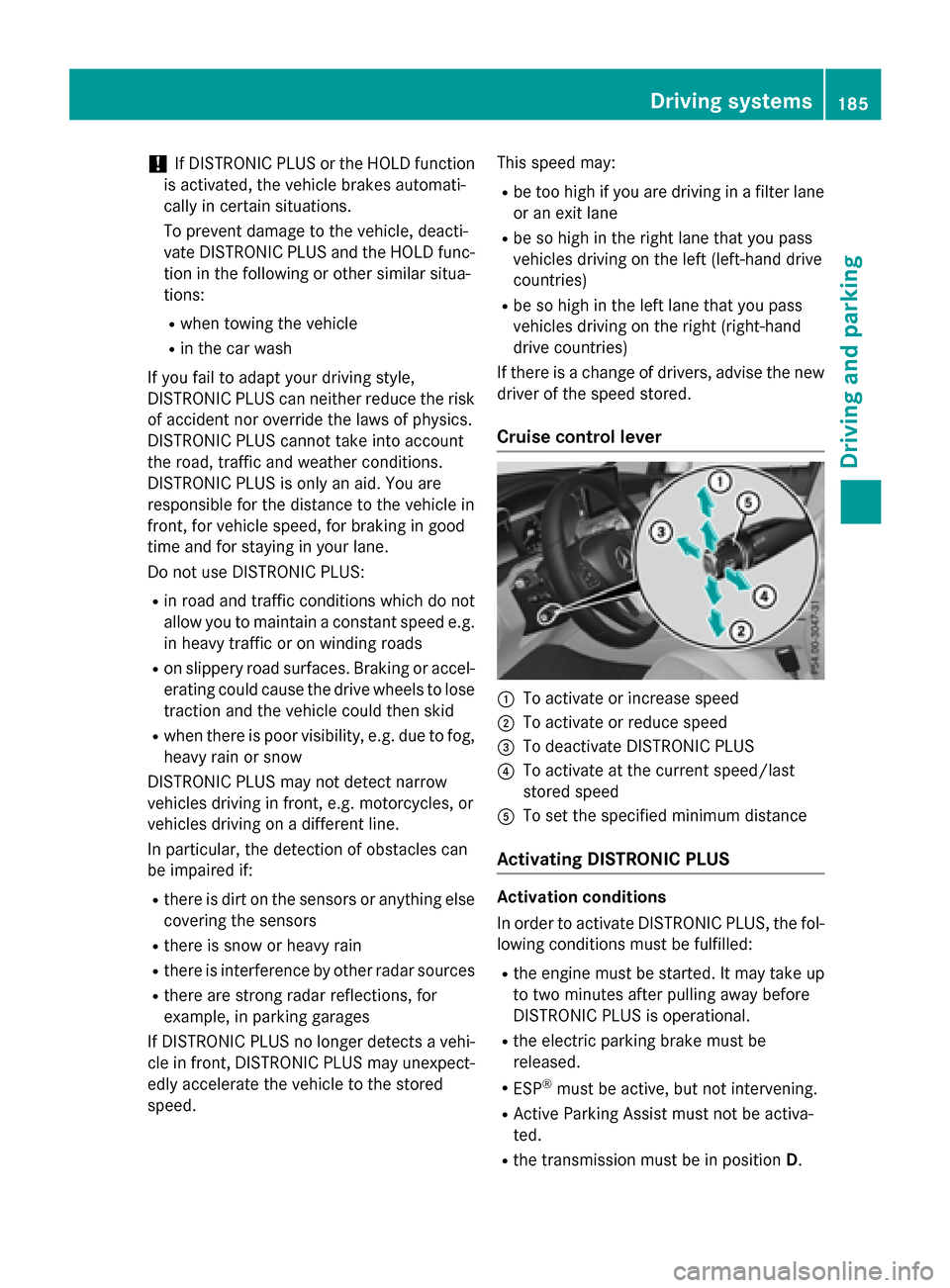
Cruise control lever
:To activate or increase speed
;To activate or reduce speed
=To deactivate DISTRONIC PLUS
?To activate at the current speed/last
stored speed
ATo set the specified minimum distance
Activating DISTRONIC PLUS
Activation conditions
In order to activate DISTRONIC PLUS, the fol-
lowing conditions must be fulfilled:
Rthe engine must be started. It may take up
to two minutes after pulling away before
DISTRONIC PLUS is operational.
Rthe electric parking brake must be
released.
RESP®must be active, but not intervening.
RActive Parking Assist must not be activa-
ted.
Rthe transmission must be in position D.
Driving systems185
Driving and parking
Z