start stop button MERCEDES-BENZ GLC-Class 2016 X253 Owner's Manual
[x] Cancel search | Manufacturer: MERCEDES-BENZ, Model Year: 2016, Model line: GLC-Class, Model: MERCEDES-BENZ GLC-Class 2016 X253Pages: 418, PDF Size: 9.23 MB
Page 14 of 418
J
JackUsing ............................................. 396
Jump starting (engine) ......................365
K
Key positions
SmartKey ....................................... 153
Start/Stop button .......................... 153
KEYLESS-GO
Convenience closing feature .......... 100
Deactivation ..................................... 83
Locking ............................................ 83
Removing the Start/Stop button ... 155
Unlocking ......................................... 83
Kickdown
Driving tips ....................................1 65
Manual gearshifting ....................... 168
Knee bag .............................................. 50
L
Lamps
see Warning and indicator lamps
Lane Keeping Assist
Activating/deactivating ................. 221
Activating/deactivating (on-
board computer) ............................ 253
Display message ............................ 280
Function/information .................... 220
see Active Lane Keeping Assist
Lane Tracking package ..................... 217
LATCH-type (ISOFIX) child seat
anchors ................................................ 63
Level control (display message) ...... 280
License plate lamp (display mes-
sage) ................................................... 274
Light function, active
Display message ............................ 274
Light sensor (display message) ....... 275
Lights
Adaptive Highbeam Assist ............. 127
Automatic headlamp mode ............ 124
Cornering light function ................. 127
Fogged up headlamps .................... 128
General notes ................................ 124
Hazard warning lamps ................... 127 High beam flasher .......................... 126
High-beam headlamps ................... 126
Light switch ................................... 124
Low-beam headlamps .................... 125
Parking lamps ................................ 125
Rear fog lamp ................................ 125
Setting exterior lighting ................. 124
Standing lamps .............................. 126
Switching the daytime running
lamps on/off (on-board com-
puter) ............................................. 255
Turn signals ................................... 126
see Interior lighting
Loading guidelines ............................ 306
Locking
see Central locking
Locking (doors)
Automatic ........................................ 90
Emergency locking ........................... 91
From inside (central locking but-
ton) .................................................. 89
Locking centrally
see Central locking
Low-beam headlamps
Changing bulbs .............................. 131
Display message ............................ 272
Switching on/off ........................... 125
Lumbar support
Adjusting the 4-way lumbar sup-
port ................................................ 112
M
M+S tires ............................................ 376
Malfunction message
see Display messages
Matte finish (cleaning instruc-
tions) .................................................. 346
mbrace
Call priority .................................... 328
Display message ............................ 265
Downloading destinations
(COMAND) ..................................... 328
Downloading routes ....................... 331
Emergency call .............................. 325
General notes ................................ 324
Geo fencing ................................... 332
Locating a stolen vehicle ............... 330
12Index
Page 19 of 418
Fuel ................................................ 409
Important safety notes .................. 409
Refrigerant (air-conditioning sys-
tem) ............................................... 414
Washer fluid ................................... 413
Settings
Factory (on-board computer) ......... 256
On-board computer ....................... 252
Side impact air bag ............................. 50
Side marker lamp (display mes-
sage) ................................................... 274
Side windows
Cleaning ......................................... 347
Convenience closing feature ............ 99
Convenience opening feature .......... 99
Important safety information ........... 98
Opening/closing .............................. 98
Problem (malfunction) ................... 101
Resetting ....................................... 100
Reversing feature ............................. 98
Ski and snowboard bag .................... 309
Sliding sunroof
see Panorama roof with power
tilt/sliding panel
SmartKey
Changing the battery ....................... 86
Changing the programming ............. 84
Checking the battery ....................... 86
Convenience closing feature .......... 100
Convenience opening feature .......... 99
Display message ............................ 290
Door central locking/unlocking ....... 83
Important safety notes .................... 82
KEYLESS-GO start function .............. 84
Loss ................................................. 87
Mechanical key ................................ 85
Overview .......................................... 82
Positions (ignition lock) ................. 153
Problem (malfunction) ..................... 87
Starting the engine ........................ 155
Smartphone
Starting the engine ........................ 156
Snow chains ...................................... 377
Socket (12 V)
Cargo compartment ....................... 322
Center console .............................. 321
General notes ................................ 321
Rear compartment ......................... 321 Special seat belt retractor
.................. 61
Specialist workshop ............................ 27
Speed, controlling
see Cruise control
Speedometer
Activating/deactivating the addi-
tional speedometer ........................ 255
Digital ............................................ 245
In the Instrume
nt cluster ................. 33
Segments ...................................... 238
Selecting the display unit ............... 255
see Instrument cluster
Standing lamps
Display message ............................ 274
Switching on/off ........................... 126
Start/Stop button
Starting the engine ........................ 156
Start/stop function
see ECO start/stop function
Starting (engine) ................................ 155
STEER CONTROL .................................. 78
Steering
Display message ............................ 289
Warning lamps ............................... 303
Steering Assist and Stop&Go Pilot
(DISTRONIC PLUS)
Display message ............................ 284
Steering assistant STEER CON-
TROL
see STEER CONTROL
Steering wheel
Adjusting (electrically) ................... 116
Adjusting (manually) ...................... 115
Button overview ............................... 35
Buttons (on-board computer) ......... 239
Cleaning ......................................... 350
EASY ENTRY/EXIT feature ............. 117
Important safety notes .................. 115
Steering wheel heating .................. 116
Storing settings (memory func-
tion) ............................................... 122
Steering wheel heating
Problem (malfunction) ................... 117
Switching on/off ........................... 116
Steering wheel paddle shifters ........ 167
Stowage areas ................................... 306
Index17
Page 34 of 418
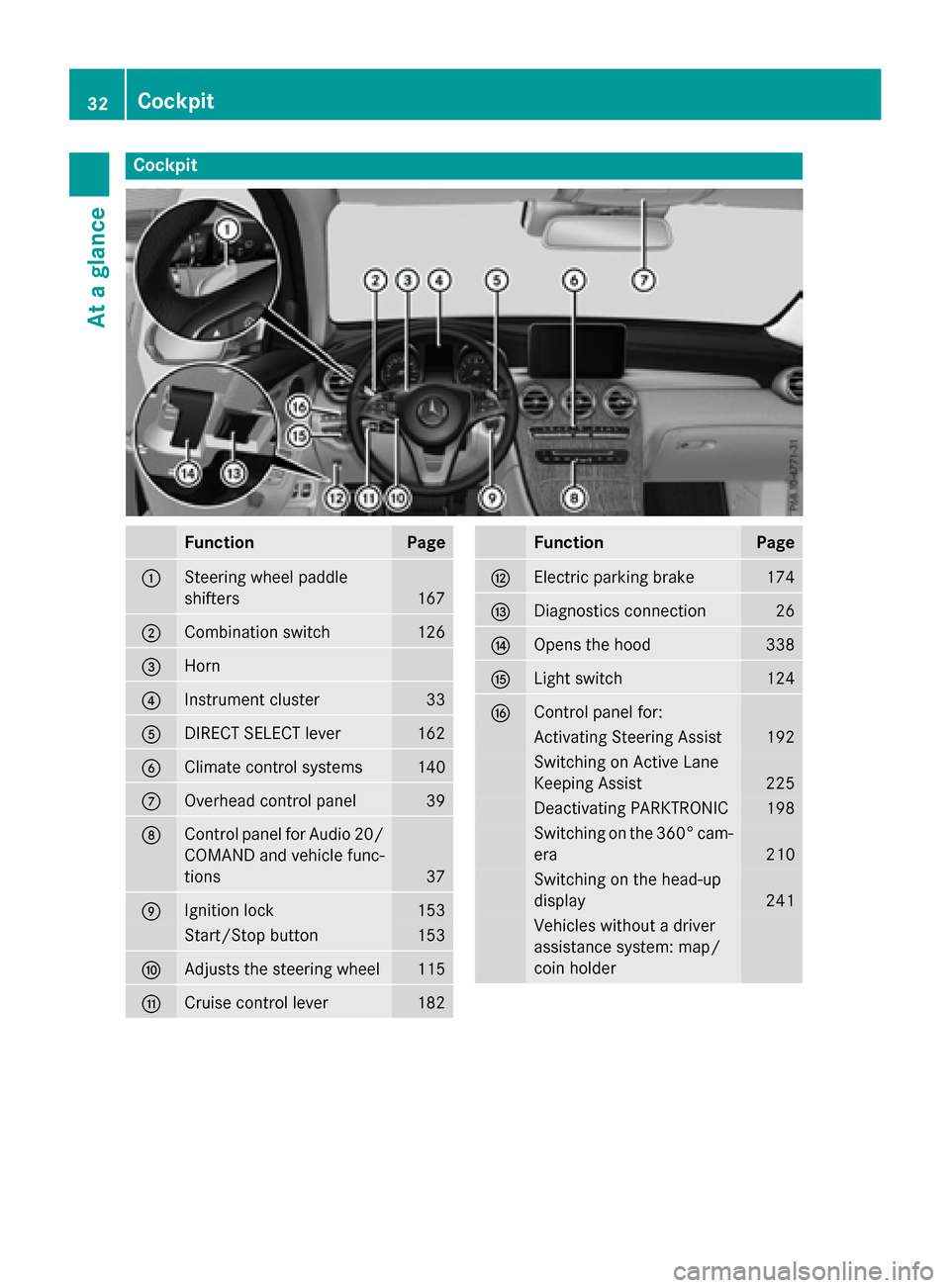
Cockpit
FunctionPage
:Steering wheel paddle
shifters
167
;Combination switch126
=Horn
?Instrument cluster33
ADIRECT SELECT lever162
BClimate control systems140
COverhead control panel39
DControl panel for Audio 20/
COMAND and vehicle func-
tions
37
EIgnition lock153
Start/Stop button153
FAdjusts the steering wheel115
GCruise control lever182
FunctionPage
HElectric parking brake174
IDiagnostics connection26
JOpens the hood338
KLight switch124
LControl panel for:
Activating Steering Assist192
Switching on Active Lane
Keeping Assist
225
Deactivating PARKTRONIC198
Switching on the 360° cam-
era
210
Switching on the head-up
display
241
Vehicles without a driver
assistance system: map/
coin holder
32Cockpit
At a glance
Page 44 of 418
Useful information
i
This Operator's Manual describes all
models and all standard and optional equip-
ment of your vehicle available at the time of
publication of the Operator's Manual.
Country-specific differences are possible.
Please note that your vehicle may not be
equipped with all features described. This
also applies to safety-related systems and
functions.
iRead the information on qualified special-
ist workshops (
Ypage 27).
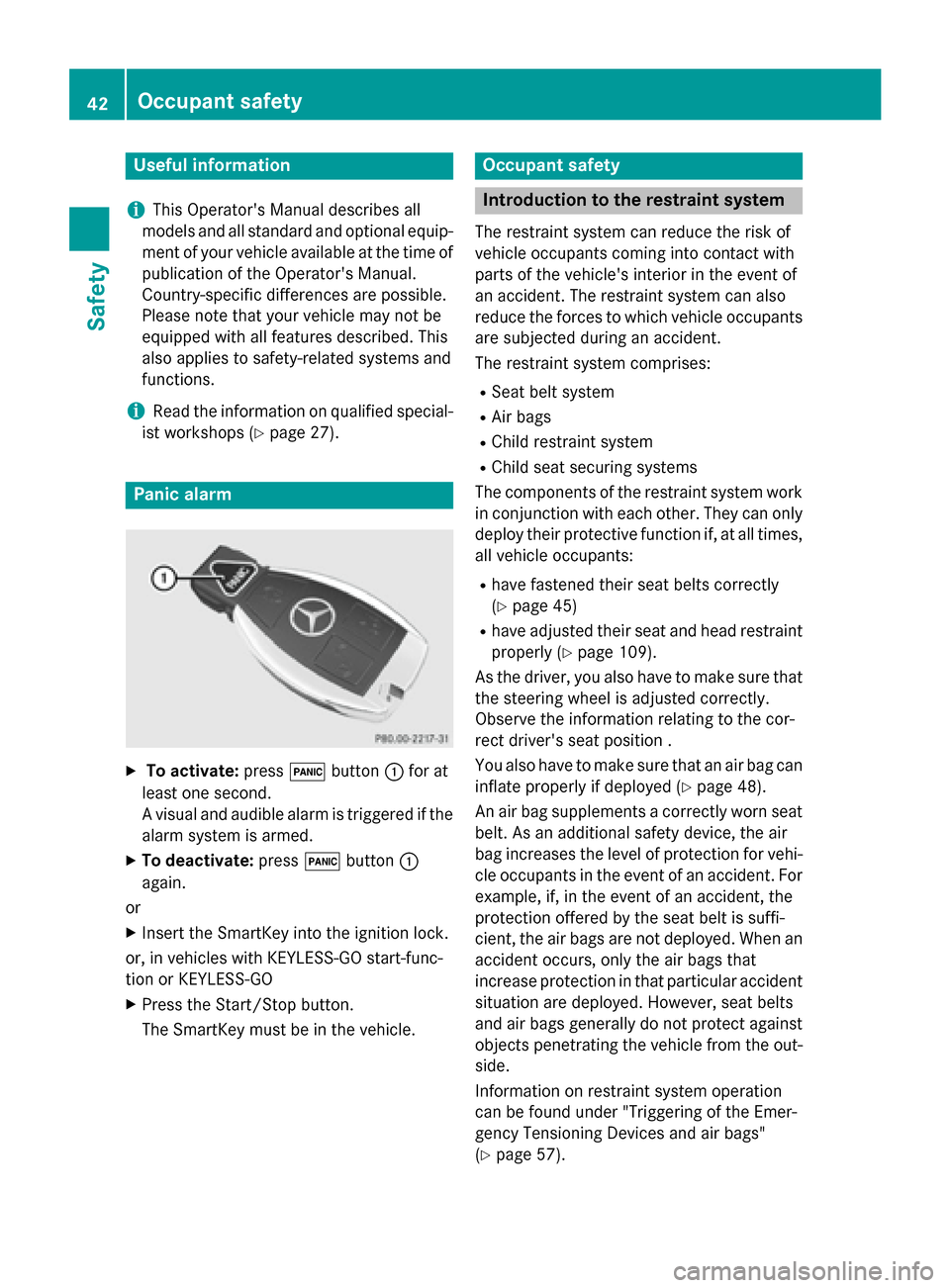
Panic alarm
XTo activate: press!button :for at
least one second.
A visual and audible alarm is triggered if the
alarm system is armed.
XTo deactivate: press!button :
again.
or
XInsert the SmartKey into the ignition lock.
or, in vehicles with KEYLESS-GO start-func-
tion or KEYLESS ‑GO
XPress the Start/Stop button.
The SmartKey must be in the vehicle.
Occupant safety
Introduction to the restraint system
The restraint system can reduce the risk of
vehicle occupants coming into contact with
parts of the vehicle's interior in the event of
an accident. The restraint system can also
reduce the forces to which vehicle occupants
are subjected during an accident.
The restraint system comprises:
RSeat belt system
RAir bags
RChild restraint system
RChild seat securing systems
The components of the restraint system work in conjunction with each other. They can only
deploy their protective function if, at all times,
all vehicle occupants:
Rhave fastened their seat belts correctly
(
Ypage 45)
Rhave adjusted their seat and head restraint
properly (
Ypage 109).
As the driver, you also have to make sure that
the steering wheel is adjusted correctly.
Observe the information relating to the cor-
rect driver's seat position .
You also have to make sure that an air bag can
inflate properly if deployed (
Ypage 48).
An air bag supplements a correctly worn seat
belt. As an additional safety device, the air
bag increases the level of protection for vehi-
cle occupants in the event of an accident. For
example, if, in the event of an accident, the
protection offered by the seat belt is suffi-
cient, the air bags are not deployed. When an
accident occurs, only the air bags that
increase protection in that particular accident
situation are deployed. However, seat belts
and air bags generally do not protect against objects penetrating the vehicle from the out-
side.
Information on restraint system operation
can be found under "Triggering of the Emer-
gency Tensioning Devices and air bags"
(
Ypage 57).
42Occupant safety
Safety
Page 54 of 418
rest and the head restraint position accord-
ingly.
Only then can OCS be guaranteed to function
correctly. Always observe the child restraint
system manufacturer's installation instruc-
tions.
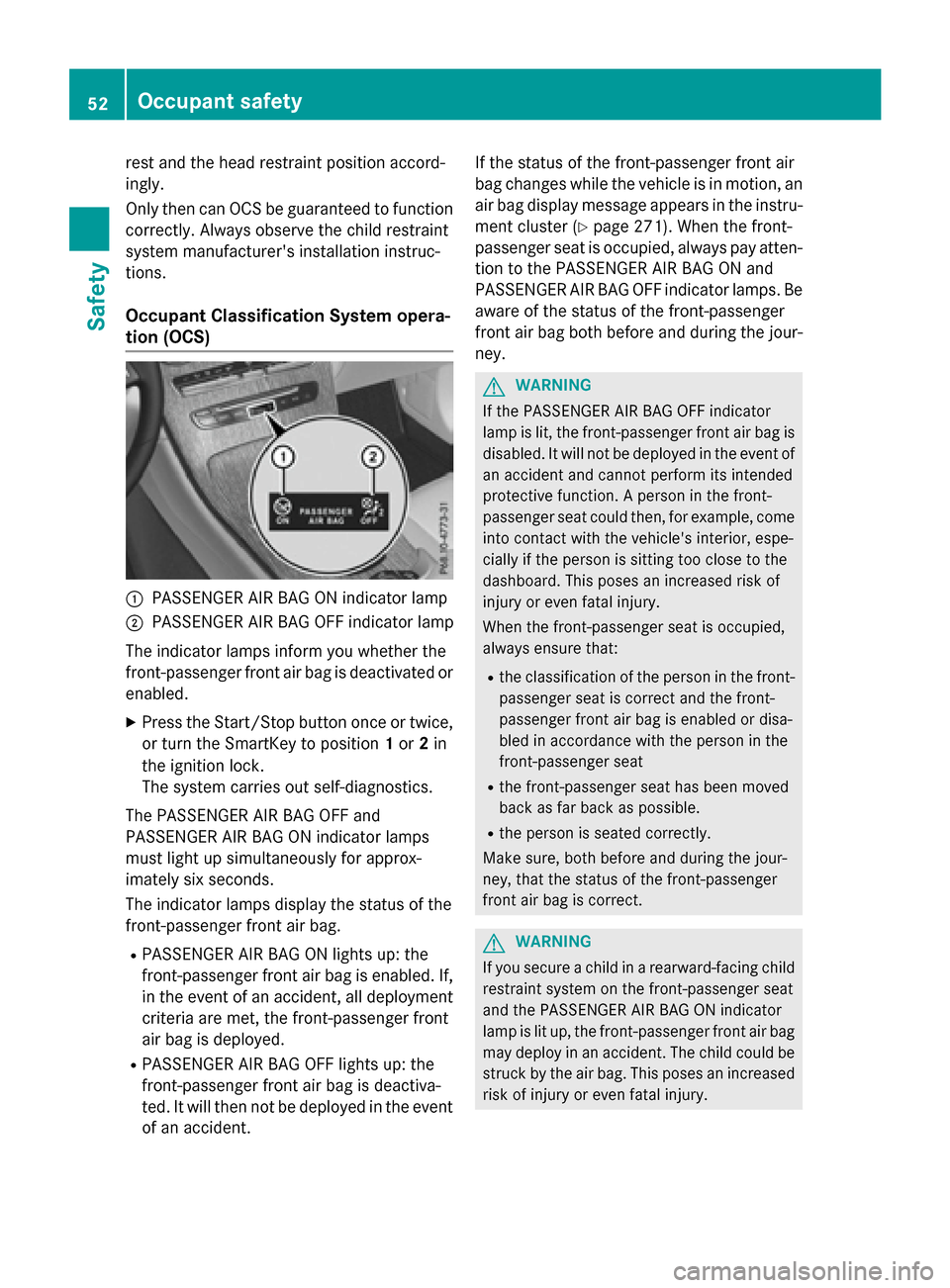
Occupant Classification System opera-
tion (OCS)
:PASSENGER AIR BAG ON indicator lamp
;PASSENGER AIR BAG OFF indicator lamp
The indicator lamps inform you whether the
front-passenger front air bag is deactivated or
enabled.
XPress the Start/Stop button once or twice,
or turn the SmartKey to position 1or 2in
the ignition lock.
The system carries out self-diagnostics.
The PASSENGER AIR BAG OFF and
PASSENGER AIR BAG ON indicator lamps
must light up simultaneously for approx-
imately six seconds.
The indicator lamps display the status of the
front-passenger front air bag.
RPASSENGER AIR BAG ON lights up: the
front-passenger front air bag is enabled. If,
in the event of an accident, all deployment
criteria are met, the front-passenger front
air bag is deployed.
RPASSENGER AIR BAG OFF lights up: the
front-passenger front air bag is deactiva-
ted. It will then not be deployed in the event of an accident. If the status of the front-passenger front air
bag changes while the vehicle is in motion, an
air bag display message appears in the instru-
ment cluster (
Ypage 271). When the front-
passenger seat is occupied, always pay atten-
tion to the PASSENGER AIR BAG ON and
PASSENGER AIR BAG OFF indicator lamps. Be
aware of the status of the front-passenger
front air bag both before and during the jour-
ney.
GWARNING
If the PASSENGER AIR BAG OFF indicator
lamp is lit, the front-passenger front air bag is
disabled. It will not be deployed in the event of
an accident and cannot perform its intended
protective function. A person in the front-
passenger seat could then, for example, come
into contact with the vehicle's interior, espe-
cially if the person is sitting too close to the
dashboard. This poses an increased risk of
injury or even fatal injury.
When the front-passenger seat is occupied,
always ensure that:
Rthe classification of the person in the front- passenger seat is correct and the front-
passenger front air bag is enabled or disa-
bled in accordance with the person in the
front-passenger seat
Rthe front-passenger seat has been moved
back as far back as possible.
Rthe person is seated correctly.
Make sure, both before and during the jour-
ney, that the status of the front-passenger
front air bag is correct.
GWARNING
If you secure a child in a rearward-facing child
restraint system on the front-passenger seat
and the PASSENGER AIR BAG ON indicator
lamp is lit up, the front-passenger front air bag may deploy in an accident. The child could be
struck by the air bag. This poses an increased
risk of injury or even fatal injury.
52Occupant safety
Safety
Page 81 of 418
A visual and audible alarm is triggered if the
alarm system is armed and you open:
Ra door
Rthe vehicle with the mechanical key
Rthe tailgate
Rthe hood
XTo turn the alarm off with the SmartKey:
press the%or& button on the
SmartKey.
The alarm is switched off.
or
XVehicles with KEYLESS-GO start-func-
tion or KEYLESS-GO: remove the Start/
Stop button from the ignition lock
(
Ypage 153).
XInsert the SmartKey into the ignition lock.
The alarm is switched off.
XTo stop the alarm using KEYLESS-GO:
grasp the outside door handle. The Smart-
Key must be outside the vehicle.
The alarm is switched off.
or
XPress the Start/Stop button on the dash-
board. The SmartKey must be inside the
vehicle.
The alarm is switched off.
The alarm is not switched off, even if you
close the open door that triggered it, for
example.
iIf the alarm continues for more than
30 seconds, the mbrace emergency call
system automatically notifies the Cus-
tomer Assistance Center. This is done
either by text message or data connection.
The emergency call system sends a mes-
sage or establishes a data connection pro-
vided that:
Ryou have subscribed to the mbrace ser-
vice.
Rthe mbrace service has been activated
properly.
Rthe necessary mobile phone network is
available.
Protection against theft79
Safety
Z
Page 84 of 418
Useful information
i
This Operator's Manual describes all
models and all standard and optional equip-
ment of your vehicle available at the time of
publication of the Operator's Manual.
Country-specific differences are possible.
Please note that your vehicle may not be
equipped with all features described. This
also applies to safety-related systems and
functions.
iRead the information on qualified special-
ist workshops (
Ypage 27).
SmartKey
Important safety notes
GWARNING
If children are left unsupervised in the vehicle,
they could:
Ropen the doors, thus endangering other
people or road users.
Rget out and disrupt traffic.
Roperate the vehicle's equipment.
Additionally, children could set the vehicle in
motion if, for example, they:
Rrelease the parking brake.
Rshifting the automatic transmission out of
park position P
RStart the engine.
There is a risk of an accident and injury.
When leaving the vehicle, always take the
SmartKey with you and lock the vehicle. Never
leave children or animals unattended in the
vehicle. Always keep the SmartKey out of
reach of children.
GWARNING
If you attach heavy or large objects to the
SmartKey, the SmartKey could be uninten-
tionally turned in the ignition lock. This could
cause the engine to be switched off. There is a risk of an accident.
Do not attach any heavy or large objects to theSmartKey. Remove any bulky key rings before
inserting the SmartKey into the ignition lock.
!Keep the SmartKey away from strong
magnetic fields. Otherwise, the remote
control function could be affected.
Strong magnetic fields can occur in the
vicinity of powerful electrical installations.
Do not keep the SmartKey:
Rwith electronic devices, e.g. a mobile
phone or another SmartKey.
Rwith metallic objects, e.g. coins or metal
foil.
Rinside metallic objects, e.g. a metal case.
This can affect the functionality of the
SmartKey.
Vehicles with KEYLESS-GO start function:
do not keep the SmartKey in the cargo com-
partment. Otherwise, the SmartKey may not
be detected, e.g. when starting the engine
using the Start/Stop button.
A check which periodically establishes a radio
connection between the vehicle and the
SmartKey determines whether a valid Smart-
Key is in the vehicle. This occurs, for example:
Rwhen starting the engine
Rwhilst driving
Rwhen the external door handles are
touched
Rduring convenience closing
82SmartKey
Opening and closing
Page 90 of 418
ProblemPossible causes/consequences andMSolutions
The engine cannot be
started using the
SmartKey.The on-board voltage is too low.
XSwitch off non-essential consumers, e.g. seat heating or interior
lighting, and try to start the engine again.
If this does not work:
XCheck the starter battery and charge it if necessary
(
Ypage 363).
or
XJump-start the vehicle (Ypage 365).
or
XConsult a qualified specialist workshop.
The engine cannot be
started using the Start/
Stop button. The
SmartKey is in the vehi-
cle.The vehicle is locked.
XUnlock the vehicle and try to start the vehicle again.
The SmartKey battery is discharged or nearly discharged.
XCheck the SmartKey battery (Ypage 86) and replace it if nec-
essary (
Ypage 86).
If this does not work:
XStart your vehicle with the SmartKey in the ignition lock.
There is interference from a powerful source of radio waves.
XStart your vehicle with the SmartKey in the ignition lock.
You have lost a Smart-
Key.XHave the SmartKey deactivated at a qualified specialist work-
shop.
XReport the loss immediately to the vehicle insurers.
XIf necessary, have the locks changed as well.
You have lost the
mechanical key.XReport the loss immediately to the vehicle insurers.
XIf necessary, have the locks changed as well.
88SmartKey
Opening and closing
Page 96 of 418
Opening automatically
You can open the tailgate automatically with
the SmartKey or the handle in the tailgate.
XPress and hold theFbutton on the
SmartKey until the tailgate opens.
or
XIf the tailgate is unlocked, pull the handle
and let it go again immediately.
or
XWith the tailgate stopped in an intermedi-
ate position, pull the tailgate upwards.
You can release the tailgate as soon as the
tailgate starts to open.
Closing automatically
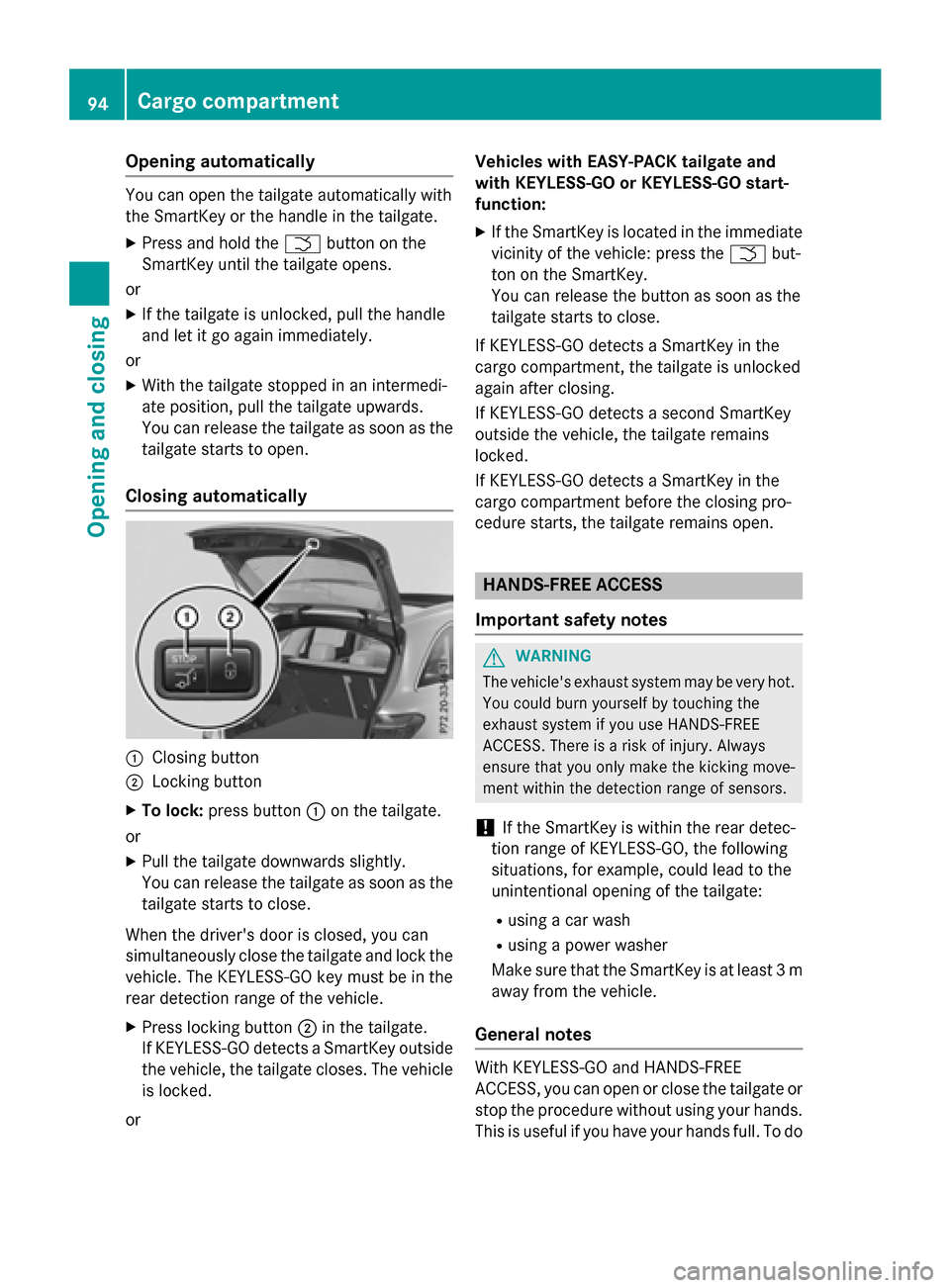
:Closing button
;Locking button
XTo lock: press button :on the tailgate.
or
XPull the tailgate downwards slightly.
You can release the tailgate as soon as the
tailgate starts to close.
When the driver's door is closed, you can
simultaneously close the tailgate and lock the
vehicle. The KEYLESS-GO key must be in the
rear detection range of the vehicle.
XPress locking button ;in the tailgate.
If KEYLESS-GO detects a SmartKey outside
the vehicle, the tailgate closes. The vehicle
is locked.
or Vehicles with EASY-PACK tailgate and
with KEYLESS-GO or KEYLESS-GO start-
function:
XIf the SmartKey is located in the immediate
vicinity of the vehicle: press the
Fbut-
ton on the SmartKey.
You can release the button as soon as the
tailgate starts to close.
If KEYLESS-GO detects a SmartKey in the
cargo compartment, the tailgate is unlocked
again after closing.
If KEYLESS-GO detects a second SmartKey
outside the vehicle, the tailgate remains
locked.
If KEYLESS-GO detects a SmartKey in the
cargo compartment before the closing pro-
cedure starts, the tailgate remains open.
HANDS-FREE ACCESS
Important safety notes
GWARNING
The vehicle's exhaust system may be very hot. You could burn yourself by touching the
exhaust system if you use HANDS-FREE
ACCESS. There is a risk of injury. Always
ensure that you only make the kicking move-
ment within the detection range of sensors.
!If the SmartKey is within the rear detec-
tion range of KEYLESS-GO, the following
situations, for example, could lead to the
unintentional opening of the tailgate:
Rusing a car wash
Rusing a power washer
Make sure that the SmartKey is at least 3 m
away from the vehicle.
General notes
With KEYLESS-GO and HANDS-FREE
ACCESS, you can open or close the tailgate or
stop the procedure without using your hands. This is useful if you have your hands full. To do
94Cargo compartment
Opening and closing
Page 101 of 418
XTo close manually:pull the corresponding
switch and hold it.
XTo close fully: pull the switch beyond the
point of resistance and release it.
Automatic operation is started.
XTo interrupt automatic operation:
press/pull the corresponding switch again.
If you press the switch beyond the point of
resistance and release, automatic operation
is started in the corresponding direction. You
can stop automatic operation by pressing/
pulling the switch again.
You can continue to operate the side windows
after you switch off the engine or remove the
SmartKey. This function remains active for
five minutes or until you open a front door.
When the override feature for the side win-
dows is activated, the side windows cannot
be operated from the rear (
Ypage 66).
Information on opening and closing the roller
sunblinds on the rear side windows
(
Ypage 319).
Convenience opening
General notes
Vehicles with KEYLESS-GO or KEYLESS-
GO start function: you can ventilate the vehi-
cle before you start driving.
If the SmartKey is in close proximity to the
vehicle, the convenience opening function is
available.
To do this, the SmartKey is used to carry out
the following functions simultaneously:
Runlock the vehicle
Ropen the side windows
Ropen the sliding sunroof or the panorama
roof with power tilt/sliding panel and the
roller sunblind
Rswitch on the seat ventilation for the driv-
er's seat
The "convenience opening" feature is also
available when the vehicle is unlocked.
Convenience opening
XPress and hold the %button on the key
until the side windows and the sliding sun- roof or the panorama roof with power tilt/
sliding panel are in the desired position.
If the roller sunblinds of the panorama roof
with power tilt/sliding panel are closed, the
roller sunblinds are opened first.
XPress and hold the %button once more
until the panorama roof with power tilt/
sliding panel reaches the desired position.
XTo interrupt convenience opening:
release the %button.
Convenience closing feature
Important safety notes
GWARNING
When the convenience closing feature is oper- ating, parts of the body could become trapped
in the closing area of the side window and the
sliding sunroof. There is a risk of injury.
Observe the complete closing procedure
when the convenience closing feature is oper-
ating. Make sure that no body parts are in
close proximity during the closing procedure.
Vehicles with KEYLESS-GO or KEYLESS-
GO start function: if the SmartKey is in close
proximity to the vehicle, the convenience
closing function is available.
When you lock the vehicle, you can simulta-
neously:
Rclose the side windows
Rclose the sliding sunroof or the panorama
roof with power tilt/sliding panel
On vehicles with a panorama roof with power
tilt/sliding panel, you can then close the
roller sunblinds.
Notes on the automatic reversing feature for:
Rthe side window (Ypage 98)
Rthe panorama roof with power tilt/sliding
panel (
Ypage 102)
Side windows99
Opening and closing
Z