audio MERCEDES-BENZ GLC-Class 2017 X253 Comand Manual
[x] Cancel search | Manufacturer: MERCEDES-BENZ, Model Year: 2017, Model line: GLC-Class, Model: MERCEDES-BENZ GLC-Class 2017 X253Pages: 178, PDF Size: 5.65 MB
Page 5 of 178
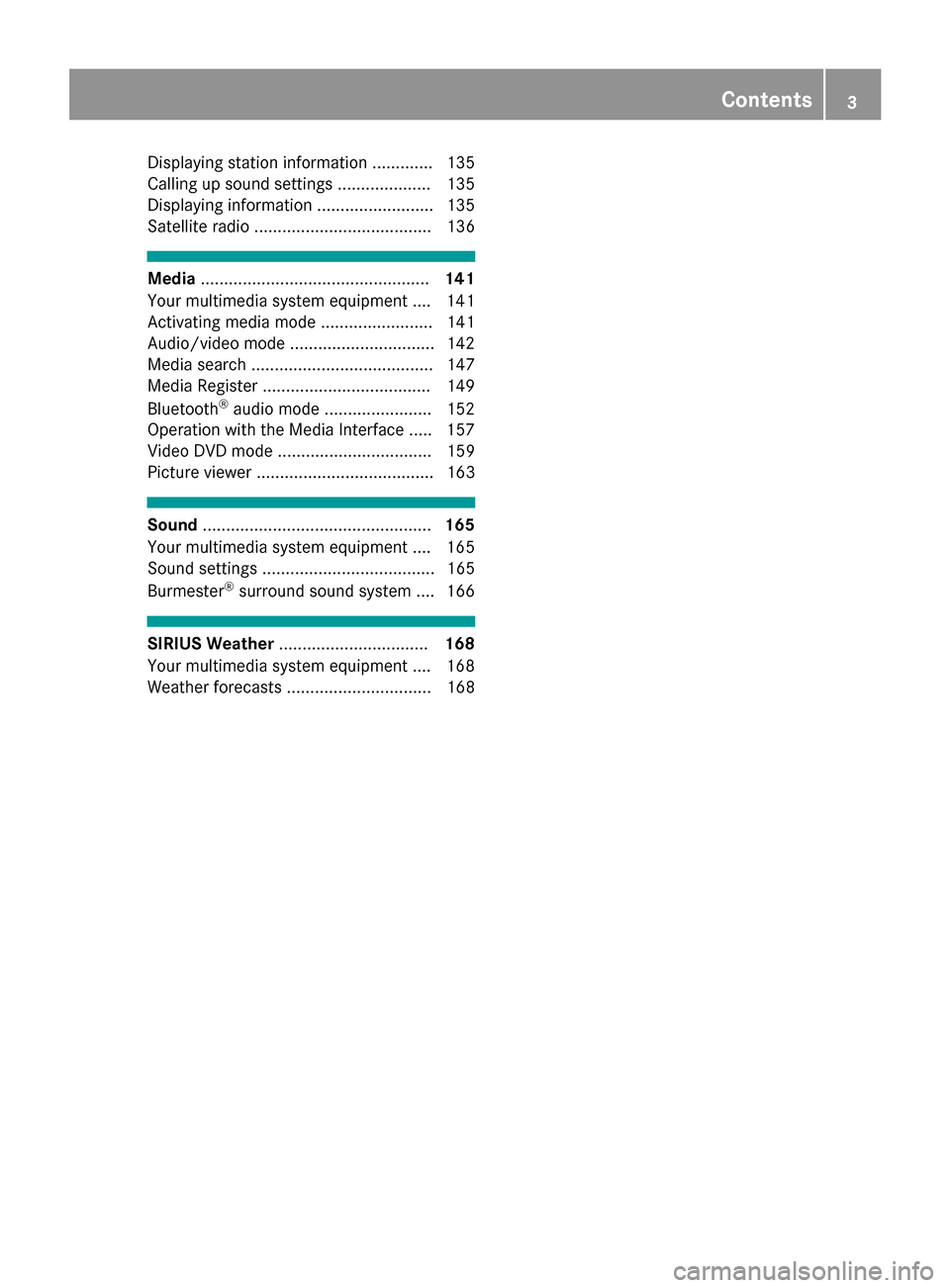
Displaying station information .............135
Calling up sound settings .................... 135
Displaying information ......................... 135
Satellite radio ...................................... 136
Media ................................................. 141
Your multimedia system equipment .... 141
Activating media mode ........................ 141
Audio/video mode ............................... 142
Media search ....................................... 147
Media Register ....................................1 49
Bluetooth
®audio mode ....................... 152
Operation with the Media Interface ..... 157
Video DVD mode ................................. 159
Picture viewer ...................................... 163
Sound ................................................. 165
Your multimedia system equipment .... 165
Sound settings ..................................... 165
Burmester
®surround sound system .... 166
SIRIUS Weather ................................ 168
Your multimedia system equipment .... 168
Weather forecasts ............................... 168
Contents3
Page 6 of 178
1, 2, 3 ...
360° cameraDisplaying images ............................ 46
Opening the camera cover for
cleaning (COMAND) .........................4 6
Settings ........................................... 46
Switching on/off .............................. 46
A
Access data of the mobile phone
network provider
Deleting ......................................... 124
Editing ........................................... 123
Making entries ............................... 122
Selecting ........................................ 122
Acoustic locking confirmation
Activating/deactivating
(COMAND) ....................................... 45
Activating media mode
General notes ................................ 141
Switching on automatically ............ 142
Adding bookmarks ............................ 128
Address
Entering (navigation) ........................ 57
Address book
Adding a new contact .................... 105
Adding information to a contact .... 106
Automatically importing contacts
from the phone .............................. 108
Browsing ........................................ 104
Calling up ....................................... 104
Changing the category of an entry .. 107
Changing the display and sorting
criteria for contacts ....................... 108
Deleting contacts ........................... 108
Deleting imported contacts ........... 110
Displaying contact details .............. 105
Editing a contact ............................ 107
Entering characters ......................... 30
Importing contacts ........................ 109
Introduction ................................... 104
Making a call ................................. 106
Receiving vCards ........................... 109
Saving a contact ............................ 108
Searching for a contact ................. 104
Sending e-mails ............................. 106 Sending text messages .................. 106
Starting route guidance ................. 106
Storing a phone number as a
speed dial number ......................... 107
Voice tags ...................................... 107
Address entry menu
Navigation ........................................ 57
Adjusting the volume
COMAND ......................................... 28
Media source ................................... 28
Traffic announcements .................... 28
Alternative Route ................................ 75
Ambient lighting
Setting (COMAND) ........................... 44
Asterisk key
see Favorites button
Audio CD/DVD and MP3 mode
Activating ....................................... 145
Bluetooth
®audio mode ................. 152
Connecting USB devices ................ 145
Data medi
a, file systems, formats .. 142
Gracenote®Media Database ......... 147
Inserting/removing a CD/DVD
(single drive) .................................. 144
Media interface .............................. 157
Media Register ............................... 149
Media search ................................. 147
Overview menu .............................. 144
Playback options ........................... 145
SD card .......................................... 144
Search menu ................................. 147
Selecting a track ............................ 146
Sound settings ............................... 165
Stop and playback function ........... 146
Automatic folding mirror function
Activating/deactivating
(COMAND) ....................................... 45
Automatic locking feature
Activating/deactivating
(COMAND) ....................................... 45
Automatic time
Switching on/off .............................. 36
Automatic volume adjustment
General information ......................... 40
Switching on/off .............................. 41
Avoiding an area .................................. 85
4Index
Page 7 of 178
B
Back button......................................... 21
Blootooth®
Connecting a different mobile
phone .............................................. 95
Bluetooth
®
Activating audio mode ................... 153
Activating/deactivating ................... 40
Audio device mode and searching
for mobile phones .......................... 157
Basic display (audio mode) ............ 153
Connecting audio devices .............. 154
De-authorizing (de-registering) a
device ............................................ 157
Device list ...................................... 154
Displaying connection details .......... 96
Displaying details ........................... 155
Entering the passcode ..................... 94
External authorization (audio
device) ........................................... 154
General information ......................... 40
Increasing the volume using
COMAND ....................................... 156
Interface .......................................... 91
Introduction ..................................... 91
Playback options ........................... 156
Preparation .................................... 152
Reconnecting an audio device ....... 156
Searching for a mobile phone .......... 93
Selecting a playback option ........... 156
Selecting a track ............................ 155
Starting and stopping playback ..... 155
Starting playback if the Blue-
tooth
®audio device has been
stopped ......................................... 155
Telephony ........................................ 92
Telephony notes .............................. 91
Burmester
®surround sound sys-
tem
Balance/fader ............................... 167
Calling up the sound menu ............ 166
Equalizer ........................................ 166
Equipment ..................................... 166
Surround sound ............................. 167
Buttons and controller ........................ 21
C
Call lists
Displaying details ........................... 110
Opening and selecting an entry ..... 110
Saving an entry in the address
book .............................................. 111
Calling up the compass display ......... 88
Car pool lanes ...................................... 56
Category list (music search) ............ 148
CD
Inserting ........................................ 144
Notes on discs ............................... 143
Characters
Entering (navigation) ........................ 31
Climate control
Calling up climate control
(COMAND) ....................................... 48
Calling up the climate control bar
(COMAND) ....................................... 48
COMAND ......................................... 48
Cooling with air dehumidification
(COMAND) ....................................... 49
Ionization (COMAND) ....................... 49
Overview .......................................... 47
Perfume atomizer (COMAND) .......... 49
Setting the air distribution
(COMAND) ....................................... 48
Setting the airflow (COMAND) ......... 48
Setting the climate mode
(COMAND) ....................................... 49
Setting the temperature
(COMAND) ....................................... 48
Switching ionization on/off
(COMAND) ....................................... 49
Switching on/off (COMAND) ..... 49, 50
Climate control bar
Calling up ......................................... 48
COMAND
Basic display menu .......................... 29
Basic functions ................................ 28
Controller ......................................... 21
Display ............................................. 20
Selecting operating mode ................ 29
Settings ......................................... 129
Switching on/off .............................. 28
COMAND display
Cleaning instructions ....................... 20
Index5
Page 8 of 178
Setting ............................................. 35
Contacts
Deleting ......................................... 108
Importing ....................................... 109
Controller ............................................. 22
Copying music files
see Media Register
Copying/renaming/deleting files
see Media Register
D
Date format, setting ............................ 37
Day design, setting ............................. 35
Delayed switch-off time
Setting (COMAND) ........................... 45
Deleting
Call lists ......................................... 112
Destination (navigation)
Editing a previous destination .......... 81
Entering a destination by address .... 57
Entering a destination using the
map ................................................. 64
Entering a point of interest .............. 61
Entering using geo-coordinates ....... 67
Entering using Mercedes-Benz
Apps ................................................ 66
General notes .................................. 57
Keyword search ............................... 59
Personal POIs and routes ................. 67
Saving .............................................. 80
Saving to the SD card. ..................... 81
Selecting an address book con-
tact as a destination ........................ 61
Selecting from the list of last des-
tinations ........................................... 61
Storing in the address book. ............ 80
Dialing a number (telephone) ............. 97
Display
Selecting the design ........................ 35
Switching on/off .............................. 36
Display COMAND
see COMAND display
Displaying current position (navi-
gation) .................................................. 76
Displaying the artist and track
Radio ............................................. 135 Distance
see Route (navigation)
DVD
Notes on discs ............................... 143
see Audio CD/DVD and MP3 mode
DVD video
Operating DVD functions ............... 163
DYNAMIC SELECT
Configuration via the DYNAMIC
SELECT switch ................................. 50
Configuring individual drive pro-
gram ................................................ 50
Displaying engine data ..................... 51
Displaying vehicle data .................... 51
Individual configuration setting
options ............................................. 51
E
E-mailAnswering ...................................... 117
Calling up the settings menu ......... 113
Changing the name of the e-mail
account .......................................... 114
Configuring an e-mail account ....... 114
Configuring the e-mails displayed .. 114
Deactivating the e-mail function .... 114
Deleting ......................................... 119
Displaying details ........................... 116
Downloading e-mails manually ...... 114
Editing text templates .................... 118
Forwarding ..................................... 117
Inbox .............................................. 115
Reading .......................................... 115
Saving the sender in the address
book .............................................. 119
Settings ......................................... 113
Storing the sender as a new entryin the address book ....................... 118
Using a phone number in the text .. 118
Using text templates ...................... 117
Writing ........................................... 117
EASY-ENTRY/EXIT feature
Activating/deactivating
(COMAND) ....................................... 44
Entering the city .................................. 57
6Index
Page 10 of 178
Elevation modeling ........................... 84
Map heading up ............................... 82
Map settings .................................... 82
Moving ............................................. 54
North orientation ............................. 82
Notes ............................................... 82
Rotating the 3D map ........................ 84
Selecting POI symbols on the
map .................................................83
Selecting text information on the
map ................................................. 83
Showing the map version ................. 84
Switching highway information
on/off .............................................. 83
Updating .......................................... 86
Map functions ...................................... 82
Media Interface
Basic display .................................. 157
Playback options ........................... 159
Search ........................................... 158
Selecting a music file ..................... 158
Supported devices ......................... 157
Supported file formats ................... 158
Switching to Media Interface ......... 157
Video function ............................... 159
Media mode
Bluetooth
®Audio ........................... 152
Connections for external media
sources .......................................... 141
Switching on .................................. 141
Media Register
Basic display .................................. 149
Calling up memory space informa-
tion ................................................ 152
Copying files .................................. 149
Deleting all files ............................. 151
Renaming/deleting files ................ 151
Selecting a playback mode ............ 152
Switching on .................................. 149
Media search
By folder ........................................ 148
Category list .................................. 148
Current track list ............................ 148
General notes ................................ 147
Keyword search ............................. 149
Music genres ................................. 148
Selecting by cover ......................... 148
Starting the media search .............. 147 Mercedes-Benz Apps
Calling up ....................................... 125
Mercedes-Benz Companion
Authorizing .................................... 126
Displaying vehicle data .................. 127
Door-to-door navigation (transfer-
ring a destination from an exter nal
d
evice) ........................................... 126
Door-to-door navigation (transfer-
ring a destination from the vehi-
cle) ................................................ 126
Introduction ................................... 125
Navigating to the vehicle ............... 127
Requirements ................................ 125
Microphone, switching on/off ........... 99
Mobile phone
Authorizing ....................................... 94
Connecting (Bluetooth
®inter-
face) ................................................ 92
Connecting another mobile
phone .............................................. 95
De-authorizing ................................. 96
Displaying Bluetooth
®connection
details .............................................. 96
Enabling for Internet access .......... 121
Monitor
see COMAND display
MP3
Copyright ....................................... 143
Stop and playback function ........... 146
see Audio CD/DVD and MP3 mode
Multimedia system
see Display
Music
see Audio CD/DVD and MP3 mode
MUSIC REGISTER
General notes ................................ 149
My address
Saving .............................................. 58
N
NavigationAdjusting the volume of the navi-
gation announcements .................... 28
Alternative route .............................. 75
Avoiding an area .............................. 85
Basic settings .................................. 55
8Index
Page 12 of 178
Personal POIs and routesAlert when approaching (personal
POI) .................................................. 68
General notes ..................................6 7
Importing via Mercedes-Benz
Apps ................................................ 69
Recording the route .........................7 0
Saving .............................................. 68
Selecting and editing ....................... 69
Settings for personal POIs ............... 67
Phone book
Adding a new contact .................... 102
Adding information to a contact .... 103
Calling up ....................................... 101
Deleting a contact ......................... 103
Displaying the details of an entry ... 102
Entering characters ......................... 30
Saving a contact ............................ 103
Searching for a contact ................. 101
Symbol overview ............................ 101
Phone call
Dialing .............................................. 97
Picture viewer
Changing view ............................... 164
Displaying pictures ........................ 164
Exiting the picture viewer .............. 164
General notes ................................ 163
Starting a slide show ..................... 164
PIN protection
Activating/deactivating ................... 42
POI (navigation)
Calling up the menu ......................... 61
Category .......................................... 62
Defining the position for the POI
search .............................................. 62
Entering ........................................... 61
Rotating 3D POI ............................... 63
Selecting .......................................... 63
Previous destinations (navigation) .... 81
Q
Quick access for audio and tele-
phone
Changing the station/music
track ................................................ 28
Sending DTMF tones ........................ 28
R
RadioActivating/deactivating the sta-
tion presets display ....................... 135
Deleting a station .......................... 134
Displaying information ................... 135
Displaying station information ....... 135
Displaying the artist and track ....... 135
Overview ........................................ 132
Setting the waveband .................... 132
Sound settings (balance, bass,
treble) ............................................ 135
Station list ..................................... 134
Storing stations ............................. 134
Switching on .................................. 132
Tagging music tracks (download-
ing/purchasing tracks from the
iTunes Store
®) ............................... 135
Radio station
Storing ........................................... 134
Read-aloud function
Automatic ........................................ 80
Read-aloud function for e-mails ....... 115
Reading out
Traffic reports on the route .............. 79
Real-time traffic reports ..................... 77
Rear view camera
Displaying the image ........................ 47
Object detection .............................. 47
Opening the camera cover for
cleaning (COMAND) ......................... 47
Switching object detection
on/off .............................................. 47
Switching on/off (COMAND) ........... 47
Receiving vCards ............................... 109
Redialing (telephone) .......................... 97
Reducing the volume
Switching announcements on/off
(COMAND) ....................................... 56
Reserve fuel level
Switching announcements on/off(COMAND) ....................................... 56
Resetting (factory settings) ............... 43
Road map
see Map (navigation)
Route (navigation)
Selecting an alternative route .......... 75
10Index
Page 13 of 178
Setting route options (avoiding:
highways, toll roads, tunnels, fer-
ries) ................................................. 55
Setting the route type (short
route, fast route, dynamic route or
economic route) ............................... 55
Starting calculation .......................... 59
Route guidance
Canceling/continuing ...................... 74
Freeway information ........................ 73
General notes .................................. 71
Lane recommendations ................... 72
Off-road ........................................... 76
Traffic reports .................................. 77
S
Safety notesAudio CD/DVD and MP3 mode ..... 142
Using the telephone ......................... 91
Satellite radio
Displaying information ................... 139
Overview ........................................ 137
Presets menu view ......................... 138
Registering .................................... 136
Switching to ................................... 137
SatRadio
Channel list updates ...................... 140
Memory functions .......................... 138
Music and sports alerts ................. 138
Notes ............................................. 136
Selecting a category ...................... 137
Selecting a channel ....................... 137
Tagging music tracks ..................... 139
SD card
Inserting ........................................ 145
Inserting/removing ........................ 144
Removing ....................................... 145
Searching for a gas station
When the fuel level is low ................ 66
Seat-belt adjustment function
Activating/deactivating
(COMAND) ....................................... 45
Selecting stations
Radio ............................................. 133
Sending DTMF tones ........................... 99
Setting access data
Online and Internet ........................ 122 Setting the language
COMAND ......................................... 41
Setting the night design ..................... 35
Setting the text reader speed ............ 38
Setting the volume
Telephone calls ................................ 28
Setting the waveband
Radio ............................................. 132
Settings
Sound settings ............................... 165
Short message
see Text messages (SMS)
SIRIUS weather display
5-day forecast ................................ 168
Daily forecast ................................. 168
Detail information .......................... 169
Information chart ........................... 168
Selecting a location for the
weather forecast ............................ 169
Switching on/off ........................... 168
Weather map ................................. 171
Sound
Switching on/off .............................. 28
Sound settings
Balance/fader ............................... 165
Calling up the sound menu ............ 165
Equalizer ........................................ 165
Sound system
see Burmester
®surround sound system
Speed dial
Deleting ......................................... 112
Setting up ...................................... 112
State
/province
Selecting .......................................... 58
Stop function
Video DVD ..................................... 163
Storing stations
Radio ............................................. 134
Street name announcements
Switching on/off (COMAND) ........... 56
Switching between summer time
and standard time ............................... 36
Switching on media mode
Using the Media button ................. 141
Via the device list .......................... 142
Via the main function bar ............... 141
Index11
Page 15 of 178
TimeSetting ............................................. 37
Setting summer/standard time ....... 36
Setting the format ............................ 37
Setting the time ............................... 37
Setting the time zone ....................... 36
Setting the time/date format .......... 37
Switching automatic time on/off ..... 36
Touchpad
Calling up quick access for audio
and telephone .................................. 24
Changing the input language for
handwriting recognition ................... 27
Changing the station/music
track ................................................ 28
Character suggestions ..................... 26
Deleting characters ......................... 26
Entering a space .............................. 26
Entering characters ......................... 26
Gesture control ................................ 24
Handwriting recognition ................... 26
Operating the touchpad ................... 24
Overview .......................................... 23
Quick access for audio and tele-
phone .............................................. 28
Switching ......................................... 23
Switching input line ......................... 27
Track
Selecting (CD, DVD, MP3) .............. 146
Traffic reports
Calling up a list ................................ 78
Real-time traffic report .................... 78
U
Updating the digital map .................... 86
USB audio mode
Selecting a track ............................ 146
USB devices
Connecting to the Media Inter-
face ............................................... 145
see Audio CD/DVD and MP3 mode
V
Vehicle Data acquisition ............................... 16
Vehicle settings
Calling up ......................................... 44 Video
see Video DVD
Video DVD
Control option ................................ 160
DVD menu ..................................... 162
DVD's control menu ...................... 162
Full-screen mode ........................... 161
Function restrictions ...................... 160
Menu options ................................. 161
Notes on discs ............................... 159
Overview ........................................ 160
Overview of DVD functions ............ 162
Pause function ............................... 163
Picture settings .............................. 161
Playing conditions .......................... 160
Safety notes .................................. 159
Selecting a scene/chapter ............ 163
Stop function ................................. 163
Switching to ................................... 160
Video menu ................................... 162
Voice Control System
Settings ........................................... 38
see Voice Control System
Volume, adjusting
Navigation messages ....................... 28
W
Weather map (SIRIUS)Activating/deactivating display
levels ............................................. 172
Calling up ....................................... 171
Legend ........................................... 174
Moving ........................................... 171
Showing/hiding the menu ............. 171
Storm overview .............................. 175
Storm watch areas ......................... 174
Time stamp .................................... 174
Weather memory (SIRIUS)
Selecting an area ........................... 171
Storing an area .............................. 171
Web browser
Entering a web address ................. 127
WiFi
Activating ......................................... 38
Changing the name of the SSID ....... 40
Connecting the device ..................... 39
Connecting via security key ............. 39
Index13
Page 21 of 178
Overview
Components
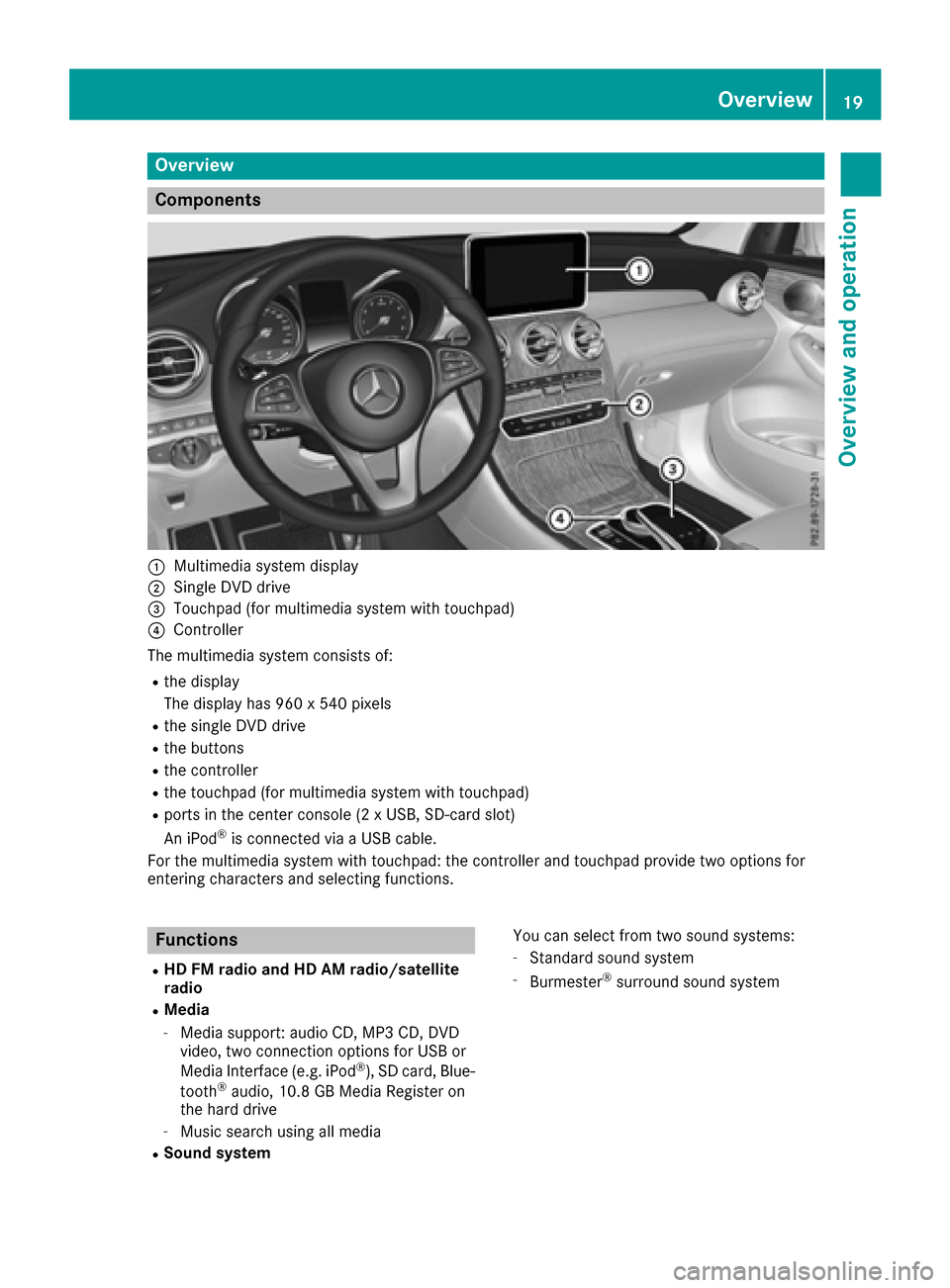
:Multimedia system display
;Single DVD drive
=Touchpad (for multimedia system with touchpad)
?Controller
The multimedia system consists of:
Rthe display
The display has 960 x 540 pixels
Rthe single DVD drive
Rthe buttons
Rthe controller
Rthe touchpad (for multimedia system with touchpad)
Rports in the center console (2 x USB, SD-card slot)
An iPod®is connected via a USB cable.
For the multimedia system with touchpad: the controller and touchpad provide two options for
entering characters and selecting functions.
Functions
RHD FM radio and HD AM radio/satellite
radio
RMedia
-Media support: audio CD, MP3 CD, DVD
video, two connection options for USB or
Media Interface (e.g. iPod
®), SD card, Blue-
tooth®audio, 10.8 GB Media Register on
the hard drive
-Music search using all media
RSound system You can select from two sound systems:
-Standard sound system
-Burmester®surround sound system
Overview19
Overview and operation
Page 24 of 178
XTo exit the menu:briefly press the%
button.
The multimedia system changes to the next
higher menu level in the current operating
mode.
XTo call up the basic display: press the%
button for longer than two seconds.
The multimedia system changes to the basic
display of the current operating mode.
Controller
The controller in the center console lets you:
Rselect menu items on the display
Renter characters
Rselect a destination on the map
Rsave entries
The controller can be:
Rturned 3
Rslid left or right 1
Rslid forwards or back 4
Rslid diagonally2
Rpressed briefly or pressed and held 7
Favorites button
With the favorites button, you can select, add or
edit favorites.
XPress the favorites button on the controller.
The favorites are displayed.
XTo select a favorite: turn and press the con-
troller.
Other functions (
Ypage 33).
Touchpad
Multimedia system with touchpad: alternatively,
you can use the touchpad to select and enter
information (
Ypage 23).
Multifunction steering wheel
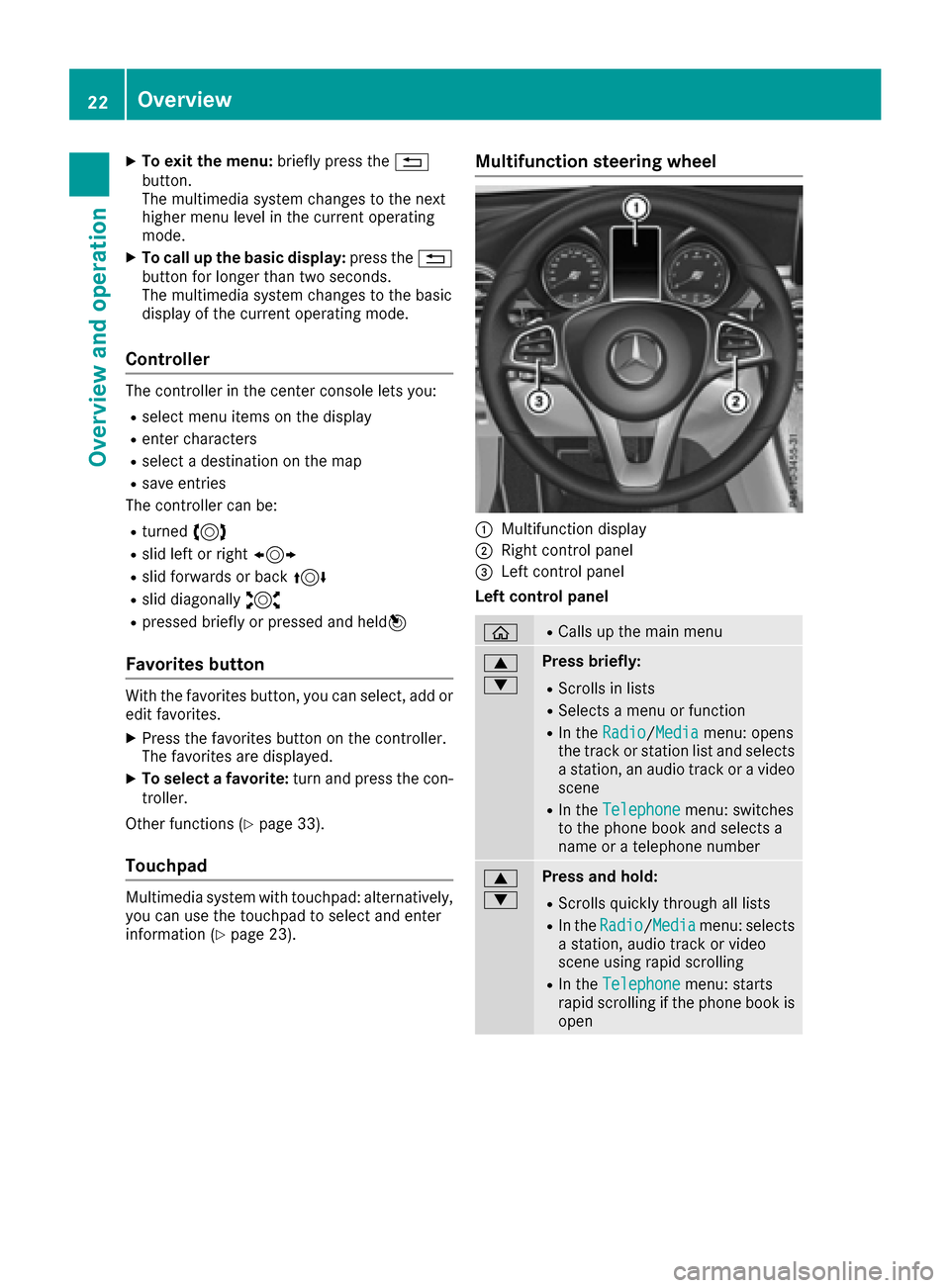
:Multifunction display
;Right control panel
=Left control panel
Left control panel
òRCalls up the main menu
9
:Press briefly:
RScrolls in lists
RSelects a menu or function
RIn the Radio/Mediamenu: opens
the track or station list and selects
a station, an audio track or a video
scene
RIn the Telephonemenu: switches
to the phone book and selects a
name or a telephone number
9
:Press and hold:
RScrolls quickly through all lists
RIn the Radio/Mediamenu: selects
a station, audio track or video
scene using rapid scrolling
RIn the Telephonemenu: starts
rapid scrolling if the phone book is
open
22Overview
Overview and operation