light MERCEDES-BENZ GLC-Class 2017 X253 Comand Manual
[x] Cancel search | Manufacturer: MERCEDES-BENZ, Model Year: 2017, Model line: GLC-Class, Model: MERCEDES-BENZ GLC-Class 2017 X253Pages: 178, PDF Size: 5.65 MB
Page 6 of 178
1, 2, 3 ...
360° cameraDisplaying images ............................ 46
Opening the camera cover for
cleaning (COMAND) .........................4 6
Settings ........................................... 46
Switching on/off .............................. 46
A
Access data of the mobile phone
network provider
Deleting ......................................... 124
Editing ........................................... 123
Making entries ............................... 122
Selecting ........................................ 122
Acoustic locking confirmation
Activating/deactivating
(COMAND) ....................................... 45
Activating media mode
General notes ................................ 141
Switching on automatically ............ 142
Adding bookmarks ............................ 128
Address
Entering (navigation) ........................ 57
Address book
Adding a new contact .................... 105
Adding information to a contact .... 106
Automatically importing contacts
from the phone .............................. 108
Browsing ........................................ 104
Calling up ....................................... 104
Changing the category of an entry .. 107
Changing the display and sorting
criteria for contacts ....................... 108
Deleting contacts ........................... 108
Deleting imported contacts ........... 110
Displaying contact details .............. 105
Editing a contact ............................ 107
Entering characters ......................... 30
Importing contacts ........................ 109
Introduction ................................... 104
Making a call ................................. 106
Receiving vCards ........................... 109
Saving a contact ............................ 108
Searching for a contact ................. 104
Sending e-mails ............................. 106 Sending text messages .................. 106
Starting route guidance ................. 106
Storing a phone number as a
speed dial number ......................... 107
Voice tags ...................................... 107
Address entry menu
Navigation ........................................ 57
Adjusting the volume
COMAND ......................................... 28
Media source ................................... 28
Traffic announcements .................... 28
Alternative Route ................................ 75
Ambient lighting
Setting (COMAND) ........................... 44
Asterisk key
see Favorites button
Audio CD/DVD and MP3 mode
Activating ....................................... 145
Bluetooth
®audio mode ................. 152
Connecting USB devices ................ 145
Data medi
a, file systems, formats .. 142
Gracenote®Media Database ......... 147
Inserting/removing a CD/DVD
(single drive) .................................. 144
Media interface .............................. 157
Media Register ............................... 149
Media search ................................. 147
Overview menu .............................. 144
Playback options ........................... 145
SD card .......................................... 144
Search menu ................................. 147
Selecting a track ............................ 146
Sound settings ............................... 165
Stop and playback function ........... 146
Automatic folding mirror function
Activating/deactivating
(COMAND) ....................................... 45
Automatic locking feature
Activating/deactivating
(COMAND) ....................................... 45
Automatic time
Switching on/off .............................. 36
Automatic volume adjustment
General information ......................... 40
Switching on/off .............................. 41
Avoiding an area .................................. 85
4Index
Page 9 of 178
Exterior mirrorActivating/deactivating the auto-
matic folding mirror function
(COMAND) ...................................... .45
F
Factory setting (reset function) .........43
Favorites
Adding ............................................ .33
Deleting ........................................... 34
Displaying and calling up ................. 33
Moving ............................................. 34
Overview .......................................... 33
Renaming ......................................... 33
Favorites (Internet) ........................... 130
Favorites button .................................. 41
G
GPS reception...................................... 53
Gracenote®Media Database ............ 147
H
Handwriting recognition
Switching text reader function
on/off .............................................. 26
Touchpad ......................................... 26
Heading up (navigation) ..................... 82
Home
see Home address
Home address
Entering and saving .........................5 8
I
Importing/exporting data.................. 42
Incident (traffic report) .......................77
Interior lighting
Setting the delayed switch-off
time (COMAND) .............................. .45
Intermediate destinations
Entering ........................................... 64
Internet
Conditions for access .................... 120
Creating favorites .......................... 130
Entering the URL ............................ 127
Favorites manager ......................... 130 Favorites menu .............................. 131
Menu functions .............................. 128
Options menu ................................ 128
Selecting/setting access data ....... 121
Setting automatic disconnection
of the Internet connection ............. 124
Setting up an Internet connection .. 121
K
Keyword search (navigation)
Online search ................................... 61
Selecting search options ................. 60
Selecting search results ................... 60
L
Lane recommendationsExplanation ...................................... 72
Presentation .................................... 72
Lighting
Setting the delayed switch-off
time (COMAND) ............................... 45
Switching the locator lighting on/
off .................................................... 45
Lights
Setting the ambient lighting
(COMAND) ....................................... 44
List of access data
New provider ................................. 122
List of mobile phone network pro-
viders
With the selected provider ............. 122
Locator lighting
Setting (COMAND) ........................... 45
Locking confirmation
see Acoustic locking confirmation
M
Making a callUsing speed dial .............................. 98
Using the call lists ............................ 97
Using the phone book ...................... 98
Map (navigation)
3D map ............................................ 82
Adjusting the scale .......................... 82
Building images ................................ 84
Displaying the next intersection ...... 83
Index7
Page 11 of 178
Blocking a route section affected
by a traffic jam ................................. 76
Calling up the compass display ........ 88
Calling up the menu ......................... 87
Canceling/continuing route guid-
ance ................................................. 74
Displaying current position .............. 76
Drive Information ............................. 88
Entering a destination ...................... 57
Entering a destination using geo-
coordinates ...................................... 67
Entering a destination using
Mercedes-Benz Apps ....................... 66
Entering a destination using the
map ................................................. 64
Entering a point of interest .............. 61
Entering characters (character
bar) .................................................. 31
Entering intermediate destina-
tions ................................................. 64
Entry restriction ............................... 53
First use ........................................... 53
General notes .................................. 53
GPS reception .................................. 53
Important safety notes .................... 53
Info on navigation ............................ 88
Lane recommendation .....................72
Map functions ..................................8 2
Moving the map ...............................5 4
Off-road/Off-map (off-road desti-
nation) ............................................. 76
Online map display .......................... 87
Personal POIs and routes ................. 67
Problems ......................................... 89
Reading out traffic reports ............... 79
Repeating announcements .............. 74
Route flight ...................................... 88
Route information ............................ 75
Saving destinations .......................... 80
Saving home address ....................... 58
Selecting a destination from the
list of last destinations ..................... 61
Setting route options (avoiding:
highways, toll roads, tunnels, fer-
ries) ................................................. 55
Setting the announcements vol-
ume ................................................. 74 Setting the route type (short
route, fast route, dynamic route
or
e
conomic route) ............................... 55
Showing/hiding the menu ............... 54
Starting route calculation ................ 59
Switching announcements
on/off .............................................. 74
Switching to ..................................... 54
Traffic jam function .......................... 76
Updating the digital map .................. 86
Navigation announcements
Switching off .................................... 29
North orientation (navigation) ........... 82
O
Off-road................................................ 76
Off-road program
Setting (COMAND) ........................... 50
Online and Internet functions
Calling up ....................................... 124
Calling up the device list ................ 123
Enabling a mobile phone for Inter-
net access ..................................... 121
Ending the connection ................... 125
Establishing a connection .............. 124
Managing all Internet devices ........ 124
Manually setting the access data
of the mobile phone network pro-
vider .............................................. 122
Mercedes-Benz Apps ..................... 125
Selecting the access data of the
mobile phone network provider ..... 122
Setting automatic disconnection
of the Internet connection ............. 124
Setting up an Internet connection .. 121
Web browser .................................. 127
Own address (navigation)
see Home address
P
Pause functionVideo DVD ..................................... 163
Perfume atomizer
Setting the perfume intensity
(COMAND) ....................................... 49
Index9
Page 17 of 178
Operating safety
Important safety notes
GWARNING
If you operate information systems and com-
munication equipment integrated in the vehi-
cle while driving, you will be distracted from
traffic conditions. You could also lose control
of the vehicle. There is a risk of an accident.
Only operate the equipment when the traffic
situation permits. If you are not sure that this
is possible, park the vehicle paying attention
to traffic conditions and operate the equip-
ment when the vehicle is stationary.
You must observe the legal requirements for the
country in which you are currently driving when
operating the multimedia system.
The multimedia system calculates the route to
the destination without taking account of the
following, for example:
Rtraffic lights
Rstop and yield signs
Rmerging lanes
Rparking or stopping in a no parking/no stop-
ping zone
Rother road and traffic rules and regulations
Rnarrow bridges
The multimedia system can give incorrect navi-
gation commands if the actual street/traffic sit-
uation does not correspond with the digital
map's data. Digital maps do not cover all areas
nor all routes in an area. For example, a route
may have been diverted or the direction of a one-
way street may have changed.
For this reason, you must always observe road
and traffic rules and regulations during your
journey. Road and traffic rules and regulations
always have priority over the system's driving
recommendations.
Navigation announcements are intended to
direct you while driving without diverting your
attention from the road and driving.
Please always use this feature instead of con-
sulting the map display for directions. Looking
at the icons or map display can distract you from
traffic conditions and driving, and increase the
risk of an accident. Bear in mind that at a speed of only 30 mph
(approximately 50 km/
h), your vehicle covers a
distance of 44 feet (approximately 14 m) every
second.
This equipment complies with FCC radiation
exposure limits set forth for uncontrolled equip-
ment and meet s t
he FCC radio frequency (RF)
Exposure Guidelines in Supplement C to OET65.
This equipment has very low levels of RF energy
that is deemed to comply without maximum
permissive exposure evaluation (MPE). How-
ever, it is recommended to install it at a distance
of at least 8 inches (approx. 20 cm) between the
radiation source and a person's body (not
including limbs such as hands, wrists, feet and
legs).
GWARNING
Modifications to electronic components, their software as well as wiring can impair their
function and/or the function of other net-
worked components. In particular, systems
relevant to safety could also be affected. As a
result, these may no longer function as inten-
ded and/or jeopardize the operating safety of
the vehicle. There is an increased risk of an
accident and injury.
Never tamper with the wiring as well as elec-
tronic components or their software. You
should have all work to electrical and elec-
tronic equipment carried out at a qualified
specialist workshop.
Declarations of conformity
Vehicle components which receive
and/or transmit radio waves
USA only: The wireless devices of this vehicle
comply with Part 15 of the FCC Rules. Operation
is subject to the following two conditions:
1) These devices may not cause interference,
and
2) These devices must accept any interference,
including interference that may cause undesired
operation of the device.
Changes or modifications not expressly
approved by the party responsible for compli-
ance could void the user's authority to operate
the equipment.
Introduction15
Z
Page 18 of 178
Canada only:The wireless devices of this vehi-
cle comply with Industry Canada license-
exempt RSS standard(s). Operation is subject to the following two conditions:
1) These devices may not cause interference,
and
2) These devices must accept any interference,
including interference that may cause undesired
operation of the device.
Correct use
You need to observe the following information
when using the multimedia system:
Rthe safety notes in this manual
Rtraffic rules and regulations
Rlaws and safety standards pertaining to motorvehicles
Using roof carriers may impair the correct func-
tioning of a roof antenna (phone, satellite radio,
GPS).
Attaching metalized retrofit film to the wind-
shield may affect radio reception. This can have
a negative impact on all other antennas (e.g.
emergency call antenna) in the vehicle interior.
Protection against theft: this device is equip-
ped with technical provisions to protect it
against theft. Further information on protection
against theft can be obtained from an author-
ized Mercedes-Benz Center.
Qualified specialist workshop
Read the information on qualified specialist
workshops in the vehicle Operator's Manual.
Function restrictions
For safety reasons, some functions are restric-
ted or unavailable while the vehicle is in motion.
You will notice this, for example, because either you will not be able to select certain menu items
or a message will appear to this effect.
Data stored in the vehicle
Data recording
A wide range of electronic components in your
vehicle contain data memories.
These data memories temporarily or perma-
nently store technical information about:
Rthe vehicle's operating state
Revents
Rmalfunctions
In general, this technical information docu-
ments the state of a component, a module, a
system or the surroundings.
These include, for example:
Roperating conditions of system components,
e.g. fluid levels
Rthe vehicle's status messages and those of its
individual components, e.g. number of wheel
revolutions/speed, deceleration in move-
ment, lateral acceleration, accelerator pedal
position
Rmalfunctions and defects in important system
components, e.g. lights, brakes
Rvehicle reactions and operating conditions in
special driving situations, e.g. air bag deploy-
ment, intervention of stability control sys-
tems
Rambient conditions, e.g. outside temperature
This data is of an exclusively technical nature
and can be used to:
Rassist in detecting and rectifying faults and
defects
Ranalyze vehicle functions, e.g. after an acci-
dent
Roptimize vehicle function
The data cannot be used to trace the vehicle's
movements.
When your vehicle is serviced, technical infor-
mation can be read from the event data memory
and fault data memory.
Services include, for example:
Rrepair services
Rservice processes
Rwarranty events
Rquality assurance
The vehicle is read out by employees of the ser-
vice network (including the manufacturer) using
special diagnostic testers. You can obtain more
information there, if required.
16Introduction
Page 22 of 178
RNavigation system
-Navigation via the hard drive
-Destination entry using keyword search
-Realistic 3D map with textured city models
-Personal POIs and routes using SD memory
card
-Navigation functions, e.g. Drive Informa-
tion
-Dynamic route guidance with traffic reports
via SIRIUS satellite radio
RCommunication
-Messaging functions (text messages,
email)
-Address book
-Internet browser
-Mercedes-Benz Apps with online search,
Facebook, stock prices, news and much
more
-Mercedes-Benz Mobile Website
-Wi-Fi interface for the connection of a
smartphone to the multimedia system
RSIRIUS Weather
-Weather data as an information chart (cur-
rent forecast, 5-day preview, detailed infor-
mation)
-Weather data on the weather map, e.g. rain
radar data, storm characteristics and the
track of tropical cyclones (hurricanes,
typhoons)
RVehicle functions
-Vehicle settings, such as ambient lighting,
belt adjustment and tow-away alarm
-360° camera
-Rear view camera
-Climate control functions, such as climate
mode, perfume atomizer and auxiliary heat-
ing
-DYNAMIC SELECT (individual drive pro-
gram)
RFavorites button
Fast access to favorites functionsusi
ng the
favorites button on the controller or on the
touchpad
Display
General notes
!Avoid any direct contact with the display
surface. Pressure on the display surface may
result in impairments to the display, which
could be irreversible.
Wearing polarized sunglasses may impair your
ability to read the display.
The display has an automatic temperature-con-
trolled switch-off feature. The brightness is
automatically reduced if the temperature is too
high. The display may then temporarily switch
off completely.
Overview
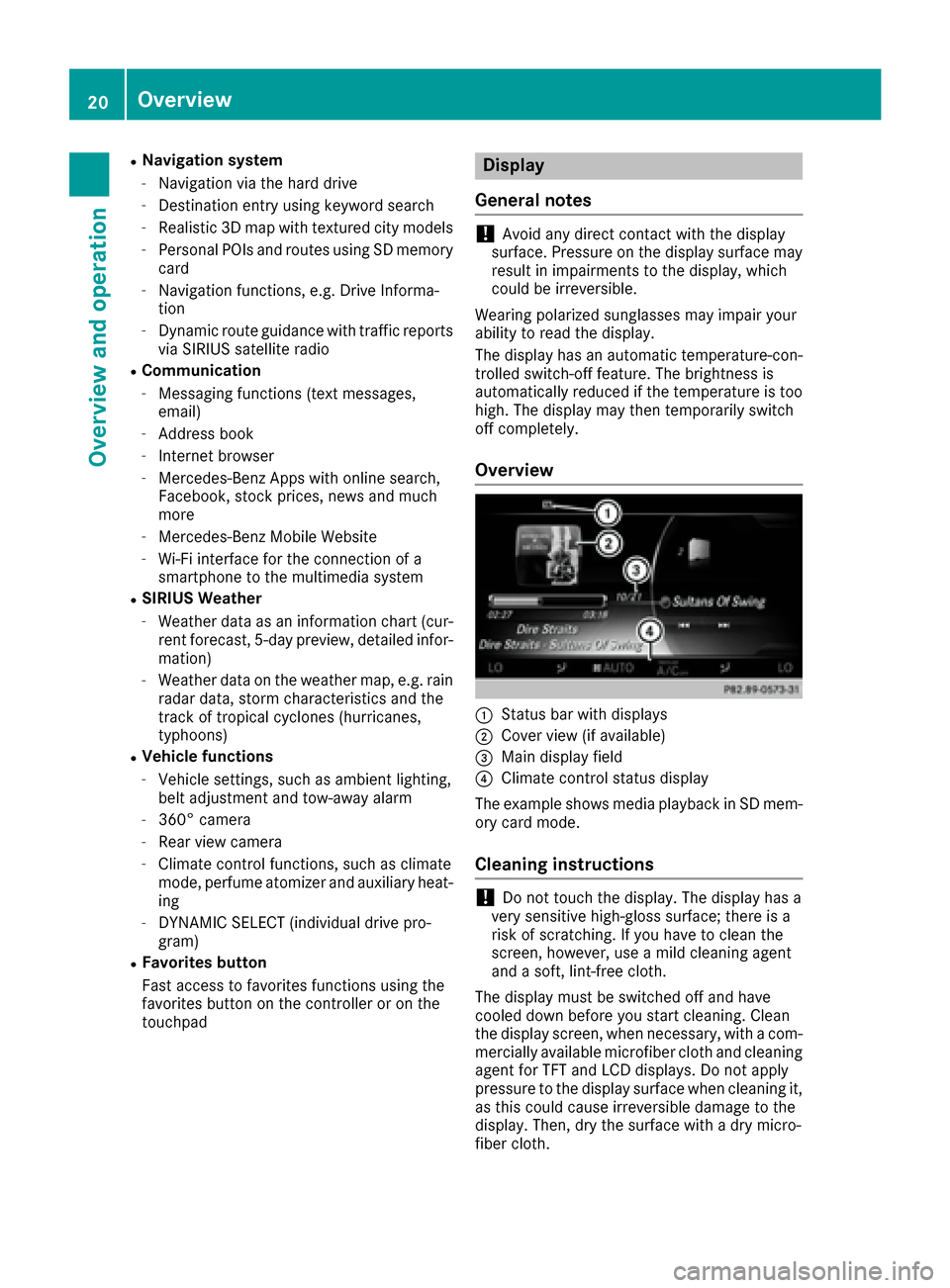
:Status bar with displays
;Cover view (if available)
=Main display field
?Climate control status display
The example shows media playback in SD mem-
ory card mode.
Cleaning instructions
!Do not touch the display. The display has a
very sensitive high-gloss surface; there is a
risk of scratching. If you have to clean the
screen, however, use a mild cleaning agent
and a soft, lint-free cloth.
The display must be switched off and have
cooled down before you start cleaning. Clean
the display screen, when necessary, with a com- mercially available microfiber cloth and cleaning
agent for TFT and LCD displays. Do not apply
pressure to the display surface when cleaning it,
as this could cause irreversible damage to the
display. Then, dry the surface with a dry micro-
fiber cloth.
20Overview
Overview and operation
Page 27 of 178
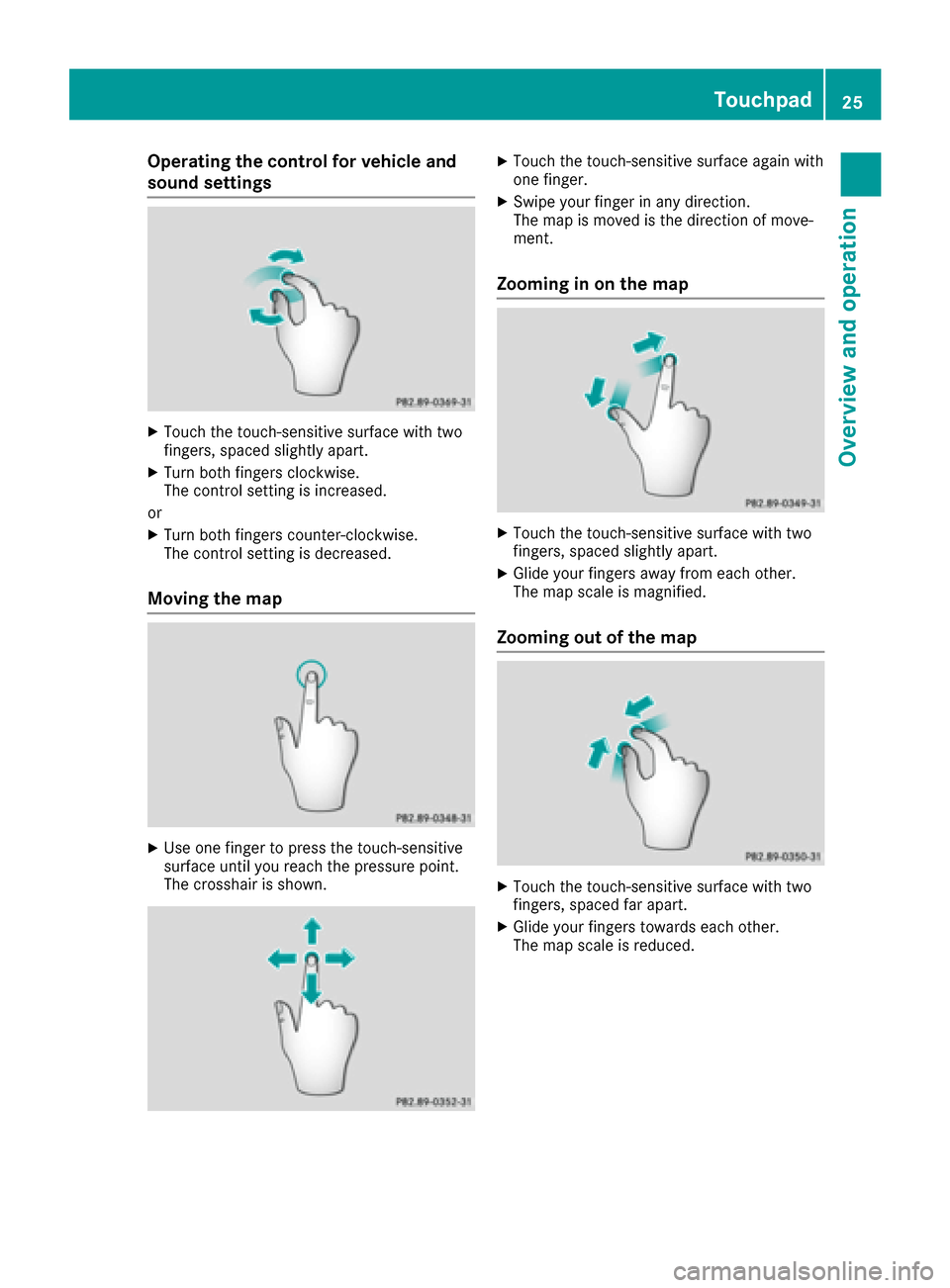
Operating the control for vehicle and
sound settings
XTouch the touch-sensitive surface with two
fingers, spaced slightly apart.
XTurn both fingers clockwise.
The control setting is increased.
or
XTurn both fingers counter-clockwise.
The control setting is decreased.
Moving the map
XUse one finger to press the touch-sensitive
surface until you reach the pressure point.
The crosshair is shown.
XTouch the touch-sensitive surface again with
one finger.
XSwipe your finger in any direction.
The map is moved is the direction of move-
ment.
Zooming in on the map
XTouch the touch-sensitive surface with two
fingers, spaced slightly apart.
XGlide your fingers away from each other.
The map scale is magnified.
Zooming out of the map
XTouch the touch-sensitive surface with two
fingers, spaced far apart.
XGlide your fingers towards each other.
The map scale is reduced.
Touchpad25
Overview and operation
Page 29 of 178

XUse your finger to touch the touch-sensitive
surface and swipe to the left.
The character last entered is deleted.
Switching input lines
XPress the touchpad.
A symbol is shown.
XTo selectp: swipe your finger to the left or
right and press.
XTo select the input line: swipe up or down and
press.
The selected input line is active and character
entry can be continued.
Moving the cursor within the input line
XPress the touchpad.
A symbol is shown.
XTo select p: glide your finger to the left or
right and press.
XTo move the cursor: glide to the left or right.
Changing the input language for hand-
writing recognition
Prerequisite: an input line for text, numbers or
characters has been selected.
XPress the touchpad.
A symbol is shown.
XTo select B: swipe your finger to the left or
right and press.
The list of available input languages appears.
XTo select a language: swipe up or down and
press.
The input language for handwriting recogni-
tion has been changed.
Searching in lists
The phone book search is used as an example.
You determine the first letter of the contact you
are looking for with the first character you enter.
XDraw the letter on the touchpad surface.
The first contact with the selected first char-
acter is highlighted in the phone book.
Further information on handwriting recogni-
tion on the touchpad (
Ypage 26).
XDraw additional letters on the touchpad sur-
face one after another.
XTo complete the search and return to the
phone book: press the touchpad.
Switching between the controller and
the touchpad as input device
Prerequisite: an input line for text, numbers or
characters has been selected.
XTo switch from character entry using the
controller to handwriting recognition on
the touchpad: use one finger to press the
touchpad.
Handwriting recognition on the touchpad is
active.
XTo switch from handwriting recognition
on the touchpad to character entry using
the controller: press the controller.
Character entry using the controller is active.
Touchpad27
Overview and operation
Page 33 of 178
R¬
Confirms an entry
R&
Cancels input
RS
Inserts a paragraph
Character entry (navigation)
Character entry options
You can enter characters using the controller or
the touch pad.With the controller, you enter
characters using a character bar. To enter using
the touch pad,draw the character inthe entry
fiel d.The multimedia system supports th isusing
a handwrit ing recognition function.
Entering characters using the charac-
ter bar
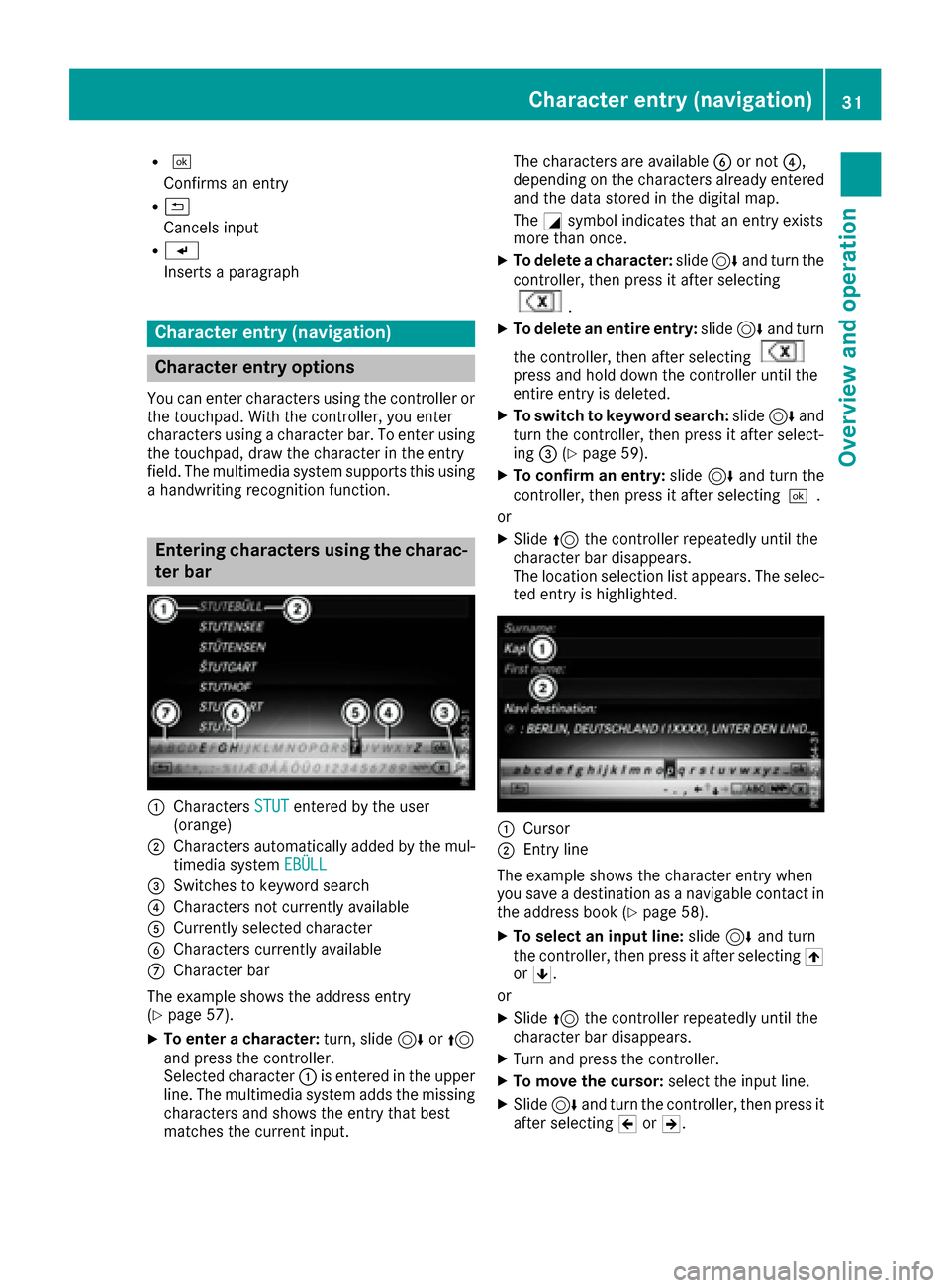
:Characters STUTenteredbythe user
(orange)
;Characters automatically added bythe mul-
tim edia system EBÜLL
=Switches to keyword search
?Characters not currently availab le
ACurrently selected character
BCharacters currently available
CCharacter bar
The example shows theaddr ess entry
(
Ypage 57).
XTo enter a cha racter: turn,slide6or5
and press the controller.
Selected character :isentered inthe upper
lin e. The multimedia systemaddsthe missing
characters and shows the entry that best
matches the current input. The characters are availab
leB or not ?,
depending on the characters already entered and the data stored in the digital map.
The Gsymbol indicates that an entry exists
more than once.
XTo delete a cha racter: slide6and turn the
controller, then press it after selecting
.
XTo delete an entire entry :slide 6and turn
the controller, then after selecting
press and hold downthe controller until the
entire entry is deleted.
XTo switch tokey word search: slide6and
turn the controller, then press it after select-
ing =(
Ypage 59 ).
XTo confi rman entry :slide 6and turn the
controller, then press it after selecting¬.
or
XSlide 5the controller repeatedly until the
character bar disappears.
The location selection list appears. The selec-
ted entry is highlighted.
:Cursor
;Entry line
The example shows the character entry when
you save a destination as a nav igablecontact in
the addr ess book (
Ypage 58).
XTo select an input line: slide6and turn
the controller, then press itafter selecting 4
or 5.
or
XSlid e5 the controller repeatedly until the
character bar disappears.
XTurn and press the controller.
XTo move the cursor: select the input line.
XSlide6 and turn the controller, then press it
after selecting 2or3.
Character entry (navigation)31
Overview and operation
Page 34 of 178
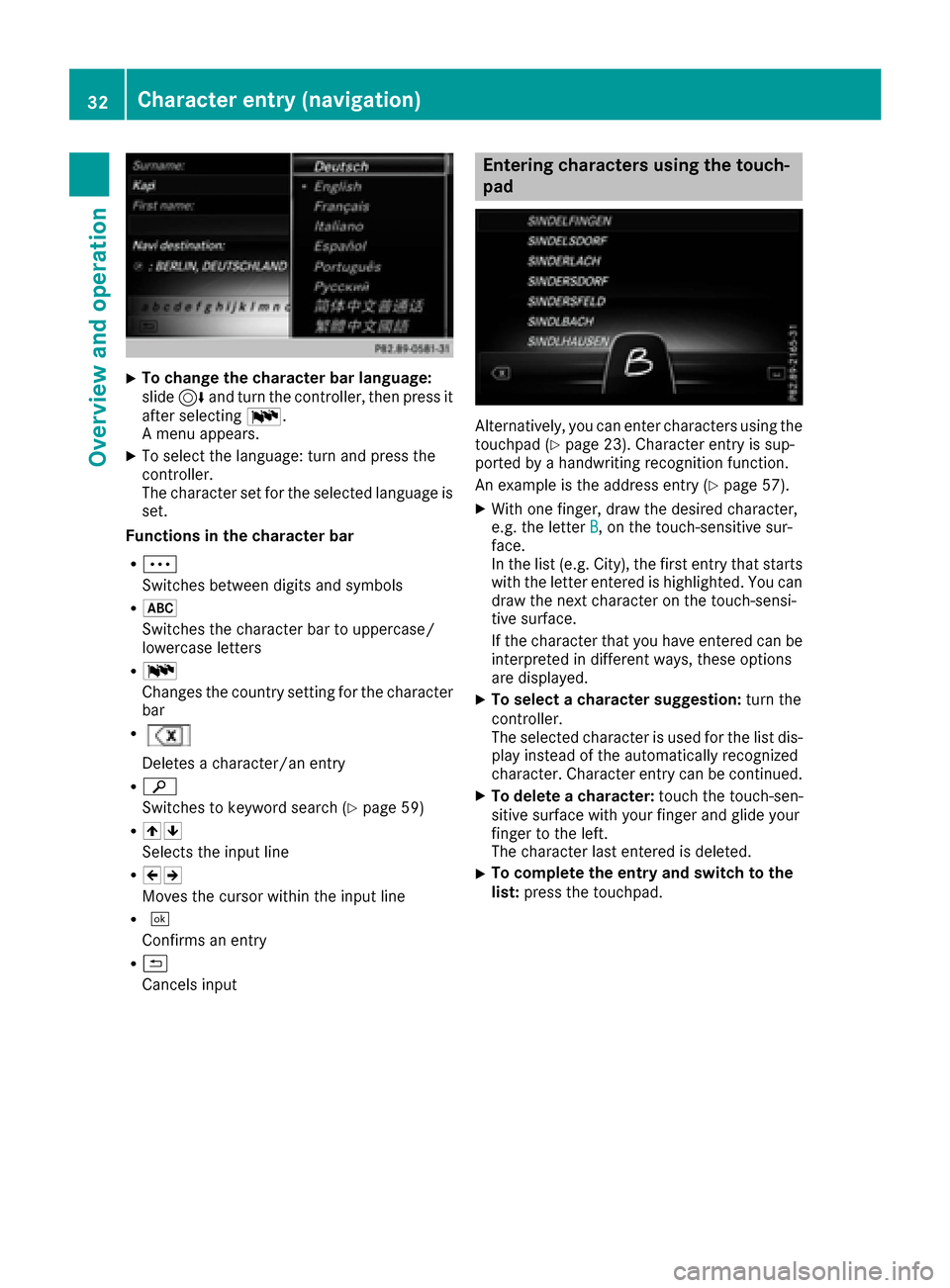
XTo change the character bar language:
slide6and turn the controller, then press it
after selecting B.
A menu appears.
XTo select the language: turn and press the
controller.
The character set for the selected language is set.
Functions in the character bar
RÄ
Switches between digits and symbols
R*
Switches the character bar to uppercase/
lowercase letters
RB
Changes the country setting for the character
bar
R
Deletes a character/an entry
Rè
Switches to keyword search (
Ypage 59)
R45
Selects the input line
R23
Moves the cursor within the input line
R¬
Confirms an entry
R&
Cancels input
Entering characters using the touch-
pad
Alternatively, you can enter characters using the
touchpad (Ypage 23). Character entry is sup-
ported by a handwriting recognition function.
An example is the address entry (
Ypage 57).
XWith one finger, draw the desired character,
e.g. the letter B, on the touch-sensitive sur-
face.
In the list (e.g. City), the first entry that starts
with the letter entered is highlighted. You can
draw the next character on the touch-sensi-
tive surface.
If the character that you have entered can be
interpreted in different ways, these options
are displayed.
XTo select a character suggestion: turn the
controller.
The selected character is used for the list dis-
play instead of the automatically recognized
character. Character entry can be continued.
XTo delete a character: touch the touch-sen-
sitive surface with your finger and glide your
finger to the left.
The character last entered is deleted.
XTo complete the entry and switch to the
list: press the touchpad.
32Character entry (navigation)
Overview and operation