light MERCEDES-BENZ GLC COUPE 2016 User Guide
[x] Cancel search | Manufacturer: MERCEDES-BENZ, Model Year: 2016, Model line: GLC COUPE, Model: MERCEDES-BENZ GLC COUPE 2016Pages: 389, PDF Size: 7.34 MB
Page 18 of 389
Side lamps ..................................... 116
Turn signals ................................... 117
see Interior lighting
LIM indicator lamp
Cruise control ................................ 174
DISTRONIC PLUS ........................... 179
Variable SPEEDTRONIC ................. 176
Limiting the speed
see SPEEDTRONIC
Loading guidelines ............................ 305
Locking
see Central locking
Locking (doors)
Automatic ........................................ 89
Emergency locking ........................... 90
From inside (central locking but-
ton) .................................................. 89
Locking centrally
see Central locking
Luggage compartment
Opening/closing (from outside,
HANDS-FREE ACCESS) .................... 92
Luggage compartment cover
Important safety notes .................. 311
Notes/function .............................. 311
Luggage compartment enlarge-
ment ................................................... 308
Luggage compartment floor
Important safety notes .................. 314
opening/closing ............................ 314
stowage well, under ....................... 314
Luggage compartment plug-in
module (telescopic rod) .................... 313
Luggage net ....................................... 312
Lumbar support
Adjusting the 4-way lumbar sup-
port ................................................ 106 M
M+S tyres ........................................... 358
Main-beam headlamps
Adaptive Highbeam Assist ............. 119
Adaptive Highbeam Assist PLUS .... 119
Display message ............................ 261
Replacing bulb s............................. 122
Switching on/of f........................... 117
Matt finish (cleaning instructions) .. 333MB Contact
Breakdown assistance call but-
ton ................................................. 322
Display message ............................ 255
General notes ................................ 321
Info call button .............................. 322
Media Interface
see Digital Owner's Manual
Memory card (audio) ......................... 237
Memory function
Seats, steering wheel, exterior
mirrors ........................................... 113
Mercedes connect me
display message ............................ 255
Mercedes me connect
Breakdown assistance call but-
ton ................................................. 322
General notes ................................ 321
Info call button .............................. 322
Mercedes-Benz emergency call
system
Switch in the overhead control
panel .............................................. 321
Mercedes-Benz Intelligent Drive
360°camera .................................. 202
Active Blind Spot Assist ................. 213
Active Lane Keeping Assist ............ 216
Active Parking Assist ..................... 194
ATTENTION ASSIST ........................ 207
Blind Spot Assist ............................ 210
DISTRONIC PLUS ........................... 178
DISTRONIC PLUS with Steering
Assist and Stop&Go Pilot ............... 184
General notes ................................ 174
Lane Keeping Assist ...................... 211
PARKTRONIC ................................. 191
PRE-SAFE ®
(anticipatory occu-
pant protection) ............................... 55
PRE-SAFE ®
PLUS (anticipatory
occupant protection PLUS) .............. 55
Reversing camera .......................... 198
Traffic Sign Assist .......................... 208
Mercedes-Benz Service Centre
see Qualified specialist workshop
Message memory (on-board com-
puter) .................................................. 249 Index
15
Page 19 of 389
Messages
see Display messages
see Warning and indicator lamps
Mirror turn signal
Cleaning ........................................ .335
Mirrors
see Exterior mirrors
see Rear-view mirror
see Vanity mirror (in sun visor)
Mobile phone
Connecting (Bluetooth ®
inter-
face) .............................................. 299
Connecting another mobile
phone ............................................ 300
Connecting the telephone module
with Bluetooth ®
(SAP profile) ......... 301
Frequencies ................................... 371
Installation ..................................... 371
Menu (on-board computer) ............ 238
Notes/placing in the bracket ......... 322
Transmission output (maximum) .... 371
Modifying the programming (key) ..... 84
MOExtended tyres .............................341
Motorway mode ................................ 118
MP3
Operating ....................................... 237
See also Digital Owner's Manual ... 292
Multifunction display
Function/notes ............................ .230
Multifunction steering wheel
Operating the on-board computer .. 229
Overview .......................................... 35
Multimedia system
Switching on and off ..................... .293
Music files
See also Digital Owner's Manual ... 292 N
Navigation Menu (on-board computer) ............ 234
See also Digital Owner's Manual ... 292
Notes on running in a new vehicle .. 143O
Occupant safety Airbags ............................................ 46 Automatic front-passenger front
airbag deactivatio
n .......................... 49
Automatic measures after an acci-
dent ................................................. 56
Children in the vehicle ..................... 56
Important safety notes .................... 41
PASSENGER AIRBAG indicator
lamp ................................................. 42
Pets in the vehicle ........................... 67
PRE-SAFE ®
(anticipatory occu-
pant protection) ............................... 55
PRE-SAFE ®
PLUS (anticipatory
occupant protection PLUS) .............. 55
Restraint system introduction .......... 41
Restraint system warning lamp ....... .42
Seat belts ........................................ 43
Odometer ........................................... 232
Oil
see Engine oil
On-board computer
AMG menu ..................................... 245
Assistance graphic menu ............... 239
Assistance menu ........................... 240
Display messages .......................... 248
Displaying a service message ........ 330
DISTRONIC PLUS ........................... 183
Factory settings ............................. 245
G-Meter ......................................... 246
Head-up display ............................. 231
Important safety notes .................. 228
Instrument cluster menu ............... 244
Light menu ..................................... 243
Media menu ................................... 236
Menu overview .............................. 232
Message memory .......................... 249
Navigation menu ............................ 234
Operating the TV ............................ 238
Operating video DVD ..................... 237
Operation ....................................... 229
RACETIMER ................................... 247
Radio menu ................................... 236
Service menu ................................. 240
Settings menu ............................... 240
Standard display ............................ 232
Telephone menu ............................ 238
Trip menu ...................................... 232
Vehicle menu ................................. 244 16
Index
Page 25 of 389
Transmission oil (on-board com-
puter, Mercedes-AMG vehicles) ..... 245
TEMPOMAT
Function/notes ............................. 174
Text messages
Telephone module with Blue-
tooth ®
(SAP profile) ....................... 302
Timing (RACETIMER) .........................247
TIREFIT Kit
Declaration of conformity ................ 29
Important safety notes .................. 342
Storage location ............................ 340
Tyre pressure not reached ............. 344
Tyre pressure reached ................... 344
Using ............................................. 343
Top Tether ............................................ 59
Total distance recorder .................... 232
Touchpad
Changing the station/music
track .............................................. 295
Character suggestions ................... 294
Deleting characters ....................... 294
Entering a space ............................ 294
Entering characters ....................... 294
Gesture control .............................. 294
Handwriting recognition ................ 294
Operating the touchpad ................. 294
Overview ........................................ 293
Quick access for audio .................. 295
Switching ....................................... 293
Switching input line ....................... 294
Tow-away protection
Deactivating ..................................... 80
Function .......................................... .80
Priming/deactivating ....................... 80
Tow-starting
Emergency engine starting ............ 353
Important safety notes .................. 350
Towing
Important safety notes .................. 350
Notes for 4MATIC vehicles ............ 353
Transporting the vehicle ................3 53
Towing a trailer
Active Blind Spot Assist ................. 215
Active Lane Keeping Assist ............ 218
Active Parking Assist ..................... 194
Axle load, permissible .................... 381 ESP
®
(Electronic Stability Pro-
gram) ............................................... 76
Failure check for LEDs ................... 223
Pulling away with a trailer .............. 147
Swinging out the ball coupling ....... 220
Trailer tow hitch display message .. 277
Towing away
Fitting the towing eye .................... 352
Removing the towing eye ............... 352
With both axles on the ground ....... 353
Towing eye ......................................... 340
Traffic Sign Assist
Activating/deactivating the warn-ing function .................................... 241
Display message ............................ 269
Function/note s............................. 208
Important safety notes .................. 209
Instrument cluster display ............. 209
Trailer coupling
see Towing a trailer
Trailer towing
7-pin connecto r............................. 223
Blind Spot Assist ............................ 211
Cleaning the trailer tow hitch ......... 336
Coupling up a traile r...................... 222
Decoupling a trailer ....................... 222
Driving tip s.................................... 219
Important safety notes .................. 218
Lights display message .................. 261
Parktronic ...................................... 191
Power supply ................................. 222
Problem (fault) ............................... 224
Trailer load s................................... 380
Transfer case ..................................... 161
Transmission
see Automatic transmission
Transmission position display ......... 155
Transporting the vehicle .................. 353
Trim pieces (cleaning instruc-
tions) .................................................. 336
Trip computer (on-board com-
puter) .................................................. 233
Trip meter
Calling up ....................................... 232
Resetting (on-board computer) ...... 234
Turn signals
Replacing bulbs (front) ................... 123 22
Index
Page 34 of 389
R
malfunctions and defects in important system
components, e.g. lights, brakes
R vehicle reactions and operating conditions in
special driving situations, e.g. airbag deploy-
ment, intervention of stability control sys-
tems
R ambient conditions, e.g. outside temperature
These data are of an exclusively technical nature
and can be used to:
R assist in detecting and rectifying faults and
defects
R analyse vehicle functions, e.g. after an acci-
dent
R optimise vehicle functions
The data cannot be used to trace the vehicle's
movements.
When your vehicle is serviced, technical infor-
mation can be read from the event data memory
and fault data memory.
Services include, for example:
R repair services
R service processes
R warranty events
R quality assurance
The information is read out by employees of the service network (including the manufacturer)
using special diagnostic testers. You can obtain
more information there, if required.
After a fault has been rectified, the information
is deleted from the fault memory or is continu-
ally overwritten.
During vehicle operation, certain situations may arise in which these technical data – in conjunc-
tion with other information and, if applicable,
after consultation with an approved assessor –
may be linked to an individual person.
Examples include:
R accident reports
R damage to the vehicle
R witness statements
Further additional functions that have been con-
tractually agreed upon with the customer allow
certain vehicle data to be conveyed by the vehi-
cle as well. The additional functions include, for example, vehicle location in the event of an
emergency. Copyright information
Information on licences for free and open-
source software used in your vehicle can be
found on the data carrier in your vehicle docu-
ment wallet and, including updates, on the fol-
lowing website:
http://www.mercedes-benz.com/opensource Copyright information
31Introduction Z
Page 35 of 389
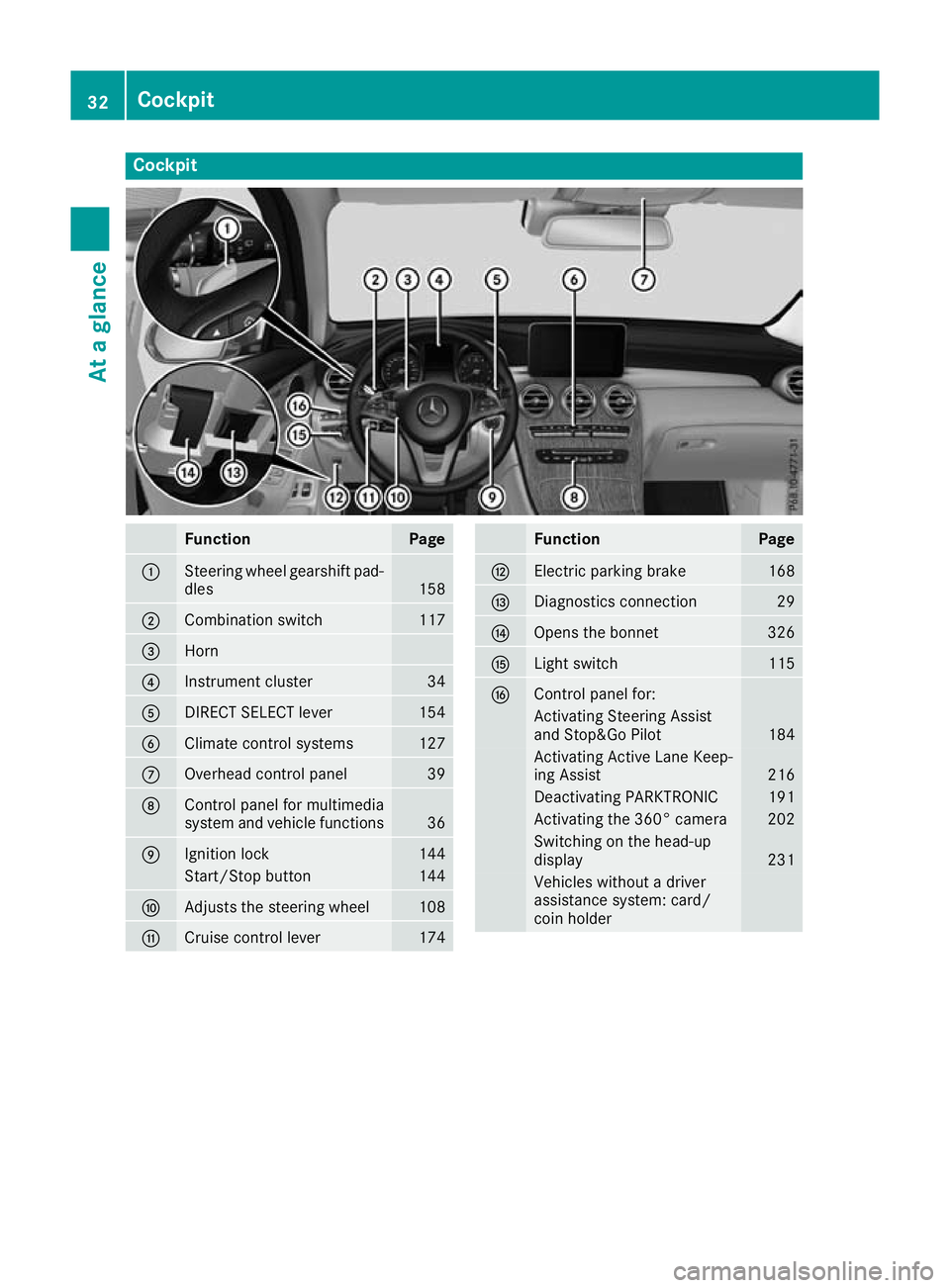
Cockpit
Function Page
:
Steering wheel gearshift pad-
dles 158
;
Combination switch 117
=
Horn
?
Instrument cluster 34
A
DIRECT SELECT lever 154
B
Climate control systems 127
C
Overhead control panel 39
D
Control panel for multimedia
system and vehicle functions
36
E
Ignition lock 144
Start/Stop button 144
F
Adjusts the steering wheel 108
G
Cruise control lever 174 Function Page
H
Electric parking brake 168
I
Diagnostics connection 29
J
Opens the bonnet 326
K
Light switch 115
L
Control panel for:
Activating Steering Assist
and Stop&Go Pilot 184
Activating Active Lane Keep-
ing Assist 216
Deactivating PARKTRONIC 191
Activating the 360° camera 202
Switching on the head-up
display
231
Vehicles without a driver
assistance system: card/
coin holder 32
CockpitAt a glance
Page 36 of 389
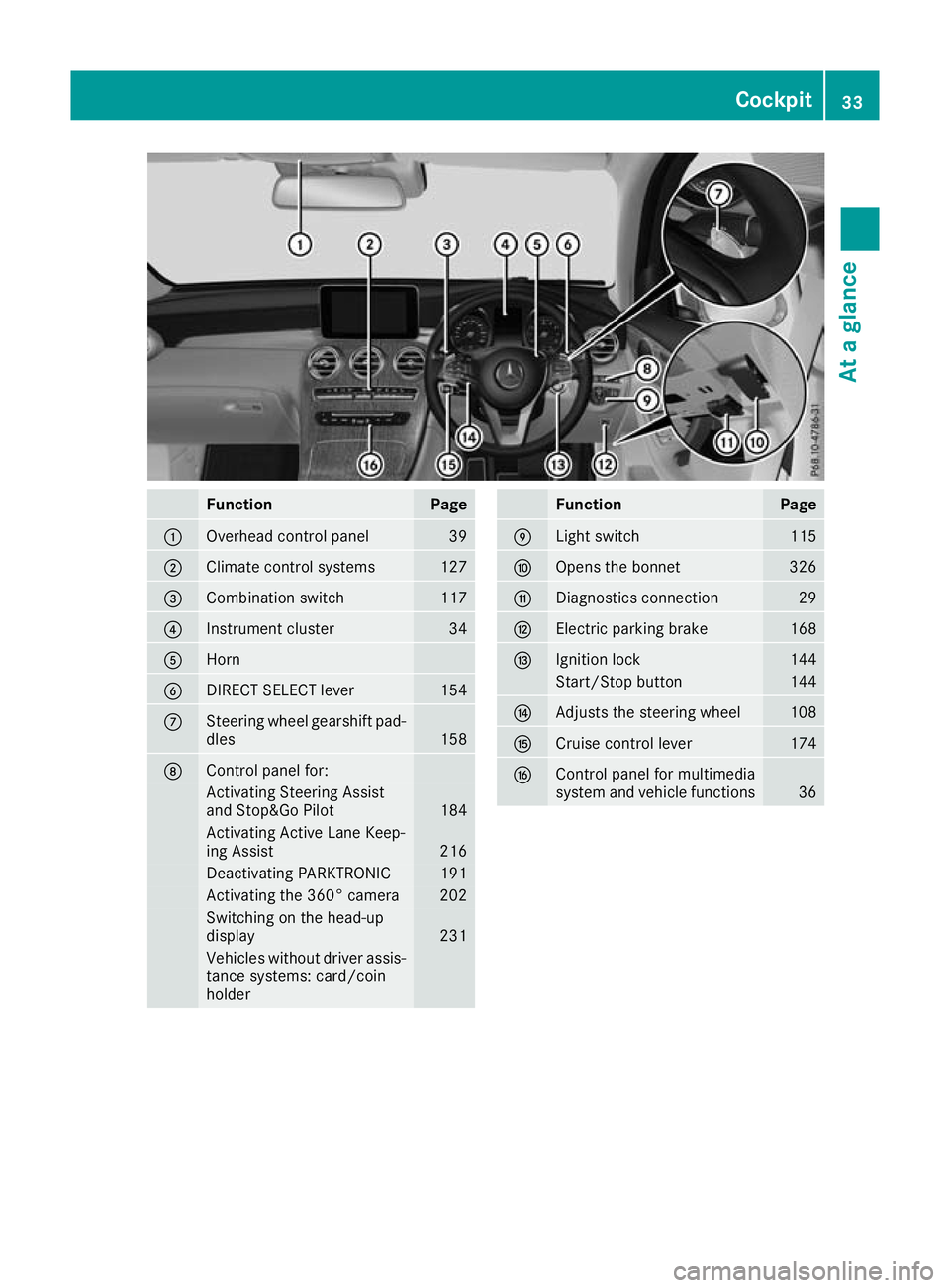
Function Page
:
Overhead control panel 39
;
Climate control systems 127
=
Combination switch 117
?
Instrument cluster 34
A
Horn
B
DIRECT SELECT lever 154
C
Steering wheel gearshift pad-
dles 158
D
Control panel for:
Activating Steering Assist
and Stop&Go Pilot
184
Activating Active Lane Keep-
ing Assist
216
Deactivating PARKTRONIC 191
Activating the 360° camera 202
Switching on the head-up
display
231
Vehicles without driver assis-
tance systems: card/coin
holder Function Page
E
Light switch 115
F
Opens the bonnet 326
G
Diagnostics connection 29
H
Electric parking brake 168
I
Ignition lock 144
Start/Stop button 144
J
Adjusts the steering wheel 108
K
Cruise control lever 174
L
Control panel for multimedia
system and vehicle functions
36Cockpit
33At a glance
Page 40 of 389
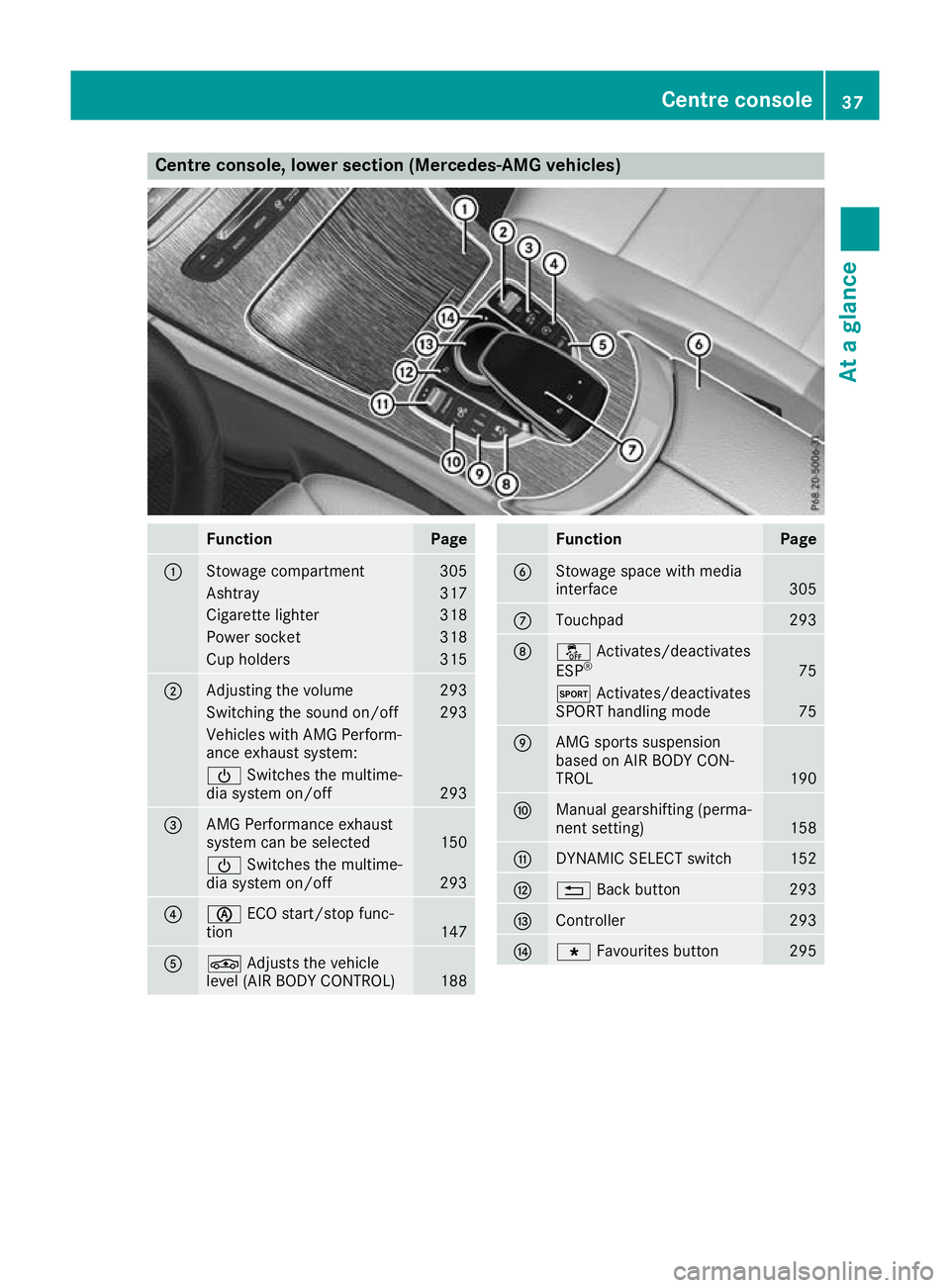
Centre console, lower section (Mercedes-AMG vehicles)
Function Page
:
Stowage compartment 305
Ashtray 317
Cigarette lighter 318
Power socket 318
Cup holders 315
;
Adjusting the volume 293
Switching the sound on/off 293
Vehicles with AMG Perform-
ance exhaust system:
Ü
Switches the multime-
dia system on/off 293
=
AMG Performance exhaust
system can be selected
150
Ü
Switches the multime-
dia system on/off 293
?
è
ECO start/stop func-
tion 147
A
É
Adjusts the vehicle
level (AIR BODY CONTROL) 188 Function Page
B
Stowage space with media
interface
305
C
Touchpad 293
D
å
Activates/deactivates
ESP ® 75
M
Activates/deactivates
SPORT handling mode 75
E
AMG sports suspension
based on AIR BODY CON-
TROL
190
F
Manual gearshifting (perma-
nent setting)
158
G
DYNAMIC SELECT switch 152
H
%
Back button 293
I
Controller 293
J
g
Favourites button 295Centre console
37At a glance
Page 41 of 389
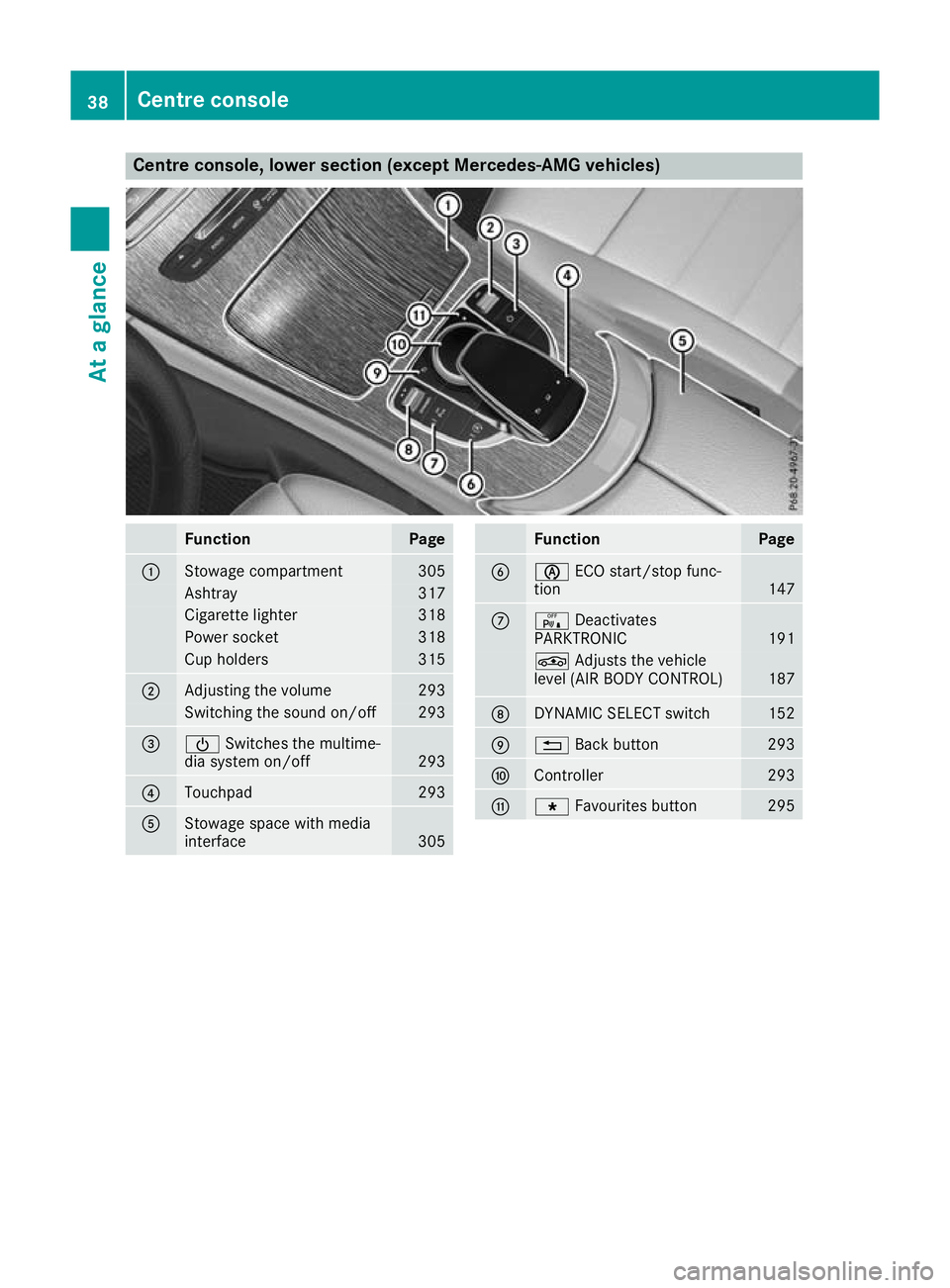
Centre console, lower section (except Mercedes-AMG vehicles)
Function Page
:
Stowage compartment 305
Ashtray 317
Cigarette lighter 318
Power socket 318
Cup holders 315
;
Adjusting the volume 293
Switching the sound on/off 293
=
Ü
Switches the multime-
dia system on/off 293
?
Touchpad 293
A
Stowage space with media
interface
305 Function Page
B
è
ECO start/stop func-
tion 147
C
c
Deactivates
PARKTRONIC 191
É
Adjusts the vehicle
level (AIR BODY CONTROL) 187
D
DYNAMIC SELECT switch 152
E
%
Back button 293
F
Controller 293
G
g
Favourites button 29538
Centre consoleAt a glance
Page 42 of 389
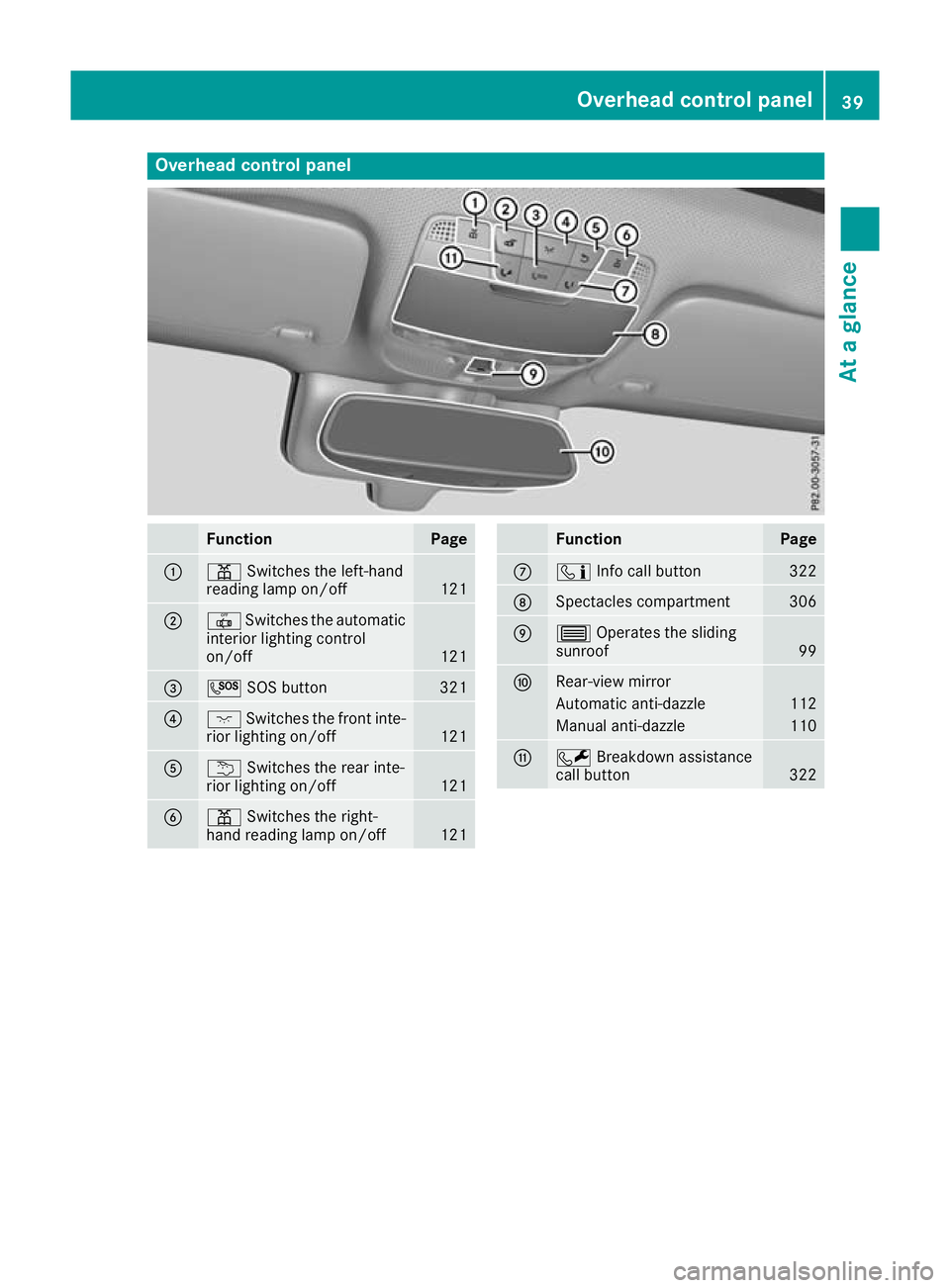
Overhead control panel
Function Page
:
p
Switches the left-hand
reading lamp on/off 121
;
|
Switches the automatic
interior lighting control
on/off 121
=
G
SOS button 321
?
c
Switches the front inte-
rior lighting on/off 121
A
u
Switches the rear inte-
rior lighting on/off 121
B
p
Switches the right-
hand reading lamp on/off 121 Function Page
C
ï
Info call button 322
D
Spectacles compartment 306
E
3
Operates the sliding
sunroof 99
F
Rear-view mirror
Automatic anti-dazzle 112
Manual anti-dazzle 110
G
F
Breakdown assistance
call button 322Overhead control panel
39At a glance
Page 45 of 389
Mercedes-Benz recommends that you use only
driving aids that have been approved specifi-
cally for your vehicle by Mercedes-Benz. Restraint system warning lamp
The functions of the restraint system are
checked after the ignition is switched on and at regular intervals while the engine is running.
Therefore, malfunctions can be detected in
good time.
The 6 restraint system warning lamp on the
instrument cluster lights up when the ignition is
switched on. It goes out no later than a few sec- onds after the vehicle is started. The compo-
nents of the restraint system are in operational
readiness.
A malfunction has occurred if the 6restraint
system warning lamp:
R does not light up after the ignition is switched
on
R does not go out after a few seconds with the
engine running
R lights up again while the engine is running G
WARNING
If the restraint system is malfunctioning,
restraint system components may be trig-
gered unintentionally or may not deploy as
intended during an accident. This may affect
the seat belt tensioner or airbag, for example. This poses an increased risk of injury or even
fatal injury.
Have the restraint system checked and
repaired immediately at a qualified specialist
workshop. PASSENGER AIR BAG indicator lamp
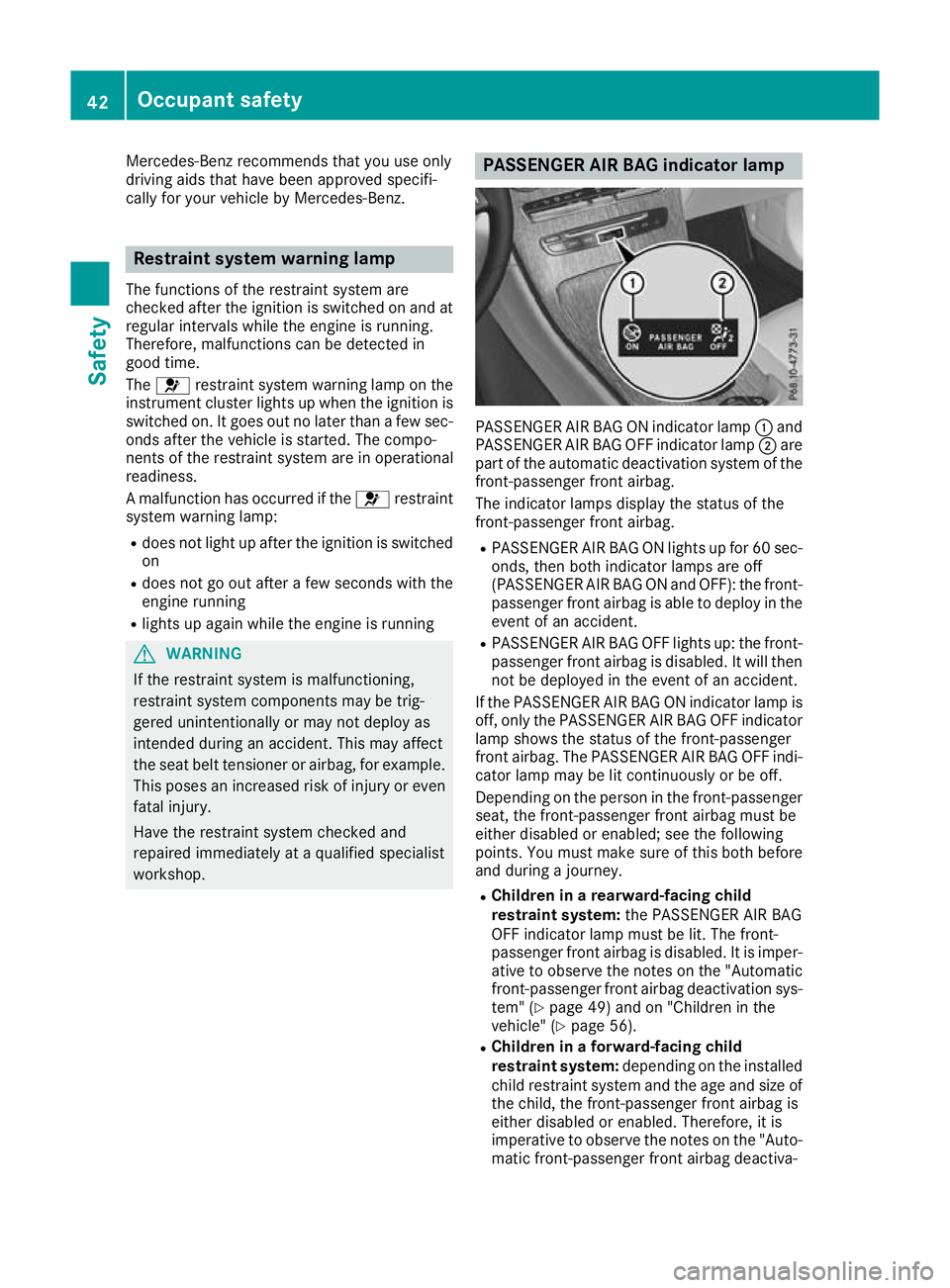
PASSENGER AIR BAG ON indicator lamp
:and
PASSENGER AIR BAG OFF indicator lamp ;are
part of the automatic deactivation system of the front-passenger front airbag.
The indicator lamps display the status of the
front-passenger front airbag.
R PASSENGER AIR BAG ON lights up for 60 sec-
onds, then both indicator lamps are off
(PASSENGER AIR BAG ON and OFF): the front-
passenger front airbag is able to deploy in the event of an accident.
R PASSENGER AIR BAG OFF lights up: the front-
passenger front airbag is disabled. It will then
not be deployed in the event of an accident.
If the PASSENGER AIR BAG ON indicator lamp is off, only the PASSENGER AIR BAG OFF indicator
lamp shows the status of the front-passenger
front airbag. The PASSENGER AIR BAG OFF indi-
cator lamp may be lit continuously or be off.
Depending on the person in the front-passenger seat, the front-passenger front airbag must be
either disabled or enabled; see the following
points. You must make sure of this both before
and during a journey.
R Children in a rearward-facing child
restraint system: the PASSENGER AIR BAG
OFF indicator lamp must be lit. The front-
passenger front airbag is disabled. It is imper-
ative to observe the notes on the "Automatic front-passenger front airbag deactivation sys-
tem" (Y page 49) and on "Children in the
vehicle" (Y page 56).
R Children in a forward-facing child
restraint system: depending on the installed
child restraint system and the age and size of the child, the front-passenger front airbag is
either disabled or enabled. Therefore, it is
imperative to observe the notes on the "Auto-
matic front-passenger front airbag deactiva- 42
Occupant safetySafety