audio MERCEDES-BENZ GLC COUPE 2016 Owners Manual
[x] Cancel search | Manufacturer: MERCEDES-BENZ, Model Year: 2016, Model line: GLC COUPE, Model: MERCEDES-BENZ GLC COUPE 2016Pages: 389, PDF Size: 7.34 MB
Page 18 of 389
Side lamps ..................................... 116
Turn signals ................................... 117
see Interior lighting
LIM indicator lamp
Cruise control ................................ 174
DISTRONIC PLUS ........................... 179
Variable SPEEDTRONIC ................. 176
Limiting the speed
see SPEEDTRONIC
Loading guidelines ............................ 305
Locking
see Central locking
Locking (doors)
Automatic ........................................ 89
Emergency locking ........................... 90
From inside (central locking but-
ton) .................................................. 89
Locking centrally
see Central locking
Luggage compartment
Opening/closing (from outside,
HANDS-FREE ACCESS) .................... 92
Luggage compartment cover
Important safety notes .................. 311
Notes/function .............................. 311
Luggage compartment enlarge-
ment ................................................... 308
Luggage compartment floor
Important safety notes .................. 314
opening/closing ............................ 314
stowage well, under ....................... 314
Luggage compartment plug-in
module (telescopic rod) .................... 313
Luggage net ....................................... 312
Lumbar support
Adjusting the 4-way lumbar sup-
port ................................................ 106 M
M+S tyres ........................................... 358
Main-beam headlamps
Adaptive Highbeam Assist ............. 119
Adaptive Highbeam Assist PLUS .... 119
Display message ............................ 261
Replacing bulb s............................. 122
Switching on/of f........................... 117
Matt finish (cleaning instructions) .. 333MB Contact
Breakdown assistance call but-
ton ................................................. 322
Display message ............................ 255
General notes ................................ 321
Info call button .............................. 322
Media Interface
see Digital Owner's Manual
Memory card (audio) ......................... 237
Memory function
Seats, steering wheel, exterior
mirrors ........................................... 113
Mercedes connect me
display message ............................ 255
Mercedes me connect
Breakdown assistance call but-
ton ................................................. 322
General notes ................................ 321
Info call button .............................. 322
Mercedes-Benz emergency call
system
Switch in the overhead control
panel .............................................. 321
Mercedes-Benz Intelligent Drive
360°camera .................................. 202
Active Blind Spot Assist ................. 213
Active Lane Keeping Assist ............ 216
Active Parking Assist ..................... 194
ATTENTION ASSIST ........................ 207
Blind Spot Assist ............................ 210
DISTRONIC PLUS ........................... 178
DISTRONIC PLUS with Steering
Assist and Stop&Go Pilot ............... 184
General notes ................................ 174
Lane Keeping Assist ...................... 211
PARKTRONIC ................................. 191
PRE-SAFE ®
(anticipatory occu-
pant protection) ............................... 55
PRE-SAFE ®
PLUS (anticipatory
occupant protection PLUS) .............. 55
Reversing camera .......................... 198
Traffic Sign Assist .......................... 208
Mercedes-Benz Service Centre
see Qualified specialist workshop
Message memory (on-board com-
puter) .................................................. 249 Index
15
Page 21 of 389
Tow-away protection ........................ 80
Protection of the environment
General notes ..................................26
Pulling away
Automatic transmission ................. 146
General notes ................................ 146
Hill start assist ...............................1 47
Trailer ............................................ 147 Q
QR code Mercedes-Benz Guide App ................. 1
Rescue card ..................................... 30
Qualified specialist workshop ........... 30
Quick access for audio and tele-
phone
Changing the station/music
track .............................................. 295 R
RACETIMER (on-board computer) .... 247
Radiator cover ................................... 326
Radio
Selecting a station ......................... 236
Radio mode
See also Digital Owner's Manual ... 292
Radio-based vehicle components
Declaration of conformity ................ 28
Rain closing feature
Sliding sunroof ................................. 99
Reading lamp ..................................... 121
Rear compartment
Setting the air vents ..................... .141
Setting the airflow ......................... 132
Setting the temperature ................ 131
Rear foglamp
Display message ............................ 261
Switching on/off ........................... 116
Rear seat
Display message ............................ 277
Rear window heating
Problem (fault) ............................... 133
Switching on/off ........................... 133
Rear-compartment seat belt sta-
tus indicator ........................................ 46 Rear-view mirror
Anti-dazzle mode (automatic) ....... .112
Dipping (manual) ........................... 110
Recuperation display ........................ 233
Reflective safety vest ....................... 338
Refuelling
AdBlue ®
......................................... 164
Fuel gauge ....................................... 34
Important safety notes .................. 161
Refuelling process ......................... 162
see Fuel
Remote control
Auxiliary heating/ventilation .......... 139
Changing the batteries (auxiliary
heating) ......................................... 140
Replacing bulbs
Dipped-beam headlamps .............. .122
Fitting/removing the cover (front
wheel arch) ................................... .123
Important safety notes .................. 121
Main-beam headlamps ................... 122
Overview of bulb types .................. 122
Turn signals (front) ......................... 123
Replacing the battery (auxiliary
heating remote control) .................... 140
Rescue card ......................................... 30
Reserve (fuel tank)
see Fuel
Reserve fuel
Display message ............................ 265
Warning lamp ................................. 286
Residual heat (climate control) ........135
Restraint system
Display message ............................ 257
Introduction ..................................... 41
Warning lamp ................................. 286
Warning lamp (function) ................... 42
Rev counter ........................................ 229
Reversing camera
"Reverse parking" function ............ 200
Cleaning instructions ..................... 335
Coupling up a trailer function ....... .201
Display in the multimedia system .. 199
General notes ................................ 198
Object detection (function/
notes) ............................................ 202
Switching on/off ........................... 198 18
Index
Page 25 of 389
Transmission oil (on-board com-
puter, Mercedes-AMG vehicles) ..... 245
TEMPOMAT
Function/notes ............................. 174
Text messages
Telephone module with Blue-
tooth ®
(SAP profile) ....................... 302
Timing (RACETIMER) .........................247
TIREFIT Kit
Declaration of conformity ................ 29
Important safety notes .................. 342
Storage location ............................ 340
Tyre pressure not reached ............. 344
Tyre pressure reached ................... 344
Using ............................................. 343
Top Tether ............................................ 59
Total distance recorder .................... 232
Touchpad
Changing the station/music
track .............................................. 295
Character suggestions ................... 294
Deleting characters ....................... 294
Entering a space ............................ 294
Entering characters ....................... 294
Gesture control .............................. 294
Handwriting recognition ................ 294
Operating the touchpad ................. 294
Overview ........................................ 293
Quick access for audio .................. 295
Switching ....................................... 293
Switching input line ....................... 294
Tow-away protection
Deactivating ..................................... 80
Function .......................................... .80
Priming/deactivating ....................... 80
Tow-starting
Emergency engine starting ............ 353
Important safety notes .................. 350
Towing
Important safety notes .................. 350
Notes for 4MATIC vehicles ............ 353
Transporting the vehicle ................3 53
Towing a trailer
Active Blind Spot Assist ................. 215
Active Lane Keeping Assist ............ 218
Active Parking Assist ..................... 194
Axle load, permissible .................... 381 ESP
®
(Electronic Stability Pro-
gram) ............................................... 76
Failure check for LEDs ................... 223
Pulling away with a trailer .............. 147
Swinging out the ball coupling ....... 220
Trailer tow hitch display message .. 277
Towing away
Fitting the towing eye .................... 352
Removing the towing eye ............... 352
With both axles on the ground ....... 353
Towing eye ......................................... 340
Traffic Sign Assist
Activating/deactivating the warn-ing function .................................... 241
Display message ............................ 269
Function/note s............................. 208
Important safety notes .................. 209
Instrument cluster display ............. 209
Trailer coupling
see Towing a trailer
Trailer towing
7-pin connecto r............................. 223
Blind Spot Assist ............................ 211
Cleaning the trailer tow hitch ......... 336
Coupling up a traile r...................... 222
Decoupling a trailer ....................... 222
Driving tip s.................................... 219
Important safety notes .................. 218
Lights display message .................. 261
Parktronic ...................................... 191
Power supply ................................. 222
Problem (fault) ............................... 224
Trailer load s................................... 380
Transfer case ..................................... 161
Transmission
see Automatic transmission
Transmission position display ......... 155
Transporting the vehicle .................. 353
Trim pieces (cleaning instruc-
tions) .................................................. 336
Trip computer (on-board com-
puter) .................................................. 233
Trip meter
Calling up ....................................... 232
Resetting (on-board computer) ...... 234
Turn signals
Replacing bulbs (front) ................... 123 22
Index
Page 29 of 389
Environmental protection
General notes
H
Environmental note
Daimler's declared policy is one of compre-
hensive environmental protection.
Our objectives are to use the natural resour-
ces which form the basis of our existence on
this planet sparingly and in a manner which
takes the requirements of both nature and
humanity into consideration.
You too can help to protect the environment
by operating your vehicle in an environmen-
tally-responsible manner.
Fuel consumption and the rate of engine,
transmission, brake and tyre wear depend on
the following factors:
R operating conditions of your vehicle
R your personal driving style
You can influence both factors. Therefore,
please bear the following in mind:
Operating conditions:
R avoid short trips, as these increase fuel
consumption.
R observe the correct tyre pressure.
R do not carry any unnecessary weight in the
vehicle.
R remove the roof rack once you no longer
need it.
R a regularly serviced vehicle will contribute
to environmental protection. You should
therefore adhere to the service intervals.
R all maintenance work should be carried out
at a qualified specialist workshop.
Personal driving style:
R do not depress the accelerator pedal when
starting the engine.
R do not warm up the engine when the vehicle
is stationary.
R drive carefully and maintain a safe distance
from the vehicle in front.
R avoid frequent, sudden acceleration and
braking. R
change gear in good time and use each gear
only up to Ôof its maximum engine speed.
R switch off the engine in stationary traffic.
R monitor the vehicle's fuel consumption. Returning an end-of-life vehicle
EU countries only:
Mercedes-Benz will take back your end-of-life
vehicle for environmentally-friendly disposal in
accordance with the European Union (EU) End-
Of-Life Vehicles Directive.
A network of vehicle take-back points and dis-
mantlers has been established for you to return
your vehicle. You can leave it at any of these
points free of charge. This makes an important
contribution to closing the recycling circle and
conserving resources.
For further information about the recycling and
disposal of end-of-life, and the take-back con-
ditions, please visit the national Mercedes-Benz
website for your country. Genuine Mercedes-Benz parts
H
Environmental note
Daimler AG also supplies reconditioned
assemblies and parts which are of the same
quality as new parts. For these, the same war- ranty applies as for new parts.
! Airbags and seat belt tensioners, as well as
control units and sensors for these restraint
systems, may be installed in the following
areas of your vehicle:
R doors
R door pillars
R door sills
R seats
R dashboard
R instrument cluster
R centre console
Do not install accessories such as audio sys-
tems in these areas. Do not carry out repairs
or welding. You could impair the operating
efficiency of the restraint systems. 26
Genuine Mercedes-Benz partsIntroduction
Page 38 of 389
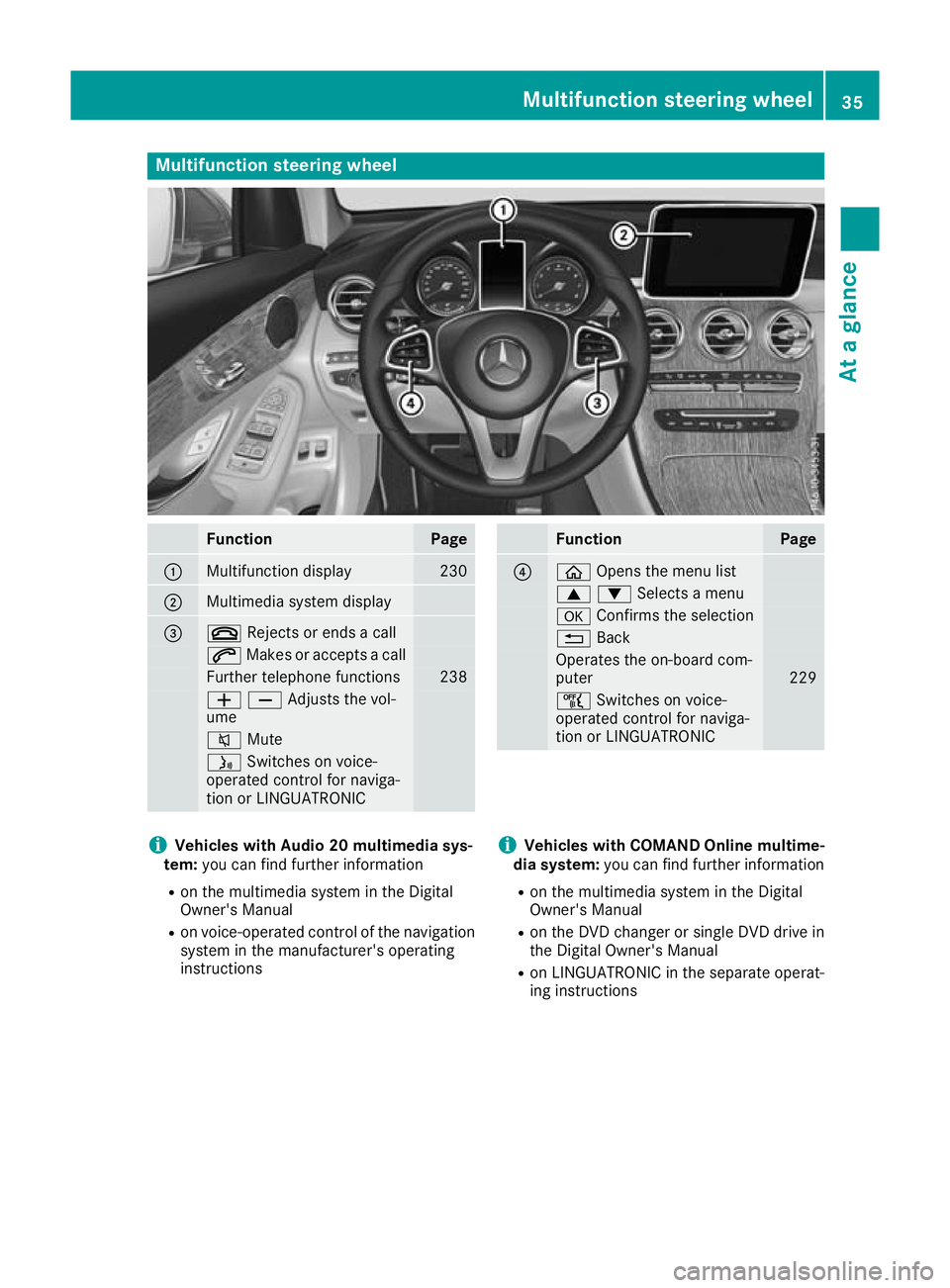
Multifunction steering wheel
Function Page
:
Multifunction display 230
;
Multimedia system display
=
~
Rejects or ends a call 6
Makes or accepts a call Further telephone functions 238
WXAdjusts the vol-
ume 8
Mute ó
Switches on voice-
operated control for naviga-
tion or LINGUATRONIC Function Page
?
ò
Opens the menu list 9:Selects a menu
a
Confirms the selection %
Back Operates the on-board com-
puter
229
ñ
Switches on voice-
operated control for naviga-
tion or LINGUATRONIC i
Vehicles with Audio 20 multimedia sys-
tem: you can find further information
R on the multimedia system in the Digital
Owner's Manual
R on voice-operated control of the navigation
system in the manufacturer's operating
instructions i
Vehicles with COMAND Online multime-
dia system: you can find further information
R on the multimedia system in the Digital
Owner's Manual
R on the DVD changer or single DVD drive in
the Digital Owner's Manual
R on LINGUATRONIC in the separate operat-
ing instructions Multifunction steering wheel
35At a glance
Page 184 of 389
Vehicles with COMAND Online multimedia
system: when you change lanes, DISTRONIC
PLUS monitors the right lane in the case of left-
side traffic or the left lane in the case of right-
side traffic.
Vehicles with Audio 20 multimedia system:
when you change lanes, DISTRONIC PLUS mon- itors the left lane on left-hand-drive vehicles or
the right lane on right-hand-drive vehicles.
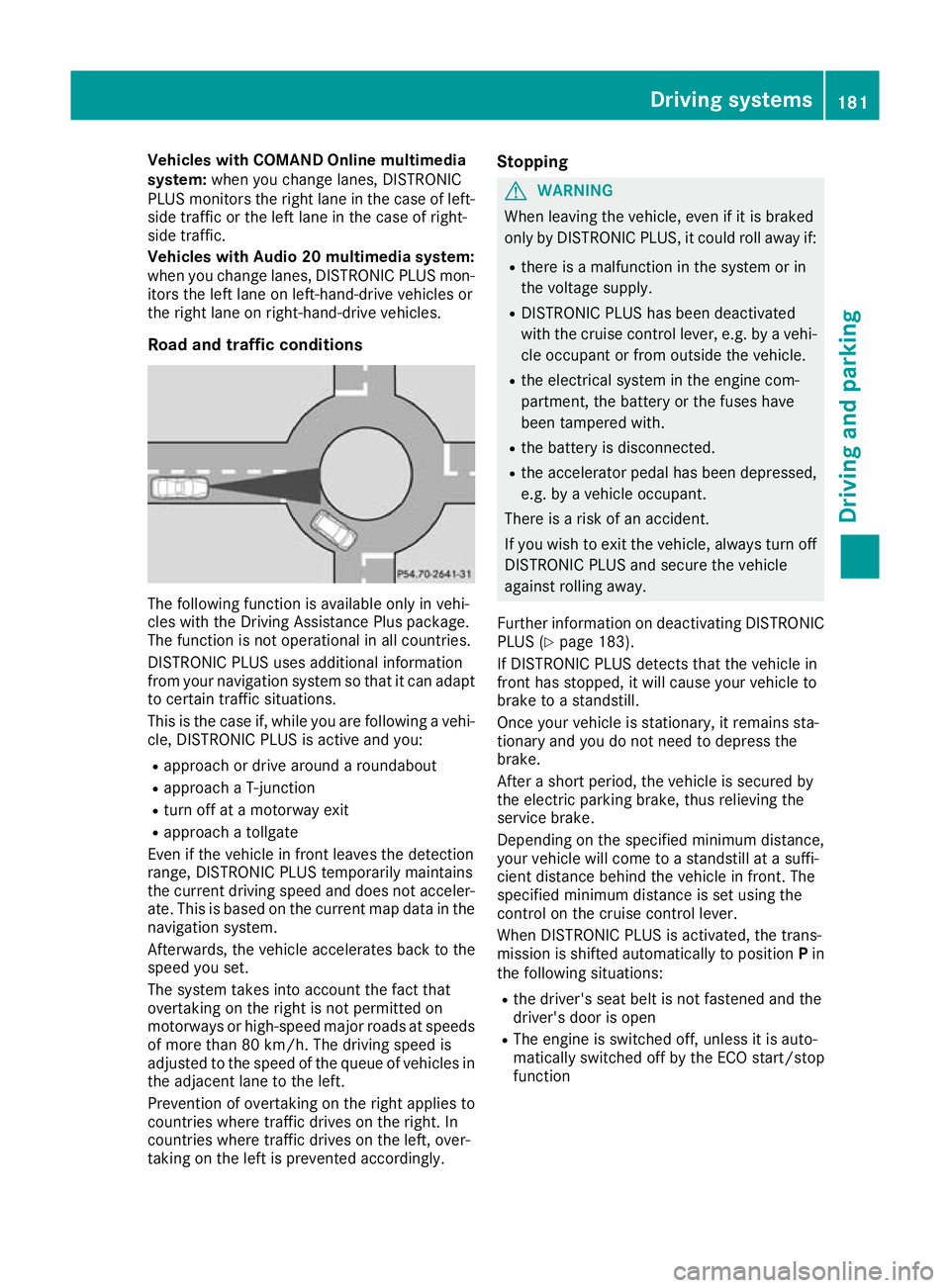
Road and traffic conditions The following function is available only in vehi-
cles with the Driving Assistance Plus package.
The function is not operational in all countries.
DISTRONIC PLUS uses additional information
from your navigation system so that it can adapt to certain traffic situations.
This is the case if, while you are following a vehi-
cle, DISTRONIC PLUS is active and you:
R approach or drive around a roundabout
R approach a T-junction
R turn off at a motorway exit
R approach a tollgate
Even if the vehicle in front leaves the detection
range, DISTRONIC PLUS temporarily maintains
the current driving speed and does not acceler-
ate. This is based on the current map data in the navigation system.
Afterwards, the vehicle accelerates back to the
speed you set.
The system takes into account the fact that
overtaking on the right is not permitted on
motorways or high-speed major roads at speeds
of more than 80 km/h. The driving speed is
adjusted to the speed of the queue of vehicles in
the adjacent lane to the left.
Prevention of overtaking on the right applies to
countries where traffic drives on the right. In
countries where traffic drives on the left, over-
taking on the left is prevented accordingly. Stopping G
WARNING
When leaving the vehicle, even if it is braked
only by DISTRONIC PLUS, it could roll away if:
R there is a malfunction in the system or in
the voltage supply.
R DISTRONIC PLUS has been deactivated
with the cruise control lever, e.g. by a vehi-
cle occupant or from outside the vehicle.
R the electrical system in the engine com-
partment, the battery or the fuses have
been tampered with.
R the battery is disconnected.
R the accelerator pedal has been depressed,
e.g. by a vehicle occupant.
There is a risk of an accident.
If you wish to exit the vehicle, always turn off
DISTRONIC PLUS and secure the vehicle
against rolling away.
Further information on deactivating DISTRONIC PLUS (Y page 183).
If DISTRONIC PLUS detects that the vehicle in
front has stopped, it will cause your vehicle to
brake to a standstill.
Once your vehicle is stationary, it remains sta-
tionary and you do not need to depress the
brake.
After a short period, the vehicle is secured by
the electric parking brake, thus relieving the
service brake.
Depending on the specified minimum distance,
your vehicle will come to a standstill at a suffi-
cient distance behind the vehicle in front. The
specified minimum distance is set using the
control on the cruise control lever.
When DISTRONIC PLUS is activated, the trans-
mission is shifted automatically to position Pin
the following situations:
R the driver's seat belt is not fastened and the
driver's door is open
R The engine is switched off, unless it is auto-
matically switched off by the ECO start/stop
function Driving systems
181Driving and parking Z
Page 232 of 389
The segments between the speed of the vehi-
cle in front and the stored speed light up. Rev counter
! Do not drive in the overrevving range. Doing
so will damage the engine.
The red band in the rev counter indicates the
engine's overrevving range.
The fuel supply is interrupted to protect the
engine when the red band is reached. Outside temperature display
You should pay special attention to road condi-
tions when temperatures are around freezing
point.
Bear in mind that the outside temperature dis-
play indicates the measured air temperature
and not the road surface temperature.
The outside temperature display is in the multi-
function display (Y page 230).
Changes in the outside temperature are dis-
played after a short delay. Coolant temperature gauge
G
WARNING
If you open the bonnet while the engine is
overheating or while there is a fire in the
engine compartment, you could come into
contact with hot gases or other leaking ser-
vice products. There is a danger of injury.
Allow an overheating engine to cool down
before opening the bonnet. If there is a fire in the engine compartment, leave the bonnet
closed and notify the fire brigade.
The coolant temperature gauge is in the lower
section of the rev counter (Y page 34).
At high outside temperatures and when driving
in mountainous terrain, the coolant temperature
may rise to the end of the scale.
Under normal operating conditions and with the correct coolant level, the coolant temperature
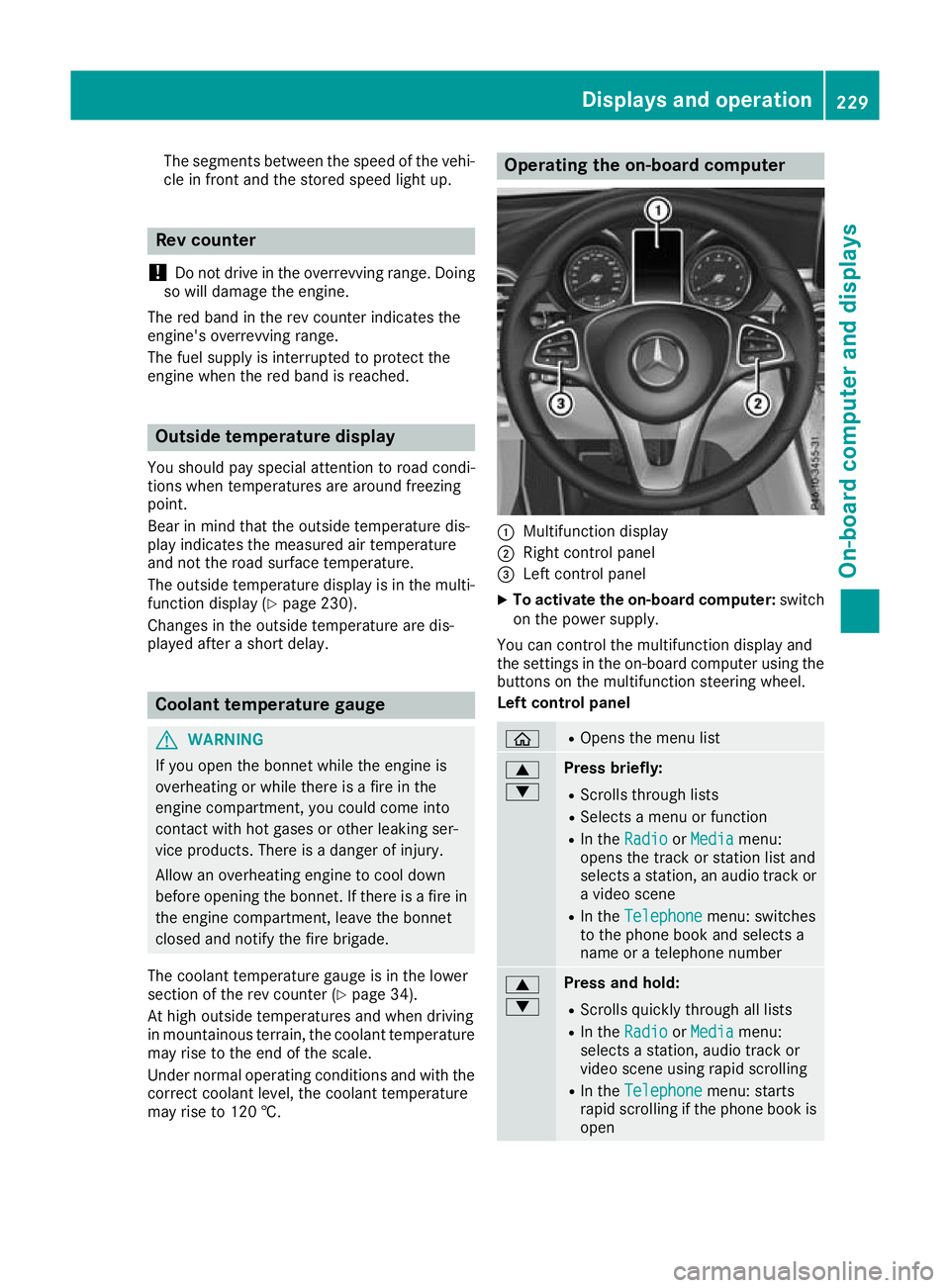
may rise to 120 †. Operating the on-board computer
:
Multifunction display
; Right control panel
= Left control panel
X To activate the on-board computer: switch
on the power supply.
You can control the multifunction display and
the settings in the on-board computer using the buttons on the multifunction steering wheel.
Left control panel ò R
Opens the menu list 9
: Press briefly:
R Scrolls through lists
R Selects a menu or function
R In the Radio Radio orMedia
Media menu:
opens the track or station list and
selects a station, an audio track or a video scene
R In the Telephone Telephone menu: switches
to the phone book and selects a
name or a telephone number 9
: Press and hold:
R
Scrolls quickly through all lists
R In the Radio Radio orMedia
Media menu:
selects a station, audio track or
video scene using rapid scrolling
R In the Telephone Telephone menu: starts
rapid scrolling if the phone book is open Displays and operation
229On-board computer and displays Z
Page 233 of 389
a R
In all menus: confirms the selected
entry in the list
R In the Radio
Radio orMedia
Media menu:
opens the list of available radio
sources or media
R In the Telephone Telephone menu: switches
to the phone book and starts dial-
ling the selected number ñ R
Vehicles with multimedia system
Audio 20:
Switches off voice-operated con-
trol for navigation (see manufac-
turer's operating instructions)
R Vehicles with multimedia system
COMAND Online:
Switches off LINGUATRONIC (see
the separate operating instruc-
tions) % Press briefly:
R Back
R In the Radio Radio orMedia
Media menu: dese-
lects the track or station list or list
of available radio sources or media
R Hides display messages
R Exits the telephone book/redial
memory % Press and hold:
R
Calls up the standard display in the
Trip Trip menu Right control panel
~ R
Rejects or ends a call
R Exits the telephone book/redial
memory 6 R
Makes or accepts a call
R Switches to the redial memory W
X R
Adjusts the volume 8 R
Mute ó R
Vehicles with multimedia system
Audio 20:
Switches on voice-operated con-
trol for navigation (see manufac-
turer's operating instructions)
R Vehicles with multimedia system
COMAND Online:
Switches on LINGUATRONIC (see
the separate operating instruc-
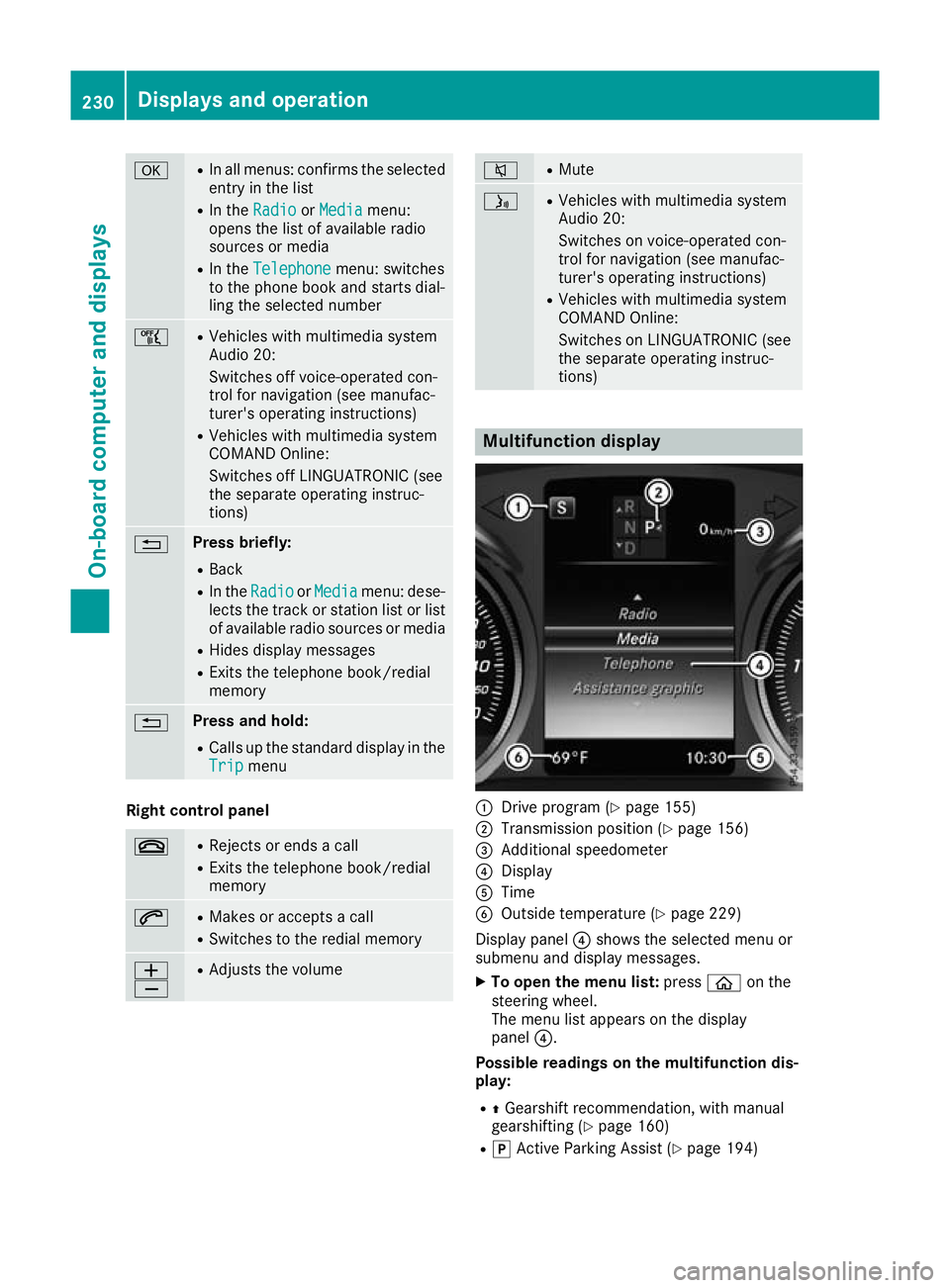
tions) Multifunction display
:
Drive program (Y page 155)
; Transmission position (Y page 156)
= Additional speedometer
? Display
A Time
B Outside temperature (Y page 229)
Display panel ?shows the selected menu or
submenu and display messages.
X To open the menu list: pressòon the
steering wheel.
The menu list appears on the display
panel ?.
Possible readings on the multifunction dis-
play:
R ZGearshift recommendation, with manual
gearshifting (Y page 160)
R j Active Parking Assist (Y page 194)230
Displays and operationOn-board computer and displays
Page 239 of 389
Other status indicators of the naviga-
tion system :
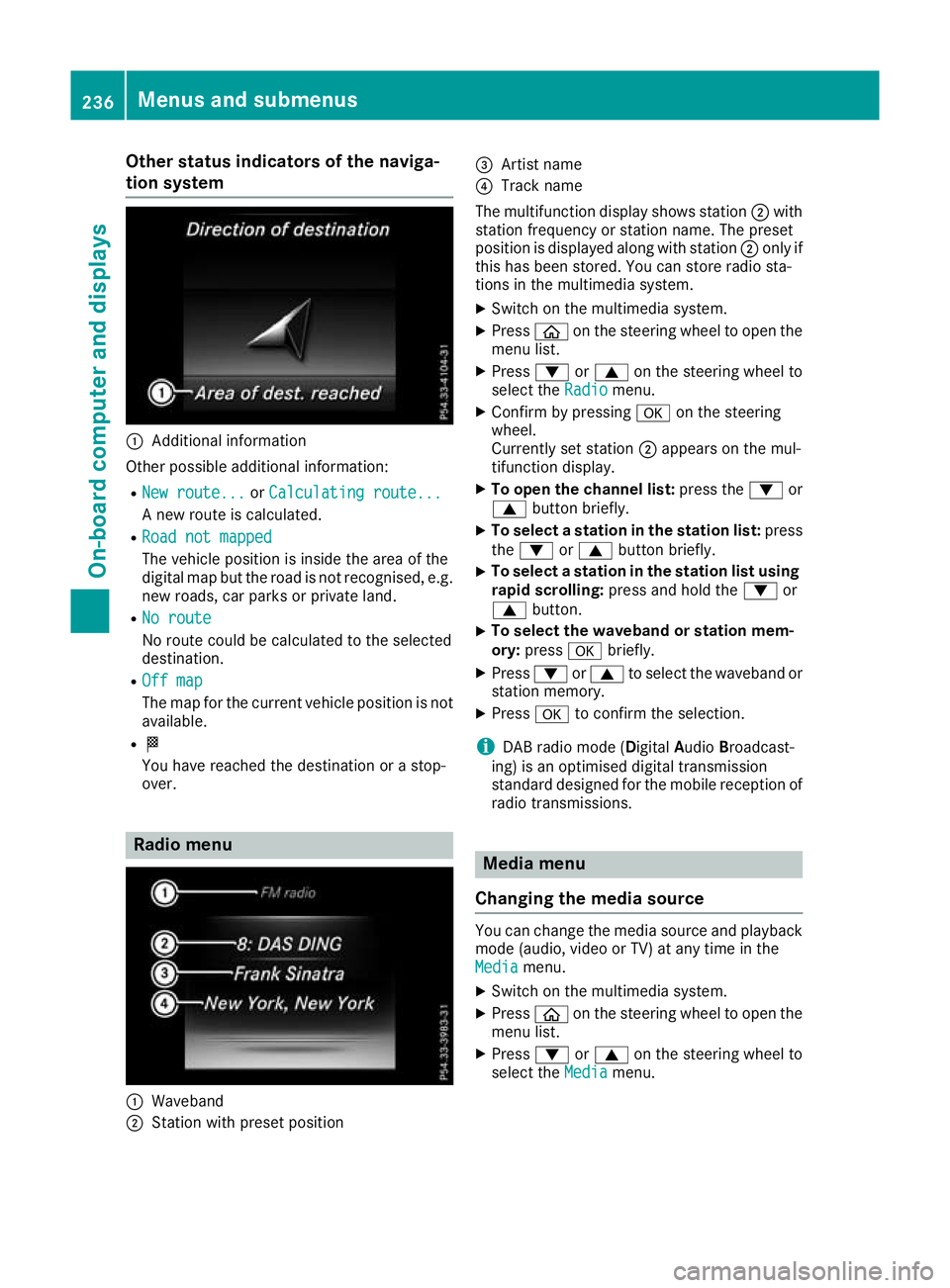
Additional information
Other possible additional information: R New route...
New route... orCalculating route...
Calculating route...
A new route is calculated.
R Road not mapped
Road not mapped
The vehicle position is inside the area of the
digital map but the road is not recognised, e.g. new roads, car parks or private land.
R No route
No route
No route could be calculated to the selected
destination.
R Off map Off map
The map for the current vehicle position is not
available.
R O
You have reached the destination or a stop-
over. Radio menu
:
Waveband
; Station with preset position =
Artist name
? Track name
The multifunction display shows station ;with
station frequency or station name. The preset
position is displayed along with station ;only if
this has been stored. You can store radio sta-
tions in the multimedia system.
X Switch on the multimedia system.
X Press òon the steering wheel to open the
menu list.
X Press :or9 on the steering wheel to
select the Radio Radiomenu.
X Confirm by pressing aon the steering
wheel.
Currently set station ;appears on the mul-
tifunction display.
X To open the channel list: press the:or
9 button briefly.
X To select a station in the station list: press
the : or9 button briefly.
X To select a station in the station list using
rapid scrolling: press and hold the :or
9 button.
X To select the waveband or station mem-
ory:
press abriefly.
X Press :or9 to select the waveband or
station memory.
X Press ato confirm the selection.
i DAB radio mode (Digital
AudioBroadcast-
ing) is an optimised digital transmission
standard designed for the mobile reception of
radio transmissions. Media menu
Changing the media source You can change the media source and playback
mode (audio, video or TV) at any time in the
Media Media menu.
X Switch on the multimedia system.
X Press òon the steering wheel to open the
menu list.
X Press :or9 on the steering wheel to
select the Media
Mediamenu. 236
Menus and submenusOn-board computer and displays
Page 240 of 389
X
Confirm by pressing aon the steering
wheel.
X To open the media sources list: pressa
briefly.
The list shows the following media sources,
for example:
R CD or DVD (DVD only in the COMAND
Online multimedia system)
R SD card
R Media Register (only in the COMAND
Online multimedia system)
R USB storage device
R Bluetooth ®
-capable audio device
Please observe further information on media
support and media operation in the multimedia
system (see Digital Owner's Manual).
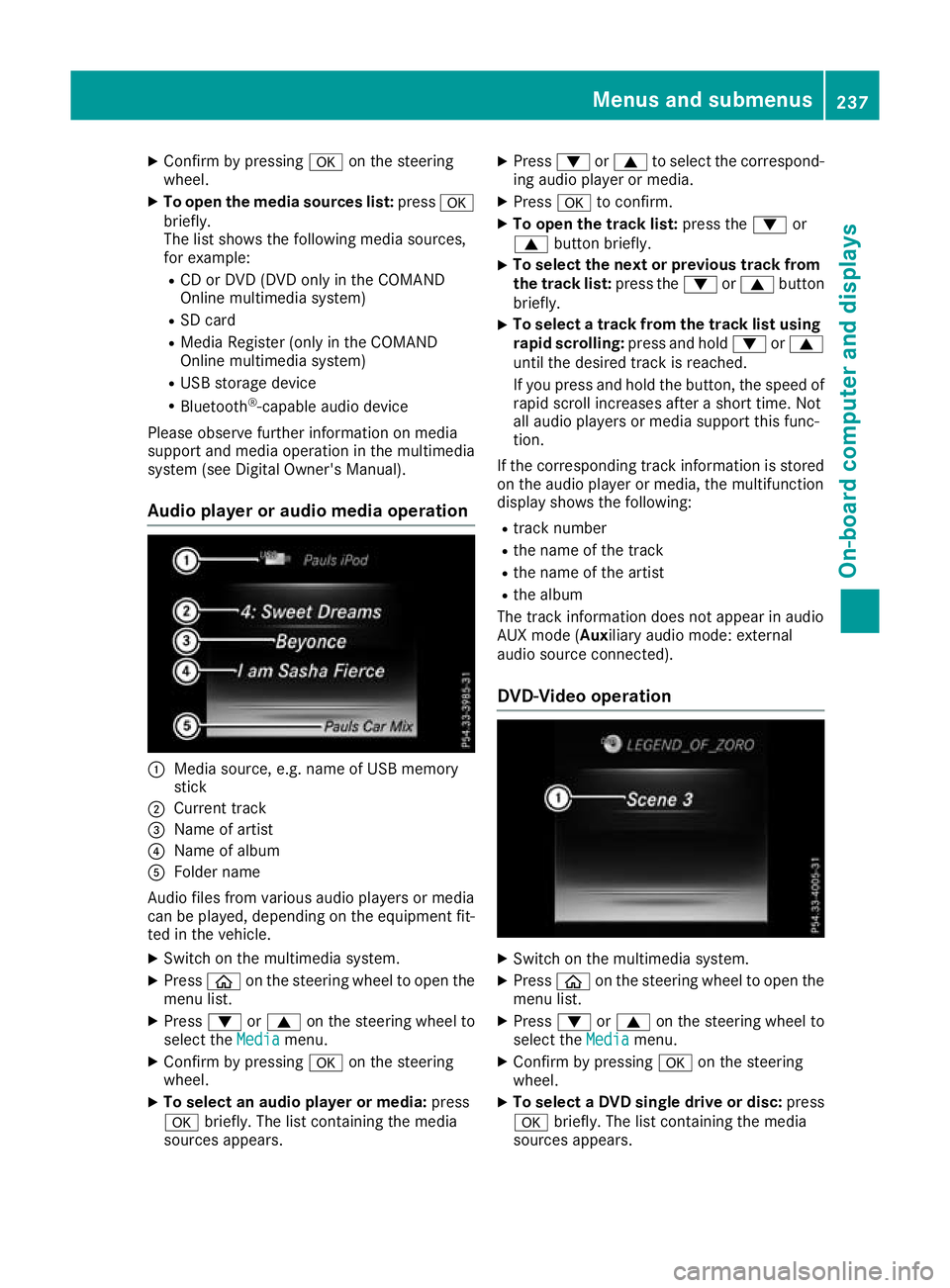
Audio player or audio media operation :
Media source, e.g. name of USB memory
stick
; Current track
= Name of artist
? Name of album
A Folder name
Audio files from various audio players or media
can be played, depending on the equipment fit- ted in the vehicle.
X Switch on the multimedia system.
X Press òon the steering wheel to open the
menu list.
X Press :or9 on the steering wheel to
select the Media
Media menu.
X Confirm by pressing aon the steering
wheel.
X To select an audio player or media: press
a briefly. The list containing the media
sources appears. X
Press :or9 to select the correspond-
ing audio player or media.
X Press ato confirm.
X To open the track list: press the:or
9 button briefly.
X To select the next or previous track from
the track list: press the:or9 button
briefly.
X To select a track from the track list using
rapid scrolling: press and hold:or9
until the desired track is reached.
If you press and hold the button, the speed of rapid scroll increases after a short time. Not
all audio players or media support this func-
tion.
If the corresponding track information is stored on the audio player or media, the multifunction
display shows the following:
R track number
R the name of the track
R the name of the artist
R the album
The track information does not appear in audio
AUX mode (Aux iliary audio mode: external
audio source connected).
DVD-Video operation X
Switch on the multimedia system.
X Press òon the steering wheel to open the
menu list.
X Press :or9 on the steering wheel to
select the Media Mediamenu.
X Confirm by pressing aon the steering
wheel.
X To select a DVD single drive or disc: press
a briefly. The list containing the media
sources appears. Menus and submenus
237On-board computer and displays Z