ignition MERCEDES-BENZ GLC COUPE 2016 Repair Manual
[x] Cancel search | Manufacturer: MERCEDES-BENZ, Model Year: 2016, Model line: GLC COUPE, Model: MERCEDES-BENZ GLC COUPE 2016Pages: 389, PDF Size: 7.34 MB
Page 173 of 389
Emergency braking
The vehicle can also be braked during an emer-
gency by using the electric parking brake.
X While driving, press handle :of the electric
parking brake (Y page 169).
The vehicle is braked as long as you keep
handle :of the electric parking brake
depressed. The longer electric parking brake
handle :is depressed, the greater the brak-
ing force.
During braking:
R a warning tone sounds
R the Release parking brake
Release parking brake display mes-
sage appears
R red indicator lamp !on the instrument
cluster flashes
When the vehicle has been braked to a stand-
still, the electric parking brake is applied. Parking up the vehicle
If you leave the vehicle parked up for longer than
four weeks, the battery may be damaged by
exhaustive discharging.
If you leave the vehicle parked up for longer than
six weeks, it may suffer from lack of use.
X Contact a qualified specialist workshop and
seek advice.
i You can obtain information on trickle charg-
ers from a qualified specialist workshop.
Hybrid vehicles: observe the notes on the high-
voltage battery in the separate Owner's Manual. Driving tips
General driving tips
Important safety notes G
WARNING
If you switch off the ignition while driving,
safety-relevant functions are only available
with limitations, or not at all. This could affect, for example, the power steering and the brake
boosting effect. You will require considerably
more effort to steer and brake. There is a risk of an accident. Do not switch off the ignition while driving.
Drive sensibly – save fuel Observe the following tips to save fuel:
X The tyres should always be inflated to the rec-
ommended tyre pressure.
X Remove unnecessary loads.
X Remove roof racks when they are not needed.
X Warm up the engine at low engine speeds.
X Avoid frequent acceleration or braking.
X Have all maintenance work carried out as
indicated by the service intervals in the Ser-
vice Booklet or by the service interval display.
Fuel consumption also increases when driving in
cold weather, in stop-start traffic, on short jour- neys and in hilly terrain. ECO display
The ECO display shows you how economical
your driving style is. The ECO display assists you in achieving the most economical driving style
for the selected settings and prevailing condi-
tions. Consumption can be significantly influ-
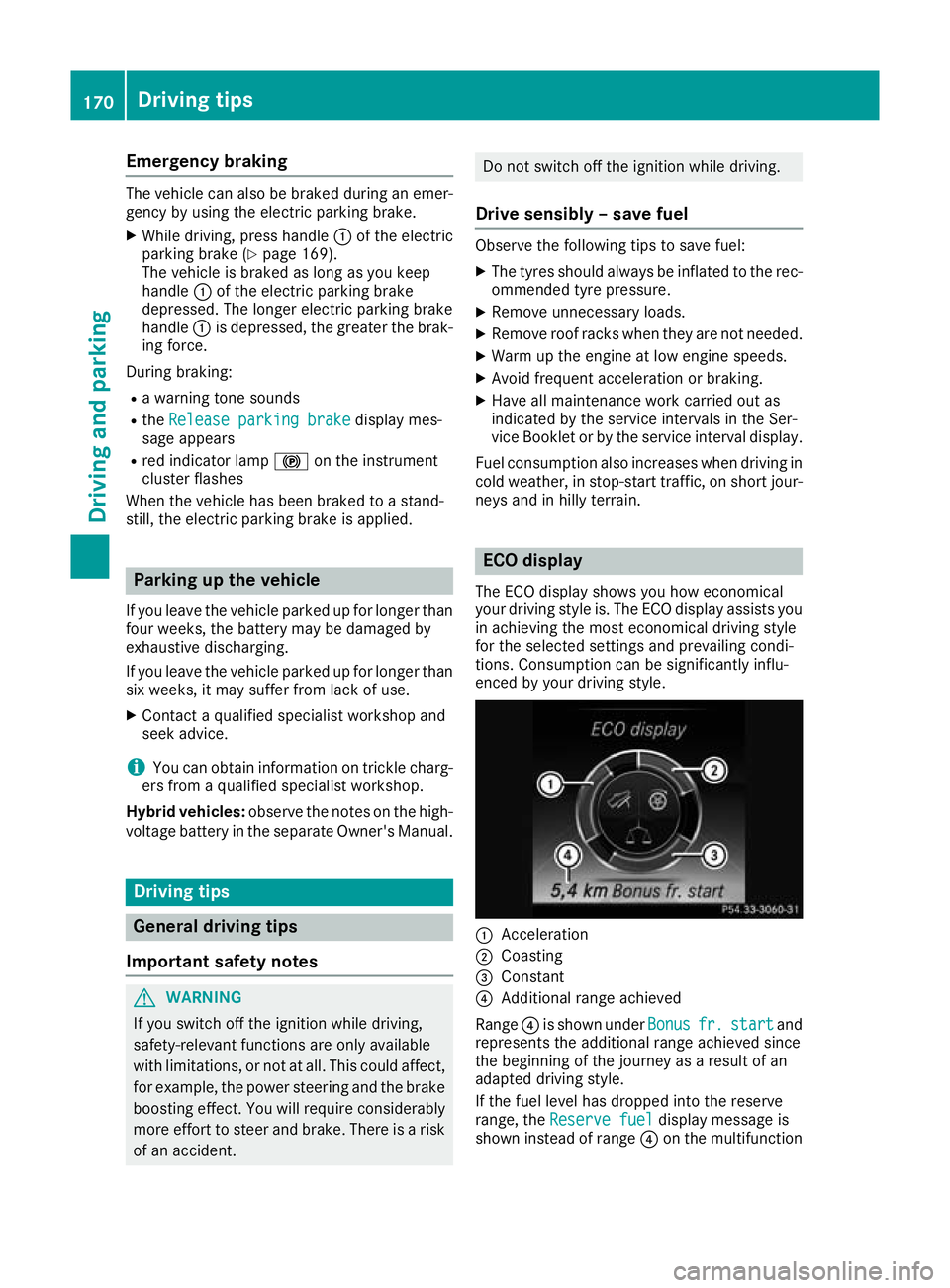
enced by your driving style. :
Acceleration
; Coasting
= Constant
? Additional range achieved
Range ?is shown under Bonus Bonusfr. fr.start
start and
represents the additional range achieved since
the beginning of the journey as a result of an
adapted driving style.
If the fuel level has dropped into the reserve
range, the Reserve fuel Reserve fuel display message is
shown instead of range ?on the multifunction 170
Driving tipsDriving and parking
Page 191 of 389
Vehicle level
Setting the raised vehicle level
It is possible to choose between the "Normal"
and "Raised" vehicle levels below a speed of
80 km/h. Select the "Normal" setting for normal
road surfaces and "Raised" for driving with snow chains or on particularly poor road surfaces.
Your selection remains stored even if you
remove the key from the ignition lock.
X Start the engine.
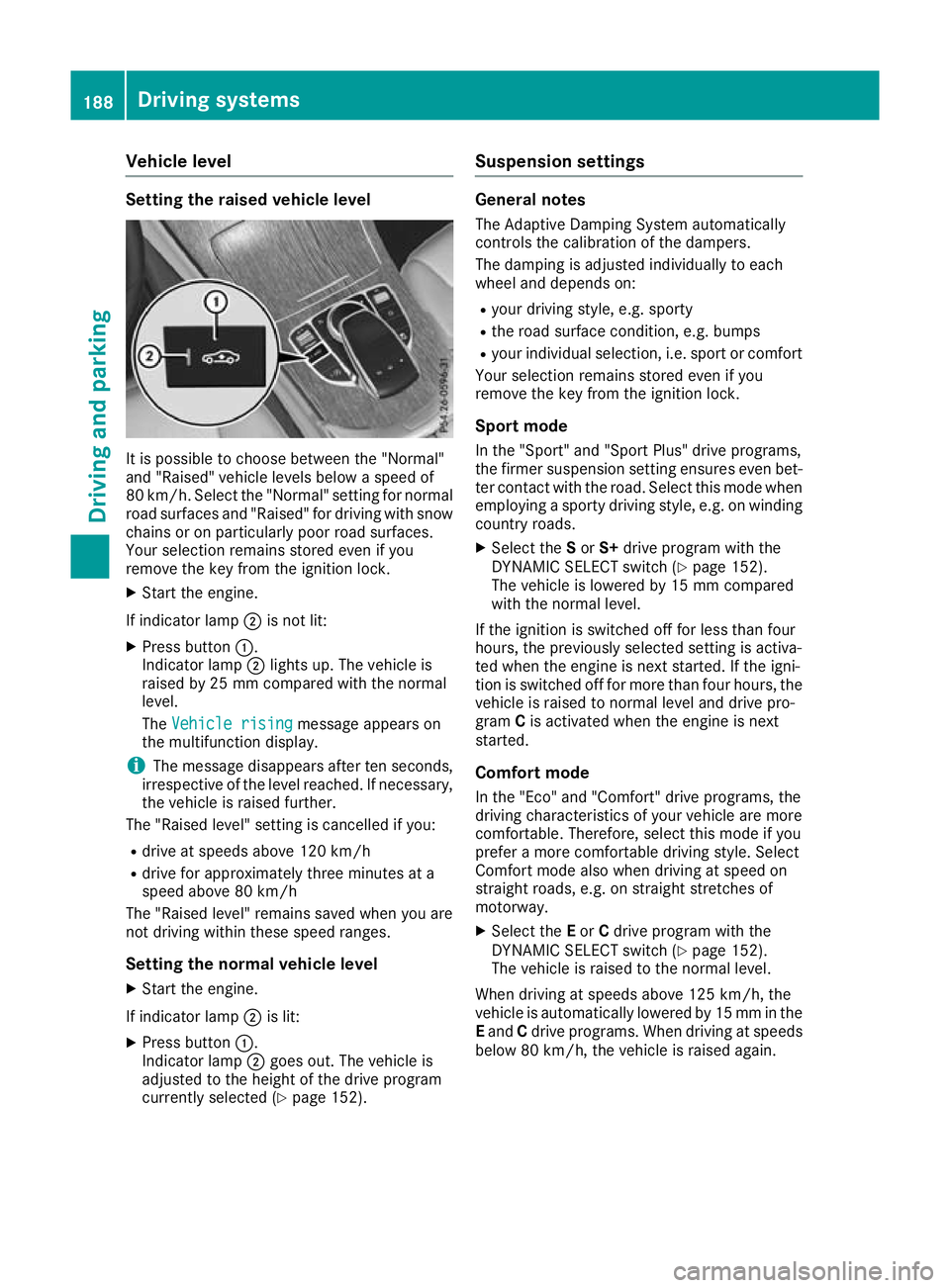
If indicator lamp ;is not lit:
X Press button :.
Indicator lamp ;lights up. The vehicle is
raised by 25 mm compared with the normal
level.
The Vehicle rising
Vehicle rising message appears on
the multifunction display.
i The message disappears after ten seconds,
irrespective of the level reached. If necessary,
the vehicle is raised further.
The "Raised level" setting is cancelled if you:
R drive at speeds above 120 km/h
R drive for approximately three minutes at a
speed above 80 km/h
The "Raised level" remains saved when you are
not driving within these speed ranges.
Setting the normal vehicle levelX Start the engine.
If indicator lamp ;is lit:
X Press button :.
Indicator lamp ;goes out. The vehicle is
adjusted to the height of the drive program
currently selected (Y page 152). Suspension settings General notes
The Adaptive Damping System automatically
controls the calibration of the dampers.
The damping is adjusted individually to each
wheel and depends on:
R your driving style, e.g. sporty
R the road surface condition, e.g. bumps
R your individual selection, i.e. sport or comfort
Your selection remains stored even if you
remove the key from the ignition lock.
Sport mode In the "Sport" and "Sport Plus" drive programs,
the firmer suspension setting ensures even bet- ter contact with the road. Select this mode when
employing a sporty driving style, e.g. on winding
country roads.
X Select the Sor S+ drive program with the
DYNAMIC SELECT switch (Y page 152).
The vehicle is lowered by 15 mm compared
with the normal level.
If the ignition is switched off for less than four
hours, the previously selected setting is activa-
ted when the engine is next started. If the igni-
tion is switched off for more than four hours, the vehicle is raised to normal level and drive pro-
gram Cis activated when the engine is next
started.
Comfort mode
In the "Eco" and "Comfort" drive programs, the
driving characteristics of your vehicle are more
comfortable. Therefore, select this mode if you
prefer a more comfortable driving style. Select
Comfort mode also when driving at speed on
straight roads, e.g. on straight stretches of
motorway. X Select the Eor Cdrive program with the
DYNAMIC SELECT switch (Y page 152).
The vehicle is raised to the normal level.
When driving at speeds above 125 km/h, the
vehicle is automatically lowered by 15 mm in the
E and Cdrive programs. When driving at speeds
below 80 km/h, the vehicle is raised again. 188
Driving systemsDriving an
d parking
Page 192 of 389
Lowering the rear of the vehicle
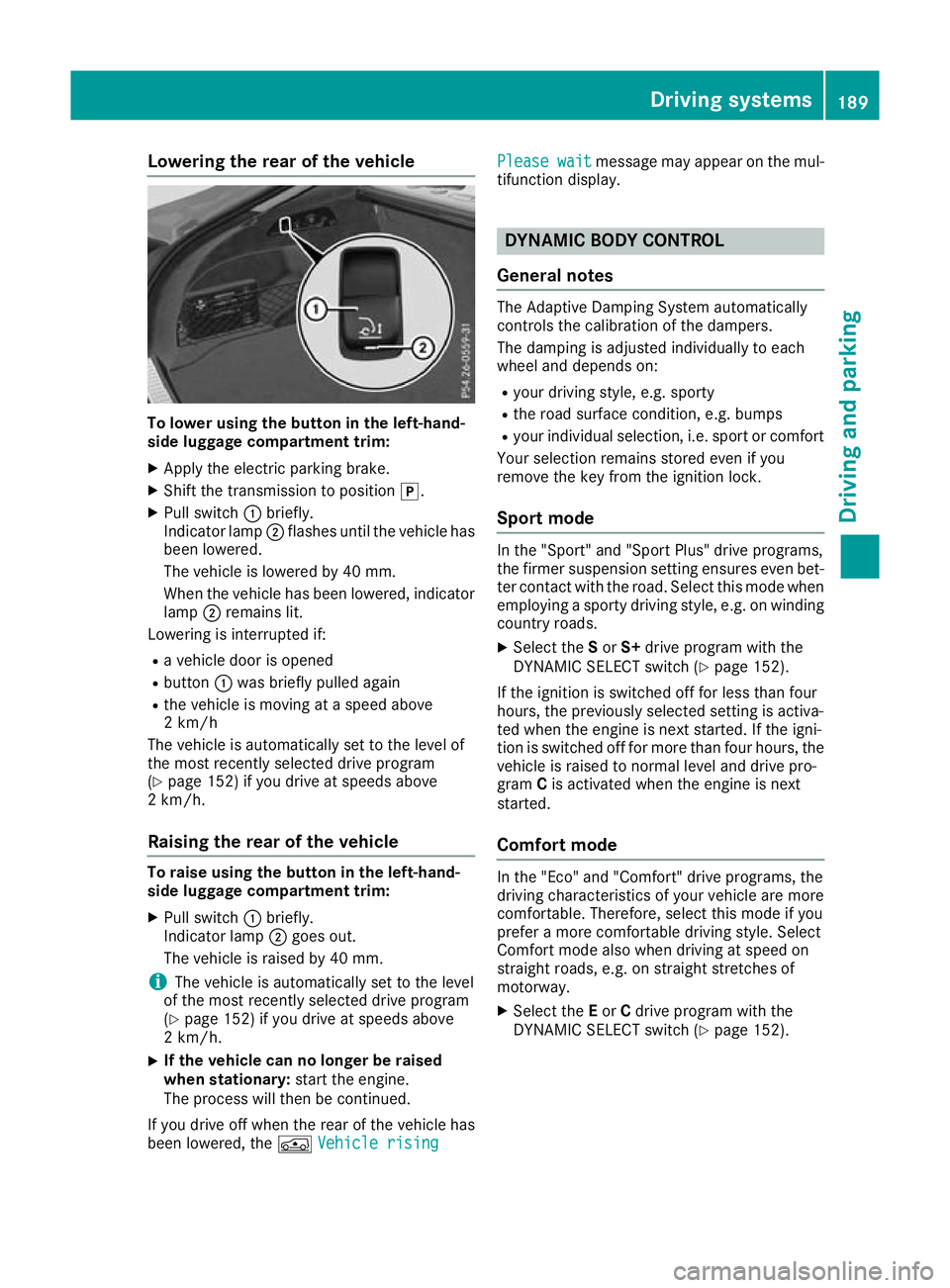
To lower using the button in the left-hand-
side luggage compartment trim:
X Apply the electric parking brake.
X Shift the transmission to position j.
X Pull switch :briefly.
Indicator lamp ;flashes until the vehicle has
been lowered.
The vehicle is lowered by 40 mm.
When the vehicle has been lowered, indicator lamp ;remains lit.
Lowering is interrupted if:
R a vehicle door is opened
R button :was briefly pulled again
R the vehicle is moving at a speed above
2 km/h
The vehicle is automatically set to the level of
the most recently selected drive program
(Y page 152) if you drive at speeds above
2 km/h.
Raising the rear of the vehicle To raise using the button in the left-hand-
side luggage compartment trim:
X Pull switch :briefly.
Indicator lamp ;goes out.
The vehicle is raised by 40 mm.
i The vehicle is automatically set to the level
of the most recently selected drive program
(Y page 152) if you drive at speeds above
2 km/h.
X If the vehicle can no longer be raised
when stationary: start the engine.
The process will then be continued.
If you drive off when the rear of the vehicle has
been lowered, the ÁVehicle rising
Vehicle rising Please wait Please wait
message may appear on the mul-
tifunction display. DYNAMIC BODY CONTROL
General notes The Adaptive Damping System automatically
controls the calibration of the dampers.
The damping is adjusted individually to each
wheel and depends on:
R your driving style, e.g. sporty
R the road surface condition, e.g. bumps
R your individual selection, i.e. sport or comfort
Your selection remains stored even if you
remove the key from the ignition lock.
Sport mode In the "Sport" and "Sport Plus" drive programs,
the firmer suspension setting ensures even bet-
ter contact with the road. Select this mode when
employing a sporty driving style, e.g. on winding
country roads.
X Select the Sor S+ drive program with the
DYNAMIC SELECT switch (Y page 152).
If the ignition is switched off for less than four
hours, the previously selected setting is activa-
ted when the engine is next started. If the igni-
tion is switched off for more than four hours, the vehicle is raised to normal level and drive pro-
gram Cis activated when the engine is next
started.
Comfort mode In the "Eco" and "Comfort" drive programs, the
driving characteristics of your vehicle are more
comfortable. Therefore, select this mode if you
prefer a more comfortable driving style. Select
Comfort mode also when driving at speed on
straight roads, e.g. on straight stretches of
motorway.
X Select the Eor Cdrive program with the
DYNAMIC SELECT switch (Y page 152). Driving systems
189Driving and parking Z
Page 193 of 389
AMG sports suspension based on AIR
BODY CONTROL (Mercedes-AMG
GLC 43 4MATIC Coupé)
General notes The electronically controlled damping system
works continuously. This improves driving
safety and ride comfort.
The damping is adjusted individually to each
wheel and depends on:
R your driving style, e.g. sporty
R the road surface condition, e.g. bumps
R your individual selection of Sport, Sport+ or
Comfort
The suspension setting is adjusted using the
corresponding button on the centre console.
i The mode can also be set using the
DYNAMIC SELECT switch (Y page 152).
This is possible only if the same mode is
selected for the suspension by pressing the
AMG sports suspension based on AIR BODY
CONTROL button on the centre console and
the DYNAMIC SELECT switch. This is the case,
for example, when both are set to Comfort
mode
If the ignition is switched off for less than four
hours, the previously selected drive program is
activated when the engine is next started. If the
ignition is switched off for more than four hours, Comfort mode is activated when the engine is
next started.
Sport mode The firmer setting of the suspension tuning in
Sport mode ensures even better contact with
the road. Select this mode when employing a
sporty driving style, e.g. on winding country
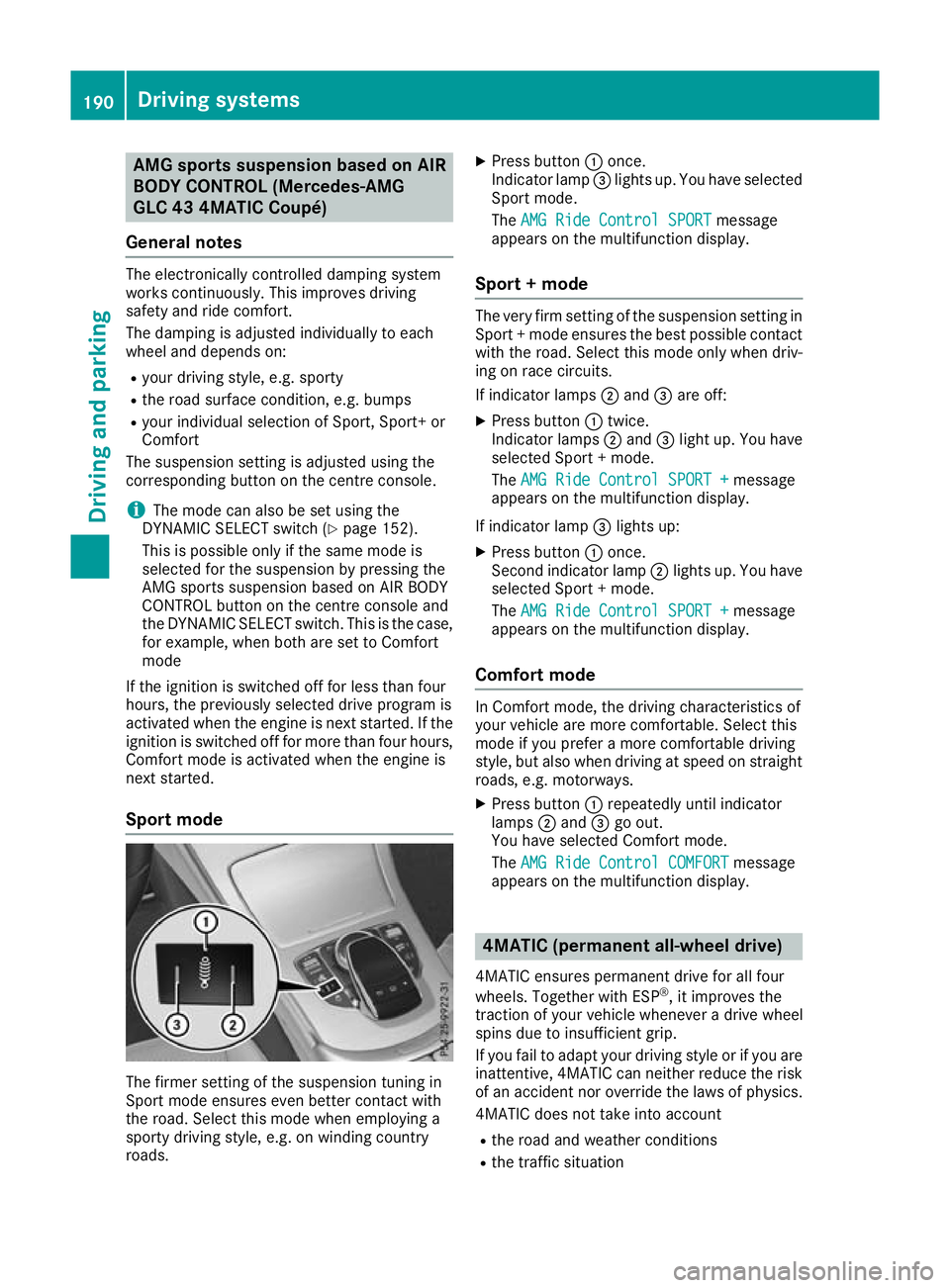
roads. X
Press button :once.
Indicator lamp =lights up. You have selected
Sport mode.
The AMG Ride Control SPORT
AMG Ride Control SPORT message
appears on the multifunction display.
Sport + mode The very firm setting of the suspension setting in
Sport + mode ensures the best possible contact
with the road. Select this mode only when driv-
ing on race circuits.
If indicator lamps ;and =are off:
X Press button :twice.
Indicator lamps ;and =light up. You have
selected Sport + mode.
The AMG Ride Control SPORT +
AMG Ride Control SPORT + message
appears on the multifunction display.
If indicator lamp =lights up:
X Press button :once.
Second indicator lamp ;lights up. You have
selected Sport + mode.
The AMG Ride Control SPORT + AMG Ride Control SPORT + message
appears on the multifunction display.
Comfort mode In Comfort mode, the driving characteristics of
your vehicle are more comfortable. Select this
mode if you prefer a more comfortable driving
style, but also when driving at speed on straight
roads, e.g. motorways.
X Press button :repeatedly until indicator
lamps ;and =go out.
You have selected Comfort mode.
The AMG Ride Control COMFORT AMG Ride Control COMFORT message
appears on the multifunction display. 4MATIC (permanent all-wheel drive)
4MATIC ensures permanent drive for all four
wheels. Together with ESP ®
, it improves the
traction of your vehicle whenever a drive wheel
spins due to insufficient grip.
If you fail to adapt your driving style or if you are inattentive, 4MATIC can neither reduce the risk
of an accident nor override the laws of physics.
4MATIC does not take into account
R the road and weather conditions
R the traffic situation 190
Driving systemsDriving and pa
rking
Page 194 of 389
4MATIC is only an aid. You are responsible for
the distance to the vehicle in front, for vehicle
speed, for braking in good time and for staying in
lane.
If a drive wheel spins due to insufficient grip:
R When pulling away, only depress the acceler-
ator pedal as far as is necessary.
R accelerate less when driving.
! Never tow the vehicle with one axle raised.
This may damage the transfer case. Damage
of this sort is not covered by the Mercedes-
Benz implied warranty. All wheels must
remain either on the ground or be fully raised.
Observe the instructions for towing the vehi-
cle with all wheels in full contact with the
ground.
i In wintry driving conditions, the maximum
effect of 4MATIC can only be achieved if you
use winter tyres (M+S tyres), with snow
chains if necessary. PARKTRONIC
Important safety notes PARKTRONIC is an electronic parking aid with
ultrasound. It monitors the area around your
vehicle using six sensors in the front bumper
and six sensors in the rear bumper.
PARKTRONIC visually and audibly indicates the
distance between your vehicle and an object.
PARKTRONIC is only an aid. It is not a substitute for your attention to the immediate surround-
ings. The responsibility for safe manoeuvring
and parking remains with you. Make sure that
there are no persons, animals or objects in
range while manoeuvring and parking.
! When parking, pay particular attention to
objects above or below the sensors, such as
flower pots or trailer drawbars. PARKTRONIC does not detect such objects when they are in
the immediate vicinity of the vehicle. You
could damage the vehicle or the objects.
The sensors may not detect snow and objects which absorb ultrasonic sources.
Ultrasonic sources, such as an automatic car
wash, a lorry's compressed-air brakes or a
pneumatic drill, could cause PARKTRONIC to
malfunction.
PARKTRONIC may not function correctly on
uneven terrain. !
Fold in the ball coupling if the trailer tow
hitch is not required. PARKTRONIC measures the minimum detection range to an obstacle
from the bumper, not the ball coupling.
PARKTRONIC is activated automatically when
you: R switch on the ignition
R shift the transmission to position D,Ror N
PARKTRONIC is deactivated at speeds above
18 km/h. It is reactivated at lower speeds.
PARKTRONIC is deactivated for the rear area
when you establish the electrical connection
between your vehicle and a trailer.
Range of the sensors PARKTRONIC does not take into account obsta-
cles located:
R below the detection range, e.g. persons, ani-
mals or objects
R above the detection range, e.g. overhanging
loads, tail sections or loading ramps of goods
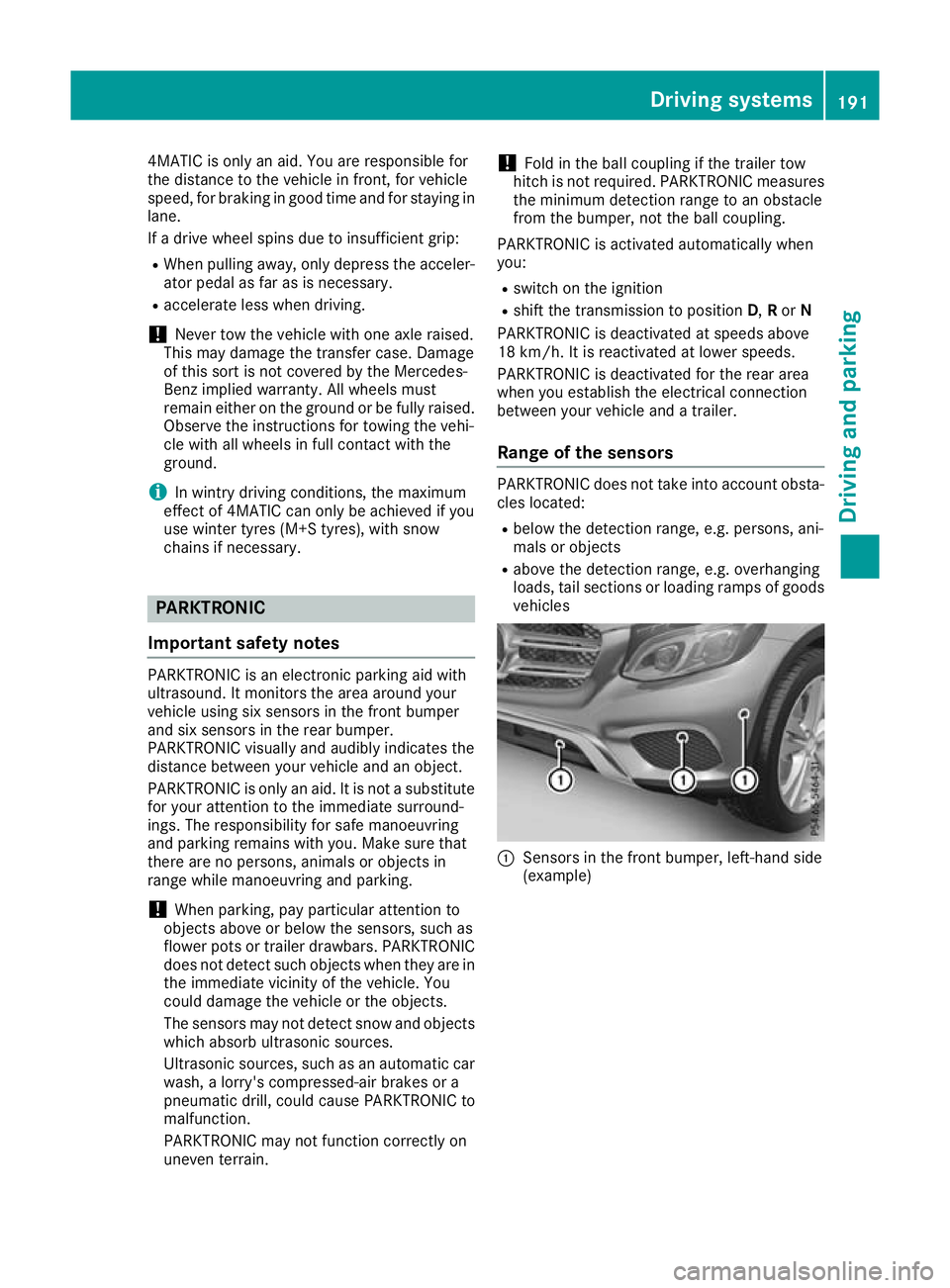
vehicles :
Sensors in the front bumper, left-hand side
(example) Driving systems
191Driving and parking Z
Page 196 of 389
This indicates that you have now reached the
minimum distance.
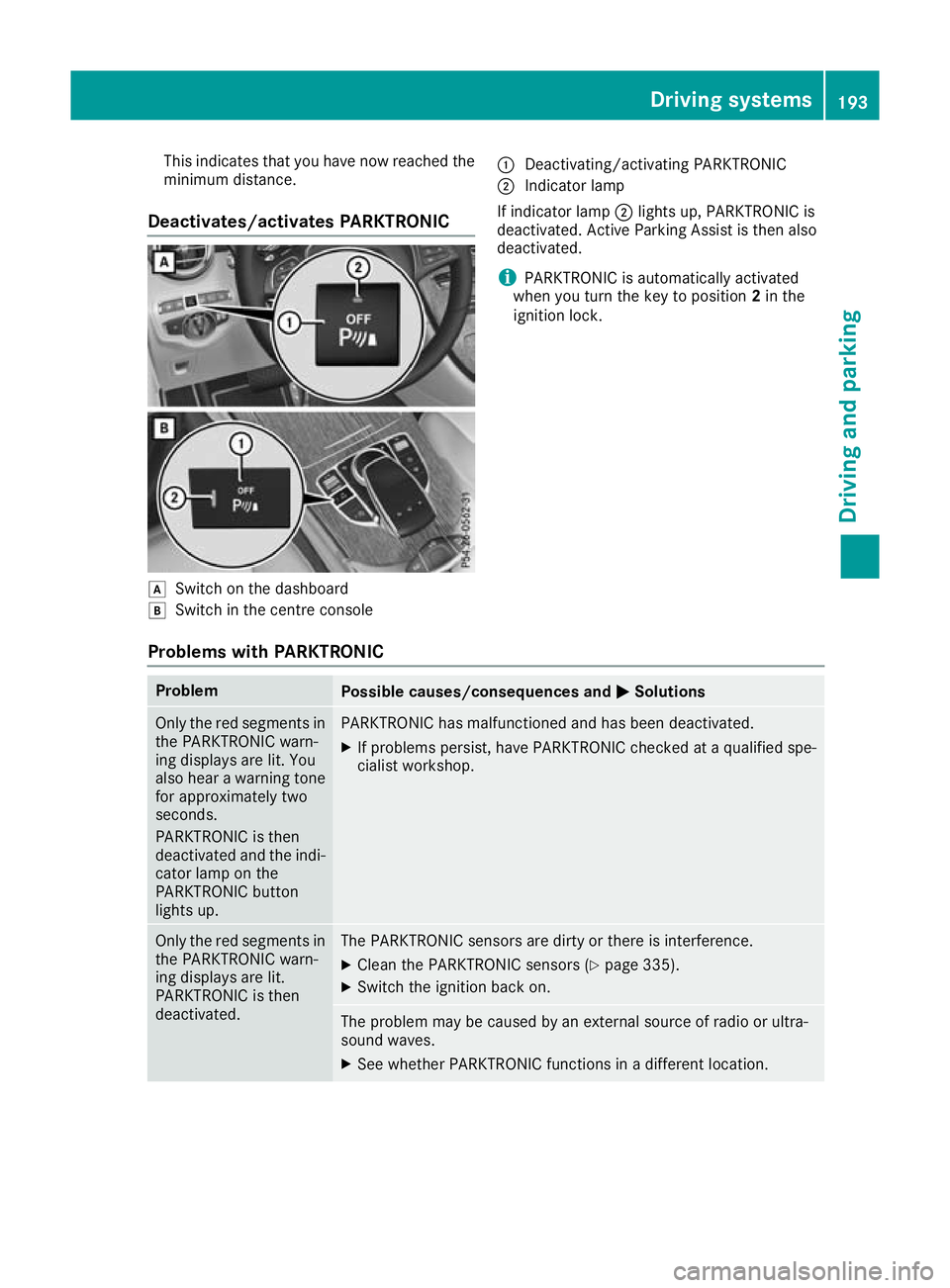
Deactivates/activates PARKTRONIC d
Switch on the dashboard
e Switch in the centre console :
Deactivating/activating PARKTRONIC
; Indicator lamp
If indicator lamp ;lights up, PARKTRONIC is
deactivated. Active Parking Assist is then also
deactivated.
i PARKTRONIC is automatically activated
when you turn the key to position 2in the
ignition lock.
Problems with PARKTRONIC Problem
Possible causes/consequences and
M
MSolutions Only the red segments in
the PARKTRONIC warn-
ing displays are lit. You
also hear a warning tone
for approximately two
seconds.
PARKTRONIC is then
deactivated and the indi-
cator lamp on the
PARKTRONIC button
lights up. PARKTRONIC has malfunctioned and has been deactivated.
X If problems persist, have PARKTRONIC checked at a qualified spe-
cialist workshop. Only the red segments in
the PARKTRONIC warn-
ing displays are lit.
PARKTRONIC is then
deactivated. The PARKTRONIC sensors are dirty or there is interference.
X
Clean the PARKTRONIC sensors (Y page 335).
X Switch the ignition back on. The problem may be caused by an external source of radio or ultra-
sound waves.
X See whether PARKTRONIC functions in a different location. Driving systems
193Driving and parking Z
Page 214 of 389
Warning lamp
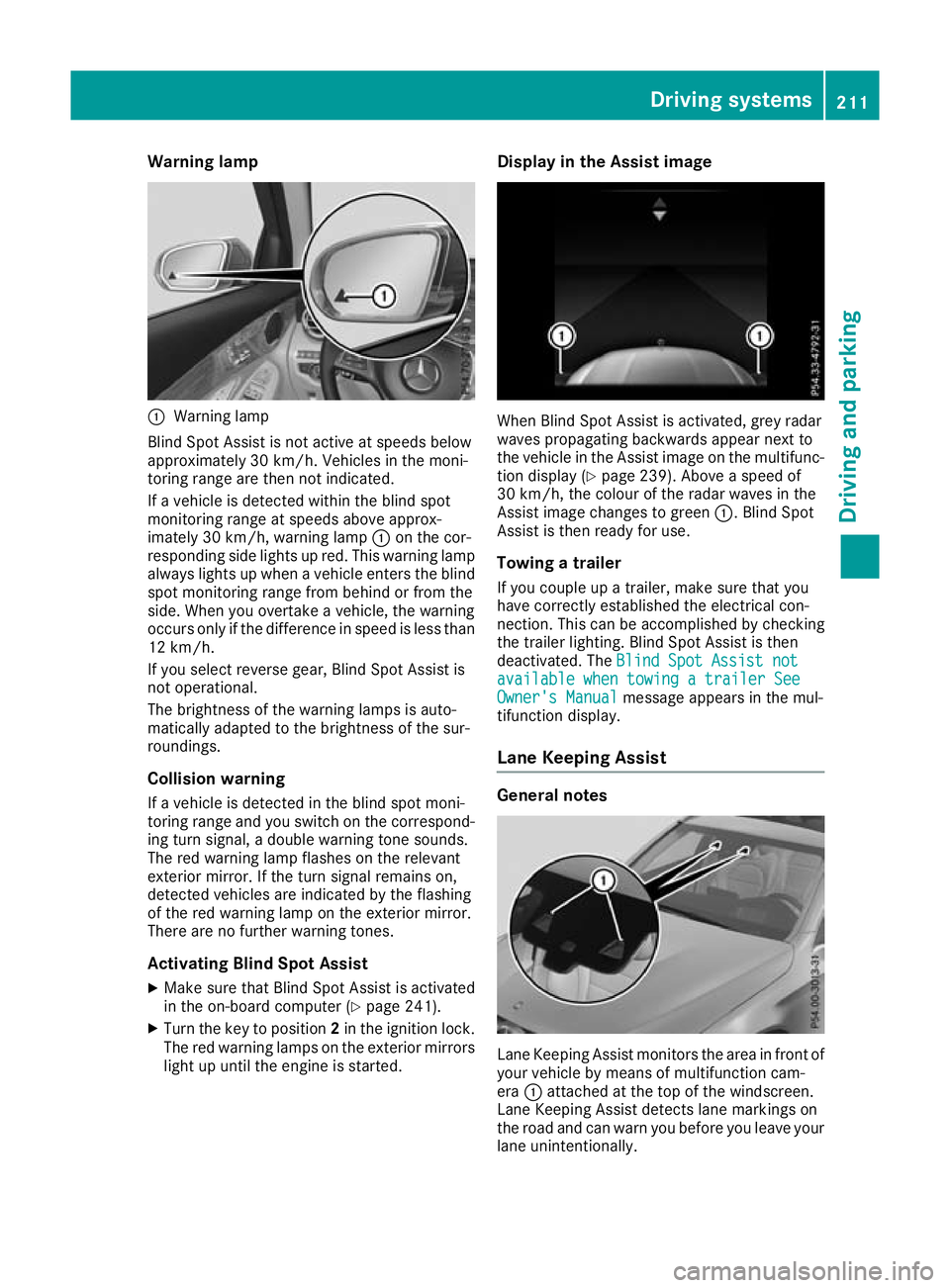
:
Warning lamp
Blind Spot Assist is not active at speeds below
approximately 30 km/h. Vehicles in the moni-
toring range are then not indicated.
If a vehicle is detected within the blind spot
monitoring range at speeds above approx-
imately 30 km/h, warning lamp :on the cor-
responding side lights up red. This warning lamp always lights up when a vehicle enters the blindspot monitoring range from behind or from the
side. When you overtake a vehicle, the warning
occurs only if the difference in speed is less than
12 km/h.
If you select reverse gear, Blind Spot Assist is
not operational.
The brightness of the warning lamps is auto-
matically adapted to the brightness of the sur-
roundings.
Collision warning
If a vehicle is detected in the blind spot moni-
toring range and you switch on the correspond-
ing turn signal, a double warning tone sounds.
The red warning lamp flashes on the relevant
exterior mirror. If the turn signal remains on,
detected vehicles are indicated by the flashing
of the red warning lamp on the exterior mirror.
There are no further warning tones.
Activating Blind Spot Assist
X Make sure that Blind Spot Assist is activated
in the on-board computer (Y page 241).
X Turn the key to position 2in the ignition lock.
The red warning lamps on the exterior mirrors
light up until the engine is started. Display in the Assist image
When Blind Spot Assist is activated, grey radar
waves propagating backwards appear next to
the vehicle in the Assist image on the multifunc-
tion display (Y page 239). Above a speed of
30 km/h, the colour of the radar waves in the
Assist image changes to green :. Blind Spot
Assist is then ready for use.
Towing a trailer
If you couple up a trailer, make sure that you
have correctly established the electrical con-
nection. This can be accomplished by checking
the trailer lighting. Blind Spot Assist is then
deactivated. The Blind Spot Assist not Blind Spot Assist not
available when towing a trailer See
available when towing a trailer See
Owner's Manual Owner's Manual message appears in the mul-
tifunction display.
Lane Keeping Assist General notes
Lane Keeping Assist monitors the area in front of
your vehicle by means of multifunction cam-
era :attached at the top of the windscreen.
Lane Keeping Assist detects lane markings on
the road and can warn you before you leave your lane unintentionally. Driving systems
211Driving and parking Z
Page 218 of 389
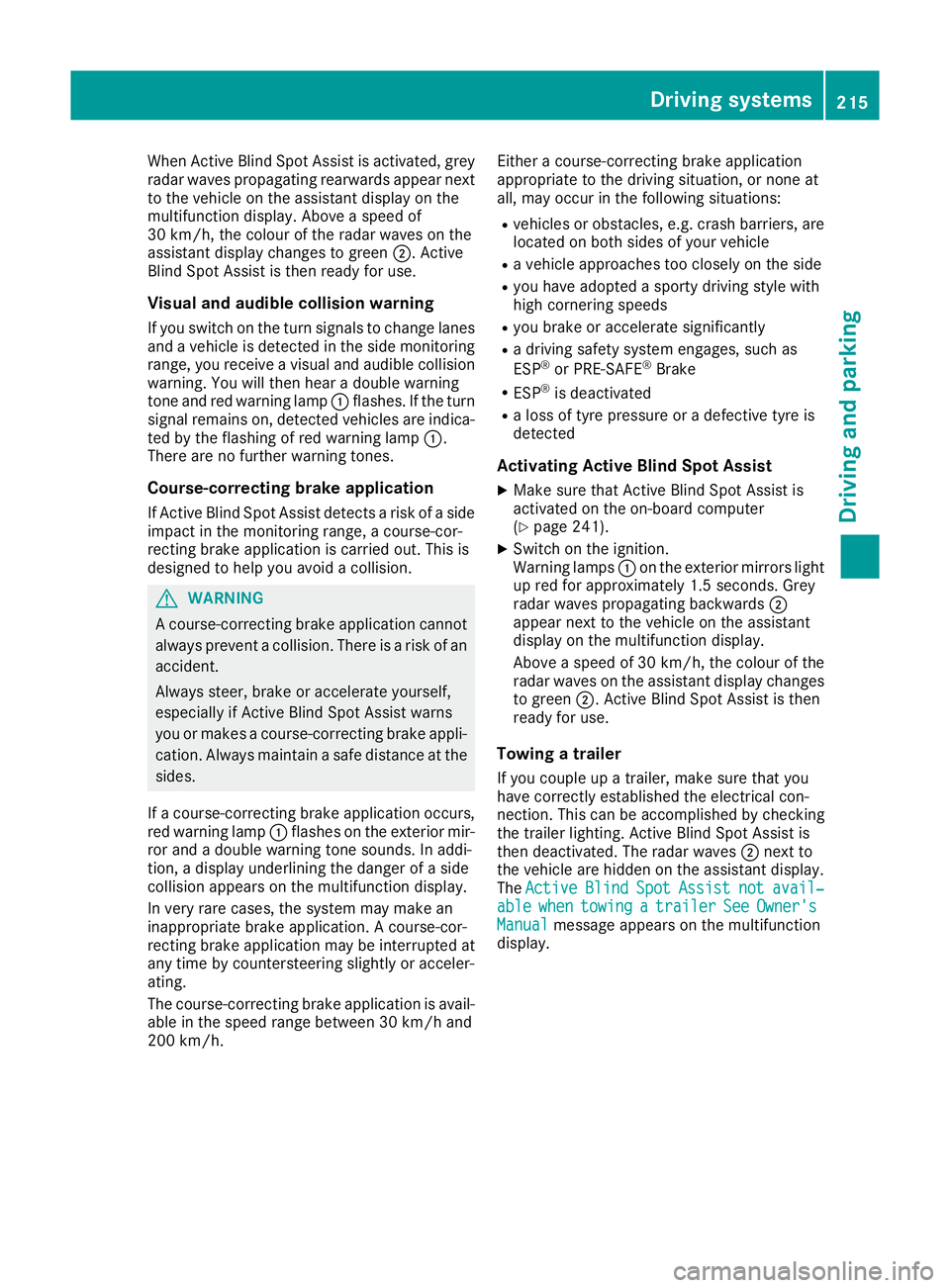
When Active Blind Spot Assist is activated, grey
radar waves propagating rearwards appear next
to the vehicle on the assistant display on the
multifunction display. Above a speed of
30 km/h, the colour of the radar waves on the
assistant display changes to green ;. Active
Blind Spot Assist is then ready for use.
Visual and audible collision warning If you switch on the turn signals to change lanes
and a vehicle is detected in the side monitoring range, you receive a visual and audible collision warning. You will then hear a double warning
tone and red warning lamp :flashes. If the turn
signal remains on, detected vehicles are indica-
ted by the flashing of red warning lamp :.
There are no further warning tones.
Course-correcting brake application
If Active Blind Spot Assist detects a risk of a side
impact in the monitoring range, a course-cor-
recting brake application is carried out. This is
designed to help you avoid a collision. G
WARNING
A course-correcting brake application cannot always prevent a collision. There is a risk of an
accident.
Always steer, brake or accelerate yourself,
especially if Active Blind Spot Assist warns
you or makes a course-correcting brake appli-
cation. Always maintain a safe distance at the sides.
If a course-correcting brake application occurs, red warning lamp :flashes on the exterior mir-
ror and a double warning tone sounds. In addi-
tion, a display underlining the danger of a side
collision appears on the multifunction display.
In very rare cases, the system may make an
inappropriate brake application. A course-cor-
recting brake application may be interrupted at
any time by countersteering slightly or acceler-
ating.
The course-correcting brake application is avail-
able in the speed range between 30 km/h and
200 km/h. Either a course-correcting brake application
appropriate to the driving situation, or none at
all, may occur in the following situations:
R vehicles or obstacles, e.g. crash barriers, are
located on both sides of your vehicle
R a vehicle approaches too closely on the side
R you have adopted a sporty driving style with
high cornering speeds
R you brake or accelerate significantly
R a driving safety system engages, such as
ESP ®
or PRE-SAFE ®
Brake
R ESP ®
is deactivated
R a loss of tyre pressure or a defective tyre is
detected
Activating Active Blind Spot Assist X Make sure that Active Blind Spot Assist is
activated on the on-board computer
(Y page 241).
X Switch on the ignition.
Warning lamps :on the exterior mirrors light
up red for approximately 1.5 second s. Grey
radar waves propagating backwards ;
appear next to the vehicle on the assistant
display on the multifunction display.
Above a speed of 30 km/h, the colour of the
radar waves on the assistant display changes to green ;. Active Blind Spot Assist is then
ready for use.
Towing a trailer
If you couple up a trailer, make sure that you
have correctly established the electrical con-
nection. This can be accomplished by checking
the trailer lighting. Active Blind Spot Assist is
then deactivated. The radar waves ;next to
the vehicle are hidden on the assistant display.
The Active Active Blind
BlindSpot
Spot Assist
Assist not
notavail‐
avail‐
able
able when
whentowing
towing a
atrailer
trailer See
SeeOwner's
Owner's
Manual
Manual message appears on the multifunction
display. Driving systems
215Driving and parking Z
Page 223 of 389
This will use the braking effect of the engine, so
less braking will be required to maintain the
vehicle speed. This relieves the load on the
brake system and prevents the brakes from
overheating and wearing too quickly. If you need additional braking, depress the brake pedal
repeatedly rather than continuously.
Driving tips R
Maintain a greater distance to the vehicle in
front than when driving without a trailer.
R Avoid braking abruptly. If possible, brake gen-
tly at first to allow the trailer to run on. Then,
increase the braking force rapidly.
R The values given for gradient-climbing capa-
bilities from a standstill refer to sea level.
When driving in mountainous areas, note that
the power output of the engine, and conse-
quently the vehicle's gradient-climbing capa-
bility from a standstill, decrease with increas- ing altitude.
If the trailer swings from side to side:
X Do not accelerate under any circumstances.
X Do not countersteer.
X Brake, if necessary. Swivelling the ball coupling in/out
Important safety notes G
WARNING
If the ball coupling is not engaged, the trailer
may come loose. There is a risk of an accident.
Make sure that the ball coupling is securely
engaged and locked in position.
! Do not attempt to speed the up the swing-
out procedure by applying additional pressure
with your foot. The system could otherwise be
mechanically damaged.
In order to tow a trailer with the vehicle, you
must swivel the ball coupling out.
You can swivel the ball coupling out by means of the switch on the driver's door or the tailgate.
The trailer socket is integrated in the ball cou-
pling and swivels out with it.
Swivel the ball coupling in or out only when the
swivel range is unobstructed. Swivelling out using the switch on the
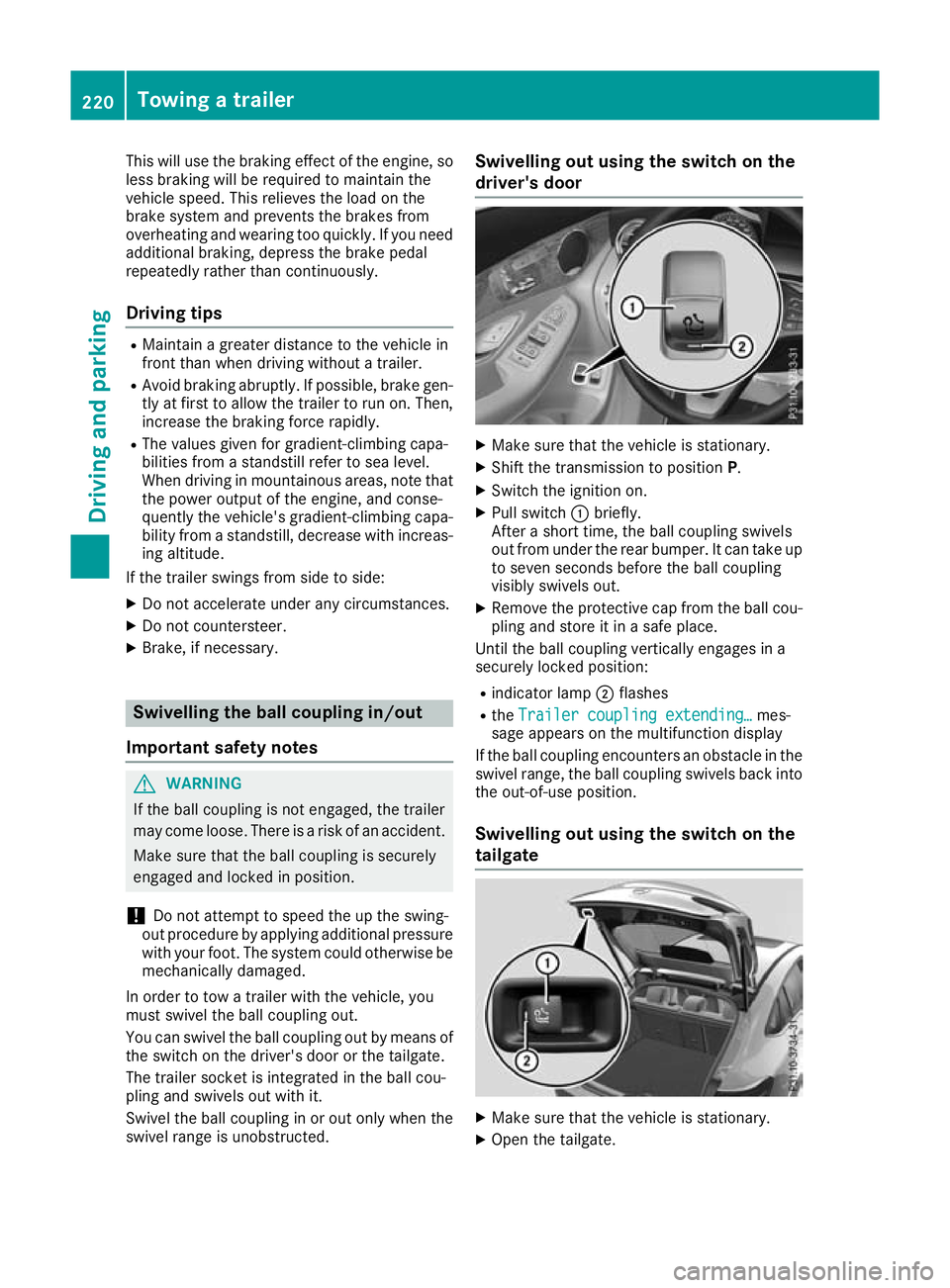
driver's door
X
Make sure that the vehicle is stationary.
X Shift the transmission to position P.
X Switch the ignition on.
X Pull switch :briefly.
After a short time, the ball coupling swivels
out from under the rear bumper. It can take up to seven seconds before the ball coupling
visibly swivels out.
X Remove the protective cap from the ball cou-
pling and store it in a safe place.
Until the ball coupling vertically engages in a
securely locked position:
R indicator lamp ;flashes
R the Trailer coupling extending…
Trailer coupling extending… mes-
sage appears on the multifunction display
If the ball coupling encounters an obstacle in the
swivel range, the ball coupling swivels back into
the out-of-use position.
Swivelling out using the switch on the
tailgate X
Make sure that the vehicle is stationary.
X Open the tailgate. 220
Towing a trailerDriving and parking
Page 224 of 389
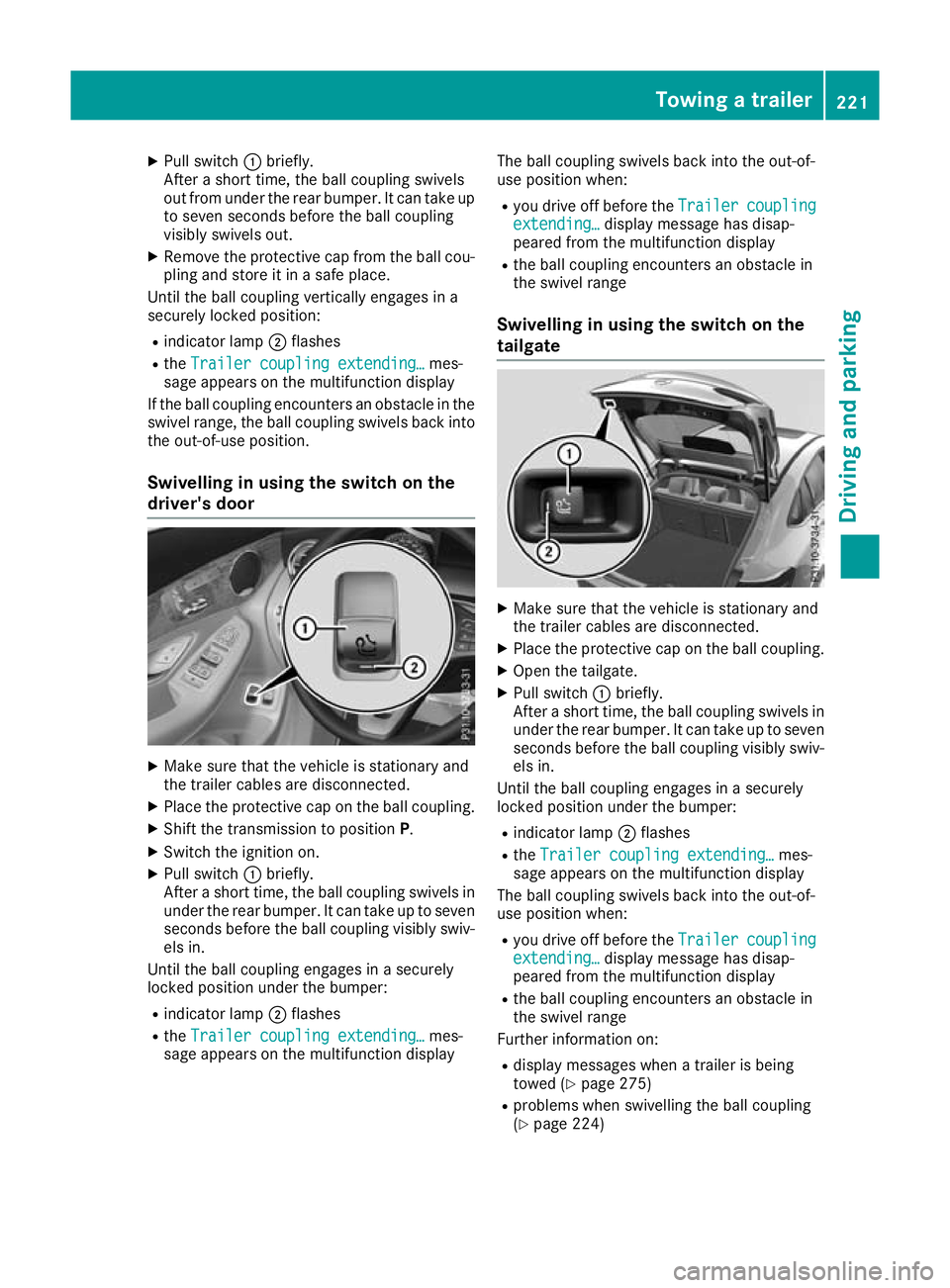
X
Pull switch :briefly.
After a short time, the ball coupling swivels
out from under the rear bumper. It can take up to seven seconds before the ball coupling
visibly swivels out.
X Remove the protective cap from the ball cou-
pling and store it in a safe place.
Until the ball coupling vertically engages in a
securely locked position:
R indicator lamp ;flashes
R the Trailer coupling extending… Trailer coupling extending… mes-
sage appears on the multifunction display
If the ball coupling encounters an obstacle in the
swivel range, the ball coupling swivels back into
the out-of-use position.
Swivelling in using the switch on the
driver's door X
Make sure that the vehicle is stationary and
the trailer cables are disconnected.
X Place the protective cap on the ball coupling.
X Shift the transmission to position P.
X Switch the ignition on.
X Pull switch :briefly.
After a short time, the ball coupling swivels in under the rear bumper. It can take up to sevenseconds before the ball coupling visibly swiv-
els in.
Until the ball coupling engages in a securely
locked position under the bumper:
R indicator lamp ;flashes
R the Trailer coupling extending… Trailer coupling extending… mes-
sage appears on the multifunction display The ball coupling swivels back into the out-of-
use position when:
R you drive off before the Trailer
Trailer coupling coupling
extending…
extending… display message has disap-
peared from the multifunction display
R the ball coupling encounters an obstacle in
the swivel range
Swivelling in using the switch on the
tailgate X
Make sure that the vehicle is stationary and
the trailer cables are disconnected.
X Place the protective cap on the ball coupling.
X Open the tailgate.
X Pull switch :briefly.
After a short time, the ball coupling swivels in under the rear bumper. It can take up to sevenseconds before the ball coupling visibly swiv-
els in.
Until the ball coupling engages in a securely
locked position under the bumper:
R indicator lamp ;flashes
R the Trailer coupling extending…
Trailer coupling extending… mes-
sage appears on the multifunction display
The ball coupling swivels back into the out-of-
use position when:
R you drive off before the Trailer Trailercoupling
coupling
extending…
extending… display message has disap-
peared from the multifunction display
R the ball coupling encounters an obstacle in
the swivel range
Further information on:
R display messages when a trailer is being
towed (Y page 275)
R problems when swivelling the ball coupling
(Y page 224) Towing a trailer
221Driving and parking Z