ignition MERCEDES-BENZ GLC COUPE 2016 Manual Online
[x] Cancel search | Manufacturer: MERCEDES-BENZ, Model Year: 2016, Model line: GLC COUPE, Model: MERCEDES-BENZ GLC COUPE 2016Pages: 389, PDF Size: 7.34 MB
Page 269 of 389
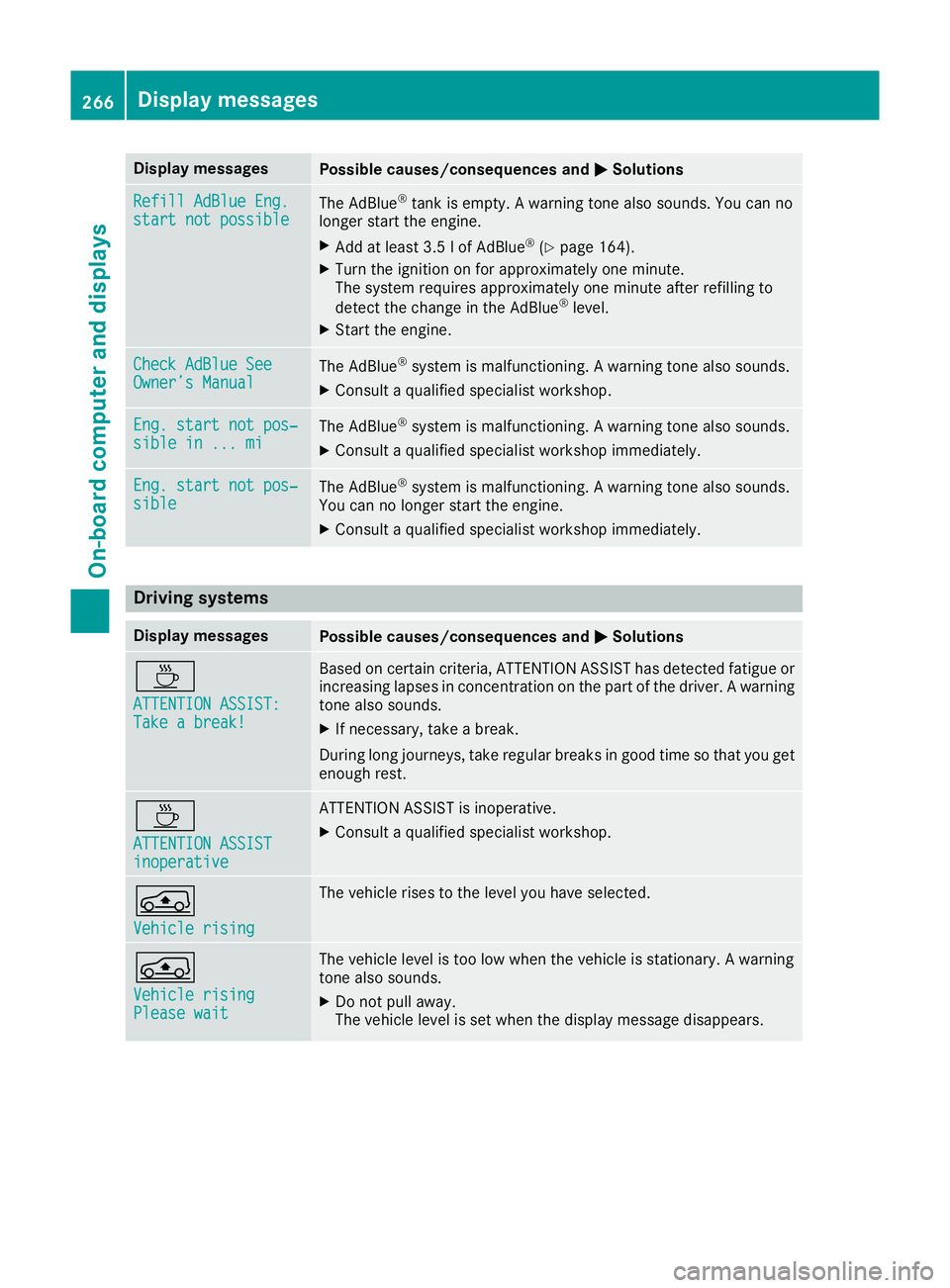
Display messages
Possible causes/consequences and
M
MSolutions Refill AdBlue Eng.
Refill AdBlue Eng.
start not possible start not possible
The AdBlue
®
tank is empty. A warning tone also sounds. You can no
longer start the engine.
X Add at least 3.5 l of AdBlue ®
(Y page 164).
X Turn the ignition on for approximately one minute.
The system requires approximately one minute after refilling to
detect the change in the AdBlue ®
level.
X Start the engine. Check AdBlue See Check AdBlue See
Owner’s Manual Owner’s Manual
The AdBlue
®
system is malfunctioning. A warning tone also sounds.
X Consult a qualified specialist workshop. Eng. start not pos‐
Eng. start not pos‐
sible in ... mi sible in ... mi
The AdBlue
®
system is malfunctioning. A warning tone also sounds.
X Consult a qualified specialist workshop immediately. Eng. start not pos‐
Eng. start not pos‐
sible sible
The AdBlue
®
system is malfunctioning. A warning tone also sounds.
You can no longer start the engine.
X Consult a qualified specialist workshop immediately. Driving systems
Display messages
Possible causes/consequences and
M
MSolutions À
ATTENTION ASSIST: ATTENTION ASSIST:
Take a break! Take a break! Based on certain criteria, ATTENTION ASSIST has detected fatigue or
increasing lapses in concentration on the part of the driver. A warning tone also sounds.
X If necessary, take a break.
During long journeys, take regular breaks in good time so that you get enough rest. À
ATTENTION ASSIST ATTENTION ASSIST
inoperative inoperative ATTENTION ASSIST is inoperative.
X Consult a qualified specialist workshop. Á
Vehicle rising Vehicle rising The vehicle rises to the level you have selected.
Á
Vehicle rising Vehicle rising
Please wait Please wait The vehicle level is too low when the vehicle is stationary. A warning
tone also sounds.
X Do not pull away.
The vehicle level is set when the display message disappears. 266
Display
messagesOn-board computer and displays
Page 272 of 389
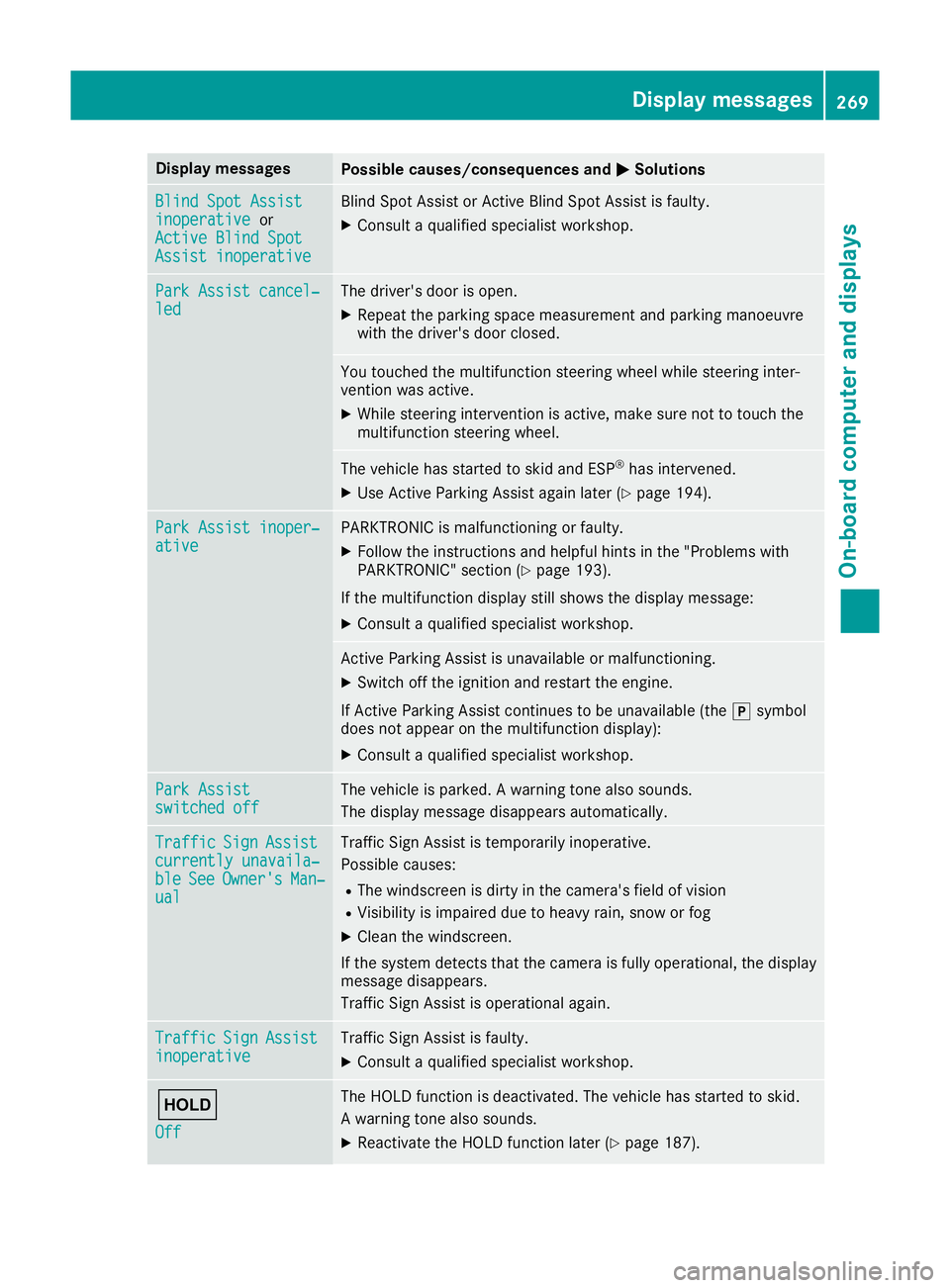
Display messages
Possible causes/consequences and
M
MSolutions Blind Spot Assist
Blind Spot Assist
inoperative inoperative
or
Active Blind Spot
Active Blind Spot
Assist inoperative Assist inoperative Blind Spot Assist or Active Blind Spot Assist is faulty.
X Consult a qualified specialist workshop. Park Assist cancel‐
Park Assist cancel‐
led led The driver's door is open.
X Repeat the parking space measurement and parking manoeuvre
with the driver's door closed. You touched the multifunction steering wheel while steering inter-
vention was active.
X While steering intervention is active, make sure not to touch the
multifunction steering wheel. The vehicle has started to skid and ESP
®
has intervened.
X Use Active Parking Assist again later (Y page 194).Park Assist inoper‐ Park Assist inoper‐
ative ative PARKTRONIC is malfunctioning or faulty.
X Follow the instructions and helpful hints in the "Problems with
PARKTRONIC" section (Y page 193).
If the multifunction display still shows the display message: X Consult a qualified specialist workshop. Active Parking Assist is unavailable or malfunctioning.
X Switch off the ignition and restart the engine.
If Active Parking Assist continues to be unavailable (the jsymbol
does not appear on the multifunction display):
X Consult a qualified specialist workshop. Park Assist Park Assist
switched off switched off The vehicle is parked. A warning tone also sounds.
The display message disappears automatically. Traffic
Traffic
Sign
SignAssist
Assist
currently unavaila‐
currently unavaila‐
ble ble See
SeeOwner's
Owner's Man‐
Man‐
ual
ual Traffic Sign Assist is temporarily inoperative.
Possible causes:
R The windscreen is dirty in the camera's field of vision
R Visibility is impaired due to heavy rain, snow or fog
X Clean the windscreen.
If the system detects that the camera is fully operational, the display message disappears.
Traffic Sign Assist is operational again. Traffic Traffic
Sign
SignAssist
Assist
inoperative
inoperative Traffic Sign Assist is faulty.
X Consult a qualified specialist workshop. ë
Off Off The HOLD function is deactivated. The vehicle has started to skid.
A warning tone also sounds.
X Reactivate the HOLD function later (Y page 187). Display
messages
269On-board computer and displays Z
Page 274 of 389
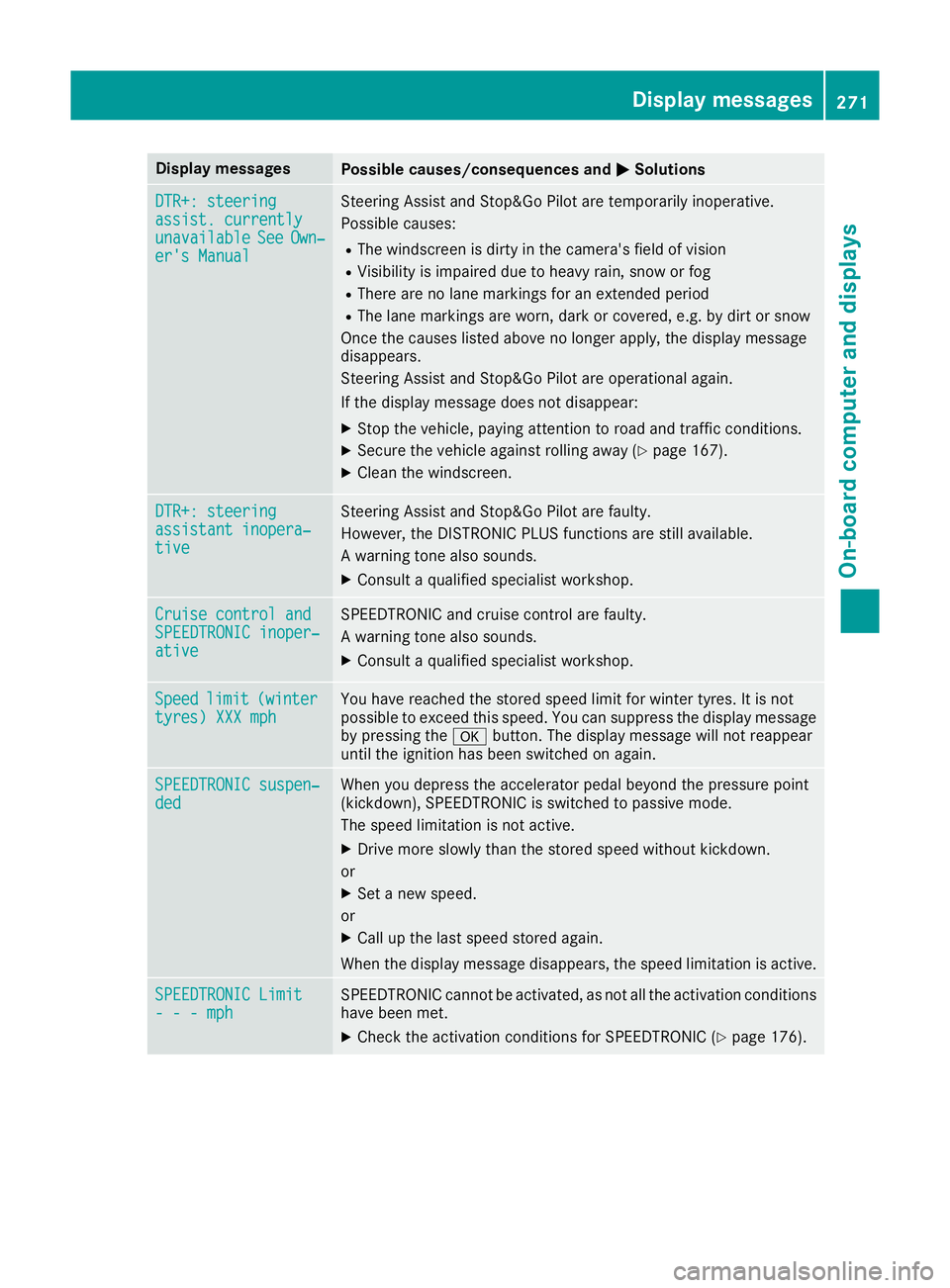
Display messages
Possible causes/consequences and
M
MSolutions DTR+: steering
DTR+: steering
assist. currently assist. currently
unavailable unavailable
See
SeeOwn‐
Own‐
er's Manual
er's Manual Steering Assist and Stop&Go Pilot are temporarily inoperative.
Possible causes:
R The windscreen is dirty in the camera's field of vision
R Visibility is impaired due to heavy rain, snow or fog
R There are no lane markings for an extended period
R The lane markings are worn, dark or covered, e.g. by dirt or snow
Once the causes listed above no longer apply, the display message
disappears.
Steering Assist and Stop&Go Pilot are operational again.
If the display message does not disappear:
X Stop the vehicle, paying attention to road and traffic conditions.
X Secure the vehicle against rolling away (Y page 167).
X Clean the windscreen. DTR+: steering DTR+: steering
assistant inopera‐ assistant inopera‐
tive tive Steering Assist and Stop&Go Pilot are faulty.
However, the DISTRONIC PLUS functions are still available.
A warning tone also sounds.
X Consult a qualified specialist workshop. Cruise control and Cruise control and
SPEEDTRONIC inoper‐ SPEEDTRONIC inoper‐
ative ative SPEEDTRONIC and cruise control are faulty.
A warning tone also sounds.
X Consult a qualified specialist workshop. Speed Speed
limit
limit(winter
(winter
tyres) XXX mph
tyres) XXX mph You have reached the stored speed limit for winter tyres. It is not
possible to exceed this speed. You can suppress the display message
by pressing the abutton. The display message will not reappear
until the ignition has been switched on again. SPEEDTRONIC suspen‐ SPEEDTRONIC suspen‐
ded ded When you depress the accelerator pedal beyond the pressure point
(kickdown), SPEEDTRONIC is switched to passive mode.
The speed limitation is not active.
X Drive more slowly than the stored speed without kickdown.
or X Set a new speed.
or X Call up the last speed stored again.
When the display message disappears, the speed limitation is active. SPEEDTRONIC Limit SPEEDTRONIC Limit
- - - mph - - - mph SPEEDTRONIC cannot be activated, as not all the activation conditions
have been met.
X Check the activation conditions for SPEEDTRONIC (Y page 176). Display
messages
271On-board computer and displays Z
Page 282 of 389
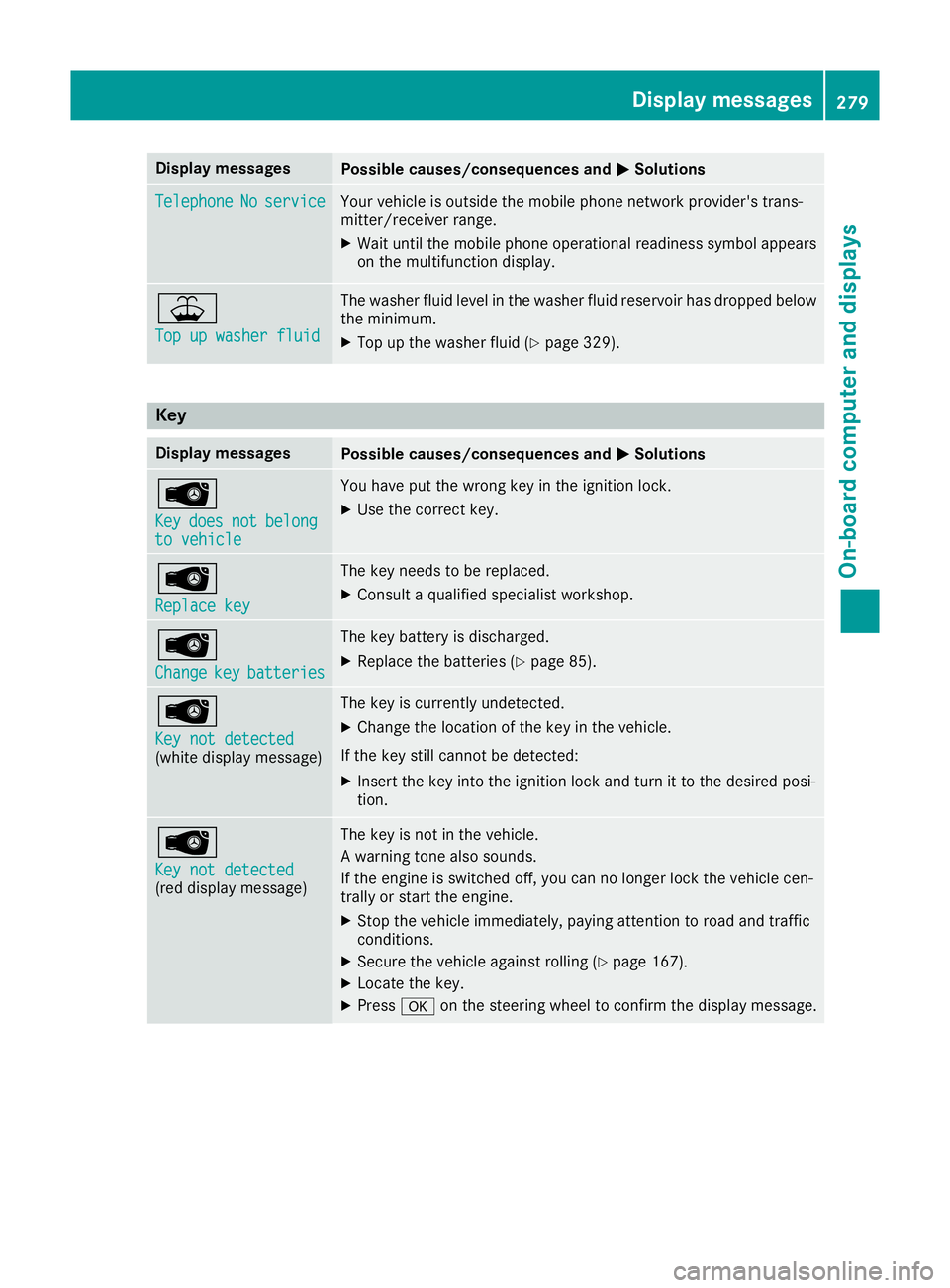
Display messages
Possible causes/consequences and
M
MSolutions Telephone
Telephone
No
Noservice
service Your vehicle is outside the mobile phone network provider's trans-
mitter/receiver range.
X Wait until the mobile phone operational readiness symbol appears
on the multifunction display. ¥
Top up washer fluid Top up washer fluid The washer fluid level in the washer fluid reservoir has dropped below
the minimum.
X Top up the washer fluid (Y page 329).Key
Display messages
Possible causes/consequences and
M
MSolutions Â
Key Key
does
does not
notbelong
belong
to vehicle
to vehicle You have put the wrong key in the ignition lock.
X Use the correct key. Â
Replace key Replace key The key needs to be replaced.
X Consult a qualified specialist workshop. Â
Change Change
key
keybatteries
batteries The key battery is discharged.
X Replace the batteries (Y page 85).Â
Key not detected Key not detected
(white display message) The key is currently undetected.
X Change the location of the key in the vehicle.
If the key still cannot be detected:
X Insert the key into the ignition lock and turn it to the desired posi-
tion. Â
Key not detected Key not detected
(red display message) The key is not in the vehicle.
A warning tone also sounds.
If the engine is switched off, you can no longer lock the vehicle cen-
trally or start the engine.
X Stop the vehicle immediately, paying attention to road and traffic
conditions.
X Secure the vehicle against rolling (Y page 167).
X Locate the key.
X Press aon the steering wheel to confirm the display message. Display
messages
279On-board computer and displays Z
Page 283 of 389
Display messages
Possible causes/consequences and
M
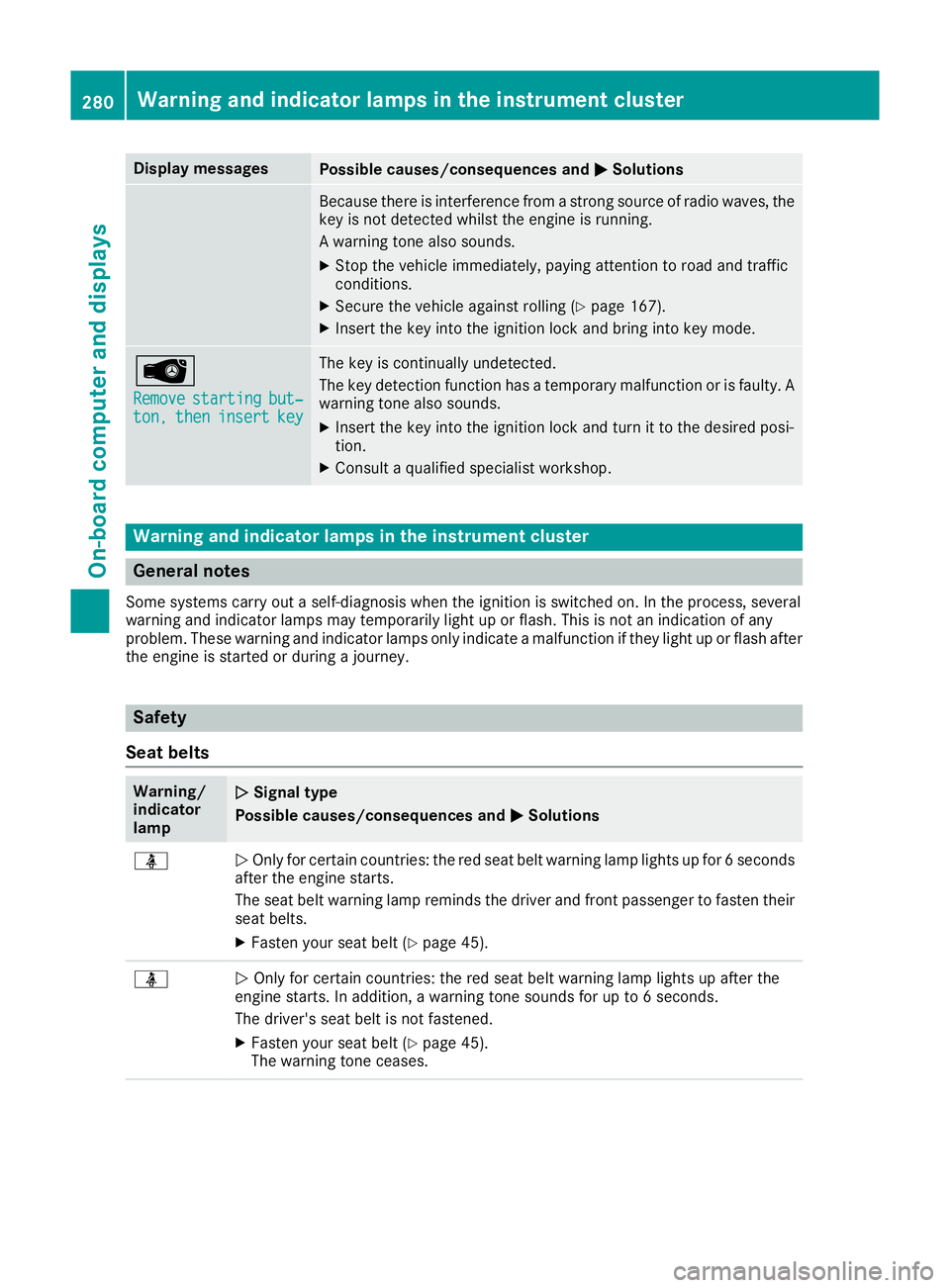
MSolutions Because there is interference from a strong source of radio waves, the
key is not detected whilst the engine is running.
A warning tone also sounds.
X Stop the vehicle immediately, paying attention to road and traffic
conditions.
X Secure the vehicle against rolling (Y page 167).
X Insert the key into the ignition lock and bring into key mode. Â
Remove Remove
starting
starting but‐
but‐
ton,
ton, then
theninsert
insert key
key The key is continually undetected.
The key detection function has a temporary malfunction or is faulty. A
warning tone also sounds.
X Insert the key into the ignition lock and turn it to the desired posi-
tion.
X Consult a qualified specialist workshop. Warning and indicator lamps in the instrument cluster
General notes
Some systems carry out a self-diagnosis when the ignition is switched on. In the process, several
warning and indicator lamps may temporarily light up or flash. This is not an indication of any
problem. These warning and indicator lamps only indicate a malfunction if they light up or flash after
the engine is started or during a journey. Safety
Seat belts Warning/
indicator
lamp
N N
Signal type
Possible causes/consequences and M
MSolutions ü
N
Only for certain countries: the red seat belt warning lamp lights up for 6 seconds
after the engine starts.
The seat belt warning lamp reminds the driver and front passenger to fasten their
seat belts.
X Fasten your seat belt (Y page 45).ü
N
Only for certain countries: the red seat belt warning lamp lights up after the
engine starts. In addition, a warning tone sounds for up to 6 seconds.
The driver's seat belt is not fastened.
X Fasten your seat belt (Y page 45).
The warning tone ceases. 280
Wa
rning and indi cator lamps in the instrument clusterOn-board computer and displays
Page 289 of 389
Warning/
indicator
lamp
N N
Signal type
Possible causes/consequences and M
M Solutions !
N
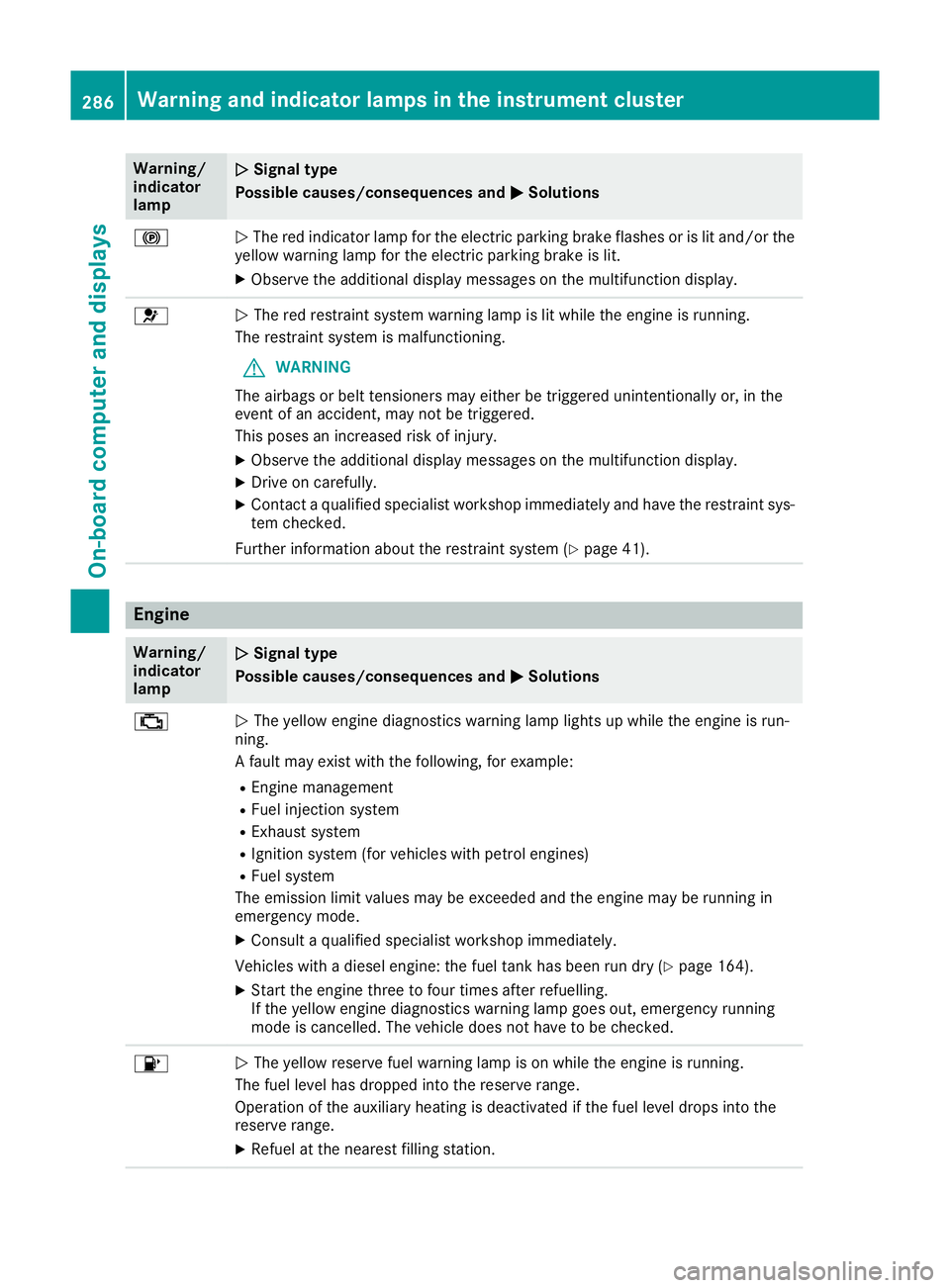
The red indicator lamp for the electric parking brake flashes or is lit and/or the
yellow warning lamp for the electric parking brake is lit.
X Observe the additional display messages on the multifunction display. 6
N
The red restraint system warning lamp is lit while the engine is running.
The restraint system is malfunctioning.
G WARNING
The airbags or belt tensioners may either be triggered unintentionally or, in the
event of an accident, may not be triggered.
This poses an increased risk of injury.
X Observe the additional display messages on the multifunction display.
X Drive on carefully.
X Contact a qualified specialist workshop immediately and have the restraint sys-
tem checked.
Further information about the restraint system (Y page 41).Engine
Warning/
indicator
lamp
N N
Signal type
Possible causes/consequences and M
M Solutions ;
N
The yellow engine diagnostics warning lamp lights up while the engine is run-
ning.
A fault may exist with the following, for example:
R Engine management
R Fuel injection system
R Exhaust system
R Ignition system (for vehicles with petrol engines)
R Fuel system
The emission limit values may be exceeded and the engine may be running in
emergency mode.
X Consult a qualified specialist workshop immediately.
Vehicles with a diesel engine: the fuel tank has been run dry (Y page 164).
X Start the engine three to four times after refuelling.
If the yellow engine diagnostics warning lamp goes out, emergency running
mode is cancelled. The vehicle does not have to be checked. 8
N
The yellow reserve fuel warning lamp is on while the engine is running.
The fuel level has dropped into the reserve range.
Operation of the auxiliary heating is deactivated if the fuel level drops into the
reserve range.
X Refuel at the nearest filling station. 286
Warning and indicator lamps in the instrument clusterOn-board computer and displays
Page 321 of 389
i
You can remove the ashtray insert and use
the resultant compartment for stowage.
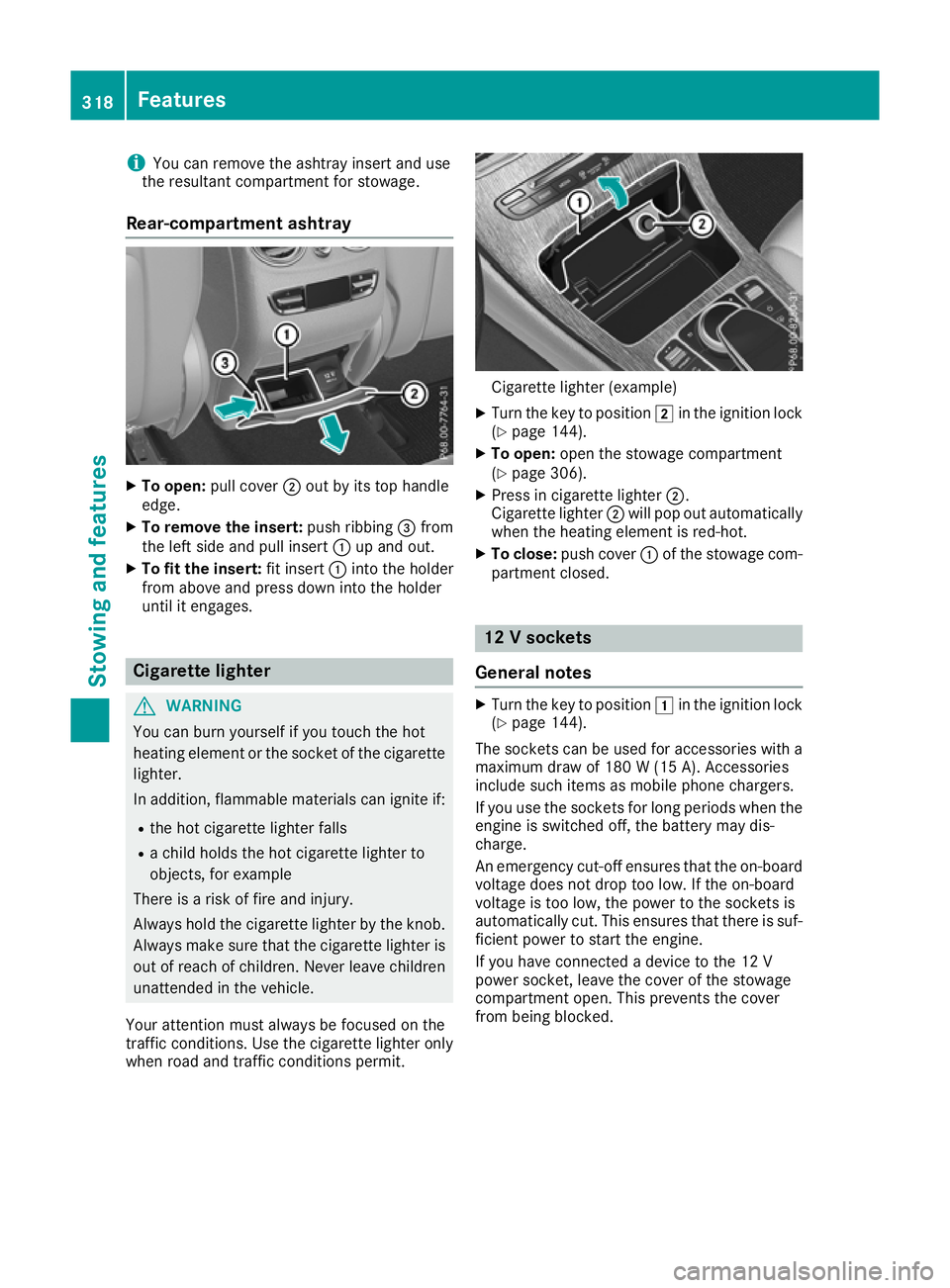
Rear-compartment ashtray X
To open: pull cover ;out by its top handle
edge.
X To remove the insert: push ribbing=from
the left side and pull insert :up and out.
X To fit the insert: fit insert:into the holder
from above and press down into the holder
until it engages. Cigarette lighter
G
WARNING
You can burn yourself if you touch the hot
heating element or the socket of the cigarette lighter.
In addition, flammable materials can ignite if:
R the hot cigarette lighter falls
R a child holds the hot cigarette lighter to
objects, for example
There is a risk of fire and injury.
Always hold the cigarette lighter by the knob.
Always make sure that the cigarette lighter is
out of reach of children. Never leave children unattended in the vehicle.
Your attention must always be focused on the
traffic conditions. Use the cigarette lighter only when road and traffic conditions permit. Cigarette lighter (example)
X Turn the key to position 2in the ignition lock
(Y page 144).
X To open: open the stowage compartment
(Y page 306).
X Press in cigarette lighter ;.
Cigarette lighter ;will pop out automatically
when the heating element is red-hot.
X To close: push cover :of the stowage com-
partment closed. 12 V sockets
General notes X
Turn the key to position 1in the ignition lock
(Y page 144).
The sockets can be used for accessories with a
maximum draw of 180 W (15 A). Accessories
include such items as mobile phone chargers.
If you use the sockets for long periods when the engine is switched off, the battery may dis-
charge.
An emergency cut-off ensures that the on-board
voltage does not drop too low. If the on-board
voltage is too low, the power to the sockets is
automatically cut. This ensures that there is suf- ficient power to start the engine.
If you have connected a device to the 12 V
power socket, leave the cover of the stowage
compartment open. This prevents the cover
from being blocked. 318
FeaturesStowing and features
Page 322 of 389
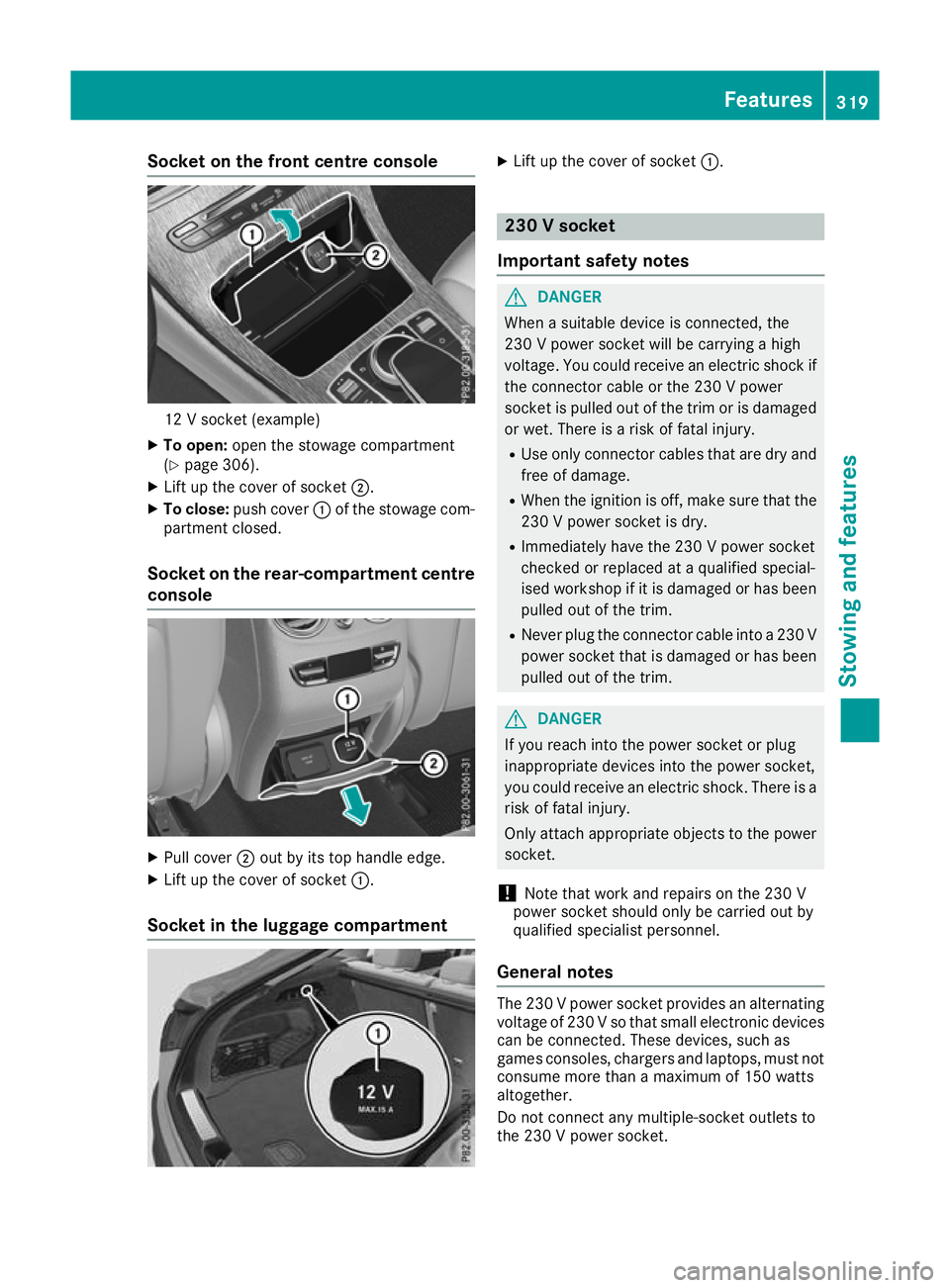
Socket on the front centre console
12 V socket (example)
X To open: open the stowage compartment
(Y page 306).
X Lift up the cover of socket ;.
X To close: push cover :of the stowage com-
partment closed.
Socket on the rear-compartment centre console X
Pull cover ;out by its top handle edge.
X Lift up the cover of socket :.
Socket in the luggage compartment X
Lift up the cover of socket :. 230 V socket
Important safety notes G
DANGER
When a suitable device is connected, the
230 V power socket will be carrying a high
voltage. You could receive an electric shock if the connector cable or the 230 V power
socket is pulled out of the trim or is damaged
or wet. There is a risk of fatal injury.
R Use only connector cables that are dry and
free of damage.
R When the ignition is off, make sure that the
230 V power socket is dry.
R Immediately have the 230 V power socket
checked or replaced at a qualified special-
ised workshop if it is damaged or has been
pulled out of the trim.
R Never plug the connector cable into a 230 V
power socket that is damaged or has beenpulled out of the trim. G
DANGER
If you reach into the power socket or plug
inappropriate devices into the power socket,
you could receive an electric shock. There is a risk of fatal injury.
Only attach appropriate objects to the powersocket.
! Note that work and repairs on the 230 V
power socket should only be carried out by
qualified specialist personnel.
General notes The 230 V power socket provides an alternating
voltage of 230 Vso that small electronic devices
can be connected. These devices, such as
games consoles, chargers and laptops, must not
consume more than a maximum of 150 watts
altogether.
Do not connect any multiple-socket outlets to
the 230 V power socket. Features
319Stowing and features Z
Page 323 of 389
Requirements for operating these devices:
R the electronic device that you connect has a
suitable connector and conforms to stand-
ards specific to the country you are in
R the electronic device connector is plugged
into the 230 V power socket
R the maximum wattage of the device to be
connected must not exceed 150 watts
R the on-board voltage is within a permissible
voltage range
R the 12 V socket in the front centre console is
working properly (Y page 319)
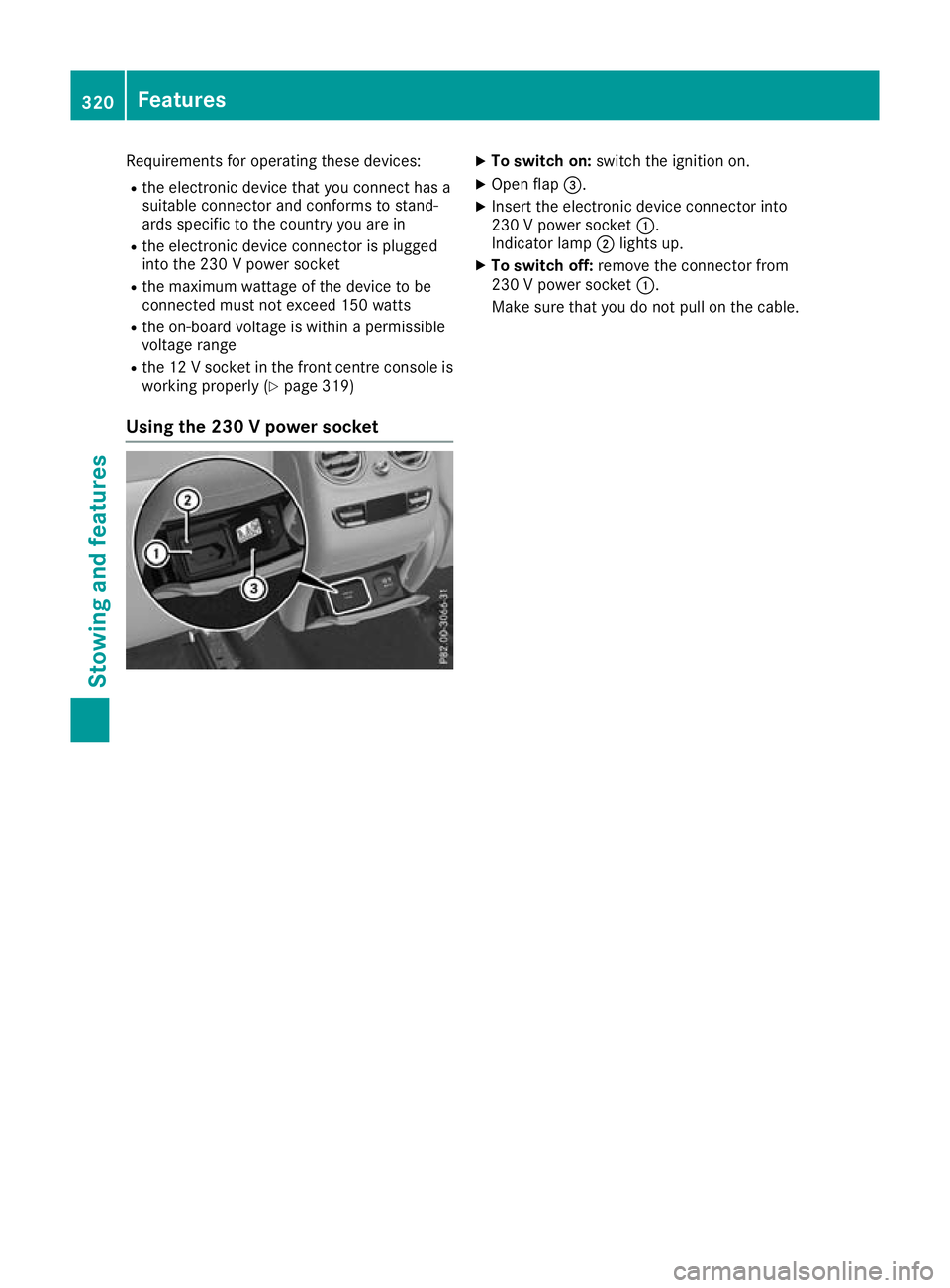
Using the 230 V power socket X
To switch on: switch the ignition on.
X Open flap =.
X Insert the electronic device connector into
230 V power socket :.
Indicator lamp ;lights up.
X To switch off: remove the connector from
230 V power socket :.
Make sure that you do not pull on the cable. 320
FeaturesStowing and featu
res
Page 326 of 389
cause you to lose control of the vehicle. There
is a risk of an accident.
Use this device only when the vehicle is sta-
tionary.
You must observe the legal requirements for the country in which you are currently driving whenoperating mobile communications equipment in
the vehicle.
If it is permitted by law to operate communica-
tions equipment while the vehicle is in motion,
you may do so only if the traffic situation per-
mits. You may otherwise be distracted from the traffic conditions, cause an accident and injure
yourself and others.
Excessive levels of electromagnetic radiation
may cause damage to your health and to the
health of others. The use of an exterior aerial
takes into consideration the scientific discus-
sion surrounding the possible health risk posed
by electromagnetic fields.
Mercedes-Benz recommends the use of an
approved exterior aerial. This ensures:
R optimal mobile phone reception quality in the
vehicle
R that mutual interference between the vehicle
electronics and mobile phones is minimised
An exterior aerial has the following advantages:
R it conducts the electromagnetic fields gener-
ated by a wireless device to the exterior
R the field strength in the vehicle interior is
lower than in a vehicle that does not have an exterior aerial
Information on retrofitting two-way radios and
mobile phones (RF transmitters) (Y page 371).
General notes Depending on the vehicle equipment, there are
various mobile phone brackets that may be fit-
ted in your vehicle; in some cases, these are
country-specific.
More information on suitable mobile phones,
mobile phone brackets and on connecting Blue-
tooth ®
-capable mobile phones with the multi-
media system can be obtained:
R at a qualified specialist workshop
R on the internet at http://www.mercedes-
benz.com/connect The functions and services available when you
use the phone depend on your mobile phone
model and service provider.
Using a mobile phone To connect a mobile phone to the exterior aerial
and charge it, insert it into the mobile phone
bracket.
X Open the telephone compartment
(Y page 307).
X Place the mobile phone bracket into the pre-
installed fitting; see the separate installation
instructions for the mobile phone fitting.
X Insert the mobile phone into the mobile phone
bracket; see the separate installation instruc-
tions for the mobile phone fitting.
i The mobile phone can also be operated
without being in the bracket. However, the
charging function and aerial function are not
available.
In order to use Bluetooth ®
(SAP profile) on your
telephone module, you must first insert the tele-
phone module into the pre-installed fitting. This connects it to the exterior aerial. If you wish to
charge the mobile phone, you must connect it to
a USB port.
Further information on the telephone module
with Bluetooth ®
(SAP profile) can be found in the
Digital Owner's Manual.
Operating the mobile phone You can operate the phone using the
6and
~ buttons on the multifunction steering
wheel. You can operate other mobile phone
functions via the on-board computer
(Y page 238).
When you remove the key from the ignition lock, the mobile phone is disconnected from the vehi-cle. You can then no longer make calls using the
hands-free system.
If a call is active and you remove the key from
the ignition lock, the conversation is transferred
over to the mobile phone. It is then possible to
continue the conversation on the mobile phone. Features
323Stowing and features Z