rear view mirror MERCEDES-BENZ GLC COUPE 2016 Owners Manual
[x] Cancel search | Manufacturer: MERCEDES-BENZ, Model Year: 2016, Model line: GLC COUPE, Model: MERCEDES-BENZ GLC COUPE 2016Pages: 389, PDF Size: 7.34 MB
Page 19 of 389
Messages
see Display messages
see Warning and indicator lamps
Mirror turn signal
Cleaning ........................................ .335
Mirrors
see Exterior mirrors
see Rear-view mirror
see Vanity mirror (in sun visor)
Mobile phone
Connecting (Bluetooth ®
inter-
face) .............................................. 299
Connecting another mobile
phone ............................................ 300
Connecting the telephone module
with Bluetooth ®
(SAP profile) ......... 301
Frequencies ................................... 371
Installation ..................................... 371
Menu (on-board computer) ............ 238
Notes/placing in the bracket ......... 322
Transmission output (maximum) .... 371
Modifying the programming (key) ..... 84
MOExtended tyres .............................341
Motorway mode ................................ 118
MP3
Operating ....................................... 237
See also Digital Owner's Manual ... 292
Multifunction display
Function/notes ............................ .230
Multifunction steering wheel
Operating the on-board computer .. 229
Overview .......................................... 35
Multimedia system
Switching on and off ..................... .293
Music files
See also Digital Owner's Manual ... 292 N
Navigation Menu (on-board computer) ............ 234
See also Digital Owner's Manual ... 292
Notes on running in a new vehicle .. 143O
Occupant safety Airbags ............................................ 46 Automatic front-passenger front
airbag deactivatio
n .......................... 49
Automatic measures after an acci-
dent ................................................. 56
Children in the vehicle ..................... 56
Important safety notes .................... 41
PASSENGER AIRBAG indicator
lamp ................................................. 42
Pets in the vehicle ........................... 67
PRE-SAFE ®
(anticipatory occu-
pant protection) ............................... 55
PRE-SAFE ®
PLUS (anticipatory
occupant protection PLUS) .............. 55
Restraint system introduction .......... 41
Restraint system warning lamp ....... .42
Seat belts ........................................ 43
Odometer ........................................... 232
Oil
see Engine oil
On-board computer
AMG menu ..................................... 245
Assistance graphic menu ............... 239
Assistance menu ........................... 240
Display messages .......................... 248
Displaying a service message ........ 330
DISTRONIC PLUS ........................... 183
Factory settings ............................. 245
G-Meter ......................................... 246
Head-up display ............................. 231
Important safety notes .................. 228
Instrument cluster menu ............... 244
Light menu ..................................... 243
Media menu ................................... 236
Menu overview .............................. 232
Message memory .......................... 249
Navigation menu ............................ 234
Operating the TV ............................ 238
Operating video DVD ..................... 237
Operation ....................................... 229
RACETIMER ................................... 247
Radio menu ................................... 236
Service menu ................................. 240
Settings menu ............................... 240
Standard display ............................ 232
Telephone menu ............................ 238
Trip menu ...................................... 232
Vehicle menu ................................. 244 16
Index
Page 20 of 389
Operating instructions
Vehicle equipment ........................... 27
Operating safety
Declaration of conformit y................ 28
Important safety note ...................... 27
Operating system
see On-board computer
Operation
Digital Owner's Manua l.................... 25
Outside temperature display ........... 229
Overhead control panel ...................... 39
Override feature
Rear side window s........................... 67
Owner's Manual
Overview .......................................... 27 P
Paint code .......................................... 372
Paintwork (cleaning instructions) ... 333
Panic alarm .......................................... 41
Parking
Important safety notes .................. 167
Parking brake ................................ 168
Parking position for the exterior
mirror on the front-passenger
side ................................................ 112
Reversing camera .......................... 198
Switching off the engine ................ 168
see PARKTRONIC
Parking aid
see 360° camera
see Active Parking Assist
see Exterior mirrors
see PARKTRONIC
see Reversing camera
Parking brake
Applying automaticall y................... 169
Applying or releasing manually ...... 169
Display message ............................ 252
Electric parking brake .................... 168
Emergency braking ........................ 170
General information ....................... 168
Releasing automaticall y................. 169
Warning lamp ................................. 286
Parking lamps
Display message ............................ 261
Switching on/of f........................... 116 PARKTRONIC
Deactivating/activating ................. 193
Driving system ............................... 191
Function/note s............................. 191
Important safety notes .................. 191
Problem (fault) ............................... 193
Sensor rang e................................. 191
Trailer towing ................................. 191
Warning display ............................. 192
PASSENGER AIR BAG
Display message ............................ 259
Indicator lamps ................................ 42
Problems (malfunctions) ................ 259
Perfume atomiser
Setting the perfume intensity
(multimedia system )...................... 296
Vial ................................................ 135
Perfume atomizer
Operating ....................................... 135
Problem (malfunction) ................... 137
Petrol .................................................. 374
Pets in the vehicle ............................... 67
Phone book
See also Digital Owner's Manua l... 292
Plastic trim (cleaning instruc-
tions) .................................................. 336
Power windows
see Side windows
PRE-SAFE ®
(anticipatory occupant
protection)
Operation ......................................... 55
PRE-SAFE ®
(preventive occupant
safety system)
Display message ............................ 255
PRE-SAFE ®
Brake
Activating/deactivating ................. 241
Display message ............................ 256
Function/note s................................ 77
Important safety notes .................... 77
Warning lamp ................................. 289
PRE-SAFE ®
PLUS (anticipatory
occupant protection PLUS)
Operation ......................................... 55
Protection against theft
ATA (Anti-Theft Alarm system )......... 79
Immobiliser ...................................... 79
Interior motion sensor ..................... 81 Index
17
Page 21 of 389
Tow-away protection ........................ 80
Protection of the environment
General notes ..................................26
Pulling away
Automatic transmission ................. 146
General notes ................................ 146
Hill start assist ...............................1 47
Trailer ............................................ 147 Q
QR code Mercedes-Benz Guide App ................. 1
Rescue card ..................................... 30
Qualified specialist workshop ........... 30
Quick access for audio and tele-
phone
Changing the station/music
track .............................................. 295 R
RACETIMER (on-board computer) .... 247
Radiator cover ................................... 326
Radio
Selecting a station ......................... 236
Radio mode
See also Digital Owner's Manual ... 292
Radio-based vehicle components
Declaration of conformity ................ 28
Rain closing feature
Sliding sunroof ................................. 99
Reading lamp ..................................... 121
Rear compartment
Setting the air vents ..................... .141
Setting the airflow ......................... 132
Setting the temperature ................ 131
Rear foglamp
Display message ............................ 261
Switching on/off ........................... 116
Rear seat
Display message ............................ 277
Rear window heating
Problem (fault) ............................... 133
Switching on/off ........................... 133
Rear-compartment seat belt sta-
tus indicator ........................................ 46 Rear-view mirror
Anti-dazzle mode (automatic) ....... .112
Dipping (manual) ........................... 110
Recuperation display ........................ 233
Reflective safety vest ....................... 338
Refuelling
AdBlue ®
......................................... 164
Fuel gauge ....................................... 34
Important safety notes .................. 161
Refuelling process ......................... 162
see Fuel
Remote control
Auxiliary heating/ventilation .......... 139
Changing the batteries (auxiliary
heating) ......................................... 140
Replacing bulbs
Dipped-beam headlamps .............. .122
Fitting/removing the cover (front
wheel arch) ................................... .123
Important safety notes .................. 121
Main-beam headlamps ................... 122
Overview of bulb types .................. 122
Turn signals (front) ......................... 123
Replacing the battery (auxiliary
heating remote control) .................... 140
Rescue card ......................................... 30
Reserve (fuel tank)
see Fuel
Reserve fuel
Display message ............................ 265
Warning lamp ................................. 286
Residual heat (climate control) ........135
Restraint system
Display message ............................ 257
Introduction ..................................... 41
Warning lamp ................................. 286
Warning lamp (function) ................... 42
Rev counter ........................................ 229
Reversing camera
"Reverse parking" function ............ 200
Cleaning instructions ..................... 335
Coupling up a trailer function ....... .201
Display in the multimedia system .. 199
General notes ................................ 198
Object detection (function/
notes) ............................................ 202
Switching on/off ........................... 198 18
Index
Page 42 of 389
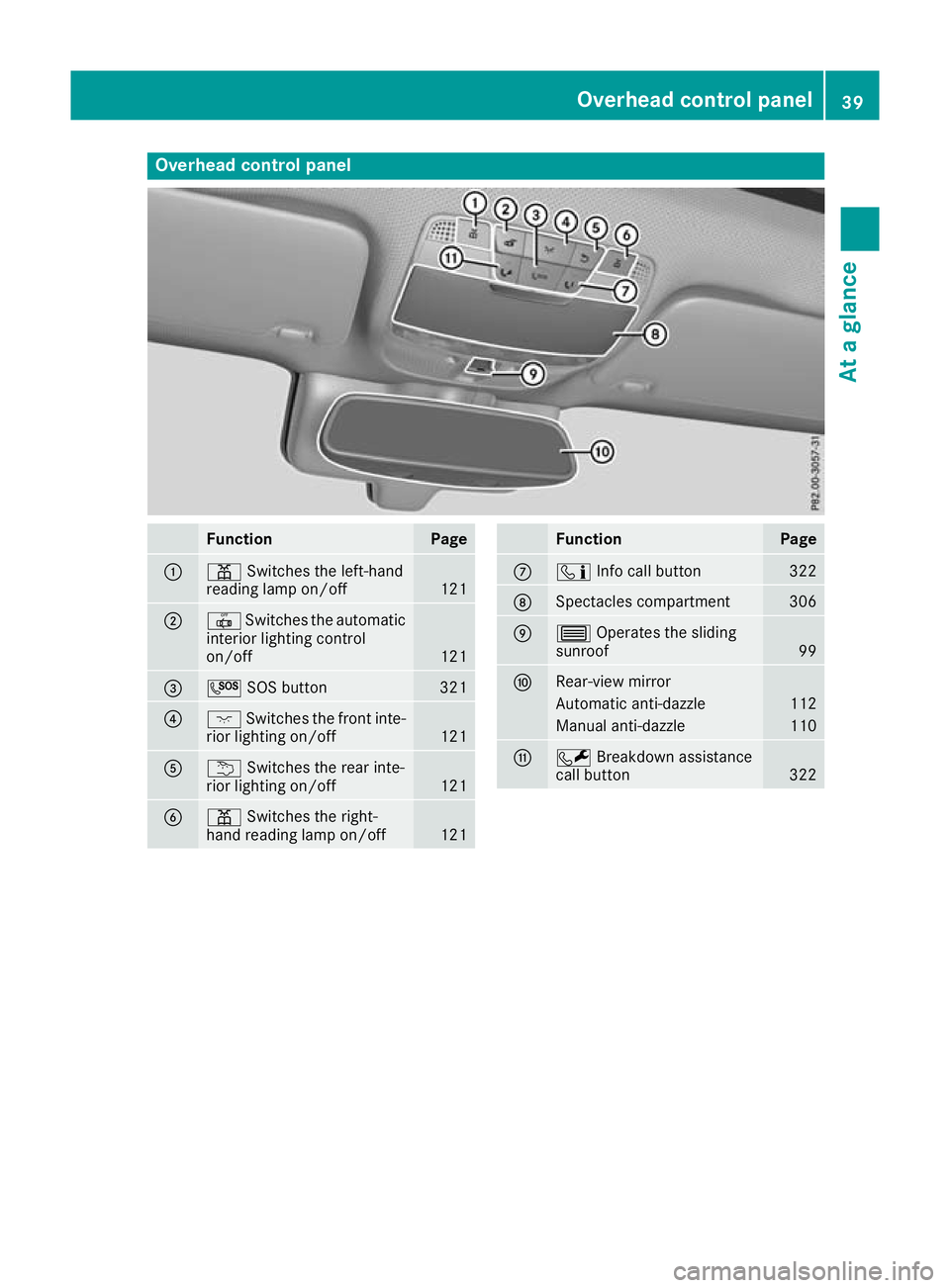
Overhead control panel
Function Page
:
p
Switches the left-hand
reading lamp on/off 121
;
|
Switches the automatic
interior lighting control
on/off 121
=
G
SOS button 321
?
c
Switches the front inte-
rior lighting on/off 121
A
u
Switches the rear inte-
rior lighting on/off 121
B
p
Switches the right-
hand reading lamp on/off 121 Function Page
C
ï
Info call button 322
D
Spectacles compartment 306
E
3
Operates the sliding
sunroof 99
F
Rear-view mirror
Automatic anti-dazzle 112
Manual anti-dazzle 110
G
F
Breakdown assistance
call button 322Overhead control panel
39At a glance
Page 84 of 389
Interior motion sensor
Function When the interior motion sensor is switched on,
a visual and audible alarm is triggered if move-
ment is detected in the vehicle interior. This can occur if someone reaches into the vehicle inte-
rior, for example.
Switching on/off The interior motion sensor is automatically
switched on and off with the ATA (Anti-Theft
Alarm system) when:
R the doors are closed
R the tailgate is closed
The interior motion sensor is active around ten
seconds after the ATA has been switched on
(Y page 79).
You can prevent false alarms by doing the fol-
lowing before switching on the ATA:
R close the side windows
R close the sliding sunroof
R make sure that no objects, such as mascots,
are attached to the rear-view mirror or the
grab handles on the roof trim
Deactivating If you want to lock your vehicle and people or
animals are inside it, you can deactivate the
interior motion sensor.
The interior motion sensor remains deactivated until you switch the ATA on again after opening
a door.
You can deactivate the interior motion sensor
via the multimedia system (see Digital Owner's
Manual). Protection against theft
81Safety Z
Page 104 of 389
Correct driver's seat position
G
WARNING
You could lose control of the vehicle while
driving if you:
R adjust the driver's seat, steering wheel or
mirrors
R fasten the seat belt
There is a risk of an accident.
Adjust the driver's seat, head restraint, steer-
ing wheel and mirrors and fasten your seat
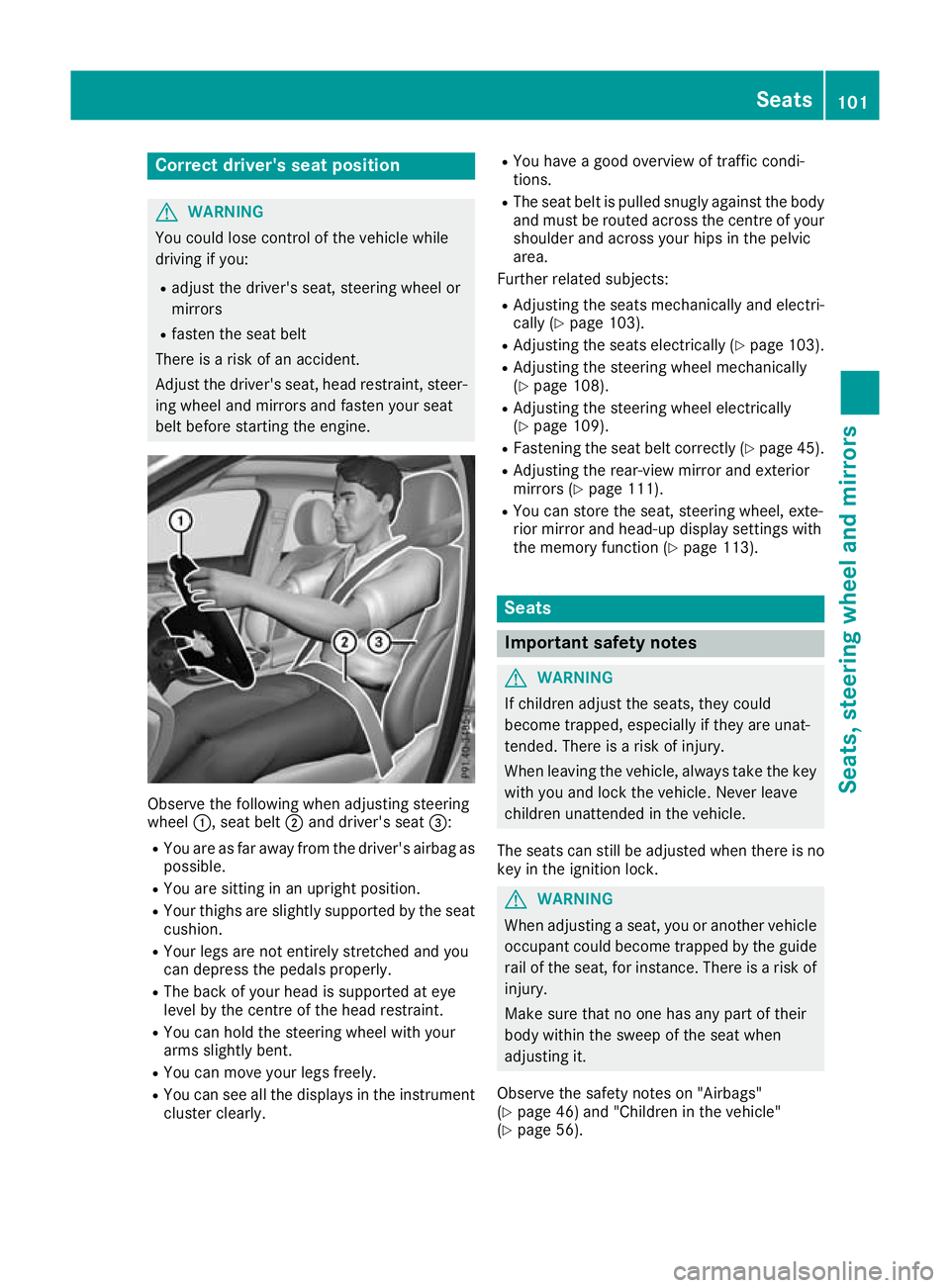
belt before starting the engine. Observe the following when adjusting steering
wheel
:, seat belt ;and driver's seat =:
R You are as far away from the driver's airbag as
possible.
R You are sitting in an upright position.
R Your thighs are slightly supported by the seat
cushion.
R Your legs are not entirely stretched and you
can depress the pedals properly.
R The back of your head is supported at eye
level by the centre of the head restraint.
R You can hold the steering wheel with your
arms slightly bent.
R You can move your legs freely.
R You can see all the displays in the instrument
cluster clearly. R
You have a good overview of traffic condi-
tions.
R The seat belt is pulled snugly against the body
and must be routed across the centre of your
shoulder and across your hips in the pelvic
area.
Further related subjects:
R Adjusting the seats mechanically and electri-
cally (Y page 103).
R Adjusting the seats electrically (Y page 103).
R Adjusting the steering wheel mechanically
(Y page 108).
R Adjusting the steering wheel electrically
(Y page 109).
R Fastening the seat belt correctly (Y page 45).
R Adjusting the rear-view mirror and exterior
mirrors (Y page 111).
R You can store the seat, steering wheel, exte-
rior mirror and head-up display settings with
the memory function (Y page 113). Seats
Important safety notes
G
WARNING
If children adjust the seats, they could
become trapped, especially if they are unat-
tended. There is a risk of injury.
When leaving the vehicle, always take the key with you and lock the vehicle. Never leave
children unattended in the vehicle.
The seats can still be adjusted when there is no
key in the ignition lock. G
WARNING
When adjusting a seat, you or another vehicle occupant could become trapped by the guiderail of the seat, for instance. There is a risk of
injury.
Make sure that no one has any part of their
body within the sweep of the seat when
adjusting it.
Observe the safety notes on "Airbags"
(Y page 46) and "Children in the vehicle"
(Y page 56). Seats
101Seats, steering wheel and mirrors Z
Page 108 of 389
Adjusting the head restraint height
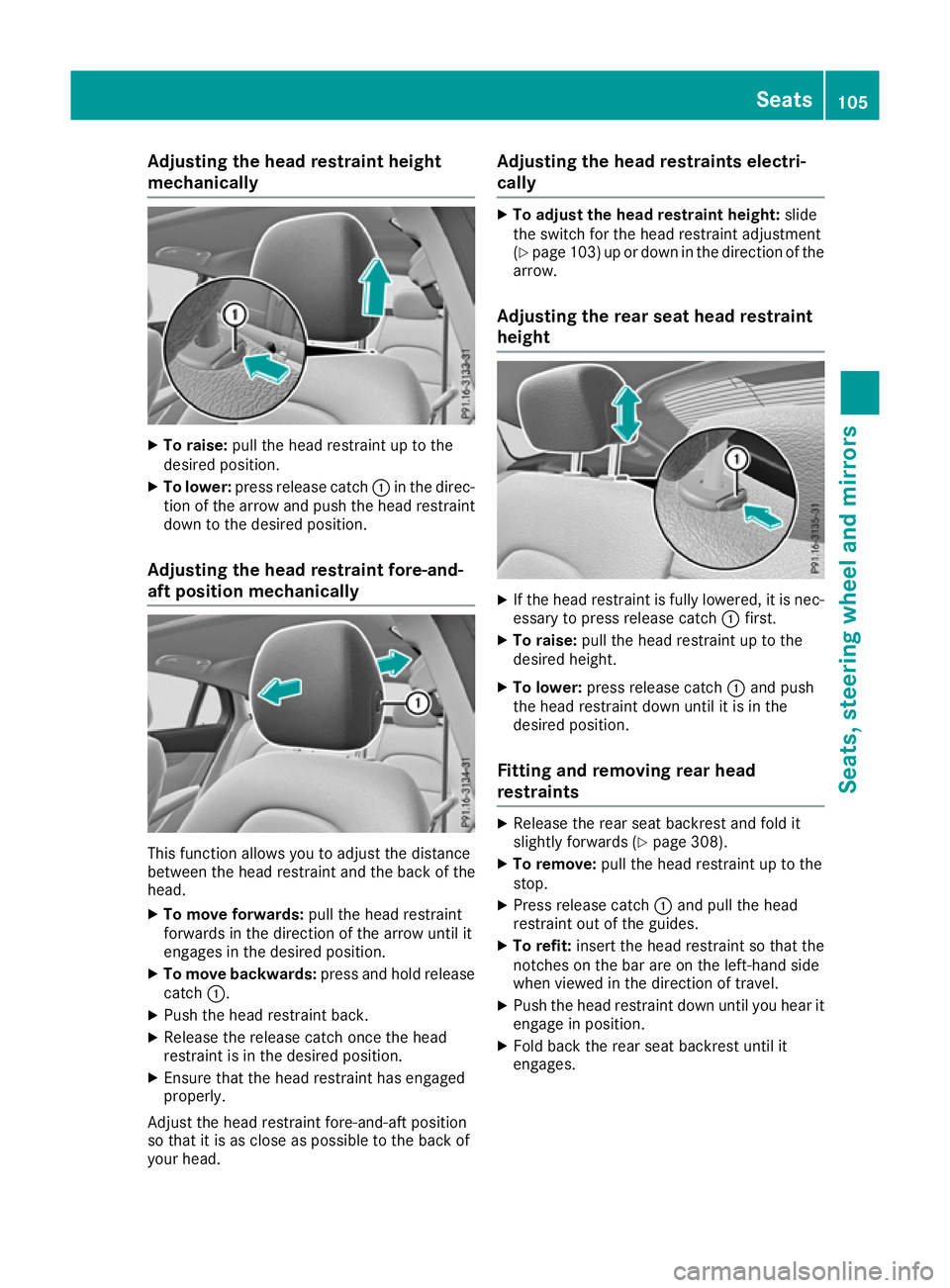
mechanically X
To raise: pull the head restraint up to the
desired position.
X To lower: press release catch :in the direc-
tion of the arrow and push the head restraint down to the desired position.
Adjusting the head restraint fore-and-
aft position mechanically This function allows you to adjust the distance
between the head restraint and the back of the
head.
X To move forwards: pull the head restraint
forwards in the direction of the arrow until it
engages in the desired position.
X To move backwards: press and hold release
catch :.
X Push the head restraint back.
X Release the release catch once the head
restraint is in the desired position.
X Ensure that the head restraint has engaged
properly.
Adjust the head restraint fore-and-aft position
so that it is as close as possible to the back of
your head. Adjusting the head restraints electri-
cally X
To adjust the head restraint height: slide
the switch for the head restraint adjustment
(Y page 103) up or down in the direction of the
arrow.
Adjusting the rear seat head restraint
height X
If the head restraint is fully lowered, it is nec-
essary to press release catch :first.
X To raise: pull the head restraint up to the
desired height.
X To lower: press release catch :and push
the head restraint down until it is in the
desired position.
Fitting and removing rear head
restraints X
Release the rear seat backrest and fold it
slightly forwards (Y page 308).
X To remove: pull the head restraint up to the
stop.
X Press release catch :and pull the head
restraint out of the guides.
X To refit: insert the head restraint so that the
notches on the bar are on the left-hand side
when viewed in the direction of travel.
X Push the head restraint down until you hear it
engage in position.
X Fold back the rear seat backrest until it
engages. Seats
105Seats, steering wheel and mirrors Z
Page 113 of 389
control of the vehicle. There is a risk of an
accident.
Always wait until the adjustment process is
complete before driving off.
The EASY-ENTRY/EXIT feature makes getting in
and out of your vehicle easier.
You can activate and deactivate the EASY-
ENTRY/EXIT feature using the multimedia sys-
tem (see the Digital Operating Instructions).
Position of the steering wheel when the
EASY-ENTRY/EXIT feature is active The steering wheel tilts upwards if you:
R remove the key from the ignition lock
R with KEYLESS-GO or KEYLESS-GO start
function: open the driver's door; the voltage
supply must be switched on
R with the key: open the driver's door; the key
must be in position 0or 1in the ignition lock
(Y page 144)
R open the driver's door when the ignition is
switched off
i The steering wheel tilts upwards only if the
driving position is stored after the steering
column adjustment has been adjusted
(Y page 113).
The most recent driving position of the steering
wheel is stored if:
R the ignition is switched off
R the setting is stored using the memory func-
tion (Y page 113)
i The steering wheel moves upwards only if it
has not already reached the upper steering
limiter.
Position of the steering wheel for driv-
ing The steering wheel is moved to the previously
set position if:
R the driver's door is closed and you insert the
key into the ignition lock
R you close the driver's door when the ignition
is switched on
R you press the Start/Stop button once in vehi-
cles with KEYLESS-GO or the KEYLESS-GO
start function i
The steering wheel returns to the last set
position only if the driving position is stored
after the seat or steering column has been
adjusted (Y page 113).
The most recent driving position of the steering
wheel is stored if:
R the ignition is switched off
R the setting is stored using the memory func-
tion (Y page 113)
Crash-responsive EASY-EXIT feature If the crash-responsive EASY-EXIT feature is trig-
gered in an accident, the steering column will
move upwards when the driver's door is opened
or the key is removed from the ignition lock. This
makes it easier to exit the vehicle and rescue the
occupants.
The crash-responsive EASY-EXIT feature is
operational only if the EASY-EXIT/ENTRY fea-
ture is activated in the multimedia system (see
Digital Operating Instructions). Mirrors
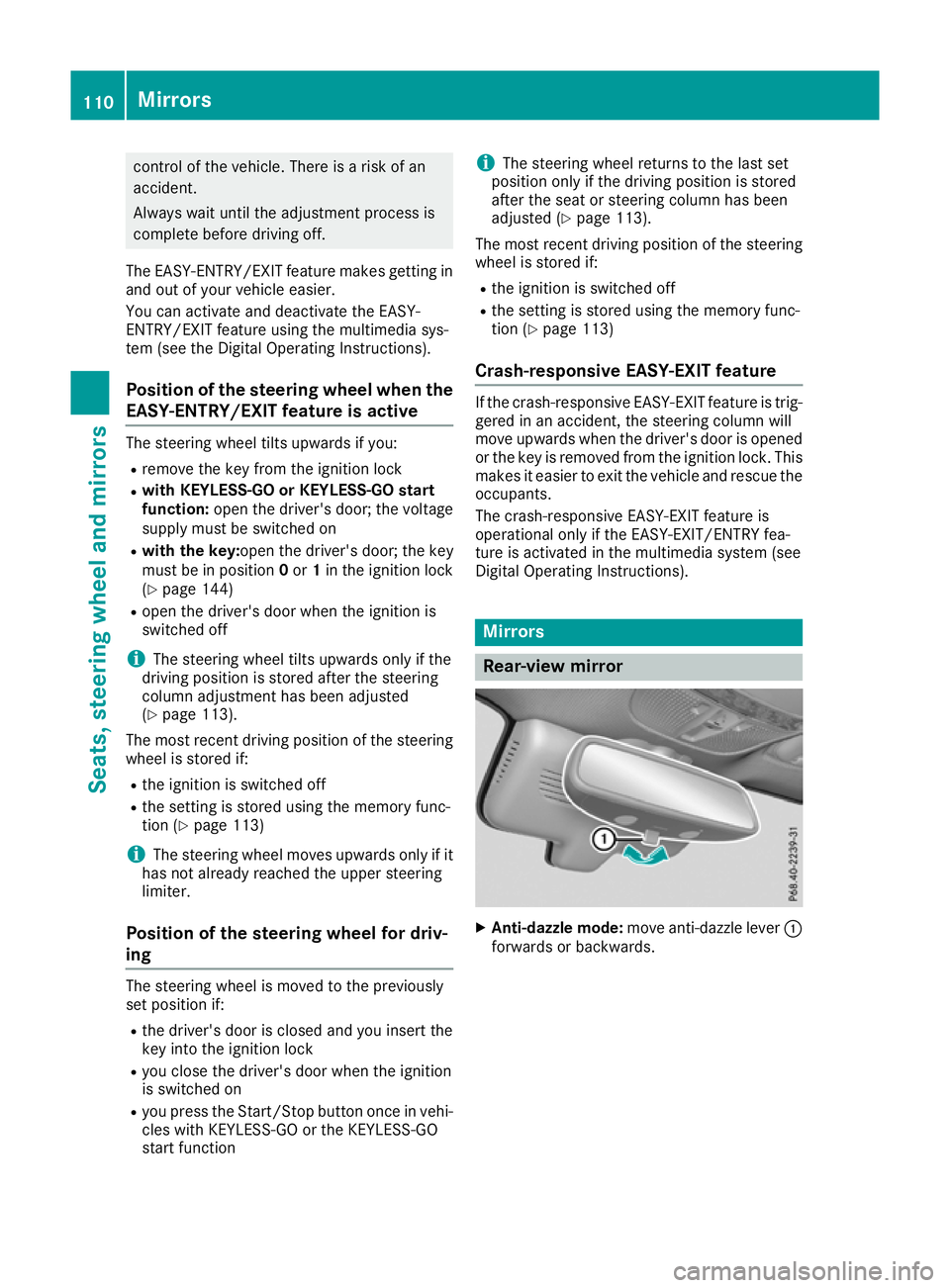
Rear-view mirror
X
Anti-dazzle mode: move anti-dazzle lever :
forwards or backwards. 110
MirrorsSeats, steering wheel and mirrors
Page 114 of 389
Exterior mirrors
Important safety notes G
WARNING
You could lose control of the vehicle while
driving if you:
R adjust the driver's seat, steering wheel or
mirrors
R fasten the seat belt
There is a risk of an accident.
Adjust the driver's seat, head restraint, steer-
ing wheel and mirrors and fasten your seat
belt before starting the engine. G
WARNING
The exterior mirrors reduce the size of the
image. Objects visible in the mirrors are
closer than they appear. You could misjudge
the distance from road users driving behind
you when changing lanes, for instance. There is a risk of an accident.
You should therefore always look over your
shoulder to determine the actual distance
from road users driving behind you.
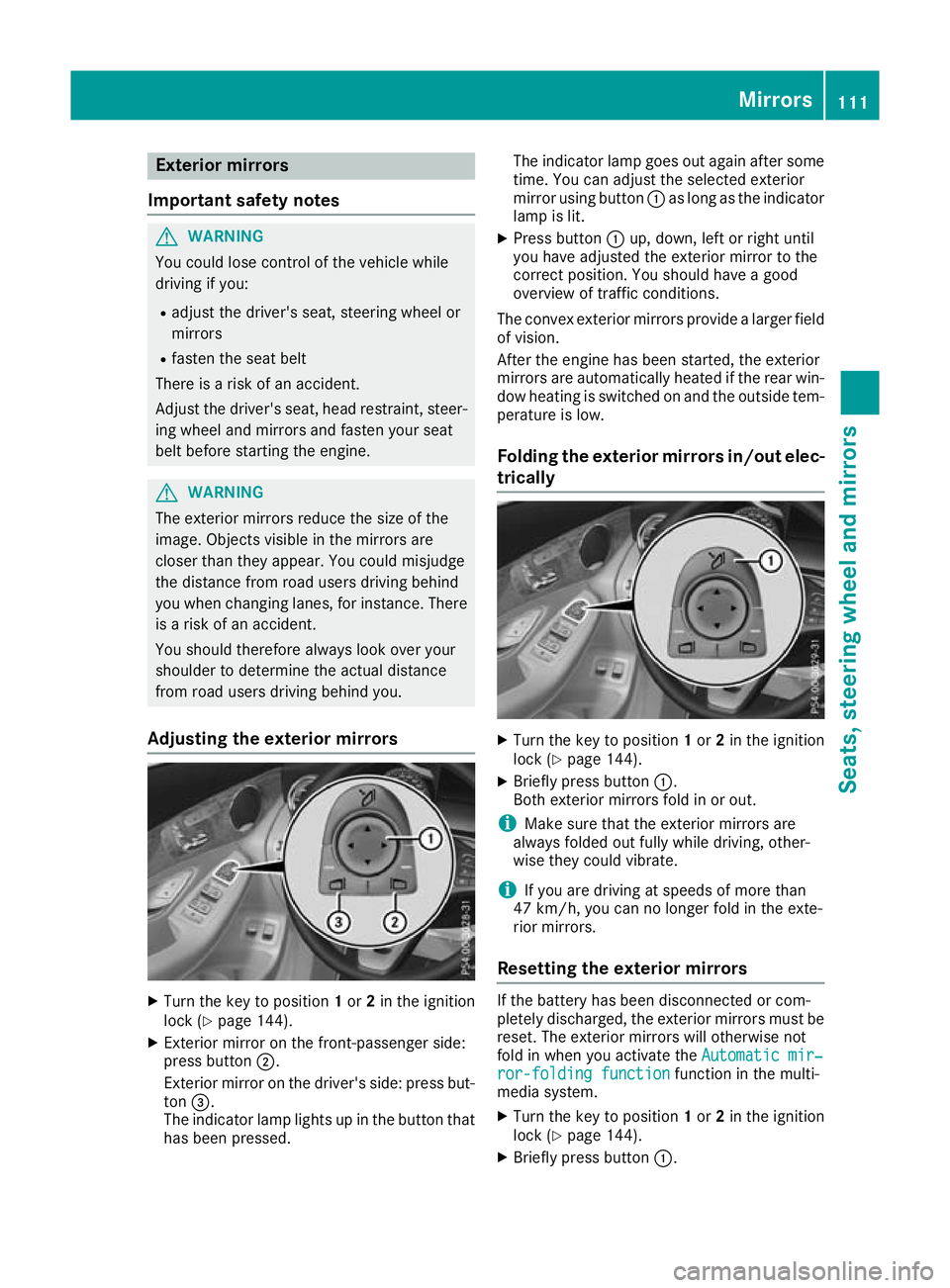
Adjusting the exterior mirrors X
Turn the key to position 1or 2in the ignition
lock (Y page 144).
X Exterior mirror on the front-passenger side:
press button ;.
Exterior mirror on the driver's side: press but-
ton =.
The indicator lamp lights up in the button that has been pressed. The indicator lamp goes out again after some
time. You can adjust the selected exterior
mirror using button :as long as the indicator
lamp is lit.
X Press button :up, down, left or right until
you have adjusted the exterior mirror to the
correct position. You should have a good
overview of traffic conditions.
The convex exterior mirrors provide a larger field of vision.
After the engine has been started, the exterior
mirrors are automatically heated if the rear win-
dow heating is switched on and the outside tem- perature is low.
Folding the exterior mirrors in/out elec- trically X
Turn the key to position 1or 2in the ignition
lock (Y page 144).
X Briefly press button :.
Both exterior mirrors fold in or out.
i Make sure that the exterior mirrors are
always folded out fully while driving, other-
wise they could vibrate.
i If you are driving at speeds of more than
47 km/h, you can no longer fold in the exte-
rior mirrors.
Resetting the exterior mirrors If the battery has been disconnected or com-
pletely discharged, the exterior mirrors must be reset. The exterior mirrors will otherwise not
fold in when you activate the Automatic mir‐ Automatic mir‐
ror-folding function
ror-folding function function in the multi-
media system.
X Turn the key to position 1or 2in the ignition
lock (Y page 144).
X Briefly press button :. Mirrors
111Seats, steering wheel and mirrors Z
Page 115 of 389
Folding the exterior mirrors in/out
automatically When the
Automatic
Automatic mirror-folding
mirror-folding func‐
func‐
tion
tion function is activated in the multimedia sys-
tem (see Digital Operating Instructions):
R the exterior mirrors fold in automatically as
soon as you lock the vehicle from the outside
R the exterior mirrors fold out again automati-
cally as soon as you unlock the vehicle
i If the exterior mirrors have been folded in
manually, they do not fold out.
Exterior mirror pushed out of position If an exterior mirror has been pushed out of
position (forwards or backwards), proceed as
follows:
X Vehicles without electrically folding exte-
rior mirrors: manually move the exterior mir-
ror into the correct position.
X Vehicles with electrically folding exterior
mirrors: press and hold button :until you
hear a click and then the mirror engaging in
position (Y page 111).
The mirror housing is engaged again and you
can adjust the exterior mirrors as usual
(Y page 111). Automatic anti-dazzle mirrors
G
WARNING
Electrolyte may escape if the glass of an auto- matic anti-dazzle mirror breaks. Electrolyte is
harmful and causes irritation. It must not
come into contact with your skin, eyes, res-
piratory organs or clothing or be swallowed.
There is a risk of injury.
If you come into contact with electrolyte,
observe the following:
R immediately rinse off electrolyte from your
skin with water.
R immediately and thoroughly rinse electro-
lyte out of eyes using clean water.
R if electrolyte is swallowed, immediately
rinse out your mouth thoroughly. Do not
induce vomiting. R
if electrolyte comes into contact with skin
or eyes or is swallowed, seek medical atten-
tion immediately.
R immediately change out of clothing that has
been in contact with electrolyte.
R if an allergic reaction occurs, seek medical
attention immediately.
The exterior mirror on the driver's side and the
rear-view mirror automatically go into anti-daz-
zle mode if:
R the ignition is switched on
R incident light from headlamps strikes the sen-
sor in the rear-view mirror
The mirrors do not dip if reverse gear is engaged or if the interior lighting is switched on. Parking position for the exterior mir-
ror on the front-passenger side
Storing the parking position You can adjust the front-passenger-side exterior
mirror such that you can see the rear wheel on
that side as soon as you engage reverse gear.
You can store this position.
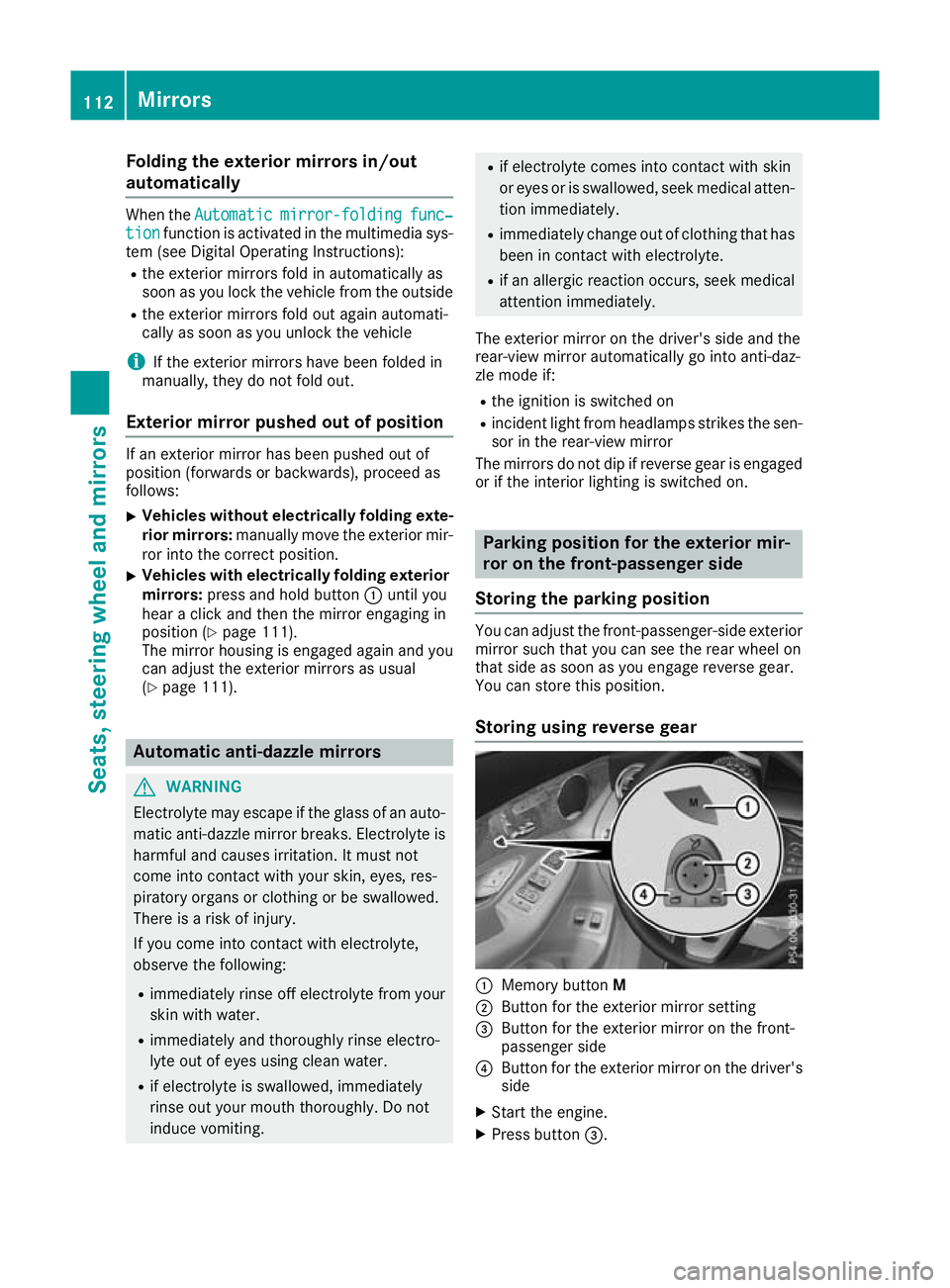
Storing using reverse gear :
Memory button M
; Button for the exterior mirror setting
= Button for the exterior mirror on the front-
passenger side
? Button for the exterior mirror on the driver's
side
X Start the engine.
X Press button =.112
MirrorsSeats, steering wheel and
mirrors