brake light MERCEDES-BENZ GLC COUPE 2017 X253 Owner's Manual
[x] Cancel search | Manufacturer: MERCEDES-BENZ, Model Year: 2017, Model line: GLC COUPE, Model: MERCEDES-BENZ GLC COUPE 2017 X253Pages: 370, PDF Size: 6.08 MB
Page 6 of 370
1, 2, 3 ...
4ETS (Electronic Traction System)see ETS/4ETS (Electronic Trac-
tion System)
4MATIC (permanent four-wheel
drive) .................................................. 170
12 V socket
see Socket (12 V)
115 V socket ...................................... 288
360° camera
Cleaning .........................................3 10
Display in the multimedia system .. 183
Function/notes .............................1 82
A
ABS (Anti-lock Braking System)
Display message ............................ 223
Function/notes ................................ 64
Warning lamp ................................. 254
Accident
Automatic measures after an acci-
dent ................................................. 57
Activating media mode
General notes ................................ 271
Activating/deactivating cooling
with air dehumidification ................. 120
Active Blind Spot Assist
Activating/deactivating (on-
board computer) ............................ 216
Display message ............................ 241
Function/notes .............................1 92
Active Lane Keeping Assist
Activating/deactivating (on-
board computer) ............................ 216
Display message ............................ 240
Function/information .................... 195
Active light function
Display message ............................ 234
Active Parking Assist
Canceling ....................................... 177
Detecting parking spaces .............. 174
Exiting a parking space .................. 176
Function/notes ............................. 173
Important safety notes .................. 173
Parking .......................................... 175
ADAPTIVE BRAKE ................................. 72 Adaptive Brake Assist
Function/notes ................................ 68
Adaptive Damping System
Function/notes ............................. 169
Adaptive Damping System (ADS) ..... 168
Adaptive Highbeam Assist
Display message ............................ 235
Function/notes ............................. 110
Switching on/off ........................... 111
Additional speedometer ................... 218
Additives (engine oil) ........................ 362
Address book
see also Digital Operator's Man-
ual .................................................. 263
Adjusting the volume
Multimedia system ........................ 264
Air bags
Deployment ..................................... 54
Display message ............................ 232
Front air bag (driver, front
passenger) ....................................... 48
Important safety notes .................... 47
Introduction ..................................... 47
Knee bag .......................................... 49
Occupant Classification System
(OCS) ............................................... 50
P
ASSENGER AIR BAG indicator
lamps ............................................... 43
Side impact air bag .......................... 49
Window curtain air bag .................... 49
AIR BODY CONTROL
Display message ............................ 239
Function/notes ............................. 167
Lowering the rear of the vehicle .... 169
Raising the rear of the vehicle ....... 169
Setting the normal vehicle level ..... 168
Setting the raised vehicle level ...... 168
Air filter (display message) .............. 238
Air suspension
see AIR BODY CONTROL
Air vents
Important safety notes .................. 124
Rear ............................................... 125
Setting ........................................... 124
Setting the center air vents ........... 125
Setting the side air vents ............... 125
Air-conditioning system
see Climate control
4Index
Page 8 of 370
Bag hook............................................ 279
Ball coupling
Installing ........................................ 199
Removing ....................................... 201
BAS (Brake Assist System) ................. 64
BAS PLUS with Cross-Traffic Assist
(Brake Assist PLUS with Cross-
Traffic Assist)
Function/notes ................................ 65
Important safety notes .................... 65
Battery (SmartKey)
Checking .......................................... 79
Important safety notes .................... 79
Replacing ......................................... 79
Battery (vehicle)
Charging ........................................ 321
Display message ............................ 236
Important safety notes .................. 319
Jump starting ................................. 322
Blind Spot Assist
Activating/deactivating (on-
board computer) ............................ 216
Display message ............................ 241
Notes/function .............................. 188
see Active Blind Spot Assist
Blootooth
®
Connecting a different mobile
phone ............................................ 271
BlueTEC
see DEF
Bluetooth
®
Searching for a mobile phone ........ 270
see also Digital Operator's Man-
ual .................................................. 263
Telephony ...................................... 270
Brake Assist
see BAS (Brake Assist System)
Brake fluid
Display message ............................ 228
Notes ............................................. 362
Brake force distribution
see EBD (electronic brake force
distribution)
Brake linings
Display message ............................ 228
Brakes
ABS .................................................. 64 Adaptive Brake Assist ...................... 68
BAS .................................................. 64
BAS PLUS with Cross-Traffic
Assist ............................................... 65
Brake fluid (notes) ......................... 362
Display message ............................ 223
EBD .................................................. 72
Hill start assist ............................... 131
HOLD function ............................... 166
Important safety notes .................. 154
Maintenance .................................. 155
Parking brake ................................ 150
Riding tips ...................................... 154
Warning lamp ................................. 253
Breakdown
Where will I find...? ........................ 313
see Flat tire
see Towing away
Brightness contro l (
instrument
cluster lighting) ................................... 34
Buttons on the steering wheel ......... 204
C
California
Important notice for retail cus-
tomers and lessees .......................... 27
Calling up a malfunction
see Display messages
Calling up the climate control bar
Multimedia system ........................ 267
Calling up the climate control
menu
Multimedia system ........................ 268
Camera
see 360° camera
see Rear view camera
Car
see Vehicle
Care
360° camera ................................. 310
Car wash ........................................ 305
Carpets .......................................... 312
Display ........................................... 310
Exhaust pipe .................................. 310
Exterior lights ................................ 309
General notes ................................ 305
Interior ........................................... 310
6Index
Page 11 of 370
Important safety notes .................. 361
Low outside temperatures .............361
Purity ............................................. 361
DEF
®
Additives ........................................ 361
Diagnostics connection ......................30
Diesel .................................................. 36 0
Digital Operator's Manua l
Help ................................................ .25
Introduction .....................................2 5
Digital speedomete r........................ .208
DIRECT SELECT lever
Automatic transmission ................. 136
Display
see Display messages
see Warning and indicator lamps
Display messages
ASSYST PLUS ................................ 304
Calling up (on-board computer) ..... 222
Driving systems .............................2 39
Engine ............................................ 235
General notes ................................ 221
Hiding (on-board computer) ........... 222
Introduction ................................... 221
Lights ............................................. 234
Safety systems .............................. 223
SmartKey ....................................... 250
Tires ............................................... 245
Vehicle ...........................................2 47
Distance recorder .............................2 07
Distance warning (warning lamp) .... 260
Distance warning function
Function/notes ................................ 67
Distance warning system
see COLLISION PREVENTION
ASSIST PLUS
DISTRONIC PLUS
Activating ....................................... 160
Activation conditions ..................... 160
Cruise control lever ....................... 160
Deactivating ................................... 164
Display message ............................ 242
Displays in the instrument clus ter .. 163
Dri
ving tips ....................................1 64
Driving with DISTRONIC PLUS ....... 161
Function/notes .............................1 59
Important safety notes .................. 159 Setting a speed .............................. 162
Setting the specified minimum
distance ......................................... 162
Stopping ........................................ 162
with Steering Assist and Stop&Go
Pilot ............................................... 164
Doors
Automatic locking (switch) ...............8 3
Central locking/unlocking
(Sm artKey) ...................................... .76
Control panel .................................. .41
Display message ............................ 249
Emergency locking ........................... 83
Emergency unlocking ....................... 83
Important safety notes .................... 82
Opening (from inside) ...................... 82
Drinking and driving ......................... 152
Drive program
Automatic transmission ................. 139
SETUP (on-board computer,
Mercedes-AMG vehicles) ............... 219
Drive programs
Display (DIRECT SELECT lever) ...... 137
DYNAMIC SELECT switch .............. 134
Driver's door
see Doors
Driving abroad
Mercedes-Benz Service ................. 305
Driving Assistance PLUS package ... 192
Driving on flooded roads .................. 156
Driving safety system
Crosswind Assist ............................. 72
Driving safety systems
ABS (Anti-lock Braking System) ....... 64
ADAPTIVE BRAKE ............................. 72
Adaptive Brake Assist ...................... 68
BAS (Brake Assist System) .............. 64
BAS PLUS with Cross-Traffic
Assist ............................................... 65
COLLISION PREVENTION ASSIST
PLUS ................................................ 66
Distance warning function ............... 67
EBD (electronic brake force distri-
bution) ............................................. 72
ESP®(Electronic Stability Pro-
gram) ............................................... 69
Important safety information ........... 64
Index9
Page 18 of 370
Assistance menu ........................... 215
Display messages .......................... 221
Displaying a service message ........ 304
Displays and operation .................. 203
DISTRONIC PLUS ........................... 163
Factory settings ............................. 218
G-Meter ......................................... 219
Head-up display ............................. 206
Important safety notes .................. 203
Instrument cluster menu ............... 218
Lights menu ................................... 217
Media menu ................................... 211
Menu overview .............................. 207
Message memory .......................... 222
Navigation menu ............................ 209
RACETIMER ................................... 220
Radio menu ................................... 211
Service menu ................................. 214
Settings menu ............................... 215
Standard display ............................ 207
Telephone menu ............................ 213
Trip menu ...................................... 207
Video DVD operation ..................... 212
Operating safety
Declaration of conformity ................ 29
Important safety notes .................... 29
Operating system
see On-board computer
Operation
Digital Operator's Manual ................ 25
Operator's Manual
Overview .......................................... 27
Vehicle equipment ........................... 27
Outside temperature display ........... 204
Overhead control panel ...................... 40
Override feature
Rear side windows ........................... 63
P
Paddle shifterssee Steering wheel paddle shifters
Paint code number ............................ 357
Paintwork (cleaning instructions) ... 307
Panic alarm .......................................... 42
Parcel net ........................................... 280
Parking
Important safety notes .................. 149 Parking brake ................................ 150
Parking position for the exterior
mirror on the front-passenger
side ................................................ 105
Rear view camera .......................... 177
Switching off the engine ................ 150
see PARKTRONIC
Parking aid
see 360° camera
see Active Parking Assist
see Exterior mirrors
see PARKTRONIC
see Rear view camera
Parking Assist
Display message ............................ 241
Parking brake
Applying automatically ................... 151
Applying or releasing manually ...... 151
Display message ............................ 225
Electric parking brake .................... 150
Emergency braking ........................ 152
General notes ................................ 150
Releasing automatically ................. 151
Warning lamp ................................. 257
Parking lamps
Switching on/off ........................... 109
PARKTRONIC
Deactivating/activating ................. 172
Driving system ............................... 170
Function/notes ............................. 170
Important safety notes .................. 170
Problem (malfunction) ................... 173
Range of the sensors ..................... 171
Warning display ............................. 172
PASSENGER AIR BAG
Display message ............................ 232
Indicator lamps ................................ 43
Problems (malfunction) .................. 232
Perfume atomizer
Operating ....................................... 123
Problem (malfunction) ................... 124
Setting the perfume intensity
(multimedia system) ...................... 268
Vial ................................................ 123
Pets in the vehicle ............................... 63
Phone book
see also Digital Operator's Man-
ual .................................................. 263
16Index
Page 33 of 370
The following text is reproduced as required of
all manufacturers under Title 49, Code of U.S.
Federal Regulations, Part 575 pursuant to the
National Traffic and Motor Vehicle Safety Act of
1966.
If you believe that your vehicle has a defect
which could cause a crash or could cause injury
or death, you should immediately inform the
National Highway Traffic Safety Administration
(NHTSA) in addition to notifying Mercedes-Benz USA, LLC.
If NHTSA receives similar complaints, it may
open an investigation, and if it finds that a safety
defect exists in a group of vehicles, it may order
a recall and remedy campaign. However, NHTSA
cannot become involved in individual problems
between you, your dealer, or Mercedes-Benz
USA, LLC.
To contact NHTSA, you may call the Vehicle
Safety Hotline toll-free at 1-888-327-4236
(TTY: 1-800-424-9153); go tohttp://
www.safercar.gov; or write to: Administrator,
NHTSA, 400 Seventh Street, SW., Washington,
DC 20590.
You can also obtain other information about
motor vehicle safety from
http://www.safercar.gov
Limited Warranty
!
Follow the instructions in this manual about
the proper operation of your vehicle as well as
about possible vehicle damage. Damage to
your vehicle that arises from culpable contra-
ventions against these instructions is not cov-
ered either by the Mercedes-Benz Limited
Warranty or by the New or Used-Vehicle War-
ranty.
QR codes for the rescue card
The QR codes are secured in the fuel filler flap
and on the opposite side on the B-pillar. In the
event of an accident, rescue services can use
the QR code to quickly find the appropriate res-
cue card for your vehicle. The current rescue
card contains the most important information
about your vehicle in a compact form, e.g. the
routing of the electric cables.
You can find more information under
www.mercedes-benz.de/qr-code.
Data stored in the vehicle
Data storage
A wide range of electronic components in your
vehicle contain data memories.
These data memories temporarily or perma-
nently store technical information about:
Rthe vehicle's operating state
Rincidents
Rmalfunctions
In general, this technical information docu-
ments the state of a component, a module, a
system or the surroundings.
These include, for example:
Roperating conditions of system components,
e.g. fluid levels
Rthe vehicle's status messages and those of its
individual components, e.g. number of wheel
revolutions/speed, deceleration in move-
ment, lateral acceleration, accelerator pedal
position
Rmalfunctions and defects in important system
components, e.g. lights, brakes
Rvehicle reactions and operating conditions in
special driving situations, e.g. air bag deploy-
ment, intervention of stability control sys-
tems
Rambient conditions, e.g. outside temperature
This data is of an exclusively technical nature
and can be used to:
Rassist in recognizing and rectifying malfunc-
tions and defects
Ranalyze vehicle functions, e.g. after an acci-
dent
Roptimize vehicle functions
The data cannot be used to trace the vehicle's
movements.
When your vehicle is serviced, technical infor-
mation can be read from the event data memory
and malfunction data memory.
Services include, for example:
Rrepair services
Rservice processes
Rwarranties
Rquality assurance
The vehicle is read out by employees of the ser-
vice network (including the manufacturer) using special diagnostic testers. More detailed infor-
mation is obtained from it, if required.
Data stored in the vehicle31
Introduction
Z
Page 36 of 370
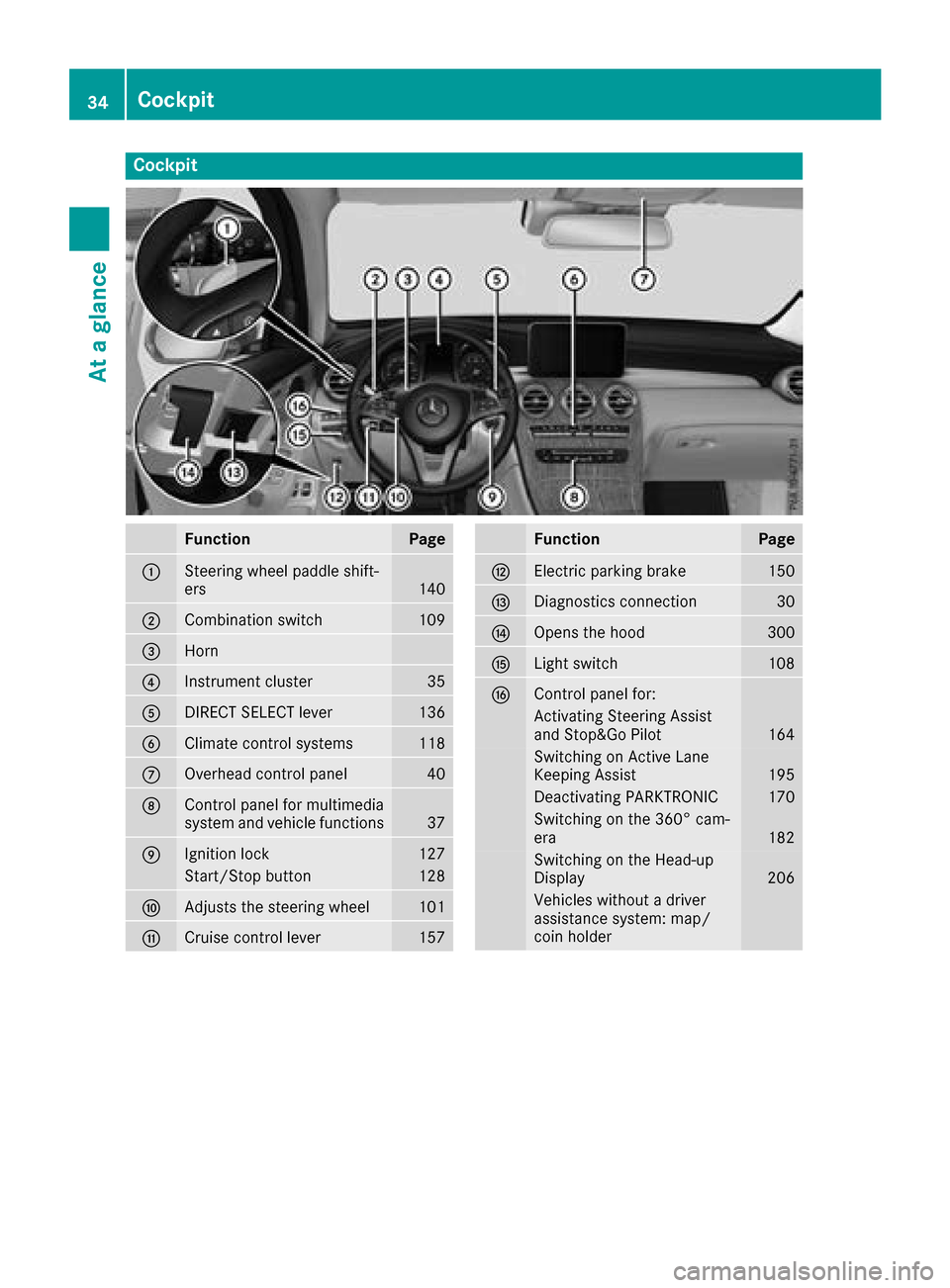
Cockpit
FunctionPage
:Steering wheel paddle shift-
ers140
;Combination switch109
=Horn
?Instrument cluster35
ADIRECT SELECT lever136
BClimate control systems118
COverhead control panel40
DControl panel for multimedia
system and vehicle functions37
EIgnition lock127
Start/Stop button128
FAdjusts the steering wheel101
GCruise control lever157
FunctionPage
HElectric parking brake150
IDiagnostics connection30
JOpens the hood300
KLight switch108
LControl panel for:
Activating Steering Assist
and Stop&Go Pilot164
Switching on Active Lane
Keeping Assist195
Deactivating PARKTRONIC170
Switching on the 360° cam-
era182
Switching on the Head-up
Display206
Vehicles without a driver
assistance system: map/
coin holder
34Cockpit
At a glance
Page 59 of 370
PRE-SAFE®takes the following measures
depending on the hazardous situation detected:
Rthe front seat belts are pre-tensioned.
Rif the vehicle skids, the side windows and the
sliding sunroof are closed.
Rvehicles with the memory function for the
front-passenger seat: the front-passenger
seat is adjusted if it is in an unfavorable posi-
tion.
If the hazardous situation passes without result-
ing in an accident, PRE-SAFE
®slackens the belt
pre-tensioning. All settings made by PRE-SAFE®
can then be reversed.
If the seat belt pre-tensioning is not reduced:
XMove the seat backrest or seat back slightly
when the vehicle is stationary.
The seat belt pre-tensioning is reduced and
the locking mechanism is released.
The seat-belt adjustment is an integral part of
the PRE-SAFE
®convenience function. Informa-
tion about the convenience function can be
found under "Belt adjustment" (
Ypage 46).
PRE-SAFE®PLUS (anticipatory occu-
pant protection system PLUS)
Introduction
PRE-SAFE®PLUS is only available in vehicles
with the Driving Assistance package.
Using the radar sensor system, PRE-SAFE
®
PLUS is able to detect that a head-on or rear-end
collision is imminent. In certain hazardous sit-
uations, PRE-SAFE
®PLUS takes pre-emptive
measures to protect the vehicle occupants.
Important safety notes
The intervention of PRE-SAFE®PLUS cannot
prevent an imminent collision.
The driver is not warned about the intervention
of PRE-SAFE
®PLUS.
PRE-SAFE®PLUS does not intervene:
Rif the vehicle is backing up
Rwhen the vehicle is towing a trailer and there
is a risk of a rear-end collision
When driving, or when parking or exiting a park- ing space with assistance from Active Parking Assist, PRE-SAFE
®PLUS will not apply the
brakes.
Function
PRE-SAFE®PLUS intervenes in certain situa-
tions if the radar sensor system detects an
imminent head-on or rear-end collision.
PRE-SAFE
®PLUS takes the following measures
depending on the hazardous situation detected:
Rif the radar sensor system detects that a
head-on collision is imminent, the seat belts
are pre-tensioned.
Rif the radar sensor system detects that a rear-
end collision is imminent:
-the brake pressure is increased if the driver
applies the brakes when the vehicle is sta-
tionary.
-the seat belts are pre-tensioned.
The PRE-SAFE®PLUS braking application is can-
celed:
Rif the accelerator pedal is depressed when a
gear is engaged
Rif the risk of a collision passes or is no longer
detected
Rif DISTRONIC PLUS indicates an intention to
pull away
If the hazardous situation passes without result-
ing in an accident, the original settings are
restored.
Automatic measures after an acci-
dent
Immediately after an accident, the following
measures are implemented, depending on the
type and severity of the impact:
Rthe hazard warning lamps are activated
Rthe emergency lighting is activated
Rthe vehicle doors are unlocked
Rthe front side windows are lowered
Rvehicles with a memory function: the electri-
cally adjustable steering wheel is raised
Rthe engine is switched off and the fuel supply
is cut off
Rvehicles with mbrace: automatic emergency
call
Occupant safety57
Safety
Z
Page 60 of 370
Children in the vehicle
Important safety notes
Accident statistics show that children secured
in the rear seats are safer than children secured
in the front-passenger seat. For this reason,
Mercedes-Benz strongly advises that you install
a child restraint system on a rear seat. Children are generally better protected there.
If a child younger than twelve years old and
under 5 ft (1.50 m) in height is traveling in the
vehicle:
Ralways secure the child in a child restraint
system suitable for Mercedes-Benz vehicles.
The child restraint system must be appropri-
ate to the age, weight and size of the child
Rbe sure to observe the instructions and safety
notes in this section in addition to the child
restraint system manufacturer's installation
instructions
Rbe sure to observe the instructions and safetynotes on the "Occupant classification system
(OCS)" (
Ypage 50)
GWARNING
If you leave children unsupervised in the vehi-
cle, they could set it in motion by, for example:
Rrelease the parking brake.
Rshift the automatic transmission out of the
parking position P.
Rstart the engine.
In addition, they may operate vehicle equip-
ment and become trapped. There is a risk of
an accident and injury.
When leaving the vehicle, always take the
SmartKey with you and lock the vehicle. Never
leave children unsupervised in the vehicle.
GWARNING
If persons, particularly children are subjected to prolonged exposure to extreme heat or
cold, there is a risk of injury, possibly even
fatal. Never leave children unattended in the
vehicle.
GWARNING
If the child restraint system is subjected to
direct sunlight, parts may get very hot. Chil-
dren may burn themselves on these parts,
particularly on the metal parts of the child
restraint system. There is a risk of injury.
If you leave the vehicle, taking the child with
you, always ensure that the child restraint
system is not exposed to direct sunlight. Pro- tect it with a blanket, for example. If the child
restraint system has been exposed to direct
sunlight, let it cool down before securing the
child in it. Never leave children unattended in
the vehicle.
Always ensure that all vehicle occupants have
their seat belts fastened correctly and are sitting
properly. Particular attention must be paid to
children.
Observe the safety notes on the seat belt
(
Ypage 44 )and the notes on correct use of seat
belts (Ypage 45).
A booster seat may be necessary to achieve
proper seat belt positioning for children over
41 lb s(18 kg) until they reach a height where a
three-point seat belt can be properly fastened
without a booster seat.
Special seat belt retractor
GWARNING
If the seat belt is released while driving, the
child restraint system will no longer be
secured properly. The special seat belt retrac- tor is disabled and the inertia real draws in a
portion of the seat belt. The seat belt cannot
be immediately refastened. There is an
increased risk of injury, possibly even fatal.
Stop the vehicle immediately, paying atten-
tion to road and traffic conditions. Reactivate
the special seat belt retractor and secure the
child restraint system properly.
All seat belts in the vehicle, except the driver's
seat belt, are equipped with a special seat belt
retractor. When activated, the special seat belt
retractor ensures that the seat belt cannot
slacken once the child seat is secured.
58Children in the vehicle
Safety
Page 64 of 370
Forward-facing child restraint system
Always moveth efront-passenger's seat as far
bac kas possible if th echild must be secured on
th efront-passenger seat in aforward-facing
child restrain tsystem. Full yretrac tth eseat
cushion length. The base of th echild restrain t
system must always res ton th eseat cushion of
th efront-passenger's seat .As muc has possible
of th ebackrest of th echild restrain tsystem
must be resting on th ebackrest of th efront-
passenger's seat .The child restrain tsystem
may no ttouch th eroo for be subjected to aload
by th ehead restraint. Adjus tth eangle of th e
seat backrest and th ehead restraint position
accordingly. Always mak esure th eshoulder belt
is correctly secured ,runnin gfrom th ebelt outlet
to th ebelt guide of th echild restrain tsystem.
The shoulder belt strap must be routed forward
and down from th evehicl ebelt outlet .Adjus tth e
belt outlet and front-passenger seat as required.
Always comply wit hth emanufacturer' sinstal -
lation and operating instruction sfor th echild
restrain tsystem.
Child-proof locks
Important safety notes
GWARNIN G
If children are traveling in th evehicle, they
could:
Ropen doors, thus endangering other people
or road user s
Rexit thevehicl eand be caught by oncomin g
traffic
Roperate vehicl eequipmen tand become
trapped
Ther eis aris kof an acciden tand injury.
Always activat eth echild-proof locks and
override feature if children are traveling in th e
vehicle. When leaving th evehicle, always tak e
th eke ywit hyou and loc kth evehicle. Never
leav echildren unattended in th evehicle.
Override feature for :
Rtherear door s (Ypage 63)
Rtherear side windows (Ypage 63)
GWARNING
If you leav echildren unsupervised in th evehi-
cle ,they could set it in motion by, for example :
Rrelease theparking brake.
Rshif tth eautomatic transmission out of th e
parking position P.
Rstart theengine.
In addition ,they may operate vehicl eequip-
men tand become trapped .Ther eis aris kof
an acciden tand injury.
When leaving th evehicle, always tak eth e
SmartKey wit hyou and loc kth evehicle. Never
leav echildren unsupervised in th evehicle.
GWARNIN G
If persons, particularly children are subjected to prolonged exposure to extreme heat or
cold, there is aris kof injury, possibly eve n
fatal. Never leav echildren unattended in th e
vehicle.
GWARNIN G
If th echild restraint system is subjected to
direct sunlight, part smay get ver yhot .Chil-
dre nmay burn themselve son these parts,
particularly on th emetal part sof th echild
restraint system. Ther eis aris kof injury.
If you leav eth evehicle, taking th echild wit h
you, always ensure that th echild restraint
system is no texposed to direct sunlight. Pro -
tect it wit h ablanket, for example. If th echild
restraint system has been expose dto direct
sunlight, let it cool down before securin gth e
child in it .Never leav echildren unattended in
th evehicle.
62Children in the vehicle
Safety
Page 66 of 370
Important safety notes
If you fail to adapt your driving style or if you are
inattentive, thedriving safet ysystems can nei-
ther reduce th eris kof an acciden tno roverride
th elaws of physics .Drivin gsafet ysystems are
merely aids designed to assist driving .You are
responsible for maintainin gth edistanc eto th e
vehicl ein front, for vehicl espeed, for braking in
goo dtime, and for staying in lane. Always adapt
your driving style to suit th eprevailing road and
weather condition sand maintai n asafedistanc e
from th evehicl ein front. Drive carefully.
The driving safet ysystems describe donly wor k
as effectivel yas possible when there is ade-
quat econtact between th etires and th eroad
surface. Pay particular attention to th einforma-
tion regarding tires ,recommended minimum
tire tread depths etc. in th e"Wheels and tires "
section (
Ypage 330).
In wintr ydriving conditions, always use winte r
tires (M+ Stires )and if necessary, snow chains.
Only in this way will the driving safety systems
described in this section work as effectively as
possible.
ABS (Anti-lock Braking System)
General information
ABS regulates brake pressure in such a way that
the wheels do not lock when you brake. This
allows you to continue steering the vehicle when
braking.
The ! ABS warning lamp in the instrument
cluster lights up when the ignition is switched
on. It goes out when the engine is running.
ABS works from a speed of about 5 mph
(8 km/h), regardless of road-surface conditions.
ABS works on slippery surfaces, even when you
only brake gently.
Important safety notes
iObserve the "Important safety notes" sec-
tion (Ypage 64).
GWARNING
If ABS is faulty, the wheels could lock when
braking. The steerability and braking charac-
teristics may be severely impaired. Addition-
ally, further driving safety systems are deac-
tivated. There is an increased danger of skid-
ding and accidents.
Drive on carefully. Have ABS checked imme-
diately at a qualified specialist workshop.
When ABS is malfunctioning, other systems,
including driving safety systems, will also
become inoperative. Observe the information
on the ABS warning lamp (
Ypage 254) and dis-
play messages which may be shown in the
instrument cluster (
Ypage 223).
Braking
XIf ABS intervenes: continue to depress the
brake pedal vigorously until the braking sit-
uation is over.
XTo make a full brake application: depress
the brake pedal with full force.
If ABS intervenes when braking, you will feel a
pulsing in the brake pedal.
The pulsating brake pedal can be an indication
of hazardous road conditions, and functions as a reminder to take extra care while driving.
BAS (Brake Assist System)
General information
BAS operates in emergency braking situations.
If you depress the brake pedal quickly, BAS
automatically boosts the braking force, thus
shortening the stopping distance.
Important safety notes
iObserve the "Important safety notes" sec-
tion (Ypage 64).
GWARNING
If BAS is malfunctioning, the braking distance
in an emergency braking situation is
increased. There is a risk of an accident.
In an emergency braking situation, depress
the brake pedal with full force. ABS prevents
the wheels from locking.
64Driving safety systems
Safety