sensor MERCEDES-BENZ GLC COUPE 2019 User Guide
[x] Cancel search | Manufacturer: MERCEDES-BENZ, Model Year: 2019, Model line: GLC COUPE, Model: MERCEDES-BENZ GLC COUPE 2019Pages: 657, PDF Size: 11.28 MB
Page 102 of 657
Interior pr
otection is only primed when thefo l‐
lowing components are closed:
R the doors
R theta ilgate
Interior pr otection is automatically deactivated:
R afte r pressing theÜ orp button on
th ekey
R afte r pressing thest art/ stop button with the
ke y in thestow age compartment
(/ page 168)
R afte r unlocking theve hicle using KEYLESS-
GO
R when using HANDS-FREE ACCESS
The following situations can lead toafa lse
alarm:
R moving objects such as masc ots in theve hi‐
cle interior
R when the side window is open
R when the sliding sunroof is open Priming/deactivating interior pr
otection Multimedia sy
stem:
4 © 5
Settings 5
Quick access #
Prime or deactivate Interior motion sensor.
Interior pr otection is primed again in thefo llow‐
ing cases:
R The vehicle is unloc ked again.
R A door is opened.
R The vehicle is loc ked again.
% Ifqu ick access is una vailable, select the
Vehicle menu under Settingstoprime or
deactivate interior pr otection. Opening and closing
99
Page 145 of 657
The function is automatically deactivated under
th efo llowing conditions:
R Atspeeds abo ve100 km/h af ter activation.
R When there ar fog light is switched off.
% The enhanced fog light function can be acti‐
va ted up toa speed of 100 km/h byswitch‐
ing on there ar fog light.
Switching the Intelligent Light Sy stem
on/off
Re quirements:
R the ignition is switched on.
Multimedia sy stem:
4 © 5
Settings 5
Lights
5 Intelligent Light System #
Activate or deacti vate the function. Ad
aptive Highbeam Assist Ad
aptive Highbeam Assist function &
WARNING Risk of accident despi te
Ad aptive Highbeam Assist
Ad aptive Highbeam Assist does not recog‐
nise thefo llowing road users:
R Road users without lights, e.g. pedes‐
trians
R Road users with poor lighting, e.g.
cyclists
R Road users whose lighting is obstructed,
e.g. bya bar rier
On very rare occasions, Adaptive Highbeam
Assist may failto recognise other road users
with their own lighting, or may recognise
th em too late.
In this, or in similar situations, the automatic
main beam will not be deactivated or will be
activated despite the presence of other road
users. #
Alw ays obser vethe tra ffic carefully and
switch off the main beam in good time. Ad
aptive Highbeam Assist cannot take into
account road, weather or traf fic conditions.
De tection may be restricted in thefo llowing
cases:
R In poor visibilit y,e.g. fog, heavy rain or snow
R Ifth ere is dirt on the sensors or the sensors
are obscured
Ad aptive Highbeam Assist is on lyan aid. You are
re sponsible for adju sting theve hicle's lighting to
th e pr evailing light, visibility and traf fic condi‐
tions.
% Adaptive Highbeam Assist is available on ly in
ve hicles with LED high per form ance head‐
lamps. 14 2
Light and sight
Page 146 of 657
The
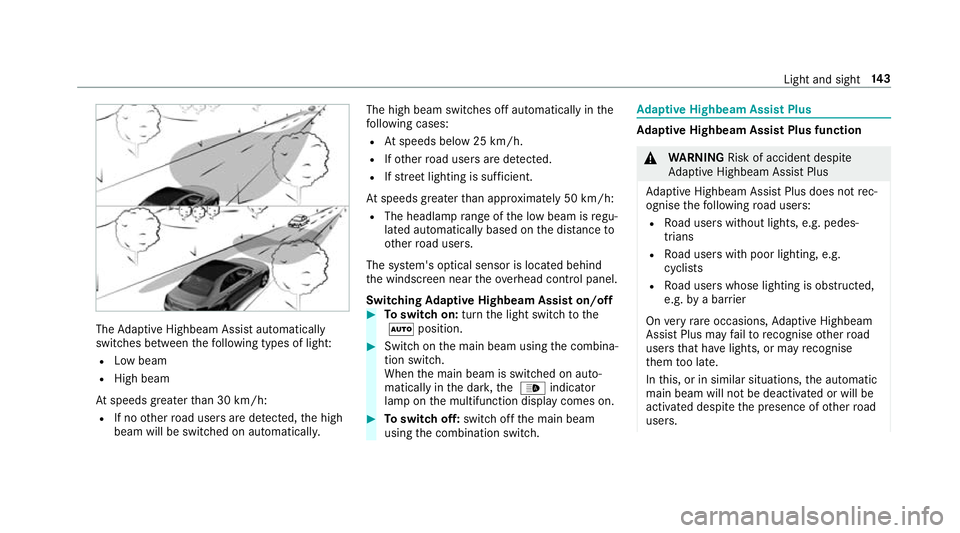
Adaptive Highbeam Assist automatically
swit ches between thefo llowing types of light:
R Low beam
R High beam
At speeds greater than 30 km/h:
R If no other road users are de tected, the high
beam will be switched on automaticall y.The high beam switches off automatically in
the
fo llowing cases:
R Atspeeds below 25 km/h.
R Ifot her road users are de tected.
R Ifstre et lighting is suf ficient.
At speeds greater than appr oximately 50 km/h:
R The headlamp range of the low beam is regu‐
lated automatically based on the dis tance to
ot her road users.
The sy stem's optical sensor is located behind
th e windscreen near theov erhead control panel.
Switching Adaptive Highbeam Assist on/off #
Toswitch on: turnthe light switch tothe
à position. #
Switch on the main beam using the combina‐
tion switch.
When the main beam is switched on auto‐
matically in the dar k,the _ indicator
lamp on the multifunction display comes on. #
Toswitch off: switch offthe main beam
using the combination switch. Ad
aptive Highbeam Assist Plus Ad
aptive Highbeam Assist Plus function &
WARNING Risk of accident despi te
Ad aptive Highbeam Assist Plus
Ad aptive Highbeam Assist Plus does not rec‐
ognise thefo llowing road users:
R Road users without lights, e.g. pedes‐
trians
R Road users with poor lighting, e.g.
cyclists
R Road users whose lighting is obstructed,
e.g. bya bar rier
On very rare occasions, Adaptive Highbeam
Assist Plus may failto recognise other road
users that ha velights, or may recognise
th em too late.
In this, or in similar situations, the automatic
main beam will not be deactivated or will be
activated despite the presence of other road
users. Light and sight
14 3
Page 147 of 657
#
Alw ays obser vethe tra ffic carefully and
switch off the main beam in good time. Ad
aptive Highbeam Assist Plus cannot take into
account road, weather or traf fic conditions.
De tection may be restricted in thefo llowing
cases:
R in poor visibilit y,e.g. fog, heavy rain or snow
R ifth ere is dirt on the sensors or the sensors
are obscured
Ad aptive Highbeam Assist Plus is on lyan aid.
Yo u are responsible for adju sting theve hicle's
lighting tothe pr evailing light, visibility and traf‐
fi c conditions. The
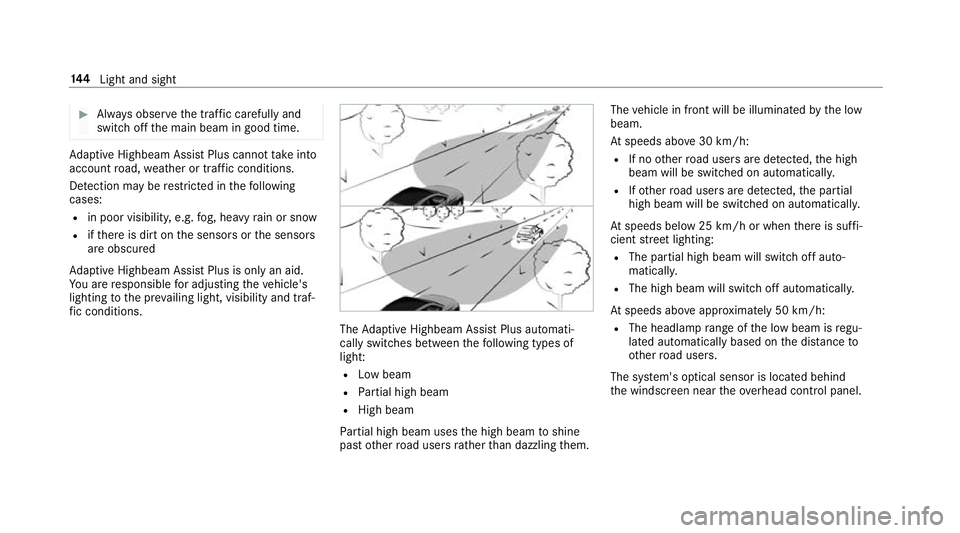
Adaptive Highbeam Assist Plus automati‐
cally swit ches between thefo llowing types of
light:
R Low beam
R Partial high beam
R High beam
Pa rtial high beam uses the high beam toshine
past other road users rath er than dazzling them. The
vehicle in front will be illuminated bythe low
beam.
At speeds abo ve30 km/h:
R If no other road users are de tected, the high
beam will be switched on automaticall y.
R Ifot her road users are de tected, the partial
high beam will be switched on automatically.
At speeds below 25 km/h or when there is suf fi‐
cient stre et lighting:
R The partial high beam will switch off auto‐
maticall y.
R The high beam will switch off automatically.
At speeds abo veappr oximately 50 km/h:
R The headlamp range of the low beam is regu‐
lated automatically based on the dis tance to
ot her road users.
The sy stem's optical sensor is located behind
th e windscreen near theove rhead control panel. 14 4
Light and sight
Page 154 of 657
The inside
rearview mir ror and the outside mir‐
ro r on the driver's side automatically go into
anti-dazzle mode if light from a headlamp hits
th e sensor on the inside rearview mir ror.
Sy stem limitations
The sy stem does not go into anti-dazzle mode in
th efo llowing situations:
R the engine is switched off
R reve rsege ar is engaged
R the interior lighting is switched on Fr
ont-passenger outside mir ror parking posi‐
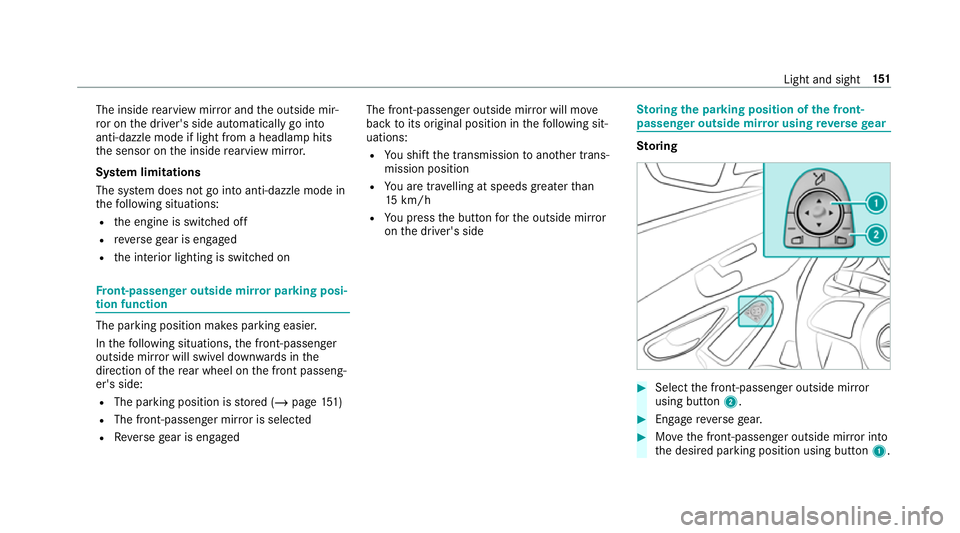
tion function The pa
rking position makes parking easier.
In thefo llowing situations, the front-passen ger
outside mir ror will swivel down wards in the
direction of there ar wheel on the front passeng‐
er's side:
R The parking position is stored (/ page151)
R The front-passenger mir ror is selected
R Reversege ar is engaged The front-passenger outside mir
ror will mo ve
back toits original position in thefo llowing sit‐
uations:
R You shift the transmission toano ther trans‐
mission position
R You are tra velling at speeds greaterth an
15 km/h
R You press the button forth e outside mir ror
on the driver's side St
oring the pa rking position of the front-
passenger outside mir ror using reve rsege ar St
oring #
Select the front-passen ger outside mir ror
using but ton2. #
Engage reve rsege ar. #
Movethe front-passen ger outside mir ror into
th e desired parking position using button 1. Light and sight
151
Page 173 of 657
#
open a side window or the sliding sunroof. Ru
nning-in no tes Mercedes-AMG
vehicles: observeth e no tes in
th e Supplement. Otherwise, you may failto rec‐
ognise dangers.
To preser vethe engine during thefirs t1, 500 km:
R drive at varying road speeds and engine
speeds.
R drive theve hicle in drive program A
or ;.
R change gear before there v counter needle is
Ô ofthewa yto there d area of there v coun‐
te r.
R do not shift down a gear manually in order to
brake.
R avoidoverstra ining theve hicle, e.g. driving at
full thro ttle.
R do not depress the accelera tor pedal past
th e pressure point (kickdown). R
only increase the engine speed gradually and
accelerate theve hicle tofull speed af ter
1, 500 km.
This also applies when the engine or parts of the
driv etra in ha vebeen replaced.
Please also obser vethefo llowing running-in
no tes:
R in cer tain driving and driving saf ety sy stems,
th e sensors adjust automatically while a cer‐
ta in dis tance is being driven af terth eve hicle
has been delivered or af terre pairs. Full sys‐
te m ef fectiveness is not reached until the
end of this teach-in process.
R brakepads, brake discs and tyres that are
either new or ha vebeen replaced only ach‐
ie ve optimum braking ef fect and grip af ter
se veral hundred kilom etre s of driving. Com‐
pensate forth ere duced braking ef fect by
applying greaterfo rc eto the brake pedal. Note
s on driving &
WARNING Risk of accident due to
objects in the driver's foot we ll
Objects in the driver's foot we ll may impede
pedal tr avel or block a depressed pedal.
This jeopardises the operating and road
saf ety of theve hicle. #
Stow all objects in theve hicle securely
so that they cannot getinto the driver's
fo ot we ll. #
Alw aysfit th efloor mats securely and
as prescribed in order toensure that
th ere is alw ays suf ficient room forthe
pedals. #
Do not use loose floor mats and do not
place floor mats on top of one ano ther. 17 0
Driving and pa rking
Page 202 of 657
St
andby mode (extension of the star ter bat‐
te ry 's period out of use) St
andby mode function
% This function is not available for all models.
If standby mode is activated, ene rgy loss will be
minimised during extended pe riods of non-oper‐
ation.
St andby mode is characterised bythefo llowing:
R thest ar ter battery is preser ved.
R the maximum non-operational time appears
in the media displa y.
R the connection toonline services is inter rup‐
te d.
R theAT A (anti-theft alarm sy stem) is not avail‐
able.
R the interior pr otection and tow- aw ay protec‐
tion functions are not available.
R the function for de tecting damage on a
pa rked vehicle is not available. If
th efo llowing conditions are fulfilled, standby
mode can be activated or deactivated using the
multimedia sy stem:
R the engine is switched off.
R the ignition is switched on.
Exceeding theve hicle's displa yed non-opera‐
tional time may cause incon venience, i.e. it can‐
not be guaranteed that thest ar ter battery will
re liably start the engine.
The star ter battery must be charge dfirs t in the
fo llowing situations:
R The vehicle's non-operational time must be
ex tended.
R The Battery charge insufficient for standby
mode messa geappears in the media displa y.
% Standby mode is automatically deactivated
when the ignition is switched on.
Ac tivating/deactivating standby mode (park‐
ing up theve hicle)
Re quirements:
R The engine is switched off. Multimedia sy
stem:
4 © 5
Settings 5
Vehicle #
Switch Standby mode on or off.
When you activate the function, a prom pt
appears. #
Select Yes.
St andby mode is activated. Driving and driving saf
ety sy stems Driving sy
stems and your responsibility Yo
ur vehicle is equipped with driving sy stems
which assist you in driving, parking and manoeu‐
vring theve hicle. The driving sy stems are aids
and do not relie ve you of your responsibility per‐
ta ining toroad traf fic la w.Pay attention tothe
traf fic conditions at all times and inter vene
when necessa ry. Be aware of the limitations
re ga rding the safe use of these sy stems. Information on
radar and ultrasonic senso rs Some driving and driving sa
fety sy stems use
ra dar or ultrasonic sensors tomonitor the area Driving and parking
19 9
Page 203 of 657
in front of, behind or next
totheve hicle (depend‐
ing on theve hicle's equipment).
Depending on theve hicle's equipment, thera dar
sensors are integrated behind the bumpers
and/or behind the Mercedes star. The ultrasonic
sensors are located in the front and rear bump‐
ers. Keep these parts free of dirt, ice and slush
(/ page 475). The se nsors mustnot be cov‐
ered, forex ample bycycle rack s, ove rhanging
loads, sticke rs,fo il or foils toprotect against
st one chipping. Additional license plate brac kets
can li kewise impair the function of the ultrasonic
sensors. In theev ent of damage tothe bumpers
or radiator grille, or following a collision impact‐
ing the bumpers or radiator grille, ha vethe func‐
tion of the sensors checked at a qualified spe‐
cialist workshop. If the sensors are damaged,
some driving sy stems and driving saf ety sy stems
may no longer function proper ly. Overview of driving sy
stems and driving
saf ety sy stems In
this section, you will find information about
th efo llowing driving sy stems and driving saf ety
sy stems:
R 360° Camera (/ page243)
R ABS ( Anti-lo ckBra king System)
(/ page 201)
R Active Dis tance Assi stDISTRONIC
(/ page 216)
R Adaptive Brake Lights (/ page212)
R AIR BODY CONTROL (/ page 230)
R Active Brake Assi st (/ page 206)
R Active Lane Keeping Assist (/ page 260)
R ATTENTION ASSIST (/ page 253)
R BAS (Bra keAssist System) (/ page 201)
R Hill Start Assist (/ page 228)
R DYNA MIC BODY CONTROL (/ page 230)
R EBD ( Electronic Brakeforc eDistribution)
(/ page 206) R
ESP ®
(Elect ronic Stability Program)
(/ page 201)
R ESP ®
Crosswind Assist (/ page 205)
R ESP ®
trailer stabilisation (/ page 206)
R Active Speed Limit Assi st (/ page 220)
R HOLD function (/ page 228)
R STEER CONTROL (/ page 206)
R Active Steering Assist with rescue lane func‐
tion (/ page 222)
R Limiter (/ page213)
R Active Emergency Stop Assist (/ page 226)
R Active Parking Assist (/ page247)
R Parking Assist PARKTRONIC (/ page 233)
R Reversing camera (/ page240)
R Active Lane Change Assi st (/ page 224)
R Cruise control (/ page212)
R Blind Spot Assi stand Active Blind Spot Assi st
with exitwa rning (/ page 257)
R Traf fic Sign Assi st (/ page 255) 200
Driving and parking
Page 214 of 657
R
Activation byan abrupt steering mo vement
during a swerving manoeuvre.
R Assis tance du ring swerving and stra ightening
of theve hicle.
R Reaction from a speed of appr oximately
20 km/h up toa speed of appr oximately
70 km/h.
Yo u can pr eventthe assis tance at any time by
actively steering. &
WARNING Risk of an accident despi te
Evasive Steering Assist
Evasive Steering Assist cann otalw ays clearly
identify objects and complex traf fic situa‐
tions.
In addition, thesteering support of Evasive
St eering Assist is general lynot su fficient to
avo id a collision.
In such cases Evasive Steering Assist can:
R give an unnecessary warning or pr ovide
assis tance R
not gi veawa rning or not pr ovide assis‐
ta nce #
Alw ays pay careful attention tothe traf‐
fi c situation; do not rely on Ev asive
St eering Assist alone. #
Beready tobrake and take evasive
action, if necessar y. #
Preve ntthe assis tance byactively
st eering in non-critical driving situa‐
tions. #
Drive at an appropriate speed if pedes‐
trians are close tothe path of your vehi‐
cle. Sy
stem limits
Fu ll sy stem per form ance is not available for a
fe w seconds af ter switching on the ignition or
af te r driving off.
The sy stem may be impaired or may not function
in thefo llowing situations:
R In sno w,rain, fog, heavy spr ay, if there is
gl are, in direct sunlight or in greatlyvarying
light conditions. R
Ifth e sensors are dirty, mis ted up, damaged
or co vered.
R Ifth e sensors are impaired due tointer fer‐
ence from other radar sources, e.g. strong
ra dar reflections in multi-s torey car par ks.
R If a loss of tyre pressure or a defective tyre
has been de tected and displ ayed.
R In complex traf fic situations whe reobjects
cannot always be clearly identified.
R If pedestrians or vehicles mo vequickly into
th e sensor de tection range.
R If pede strians are hidden by other objects.
R Ifth e typical outline of a pedestrian cann ot
be distinguished from the bac kground.
R If a pedestrian is not de tected as su ch, e.g.
due tospecial clo thing or other objects.
R On bends with a tight radius. Setting
Active Brake Assi st Requ
irements:
R The ignition is switched on. Driving and parking
211
Page 220 of 657
urban speed
ranges (e xcept bicycles and
mo torcyc les).
R Initiates acceleration tothestored speed if
th e turn signal indicator is switched on to
ch ange totheove rtaking lane.
R Vehicles with Driving Assistance Pack‐
age: takes one-sided overtaking restrictions
into account on mo torw ays or on multi-lane
ro ads with separate car riag ewa ys(countr y-
dependent).
Ve hicles with Active Parking Assist and Driv‐
ing Assistance Package: ifth eve hicle has
been braked toast andstill on multi-lane, sepa‐
ra te car riag ew aysby Active Dis tance Assi st
DISTRONIC, it can au tomatically follow theve hi‐
cle in front driving off again within 30 seconds. If
a critical situation is de tected when driving off, a
visual and acoustic warning is given indicating
th at the driver must now take control of theve hi‐
cle. The vehicle is not accelerated any fur ther.
Ac tive Dis tance Assi stDISTRONIC is only an aid.
The driver is responsible forke eping a safe dis‐
ta nce totheve hicle in front, forve hicle speed
and for braking in good time. Sy
stem limits
The sy stem may be impaired or may not function
in thefo llowing situations:
R In sno w,rain, fog, heavy spr ay, if there is
gl are, in direct sunlight or in great lyvarying
light conditions.
R The windsc reen in the area of the camera is
dirty, mis ted up, damaged or co vered.
R Ifth era dar sensors are dirty or co vered.
R In multi- stor ey car pa rks or on roads with
st eep uphill or downhill gradients.
R Ifth ere are nar rowvehicles in front, such as
bicycles or mo torcyc les.
In addition, on slippery roads, braking or accel‐
erating can cause one or se veral wheels tolose
traction and theve hicle could then skid.
Do not use Active Dis tance Assi stDISTRONIC in
th ese situations. &
WARNING Risk of accident from acceler‐
ation or braking byActive Dis tance
Assi stDISTRONIC
Ac tive Dis tance Assi stDISTRONIC may accel‐
erate or brake in thefo llowing cases, for
ex ample:
R Ifth eve hicle pulls away using Active Dis‐
ta nce Assi stDISTRONIC.
R Ifth estored speed is called up and is
considerably faster or slo werth an the
cur rently driven speed.
R IfAc tive Dis tance Assi stDISTRONIC no
longer de tects a vehicle in front or does
not react toreleva nt objects. #
Alw ays carefully obser vethe traf fic con‐
ditions and be ready tobrake at all
times. #
Take into account the tra ffic situation
before calling up thestored speed. Driving and parking
217