display MERCEDES-BENZ GLC COUPE 2021 Manual PDF
[x] Cancel search | Manufacturer: MERCEDES-BENZ, Model Year: 2021, Model line: GLC COUPE, Model: MERCEDES-BENZ GLC COUPE 2021Pages: 481, PDF Size: 9 MB
Page 242 of 481
The sy
stem may be impaired or may not function
in thefo llowing situations:
R The gradient is more than appr oximately
15 %.
Using Trailer Manoeuvring Assist
Requ irements:
R The vehicle has been star ted and is station‐
ar y.
R A trailer has been de tected.
R The gradient is less than appr oximately 15%.
R The elect ric pa rking brake is not applied. Using
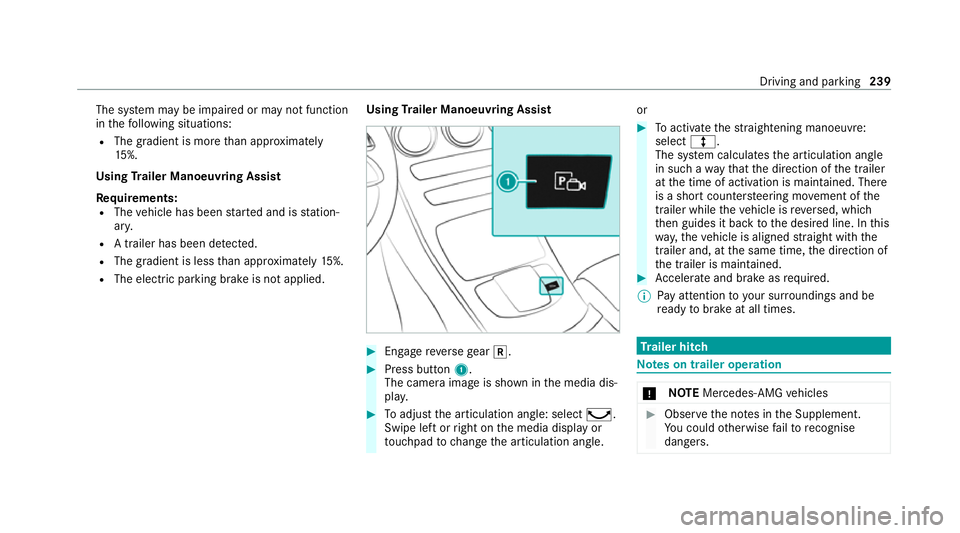
Trailer Manoeuvring Assist #
Engage reve rsege ar k. #
Press button 1.
The camera image is shown in the media dis‐
pla y. #
Toadjust the articulation angle: select ¸.
Swipe left or right on the media display or
to uchpad tochange the articulation angle. or #
Toactivate thest ra ightening manoeuvre:
select º.
The sy stem calculates the articulation angle
in such a wayth at the direction of the trailer
at the time of activation is maintained. There
is a short counter steering mo vement of the
trailer while theve hicle is reve rsed, which
th en guides it back tothe desired line. In this
wa y,theve hicle is aligned stra ight with the
trailer and, at the same time, the direction of
th e trailer is maintained. #
Accelerate and brake as requ ired.
% Pay attention toyour sur roundings and be
re ady tobrake at all times. Tr
ailer hitch Note
s on trailer operation *
NO
TEMercedes-AMG vehicles #
Obser vethe no tes in the Supplement.
Yo u could otherwise failto recognise
dangers. Driving and park
ing239
Page 245 of 481
Re
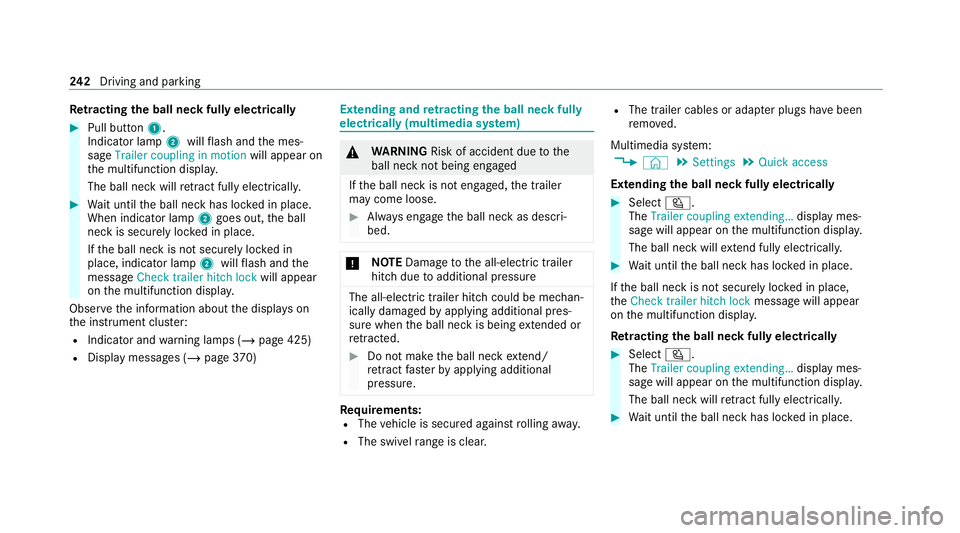
tracting the ball ne ckfully electrical ly#
Pull button 1.
Indicator lamp 2willflash and the mes‐
sage Trailer coupling in motion will appear on
th e multifunction displa y.
The ball neck will retract fully electrically. #
Wait until the ball neck has loc ked in place.
When indicator lamp 2goes out, the ball
neck is securely loc ked in place.
If th e ball neck is not securely loc ked in
place, indicator lamp 2willflash and the
messa geCheck trailer hitch lock will appear
on the multifunction displa y.
Obser vethe information about the displa yson
th e instrument clus ter:
R Indicator and warning lamps (/ page 425)
R Display messages (/ page370) Extending and
retracting the ball ne ckfully
electrically (multimedia sy stem) &
WARNING Risk of accident due tothe
ball neck not being engaged
If th e ball neck is not engaged, the trailer
may come loose. #
Alw ays engage the ball neck as descri‐
bed. *
NO
TEDama getothe all-electric trailer
hitch due toadditional pressure The all-electric trailer hit
chcould be mechan‐
ically damaged byapplying additional pres‐
sure when the ball neck is being extended or
re tracted. #
Do not ma kethe ball neck extend/
re tract faster by applying additional
pressure. Re
quirements:
R The vehicle is secured against rolling away.
R The swivel range is clear. R
The trailer cables or adap ter plugs ha vebeen
re mo ved.
Multimedia sy stem:
4 © 5
Settings 5
Quick access
Extending the ball neck fully electrically #
Select Ü.
The Trailer coupling extending… display mes‐
sage will appear on the multifunction displa y.
The ball neck will extend fully electrically. #
Wait until the ball neck has loc ked in place.
If th e ball neck is not securely loc ked in place,
th eCheck trailer hitch lock message will appear
on the multifunction displa y.
Re tracting the ball ne ckfully electrical ly #
Select Ü.
The Trailer coupling extending… displaymes‐
sage will appear on the multifunction displa y.
The ball neck will retract fully electrically. #
Wait until the ball neck has loc ked in place. 242
Driving and pa rking
Page 247 of 481
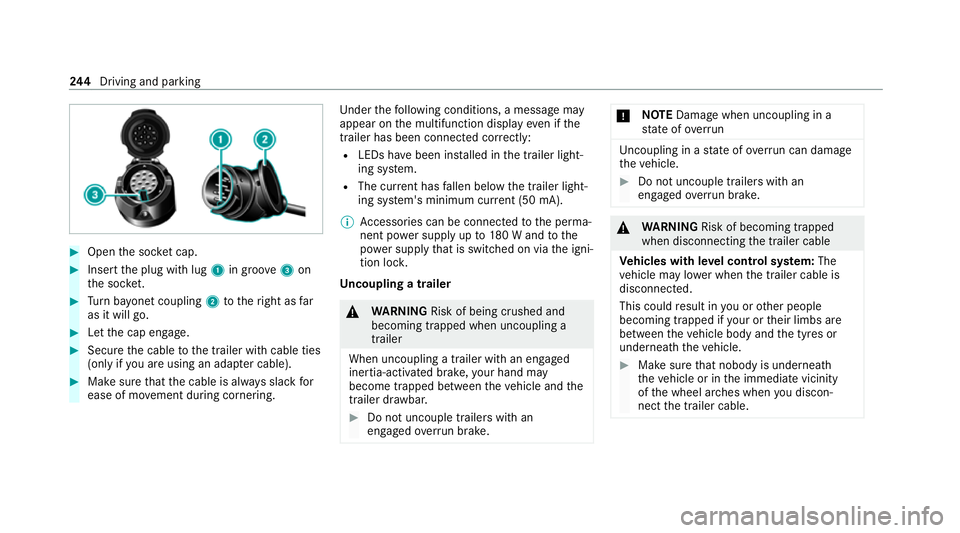
#
Open the soc ket cap. #
Inse rtthe plug with lug 1in groo ve3 on
th e soc ket. #
Turn bayonet coupling 2totheright as far
as it will go. #
Let the cap engage. #
Secure the cable tothe trailer with cable ties
(only if you are using an adap ter cable). #
Make sure that the cable is alw ays slack for
ease of mo vement during cornering. Under
thefo llowing conditions, a message may
appear on the multifunction display even if the
trailer has been connected cor rectly:
R LEDs ha vebeen ins talled in the trailer light‐
ing sy stem.
R The cur rent has fallen below the trailer light‐
ing sy stem's minimum cur rent (50 mA).
% Accessories can be connected tothe perma‐
nent po wer supp lyup to180 W and tothe
po we r supp lythat is swit ched on via the igni‐
tion loc k.
Un coupling a trailer &
WARNING Risk of being crushed and
becoming trapped when uncoupling a
trailer
When uncoupling a trailer with an engaged
ine rtia-activated brake, your hand may
become trapped between theve hicle and the
trailer dr awbar. #
Do not uncouple trailers with an
engaged overrun brake. *
NO
TEDama gewhen uncoupling in a
st ate of overrun Uncou
pling in a state of overru n can dama ge
th eve hicle. #
Do not uncouple trailers with an
engaged overrun brake. &
WARNING Risk of becoming trapped
when disconnecting the trailer cable
Ve hicles with le vel control sy stem: The
ve hicle may lo wer when the trailer cable is
disconnected.
This could result in you or other people
becoming trapped if your or their limbs are
between theve hicle body and the tyres or
underneath theve hicle. #
Make sure that nobody is unde rneath
th eve hicle or in the immediate vicinity
of the wheel ar ches when you discon‐
nect the trailer cable. 244
Driving and pa rking
Page 251 of 481
Note
s onthe instrument display and on-
board compu ter &
WARNING Risk of accident due toan
instrument display malfunction
If th e instrument display has failed or mal‐
functioned, the function restrictions applying
to saf etyre leva nt sy stems are not visible.
The operating saf ety of your vehicle may be
impaired. #
Drive on carefull y.#
Have theve hicle checked immediately
at a qualified specialist workshop. &
WARNING Risk of dist raction from infor‐
mation sy stems and communications
equipment
If yo u operate information and communica‐
tion equipment integ rated in theve hicle
when driving, you will be distracted from the
traf fic situation. This could also cause youto
lose control of theve hicle. #
Only operate this equipment when the
traf fic situation permits. #
Ifyo u cannot be sure of this, stop the
ve hicle whilst paying attention toroad
and traf fic conditions and ope rate the
equipment with theve hicle stationar y. *
NO
TEMercedes-AMG vehicles #
Obser vethe no tes in the Supplement.
Yo u could otherwise failto recognise
dangers. *
NO
TEPlug-in hybrid #
Obser vethe no tes in the Supplement.
Yo u could otherwise failto recognise
dangers. Yo
u must obse rveth e legal requirements forthe
country in whi chyou are cur rently driving when
operating the on-board computer.
The on-board computer sho wsonly display mes‐
sages and warnings from specific sy stems on th
e multifunction displa y.Yo u must therefore
ensure that your vehicle is alw aysre liable.
If th e operating saf ety of your vehicle is
impaired, park theve hicle immediately and in
accordance with the traf fic conditions. Contact a
qu alified specialist workshop. 248
Instrument display and on-board computer
Page 252 of 481
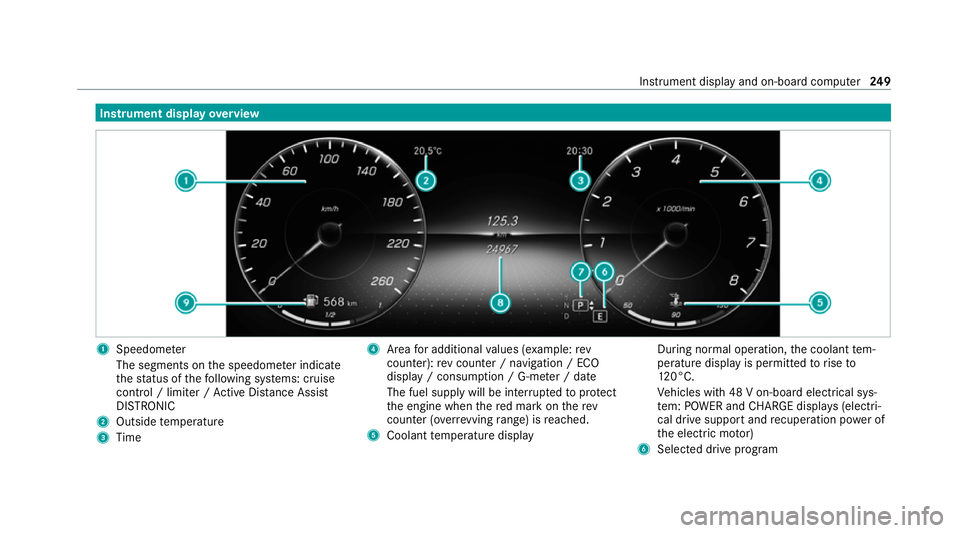
Instrument display
overview 1
Speedome ter
The segments on the speedome ter indica te
th est atus of thefo llowing sy stems: cruise
control / limiter / Active Dis tance Assi st
DISTRONIC
2 Outside temp erature
3 Time 4
Area for additional values (e xamp le:rev
counter): rev counter / navigation / ECO
display / consum ption / G-me ter / date
The fuel supply will be inter rupted toprotect
th e engine when there d mark on therev
counter (o verrev ving range) is reached.
5 Coolant temp erature display During normal operation,
the coolant tem‐
perature display is permitted torise to
12 0°C.
Ve hicles with 48 V on-board electrical sys‐
te m: POWER and CHARGE displ ays (electri‐
cal drive support and recuperation po wer of
th e electric mo tor)
6 Selected drive program Instrument display and on-board computer
249
Page 253 of 481
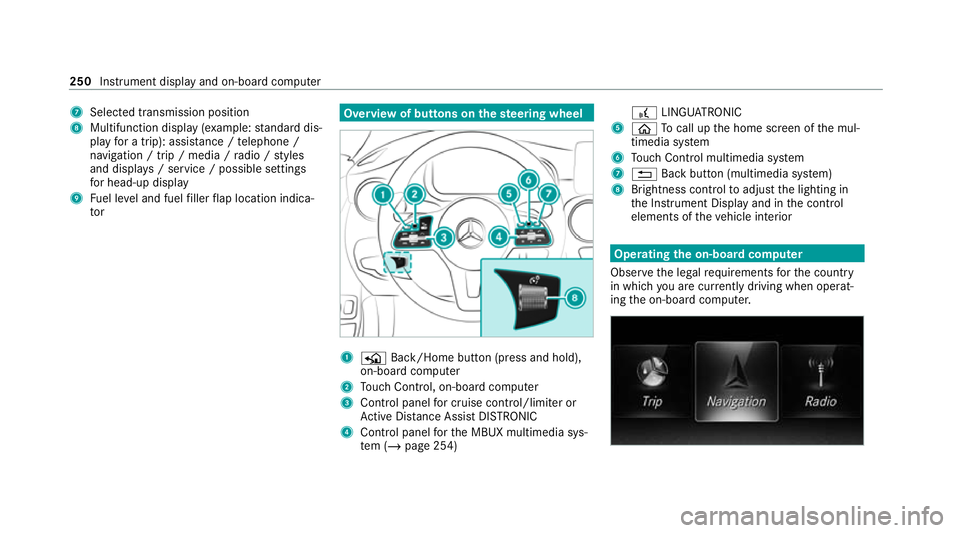
7
Selected transmission position
8 Multifunction displ ay(exa mp le:standard dis‐
play for a trip): assi stance / telephone /
navigation / trip / media / radio / styles
and displa ys/ service / possible settings
fo r head-up display
9 Fuel le vel and fuel filler flap location indica‐
tor Overview of buttons on
thest eering wheel 1
P Back/Home button (press and hold),
on-board computer
2 Touch Control, on-board co mputer
3 Control panel for cruise control/limiter or
Ac tive Dis tance Assi stDISTRONIC
4 Control panel forth e MBUX multimedia sys‐
te m (/ page 254) £
LINGU ATRO NIC
5 ò Tocall up the home screen of the mul‐
timedia sy stem
6 Touch Control multimedia sy stem
7 % Back button (multimedia sy stem)
8 Brightness control toadjust the lighting in
th e Instrument Display and in the control
elements of theve hicle interior Operating
the on-boa rdcompu ter
Obser vethe legal requ irements forth e count ry
in which you are cur rently driving when operat‐
ing the on-board computer. 250
Instrument display and on-board computer
Page 254 of 481
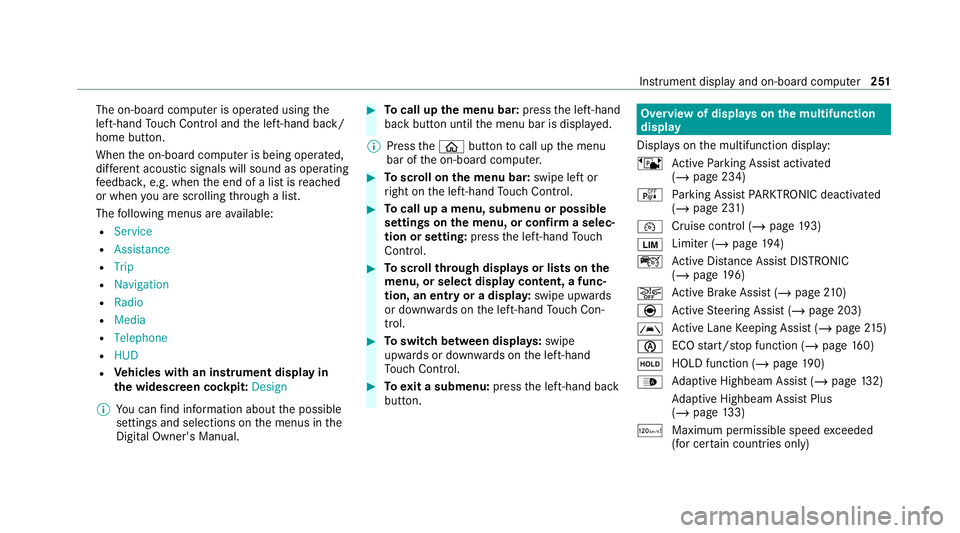
The on-board computer is operated using
the
left-hand Touch Control and the left-hand back/
home button.
When the on-board computer is being operated,
dif fere nt acoustic signals will sound as operating
fe edbac k,e.g. when the end of a list is reached
or when you are sc rolling thro ugh a list.
The following menus are available:
R Service
R Assistance
R Trip
R Navigation
R Radio
R Media
R Telephone
R HUD
R Vehicles with an instrument display in
th e widescreen cockpit: Design
% You can find information about the possible
settings and selections on the menus in the
Digital Owner's Manual. #
Tocall up the menu bar: pressthe left-hand
back button until the menu bar is displa yed.
% Press theò button tocall up the menu
bar of the on-board computer. #
Toscroll on the menu bar: swipe left or
ri ght on the left-hand Touch Control. #
Tocall up a menu, submenu or possible
settings on the menu, or confirm a selec‐
tion or setting: pressthe left-hand Touch
Control. #
Toscroll through displa ysor lists on the
menu, or select display content, a func‐
tion, an entry or a displa y:swipe upwards
or down wards on the left-hand Touch Con‐
trol. #
Toswitch between displa ys:swipe
upwards or down wards on the left-hand
To uch Control. #
Toexit a submenu: pressthe left-hand back
button. Overview of displa
yson the multifunction
display
Displa yson the multifunction display:
ë Active Parking Assist activated
(/ page 234)
é Parking Assist PARKTRONIC deacti vated
( / page 231)
¯ Cruise control (/
page193)
È Limi
ter (/ page194)
ç Active Dis tance Assi stDISTRONIC
(/ page 196)
æ Ac
tive Brake Assi st (/ page 210)
è Active Steering Assist (/ page 203)
à Ac
tive Lane Keeping Assist (/ page215)
è ECO
start/ stop function (/ page160)
ë HOLD fu
nction (/ page 190)
_ Ad
aptive Highbeam Assist (/ page132)
Ad aptive Highbeam Assist Plus
(/ page 133)
ð Maximum pe rmissible speed exceeded
(for cer tain countries only) Instrument display and on-board computer
251
Page 255 of 481
Ve
hicles with Traf fic Sign Assis t:de tected
instructions and traf fic signs (/ page 210). Head-up display
Fu
nction of the head-up display *
NO
TEMercedes-AMG vehicles #
Obser vethe no tes in the Supplement.
Yo u could otherwise failto recognise
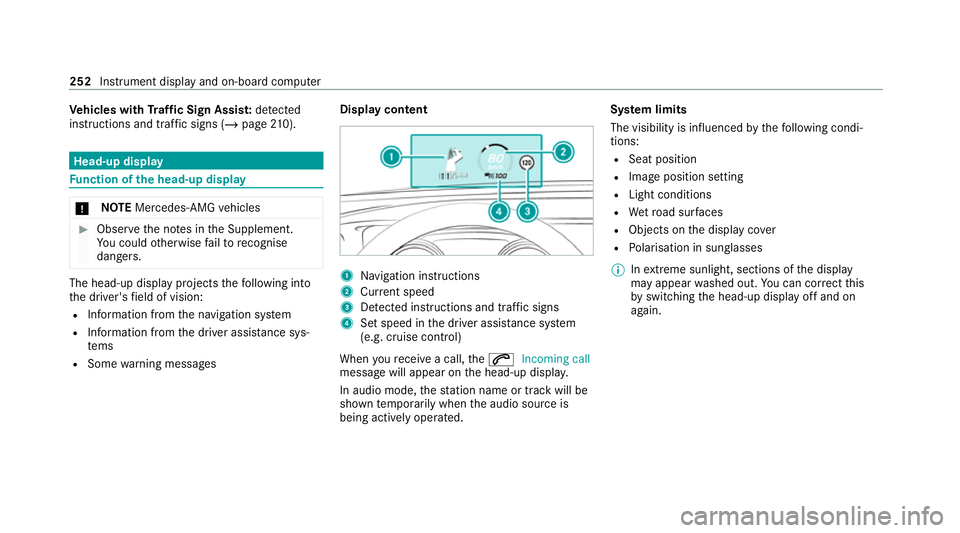
dangers. The head-up displ
ayprojects thefo llowing into
th e driver's field of vision:
R Information from the navigation sy stem
R Information from the driver assis tance sys‐
te ms
R Some warning messages Display content 1
Navigation instructions
2 Curr ent speed
3 Detected instructions and traf fic signs
4 Set speed in the driver assis tance sy stem
(e.g. cruise control)
When youre cei vea call, the6 Incoming call
message will appear on the head-up displa y.
In audio mode, thest ation name or track will be
shown temp orarily when the audio source is
being actively operated. Sy
stem limits
The visibility is influenced bythefo llowing condi‐
tions:
R Seat position
R Image position setting
R Light conditions
R Wetro ad sur faces
R Objects on the display co ver
R Polarisation in sunglasses
% Inextreme sunlight, sections of the display
may appear washed out. You can co rrect this
by switching the head-up display off and on
again. 252
Instrument display and on-board computer
Page 256 of 481
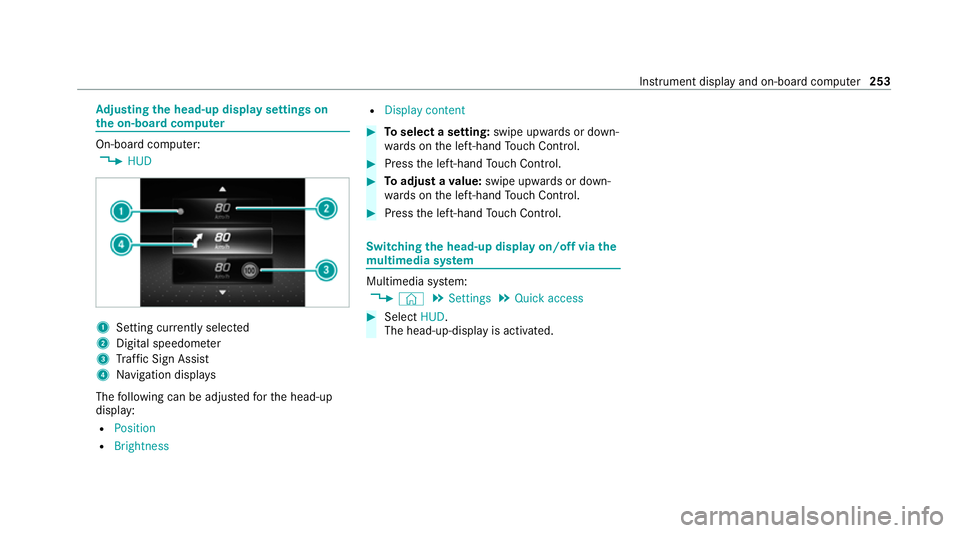
Ad
justing the head-up display settings on
the on-board co mputer On-board computer:
4 HUD 1
Setting cur rently selected
2 Digital speedome ter
3 Traf fic Sign Assi st
4 Navigation displa ys
The following can be adjus tedfo rth e head-up
display:
R Position
R Brightness R
Display content #
Toselect a setting: swipe upwards or down‐
wa rds on the left-hand Touch Control. #
Press the left-hand Touch Control. #
Toadjust a value: swipe upwards or down‐
wa rds on the left-hand Touch Control. #
Press the left-hand Touch Control. Swit
ching the head-up display on/off via the
mu ltimedia sy stem Multimedia sy
stem:
4 © 5
Settings 5
Quick access #
Select HUD.
The head-up-display is activated. Instrument display and on-board computer
253
Page 257 of 481
Overview and operation
Note
s onthe MBUX multimedia sy stem &
WARNING Risk of dist raction from infor‐
mation sy stems and communications
equipment
If yo u operate information and communica‐
tion equipment integ rated in theve hicle
when driving, you will be distracted from the
traf fic situation. This could also cause youto
lose control of theve hicle. #
Only operate this equipment when the
traf fic situation permits. #
Ifyo u cannot be sure of this, stop the
ve hicle whilst paying attention toroad
and traf fic conditions and ope rate the
equipment with theve hicle stationar y. Yo
u must obse rveth e legal requirements forthe
country in whi chyou are cur rently driving when
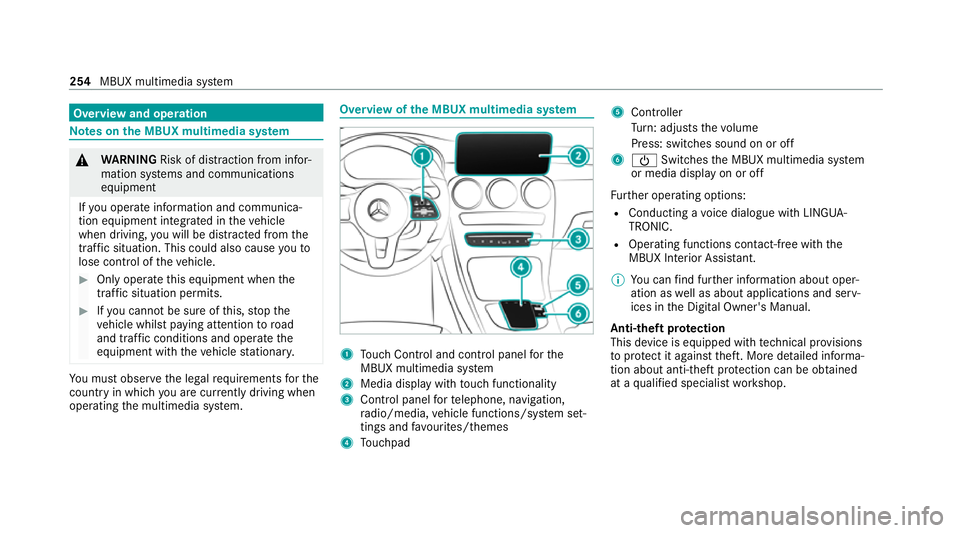
operating the multimedia sy stem. Overview of
the MBUX multimedia sy stem 1
Touch Control and cont rol panel forthe
MBUX multimedia sy stem
2 Media display with touch functionality
3 Control panel forte lephone, navigation,
ra dio/media, vehicle functions/sy stem set‐
tings and favo urites/ themes
4 Touchpad 5
Controller
Turn: adjusts thevo lume
Press: switches sound on or off
6 Ü Switches the MBUX multimedia sy stem
or media display on or off
Fu rther operating options:
R Conducting a voice dialogue with LINGUA‐
TRONIC.
R Operating functions con tact-free with the
MBUX Interior Assis tant.
% You can find fur ther information about oper‐
ation as well as about applications and serv‐
ices in the Digital Owner's Manual.
Anti-theft pr otection
This device is equipped with tech nical pr ovisions
to protect it against theft. More de tailed informa‐
tion about anti-theft pr otection can be obtained
at a qualified specialist workshop. 254
MBUX multimedia sy stem