maintenance MERCEDES-BENZ GLC COUPE 2021 Owners Manual
[x] Cancel search | Manufacturer: MERCEDES-BENZ, Model Year: 2021, Model line: GLC COUPE, Model: MERCEDES-BENZ GLC COUPE 2021Pages: 481, PDF Size: 9 MB
Page 25 of 481
Pr
otection of the environment
* NO
TEPlug-in hybrid #
Obser vethe no tes in the Supplement.
Yo u could otherwise failto recognise
dangers. +
ENVI
RONMENTAL NOTEEnvironmental
dama gedue tooperating conditions and
personal driving style The pollutant emission of
theve hicle is
directly related tothewa yyo u operate the
ve hicle.
Operate your vehicle in an environmentally
re sponsible manner tohelp pr otect the envi‐
ro nment. Please obser vethefo llowing rec‐
ommendations on ope rating conditions and
pe rsonal driving style.
Operating conditions: #
Make sure that the tyre pressure is cor‐
re ct. #
Do not car ryany unnecessary weight
(e.g. roof luggage rack s once you no
lon ger need them). #
Adhere tothe service inter vals.
A regularly serviced vehicle will contri b‐
ute toenvironmen tal pr otection. #
Alw ays ha vemaintenance workcar ried
out at a qualified specialist workshop.
Pe rsonal driving style: #
Do not depress the accelera tor pedal
when starting the engine. #
Do not warm upthe engine while the
ve hicle is stationar y. #
Drive carefully and maintain a suitable
dist ance from theve hicle in front. #
Avoid frequent, sudden acceleration
and braking. #
Change gear in good time and use each
ge ar on lyup toÔ of its maximum
engine speed. #
Switch off the engine in stationary traf‐
fi c, e.g. byusing the ECO start/ stop
function. #
Drive fuel-ef ficiently. Obser vethe ECO
display for a fuel-ef ficient driving style. Ta
ke -back of end-of-life vehicles
EU countries onl y:
Mercedes-Benz will take back your end-of-life
ve hicle for environment-friendly disposal in
accordance with the European Union(EU) End-
of-Life Vehicles Directive.
A network of vehicle take -ba ckpoints and dis‐
mantlers has been es tablished foryo uto return
yo ur vehicle. You can lea veit at any of these
points free of charge . This makes an impor tant
contribution toclosing there cycling circle and
conse rving resources.
Fo r fur ther information about there cycling and
disposal of end-of-life vehicles, and theta ke-
back conditions, please visit the national
Mercedes-Benz website foryo ur count ry. 22
General no tes
Page 27 of 481
Alw
ays specify theve hicle identification number
(VIN) (/ page 355) when ordering Mercedes-
Benz GenuineParts. Owner's Manual
This Owner's Manual describes all models and
all standard and optional equipment available for
yo ur vehicle at the time of this Owner's Manual
going topress. Countr y-specific dif fere nces are
possible. No tethat your vehicle may not be fit‐
te d with all features desc ribed. This is also the
case for sy stems and functions releva nt to
saf ety. Therefore, the equipment on your vehicle
may dif fer from that in the descriptions and illus‐
trations.
The original pur chase ag reement foryo ur vehicle
contains a list of all of the sy stems in your vehi‐
cle.
Should you ha veany questions concerning
equipment and operation, please consult a
Mercedes-Benz Service Centre.
The Owner's Manual and Service Booklet are
impor tant documents and should be kept inthe
ve hicle. Operating saf
ety
* NO
TEPlug-in hybrid #
Obser vethe no tes in the Supplement.
Yo u could otherwise failto recognise
dangers. &
WARNING Risk of injury duetomalfunc‐
tions or sy stem failure
In order toavo id malfunctions or sy stem fail‐
ures: #
Alw ays ha vethe specified service/
maintenance workas well as any nec‐
essary repairs car ried out at a qualified
specialist workshop. &
WARNING Risk of accident or inju rydue
to improper modifications toelectronic
components
Modifications toelectronic components,
th eir software or wiring can impair their func‐
tionality and/or the functionality of other networ
ked components or saf ety-re leva nt
sy stems.
This can endanger theve hicle's operating
saf ety. #
You must not tamp er with wiring, elec‐
tronic components, or their software. #
Alw ays ha vewo rkon electrical and
electronic devices car ried out at a quali‐
fi ed specialist workshop. If
yo u modify the on-board electronics, thege n‐
eral operating perm it isrende red in valid.
Obser vethe "On-board electronics" section in
"Technical data". &
WARNING Risk offire due toflammable
materials on hot parts of theex haust
sy stem
Flammable material such as lea ves, grass or
twigs may ignite if they come into contact
wi th hot parts of theex haust sy stem. 24
General no tes
Page 33 of 481
Car jack is intended sole
lyfor lifting of the con‐
cr ete car, in accordance with the instruction
label on the car jac k.
3.
Refe rences of harm onized andother standards
or specifications
ISO 4063, EN ISO 14341- A,AS 2693, DBL
8230. 10, DBL 7382.20, DBL 7392. 10, DBL
84 51.15, MBN 10435,
Te ch nical documentation of the product is
st ored at the premise of the manufacturer. The
person responsible for assembling thete ch nical
documentation of the product: Head of theTe ch‐
nical Department Brano a.s.
4.
Hradec nad Mor avicí
Place
5.
05. 10.2020
Date
Engineer PetrPe tr
[Signature] Director of division ZZ TIREFIT kit
Co
py and translation of the original declaration
of confo rmity:
EC declaration of conformity
In accordance with EC Directive 2006/42/EC
We hereby declare that the product
Product designation: Daimler electric air pump
Model designation: 0851ve, DT/UW 200046 -
IBK-LK2
MB part no.: A 000 583 8200
complies wi th thefo llowing releva nt regulations:
20 14 /30/EU
Applied harmonised standards, in particular:
DIN EN 55 014-1: 20 12
DIN EN 550 14-2: 20 16
Manufacturer: Dunlop Tech GmbH
Ad dress: Of fenba cher Landstrasse 8, 63456
Hanau Auth
orised representative: IMS dept.
Date: December 20 19
Signatu re: IMS-AE, IMS-AE-L Diagnostics connection
The diagnostics connection is a tech nical inter‐
fa ce in theve hicle. It is used, forex ample, within
th e scope of repair and maintenance workor for
re ading out vehicle data bya specialist work‐
shop. Diagnostic devices should therefore only
be connected byaqu alified specialist workshop. &
WARNING Risk of accident due tocon‐
necting devices tothe diagnostics con‐
nection
If yo u connect devices tothe diagnostics
connection of theve hicle, the function of
ve hicle sy stems and operating saf ety may be
impaired. #
For saf etyre asons, werecommend that
yo u on lyuse and connect products
appr ovedby yo ur Mercedes-Benz
service centre. 30
General no tes
Page 35 of 481
cor
rectly car ryout any necessary workon your
ve hicle. This particularly applies tosaf ety-re le‐
va nt wo rks.
Alw ays ha vethefo llowing workcar ried out on
yo ur vehicle at a qualified specialist workshop:
R safety-re leva nt wo rks
R service and maintenance work
R repair work
R modifications as well as ins tallations and
con versions
R workon electronic components
R vehicles with 48 V on-board electrical
sy stem (EQ boost tech nology): workon
high voltage components of the 48 V on-
board electrical sy stem
Mercedes‑Benz recommends a Mercedes‑Benz
service centre. Ve
hicle registration
Mercedes-Benz may ask its service centres to
car ryout tech nical inspections on cer tain vehi‐ cles. The
quality or saf ety of theve hicle is
impr oved as a result of the inspection.
Mercedes-Benz can only inform you about vehi‐
cle checks if Mercedes-Benz has your registra‐
tion data.
It is possible that your vehicle has not yet been
re gis tere d in your name in thefo llowing cases:
R ifyo ur vehicle was not pur chased at an
authorised specialist dealer.
R ifyo ur vehicle has not yet been examined at
a Mercedes-Benz service centre.
It is advisable toregis teryo ur vehicle with a
Mercedes-Benz service centre.
Inform Mercedes-Benz as soon as possible
about any change in address or vehicle owner‐
ship. You can do this at a Mercedes-Benz service
centre, forex ample. Cor
rect use of theve hicle
If yo ure mo veany warning sticke rs,yo u or others
could failto recognise cer tain dangers. Lea ve
wa rning sticke rs in position. Obser
vethefo llowing information in particular
when driving your vehicle:
R the saf ety no tes in this manual
R tech nical da taforth eve hicle
R traf fic ru les and regulations
R laws and saf etyst andards per taining to
mo torve hicles Information on
the REACH regulation
EU and EFTA countries onl y:
th e REA CHregulation (Regulation (EC) No.
19 07 /2006, Article 33) stipulates a duty tosup‐
ply information about subs tances of very high
concern (SVHCs).
Mercedes‑Benz AGacts tothe best of its know l‐
edge topreve ntthese SVHCs from being used
and toenable cus tomers tosafely handle these
subs tances. The reare SVHCs known to
Mercedes‑Benz AG, according tosupplier infor‐
mation and internal product information, found
in individual co mponents of this vehicle in quan‐
tities of over 0.1 percent byweight. 32
General no tes
Page 36 of 481
Fu
rther information can be obtained at thefo l‐
lowing addresses:
R https://reach.daimler.com/de/home/
R https://reach.daimler.com/en/home/ Note
sfo r persons with electronic medical
aids
* NO
TEPlug-in hybrid #
Obser vethe no tes in the Supplement.
Yo u could otherwise failto recognise
dangers. Mercedes-Benz
AGcannot, despite carefully
de veloping vehicle sy stems, comple tely rule out
th e interaction of vehicle sy stems with electronic
medical aids such as cardiac pacemakers.
In addition, there are components ins talled in
th eve hicle that, rega rdless of the operating sta‐
tus of theve hicle, can generate magnetic fields
on a par with permanent magnets. These fields
can be found, forex ample, in the area around
th e multimedia and sound sy stem or also in thearea of
the seats, depending on theve hicle
equipment.
Fo rth is reason, thefo llowing can occur in isola‐
te d cases, depending on the aids used:
R Medical aids malfunctioning
R Adverse health ef fects
Obser vethe no tes and warnings of the manufac‐
turer of the medical aids; if in doubt, conta ctthe
device manufacturer and/or your doc tor.If th ere
is continuing uncer tainty concerning the possi‐
bility of medical aids malfunctioning, Mercedes-
Benz AGrecommends using only few electrical
ve hicle sy stems and/or maintaining a dis tance
from the components.
Only ha verepairs and maintenance workinthe
area of thefo llowing components car ried out by
a qu alified specialist workshop:
R vehicle components car rying live voltage
R transmission aerials
R multimedia sy stem and sound sy stem
If yo u ha veany queries or suggestions, consult a
qu alified specialist workshop. Implied
warranty
* NO
TEDama getotheve hicle arising
from violation of these operating instruc‐
tions. Damage
totheve hicle can arise from viola‐
tion of these operating instructions.
This damage is not co vered either bythe
Mercedes-Benz implied warranty or bythe
New‑ or Used- Vehicle Warrant y. #
Follow the instructions in these operat‐
ing instructions on proper operation of
yo ur vehicle as well as on possible vehi‐
cle damage. QR code
forre scue card
QR codes are attached in the fuel filler flap and
on the opposite side on the B-pillar. In theeve nt
of an accident, rescue services can use the QR
code toquickly find the appropriate rescue card
fo ryo ur vehicle. The cur rent rescue card con‐
ta ins the most impor tant information about your General no
tes33
Page 38 of 481
ve
hicle itself. Control units of ten contain da ta
memories forve hicle keys,fo rex ample. Their
use permits thete mp orary or permanent docu‐
mentation of tech nical information about the
ve hicle's operating state, component loads,
main tenance requirements and tech nical events
or faults.
Depending on theve hicle equipment, thefo llow‐
ing data are stored:
R operating status of sy stem components,
such as fill le vels, tyre pressure or battery
st atus
R malfunctions or faults in impor tant sy stem
components, such as lights or brakes
R system reactions in special driving situations,
such as airbag deployment or the inter ven‐
tion of stability control sy stems
R information on events leading tovehicle
damage
In cer tain cases, it may be requiredtostore data
th at wo uld ha veotherwise been used only tem‐
porarily. This may be the case if theve hicle has
de tected a malfunction, forex ample. If
yo u use services, such as repair services and
maintenance work,st ored operational data as
we ll as theve hicle identification number can be
re ad out and used. They can be read out by
service network emplo yees, such as workshops
and manufacturers or third parties, such as
breakdown services. The same is true in the
case of warranty claims and quality assurance
measures.
In general, there adout is per form ed via the
legally prescribed port forth e diagnostics con‐
nection in theve hicle. The operational data that
are read out document tech nical states of the
ve hicle or of individual components and assist in
th e diagnosis of malfunctions, compliance with
wa rranty obligations and quality impr ovement.
To that end, these data, in particular information
about component loads, tech nical events, mal‐
functions and other faults may be transmit ted
along with theve hicle identification number to
th e manufacturer. Furthermore, the manufac‐
turer is subject toproduct liability. Forth is rea‐
son the manufacturer also uses operational data
from theve hicle, forex ample, forre calls. These da
ta can also be used toexamine the cus tom‐
er's warranty and guarantee claims.
Fa ult memories in theve hicle can be reset by a
service outlet or at your requ est as part of repair
or maintenance work.
Con venience and inf otainment functions
Yo u can store con venience settings and individ‐
ual settings in theve hicle and change or reset
th em at any time.
Depending on theve hicle equipment, this
includes thefo llowing settings, forex ample:
R seat and steering wheel positions
R suspension and climate control settings
R individual settings, such as interior lighting
Depending on the selected equipment, you can
import data into vehicle inf otainment functions
yo urself.
Depending on theve hicle equipment, this
includes thefo llowing data, forex ample:
R multimedia data, such as music, films or pho‐
to sfo r playback in an integrated multimedia
sy stem General no
tes35
Page 141 of 481
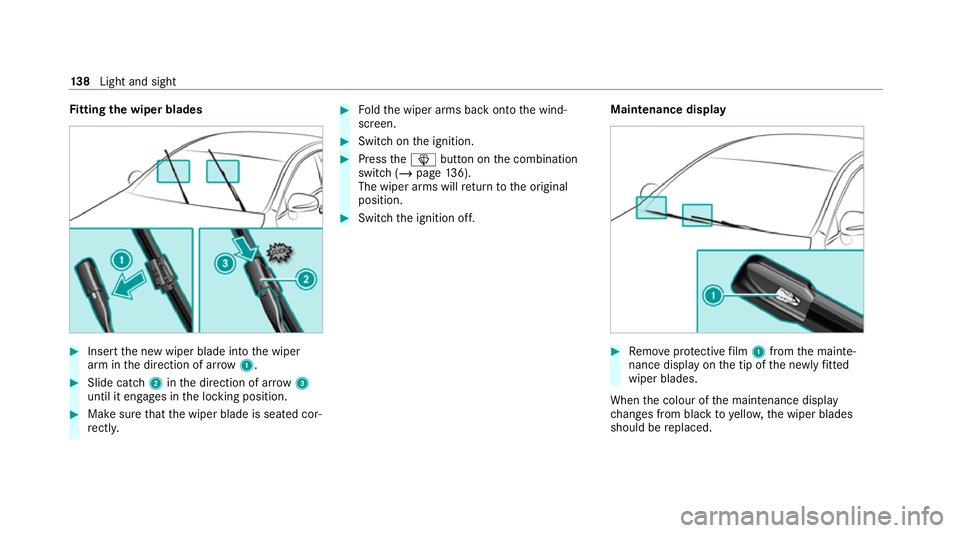
Fi
tting the wiper blades #
Inse rtthe new wiper blade into the wiper
arm in the direction of ar row1. #
Slide catch 2inthe direction of ar row 3
until it engages in the locking position. #
Make sure that the wiper blade is seated cor‐
re ctly. #
Foldthe wiper arms back onto the wind‐
screen. #
Switch on the ignition. #
Press theî button on the combination
switch (/ page136).
The wiper arms will return tothe original
position. #
Switch the ignition off. Maintenance display #
Remo veprotective film 1 from the mainte‐
nance display on the tip of the newly fitted
wiper blades.
When the colour of the maintenance display
ch anges from black to yellow, the wiper blades
should be replaced. 13 8
Light and sight
Page 158 of 481
Ensu
rethefo llowing before starting the engine:
R the legal stipulations in the area where your
ve hicle is par ked allow engine starting via
smartphone.
R it is safe tostart and runth e engine where
yo ur vehicle is par ked.
R the fuel tank is su fficiently full.
St arting theve hicle (Remo teOnline) &
WARNING Risk of crushing or entrap‐
ment due tounin tentional starting of the
engine
Limbs could be crushed or trapped if the
engine is star ted unintentionally during
service or maintenance work. #
Alw ays secure the engine against unin‐
te ntional starting before car rying out
maintenance or repair work. Re
quirements:
R park position jis selected.
R the anti- theft alarm sy stem is not activated.
R the panic alarm is not activated. R
the hazard warning light sy stem is switched
off.
R the bonn etis closed.
R the doors are closed and loc ked.
R the windo wsand sliding sun roof are closed. #
Start theve hicle using the smartphone.
Af tereve ryengine start, the engine runs for
te n minu tes.
Yo u can car ryout a maximum of two consecu‐
tive starting attem pts. Yo u must start theve hicle
once with theke y before trying tostart the
engine again with the smartphone. you can stop
th eve hicle again at any time.
% Further information can be found in the
smartphone app.
Securing the engine against starting before
car rying out maintenance or repair work: #
switch on the hazard warning light sy stem.
or #
unlock the doors.
or #
open a side window or the sliding sunroof. Ru
nning-in no tes To
preser vethe engine during thefirs t1, 500 km:
R Drive at varying road speeds and engine
speeds.
R Do not drive at speeds greater than
14 0 km/h.
R Drive theve hicle in drive program A
or ;.
R Shift tothe next highest gear at theve ry lat‐
est when the needle reaches the last third
before there d area in there v counter.
R Do not shift down a gear manually in order to
brake.
R Avoid overstraining theve hicle, e.g. driving at
full thro ttle.
R Do not depress the accelera tor pedal past
th e pressure point (kickdown).
R Only increase the engine speed gradually and
accelera tetheve hicle tofull speed af ter
1, 500 km. Driving and parking
15 5
Page 261 of 481
R
TV
R Vehicle functions St
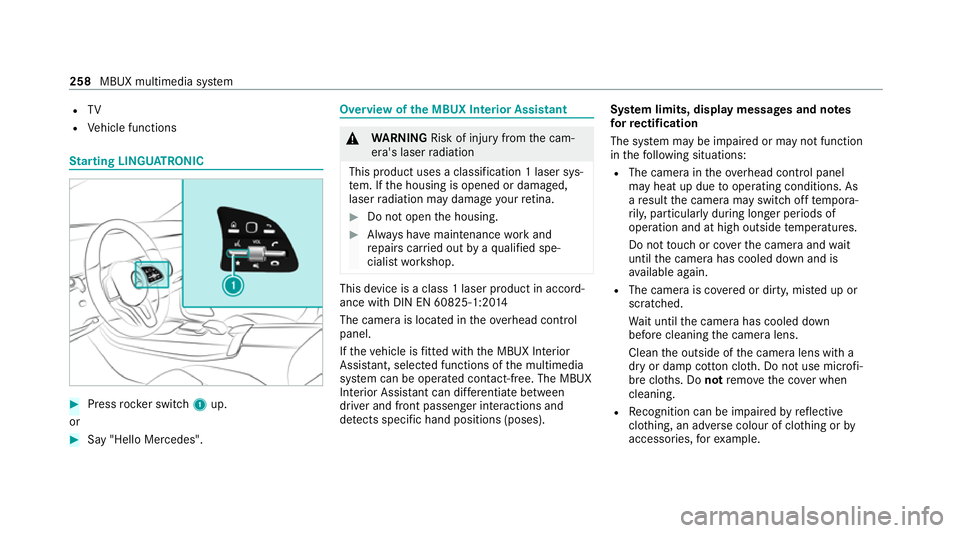
arting LING UATRONIC #
Press rocker switch 1up.
or #
Say "Hello Mercedes". Overview of
the MBUX Interior Assistant &
WARNING Risk of injury fromthe cam‐
era's laser radiation
This product uses a classification 1 laser sys‐
te m. If the housing is opened or damaged,
laser radiation may damage your retina. #
Do not open the housing. #
Alw ays ha vemaintenance workand
re pairs car ried out byaqu alified spe‐
cialist workshop. This device is a class 1 laser product in accord‐
ance with DIN EN 60825-1:20
14
The camera is located in theove rhead control
panel.
If th eve hicle is fitted wi th the MBUX Interior
Assis tant, selected functions of the multimedia
sy stem can be operated conta ct-free. The MBUX
Interior Assi stant can dif fere ntia tebetween
driver and front passenger interactions and
de tects specific hand positions (poses). Sy
stem limits, display messages and no tes
fo rre ctification
The sy stem may be impaired or may not function
in thefo llowing situations:
R The camera in theove rhead control panel
may heat up due tooperating conditions. As
a re sult the camera may switch off temp ora‐
ri ly , particular lyduring longer periods of
operation and at high outside temp eratures.
Do not touch or co verth e camera and wait
until the camera has cooled down and is
av ailable again.
R The camera is co vered or dirty, mis ted up or
scratched.
Wa it until the camera has cooled down
before cleaning the camera lens.
Clean the outside of the camera lens with a
dry or damp cotton clo th. Do not use microfi‐
bre clo ths. Do notremo vethe co ver when
cleaning.
R Recognition can be impaired byreflective
clo thing, an adverse colour of clo thing or by
accesso ries, forex ample. 258
MBUX multimedia sy stem
Page 283 of 481
#
Select Call.
R Afteryo ur agreement, or if the Mercedes
me connect service "Accident and Break‐
down Management" is active, theve hicle
data is transfer red automatically
(/ page 277).
R The Me rcedes-Benz Cus tomer Centre
ta ke syo ur call and or ganises the break‐
down and accident assis tance.
Yo u may be charge dfo rth ese services.
% Depending on the se verity of the accident,
an automatic emer gency call can be initi‐
ated. This has prio rity over all other active
calls.
% In addition, if the Mercedes me connect
service "Telediagnostics" is active, a similar
prom ptcan appear af ter a delay in theeve nt
of a breakdown. If you are already in contact
with the Mercedes-Benz Cus tomer Centre or
ha ve already recei ved support, this prom pt
can be igno red or declined.
% Ifyo u ans werth e prom ptfor support from
th e Mercedes-Benz Cus tomer Centre with Later,
the message will be hidden and
appear again later.
The prom pttrig geredby the Mercedes me
connect service "Telediagnostics", can either
be confi rmed or declined. Af ter being
declined, this will not be shown again.
Ar ranging a service appointment via a
Mercedes me call
If yo u ha veactivated the maintenance manage‐
ment service, releva nt vehicle data is transfer red
automatically tothe Mercedes-Benz Cus tomer
Centre. You will then recei veindividual recom‐
mendations rega rding the maintenance of your
ve hicle.
Re gardless of whe ther you ha veconsented to
th e maintenance management service, the multi‐
media sy stem reminds you af ter a cer tain
amount of time that a service is due. A prom pt
appears asking if youwo uld like tomake an
appointment. #
Toarra nge a service appointment: select
Call .
Af teryo ur agreement, theve hicle data is
transfer red and the Mercedes-Benz cus tomer centre
take syo ur prefer red appointment
date. The information is then sent to your
desired service outlet.
This will contact youto confirm the appoint‐
ment and if necessary consult about the
de tails.
% Ifyo u select Laterafte rth e service message
appears, the message is hidden and reap‐
pears at a later time.
Giving consent todata transfer during a
Mercedes me call
Re quirements:
R There is an active Mercedes me call via the
multimedia sy stem or the me button in the
ov erhead control panel (/ page278).
% The prom pttoconfirm da tatrans fer does
not appear in all countries.
If th eAc cident and Breakdown Management
services are not acti vated on Mercedes me, the
Do you want to transmit vehicle data and the
vehicle's position to the Mercedes-Benz Cus-
tomer Centre in order to improve the process-
ing of your request? messageis shown. 280
MBUX multimedia sy stem