engine MERCEDES-BENZ GLC SUV 2015 Owners Manual
[x] Cancel search | Manufacturer: MERCEDES-BENZ, Model Year: 2015, Model line: GLC SUV, Model: MERCEDES-BENZ GLC SUV 2015Pages: 497, PDF Size: 15.27 MB
Page 366 of 497
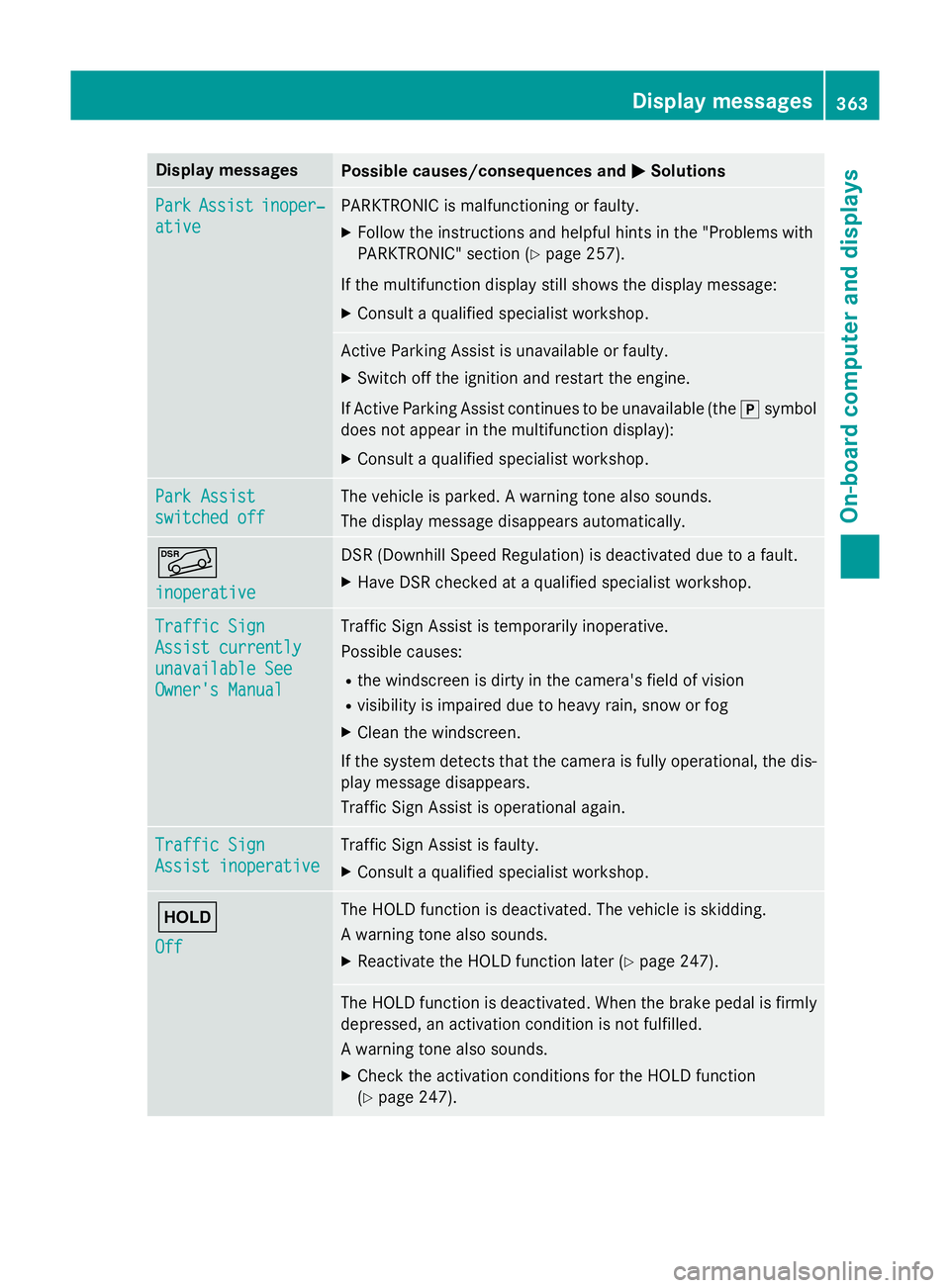
Display messages
Possible causes/consequences and
M
MSolutions Park
Park
Assist
Assist inoper‐
inoper‐
ative
ative PARKTRONIC is malfunctioning or faulty.
X Follow the instructions and helpful hints in the "Problems with
PARKTRONIC" section (Y page 257).
If the multifunction display still shows the display message: X Consult a qualified specialist workshop. Active Parking Assist is unavailable or faulty.
X Switch off the ignition and restart the engine.
If Active Parking Assist continues to be unavailable (the jsymbol
does not appear in the multifunction display):
X Consult a qualified specialist workshop. Park Assist Park Assist
switched off switched off The vehicle is parked. A warning tone also sounds.
The display message disappears automatically.
Ã
inoperative inoperative DSR (Downhill Speed Regulation) is deactivated due to a fault.
X Have DSR checked at a qualified specialist workshop. Traffic Sign
Traffic Sign
Assist currently Assist currently
unavailable See unavailable See
Owner's Manual Owner's Manual Traffic Sign Assist is temporarily inoperative.
Possible causes:
R the windscreen is dirty in the camera's field of vision
R visibility is impaired due to heavy rain, snow or fog
X Clean the windscreen.
If the system detects that the camera is fully operational, the dis-
play message disappears.
Traffic Sign Assist is operational again. Traffic Sign Traffic Sign
Assist inoperative Assist inoperative Traffic Sign Assist is faulty.
X Consult a qualified specialist workshop. ë
Off Off The HOLD function is deactivated. The vehicle is skidding.
A warning tone also sounds.
X Reactivate the HOLD function later (Y page 247). The HOLD function is deactivated. When the brake pedal is firmly
depressed, an activation condition is not fulfilled.
A warning tone also sounds.
X Check the activation conditions for the HOLD function
(Y page 247). Display
messages
363On-board computer and displays Z
Page 367 of 497
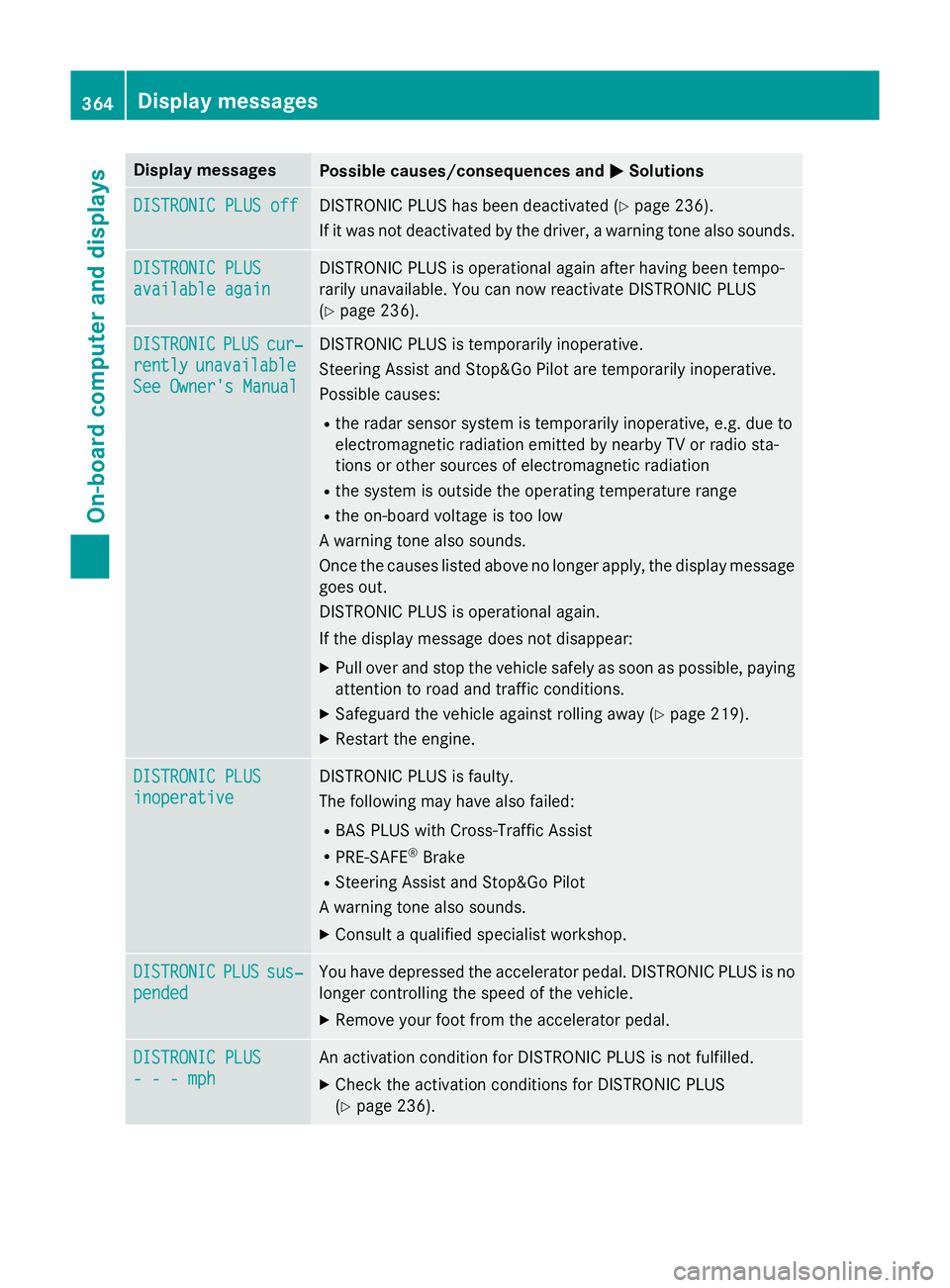
Display messages
Possible causes/consequences and
M
MSolutions DISTRONIC PLUS off
DISTRONIC PLUS off DISTRONIC PLUS has been deactivated (Y
page 236).
If it was not deactivated by the driver, a warning tone also sounds. DISTRONIC PLUS
DISTRONIC PLUS
available again available again DISTRONIC PLUS is operational again after having been tempo-
rarily unavailable. You can now reactivate DISTRONIC PLUS
(Y
page 236). DISTRONIC DISTRONIC
PLUS
PLUScur‐
cur‐
rently
rently unavailable
unavailable
See Owner's Manual
See Owner's Manual DISTRONIC PLUS is temporarily inoperative.
Steering Assist and Stop&Go Pilot are temporarily inoperative.
Possible causes:
R the radar sensor system is temporarily inoperative, e.g. due to
electromagnetic radiation emitted by nearby TV or radio sta-
tions or other sources of electromagnetic radiation
R the system is outside the operating temperature range
R the on-board voltage is too low
A warning tone also sounds.
Once the causes listed above no longer apply, the display message goes out.
DISTRONIC PLUS is operational again.
If the display message does not disappear:
X Pull over and stop the vehicle safely as soon as possible, paying
attention to road and traffic conditions.
X Safeguard the vehicle against rolling away (Y page 219).
X Restart the engine. DISTRONIC PLUS DISTRONIC PLUS
inoperative inoperative DISTRONIC PLUS is faulty.
The following may have also failed:
R BAS PLUS with Cross-Traffic Assist
R PRE-SAFE ®
Brake
R Steering Assist and Stop&Go Pilot
A warning tone also sounds.
X Consult a qualified specialist workshop. DISTRONIC DISTRONIC
PLUS
PLUSsus‐
sus‐
pended
pended You have depressed the accelerator pedal. DISTRONIC PLUS is no
longer controlling the speed of the vehicle.
X Remove your foot from the accelerator pedal. DISTRONIC PLUS
DISTRONIC PLUS
- - - mph - - - mph An activation condition for DISTRONIC PLUS is not fulfilled.
X Check the activation conditions for DISTRONIC PLUS
(Y page 236). 364
Display
messagesOn-board computer and displays
Page 372 of 497
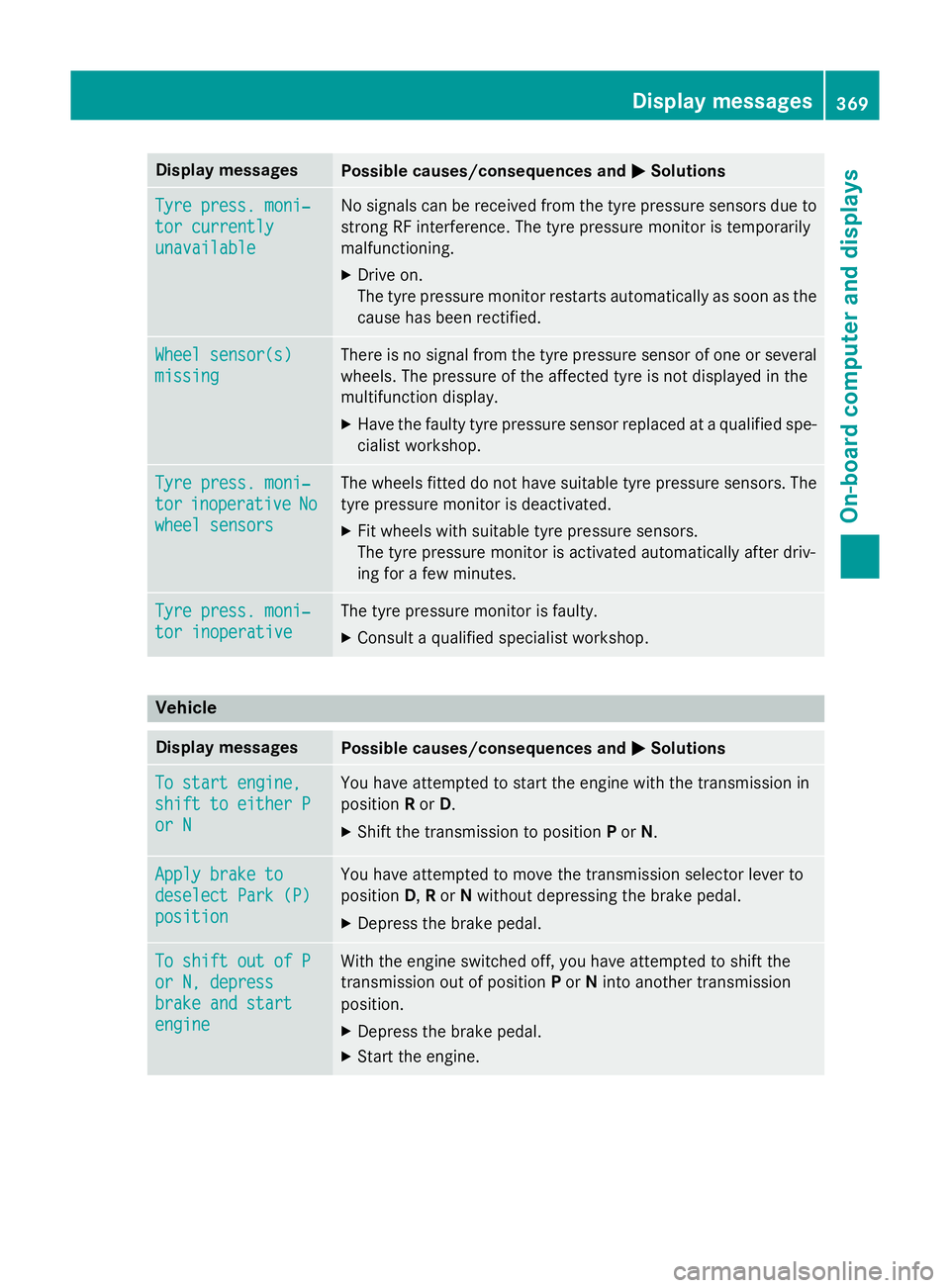
Display messages
Possible causes/consequences and
M
MSolutions Tyre press. moni‐
Tyre press. moni‐
tor currently tor currently
unavailable unavailable No signals can be received from the tyre pressure sensors due to
strong RF interference. The tyre pressure monitor is temporarily
malfunctioning.
X Drive on.
The tyre pressure monitor restarts automatically as soon as the
cause has been rectified. Wheel sensor(s) Wheel sensor(s)
missing missing There is no signal from the tyre pressure sensor of one or several
wheels. The pressure of the affected tyre is not displayed in the
multifunction display.
X Have the faulty tyre pressure sensor replaced at a qualified spe-
cialist workshop. Tyre press. moni‐ Tyre press. moni‐
tor tor
inoperative
inoperative No
No
wheel sensors
wheel sensors The wheels fitted do not have suitable tyre pressure sensors. The
tyre pressure monitor is deactivated.
X Fit wheels with suitable tyre pressure sensors.
The tyre pressure monitor is activated automatically after driv-
ing for a few minutes. Tyre press. moni‐ Tyre press. moni‐
tor inoperative tor inoperative The tyre pressure monitor is faulty.
X Consult a qualified specialist workshop. Vehicle
Display messages
Possible causes/consequences and
M
MSolutions To start engine,
To start engine,
shift to either P shift to either P
or N or N You have attempted to start the engine with the transmission in
position
Ror D.
X Shift the transmission to position Por N. Apply brake to Apply brake to
deselect Park (P) deselect Park (P)
position position You have attempted to move the transmission selector lever to
position
D,Ror Nwithout depressing the brake pedal.
X Depress the brake pedal. To shift out of P To shift out of P
or N, depress or N, depress
brake and start brake and start
engine engine With the engine switched off, you have attempted to shift the
transmission out of position
Por Ninto another transmission
position.
X Depress the brake pedal.
X Start the engine. Display
messages
369On-board computer and displays Z
Page 374 of 497
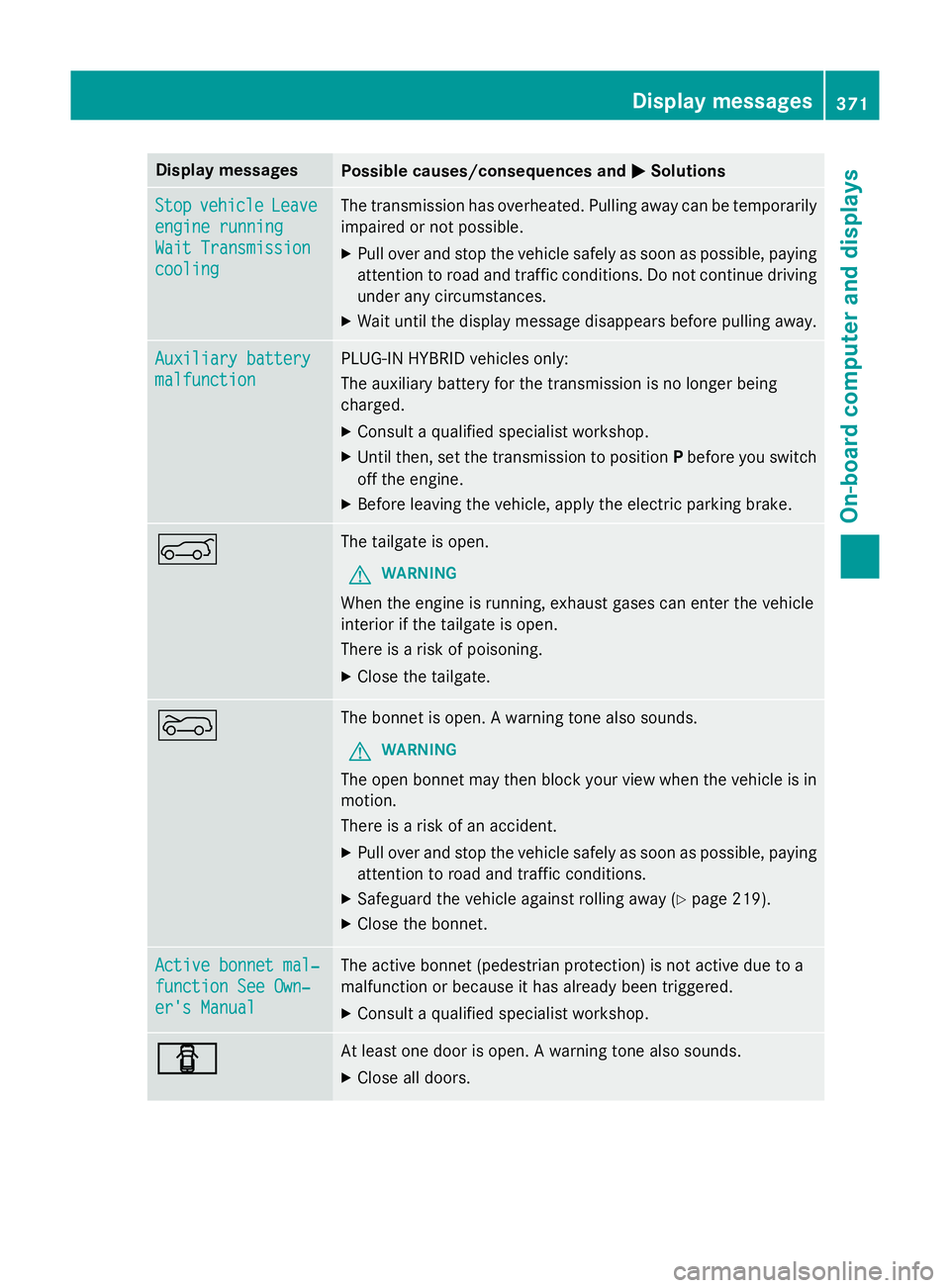
Display messages
Possible causes/consequences and
M
MSolutions Stop
Stop
vehicle
vehicle Leave
Leave
engine running
engine running
Wait Transmission Wait Transmission
cooling cooling The transmission has overheated. Pulling away can be temporarily
impaired or not possible.
X Pull over and stop the vehicle safely as soon as possible, paying
attention to road and traffic conditions. Do not continue driving
under any circumstances.
X Wait until the display message disappears before pulling away. Auxiliary battery
Auxiliary battery
malfunction malfunction PLUG-IN HYBRID vehicles only:
The auxiliary battery for the transmission is no longer being
charged.
X Consult a qualified specialist workshop.
X Until then, set the transmission to position Pbefore you switch
off the engine.
X Before leaving the vehicle, apply the electric parking brake. A The tailgate is open.
G WARNING
When the engine is running, exhaust gases can enter the vehicle
interior if the tailgate is open.
There is a risk of poisoning.
X Close the tailgate. ? The bonnet is open. A warning tone also sounds.
G WARNING
The open bonnet may then block your view when the vehicle is in
motion.
There is a risk of an accident.
X Pull over and stop the vehicle safely as soon as possible, paying
attention to road and traffic conditions.
X Safeguard the vehicle against rolling away (Y page 219).
X Close the bonnet. Active bonnet mal‐ Active bonnet mal‐
function See Own‐ function See Own‐
er's Manual er's Manual The active bonnet (pedestrian protection) is not active due to a
malfunction or because it has already been triggered.
X Consult a qualified specialist workshop. C C At least one door is open. A warning tone also sounds.
X Close all doors. Display
messages
371On-board computer and displays Z
Page 375 of 497
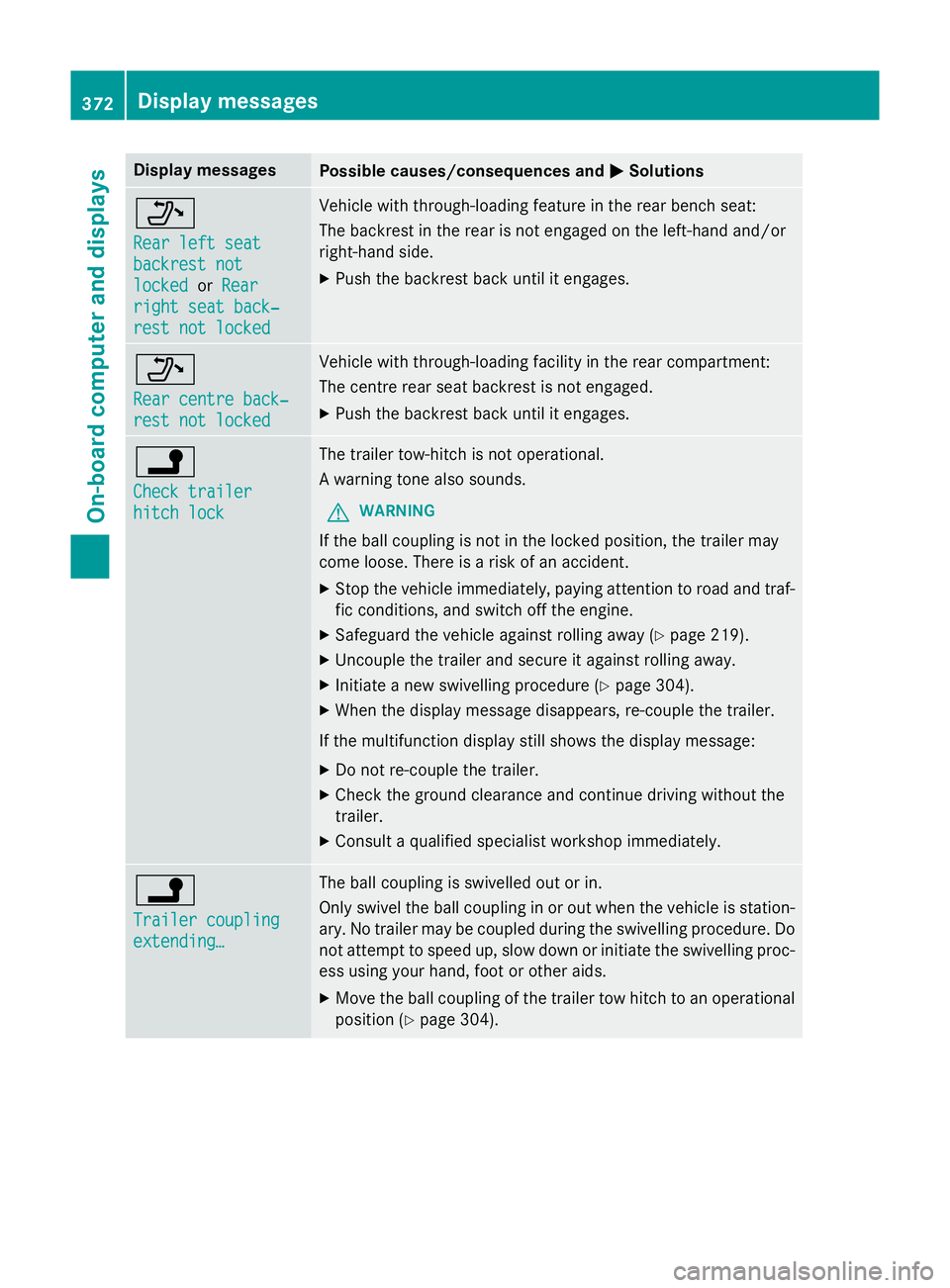
Display messages
Possible causes/consequences and
M
MSolutions _
Rear left seat Rear left seat
backrest not backrest not
locked locked
orRear
Rear
right seat back‐
right seat back‐
rest not locked rest not locked Vehicle with through-loading feature in the rear bench seat:
The backrest in the rear is not engaged on the left-hand and/or
right-hand side.
X Push the backrest back until it engages. _
Rear centre back‐ Rear centre back‐
rest not locked rest not locked Vehicle with through-loading facility in the rear compartment:
The centre rear seat backrest is not engaged.
X Push the backrest back until it engages. j
Check trailer Check trailer
hitch lock hitch lock The trailer tow-hitch is not operational.
A warning tone also sounds.
G WARNING
If the ball coupling is not in the locked position, the trailer may
come loose. There is a risk of an accident.
X Stop the vehicle immediately, paying attention to road and traf-
fic conditions, and switch off the engine.
X Safeguard the vehicle against rolling away (Y page 219).
X Uncouple the trailer and secure it against rolling away.
X Initiate a new swivelling procedure (Y page 304).
X When the display message disappears, re-couple the trailer.
If the multifunction display still shows the display message: X Do not re-couple the trailer.
X Check the ground clearance and continue driving without the
trailer.
X Consult a qualified specialist workshop immediately. j
Trailer coupling Trailer coupling
extending… extending… The ball coupling is swivelled out or in.
Only swivel the ball coupling in or out when the vehicle is station-
ary. No trailer may be coupled during the swivelling procedure. Do
not attempt to speed up, slow down or initiate the swivelling proc- ess using your hand, foot or other aids.
X Move the ball coupling of the trailer tow hitch to an operational
position (Y page 304).372
Display
messagesOn-board computer and displays
Page 376 of 497

Display messages
Possible causes/consequences and
M
MSolutions &
Pre-entry climate Pre-entry climate
control (via key) control (via key)
available again available again
after engine start after engine start PLUG-IN HYBRID vehicles:
With the engine switched off, you have attempted to switch on the
pre-entry climate control more than twice.
X Let the engine run for ten seconds.
After running the engine, the pre-entry climate control is opera-
tional again. &
Pre-entry climate Pre-entry climate
control (via key) control (via key)
inoperative HV- inoperative HV-
battery low battery low PLUG-IN HYBRID vehicles:
The on-board voltage is too low. The pre-entry climate control
cannot be switched on.
X Drive for a considerable distance.
The battery charges. When the charge status of the high-voltage
battery is over the specified minimum charge status, pre-entry
climate control is operational again. &
Function Function
available
available
again
again after
afterengine
engine
start
start Vehicles with the BlueEFFICIENCY package:
With the engine switched off, you have attempted to switch on
remote activation of heating and ventilation systems more than
three times.
X Let the engine run for ten seconds.
After running the engine, the pre-entry climate control is opera-
tional again. &
inoperative Bat‐ inoperative Bat‐
tery low tery low The on-board voltage is too low.
The auxiliary heating (Y
page 178) has switched itself off. The
auxiliary heating or remote activation of heating and ventilation
systems cannot be switched on.
X Drive for a considerable distance.
The battery charges. The auxiliary heating or remote activation
of heating and ventilation systems is operational again as soon
as the on-board electrical system voltage is sufficient. &
inoperative inoperative
Refuel
Refuel
vehicle
vehicle There is too little fuel in the fuel tank. The auxiliary heating cannot
be switched on (Y page 178).
X Refuel at the nearest filling station. &
inoperative See inoperative See
Owner's Man. Owner's Man. The auxiliary heating is temporarily malfunctioning or faulty.
X When the vehicle is on a level surface and the engine has cooled
down, make up to four attempts to switch on the auxiliary heat- ing, waiting several minutes between each attempt
(Y page 178).
If the auxiliary heating does not switch on: X Consult a qualified specialist workshop. Display
messages
373On-board computer and displays Z
Page 378 of 497
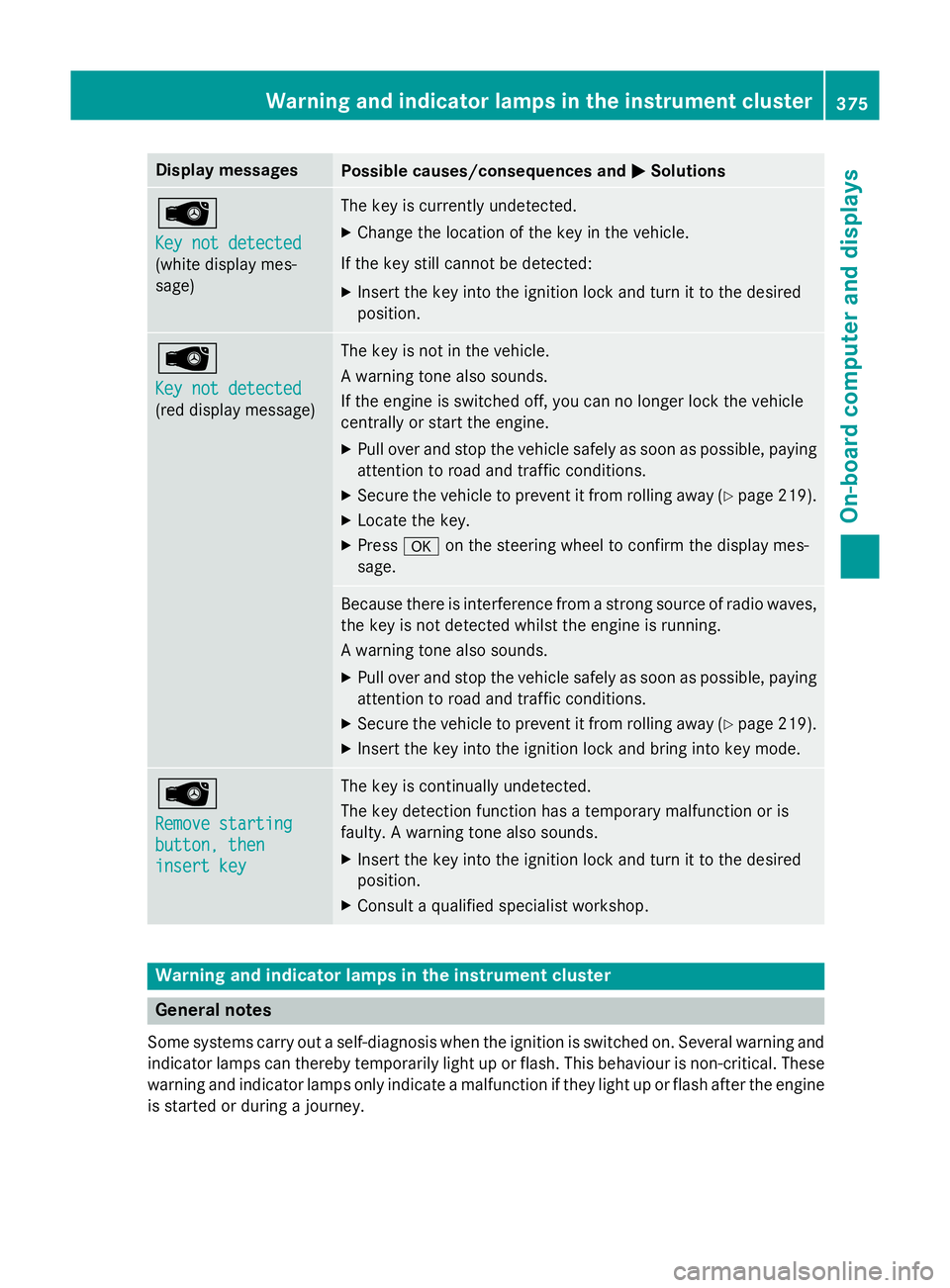
Display messages
Possible causes/consequences and
M
MSolutions Â
Key not detected Key not detected
(white display mes-
sage) The key is currently undetected.
X Change the location of the key in the vehicle.
If the key still cannot be detected: X Insert the key into the ignition lock and turn it to the desired
position. Â
Key not detected Key not detected
(red display message) The key is not in the vehicle.
A warning tone also sounds.
If the engine is switched off, you can no longer lock the vehicle
centrally or start the engine.
X Pull over and stop the vehicle safely as soon as possible, paying
attention to road and traffic conditions.
X Secure the vehicle to prevent it from rolling away (Y page 219).
X Locate the key.
X Press aon the steering wheel to confirm the display mes-
sage. Because there is interference from a strong source of radio waves,
the key is not detected whilst the engine is running.
A warning tone also sounds.
X Pull over and stop the vehicle safely as soon as possible, paying
attention to road and traffic conditions.
X Secure the vehicle to prevent it from rolling away (Y page 219).
X Insert the key into the ignition lock and bring into key mode. Â
Remove starting Remove starting
button, then button, then
insert key insert key The key is continually undetected.
The key detection function has a temporary malfunction or is
faulty. A warning tone also sounds.
X Insert the key into the ignition lock and turn it to the desired
position.
X Consult a qualified specialist workshop. Warning and indicator lamps in the instrument cluster
General notes
Some systems carry out a self-diagnosis when the ignition is switched on. Several warning and indicator lamps can thereby temporarily light up or flash. This behaviour is non-critical. These
warning and indicator lamps only indicate a malfunction if they light up or flash after the engine is started or during a journey. Wa
rning and indi cator lamps in the instrument cluster
375On-board computer and displays Z
Page 379 of 497
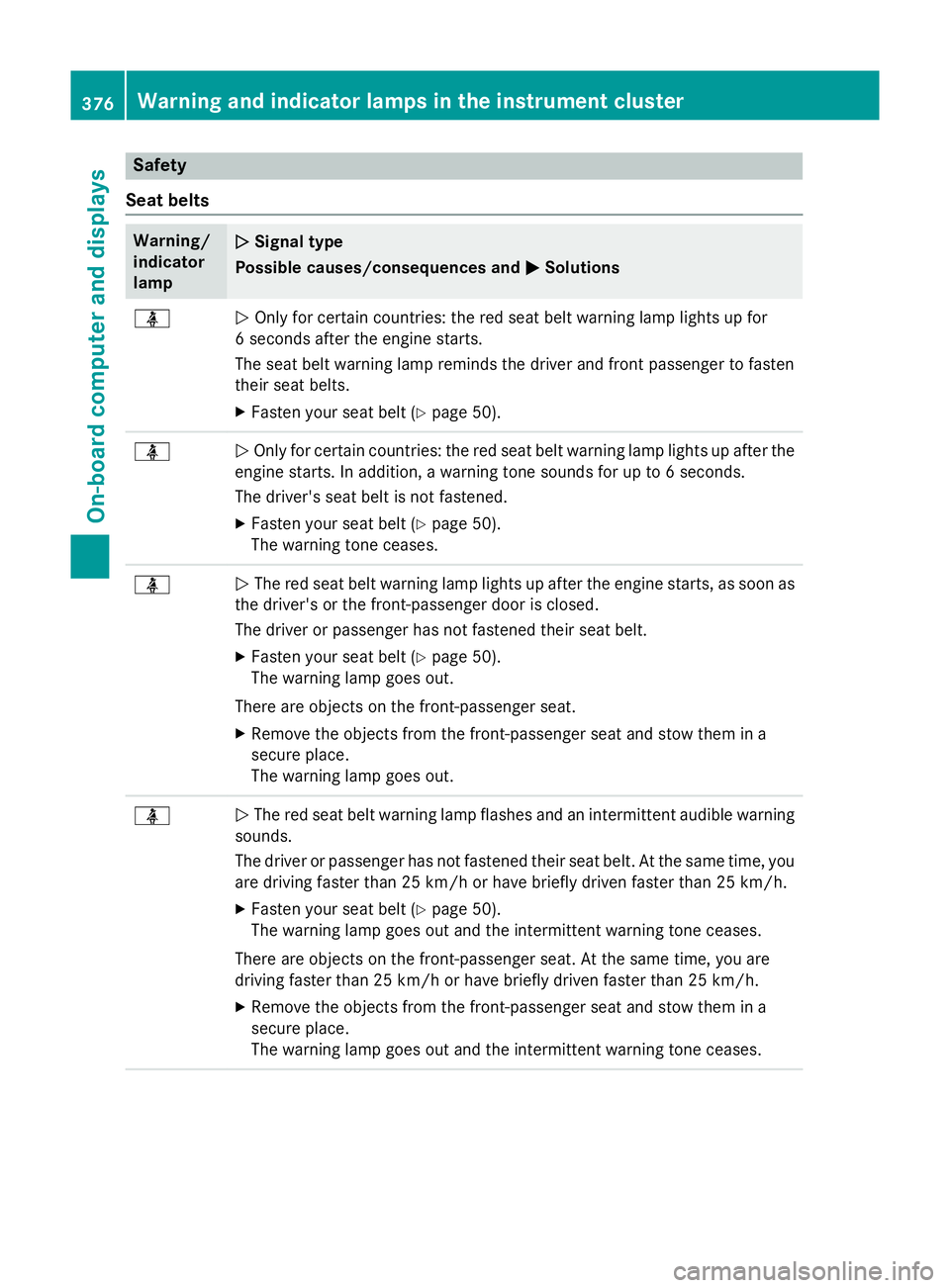
Safety
Seat belts Warning/
indicator
lamp
N N
Signal type
Possible causes/consequences and M
MSolutions ü
N
Only for certain countries: the red seat belt warning lamp lights up for
6 seconds after the engine starts.
The seat belt warning lamp reminds the driver and front passenger to fasten
their seat belts.
X Fasten your seat belt (Y page 50).ü
N
Only for certain countries: the red seat belt warning lamp lights up after the
engine starts. In addition, a warning tone sounds for up to 6 seconds.
The driver's seat belt is not fastened.
X Fasten your seat belt (Y page 50).
The warning tone ceases. ü
N
The red seat belt warning lamp lights up after the engine starts, as soon as
the driver's or the front-passenger door is closed.
The driver or passenger has not fastened their seat belt.
X Fasten your seat belt (Y page 50).
The warning lamp goes out.
There are objects on the front-passenger seat.
X Remove the objects from the front-passenger seat and stow them in a
secure place.
The warning lamp goes out. ü
N
The red seat belt warning lamp flashes and an intermittent audible warning
sounds.
The driver or passenger has not fastened their seat belt. At the same time, you are driving faster than 25 km/h or have briefly driven faster than 25 km/h.
X Fasten your seat belt (Y page 50).
The warning lamp goes out and the intermittent warning tone ceases.
There are objects on the front-passenger seat. At the same time, you are
driving faster than 25 km/h or have briefly driven faster than 25 km/h.
X Remove the objects from the front-passenger seat and stow them in a
secure place.
The warning lamp goes out and the intermittent warning tone ceases. 376
Warning and indicator lamps in the instrument clusterOn-board computer and displays
Page 380 of 497
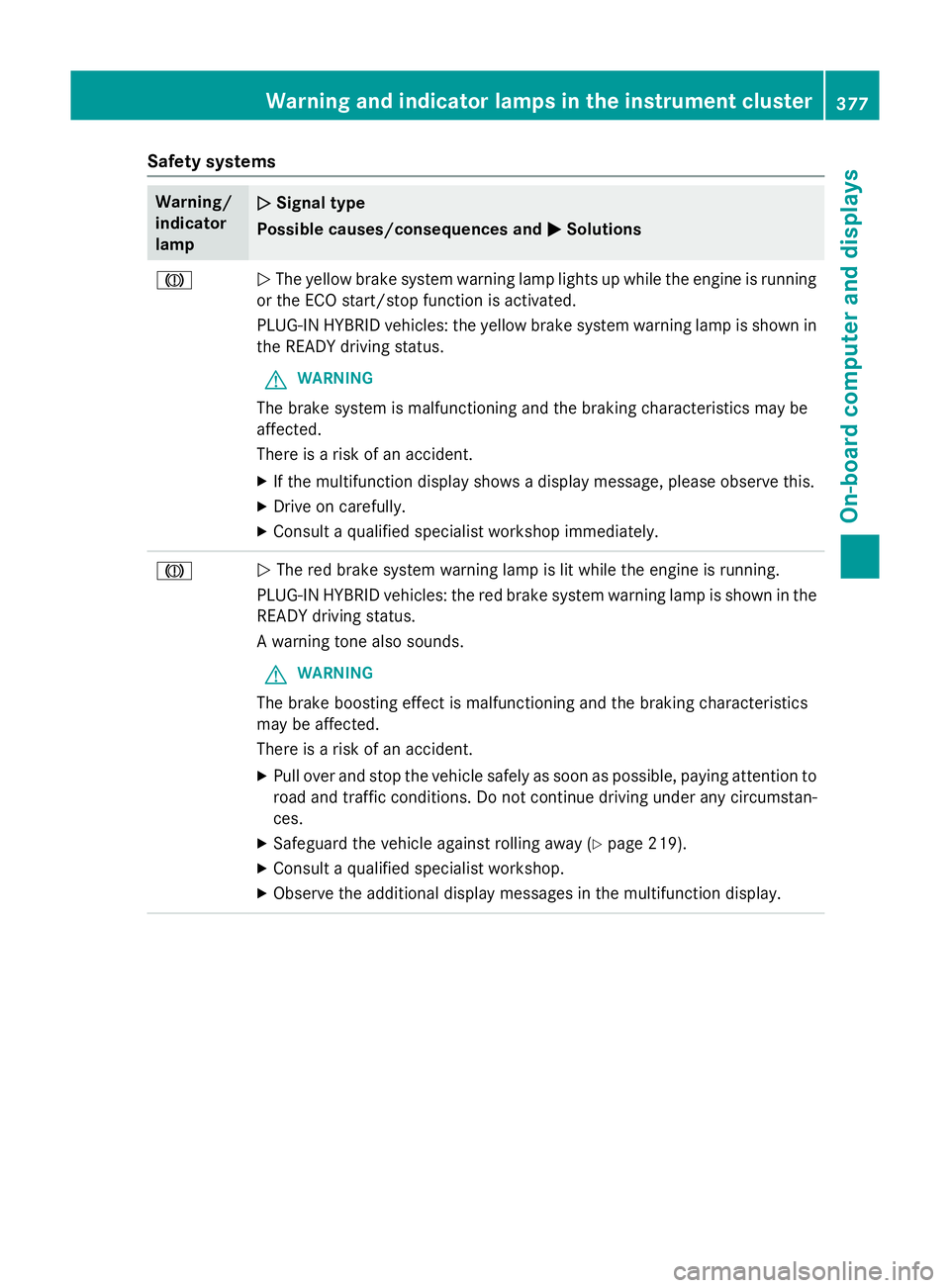
Safety systems
Warning/
indicator
lamp
N N
Signal type
Possible causes/consequences and M
MSolutions J
N
The yellow brake system warning lamp lights up while the engine is running
or the ECO start/stop function is activated.
PLUG-IN HYBRID vehicles: the yellow brake system warning lamp is shown in
the READY driving status.
G WARNING
The brake system is malfunctioning and the braking characteristics may be
affected.
There is a risk of an accident. X If the multifunction display shows a display message, please observe this.
X Drive on carefully.
X Consult a qualified specialist workshop immediately. J
N
The red brake system warning lamp is lit while the engine is running.
PLUG-IN HYBRID vehicles: the red brake system warning lamp is shown in the READY driving status.
A warning tone also sounds.
G WARNING
The brake boosting effect is malfunctioning and the braking characteristics
may be affected.
There is a risk of an accident.
X Pull over and stop the vehicle safely as soon as possible, paying attention to
road and traffic conditions. Do not continue driving under any circumstan-
ces.
X Safeguard the vehicle against rolling away (Y page 219).
X Consult a qualified specialist workshop.
X Observe the additional display messages in the multifunction display. Warning and indicator lamps in the instrument cluster
377On-board computer and displays Z
Page 381 of 497
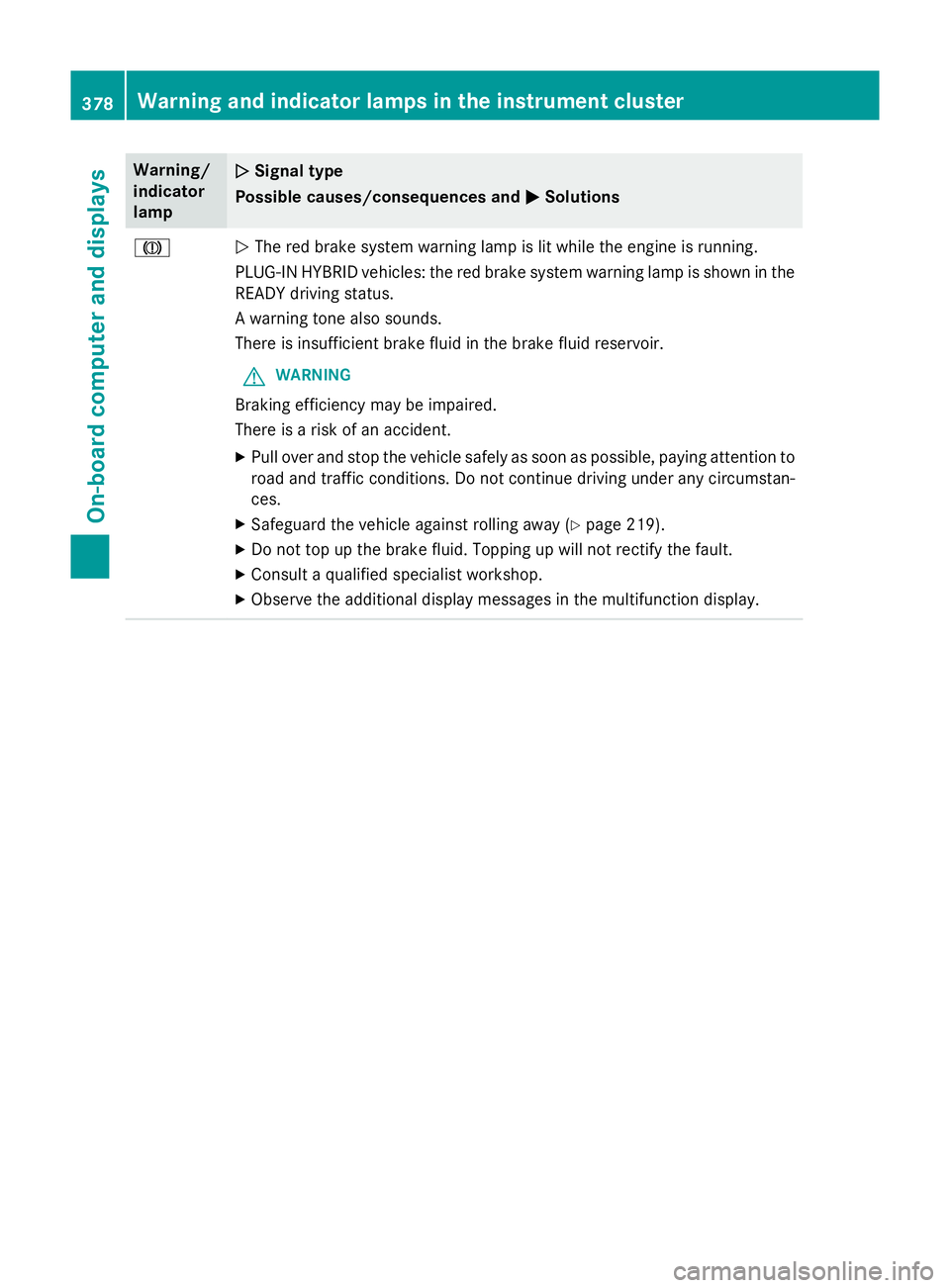
Warning/
indicator
lamp
N N
Signal type
Possible causes/consequences and M
MSolutions J
N
The red brake system warning lamp is lit while the engine is running.
PLUG-IN HYBRID vehicles: the red brake system warning lamp is shown in the READY driving status.
A warning tone also sounds.
There is insufficient brake fluid in the brake fluid reservoir.
G WARNING
Braking efficiency may be impaired.
There is a risk of an accident. X Pull over and stop the vehicle safely as soon as possible, paying attention to
road and traffic conditions. Do not continue driving under any circumstan-
ces.
X Safeguard the vehicle against rolling away (Y page 219).
X Do not top up the brake fluid. Topping up will not rectify the fault.
X Consult a qualified specialist workshop.
X Observe the additional display messages in the multifunction display. 378
Warning and indicator lamps in the instrument clusterOn-board computer and displays