climate control MERCEDES-BENZ GLC SUV 2015 User Guide
[x] Cancel search | Manufacturer: MERCEDES-BENZ, Model Year: 2015, Model line: GLC SUV, Model: MERCEDES-BENZ GLC SUV 2015Pages: 497, PDF Size: 15.27 MB
Page 36 of 497
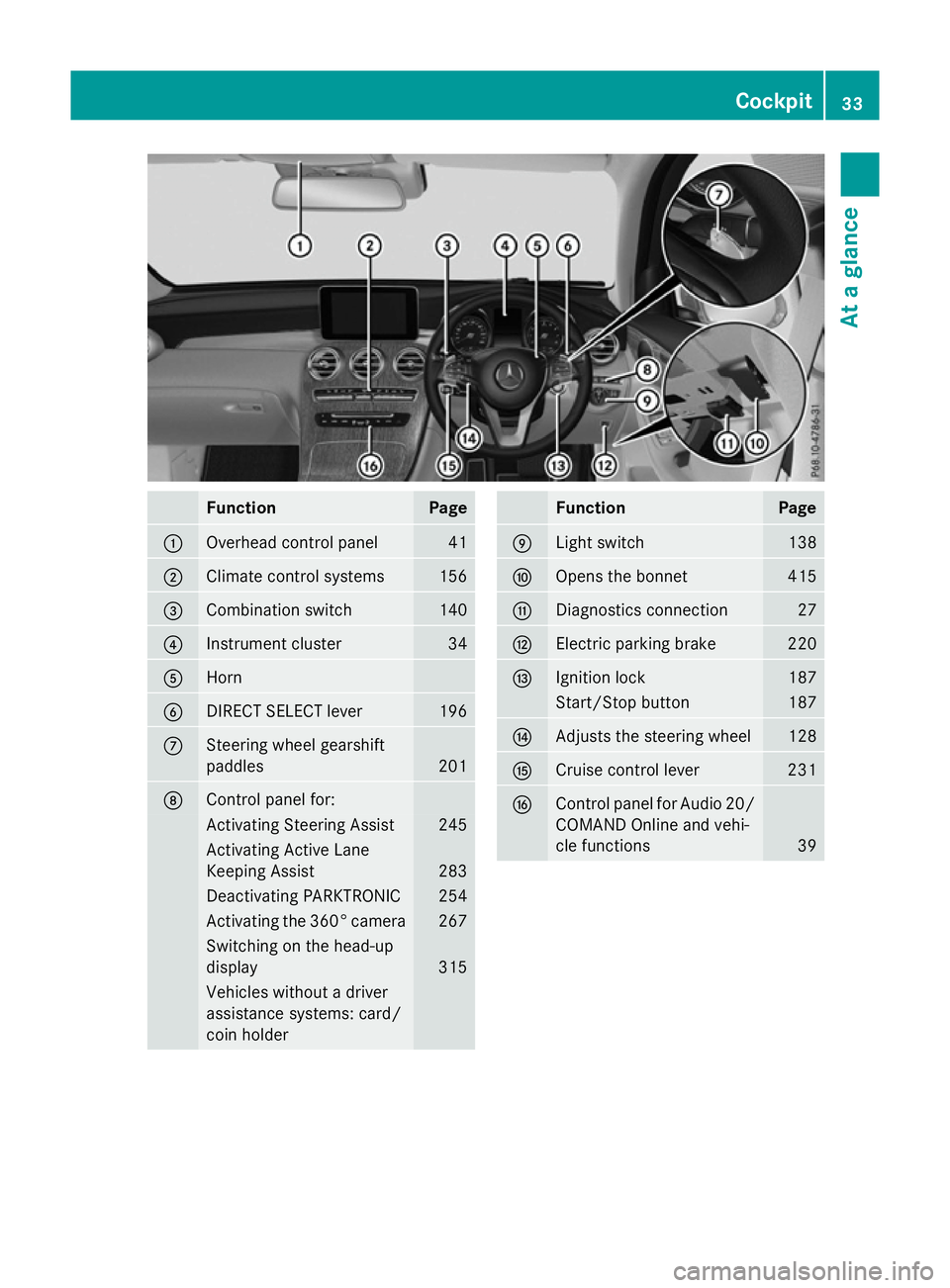
Function Page
:
Overhead control panel 41
;
Climate control systems 156
=
Combination switch 140
?
Instrument cluster 34
A
Horn
B
DIRECT SELECT lever 196
C
Steering wheel gearshift
paddles
201
D
Control panel for:
Activating Steering Assist 245
Activating Active Lane
Keeping Assist
283
Deactivating PARKTRONIC 254
Activating the 360° camera 267
Switching on the head-up
display
315
Vehicles without a driver
assistance systems: card/
coin holder Function Page
E
Light switch 138
F
Opens the bonnet 415
G
Diagnostics connection 27
H
Electric parking brake 220
I
Ignition lock 187
Start/Stop button 187
J
Adjusts the steering wheel 128
K
Cruise control lever 231
L
Control panel for Audio 20/
COMAND Online and vehi-
cle functions 39Cockpit
33At a glance
Page 42 of 497
Centre console
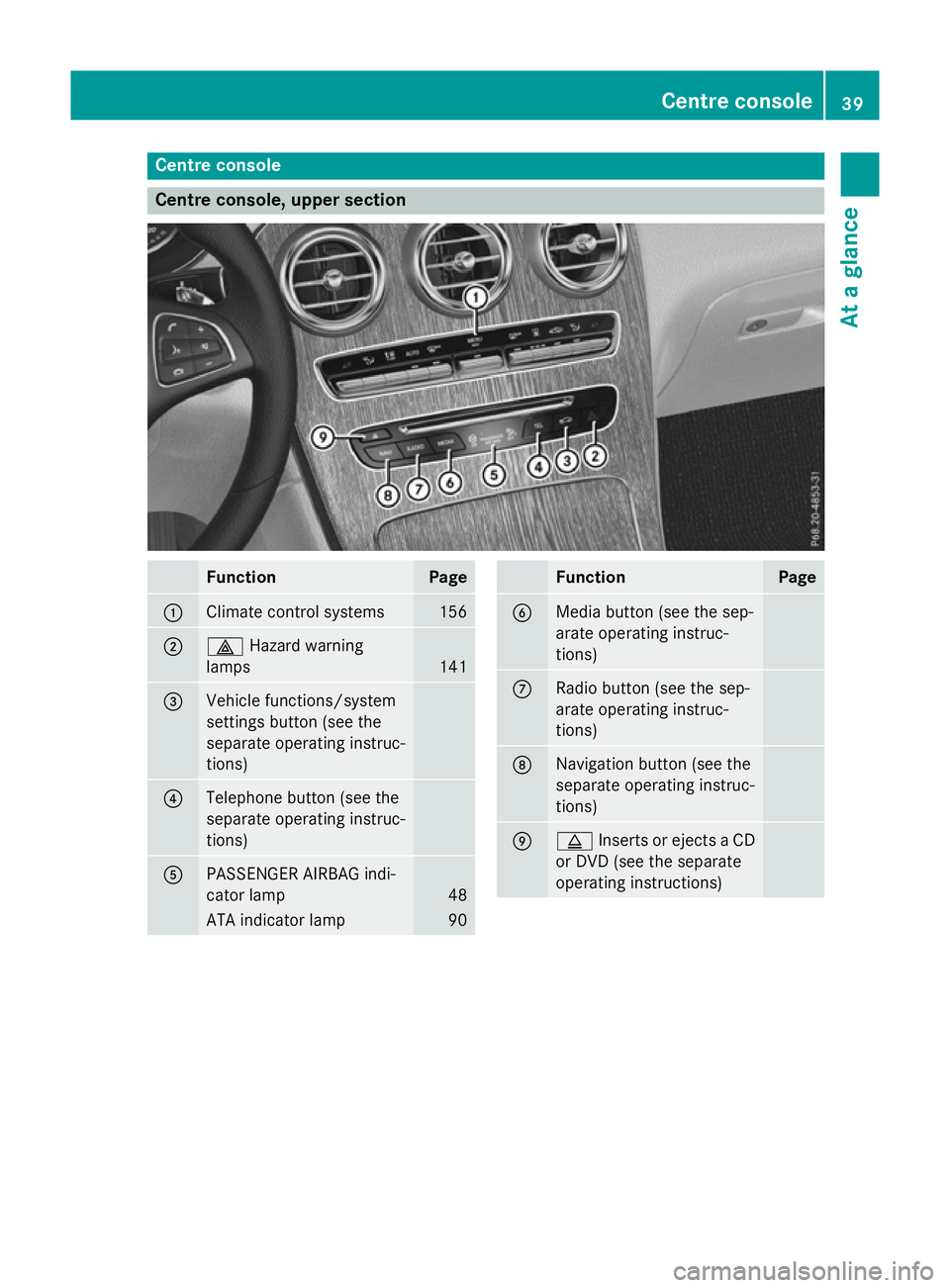
Centre console, upper section
Function Page
:
Climate control systems 156
;
£
Hazard warning
lamps 141
=
Vehicle functions/system
settings button (see the
separate operating instruc-
tions) ?
Telephone button (see the
separate operating instruc-
tions) A
PASSENGER AIRBAG indi-
cator lamp
48
ATA indicator lamp 90 Function Page
B
Media button (see the sep-
arate operating instruc-
tions)
C
Radio button (see the sep-
arate operating instruc-
tions) D
Navigation button (see the
separate operating instruc-
tions)
E
þ
Inserts or ejects a CD
or DVD (see the separate
operating instructions) Centre console
39At a glance
Page 158 of 497
Useful information
............................156
Overview of climate control sys-
tems ................................................... 156
Operating the climate control sys-
tem ..................................................... 162
Adjusting the air vents .....................183 155Climate control
Page 159 of 497
Useful information
i This Owner's Manual describes all mod-
els, series and optional equipment for your
vehicle that were available at the time of
going to press. National variations are pos- sible. Note that your vehicle may not be
equipped with all of the functions descri-
bed. This is also the case for systems and
functions relevant to safety.
i Read the information on qualified special-
ist workshops: (Y page 28). Overview of climate control systems
General notes
Observe the settings recommended on the
following pages. The windows could other-
wise mist up.
To prevent the windows from misting up:
R switch off climate control only briefly
R activate air-recirculation mode only briefly
R activate the "Cooling with air dehumidifica-
tion" function
R activate the windscreen demisting function
briefly, if required
Climate control regulates the temperature
and air humidity in the vehicle interior. The
interior filter cleans the air, thus improving
the interior climate.
The "Cooling with air dehumidification" func-
tion is only available when the engine is run-
ning. Optimum climate control is only ach-
ieved with the side windows and roof closed.
The residual heat function can only be acti-
vated or deactivated with the ignition
switched off (Y page 171).
i Ventilate the vehicle for a brief period
during warm weather, e.g. using the con-
venience opening feature (Y page 111).
This will speed up the cooling process and
the desired interior temperature will be
reached more quickly. i
The integrated filter filters out most par-
ticles of dust and soot and completely fil-
ters out pollen. It also reduces gaseous pol-
lutants and odours. A clogged filter reduces the amount of air supplied to the vehicle
interior. For this reason, you should alwaysobserve the interval for replacing the filter,
which is specified in the Service Booklet. As this depends on environmental conditions,
e.g. heavy air pollution, the interval may be shorter than stated in the Service Booklet.
i It is possible that the blower may be acti-
vated automatically 60 minutes after the
key has been removed depending on vari-
ous factors, e.g. the outside temperature.
The vehicle is then ventilated for
30 minutes to dry the automatic climate
control. 156
Overview of climate control systemsClimate control
Page 160 of 497
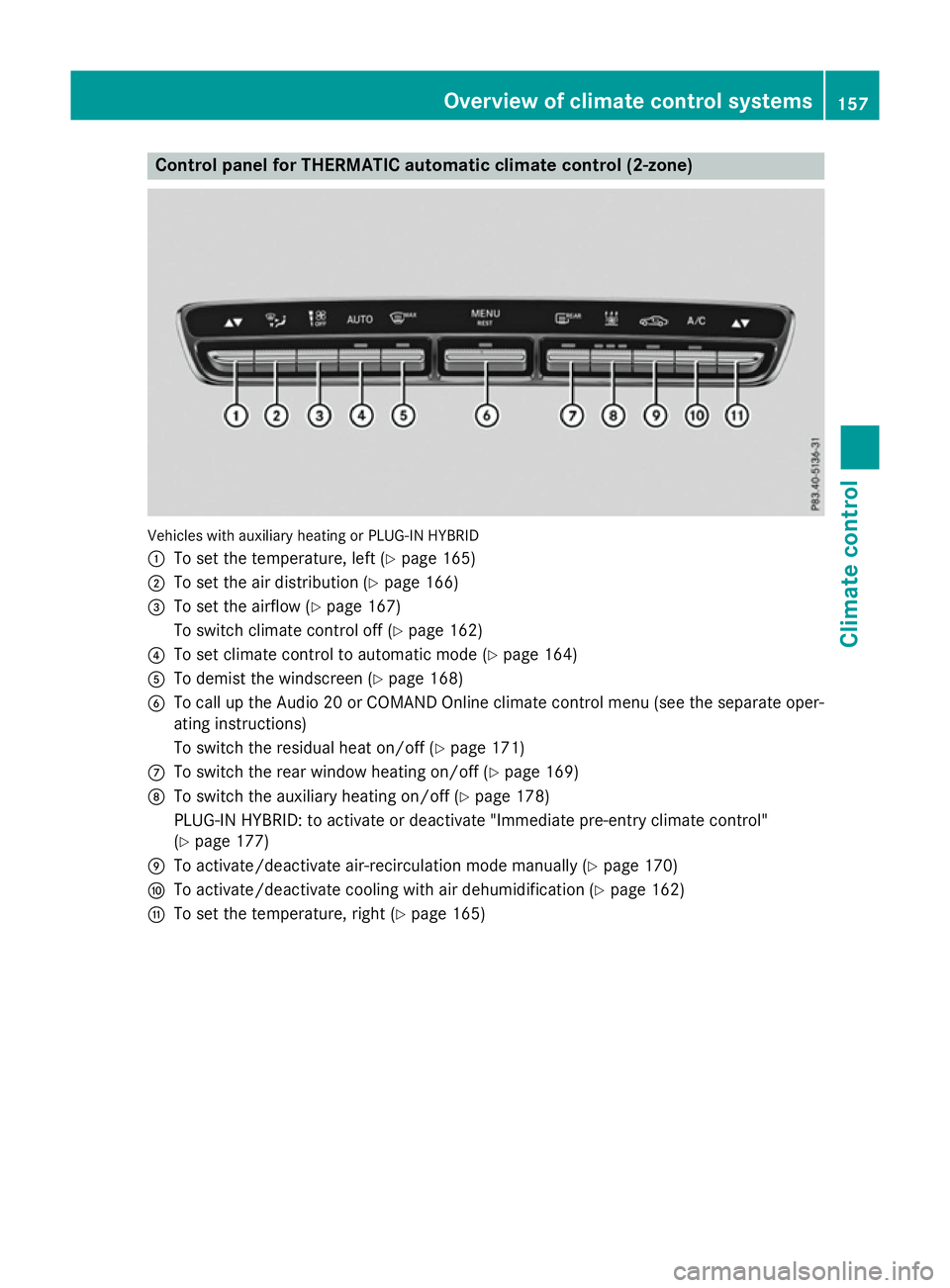
Control panel for THERMATIC automatic climate control (2-zone)
Vehicles with auxiliary heating or PLUG-IN HYBRID
: To set the temperature, left (Y page 165)
; To set the air distribution (Y page 166)
= To set the airflow (Y page 167)
To switch climate control off (Y page 162)
? To set climate control to automatic mode (Y page 164)
A To demist the windscreen (Y page 168)
B To call up the Audio 20 or COMAND Online climate control menu (see the separate oper-
ating instructions)
To switch the residual heat on/off (Y page 171)
C To switch the rear window heating on/off (Y page 169)
D To switch the auxiliary heating on/off (Y page 178)
PLUG-IN HYBRID: to activate or deactivate "Immediate pre-entry climate control"
(Y page 177)
E To activate/deactivate air-recirculation mode manually (Y page 170)
F To activate/deactivate cooling with air dehumidification (Y page 162)
G To set the temperature, right (Y page 165) Overview of climate control systems
157Climate control
Page 161 of 497
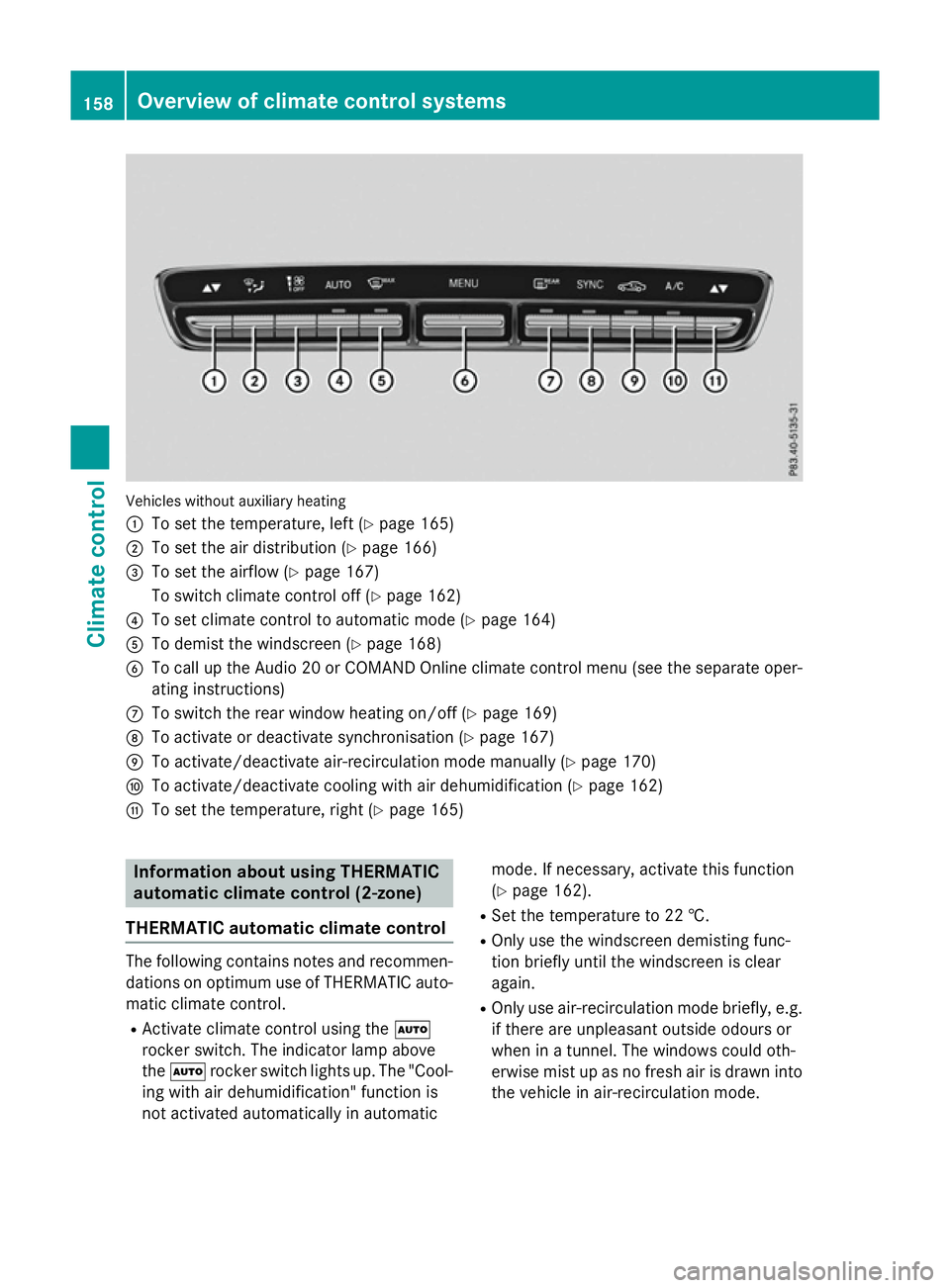
Vehicles without auxiliary heating
:
To set the temperature, left (Y page 165)
; To set the air distribution (Y page 166)
= To set the airflow (Y page 167)
To switch climate control off (Y page 162)
? To set climate control to automatic mode (Y page 164)
A To demist the windscreen (Y page 168)
B To call up the Audio 20 or COMAND Online climate control menu (see the separate oper-
ating instructions)
C To switch the rear window heating on/off (Y page 169)
D To activate or deactivate synchronisation (Y page 167)
E To activate/deactivate air-recirculation mode manually (Y page 170)
F To activate/deactivate cooling with air dehumidification (Y page 162)
G To set the temperature, right (Y page 165)Information about using THERMATIC
automatic climate control (2‑zone)
THERMATIC automatic climate control The following contains notes and recommen-
dations on optimum use of THERMATIC auto-
matic climate control.
R Activate climate control using the Ã
rocker switch. The indicator lamp above
the à rocker switch lights up. The "Cool-
ing with air dehumidification" function is
not activated automatically in automatic mode. If necessary, activate this function
(Y page 162).
R Set the temperature to 22 †.
R Only use the windscreen demisting func-
tion briefly until the windscreen is clear
again.
R Only use air-recirculation mode briefly, e.g.
if there are unpleasant outside odours or
when in a tunnel. The windows could oth-
erwise mist up as no fresh air is drawn into
the vehicle in air-recirculation mode. 158
Overview of climate control systemsClimate control
Page 162 of 497
DYNAMIC SELECT switch
You can choose between various drive pro-
grams with the DYNAMIC SELECT switch
(Y page 195).
If you have selected drive program E:
R the cooling output is reduced when cooling
R when heating, the electrical heater booster
is deactivated and heat output is reduced
as a result
R the rear window heating running time is
reduced
If you have selected drive program C,Sor S+ ,
the current climate settings are maintained.
ECO start/stop function During automatic engine switch-off, the cli-
mate control only operates at a reduced capa- city. If you require the full climate control out-
put, you can switch off the ECO start/stop
function by pressing the ECO button
(Y page 193). Overview of climate cont
rol systems
159Climate control
Page 163 of 497
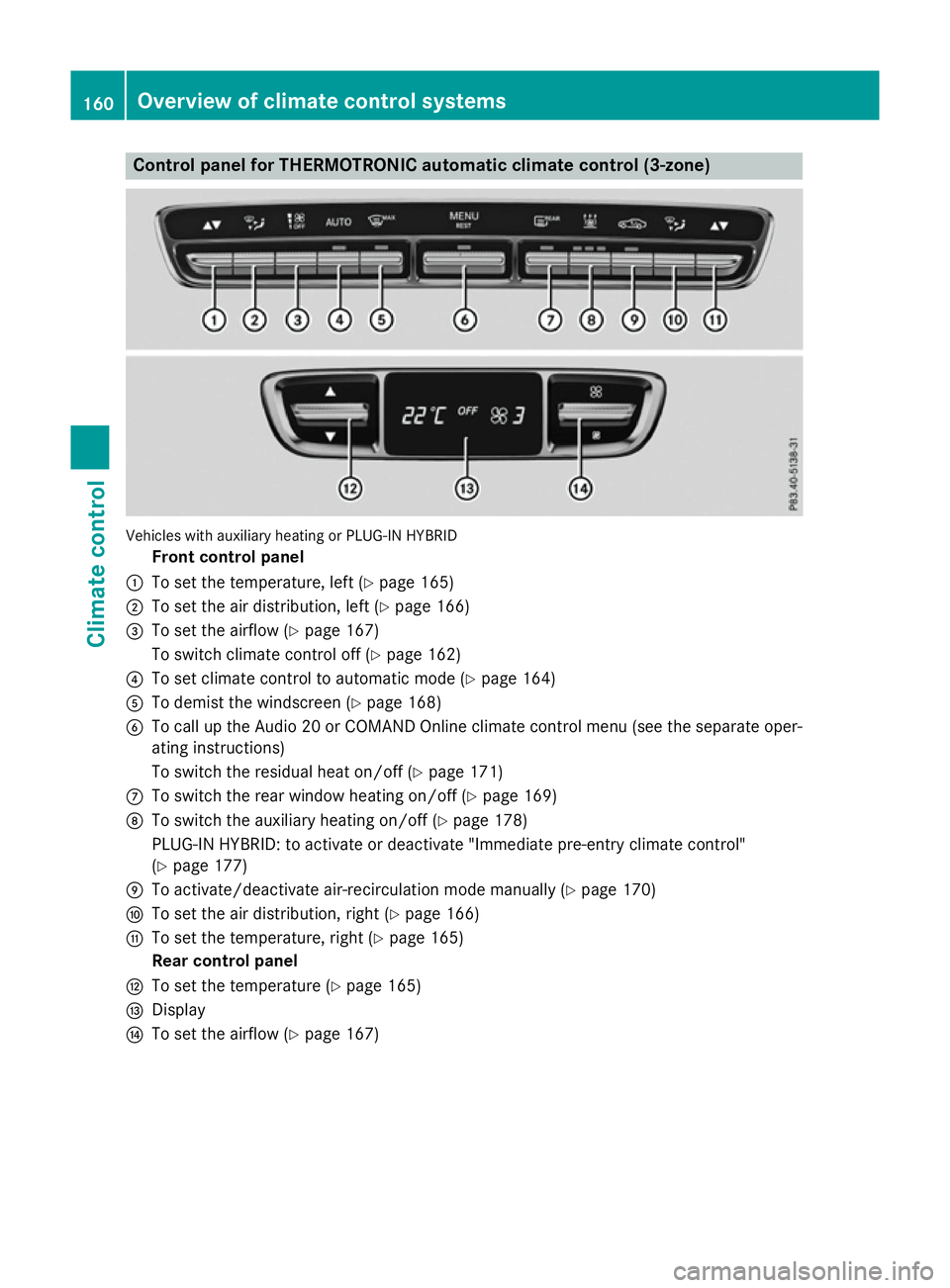
Control panel for THERMOTRONIC automatic climate control (3-zone)
Vehicles with auxiliary heating or PLUG-IN HYBRID
Front control panel
: To set the temperature, left (Y page 165)
; To set the air distribution, left (Y page 166)
= To set the airflow (Y page 167)
To switch climate control off (Y page 162)
? To set climate control to automatic mode (Y page 164)
A To demist the windscreen (Y page 168)
B To call up the Audio 20 or COMAND Online climate control menu (see the separate oper-
ating instructions)
To switch the residual heat on/off (Y page 171)
C To switch the rear window heating on/off (Y page 169)
D To switch the auxiliary heating on/off (Y page 178)
PLUG-IN HYBRID: to activate or deactivate "Immediate pre-entry climate control"
(Y page 177)
E To activate/deactivate air-recirculation mode manually (Y page 170)
F To set the air distribution, right (Y page 166)
G To set the temperature, right (Y page 165)
Rear control panel
H To set the temperature (Y page 165)
I Display
J To set the airflow (Y page 167)160
Overview of climate control systemsClimate control
Page 164 of 497
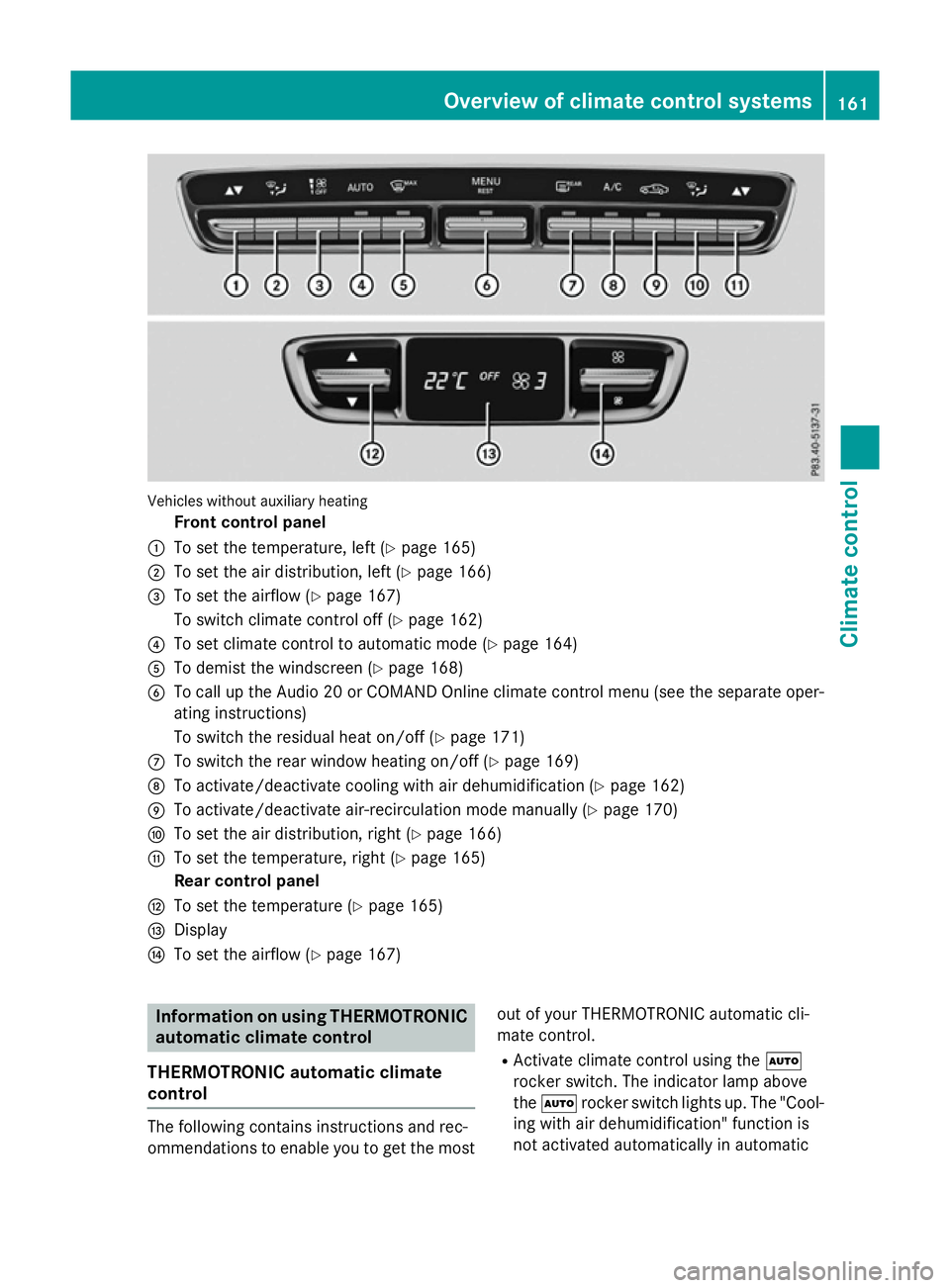
Vehicles without auxiliary heating
Front control panel
: To set the temperature, left (Y page 165)
; To set the air distribution, left (Y page 166)
= To set the airflow (Y page 167)
To switch climate control off (Y page 162)
? To set climate control to automatic mode (Y page 164)
A To demist the windscreen (Y page 168)
B To call up the Audio 20 or COMAND Online climate control menu (see the separate oper-
ating instructions)
To switch the residual heat on/off (Y page 171)
C To switch the rear window heating on/off (Y page 169)
D To activate/deactivate cooling with air dehumidification (Y page 162)
E To activate/deactivate air-recirculation mode manually (Y page 170)
F To set the air distribution, right (Y page 166)
G To set the temperature, right (Y page 165)
Rear control panel
H To set the temperature (Y page 165)
I Display
J To set the airflow (Y page 167) Information on using THERMOTRONIC
automatic climate control
THERMOTRONIC automatic climate
control The following contains instructions and rec-
ommendations to enable you to get the most
out of your THERMOTRONIC automatic cli-
mate control.
R Activate climate control using the Ã
rocker switch. The indicator lamp above
the à rocker switch lights up. The "Cool-
ing with air dehumidification" function is
not activated automatically in automatic Overview of climate control systems
161Climate control
Page 165 of 497
mode. If necessary, activate this function
(Y
page 162).
R Set the temperature to 22 †.
R Only use the "Windscreen demisting" func-
tion briefly until the windscreen is clear
again.
R Only use air-recirculation mode briefly, e.g.
if there are unpleasant outside odours or
when in a tunnel. The windows could oth-
erwise mist up as no fresh air is drawn into the vehicle in air-recirculation mode.
R Use the residual heat function if you want to
heat or ventilate the vehicle interior when
the ignition is switched off. The residual
heat function can only be activated or deac-
tivated with the ignition switched off. The
residual heat function is deactivated when
the ignition is switched on.
DYNAMIC SELECT switch You can choose between various drive pro-
grams with the DYNAMIC SELECT switch
(Y
page 195).
If you have selected drive program E:
R the cooling output is reduced when cooling
R when heating, the electrical heater booster
is deactivated and heat output is reduced
as a result
R the rear window heating running time is
reduced
If you have selected drive program C,Sor S+,
the current climate settings are maintained.
ECO start/stop function During automatic engine switch-off, the cli-
mate control only operates at a reduced capa-
city. If you require the full climate control out-
put, you can switch off the ECO start/stop
function by pressing the ECO button
(Y page 193). Operating the climate control system
Switching the climate control on/off
General notes When the climate control is switched off, the
air supply and air circulation are also
switched off. The windows could mist up.
Therefore, only switch off climate control
briefly.
Switch on climate control primarily using the à rocker switch (Y page 164).
Activating/deactivating X
Turn the key to position 2in the ignition
lock (Y page 187).
X To switch on: press thetor!
rocker switch up or down.
The Audio 20 or COMAND Online climate
control menu opens.
X Switch on climate control via the air-condi-
tioning function bar; see the separate oper- ating instructions.
or
X Set the airflow to level 1 or higher using the
H rocker switch.
X To switch off: press thetor!
rocker switch up or down.
The Audio 20 or COMAND Online climate
control menu opens.
X Switch off climate control via the air-con-
ditioning function bar; see the separate
operating instructions.
or
X Set the airflow to level 0 using the H
rocker switch. Activating/deactivating cooling with
air dehumidification
General notes If you deactivate the "Cooling with air dehu-
midification" function, the air inside the vehi- cle will not be cooled. The air inside the vehi- 162
Operating the climate control systemClimate control