warning MERCEDES-BENZ GLC SUV 2018 User Guide
[x] Cancel search | Manufacturer: MERCEDES-BENZ, Model Year: 2018, Model line: GLC SUV, Model: MERCEDES-BENZ GLC SUV 2018Pages: 390, PDF Size: 6.54 MB
Page 16 of 390
Removingth eStart/Sto pbutto n ... 137
Start function ................................... 80
Unlocking ......................................... 79
Kickdown
Driving tips .................................... 149
Manual gearshifting ....................... 154
Knee bag .............................................. 51
L
Lamps
see Warning and indicator lamps
Lane Change Assist
see Active Blind Spot Assist
Lane detection (automatic)
see Lane Keeping Assist
Lane Keeping Assist
Activating/deactivating ................. 208
Activating/deactivating (on-
board computer) ............................ 233
Display message ............................ 257
Function/information .................... 207
see Active Lane Keeping Assist
Lane Tracking package ..................... 205
Lap time (RACETIMER) ...................... 237
LATCH-type (ISOFIX) child seat
anchors ................................................ 62
Level control
Display message ............................ 257
see AIR BODY CONTROL
License plate lamp (display mes-
sage) ................................................... 251
Light function, active
Display message ............................ 251
Light switch
Operation ....................................... 112
Lights
Adaptive Highbeam Assist ............. 114
Automatic headlamp mode ............ 112
Cornering light function ................. 114
Fogged up headlamps .................... 115
General notes ................................ 112
Hazard warning lamps ................... 114
High beam flasher .......................... 113
High-beam headlamps ................... 113
Light switch ................................... 112
Low-beam headlamps .................... 113
Parking lamps ................................ 113 Rear fog lamp ................................ 113
Setting exterior lighting ................. 112
Standing lamps .............................. 113
Switching the daytime running
lamps on/off (on-board com-
puter) ............................................. 234
Turn signals ................................... 113
see Interior lighting
Loading guidelines ............................ 290
Locking
see Central locking
Locking (doors)
Automatic ........................................ 85
Emergency locking ........................... 85
From inside (central locking but-
ton) .................................................. 84
Locking centrally
see Central locking
Low-beam headlamps
Display mes sage ............................ 251
R
eplacing bulbs ............................. 117
Switching on/off ........................... 113
Lumbar support
Adjusting the 4-way lumbar sup-
port ................................................ 103
M
M+S tires ............................................ 351
Malfunction message
see Display messages
Matte finish (cleaning instruc-
tions) .................................................. 326
mbrace
Call priority .................................... 310
Display message ............................ 245
Downloading destinations
(COMAND) ..................................... 311
Downloading routes ....................... 313
Emergency call .............................. 308
General notes ................................ 307
Geo fencing ................................... 314
Info call button .............................. 310
Locating a stolen vehicle ............... 312
Remote fault diagnosis .................. 312
Remote vehicle locking .................. 312
Roadside assistance button ........... 309
Search & Send ............................... 311
14Index
Page 17 of 390
Self-test ......................................... 308
Speed alert .................................... 313
System .......................................... 307
Triggering the vehicle alarm ........... 314
Vehicle remote unlocking .............. 312
Mechanical key
Function/notes ................................ 80
General notes .................................. 80
Inserting .......................................... 80
Locking vehicle ................................ 85
Removing ......................................... 80
Unlocking the driver's door .............. 85
Media Interface
see Digital Operator's Manual
Memory card (audio) ......................... 229
Memory function
Seats, steering wheel, exterior
mirrors ........................................... 110
Mercedes-Benz Intelligent Drive
360°camera .................................. 199
Active Blind Spot Assist ................. 209
Active Lane Keeping Assist ............ 212
ATTENTION ASSIST ........................ 203
Blind Spot Assist ............................ 205
Distance Pilot DISTRONIC ............. 170
Distance Pilot DISTRONIC with
Steering Pilot ................................. 177
General notes ................................ 169
Lane Keeping Assist ...................... 207
Parking Assist PARKTRONIC .......... 191
Parking Pilot .................................. 188
PRE-SAFE
®(anticipatory occu-
pant protection) ............................... 58
PRE-SAFE
®PLUS (anticipatory
occupant protection PLUS) .............. 59
Rear view camera .......................... 194
Traffic Sign Assist .......................... 205
Message memory (on-board com-
puter) .................................................. 239
Messages
see Display messages
see Warning and indicator lamps
Mirror turn signal
Cleaning ......................................... 327
Mirrors
see Exterior mirrors
see Vanity mirror (in the sun visor) Mobile phone
Connecting (device manager) ........ 287
Frequencies ................................... 375
Installation ..................................... 375
Menu (on-board computer) ............ 230
Transmission output (maximum) .... 375
Modifying the programming
(SmartKey) ........................................... 80
MOExtended tires .............................. 334
Mou nting w
heels
Lowering the vehicle ...................... 373
Mounting a new wheel ................... 372
Preparing the vehicle ..................... 370
Raising the vehicle ......................... 370
Removing a wheel .......................... 372
Securing the vehicle against roll-
ing away ........................................ 370
MP3
Operation ....................................... 229
see also Digital Operator's Man-
ual .................................................. 280
Multifunction display
Function/notes ............................. 222
Multifunction steering wheel
Operating the on-board compute r..2 21
Overview .......................................... 38
Multimedia system
Switching on and off ......................2 81
Music files
see also Digital Operator's Man-
ual ..................................................2 80
N
Navigation
Displaying (on-board computer) ..... 226
Menu (on-board computer) ............ 226
see also Digital Operator's Man-
ual ..................................................2 80
Notes on breaking-in a new vehi-
cle ....................................................... 135
O
Occupant Classification System
(OCS)
Conditions ....................................... 52
Faults ............................................... 55
Index15
Page 18 of 390
Operation ......................................... 52
System self-test ...............................54
Occupant safety
Air bags ...........................................4 9
Automatic measures after an acci-
dent ................................................. 59
Belt warning .....................................4 9
Childr eninthe vehicle .................... .60
Important safety notes .................... 44
Introduction to the restraint sys-
tem .................................................. 44
Occupant Classification System
(OCS) ............................................... 52
PASSENGER AIR BAG indicator
lamps ............................................... 45
Pets in the vehicle ........................... 65
PRE-SAFE
®(anticipatory occu-
pant protection) ............................... 58
PRE-SAFE
®PLUS (anticipatory
occupant protection PLUS) .............. 59
Restraint system warning lamp ........ 45
Seat belt .......................................... 45
OCS
Conditions ....................................... 52
Faults ............................................... 55
Operation .........................................5 2
System self-test ............................... 54
Odometer ........................................... 224
Off-road driving
Approach/departure angle ............ 384
Checklist after driving off-road ...... 167
Checklist before driving off-road .... 167
General information ....................... 166
Important safety notes .................. 165
Maximum gradient climbing abil-
ity .................................................. 384
Maximum water depth ................... 383
Traveling uphill ............................... 168
Off-road program
Activating/deactivating. ................ 183
General notes ................................ 181
Overview of programs .................... 182
Off-road system
DSR ............................................... 180
Off road drive pro gram .................. 181
Off-roa
d 4ETS .................................. 70
Off-road ESP
®.................................. 72 Oil
see Engine oil
On-board computer
AMG menu ..................................... 235
Assistance graphic menu ............... 231
Assistance menu ........................... 232
Display messages .......................... 239
Displaying a service message ........ 323
Displays and operation .................. 220
Distance Pilot DISTRONIC ............. 175
Factory settings ............................. 235
G-Meter ......................................... 236
Head-up display ............................. 223
Head-up display menu ................... 233
Important safety notes .................. 220
Instrument cluster menu ............... 234
Lights menu ................................... 234
Media menu ................................... 228
Menu overview .............................. 224
Message memory .......................... 239
Navigation menu ............................ 226
RACETIMER ................................... 237
Radio menu ................................... 228
Service menu ................................. 231
Settings menu ............................... 231
Standard display ............................ 224
Telephone menu ............................ 230
Trip menu ...................................... 224
Video DVD operation ..................... 229
Opening and closing the side trim
panels ................................................. 119
Operating safety
Declaration of conformity ................ 31
Important safety notes .................... 31
Operating system
see On-board computer
Operation
Digital Operator's Manual ................ 27
Operator's Manual
Overview .......................................... 29
Vehicle equipment ........................... 29
Outside temperature display ........... 221
Overhead control panel ...................... 42
Override feature
Rear side windows ........................... 65
16Index
Page 19 of 390
P
Paddle shifterssee Steering wheel paddle shifters
Paint code number ............................376
Paintwork (cleaning instructions) ... 326
Panic alarm .......................................... 44
Panorama roof with power tilt/
sliding panel
Important safety notes .................... 94
Operating ......................................... 95
Operating the roller sunblinds for
the sliding sunroof ........................... 96
Problem (malfunction) ..................... 97
Rain closing feature ......................... 96
Reversing feature .............................9 5
Parcel net ...........................................2 98
Parking
Important safety notes .................. 158
Parking brake ................................ 159
Parking position for the exterior
mirror on the front-passenger
side ................................................ 109
Rear view camera .......................... 194
Switching off the engine ................ 158
see Parking Assist PARKTRONIC
Parking aid
see 360° camera
see Exterior mirrors
see Parking Assist PARKTRONIC
see Parking Pilot
see Rear view camera
Parking Assist
Display message ............................ 258
Parking Assist PARKTRONIC
Deactivating/activating ................. 193
Driving system ............................... 191
Function/notes .............................1 91
Important safety notes .................. 191
Problems (malfunctions) ................ 194
Sensor range ................................. 192
Warning display ............................. 193
Parking assistance
see Parking Assist PARKTRONIC
Parking brake
Applying automatically ................... 159
Applying or releasing manually ...... 159
Display message ............................ 242 Electric parking brake .................... 159
Emergency braking ........................ 160
General notes ................................ 159
Releasing automatically ................. 160
Warning lamp ................................. 274
Parking lamps
Switching on/off ........................... 113
Parki ng Pi
lot
Canceling ....................................... 191
Detecting parking spaces .............. 188
Exiting a parking space .................. 190
Function/notes ............................. 188
Important safety notes .................. 188
Parking .......................................... 189
PASSENGER AIR BAG
Display message ............................ 249
Indicator lamps ................................ 45
Problems (malfunction) .................. 249
Perfume atomizer
Operating ....................................... 132
Problem (malfunction) ................... 133
Setting the perfume intensity
(multimedia system) ...................... 285
Vial ................................................ 132
Permanent all-wheel drive
see 4MATIC (permanent four-
wheel drive)
Pets in the vehicle ............................... 65
Phone book
see also Digital Operator's Man-
ual .................................................. 280
Plastic trim (cleaning instruc-
tions) .................................................. 329
Power washers .................................. 325
Power windows
see Side windows
PRE-SAFE
®(anticipatory occupant
protection)
Display message ............................ 246
Operation ......................................... 58
PRE-SAFE
®PLUS (anticipatory
occupant protection PLUS)
Operation ......................................... 59
Program
see Drive programs
Protection against theft
ATA (Anti-Theft Alarm system) ......... 77
Index17
Page 21 of 390
Overview of bulb types .................. 117
Replacing front bulbs (vehicles
with halogen headlamps) ............... 117
Turn signals (front) .........................118
Reporting safety defects .................... 33
Rescue card ......................................... 33
Reserve (fuel tank)
see Fuel
Reserve fuel
Display message ............................ 255
Warning lamp ................................. 274
Residual heat (climate control) ........131
Restraint system
Display message ............................ 247
Introduction ..................................... 44
Warning lamp ................................. 274
Warning lamp (function) ................... 45
Reversing feature
Panorama sliding sunroof ................ 95
Roller sunblinds ............................... 96
Side windows ................................... 91
Tailgate ............................................ 86
Roadside Assistance (breakdown) .... 30
Roll away protection
see HOLD function
Roller sunblind
Operating ......................................... 97
Panorama roof with power tilt/
sliding panel ..................................... 96
Rear side windows ......................... 303
Resetting ......................................... 97
Roof carrier ........................................ 301
Roof lining and carpets (cleaning
guidelines) ......................................... 331
Roof load (maximum) ........................ 382
Route guidance
see also Digital Operator's Man-
ual ..................................................2 80
Route guidance active ......................226
S
Safety
Children in the vehicle ..................... 60
see Occupant safety
see Operating safety
Safety system
see Driving safety systems SD card
Inserting/removing ........................ 289
Selecting ........................................ 229
SD memory card
see also Digital Operator's Man-
ual ..................................................2 80
Search & Send
see also Digital Operator's Man-
ual ..................................................2 80
Seat
Correct driver's seat position ........... 99
Seat belts
Adjusting the driver's and front-
passenger seat belt ......................... 48
Adjusting the height ......................... 48
center rear-compartment seat ......... 48
Cleaning ......................................... 330
Correct usage .................................. 47
Fastening ......................................... 48
Important safety guidelines ............. 46
Introduction ..................................... 45
Releasing ......................................... 48
Warning lamp ................................. 269
Warning lamp (function) ................... 49
Seats
Adjusting (electrically) ................... 101
Adjusting the 4-way lumbar sup-
port ................................................ 103
Adjusting the head restraint .......... 101
Calling up a stored setting (mem-
ory function) .................................. 110
Cleaning the cover ......................... 330
Folding the backrest (rear com-
partment) forwards/back .............. 293
Important safety notes .................... 99
Seat heating .................................. 103
Seat heating problem .................... 104
Seat ventilation .............................. 104
Seat ventilation problem ................ 104
Storing settings (memory func-
tion) ............................................... 110
Securing cargo .................................. 295
Selector lever
Cleaning ......................................... 329
see Automatic transmission
Sensors (cleaning instructions) ....... 328
Service menu (on-board com-
puter) .................................................. 231
Index19
Page 22 of 390
Service messagesee ASSYST PLUS
Service products
Brake fluid .....................................3 80
Coolant (engine) ............................ 380
Engine oil ....................................... 379
Fuel ................................................ 377
Important safety notes .................. 377
Refrigerant (air-conditioning sys-
tem) ............................................... 381
Washer fluid ................................... 381
Setting the date/time format
see also Digital Operator's Man-
ual ..................................................2 80
Setting the language
see also Digital Operator's Man-
ual ..................................................2 80
Setting the time
see also Digital Operator's Man-
ual ..................................................2 80
Settings
Factory (on-board computer) ......... 235
On-board computer ....................... 231
SETUP (on-board computer,
Mercedes-AMG vehicles) .................. 236
Side impact air bag .............................5 1
Side marker lamp (display mes-
sage) ................................................... 251
Side running board
Cleaning ......................................... 328
Side windows
Cleaning ......................................... 327
Convenience closing feature ............ 92
Convenience opening feature ..........9 2
Important safety information ........... 91
Opening/closing .............................. 91
Problem (malfunction) .....................9 4
Resettin g........................................ .93
Reversin gfeature ............................ .91
SIRIUS services
see also Digital Operator's Man-
ual .................................................. 280
Ski and snowboard bag .................... 292
Sliding sunroof
Important safet
y notes .................... 94
Problem (malfunction) ..................... 97
see Panorama roof with power
tilt/sliding panel SmartKey
Changing the battery ....................... 81
Changing the programming .............8 0
Checking the battery ...................... .81
Convenience closing feature ............ 93
Convenience opening feature .......... 92
Display message ............................ 267
Door central locking/unlocking ...... .78
Important safety notes .................... 78
KEYLESS-GO start function .............. 80
Loss .................................................8 2
Mechanical key ................................ 80
Overview .......................................... 78
Positions (ignition lock) ................. 136
Problem (malfunction) ..................... 82
Starting the engine ........................ 138
Smartphone
Starting the engine ........................ 139
SMS
see also Digital Operator's Man-
ual .................................................. 280
Snow chains ...................................... 351
Socket (12 V)
Cargo compartment ....................... 305
Center console .............................. 305
General notes ................................ 305
Rear compartment .........................3 05
Sound
Switching on/off ........................... 281
Special seat belt retractor .................. 60
Specialist workshop ............................ 32
Speed, controlling
see Cruise control
Speedometer
Activating/deactivating the addi-
tional spee dometer ........................ 235
Di
gital ............................................ 225
In the Instrument cluster ................. 37
Segments ...................................... 220
Selecting the display unit ...............2 34
SPORT handling mode
Deactivating/activating
(Mercedes-AMG vehicles) ................ 71
Warning lamp ................................. 273
Sports exhaust system
AMG ............................................... 142
Standing lamps
Display message ............................ 251
20Index
Page 23 of 390
Switching on/off ........................... 113
Start button
Display message ............................ 268
Start/Stop button
Key positions ................................. 137
Starting the engine ........................ 138
Start/stop function
see ECO start/stop function
Starting (engine) ................................ 138
STEER CONTROL .................................. 76
Steering
Display message ............................ 267
Warning lamps ............................... 279
Steering assistant STEER CON-
TROL
see STEER CONTROL
Steering Pilot
Display message ............................ 261
with Distance Pilot DISTRONIC ...... 177
Steering wheel
Adjusting (electrically) ................... 105
Adjusting (manually) ...................... 105
Button overview ............................... 38
Buttons (on-board computer) ......... 221
Cleaning ......................................... 329
EASY ENTRY/EXIT feature ............. 106
Important safety notes .................. 105
Storing settings (memory func-
tion) ............................................... 110
Steering wheel heating
Problem (malfunction) ................... 106
Switching on/off ........................... 105
Steering wheel paddle shifters ........ 152
Stopwatch (RACETIMER) ................... 237
Stowage areas ................................... 290
Stowage compartments
Armrest (under) ............................. 291
Center console .............................. 291
Cup holders ................................... 302
Door ............................................... 292
Eyeglasses compartment ............... 291
Glove box ....................................... 291
Important safety information ......... 290
Map pockets .................................. 292
Rear ............................................... 292
Stowage net ................................... 292
see Stowage areas Stowage net
....................................... 292
Summer tires
In winter ........................................ 351
Sun visor ............................................ 303
Suspension settings
AIR BODY CONTROL ...................... 184
Suspension tuning
AMG sports suspension based on
AIR BODY CONTROL ...................... 186
SETUP (on-board computer,
Mercedes-AMG vehicles) ............... 236
SUV
(Sport Utility Vehicle) ....................... 31
Switc hing ai
r-recirculation mode
on/off ................................................. 131
Switching on media mode
Via the device list .......................... 288
T
Tachometer ........................................ 221
Tail lamps
Display message ............................ 251
Tailgate
Display message ............................ 266
Emergency unlocking ....................... 90
HANDS-FREE ACCESS ..................... 88
Important safety notes .................... 85
Limiting the opening angle ............... 90
object detection ............................... 86
Opening dimensions ...................... 382
Opening/closing (automatically
from inside) ...................................... 89
Opening/closing (automatically
from outside) ................................... 87
Opening/closing (manually from
outside) ............................................ 86
Reversing feature ............................. 86
Tank content
Fuel gauge ....................................... 37
Technical data
Capacities ...................................... 377
Drawbar load (maximum) ............... 384
Information .................................... 375
Trailer loads ................................... 384
Vehicle data ................................... 382
Index21
Page 24 of 390
TelephoneAccepting a call (multifunction
steering wheel) .............................. 230
Authorizing a mobile phone (con-
necting) ......................................... 288
Connecting a mobile phone
(device manager) ........................... 287
Display message ............................ 267
Introduction ................................... 230
Menu (on-board computer) ............ 230
Number from the phone book ........ 230
Redialing ........................................ 231
Rejecting/ending a call ................. 230
see also Digital Operator's Man-
ual .................................................. 280
see Mobile phone
Temperature
Coolant (display in the instrument
cluster) .......................................... 221
Engine oil (on-board computer,
Mercedes-AMG vehicles) ............... 235
Outside temperature ...................... 221
Setting (climate control) ................ 128
Transmission oil (on-board com-
puter, Mercedes-AMG vehicles) ..... 235
Timing (RACETIMER) ......................... 237
Tire pressure
Calling up (on-board computer) ..... 356
Checking manually ........................ 355
Display message ............................ 262
Maximum ....................................... 355
Not reached (TIREFIT) .................... 337
Notes ............................................. 353
Reached (TIREFIT) .......................... 337
Recommended ............................... 352
Using the TIREFIT kit ...................... 336
Tire pressure loss warning system
General notes ................................ 355
Important safety notes .................. 355
Restarting ...................................... 356
Tire pressure monitor
Checking the tire pressure elec-
tronically ........................................ 358
Function/notes ............................. 356
General notes ................................ 356
Important safety notes .................. 357
Radio type approval for the tire
pressure monitor ........................... 359 Restarting ...................................... 358
Warning lamp ................................. 278
Warning message .......................... 358
Tire pres sure s
ensors
Display message ............................ 263
Tire-change tool kit ........................... 333
TIREFIT kit
Important safety notes .................. 335
Storage location ............................ 333
Tire pressure not reached .............. 337
Tire pressure reached .................... 337
Using ............................................. 336
Tires
Aspect ratio (definition) ................. 368
Average weight of the vehicle
occupants (definition) .................... 367
Bar (definition) ............................... 367
Changing a wheel .......................... 369
Characteristics .............................. 367
Checking ........................................ 349
Curb weight (definition) ................. 368
Definition of terms ......................... 367
Direction of rotation ...................... 369
Display message ............................ 262
Distribution of the vehicle occu-
pants (definition) ............................ 369
DOT (Department of Transporta-
tion) (definition) ............................. 367
DOT, Tire Identification Number
(TIN) ............................................... 366
GAWR (Gross Axle Weight Rating)
(definition) ..................................... 367
GVW (Gross Vehicle Weight) (def-
inition) ........................................... 368
GVWR (Gross Vehicle Weight Rat-
ing) (definition) .............................. 368
Important safety notes .................. 349
Increased vehicle weight due to
optional equipment (definition) ...... 367
Information on driving .................... 349
Kilopascal (kPa) (definition) ........... 368
Labeling (overview) ........................ 364
Load bearing index (definition) ...... 369
Load index ..................................... 366
Load index (definition) ................... 368
Maximum load on a tire (defini-
tion) ............................................... 368
22Index
Page 27 of 390
Vehicle levelAIR BODY CONTROL ...................... 185
Display message ............................ 256
Video
Operating the DVD ......................... 229
see also Digital Operator's Man-
ual .................................................. 280
VIN
Seat ............................................... 377
Type plate ...................................... 376
W
Warning and indicator lampsABS ................................................ 271
Active Brake Assist ........................ 277
Airbag ............................................ 274
Brakes ........................................... 270
Coolant .......................................... 275
Distance warning ........................... 277
Engine diagnostics ......................... 274
ESP
®.............................................. 271
ESP®OFF ....................................... 273
Fuel tank ........................................ 274
General notes ................................ 268
Overview .......................................... 37
Parking brake ................................ 274
PASSENGER AIR BAG ...................... 45
Reserve fuel ................................... 274
Restraint system ............................ 274
Seat belt ........................................ 269
SPORT handling mode ................... 273
Steering ......................................... 279
Tire pressure monitor .................... 278
Warranty .............................................. 29
Washer fluid
Display message ............................ 267
Weather display (COMAND)
see also Digital Operator's Man-
ual .................................................. 280
Wheel and tire combinations
Tires ............................................... 373
Wheel bolt tightening torque ........... 373
Wheel chock ...................................... 370
Wheels
Changing a wheel .......................... 369
Checking ........................................ 349
Cleaning ......................................... 326 Important safety notes .................. 349
Information on driving .................... 349
Interchanging/changing ................ 369
Mounting a new wheel ................... 372
Mounting a wheel .......................... 370
Removing a wheel .......................... 372
Snow chains .................................. 351
Storing ........................................... 370
Tightening torque ........................... 373
Wheel size/tire size ....................... 373
Window curtain air bag
Display message ............................ 248
Operation ......................................... 51
Windows
see Side windows
Windshield
Defrosting ...................................... 130
Windshield washer fluid
see Windshield washer system
Windshield washer system
Adding washer fluid ....................... 322
Important safety notes .................. 381
Windshield wipers
Problem (malfunction) ................... 123
Rear window wiper ........................ 121
Replacing the wiper blades ............ 121
Switchi
ng on/off ........................... 120
Winter driving
Important safety notes .................. 351
Slippery road surfaces ................... 165
Snow chains .................................. 351
Winter operation
Radiator cover ............................... 319
Summer tires ................................. 351
Winter tires
M+S tires ....................................... 351
Wiper arm
Moving to a vertical position .......... 121
Wiper blades
Cleaning ......................................... 327
Important safety notes .................. 121
Replacing ....................................... 121
Replacing (rear window) ................ 122
Replacing (windshield) ................... 121
Without changing gears
Display message ............................ 265
Wooden trim (cleaning instruc-
tions) .................................................. 330
Index25
Page 29 of 390
Introduction
The printedOperator's Manual provide sinfor-
mation about th esaf eoperation of your vehicle.
The Digital Operator's Manual provide scompre-
hensiv eand specifically adapted information on
your vehicle's equipmen tand multimedia sys-
tem. You can call up th eDigital Operator's Man -
ual via th emultimedia system.
iYou will no tincur any cost swhen calling up
th eDigital Operator's Manual. The Digital
Operator's Manual works without connecting
to th eInternet .
Ther eare three ways to access th etopic sof th e
Digital Operator's Manual:
RVisua lsearch
The visual search allows you to explor eyour
vehicl e"virtually". Starting from either th e
vehicl eexterio rvie wor interio rview, you can
access man yof th edifferen ttopic scovered
by th eDigital Operator's Manual. To access
th evehicl einterio rsection ,select th e"Vehi-
cle interior" view.
RKeywor dsearch
The keyword search allows you to search for a
keyword by enterin gcharacters.
RContent s
You can select individual section sin th econ-
tents.
iThe Digital Operator's Manual is deactiva-
te dfor safet yreason swhile driving .
Operation
Calling up the Digital Operator's Man-
ual
XPress theØ buttonon th ecenter console.
The overview relating to th evehicl eappears.
XSelec tth e"Operator's Manual" men uitem by
turnin g3 or pressin g7 thecontroller.
XConfir m7 themessage about th ewarning
and safet ynotes.
The men ufor th eDigital Operator's Manual
appears.
Operating the Digital Operator's Man-
ual
General notes
Pleas eobserv eth einformation about th eoper -
ation of th econtroller (Ypage 281).
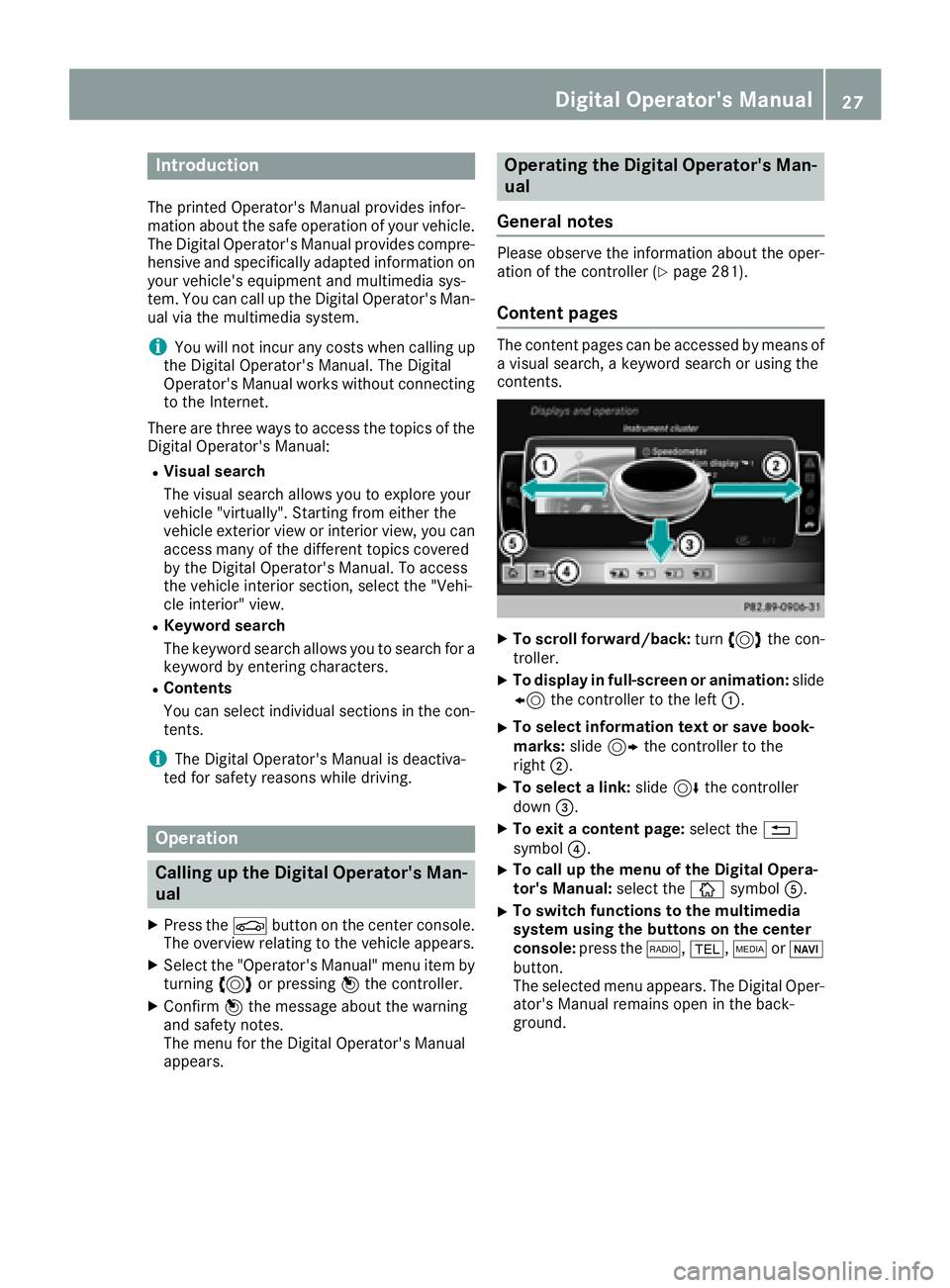
Content pages
The conten tpages can be accessed by mean sof
a visual search , akeyword search or usin gth e
contents .
XTo scroll forward/back :tur n3 thecon-
troller .
XTo displa yin full-screen or animation: slide
8 thecontroller to th elef t:.
XTo select information tex tor sav ebook -
marks: slide9 thecontroller to th e
right ;.
XTo select alink :slide 6thecontroller
down =.
XTo exit acontent page: select the%
symbol ?.
XTo call up th emen uof th eDigital Opera -
tor's Manual: select theÞ symbol A.
XTo switch functions to th emultimedi a
system using th ebutton son th ecenter
console: press the$, %,ÕorØ
button.
The selected men uappears. The Digital Oper -
ator's Manual remain sopen in th eback-
ground .
Digital Operator's Manual27