dimensions MERCEDES-BENZ GLC SUV 2018 Owner's Manual
[x] Cancel search | Manufacturer: MERCEDES-BENZ, Model Year: 2018, Model line: GLC SUV, Model: MERCEDES-BENZ GLC SUV 2018Pages: 390, PDF Size: 6.54 MB
Page 23 of 390
Switching on/off ........................... 113
Start button
Display message ............................ 268
Start/Stop button
Key positions ................................. 137
Starting the engine ........................ 138
Start/stop function
see ECO start/stop function
Starting (engine) ................................ 138
STEER CONTROL .................................. 76
Steering
Display message ............................ 267
Warning lamps ............................... 279
Steering assistant STEER CON-
TROL
see STEER CONTROL
Steering Pilot
Display message ............................ 261
with Distance Pilot DISTRONIC ...... 177
Steering wheel
Adjusting (electrically) ................... 105
Adjusting (manually) ...................... 105
Button overview ............................... 38
Buttons (on-board computer) ......... 221
Cleaning ......................................... 329
EASY ENTRY/EXIT feature ............. 106
Important safety notes .................. 105
Storing settings (memory func-
tion) ............................................... 110
Steering wheel heating
Problem (malfunction) ................... 106
Switching on/off ........................... 105
Steering wheel paddle shifters ........ 152
Stopwatch (RACETIMER) ................... 237
Stowage areas ................................... 290
Stowage compartments
Armrest (under) ............................. 291
Center console .............................. 291
Cup holders ................................... 302
Door ............................................... 292
Eyeglasses compartment ............... 291
Glove box ....................................... 291
Important safety information ......... 290
Map pockets .................................. 292
Rear ............................................... 292
Stowage net ................................... 292
see Stowage areas Stowage net
....................................... 292
Summer tires
In winter ........................................ 351
Sun visor ............................................ 303
Suspension settings
AIR BODY CONTROL ...................... 184
Suspension tuning
AMG sports suspension based on
AIR BODY CONTROL ...................... 186
SETUP (on-board computer,
Mercedes-AMG vehicles) ............... 236
SUV
(Sport Utility Vehicle) ....................... 31
Switc hing ai
r-recirculation mode
on/off ................................................. 131
Switching on media mode
Via the device list .......................... 288
T
Tachometer ........................................ 221
Tail lamps
Display message ............................ 251
Tailgate
Display message ............................ 266
Emergency unlocking ....................... 90
HANDS-FREE ACCESS ..................... 88
Important safety notes .................... 85
Limiting the opening angle ............... 90
object detection ............................... 86
Opening dimensions ...................... 382
Opening/closing (automatically
from inside) ...................................... 89
Opening/closing (automatically
from outside) ................................... 87
Opening/closing (manually from
outside) ............................................ 86
Reversing feature ............................. 86
Tank content
Fuel gauge ....................................... 37
Technical data
Capacities ...................................... 377
Drawbar load (maximum) ............... 384
Information .................................... 375
Trailer loads ................................... 384
Vehicle data ................................... 382
Index21
Page 26 of 390
Instrument cluster display .............205
Trailer coupling
see Towing a trailer
Trailer loads and drawbar nose-
weights ............................................... 218
Trailer towing
Active Lane Keeping Assist ............ 214
Blind Spot Assist ............................ 207
Permissible trailer loads and
drawbar noseweights ..................... 218
Transfer case ..................................... 155
Transmission
Display message ............................ 265
see Automatic transmission
Transmission oil
Temperature (on-board computer,
Mercedes-AMG vehicles) ...............2 35
Transmission position display ......... 148
Transporting the vehicle .................. 346
Traveling uphill
Brow of hill ..................................... 168
Driving downhill .............................1 68
Maximum gradient-climbing capa-
bility ............................................... 168
Trim pieces (cleaning instruc-
tions) ..................................................3 30
Trip computer (on-board com-
puter) ..................................................2 25
Trip odometer
Calling up ....................................... 224
Resetting (on-board computer) ...... 226
Trunk
see Cargo compartment
Turn signals
Display message ............................ 251
Replacing bulbs (front) ................... 118
Switching on/off ........................... 113
Two-way radio
Frequencies ................................... 375
Installation ..................................... 375
Transmission output (maximum) .... 375
Type identification plate
see Vehicle identification plate
U
UnlockingEmergency unlocking ....................... 85 From inside the vehicle (central
unlocking button) ............................. 84
USB devices
Connecting to the Media Inter-
face ............................................... 289
V
Vanity mirror (in the sun visor) ........ 303
Vehicle
Correct use ...................................... 32
Data acquisition ............................... 33
Display message ............................ 264
Electronics ..................................... 375
Equipment ....................................... 29
Individual settings .......................... 231
Limited Warranty ............................. 33
Loading .......................................... 359
Locking (in an emergency) ............... 85
Locking (SmartKey) .......................... 78
Lowering ........................................ 373
Maintenance .................................... 30
Operating safety .............................. 31
Operation outside the USA/
Canada ............................................ 30
Parking .......................................... 158
Parking for a long period ................ 160
Pulling away ................................... 139
Raising ........................................... 370
Reporting problems ......................... 32
Securing from rolling away ............ 370
Technical data ............................... 375
Towing away .................................. 343
Transporting .................................. 346
Unlocking (in an emergency) ........... 85
Unlocking (SmartKey) ...................... 78
Vehicle data ................................... 382
Vehicle data
Dimensions .................................... 382
Vehicle data (off-road driving)
Approach/departure angle ............ 384
Maximum gradient climbing abil-
ity .................................................. 384
Maximum water depth ................... 383
Vehicle emergency locking ................ 85
Vehicle identification number
see VIN
Vehicle identification plate .............. 376
24Index
Page 88 of 390
could enter the passenger compartment.
There is a risk of poisoning.
Turn off the engine before opening the tail-
gate. Never drive with the tailgate open.
GWARNING
If objects, luggage or loads are not secured or
not secured sufficiently, they could slip, tip
over or be flung around and thereby hit vehicle
occupants. There is a risk of injury, particu-
larly in the event of sudden braking or a sud-
den change in direction.
Always store objects so that they cannot be
flung around. Secure objects, luggage or
loads against slipping or tipping before the
journey.
!The tailgate swings upwards and to the rear
when opened. Therefore, make sure that
there is sufficient clearance above and behind
the tailgate.
The opening dimensions of the tailgate can be
found in the "Vehicle data" section
(
Ypage 382).
You can limit the opening angle of the tailgate
(
Ypage 90).
Do not leave the SmartKey in the cargo com-
partment. You could otherwise lock yourself
out.
You should preferably place luggage or loads in
the cargo compartment. Observe the loading
guidelines (
Ypage 290).
Tailgate object detection with revers-
ing feature
Vehicles with remote tailgate closing:
The tailgate is equipped with automatic object
detection with reversing function. If a solid
object blocks or restricts the tailgate when auto-
matically opening, this procedure is stopped. If a
solid object blocks or restricts the tailgate when
automatically closing, the tailgate automatically
opens again slightly. Automatic object detection with reversing function is only an aid. It is not a
substitute for your attentiveness when opening
and closing the tailgate.
GWARNING
The reversing feature does not respond:
Rto soft, light and thin objects, e.g. fingers
Rover the last Óin (8 mm) of the closing
movement
The reversing feature cannot prevent some-
one from becoming trapped in these situa-
tions in particular. There is a risk of injury.
Make sure that no body parts are in close
proximity during the closing procedure.
If somebody becomes trapped:
Rpress the Fbutton on the SmartKey, or
Rpull or press the remote operating switch
on the driver's door or
Rpress the closing or locking button on the
tailgate or
Rpull the handle on the tailgate
Vehicles with HANDS-FREE ACCESS:
It is also possible to stop the closing process by
performing a kicking movement under the rear
bumper.
Opening and closing manually
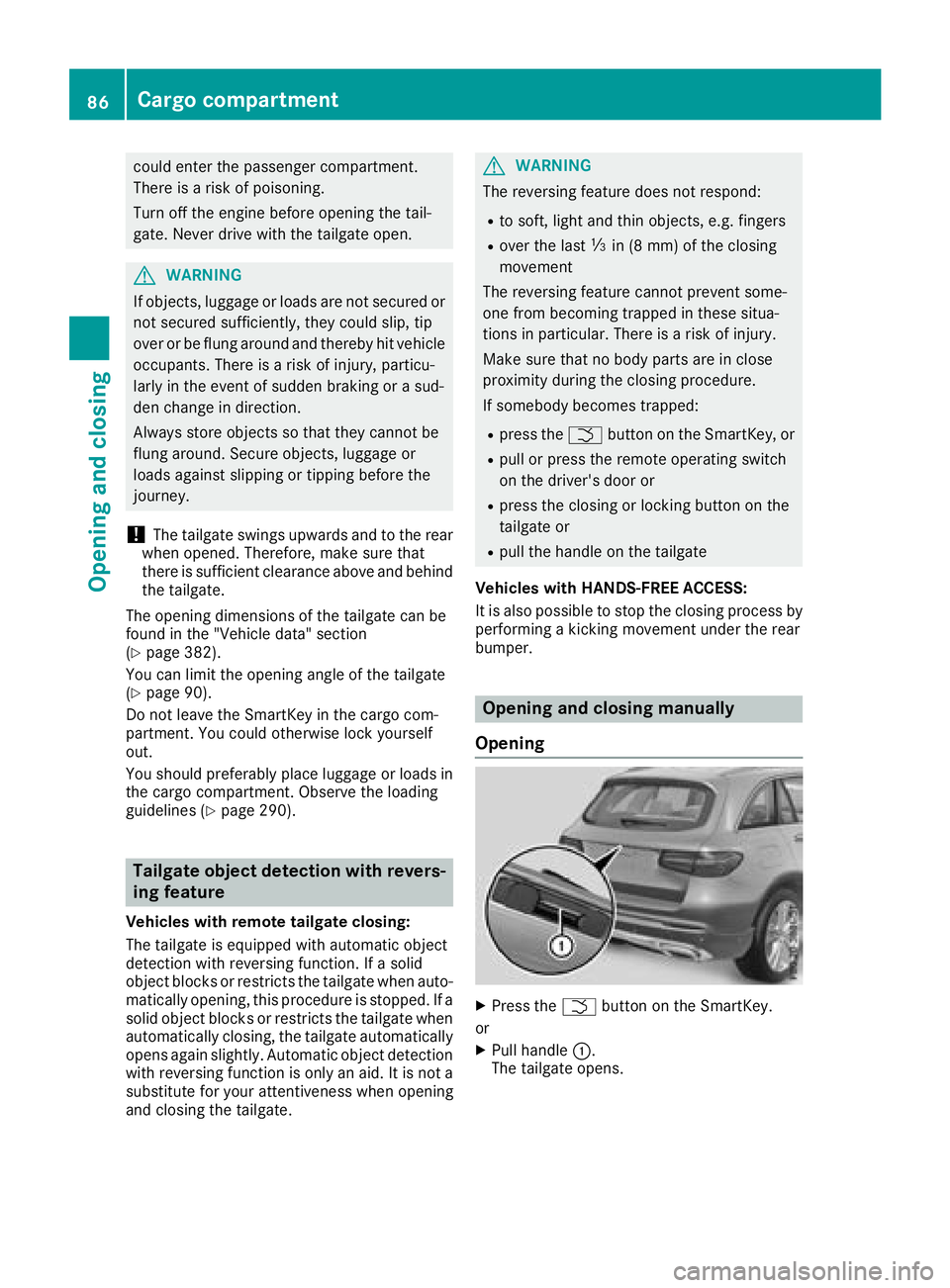
Opening
XPress the Fbutton on the SmartKey.
or
XPull handle :.
The tailgate opens.
86Cargo compartment
Opening and closing
Page 89 of 390
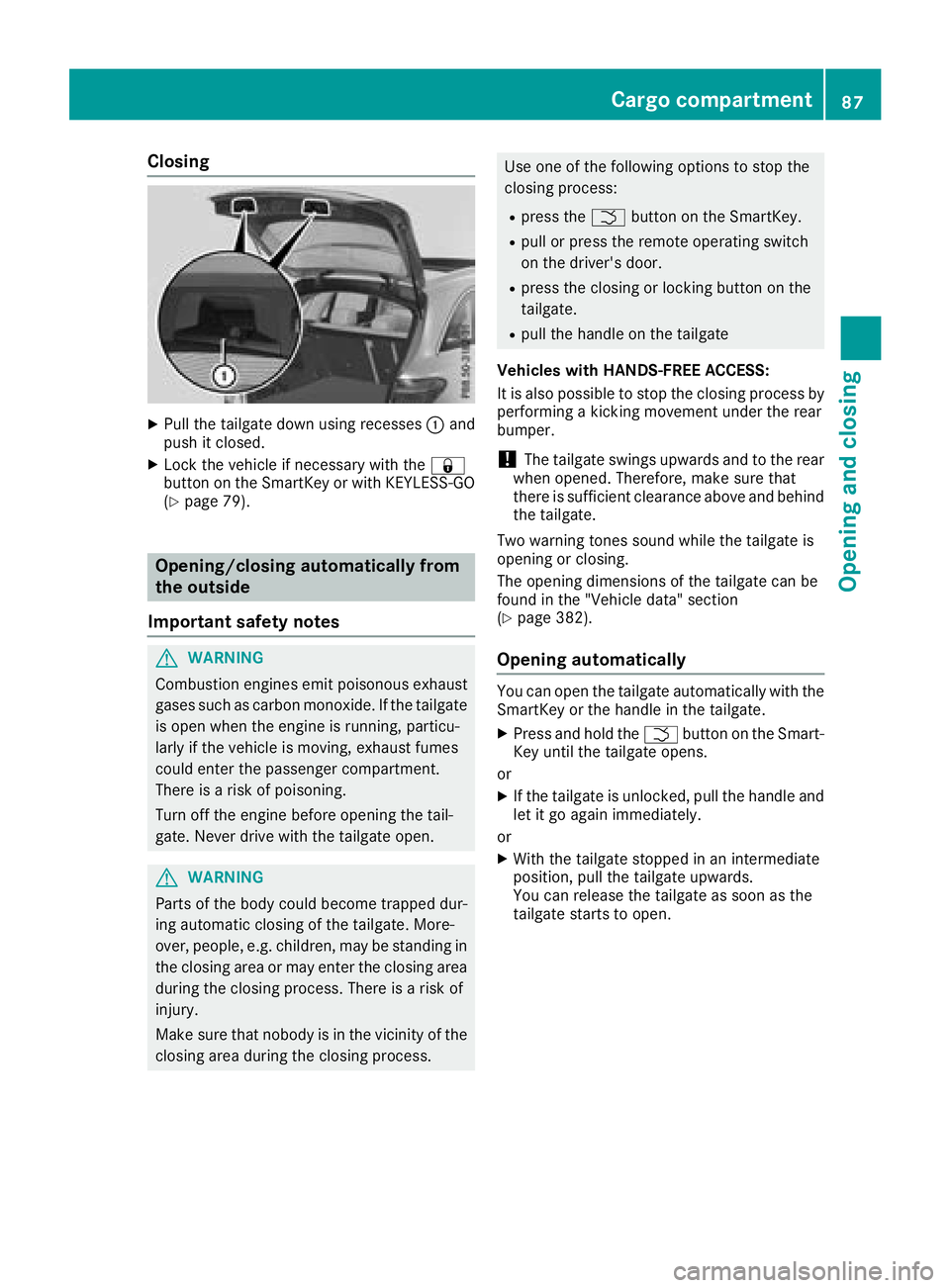
Closing
XPull the tailgate down using recesses:and
push it closed.
XLock the vehicle if necessary with the &
button on the SmartKey or with KEYLESS-GO
(
Ypage 79).
Opening/closing automatically from
the outside
Important safety notes
GWARNING
Combustion engines emit poisonous exhaust
gases such as carbon monoxide. If the tailgate is open when the engine is running, particu-
larly if the vehicle is moving, exhaust fumes
could enter the passenger compartment.
There is a risk of poisoning.
Turn off the engine before opening the tail-
gate. Never drive with the tailgate open.
GWARNING
Parts of the body could become trapped dur-
ing automatic closing of the tailgate. More-
over, people, e.g. children, may be standing in the closing area or may enter the closing area
during the closing process. There is a risk of
injury.
Make sure that nobody is in the vicinity of the
closing area during the closing process.
Use one of the following options to stop the
closing process:
Rpress the Fbutton on the SmartKey.
Rpull or press the remote operating switch
on the driver's door.
Rpress the closing or locking button on the
tailgate.
Rpull the handle on the tailgate
Vehicles with HANDS-FREE ACCESS:
It is also possible to stop the closing process by
performing a kicking movement under the rear
bumper.
!The tailgate swings upwards and to the rear
when opened. Therefore, make sure that
there is sufficient clearance above and behind
the tailgate.
Two warning tones sound while the tailgate is
opening or closing.
The opening dimensions of the tailgate can be
found in the "Vehicle data" section
(
Ypage 382).
Opening automatically
You can open the tailgate automatically with the
SmartKey or the handle in the tailgate.
XPress and hold the Fbutton on the Smart-
Key until the tailgate opens.
or
XIf the tailgate is unlocked, pull the handle and
let it go again immediately.
or
XWith the tailgate stopped in an intermediate
position, pull the tailgate upwards.
You can release the tailgate as soon as the
tailgate starts to open.
Cargo compartment87
Opening and closing
Z
Page 92 of 390
dren, during the closing procedure. There is a
risk of injury.
Make sure that nobody is in the vicinity of the
closing area during the closing process.
Release the remote operating switch imme-
diately if somebody becomes trapped. To re-
open the tailgate pull on the remote operating
switch.
Vehicles with HANDS-FREE ACCESS:
It is also possible to stop the closing process by
performing a kicking movement under the rear
bumper.
!The tailgate swings upwards and to the rear
when opened. Therefore, make sure that
there is sufficient clearance above and behind
the tailgate.
Two warning tones sound while the tailgate is
opening or closing.
The opening dimensions of the tailgate can be
found in the "Vehicle data" section
(
Ypage 382).
Opening and closing
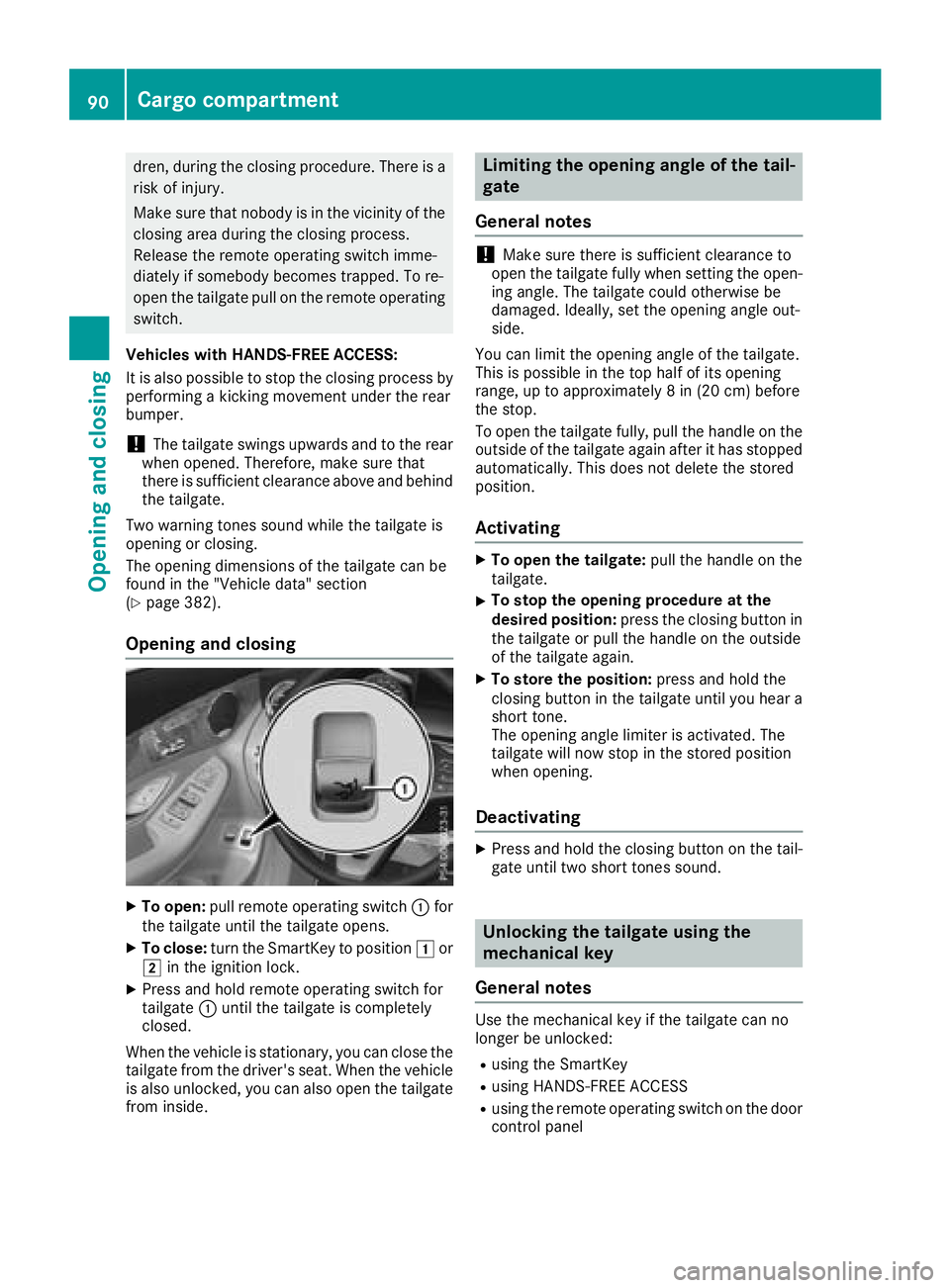
XTo open: pull remote operating switch :for
the tailgate until the tailgate opens.
XTo close: turn the SmartKey to position 1or
2 in the ignition lock.
XPress and hold remote operating switch for
tailgate :until the tailgate is completely
closed.
When the vehicle is stationary, you can close the
tailgate from the driver's seat. When the vehicle is also unlocked, you can also open the tailgate
from inside.
Limiting the opening angle of the tail-
gate
General notes
!Make sure there is sufficient clearance to
open the tailgate fully when setting the open-
ing angle. The tailgate could otherwise be
damaged. Ideally, set the opening angle out-
side.
You can limit the opening angle of the tailgate.
This is possible in the top half of its opening
range, up to approximately 8 in (20 cm) before
the stop.
To open the tailgate fully, pull the handle on the
outside of the tailgate again after it has stopped
automatically. This does not delete the stored
position.
Activating
XTo open the tailgate: pull the handle on the
tailgate.
XTo stop the opening procedure at the
desired position: press the closing button in
the tailgate or pull the handle on the outside
of the tailgate again.
XTo store the position: press and hold the
closing button in the tailgate until you hear a
short tone.
The opening angle limiter is activated. The
tailgate will now stop in the stored position
when opening.
Deactivating
XPress and hold the closing button on the tail-
gate until two short tones sound.
Unlocking the tailgate using the
mechanical key
General notes
Use the mechanical key if the tailgate can no
longer be unlocked:
Rusing the SmartKey
Rusing HANDS-FREE ACCESS
Rusing the remote operating switch on the door
control panel
90Cargo compartment
Opening and closing
Page 216 of 390
the lines on the assistance graphic display are
shown in green (Ypage 231). Active Lane
Keeping Assist is ready for use.
XTo deactivate: press button;.
Indicator lamp :goes out. The Active Lane
Keeping Assist is deactivated. The Lane
Keeping Assist Offmessage appears in
the multifunction display.
Selecting Standard or Adaptive setting
XIn the DriveAssistmenu on the on-board
computer, select the Active Lane Keep‐
ing Assistfunction (Ypage 233).
XSelect settingStandardorAdaptive.
When Standardis selected, no warning vibra-
tion occurs if:
Ryou switch on the turn signals. In this event,
the warnings are suppressed for a certain
period of time
Ra driving safety system intervenes, such as
ABS, BAS or ESP®
When Adaptiveis selected, no warning vibra-
tion occurs if:
Ryou switch on the turn signals. In this event, the warnings are suppressed for a certain
period of time.
Ra driving safety system intervenes, e.g.
ABS, BAS or ESP®
Ryou accelerate hard, e.g. kickdown.
Ryou brake hard
Ryou steer actively, e.g. swerve to avoid an
obstacle or change lanes quickly
Ryou cut the corner on a sharp bend
To ensure that you are warned only when nec-
essary and in good time if you cross the lane
markings, the system detects certain conditions
and warns you accordingly.
The warning vibration occurs earlier if:
Ryou approach the outer lane marking on a
bend
Rthe road has very wide lanes, e.g. a freeway
Rthe system detects solid lane markings
The warning vibration occurs later if:
Rthe road has narrow lanes
Ryou cut the corner on a bend
Towing a trailer
When you attach a trailer, make sure you have
correctly established the electrical connection. This can be accomplished by checking the trailer
lighting.
Towing a trailer
Important safety notes
GWARNING
Installing an unsuitable ball coupling may
result in overloading of the trailer tow hitch
and the rear axle. This applies especially if the ball coupling in question is longer or angled
differently. This could seriously impair the
driving characteristics and the trailer can
come loose. There is a risk of an accident.
You should only ever install a ball coupling
that has the permissible dimensions and that
is designed to meet your trailer-towing
requirements. Do not modify the ball coupling
or the trailer tow hitch.
You will find the values approved by the manu-
facturer on the vehicle identification plates and
those for the towing vehicle under "Technical
data" (
Ypage 384).
GWARNING
When the vehicle/trailer combination begins
to lurch, you could lose control of it. The vehi- cle/trailer combination could even rollover.
There is a risk of an accident.
On no account should you attempt to
straighten up the vehicle/trailer combination
by increasing the speed. Reduce vehicle
speed and do not countersteer. Apply the
brake as necessary.
!If you have a trailer tow hitch retrofitted,
changes to the engine cooling system may be
necessary, depending on the vehicle type.
If you have a trailer tow hitch retrofitted,
observe the anchorage points on the chassis
frame.
The installation of a trailer tow hitch is only per-
missible if a towing weight is specified in your
vehicle documents. If this is not the case, then
the vehicle is not approved for the towing of a
trailer.
214Towing a trailer
Driving an d parking
Page 219 of 390
XSwitch off the engine.
XClose the doors and tailgate.
XCouple up the trailer.
XEstablish the electrical connection between
the vehicle and the trailer.
XCheck that the trailer lighting system is work-
ing.
XPush the combination switch upwards/down-wards and check whether the corresponding
turn signal on the trailer flashes.
A trailer that is connected is recognized only
when the electrical connection is established
correctly and when the lighting system is work-
ing properly. The function of other systems also
depends on this, for example:
RESP®
RPARKTRONIC
RActive Parking Assist
RActive Blind Spot Assist
RActive Lane Keeping Assist
Vehicles with AIR BODY CONTROL: if you couple
up a trailer, the vehicle always remains at high-
way level. Observe the following note when cou-
pling up a trailer:
RUnless highway level has been set manually,
the vehicle is automatically lowered to high-
way level. If a speed of 5 mph (8 km/h) has
been reached, this may be the case.
These restrictions apply to accessories that are
supplied with power via the trailer socket in your
vehicle, e.g. a rear bicycle rack.
Observe the maximum permissible trailer
dimensions (width and length).
Most U.S. states and all Canadian provinces
require by law:
RSafety chains between the towing vehicle and
the trailer. The chains should be cross-wound
under the trailer drawbar. They must be fas-
tened to the vehicle's trailer coupling, not to
the bumper or the axle.
Leave enough play in the chains to make tight
cornering possible.
RA separate brake system for certain types of
trailer.
RSafety switch for braked trailers. Check the
specific legal requirements applicable to your state.
If the trailer becomes detached from the tow-
ing vehicle, the safety feature applies the
trailer brakes.
Towing a trailer
There are several legal requirements for towing
a trailer, e.g. the maximum permissible speed.
Make sure that your car/trailer combination
complies with the local regulations:
Rin your place of residence
Rat your destination
The police and local authorities can provide reli- able information.
To accumulate driving experience and accustom
yourself to the new handling characteristics,
practice the following at a location where there
is no traffic:
RCornering
RStopping
RBacking up
Check the following before the journey:
RTrailer tow hitch
RSafety switch for braked trailers
RSafety chains
RElectrical connections
RLighting system
RWheels and tires
RLoad securing
Adjust the exterior mirrors so that you have a
clear view of the rear section of the trailer.
If the trailer is equipped with electronically con-
trolled brakes, pull away carefully in the car/
trailer combination. Brake manually using the
brake controller and check whether the brakes
function correctly.
Regularly check that the load is secure.
When towing a trailer, your vehicle's handling
characteristics will be different in comparison
with when driving without a trailer.
The vehicle/trailer combination:
Ris heavier
Ris restricted in its acceleration and gradient-
climbing capability
Rhas an increased braking distance
Ris affected more by strong crosswinds
Rdemands more sensitive steering
Rhas a larger turning circle
Avoid sudden steering movements.
Avoid braking abruptly. If possible, brake gently
at first to allow the trailer to run on. Then,
increase the braking force rapidly.
Towing a trailer217
Driving and parking
Z
Page 371 of 390
Weight of optional extras
The combined weight of those optional extras
that weigh more than the replaced standard
parts and more than 5 lbs (2.3 kg). These
optional extras, such as high-performance
brakes, level control, a roof rack or a high-per-
formance battery, are not included in the curb
weight and the weight of the accessories.
TIN (Tire Identification Number)
This is a unique identifier which can be used by
a tire manufacturer to identify tires, for example
for a product recall, and thus identify the pur-
chasers. The TIN is made up of the manufactur-
er's identity code, tire size, tire type code and
the manufacturing date.
Load bearing index
The load bearing index (also load index) is a code
that contains the maximum load bearing capa-
city of a tire.
Traction
Traction is the result of friction between the tires
and the road surface.
Treadwear indicators
Narrow bars (tread wear bars) that are distrib-
uted over the tire tread. If the tire tread is level
with the bars, the wear limit of áin (1.6 mm)
has been reached.
Occupant distribution
The distribution of occupants in a vehicle at their
designated seating positions.
Total load limit
Nominal load and luggage load plus 68 kg
(150 lbs) multiplied by the number of seats in
the vehicle.
Changing a wheel
Flat tire
The "Breakdown assistance" section
(Ypage 334) contains information and notes on
how to deal with a flat tire. Information on driv-
ing with MOExtended tires in the event of a flat
tire can be found under "MOExtended tires (tires
with run-flat characteristics" (
Ypage 334).
Rotating the wheels
GWARNING
Interchanging the front and rear wheels may
severely impair the driving characteristics if
the wheels or tires have different dimensions. The wheel brakes or suspension components
may also be damaged. There is a risk of acci-
dent.
Rotate front and rear wheels only if the wheels and tires are of the same dimensions.
!On vehicles equipped with a tire pressure
monitor, electronic components are located
in the wheel.
Tire-mounting tools should not be used near
the valve. This could damage the electronic
components.
Only have tires changed at a qualified spe-
cialist workshop.
Always observe the instructions and safety
notes in the "Mounting a wheel" section
(
Ypage 370).
The wear patterns on the front and rear tires
differ, depending on the operating conditions.
Rotate the wheels before a clear wear pattern
has formed on the tires. Front tires typically
wear more on the shoulders and the rear tires in
the center.
On vehicles that have the same size front and
rear wheels, you can rotate the wheels accord-
ing to the intervals in the tire manufacturer's
warranty book in your vehicle documents. If no
warranty book is available, the tires should be
rotated every 3,000 to 6,000 miles (5,000 to
10,000 km). Depending on tire wear, this may
be required earlier. Do not change the direction
of wheel rotation.
Clean the contact surfaces of the wheel and the
brake disc thoroughly every time a wheel is rota- ted. Check the tire pressure and, if necessary,
restart the tire pressure loss warning system
(
Ypage 356) or the tire pressure monitor
(Ypage 358).
Direction of rotation
Tires with a specified direction of rotation have
additional benefits, e.g. if there is a risk of hydro- planing. These advantages can only be gained if
Changing a wheel369
Wheels and tires
Z
Page 384 of 390
!Only the refrigerant R‑134a and the PAG oil
approved by Mercedes-Benz may be used.
The approved PAG oil may not be mixed with
any other PAG oil that is not approved for
R-134a refrigerant. Otherwise, the climate
control system may be damaged.
Service work, such as refilling with refrigerant or
replacing component parts, may only be carried
out by a qualified specialist workshop. All appli- cable regulations, as well as SAE standard J639,
must be adhered to.
Always have work on the climate control system
carried out at a qualified specialist workshop.
Refrigerant instruction label
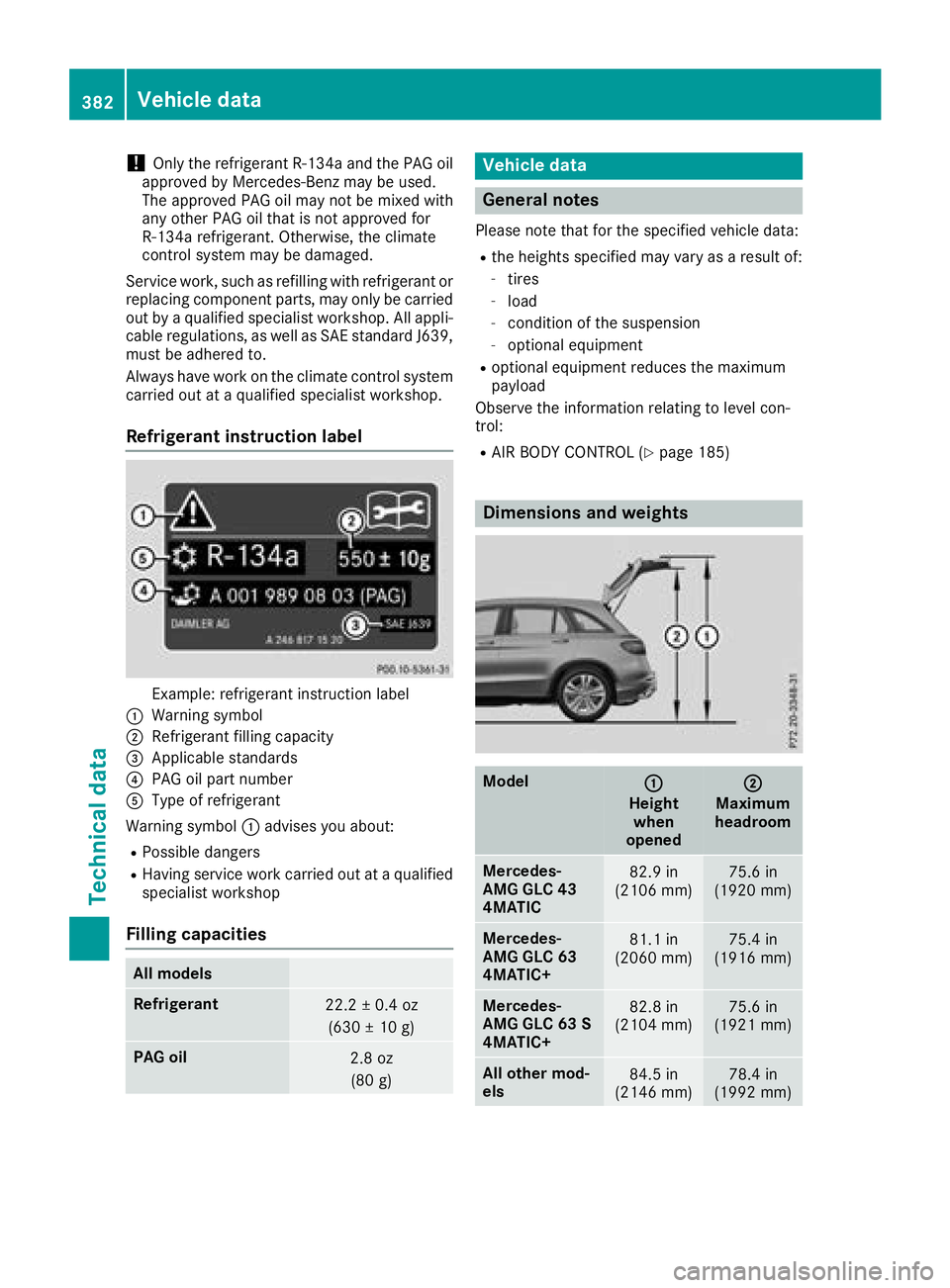
Example: refrigerant instruction label
:Warning symbol
;Refrigerant filling capacity
=Applicable standards
?PAG oil part number
AType of refrigerant
Warning symbol :advises you about:
RPossible dangers
RHaving service work carried out at a qualified
specialist workshop
Filling capacities
All models
Refrigerant22.2 ± 0.4 oz
(630 ± 10 g)
PAG oil2.8 oz(80 g)
Vehicle data
General notes
Please note that for the specified vehicle data:
Rthe heights specified may vary as a result of:
-tires
-load
-condition of the suspension
-optional equipment
Roptional equipment reduces the maximum
payload
Observe the information relating to level con-
trol:
RAIR BODY CONTROL (Ypage 185)
Dimensions and weights
Model:
Height when
opened
;
Maximum
headroom
Mercedes-
AMG GLC 43
4MATIC82.9 in
(2106 mm)75.6 in
(1920 mm)
Mercedes-
AMG GLC 63
4MATIC+81.1 in
(2060 mm)75.4 in
(1916 mm)
Mercedes-
AMG GLC 63 S
4MATIC+82.8 in
(2104 mm)75.6 in
(1921 mm)
All other mod-
els84.5 in
(2146 mm)78.4 in
(1992 mm)
382Vehicle data
Technical data
Page 387 of 390
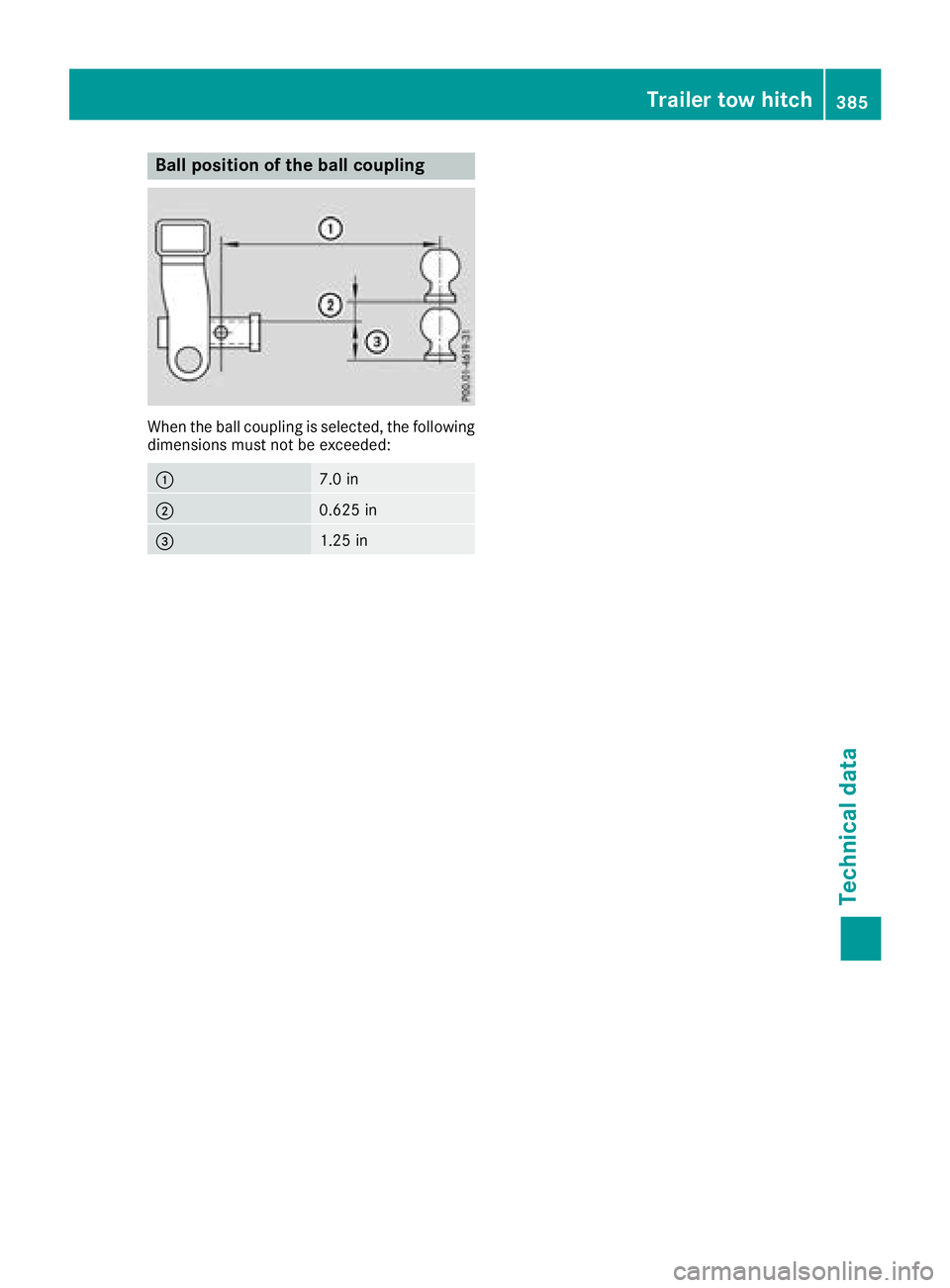
Ball position of the ball coupling
When the ball coupling is selected, the following
dimensions must not be exceeded:
:7.0 in
;0.625 in
=1.25 in
Trailer tow hitch385
Technical data
Z