sunroof MERCEDES-BENZ GLC SUV 2019 User Guide
[x] Cancel search | Manufacturer: MERCEDES-BENZ, Model Year: 2019, Model line: GLC SUV, Model: MERCEDES-BENZ GLC SUV 2019Pages: 673, PDF Size: 11.51 MB
Page 100 of 673
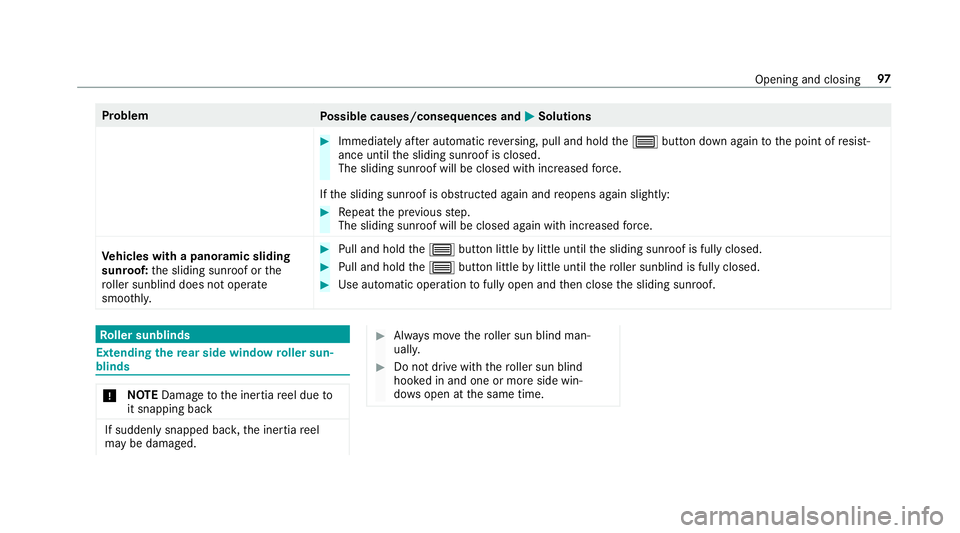
Problem
Possible causes/consequences and M
MSolutions #
Immediately af ter auto matic reve rsing, pull and hold the3 button down again tothe point of resist‐
ance until the sliding sunroof is closed.
The sliding sunroof will be closed with increased forc e.
If th e sliding sunroof is obstructed again and reopens again slightly: #
Repeat the pr evious step.
The sliding sunroof will be closed again with increased forc e.
Ve hicles with a panoramic sliding
sunroof: the sliding sunroof or the
ro ller sunblind does not opera te
smoo thly. #
Pull and hold the3 button little bylittle until the sliding sunroof is fully closed. #
Pull and hold the3 button little bylittle until thero ller sunblind is fully closed. #
Use automatic operation tofully open and then close the sliding sunroof. Ro
ller sunblinds Extending
there ar side window roller sun‐
blinds *
NO
TEDama getothe inertia reel due to
it snapping back If suddenly snapped bac
k,the inertia reel
may be damaged. #
Alw ays mo vethero ller sun blind man‐
uall y. #
Do not drive wi th thero ller sun blind
hooked in and one or more side win‐
do ws open at the same time. Opening and closing
97
Page 105 of 673
Interior pr
otection is only primed when thefo l‐
lowing components are closed:
R the doors
R theta ilgate
Interior pr otection is automatically deactivated:
R afte r pressing theÜ orp button on
th ekey
R afte r pressing thest art/ stop button with the
ke y in thestow age compartment
(/ page 174)
R afte r unlocking theve hicle using KEYLESS-
GO
R when using HANDS-FREE ACCESS
The following situations can lead toafa lse
alarm:
R moving objects such as masc ots in theve hi‐
cle interior
R when the side window is open
R when the panoramic sliding sunroof is open Priming/deactivating interior pr
otection Multimedia sy
stem:
4 © 5
Settings 5
Quick access #
Prime or deactivate Interior motion sensor.
Interior pr otection is primed again in thefo llow‐
ing cases:
R The vehicle is unloc ked again.
R A door is opened.
R The vehicle is loc ked again.
% Ifqu ick access is una vailable, select the
Vehicle menu under Settingstoprime or
deactivate interior pr otection. 102
Opening and closing
Page 135 of 673
At
taching a roof rack &
WARNING Risk of inju ryifth e maximum
ro of load is exceeded
When you load thero of, the cent reof gr avity
of theve hicle rises and the usual driving
ch aracteristics as well as thesteering and
braking characteristics change. During cor‐
nering, theve hicle tilts more strongly and
may react more sluggishly tosteering mo ve‐
ments.
If yo uexc eed the maximum roof load, the
driving characteristics, as well as thesteer‐
ing and braking characteristics, will be
great lyimpaired. #
Alw ays comply with the maximum roof
load and adjust your driving style. Yo
u will find information on the maximum roof
load in the "Technical data" section. *
NO
TEDama getothe panorama sliding
sunroof caused bya non-appr ovedro of
ra ck The panorama sliding sunroof may be dam‐
aged
bythero of rack ifyo u attem pttoopen
it when using a roof rack not tested and
appr ovedfo r Mercedes-Benz. #
When a roof rack isfitted, open the
panorama sliding sunroof only if this
has been tested and appr oved for
Mercedes-Benz.
In order toallow ventilation of theve hicle
interior, you can raise the panorama sliding
sunroof. #
Secure thero of rack tothero of railing. #
Obser vethe manufacturer's ins tallation
instructions. Cup holders
Fi
tting the cup holder in or removing it from
the centre console (au tomatic transmission) &
WARNING ‑ Risk of accident or inju ry
when using the cup holder while the
ve hicle is in motion
The cup holder cannot hold a container
secure while theve hicle is in motion.
If yo u use a cup holder while theve hicle is in
motion, the conta iner may be flung around
and liquids could be spilled. The vehicle
occupants may come into contact with the
liquid and if it is hot, they could be scalded.
Yo u could be distracted from traf fic condi‐
tions and you may lose cont rol of theve hicle. #
Only use the cup holder when theve hi‐
cle is stationar y. #
Only use the cup holder for containers
of theright size. #
Alw ays close the conta iner, particularly
if th e liquid is hot. 13 2
Seats and stowing
Page 179 of 673
#
open a side window or the sliding sunroof. Ru
nning-in no tes Mercedes-AMG
vehicles: observeth e no tes in
th e Supplement. Otherwise, you may failto rec‐
ognise dangers.
To preser vethe engine during thefirs t1, 500 km:
R drive at varying road speeds and engine
speeds.
R drive theve hicle in drive program A
or ;.
R change gear before there v counter needle is
Ô ofthewa yto there d area of there v coun‐
te r.
R do not shift down a gear manually in order to
brake.
R avoidoverstra ining theve hicle, e.g. driving at
full thro ttle.
R do not depress the accelera tor pedal past
th e pressure point (kickdown). R
only increase the engine speed gradually and
accelerate theve hicle tofull speed af ter
1, 500 km.
This also applies when the engine or parts of the
driv etra in ha vebeen replaced.
Please also obser vethefo llowing running-in
no tes:
R in cer tain driving and driving saf ety sy stems,
th e sensors adjust automatically while a cer‐
ta in dis tance is being driven af terth eve hicle
has been delivered or af terre pairs. Full sys‐
te m ef fectiveness is not reached until the
end of this teach-in process.
R brakepads, brake discs and tyres that are
either new or ha vebeen replaced only ach‐
ie ve optimum braking ef fect and grip af ter
se veral hundred kilom etre s of driving. Com‐
pensate forth ere duced braking ef fect by
applying greaterfo rc eto the brake pedal. Note
s on driving &
WARNING Risk of accident due to
objects in the driver's foot we ll
Objects in the driver's foot we ll may impede
pedal tr avel or block a depressed pedal.
This jeopardises the operating and road
saf ety of theve hicle. #
Stow all objects in theve hicle securely
so that they cannot getinto the driver's
fo ot we ll. #
Alw aysfit th efloor mats securely and
as prescribed in order toensure that
th ere is alw ays suf ficient room forthe
pedals. #
Do not use loose floor mats and do not
place floor mats on top of one ano ther. 176
Driving and pa rking
Page 204 of 673
#
Engage transmission position jin a station‐
ary vehicle with the brake pedal applied
(/ page 190). #
Switch off the engine and the ignition by
pressing the1 button. #
Release the service brake slowl y.#
Get out of theve hicle and lock it.
% When you park theve hicle, you can still
opera tethe side windo wsand the panoramic
sliding sunroof for appro ximately five
minutes if the driver's door is closed. Garage door opener
Prog
ramming buttons for the garage door
opener &
WARNING Risk of inju rywhen opening
or closing a door with thega rage door
opener
When you operate or program the door with
th e integrated garage door opener, people in
th era nge of mo vement of the door may
become trapped or stru ck bythe door. #
When using the integrated garage door
opener, alw ays make sure that nobody
is within thera nge of mo vement of the
door. Re
quirements:
R The vehicle has been par ked outside the
ga rage or outside thera nge of mo vement of
th e door.
R The engine is switched off.
R The ignition is switched on.
% The garage door opener function is alw ays
av ailable when the ignition is switched on. #
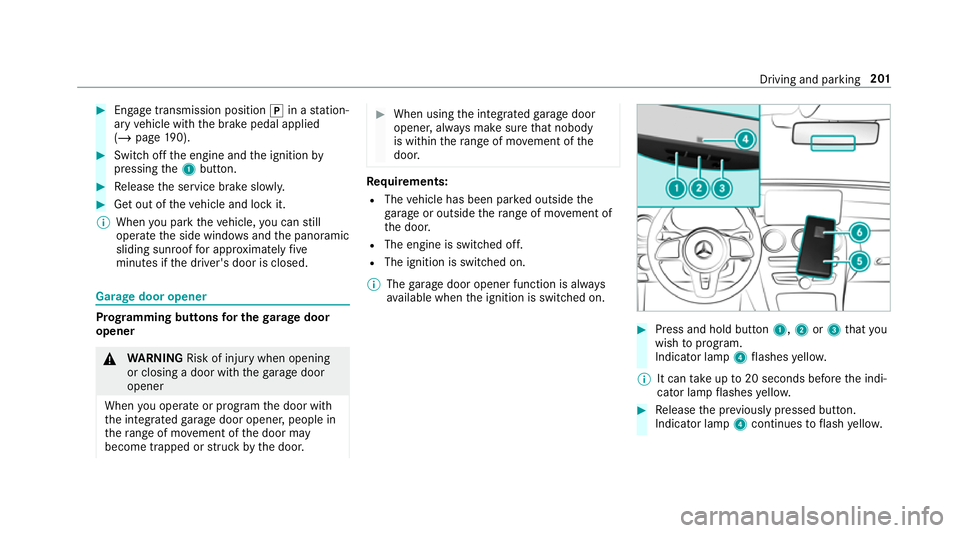
Press and hold button 1,2or3 that you
wish toprog ram.
Indicator lamp 4flashes yello w.
% It can take up to20 seconds before the indi‐
cator lamp flashes yello w. #
Release the pr eviously pressed button.
Indicator lamp 4continues toflash yello w. Driving and pa
rking 201
Page 486 of 673
Cleaning and care
Information on
washing theve hicle in a car
wa sh &
WARNING Risk of an accident due to
re duced braking po wer af terwa shing the
ve hicle
Braking ef ficiency is reduced af terwa shing
th eve hicle. #
Afterth eve hicle has been washed,
brake carefully while paying attention to
th e traf fic conditions until braking
po we r has been fully restored. *
NO
TEDama gedue tounsuitable car
wa sh #
Before driving into a car wash make
sure that the car wash is suitable for
th eve hicle dimensions. #
Ensure there is suf ficient ground clear‐
ance between the underbody and the
guide rails of the car wash. #
Ensure that the clearance width of the
car wash, in particular the width of the
guide rails, is suf ficient. To
avo id damage to yourvehicle when using a
car wash, ensure thefo llowing beforehand:
R Active Dis tance Assi stDISTRONIC and the
HOLD function are deactivated.
R the 360° Camera or there ve rsing camera is
switched off.
R the side windo wsand sliding sun roof are
comple tely closed.
R the blo werfo rth eve ntilation/heating is
switched off.
R the windscreen wiper switch is in position
g.
R theke y is at a minimum dis tance of 3 m
aw ay from theve hicle, otherwise theta ilgate
could open unin tentionally.
R in car washes with a con veyo r sy stem: neu‐
tral iis engaged.
% In car washes with a con veyo r sy stem: if you
wo uld like tolea vetheve hicle while it is being
washed, make sure theke y is located
in theve hicle. The park position jisother‐
wise automatically engaged.
% If, af terth e car wash, youre mo vethewax
from the windscreen and wiper rubbers, this
will pr event smearing and reduce wiper
noise.
Au tomatic car wash mode
In car wash mode, theve hicle is prepared for
driving into the automatic car wash. Car wash
mode can be activated up toa speed of
20 km/h.
The following settings are made when car wash
mode is activated:
R the outside mir rors are folded down.
R thera in sensor is deactivated topreve ntthe
windscreen washer sy stem from starting up
automaticall y.
R there ar wind owwiper is deactivated.
R the windo wsand the sliding sunroof are
closed.
R the air conditioning sy stem is set toair-recir‐
culation mode. Main
tenance and care 483
Page 487 of 673
R
Parking Assist PARKTRONIC is deacti vated.
R Vehicles with 360° Camera: the front
image is activated af ter appro x. eight sec‐
onds.
R Vehicles with AIRMATIC or E- ACTIVE
BO DY CONT ROL:theve hicle is raised tothe
maximum possible chassis le vel
( / page 244) .
If one of the settings cann otbe selected, this is
displa yedby a% behind there spective set‐
ting.
Car wash mode is automatically deactivated at
speeds abo ve20 km/h.
The following settings are reset when car wash
mode is deactivated:
R the outside mir rors are folded out.
R thera in sensor is activated.
R there ar wind owwiper is activated.
R the air conditioning sy stem is set tofresh air
mode.
R Parking Assist PARKTRONIC is reset tothe
pr ev iously selec ted setting. R
the windo wsand the sliding sunroof remain
closed.
R Vehicles with 360° Camera: the front
image is deactivated at speeds abo ve
18 km/h.
R Vehicles with AIRMATIC or E- ACTIVE
BO DY CONT ROL:theve hicle is lo weredto
th e pr eviously set chassis le vel. Information on using a high-pressure cleaner
&
WARNING Risk of an accident when
using high-pressure cleane rswith circu‐
lar jet nozzles
The water jet of a circular jet nozzle (dirt
grinder) can cause extern ally invisible dam‐
age tothe tyres or chassis parts.
Components damaged in this wa y may unex‐
pec tedly fail. #
Do not use high-pressure cleaners with
circular jet nozzles toclean theve hicle. #
Have damaged tyres or chassis parts
re placed immediatel y. To
avo id damage to yourvehicle, obser vethefo l‐
lowing when using a high-pressure cleaner:
R keep theke y at least 3 m away from theve hi‐
cle. Otherwise theta ilgate could open unin‐
te ntional ly.
R maintain a dis tance of at least 30 cm tothe
ve hicle.
R vehicles with deco rative foil: parts of your
ve hicle are co vered with a decorative foil.
Maintain a dis tance of at least 70 cm
between thefo il-c ove red parts of theve hicle
and the nozzle of the high-pressure cleaner.
Mo vethe high-pressure cleaner nozzle
around whilst cleaning. The waterte mp era‐
ture of the high-pressure cleaner must not
exc eed 60 °C.
R obser vethe information on the cor rect dis‐
ta nce in the equipment manufacturer's oper‐
ating instructions.
R do not point the nozzle of the high-pressure
cleaner directly at sensitive parts such as
tyres, slits, electrical components, bat teries,
light bulbs and ventilation sl ots. 484
Maintenance and care
Page 541 of 673
#
When operating two-w ayradios in the
ve hicle, alw ays connect them tothe
lo w- reflection exterior aerial. *
NO
TEInva lidation of the operating per‐
mit due tofailure tocomply wi th the
instructions for ins tallation and use The operating permit may be in
validated if
th e instructions for ins tallation and use of
two-w ayradios are not obser ved. #
Only use appr oved frequency bands. #
Obser vethe maximum permissible out‐
put po wer in these frequency bands. #
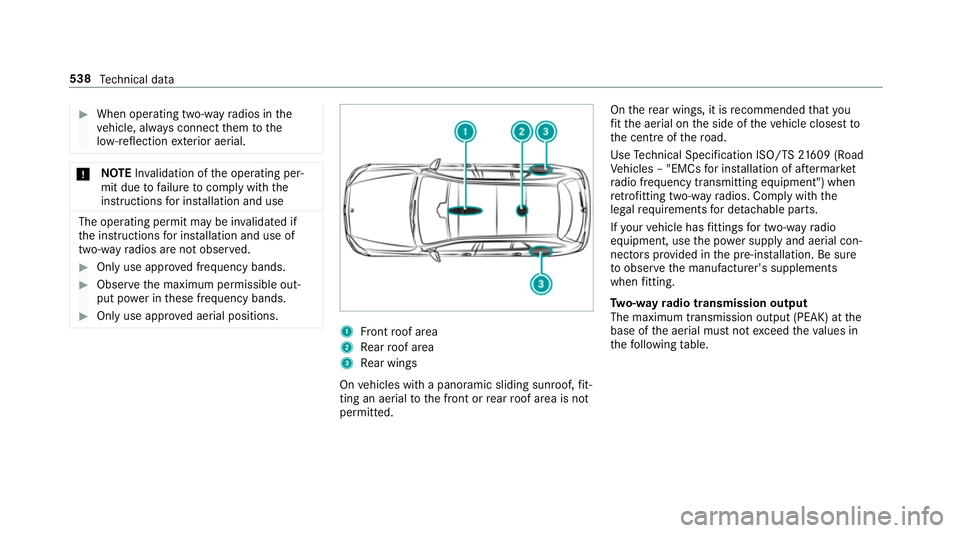
Only use appr oved aerial positions. 1
Front roof area
2 Rear roof area
3 Rear wings
On vehicles with a panoramic sliding sunroof, fit‐
ting an ae rial to the front or rear roof area is not
permitted. On
there ar wings, it is recommended that you
fi t th e aerial on the side of theve hicle closest to
th e cent reofthero ad.
Use Tech nical Specification ISO/TS 21609 (Road
Ve hicles – "EMCs for ins tallation of af term arket
ra dio frequency transmitting equipment") when
re trofitting two-w ayradios. Comply with the
legal requirements for de tach able parts.
If yo ur vehicle has fittings for two-w ayradio
equipment, use the po wer supp lyand aerial con‐
nec tors prov ided in the pre-ins tallation. Be sure
to obser vethe manufacturer's supplements
when fitting.
Tw o-w ayradio transmission output
The maximum transmission output (PEAK) at the
base of the aerial must not exceed theva lues in
th efo llowing table. 538
Tech nical da ta
Page 655 of 673
No
tes ................................................... 541
Wi ndsc reen washer fluid .................... .548
Operating saf ety
48 V on-boa rdelectrical sy stem ............ 21
Declaration of conformity (electro‐
magnetic compatibility) ........................ .23
Declaration of conformity (ja ck) ............ 26
Declaration of con form ity (TIREFIT kit) .. 27
Declaration of conformity (wireless
ve hicle components) ............................. 23
EQ Boost ................................................ 21
Information ............................................ 21
Operating sy stem
see On-board computer
Outside mir rors ............................... 155, 15 6
Anti-dazzle mode (automatic) .............. 15 6
Au tomatic mir rorfo lding function ........ 157
Fo lding in/out .................................... .155
Operating the memory function ........... 11 5
Pa rking position .................................. .156
Setting ................................................. 15 5
Overhead control panel Overview ................................................ 12Owner's Manual
Vehicle equipment ................................. 21
Owner's Manual (digital) ...........................18 P
Pa int code ................................................ 539
Pa intwork (cleaning instructions) .........486
Pa nel heating
Setting .................................................1 12
Pa noramic roof
Ad justing thero ller sunblind .................. 99
Operating thero ller sunblind ................ .98
Pa noramic sliding sunroof
see Sliding sunroof
Pa rk position
Inserting .............................................. 19 0
Selecting au tomatical ly....................... 19 0
Pa rking
see Electric parking brake
Pa rking aid
see Parking Assist PARKTRONIC Pa
rking Assist PARKTRONIC .................. 24 6
Ac tivating .................................... 249, 250
Ad justing warning tones ...................... 250
Deactivating ................................ 249, 250
Fu nction .............................................. 24 6
Side impact pr otection ........................ 24 8
Sy stem limitations ...............................2 46
Pa rking assistance sy stems
see Active Parking Assist
Pa rking brake
see Electric parking brake
Pa rking lights .......................................... .141
Pa rking options
see Parking service
Pa rking position
Outside mir rors ................................... 15 6
St oring the position of the passenger
outside mir ror using reve rsege ar ........ 157
Pa rking service ........................................ 407
No tes ................................................... 407
Selecting parking options .................... 407
Showing a parking option on the
map ..................................................... 408 652
Index
Page 657 of 673
Qualified specialist
workshop ................. 28 R
Ra dar and ultrasonic senso rs
Damage ............................................... 208
Ra dio
Ac tivating ............................................ 459
Ac tivating/deactivating radio text ....... 462
Ac tivating/deactivating traf fic
announcements .................................. 462
Calling up a slide show ........................ 461
Calling up thest ation list .................... .461
Del eting channels ................................ 461
Direct frequency ent ry......................... 461
Displaying information ......................... 462
Displaying radio text ............................ 462
Editing station presets ........................ .461
Fr equency fix ....................................... 462
Menu (on-boa rdcompu ter) .................. 292
Moving stations .................................. .461
Overview ............................................. 460
Sear ching forst ations .......................... 461
Setting a channel ................................ .461
Setting station tracking ...................... .462
Setting the frequency band .................. 461 Setting
the traf fic information
service volume inc rease ...................... 462
St oring radio stations .......................... 461
Vo ice commands (LINGU ATRO NIC) .....3 08
Ra dio stations
Dialling (on-boa rdcompu ter) ............... 292
Ra in closing function
Sliding sunroof ...................................... 95
Ra in-closing feature
Side wind ows ........................................90
Ra ising theve hicle
Re ar of theve hicle ...............................1 22
Ra nge
Ad Blue ®
............................................... 288
Displaying ............................................ 289
REACH regulation ...................................... 29
Re ading light
Switching on/off using poses ............. 329
Re ading light
see Interior lighting
Re alwo od (Care) .................................... .491
Re ar door (child saf ety lock) .................... 71Re
ar fog light
Switching on/off .................................1 42
Re ar of theve hicle
Lo we ring .............................................. 12 2
Ra ising ................................................ .122
Re ar seat
see Seat
Re ar seat belt
St atus display ........................................ 39
Re ar seat belt status display .................... 39
Re ar window
Changing the wiper blade .................... 154
Re ar window heater ................................ 15 9
Re ar window wipers
Ac tivating/deactivating ...................... .152
Re ar-view mir ror
see Outside mir rors
Re cycling
see Take -ba ckof end-of-life vehicles
Re ducing agent
see AdBlue ® 654
Index