ignition MERCEDES-BENZ GLC SUV 2019 Service Manual
[x] Cancel search | Manufacturer: MERCEDES-BENZ, Model Year: 2019, Model line: GLC SUV, Model: MERCEDES-BENZ GLC SUV 2019Pages: 673, PDF Size: 11.51 MB
Page 368 of 673
St
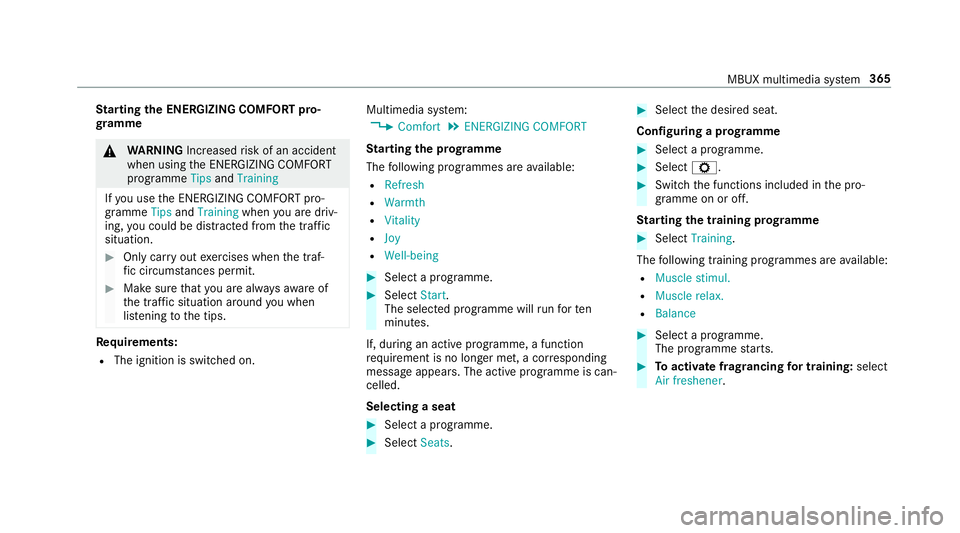
arting the ENERGIZING COMFORT pro‐
gr amme &
WARNING Increased risk of an accident
when using the ENERG IZINGCOMFORT
programme TipsandTraining
If yo u use the ENERG IZINGCOMFORT pro‐
gramme TipsandTraining whenyou are driv‐
ing, you could be distracted from the tra ffic
situation. #
Only car ryout exercises when the traf‐
fi c circums tances pe rmit. #
Make sure that you are alw aysaw are of
th e traf fic situation around you when
lis tening tothe tips. Re
quirements:
R The ignition is switched on. Multimedia sy
stem:
4 Comfort 5
ENERGIZING COMFORT
St arting the prog ramme
The following programmes are available:
R Refresh
R Warmth
R Vitality
R Joy
R Well-being #
Select a programme. #
Select Start.
The selec ted prog ramme will runfo rten
minutes.
If, during an active programme, a function
re qu irement is no longer met, a cor responding
message appears . The activeprog ramme is can‐
celled.
Selecting a seat #
Select a programme. #
Select Seats. #
Select the desired seat.
Configuring a prog ramme #
Select a prog ramme. #
Select Z. #
Switch the functions included in the pro‐
gramme on or off.
St arting the training prog ramme #
Select Training.
The following training prog rammes are available:
R Muscle stimul.
R Muscle relax.
R Balance #
Select a programme.
The programme starts. #
Toactivate frag rancing for training: select
Air freshener . MBUX multimedia sy
stem 365
Page 399 of 673
R
Cause of the tra ffic incident, e.g. con‐
st ru ction work
R Warning message (highligh tedre d) #
Toselect a traf fic incident symbol: select
q orr. #
Toselect a map section: tap on the
to uchsc reen.
or #
Press theTo uch Control or theto uchpad. #
Movethe map. #
Toreturn tothe navigation map: tapon
G.
or #
Press theG button on theTo uch Control
or on theto uchpad.
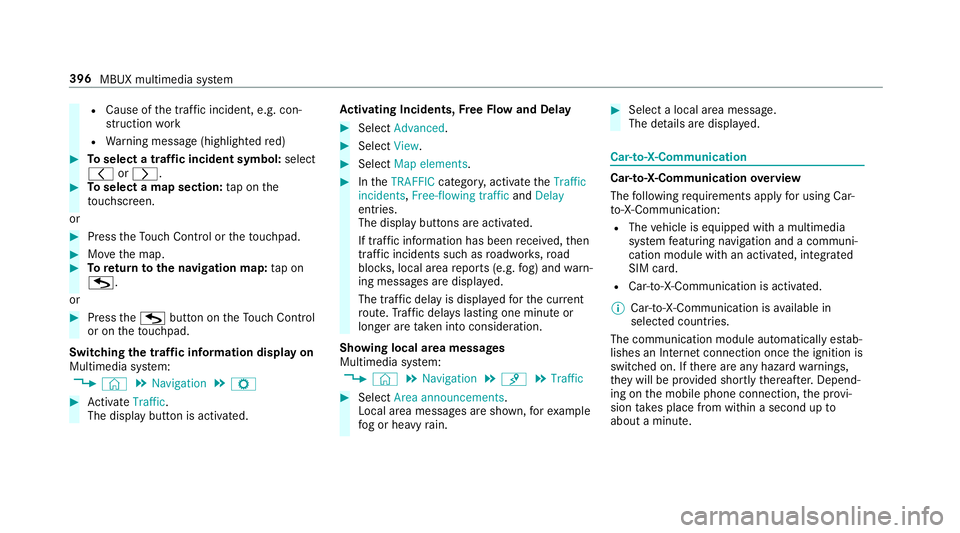
Swit ching the traf fic information display on
Multimedia sy stem:
4 © 5
Navigation 5
Z #
Activate Traffic.
The display button is acti vated. Ac
tivating Incidents, Free Flow and Delay #
Select Advanced. #
Select View. #
Select Map elements. #
IntheTRAFFIC category,activate theTraffic
incidents, Free-flowing traffic andDelay
entri es.
The display buttons are activated.
If tra ffic information has been recei ved, then
tra ffic incidents such as roadwor ks,ro ad
bloc ks, local area reports (e.g. fog) and warn‐
ing messages are displa yed.
The tra ffic delay is displa yedfo rth e cur rent
ro ute. Traf fic del ays lasting one minute or
longer are take n into conside ration.
Showing local area messages
Multimedia sy stem:
4 © 5
Navigation 5
¡ 5
Traffic #
Select Area announcements .
Local area messages are shown, forex ample
fo g or heavy rain. #
Select a local area message.
The de tails are displa yed. Car-to-X-Communication
Car-to-X-Communication
overview
The following requ irements apply for using Car-
to -X-Communication:
R The vehicle is equipped with a multimedia
sy stem featuring navigation and a communi‐
cation module with an activated, integ rated
SIM card.
R Car-to -X-Communication is acti vated.
% Car-to-X-Communication is available in
selec ted count ries.
The communication module automatically es tab‐
lishes an Internet connection once the ignition is
switched on. If there are any hazard warnings,
th ey will be pr ovided shortly thereaf ter.Depend‐
ing on the mobile phone connection, the pr ovi‐
sion take s place from within a second up to
about a minute. 396
MBUX multimedia sy stem
Page 412 of 673
This function is not
available in all countries.
Obse rveth e count ry-specific regulations.
Multimedia sy stem:
4 © 5
Mercedes me & Apps
5 Dashcam #
Select the USB device.
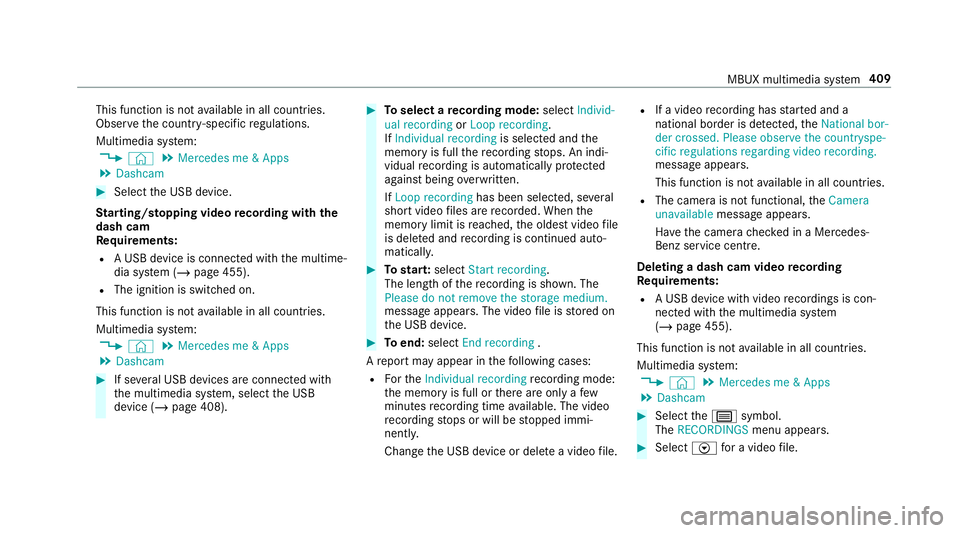
St arting/ stopping video recording with the
da sh cam
Re quirements:
R A USB device is connec ted with the multime‐
dia sy stem (/ page 455).
R The ignition is switched on.
This function is not available in all countries.
Multimedia sy stem:
4 © 5
Mercedes me & Apps
5 Dashcam #
If se veral USB devices are connec ted with
th e multimedia sy stem, select the USB
device (/ page 408). #
Toselect a recording mode: selectIndivid-
ual recording orLoop recording .
If Individual recording is selected and the
memory is full there cording stops. An indi‐
vidual recording is au tomatical lyprotected
against being overwritten.
If Loop recording has been selected, se veral
short video files are recorded. When the
memory limit is reached, the oldest video file
is dele ted and recording is continued au to‐
matical ly. #
Tostar t:select Start recording.
The length of there cording is shown. The
Please do not remove the storage medium.
message appea rs. The video file is stored on
th e USB device. #
Toend: select End recording .
A report may appear in thefo llowing cases:
R Forth eIndividual recording recording mode:
th e memory is full or there are only a few
minutes recording time available. The video
re cording stops or will be stopped immi‐
nently.
Chan gethe USB device or dele tea video file. R
If a video recording has star ted and a
national border is de tected, theNational bor-
der crossed. Please observe the countryspe-
cific regulations regarding video recording.
message appears.
This function is not available in all countries.
R The camera is not functional, theCamera
unavailable message appears.
Ha ve the camera checked in a Mercedes-
Benz service centre.
Deleting a dash cam video recording
Requ irements:
R A USB device with video recordings is con‐
nected wi th the multimedia sy stem
(/ page 455).
This function is not available in all countries.
Multimedia sy stem:
4 © 5
Mercedes me & Apps
5 Dashcam #
Select thep symbol.
The RECORDINGS menu appears. #
Select Vfor a video file. MBUX multimedia sy
stem 409
Page 438 of 673
R
Other products and services from Mercedes-
Benz
Data is transfer red during the connection tothe
Mercedes-Benz Cus tomer Centre (/ page 436).
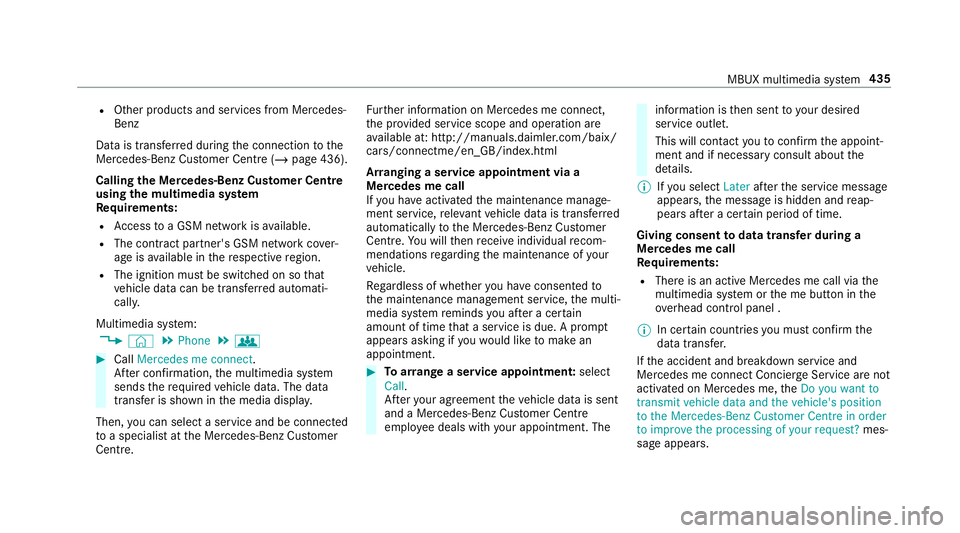
Calling the Mercedes-Benz Cus tomer Centre
using the multimedia sy stem
Requ irements:
R Access toa GSM network is available.
R The contract partner's GSM network co ver‐
age is available in there spective region.
R The ignition must be switched on so that
ve hicle data can be transfer red automati‐
call y.
Multimedia sy stem:
4 © 5
Phone 5
g #
Call Mercedes me connect.
Af ter confirmation, the multimedia sy stem
sends there qu ired vehicle data. The data
transfer is shown in the media displa y.
Then, you can select a service and be connected
to a specialist at the Mercedes-Benz Cus tomer
Centre. Fu
rther information on Mercedes me connect,
th e pr ovided service scope and operation are
av ailable at: http://manuals.daimler.com/baix/
cars/connectme/en_GB/ind ex.html
Ar ranging a service appointment via a
Mercedes me call
If yo u ha veactivated the maintenance manage‐
ment service, releva nt vehicle data is transfer red
automatically tothe Mercedes-Benz Cus tomer
Centre. You will then recei veindividual recom‐
mendations rega rding the maintenance of your
ve hicle.
Re gardless of whe ther you ha veconsented to
th e maintenance management service, the multi‐
media sy stem reminds you af ter a cer tain
amount of time that a service is due. A prom pt
appears asking if youwo uld like tomake an
appointment. #
Toarra nge a service appointment: select
Call .
Af teryo ur agreement theve hicle data is sent
and a Mercedes-Benz Cus tomer Centre
emplo yee deals with your appointment. The information is
then sent toyour desired
service outlet.
This will contact youto confirm the appoint‐
ment and if necessary consult about the
de tails.
% Ifyo u select Laterafte rth e service message
appears, the message is hidden and reap‐
pears af ter a cer tain period of time.
Giving consent todata transfer during a
Mercedes me call
Re quirements:
R There is an active Mercedes me call via the
multimedia sy stem or the me button in the
ov erhead control panel .
% In cer tain countries you must confirm the
data transfer.
If th e accident and breakdown service and
Mercedes me connect Concier geService are not
acti vated on Mercedes me, theDo you want to
transmit vehicle data and the vehicle's position
to the Mercedes-Benz Customer Centre in order
to improve the processing of your request? mes‐
sage appears. MBUX multimedia sy
stem 435
Page 441 of 673
Calling up
the Mercedes me user account
Multimedia sy stem:
4 © 5
Mercedes me & Apps
Yo ur vehicle is connected with a user
account #
Select Mercedes me.
Information about the connected user
account appears.
Yo ur vehicle is not yet connec ted with a user
account #
Select Mercedes me. #
The instructions for creating a user account
and connecting theve hicle with this follow
on the media displa y.
% Ifth e Mercedes me app is available on a
mobile phone, theve hicle connection can be
accomplished using the QR code shown.
Calling up the Mercedes me services
Re quirements:
R The vehicle is connected with the user
account. Multimedia sy
stem:
4 © 5
Mercedes me & Apps #
Select Services.
Wi thin theva rious categories you can see the
Mercedes me services you ha vealready pur‐
ch ased and also those still available topur‐
ch ase.
To activate or deactivate the services, log in
to yo ur user account in the Mercedes me
por tal.
Deleting a connection between a user
account and theve hicle
Re quirements:
R The (vehicle) profile of the user account that
wa sfirs t connected wi th theve hicle is selec‐
te d.
R The profile is synchronised (/ page 333).
R A PIN has been set.
Multimedia sy stem:
4 © 5
Mercedes me & Apps
5 Mercedes me #
Select Delete vehicle assignment. #
Ente rth e PIN of the connected user account.
% Only the user, whose user account wasfirst
connected wi th theve hicle can dele tethe
connection between all user accounts and
th eve hicle. Mercedes-Benz emer
gency call sy stem Information on
the Mercedes-Benz emer‐
ge ncy call sy stem
The Mercedes-Benz emer gency call sy stem only
functions in areas where mobile phone co verage
is available from there leva nt contract pa rtner.
Insu fficient network co verage from there leva nt
contract pa rtner may result in an emer gency call
not being transmitted.
The ignition mu stbe switched on before an auto‐
matic emer gency call can be made.
% The Mercedes-Benz eme rgency call sy stem
is activated at thefa ctor y.Using the
Mercedes-Benz emer gency call sy stem is
free of charge. 438
MBUX multimedia sy stem
Page 442 of 673
Overview of
the Mercedes-Benz emer gency
call sy stem
The Mercedes-Benz emer gency call sy stem can
help todecisively reduce the time between an
accident and the ar riva l of emer gency services
at the site of the accident. It helps locate an
accident site in places that are dif ficult to
access.
The emer gency call can be made au tomatical ly
( / page 439) or manually (/ page440). Only
make eme rgency calls if you or others are in
need of rescue. Do not make an emergency call
in theeve nt of a breakdown or a similar situa‐
tion.
Yo u can find more information on there gional
av ailability of the Mercedes-Benz emer gency call
sy stem at: http://www.mercedes-benz.com/
connect_ecall.
Message in the media displa y:
The following messages appear in the media dis‐
play:
R SOS NOT READY :th e ignition is not on or
th ere is a malfunction with the emer gency
call sy stem (/ page319). This does not nec‐ essarily indica
tecompl etefa ilure of the
emer gency call sy stem. Emer gency calls call
st ill be transmitted.
The display only refers to theve hicle and
does not take account of theav ailability of
mobile phone networ ksand the Mercedes-
Benz emer gency call centre.
The functional readiness of the emer gency
call sy stem on theve hicle can be seen when
th eSOS NOT READY display disappears once
th e ignition is switched on.
R G: The icon appears in the display during
an active emer gency call.
% Ifth ere is a malfunction in the Mercedes-
Benz emer gency call sy stem (e.g. a fault with
th e speaker, microphone, airbag, SOS but‐
to n), a cor responding message appears in
th e multifunction display of the instrument
clus ter.
Tr iggering an automatic Mercedes-Benz
emer gency call
Re quirements:
R The ignition is switched on. R
The star ter battery is suf ficiently charge d.
The Mercedes-Benz emer gency call sy stem trig‐
ge rs an emer gency call au tomatical lyin thefo l‐
lowing cases:
R After activation of there stra int sy stems such
as airbags or seat belt tensioners af ter an
accident.
R After an auto maticallyinitiated emer gency
st op byActive Emergency Stop Assist.
The emer gency call has been made:
R Avo ice connection is made tothe Mercedes-
Benz emer gency call centre.
R A messa gewith accident data is transmitted
to the Mercedes-Benz emer gency call centre.
The Mercedes-Benz emergency call centre
can transmit theve hicle position data toone
of the public emer gency services call cen‐
tres.
R Under cer tain circums tances da tais also
transmitte d inthevo ice channel tothe
Mercedes-Benz emer gency call centre. MBUX multimedia sy
stem 439
Page 444 of 673
#
Dial the emer gency number 11 2onyour
mobile phone.
Ending an unin tentionally triggered manual
Mercedes-Benz emer gency call #
On the multifunction steering wheel:
select ~.
Data transfer of the Mercedes-Benz emer‐
ge ncy call sy stem
In theeve nt of an au tomatic or manual emer‐
ge ncy call thefo llowing data is transmitte d,for
ex ample:
R Vehicle's GPS position data
R GPS position data on thero ute (a few hun‐
dred metres before the incident)
R Direction of tra vel
R Vehicle identification number
R Vehicle drive type
R Number of people de term ined tobe in the
ve hicle
R Whe ther Mercedes me connect is available
or not R
Whe ther the emer gency call was initiated
manually or automatically
R Time of the accident
R Language setting on the multimedia sy stem
Fo r accident clarification purposes, thefo llowing
measures can be take n up toan hour af terthe
emer gency call has been initia ted:
R The cur rent vehicle position can be called up.
R Avo ice connection totheve hicle occupants
can be es tablished
% ForRu ssia: various functions, e.g. receiving
traf fic information, cannot be per form ed for
up totwo hou rsafte r sending an emer gency
call.
Fu nction of the emer gency call sy stem self-
diagnosis (Russia)
Yo ur car verifies the operability of the emer‐
ge ncy call sy stem each time the ignition is ON.
In case of sy stem failure, you will be informed
with text messa geon the instrument clus ter and
with red indicator SOS NOT READY onthe media
displa y. Please, make sure,
that during 30 seconds af ter
switching ignition ON there d indicator SOS
NOT READY inthe upper right corner of the
media display is switched OFF, this means the
emer gency call sy stem passed diagnostics suc‐
cessfully. If necessar y,switch ON the media dis‐
pla y,if it was switched OFF before.
St arting/ending ERA-GLONASS test mode
(Russia)
Re quirements:
R The star ter battery is suf ficiently charge d.
R The ignition is switched on.
R The vehicle has been stationary for at least
one minute. #
Tostart thete st mode: press and hold the
~ button on the multifunction steering
wheel for at least five seconds.
The test mode is star ted and automatically
ends af terth e language test has been per‐
fo rm ed. #
Toend thete st mode manuall y:switch off
th e ignition.
The test mode is ended. MBUX multimedia sy
stem 441
Page 473 of 673
#
Toinsert the Smart Card in the CI+ mod‐
ule: ifre qu ired (countr y-dependent), insert
th e Smart Card into the CI+ module slot.
Encryp ted HD programmes can be recei ved
according tothe CI+ standard.
% If a CI+ module is connec ted, Card status
reminder is switched on (/ page470)and
th e ignition is switched off, theAlert: CI+
card is still in the vehicle. message appears
in the media displa y.
Calling up the CI+ module menu
Multimedia sy stem:
4 © 5
Media 5
TV 5
Z
5 General 5
CI+ module #
Tocall up the CI+ menu: selectOpen menu.
The subsc ript ion number can be shown in
th e menu, forex ample. The con tent of the
menu depends on the manufacturer of the CI
+ module.
% You need the subscription menu toextend
th e subscription, forex ample.
Fu rther information can be found in the man‐
ufacturer's operating instructions. #
Toshow theve rsion number: selectDis-
play version . #
Torestart the CI+ module: if playback is
ex periencing inter fere nce you can try and
re solve the problem using Restart CI+. #
Toswitch there minder of a connec ted CI
+ module on or off: selectZ. #
Select General settings. #
Switch theCard status reminder option on or
off. #
Toreset theTV tuner: selectReset TV. Sound
To
ne settings Information about
the sound sy stem
The sound sy stem has a total output of 125 W
and is equipped with five speakers. It is available
fo r all functions in thera dio and media modes. Calling up
the sound menu
Multimedia sy stem:
4 © 5
Media 5
Z 5
Sound
The following functions are available:
R Equaliser
R Balance and Fader
R Volume #
Select a function.
Ad justing treble, mid- range and bass set‐
tings
Multimedia sy stem:
4 © 5
Media 5
Z 5
Sound
5 Equaliser #
Set TREBLE, MIDorBASS . 47 0
MBUX multimedia sy stem
Page 479 of 673
#
With your hand flat, push down active bonnet
1 inthe area around the hinges on bo th
sides (ar rows).
In doing so, the actuator is depressurised
and you may hear a hissing sound.
The engine bonnet must en gage in position. #
Ifth e active bonn etcan be raised slight lyat
th ere ar in the area of the hinges, repeat the
st ep until it engages cor rectl y. Opening/closing
the bonnet &
WARNING Risk of accident due todriv‐
ing with the engine bonn etunlo cked
An unloc ked engine bonn etmay open up
when theve hicle is in motion and block your
vie w. #
Never unlock the engine bonn etwhen
driving. #
Before every trip, ensure that the
engine bonn etis loc ked. &
WARNING Risk of accident and inju ry
when opening and closing the engine
bonn et
When opening or closing the engine bonn et,
it may suddenly drop into the end position.
There is a risk of injury for an yone in the
engine bonn et's range of mo vement. #
Only open or close the engine bonn et
when there are no persons in the
engine bonn et's range of mo vement. &
WARNING Danger of bu rns when open‐
ing the bonn et
If yo u open the engine bonn etwhen the
engine has overheated or during a fire inthe
engine compartment, you could come into
contact with hot gases or other escaping
operating fluids. #
Before opening the bonn et, allow the
engine tocool down. #
Intheeve nt of a fire inthe engine com‐
partment, keep the engine bonn et
closed and call thefire service. &
WARNING Risk of inju rydue tomoving
parts
Cer tain components in the engine compart‐
ment may continue tomo veor suddenly
mo veagain even af terth e ignition has been
switched off, e.g. the cooler fan.
Ma kesure of thefo llowing before per form ing
ta sks in the engine compartmen t: #
Switch the ignition off. #
Neverto uch the danger zone sur round‐
ing moving co mponent parts, e.g. the
ro tation area of thefa n. #
Remo vejewe llery and watches. #
Keep items of clo thing and hair away
from moving parts. 476
Maintenance and care
Page 480 of 673
&
WARNING Risk of inju ryfrom touching
co mp onent parts under voltage
The ignition sy stem and the fuel injection
sy stem workunder high voltage. If youto uch
co mp onent parts which are under voltage,
yo u could recei vean electric shoc k. #
Neverto uch co mponents of the ignition
sy stem or the fuel injection sy stem
when the ignition is switched on. &
WARNING Risk of bu rns from hot com‐
ponent parts in the engine compartment
Cer tain components in the engine compart‐
ment can be very hot, e.g. the engine, the
ra diator and parts of theex haust sy stem. #
Allow the engine tocool down and only
to uch co mponent parts described in
th efo llowing. &
WARNING Risk of inju ryfrom using the
windscreen wipers while the engine bon‐
net is open
When the engine bonn etis open, and the
windscreen wipers are set in motion, you can
be trapped bythe wiper linkage. #
Alw ays switch off the windscreen wip‐
ers and ignition before opening the
engine bonn et. Plug-in
hybrid: obser vethe no tes in the Supple‐
ment. Otherwise, you may failto recognise dan‐
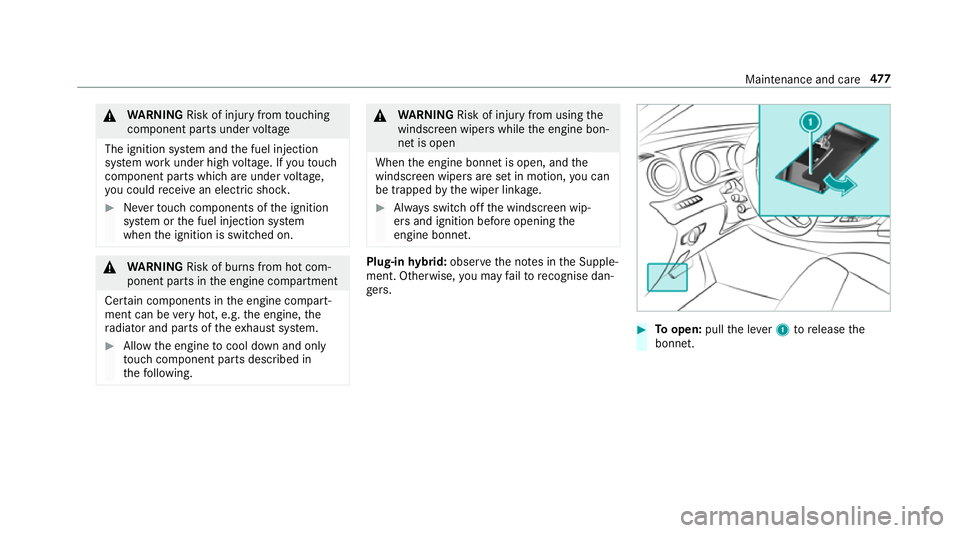
ge rs. #
Toopen: pullthe le ver1 torelease the
bonn et. Maintenance and care
477