service MERCEDES-BENZ GLC SUV 2019 Manual PDF
[x] Cancel search | Manufacturer: MERCEDES-BENZ, Model Year: 2019, Model line: GLC SUV, Model: MERCEDES-BENZ GLC SUV 2019Pages: 673, PDF Size: 11.51 MB
Page 446 of 673
R
Mercedes me connect is activated for Inter‐
net access.
R In some countries: data volume via Mercedes
me connect is available.
In some countries: if the data volume limit is
re ached, theav ailability of Mercedes me con‐
nect services is limited. The data volume must
be pur chased via Mercedes me connect.
% Con tact a Mercedes-Benz service centre to
fi nd out wh ether it is possible topur chase
data volume in your count ry.
Setting up an Internet connection via Wi-Fi
Re quirements:
R theWi -Fi function is acti vated on the multi‐
media sy stem (/ page 356).
R theWi -Fi function is acti vated on the mobile
phone (see the manufacturer's operating
instructions).
R Internet access via Wi-Fi is acti vated (see the
manufacturer's operating instructions). The Internet connection via
Wi-Fi is restricted or
does not function if:
R the mobile phone is switched off
R mobile data use is deactivated on the mobile
phone
R theWi -Fi function is deacti vated on the multi‐
media sy stem
R theWi -Fi function is deacti vated on the
mobile phone
R Internet access via Wi-Fi is deacti vated on
th e mobile phone
Multimedia sy stem:
4 © 5
Settings 5
System
5 Wi-Fi & Bluetooth 5
Internet settings
5 Connect via Wi-Fi #
Select the networ k. #
Log in totheWi -Fi network (/ page 356).
Setting up an Internet connection via Blue‐
to oth ®
Re quirements: R
The mobile phone supports the Blue tooth®
profile PAN (Personal AreaNet work).
R The mobile phone is connec tedto the multi‐
media sy stem via Blue tooth®
(/ page 413).
If a mobile phone is connected tothe multi‐
media sy stem forth efirs t time via Blue‐
to oth ®
,yo u will be assis tedth ro ugh the proc‐
ess of setting up an Internet connection.
The Internet connection can also be confi g‐
ured manuall y.
Multimedia sy stem:
4 © 5
Settings 5
System
5 Wi-Fi & Bluetooth 5
Internet settings
5 Connect via Bluetooth #
Select the mobile phone.
The Internet connection is es tablished.
The Internet connection via Blue tooth®
is restric‐
te d or does not function in thefo llowing cases:
R the mobile phone is switched off
R the mobile phone is connected a an addi‐
tional mobile phone MBUX multimedia sy
stem 443
Page 452 of 673
Closing
the br owser
Multimedia sy stem:
4 © 5
Mercedes me & Apps
5 z Browser #
Select ©. Internet
radio Calling up In
ternetradio
Re quirements: R
There is an account on http://
www.me rcedes.me.
R The Internet radio service is activated.
R The data volume is available.
Depending on the count ry, data volume may
need tobe pur chased.
R Afast Internet connection for data transmis‐
sion free of inter fere nce.
% The functions and services are countr y-
dependent. For more information, consult a
Mercedes-Benz service centre. Multimedia sy
stem:
4 © 5
Radio #
Select TuneIn radio.
The Internet radio menu appears. The last
st ation set starts playing.
% The connection quality depends on the local
mobile phone reception. MBUX multimedia sy
stem 449
Page 460 of 673
A pl
aylist with randomly selected trac ksis
created.
R Add to favourite songs
The cur rent track is added tothefa vo urite
songs.
R Delete from favourite songs
The cur rent track is remo ved from thefa vo ur‐
ite songs. #
Select an option. Music online
Calling up music online
Re
quirements:
R There is an account forth e music stre aming
service.
R A subsc ript ion forth e music stre aming
service has been obtained.
R The data volume is available.
Depending on the count ry, data volume may
need tobe pur chased. R
Afast Internet connection for data transmis‐
sion free of inter fere nce.
% The functions and services are countr y-
dependent. For more information, consult a
Mercedes-Benz service centre.
Multimedia sy stem:
4 © 5
Media #
Select Online music.
Wi th Online music you can lis tento music via
a st re aming service.
Music playback can be controlled with theTo uch
Control, theto uchsc reen, theto uchpad or using
th e media application.
Sear ching for music in online music
Multimedia sy stem:
4 © 5
Media 5
Online music
Sear ching for ca tegories in online music
The media con tent of thest re aming pr ovider can
be scanned thro ugh in the category sear ch. The
av ailable categories depend on thest re aming
pr ov ider. #
Select 5.
The list of available categories appears. #
Select a categor y.
Ke yword sear chin online music
Yo u can look for content using theke yword
sear chwith free text input. #
Select ª.
A ke yboard forch aracter ent ryappears. #
Enterth ete rm sear ched for.
% The sear chbegins from thefirs tth re ech ar‐
acters entered. The more characters entered
th e more concr eteth e sear chresults
become. #
Select the desired entry fromthere sult list.
If th e selected result is an album, song or a
playback list then playback is star ted. If the
selected result is a new category then this is
opened in the sear ch. MBUX multimedia sy
stem 457
Page 461 of 673
Configuring online music options
Multimedia sy
stem:
4 © 5
Media 5
Online music #
During media playbac k,press ß inthe
Media menu.
Three options appear:
R Adding the song to yourow nfavo urites
R Adding the song toa playback list
R The Title Radio option #
Select one of theth re e options.
% IfTitle Radio is selected, a playback list with
similar music tra cks is created.
The available options depend on what is
of fere dby the pr ovider of thest re aming
service. Media sear
ch Note
s about the sear chfunction in catego‐
ri es
Und er5 you can sear chthro ugh all available
media files. There are se veral categories availa‐ ble
for selection. The categories shown depend
on the connected device and data form at.
Av ailable categories with Blue tooth ®
audio:
R Current tracklist
The folders and categories of the connected
device are shown.
Av ailable categories with audio files:
R Current tracklist
R Playlists
R Folder
R Albums
R Artists
R Tracks
R Favourite songs
R Frequently played
R Most recently added
R Mood (/page 459)
R Music genres
R Year
R Composers R
Select by cover
R Podcasts (Apple®
devices)
R Audiobooks (Apple®
devices)
Av ailable categories with video files:
R Folder
R Videos
% The categories are available as soon as the
entire media conte nt has beenread in and
anal ysed.
St arting a sear chin categories
Multimedia sy stem:
4 © 5
Media 5
5 #
Select a categor y. #
Select ªand enter a sea rchte rm.
Sorting results shown or playing back all
media found #
Select Ä. 458
MBUX multimedia sy stem
Page 465 of 673
include logos, album co
vers, music trac ks, pro‐
grammes, ne wsor service information, forex am‐
ple. #
Select .
Ac
tivating/deactivating the frequency fix
function Multimedia sy
stem:
4 © 5
Radio 5
Z 5
General #
Switch Frequency fix on or off.
If th e function is activated, the set frequency
is ke pt eve n ifthere ception is poo r.Ac
tivating/deactivating traf fic announce‐
ments Multimedia sy
stem:
4 © 5
Radio 5
Z 5
General #
Switch Traffic announcements (TA) on or off. Setting
the traf fic information service vol‐
ume increase Multimedia sy
stem:
4 © 5
Settings 5
Audio #
Select Navigation and traffic announce-
ments. #
Set a value forTraffic announc. vol. increase . #
Set a value. #
Accept theva lue with q. Displaying
radio text Multimedia sy
stem:
4 © 5
Radio 5
Z 5
General #
Switch Radio text information on or off. TV
Information on
TVmode In
fo rm ation on copy right pr otection and
tradema rks
Ubiquitous DTCP-IP Copyright
®
20 15 Ubiquitous Corp.
DV B and DVB logos are tradema rks of theDVB
Project.
The TVtuner enables reception of digital chan‐
nels according tothefo llowing standards:
R DVB-T
R DVB-T2
In some countries, thest andards may not be
av ailable, or may not be available in all areas.
A CI+ module (Common In terface Module),
which is not included in the scope of deliver y,is
used todecrypt HD prog rammes according to
th e CI+ standard. In some countries, an addi‐
tional smart card is required, which is inse rted
into the CI+ module (see the manufacturer's
operating manual).
The CI+ module is connected in the CI+ box in
th eglov e compartment. 462
MBUX multimedia sy stem
Page 477 of 673
ASS
YST PLUS se rvice inter val display Fu
nction of the ASS YST PLUS se rvice inter val
displ ay The ASS
YST PLUS service inter val display on the
instrument display pr ovides information on the
re maining time or dis tance be fore the next
service due date.
Yo u can hide this service display using the back
button on the left-hand side of thesteering
wheel.
Depending on how theve hicle is used, the
ASS YST PLUS service inter val display may
shor tenth e service inter val, e.g. in thefo llowing
cases:
R mainly short-dis tance driving
R when the engine is of ten le ftidling for long
periods
R intheeve nt of frequent cold start phases
R vehicles with a diesel particulate filter: in
th eev ent of frequently inter rupted rege nera‐
tion of the diesel particulate filter Mercedes-Benz
recommends avoiding such
operating conditions.
Yo u can obtain information concerning the serv‐
icing of your vehicle from a qualified specialist
wo rkshop, e.g. a Mercedes-Benz Service Centre. Displaying
the service due da te On-board computer:
4 Service 5
ASSYST PLUS
The next service due date is displa yed. #
Toexitth e displa y:press the back button
on the left-hand side of thesteering wheel.
Make sure toobser vethefo llowing fur ther rela‐
te d subjec t:
R Operating the on-board computer
(/ page 285). Information on
regular maintenance work *
NO
TEPremature wearthro ugh failure to
obser veservice due dates Service
workwhich is not car ried out at the
ri ght time or incomple tely can lead to
inc reased wear and damage totheve hicle. #
Alw ays obser vethe prescribed service
inter vals. #
Alw ays ha vethe prescribed service
wo rkcar ried out at a qualified specialist
wo rkshop. Special service
requ irements The prescribed service inter
val is based on nor‐
mal operation of theve hicle. Maintenance work
will need tobe per form ed more of ten if theve hi‐
cle is operated under arduous conditions or
increased loads.
The ASS YST PLUS service inter val display is only
an aid. The driver of theve hicle bears responsi‐
bility as rega rdsto whe ther maintenance work
needs tobe per form ed more of tenth an speci‐ 474
Maintenance and care
Page 478 of 673
fi
ed based on the actual operating conditions
and/or loads.
Examples of arduous operating conditions:
R regular city driving with frequent intermedi‐
ate stops
R mainly short-dis tance driving
R frequent operation in mountainous terrain or
on poor road sur faces
R when the engine is of ten le ftidling for long
periods
R operation in particula rly dusty conditions
and/or if air-recirculation mode is frequently
used
In these or similar operating conditions, ha vethe
interior air filter, engine air cleaner, engine oil
and oil filter etc. changed more frequent ly. The
ty re s must be checked more frequently if the
ve hicle is operated under increased loads. Fur‐
th er information can be obtained at a qualified
specialist workshop. Battery disconnection periods
The ASS
YST PLUS se rvice inter val display
can only calculate the service due da tewhen
th e bat tery is connected. #
Notedown the service due date displa yed on
th e instrument display before disconnecting
th e battery (/ page474). Engine com
partment Ac
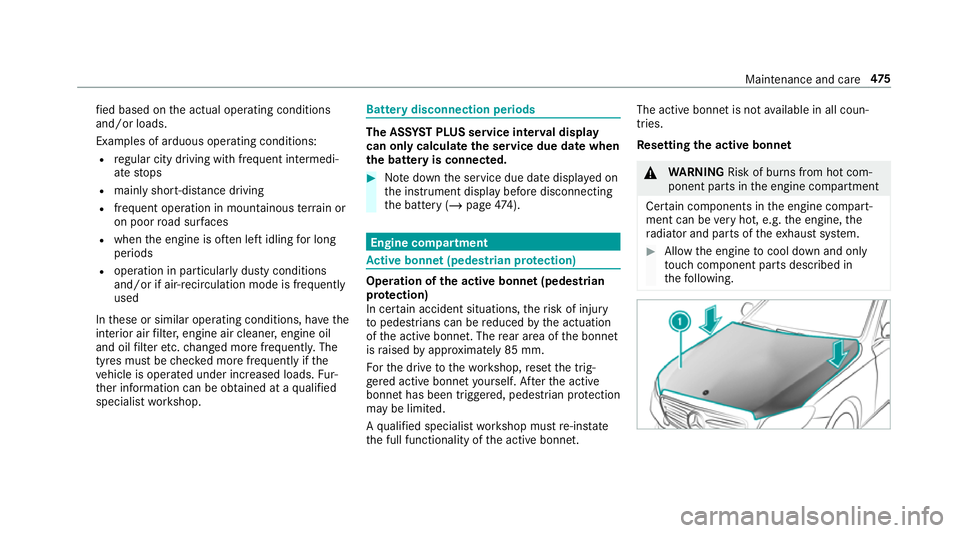
tive bonn et(pedestrian pr otection) Operation of
the active bonnet (pedestrian
pr otection)
In cer tain accident situations, therisk of injury
to pedestrians can be reduced bythe actuation
of the active bonn et. The rear area of the bonn et
is raised byappr oximately 85 mm.
Fo rth e drive tothewo rkshop, reset the trig‐
ge red active bonn etyourself. Af terth e active
bonn ethas been triggered, pedestrian pr otection
may be limited.
A qu alified specialist workshop must re-ins tate
th e full functionality of the active bonn et. The active bonnet is not
available in all coun‐
tries.
Re setting the active bonnet &
WARNING Risk of bu rns from hot com‐
ponent parts in the engine compartment
Cer tain components in the engine compart‐
ment can be very hot, e.g. the engine, the
ra diator and parts of theex haust sy stem. #
Allow the engine tocool down and only
to uch co mponent parts described in
th efo llowing. Maintenance and care
475
Page 479 of 673
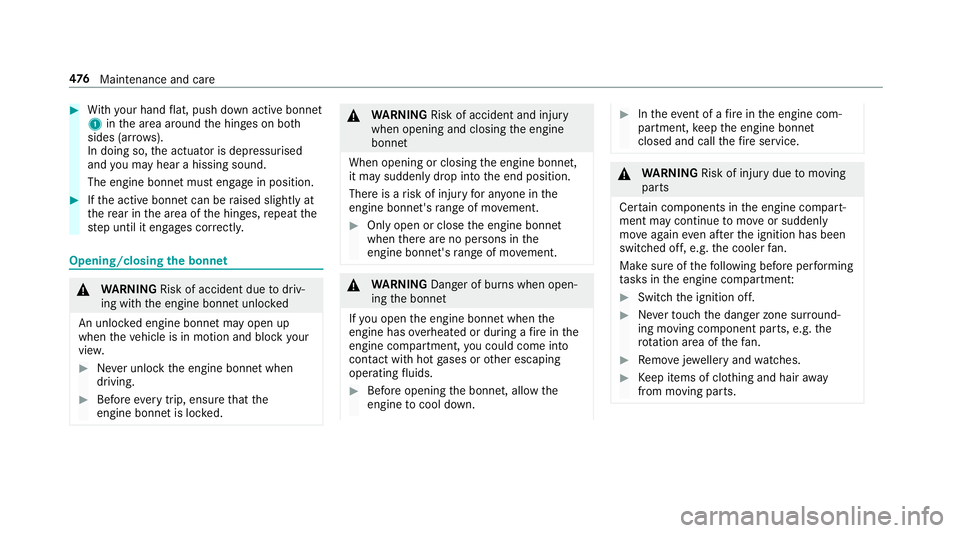
#
With your hand flat, push down active bonnet
1 inthe area around the hinges on bo th
sides (ar rows).
In doing so, the actuator is depressurised
and you may hear a hissing sound.
The engine bonnet must en gage in position. #
Ifth e active bonn etcan be raised slight lyat
th ere ar in the area of the hinges, repeat the
st ep until it engages cor rectl y. Opening/closing
the bonnet &
WARNING Risk of accident due todriv‐
ing with the engine bonn etunlo cked
An unloc ked engine bonn etmay open up
when theve hicle is in motion and block your
vie w. #
Never unlock the engine bonn etwhen
driving. #
Before every trip, ensure that the
engine bonn etis loc ked. &
WARNING Risk of accident and inju ry
when opening and closing the engine
bonn et
When opening or closing the engine bonn et,
it may suddenly drop into the end position.
There is a risk of injury for an yone in the
engine bonn et's range of mo vement. #
Only open or close the engine bonn et
when there are no persons in the
engine bonn et's range of mo vement. &
WARNING Danger of bu rns when open‐
ing the bonn et
If yo u open the engine bonn etwhen the
engine has overheated or during a fire inthe
engine compartment, you could come into
contact with hot gases or other escaping
operating fluids. #
Before opening the bonn et, allow the
engine tocool down. #
Intheeve nt of a fire inthe engine com‐
partment, keep the engine bonn et
closed and call thefire service. &
WARNING Risk of inju rydue tomoving
parts
Cer tain components in the engine compart‐
ment may continue tomo veor suddenly
mo veagain even af terth e ignition has been
switched off, e.g. the cooler fan.
Ma kesure of thefo llowing before per form ing
ta sks in the engine compartmen t: #
Switch the ignition off. #
Neverto uch the danger zone sur round‐
ing moving co mponent parts, e.g. the
ro tation area of thefa n. #
Remo vejewe llery and watches. #
Keep items of clo thing and hair away
from moving parts. 476
Maintenance and care
Page 482 of 673
#
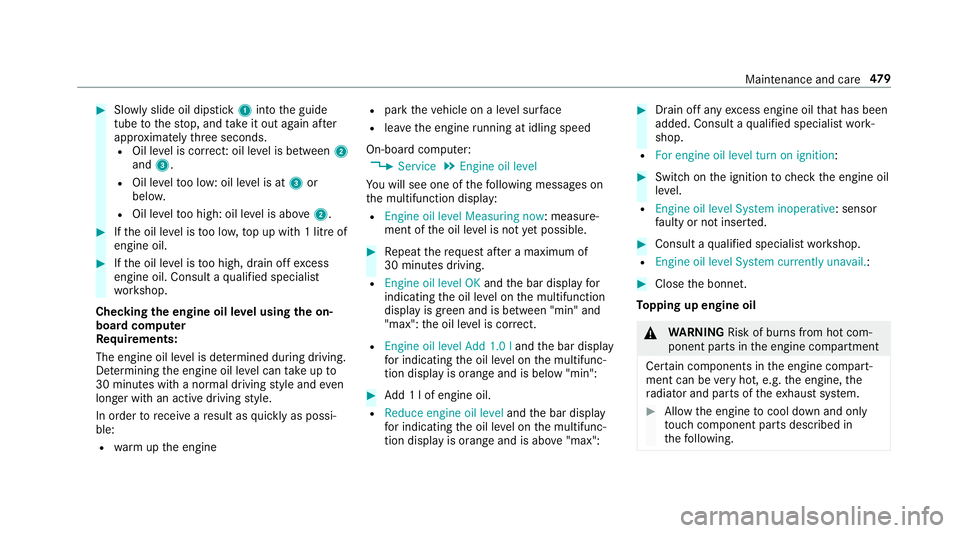
Slowly slide oil dipstick 1into the guide
tube tothestop, and take it out again af ter
appr oximately thre e seconds.
R Oil le vel is cor rect: oil le vel is between 2
and 3.
R Oil le velto o low: oil le vel is at 3or
belo w.
R Oil le velto o high: oil le vel is abo ve2 . #
Ifth e oil le vel is too lo w,top up with 1 litre of
engine oil. #
Ifth e oil le vel is too high, drain off excess
engine oil. Consult a qualified specialist
wo rkshop.
Checking the engine oil le vel using the on-
board compu ter
Re quirements:
The engine oil le vel is de term ined during driving.
De term ining the engine oil le vel can take up to
30 minutes with a normal driving style and even
longer with an active driving style.
In order torecei veare sult as quickly as possi‐
ble:
R warm upthe engine R
park theve hicle on a le vel sur face
R leave the engine running at idling speed
On-board compu ter:
4 Service 5
Engine oil level
Yo u will see one of thefo llowing messages on
th e multifunction display:
R Engine oil level Measuring now : measure‐
ment of the oil le vel is not yet possible. #
Repeat there qu est af ter a maximum of
30 minutes driving.
R Engine oil level OK andthe bar display for
indicating the oil le vel on the multifunction
display is green and is between "min" and
"max": the oil le vel is cor rect.
R Engine oil level Add 1.0 l andthe bar display
fo r indicating the oil le vel on the multifunc‐
tion display is orange and is below "min": #
Add 1 l of engine oil.
R Reduce engine oil level andthe bar display
fo r indicating the oil le vel on the multifunc‐
tion display is orange and is abo ve"max": #
Drain off any excess engine oil that has been
added. Consult a qualified specialist work‐
shop.
R For engine oil level turn on ignition: #
Switch on the ignition tocheck the engine oil
le ve l.
R Engine oil level System inoperative : sensor
fa ulty or not inser ted. #
Consult a qualified specialist workshop.
R Engine oil level System currently unavail. : #
Close the bonn et.
To pping up engine oil &
WARNING Risk of bu rns from hot com‐
ponent parts in the engine compartment
Cer tain components in the engine compart‐
ment can be very hot, e.g. the engine, the
ra diator and parts of theex haust sy stem. #
Allow the engine tocool down and only
to uch co mponent parts described in
th efo llowing. Maintenance and care
47 9
Page 483 of 673
&
WARNING Risk offire and injury from
engine oil
If engine oil comes into con tact wi thhot
component parts in the engine compart‐
ment, it may ignite. #
Make sure that no engine oil is spilled
next tothefiller opening. #
Allow the engine tocool off and thor‐
oughly clean the engine oil from compo‐
nent parts before starting theve hicle. *
NO
TEEngine dama gecaused byan
incor rect oil filter, incor rect oil or addi‐
tives #
Do not use engine oils or oil filters
which do not cor respond tothe specifi‐
cations explicitly prescribed forthe
service inter vals. #
Do not alter the engine oil or oil filter in
order toachie velonger change inter vals
th an presc ribed. #
Do not use additives. #
Follow the instructions in the service
inter val display rega rding the oil
ch ange. *
NO
TEDama gecaused bytopping up too
much engine oil To
o much engine oil can damage the engine
or the catalytic con verter. #
Have excess engine oil remo ved at a
qu alified specialist workshop. #
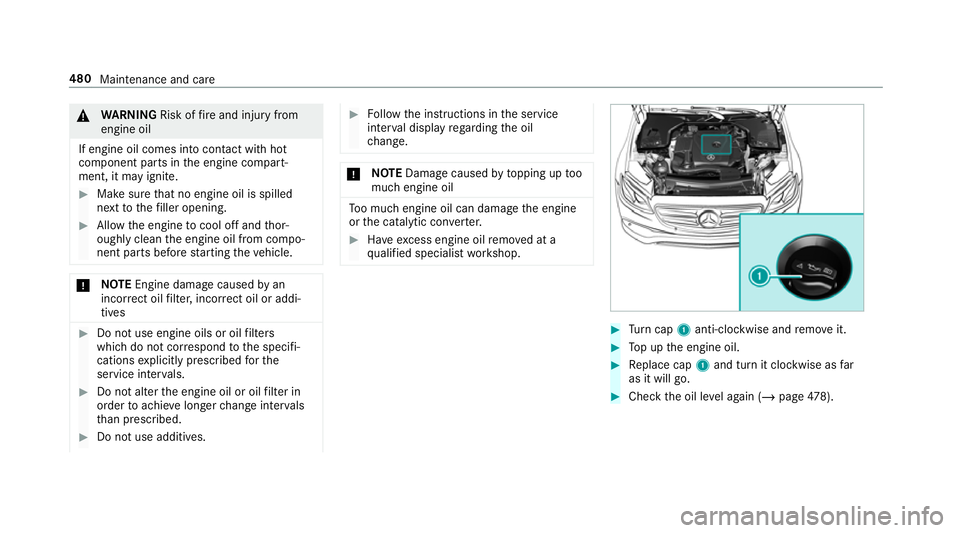
Turn cap 1anti-clockwise and remo veit. #
Top up the engine oil. #
Replace cap 1and turn it clockwise as far
as it will go. #
Check the oil le vel again (/ page478). 480
Maintenance and care