ao service MERCEDES-BENZ GLC SUV 2021 User Guide
[x] Cancel search | Manufacturer: MERCEDES-BENZ, Model Year: 2021, Model line: GLC SUV, Model: MERCEDES-BENZ GLC SUV 2021Pages: 462, PDF Size: 39.34 MB
Page 238 of 462
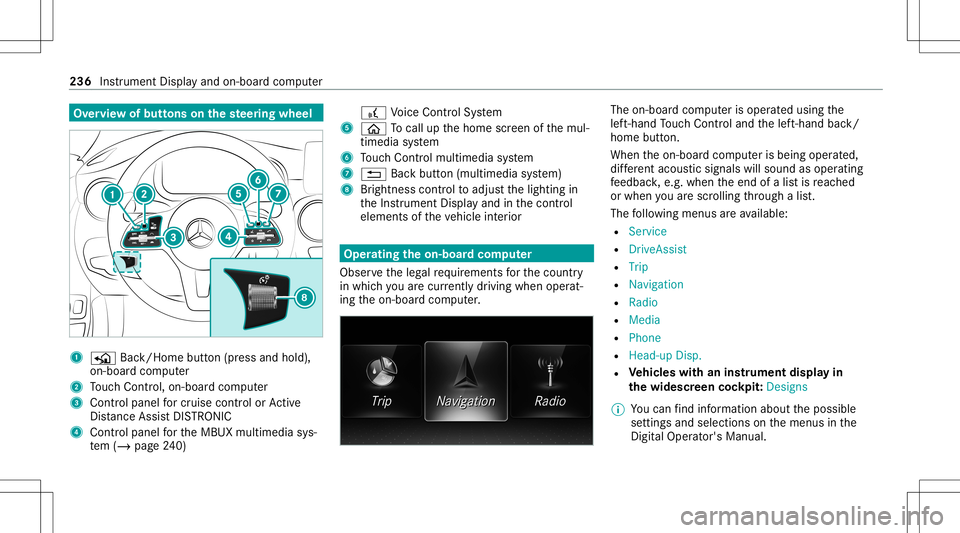
Ov
ervie wof butt ons onthest eer ing wheel 1
P Back/Hom ebutt on(press and hold),
on- boar dcom puter
2 Touc hCon trol, on-bo ardco mp uter
3 Con trol pan elforcr uis econtr olor Active
Dis tance AssistDIS TRONI C
4 Contr olpa nel forth eMBUX multimedia sys‐
te m (/ page24 0) £
Voice Cont rolSy stem
5 00E2 Tocal lup thehome screen ofthemul‐
timedia system
6 Touc hCon trol mult imed iasystem
7 0038 Backbutt on(multimedia system)
8 Brightn esscontrol to adjus tth elighting in
th eIns trument Displayand inthecon trol
element sof theve hicle interior Oper
ating theon-boa rdcom puter
Obser vetheleg alrequ iremen tsforth ecount ry
in whic hyo uar ecur rently drivi ng when operat‐
ing theon- boar dcom puter. The
on-boar dcom puterisoper ated using the
lef t-hand Touc hCon trol and thelef t-hand back/
home button.
When theon- boar dcom puterisbeing operated,
dif fere nt aco ustic signa lswillsou ndasoperati ng
fe edbac k,e.g. when theend ofalis tis reac hed
or when youar esc rolling thro ugh alis t.
The follo wing menusareav ailable:
R Service
R DriveA ssist
R Trip
R Navi gation
R Radio
R Media
R Phon e
R Head -upDisp.
R Vehicl eswith aninstrument displayin
th ewidescr eencockpit:Des igns
% Youcan find informa tionab ou tth epossible
se ttings andselect ionsonthemenus inthe
Dig ital Op erator' sMa nua l. 23
6
Instrum ent Display and on-bo ardcom puter
Page 244 of 462
%
IfMer cedes meconnect isactiv e5, the
ve hicle islink edwithMer cedes meconn ect.
Ve hicle datais then transmit tedto thebac k-
end system. What datais tra nsmit ted
depends onwhic hser vices areactiv ated.
Fu rther details can befound intheMer cedes
me connect term sand conditions anddata
pr otect ion information .The func tion iscoun‐
tr y- dependen t.
If tra nsmis sionofvehicle position isactiv e
6, Mercedes meconn ectservices have
been activated forth is vehicle whichaccess
th eve hicle's geoposition. Inwhic hins tances
th ege oposition istransmitt eddepends on
th epar ticular services. Further details can
be found intheMer cedes meconnect term s
and condition sand datapr otect ion informa‐
tion .The func tion iscount ry-de pende nt. Ope
ratin gthe MBUX multimediasy stem Using
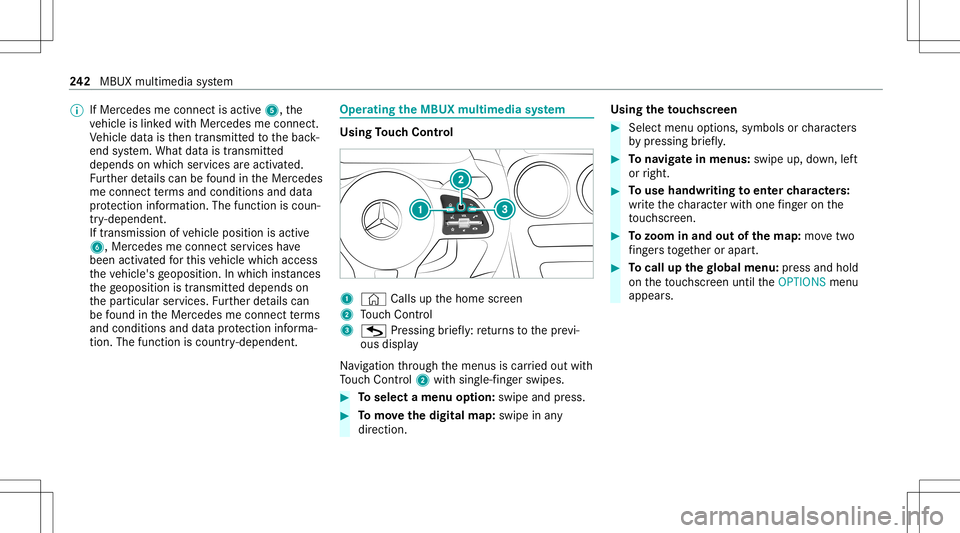
Touc hCon trol 1
© Calls up thehome screen
2 Touc hCon trol
3 G Press ing brief ly:re tur ns tothepr ev i‐
ous displa y
Na vig ation thro ugh themenus iscar ried out with
To uc hCon trol 2 withsin gle-f ing erswipes. #
Toselect amenu option: swipe andpress. #
Tomo vethedigita lma p:swipe inany
dir ect ion. Using
theto uc hscr een #
Select menuoptions, symbolsorcharact ers
by pressing brief ly. #
Tonavig atein menus: swipeup,down, left
or right. #
Touse handwr itingtoent ercharact ers:
wr ite th ech aract erwit hon efing er on the
to uc hsc reen. #
Tozoo minand outofthe map: movetwo
fi ng ersto get her orapar t. #
Tocall upthegl obal menu :pr ess and hold
on theto uc hsc reen until theOPTIONS menu
appear s. 24
2
MBUX multimedia system
Page 257 of 462
The
follo wing entries can bemade, forex am ple:
R City ,st re et,house number
R Street,cit y
R ZIP code
R POI name orPOI categor y,e.g. Parkin g
R Cont actname #
Select asear chresult inlist3. #
Calculat eth ero ute(/ page25 5).
% Youcan find further information aboutdesti‐
nation entry,e.g. 3wo rdaddr esse s,in the
Dig ital Op erator' sMa nua l.
Ch ang ingco untr y #
Select theindicat orforfe der alstat eor prov ‐
inc e1. #
Selec tth efe der alstat eor thepr ov inc ein
1. #
Enterth ecount ryindic ator. #
Selec tth ecount ryon list3. #
Select thefe der alstat eor thepr ov inc efrom
lis t3. Using
online search
Des tinationentr yus es onl ine mapser vices. If
th eon- boar dsear chfinds nosuitab lede stina‐
tion sor ifyo uch ang ecoun tries, theonline
sear chisavailable.
Fo rth edes tinat ionyoucan enteran add ress, a
POI ora3 wo rdaddr ess. #
Select coun try ind icat or1. #
Select thepr ov ider forth eonline service
fr om thecount ries list.
or #
Ifth eon- boar dsear chdeliv ersno results,
ent erthedes tinat ionininput line 2. #
Select thedes tinat ioninthelis t.
The detailed viewforth ero uteis displ ayed. Calculating
aro ut eand using settings for
ro ut eguidanc e Re
quirement s:
R The destination hasbeen entered.
R The destination addressissho wn. Multime
diasystem:
4 © 5
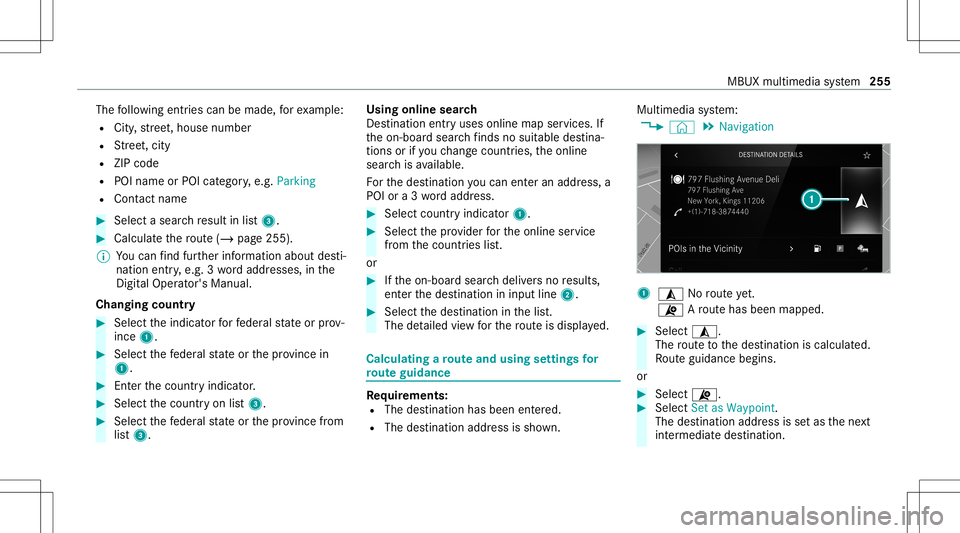
Navigation 1
¥ Norouteye t.
¦ Aro utehas been mappe d. #
Select ¥.
The routeto thedes tinat ioniscalculat ed.
Ro uteguidan cebegin s.
or #
Select ¦. #
Select Set asWaypoin t.
The destinatio naddr essissetas thene xt
int ermediat edes tinat ion. MBUX
multimedia system 255
Page 259 of 462
#
Swi tchHig hway Inform ation onoroff. Usi
ngservices Re
quirement s:
R Ther eis an Interne tcon nection .
R Mer cedes meconnectis available.
R Youha ve setup auser account inthe
Mer cedes mePortal.
R The vehicle isconn ectedtoauser accoun t
and youha ve acc eptedth econ ditions ofuse
fo rth eser vice.
Fu rther information canbefound at:
ht tp s:// www .merced es.me
R The serviceis available.
R The servicehas been activat ed atan aut hor ‐
ize dMer cedes-Ben zCent er.
Mult imed iasystem:
4 © 5
Navigation
Displa yingthetraf fic sit uation withLiv eTr af‐
fi c Inf orma tion #
Select Z. #
ActivateTra ffic. #
Select Adva nced. #
Select View . #
Select MapEle ments . #
Swi tchon Tra fficInci dents ,Fre eFlo wing
Tra fficand Delay.
If traf fic inf ormati onhasbee nre cei ved, then
tra ffic inc ident ssuc has roadw orks ,ro ad
bloc ks,local area repor ts(e.g. fog) and warn‐
ing mess ages aredispla yed.
The traffic dela yis displa yedfo rth ecur rent
ro ute. Traf fic del ayslas ting oneminut eor
long erareta ke nint oconsi deratio n.
Di spl aying hazardwa rnings withCar -to-X -
Comm unication
If hazar dwa rnings areav ailable these can be
sho wnassymbols onthemap. Thedispla y
depends onthese ttings forth eTraffic andTraf-
fic Incidents option s. #
Setth eop tion s.
If Traffic isswitc hedoffand Traffic Incidents
is switc hedon,thesymbols aresho wnon
th epr ospect ive ro ute. Disp
laying weather information andother
map contents #
Select Z. #
Select Advanced . #
Select View. #
Select MapElements . #
Scrollup and showtheONLIN EMAP CON-
TENT categor y. #
Swi tchon aser vice ,e.g. Wea ther.
Cu rrent weather informat ionisdispla yedon
th ena vig ation map,e.g.temp eratur eor
cloud cover. MBUX
multimedia system 25
7
Page 263 of 462
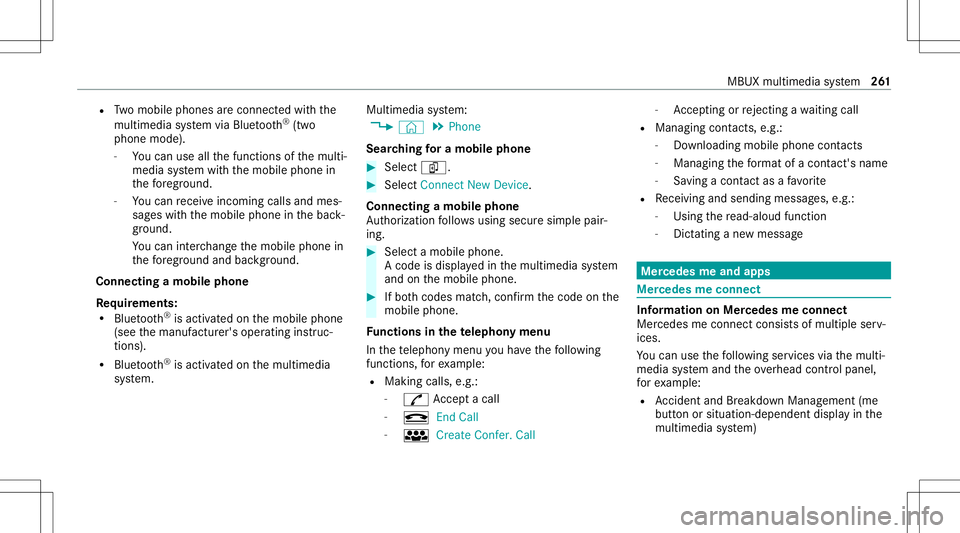
R
Twomobile phones areconn ectedwithth e
multime diasystem viaBlue tooth®
(tw o
phone mode).
- Youcan useallthefunc tionsof themulti‐
media system withth emobile phonein
th efo re ground.
- Youcan recei veinc omin gcalls andmes‐
sag eswit hth emobile phoneinthebac k‐
gr ound.
Yo ucan interch ang eth emobile phonein
th efo re ground andbackground .
Connect ingamob ilephone
Re quirement s:
R Blue tooth®
is act ivat ed on themobile phone
(see themanuf acturer'soper ating instruc‐
tion s).
R Blue tooth®
is act ivat ed on themultimedia
sy stem. Multimedia
system:
4 © 5
Phone
Sear ching fora mob ile pho ne #
Select í. #
Select Connect NewDevice.
Co nnectin gamob ile pho ne
Au thor ization follo ws usin gsec uresim ple pair‐
ing . #
Select amob ilephon e.
A co de isdispl ayed inthemultimedia system
and onthemobile phone. #
Ifbo th code smatc h,conf irm thecode onthe
mobil ephone.
Fu nctions inthete lephon ymenu
In thete lephon ymen uyo uha ve thefo llo wing
func tions,forex am ple:
R Mak ingcalls ,e.g .:
- R Accep ta cal l
- k EndCall
- i Create Confer. Call -
Accep ting orrejecti ngawa itin gcall
R Managin gcon tacts, e.g.:
- Downl oading mob ile pho necont acts
- Managi ngthefo rm atofacon tact's name
- Saving acont actasafa vo rite
R Recei ving andsend ingmess ages, e.g.:
- Usingthere ad-al oudfunction
- Dictating ane wmes sage Mer
cede sme and apps Mer
cede sme connect Inf
ormation onMer cede sme connect
Mer cedes meconnect consistsof multi pleserv‐
ices.
Yo ucan usethefo llo wing service svia themulti‐
media system and theov erhead control panel,
fo rex am ple:
R Accid ent and Brea kdo wnManag eme nt(me
bu tton orsitu ation-de pendentdispl ayinthe
multime diasystem) MBUX
multimedia system 26
1
Page 264 of 462
R
Mer cedes-Ben zemer gency callsy stem (aut o‐
matic emergency calland SOS button)
The Mercede sme conne ctAccid ent and Brea k‐
do wn Manag eme ntand theMer cedes- Benz
emer gency callcent erareav ailable toyou
ar oun dth ecloc k.
The mebutt onand theSOS buttoncan befound
on theve hicle's overhead control panel
(/ page263).
Yo ucan also calltheMer cedes- BenzCustomer
Cent erusi ng themultimedia system
(/ page26 4).
Please note that Mer cedesme connectis a
Mer cedes-Ben zser vice.In emer gencie s,firs tcal l
th enation alemer gency service sus ing the
st andar dnat ionalemer gency service telephon e
numb ers. In emer gencie s,youcan also usethe
Mer cedes-Ben zemer gency callsy stem
(/ page269).
Obser vethecon ditions ofuse forMer cedes me
connect andother services. These canbe
obt ained intheMer cedes mePortal: http s://
me. secure.m erced es-ben z.com Fu
rther information aboutMercedes meconn ect
ser vices canbeobt ained intheMer cedes me
Po rtal: http s:// me. secure.m erced es-ben z.com
Inf orma tion onMer cedes meconnect Acci‐
dent andBreak down Manag emen t
The Accid ent and Brea kdo wnManag eme ntcan
incl udeth efo llo wing functions:
R Supplem enttotheMer cedes- Benzemer‐
ge ncy callsy stem (/ page269)
If neces sary,thecon tact per son atthe
Mer cedes-Ben zemer gency callcent erfor‐
wa rdsth ecall toMer cedes meconn ectAcci‐
dent andBrea kdo wnManag eme nt.Forw ard‐
ing thecall isho we verno tpossi bleinall
countr ies.
R Breakdo wnassi stanc eby ate ch nici anon
lo cati onand /or theto wing away oftheve hi‐
cle tothenear estaut hor ized Mercedes- Benz
Cent er
Yo uma ybe charge dfo rth ese services.
R Addition totheemer gency guide af te rau to‐
matic accide ntor breakdo wndetection
(/ page 264) In
theeve ntofabr ea kdo wnoracci dent, fur‐
th er vehicle datais sent whichenables opti‐
mal suppor tby theMer cedes- BenzCustomer
Cent erand theaut hor ized service partner or
br eakdo wnassis tance.
R Addition totheMer cedes meconnect
ser vice Telediagno stics
Wi th theTe lediagno stics func tion,spec ific
we arand failur ere por tsarere cor ded bythe
ser vice prov ider ,in so faras these can be
clear lyint erpr eted and areav ailable thro ugh
th emonit oring ofcom ponen tsthat aresub‐
je ct to diagnos tics.
If yo ur vehicle detects abr ea kdo wnorthre at
of abr eak down, youma ybe prom pte dvia
th emultimedia system tocont actthe
Mer cedes-Ben zCus tomer Cent erforfur ther
help. Thisprom ptinthemultimedia system
onl yappear swhen theve hicle isstatio nary. 262
MBUX multimedia system
Page 265 of 462
%
These services aresubject totech nica l
re strictions such asthemobile phonecover‐
ag e, mobil ene tworkqu alit yand theability of
th epr ocessin gsy stems tointerpr et the
tr ans ferred dat a.In some circums tances,
th is can result indela ysorthefa ilur eof the
inf ormatio nto appear inthemultimedia sys‐
te m.
Mor einf ormation aboutMer cedes meconnect
ser vices canbeobt ained intheMer cedes me
Po rtal: http s:// me. secure.m erced es-ben z.com
Data trans ferre ddur ing Mer cedes mecon‐
ne ct cal lse rvices
The datatransf erreddur ing aMer cedes mecon‐
nec tcall depends on:
R The reason forinitia tionofthecall
R The service that isselec tedin thevo ice con ‐
tr ol system
R The activ ated Mer cedes meconnect services
Yo ucan find outwh ich da ta istransf erredwhen
using theser vices inthecur rentl yva lid
Mer cedes meconnectte rm sof use and thedat a
pr otect ion information forMer cedes mecon‐ nect.
Youcan find these inyour Mer cedesme
user accoun t. Mer
cedes mecalls Ma
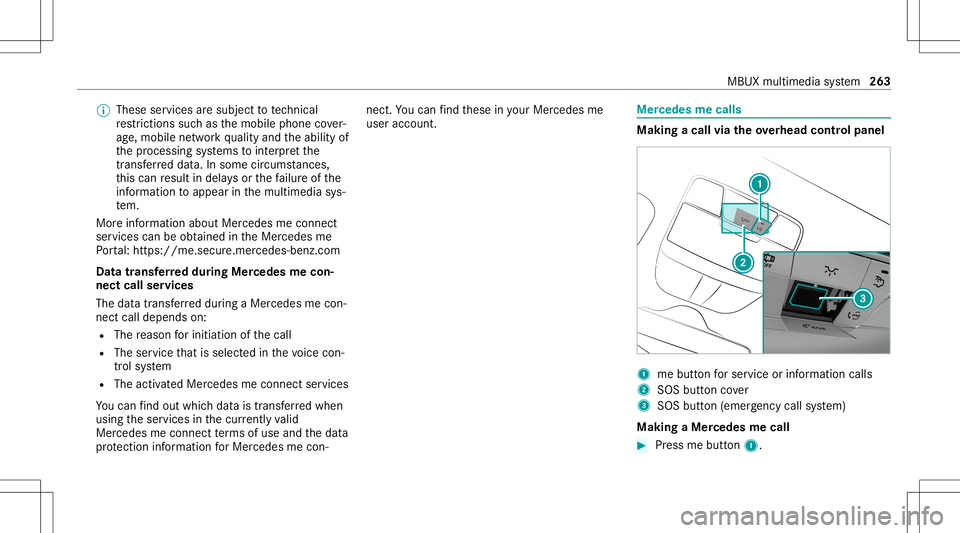
king acall viatheove rhead contr olpa nel 1
mebutt onforser vice orinformation calls
2 SOS buttoncover
3 SOS button (emerg ency callsy stem)
Making aMer cedes mecall #
Press mebutt on1. MBUX
multimedia system 263
Page 266 of 462
Making
anemer gency call #
Toopen theco verof SOS button2 ,pr ess it
br ief ly. #
Press and hold SOS button3 forat lea st
one second.
If aMer cedes mecall isactiv e,an emer gency
cal lcan still be trigg ered. This hasprior ity ove r
all other activ ecalls.
Inf ormat ionabout theMer cedes mecall
using theme button
A cal lto theMer cedes- BenzCustomer Cent er
has been initiatedvia theme butt onintheove r‐
head controlpanel orthemultimedia system
(/ page263).
Using thevo ice dialog system youacc ess the
desir edser vice:
R Accid ent and Brea kdo wnManag eme nt
R Mer cede s-Benz Customer Centerforge ner al
inf orma tionab ou tth eve hicle
Yo ucan find informa tionon thefo llo wing topics:
R Activati on ofMe rcedes meconnect
R Oper ating theve hicle R
Near estaut hor ized Mercedes-Ben zCent er
R Other products andservices from Mer cedes-
Benz
Dat ais transf erreddur ing thecon nect iontothe
Mer cedes-Ben zCus tomer Cent er(/ page265).
Call ingtheMer cedes- BenzCustomer Center
usi ng the multi mediasy stem
Re quirement s:
R Access toaGSM networkis available.
R The contract partner' sGSM networkco ver‐
ag eis available inthere spectiv ere gion.
R The ignition mustbe switc hedonsothat
ve hicle datacan betransf erredaut omati‐
cally .
Multimedia system:
4 © 5
Phone 5
g #
Call Mercedes meconnect.
Af terconf irmation, themultimedia system
sends there qu ired vehicle data.The data
tr ansf erissho wninthemedia display. Then,
youcan selectaser viceand beconn ect ed
to aspec ialistat theMer cedes- BenzCustomer
Cent er.
Call ingtheMer cedes- BenzCustomer Center
af te raut omat icac ciden tor break down
de tection
Re quirement s:
R The vehicle hasdetected anacci dent or
br ea kdo wnsitu ation.
R The vehicle isstatio nary.
R The hazar dwa rning light sar eswitc hedon.
% This function isno tav ailable inall coun tries.
The vehicle candetect acci dent orbrea kdo wn
situ ations undercer tain cir cums tances.
In theeve ntan acci dent or brea kdo wnisde tec‐
te d, theemer gency guide sho wssafetyno tesin
th emultimedia system displa y.
Af terqu itting theemer gency guide displ ayon
th emultimedia system, apr om ptappear sask ing
whe ther youwo uld liketo get suppor tfr om the
Mer cedes-Ben zCus tomer Cent er. 26
4
MBUX multime diasystem
Page 267 of 462
#
Select Call.
R The vehicle datais sent automatically
(/ page262).
R The Mercedes-Ben zCus tomer Cent er
ta ke syo ur call and orga nize sth ebr eak‐
do wn and acciden tassis tance.
Yo uma ybe charge dfo rth ese services.
% Depen dingonthese verity of theacciden t,
an aut omatic emergency callcan beiniti‐
at ed .Thi sha spr iority over all other activ e
calls.
% Inaddition, ifth eMer cedes meconnect
ser vice "Telediagnos tics"is activ e,asimilar
pr om ptcan appea raf te ra dela yin theeve nt
of abr ea kdo wn. Ifyo uar ealr eady incontact
wit hth eMer cedes- BenzCustomer Cent eror
ha ve already recei vedsuppor t,th is prom pt
can beigno redor declined.
% Ifyo uans werth epr om ptforsupp ortfr om
th eMer cedes- BenzCustomer Cent erwit h
Later, themessag ewill behidden and
appear again later.
The prom pttrig ge redby theMer cedes me
con nect service "Telediagnos tics",can either be
con firm ed ordeclined. Afterbeing
decli ned, this will notbe sho wnagain.
Ar ranging aser vice appointment viaa
Mer cedes mecall
If yo uha ve act ivat ed themaint enanc emanag e‐
ment service, releva nt vehicle datais transf erred
aut omat icallyto theMer cedes- BenzCustomer
Cent er.Yo uwill then recei veindiv idual recom‐
mend ations rega rding themaint enanc eof your
ve hicle.
Re gardless ofwhe ther youha ve conse nted to
th emaint enanc emanag ement service, themulti‐
media system reminds youaf te ra cer tain
amount oftim eth at aser viceis due. Apr om pt
appear sask ing ifyo uwo uld liketo mak ean
app ointment. #
Toarra ng easer vice appointment :select
Call .
Af teryo ur agr eem ent,th eve hicle datais
tr ansf erredand theMer cedes- BenzCus‐
to mer Cent ertake syo ur prefer redappoint‐
ment date.The information isthen sent to
yo ur desir edser viceout let. This
willcontact youto conf irm theappoint‐
ment andifneces sarycon sult about the
de tails.
% Ifyo usele ctLat erafte rth eser vice messag e
appear s,themessag eis hidden andreap‐
pear sat alat er tim e.
Tr ansf erre ddata during aMer cedes mecall
Whe nyo umak easer vicecall viaMer cedesme,
dat ais transm itted. This enables targeted advice
and asmoo thser vice.
The follo wing requ iremen tsmus tbe fulf illed for
th etransf erofthedat a:
R The ignition isswitc hedon.
R The requ ired dat atransf ertech nol ogy issu p‐
po rted bythemobile phonenetworkpr o‐
vider .
R The qualit yof themobile connect ionissuf fi‐
cie nt.
Mu lti-sta ge trans ferdepe ndsonthefo llo wing
fa ct or s:
R Reason forth einitiat ionofthecall MBUX
multimedia system 265
Page 268 of 462
R
The available mobilephon etransm ission
te ch nol ogy .
R The activatedMer cedes meconnectser v‐
ices.
R The service select edinthevo ice con trol sys‐
te m.
Dat atransf erifMer cede sme connectser v‐
ice sar eno tactiv ated
If no Mer cedes meconnect services areactiv a‐
te d, thefo llo wing datais transf erred:
R Vehicle identif ication number
R Time ofthecall
R Reason forth einitiat ionofthecall
R Countr yindicat oroftheve hicle
R Setlanguag efo rth emultimedia system
R Telephon enumb erofthecomm unication
platf orm ins talled intheve hicle
If acall ismade fora ser vice appointment via
th eser vice reminder ,th efo llo wing datais also
transmit ted:
R Cur rent mil eage and main tenance data If
acall ismade afte rau tomatic accide ntor
br eakdo wndetection using themultimedia sys‐
te m, thefo llo wing datais also transm itted:
R Cur rent mil eage and main tenance data
R Cur rent vehicle location
If Ac cid ent and Brea kdo wnManag eme ntis
cal led via thevo ice con trol system, thefo llo wing
dat acan also becalled upfrom theve hicle by
th eMer cedes- BenzCustomer Cent er:
R Current vehicle location
Data transf erifMer cedes meconne ctser v‐
ices areactiv ated
An ove rview of thedat atransmit tedcan be
fo und inthere spectiv ete rm sof use for
Mer cedes meconn ectservices. These canbe
obt ained intheMer cedes meportal:htt ps:/ /
me. secur e.mercedes -benz.com
Data processing
The datatransm itted within thescope ofthecall
is dele tedfrom thepr ocessin gsy stem afte rth e
cal lis finis hed ,in so faras this dat ais no tbeing
used forot her activ ated Mer cedes meconn ect
ser vices. The
incident- specificdat ais processed and
st or ed intheMer cedes- BenzCustomer Cent er
and, ifre qu ired toprocess theinciden t,forw ar‐
ded totheser vice partner aut hor ized bythe
Mer cedes-Ben zCus tomer Cent er.Plea setake
no te ofthedat apr otect ion information onthe
Mer cedes meInterne tpag ehttps: //
www .mercedes.me orinthere cor ded mess age
imme diat ely afte rcall ing theMer cedes- Benz
Cus tomer Cent er.
% The recor ded mess ageis no tav ailable in
eve rycou ntry. Ov
ervie wof theMer cedes me&App smenu When
youlog inwit hauser accoun tto the
Mer cedes mePortal, then ser vices andoffers
fr om Mer cedes-Benz willbe available toyou.
Fo rmor einf ormation consult anauthor ized
Mer cedes-B enzCent eror visit theMer cedes me
por tal:htt ps:/ /me .secure.m ercedes -benz.com
% Mak esur eyo ualw ayske ep theMer cedes
me apps updat ed. 266
MBUX multimedia system