display MERCEDES-BENZ GLE 2016 Owners Manual
[x] Cancel search | Manufacturer: MERCEDES-BENZ, Model Year: 2016, Model line: GLE, Model: MERCEDES-BENZ GLE 2016Pages: 450, PDF Size: 12.92 MB
Page 266 of 450

Outside temperature display You should pay special attention to road condi-
tions when temperatures are around freezing
point.
Bear in mind that the outside temperature dis-
play indicates the temperature measured and
does not record the road temperature.
The outside temperature display is in the multi-
function display ( Y
page 265).
There is a short delay before a change in outside
temperature appears in the multifunction dis-
play.
Coolant temperature display
G WARNING
Opening the hood when the engine is over-
heated or when there is a fire in the engine
compartment could expose you to hot gases
or other service products. There is a risk of
injury.
Let an overheated engine cool down before
opening the hood. If there is a fire in the
engine compartment, keep the hood closed
and contact the fire department.
! A display message is shown if the coolant
temperature is too high.
If the coolant temperature is over 248 ‡
(120 †), do not continue driving. The engine
will otherwise be damaged.
All vehicles except PLUG-IN HYBRID vehicles:
the coolant temperature gauge is in the instru-
ment cluster on the right-hand side ( Y
page 34).
PLUG-IN HYBRID vehicles: the multifunction dis-
play shows the coolant temperature in the
Coolant ( Y
page 273) submenu.
Under normal operating conditions and with the
specified coolant level, the coolant temperature
may rise to 248 ‡ (120 †). Operating the on-board computer
Overview
C
Multifunction display D
Right control panel
Page 267 of 450

Left control panel Y
e R
Calls up the menu and menu bar
c
d Press briefly: R
Scrolls in lists R
Selects a submenu or function R
In the Audio menu: selects the
previous or next station, when the
preset list or station list is active,
or an audio track or video scene R
In the Tel (telephone) menu:
switches to the phone book and
selects a name or telephone num-
ber
c
d Press and hold: R
In the Audio menu: selects a pre-
set list or a station list in the
desired frequency range, or
selects an audio track or video
scene using rapid scrolling R
In the Tel (Telephone) menu:
starts rapid scrolling if the phone
book is open
v R
Confirms the selection or display
message R
In the Tel (Telephone) menu:
switches to the telephone book
and starts dialing the selected
number
8 Press briefly: R
Back R
Switches off voice-operated con-
trol for navigation or the Voice
Control System R
Hides display messages or calls up
the last Trip menu function usedR
Exits the telephone book/redial
memory
8 Press and hold: R
Calls up the standard display in the
Trip menu Right control panel v R
Rejects or ends a call R
Exits the telephone book/redial
memory
a R
Makes or accepts a call R
Switches to the redial memory
Page 268 of 450

i Set the time using the multimedia system
(see the Digital Operator's Manual).
Possible displays in the multifunction dis-
play: R
Page 269 of 450

ECO display
The ECO display is not available for Mercedes-
AMG vehicles. X
Press the Y or e button on the steering
wheel to select the Trip menu.X
Press the c or d button to select ECO
DISPLAY .
If the ignition remains switched off for longer
than four hours, the ECO display will be auto-
matically reset.
For more information on the ECO display, see
( Y
page 182).
Displaying the range and current fuel
consumption
Mercedes-AMG vehicles: the menu only dis-
plays approximate range C .
PLUG-IN HYBRID vehicles: the menu displays
current fuel consumption D . In the subsequent
message, the multifunction display shows the
approximate electrical range as well as the total
range ( Y
page 250).X
Press the Y or e button on the steering
wheel to select the Trip menu.X
Press the c or d button to select
approximate range C and current fuel con-
sumption D .
Approximate range C that can be covered is
calculated according to your current driving
style and the amount of fuel in the tank. If
there is only a small amount of fuel left in the
fuel tank, a vehicle being refueled
Page 270 of 450
If you reset the values in the ECO display, the
values in the "From Start" trip computer are also
reset. If you reset the values in the "From Start"
trip computer, the values in the ECO display are
also reset.
Navigation system menu
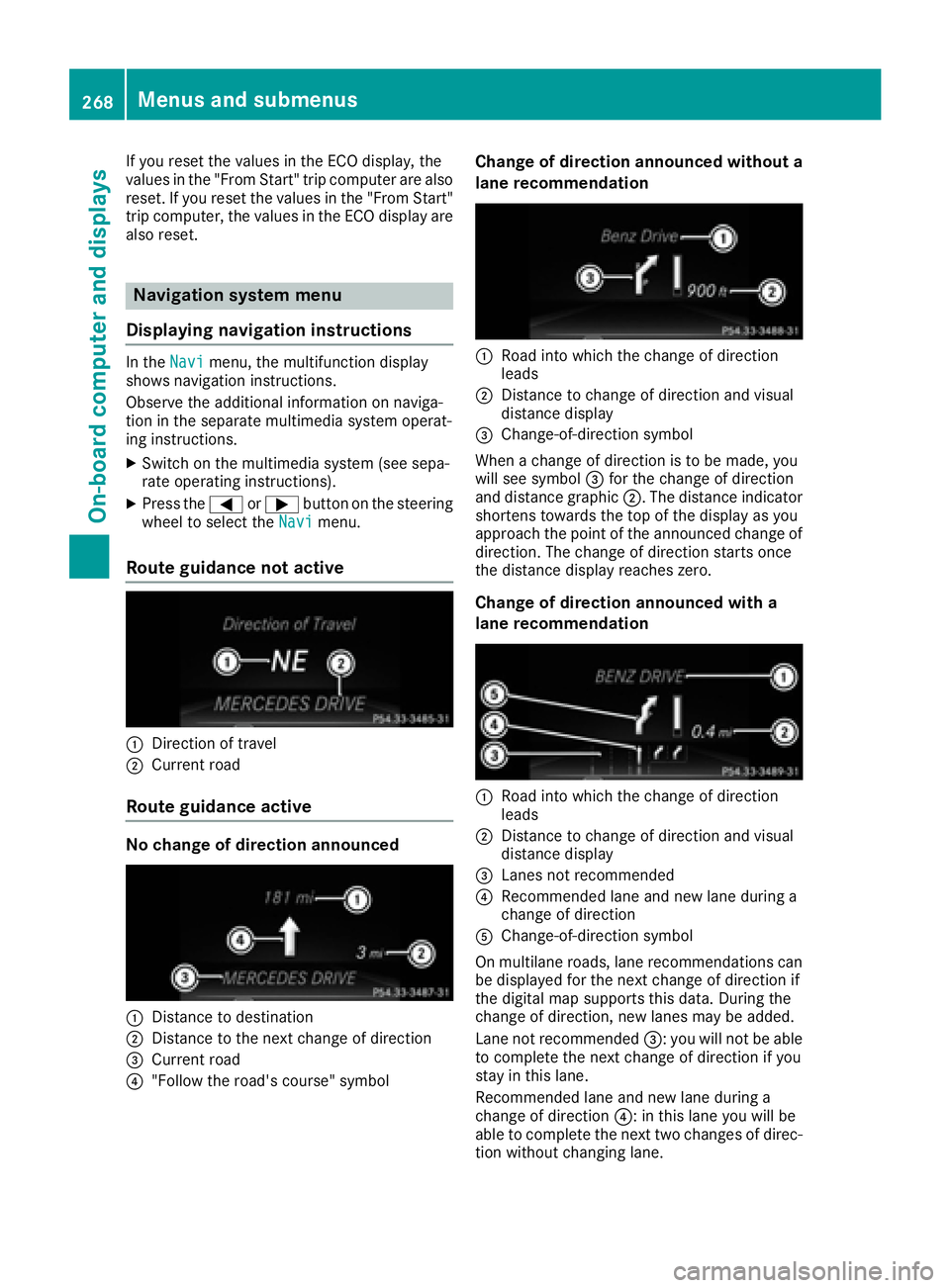
Displaying navigation instructions In the Navi menu, the multifunction display
shows navigation instructions.
Observe the additional information on naviga-
tion in the separate multimedia system operat-
ing instructions. X
Switch on the multimedia system (see sepa-
rate operating instructions). X
Press the Y or e button on the steering
wheel to select the Navi menu.
Route guidance not active
C
Direction of travelD
Current road
Route guidance active
No change of direction announced
C
Distance to destination
D
Distance to the next change of direction
Page 271 of 450

Other status indicators of the naviga-
tion system
The navigation system displays additional infor-
mation and the vehicle status.
Possible displays: R
New Route... or Calculating Route...
A new route is calculated. R
Road Not Mapped
The vehicle position is inside the area of the
digital map but the road is not recognized, e.g.
newly built streets, car parks or private land. R
No Route
No route could be calculated to the selected
destination. R
K
You have reached the destination or an inter-
mediate destination.
Audio menu
Selecting a radio station
C
Active station list
D
Station frequency with memory position
The multifunction display shows station D with
station frequency or station name. The preset
position is only displayed along with station D if
this has been stored. You can store TV chan-
nels D in the multimedia system.X
Switch on the multimedia system and select
radio; see the separate operating instruc-
tions. X
Press the Y or e button on the steering
wheel to select the Audio menu. X
To select a preset list or station list: press
and briefly hold the c or d button until
the preset list or station list in the desired
frequency range is shown in the multifunction
display. X
To select a station: briefly press c
or d .
i SIRIUS XM satellite radio functions like a
normal radio.
For more information on radio operation, see
"Satellite radio" in the separate operating
instructions.
Operating an audio player or audio
media
Audio data from various audio devices or media
can be played, depending on the equipment
installed in the vehicle. X
Switch on the multimedia system and select
audio CD or MP3 mode; see the separate
operating instructions. X
Press the Y or e button on the steering
wheel to select the Audio menu.X
To select the next/previous track: briefly
press the c or d button.X
To select a track from the track list (rapid
scrolling): press and hold the c or d
button until desired track C has been
reached.
If you press and hold c or d , the rapid
scrolling speed is increased. Not all audio
drives or data carriers support this function.
If track information is stored on the audio device
or medium, the multifunction display will show
the number and title of the track. The current
track does not appear in audio AUX mode
( Aux iliary audio mode: external audio source
connected).Menus and submenus 269
On-board computer and displays Z
Page 272 of 450

Video DVD operation X
Switch on the multimedia system and select
video DVD; see the separate operating
instructions. X
Press the Y or e button on the steering
wheel to select the Audio menu.X
To select the next or previous scene:
briefly press the c or d button.X
To select a scene from the scene list
(rapid scrolling): press and hold the c
or d button until desired scene C has
been reached.
Telephone menu
Introduction
G WARNING
If you operate information systems and com-
munication equipment integrated in the vehi-
cle while driving, you will be distracted from
traffic conditions. You could also lose control
of the vehicle. There is a risk of an accident.
Only operate the equipment when the traffic
situation permits. If you are not sure that this
is possible, park the vehicle paying attention
to traffic conditions and operate the equip-
ment when the vehicle is stationary.
When telephoning, you must observe the legal
requirements for the country in which you are
currently driving. X
Switch on the mobile phone (see the manu-
facturer’s operating instructions). X
Switch on the multimedia system (see sepa-
rate operating instructions). X
Establish a Bluetooth ®
connection to the mul-
timedia system; see the separate operating
instructions. X
Press the Y or e button on the steering
wheel to select the Tel menu. You will see one of the following display mes-
sages in the multifunction display: R
Phone READY or the name of the network
provider: the mobile phone has found a net-
work and is ready to receive. R
Phone No Service : there is no network
available or the mobile phone is searching for
a network.
Accepting a call
If someone calls you when you are in the Tel
menu, a display message appears in the multi-
function display.
You can accept a call at any time, even if you are
not in the Tel menu. X
Press the a button on the steering wheel
to accept an incoming call.
Rejecting or ending a call You can end or reject a call even if you are not in
the Tel menu. X
Press the v button on the steering wheel
to reject or end a call.
Selecting an entry from the telephone
book X
Press the Y or e button on the steering
wheel to select the Tel menu.X
Press the c , d or v button to
switch to the phone book. X
Authorize access to the phone book on the
phone. X
Press the c or d button to select the
desired name.
or X
To start rapid scrolling: press and hold the
c or d button for longer than one sec-
ond.
Rapid scrolling stops when you release the
button or reach the end of the list.270
Menus and submenus
On-board computer and displays
Page 273 of 450

X
If only one telephone number is stored for
a name: press the a or v button to
start dialing.
or X
If there is more than one number for a
particular name: press the a or v
button to display the numbers. X
Press the c or d button to select the
number you want to dial. X
Press the a or v button to start dialing.
or X
To exit the telephone book: press the v
or 8 button.
Redialing The on-board computer saves the last names or
numbers dialed in the redial memory. X
Press the Y or e button on the steering
wheel to select the Tel menu.X
Press the a button to switch to the redial
memory. X
Press the c or d button to select the
desired name or number. X
Press the a or v button to start dialing.
or X
To exit the redial memory: press the v
or 8 button.
Assistance menu
Introduction
Depending on the equipment installed in the
vehicle, you have the following options in the
DriveAssist menu:R
Displaying the assistance graphic
( Y
page 271) R
Activating/deactivating Steering Assist and
Stop&Go Pilot ( Y
page 272)R
Activating/deactivating PRE-SAFE ®
Brake
( Y
page 272) R
Activating/deactivating COLLISION PREVEN-
TION ASSIST PLUS ( Y
page 272)R
Activating/deactivating ATTENTION ASSIST
( Y
page 272) R
Activating/deactivating Blind Spot Assist or
Active Blind Spot Assist ( Y
page 272)R
Activating/deactivating Lane Keeping Assist
or Active Lane Keeping Assist ( Y
page 272)
Displaying the assistance graphic X
Press the Y or e button on the steering
wheel to select the DriveAssist menu.X
Press c or d to select Assistance
Graphic . X
Confirm by pressing v on the steering
wheel.
The multifunction display shows the
DISTRONIC PLUS distance display in the
assistance graphic.
The assistance graphic displays the status of
and information from the following driving
systems or driving safety systems: R
Traffic Sign Assist ( Y
page 226)R
DISTRONIC PLUS ( Y
page 193)R
PRE-SAFE ®
Brake ( Y
page 74)R
COLLISION PREVENTION ASSIST PLUS
( Y
page 69) R
ATTENTION ASSIST ( Y
page 224)R
Lane Keeping Assist ( Y
page 229) or Active
Lane Keeping Assist ( Y
page 233)R
DSR ( Y
page 236) R
Off-road program (vehicles with Off-Road
Engineering package) ( Y
page 237)R
Rear window wiper ( Y
page 122)X
Press d to display the ATTENTION ASSIST
assessment.Menus and submenus 271
On-board computer and displays Z
Page 274 of 450

Activating/deactivating Steering
Assist and Stop& Go PilotX
Press th e Y or e butto n on th e steering
whee l to select th e DriveAssist menu.X
Press th e c or d butto n to select DTR
+: Steer. Asst. X
Confir m by pressing v on th e steering
wheel.
The curren t selection appears.X
To activate/deactivate: press th e v but -
to n again .
When Steering Assis t and Stop&Go Pilo t are
activated, th e multifunction display shows th e
DTR+: Steer. Asst. On message .
Further information about DISTRONI C PLU S
wit h Steering Assis t and Stop&Go Pilo t
( Y
page 199).
Activating/deactivating PRE-SAFE ®
Brake PRE ‑ SAFE ®
Brake is only available for vehicles
wit h th e Drivin g Assistance package.X
Press th e Y or e butto n on th e steering
whee l to select th e DriveAssist menu.X
Press th e c or d butto n to select PRE -
SAF E Brake .X
Press v to confirm .
The curren t selection appears.X
To activate/deactivate: press th e v but -
to n again .
When PRE-SAF E ®
Brake is deactivated, th e
assistanc e graphic shows th e
Page 275 of 450

X
Press the d or c button to set Off ,
Standard or Adaptive .
When Lane Keeping Assist or Active Lane
Keeping Assist is activated, the multifunction
display shows the lane markings as bright
lines in the assistance graphic. X
Press the v button to save the setting.
For further information about Lane Keeping
Assist, see ( Y
page 229).
For further information about Active Lane Keep-
ing Assist, see ( Y
page 233).
Service menu
Introduction
Depending on the equipment installed in the
vehicle, you have the following options in the
Serv. menu:R
Calling up display messages in message
memory ( Y
page 280)R
Restarting the tire pressure loss warning sys-
tem ( Y
page 394) or checking the tire pres-
sure electronically ( Y
page 396)R
Calling up the service due date
( Y
page 360) R
Displaying the coolant temperature (PLUG-IN
HYBRID vehicles) ( Y
page 273)
Displaying the coolant temperature The Coolant menu is only available on PLUG-IN
HYBRID vehicles.
Observe the notes on coolant temperature
( Y
page 264). X
Press the Y or e button on the steering
wheel to select the Sett. menu.X
Press the d or c button to select the
Serv. submenu.X
Confirm by pressing v on the steering
wheel. X
Press the d or c button to select the
Coolant submenu. X
Press v to confirm your selection.
The coolant temperature is shown in a bar
display.
Settings menu
Introduction
Depending on the equipment installed in the
vehicle, In the Sett. menu you have the follow-
ing options: R
Changing HYBRID settings (PLUG-IN HYBRID
vehicles) ( Y
page 273) R
Changing the instrument cluster settings
( Y
page 274) R
Changing the light settings ( Y
page 275)R
Changing the vehicle settings ( Y
page 275)R
Changing the convenience settings
( Y
page 275) R
Restoring the factory settings ( Y
page 276)
HYBRID submenu (PLUG-IN HYBRID
vehicles)
Setting the maximum charge current
Using the Maximum Charge Current: function,
you can limit the charge current value at which
the high-voltage battery should be charged.
Before charging the high-voltage battery at a
power socket, check the maximum permissible
charge current for the relevant power socket or
the building.
Only set the maximum permissible charge cur-
rent using the function if: R
it is not possible to set the charge current on
the charging cable R
the precise maximum permitted charge cur-
rent can only be set via the on-board com-
puterMenus and submenus 273
On-board computer and displays Z