change time MERCEDES-BENZ GLE 2016 Owner's Manual
[x] Cancel search | Manufacturer: MERCEDES-BENZ, Model Year: 2016, Model line: GLE, Model: MERCEDES-BENZ GLE 2016Pages: 450, PDF Size: 12.92 MB
Page 236 of 450
The system may be impaired or may not function
if: R
there is poor visibility, e.g. due to insufficient
illumination of the road, or due to snow, rain,
fog or spray R
there is glare, e.g. from oncoming traffic, the
sun or reflections (e.g. when the road surface
is wet) R
the windshield is dirty, fogged up, damaged or
covered, for instance by a sticker, in the vicin-
ity of the camera R
there are no, several or unclear lane markings
for a lane, e.g. in areas with road construction
work R
the lane markings are worn away, dark or cov-
ered up, e.g. by dirt or snow R
the distance to the vehicle in front is too small
and the lane markings thus cannot be detec-
ted R
the lane markings change quickly, e.g. lanes
branch off, cross one another or merge R
the road is narrow and winding R
there are highly variable shade conditions on
the roadway R
no vehicle is detected in the adjacent lane and
there are broken lane markings
Warning vibration in the steering wheel A warning may be given if a front wheel passes
over a lane marking. It will warn you by means of
intermittent vibration in the steering wheel for
up to 1.5 seconds.
In order that you are warned only when neces-
sary and in good time if you cross the lane mark-
ing, the system detects certain conditions and
warns you accordingly.
The warning vibration occurs earlier if: R
you approach the outer lane marking on a
bend R
the road has very wide lanes, e.g. a highway R
the system detects solid lane markings
The warning vibration occurs later if: R
the road has narrow lanes R
you cut the corner on a bend Lane-correcting brake application
G WARNING
A lane-correcting brake application cannot
always bring the vehicle back into the original
lane. There is a risk of an accident.
Always steer, brake or accelerate yourself,
especially if Active Lane Keeping Assist warns
you or makes a lane-correcting brake appli-
cation.
G WARNING
Active Lane Keeping Assist does not detect
traffic conditions or road users. In very rare
cases, the system may make an inappropriate
brake application, e.g. after intentionally driv-
ing over a solid lane marking. There is a risk of
an accident.
An inappropriate brake application may be
interrupted at any time if you steer slightly in
the opposite direction. Always make sure that
there is sufficient distance on the side for
other traffic or obstacles.
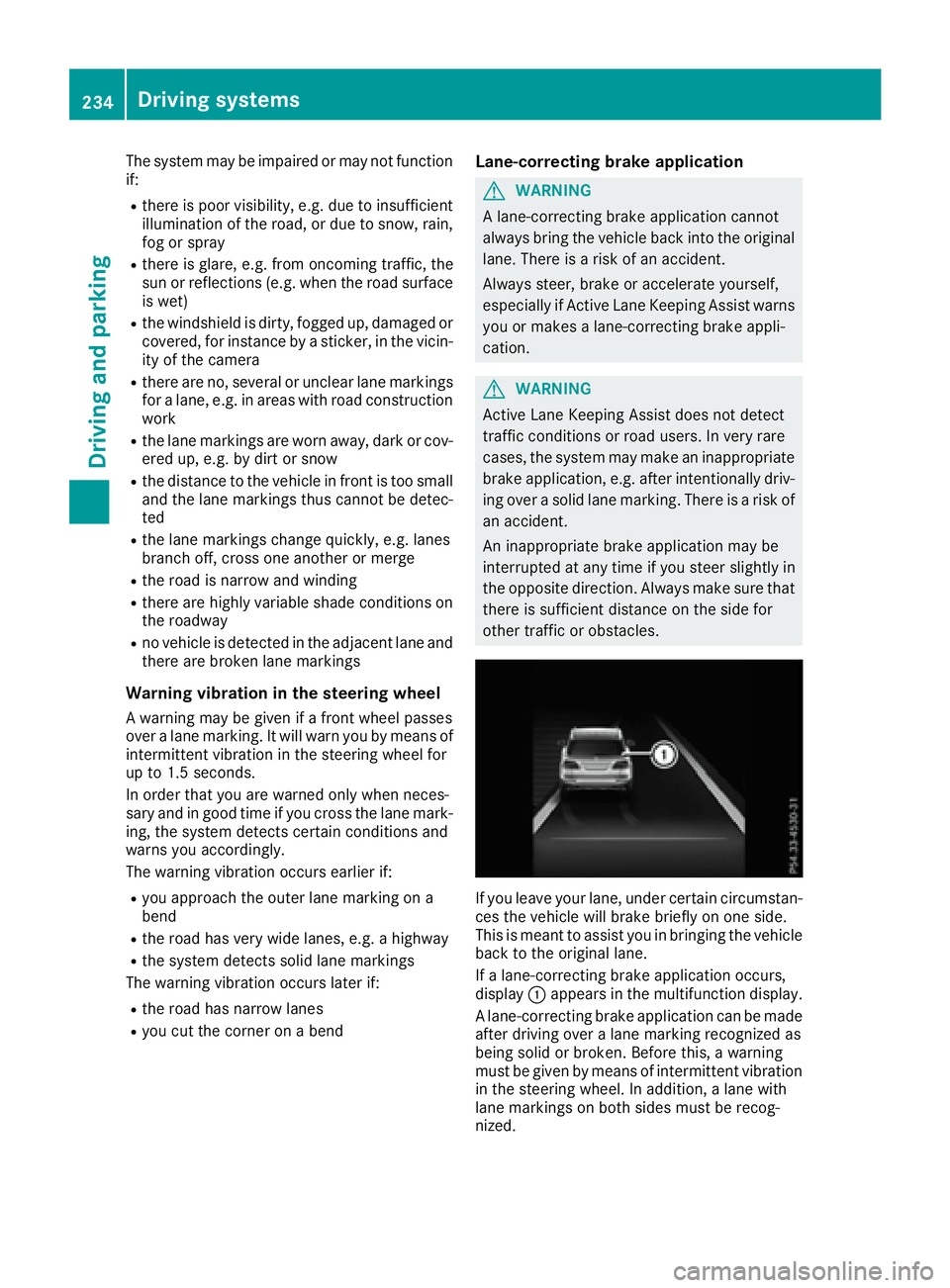
If you leave your lane, under certain circumstan-
ces the vehicle will brake briefly on one side.
This is meant to assist you in bringing the vehicle
back to the original lane.
If a lane-correcting brake application occurs,
display C appears in the multifunction display.
A lane-correcting brake application can be made
after driving over a lane marking recognized as
being solid or broken. Before this, a warning
must be given by means of intermittent vibration
in the steering wheel. In addition, a lane with
lane markings on both sides must be recog-
nized.234
Driving systems
Driving and parking
Page 237 of 450
In the case of a broken lane marking being
detected, a lane-correcting brake application
can only be made if a vehicle has been detected
in the adjacent lane. The following vehicles can
have an influence on brake application: oncom-
ing traffic, vehicles that are overtaking and vehi-
cles that are driving parallel to your vehicle.
i A further lane-correcting brake application
can only occur after your vehicle has returned
to the original lane.
No lane-correcting brake application occurs if: R
you clearly and actively steer, brake or accel-
erate. R
you cut the corner on a sharp bend. R
you have switched on the turn signal. R
a driving safety system intervenes, e.g. ESP ®
,
PRE-SAFE ®
Brake or Active Blind Spot Assist.R
you have adopted a sporty driving style with
high cornering speeds or high rates of accel-
eration. R
ESP ®
is switched off.R
the transmission is not in position D .R
on vehicles with a trailer tow hitch, the elec-
trical connection to the trailer has been cor-
rectly established. R
the offroad program is activated (vehicles
without the Offroad Engineering package). R
the Offroad or Offroad Plus drive program is
activated (vehicles with the Off-Road Engi-
neering package). R
the LOW RANGE offroad gear is activated
(vehicles with the Offroad Engineering pack-
age). R
an obstacle has been detected in the lane in
which you are driving. R
when a loss of tire pressure or a defective tire
has been detected and displayed.
There is a possibility that the Active Lane Keep-
ing Assist could misjudge the given traffic sit-
uation. An inappropriate brake application may
be interrupted at any time if you: R
steer slightly in the opposite direction R
switch on the turn signal R
clearly brake or accelerate
A lane-correcting brake application is interrup-
ted automatically if: R
a driving safety system intervenes, e.g. ESP ®
,
PRE-SAFE ®
Brake or Active Blind Spot AssistR
lane markings are no longer detected Switching on Active Lane Keeping Assist X
Switch on Active Lane Keeping Assist using
the on-board computer; to do so, select
Standard or Adaptive ( Y
page 272).
If you drive at speeds above 40 mph
(60 km/h) and lane markings are detected,
the lines in the assistance graphics display
( Y
page 271) are shown in green. Active Lane
Keeping Assist is ready for use.
If Standard is selected, no warning vibration
occurs if: R
you switch on the turn signals. In this event,
the warnings are suppressed for a certain
period of time. R
a driving safety system intervenes, such as
ABS, BAS or ESP ®
.
When Adaptive
is selected, no warning vibra-
tion occurs if: R
you switch on the turn signals. In this event,
the warnings are suppressed for a certain
period of time. R
a driving safety system intervenes, e.g.
ABS, BAS or ESP ®
. R
you accelerate hard, e.g. kickdown. R
you brake hard. R
you steer actively, e.g. swerve to avoid an
obstacle or change lanes quickly. R
you cut the corner on a sharp bend.
Towing a trailer When you attach a trailer, make sure you have
correctly established the electrical connection.
This can be accomplished by checking the trailer
lighting. Lane-correcting brake application does
not take place when towing a trailer. Active Lane
Keeping Assist is not activated and the lines in
the assistance graphic are gray.
Off-road driving systems
4MATIC (permanent four-wheel drive)
4MATIC ensures that all four wheels are perma-
nently driven. Together with ESP ®
and 4ETS, it
improves the traction of your vehicle whenever
a drive wheel spins due to insufficient grip.
If you fail to adapt your driving style, 4MATIC can
neither reduce the risk of accident nor override
the laws of physics. 4MATIC cannot take
account of road, weather and traffic conditions.
4MATIC is only an aid. You are responsible forDriving systems 235
Driving and parking Z
Page 249 of 450
If manual gearshifting is deactivated, the auto-
matic transmission shifts: R
into the drive program that was last selected,
and R
into the driving mode that was last selected
If you change the drive program, the operating
mode that was last selected is stored for approx-
imately 60 seconds. After this time, the HYBRID
operating mode is automatically activated.
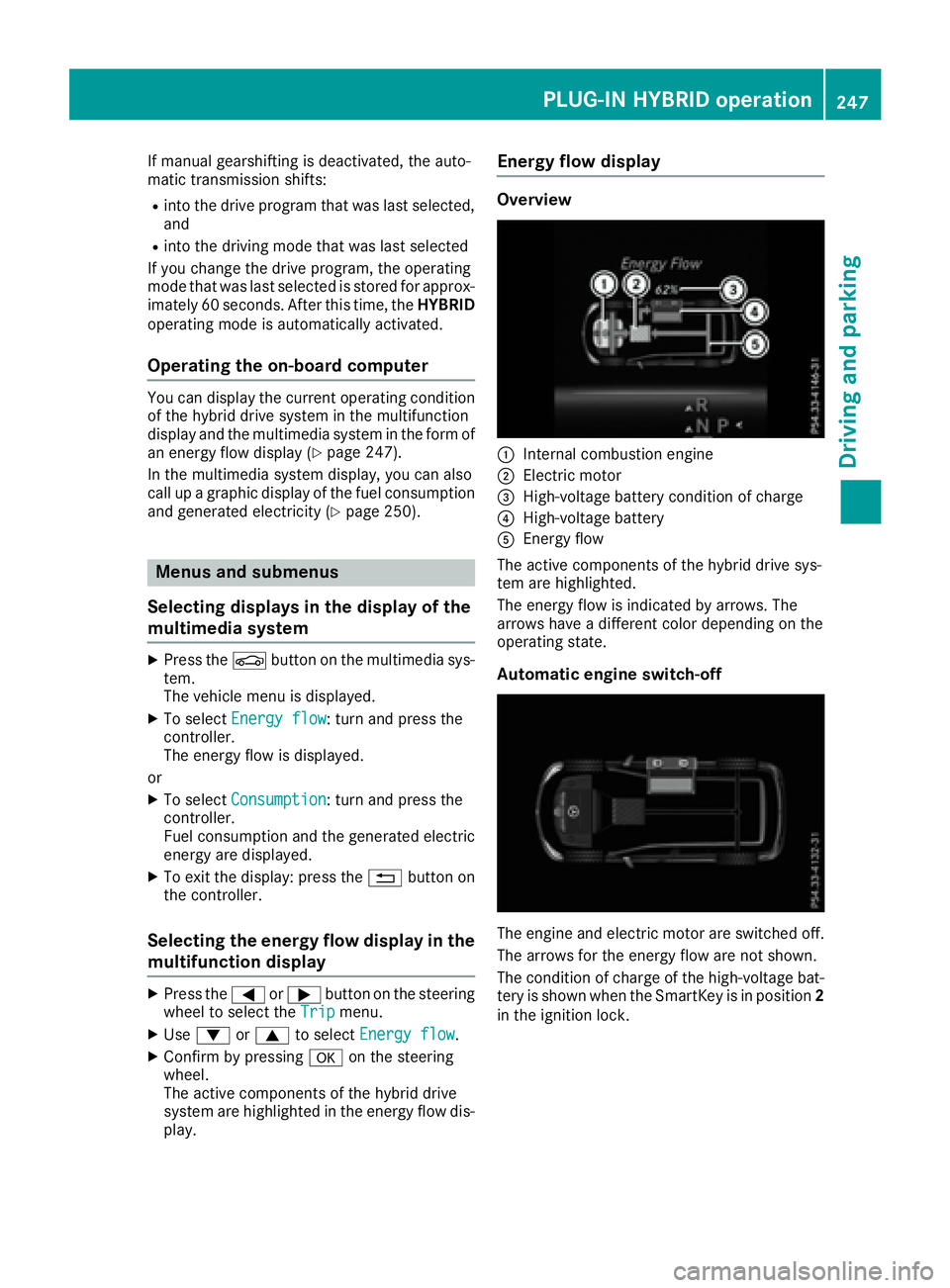
Operating the on-board computer You can display the current operating condition
of the hybrid drive system in the multifunction
display and the multimedia system in the form of
an energy flow display ( Y
page 247).
In the multimedia system display, you can also
call up a graphic display of the fuel consumption
and generated electricity ( Y
page 250).
Menus and submenus
Selecting displays in the display of the
multimedia system X
Press the
Page 253 of 450
X
Switch on the ignition. X
Depress the brake pedal. X
Observe the notes on starting the engine
( Y
page 147). X
Start the vehicle ( Y
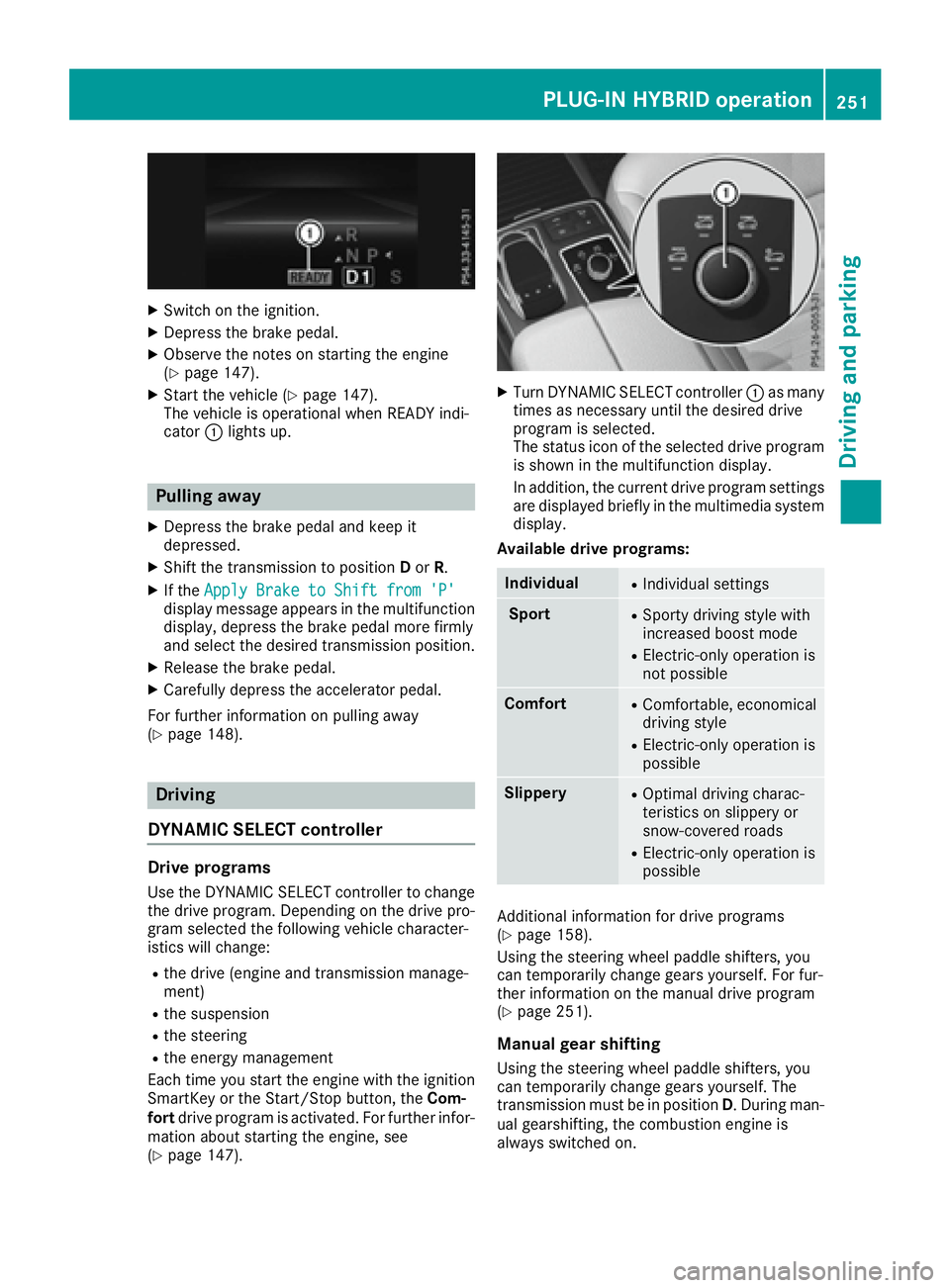
page 147).
The vehicle is operational when READY indi-
cator C lights up.
Pulling away X
Depress the brake pedal and keep it
depressed. X
Shift the transmission to position D or R .X
If the Apply Brake to Shift from 'P'
display message appears in the multifunction
display, depress the brake pedal more firmly
and select the desired transmission position. X
Release the brake pedal. X
Carefully depress the accelerator pedal.
For further information on pulling away
( Y
page 148).
Driving
DYNAMIC SELECT controller
Drive programs
Use the DYNAMIC SELECT controller to change
the drive program. Depending on the drive pro-
gram selected the following vehicle character-
istics will change: R
the drive (engine and transmission manage-
ment) R
the suspension R
the steering R
the energy management
Each time you start the engine with the ignition
SmartKey or the Start/Stop button, the Com-
fort drive program is activated. For further infor-
mation about starting the engine, see
( Y
page 147). X
Turn DYNAMIC SELECT controller C as many
times as necessary until the desired drive
program is selected.
The status icon of the selected drive program
is shown in the multifunction display.
In addition, the current drive program settings
are displayed briefly in the multimedia system
display.
Available drive programs:
Individual R
Individual settings
Sport R
Sporty driving style with
increased boost mode R
Electric-only operation is
not possible
Comfort R
Comfortable, economical
driving style R
Electric-only operation is
possible
Slippery R
Optimal driving charac-
teristics on slippery or
snow-covered roads R
Electric-only operation is
possible
Additional information for drive programs
( Y
page 158).
Using the steering wheel paddle shifters, you
can temporarily change gears yourself. For fur-
ther information on the manual drive program
( Y
page 251).
Manual gear shifting
Using the steering wheel paddle shifters, you
can temporarily change gears yourself. The
transmission must be in position D . During man-
ual gearshifting, the combustion engine is
always switched on.PLUG-IN HYBRID operation 251
Driving and parking Z
Page 270 of 450
If you reset the values in the ECO display, the
values in the "From Start" trip computer are also
reset. If you reset the values in the "From Start"
trip computer, the values in the ECO display are
also reset.
Navigation system menu
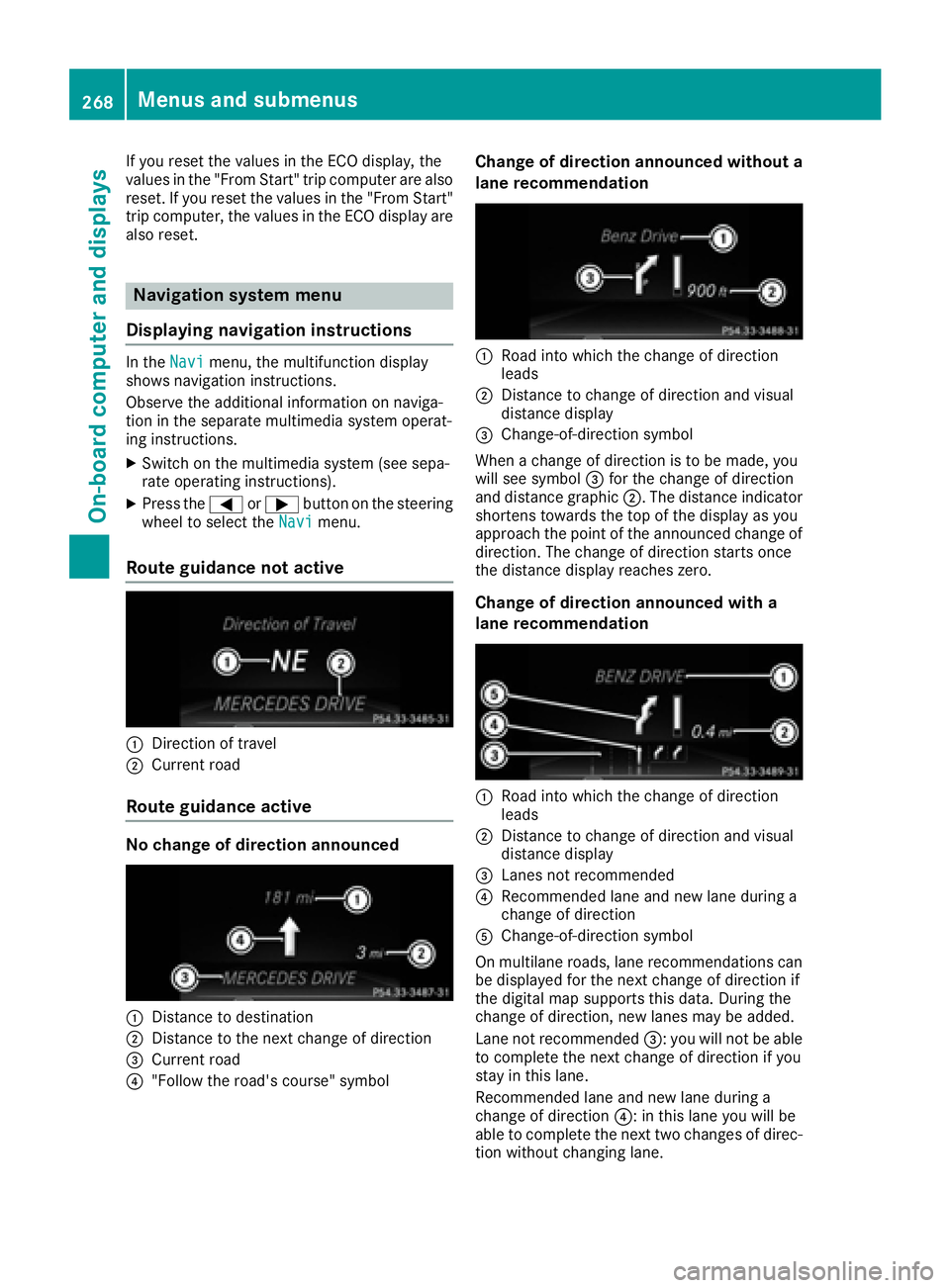
Displaying navigation instructions In the Navi menu, the multifunction display
shows navigation instructions.
Observe the additional information on naviga-
tion in the separate multimedia system operat-
ing instructions. X
Switch on the multimedia system (see sepa-
rate operating instructions). X
Press the Y or e button on the steering
wheel to select the Navi menu.
Route guidance not active
C
Direction of travelD
Current road
Route guidance active
No change of direction announced
C
Distance to destination
D
Distance to the next change of direction
Page 277 of 450

X
Press the Y or e button on the steering
wheel to select the Sett. menu.X
Press the d or c button to select the
Instrument Cluster submenu.X
Confirm by pressing v on the steering
wheel. X
Press the d or c button to select the
Permanent Display: function.
The current setting, Outside Temperature ,
Speedometer [km/h] or Speedometer
[mph] appears.X
To change the setting: press v again.
Light submenu Setting the daytime running lamps This function is not available in Canada. X
Press the Y or e button on the steering
wheel to select the Sett. menu.X
Press the d or c button to select the
Light submenu.X
Press v to confirm.X
Press d or c to select the Daytime
Running Lights function.
If the Daytime Running Lights function has
been switched on, the cone of light and the
Page 331 of 450
Useful information
i This Operator's Manual describes all models
and all standard and optional equipment of
your vehicle available at the time of publica-
tion of the Operator's Manual. Country-spe-
cific differences are possible. Please note
that your vehicle may not be equipped with all
features described. This also applies to
safety-related systems and functions.
i Read the information on qualified specialist
workshops ( Y
page 29).
Stowage areas
Loading guidelines
G WARNING
If objects, luggage or loads are not secured or
not secured sufficiently, they could slip, tip
over or be flung around and thereby hit vehicle
occupants. There is a risk of injury, particu-
larly in the event of sudden braking or a sud-
den change in direction.
Always store objects so that they cannot be
flung around. Secure objects, luggage or
loads against slipping or tipping before the
journey.
G WARNING
Combustion engines emit poisonous exhaust
gases such as carbon monoxide. If the tailgate
is open when the engine is running, particu-
larly if the vehicle is moving, exhaust fumes
could enter the passenger compartment.
There is a risk of poisoning.
Turn off the engine before opening the tail-
gate. Never drive with the tailgate open.
G WARNING
The exhaust tail pipe and tail pipe trim can
become very hot. If you come into contact
with these parts of the vehicle, you could burn
yourself. There is a risk of injury.
Always be particularly careful around the
exhaust tail pipe and the tail pipe trim. Allow these components to cool down before touch-
ing them.
The gross vehicle weight (GVW) is the vehicle
weight including fuel, vehicle tool kit, spare
wheel, installed accessories, vehicle occupants
and luggage/cargo.
Do not exceed the load limit or permitted gross
vehicle weight rating (GVWR) for your vehicle.
The gross load limit and the GVWR are specified
on the vehicle identification plate on the B-pillar
of the driver's door ( Y
page 397).
The load must also be distributed so that the
weight on each axle never exceeds the gross
axle weight rating (GAWR) for the front and rear
axles. The specifications for GVWR and GAWR
are on the vehicle identification plate on the B-
pillar of the driver's door ( Y
page 397).
Observe the notes on loading the vehicle
( Y
page 397).
The handling characteristics of a laden vehicle
are dependent on the distribution of the load
within the vehicle. For this reason, you should
observe the following notes when transporting a
load: R
Never exceed the maximum permissible
gross vehicle mass or the gross axle weight
rating for the vehicle (including occupants). R
The cargo compartment is the preferred place
to carry objects. R
Position heavy loads as far forwards as pos-
sible and as low down in the cargo compart-
ment as possible. R
The load must not protrude above the upper
edge of the seat backrests. R
Always place the load against the rear or front
seat backrests. Make sure that the seat
backrests are securely locked into place. R
Always place the load behind unoccupied
seats if possible. R
Use the cargo tie-down rings and the parcel
nets to transport loads and luggage. R
Use cargo tie-down rings and fastening mate-
rials appropriate for the weight and size of the
load. R
Hook in the cargo net when loading. R
Secure the load with sufficiently strong and
wear-resistant tie-downs. Pad sharp edges for
protection.Stowage areas 329
Stowage and features Z
Page 349 of 450
lished between the Customer Assistance Center
and the vehicle occupants. R
If the vehicle occupants respond, the
Mercedes-Benz Customer Assistance Center
attempts to get more information on the
emergency. R
If there is no response from the vehicle occu-
pants, an ambulance is immediately sent to
the vehicle.
If no voice connection can be established to the
Mercedes-Benz Customer Assistance Center,
the system has been unable to initiate an emer-
gency call.
This can occur, for example, if the relevant
mobile phone network is not available. The indi-
cator lamp in the SOS button flashes continu-
ously.
The Call Failed message appears in the mul-
tifunction display and must be confirmed.
In this case, summon assistance by other
means.
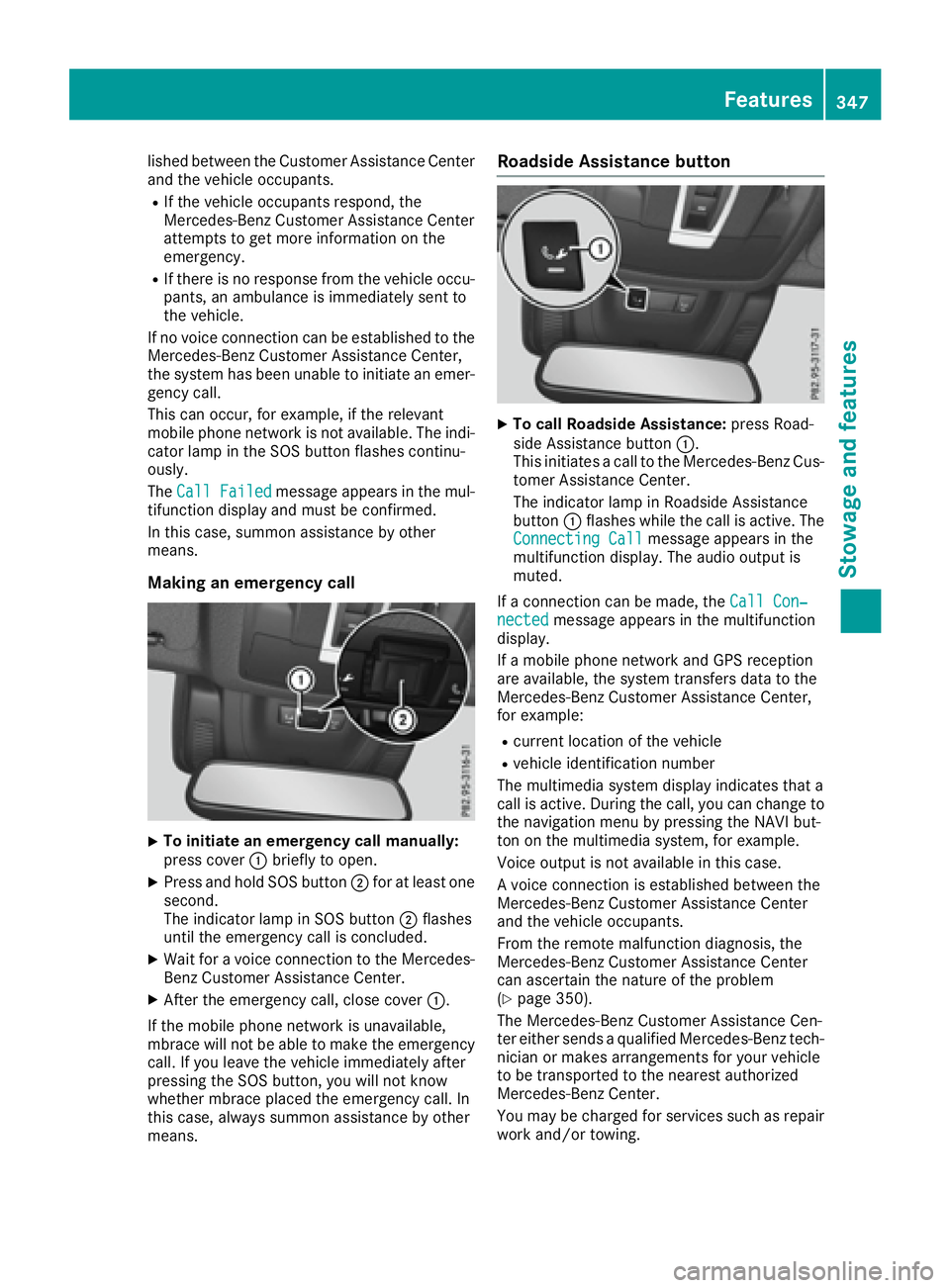
Making an emergency call
X
To initiate an emergency call manually:
press cover C briefly to open.X
Press and hold SOS button D for at least one
second.
The indicator lamp in SOS button D flashes
until the emergency call is concluded. X
Wait for a voice connection to the Mercedes-
Benz Customer Assistance Center. X
After the emergency call, close cover C .
If the mobile phone network is unavailable,
mbrace will not be able to make the emergency
call. If you leave the vehicle immediately after
pressing the SOS button, you will not know
whether mbrace placed the emergency call. In
this case, always summon assistance by other
means. Roadside Assistance button X
To call Roadside Assistance: press Road-
side Assistance button C .
This initiates a call to the Mercedes-Benz Cus-
tomer Assistance Center.
The indicator lamp in Roadside Assistance
button C flashes while the call is active. The
Connecting Call message appears in the
multifunction display. The audio output is
muted.
If a connection can be made, the Call Con‐
nected message appears in the multifunction
display.
If a mobile phone network and GPS reception
are available, the system transfers data to the
Mercedes-Benz Customer Assistance Center,
for example: R
current location of the vehicle R
vehicle identification number
The multimedia system display indicates that a
call is active. During the call, you can change to
the navigation menu by pressing the NAVI but-
ton on the multimedia system, for example.
Voice output is not available in this case.
A voice connection is established between the
Mercedes-Benz Customer Assistance Center
and the vehicle occupants.
From the remote malfunction diagnosis, the
Mercedes-Benz Customer Assistance Center
can ascertain the nature of the problem
( Y
page 350).
The Mercedes-Benz Customer Assistance Cen-
ter either sends a qualified Mercedes-Benz tech-
nician or makes arrangements for your vehicle
to be transported to the nearest authorized
Mercedes-Benz Center.
You may be charged for services such as repair
work and/or towing. Features 347
Stowage and features Z
Page 350 of 450
You can find more information in the separate
mbrace manual.
The system has not been able to initiate a Road-
side Assistance call, if: R
the indicator lamp for Roadside Assistance
call button R is flashing continuously.R
no voice connection to the Mercedes-Benz
Customer Assistance Center was estab-
lished.
This can occur if the relevant mobile phone net-
work is not available, for example.
The Call Failed message appears in the mul-
tifunction display. X
To end a call: press the v button on the
multifunction steering wheel.
or X
Press the corresponding multimedia system
button for ending a phone call.
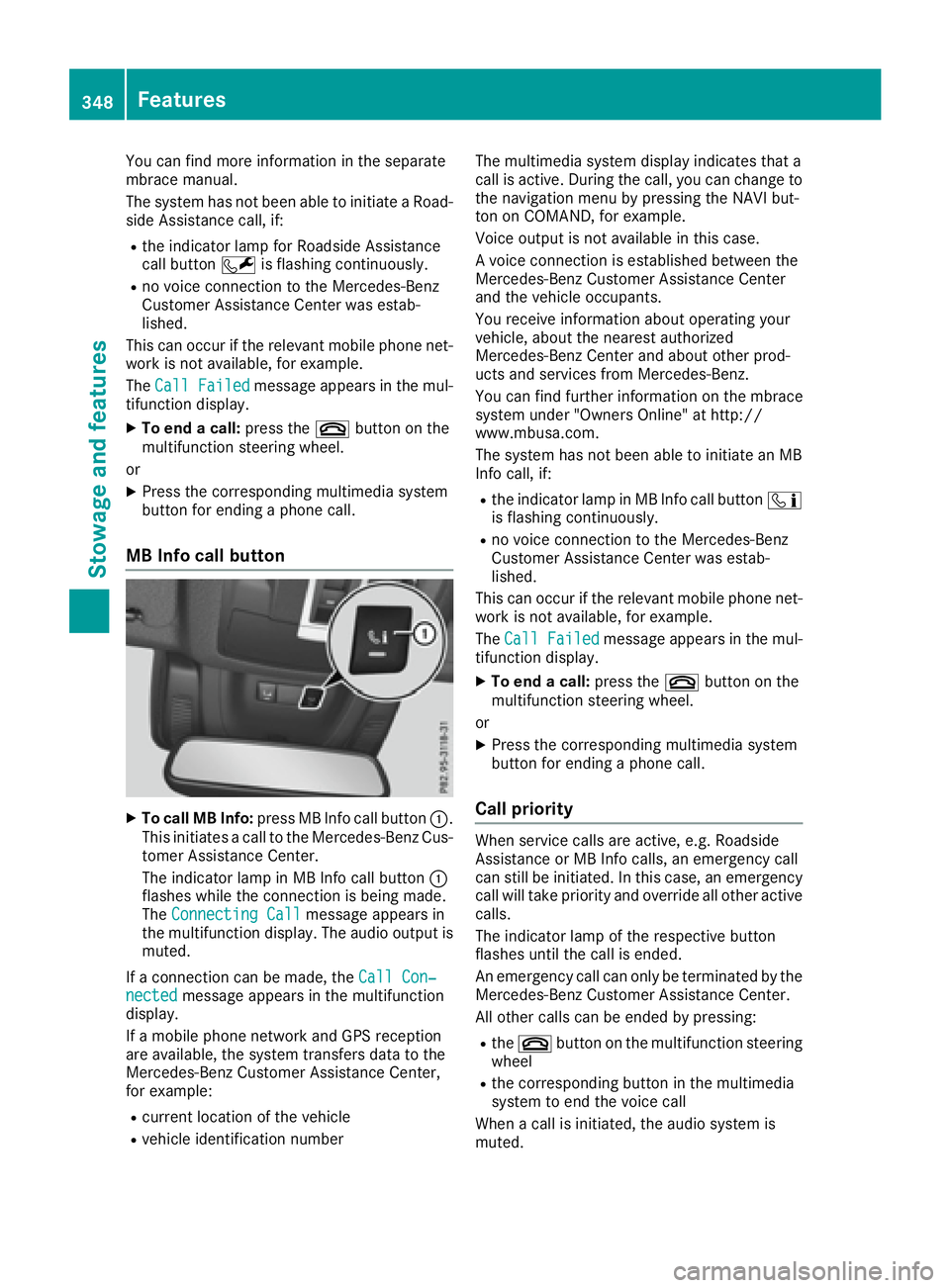
MB Info call button
X
To call MB Info: press MB Info call button C .
This initiates a call to the Mercedes-Benz Cus-
tomer Assistance Center.
The indicator lamp in MB Info call button C
flashes while the connection is being made.
The Connecting Call message appears in
the multifunction display. The audio output is
muted.
If a connection can be made, the Call Con‐
nected message appears in the multifunction
display.
If a mobile phone network and GPS reception
are available, the system transfers data to the
Mercedes-Benz Customer Assistance Center,
for example: R
current location of the vehicle R
vehicle identification number The multimedia system display indicates that a
call is active. During the call, you can change to
the navigation menu by pressing the NAVI but-
ton on COMAND, for example.
Voice output is not available in this case.
A voice connection is established between the
Mercedes-Benz Customer Assistance Center
and the vehicle occupants.
You receive information about operating your
vehicle, about the nearest authorized
Mercedes-Benz Center and about other prod-
ucts and services from Mercedes-Benz.
You can find further information on the mbrace
system under "Owners Online" at http://
www.mbusa.com.
The system has not been able to initiate an MB
Info call, if: R
the indicator lamp in MB Info call button
Page 371 of 450
Useful information
i This Operator's Manual describes all models
and all standard and optional equipment of
your vehicle available at the time of publica-
tion of the Operator's Manual. Country-spe-
cific differences are possible. Please note
that your vehicle may not be equipped with all
features described. This also applies to
safety-related systems and functions.
i Read the information on qualified specialist
workshops ( Y
page 29).
Where will I find...?
Vehicle tool kit
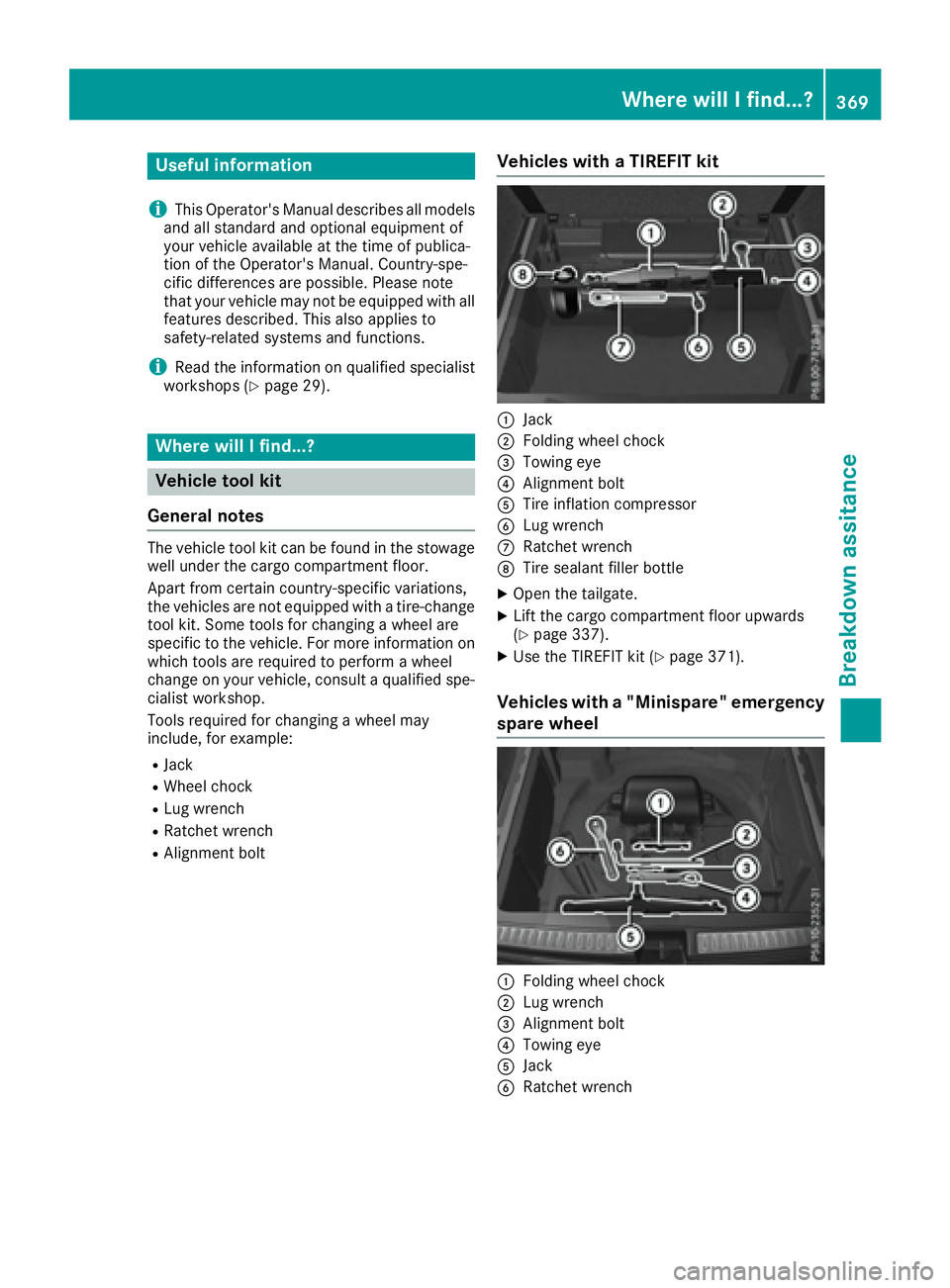
General notes The vehicle tool kit can be found in the stowage
well under the cargo compartment floor.
Apart from certain country-specific variations,
the vehicles are not equipped with a tire-change
tool kit. Some tools for changing a wheel are
specific to the vehicle. For more information on
which tools are required to perform a wheel
change on your vehicle, consult a qualified spe-
cialist workshop.
Tools required for changing a wheel may
include, for example: R
Jack R
Wheel chock R
Lug wrench R
Ratchet wrench R
Alignment bolt Vehicles with a TIREFIT kit
C
Jack D
Folding wheel chock