display MERCEDES-BENZ GLE 2016 Owner's Guide
[x] Cancel search | Manufacturer: MERCEDES-BENZ, Model Year: 2016, Model line: GLE, Model: MERCEDES-BENZ GLE 2016Pages: 450, PDF Size: 12.92 MB
Page 155 of 450
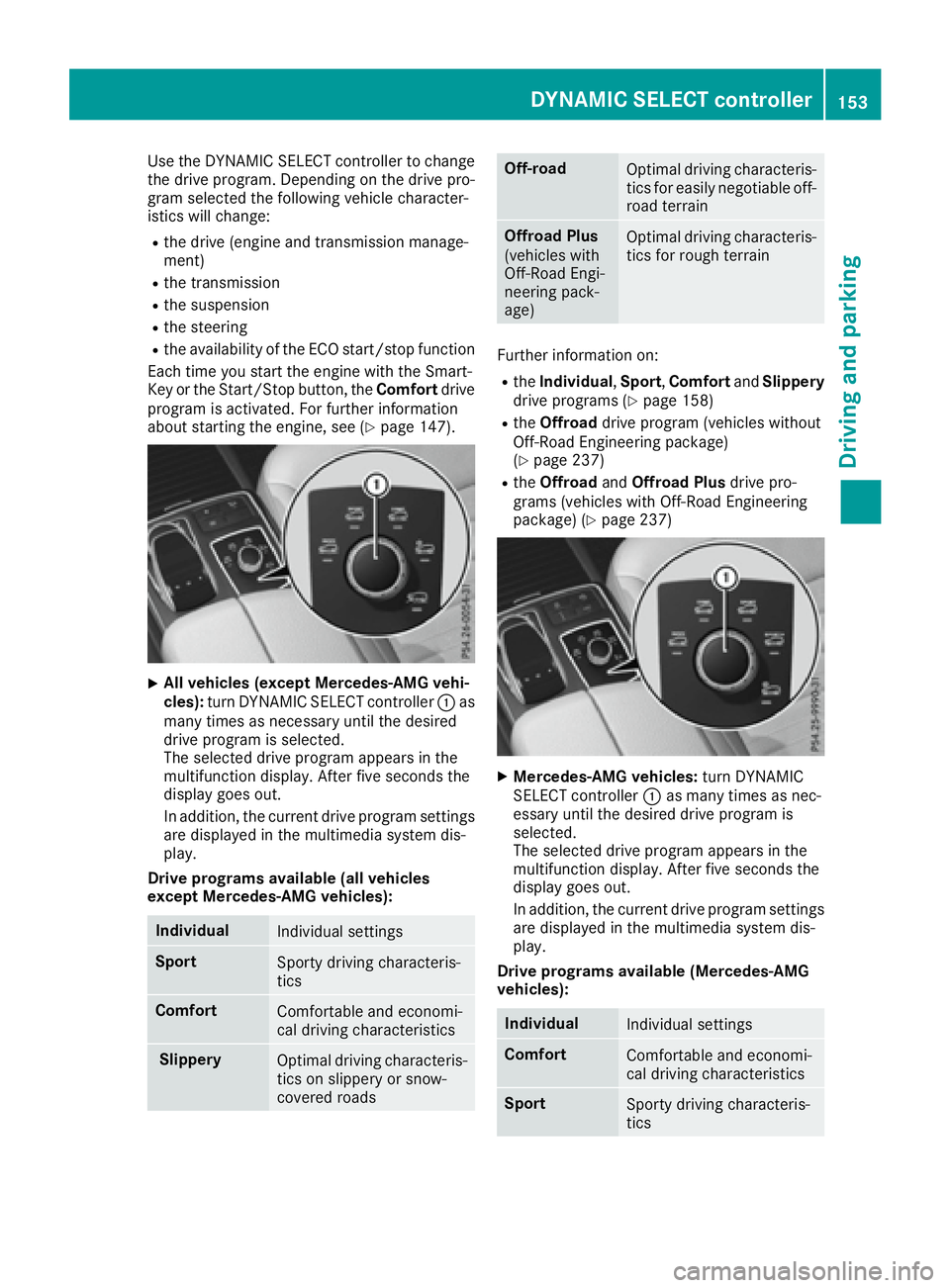
Use the DYNAMIC SELECT controller to change
the drive program. Depending on the drive pro-
gram selected the following vehicle character-
istics will change: R
the drive (engine and transmission manage-
ment) R
the transmission R
the suspension R
the steering R
the availability of the ECO start/stop function
Each time you start the engine with the Smart-
Key or the Start/Stop button, the Comfort drive
program is activated. For further information
about starting the engine, see ( Y
page 147).
X
All vehicles (except Mercedes-AMG vehi-
cles): turn DYNAMIC SELECT controller C as
many times as necessary until the desired
drive program is selected.
The selected drive program appears in the
multifunction display. After five seconds the
display goes out.
In addition, the current drive program settings
are displayed in the multimedia system dis-
play.
Drive programs available (all vehicles
except Mercedes-AMG vehicles):
Individual
Individual settings
Sport
Sporty driving characteris-
tics
Comfort
Comfortable and economi-
cal driving characteristics
Slippery
Optimal driving characteris-
tics on slippery or snow-
covered roads Off-road
Optimal driving characteris-
tics for easily negotiable off-
road terrain
Offroad Plus
(vehicles with
Off-Road Engi-
neering pack-
age) Optimal driving characteris-
tics for rough terrain
Further information on: R
the Individual , Sport , Comfort and Slippery
drive programs ( Y
page 158)R
the Offroad drive program (vehicles without
Off-Road Engineering package)
( Y
page 237) R
the Offroad and Offroad Plus drive pro-
grams (vehicles with Off-Road Engineering
package) ( Y
page 237)
X
Mercedes-AMG vehicles: turn DYNAMIC
SELECT controller C as many times as nec-
essary until the desired drive program is
selected.
The selected drive program appears in the
multifunction display. After five seconds the
display goes out.
In addition, the current drive program settings
are displayed in the multimedia system dis-
play.
Drive programs available (Mercedes-AMG
vehicles):
Individual
Individual settings
Comfort
Comfortable and economi-
cal driving characteristics
Sport
Sporty driving characteris-
ticsDYNAMIC SELECT controller 153
Driving and parking Z
Page 156 of 450
Sport Plus
Particularly sporty driving
characteristics
Slippery
Optimal driving characteris-
tics on slippery or snow-
covered roads
Additional information for drive programs
( Y
page 158).
Automatic transmission
Important safety notes
G WARNING
If the engine speed is above the idling speed
and you engage transmission position D or R ,
the vehicle could pull away suddenly. There is
a risk of an accident.
When engaging transmission position D or R ,
always firmly depress the brake pedal and do
not simultaneously accelerate.
G WARNING
The automatic transmission switches to neu-
tral position N when you switch off the engine.
The vehicle may roll away. There is a risk of an
accident.
After switching off the engine, always switch
to parking position P . Prevent the parked vehi-
cle from rolling away by applying the parking
brake.
Observe the important safety notes for PLUG-IN
HYBRID vehicles ( Y
page 42). DIRECT SELECT lever
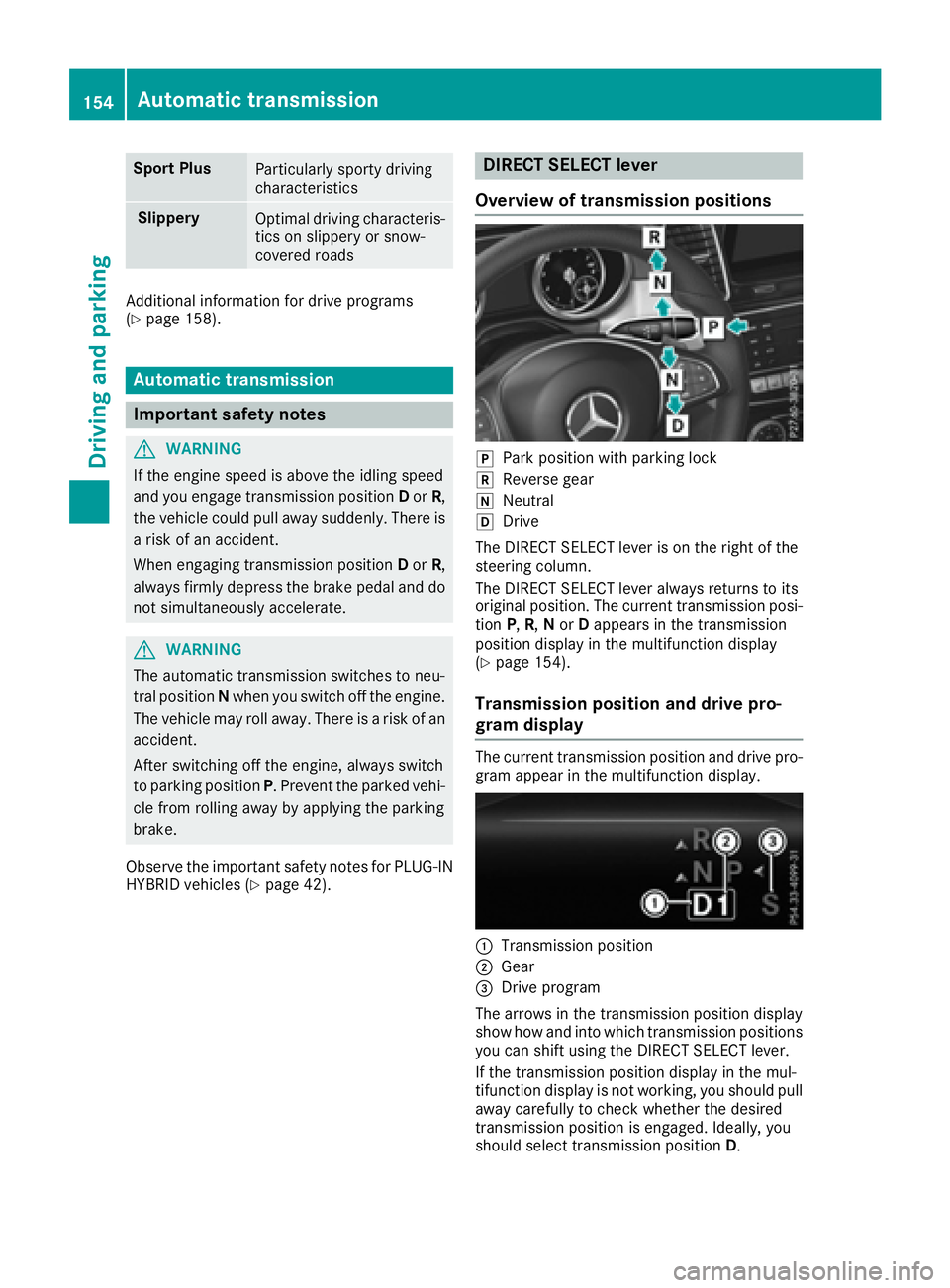
Overview of transmission positions
]
Park position with parking lock ^
Reverse gear \\
Neutral [
Drive
The DIRECT SELECT lever is on the right of the
steering column.
The DIRECT SELECT lever always returns to its
original position. The current transmission posi-
tion P , R , N or D appears in the transmission
position display in the multifunction display
( Y
page 154).
Transmission position and drive pro-
gram display The current transmission position and drive pro-
gram appear in the multifunction display.
C
Transmission position
D
Gear
Page 159 of 450
D Neutral
Do not shift the transmission to N
while driving. Otherwise, the auto-
matic transmission could be dam-
aged.
No power is transmitted from the
engine to the drive wheels.
Releasing the brakes will allow you to
move the vehicle freely, e.g. to push
it or tow it.
If ESP ®
is deactivated or faulty: shift
the transmission to position N if the
vehicle is in danger of skidding, e.g.
on icy roads.
If you switch the engine off with the
transmission in position R or D , the
automatic transmission shifts to N
automatically.
! Rolling in neutral N can damage
the drive train.
: Drive
The automatic transmission changes
gear automatically. All forward gears
are available.
Driving tips
Changing gear The automatic transmission shifts to the indi-
vidual gears automatically when it is in trans-
mission position D . This automatic gear shifting
behavior is determined by: R
the selected drive program R
the position of the accelerator pedal R
the road speed
Accelerator pedal position Your style of driving influences how the auto-
matic transmission shifts gear: R
little throttle: early upshifts R
more throttle: late upshifts Kickdown Use kickdown for maximum acceleration. X
Depress the accelerator pedal beyond the
pressure point.
The automatic transmission shifts to a lower
gear depending on the engine speed. X
Ease off the accelerator pedal once the
desired speed is reached.
The automatic transmission shifts back up.
Rocking the vehicle free Shifting the transmission repeatedly between
gears D and R may help to free the vehicle if it
has become stuck in slush or snow. The vehi-
cle's engine management system limits the
speed to a maximum of 5 mph (9 km/h) when
shifting back and forth. To shift back and forth
between transmission positions D and R , move
the DIRECT SELECT lever up and down past the
point of resistance.
Gliding mode
All vehicles (except Mercedes-AMG vehi-
cles) Gliding mode is characterized by the following: R
the combustion engine is disconnected from
the drive train. R
the engine speed corresponds to the idling
speed. R
the gear indicated after the transmission
position D disappears in the multifunction
display ( Y
page 154).
Gliding mode can be activated under the follow-
ing conditions: R
you select the "ECO" setting for the drive sys-
tem within the Individual drive program. You
can find information about this in the Digital
Operator's Manual. R
the speed is within a suitable range. R
the course of the road is suitable, e.g. there
are no steep up or downhill gradients. R
you are no longer depressing the accelerator
pedal.
Gliding mode is deactivated under the following
conditions: R
you depress the accelerator pedal. R
you depress the brake pedal.Automatic transmission 157
Driving an d parking Z
Page 160 of 450
R
you use th e DIRECT SELECT lever to switch
th e transmission position ( Y
page 154).R
use th e DYNAMIC SELECT controller to
chang e th e drive progra m ( Y
page 152).R
you activat e manual gearshiftin g
( Y
page 159).R
you leav e th e suitable speed range.
Mercedes-AMG vehicles Glidin g mod e is characterized by th e following:R
th e combustion engin e is disconnected from
th e drive train .R
th e engin e speed corresponds to th e idlin g
speed. R
in th e multifunction display, th e glidin g sym -
bol appears in th e drive progra m display.
Glidin g mod e can be activated under th e follow-
in g conditions: R
th e Comfor t drive progra m is activated or you
select th e "Comfort" setting for th e drive sys-
te m within th e Individua l drive program. You
can fin d information about this in th e Digital
Operator' s Manual.R
th e ECO start/sto p function is activated.R
you are drivin g carefully wit h low acceleration
of th e vehicle.R
th e engin e is at normal operating tempera-
ture. R
th e speed is within a suitable range.R
th e cours e of th e roa d is suitable, e.g. there
are no steep up or downhill gradients .R
you are no longer depressin g th e accelerato r
pedal .
Glidin g mod e is d eactivated under th e fo
llowin g
conditions: R
you hav e deactivated th e ECO start/sto p
function .R
you depress th e accelerato r pedal .R
you depress th e brak e pedal .R
you use th e DIRECT SELECT lever to switch
th e transmission position ( Y
page 154).R
use th e DYNAMIC SELECT controller to
chang e th e drive progra m ( Y
page 152).R
you activat e manual gearshiftin g
( Y
page 159).R
you leav e th e suitable speed range. Towing a trailer X
Drive in th e middle of th e engin e speed range
on uphil l gradients .X
Dependin g on th e uphil l or downhill gradient,
use left-han d steerin g whee l paddl e shifter
( Y
page 159) to select a lower gear , eve n if
cruise control or DISTRONI C PLU S are acti-
vated.
Drive programs
Slippery drive program The Slipper y drive progra m has th e followin g
characteristics : R
reduce d engin e and transmission setting s for
optimum propulsion on slipper y or snow-cov-
ere d roads. R
optimized ES P ®
stabilit y control on slipper y or
snow-covered roads. R
th e vehicl e has improved drivin g stabilit y on
slipper y or snow-covered roads, for example.
Comfort drive program The Comfor t drive progra m has th e followin g
characteristics : R
comfort-oriented engin e and transmission
settings. R
optimal fuel consumption resultin g from th e
automati c transmission shiftin g up sooner.R
th e vehicl e pullin g away mor e gentl y in
forward and revers e gears, unless th e accel-
erator pedal is depressed fully. R
th e automati c transmission shiftin g up
sooner. This result s in th e vehicl e bein g driven
at lower engin e speeds and th e wheels bein g
less likely to spin .
Sp or t drive program The Sport drive progra m has th e followin g char-
acteristics : R
sport y engin e and transmission settings. R
th e automati c transmission shiftin g up later.
th e fuel consumption possibl y bein g higher as
a result of th e later automati c transmission
shift points . R
th e suspension exhibits sport y dampin g (vehi-
cle s wit h AIRMATIC) .158
Automatic transmission
Driving an d parking
Page 161 of 450
Drive program Spor t Plu s (Mercedes-
AMG vehicles )The Spor t Plu s drive program has th e followin g
characteristics :R
th e vehicle exhibits particularly sport y drivin g
characteristics .R
th e vehicle pulling away in first gear .R
th e automatic transmissio n shiftin g up later.
th e fue l consumption possibly bein g higher as
a result of th e later automatic transmissio n
shift points .R
th e suspensio n exhibits particularly fir m
springin g and dampin g setting s (vehicles wit h
AIRMATIC). R
th e EC O start/sto p function is deactivated, it
can , however, be activated again usin g th e
EC O butto n ( Y
page 151).
Individua l drive programIn th e Individua l drive program, th e followin g
properties of th e drive program can be selected:R
th e drive (engin e and transmissio n manage-
ment) R
th e transmissio nR
th e suspensio nR
all vehicles (except Mercedes-AMG vehicles):
th e steerin gR
all vehicles (except Mercedes-AMG vehicles):
availabilit y of th e EC O start/sto p function
To selec t th e gear s in th e Individua l drive pro -
gram permanentl y usin g th e steerin g whee l pad-
dle shifters , selec t th e permanen t manual gear -
shift program.
Information about configurin g th e Individua l
drive program wit h th e multimedia syste m can
be found in th e Digital Operator's Manual.
Manual gea r shifting
General notes
You can chang e gear yoursel f usin g th e steerin g
whee l paddle shifters . The transmissio n mus t be
in position D .
Dependin g on whic h paddle shifter is pulled, th e
automatic transmissio n immediately shift s into
th e next gear down or up, if permitted. To use manual shifting, you hav e tw o options:R
temporar y setting R
permanen t setting
If you activat e manual gearshifting, th e multi-
function display will sho w th e curren t gear
instead of transmissio n position D .
If manual gearshiftin g is deactivated, th e gear s
will be selecte d automatically.
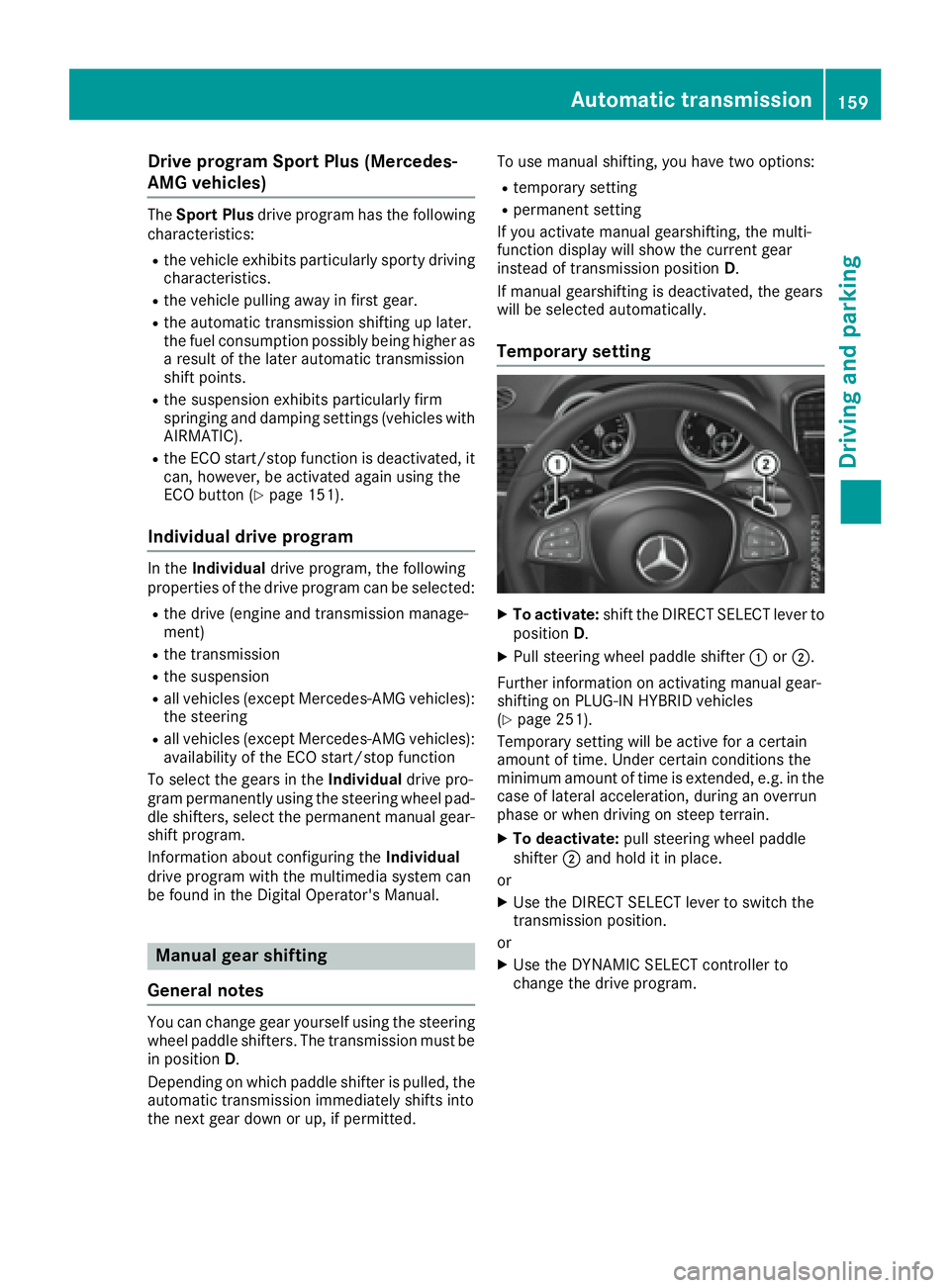
Temporar y setting X
To activate : shift th e DIREC T SELECT lever to
position D . X
Pull steerin g whee l paddle shifter C or D .
Further information on activatin g manual gear -
shiftin g on PLUG-I N HYBRID vehicles
( Y
page 251).
Temporary setting will be active fo r a certain
amount of time. Under certain condition s th e
minimum amount of time is extended, e.g. in th e
cas e of latera l acceleration , durin g an overrun
phas e or when drivin g on steep terrain .X
To deactivate : pull steerin g whee l paddle
shifter D and hol d it in place.
or X
Use th e DIREC T SELECT lever to switch th e
transmissio n position .
or X
Use th e DYNAMI C SELECT controller to
chang e th e drive program.Automatic transmission 159
Driving and parking Z
Page 163 of 450
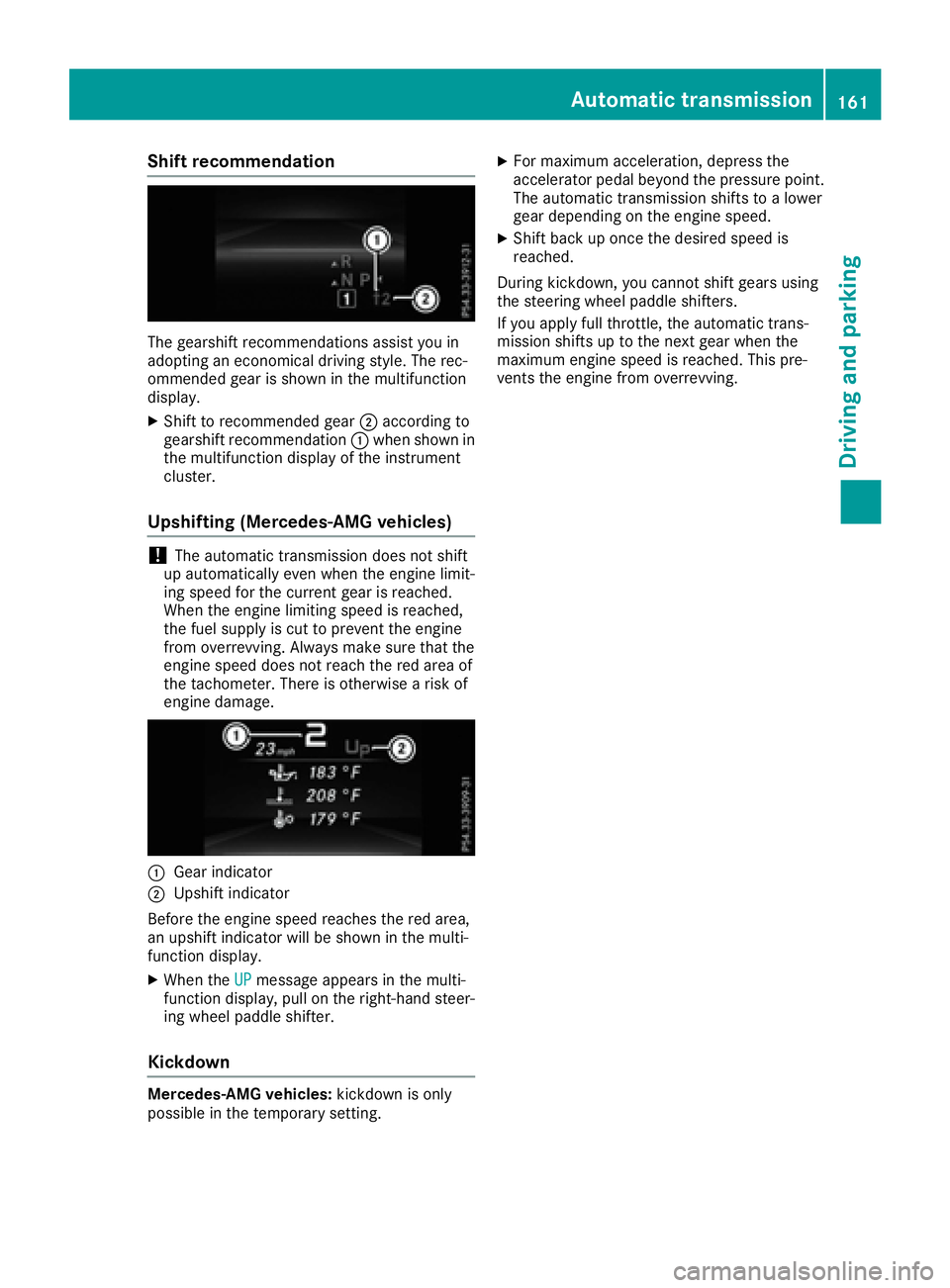
Shift recommendation
The gearshift recommendations assist you in
adopting an economical driving style. The rec-
ommended gear is shown in the multifunction
display. X
Shift to recommended gear D according to
gearshift recommendation C when shown in
the multifunction display of the instrument
cluster.
Upshifting (Mercedes-AMG vehicles)
! The automatic transmission does not shift
up automatically even when the engine limit-
ing speed for the current gear is reached.
When the engine limiting speed is reached,
the fuel supply is cut to prevent the engine
from overrevving. Always make sure that the
engine speed does not reach the red area of
the tachometer. There is otherwise a risk of
engine damage.
C
Gear indicatorD
Upshift indicator
Before the engine speed reaches the red area,
an upshift indicator will be shown in the multi-
function display. X
When the UP message appears in the multi-
function display, pull on the right-hand steer-
ing wheel paddle shifter.
Kickdown
Mercedes-AMG vehicles: kickdown is only
possible in the temporary setting. X
For maximum acceleration, depress the
accelerator pedal beyond the pressure point.
The automatic transmission shifts to a lower
gear depending on the engine speed. X
Shift back up once the desired speed is
reached.
During kickdown, you cannot shift gears using
the steering wheel paddle shifters.
If you apply full throttle, the automatic trans-
mission shifts up to the next gear when the
maximum engine speed is reached. This pre-
vents the engine from overrevving.
Automatic transmission 161
Driving and parking Z
Page 166 of 450
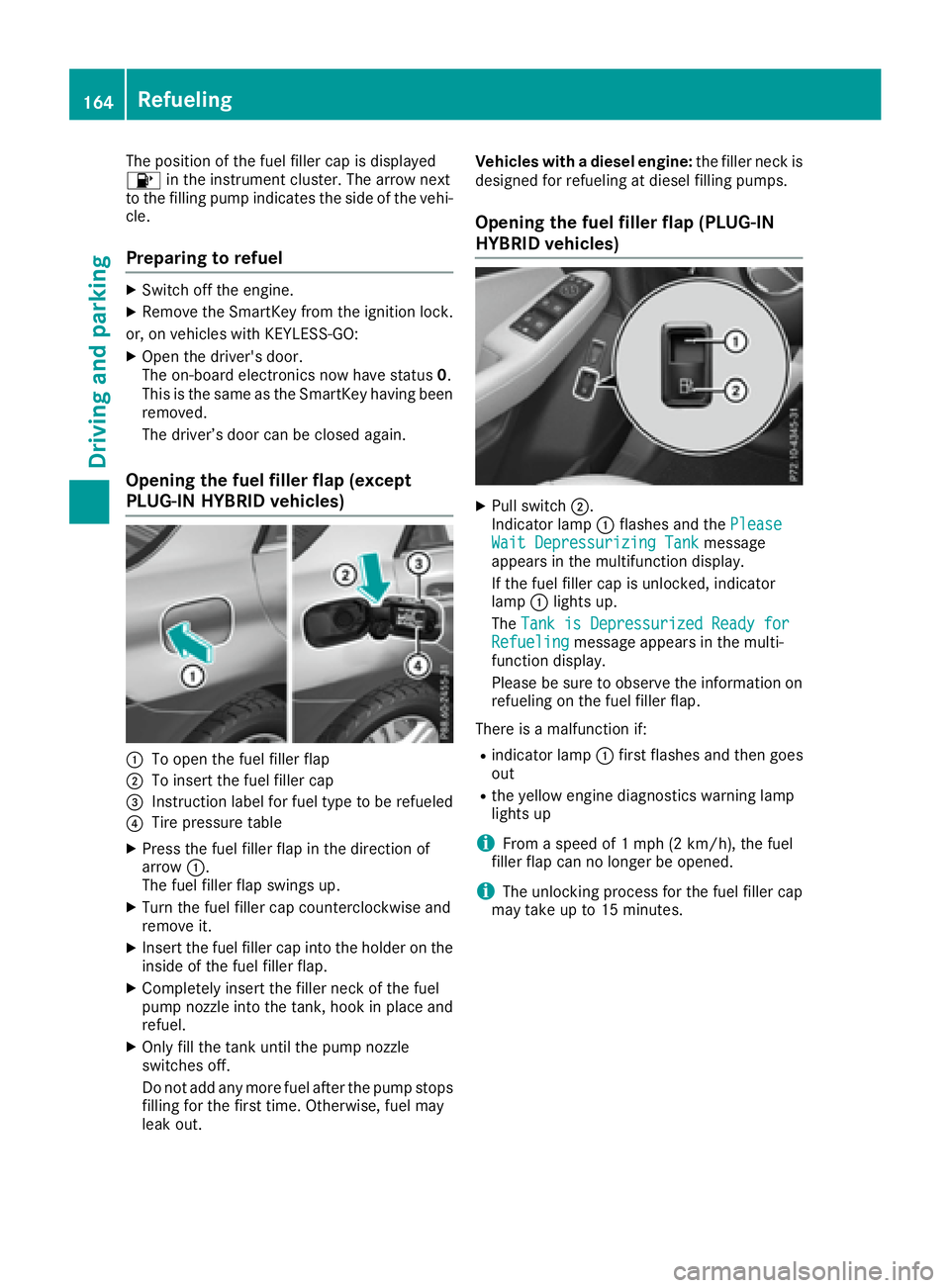
The position of the fuel filler cap is displayed
Page 169 of 450
DEF (BlueTE C vehicles only )
General notes To function properly, BlueTE C exhaus t gas after-
treatmen t mus t be operated wit h th e reducing
agen t DEF. Addin g DE F is on e of th e task s per -
formed durin g maintenance . Under normal
operatin g conditions, a tank of DE F last s until
th e next servic e due date.
Whe n th e supply of DE F is almost used up, th e
Check Additive See Operator' s Manual
messag e is shown in th e multifunction display.
If you drive th e vehicle faste r than 10 mph
(16 km/h), th e Check Additive See Opera‐
tor's Manual messag e goe s out after approx -
imately on e minute.
Whe n th e DE F supply drops to a minimum , th e
Remaining Starts : 16 messag e is shown in
th e multifunction display.
If th e Remaining Starts : 16 messag e
appears in th e multifunction display, you can
start th e engin e another 16 times . If DE F is no t
refilled, you will subsequently be unable to
star t th e engine .X
Ad d at leas t 1 gal (3. 8 l) of DEF.X
Switc h on th e ignition fo r at leas t 60 seconds.X
Start th e engine.
i Hav e th e DE F tank refille d at a qualified spe -
cialis t workshop .
Use th e special DE F refill bottl e when addin g
DE F between maintenance intervals. You can
obtain further information from an authorized
Mercedes-Ben z Cente r or , if necessary, contact
Roadside Assistanc e ( Y
page 27).
If th e outsid e temperature is belo w 12 ‡(
Page 171 of 450
the vehicle's DEF tank offers no protection
against overfilling. DEF may leak if overfilled.
Mercedes-Benz offers a special disposable hose
with overfill protection. You can obtain this from
any authorized Mercedes-Benz Center. DEF is
available in a variety of containers and recepta-
cles. Only use the disposable hose with the
Mercedes-Benz DEF refill canisters.
DEF refill bottle
! Only screw on the DEF refill bottle hand-
tight. It could otherwise be damaged.
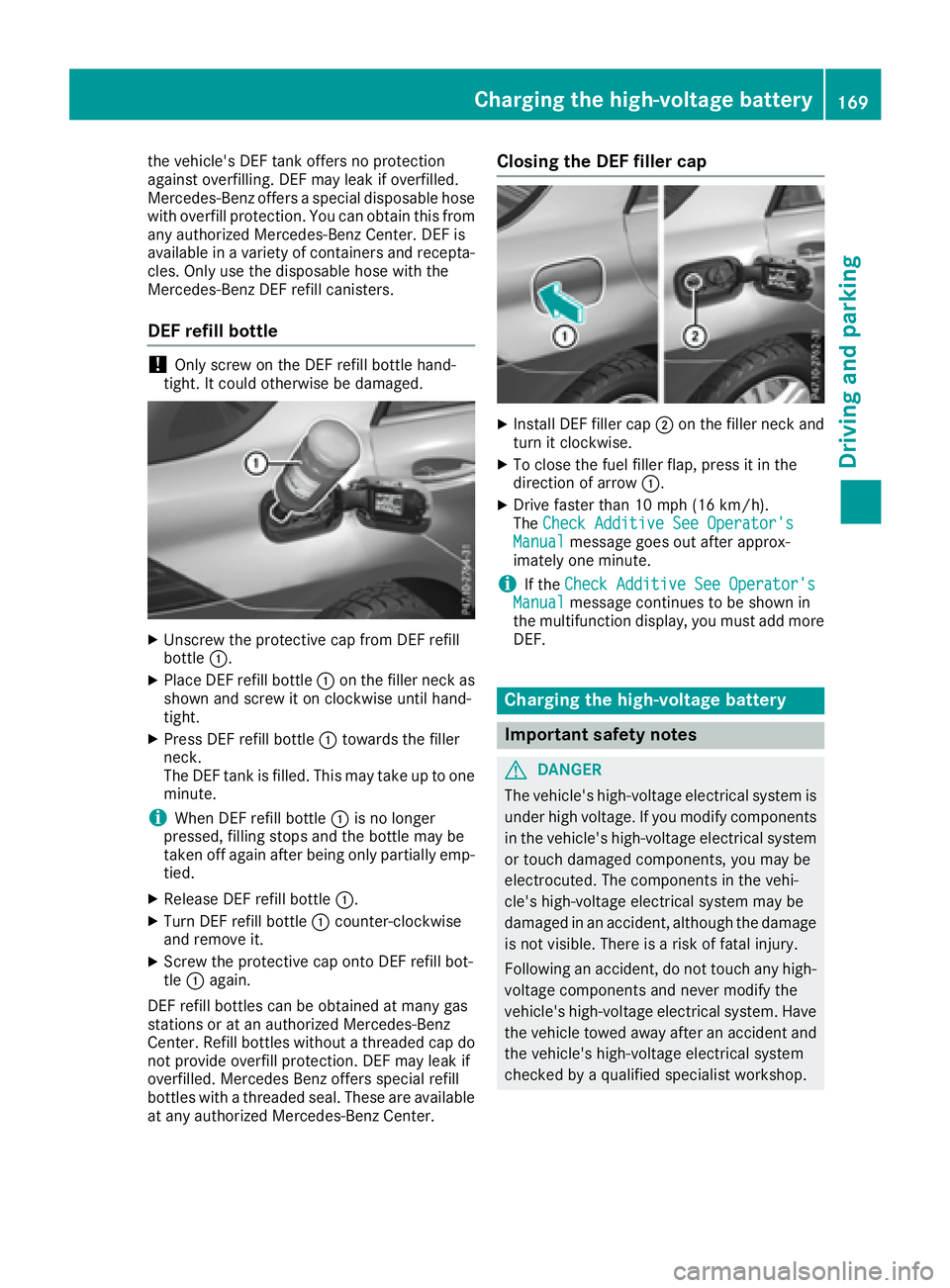
X
Unscrew the protective cap from DEF refill
bottle C .X
Place DEF refill bottle C on the filler neck as
shown and screw it on clockwise until hand-
tight. X
Press DEF refill bottle C towards the filler
neck.
The DEF tank is filled. This may take up to one
minute.
i When DEF refill bottle C is no longer
pressed, filling stops and the bottle may be
taken off again after being only partially emp-
tied. X
Release DEF refill bottle C .X
Turn DEF refill bottle C counter-clockwise
and remove it. X
Screw the protective cap onto DEF refill bot-
tle C again.
DEF refill bottles can be obtained at many gas
stations or at an authorized Mercedes-Benz
Center. Refill bottles without a threaded cap do
not provide overfill protection. DEF may leak if
overfilled. Mercedes Benz offers special refill
bottles with a threaded seal. These are available
at any authorized Mercedes-Benz Center. Closing the DEF filler cap X
Install DEF filler cap D on the filler neck and
turn it clockwise. X
To close the fuel filler flap, press it in the
direction of arrow C .X
Drive faster than 10 mph (16 km/h).
The Check Additive See Operator's
Manual message goes out after approx-
imately one minute.
i If the Check Additive See Operator's
Manual message continues to be shown in
the multifunction display, you must add more
DEF.
Charging the high-voltage battery
Important safety notes
G DANGER
The vehicle's high-voltage electrical system is
under high voltage. If you modify components
in the vehicle's high-voltage electrical system
or touch damaged components, you may be
electrocuted. The components in the vehi-
cle's high-voltage electrical system may be
damaged in an accident, although the damage
is not visible. There is a risk of fatal injury.
Following an accident, do not touch any high-
voltage components and never modify the
vehicle's high-voltage electrical system. Have
the vehicle towed away after an accident and
the vehicle's high-voltage electrical system
checked by a qualified specialist workshop.Charging the high-voltage battery 169
Driving an d parking Z
Page 173 of 450
energy and stored in the high-voltage battery.
Information on overrun mode ( Y
page 253).
The high-voltage battery can be charged as fol-
lows: R
through energy recuperation while the vehicle
is in motion R
through the combustion engine while driving
in CHARGE operating mode ( Y
page 246)R
with the relevant charging cable at an electri-
cal outlet while the vehicle is stationary R
at a wallbox while the vehicle is stationary R
at a charging station while the vehicle is sta-
tionary
The high-voltage battery can be charged in a
nominal voltage range from 100 V to 240 V.
You can view the condition of charge of the high-
voltage battery in the multifunction display. You
can find information in "PLUG-IN HYBRID oper-
ation", section "Menus and submenus" under
"Energy flow display" ( Y
page 247).
High and low outside temperatures Low outside temperatures
At very low outside temperatures the maximum
power output of the high-voltage battery may be
reduced. The high-voltage battery is then no
longer able to provide the normal electrical
power output.
High outside temperatures
To prevent damage to the high-voltage battery
due to very high outside temperatures, the max-
imum power output of the high-voltage battery
is reduced by the vehicle.
Energy consumption and electrical
range The maximum electrical range is generally
reduced by: R
high and low outside temperatures R
operating the climate control system R
switching on consumers
The battery's physical characteristics are such
that leaving the vehicle parked for long periods
at low outdoor temperatures without charging it
can lead to: R
a reduction in battery performance R
longer charge times Notes on battery care Avoid storing or transporting the vehicle at
excessively high or low temperatures over a long
period.
If you park the vehicle and leave it stationary for
long periods: R
check the condition of charge of the high-
voltage battery more often R
connect the vehicle to a power supply
This prevents self-discharge and damage to the
high-voltage battery.
Terms of use Please note the information on exceptions and
limitations in warranty documentation and in
the Maintenance Booklet.
Handling the charging cable and charg-
ing cable controls Do not leave the charging cable controls
( Y
page 172) hanging loose from an electrical
outlet. Otherwise, this could result in a poor
contact with the electrical outlet and malfunc-
tions when charging the vehicle.
To ensure that the brackets within the charging
cable controls are not subjected to incorrect
loads, observe the following: R
Never lift or carry the controls by the charging
cable connector or the mains plug. R
To transport the charging cable, the charging
cable can be: -
wrapped around the controls or -
secured to the housing of the controls
Heat generated by the charging cable
and charging cable connector Pay attention to the "Important safety notes"
( Y
page 169).
During the charging process, the charging cable
and charging cable connector may heat up.
The charging cable and the charging cable con-
nector will only heat up within the permissible
limiting values, provided that: R
the power supply and the charging cable are
not damaged R
the instructions for handling the charging
cable and controls on the charging cable are
observedCharging the high-voltage battery 171
Driving and parking Z