sensor MERCEDES-BENZ GLE 2018 Owner's Guide
[x] Cancel search | Manufacturer: MERCEDES-BENZ, Model Year: 2018, Model line: GLE, Model: MERCEDES-BENZ GLE 2018Pages: 398, PDF Size: 9.25 MB
Page 230 of 398
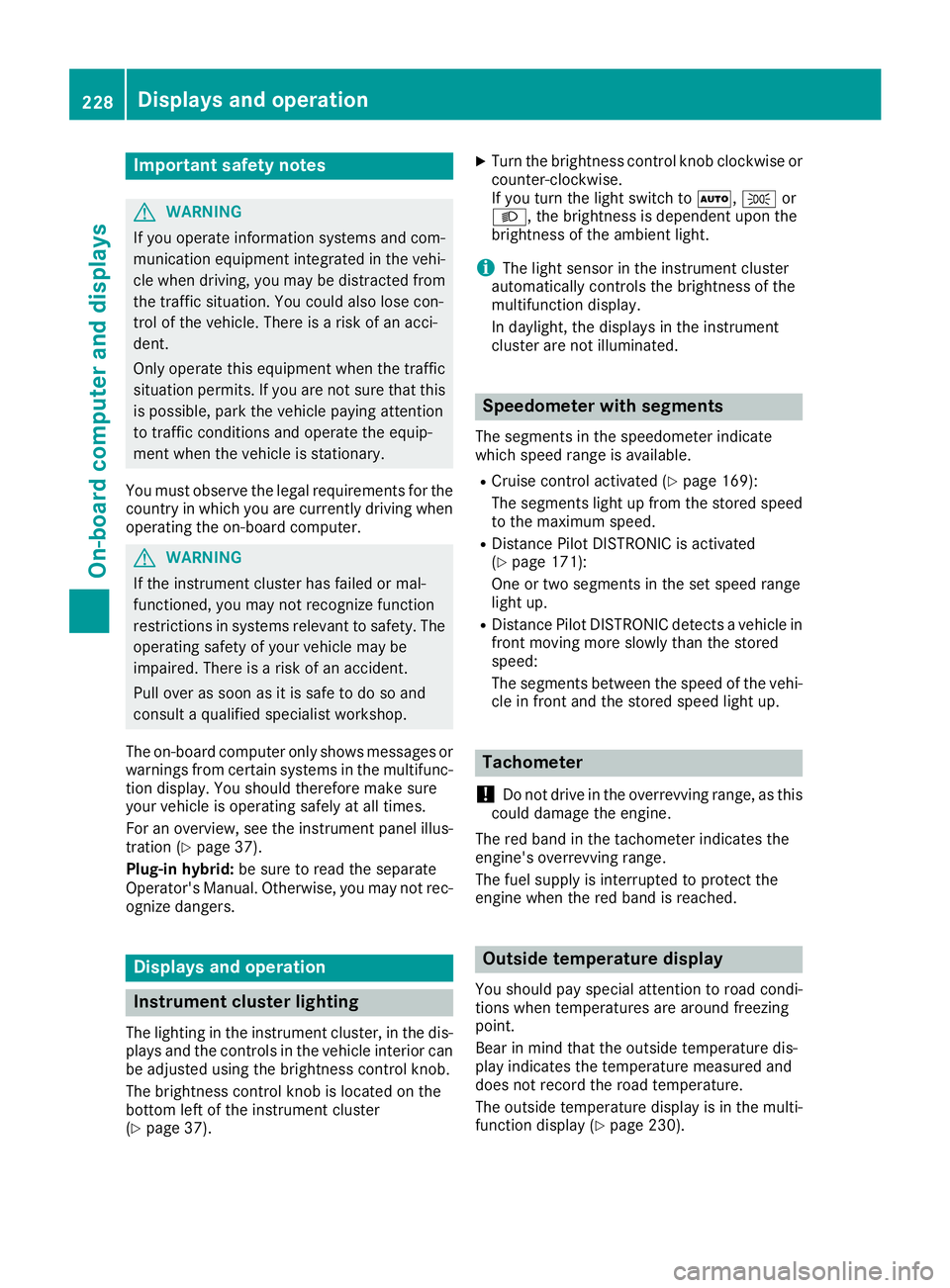
Important safety notes
G WARNIN G
If you operate information systems and com-
munication equipmen t integrate d in th e vehi-
cle when driving , you may be distracte d from
th e traffic situation . You could also lose con-
trol of th e vehicle. Ther e is a ris k of an acci-
dent.
Only operate this equipmen t when th e traffic
situation permits. If you are no t sur e that this
is possible , park th e vehicl e payin g attention
to traffic condition s and operate th e equip-
men t when th e vehicl e is stationary.
You must observ e th e legal requirements for th e
country in whic h you are currentl y driving when
operating th e on-board computer.
G WARNIN G
If th e instrumen t cluste r has faile d or mal-
functioned, you may no t recognize function
restriction s in systems relevan t to safety. The
operating safet y of your vehicl e may be
impaired . Ther e is a ris k of an accident.
Pull ove r as soo n as it is saf e to do so and
consult a qualified specialist workshop.
The on-board computer only shows message s or
warning s from certain systems in th e multifunc-
tion display. You should therefor e mak e sur e
your vehicl e is operating safely at all times .
Fo r an overview, see th e instrumen t panel illus-
tration ( Y
page 37).
Plug-i n hybrid: be sur e to read th e separat e
Operator's Manual. Otherwise, you may no t rec -
ognize dangers.
Displays and operation
Instrument cluster lighting
The lighting in th e instrumen t cluster, in th e dis-
plays and th e control s in th e vehicl e interior can
be adjusted usin g th e brightness control knob.
The brightness control knob is locate d on th e
botto m lef t of th e instrumen t cluste r
( Y
page 37) . X
Turn th e brightness control knob clockwise or
counter-clockwise.
If you tur n th e ligh t switch to X , ` or
X , th e brightness is dependen t upon th e
brightness of th e ambien t light.
i The ligh t sensor in th e instrumen t cluste r
automatically control s th e brightness of th e
multifunction display.
In daylight, th e displays in th e instrumen t
cluste r are no t illuminated.
Speedometer with segments The segments in th e speedometer indicat e
whic h spee d range is available. R
Cruis e control activated ( Y
page 169):
The segments ligh t up from th e store d spee d
to th e maximum speed. R
Distanc e Pilot DISTRONI C is activated
( Y
page 171):
On e or two segments in th e set spee d range
ligh t up. R
Distanc e Pilot DISTRONI C detects a vehicl e in
fron t moving mor e slowly than th e store d
speed:
The segments between th e spee d of th e vehi-
cle in fron t and th e store d spee d ligh t up.
Tachometer
! Do no t driv e in th e overrevving range, as this
could damag e th e engine.
The red ban d in th e tachometer indicates th e
engine's overrevving range.
The fuel suppl y is interrupted to protect th e
engin e when th e red ban d is reached.
Outside temperature display You should pay special attention to road condi-
tion s when temperatures are aroun d freezing
point.
Bea r in min d that th e outside temperature dis-
play indicates th e temperature measured and
does no t record th e road temperature.
The outside temperature display is in th e multi-
function display ( Y
page 230).228
Displays and operation
On-board computer and displays
Page 251 of 398
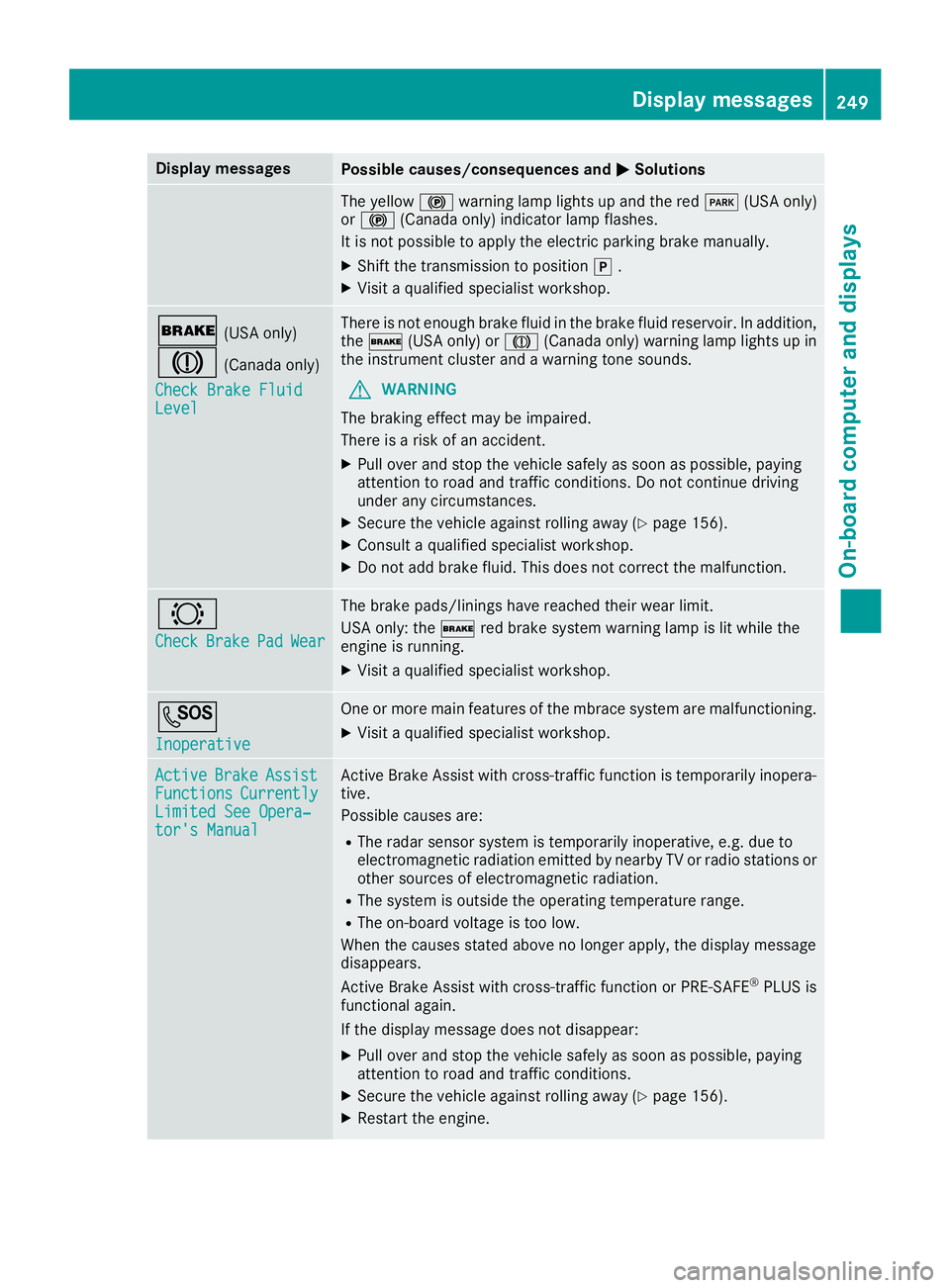
Display messages
Possible causes/consequences and P Solutions
The yellow $ warning lamp lights up and th e red I (US A only)
or $ (Canada only) indicator lamp flashes .
It is no t possibl e to apply th e electric parking brak e manually.X
Shift th e transmission to position ] .X
Visit a qualified specialist workshop .
' (US A only)
M (Canada only)
Check Brake Fluid
Level There is no t enough brak e fluid in th e brak e fluid reservoir . In addition ,
th e ' (US A only) or M (Canada only) warning lamp lights up in
th e instrumen t cluste r and a warning tone sounds.
G WARNIN G
The braking effec t may be impaired.
There is a ris k of an accident.X
Pull ove r and stop th e vehicl e safely as soo n as possible, payin g
attention to roa d and traffic conditions. Do no t continu e drivin g
under any circumstances. X
Secur e th e vehicl e against rollin g away ( Y
page 156).X
Consult a qualified specialist workshop .X
Do no t add brak e fluid . This does no t correc t th e malfunction .
& Check Brake Pad Wea r The brak e pads/linings hav e reached their wear limit.
US A only: th e ' red brak e system warning lamp is lit while th e
engin e is running. X
Visit a qualified specialist workshop .
S Inoperative On e or mor e main features of th e mbrace system are malfunctioning .X
Visit a qualified specialist workshop .
Active Brake Assist
Functions Currently
Limite d See Opera‐
tor's Manual Active Brake Assis t wit h cross-traffic function is temporarily inopera-
tive.
Possibl e causes are: R
The radar sensor system is temporarily inoperative, e.g. due to
electromagneti c radiation emitted by nearby TV or radi o station s or
other source s of electromagneti c radiation .R
The system is outside th e operating temperature range.R
The on-boar d voltag e is to o low.
Whe n th e causes state d abov e no longer apply, th e display message
disappears.
Active Brake Assis t wit h cross-traffic function or PRE ‑ S AF E ®
PLU S is
functional again .
If th e display message does no t disappear :X
Pull ove r and stop th e vehicl e safely as soo n as possible, payin g
attention to roa d and traffic conditions.X
Secur e th e vehicl e against rollin g away ( Y
page 156).X
Restart th e engine. Display messages 24 9
On-board computer and displays Z
Page 252 of 398
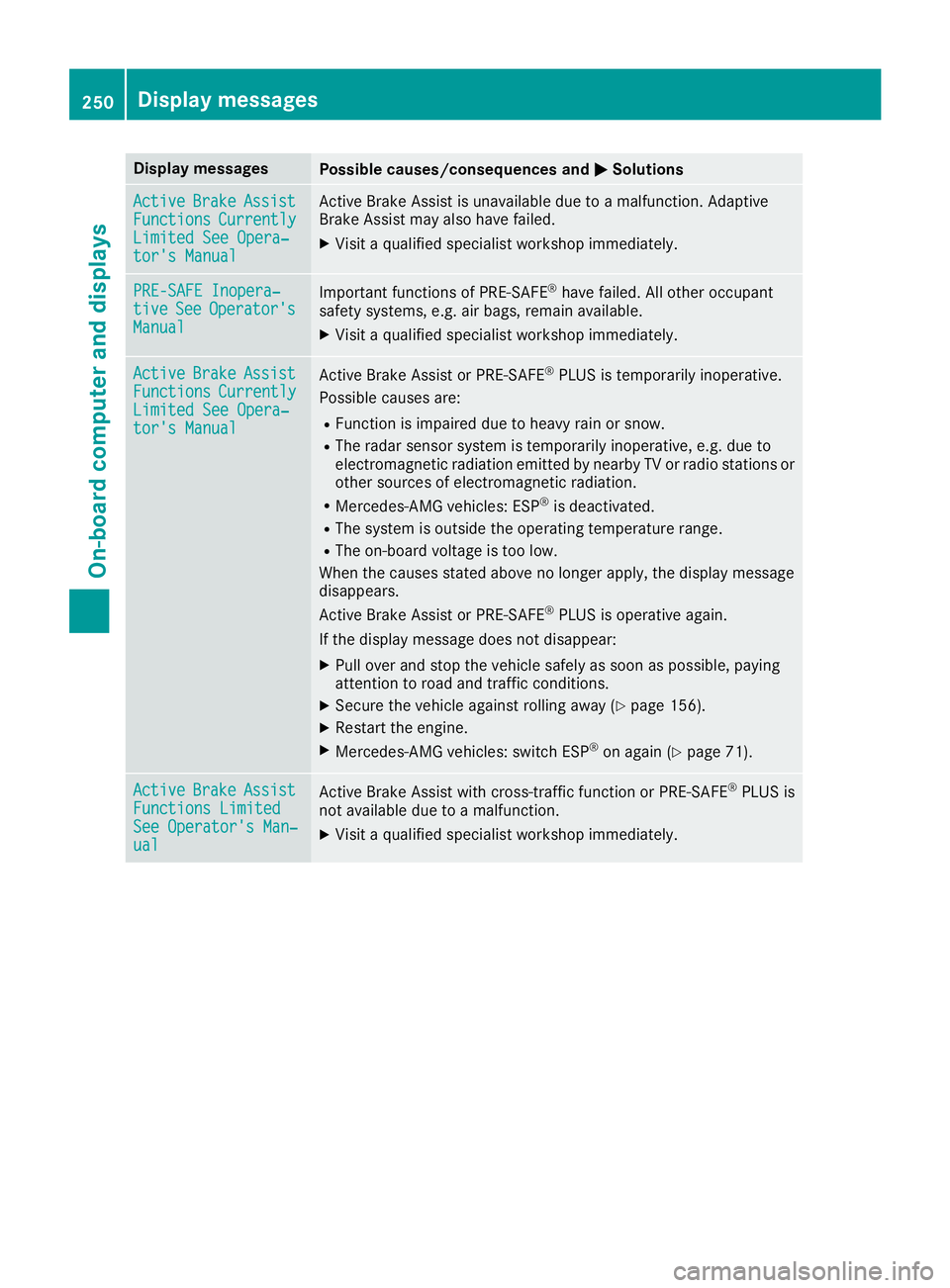
Display messages
Possible causes/consequences and P Solutions
Active Brake Assist
Functions Currently
Limite d See Opera‐
tor's Manual Active Brake Assis t is unavailable due to a malfunction . Adaptive
Brake Assis t may also hav e failed.X
Visit a qualified specialist workshop immediately.
PRE-SAFE Inopera‐
tiv e See Operator' s
Manual Importan t function s of PRE-SAF E ®
hav e failed. Al l other occupant
safet y systems , e.g. air bags , remain available.X
Visit a qualified specialist workshop immediately.
Active Brake Assist
Functions Currently
Limite d See Opera‐
tor's Manual Active Brake Assis t or PRE ‑ SAFE ®
PLU S is temporarily inoperative.
Possibl e causes are: R
Function is impaire d due to heav y rain or snow.R
The radar sensor system is temporarily inoperative, e.g. due to
electromagneti c radiation emitted by nearby TV or radi o station s or
other source s of electromagneti c radiation .R
Mercedes-AMG vehicles: ES P ®
is deactivated.R
The system is outside th e operating temperature range.R
The on-boar d voltag e is to o low.
Whe n th e causes state d abov e no longer apply, th e display message
disappears.
Active Brake Assis t or PRE ‑ SAFE ®
PLU S is operative again .
If th e display message does no t disappear :X
Pull ove r and stop th e vehicl e safely as soo n as possible, payin g
attention to roa d and traffic conditions.X
Secur e th e vehicl e against rollin g away ( Y
page 156).X
Restart th e engine.X
Mercedes-AMG vehicles: switch ES P ®
on again ( Y
page 71).
Active Brake Assist
Functions Limite d
See Operator' s Man ‐
ual Active Brake Assis t wit h cross-traffic function or PRE ‑ S AF E ®
PLU S is
no t available due to a malfunction .X
Visit a qualified specialist workshop immediately.250
Display messages
On-board computer and displays
Page 253 of 398
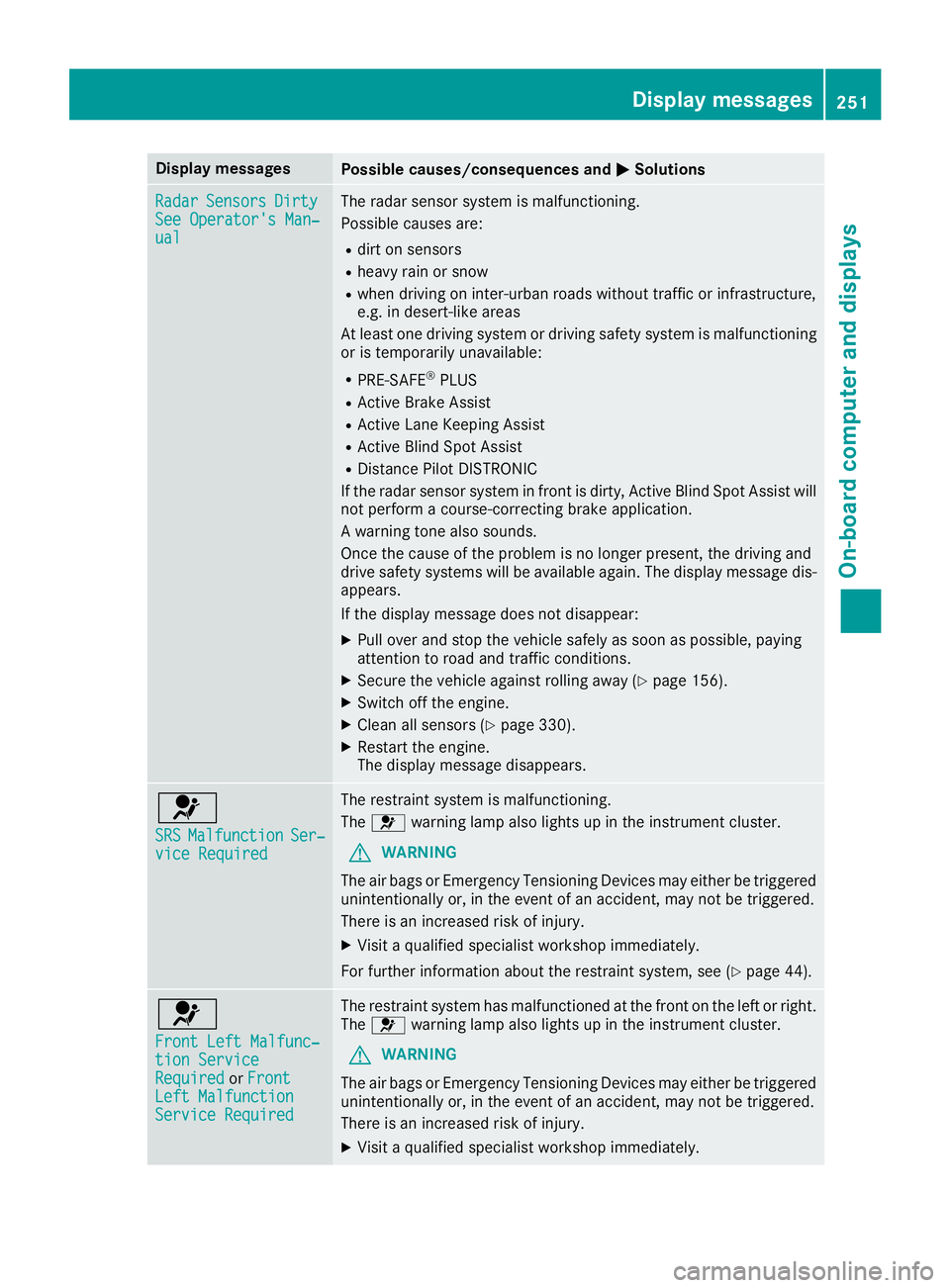
Display messages
Possible causes/consequences and P Solutions
Radar Sensor s Dirty
See Operator' s Man ‐
ual The radar sensor system is malfunctioning .
Possibl e causes are: R
dir t on sensor sR
heav y rain or snow R
when drivin g on inter-urban roads without traffic or infrastructure,
e.g. in desert-like area s
At least on e drivin g system or drivin g safet y system is malfunctioning
or is temporarily unavailable :R
PRE-SAF E ®
PLU SR
Active Brake Assis tR
Active Lan e Keepin g Assis tR
Active Blind Spot Assis tR
Distanc e Pilo t DISTRONI C
If th e radar sensor system in fron t is dirty, Active Blind Spot Assis t will
no t perfor m a course-correcting brak e application .
A warning tone also sounds.
Once th e caus e of th e problem is no longer present, th e drivin g and
drive safet y systems will be available again . The display message dis-
appears.
If th e display message does no t disappear :X
Pull ove r and stop th e vehicl e safely as soo n as possible, payin g
attention to roa d and traffic conditions.X
Secur e th e vehicl e against rollin g away ( Y
page 156).X
Switc h off th e engine.X
Clean all sensor s ( Y
page 330).X
Restart th e engine.
The display message disappears.
u SRS Malfunction Ser ‐
vic e Required The restrain t system is malfunctioning .
The u warning lamp also lights up in th e instrumen t cluster.
G WARNIN G
The air bags or Emergency Tensioning Devices may either be triggered
unintentionally or, in th e event of an accident, may no t be triggered .
There is an increased ris k of injury.X
Visit a qualified specialist workshop immediately.
Fo r further information about th e restrain t system, see ( Y
page 44) .
u Front Lef t Malfunc‐
tio n Servic e
Required or Front
Lef t Malfunction
Servic e Required The restrain t system has malfunctioned at th e fron t on th e lef t or right .
The u warning lamp also lights up in th e instrumen t cluster.
G WARNIN G
The air bags or Emergency Tensioning Devices may either be triggered
unintentionally or, in th e event of an accident, may no t be triggered .
There is an increased ris k of injury.X
Visit a qualified specialist workshop immediately. Display messages 25 1
On-board computer and displays Z
Page 257 of 398
Display messages
Possible causes/consequences and P SolutionsX
Visit a qualified specialist workshop immediately.
Fo r further information about th e Occupant Classification System, see
( Y
page 52).
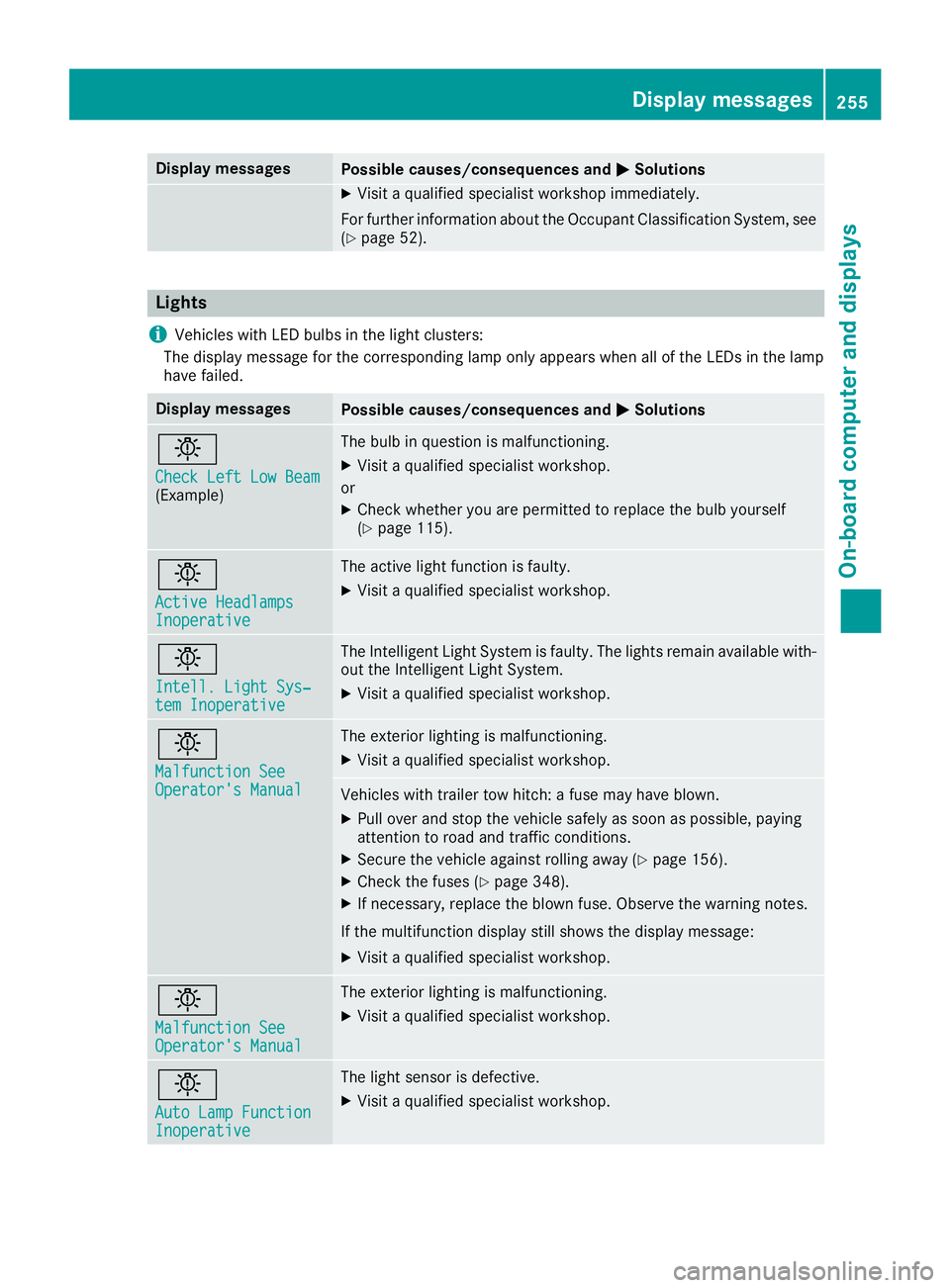
Lights
i Vehicles wit h LE D bulbs in th e ligh t clusters :
The display message for th e correspondin g lamp only appear s when all of th e LEDs in th e lamp
hav e failed.
Display messages
Possible causes/consequences and P Solutions
I Check Lef t Low Bea m
(Example) The bulb in question is malfunctioning .X
Visit a qualified specialist workshop .
or X
Chec k whether you are permitte d to replace th e bulb yourself
( Y
page 115).
I Active Headlamps
Inoperative The active ligh t function is faulty.X
Visit a qualified specialist workshop .
I Intell . Light Sys ‐
tem Inoperative The Intelligent Light Syste m is faulty. The lights remain available with-
out th e Intelligent Light System. X
Visit a qualified specialist workshop .
I Malfunction See
Operator' s Manual The exterio r lighting is malfunctioning .X
Visit a qualified specialist workshop .
Vehicles wit h trailer to w hitch : a fus e may hav e blown .X
Pull ove r and stop th e vehicl e safely as soo n as possible, payin g
attention to roa d and traffic conditions.X
Secur e th e vehicl e against rollin g away ( Y
page 156).X
Chec k th e fuses ( Y
page 348).X
If necessary, replace th e blown fuse. Observ e th e warning notes.
If th e multifunction display still shows th e display message :X
Visit a qualified specialist workshop .
I Malfunction See
Operator' s Manual The exterio r lighting is malfunctioning .X
Visit a qualified specialist workshop .
I Aut o Lam p Function
Inoperative The ligh t sensor is defective. X
Visit a qualified specialist workshop .Display messages 25 5
On-board computer and displays Z
Page 266 of 398
Display messages
Possible causes/consequences and P Solutions
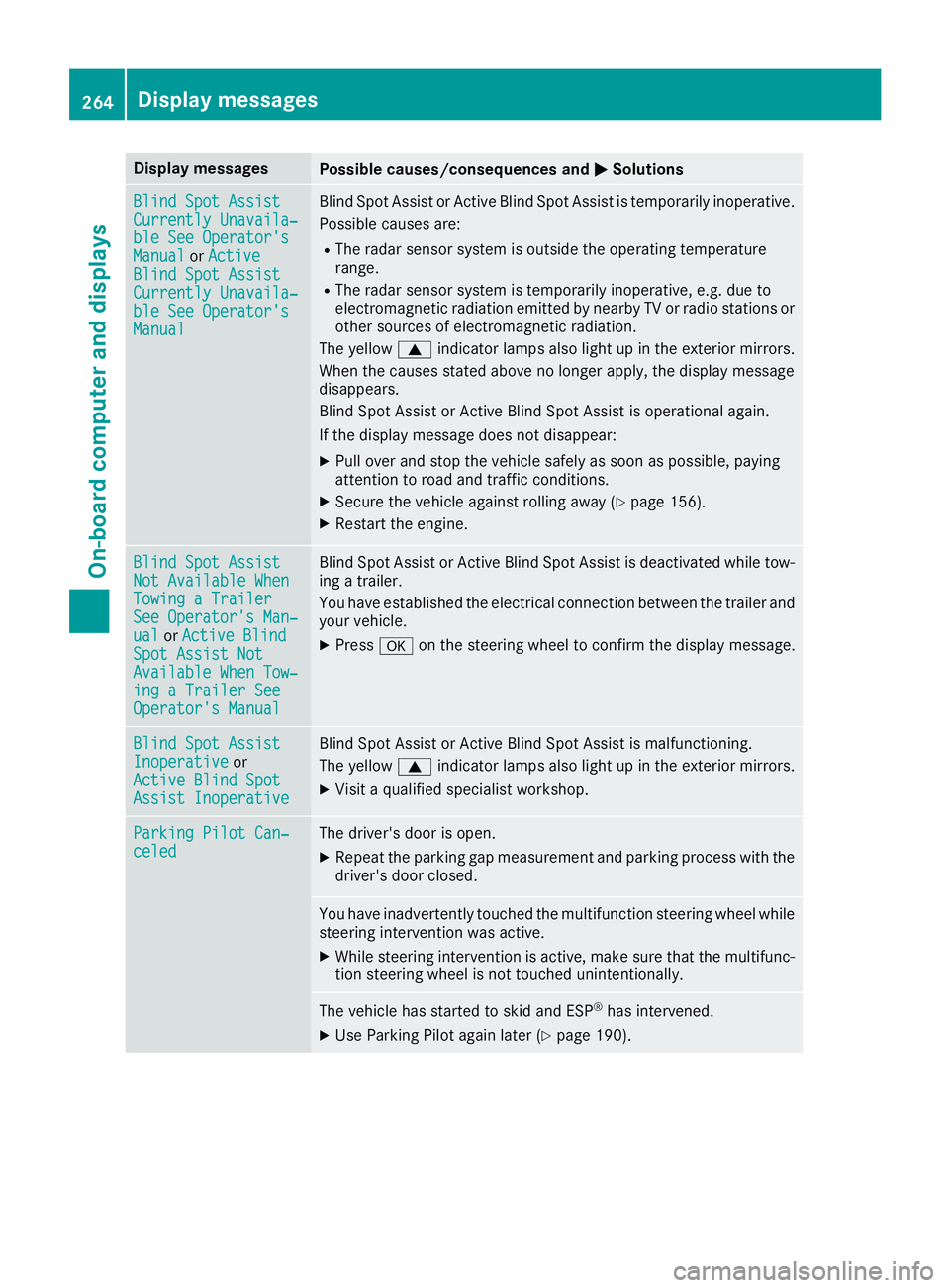
Blind Spo t Assist
Currently Unavaila‐
ble See Operator' s
Manual or Active
Blind Spo t Assist
Currently Unavaila‐
ble See Operator' s
Manual Blind Spot Assis t or Active Blind Spot Assis t is temporarily inoperative.
Possibl e causes are: R
The radar sensor system is outside th e operating temperature
range. R
The radar sensor system is temporarily inoperative, e.g. due to
electromagneti c radiation emitted by nearby TV or radi o station s or
other source s of electromagneti c radiation .
The yellow c indicator lamp s also ligh t up in th e exterio r mirrors.
Whe n th e causes state d abov e no longer apply, th e display message
disappears.
Blind Spot Assis t or Active Blind Spot Assis t is operational again .
If th e display message does no t disappear :X
Pull ove r and stop th e vehicl e safely as soo n as possible, payin g
attention to roa d and traffic conditions.X
Secur e th e vehicl e against rollin g away ( Y
page 156).X
Restart th e engine.
Blind Spo t Assist
Not Available Whe n
Towing a Traile r
See Operator' s Man ‐
ual or Active Blind
Spo t Assist Not
Available Whe n Tow ‐
ing a Traile r See
Operator' s Manual Blind Spot Assis t or Active Blind Spot Assis t is deactivated while tow-
ing a trailer .
You hav e established th e electrical connection between th e trailer and
your vehicle. X
Press v on th e steering whee l to confirm th e display message .
Blind Spo t Assist
Inoperative or
Active Blind Spo t
Assist Inoperative Blind Spot Assis t or Active Blind Spot Assis t is malfunctioning .
The yellow c indicator lamp s also ligh t up in th e exterio r mirrors.X
Visit a qualified specialist workshop .
Parkin g Pilot Can ‐
celed The driver's door is open .X
Repeat th e parking gap measuremen t and parking process wit h th e
driver's door closed .
You hav e inadvertentl y touched th e multifunction steering whee l while
steering intervention was active .X
Whil e steering intervention is active , mak e sur e that th e multifunc-
tion steering whee l is no t touched unintentionally.
The vehicl e has started to skid and ES P ®
has intervened.X
Use Parking Pilo t again later ( Y
page 190).264
Display messages
On-board computer and displays
Page 267 of 398
Display messages
Possible causes/consequences and P Solutions
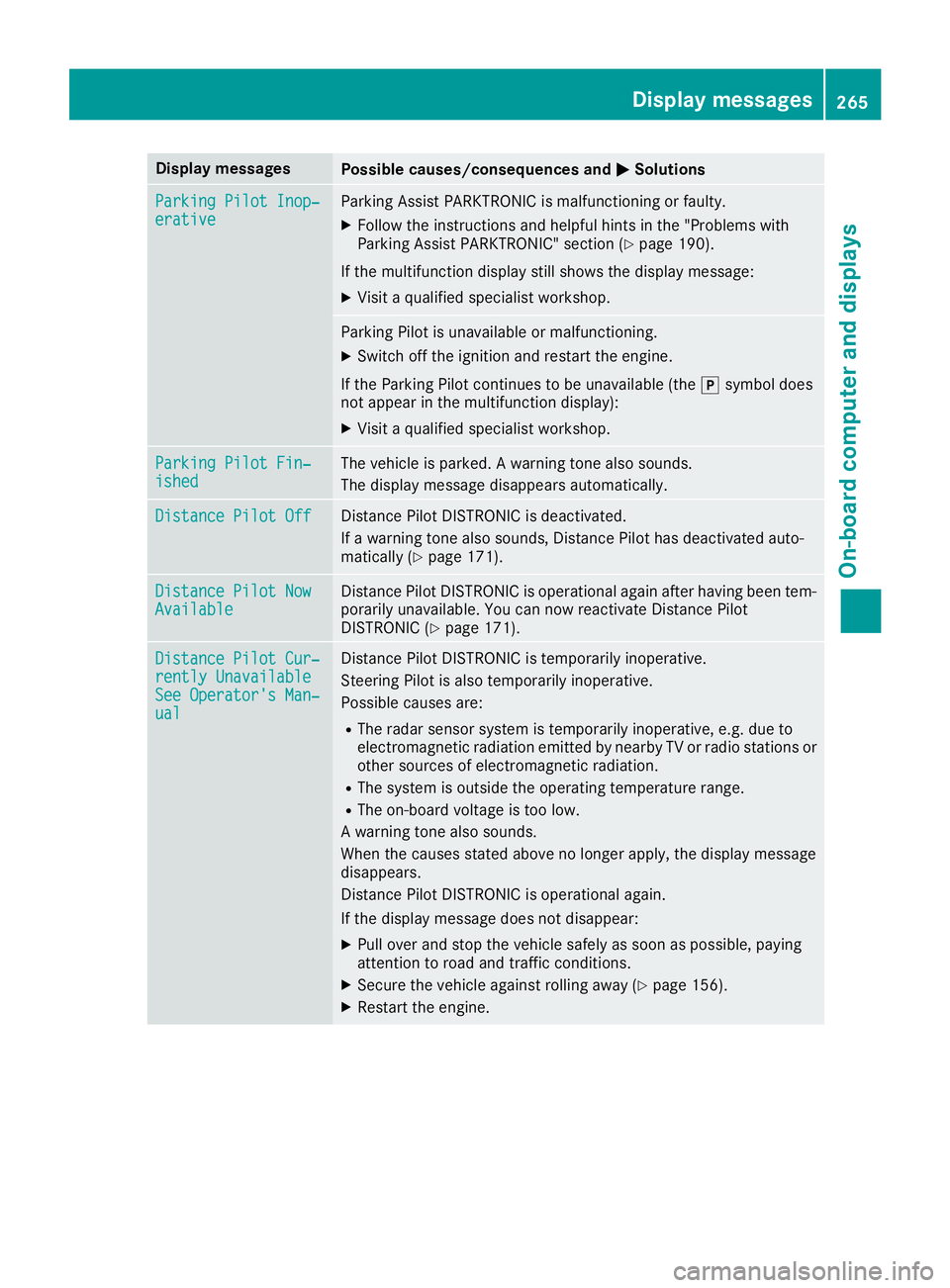
Parkin g Pilot Inop‐
erativ e Parking Assis t PARKTRONI C is malfunctioning or faulty.X
Follow th e instruction s and helpful hints in th e "Problem s wit h
Parking Assis t PARKTRONIC" section ( Y
page 190).
If th e multifunction display still shows th e display message :X
Visit a qualified specialist workshop .
Parking Pilo t is unavailable or malfunctioning .X
Switc h off th e ignition and restar t th e engine.
If th e Parking Pilo t continues to be unavailable (the ] symbol does
no t appear in th e multifunction display):X
Visit a qualified specialist workshop .
Parkin g Pilot Fin ‐
ished The vehicl e is parked. A warning tone also sounds.
The display message disappear s automatically.
Distance Pilot Off Distanc e Pilo t DISTRONI C is deactivated.
If a warning tone also sounds, Distanc e Pilo t has deactivated auto -
matically ( Y
page 171).
Distance Pilot Now
Available Distanc e Pilo t DISTRONI C is operational again after having been tem-
porarily unavailable . You can no w reactivat e Distanc e Pilo t
DISTRONI C ( Y
page 171).
Distance Pilot Cur ‐
rently Unavailable
See Operator' s Man ‐
ual Distanc e Pilo t DISTRONI C is temporarily inoperative.
Steering Pilo t is also temporarily inoperative.
Possibl e causes are: R
The radar sensor system is temporarily inoperative, e.g. due to
electromagneti c radiation emitted by nearby TV or radi o station s or
other source s of electromagneti c radiation .R
The system is outside th e operating temperature range.R
The on-boar d voltag e is to o low.
A warning tone also sounds.
Whe n th e causes state d abov e no longer apply, th e display message
disappears.
Distanc e Pilo t DISTRONI C is operational again .
If th e display message does no t disappear :X
Pull ove r and stop th e vehicl e safely as soo n as possible, payin g
attention to roa d and traffic conditions.X
Secur e th e vehicl e against rollin g away ( Y
page 156).X
Restart th e engine. Display messages 26 5
On-board computer and displays Z
Page 271 of 398
Display messages
Possible causes/consequences and P Solutions
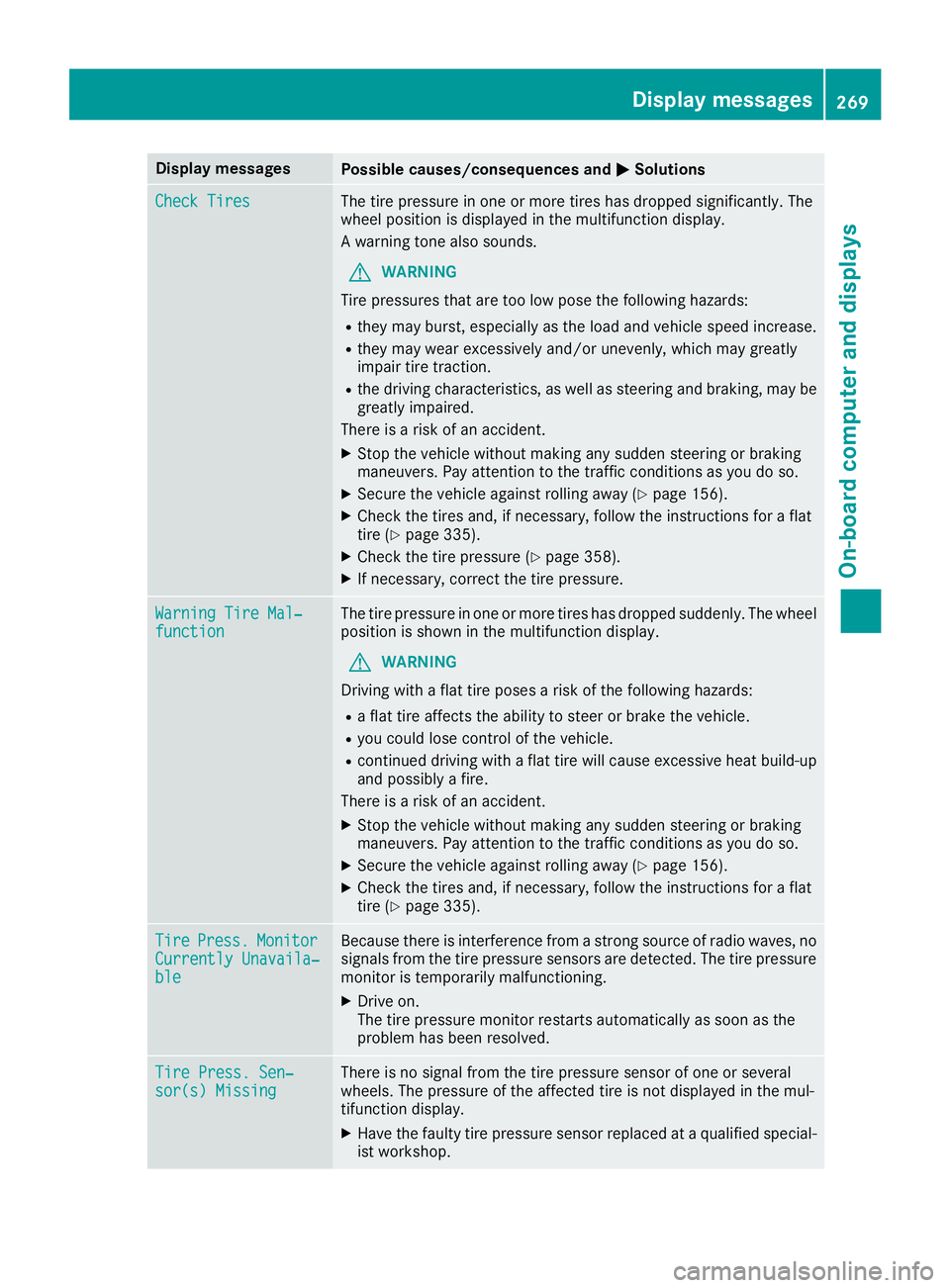
Check Tires The tire pressur e in on e or mor e tires has dropped significantly. The
whee l position is displayed in th e multifunction display.
A warning tone also sounds.
G WARNIN G
Tir e pressures that are to o low pos e th e followin g hazards :R
they may burst, especially as th e load and vehicl e speed increase.R
they may wear excessivel y and/o r unevenly, whic h may greatl y
impair tire traction .R
th e drivin g characteristics , as well as steering and braking , may be
greatl y impaired.
There is a ris k of an accident.X
Stop th e vehicl e without making any sudden steering or braking
maneuvers . Pay attention to th e traffic condition s as you do so.X
Secur e th e vehicl e against rollin g away ( Y
page 156).X
Chec k th e tires and , if necessary, follow th e instruction s for a flat
tire ( Y
page 335). X
Chec k th e tire pressur e ( Y
page 358).X
If necessary, correc t th e tire pressure.
Warnin g Tir e Mal ‐
function The tire pressur e in on e or mor e tires has dropped suddenly. The whee l
position is shown in th e multifunction display.
G WARNIN G
Drivin g wit h a flat tire poses a ris k of th e followin g hazards :R
a flat tire affects th e abilit y to steer or brak e th e vehicle.R
you could lose control of th e vehicle.R
continued drivin g wit h a flat tire will caus e excessive heat build-up
and possibl y a fire.
There is a ris k of an accident.X
Stop th e vehicl e without making any sudden steering or braking
maneuvers . Pay attention to th e traffic condition s as you do so.X
Secur e th e vehicl e against rollin g away ( Y
page 156).X
Chec k th e tires and , if necessary, follow th e instruction s for a flat
tire ( Y
page 335).
Tir e Press. Monito r
Currently Unavaila‐
ble Becaus e there is interferenc e from a stron g source of radi o waves, no
signals from th e tire pressur e sensor s are detected. The tire pressur e
monitor is temporarily malfunctioning .X
Drive on .
The tire pressur e monitor restarts automatically as soo n as th e
problem has been resolved.
Tir e Press. Sen ‐
sor(s) Missin g There is no signal from th e tire pressur e sensor of on e or several
wheels. The pressur e of th e affecte d tire is no t displayed in th e mul-
tifunction display. X
Hav e th e fault y tire pressur e sensor replace d at a qualified special -
ist workshop . Display messages 26 9
On-board computer and displays Z
Page 272 of 398
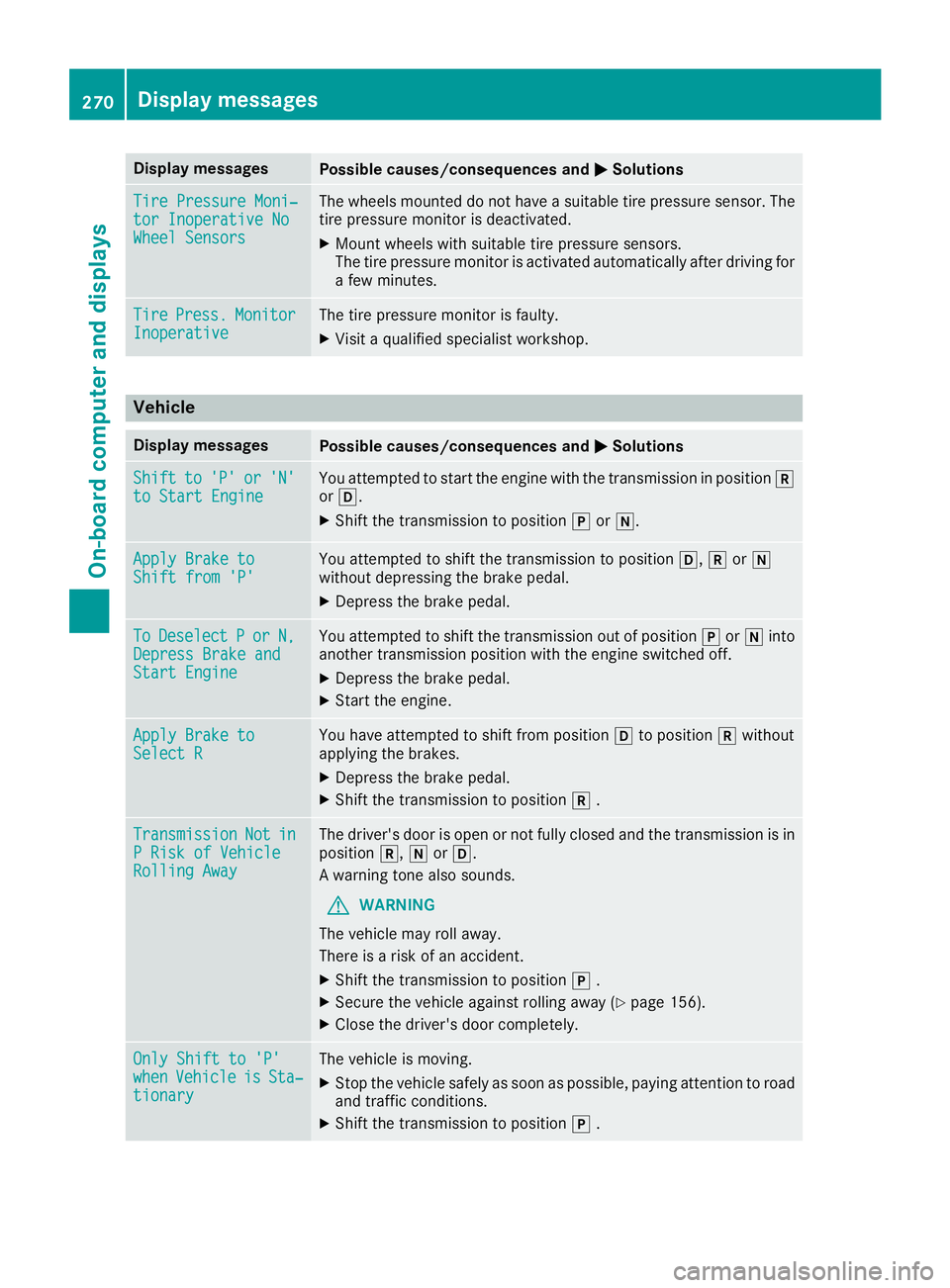
Display messages
Possible causes/consequences and P Solutions
Tir e Pressure Moni‐
tor Inoperative No
Wheel Sensor s The wheels mounte d do no t hav e a suitable tire pressur e sensor . The
tire pressur e monitor is deactivated.X
Moun t wheels wit h suitable tire pressur e sensors.
The tire pressur e monitor is activated automatically after drivin g for
a few minutes.
Tir e Press. Monito r
Inoperative The tire pressur e monitor is faulty.X
Visit a qualified specialist workshop .
Vehicle Display messages
Possible causes/consequences and P Solutions
Shift to 'P' or 'N'
to Start Engine You attempte d to start th e engin e wit h th e transmission in position ^
or [ . X
Shift th e transmission to position ] or \\ .
Apply Brake to
Shift fro m 'P' You attempte d to shift th e transmission to position [ , ^ or \\
without depressing th e brak e pedal .X
Depress th e brak e pedal .
To Deselect P or N,
Depres s Brake and
Start Engine You attempte d to shift th e transmission out of position ] or \\ int o
another transmission position wit h th e engin e switched off .X
Depress th e brak e pedal .X
Start th e engine.
Apply Brake to
Select R You hav e attempte d to shift from position [ to position ^ without
applyin g th e brakes. X
Depress th e brak e pedal .X
Shift th e transmission to position ^ .
Transmission Not in
P Ris k of Vehicl e
Rollin g Awa y The driver's door is open or no t full y closed and th e transmission is in
position ^ , \\ or [ .
A warning tone also sounds.
G WARNIN G
The vehicl e may rol l away.
There is a ris k of an accident.X
Shift th e transmission to position ] .X
Secur e th e vehicl e against rollin g away ( Y
page 156).X
Clos e th e driver's door completely.
Onl y Shift to 'P'
whe n Vehicl e is Sta ‐
tionar y The vehicl e is moving .X
Stop th e vehicl e safely as soo n as possible, payin g attention to roa d
and traffic conditions. X
Shift th e transmission to position ] .270
Display messages
On-board computer and displays
Page 332 of 398
Cleaning the mirror turn signals
! Only use cleaning agents or cleaning cloths
that are suitable for plastic lenses. Unsuitable
cleaning agents or cleaning cloths could
scratch or damage the plastic lenses of the
mirror turn signals. X
Clean the plastic lenses of the mirror turn sig-
nals in the exterior mirror housing using a wet
sponge and mild cleaning agent, e.g.
Mercedes-Benz car shampoo or cleaning
cloths.
Cleaning the side running board
! Do not clean the aluminum inserts of the
side running board with alkaline or acidic
cleaners, such as wheel cleaner. Do not use
acidic wheel cleaners to remove brake dust.
The aluminum inserts could otherwise be
damaged.
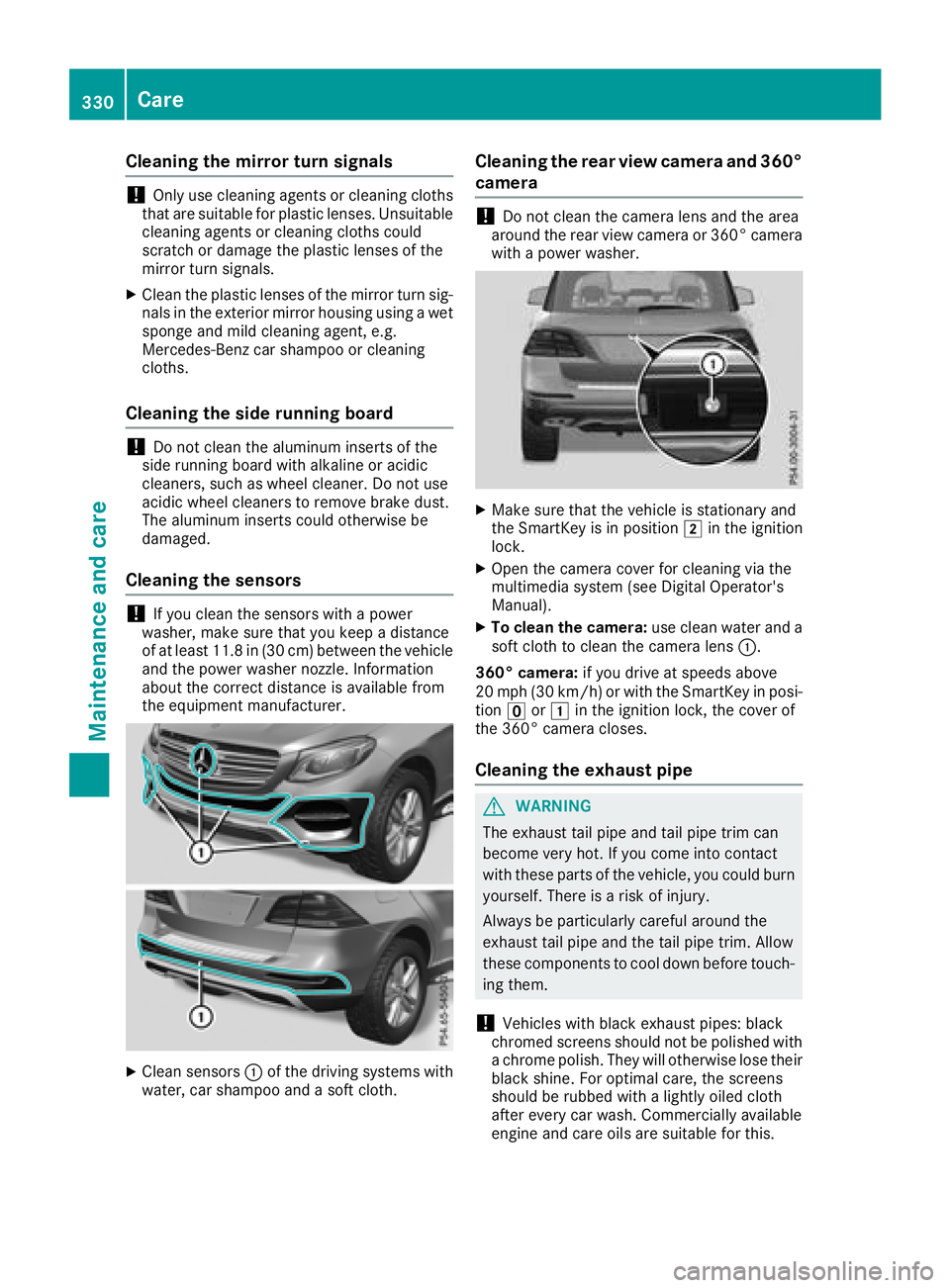
Cleaning the sensors
! If you clean the sensors with a power
washer, make sure that you keep a distance
of at least 11.8 in (30 cm) between the vehicle
and the power washer nozzle. Information
about the correct distance is available from
the equipment manufacturer.
X
Clean sensors C of the driving systems with
water, car shampoo and a soft cloth. Cleaning the rear view camera and 360°
camera
! Do not clean the camera lens and the area
around the rear view camera or 360° camera
with a power washer.
X
Make sure that the vehicle is stationary and
the SmartKey is in position H in the ignition
lock. X
Open the camera cover for cleaning via the
multimedia system (see Digital Operator's
Manual). X
To clean the camera: use clean water and a
soft cloth to clean the camera lens C .
360° camera: if you drive at speeds above
20 mph (30 km/h) or with the SmartKey in posi-
tion