brake fluid MERCEDES-BENZ GLE-Class 2016 W218 Owner's Manual
[x] Cancel search | Manufacturer: MERCEDES-BENZ, Model Year: 2016, Model line: GLE-Class, Model: MERCEDES-BENZ GLE-Class 2016 W218Pages: 450, PDF Size: 10.52 MB
Page 7 of 450
Battery (SmartKey)Checking .......................................... 81
Important safety notes .................... 81
Replacing ......................................... 81
Battery (vehicle)
Charging ........................................ 377
Display message ............................ 296
Important safety notes .................. 374
Jump starting ................................. 379
Overview ........................................ 374
Belt
see Seat belts
Blind Spot Assist
Activating/deactivating ................. 272
Display message ............................ 305
Notes/function .............................. 227
Trailer towing ................................. 229
see Active Blind Spot Assist
BlueTEC
Adding DEF .................................... 167
BlueTEC (DEF) .................................... 436
Brake Assist
see BAS (Brake Assist System)
Brake fluid
Display message ............................ 286
Notes ............................................. 438
Brake force distribution
see EBD (electronic brake force
distribution)
Brake lamps
Display message ............................ 293
Brake pedal
Pedal resistance/pedal travel .......... 44
Brakes
ABS .................................................. 66
Adaptive Brake Assist ...................... 70
BAS .................................................. 67
BAS PLUS with Cross-Traffic
Assist ............................................... 67
Brake fluid (notes) ......................... 438
Display message ............................ 281
High-performance brake system .... 185
Important safety notes .................. 183
Maintenance .................................. 184
Parking brake ................................ 179
RBS warning lamp .......................... 318
Recuperative Brake System ............. 44
Riding tips ...................................... 183 Warning lamp ................................. 317
Breakdown
Where will I find...? ........................ 369
see Flat tire
see Towing away
Brightness control (instrument
cluster lighting) ................................... 34
C
California
Important notice for retail cus-
tomers and lessees .......................... 26
Calling up a malfunction
see Display messages
Car
see Vehicle
Care
360° camera ................................. 366
Car wash ........................................ 361
Carpets .......................................... 368
Display ........................................... 367
Exhaust pipe .................................. 366
Exterior lights ................................ 365
Gear or selector lever .................... 367
Interior ........................................... 367
Matte finish ................................... 363
Notes ............................................. 361
Paint .............................................. 363
Plastic trim .................................... 367
Power washer ................................ 363
Rear view camera .......................... 365
Roof lining ...................................... 368
Seat belt ........................................ 368
Seat cover ..................................... 367
Sensors ......................................... 365
Side running board ........................ 365
Steering wheel ............................... 367
Trim pieces .................................... 367
Washing by hand ........................... 362
Wheels ........................................... 364
Windows ........................................ 364
Wiper blades .................................. 364
Wooden trim .................................. 367
Cargo compartment cover
Notes/how to use ......................... 334
Cargo compartment enlargement
Important safety notes .................. 332
Index5
Page 20 of 450
Reversing featurePanorama sliding sunroof ................ 96
Roller sunblinds ............................... 97
Side windows ................................... 91
Sliding sunroof ................................. 96
Tailgate ............................................ 87
Reversing lamps (display mes-
sage) ................................................... 293
Roadside Assistance (breakdown) .... 27
Roller sunblind
Panorama roof with power tilt/
sliding panel ..................................... 97
Rear side windows ......................... 341
Roof carrier ........................................ 338
Roof lining and carpets (cleaning
guidelines) ......................................... 368
Roof load (maximum) ........................ 441
Route (navigation)
see Route guidance (navigation)
Route guidance (navigation) ............ 268
S
Safety
Children in the vehicle ..................... 60
Hybrid drive system ......................... 42
see Occupant safety
Safety notes
Hybrid vehicles ................................ 42
Safety system
see Driving safety systems
SD memory card
Selecting ........................................ 269
Seat belts
Adjusting the driver's and front-
passenger seat belt ......................... 48
Adjusting the height ......................... 48
Cleaning ......................................... 368
Correct usage .................................. 47
Fastening ......................................... 48
Important safety guidelines ............. 46
Introduction ..................................... 46
Releasing ......................................... 48
Switching belt adjustment on/off
(on-board computer) ...................... 276
Warning lamp ................................. 316
Warning lamp (function) ................... 49 Seats
Adjusting (electrically) ................... 102
Adjusting the head restraint .......... 102
Cleaning the cover ......................... 367
Correct driver's seat position ........ 100
Folding the rear bench seat for-
wards/back ................................... 332
Important safety notes .................. 101
Overview ........................................ 101
Seat heating problem .................... 106
Seat ventilation problem ................ 107
Storing settings (memory func-
tion) ............................................... 113
Switching seat heating on/off ....... 104
Switching seat ventilation on/off .. 106
Section
Sliding sunroof ................................. 95
Securing hooks .................................. 334
Selector lever
Cleaning ......................................... 367
Sensors (cleaning instructions) ....... 365
Service menu (on-board com-
puter) .................................................. 273
Service message
see ASSYST PLUS
Service products
Brake fluid ..................................... 438
Coolant (engine) ............................ 438
DEF special additives ..................... 436
Engine oil ....................................... 437
Fuel ................................................ 434
Important safety notes .................. 433
Refrigerant (air-conditioning sy s-
te
m) ............................................... 440
Washer fluid ................................... 439
Setting the air distribution ............... 135
Setting the airflow ............................ 135
Setting the charge current (on-
board computer) ............................... 273
Setting the departure time (on-
board computer) ............................... 274
Settings
Factory (on-board computer) ......... 276
On-board computer ....................... 273
SETUP (on-board computer) ............. 277
Side impact air bag ............................. 51
18Index
Page 25 of 450
Vehicle data ................................... 441
Vehicle battery
see Battery (vehicle)
Vehicle data ....................................... 441
Vehicle data (off-road driving)
Approach/departure angle ............ 443
Fording depth ................................ 442
Maximum gradient climbing abil-
ity .................................................. 444
Vehicle dimensions ........................... 441
Vehicle emergency locking ................ 86
Vehicle identification number
see VIN
Vehicle identification plate .............. 432
Vehicle level
AIRMATIC ...................................... 207
Vehicle level (display message) ....... 302
Vehicle tool kit .................................. 369
Video
Operating the DVD .........................2 70
VIN ...................................................... 432
Seat ............................................... 433
Type plate ...................................... 432
W
Warning Stickers ...........................................4 2
Warning and indicator lamps
ABS ................................................ 319
Brakes ...........................................3 17
Check Engine ................................. 325
Coolant .......................................... 325
Distance warning ........................... 327
DISTRONIC PLUS ........................... 327
ESP
®.............................................. 321
ESP®OFF ....................................... 322
Fuel tank ........................................ 325
Hybrid drive system ....................... 318
Overview .......................................... 35
Parking brake ................................ 324
PASSENGER AIR BAG ......................4 5
RBS (Recuperative Brake Sys -
tem) .............................................. .318
Reserve fuel ................................... 325
Restraint system ............................ 324
Seat belt ........................................ 316
Tire pressure monitor .................... 328 Warranty
.............................................. 26
Washer fluid
Display message ............................ 314
Wheel and tire combinations
Tires ............................................... 414
Wheel bolt tightening torque ........... 412
Wheel chock ...................................... 409
Wheels
Changing a wheel .......................... 408
Checking ........................................ 388
Cleaning ......................................... 364
Emergency spare wheel ................. 426
General notes ................................ 413
Important safety notes .................. 387
Information on driving .................... 387
Interchanging/changing ................ 408
Mounting a new wheel ................... 411
Mounting a wheel .......................... 409
Overview ........................................ 387
Removing a wheel .......................... 411
Storing ...........................................4 09
Tightening torque ........................... 412
Wheel size/tire si
ze ....................... 413
Window curtain air bag
Display message ............................ 289
Operation ......................................... 51
Windows
see Side windows
Windshield
Defrosting ...................................... 136
Windshield washer fluid
see Windshield washer system
Windshield washer system
Adding washer fluid ....................... 359
Important safety notes .................. 439
Windshield wipers
Problem (malfunction) ................... 125
Rear window wiper ........................ 122
Replacing the wiper blades ............ 122
Switching on/off ........................... 121
Winter driving
Slippery road surfaces ................... 186
Snow chains .................................. 390
Winter operation
General notes ................................ 389
Overview ........................................ 389
Radiator cover ............................... 357
Index23
Page 32 of 450
affect its safe operation, we urge you to contact
an authorized Mercedes-Benz Center immedi-
ately to have the problem diagnosed and recti-
fied. If the problem is not resolved to your sat-
isfaction, please discuss the problem again with
a Mercedes-Benz Center or contact us at one of
the following addresses.
In the USA
Customer Assistance Center
Mercedes-Benz USA, LLC
One Mercedes Drive
Montvale, NJ 07645-0350
In Canada
Customer Relations Department
Mercedes-Benz Canada, Inc.
98 Vanderhoof Avenue
Toronto, Ontario M4G 4C9
Reporting safety defects
USA only:
The following text is published as required of
manufacturers under Title 49, Code of U.S. Fed-
eral Regulations, Part 575 pursuant to the
"National Traffic and Motor Vehicle Safety Act of 1966".
If you believe that your vehicle has a defect
which could cause a crash or could cause injury
or death, you should immediately inform the
National Highway Traffic Safety Administration
(NHTSA) in addition to notifying Mercedes-Benz USA, LLC.
If NHTSA receives similar complaints, it may
open an investigation, and if it finds that a safety
defect exists in a group of vehicles, it may order
a recall and remedy campaign. However, NHTSA
cannot become involved in individual problems
between you, your dealer, or Mercedes-Benz
USA, LLC.
To contact NHTSA, you may call the Vehicle
Safety Hotline toll-free at
1-888-327-4236(TTY: 1-800-424-9153 );go to
http://www.safercar.gov ; or write to: Admin-
istrator, NHTSA, 400 Seventh Street, SW.,
Washington, DC 20590.
You can also obtain other information about
motor vehicle safety from
http://www.safercar.gov
Limited Warranty
!
Follow the instructions in this manual about
the proper operation of your vehicle as well as
about possible vehicle damage. Damage to
your vehicle that arises from culpable contra-
ventions against these instructions is not cov-
ered either by the Mercedes-Benz Limited
Warranty or by the New or Used-Vehicle War-
ranty.
QR codes for the rescue card
The QR codes are secured in the fuel filler flap
and on the opposite side on the B-pillar. In the
event of an accident, rescue services can use
the QR code to quickly find the appropriate res-
cue card for your vehicle. The current rescue
card contains the most important information
about your vehicle in a compact form, e.g. the
routing of the electric cables.
You can find more information under http://
portal.aftersales.i.daimler.com/public/
content/asportal/en/communication/
informationen_fuer/QRCode.html.
Data stored in the vehicle
Data storage
A wide range of electronic components in your
vehicle contain data memories.
These data memories temporarily or perma-
nently store technical information about:
RVehicle's operating state
RIncidents
RMalfunctions
In general, this technical information docu-
ments the state of a component, a module, a
system or the surroundings.
These include, for example:
Roperating conditions of system components,
e.g. fluid levels
Rthe vehicle's status messages and those of its
individual components, e.g. number of wheel
revolutions/speed, deceleration in move-
ment, lateral acceleration, accelerator pedal
position
Rmalfunctions and defects in important system
components, e.g. lights, brakes
30Introduction
Page 124 of 450
theÄ position, causing the windshield wiper
to wipe more frequently.
Vehicles with MAGIC VISION CONTROL: the
washer fluid is fed through the wiper blades and
when wiping with washer fluid îthe washer
fluid is emitted directly from the blades.
If the wiper blades are worn, the windshield will
no longer be wiped properly. This could prevent
you from observing the traffic conditions.
Switching the rear window wiper on/
off
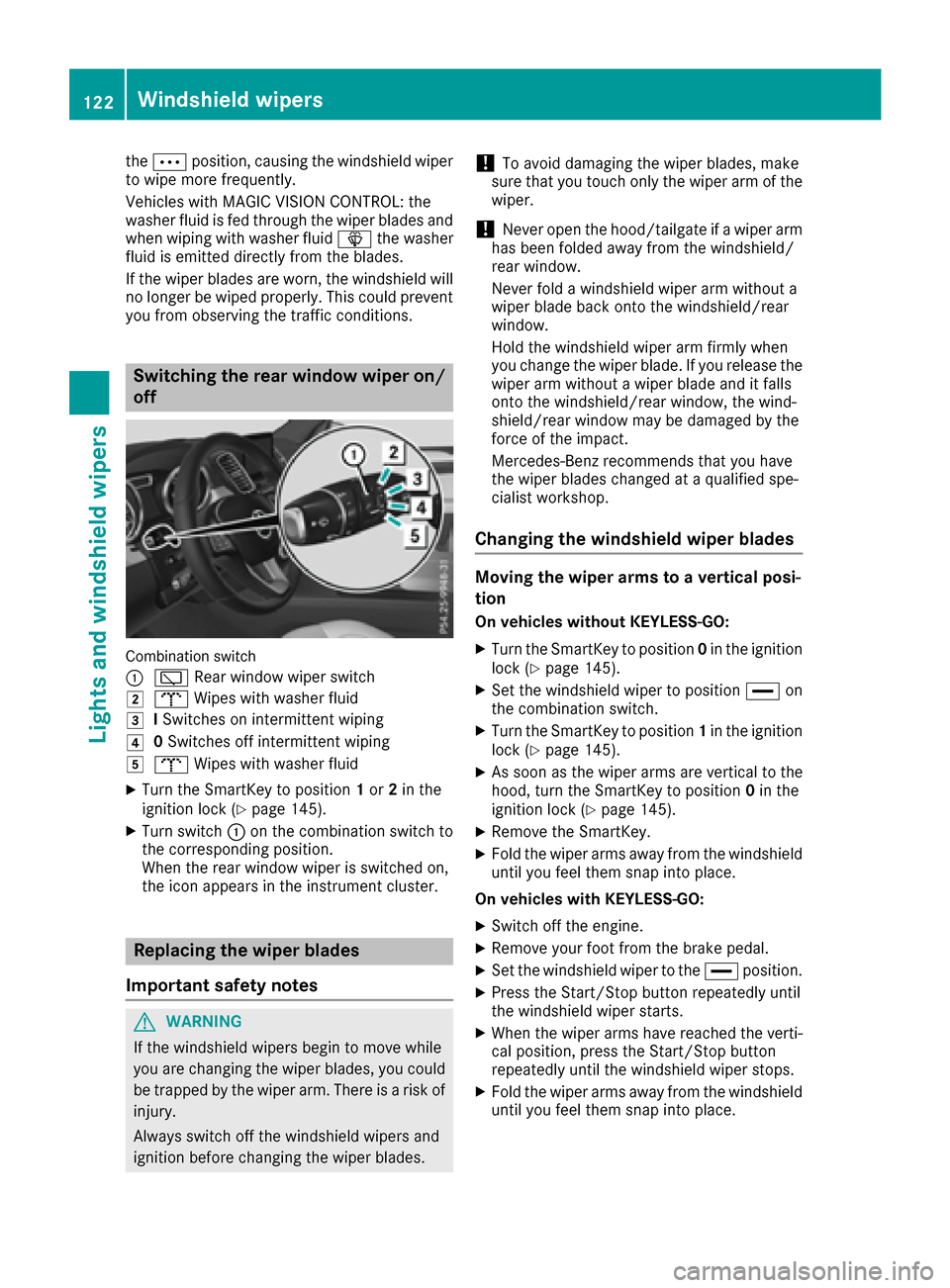
Combination switch
:
è Rear window wiper switch
2bWipes with washer fluid
3ISwitches on intermittent wiping
40 Switches off intermittent wiping
5b Wipes with washer fluid
XTurn the SmartKey to position 1or 2in the
ignition lock (Ypage 145).
XTurn switch :on the combination switch to
the corresponding position.
When the rear window wiper is switched on,
the icon appears in the instrument cluster.
Replacing the wiper blades
Important safety notes
GWARNING
If the windshield wipers begin to move while
you are changing the wiper blades, you could be trapped by the wiper arm. There is a risk of
injury.
Always switch off the windshield wipers and
ignition before changing the wiper blades.
!To avoid damaging the wiper blades, make
sure that you touch only the wiper arm of the
wiper.
!Never open the hood/tailgate if a wiper arm
has been folded away from the windshield/
rear window.
Never fold a windshield wiper arm without a
wiper blade back onto the windshield/rear
window.
Hold the windshield wiper arm firmly when
you change the wiper blade. If you release the
wiper arm without a wiper blade and it falls
onto the windshield/rear window, the wind-
shield/rear window may be damaged by the
force of the impact.
Mercedes-Benz recommends that you have
the wiper blades changed at a qualified spe-
cialist workshop.
Changing the windshield wiper blades
Moving the wiper arms to a vertical posi-
tion
On vehicles without KEYLESS-GO:
XTurn the SmartKey to position 0in the ignition
lock (Ypage 145).
XSet the windshield wiper to position °on
the combination switch.
XTurn the SmartKey to position 1in the ignition
lock (Ypage 145).
XAs soon as the wiper arms are vertical to the
hood, turn the SmartKey to position 0in the
ignition lock (
Ypage 145).
XRemove the SmartKey.
XFold the wiper arms away from the windshield
until you feel them snap into place.
On vehicles with KEYLESS-GO:
XSwitch off the engine.
XRemove your foot from the brake pedal.
XSet the windshield wiper to the °position.
XPress the Start/Stop button repeatedly until
the windshield wiper starts.
XWhen the wiper arms have reached the verti-
cal position, press the Start/Stop button
repeatedly until the windshield wiper stops.
XFold the wiper arms away from the windshield
until you feel them snap into place.
122Windshield wipers
Lights and windshield wiper s
Page 186 of 450
helps avoid overheating and excessive wear
of the brakes.
When you take advantage of the engine brak-
ing effect, a drive wheel may not turn for some
time, e.g. on a slippery road surface. This
could cause damage to the drive train. This
type of damage is not covered by the
Mercedes-Benz warranty.
Do not depress the brake pedal continuously
while the vehicle is in motion, e.g. causing the
brakes to rub by constantly applying light pres-
sure to the pedal. This results in excessive and
premature wear to the brake pads.
Heavy and light loads
GWARNING
If you rest your foot on the brake pedal while
driving, the braking system can overheat. This increases the stopping distance and can even
cause the braking system to fail. There is a
risk of an accident.
Never use the brake pedal as a footrest. Never
depress the brake pedal and the accelerator
pedal at the same time.
!Depressing the brake pedal constantly
results in excessive and premature wear to
the brake pads.
If the brakes have been subjected to a heavy
load, do not stop the vehicle immediately. Drive
on for a short while. This allows the airflow to
cool the brakes more quickly.
Wet roads
If you have driven for a long time in heavy rain
without braking, there may be a delayed reac-
tion from the brakes when braking for the first
time. This may also occur after the vehicle has
been washed or driven through deep water.
You then have to depress the brake pedal more
firmly. Maintain a greater distance from the
vehicle in front.
After driving on a wet road or having the vehicle
washed, brake firmly while paying attention to
the traffic conditions. This will warm up the
brake discs, thereby drying them more quickly
and protecting them against corrosion.
Limited braking performance on salt-
treated roads
If you drive on salted roads, a layer of salt resi-
due may form on the brake discs and brake
pads. This can result in a significantly longer
braking distance.
RBrake occasionally to remove any possible
salt residue. Make sure that you do not
endanger other road users when doing so.
RCarefully depress the brake pedal and the
beginning and end of a journey.
RMaintain a greater distance to the vehicle
ahead.
Servicing the brakes
!The brake fluid level may be too low, if:
Rif the red brake warning lamp lights up in
the instrument cluster and
Ryou hear a warning tone while the engine is
running
Observe additional warning messages in the
multifunction display.
The brake fluid level may be too low due to
brake pad wear or leaking brake lines.
Have the brake system checked immediately.
Consult a qualified specialist workshop to
arrange this.
!A function or performance test should only
be carried out on a 2-axle dynamometer. If
you wish to operate the vehicle on such a
dynamometer, please consult a qualified spe-
cialist workshop in advance. You could oth-
erwise damage the drive train or the brake
system.
!Because ESP®is an automatic system, the
engine and ignition must be switched off
(SmartKey in position 0or 1or Start/Stop
button in position 0or 1) when the electric
parking brake is being tested on a brake dyna-
mometer (maximum 10 seconds).
Braking triggered automatically by ESP
®may
seriously damage the brake system.
All checks and maintenance work on the brake
system must be carried out at a qualified spe-
cialist workshop.
Have brake pads installed and brake fluid
replaced at a qualified specialist workshop.
If the brake system has only been subject to
moderate loads, you should test the functional-
184Driving tips
Driving and parking
Page 187 of 450
ity of your brakes at regular intervals. To do so,
depress the brake pedal firmly when driving at a
high speed. This improves the grip of the brake
pads.
You can find a description of Brake Assist (BAS)on (
Ypage 67) or of BAS PLUS on (Ypage 67).
Mercedes-Benz recommends that you only have
brake pads/linings installed on your vehicle
which have been approved for Mercedes-Benz
vehicles or which correspond to an equivalent
quality standard. Brake pads/linings which have
not been approved for Mercedes-Benz vehicles
or which are not of an equivalent quality could
affect your vehicle's operating safety.
Mercedes-Benz recommends that you only use
brake fluid that has been specially approved for
your vehicle by Mercedes-Benz, or which corre-
sponds to an equivalent quality standard. Brake
fluid which has not been approved for
Mercedes-Benz vehicles or which is not of an
equivalent quality could affect your vehicle's
operating safety.
High-performance brake system
(Mercedes-AMG vehicles)
The high-performance brake system is designed
for heavy loads. This may lead to noise when
braking. This will depend on:
RSpeed
RBraking force
REnvironmental conditions, such as tempera-
ture and humidity
The wear of individual components of the brake
system, such as the brake pads/linings or brake
discs, depends on the individual driving style
and operating conditions.
For this reason, it is impossible to state a mile-
age that will be valid under all circumstances. An aggressive driving style will lead to high wear.
You can obtain further information about this
from your authorized Mercedes-Benz Center.
New and replaced brake pads and discs only
reach their optimum braking effect after several
hundred kilometers of driving. Compensate for
this by applying greater force to the brake pedal.
Keep this in mind, and adapt your driving and
braking accordingly during this break-in period.
Excessive heavy braking results in correspond-
ingly high brake wear. Observe the #brake
wear warning lamp in the instrument cluster and
note any brake status messages in the multi-
function display. Especially for high perform- ance driving, it is important to maintain and have
the brake system checked regularly.
Driving on wet roads
Hydroplaning
If water has accumulated to a certain depth on
the road surface, there is a danger of hydro-
planing occurring, even if:
Ryou drive at low speeds.
Rthe tires have adequate tread depth.
For this reason, in the event of heavy rain or in
conditions in which hydroplaning may occur,
you must drive in the following manner:
Rlower your speed.
Ravoid ruts.
Ravoid sudden steering movements.
Rbrake carefully.
Driving on flooded roads
!Do not drive through flooded areas. Check
the depth of any water before driving through
it. Drive slowly through standing water. Oth-
erwise, water may enter the vehicle interior or
the engine compartment. This can damage
the electronic components in the engine or
the automatic transmission. Water can also
be drawn in by the engine's air suction nozzles
and this can cause engine damage.
iVehicles with the AIRMATIC package:
select the raised vehicle level before driving
through a body of water.
Off-road fording
!Under no circumstances should you accel-
erate before entering the water. The bow
wave could cause water to enter and damage
the engine and other assemblies.
!Do not open any of the vehicle's doors while
fording. Otherwise, water could get into the
vehicle interior and damage the vehicle's
electronics and interior equipment.
REstablish how deep the water is and the char-
acteristics of the body of water before ford-
ing.
RSelect the highest possible vehicle level.
Driving tips185
Driving and parking
Z
Page 288 of 450
Display messagesPossible causes/consequences andMSolutions
F(USA
only)
!( Canada
only)
Parkin gBrake Inop‐
erativ e
The yellow !warning lamp lights up. The red F(USAonly)
or ! (Canada only) indicator lamp flashes for about te nseconds
after th eelectric parking brak ehas been applie dor released. It then
goe sout or remain slit .
The electric parking brak eis malfunctioning ,e.g. because of over-
voltag eor undervoltage.
XRemove th ecaus efor th eovervoltage or undervoltage, e.g. by
charging th ebattery or restarting th eengine.
XEngage or release th eelectric parking brake.
If it remain simpossible to apply or release th eelectric parking brake:
XSwitc hoff th eignition and tur nit bac kon .
XEngage or release th eelectric parking brake.
If th eelectric parking brak estill canno tbe released:
XConsult aqualified specialist workshop .
If th eelectric parking brak estill canno tbe applied:
XVisit aqualified specialist workshop .
The yellow!warning lamp lights up and th ered F (USAonly)
or ! (Canada only) indicator lamp flashes .
It is no tpossibl eto apply th eelectric parking brak emanually.
XShift th etransmission to position P.
XVisitaqualified specialist workshop .
$(USA
only)
J( Canada
only)
Check Brake Fluid
Level
There is no tenough brak eflui din th ebrak eflui dreservoir .In addition ,
th e$ (USAonly) or J(Canada only) warning lamp lights up in
th einstrumen tcluste rand awarning tone sounds.
GWARNIN G
The braking effec tmay be impaired.
There is aris kof an accident.
XPull ove rand stop th evehicl esafely as soo nas possible, payin g
attention to roa dand traffic conditions. Do no tcontinu edrivin g
under any circumstances.
XSecur eth evehicl eagainst rollin gaway (Ypage 178).
XConsult aqualified specialist workshop .
XDo notadd brak efluid .This does no tcorrec tth emalfunction .
#
CheckBrakePadWear
The brak epads/linings hav ereached their wear limit.
US Aonly: th e$ red brak esystem warning lamp is lit while th e
engin eis running.
XVisit aqualified specialist workshop .
G
Inoperative
Oneor mor emain features of th embrace system are malfunctioning .
XVisitaqualified specialist workshop .
286Display messages
On-board computer and displays
Page 319 of 450
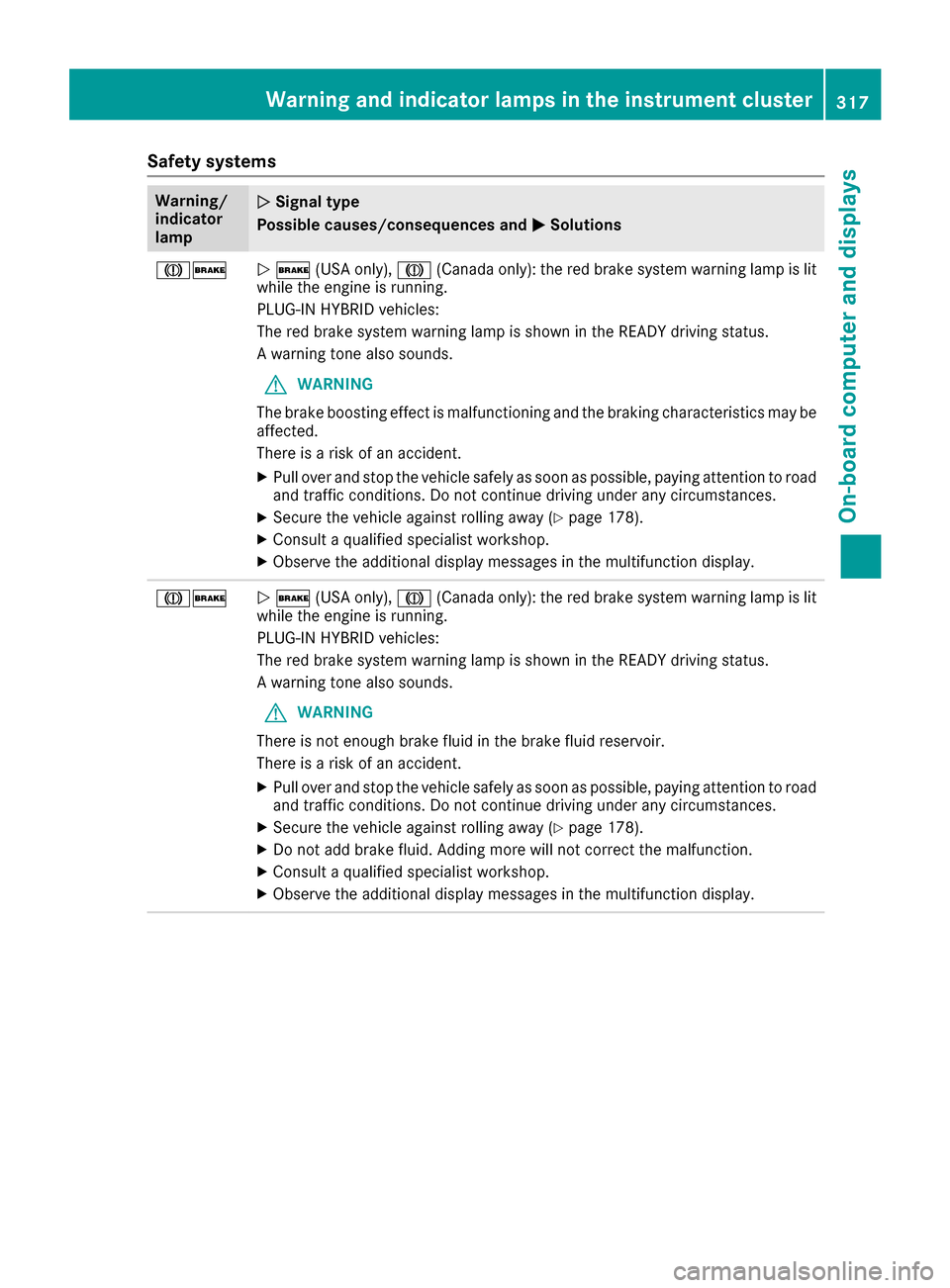
Safety systems
Warning/
indicator
lampNSignal type
Possible causes/consequences and M
Solutions
J$N$ (USA only), J(Canada only): the red brake system warning lamp is lit
while the engine is running.
PLUG-IN HYBRID vehicles:
The red brake system warning lamp is shown in the READY driving status.
A warning tone also sounds.
GWARNING
The brake boosting effect is malfunctioning and the braking characteristics may be
affected.
There is a risk of an accident.
XPull over and stop the vehicle safely as soon as possible, paying attention to road
and traffic conditions. Do not continue driving under any circumstances.
XSecure the vehicle against rolling away (Ypage 178).
XConsult a qualified specialist workshop.
XObserve the additional display messages in the multifunction display.
J$N $ (USA only), J(Canada only): the red brake system warning lamp is lit
while the engine is running.
PLUG-IN HYBRID vehicles:
The red brake system warning lamp is shown in the READY driving status.
A warning tone also sounds.
GWARNING
There is not enough brake fluid in the brake fluid reservoir.
There is a risk of an accident.
XPull over and stop the vehicle safely as soon as possible, paying attention to road
and traffic conditions. Do not continue driving under any circumstances.
XSecure the vehicle against rolling away (Ypage 178).
XDo not add brake fluid. Adding more will not correct the malfunction.
XConsult a qualified specialist workshop.
XObserve the additional display messages in the multifunction display.
Warning and indicator lamps in the instrument cluster317
On-board computer and displays
Z
Page 365 of 450
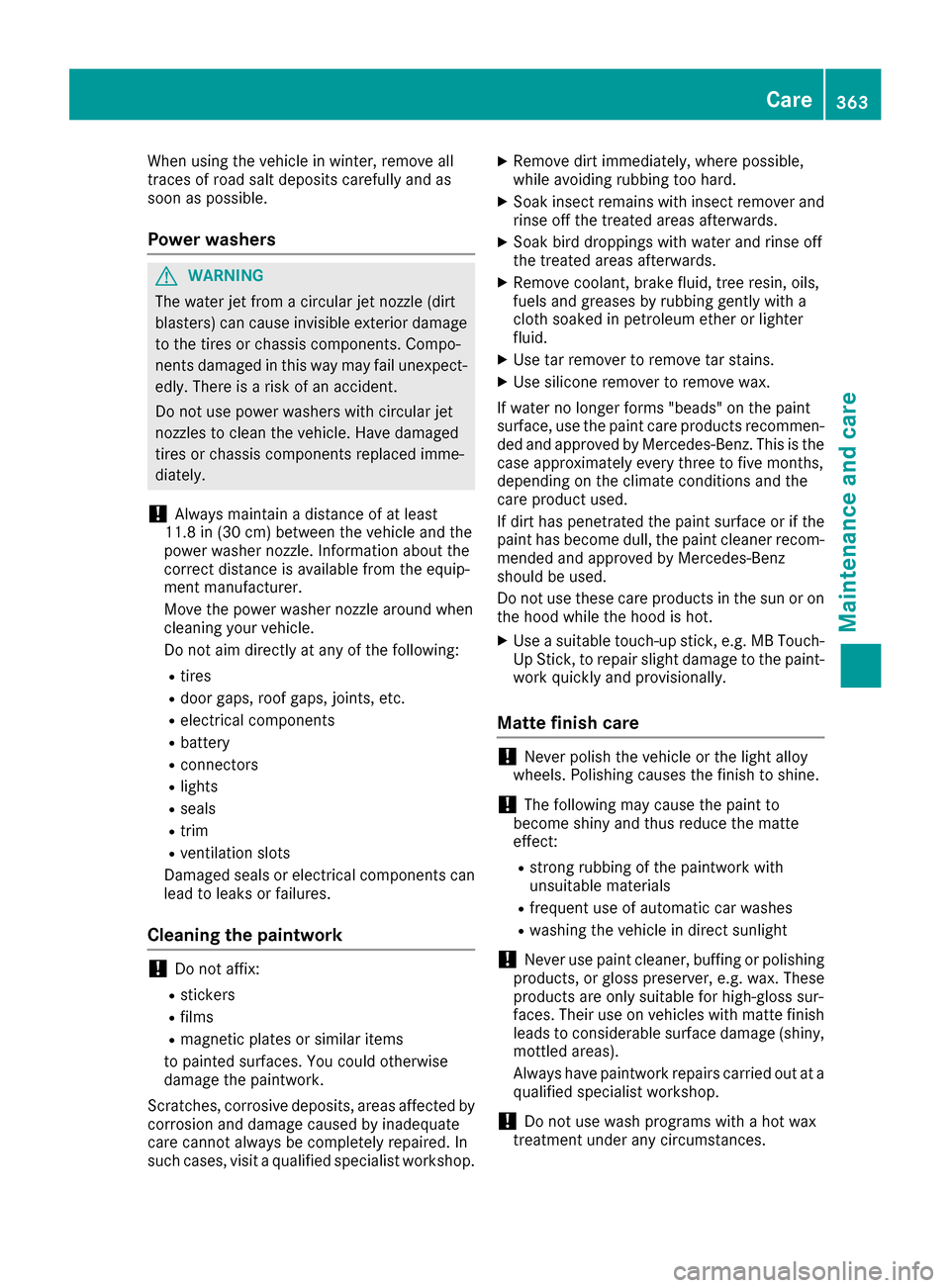
When using the vehicle in winter, remove all
traces of road salt deposits carefully and as
soon as possible.
Power washers
GWARNING
The water jet from a circular jet nozzle (dirt
blasters) can cause invisible exterior damage
to the tires or chassis components. Compo-
nents damaged in this way may fail unexpect-
edly. There is a risk of an accident.
Do not use power washers with circular jet
nozzles to clean the vehicle. Have damaged
tires or chassis components replaced imme-
diately.
!Always maintain a distance of at least
11.8 in (30 cm) between the vehicle and the
power washer nozzle. Information about the
correct distance is available from the equip-
ment manufacturer.
Move the power washer nozzle around when
cleaning your vehicle.
Do not aim directly at any of the following:
Rtires
Rdoor gaps, roof gaps, joints, etc.
Relectrical components
Rbattery
Rconnectors
Rlights
Rseals
Rtrim
Rventilation slots
Damaged seals or electrical components can
lead to leaks or failures.
Cleaning the paintwork
!Do not affix:
Rstickers
Rfilms
Rmagnetic plates or similar items
to painted surfaces. You could otherwise
damage the paintwork.
Scratches, corrosive deposits, areas affected by
corrosion and damage caused by inadequate
care cannot always be completely repaired. In
such cases, visit a qualified specialist workshop.
XRemove dirt immediately, where possible,
while avoiding rubbing too hard.
XSoak insect remains with insect remover and
rinse off the treated areas afterwards.
XSoak bird droppings with water and rinse off
the treated areas afterwards.
XRemove coolant, brake fluid, tree resin, oils,
fuels and greases by rubbing gently with a
cloth soaked in petroleum ether or lighter
fluid.
XUse tar remover to remove tar stains.
XUse silicone remover to remove wax.
If water no longer forms "beads" on the paint
surface, use the paint care products recommen-
ded and approved by Mercedes-Benz. This is the
case approximately every three to five months,
depending on the climate conditions and the
care product used.
If dirt has penetrated the paint surface or if the
paint has become dull, the paint cleaner recom-
mended and approved by Mercedes-Benz
should be used.
Do not use these care products in the sun or on
the hood while the hood is hot.
XUse a suitable touch-up stick, e.g. MB Touch-
Up Stick, to repair slight damage to the paint-
work quickly and provisionally.
Matte finish care
!Never polish the vehicle or the light alloy
wheels. Polishing causes the finish to shine.
!The following may cause the paint to
become shiny and thus reduce the matte
effect:
Rstrong rubbing of the paintwork with
unsuitable materials
Rfrequent use of automatic car washes
Rwashing the vehicle in direct sunlight
!Never use paint cleaner, buffing or polishing
products, or gloss preserver, e.g. wax. These
products are only suitable for high-gloss sur-
faces. Their use on vehicles with matte finish
leads to considerable surface damage (shiny,
mottled areas).
Always have paintwork repairs carried out at a
qualified specialist workshop.
!Do not use wash programs with a hot wax
treatment under any circumstances.
Care363
Maintenance and care
Z