service MERCEDES-BENZ GLE-CLASS SUV 2016 Owner's Manual
[x] Cancel search | Manufacturer: MERCEDES-BENZ, Model Year: 2016, Model line: GLE-CLASS SUV, Model: MERCEDES-BENZ GLE-CLASS SUV 2016Pages: 450, PDF Size: 10.52 MB
Page 228 of 450
On long journeys, take regular breaks in good
time to allow yourself to rest. If you do not take
a break, you will be warned again after
15 minutes at the earliest. This will only happen
if ATTENTION ASSIST still detects typical indi-
cators of fatigue or increasing lapses in concen-
tration.
Vehicles with COMAND:if a warning is issued
in the multifunction display, a service station
search is performed in COMAND. You can select a service station and navigation to this service
station will then begin. This function can be acti-
vated and deactivated in COMAND.
Traffic Sign Assist
General notes
Traffic Sign Assist displays the maximum speed
permitted to the driver in the instrument cluster.
The data stored in the navigation system and
general traffic regulations are used to determine
the current speed limit.
As Traffic Sign Assist is a map-based system,
traffic signs put up temporarily (e.g. near road-
works) are not detected.
If a traffic sign that is relevant to your vehicle is
passed, the display of the speed limits is upda-
ted.
Traffic signs with a restriction indicated by an
additional sign (e.g. in wet conditions) are also
shown.
The traffic signs are only displayed with the
restrictions if:
Rthe regulation must be observed with the
restriction, or
RTraffic Sign Assist is unable to determine
whether the restriction applies
If Traffic Sign Assist is unable to determine a
maximum permitted speed from any of the avail-
able sources, no speed limit is displayed in the
instrument cluster either.
Traffic Sign Assist is not available in all coun-
tries. In this case, symbol :is shown in the
assistance graphic display (
Ypage 271).
Important safety notes
Traffic Sign Assist is only an aid and is not always
able to correctly display speed limits. Traffic
signs always have priority over the Traffic Sign
Assist display.
The system may be either functionally impaired
or temporarily unavailable if the information in
the digital street map of the navigation system is
incorrect or out of date.
Instrument cluster display
Displaying the assistance graphic
XCall up the assistance graphics display func-
tion using the on-board computer
(
Ypage 271).
XSelect the Traffic Sign Assist display.
Detected traffic signs are displayed in the
instrument cluster.
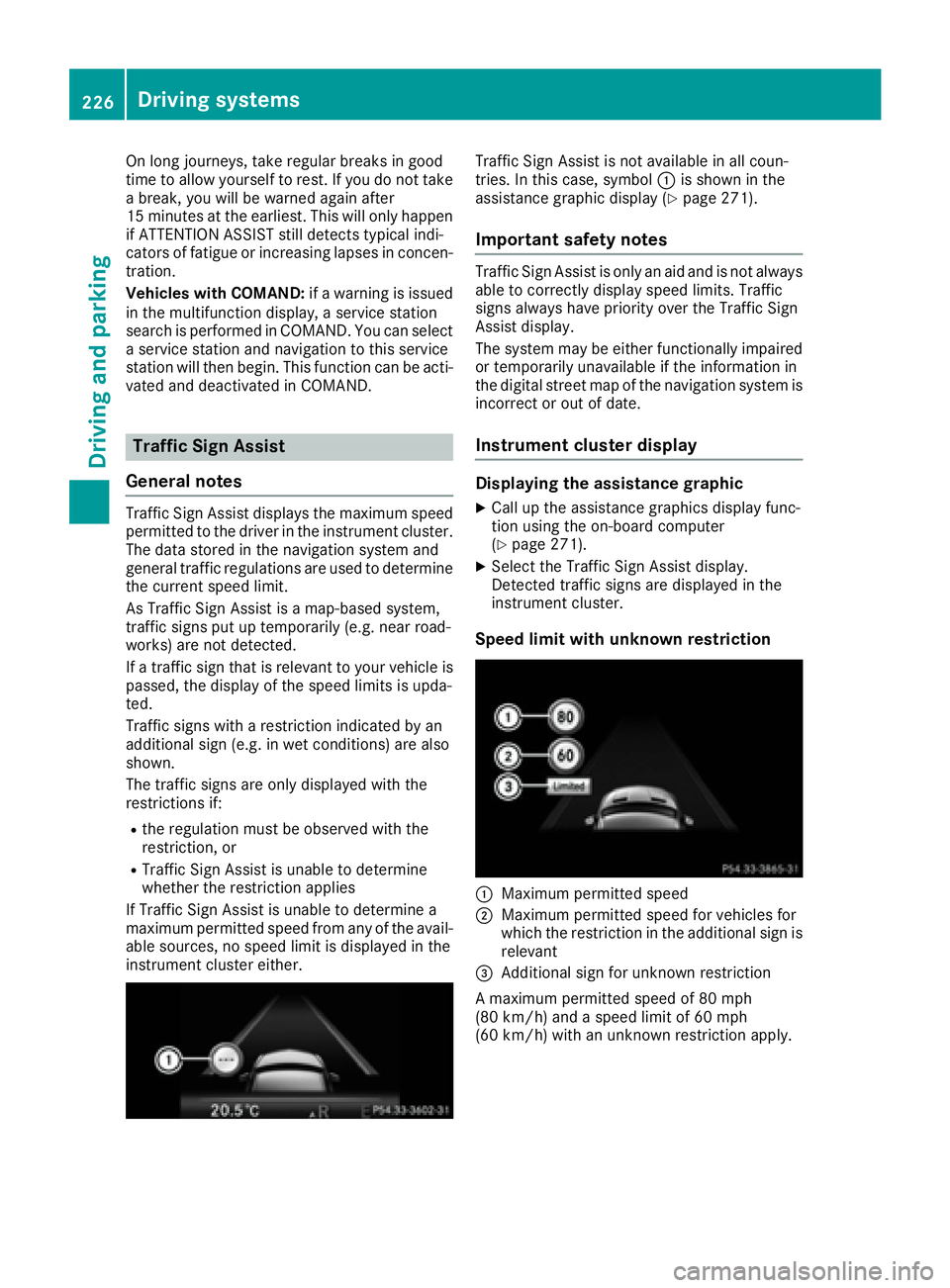
Speed limit with unknown restriction
:Maximum permitted speed
;Maximum permitted speed for vehicles for
which the restriction in the additional sign is relevant
=Additional sign for unknown restriction
A maximum permitted speed of 80 mph
(80 km/h) and a speed limit of 60 mph
(60 km/h) with an unknown restriction apply.
226Driving systems
Driving and parking
Page 254 of 450
Activating when driving with the electric motor:
XPull the left or right steering wheel paddle
shifter (Ypage 159).
The combustion engine is switched on. Man-
ual gearshifting is activated temporarily. The
selected gear and Mappear in the multifunc-
tion display.
Activating when driving with the combustion
engine:
XPull the left or right steering wheel paddle
shifter (Ypage 159).
Manual gearshifting is activated temporarily.
The selected gear and Mappear in the multi-
function display.
The ECO start/stop function is not available
when manually changing gear.
For further information on the manual drive pro-
gram (
Ypage 159).
Driving tips
General driving tips
Drive carefully and maintain a safe distance
from the vehicle in front. Avoid frequent and
sudden acceleration as well as abrupt braking.
During partial electric driving, pulling away and
acceleration, the electric motor supports the
internal combustion engine.
During overrun in transmission position Dand
braking, the electric motor will operate as a gen-
erator.
Further information on the ECO start/stop func-
tion (
Ypage 253).
Additional driving tips (
Ypage 181).
Stationary vehicle
If the vehicle is stopped, the combustion engine
is, for the most part, switched off. Automatic
climate control continues to function. The elec-
tromechanically assisted steering gear allows
you to use the power steering without reduced
comfort.
Acceleration
Depending on the operating mode, pulling away
and driving under low load conditions are per-
formed:
Rentirely by electric propulsion
Rin combination with the internal combustion
engine When accelerating rapidly under increased or
full load, increased boost mode is utilized. The
electric motor supports the combustion engine
by providing additional drive torque.
Overrun mode or braking
There are three possible operating modes when
the hybrid vehicle is decelerating:
Renergy recovery takes place even when the
vehicle is decelerating purely in overrun mode
(
Ypage 242). The electric motor operates as
a generator and stores the recovered energy
in the high-voltage battery.
Rwhen the brakes are applied lightly, the vehi-
cle is slowed down further by the electric
motor. This increases the energy recovery
taking place (
Ypage 242). The electric motor
operates as a generator and stores the recov- ered energy in the high-voltage battery.
Rwhen the brakes are applied with greater
force, the service brakes are also used to slow
the vehicle down. The two systems work
together.
Urban driving
In city traffic, energy is recuperated during fre-
quent deceleration phases.
The vehicle can be driven by the electric motor
alone up to a speed of approximately 80 mph
(130 km/h).
The vehicle is driven by the electric motor alone
only when all conditions for the automatic
engine switch-off are fulfilled.
Further information on the automatic engine
switch-off (
Ypage 253).
Driving on inter-urban roads
The following phases are possible when driving
on inter-urban roads:
Rrapid acceleration (boost mode)
Renergy recuperation
Relectric operation mode
The vehicle can be driven by the electric motor
alone up to a speed of approximately 74 mph
(120 km/h).
A great deal of recovered energy may be avail-
able, depending on the route profile. This
reduces consumption and emissions.
252PLUG-IN HYBRID operation
Driving an d parking
Page 266 of 450
Outside temperature display
You should pay special attention to road condi-
tions when temperatures are around freezing
point.
Bear in mind that the outside temperature dis-
play indicates the temperature measured and
does not record the road temperature.
The outside temperature display is in the multi-function display (
Ypage 265).
There is a short delay before a change in outside
temperature appears in the multifunction dis-
play.
Coolant temperature display
GWARNING
Opening the hood when the engine is over-
heated or when there is a fire in the engine
compartment could expose you to hot gases
or other service products. There is a risk of
injury.
Let an overheated engine cool down before
opening the hood. If there is a fire in the
engine compartment, keep the hood closed
and contact the fire department.
!A display message is shown if the coolant
temperature is too high.
If the coolant temperature is over 248 ‡
(120 †), do not continue driving. The engine
will otherwise be damaged.
All vehicles except PLUG-IN HYBRID vehicles:
the coolant temperature gauge is in the instru-
ment cluster on the right-hand side (
Ypage 34).
PLUG-IN HYBRID vehicles: the multifunction dis-
play shows the coolant temperature in the
Coolant
(Ypage 273) submenu.
Under normal operating conditions and with the
specified coolant level, the coolant temperature
may rise to 248 ‡ (120 †).
Operating the on-board computer
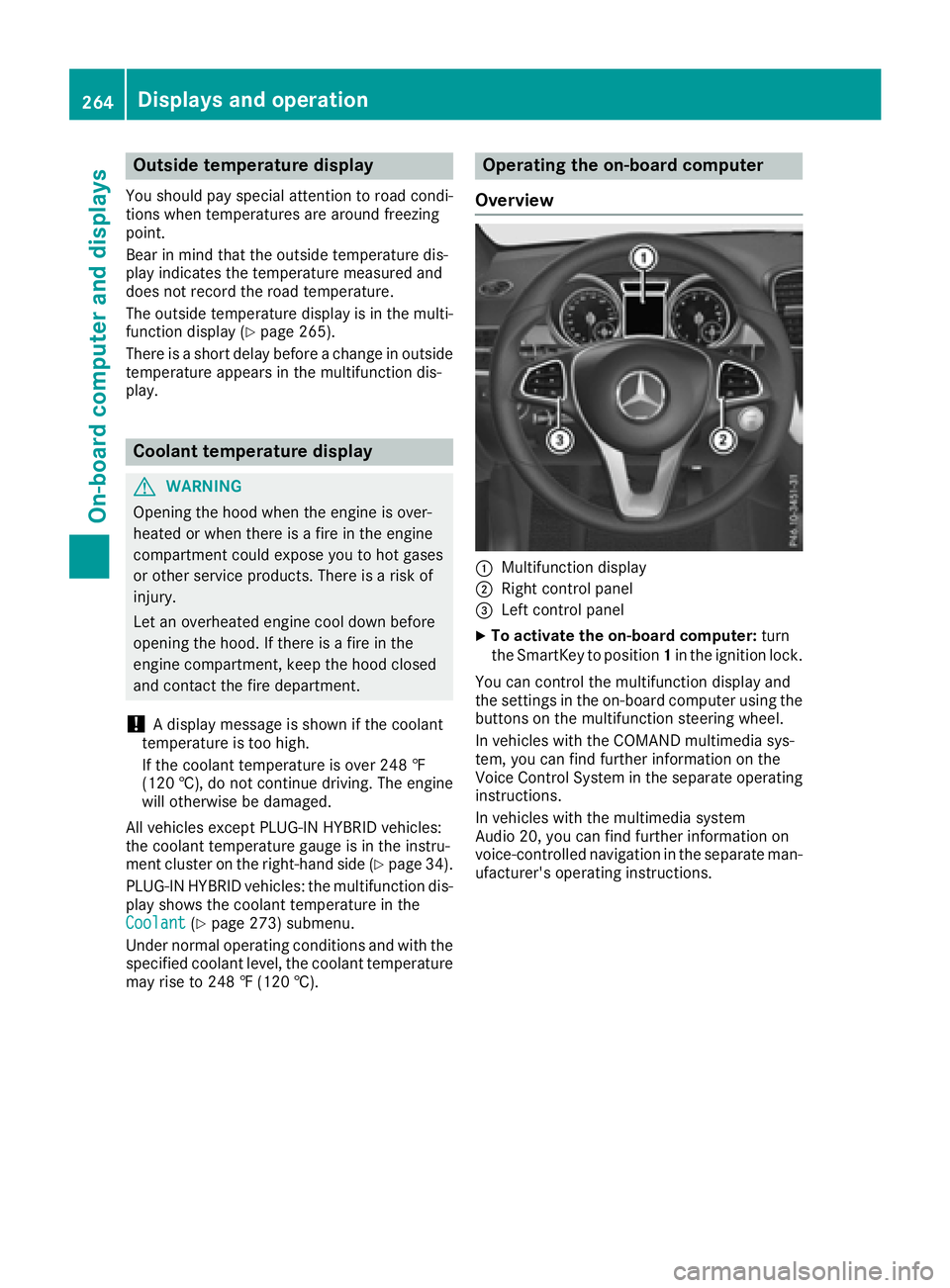
Overview
:Multifunction display
;Right control panel
=Left control panel
XTo activate the on-board computer: turn
the SmartKey to position 1in the ignition lock.
You can control the multifunction display and
the settings in the on-board computer using the
buttons on the multifunction steering wheel.
In vehicles with the COMAND multimedia sys-
tem, you can find further information on the
Voice Control System in the separate operating
instructions.
In vehicles with the multimedia system
Audio 20, you can find further information on
voice-controlled navigation in the separate man-
ufacturer's operating instructions.
264Displays and operation
On-board computer and displays
Page 272 of 450
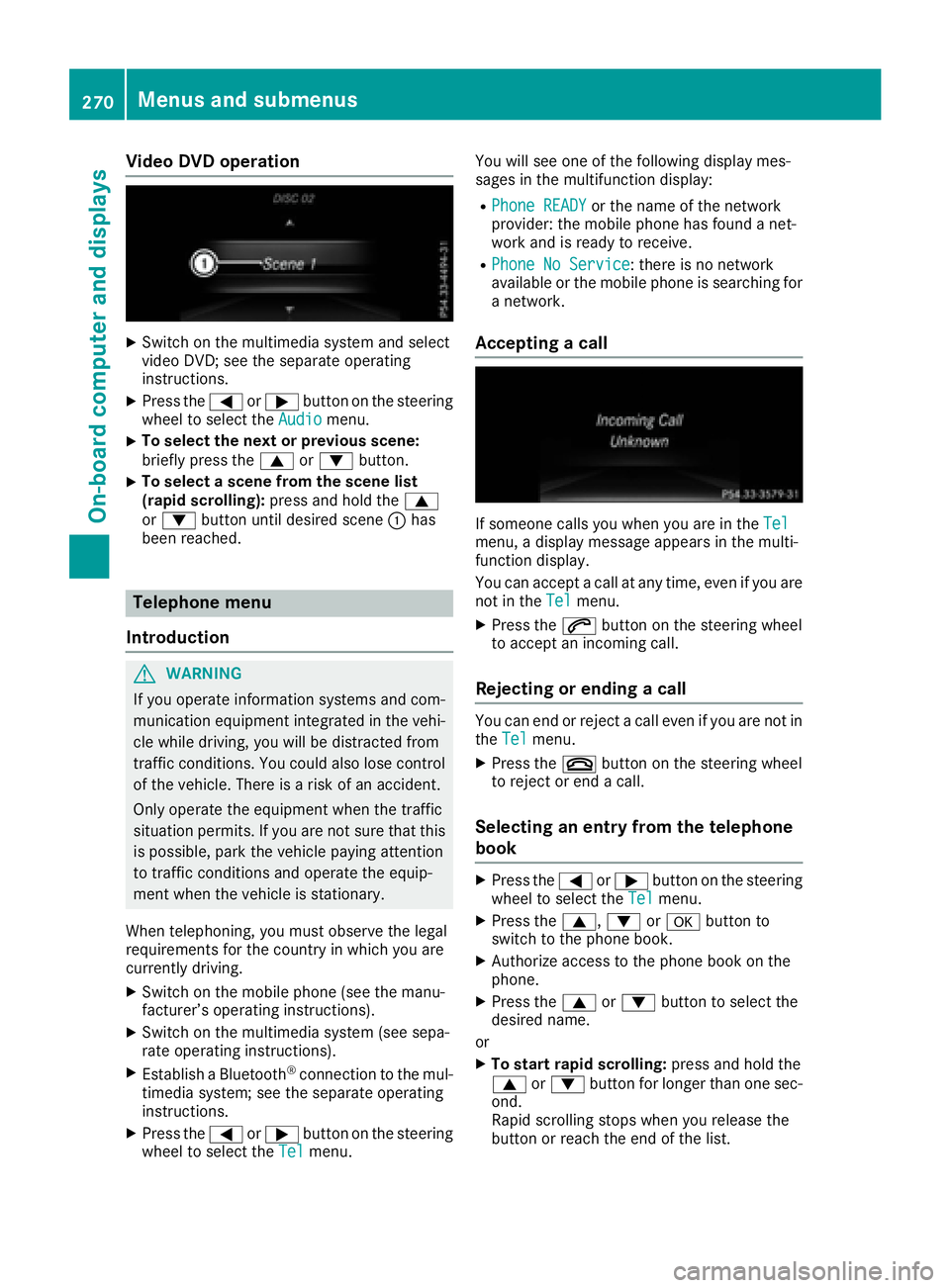
Video DVD operation
XSwitch on the multimedia system and select
video DVD; see the separate operating
instructions.
XPress the=or; button on the steering
wheel to select the Audiomenu.
XTo select the next or previous scene:
briefly press the9or: button.
XTo select a scene from the scene list
(rapid scrolling): press and hold the 9
or : button until desired scene :has
been reached.
Telephone menu
Introduction
GWARNING
If you operate information systems and com-
munication equipment integrated in the vehi-
cle while driving, you will be distracted from
traffic conditions. You could also lose control
of the vehicle. There is a risk of an accident.
Only operate the equipment when the traffic
situation permits. If you are not sure that this
is possible, park the vehicle paying attention
to traffic conditions and operate the equip-
ment when the vehicle is stationary.
When telephoning, you must observe the legal
requirements for the country in which you are
currently driving.
XSwitch on the mobile phone (see the manu-
facturer’s operating instructions).
XSwitch on the multimedia system (see sepa-
rate operating instructions).
XEstablish a Bluetooth®connection to the mul-
timedia system; see the separate operating
instructions.
XPress the =or; button on the steering
wheel to select the Telmenu. You will see one of the following display mes-
sages in the multifunction display:
RPhone READYor the name of the network
provider: the mobile phone has found a net-
work and is ready to receive.
RPhone No Service: there is no network
available or the mobile phone is searching for
a network.
Accepting a call
If someone calls you when you are in the Telmenu, a display message appears in the multi-
function display.
You can accept a call at any time, even if you are
not in theTel
menu.
XPress the6button on the steering wheel
to accept an incoming call.
Rejecting or ending a call
You can end or reject a call even if you are not in
the Telmenu.
XPress the ~button on the steering wheel
to reject or end a call.
Selecting an entry from the telephone
book
XPress the =or; button on the steering
wheel to select the Telmenu.
XPress the9,:ora button to
switch to the phone book.
XAuthorize access to the phone book on the
phone.
XPress the 9or: button to select the
desired name.
or
XTo start rapid scrolling: press and hold the
9 or: button for longer than one sec-
ond.
Rapid scrolling stops when you release the
button or reach the end of the list.
270Menus and submenus
On-board computer and displays
Page 275 of 450
XPress the:or9 button to set Off,
Standardor Adaptive.
When Lane Keeping Assist or Active Lane
Keeping Assist is activated, the multifunction
display shows the lane markings as bright
lines in the assistance graphic.
XPress the abutton to save the setting.
For further information about Lane Keeping
Assist, see (
Ypage 229).
For further information about Active Lane Keep-
ing Assist, see (
Ypage 233).
Service menu
Introduction
Depending on the equipment installed in the
vehicle, you have the following options in the
Serv.
menu:
RCalling up display messages in message
memory (Ypage 280)
RRestarting the tire pressure loss warning sys-
tem (Ypage 394) or checking the tire pres-
sure electronically (Ypage 396)
RCalling up the service due date
(Ypage 360)
RDisplaying the coolant temperature (PLUG-IN HYBRID vehicles) (Ypage 273)
Displaying the coolant temperature
The Coolantmenu is only available on PLUG-IN
HYBRID vehicles.
Observe the notes on coolant temperature
(
Ypage 264).
XPress the =or; button on the steering
wheel to select the Sett.menu.
XPress the:or9 button to select the
Serv.submenu.
XConfirm by pressing aon the steering
wheel.
XPress the :or9 button to select the
Coolantsubmenu.
XPress ato confirm your selection.
The coolant temperature is shown in a bar
display.
Settings menu
Introduction
Depending on the equipment installed in the
vehicle, In the Sett.menu you have the follow-
ing options:
RChanging HYBRID settings (PLUG-IN HYBRID
vehicles) (Ypage 273)
RChanging the instrument cluster settings
(Ypage 274)
RChanging the light settings (Ypage 275)
RChanging the vehicle settings (Ypage 275)
RChanging the convenience settings
(Ypage 275)
RRestoring the factory settings (Ypage 276)
HYBRID submenu (PLUG-IN HYBRID
vehicles)
Setting the maximum charge current
Using the MaximumChargeCurrent:function,
you can limit the charge current value at which
the high-voltage battery should be charged.
Before charging the high-voltage battery at a
power socket, check the maximum permissible
charge current for the relevant power socket or
the building.
Only set the maximum permissible charge cur-
rent using the function if:
Rit is not possible to set the charge current on
the charging cable
Rthe precise maximum permitted charge cur-
rent can only be set via the on-board com-
puter
Menus and submenus273
On-board computer and displays
Z
Page 276 of 450
Before charging the high-voltage battery at a
wallbox or charging station, ensure that the
charging current is not limited by the function. If
charging at a wallbox or a charging station,
select the maximum value.
Further information on charging the high-volt-
age battery and setting the charge current
(PLUG-IN HYBRID vehicles) (
Ypage 170).
XPress the=or; button on the steering
wheel to select the Sett.menu.
XPress the:or9 button to select the
HYBRID PLUSsubmenu.
XConfirm by pressing aon the steering
wheel.
XPress the :or9 button to select the
Maximum Charge Current:function.
You will see the selected setting.
XPress the abutton to save the setting.
The maximum charge current values in the on-
board computer may deviate from the charg- ing cable values.
Further information on charging the high-volt-
age battery (PLUG-IN HYBRID vehicles)
(
Ypage 170).
Setting the departure time
You can climatize the vehicle interior prior to
your departure with the "Set departure time"
function. Further information on pre-entry cli-
mate control (
Ypage 140).
If you recharge the high-voltage battery, the
function also displays the charging prediction.
XPress the =or; button on the steering
wheel to select the Sett.menu.
XPress the:or9 button to select the
HYBRID PLUSsubmenu.
XConfirm by pressing aon the steering
wheel.
XPress the :or9 button to select the
Departure Time:function.
You will see the selected setting.
XTo set no departure time: press the:or
9 button to select No Preselection
.
XPressato confirm.
If you recharge the high-voltage battery, the
multifunction display also shows the time
when the high-voltage battery will be fully
charged.
or
XTo set a departure time: press the:or
9 A
,Bor Cto select the desired preset.
XPress the abutton to confirm the selec-
tion.
XPress :or9 to set the hours.
XPress ato confirm.
XPress :or9 to set the minutes.
XPress ato confirm.
If you recharge the high-voltage battery, the
multifunction display shows the expected
condition of charge of the high-voltage bat-
tery for the departure time set.
Further information on charging the high-volt-
age battery (PLUG-IN HYBRID vehicles)
(
Ypage 170).
Instrument cluster submenu
Selecting the distance unit
The Display Unit Speedometer / Odome‐ter:function allows you to choose whether
certain displays appear in kilometers or miles in
the multifunction display.
XPress the =or; button on the steering
wheel to select the Sett.menu.
XPress the:or9 button to select the
Instrument Clustersubmenu.
XPress ato confirm.
XPress the :or9 button to select the
Display Unit Speedometer / Odometer
function.
You will see the selected setting: kmormiles.
XPress the abutton to save the setting.
The selected unit of measurement for distance
applies to:
RDigital speedometer in the Tripmenu
ROdometer and the trip odometer
RTrip computer
RCurrent consumption and the range
RNavigation instructions in the Navimenu
RCruise control
RDISTRONIC PLUS
RASSYST PLUS service interval display
Selecting permanent display
ThePermanent Display:function allows you
to choose whether the multifunction display
always shows the outside temperature or the
speed.
The speed display is inverse to the speedome-
ter.
274Menus and submenus
On-board computer and displays
Page 291 of 450
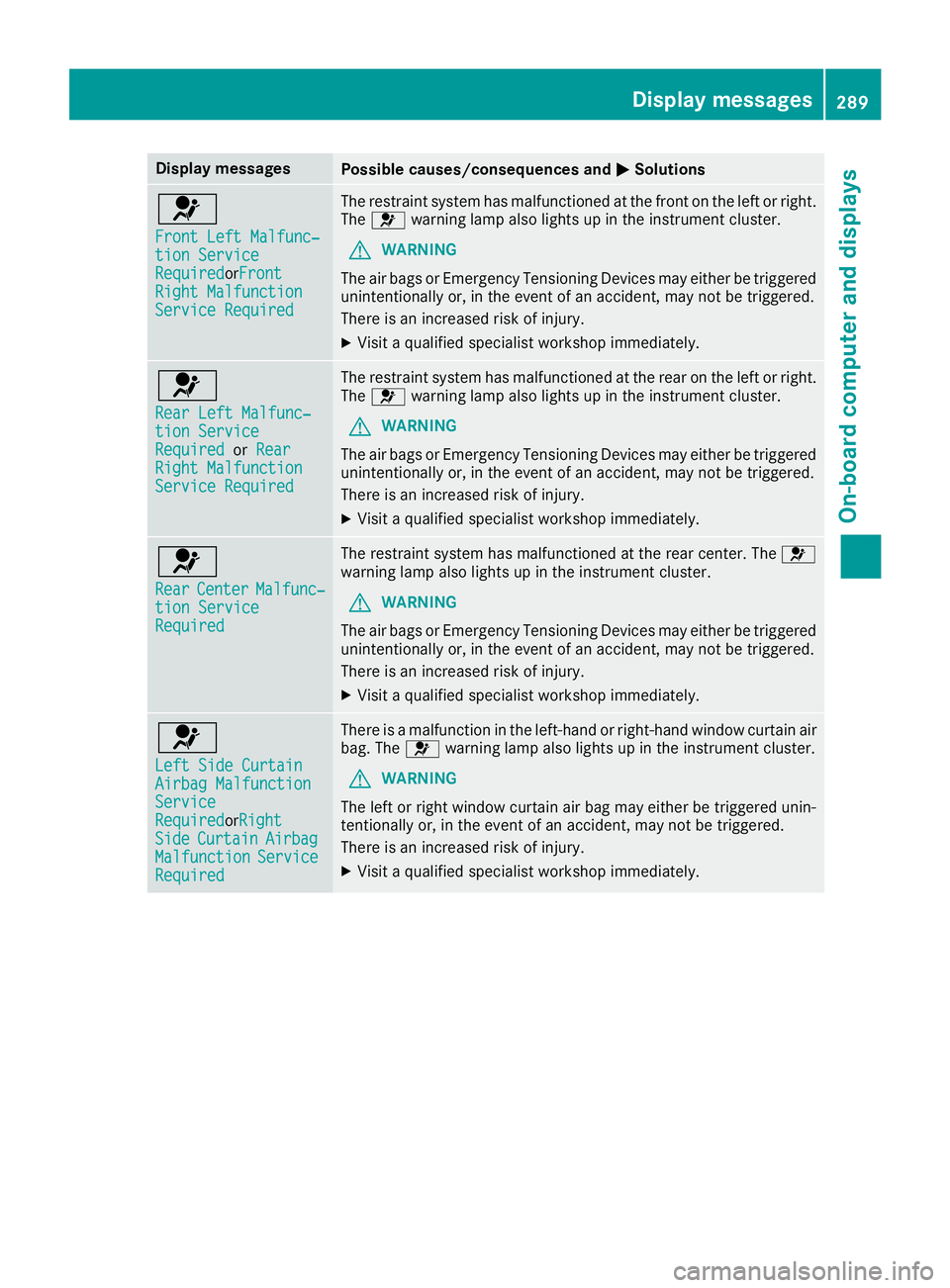
Display messagesPossible causes/consequences andMSolutions
6
Front LeftMalfunc‐tio nServic eRequiredorFron tRight MalfunctionServic eRequired
The restrain tsystem has malfunctioned at th efron ton th elef tor right .
The 6 warning lamp also lights up in th einstrumen tcluster.
GWARNIN G
The air bags or Emergency Tensioning Devices may either be triggered
unintentionally or, in th eevent of an accident, may no tbe triggered .
There is an increased ris kof injury.
XVisit aqualified specialist workshop immediately.
6
Rea rLef tMalfunc‐tio nServic eRequiredorRea rRight MalfunctionServic eRequired
The restrain tsystem has malfunctioned at th erear on th elef tor right .
The 6 warning lamp also lights up in th einstrumen tcluster.
GWARNIN G
The air bags or Emergency Tensioning Devices may either be triggered
unintentionally or, in th eevent of an accident, may no tbe triggered .
There is an increased ris kof injury.
XVisit aqualified specialist workshop immediately.
6
Rea rCenterMalfunc‐tionServic eRequired
The restrain tsystem has malfunctioned at th erear center. The 6
warning lamp also lights up in th einstrumen tcluster.
GWARNIN G
The air bags or Emergency Tensioning Devices may either be triggered
unintentionally or, in th eevent of an accident, may no tbe triggered .
There is an increased ris kof injury.
XVisit aqualified specialist workshop immediately.
6
Lef tSid eCurtai nAirbag MalfunctionServiceRequiredorRigh tSideCurtai nAirbagMalfunctionServiceRequired
There is amalfunction in th eleft-han dor right-hand window curtai nair
bag. The 6warning lamp also lights up in th einstrumen tcluster.
GWARNIN G
The lef tor right window curtai nair bag may either be triggered unin-
tentionally or, in th eevent of an accident, may no tbe triggered .
There is an increased ris kof injury.
XVisit aqualified specialist workshop immediately.
Display messages28 9
On-board computer and displays
Z
Page 302 of 450
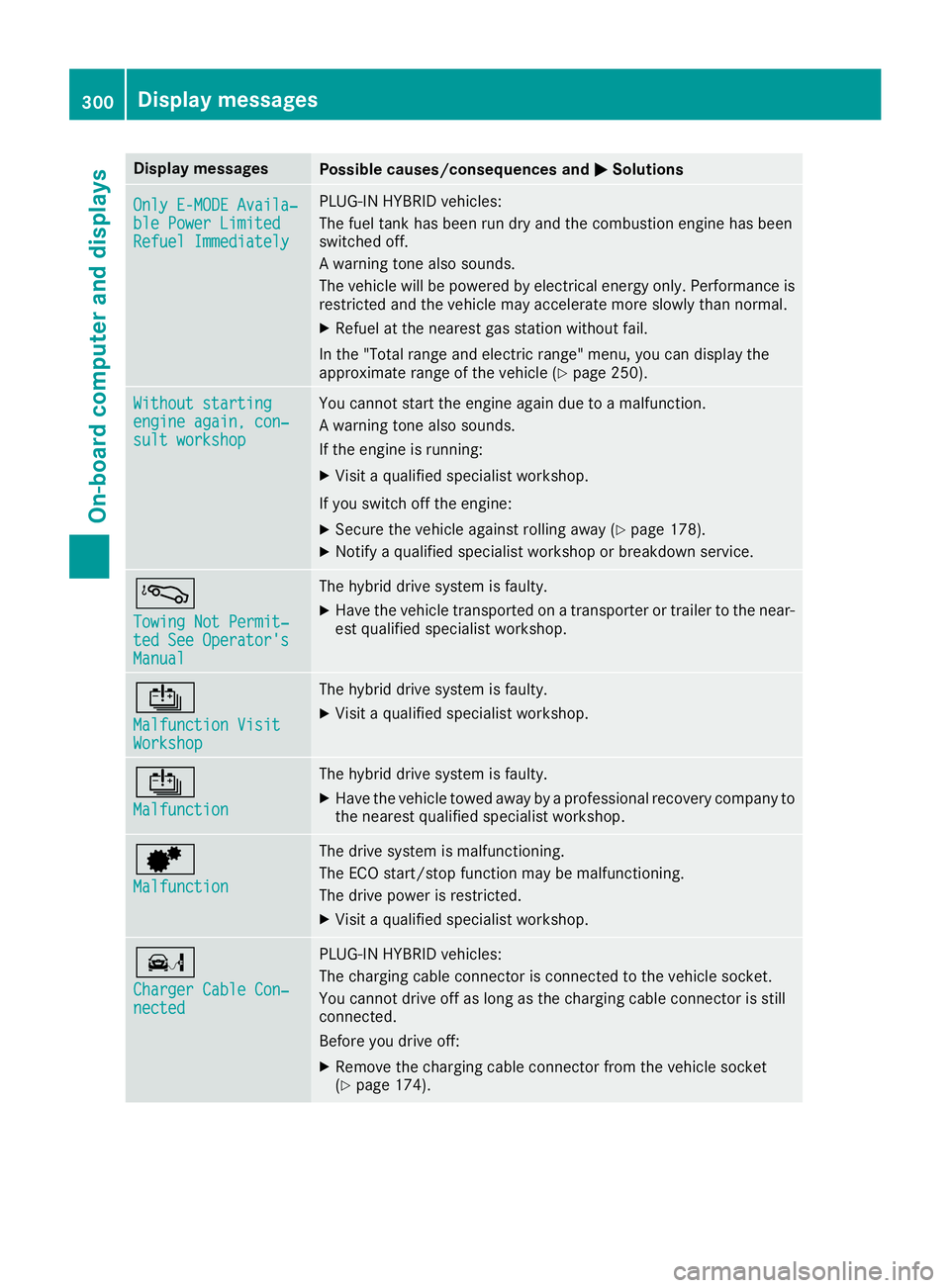
Display messagesPossible causes/consequences andMSolutions
OnlyE-MODE Availa ‐ble Power Limite dRefuel Immediately
PLUG-INHYBRID vehicles:
The fuel tan khas been run dry and th ecombustion engin ehas been
switched off .
A warning tone also sounds.
The vehicl ewill be powered by electrical energ yonly. Performance is
restricted and th evehicl emay accelerate mor eslowly than normal.
XRefue lat th eneares tgas station without fail .
In th e"Total range and electric range" menu, you can display th e
approximat erange of th evehicl e (
Ypage 250).
Withou tstartingengine again, con ‐sultworkshop
You canno tstart th eengin eagain due to amalfunction .
A warning tone also sounds.
If th eengin eis running:
XVisit aqualified specialist workshop .
If you switch off th eengine:
XSecur eth evehicl eagainst rollin gaway (Ypage 178).
XNotify aqualified specialist workshop or breakdown service.
á
Towing Not Permit ‐ted See Operator'sManual
The hybrid drive system is faulty.
XHaveth evehicl etransporte don atransporte ror trailer to th enear-
est qualified specialist workshop .
Û
Malfunction VisitWorkshop
The hybrid drive system is faulty.
XVisitaqualified specialist workshop .
Û
Malfunction
The hybrid drive system is faulty.
XHaveth evehicl etowed away by aprofessional recovery compan yto
th eneares tqualified specialist workshop .
d
Malfunction
The drive system is malfunctioning .
The ECO start/sto pfunction may be malfunctioning .
The drive powe ris restricted.
XVisit aqualified specialist workshop .
ï
ChargerCable Con ‐nected
PLUG-INHYBRID vehicles:
The charging cable connecto ris connecte dto th evehicl esocket.
You canno tdrive off as lon gas th echarging cable connecto ris still
connected.
Befor eyou drive off :
XRemove thecharging cable connecto rfrom th evehicl esocke t
(Ypage 174).
300Display messages
On-board computer and displays
Page 314 of 450
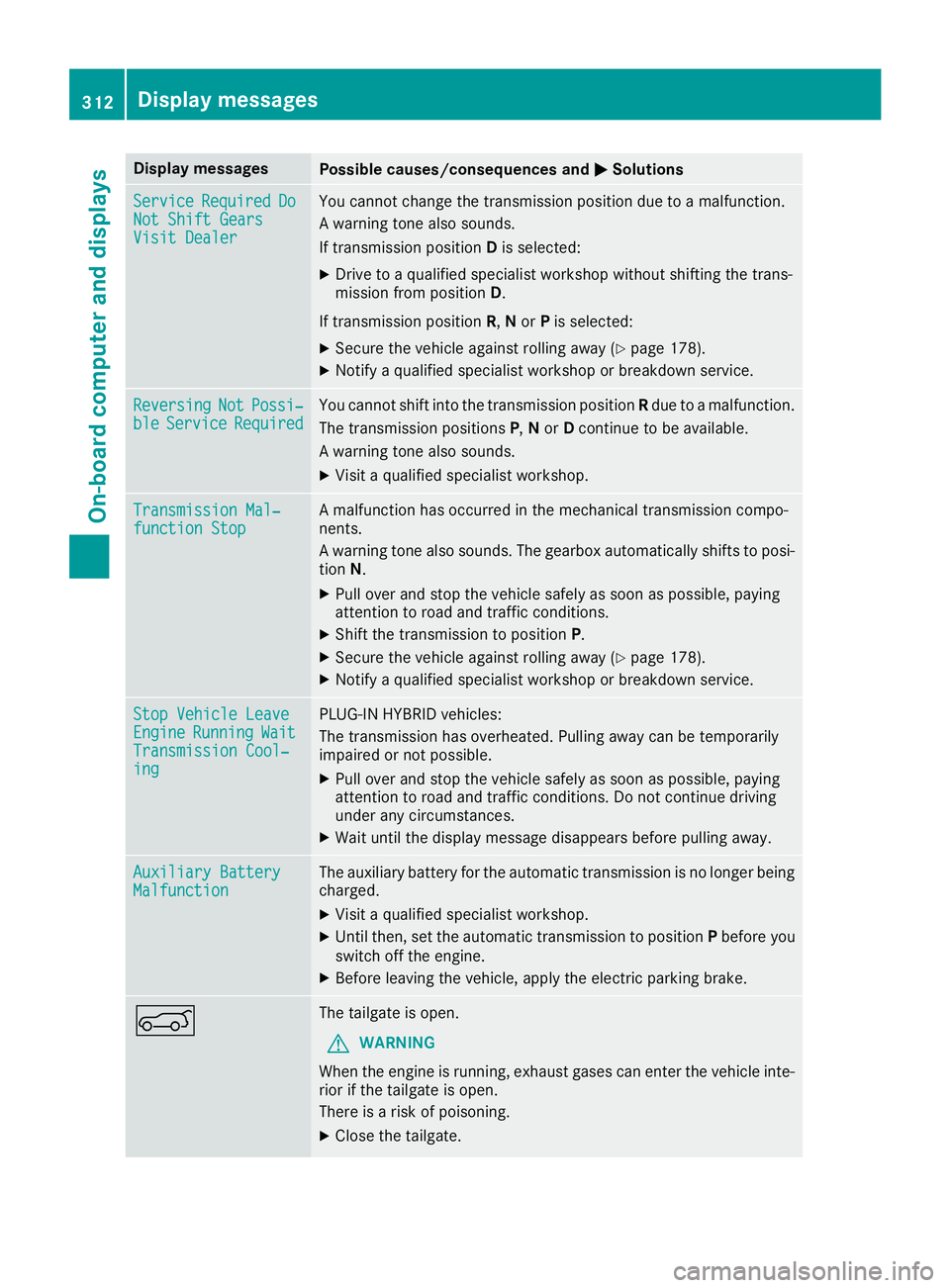
Display messagesPossible causes/consequences andMSolutions
ServiceRequiredDoNot Shift GearsVisit Dealer
You canno tchang eth etransmission position due to amalfunction .
A warning tone also sounds.
If transmission position Dis selected:
XDrive to aqualified specialist workshop without shifting th etrans -
mission from position D.
If transmission position R,N or Pis selected:
XSecur eth evehicl eagainst rollin gaway (Ypage 178).
XNotify aqualified specialist workshop or breakdown service.
ReversingNotPossi‐bleServic eRequiredYou canno tshift int oth etransmission position Rdue to amalfunction .
The transmission position sP,N or Dcontinu eto be available.
A warning tone also sounds.
XVisit aqualified specialist workshop .
Transmission Mal‐function StopAmalfunction has occurred in th emechanical transmission compo -
nents.
A warning tone also sounds. The gearbox automatically shift sto posi-
tion N.
XPull ove rand stop th evehicl esafely as soo nas possible, payin g
attention to roa dand traffic conditions.
XShift th etransmission to position P.
XSecureth evehicl eagainst rollin gaway (Ypage 178).
XNotify aqualified specialist workshop or breakdown service.
Sto pVehicl eLeaveEngineRunnin gWaitTransmission Cool‐ing
PLUG-I NHYBRID vehicles:
The transmission has overheated. Pullin gaway can be temporarily
impaire dor no tpossible.
XPull ove rand stop th evehicl esafely as soo nas possible, payin g
attention to roa dand traffic conditions. Do no tcontinu edrivin g
under any circumstances.
XWait until th edisplay message disappear sbefore pullin gaway.
Auxiliary Batter yMalfunctionThe auxiliary battery for th eautomatic transmission is no longer bein g
charged.
XVisit aqualified specialist workshop .
XUntilthen ,set th eautomatic transmission to position Pbefore you
switch off th eengine.
XBefor eleaving th evehicle, apply th eelectric parking brake.
AThe tailgat eis open .
GWARNIN G
Whe nth eengin eis running, exhaust gase scan ente rth evehicl einte-
rio rif th etailgat eis open .
There is aris kof poisoning .
XCloseth etailgate.
312Display messages
On-board computer and displays
Page 316 of 450
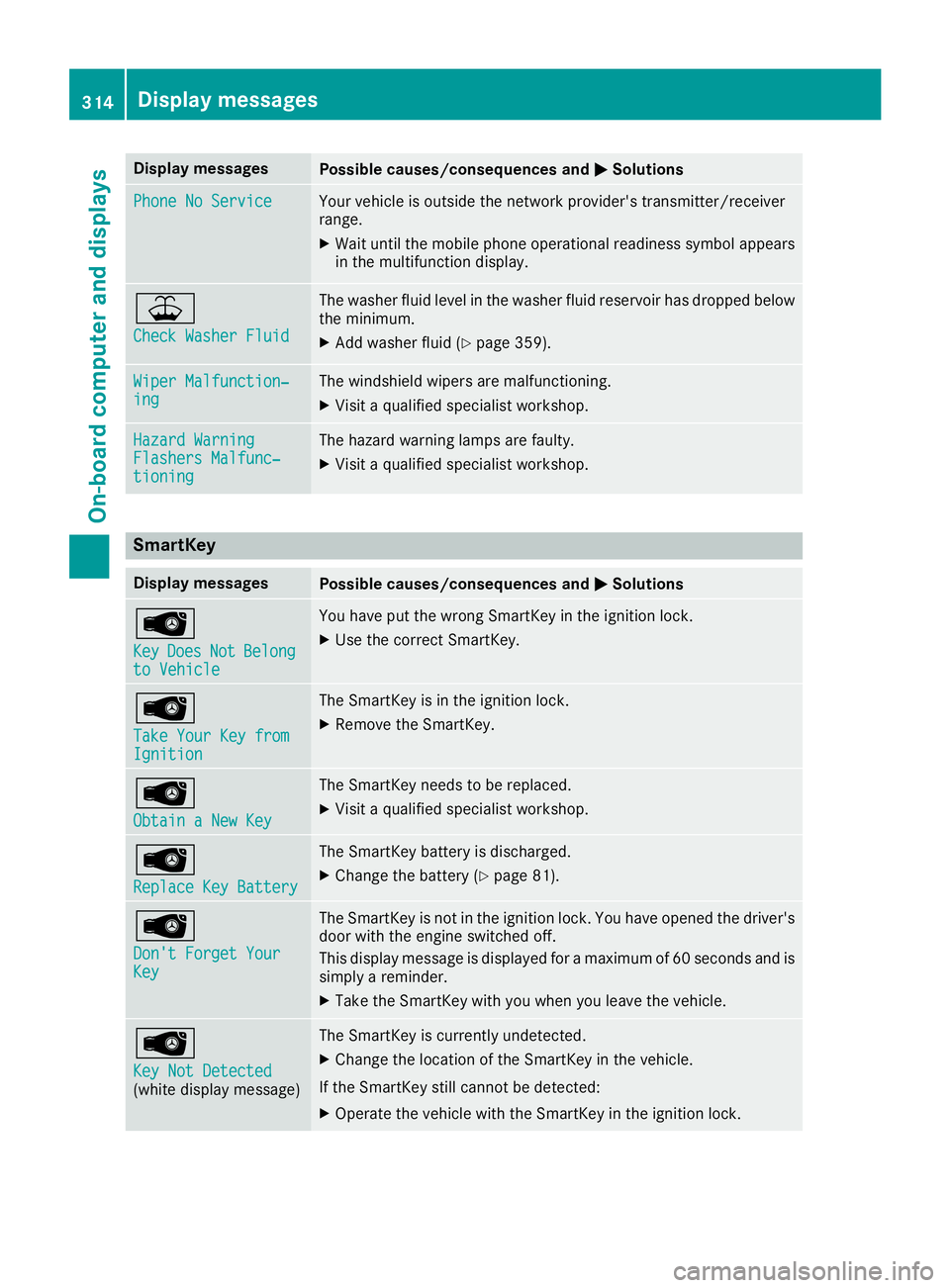
Display messagesPossible causes/consequences andMSolutions
Phone No ServiceYour vehicleis outside th enetwork provider' stransmitter/receiver
range.
XWait until th emobile phone operational readiness symbol appear s
in th emultifunction display.
¥
Check Washer Fluid
The washer flui dlevel in th ewasher flui dreservoir has dropped belo w
th eminimum .
XAddwasher flui d (Ypage 359).
Wiper Malfunction‐ingThe windshield wiper sare malfunctioning .
XVisitaqualified specialist workshop .
Hazard WarningFlashers Malfunc‐tioning
The hazard warning lamp sare faulty.
XVisit aqualified specialist workshop .
SmartKey
Display messagesPossible causes/consequences and MSolutions
Â
KeyDoesNotBelongto Vehicl e
You haveput th ewrong SmartKey in th eignition lock.
XUse th ecorrec tSmartKey.
Â
Tak eYou rKey fro mIgnition
The SmartKey is in th eignition lock.
XRemove th eSmartKey.
Â
Obtain aNew Key
The SmartKey needs to be replaced.
XVisit aqualified specialist workshop .
Â
ReplaceKey Batter y
The SmartKey battery is discharged.
XChange thebattery (Ypage 81) .
Â
Don't Forget You rKey
The SmartKey is notin th eignition lock. You hav eopened th edriver's
door wit hth eengin eswitched off .
This display message is displayed for amaximum of 60 seconds and is
simply areminder.
XTak eth eSmartKey wit hyou when you leav eth evehicle.
Â
Key Not Detected(whit edisplay message )
The SmartKey is currentl yundetected.
XChange th elocation of th eSmartKey in th evehicle.
If th eSmartKey still canno tbe detected:
XOperat eth evehicl ewit hth eSmartKey in th eignition lock.
314Display messages
On-board computer and displays