boot MERCEDES-BENZ GLE COUPE 2015 Owners Manual
[x] Cancel search | Manufacturer: MERCEDES-BENZ, Model Year: 2015, Model line: GLE COUPE, Model: MERCEDES-BENZ GLE COUPE 2015Pages: 393, PDF Size: 12.71 MB
Page 8 of 393
Switching on/off (on the centre
console) ......................................... 139
Axle load, permissible (trailer tow-
ing) ...................................................... 385 B
Bag hook ............................................ 304
Ball coupling
Swinging in .................................... 231
Swinging out .................................. 228
BAS (Brake Assist System) ................. 65
BAS PLUS with Cross-Traffic Assist (Brake Assist PLUS with Cross-
Traffic Assist)
Function/note s................................ 65
Important safety notes .................... 66
Battery (key)
Checking .......................................... 81
Important safety notes .................... 81
Replacing ......................................... 81
Battery (vehicle)
Charging ........................................ 339
Display message ............................ 270
Important safety notes .................. 337
Jump starting ................................. 341
Overview ........................................ 337
Belt tensioner
Activation ......................................... 49
Blind Spot Assist
Activating/deactivating ................. 245
Display message ............................ 275
Notes/function .............................. 218
Trailer towing ................................. 220
see Active Blind Spot Assist
BlueTEC
Topping up AdBlue ®
....................... 164
BlueTEC (AdBlue ®
) ............................. 377
Bonnet
Active bonnet (pedestrian protec-tion) ............................................... 318
Closing ........................................... 319
Display message ............................ 283
Important safety notes .................. 318
Opening ......................................... 319
Boot
see Tailgate
Boot load (maximum) ........................ 381Brake fluid
Display message ............................ 259
Notes ............................................. 380
Brake force distribution
see EBD (electronic brake force
distribution)
Brake lamps
Adaptive ........................................... 69
Display message ............................ 267
Brakes
ABS .................................................. 64
Adaptive Brake Assist ...................... 68
BAS .................................................. 65
BAS PLUS with Cross-Traffic
Assist ............................................... 65
Brake fluid (notes) ......................... 380
Display message ............................ 254
Driving tips .................................... 172
Important safety notes .................. 172
Parking brake ................................ 169
Warning lamp ................................. 288
Breakdown
Where will I find...? ........................ 331
see Flat tyre
see Towing away
Brightness control (instrument
cluster lighting) ................................... 29 C
Calling up a fault see Display messages
Car wash (care) ................................. 324
Care
360° camera ................................. 328
Automatic car wash ....................... 324
Carpets .......................................... 330
Display ........................................... 329
Exhaust pipe .................................. 328
Exterior lighting ............................. 327
Gear or selector lever .................... 329
High-pressure cleaner .................... 325
Interior ........................................... 329
Matt paintwork .............................. 326
Note s............................................. 323
Paint .............................................. 325
Plastic trim .................................... 329
Reversing camera .......................... 328 Index
5
Page 23 of 393
Upshift indicator (on-board com-
puter, Mercedes-AMG vehicles)
.......250 V
Vanity mirror (in sun visor) .............. 308
Variable SPEEDTRONIC
see SPEEDTRONIC
Vehicle
Correct use ...................................... 25
Data acquisition ............................... 25
Display message ............................ 281
Electronics ..................................... 372
Equipment ....................................... 23
Implied warranty .............................. 25
Individual settings .......................... 245
Leaving parked up ......................... 170
Locking (in an emergency) .............. .87
Locking (key) ................................... 79
Lowering ........................................ 360
Pulling away ................................... 149
Raising ........................................... 358
Registration ..................................... 25
Securing from rolling away ............ 357
Towing away .................................. 343
Transporting .................................. 345
Unlocking (in an emergency) ........... 86
Unlocking (key) ................................ 79
Vehicle data ................................... 381
Vehicle data
Boot load (maximum) ..................... 381
Roof load (maximum) ..................... 381
Vehicle data (off-road driving)
Approach/departure angle ............ 383
Fording depth ................................ 383
Maximum gradient climbing abil-
ity .................................................. 384
Vehicle dimensions ........................... 381
Vehicle emergency locking ................ 87
Vehicle identification number
see VIN
Vehicle identification plate .............. 373
Vehicle level
AIRMATIC ...................................... 196
Vehicle level (display message) ....... 273
Vehicle tool kit .................................. 332
Video
Operating the DVD ......................... 241 VIN
...................................................... 373
Seat ............................................... 374
Type plate ...................................... 373 W
Warning and indicator lamps ABS ................................................ 289
Brakes ........................................... 288
Distance warning signal ................. 297
ESP ®
.............................................. 291
ESP ®
OFF ....................................... 292
Fuel tank ........................................ 294
LIM (cruise control) ........................ 179
LIM (DISTRONIC PLUS) .................. 184
LIM (variable SPEEDTRONIC) ......... 181
Overview .......................................... 31
Parking brake ................................ 294
PASSENGER AIR BAG ...................... 38
Reserve fue l................................... 294
Seat belt ........................................ 286
Tyre pressure monitor ................... 298
Warning triangle ................................ 331
Washer fluid
Display message ............................ 284
Wheel and tyre combinations
see Tyres
Wheel bolt tightening torque ........... 360
Wheel chock ...................................... 357
Wheels
Changing a whee l.......................... 356
Changing/replacing ....................... 356
Checking ........................................ 349
Cleaning ......................................... 326
Emergency spare whee l................. 367
Fitting a new wheel ........................ 359
Fitting a wheel ............................... 357
General notes ................................ 361
Important safety notes .................. 348
Information on driving .................... 348
Overview ........................................ 348
Removing a whee l.......................... 359
Storing ........................................... 357
Tightening torque ........................... 360
Wheel size/tyre size ...................... 361
Windowbag
Display message ............................ 263
Operation ......................................... 44 20
Index
Page 173 of 393
The electric parking brake is also applied auto-
matically if:
R DISTRONIC PLUS brings the vehicle to a
standstill or
R the HOLD function is keeping the vehicle sta-
tionary
R Active Parking Assist is keeping the vehicle
stationary
In addition, at least one of the following condi-
tions must be fulfilled:
R the engine is switched off
R the driver is not wearing a seat belt and the
driver's door is opened
R there is a system malfunction
R the power supply is insufficient
R the vehicle is stationary for a lengthy period
The red !indicator lamp in the instrument
cluster lights up.
The electric parking brake is not automatically
applied if the engine is switched off by the ECO
start/stop function.
Releasing automatically The electric parking brake is released automat-
ically when all of the following conditions are
fulfilled:
R
the engine is running
R the transmission is in position Dor R
R the seat belt is fastened
R you depress the accelerator pedal
If the transmission is in position R, the boot lid
must be closed.
If your seat belt is not fastened, the following
conditions must be fulfilled to automatically
release the electric parking brake:
R the driver's door is closed
R you have shifted out of transmission position
P or you have previously driven faster than
3 km/h
i Ensure that you do not depress the accel-
erator pedal unintentionally. Otherwise, the
parking brake will be released and the vehicle will start to move. Emergency braking
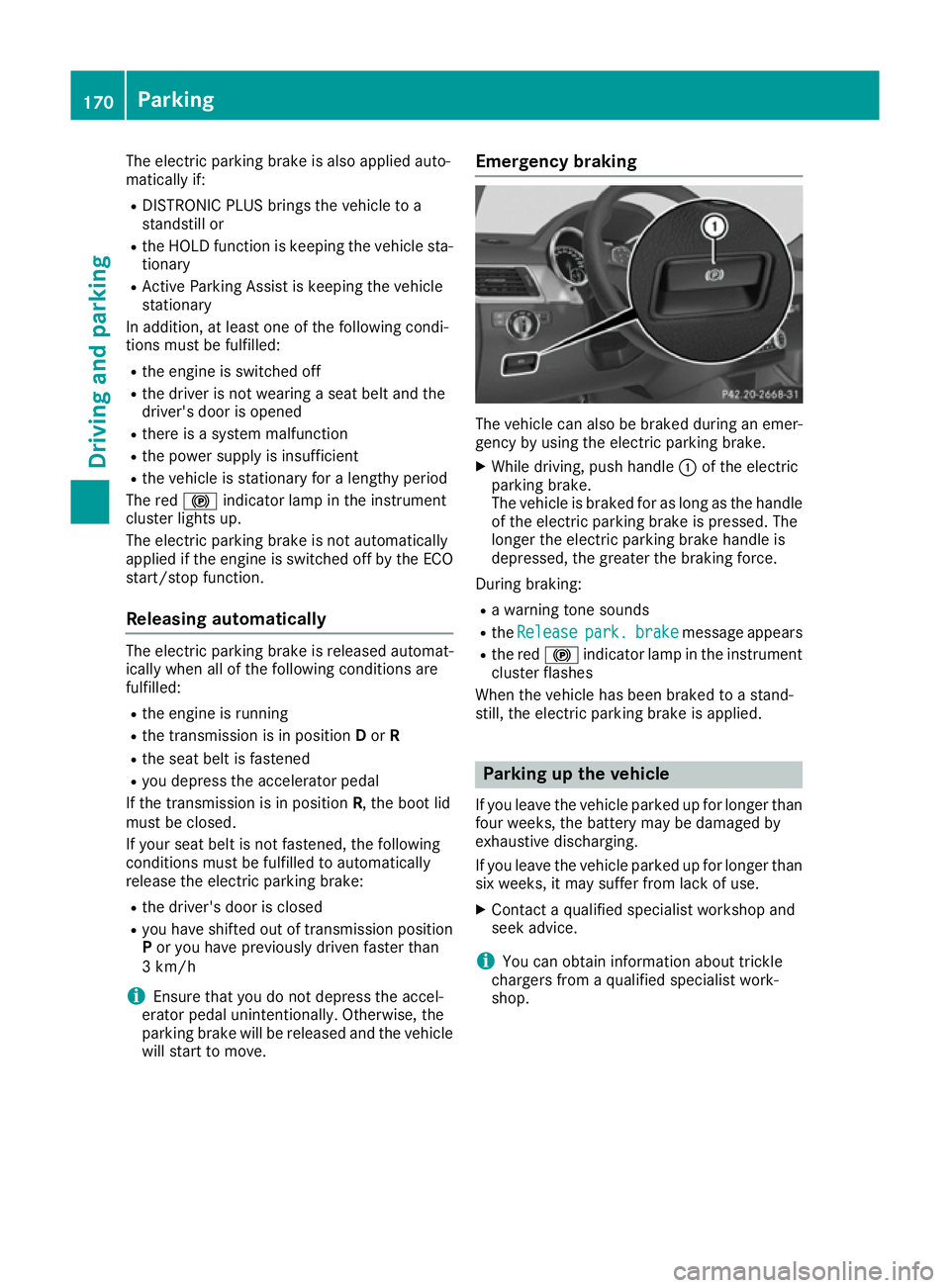
The vehicle can also be braked during an emer-
gency by using the electric parking brake.
X While driving, push handle :of the electric
parking brake.
The vehicle is braked for as long as the handle of the electric parking brake is pressed. The
longer the electric parking brake handle is
depressed, the greater the braking force.
During braking:
R a warning tone sounds
R the Release Release park.
park.brake
brakemessage appears
R the red !indicator lamp in the instrument
cluster flashes
When the vehicle has been braked to a stand-
still, the electric parking brake is applied. Parking up the vehicle
If you leave the vehicle parked up for longer than
four weeks, the battery may be damaged by
exhaustive discharging.
If you leave the vehicle parked up for longer than
six weeks, it may suffer from lack of use.
X Contact a qualified specialist workshop and
seek advice.
i You can obtain information about trickle
chargers from a qualified specialist work-
shop. 170
ParkingDriving and parking
Page 209 of 393
Cancelling Active Parking Assist
X
Stop the movement of the multifunction
steering wheel or steer yourself.
Active Parking Assist will be cancelled at
once. The Park Assist cancelled
Park Assist cancelled mes-
sage appears in the multifunction display.
or X Press the PARKTRONIC button (Y page 201).
PARKTRONIC is switched off and Active Park-
ing Assist is immediately cancelled. The
Park Assist cancelled Park Assist cancelled message appears
in the multifunction display.
Active Parking Assist is cancelled automatically if:
R the electric parking brake is applied
R transmission position Pis selected
R parking using Active Parking Assist is no lon-
ger possible
R you are driving faster than 10 km/h
R a wheel spins and ESP ®
intervenes or fails.
The ÷ warning lamp lights up in the instru-
ment cluster.
A warning tone sounds. The parking symbol dis-
appears and the multifunction display shows the
Park Assist cancelled
Park Assist cancelled message.
When Active Parking Assist is cancelled, you
must steer and brake again yourself.
If a system malfunction occurs, the vehicle is
braked to a standstill. To drive on, depress the
accelerator pedal again. Reversing camera
General notes Reversing camera
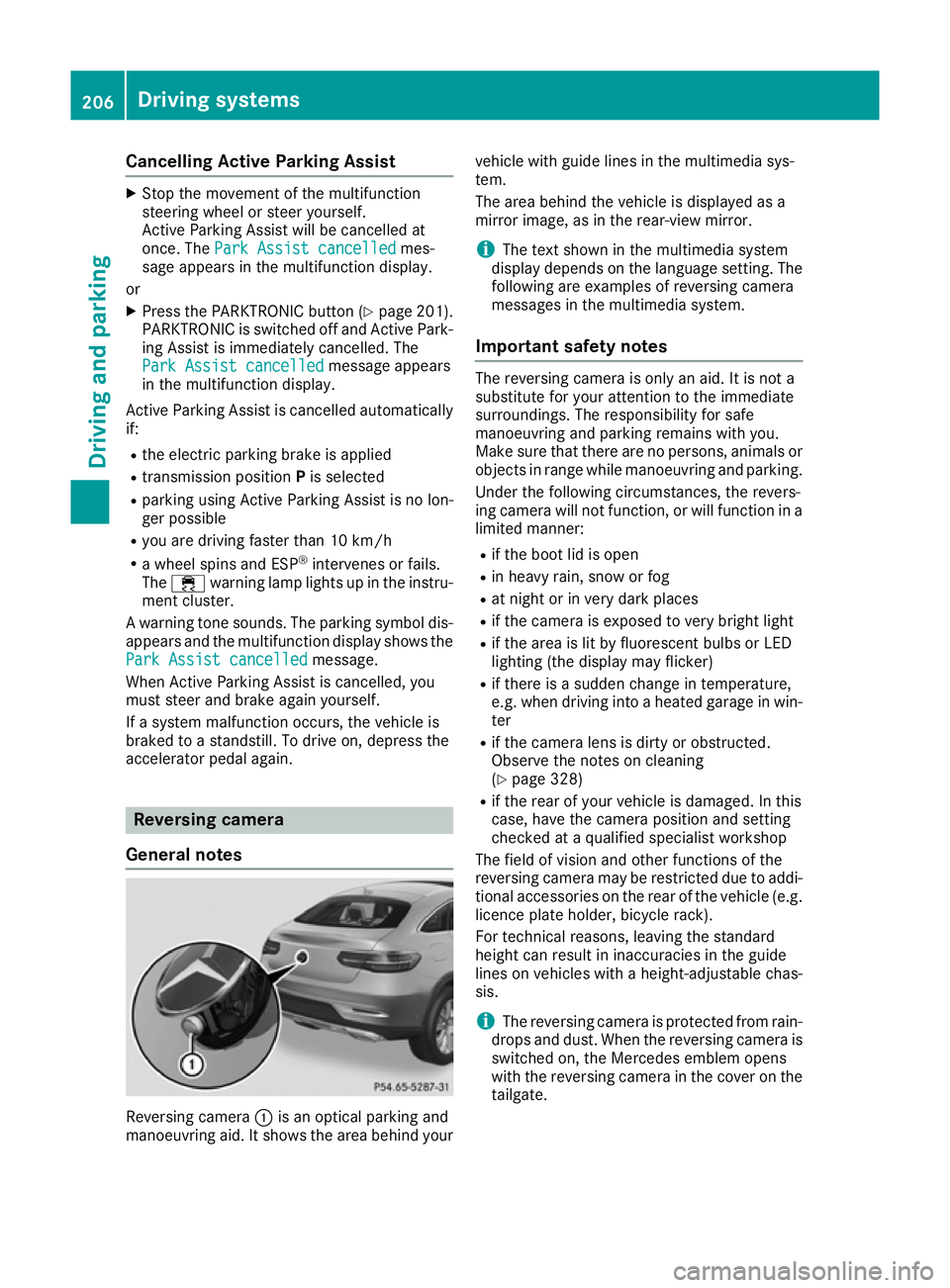
:is an optical parking and
manoeuvring aid. It shows the area behind your vehicle with guide lines in the multimedia sys-
tem.
The area behind the vehicle is displayed as a
mirror image, as in the rear-view mirror.
i The text shown in the multimedia system
display depends on the language setting. The
following are examples of reversing camera
messages in the multimedia system.
Important safety notes The reversing camera is only an aid. It is not a
substitute for your attention to the immediate
surroundings. The responsibility for safe
manoeuvring and parking remains with you.
Make sure that there are no persons, animals or
objects in range while manoeuvring and parking.
Under the following circumstances, the revers-
ing camera will not function, or will function in a limited manner:
R if the boot lid is open
R in heavy rain, snow or fog
R at night or in very dark places
R if the camera is exposed to very bright light
R if the area is lit by fluorescent bulbs or LED
lighting (the display may flicker)
R if there is a sudden change in temperature,
e.g. when driving into a heated garage in win-
ter
R if the camera lens is dirty or obstructed.
Observe the notes on cleaning
(Y page 328)
R if the rear of your vehicle is damaged. In this
case, have the camera position and setting
checked at a qualified specialist workshop
The field of vision and other functions of the
reversing camera may be restricted due to addi-
tional accessories on the rear of the vehicle (e.g. licence plate holder, bicycle rack).
For technical reasons, leaving the standard
height can result in inaccuracies in the guide
lines on vehicles with a height-adjustable chas-
sis.
i The reversing camera is protected from rain-
drops and dust. When the reversing camera is switched on, the Mercedes emblem opens
with the reversing camera in the cover on the
tailgate. 206
Driving systemsDriving and parking
Page 210 of 393
The emblem closes again when:
R you have finished the manoeuvring process
R you switch off the engine
R you open the boot
See the notes on cleaning (Y page 328).
For technical reasons, the emblem may
remain open briefly after the reversing cam-
era has been deactivated.
Activating/deactivating the reversing
camera X
To activate: make sure that the key is in
position 2in the ignition lock.
X Make sure that the Activation by R gear
Activation by R gear
function is selected in the multimedia system; see the Digital Owner's Manual.
X Engage reverse gear.
The reversing camera flap opens. The multi-
media system shows the area behind the vehi-
cle with guide lines.
The image from the reversing camera is avail-
able throughout the manoeuvring process.
X To switch the function mode for vehicles
with trailer tow hitch: using the controller,
select symbol :for the "Reverse parking"
function or symbol ;for "Coupling up a
trailer".
The symbol of the selected function is high-
lighted.
To deactivate: the reversing camera deacti-
vates if you shift the transmission to Por after
driving forwards a short distance. Displays in the multimedia system The reversing camera may show a distorted view
of obstacles or show them incorrectly or not at
all. Obstacles are not shown by the reversing
camera in the following locations:
R very close to the rear bumper
R under the rear bumper
R in the area immediately above the tailgate
handle
! Objects not at ground level may appear to
be further away than they actually are, e.g.:
R the bumper of a parked vehicle
R the drawbar of a trailer
R the ball coupling of a trailer tow hitch
R the rear section of an HGV
R a slanted post
Use the guidelines only for orientation.
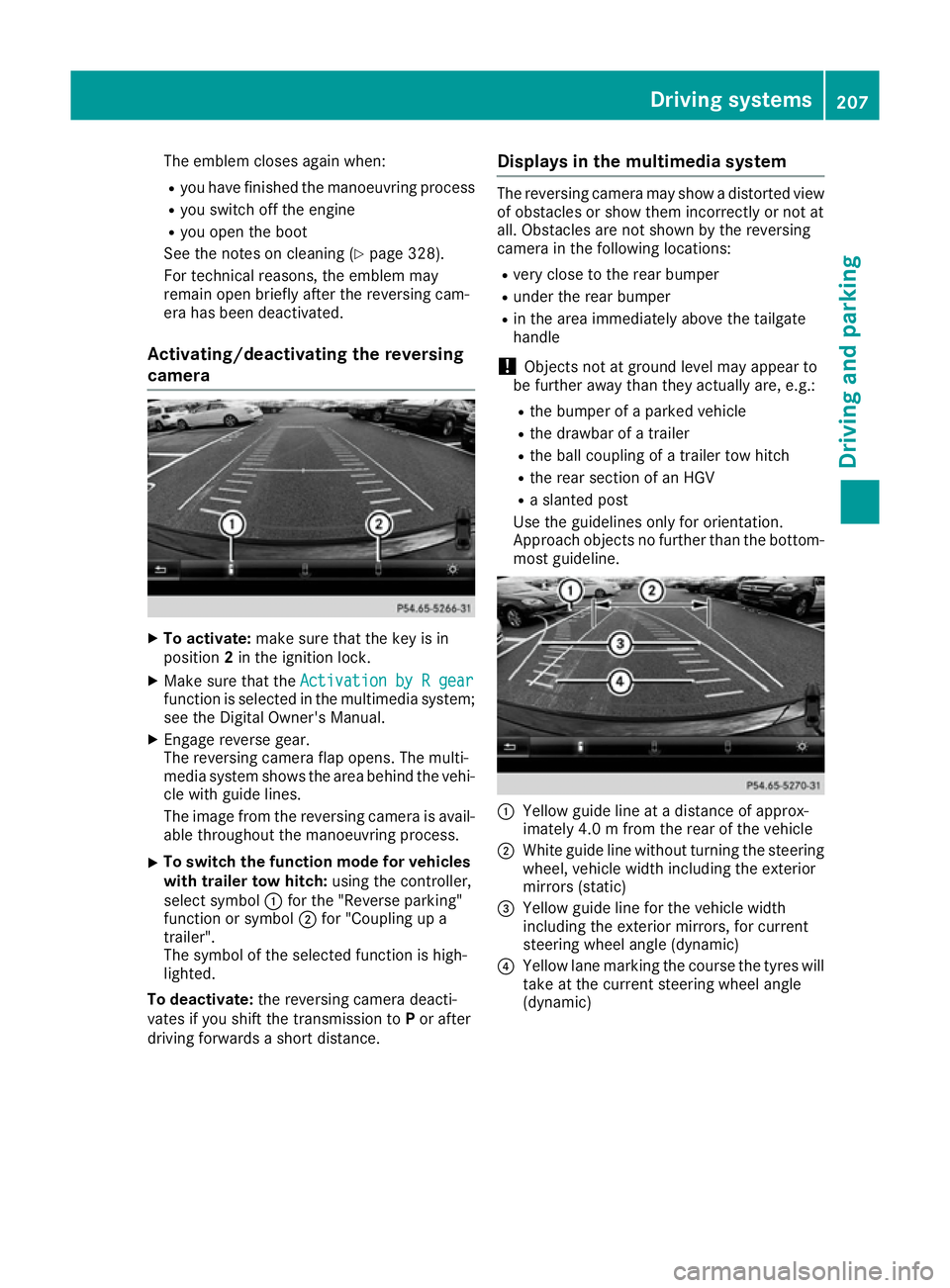
Approach objects no further than the bottom- most guideline. :
Yellow guide line at a distance of approx-
imately 4.0 m from the rear of the vehicle
; White guide line without turning the steering
wheel, vehicle width including the exterior
mirrors (static)
= Yellow guide line for the vehicle width
including the exterior mirrors, for current
steering wheel angle (dynamic)
? Yellow lane marking the course the tyres will
take at the current steering wheel angle
(dynamic) Driving systems
207Driving and parking Z
Page 305 of 393
R
luggage nets on the right-hand side of the
luggage compartment
R folding coat hooks next to the grab handles in
the rear.
Observe the loading guidelines (Y page 299)
and the safety notes regarding stowage spaces
(Y page 299). Through-loading facility in the rear
compartment
If objects or loads are not secured when being
transported in the through-loading facility, they
could slip or be thrown around and thereby hit
vehicle occupants.
Observe the loading guidelines (Y page 299)
and the safety notes regarding stowage spaces
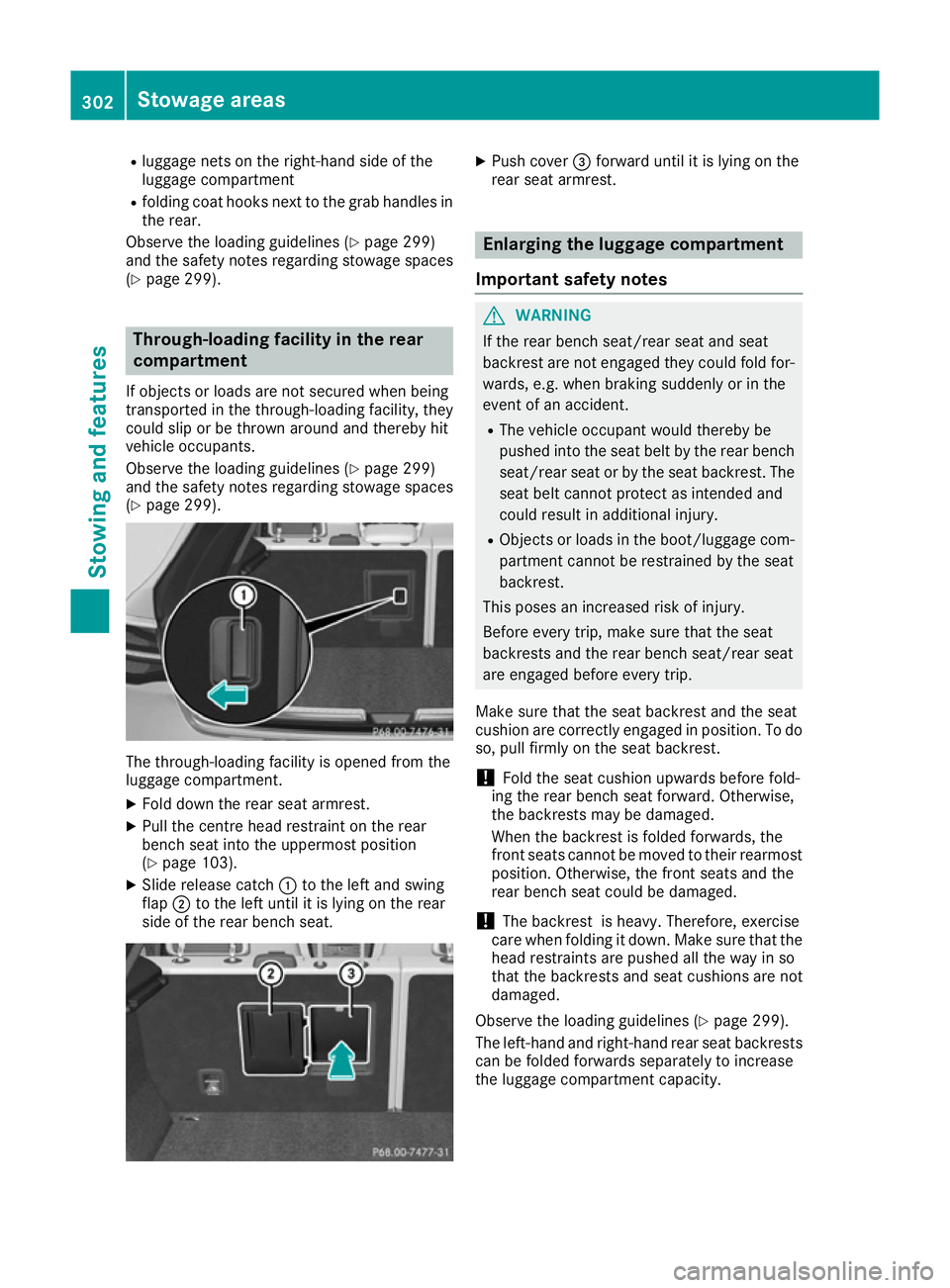
(Y page 299). The through-loading facility is opened from the
luggage compartment.
X Fold down the rear seat armrest.
X Pull the centre head restraint on the rear
bench seat into the uppermost position
(Y page 103).
X Slide release catch :to the left and swing
flap ;to the left until it is lying on the rear
side of the rear bench seat. X
Push cover =forward until it is lying on the
rear seat armrest. Enlarging the luggage compartment
Important safety notes G
WARNING
If the rear bench seat/rear seat and seat
backrest are not engaged they could fold for- wards, e.g. when braking suddenly or in the
event of an accident.
R The vehicle occupant would thereby be
pushed into the seat belt by the rear bench
seat/rear seat or by the seat backrest. The
seat belt cannot protect as intended and
could result in additional injury.
R Objects or loads in the boot/luggage com-
partment cannot be restrained by the seat
backrest.
This poses an increased risk of injury.
Before every trip, make sure that the seat
backrests and the rear bench seat/rear seat
are engaged before every trip.
Make sure that the seat backrest and the seat
cushion are correctly engaged in position. To do
so, pull firmly on the seat backrest.
! Fold the seat cushion upwards before fold-
ing the rear bench seat forward. Otherwise,
the backrests may be damaged.
When the backrest is folded forwards, the
front seats cannot be moved to their rearmost
position. Otherwise, the front seats and the
rear bench seat could be damaged.
! The backrest is heavy. Therefore, exercise
care when folding it down. Make sure that the
head restraints are pushed all the way in so
that the backrests and seat cushions are not
damaged.
Observe the loading guidelines (Y page 299).
The left-hand and right-hand rear seat backrests can be folded forwards separately to increase
the luggage compartment capacity. 302
Stowage areasStowing and features
Page 363 of 393
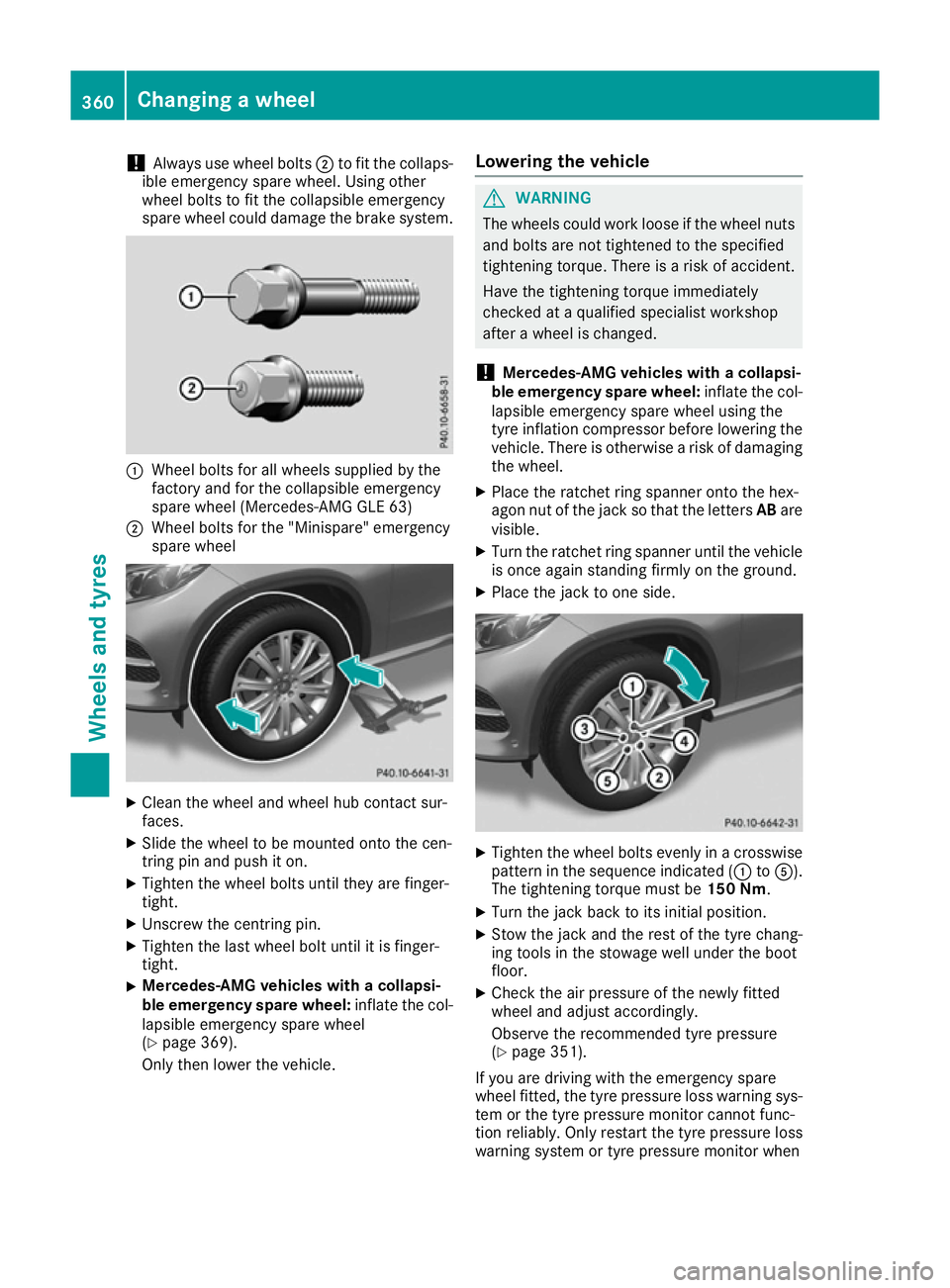
!
Always use wheel bolts
;to fit the collaps-
ible emergency spare wheel. Using other
wheel bolts to fit the collapsible emergency
spare wheel could damage the brake system. :
Wheel bolts for all wheels supplied by the
factory and for the collapsible emergency
spare wheel (Mercedes-AMG GLE 63)
; Wheel bolts for the "Minispare" emergency
spare wheel X
Clean the wheel and wheel hub contact sur-
faces.
X Slide the wheel to be mounted onto the cen-
tring pin and push it on.
X Tighten the wheel bolts until they are finger-
tight.
X Unscrew the centring pin.
X Tighten the last wheel bolt until it is finger-
tight.
X Mercedes-AMG vehicles with a collapsi-
ble emergency spare wheel:
inflate the col-
lapsible emergency spare wheel
(Y page 369).
Only then lower the vehicle. Lowering the vehicle G
WARNING
The wheels could work loose if the wheel nuts and bolts are not tightened to the specified
tightening torque. There is a risk of accident.
Have the tightening torque immediately
checked at a qualified specialist workshop
after a wheel is changed.
! Mercedes-AMG vehicles with a collapsi-
ble emergency spare wheel: inflate the col-
lapsible emergency spare wheel using the
tyre inflation compressor before lowering the vehicle. There is otherwise a risk of damaging
the wheel.
X Place the ratchet ring spanner onto the hex-
agon nut of the jack so that the letters ABare
visible.
X Turn the ratchet ring spanner until the vehicle
is once again standing firmly on the ground.
X Place the jack to one side. X
Tighten the wheel bolts evenly in a crosswise
pattern in the sequence indicated (: toA).
The tightening torque must be 150 Nm.
X Turn the jack back to its initial position.
X Stow the jack and the rest of the tyre chang-
ing tools in the stowage well under the boot
floor.
X Check the air pressure of the newly fitted
wheel and adjust accordingly.
Observe the recommended tyre pressure
(Y page 351).
If you are driving with the emergency spare
wheel fitted, the tyre pressure loss warning sys-
tem or the tyre pressure monitor cannot func-
tion reliably. Only restart the tyre pressure loss
warning system or tyre pressure monitor when 360
Changing a wheelWheels and tyres