engine start MERCEDES-BENZ GLE COUPE 2017 C292 Owner's Manual
[x] Cancel search | Manufacturer: MERCEDES-BENZ, Model Year: 2017, Model line: GLE COUPE, Model: MERCEDES-BENZ GLE COUPE 2017 C292Pages: 366, PDF Size: 8.61 MB
Page 7 of 366
Setting ........................................... 122
Setting the center air vents ........... 122
Setting the side air vents ............... 123
Air-conditioning system
see Climate control
AIRMATIC package
ADS PLUS (Adaptive Damping
System) ......................................... 170
Function/notes ............................. 169
Alarm
ATA (Anti-Theft Alarm system) ......... 70
Switching off (ATA) .......................... 70
Switching the function on/off
(ATA) ................................................ 70
AMG
Adaptive sport suspension sys-
tem ................................................ 173
AMG menu (on-board computer) ..... 218
Approach/departure angle .............. 156
Ashtray ............................................... 279
Assistance display (on-board com-
puter) .................................................. 214
Assistance menu (on-board com-
puter) .................................................. 213
ASSYST PLUS
Displaying a service message ........ 298
Hiding a service message .............. 298
Resetting the service interval dis-
play ................................................ 298
Service message ............................ 298
Special service requirements ......... 298
ATA (Anti-Theft Alarm system)
Activating/deactivating ................... 70
Function ........................................... 70
Switching off the alarm .................... 70
ATTENTION ASSIST
Activating/deactivating ................. 214
Display message ............................ 238
Function/notes ............................. 189
Audio 20
Switching on/off ........................... 264
Audio menu (on-board computer) .... 211
Audio system
see separate operating instructions
Authorized Mercedes-Benz Center
see Qualified specialist workshop AUTO lights
Display message ............................ 233
see Lights
Automatic car wash (care) ............... 299
Automatic engine start (ECO start/
stop function) .................................... 130
Automatic engine switch-off (ECO
start/stop function) .......................... 129
Automatic headlamp mode .............. 104
Automatic transmission
Accelerator pedal position ............. 135
Cha
nging gear ............................... 135
DIRECT SELECT lever ..................... 132
Display message ............................ 246
Drive program ................................ 135
Drive program display .................... 134
Driving tips .................................... 135
DYNAMIC SELECT controller ......... 132
Emergency running mode .............. 139
Engaging drive position .................. 134
Engaging neutral ............................ 133
Engaging park position automati-
cally ............................................... 133
Engaging reverse gear ................... 133
Engaging the park position ............ 132
Kickdown ....................................... 135
Manual shifting .............................. 136
Oil temperature (on-board com-
puter, Mercedes-AMG vehicles) ..... 218
Overview ........................................ 132
Problem (malfunction) ................... 139
Pulling away ................................... 128
Starting the engine ........................ 127
Steering wheel paddle shifters ...... 136
Trailer towing ................................. 135
Transmission position display ........ 134
Transmission positions .................. 134
Automatic transmission emer-
gency mode ....................................... 139
AUX jacks
CD/DVD drive ............................... 269
Axle load, permissible (trailer tow-
ing) ...................................................... 361
B
Back button ....................................... 264
Bag hook ............................................ 275
Index5
Page 12 of 366
Wet road surface ........................... 151
DSR (Downhill Speed Regulation)
Display message ............................2 39
Function/notes .............................1 68
DVD video
Operating (on-board computer) ..... 212
see also Digital Operator's Man-
ual ..................................................2 63
DYNAMIC SELECT controller
Automatic transmission ................. 132
E
EASY-ENTRY featureActivating/deactivating ................. 217
Function/notes ................................ 98
EASY-EXIT feature
Crash-responsive .............................9 9
Function/notes ................................ 98
Switching on/off ........................... 217
EBD (electronic brake force distri-
bution)
Display message ............................ 224
Function/notes ................................ 66
ECO display
Function/notes ............................. 149
On-board computer ....................... 209
ECO start/stop function
Automatic engine start .................. 130
Automatic engine switch-off .......... 129
Deactivating/activating ................. 130
General information ....................... 129
Important safety notes .................. 129
Introduction ................................... 129
Emergency
Automatic measures after an acci-
dent ................................................. 54
Emergency release
Driver's door .................................... 78
Vehicle ............................................. 78
Emergency spare wheel
General notes ................................ 346
Important safety notes .................. 346
Removing ....................................... 347
Storage location ............................ 347
Stowing .......................................... 347
Emergency Tensioning Devices
Activation ......................................... 51 Emergency unlocking
Tailgate ............................................ 82
Emissions control
Service and warranty information .... 25
Engine
Check Engine warning lamp ........... 259
Display message ............................ 234
ECO start/stop function ................ 129
Engine number ............................... 352
Irregular running ............................ 131
Jump-starting ................................. 313
Starting (important safety notes) ... 126
Starting problems .......................... 131
Starting the engine with the
SmartKey ....................................... 127
Starting via smartphone ................ 127
Starting with KEYLESS-GO ............. 127
Switching off .................................. 146
Tow-starting (vehicle) ..................... 318
Engine electronics
Problem (malfunction) ................... 131
Engine oil
Adding ........................................... 296
Additives ........................................ 356
Checki ng the o
il level ..................... 295
Checking the oil level using the
dipstick .......................................... 296
Display message ............................ 236
Filling capacity ............................... 356
Notes about oil grades ................... 355
Notes on oil level/consumption .... 295
Temperature (on-board computer,
Mercedes-AMG vehicles) ............... 218
Engine switch-off
see ECO start/stop function
Entering an address
see also Digital Operator's Man-
ual .................................................. 263
ESP
®(Electronic Stability Pro-
gram)
AMG menu (on-board computer) ... 218
Characteristics ................................. 65
Deactivating/activating ................... 65
Display message ............................ 222
Function/notes ................................ 64
General notes .................................. 64
Important safety information ........... 64
Trailer stabilization ........................... 66
10Index
Page 14 of 366
H
Hazard warning lamps...................... 106
Head restraints
Adjusting .........................................9 3
Adjusting (electrically) ..................... 94
Adjusting (rear) ................................ 94
Installing/removing (rear) ................ 94
Luxury .............................................. 94
Headlamps
Fogging up .....................................1 08
see Automatic headlamp mode
Heating
see Climate control
High beam flasher .............................1 05
High-beam headlamps
Adaptive Highbeam Assist ............. 107
Display message ............................ 233
Switching on/off ........................... 105
Highway mode ................................... 107
Hill start assist .................................. 128
HOLD function
Deactivating ................................... 167
Display message ............................ 239
Function/notes .............................1 67
Home address
see also Digital Operator's Man-
ual ..................................................2 63
Hood
Closing ...........................................2 95
Display message ............................ 248
Important safety notes .................. 294
Opening ......................................... 294
Horn ...................................................... 32
Hydroplaning ..................................... 152
I
Ignition lock
see Key positions
Immobilizer .......................................... 70
Indicator lamps
see Warning and indicator lamps
Insect protection on the radiator .... 295
Instrument cluster
Overview .......................................... 33
Warning and indicator lamps ........... 33
Instrument cluster lighting .............. 206Intelligent Light System
Activating/deactivating ................. 216
Overview ........................................ 106
Interior lighting
Automatic control .......................... 109
Emergency lighting ........................ 109
General notes ................................ 108
Manual control ............................... 108
Overview ........................................ 108
Reading lamp ................................. 108
iPod
®
see also Digital Operator's Man-
ual .................................................. 263
J
Jack Storage location ............................ 306
Using ............................................. 342
Jump starting (engine) ...................... 313
K
Key positions
SmartKey ....................................... 125
Start/Stop button .......................... 125
KEYLESS-GO
Activating ......................................... 72
Convenience closing feature ............ 85
Deactivation ..................................... 72
Display message ............................ 249
Locking ............................................ 72
Start function ................................... 73
Starting the engine ........................ 127
Unlocking ......................................... 72
Kickdown
Driving tips .................................... 135
Manual gearshifting ....................... 138
Knee bag .............................................. 45
L
Lamps
see Warning and indicator lamps
Lane Keeping Assist
Activating/deactivating ................. 215
Display message ............................ 240
Function/information .................... 193
see Active Lane Keeping Assist
12Index
Page 20 of 366

Overview .......................................... 91
Seat heating problem ......................96
Seat ventilation problem .................. 96
Storing settings (memory func-
tion) ............................................... 102
Switching seat heating on/off ......... 95
Switching seat ventilation on/off .... 96
Section
Sliding sunroof ................................. 86
Selector lever
Cleaning ......................................... 304
Sensors (cleaning instructions) ....... 303
Service message
see ASSYST PLUS
Service products
Brake fluid ..................................... 356
Coolant (engine) ............................ 356
DEF special additives ..................... 355
Engine oil ....................................... 355
Fuel ................................................ 353
Important safety notes .................. 352
Refrigerant (air-conditioning sys-
tem) ............................................... 357
Washer fluid ................................... 357
Setting the air distribution ............... 119
Setting the airflow ............................ 119
Setting the date/time format
see also Digital Operator's Man-
ual .................................................. 263
Setting the language
see also Digital Operator's Man-
ual .................................................. 263
Setting the time
see also Digital Operator's Man-
ual .................................................. 263
Settings
Factory (on-board computer) ......... 217
On-board computer ....................... 215
SETUP (on-board computer) ............. 218
Side impact air bag ............................. 46
Side marker lamp (display mes-
sage) ................................................... 233
Side windows
Cleaning ......................................... 302
Convenience closing feature ............ 84
Convenience opening feature .......... 84
Important safety information ........... 83 Opening/closing .............................. 83
Overview .......................................... 83
Problem (malfunction) ..................... 85
Resetting ......................................... 85
Reversing feature ............................. 83
SIRIUS services
see also Digital Operator's Man-
ual .................................................. 263
Sliding sunro
of
see Panorama roof with power
tilt/sliding panel
SmartKey
Changing the battery ....................... 74
Changing the programming ............. 73
Checking the battery ....................... 74
Convenience closing feature ............ 85
Convenience opening feature .......... 84
Display message ............................ 249
Door central locking/unlocking ....... 71
Important safety notes .................... 71
KEYLESS-GO start function .............. 73
Loss ................................................. 75
Mechanical key ................................ 73
Overview .......................................... 71
Positions (ignition lock) ................. 125
Problem (malfunction) ..................... 75
Starting the engine ........................ 127
Smartphone
Starting the engine ........................ 127
SMS
see also Digital Operator's Man-
ual .................................................. 263
Snow chains
Information .................................... 323
Sockets
Center console .............................. 281
General notes ................................ 280
Luggage compartment ................... 281
Rear compartment ......................... 281
Sound
Switching on/off ........................... 264
Special seat belt retractor .................. 55
Specialist workshop ............................ 28
Speed, controlling
see Cruise control
Speedometer
Digital ............................................ 210
In the Instrument cluster ................. 33
18Index
Page 21 of 366
Segments ...................................... 206
Selecting the display unit ............... 215
Standing lamps
Display message ............................ 233
Switching on/off ........................... 105
Start/Stop button
Removing ....................................... 126
Starting the engine ........................ 127
Start/stop function
see ECO start/stop function
Starting (engine) ................................ 126
STEER CONTROL .................................. 69
Steering
Display message ............................ 248
Steering Pilot
Activating/deactivating ................. 214
Display message ............................ 243
Steering wheel
Adjusting (electrically) ..................... 97
Adjusting (manually) ........................ 97
Button overview ............................... 34
Buttons (on-board computer) ......... 207
Cleaning ......................................... 304
Important safety notes .................... 97
Steering wheel heating .................... 98
Storing settings (memory func-
tion) ............................................... 102
Steering wheel heating
Problem (malfunction) ..................... 98
Switching on/off .............................. 98
Steering wheel paddle shifters ........ 136
Stopwatch (RACETIMER) ................... 218
Stowage areas ................................... 270
Stowage compartments
Armrest (under) ............................. 271
Center console .............................. 272
Center console (rear) ..................... 272
Cup holders ................................... 277
Eyeglasses compartment ............... 272
Glove box ....................................... 271
Important safety information ......... 270
Stowage net ................................... 272
Stowage net ....................................... 272
Summer tires
In winter ........................................ 323
Sun visor ............................................ 279 Suspension setting
AMG adaptive sport suspension
system ........................................... 173
Suspension settings
SETUP (on-board computer) .......... 218
SUV
(Sport Utility Vehicle) ....................... 27
Switching air-recirculation mode
on/off ................................................. 121
Switching on media mode
Via the device list .......................... 268
T
Tachometer ........................................ 206
Tailgate
Display message ............................ 247
Emergency unlocking ....................... 82
Important safety notes .................... 78
Limiting the opening angle ............... 82
Opening dimensions ...................... 358
Opening/closing (automatically
from inside) ...................................... 81
Opening/closing (automatically
from outside) ................................... 80
Opening/closing (from outside) ....... 79
Tank content
Fuel gauge ....................................... 33
Technical data
Capacities ...................................... 352
Information .................................... 350
Tires/wheels ................................. 345
Trailer loads ................................... 361
Vehicle data ................................... 358
Telephone
Accepting a call (multifunction
steering wheel) .............................. 213
Authorizing a mobile phone (con-
necting) ......................................... 267
Connecting a mobile phone (gen-
eral information) ............................ 266
Display message ............................ 248
Menu (on-board computer) ............ 212
Number from the phone book ........ 213
Redialing ........................................ 213
Rejecting/ending a call ................. 213
see also Digital Operator's Man-
ual .................................................. 263
Index19
Page 22 of 366
Switching between mobile
phones ........................................... 268
Temperature
Coolant (display in the instrument
cluster) .......................................... 207
Coolant (on-board computer,
Mercedes-AMG vehicles) ............... 218
Engine oil (on-board computer,
Mercedes-AMG vehicles) ............... 218
Outside temperature ...................... 206
Setting (climate control) ................ 119
Transmission oil (on-board com-
puter, Mercedes-AMG vehicles) ..... 218
Through-loading feature ................... 273
Time
see separate operating instructions
Timing (RACETIMER) ......................... 218
Tire pressure
Calling up (on-board computer) ..... 328
Checking manually ........................ 327
Display message ............................ 244
Maximum ....................................... 327
Not reached (TIREFIT) .................... 309
Notes ............................................. 326
Reached (TIREFIT) .......................... 310
Recommended ............................... 324
Tire pressure loss warning system
General notes ................................ 327
Important safety notes .................. 327
Restarting ...................................... 328
Tire pressure monitor
Checking the tire pressure elec-
tronically ........................................ 330
Function/notes ............................. 328
General notes ................................ 328
Important safety notes .................. 329
Radio type approval for the tire
pressure monitor ........................... 331
Restarting ...................................... 330
Warning lamp ................................. 262
Warning message .......................... 330
TIREFIT kit
Important safety notes .................. 308
Storage location ............................ 306
Tire pressure not reached .............. 309
Tire pressure reached .................... 310
Using ............................................. 308 Tires
Aspect ratio (definition) ................. 340
Average weight of the vehicle
occupants (definition) .................... 339
Bar (definition) ............................... 339
Changing a wheel .......................... 341
Characteristics .............................. 338
Checking ........................................ 321
Curb weig ht (
definition) ................. 339
Definition of terms ......................... 338
Direction of rotation ...................... 341
Display message ............................ 244
Distribution of the vehicle occu-
pants (definition) ............................ 340
DOT (Department of Transporta-
tion) (definition) ............................. 339
DOT, Tire Identification Number
(TIN) ............................................... 338
GAWR (Gross Axle Weight Rating)
(definition) ..................................... 339
GTW (Gross Trailer Weight) (defi-
nition) ............................................ 339
GVW (Gross Vehicle Weight) (def-
inition) ........................................... 339
GVWR (Gross Vehicle Weight Rat-
ing) (definition) .............................. 339
Important safety notes .................. 321
Increased vehicle weight due to
optional equipment (definition) ...... 339
Information on driving .................... 321
Kilopascal (kPa) (definition) ........... 339
Labeling (overview) ........................ 335
Load bearing index (definition) ...... 340
Load index ..................................... 337
Load index (definition) ................... 339
M+S tires ....................................... 323
Maximum load on a tire (defini-
tion) ............................................... 340
Maximum loaded vehicle weight
(definition) ..................................... 339
Maximum permissible tire pres-
sure (definition) ............................. 340
Maximum tire load ......................... 338
Maximum tire load (definition) ....... 340
MOExtended tires .......................... 323
Optional equipment weight (defi-
nition) ............................................ 340
20Index
Page 23 of 366
PSI (pounds per square inch) (def-
inition) ...........................................340
Replacing ....................................... 341
Service life ..................................... 322
Sidewall (definition) ....................... 340
Snow chains .................................. 323
Speed rating (definition) ................ 339
Storing ...........................................3 41
Structure and characteristics
(definition) ..................................... 338
Summer tires in winter .................. 323
Temperature .................................. 335
TIN (Tire Identification Number)
(definition) ..................................... 340
Tire bead (definition) ......................3 40
Tire pressure (definition) ................ 340
Tire pressures (recommended) ...... 339
Tire size (data) ............................... 345
Tire size designation, load-bearing
capacity, speed rating .................... 335
Tire tread ....................................... 322
Tire tread (definition) ..................... 340
Total load limit (definition) ............. 340
Traction ......................................... 334
Traction (definition) ....................... 340
Tread wear ..................................... 334
TWR (permissible trailer drawbar
noseweight) (definition) ................. 340
Uniform Tire Quality Grading
Standards ...................................... 334
Uniform Tire Quality Grading
Standards (definition) .................... 339
Wear indicator (definition) ............. 340
Wheel and tire combination ........... 345
Wheel rim (definition) .................... 339
see Flat tire
Top Tether ............................................ 57
Tow-starting
Emergency engine starting ............ 318
Important safety notes .................. 316
Towing a trailer
Axle load, permissible .................... 361
Cleaning the trailer tow hitch ......... 304
Coupling up a trailer ...................... 202
Decoupling a traile r ....................... 204
Dri
ving tips .................................... 200
ESP
®(Electronic Stability Pro-
gram) ............................................... 66 Important safety notes .................. 199
Installing the ball coupling ............. 201
Lights display message .................. 233
Mounting dimensions .................... 361
Parking Assist PARKTRONIC .......... 174
Power supply ................................. 205
Pulling away with a trailer .............. 128
Removing the ball coupling ............ 205
Trailer loads ................................... 361
Towing away
Important safety guidelines ........... 316
Installing the towing eye ................ 317
Notes for 4MATIC vehicles ............ 318
Removing the towing eye ............... 317
Transporting the vehicle ................ 318
With both axles on the ground ....... 317
Towing eye ......................................... 306
Traffic reports
see also Digital Operator's Man-
ual .................................................. 263
Traffic Sign Assist
Display message ............................ 239
Function/notes ............................. 190
Important safety notes .................. 190
Instrument cluster display ............. 190
Trailer coupling
see Towing a trailer
Trailer loads and drawbar nose-
weights ............................................... 204
Trailer towing
Active Blind Spot Assist ................. 197
Active Lane Keeping Assist ............ 199
Blind Spot Assist ............................ 193
Permissible trailer loads and
drawbar noseweights ..................... 204
Transfer case ..................................... 139
Transmission
see Automatic transmission
Transmission position display ......... 134
Transporting the vehicle .................. 318
Traveling uphill
Brow of hill ..................................... 156
Driving downhill ............................. 157
Maximum gradient-climbing capa-
bility ............................................... 156
Trim pieces (cleaning instruc-
tions) .................................................. 305
Index21
Page 26 of 366
Protecting the environment
General notes
HEnvironmental note
Daimler's declared policy is one of compre-
hensive environmental protection.
The objectives are for the natural resources
that form the basis of our existence on this
planet to be used sparingly and in a manner
that takes the requirements of both nature
and humanity into account.
You too can help to protect the environment
by operating your vehicle in an environmen-
tally responsible manner.
Fuel consumption and the rate of engine,
transmission, brake and tire wear are affected by these factors:
Roperating conditions of your vehicle
Ryour personal driving style
You can influence both factors. You should
bear the following in mind:
Operating conditions:
Ravoid short trips as these increase fuel con-
sumption.
Ralways make sure that the tire pressures
are correct.
Rdo not carry any unnecessary weight.
Rremove roof racks once you no longer need
them.
Ra regularly serviced vehicle will contribute
to environmental protection. You should
therefore adhere to the service intervals.
Ralways have service work carried out at a
qualified specialist workshop.
Personal driving style:
Rdo not depress the accelerator pedal when
starting the engine.
Rdo not warm up the engine when the vehicle
is stationary.
Rdrive carefully and maintain a safe distance
from the vehicle in front.
Ravoid frequent, sudden acceleration and
braking.
Rchange gear in good time and use each gear
only up to Ôof its maximum engine speed.
Rswitch off the engine in stationary traffic.
Rkeep an eye on the vehicle's fuel consump-
tion.
Environmental concerns and recom-
mendations
Wherever the operating instructions require you
to dispose of materials, first try to regenerate or
re-use them. Observe the relevant environmen-
tal rules and regulations when disposing of
materials. In this way you will help to protect the
environment.
Genuine Mercedes-Benz parts
HEnvironmental note
Daimler AG also supplies reconditioned major
assemblies and parts which are of the same
quality as new parts. They are covered by the
same Limited Warranty entitlements as new
parts.
!Air bags and Emergency Tensioning Devi-
ces, as well as control units and sensors for
these restraint systems, may be installed in
the following areas of your vehicle:
Rdoors
Rdoor pillars
Rdoor sills
Rseats
Rcockpit
Rinstrument cluster
Rcenter console
Do not install accessories such as audio sys-
tems in these areas. Do not carry out repairs or welding. You could impair the operating
efficiency of the restraint systems.
Have aftermarket accessories installed at a
qualified specialist workshop.
You could jeopardize the operating safety of
your vehicle if you use parts, tires and wheels as
well as accessories relevant to safety which
have not been approved by Mercedes-Benz. This
could lead to malfunctions in safety-relevant
24Introduction
Page 30 of 366
These devices may not cause harmful interfer-
ence, and 2) These devices must accept any
interference received, including interference
that may cause undesired operation. Changes
or modifications not expressly approved by the
party responsible for compliance could void the
user’s authority to operate the equipment."
Canada:"The wireless devices of this vehicle
comply with Industry Canada license-exempt
RSS standard(s). Operation is subject to the fol-
lowing two conditions: (1) These devices may
not cause interference, and (2) These devices
must accept any interference, including inter-
ference that may cause undesired operation of
the device."
Diagnostics connection
The diagnostics connection is only intended for
the connection of diagnostic equipment at a
qualified specialist workshop.
GWARNING
If you connect equipment to a diagnostics
connection in the vehicle, it may affect the
operation of vehicle systems. As a result, the
operating safety of the vehicle could be affec-
ted. There is a risk of an accident.
Only connect equipment to a diagnostics con-
nection in the vehicle, which is approved for
your vehicle by Mercedes-Benz.
GWARNING
Objects in the driver's footwell can restrict the pedal travel or obstruct a depressed pedal.
The operating and road safety of the vehicle is
jeopardized. There is a risk of an accident.
Make sure that all objects in the vehicle are
stowed correctly, and that they cannot enter
the driver's footwell. Install the floormats
securely and as specified in order to ensure
sufficient clearance for the pedals. Do not use
loose floormats and do not place floormats on
top of one another.
!If the engine is switched off and equipment
on the diagnostics connection is used, the
starter battery may discharge.
Connecting equipment to the diagnostics con-
nection can lead to emissions monitoring infor- mation being reset, for example. This may lead
to the vehicle failing to meet the requirements of
the next emissions test during the main inspec-
tion.
Qualified specialist workshop
An authorized Mercedes-Benz Center is a quali-
fied specialist workshop. It has the necessary
specialist knowledge, tools and qualifications to
correctly carry out the work required on your
vehicle. This is especially the case for work rel-
evant to safety.
Observe the notes in the Maintenance Booklet.
Always have the following work carried out at an
authorized Mercedes-Benz Center:
Rwork relevant to safety
Rservice and maintenance work
Rrepair work
Ralterations, installation work and modifica-
tions
Rwork on electronic components
Correct use
If you remove any warning stickers, you or oth-
ers could fail to recognize certain dangers.
Leave warning stickers in position.
Observe the following information when driving
your vehicle:
Rthe safety notes in this manual
Rthe vehicle technical data
Rtraffic rules and regulations
Rlaws and safety standards pertaining to motor
vehicles
Problems with your vehicle
If you should experience a problem with your
vehicle, particularly one that you believe may
affect its safe operation, we urge you to contact
an authorized Mercedes-Benz Center immedi-
ately to have the problem diagnosed and recti-
fied. If the problem is not resolved to your sat-
isfaction, please discuss the problem again with
the Mercedes-Benz Center or, if necessary, con-
tact us at one of the following addresses.
In the USA
Customer Assistance Center
28Introduction
Page 42 of 366
Restraint system warning lamp
The functions of the restraint system are
checked after the ignition is switched on and at
regular intervals while the engine is running.
Therefore, malfunctions can be detected in
good time.
The6 restraint system warning lamp in the
instrument cluster lights up when the ignition is
switched on. It goes out no later than a few sec-
onds after the vehicle is started. The compo-
nents of the restraint system are in operational
readiness.
A malfunction has occurred if the 6restraint
system warning lamp:
Rdoes not light up after the ignition is switched
on
Rdoes not go out after a few seconds with the
engine running
Rlights up again while the engine is running
GWARNING
If the restraint system is malfunctioning,
restraint system components may be trig-
gered unintentionally or may not deploy as
intended during an accident. This can affect
for example the Emergency Tensioning
Device or the air bag. This poses an increased
risk of injury or even fatal injury.
Have the restraint system checked and
repaired in a qualified specialist workshop as
soon as possible.
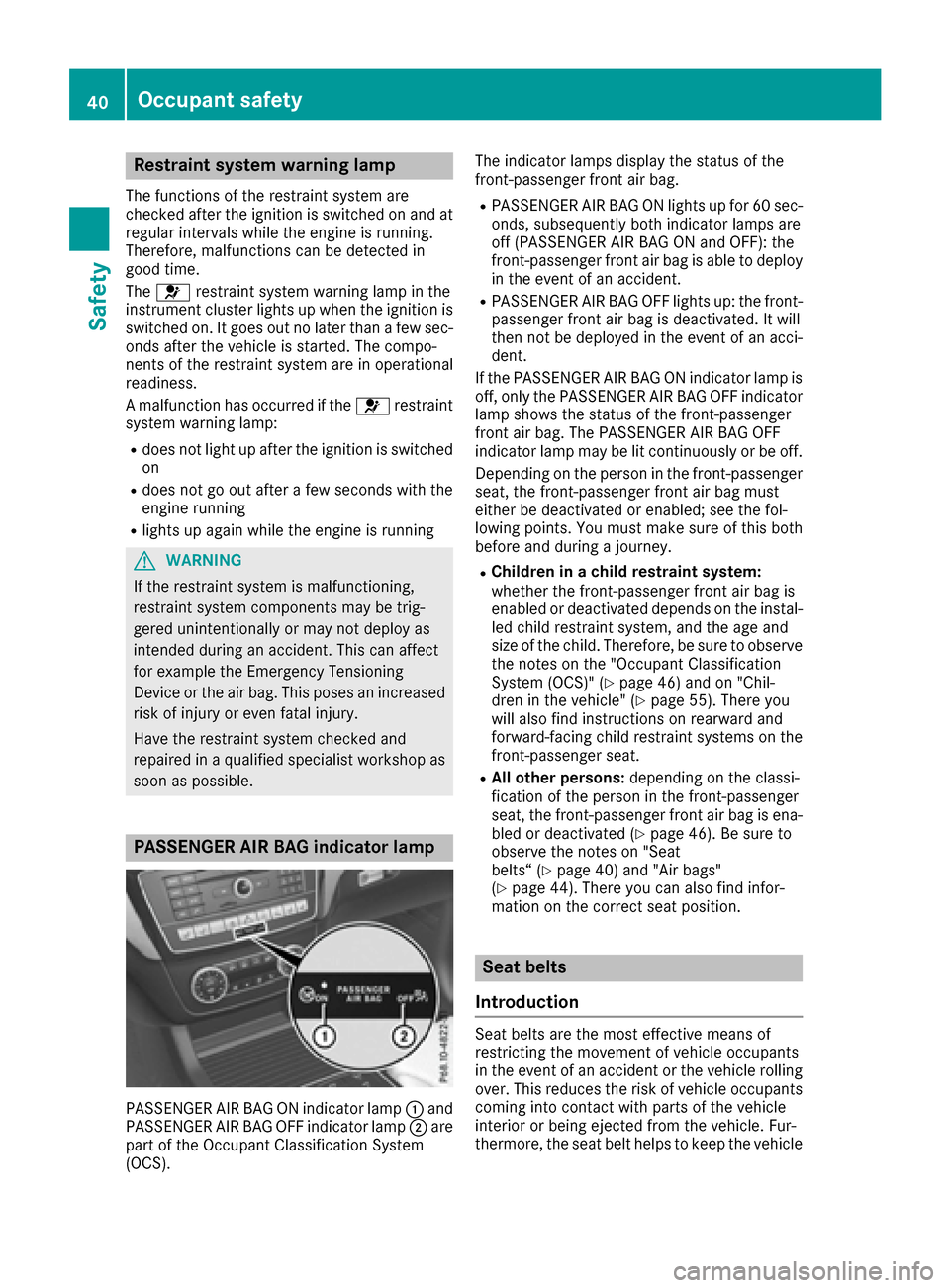
PASSENGER AIR BAG indicator lamp
PASSENGER AIR BAG ON indicator lamp :and
PASSENGER AIR BAG OFF indicator lamp ;are
part of the Occupant Classification System
(OCS). The indicator lamps display the status of the
front-passenger front air bag.
RPASSENGER AIR BAG ON lights up for 60 sec-
onds, subsequently both indicator lamps are
off (PASSENGER AIR BAG ON and OFF): the
front-passenger front air bag is able to deploy
in the event of an accident.
RPASSENGER AIR BAG OFF lights up: the front-
passenger front air bag is deactivated. It will
then not be deployed in the event of an acci-
dent.
If the PASSENGER AIR BAG ON indicator lamp is
off, only the PASSENGER AIR BAG OFF indicator lamp shows the status of the front-passenger
front air bag. The PASSENGER AIR BAG OFF
indicator lamp may be lit continuously or be off.
Depending on the person in the front-passenger
seat, the front-passenger front air bag must
either be deactivated or enabled; see the fol-
lowing points. You must make sure of this both
before and during a journey.
RChildren in a child restraint system:
whether the front-passenger front air bag is
enabled or deactivated depends on the instal-led child restraint system, and the age and
size of the child. Therefore, be sure to observe
the notes on the "Occupant Classification
System (OCS)" (
Ypage 46) and on "Chil-
dren in the vehicle" (Ypage 55). There you
will also find instructions on rearward and
forward-facing child restraint systems on the
front-passenger seat.
RAll other persons: depending on the classi-
fication of the person in the front-passenger
seat, the front-passenger front air bag is ena-
bled or deactivated (
Ypage 46). Be sure to
observe the notes on "Seat
belts“ (
Ypage 40) and "Air bags"
(Ypage 44). There you can also find infor-
mation on the correct seat position.
Seat belts
Introduction
Seat belts are the most effective means of
restricting the movement of vehicle occupants
in the event of an accident or the vehicle rolling over. This reduces the risk of vehicle occupants
coming into contact with parts of the vehicle
interior or being ejected from the vehicle. Fur-
thermore, the seat belt helps to keep the vehicle
40Occupant safety
Safety