language MERCEDES-BENZ GLE COUPE 2020 Owner's Manual
[x] Cancel search | Manufacturer: MERCEDES-BENZ, Model Year: 2020, Model line: GLE COUPE, Model: MERCEDES-BENZ GLE COUPE 2020Pages: 757, PDF Size: 11.84 MB
Page 445 of 757
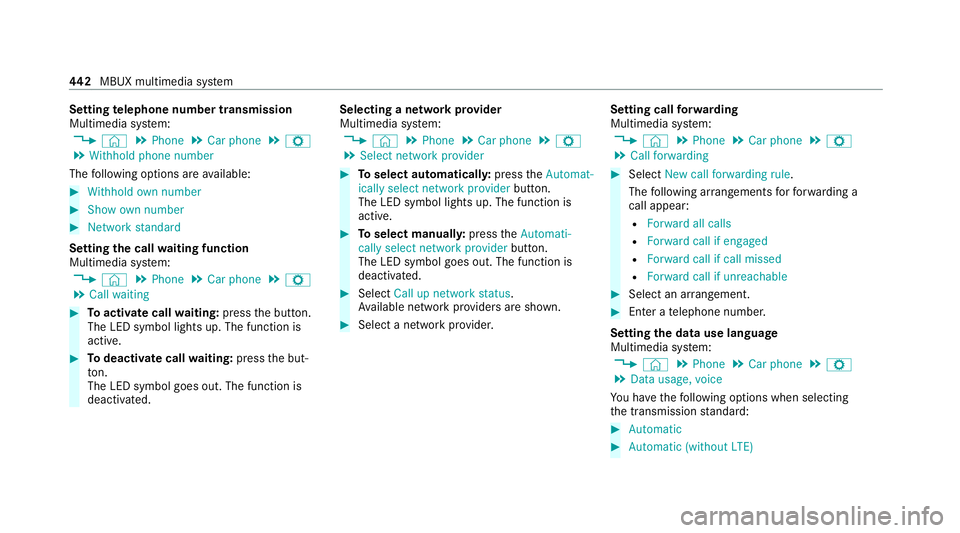
Setting
telephone number transmission
Multimedia sy stem:
4 © 5
Phone 5
Car phone 5
Z
5 Withhold phone number
The following options are available: #
Withhold own number #
Show own number #
Network standard
Setting the call waiting function
Multimedia sy stem:
4 © 5
Phone 5
Car phone 5
Z
5 Call waiting #
Toactivate call waiting: pressthe button.
The LED symbol lights up. The function is
active. #
Todeactivate call waiting: pressthe but‐
to n.
The LED symbol goes out. The function is
deacti vated. Selecting a network pr
ovider
Multimedia sy stem:
4 © 5
Phone 5
Car phone 5
Z
5 Select network provider #
Toselect automaticall y:press theAutomat-
ically select network provider button.
The LED symbol lights up. The function is
active. #
Toselect manuall y:press theAutomati-
cally select network provider button.
The LED symbol goes out. The function is
deactivated. #
Select Call up network status.
Av ailable network pr oviders are shown. #
Select a network pr ovider. Setting call
forw arding
Multimedia sy stem:
4 © 5
Phone 5
Car phone 5
Z
5 Call forwarding #
Select New call forwarding rule .
The following ar rangements forfo rw arding a
call appear:
R Forward all calls
R Forward call if engaged
R Forward call if call missed
R Forward call if unreachable #
Select an ar rangement. #
Enter a telephone number.
Setting the data use language
Multimedia sy stem:
4 © 5
Phone 5
Car phone 5
Z
5 Data usage, voice
Yo u ha vethefo llowing options when selecting
th e transmission standard: #
Automatic #
Automatic (without LTE) 442
MBUX multimedia sy stem
Page 466 of 757
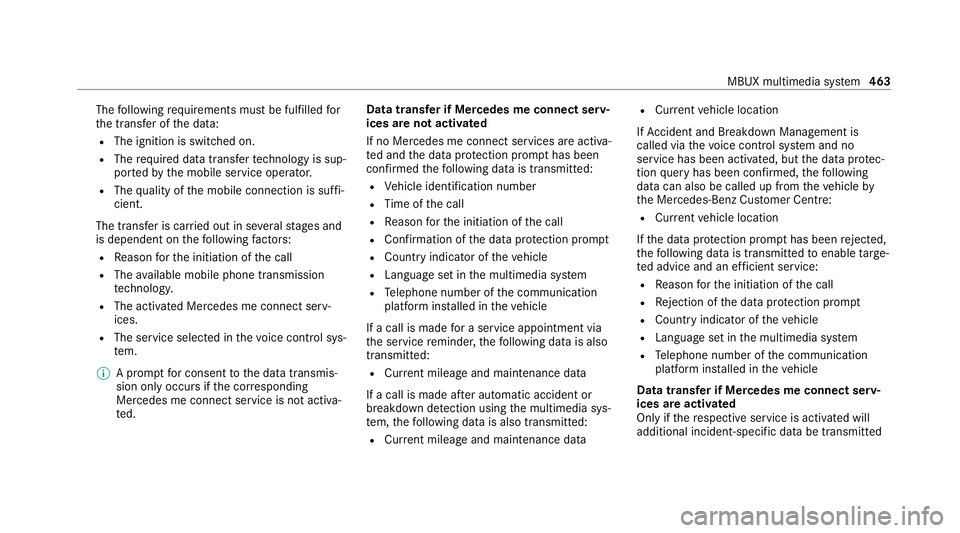
The
following requ irements must be fulfilled for
th e transfer of the data:
R The ignition is switched on.
R The requ ired data transfer tech nology is sup‐
po rted bythe mobile service operator.
R The quality of the mobile connection is suf fi‐
cient.
The transfer is car ried out in se veralst ages and
is dependent on thefo llowing factors:
R Reason forth e initiation of the call
R The available mobile phone transmission
te ch nology.
R The acti vated Mercedes me connect serv‐
ices.
R The service selected in thevo ice control sys‐
te m.
% A prom ptfor consent tothe data transmis‐
sion only occurs if the cor responding
Mercedes me connect service is not activa‐
te d. Data transfer if Mercedes me connect serv‐
ices are not activated
If no Mercedes me connect services are activa‐
te
d and the data pr otection prom pthas been
confirmed thefo llowing data is transmitted:
R Vehicle identification number
R Time of the call
R Reason forth e initiation of the call
R Confirmation of the data pr otection prom pt
R Country indicator of theve hicle
R Language set in the multimedia sy stem
R Telephone number of the communication
platform ins talled in theve hicle
If a call is made for a service appointment via
th e service reminder, thefo llowing data is also
transmitte d:
R Cur rent milea geand main tenance da ta
If a call is made af ter auto matic accident or
breakdown de tection using the multimedia sys‐
te m, thefo llowing data is also transmitted:
R Cur rent milea geand main tenance da ta R
Cur rent vehicle location
If Ac cident and Breakdown Management is
called via thevo ice control sy stem and no
service has been activated, but the data pr otec‐
tion query has been confi rmed, thefo llowing
data can also be called up from theve hicle by
th e Mercedes-Benz Cus tomer Centre:
R Curr entvehicle location
If th e data pr otection prom pthas been rejected,
th efo llowing data is transmitte dto enable targe‐
te d advice and an ef ficient service:
R Reason forth e initiation of the call
R Rejection of the data pr otection prom pt
R Country indicator of theve hicle
R Language set in the multimedia sy stem
R Telephone number of the communication
platform ins talled in theve hicle
Data transfer if Mercedes me connect serv‐
ices are activated
Only if there spective service is activated will
additional incident-specific data be transmitted MBUX multimedia sy
stem 463
Page 471 of 757
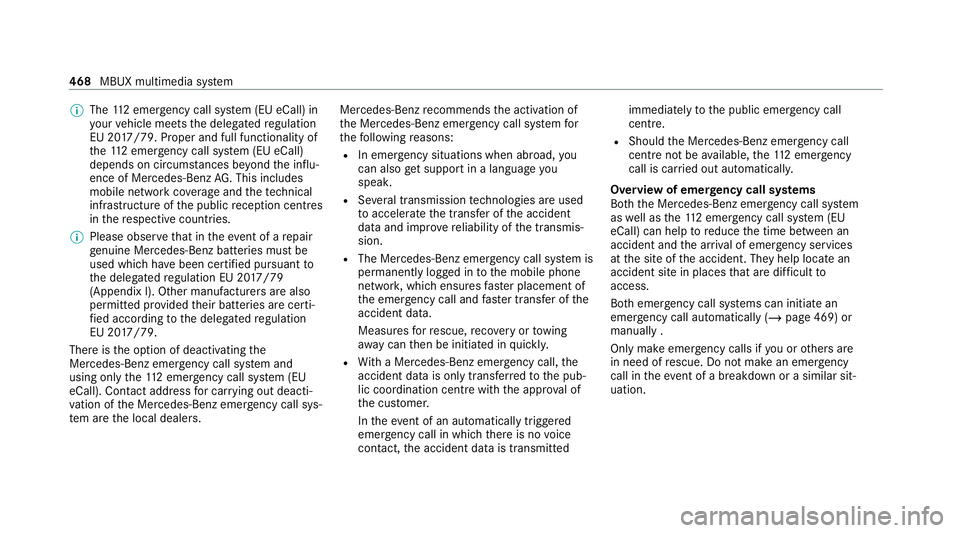
%
The 112 emer gency call sy stem (EU eCall) in
yo ur vehicle meets the delegated regulation
EU 20 17/79. Proper and full functionality of
th e11 2 emergency call sy stem (EU eCall)
depends on circums tances be yond the influ‐
ence of Mercedes-Benz AG. This includes
mobile network co verage and thete ch nical
infrastructu reofthe public reception centres
in there spective countries.
% Please obser vethat in theeve nt of a repair
ge nuine Mercedes-Benz batteries mu stbe
used which ha vebeen certified pursuant to
th e delegated regulation EU 20 17/79
(Appendix I). Other manu facturers are also
permitted pr ovided their batteries are certi‐
fi ed according tothe delegated regulation
EU 20 17/79.
The reisthe option of deactivating the
Mercedes-Benz emer gency call sy stem and
using only the11 2 emer gency call sy stem (EU
eCall). Contact address for car rying out deacti‐
va tion of the Mercedes-Benz emer gency call sys‐
te m are the local dealers. Mercedes-Benz
recommends the activation of
th e Mercedes-Benz emer gency call sy stem for
th efo llowing reasons:
R In emer gency situations when ab road, you
can also get support in a language you
speak.
R Several transmission tech nologies are used
to accelerate the transfer of the accident
data and impr overe liability of the transmis‐
sion.
R The Mercedes-Benz emer gency call sy stem is
permanently logged in tothe mobile phone
networ k,which ensures faster placement of
th e emer gency call and faster transfer of the
accident data.
Measures forre scue, reco very or towing
aw ay can then be initiated in quickl y.
R With a Mercedes-Benz emer gency call, the
accident data is on lytrans ferred tothe pub‐
lic coordination cent rewith the appr oval of
th e cus tomer.
In theeve nt of an au tomatical lytrig gered
emer gency call in which there is no voice
con tact, the accident data is transmit tedimmediately
tothe public emer gency call
centre.
R Should the Mercedes-Benz emer gency call
centre not be available, the11 2 emer gency
call is car ried out automaticall y.
Overview of emer gency call sy stems
Bo th th e Mercedes-Benz emer gency call sy stem
as well as the11 2 emer gency call sy stem (EU
eCall) can help toreduce the time between an
accident and the ar riva l of emer gency services
at the site of the accident. They help locate an
accident site in places that are dif ficult to
access.
Bo th emer gency call sy stems can initiate an
emer gency call au tomatically (/ page 469) or
manually .
Only make emergency calls if you or others are
in need of rescue. Do not make an emergency
call in theeve nt of a breakdown or a similar sit‐
uation. 468
MBUX multimedia sy stem
Page 474 of 757
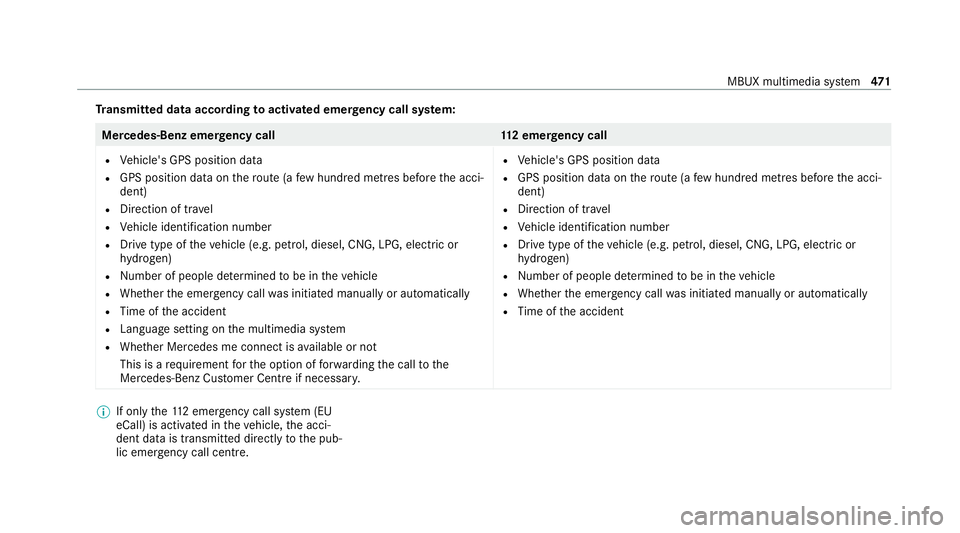
Tr
ansmitted data according toactivated emer gency call sy stem: Mercedes-Benz emer
gency call 112 emer gency call
R Vehicle's GPS position data
R GPS position data on thero ute (a few hund red metres before the acci‐
dent)
R Direction of tra vel
R Vehicle identification number
R Drive type of theve hicle (e.g. petrol, diesel, CNG, LPG, electric or
hy drogen)
R Numb er of people de term ined tobe in theve hicle
R Whe ther the emer gency call was initiated manually or automatically
R Time of the accident
R Language setting on the multimedia sy stem
R Whe ther Mercedes me connect is available or not
This is a requ irement forth e option of forw arding the call tothe
Mercedes-Benz Cus tomer Centre if necessar y. R
Vehicle's GPS position data
R GPS position data on thero ute (a few hund red metres before the acci‐
dent)
R Direction of tra vel
R Vehicle identification number
R Drive type of theve hicle (e.g. petrol, diesel, CNG, LPG, electric or
hy drogen)
R Numb er of people de term ined tobe in theve hicle
R Whe ther the emer gency call was initiated manually or automatically
R Time of the accident %
If only the11 2 emer gency call sy stem (EU
eCall) is activated in theve hicle, the acci‐
dent data is transmit ted directly tothe pub‐
lic emer gency call centre. MBUX multimedia sy
stem 471
Page 475 of 757
Fo
r accident clarification purposes, thefo llowing
measures can be take n up toan hour af terthe
emer gency call has been initia ted:
R The cur rent vehicle position can be called up.
R Avo ice connection totheve hicle occupants
can be es tablished.
R Emer gency call da taas desc ribed abo vecan
be called up.
% ForRu ssia: various functions, e.g. receiving
traf fic information, cannot be per form ed for
up totwo hou rsafte r sending an emer gency
call.
Fu nction of the emer gency call sy stem self-
diagnosis (Russia)
Yo ur car verifies the operability of the emer‐
ge ncy call sy stem each time the ignition is ON.
In case of sy stem failure, you will be informed
with text messa geon the instrument clus ter and
with red indicator SOS NOT READY onthe dis‐
pla y.
Please, make sure, that during 30 seconds af ter
switching ignition ON there d indicator SOS
NOT READY inthe upper right corner of display is switched OFF,
this means the emer gency call
sy stem passed diagnostics successfully.
St arting/ending ERA-GLONASS test mode
(Russia)
Re quirements:
R The star ter battery is suf ficiently charge d.
R The ignition is switched on.
R The vehicle has been stationary for at least
one minute. #
Tostart thete st mode: press and hold the
0076 button on the multifunction steering
wheel for at least five seconds.
The test mode is star ted and automatically
ends af terth e language test has been per‐
fo rm ed. #
Toend thete st mode manuall y:switch off
th e ignition.
The test mode is ended. Information on data processing
Processing of personal data via
the
Mercedes-Benz emer gency call sy stem
All processing of personal data via the
Mercedes-Benz emer gency call sy stem cor re‐
sponds with the specifications in the EU Regula‐
tion 20 16/679 "on the pr otection of individuals
with rega rd tothe processing of personal data
(GDPR)".
The data is solely used bythe Mercedes-Benz
emer gency call sy stem forre scue and reco very
in theeve nt of an accident.
The owner of a vehicle, that is equipped with a
Mercedes-Benz emer gency call sy stem in addi‐
tion tothe11 2 emer gency call sy stem (EU eCall),
has theright touse the11 2 emer gency call sys‐
te m ins tead of the Mercedes-Benz emer gency
call sy stem.
Contact address for car rying out deactivation of
th e Mercedes-Benz emer gency call sy stem are
th e local dealers. 472
MBUX multimedia sy stem
Page 502 of 757
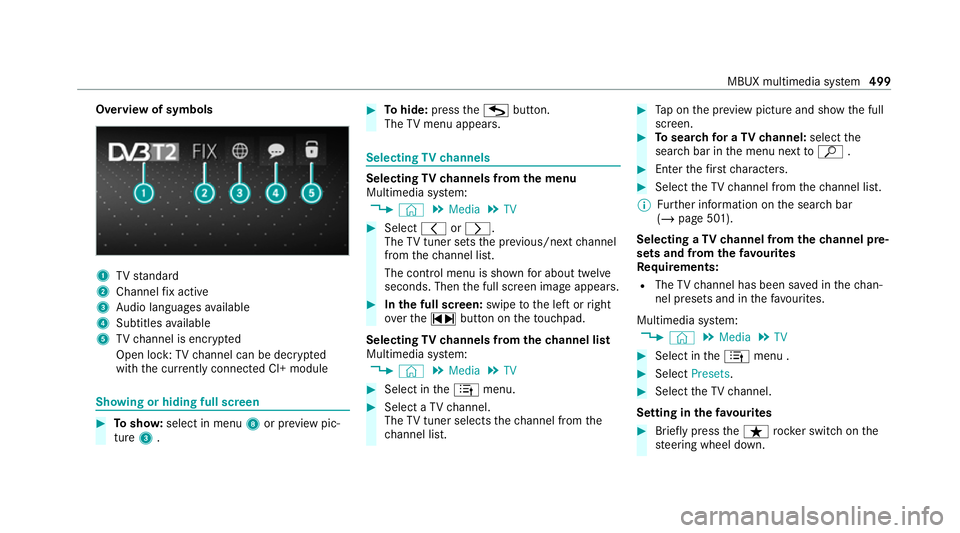
Overview of symbols
1
TVstandard
2 Channel fix acti ve
3 Audio languages available
4 Subtitles available
5 TVchannel is enc rypted
Open lock: TVchannel can be dec rypted
with the cur rently connected CI+ module Showing or hiding full sc
reen #
Tosho w:select in menu 8or pr eview pic‐
ture 3. #
Tohide: press theG button.
The TVmenu appears. Selecting
TVchannels Selecting
TVchannels from the menu
Multimedia sy stem:
4 © 5
Media 5
TV #
Select 0047or0048.
The TVtuner sets the pr evious/n extch annel
from thech annel list.
The control menu is shown for about twel ve
seconds. Then the full screen image appears. #
Inthe full screen: swipetothe left or right
ove rth e~ button on theto uchpad.
Selecting TVchannels from thech annel list
Multimedia sy stem:
4 © 5
Media 5
TV #
Select in the4 menu. #
Select a TVchannel.
The TVtuner selects thech annel from the
ch annel list. #
Tap on the pr eview picture and show the full
screen. #
Tosear chfor a TVchannel: selectthe
sear chbar in the menu next toª . #
Enter thefirs tch aracters. #
Select theTV channel from thech annel list.
% Further information on the sear chbar
(/ page 501).
Selecting a TVchannel from thech annel pre‐
sets and from thefa vo urites
Re quirements:
R The TVchannel has been sa ved in thech an‐
nel presets and in thefa vo urites.
Multimedia sy stem:
4 © 5
Media 5
TV #
Select in the4 menu . #
Select Presets. #
Select theTV channel.
Setting in thefa vo urites #
Brief lypress theß rocker switch on the
st eering wheel down. MBUX multimedia sy
stem 499
Page 505 of 757
#
Select Delete. #
Select Yes. TV
prog ramme Setting the
TVaudio language
Multimedia sy stem:
4 © 5
Media 5
TV 5
Z
5 General #
Select Audio/subtitles. #
Select one of theav ailable audio languages
0048 undertheAUDIO LANGUAGE category. #
Select one of theav ailable options forthe
selected audio language.
The selected audio language, e.g. French, will
be kept until the multimedia sy stem is
switched off.
When you swit chon the multimedia sy stem
again, the sy stem language is loaded as the
audio language. If this is not available, the
audio language that appears at the beginning
of the list is loaded. Setting
theTV subtitles
Multimedia sy stem:
4 © 5
Media 5
TV 5
Z
5 General #
Select Audio/subtitles. #
Select theav ailable languages 0048under
th eSUBTITLES category. #
Select one of theav ailable options forthe
selected language.
The selected language, e.g. French, will be
ke pt until the multimedia sy stem is switched
off.
When you swit chon the multimedia sy stem
again, the sy stem language is loaded as the
language. If this is not available, the language
th at appears at the beginning of the list is
loaded. #
Toshow no subtitles: switchActivate off. Te
lete xt Te
lete xt ove rview
Te lete xt pa ges are located between page 100
and page 899. A dynamic
telete xt pa geconsi sts of se veral sub‐
pages.
The display of subpages changes automatically
or can be called up with the ar row buttons.
Information on MHEG-5 digital telete xt:
R digi taltelete xt is only available in some coun‐
tries, e.g. the UK and New Zealand
R interactive multimedia applications such as
weather fore casts, ne wsreports and sport
re sults are available
R it may take some time before all the pages
load
Showing telete xt
Multimedia sy stem:
4 © 5
Media 5
TV 5
Z
5 General 5
Teletext #
Toswitch topage selection: switch
between number entry and selection using
th e ar row button with 00C9and123. #
Tocall up a side: enterthe numbers in quick
succession.
or 502
MBUX multimedia sy stem
Page 516 of 757
Ac
tivating multi-coloured lighting #
Select Multi-colour. #
Select a colour programme.
Ac tivating multi-coloured animation #
Activate Multi-colour animat..
The chosen colour programme will change at
predefined inter vals.
Ad justing the brightness #
Select Brightness . #
Toactivate brightness for zones: switch
Brightness zones on or off.
If Brightness zones is switched on,the zones
can be set individually. #
Set the zones.
Setting the colour ef fects #
Select Effects. #
Swit chWelcome orClimate on or off.
% Further information on theto pic of setting
ambiance light (/ page149). Setting
the language in there ar passenger
comp artment Re
ar Seat En tertainment Sy stem:
4 © 5
Settings 5
System
5 Language #
Set the language. Selecting sy
stem settings in there ar com‐
partment Re
ar Seat En tertainment Sy stem:
4 © 5
Settings 5
System
Ad justing the brightness #
Select Display. #
Adjust the brightness.
Connecting a device in the device manager #
Select Device Manager. #
Select a device that is tobe connec ted.
Headphones and headsets are connec ted
with there ar displa y. Mobile phones and
other devices are con‐
nected with the multimedia sy stem. Na
vigation Switching on navigation in
there ar comp art‐
ment
Re ar Seat En tertainment Sy stem:
4 © 5
Navigation (Navigation)
The map appears and sho ws the current vehicle
position. #
Select an option in the navigation menu.
The following options are available on there ar
displa y,forex ample:
R Entering the destination and transfer ring this
to the multimedia sy stem using Send to Car
Navigation
R Setting the map scale.
R Moving the map and rotating the map.
R Showing route information.
R Installing the online map update forre gions.
This option is not available in all countries. MBUX multimedia sy
stem 513
Page 730 of 757
Kickd
own.................................................1 96
Using ................................................... 19 6
Knee airbag ................................................ 42 L
Lamp see In terior lighting
Lamps (instrument display) see Warning/indicator lamps
Lane de tection (au tomatic)
see Active Lane Keeping Assist
Lane Keeping Assist
see Active Lane Keeping Assist
Language .................................................. 377
No tes ................................................... 377
Setting ................................................. 377
LED light see In telligent Light Sy stem
Le vel control sy stem
see AIRMATIC
see E- ACTIVE BODY CONTROL
Light switch Overview .............................................1 40Lighting
see Interior lighting
see Lights
Lights ........................................................ 14 0
Ac tive headla mps ................................ 14 3
Ad aptive Highbeam Assist .................. .145
Ad justing the instrument lighting ........ 306
Au tomatic driving lights ....................... 141
Combination swit ch............................. 14 2
Corne ring light ..................................... 14 4
Driving ab road (symm etrical low
beam) .................................................. 14 0
Fo g light (extended range) ................... 14 4
Haza rdwa rning lights .......................... 14 3
Headla mpflasher ................................ 14 2
High beam ........................................... 14 2
Intellige nt Light Sy stem ....................... 14 3
Light switch .........................................1 40
Low beam ............................................ 14 0
Mo torw ay mode .................................. 14 4
Off-road light ....................................... 14 5
Pa rking lights ...................................... .140
Re ar fog light ....................................... 14 0
Re sponsibility for lighting sy stems ...... 14 0
Setting the dipped beam ..................... 14 8Setting
theex terior lighting switch-
off delay time ...................................... 14 8
St anding lights .................................... .140
Switching the sur round lighting
on/off ................................................ .148
Tu rn signal lights ................................. 14 2
Limiter ...................................................... 226
Ac tivating ............................................ 227
Buttons ................................................ 227
Calling up a speed ............................... 227
Deactivating ........................................ 227
Fu nction .............................................. 226
Pa ssive mode ...................................... 226
Pe rm anent setting .............................. .229
Re quirements ...................................... 227
Selecting ............................................ .227
Setting a speed ................................... 227
St oring a speed ................................... 227
Sy stem limitations ...............................2 26
Limiting speed see Limi ter
Limiting the opening angle (tailgate) ...... 92
LINGU ATRO NIC ........................................ 315
Au dible help functions .........................3 18 Index
727
Page 740 of 757
Displ
aying ............................................ 307
REA CHregulation ...................................... 32
Re ading light
Switching on/off with hand mo ve‐
ments .................................................. 347
Re ading light
see Interior lighting
Re alwo od (Care) .................................... .533
Re ar climate control
Setting (MBUX multimedia sy stem) ..... 16 2
Re ar display
Home screen overview ........................ 509
Locking (child saf ety lock) .................. .376
Overview ............................................. 509
Re ar door (child saf ety lock) .....................76
Re ar fog light
Switching on/off .................................. 141
Re ar of theve hicle
Lo we ring ............................................. 250
Ra ising ................................................ 250
Re ar seat
see Seat Re
ar seat belt
St atus display ........................................ 42
Re ar seat belt status display .................... 42
Re ar Seat Entertainment Sy stem
Ad justing the brightness ......................5 13
Ad justing there ar seats ...................... .511
Calling up services, apps and web
br ows er ................................................ 514
Calling up the device manager .............5 13
Climate cont rol .................................... 512
Controlling playback ............................ 51 5
Headphones overview .......................... 51 0
Information about media mode ............ 514
Operating saf ety .................................. 508
Overview ............................................ .508
Overview of services, apps and web
br ows er ................................................ 514
Overview of sound settings .................. 516
Overview of there ar displa ys.............. 509
Selecting a massa geprogramme .........5 11
Selecting sound settings ...................... 516
Setting the ambiance light ...................5 12
Setting the language ............................5 13
Switching navigation on ....................... 513
Switching off the display ..................... 509 Switching on media mode ....................
51 5
Switching on theTV ............................. 516
Re ar window heater ................................ 15 9
Re ar-view mir ror
see Outside mir rors
Re cycling
see Take -ba ckof end-of-life vehicles
Re ducing agent
see AdBlue ®
Re fuelling
Re fuelling theve hicle ........................... 197
To pping up AdBlue ®
............................. 201
Re gistration
Ve hicle .................................................. 32
Re mo tecont rol (stationa ryheater/
ve ntilation)
Displa ys............................................... 16 8
Problems ............................................. 16 9
Re placing the battery .......................... 16 8
Setting ................................................. 167
Re mo teOnline
Charging the battery ............................1 76 Index
737