cruise control MERCEDES-BENZ GLE COUPE 2020 Owners Manual
[x] Cancel search | Manufacturer: MERCEDES-BENZ, Model Year: 2020, Model line: GLE COUPE, Model: MERCEDES-BENZ GLE COUPE 2020Pages: 757, PDF Size: 11.84 MB
Page 11 of 757
Switches
thesteering wheel heater on/off →
11 4
P Control panel:
On-board co mputer →
301
Cruise cont rol or variable limiter →
227
Ac tive Dis tance Assi stDISTRONIC →
234 Q
Diagno stics connection →
31
R Opens the bonn et →
51 8
S Electric pa rking brake →
208
T Light switch →
14 0 8
Ataglance – Cockpit
Page 186 of 757
R
Vehicles with a diesel engine: AdBlue ®
le vel
R Engine oil le vel:fill engine oil up tothe maxi‐
mum le velto ensure full gradeability
(/ page 520).
R Tyre-change tool kit and spare wheel
R Tyres and wheels
% Further information about special all-ter rain
tyres forre trofitting can be ob tained from a
qu alified specialist workshop.
Off-road driving
Re ad this section before driving your vehicle off-
ro ad. Practise bydriving over more gentle off-
ro ad terrain firs t.
R Obse rveth e no tes on the cross-country ABS
(/ page 213).
R Ifnecessa ry, select theF (/page 190)
drive program be fore driving off-road.
R Select a vehicle le vel suitable for off-road ter‐
ra in (/ page249). Toavo id damaging the
ve hicle, make sure there is alw ays suf ficient
ground clearance. R
Alw ayske ep the engine running and in gear
when driving on downhill gradients and
slopes. Obse rveth e no tes on driving in
mountainous terrain.
R Do not drive on unknown terrain that is not
easily visible and stay on mar kedro utes.
R Alw ayske ep the doors and windo wsclosed
while theve hicle is in motion.
R Deactivate Active Dis tance Assi st
DISTRONIC, cruise control and theva riable
limiter.
R Adapt your driving style to thete rrain.
R Do not use the HOLD function on steep
downhill or uphill gradients with slippery or
loose sur faces.
Driving on sand
When driving on sand, also obser vethefo llowing
instructions:
R Select theF drive prog ram.
R Select a higher vehicle le vel.
R Shift toa lo werge ar. R
Drive quickly to overcome thero lling resist‐
ance, otherwise theve hicle may dig itself in.
R Drive in the trac ksofother vehicles if possi‐
ble. Make sure that thefo llowing prerequi‐
sites are me t:
- the tyre ruts are not too deep
- the sand is firm enough
- the ground clearance is suf ficient
Mercedes -AMG vehicles: observeth e no tes in
th e Supplement. You could otherwise failto rec‐
ognise dangers.
Fo rding
Also obser vethefo llowing information when
fo rd ing:
R Drive at no more than 10 km/h.
R Obser vethe maximum permissible ford ing
dep th (/ page 628).
R Switch off automatic climate control
(/ page 161).
R Vehicles with stationary heater/ventila‐
tion: switch thest ationary heater/ ventilation
off (/ page 165). Driving and parking
18 3
Page 216 of 757
R
EBD ( Electronic Brakeforce Distribution)
(/ page 219)
R ESP ®
(Electronic Stability Pro gram)
(/ page 214)
R Off-road ESP ®
(/ page 217)
R ESP ®
Crosswind Assi st (/ page 218)
R ESP ®
trailer stabilisation (/ page218)
R Speed Limit Assist (/ page 282)
R Active Speed Limit Assi st (/ page 236)
R HOLD function (/ page245)
R STEER CONTROL (/ page 219)
R Active Steering Assist (/ page 238)
R Limiter (/ page 226)
R Active Emergency Stop Assist (/ page242)
R Active Parking Assist (/ page274)
R Parking Assist PARKTRONIC (/ page 260)
R Reversing camera (/ page 267)
R Active Lane Change Assi st (/ page 240)
R Active Traf fic Jam Assi st (/ page 242)
R Cruise control (/ page 225) R
Blind Spot Assist and Active Blind Spot Assi st
with exitwa rning (/ page 286)
R Traf fic Sign Assi st (/ page 284) Fu
nction of ABS The Anti-lock Brake Sy
stem (ABS) regulates the
brake pressure in critical driving situations:
R During braking, e.g. at full brake application
or insuf ficient tyre traction, the wheels are
pr eve nted from lo cking.
R Vehicle steerability while braking is ensured.
If ABS inter venes when braking, you will feel a
pulsing in the brake pedal. The pulsating brake
pedal can be an indication of hazardous road
conditions and can ser veas a reminder totake
ex tra care while driving.
Sy stem limits
R ABS is active from speeds of appr ox.
8 km/h.
R ABS may be impai red or may not function if a
malfunction has occur red and theye l‐
low 0025 ABSwarning lamp lights up contin‐ uously in
the instrument clus ter af terthe
engine is star ted. Fu
nctions of Off-road ABS %
Off-road ABS is activated automatically when
you select theF drive program.
Off-road ABS is specially adap tedfo r driving off-
ro ad:
R The front wheels lock cyclically during brak‐
ing.
R The braking dis tance is sho rtened due tothe
digging-in ef fect.
Sy stem limits
R Off- road ABS functions at speeds below
40 km/h.
R If Off- road ABS inter venes, the ability tosteer
may be restricted. Driving and pa
rking 213
Page 228 of 757
R
Ifth e typical outline of a pedestrian cann ot
be distinguished from the bac kground.
R If a pedestrian is not de tected as su ch, e.g.
due tospecial clo thing or other objects.
R On bends with a tight radius.
% The Active Brake Assi stsensors adjust auto‐
matically while a cer tain dis tance is being
driven af terth eve hicle has been delivered.
Ac tive Brake Assi stis una vailable or only
partially available during this teach-in period. Setting
Active Brake Assi st Re
quirements:
R The ignition is switched on.
Multimedia sy stem:
4 © 5
Settings 5
Assistance
5 Active Brake Assist
The following settings are available:
R Early
R Medium
R Late #
Select a setting.
The setting is retained when the engine is
next star ted.
Deactivating Active Brake Assi st
% It is recommended that you alw ays lea ve
Ac tive Brake Assi stactivated. #
Select Off.
The dis tance warning function, the autono‐
mous braking function and the Evasive Steer‐
ing Assist are deactivated.
When theve hicle is next star ted, the middle
setting is automatically selected.
% IfAc tive Brake Assi stis deactivated, the
00D4 symbol appears inthest atus bar of the
multifunction displa y. Fu
nction of Adaptive Brake Lights Ad
aptive Brake Lights warnfollowing traf fic in an
emergency braking situation wi th thefo llowing
actions:
R Byflashing the brake lamps
R By activating the hazard warning lights If
th eve hicle is braked sharply from speeds
abo ve50 km/h, the brake lamps flash rapidl y.
This pr ovides traf fic tr avelling behind you with an
ev en more noticeable warning.
If th eve hicle is tr avelling at speeds of more than
70 km/h at the beginning of the brake applica‐
tion, the hazard warning lights switch on once
th eve hicle is stationar y.When you pull away
again, the hazard warning lights will switch off
automatically at appr oximately 10km/h. Yo u
can also switch off the hazard warning lights
using the hazard warning button. Cruise control and limiter
Fu
nction of cruise control
Plug-in hybrid: obser vethe no tes in the Supple‐
ment. You could otherwise failto recognise dan‐
ge rs.
Cruise cont rolre gulates the speed totheva lue
selec tedby the driver.
If yo u accelerate toove rtake, forex ample, the
st ored speed is not dele ted. If youre mo veyour
fo ot from the accelera tor pedal af terov ertaking, Driving and pa
rking 225
Page 229 of 757
cruise control will
resume speed regulation back
to thestored speed.
Cruise contro l is operated using the cor respond‐
ing steering wheel buttons. You can store any
speed abo ve20 km/h up tothe maximum speed
or up tothe set winter tyre limit.
If yo ufa ilto adapt your driving style, cruise con‐
trol can neither reduce therisk of an accident
nor override the la wsof ph ysics. It cannot take
into account road, weather or traf fic conditions.
Cruise control is only an aid. The driver is
re sponsible forth e dis tance totheve hicle in
front, forve hicle speed, for braking in good time
and forst ay ing in lane.
Mercedes‑AMG vehicles: cruise control is avail‐
able up toa maximum speed of 250 km/h.
Displ ays in the multifunction display
The status of cruise control and thestored
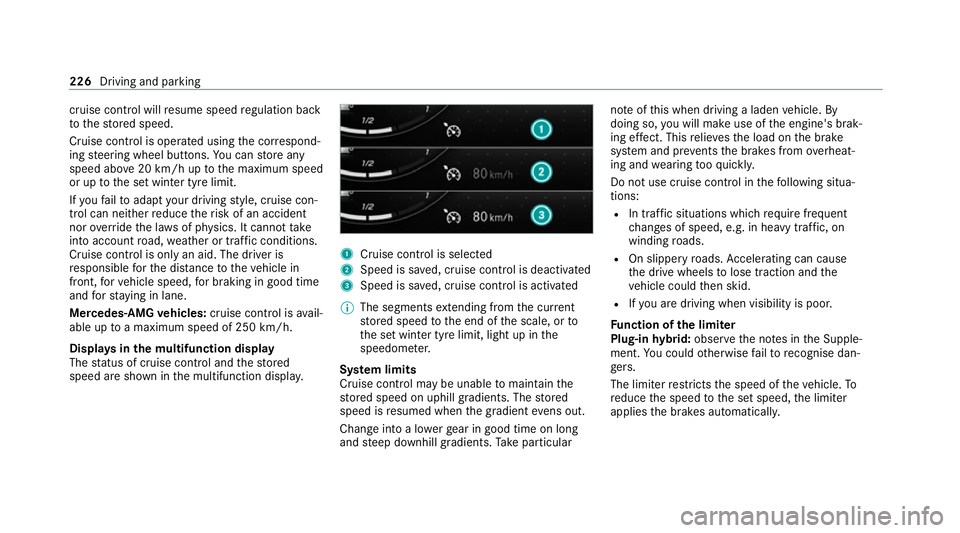
speed are shown in the multifunction displa y. 1
Cruise cont rol is selec ted
2 Speed is sa ved, cruise control is deactivated
3 Speed is sa ved, cruise control is activated
% The segments extending from the cur rent
st ored speed tothe end of the scale, or to
th e set winter tyre limit, light up in the
speedome ter.
Sy stem limits
Cruise control may be unable tomaintain the
st ored speed on uphill gradients. The stored
speed is resumed when the gradient evens out.
Change into a lo werge ar in good time on long
and steep downhill gradients. Take particular no
te ofthis when driving a laden vehicle. By
doing so, you will make use of the engine's brak‐
ing ef fect. This relie vesth e load on the brake
sy stem and pr events the brakes from overheat‐
ing and wearing tooqu ickl y.
Do not use cruise control in thefo llowing situa‐
tions:
R In traf fic situations whi chrequ ire frequent
ch anges of speed, e.g. in heavy traf fic, on
winding roads.
R On slippe ryroads. Accelerating can cause
th e drive wheels tolose traction and the
ve hicle could then skid.
R Ifyo u are driving when visibility is poor.
Fu nction of the limiter
Plug-in hybrid: obser vethe no tes in the Supple‐
ment. You could otherwise failto recognise dan‐
ge rs.
The limiter restricts the speed of theve hicle. To
re duce the speed tothe set speed, the limiter
applies the brakes automaticall y.226
Driving and parking
Page 230 of 757
Yo
u can limit the speed as follo ws:
R Variable: for speed restrictions, e.g. in built-
up areas.
R Perm anen t:for long-term speed restrictions,
e.g. when driving in winter tyre mode.
The variable limiter is operated using the cor re‐
sponding steering wheel buttons. You can store
any speed abo ve20 km/h up tothe maximum
speed or up tothe set winter tyre limit. You can
also per form settings while theve hicle is station‐
ary if theve hicle has been star ted.
If yo ufa ilto adapt your driving style, the limiter
can neither reduce therisk of an accident nor
ove rride the la wsof ph ysics. It cannot take into
account road, weather or traf fic conditions. The
limiter is only an aid. The driver is responsible
fo rth e dis tance totheve hicle in front, forve hi‐
cle speed, for braking in good time and forst ay‐
ing in lane.
Mercedes‑AMG vehicles: the limiter is available
up toa maximum speed of 250 km/h. Displ
ays in the multifunction display
The status of theva riable limiter and thestored
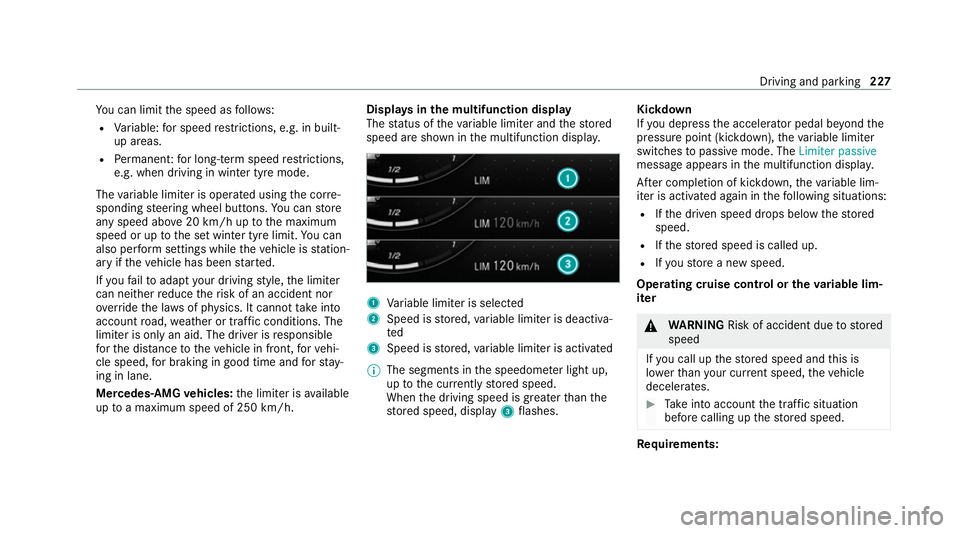
speed are shown in the multifunction displa y. 1
Variable limiter is selec ted
2 Speed is stored, variable limiter is deactiva‐
ted
3 Speed is stored, variable limiter is activated
% The segments in the speedome ter light up,
up tothe cur rently stored speed.
When the driving speed is greater than the
st ored speed, display 3flashes. Kickd
own
If yo u depress the accelerator pedal be yond the
pressure point (kickdown), theva riable limiter
swit ches topassive mode. The Limiter passive
message appears in the multifunction displa y.
Af ter completion of kickdown, theva riable lim‐
iter is activated again in thefo llowing situations:
R Ifth e driven speed drops below thestored
speed.
R Ifth estored speed is called up.
R Ifyo ustore a new speed.
Operating cruise control or theva riable lim‐
iter &
WARNING Risk of accident due tostored
speed
If yo u call up thestored speed and this is
lo we rth an your cur rent speed, theve hicle
decelerates. #
Take into account the tra ffic situation
before calling up thestored speed. Re
quirements: Driving and parking
227
Page 231 of 757
Cruise cont
rol
R Cruise cont rol is selec ted.
R ESP ®
must be activated, but not inter vening.
R The driven speed is at least 20 km/h.
R The transmission is in position 005B.
Va riable limiter
R The vehicle has been star ted.
R The variable limiter is selec ted. Switching between cruise control and
the
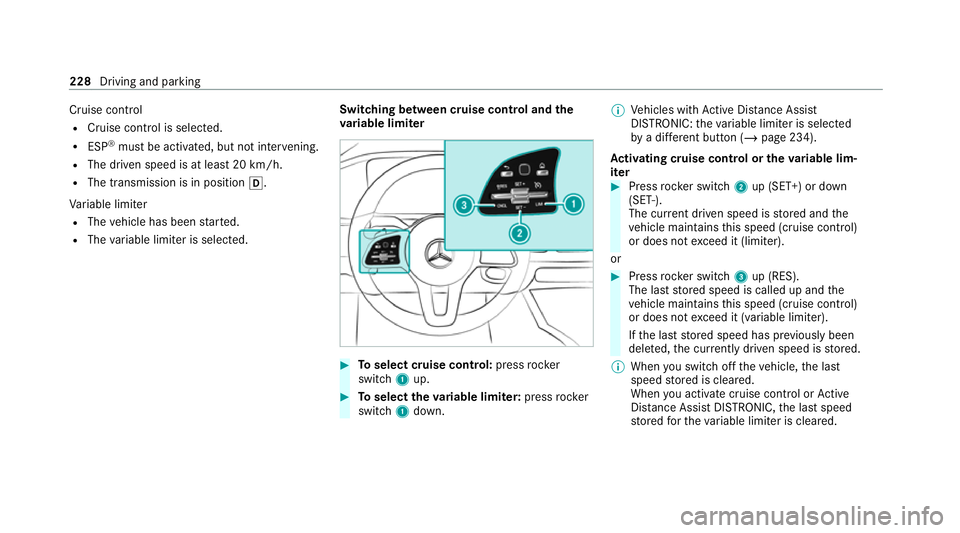
va riable limi ter #
Toselect cruise control: pressrocker
switch 1up. #
Toselect theva riable limi ter: press rocker
switch 1down. %
Vehicles with Active Dis tance Assi st
DISTRONIC: theva riable limiter is selec ted
by a dif fere nt button (/ page 234).
Ac tivating cruise control or the variable lim‐
iter #
Press rocker switch 2up (SET+) or down
(SET-).
The cur rent driven speed is stored and the
ve hicle maintains this speed (cruise control)
or does not exceed it (limiter).
or #
Press rocker switch 3up (RES).
The last stored speed is called up and the
ve hicle maintains this speed (cruise control)
or does not exceed it (variable limiter).
If th e last stored speed has pr eviously been
dele ted, the cur rently driven speed is stored.
% When you swit choff theve hicle, the last
speed stored is cleared.
When you activate cruise cont rol or Active
Dis tance Assi stDISTRONIC, the last speed
st ored forth eva riable limiter is cleared. 228
Driving and parking
Page 232 of 757
Increasing/decreasing
thesto red speed #
Press rocker switch 2up (SET+) or down
(SET-) tothe pressure point.
The stored speed is increased or reduced by
1 km/h.
or #
Press rocker switch 2up (SET+) or down
(SET-) tothe pressure point and hold.
The stored speed is increased or reduced in
increments of 1 km/h.
or #
Press rocker switch 2up (SET+) or down
(SET-) be yond the pressure point.
The stored speed is increased or reduced by
10 km/h.
or #
Press rocker switch 2up (SET+) or down
(SET-) and hold be yond the pressure point.
The stored speed is increased or reduced in
increments of 10km/h.
or #
Accelerate theve hicle tothe desired speed. #
Press rocker switch 2up (SET+). Ad
opting the de tected speed
If cruise control/ theva riable limiter is activated
and Speed Limit Assist or Traf fic Sign Assi sthas
de tected a speed restriction sign wi tha maxi‐
mum permissible speed and this is displa yed in
th e instrument clus ter,yo u can choose between
th efo llowing options: #
Press rocker switch 3up (RES).
The maximum permissible speed shown by
th e traf fic sign is stored and theve hicle
maintains or does not exceed this speed. #
Todeactivate cruise control: pressrock er
switch 3down (CNCL). #
Todeactivate cruise control: pressrock er
switch 1down.
Deactivating cruise control or theva riable
limi ter #
Press rocker switch 3down (CNCL).
% Ifyo u brake, deactivate ESP ®
or if ESP ®
inter venes, cruise control is deacti vated. The
va riable limiter is not deactivated. Pe
rm anent limi ter
If th eve hicle should ne verexc eed a specific
speed (e.g. for driving in winter tyre mode), you
can set this speed with the permanent limiter.
Yo u do this by limiting the speed toava lue
between 160 km/h and 240 km/h in the multi‐
media sy stem (/ page 229).
Shortly before the set speed is reached, it
appears in the multifunction displa y.When you
confirm the message with 0038, display mes‐
sages no longer appear until you swit choff the
ve hicle. The speed will only be displa yed again
once theve hicle has been restar ted or if the set
speed is changed.
The permanent limiter does not swit chtopas‐
sive mode even du ring kickdown and the driven
speed remains below the set speed.
Setting the speed limitation for winter tyres
Multimedia sy stem:
4 © 5
Settings 5
Vehicle
5 Winter tyres limit #
Select a speed or deactivate the function. Driving and parking
229
Page 286 of 757
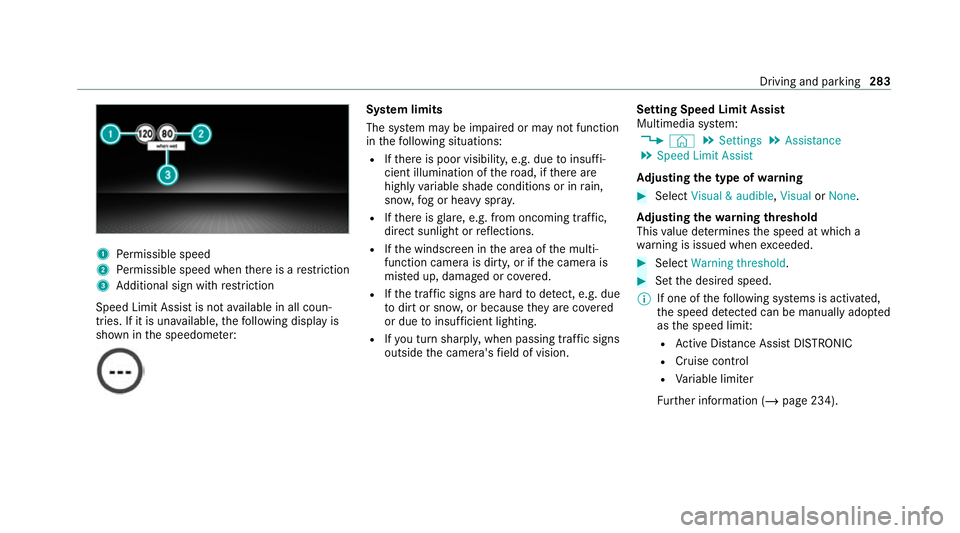
1
Perm issible speed
2 Perm issible speed when there is a restriction
3 Additional sign with restriction
Speed Limit Assi stis not available in all coun‐
tries. If it is una vailable, thefo llowing display is
shown in the speedome ter: Sy
stem limits
The sy stem may be impaired or may not function
in thefo llowing situations:
R Ifth ere is poor visibility, e.g. due toinsuf fi‐
cient illumination of thero ad, if there are
highly variable shade conditions or in rain,
sno w,fog or heavy spr ay.
R Ifth ere is glare, e.g. from oncoming traf fic,
di re ct sunlight or reflections.
R Ifth e windscreen in the area of the multi‐
function camera is dirty, or if the camera is
mis ted up, damaged or co vered.
R Ifth e tra ffic signs are hard todetect, e.g. due
to dirt or sno w,or because they are co vered
or due toinsuf ficient lighting.
R Ifyo u turn sharpl y,when passing traf fic signs
outside the camera's field of vision. Setting Speed Limit Assist
Multimedia sy
stem:
4 © 5
Settings 5
Assistance
5 Speed Limit Assist
Ad justing the type of warning #
Select Visual & audible ,Visual orNone.
Ad justing the warning threshold
This value de term ines the speed at which a
wa rning is issued when exceeded. #
Select Warning threshold. #
Set the desired speed.
% If one of thefo llowing sy stems is activated,
th e speed de tected can be manually adop ted
as the speed limit:
R Active Dis tance Assi stDISTRONIC
R Cruise control
R Variable limiter
Fu rther information (/ page 234). Driving and parking
283
Page 289 of 757
R
Only vehicles with Driving Assistance
Pa ckage:
Ac tive Dis tance Assi stDISTRONIC mu stbe
activated forth e automatic adoption of
speed limits.
Multimedia sy stem:
4 © 5
Settings 5
Assistance
5 Traffic Sign Assist
Ac tivating/deactivating automatic adoption
of speed limits (only vehicles with Driving
Assistance Package) #
Select Adopt limit. #
Activate or deacti vate the function.
The speed limits de tected byTraf fic Sign
Assi stare automatically adop tedby Active
Dis tance Assi stDISTRONIC.
% If one of thefo llowing sy stems is activated,
th e speed de tected can be manually adop ted
as the speed limit:
R Active Dis tance Assi stDISTRONIC
R Cruise control
R Variable limiter Fu
rther information (/ page 234).
Displaying de tected traf fic signs in the
medi a display #
Select Display in head unit. #
Activate or deacti vate the function.
Ad justing the type of warning #
Select Visual & audible ,Visual orOff .
Ad justing the warning threshold
This value de term ines the speed at which a
wa rning is issued when exceeded. #
Select Warning threshold. #
Set the desired speed. Blind Spot Assist and
Active Blind Spot
Assi stwith exitwa rning Fu
nction of Blind Spot Assist and Active
Blind Spot Assi stwith exitwa rning
Blind Spot Assist and Active Blind Spot Assi st
use two lateral, rear-facing radar sensors to
monitor the area up to40 m behind and 3 m
next toyour vehicle. If a
vehicle is de tected at speeds ab ove appr ox‐
imately 12km/h and this vehicle subsequently
enters the monitoring range di rectly next to your
ve hicle, thewa rning lamp in the outside mir ror
lights up red.
If a vehicle is de tected close tothe side of your
ve hicle, there dwa rning lamp in the outside mir‐
ro rflashes. If you swit chon the turn signal indi‐
cator in the cor responding direction, a warning
to ne sounds once. If the turn signal indicator
re mains switched on, all other de tected vehicles
are indicated only bytheflashing of thered
wa rning lamp.
If yo uove rtake a vehicle quickl y,no warning is
given. &
WARNING Risk of accident despi teBlind
Spot Assi st
Blind Spot Assi stdoes not react tovehicles
approaching and overtaking you at a greatly
di fferent speed.
As a result, Blind Spot Assist cannot warn
drivers in this situation. 286
Driving and parking