tailgate MERCEDES-BENZ GLE COUPE 2021 Owners Manual
[x] Cancel search | Manufacturer: MERCEDES-BENZ, Model Year: 2021, Model line: GLE COUPE, Model: MERCEDES-BENZ GLE COUPE 2021Pages: 525, PDF Size: 8.83 MB
Page 78 of 525
Key
Overview of
key functions &
WARNING Risk of accident and inju ry
due toleaving children unat tended in the
ve hicle
If ch ildren are left unat tended in theve hicle,
th ey could, in part icular:
R open doors, thereby endangering other
persons or road users.
R get out and be stru ck byoncoming traf‐
fi c.
R ope rate ve hicle equipment and become
trapped, forex ample.
In addition, thech ildren could also set the
ve hicle in motion by,fo rex ample:
R releasing the parking brake.
R changing the transmission position.
R starting theve hicle. #
Never lea vechildren unat tended in the
ve hicle. #
When leaving theve hicle, alw aysta ke
th eke y with you and lock theve hicle. #
Keep theve hicle key out of there ach of
ch ildren. *
NO
TEDama getotheke y caused by
magnetic fields #
Keep theke yaw ay from strong mag‐
netic fields. Ve
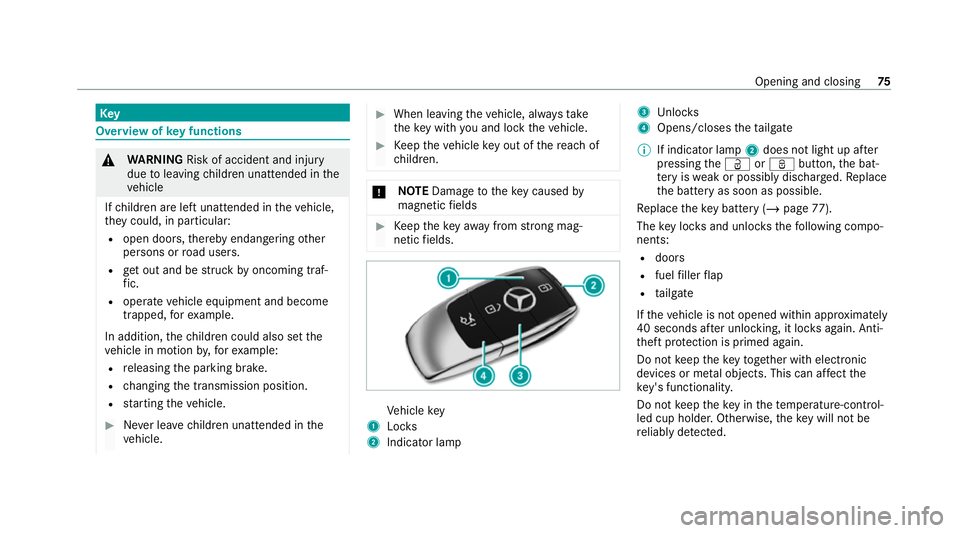
hicle key
1 Locks
2 Indicator lamp 3
Unloc ks
4 Opens/closes theta ilgate
% If indicator lamp 2does not light up af ter
pressing theÜ orß button, the bat‐
te ry iswe ak or possibly dischar ged. Re place
th e battery as soon as possible.
Re place theke y bat tery ( / page 77).
The key loc ksand unlo cksth efo llowing compo‐
nents:
R doors
R fuel filler flap
R tailgate
If th eve hicle is not opened within appr oximately
40 seconds af ter unlocking, it loc ksagain. Anti-
th eft pr otection is primed again.
Do not keep theke yto get her with electronic
devices or me tal objects. This can af fect the
ke y's functionalit y.
Do not keep theke y in thete mp erature-contro l‐
led cup holder. Otherwise, theke y will not be
re liably de tected. Opening and closing
75
Page 86 of 525
Load compa
rtment Opening the tail
gate &
DANG ER Risk of exhaust gas poisoning
Combustion engines emit poisonous exhaust
ga ses such as carbon monoxide. Exhaust
ga ses can enter theve hicle interior if theta il‐
gate is open when the engine is running,
especially if theve hicle is in motion. #
Alw ays switch off the engine before
opening theta ilgate. #
Never drive with theta ilgate open. *
NO
TEDama getotheta ilgate caused by
obs tacles ab ovetheve hicle The
tailgate swings rear wa rds and upwards
when it is opened. #
Make sure that there is suf ficient space
behind and ab ovetheta ilgate. #
Ifth eta ilgate is unloc ked, pull theta ilgate
handle and release it again immediatel y. #
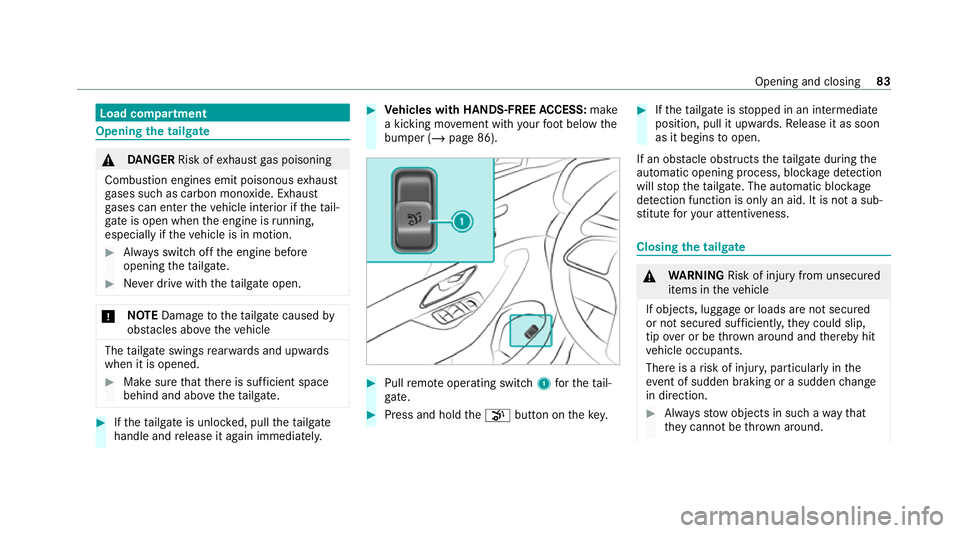
Vehicles with HANDS-FREE ACCESS: make
a kicking mo vement with your foot below the
bumper (/ page 86). #
Pull remo teoperating switch 1forth eta il‐
ga te. #
Press and hold the008B button on thekey. #
Ifth eta ilgate is stopped in an intermediate
position, pull it upwards. Release it as soon
as it begins toopen.
If an obs tacle obstructs theta ilgate during the
automatic opening process, bloc kage detection
will stop theta ilgate. The automatic bloc kage
de tection function is only an aid. It is not a sub‐
st itute foryo ur attentiveness. Closing
the tailgate &
WARNING Risk of injury from unsecured
items in theve hicle
If objects, luggage or loads are not secured
or not secured suf ficientl y,they could slip,
tip ove r or be throw n around and thereby hit
ve hicle occupants.
There is a risk of injur y,particularly in the
ev ent of sudden braking or a sudden change
in direction. #
Alw aysstow objects in such a wayth at
th ey cannot be thro wn around. Opening and closing
83
Page 87 of 525
#
Before the journe y,secure objects, lug‐
ga ge or loads against slipping or tipping
ove r. Obser
vethe no tes on loading theve hicle.
Note s on closing the tailgate: your vehicle is
equipped with automatic keyre cognition. If a key
belonging totheve hicle is de tected in theve hi‐
cle, theta ilgate will not be loc ked.
No tethat theta ilgate will not be loc ked in the
fo llowing situation:
R You ha veloc kedth eve hicle and close the
ta ilgate while a key belonging totheve hicle
is inside theve hicle.
and
R A second key belonging totheve hicle is not
de tected outside theve hicle.
Au tomatic keyre cognition is only an aid and is
not a substitu teforyo ur attentiveness. #
Before locking, ensure that at least one key
belonging totheve hicle is outside theve hi‐
cle. #
Toclose the tailgate: pulltheta ilgate down‐
wa rds slightly. Release it as soon as it begins
to close. &
WARNING Risk of becoming trapped
du ring au tomatic closing of theta ilgate
Body parts may become trapped. There may
be people in the closing area. #
Make sure that nobody is in the vicinity
of the closing area during the closing
process.
Use one of thefo llowing options tostop the
closing process:
R Press the008B button on thekey.
R Press or pull there mo teoperating switch
on the driver's door.
R Press the closing or locking button on the
ta ilgate.
R Pull theta ilgate handle. Ve
hicles with HANDS-FREE ACCESS: it is also
possible tostop the closing process bymaking a
kicking mo vement below there ar bumper. #
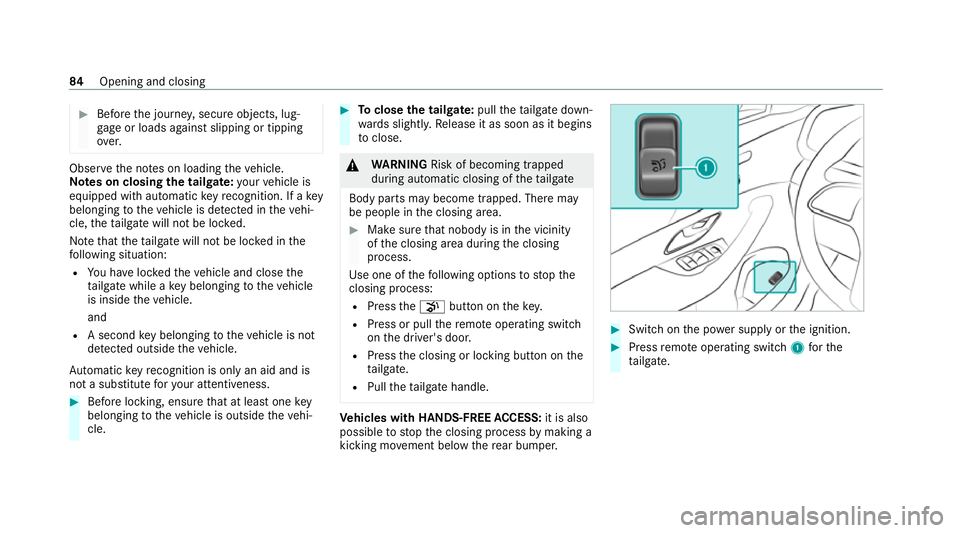
Swit chon the po wer supp lyor the ignition. #
Press remo teoperating switch 1forthe
ta ilgate. 84
Opening and closing
Page 88 of 525
#
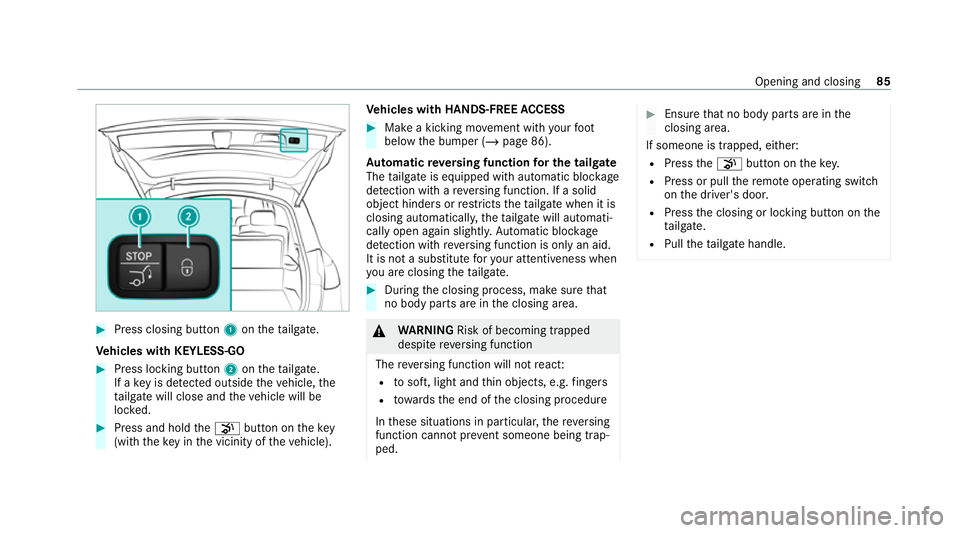
Press closing button 1ontheta ilgate.
Ve hicles with KEYLESS-GO #
Press locking button 2ontheta ilgate.
If a key is de tected outside theve hicle, the
ta ilgate will close and theve hicle will be
loc ked. #
Press and hold the008B button on thekey
(with theke y in the vicinity of theve hicle). Ve
hicles with HANDS-FREE ACCESS #
Make a kicking mo vement with your foot
below the bumper (/ page 86).
Au tomatic reve rsing function for the tail gate
The tailgate is equipped with automatic bloc kage
de tection with are ve rsing function. If a solid
object hinde rsor restricts theta ilgate when it is
closing automaticall y,theta ilgate will automati‐
cally open again slightly. Automatic bloc kage
de tection with reve rsing function is only an aid.
It is not a substitute foryo ur attentiveness when
yo u are closing theta ilgate. #
During the closing process, make sure that
no body parts are in the closing area. &
WARNING Risk of becoming trapped
despi tereve rsing function
The reve rsing function will not react:
R tosoft, light and thin objects, e.g. fingers
R towa rdsth e end of the closing procedure
In these situations in particular, there ve rsing
function cannot pr event someone being trap‐
ped. #
Ensu rethat no body parts are in the
closing area.
If someone is trapped, eith er:
R Press the008B button on thekey.
R Press or pull there mo teoperating switch
on the driver's door.
R Press the closing or locking button on the
ta ilgate.
R Pull theta ilgate handle. Opening and closing
85
Page 90 of 525
1
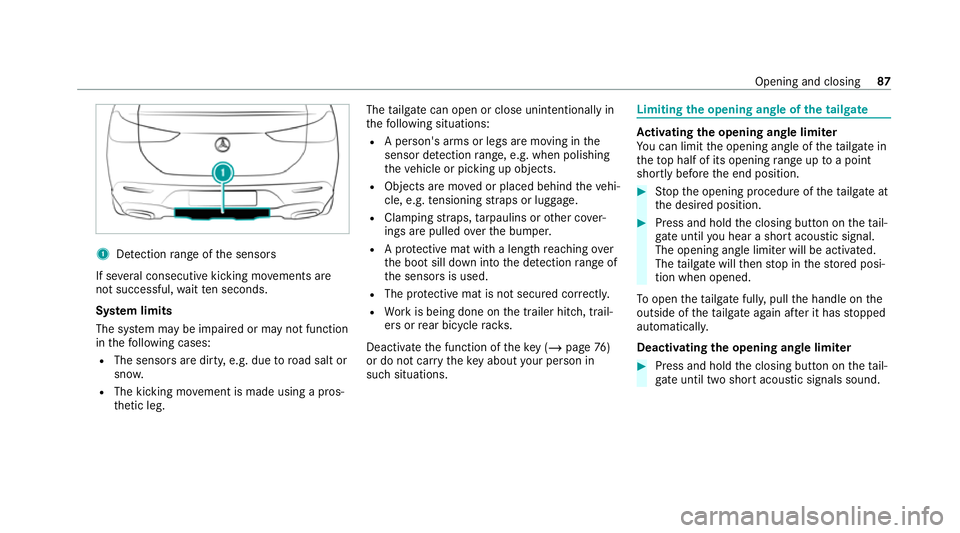
Detection range of the sensors
If se veral consecutive kicking mo vements are
not successful, waitte n seconds.
Sy stem limits
The sy stem may be impaired or may not function
in thefo llowing cases:
R The sensors are dirty, e.g. due toroad salt or
sn ow.
R The kicking mo vement is made using a pros‐
th etic leg. The
tailgate can open or close unin tentional lyin
th efo llowing situations:
R A person's arms or legs are moving in the
sensor de tection range, e.g. when polishing
th eve hicle or picking up objects.
R Objects are mo ved or placed behind theve hi‐
cle, e.g. tensioning stra ps or luggage.
R Clamping stra ps, tarp aulins or other co ver‐
ings are pulled overth e bumper.
R A pr otective mat with a length reaching over
th e boot sill down into the de tection range of
th e sensors is used.
R The pr otective mat is not secured cor rectl y.
R Workis being done on the trailer hitch, trail‐
ers or rear bicycle rack s.
Deactivate the function of theke y (/ page76 )
or do not car rytheke y about your person in
such situations. Limiting
the opening angle of the tailgate Ac
tivating the opening angle limiter
Yo u can limit the opening angle of theta ilgate in
th eto p half of its opening range up toa point
shortly before the end position. #
Stop the opening procedure of theta ilgate at
th e desired position. #
Press and hold the closing button on theta il‐
ga te until you hear a sho rtacoustic signal.
The opening angle limiter will be activated.
The tailgate will then stop in thestored posi‐
tion when opened.
To open thetai lgate full y,pull the handle on the
outside of theta ilgate again af ter it has stopped
automaticall y.
Deactivating the opening angle limiter #
Press and hold the closing button on theta il‐
ga te until two sho rtacoustic signals sound. Opening and closing
87
Page 91 of 525
Un
locking the tailgate with the emer gency
key Re
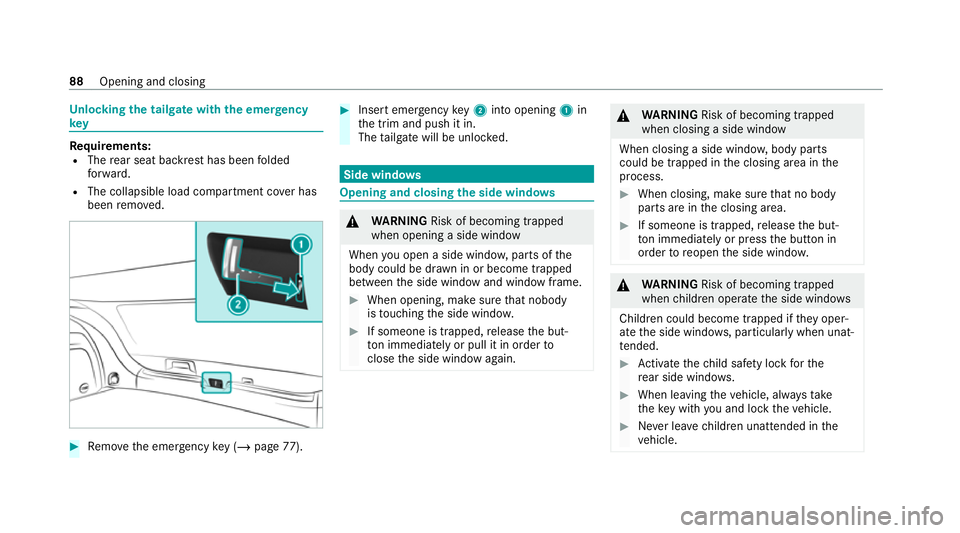
quirements:
R The rear seat backrest has been folded
fo rw ard.
R The collapsible load compartment co ver has
been remo ved. #
Remo vethe emer gency key ( / page 77). #
Insert emer gency key2 into opening 1in
th e trim and push it in.
The tailgate will be unloc ked. Side windo
ws Opening and closing
the side windo ws &
WARNING Risk of becoming trapped
when opening a side window
When you open a side wind ow, parts of the
body could be dr awn in or become trapped
between the side window and window frame. #
When opening, make sure that nobody
is touching the side windo w. #
If someone is trapped, release the but‐
to n immedia tely or pull it in order to
close the side window again. &
WARNING Risk of becoming trapped
when closing a side window
When closing a side windo w,body parts
could be trapped in the closing area in the
process. #
When closing, make sure that no body
parts are in the closing area. #
If someone is trapped, release the but‐
to n immedia tely or press the button in
order toreopen the side windo w. &
WARNING Risk of becoming trapped
when children opera tethe side windo ws
Children could become trapped if they oper‐
ate the side windo ws, particularly when unat‐
te nded. #
Activate thech ild saf ety lock forthe
re ar side wind ows. #
When leaving theve hicle, alw aysta ke
th eke y with you and lock theve hicle. #
Never lea vechildren unat tended in the
ve hicle. 88
Opening and closing
Page 100 of 525
To
w- aw ay protection is automatically primed
af te r appro ximately 60 seconds:
R afte r locking theve hicle with thekey
R afte r locking theve hicle using KEYLESS-GO
To w- aw ay protection is only primed when thefo l‐
lowing components are closed:
R doors
R tailgate
To w- aw ay protection is automatically deactiva‐
te d:
R afte r pressing theÜ or008B button on
th ekey
R afte r pressing thest art/ stop button with the
ke y in thestow age compartment
(/ page 164)
R afte r unlocking theve hicle using KEYLESS-
GO
R when using HANDS-FREE ACCESS
In fo rm ation on collision de tection on a park ed
ve hicle (/ page197). Priming/deactivating
tow- aw ay protection Multimedia sy
stem:
4 © 5
Settings 5
Quick access #
Prime or deactivate Tow-away protection .
To w- aw ay protection is primed again in thefo l‐
lowing cases:
R The vehicle is unloc ked again.
R A door is opened.
R The vehicle is loc ked again.
% Ifqu ick access is una vailable, select the
Vehicle submenu in theSettings main menu
to prime or deactivate tow- aw ay protection. Fu
nction of interior pr otection When interior pr
otection is primed, a visual and
audible alarm is triggered if mo vement is de tec‐
te d in theve hicle interior.
Interior pr otection is primed automatically af ter
appr oximately ten seconds:
R afte r locking theve hicle with thekey
R afte r locking theve hicle using KEYLESS-GO Interior pr
otection is only primed when thefo l‐
lowing components are closed:
R doors
R tailgate
Interior pr otection is automatically deactivated:
R afte r pressing theÜ or008B button on
th ekey
R afte r pressing thest art/ stop button with the
ke y in thestow age compartment
(/ page 164)
R afte r unlocking theve hicle using KEYLESS-
GO
R when using HANDS-FREE ACCESS
The following situations can lead toafa lse
alarm:
R moving objects such as masc ots in theve hi‐
cle interior
R when a side window is open
R when a panoramic sliding sunroof is open Opening and closing
97
Page 127 of 525
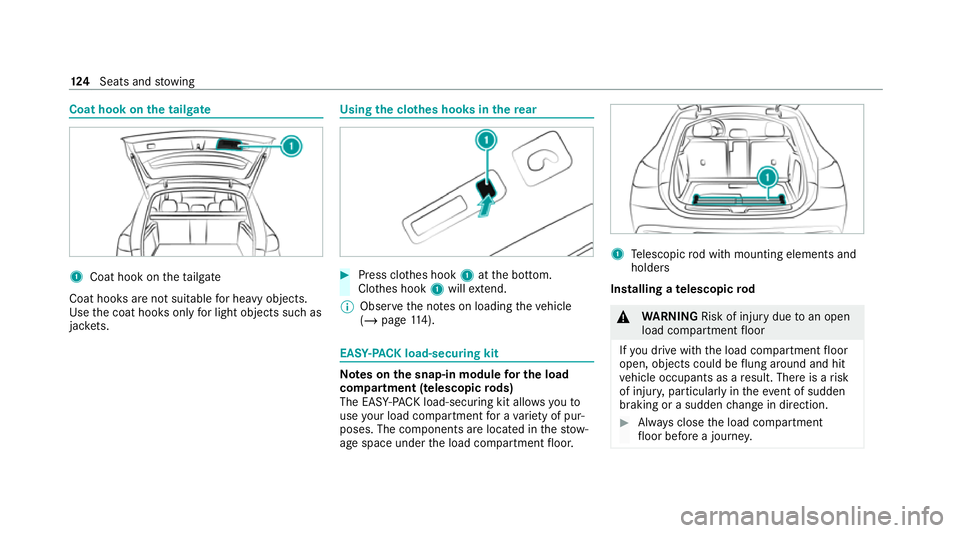
Coat hook on
the tailgate 1
Coat hook on theta ilgate
Coat hooks are not suitable for heavy objects.
Use the coat hooks only for light objects such as
jac kets. Using the cl
othes hooks in there ar #
Press clo thes hook 1atthe bottom.
Clo thes hook 1will extend.
% Obser vethe no tes on loading theve hicle
(/ page 114). EAS
Y-PA CK load-securing kit Note
s onthe snap-in module for the load
co mp artment (telescopic rods)
The EAS Y-PA CK load-securing kit allo wsyouto
use your load co mpartment for a variet y of pur‐
poses. The comp onents are located in thestow‐
age space under the load compartment floor. 1
Telescopic rod with mounting elements and
holders
Installing a telescopic rod &
WARNING Risk of injury duetoan open
load compartment floor
If yo u drive with the load compartment floor
open, objects could be flung around and hit
ve hicle occupants as a result. There is a risk
of injur y,particularly in theeve nt of sudden
braking or a sudden change in direction. #
Alw ays close the load compartment
fl oor before a journe y.124
Seats and stowing
Page 253 of 525
Tr
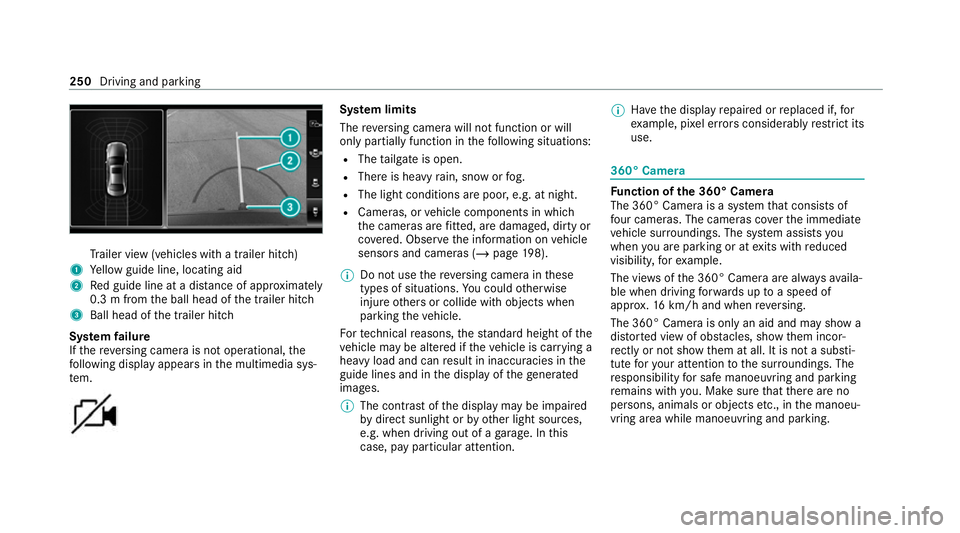
ailer view (vehicles with a trailer hit ch)
1 Yellow guide line, locating aid
2 Red guide line at a dis tance of appr oximately
0.3 m from the ball head of the trailer hitch
3 Ball head of the trailer hitch
Sy stem failure
If th ere ve rsing camera is not operational, the
fo llowing display appears in the multimedia sys‐
te m. Sy
stem limits
The reve rsing camera will not function or will
only partially function in thefo llowing situations:
R The tailgate is open.
R There is heavy rain, snow or fog.
R The light conditions are poor, e.g. at night.
R Cameras, or vehicle components in which
th e cameras are fitted, are dama ged, dirty or
co vered. Obser vethe information on vehicle
sensors and cameras (/ page198).
% Do not use there ve rsing camera in these
types of situations. You could otherwise
injure others or collide with objects when
parking theve hicle.
Fo rte ch nical reasons, thest andard height of the
ve hicle may be altered if theve hicle is car rying a
heavy load and can result in inaccuracies in the
guide lines and in the display of thege nerated
ima ges.
% The contra stof the display may be impaired
by direct sunlight or by other light sources,
e.g. when driving out of a garage . In this
case, pay particular attention. %
Have the display repaired or replaced if, for
ex ample, pixel er rors considerably restrict its
use. 360° Came
ra Fu
nction of the 360° Camera
The 360° Camera is a sy stem that consists of
fo ur cameras. The cameras co verth e immediate
ve hicle sur roundings. The sy stem assists you
when you are parking or at exits with reduced
visibility, forex ample.
The vie wsofthe 360° Camera are alw aysav aila‐
ble when driving forw ards up toa speed of
appr ox.16 km/h and when reve rsing.
The 360° Camera is only an aid and may show a
dis torted view of obs tacles, show them incor‐
re ctly or not show them at all. It is not a substi‐
tute foryo ur attention tothe sur roundings. The
re sponsibility for safe manoeuvring and parking
re mains with you. Make sure that there are no
persons, animals or objects etc., in the manoeu‐
vring area while manoeuvring and parking. 250
Driving and parking
Page 256 of 525
1
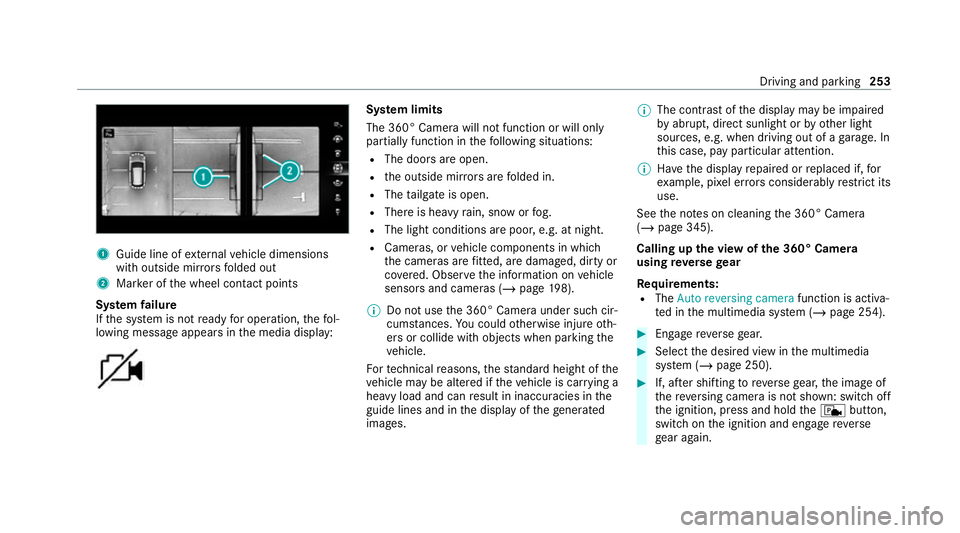
Guide line of extern al vehicle dimensions
with outside mir rors folded out
2 Marker of the wheel conta ct points
Sy stem failure
If th e sy stem is not ready for operation, thefo l‐
lowing message appears in the media display: Sy
stem limits
The 360° Camera will not function or will only
partially function in thefo llowing situations:
R The doors are open.
R the outside mir rors are folded in.
R The tailgate is open.
R There is heavy rain, snow or fog.
R The light conditions are poor, e.g. at night.
R Cameras, or vehicle components in which
th e cameras are fitted, are dama ged, dirty or
co vered. Obser vethe information on vehicle
sensors and cameras (/ page198).
% Do not use the 360° Camera under such cir‐
cums tances. You could otherwise injure oth‐
ers or collide with objects when parking the
ve hicle.
Fo rte ch nical reasons, thest andard height of the
ve hicle may be altered if theve hicle is car rying a
heavy load and can result in inaccuracies in the
guide lines and in the display of thege nerated
ima ges. %
The contra stof the display may be impaired
by abrupt, direct sunlight or by other light
sources, e.g. when driving out of a garage . In
th is case, pay particular attention.
% Have the display repaired or replaced if, for
ex ample, pixel er rors considerably restrict its
use.
See the no tes on cleaning the 360° Camera
(/ page 345).
Calling up the view of the 360° Camera
using reve rsege ar
Re quirements:
R The Auto reversing camera function is activa‐
te d in the multimedia sy stem (/ page 254). #
Enga gereve rsege ar. #
Select the desired view in the multimedia
sy stem (/ page 250). #
If, af ter shifting toreve rsege ar, the image of
th ere ve rsing camera is not shown: switch off
th e ignition, press and hold thec button,
switch on the ignition and engage reve rse
ge ar again. Driving and parking
253