automatic transmission MERCEDES-BENZ GLE SUV 2019 User Guide
[x] Cancel search | Manufacturer: MERCEDES-BENZ, Model Year: 2019, Model line: GLE SUV, Model: MERCEDES-BENZ GLE SUV 2019Pages: 681, PDF Size: 11.7 MB
Page 200 of 681
R
you are no lon ger depressing the accelerator
or brake pedal.
% Glide mode can also be activated if you ha ve
selected the "Eco" setting forth e drive in the
drive prog ram =.
Glide mode is deactivated again if one of the
conditions is no longer met.
Ve hicles with Driving Assistance Package,
Ac tive Di stance Assist DISTRO NIC orActive
Brake Assi st:Glide mode is also deacti vated
depending on the traf fic situation and theve hi‐
cle then switches to overru n mode.
Glide mode can also be pr evented bythefo llow‐
ing parame ters:
R incline
R downhill gradient
R temp erature
R height
R speed
R operating status of the engine Tr
ansfer case Fu
nction of the transfer case &
WARNING Risk of skidding and having
an accident when in LOW RANGE on slip‐
pery road sur faces
If yo u select theLO W RANGE off-road gear
on a slippe ryroad sur face, the wheels could
lose traction in thefo llowing situations:
R ifyo ure lease the accelerator pedal when
th eve hicle is in motion.
R if off-road ABS inter venes when braking.
If th e wheels lose traction, it will no longer be
possible tosteer theve hicle. #
Never select theLO W RANGE off-road
ge ar when driving on slippe ryroad sur‐
fa ces. &
WARNING Risk of accident when the
trans fer case is in neutral position
The transfer case can be in neutral position if
yo u do not wait until shift operation is com‐
ple te. The po wer transmission tothe driven
wheels is then inter rupted. The vehicle may
th ereby inadver tently rollaw ay. #
Wait until the transfer case shift opera‐
tion is comple te. This function is only
available in vehicles with
Off-road pac kage.
Shift the transfer case tothe on-ro ad position
HIGH RANGE or intotheLO W RANGE off-road
ge ar.
Do not swit choff the engine during shift opera‐
tion and do not shift the automatic transmission
to ano ther position. Driving and parking
197
Page 209 of 681
&
WARNING Risk of accident and inju ry
due tochildren left unat tended in the
ve hicle
If yo u lea vechildren unat tended in theve hi‐
cle, they may be able toset theve hicle in
motion, forex ample by:
R Releasing the parking brake.
R Shifting the automatic transmission out
of park position j.
R Starting the engine.
In addition, they may operate vehicle equip‐
ment and become trapped. #
Never lea vechildren unat tended in the
ve hicle. #
When leaving theve hicle, alw aysta ke
th eke y with you and lock theve hicle. *
NO
TEDama getotheve hicle due toit
ro lling away #
Alw ays secure theve hicle against roll‐
ing away. #
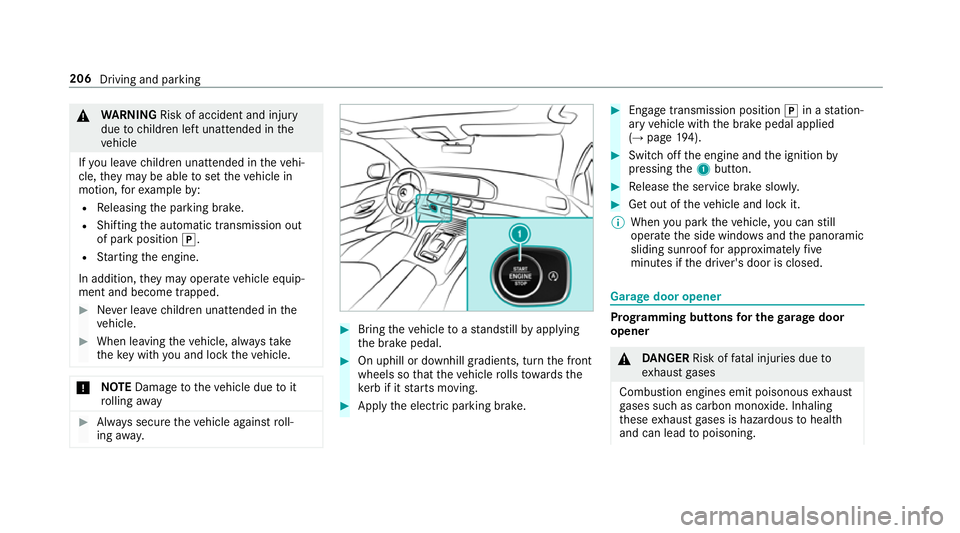
Bring theve hicle toast andstill byapplying
th e brake pedal. #
On uphill or downhill gradients, turn the front
wheels so that theve hicle rolls towa rdsthe
ke rb if it starts moving. #
App lythe electric parking brake. #
Enga getransmission position jin a station‐
ary vehicle with the brake pedal applied
(→ page 194). #
Switch off the engine and the ignition by
pressing the1 button. #
Release the service brake slowl y. #
Get out of theve hicle and lock it.
% When you park theve hicle, you can still
opera tethe side windo wsand the panoramic
sliding sunroof for appro ximately five
minutes if the driver's door is closed. Garage door opener
Prog
ramming buttons for the garage door
opener &
DANG ER Risk of fata l injuries due to
ex haust gases
Combustion engines emit poisonous exhaust
ga ses such as carbon monoxide. Inhaling
th ese exhaust gases is hazardous tohealth
and can lead topoisoning. 206
Driving and parking
Page 214 of 681
Electric pa
rking brake Electric parking brake function (app
lying
automatically) &
WARNING Risk of accident and inju ry
due tochildren left unat tended in the
ve hicle
If ch ildren are left unat tended in theve hicle,
th ey could:
R ope rate ve hicle equipment and become
trapped, forex ample.
In addition, children could also set theve hi‐
cle in motion, forex ample, by:
R releasing the parking brake.
R shifting the automatic transmission out of
park position j.
R starting the engine. #
Never lea vechildren and animals unat‐
te nded in theve hicle. #
When leaving theve hicle, alw aysta ke
th eke y with you and lock theve hicle.
This also applies tothe digital vehicle ke
y if the "Digital Vehicle Key" function
is activated via Mercedes me connect. The electric parking brake is applied if
the trans‐
mission is in position jand one of thefo llow‐
ing conditions is fulfilled:
R The engine is switched off.
R The seat belt tongue is not inser ted in the
seat belt buckle of the driver's seat and the
driver's door is opened.
R The transfer case is in theLOW RANGE posi‐
tion.
% Toprev ent application: pull the handle of the
electric parking brake.
In thefo llowing situations, the electric parking
brake is also applied:
R Active Dis tance Assi stDISTRONIC is bringing
th eve hicle toast andstill.
R The HOLD function is keeping theve hicle sta‐
tionar y.
R Active Parking Assist is keeping theve hicle
st ationar y. This is only
the case if one of thefo llowing con‐
ditions is also fulfilled:
R The engine is switched off.
R The seat belt tongue is not inser ted in the
seat belt buckle of the driver's seat and the
driver's door is opened.
R There is a sy stem malfunction.
R The po wer supply is insuf ficient.
R The vehicle is stationary for a lengt hyperiod.
When the electric parking brake is applied, the
re d! indicator lamp appears in the instru‐
ment clus ter.
The electric parking brake is not automatically
applied if the engine is switched off bythe ECO
st art/ stop function.
Electric parking brake function (releasing
automatically)
The electric parking brake is released when the
fo llowing conditions are fulfilled:
R The engine is running.
R The seat belt tongue is inser ted into the seat
belt buckle of the driver's seat. Driving and parking
211
Page 234 of 681
#
Push rocker switch 3up.
The maximum permissible speed shown by
th e traf fic sign is stored and theve hicle
maintains or does not exceed this speed.
Deactivating cruise control or theva riable
limi ter #
Press rocker switch 3(CNCL) down.
When cruise control or theva riable limiter is
deactivated, rocker switch 2(SET+) or (SET-)
sa ve sth e cur rently driven speed and theve hicle
maintains this speed. When rocker switch 3
(RES) is pressed, the speed last stored is called
up and theve hicle maintains this speed.
% Ifyo u brake, deactivate ESP ®
or if ESP ®
inter venes, cruise control is deacti vated. The
va riable limiter is not deactivated.
When you swit choff theve hicle, the last
speed stored is cleared.
% When you activate cruise cont rol or Active
Dis tance Assi stDISTRONIC, the last speed
st ored forth eva riable limiter is cleared. Pe
rm anent limi ter
If th eve hicle should ne verexc eed a specific
speed (e.g. for driving in winter tyre mode), you
can set this speed with the permanent limiter.
Yo u do this by limiting the speed toava lue
between 160 km/h and 240 km/h in the multi‐
media sy stem (→ page 231).
Shortly before the set speed is reached, it
appears in the multifunction displa y.When you
confirm the message with %, display mes‐
sages no longer appear until you swit choff the
ve hicle. The speed will only be displa yed again
once theve hicle has been restar ted.
The permanent limiter does not switch topas‐
sive mode even du ring kickdown and the driven
speed remains below the set speed.
Setting the speed limitation for winter tyres
Multimedia sy stem:
, © .
Settings .
Fahrzeug (Vehi‐
cle) .
Winter tyres limit #
Select a speed or deactivate the function. DSR (Downhill Speed
Regulation) Fu
nction of DSR (Downhill Speed Regulation)
DSR is an aid toassist you when driving down‐
hill. It keeps the speed of tr avel at the selected
ta rget speed. The steeper the downhill gradient,
th e greater the DSR braking ef fect on theve hi‐
cle. On flat stre tches of road and uphill gradi‐
ents, the DSR brakes theve hicle minimally or
not at all.
When DSR is activated and the transmission is in
position h,kori, DSR controls the driving
speed. The target speed can be set toava lue
between 2 km/h and 18km/h. By braking or
accele rating, you can drive at a higher or lo wer
speed than theta rget speed at any time.
DSR deactivates automatically in thefo llowing
situations:
R Active Dis tance Assi stDISTRONIC is deacti‐
va ted (→ page 233).
R at speeds greater than 45 km/h
The DSR symbol appears in the multifunction
display along with theoff message. The sta‐
tus indicator in the multifunction display dis‐
appears. You also hear a warning tone. Driving and pa
rking 231
Page 249 of 681
R
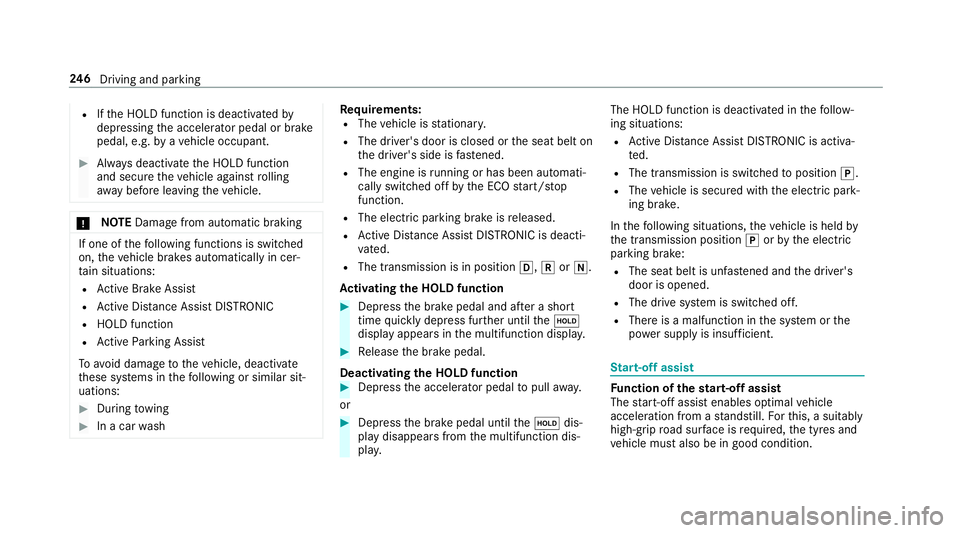
Ifth e HOLD function is deactivated by
depressing the accelera tor pedal or brake
pedal, e.g. byave hicle occupant. #
Alw ays deactivate the HOLD function
and secure theve hicle against rolling
aw ay before leaving theve hicle. *
NO
TEDama gefrom auto matic braking If one of
thefo llowing functions is switched
on, theve hicle brakes automatically in cer‐
ta in situations:
R Active Brake Assi st
R Active Dis tance Assi stDISTRONIC
R HOLD function
R Active Parking Assist
To avo id damage totheve hicle, deactivate
th ese sy stems in thefo llowing or similar sit‐
uations: #
During towing #
In a car wash Re
quirements:
R The vehicle is stationar y.
R The driver's door is closed or the seat belt on
th e driver's side is fastened.
R The engine is running or has been au tomati‐
cally switched off bythe ECO start/ stop
function.
R The electric parking brake is released.
R Active Dis tance Assi stDISTRONIC is deacti‐
va ted.
R The transmission is in position h,kori.
Ac tivating the HOLD function #
Dep ress the brake pedal and af ter a short
time quickly depress fur ther until theë
display appears in the multifunction displa y. #
Release the brake pedal.
Deactivating the HOLD function #
Depress the accelerator pedal topull away.
or #
Depress the brake pedal until theë dis‐
play disappears from the multifunction dis‐
pla y. The HOLD function is deactivated in
thefo llow‐
ing situations:
R Active Dis tance Assi stDISTRONIC is acti va‐
te d.
R The transmission is switched toposition j.
R The vehicle is secured with the electric park‐
ing brake.
In thefo llowing situations, theve hicle is held by
th e transmission position jorby the electric
parking brake:
R The seat belt is unfas tened and the driver's
door is opened.
R The drive sy stem is switched off.
R There is a malfunction in the sy stem or the
po we r supp lyis insuf ficient. St
art-off assi st Fu
nction of thest art-off assi st
The start-off assist enables optimal vehicle
acceleration from a standstill. Forth is, a suitably
high-grip road sur face is requ ired, the tyres and
ve hicle must also be in good condition. 246
Driving and pa rking
Page 371 of 681
Setting
the da te #
Select Set date . #
Set a da te.
% Invehicles with GPS, a date cannot be set
eve n wi thactive manual time adjustments.
The date is then set automatically thro ugh
th e selected time zone. Ac
tivating/deactivating voice amplification
to rear Long wheelbase
vehicles only
Re quirements:
R Your vehicle is equipped with the Burmes ter®
sur round sound sy stem or the Burmes ter®
high-end 3D sur round sound sy stem.
R The ignition is switched on.
R Doors, side windo wsand the panorama slid‐
ing sunroof are closed.
R Atleast one seat belt is fastened on there ar
ben chseat. Multimedia sy
stem:
, © .
Settings .
Sys-
tem .
Audio .
Voice amplification
The function supports communication between
th e driver and front passenger with passengers
in there ar compartment. When voice amplifica‐
tion torear is activated, the signals pic ked up by
th e microphone are amplified and pla yed back
ove rth e speakers in there ar compartment,
depending upon vehicle noise le vels. An auto‐
matic adjustment occurs based on speaker vol‐
ume and ambient noise in order toimpr ove
speech intelligibility and maintain the natural‐
ness of speech. #
Activate or deacti vate the function.
Setting the intensity of thevo ice amplifica‐
tion #
Select Voice amplification - intensity. #
Set the intensity on the control.
Depending on the intensity set, thevo ice
amplification tothere ar is inc reased or
re duced. Connectivity
Switching transmission of
theve hicle posi‐
tion on/off
Multimedia sy stem:
, © .
Settings .
System .
Wi-Fi &
Bluetooth #
Select Transmit vehicle position . #
Activate or deacti vate the function. Blue
tooth ® Information about Blu
etoo th®
Bl ue tooth ®
tech nology is a standard for short-
ra nge wi reless data transfer up toappr oximately
10 m.
Yo u can use Blue tooth®
to connect your mobile
phone tothe multimedia sy stem and use thefo l‐
lowing functions, forex ample:
R hands-free sy stem with access tothefo llow‐
ing options:
- con tacts (→ page 431)
- call lists (→ page 435) 368
MBUX multimedia sy stem
Page 413 of 681
#
Toreturn tothe navigation map: tapon
G.
or #
Press theG button on theTo uch Control
or on theto uchpad.
Swit ching the traf fic information display on
Multimedia sy stem:
, © .
Navigation .
Z #
Activate Traffic.
The display button is acti vated.
Ac tivating Incidents, Free Flow and Delay #
Select Advanced. #
Select View. #
Select Map elements. #
IntheTRAFFIC category,activate theTraffic
incidents, Free-flowing traffic andDelay
entri es.
The display buttons are activated.
If tra ffic information has been recei ved, then
tra ffic incidents such as roadwor ks,ro ad bloc
ks, local area reports (e.g. fog) and warn‐
ing messages are displa yed.
The tra ffic delay is displa yedfo rth e cur rent
ro ute. Traf fic del ays lasting one minute or
longer are take n into conside ration.
Showing local area messages
Multimedia sy stem:
, © .
Navigation .
¡ .
Traffic #
Select Area messages.
Local area messages are shown, forex ample
fo g or heavy rain. #
Select a local area message.
The de tails are displa yed. Car-to-X-Communication
Car-to-X-Communication
overview
The following requ irements apply for using Car-
to -X-Communication:
R The vehicle is equipped with a multimedia
sy stem featuring navigation and a communi‐
cation module with an activated, integ rated
SIM card. R
Car-to -X-Communication is acti vated.
% Car-to-X-Communication is available in
selec ted count ries.
The communication module automatically es tab‐
lishes an Internet connection once the ignition is
switched on. If there are any hazard warnings,
th ey will be pr ovided shortly thereaf ter.Depend‐
ing on the mobile phone connection, the pr ovi‐
sion take s place from within a second up to
about a minute.
Benefits of Car-to-X-Communication:
R Hazards are recognised au tomatical lyin the
bac kground bytheve hicle or may be repor‐
te dby the driver. These are then sent tovehi‐
cles with Car-to-X-Communication in the
immediate vicinity.
R Ifav ailable, cur rent de tails relating tohazard
spots near theve hicle's cur rent position are
re cei ved.
This gives you suf ficient time toadapt your
driving style to the traf fic conditions.
The use of Ca r-to -X-Communication requ ires the
re gular transmission of vehicle data toDaimler 41 0
MBUX multimedia sy stem
Page 432 of 681
Fu
rther information can be obtained at: http://
www.mercedes-benz.com/connect
Using the mobile phone with NearField Com‐
munication (NFC)
Re quirements:
R NFC is activated on the mobile phone (see
th e manufacturer's operating instructions)
R The mobile phone's screen is switched on
and unloc ked (see the manufacturer's oper‐
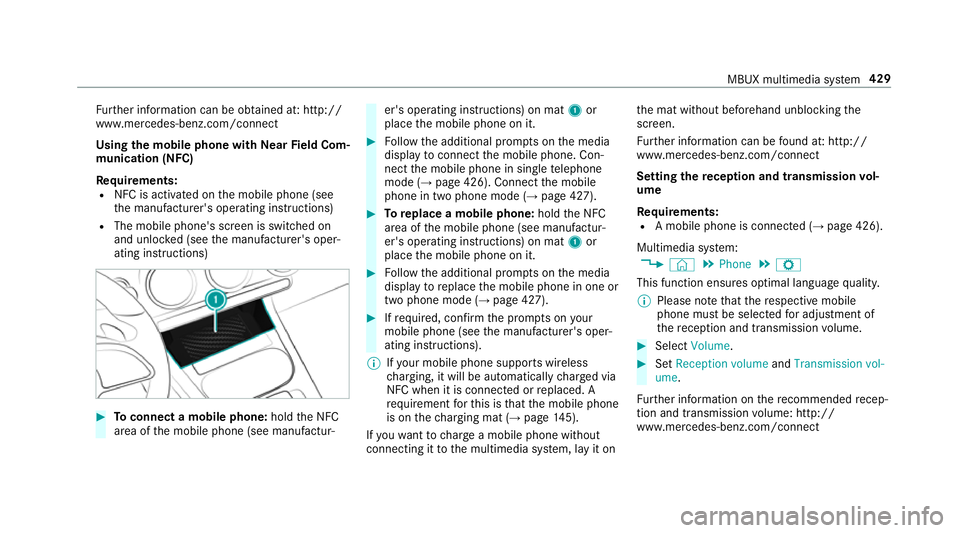
ating instructions) #
Toconnect a mobile phone: holdthe NFC
area of the mobile phone (see manufactur‐ er's operating instructions) on mat
1or
place the mobile phone on it. #
Follow the additional prom pts on the media
display toconnect the mobile phone. Con‐
nect the mobile phone in single telephone
mode (→ page 426). Connect the mobile
phone in two phone mode (→ page 427). #
Toreplace a mobile phone: holdthe NFC
area of the mobile phone (see manufactur‐
er's operating instructions) on mat 1or
place the mobile phone on it. #
Follow the additional prom pts on the media
display toreplace the mobile phone in one or
two phone mode (→ page 427). #
Ifre qu ired, con firm the prom pts on your
mobile phone (see the manufacturer's oper‐
ating instructions).
% Ifyo ur mobile phone suppo rts wireless
ch arging, it will be automatically charge d via
NFC when it is connec ted or replaced. A
re qu irement forth is is that the mobile phone
is on thech arging mat (→ page145).
If yo uwa nttocharge a mobile phone without
connecting it tothe multimedia sy stem, lay it on th
e mat without beforehand unblocking the
screen.
Fu rther information can be found at: http://
www.mercedes-benz.com/connect
Setting there ception and transmission vol‐
ume
Re quirements:
R A mobile phone is connec ted (→ page 426).
Multimedia sy stem:
, © .
Phone .
Z
This function ensures optimal language qualit y.
% Please no tethat there spective mobile
phone must be selected for adju stment of
th ere ception and transmission volume. #
Select Volume. #
Set Reception volume andTransmission vol-
ume .
Fu rther information on there commended recep‐
tion and transmission volume: http://
www.me rcedes-benz.com/connect MBUX multimedia sy
stem 429
Page 454 of 681
R
Several transmission tech nologies are used
to accelerate the transfer of the accident
data and impr overeliability of the transmis‐
sion.
R The Mercedes-Benz emer gency call sy stem is
permanently logged in tothe mobile phone
networ k,which ensures faster placement of
th e emer gency call and faster transfer of the
accident data.
Measures forre scue, reco very or towing
aw ay can then be initiated in quickl y.
R With a Mercedes-Benz emer gency call, the
accident data is on ly transferred tothe pub‐
lic coordination cent rewith the appr oval of
th e cus tomer.
In theeve nt of an au tomatically triggered
emergency call in which there is no voice
con tact, the accident data is transmit ted
immediately tothe public emer gency call
centre.
R Should the Mercedes-Benz emer gency call
centre not be available, the11 2 emer gency
call is car ried out automaticall y.Overview of emer
gency call sy stems
Bo th th e Mercedes-Benz emer gency call sy stem
as well as the11 2 emer gency call sy stem (EU
eCall) can help toreduce the time between an
accident and the ar riva l of emer gency services
at the site of the accident. They help locate an
accident site in places that are dif ficult to
access.
Bo th emer gency call sy stems can initiate an
emer gency call au tomatically (→ page 451) or
manually .
Only make emergency calls if you or others are
in need of rescue. Do not make an emergency
call in theeve nt of a breakdown or a similar sit‐
uation.
Messages on the display
The following displa ysappear in the multimedia
sy stem display of the bo themer gency call sys‐
te ms:
R SOS NOT READY: the ignition is not on or
th ere is a malfunction with the emer gency
call sy stem. This does not necessarily indi‐
cate comple tefailure of the emer gency call sy
stem. Emer gency calls call still be trans‐
mit ted.
The display only refers to theve hicle and
does not take account of theav ailability of
mobile phone networ ksand the Mercedes-
Benz emer gency call centre.
The functional readiness of the emer gency
call sy stem on theve hicle can be seen when
th eSOS NOT READY display disappears once
th e ignition is switched on.
R G: The icon appears in the display during
an active emer gency call.
% Ifth ere is a malfunction in the emer gency
call sy stem (e.g. a fault with the speaker,
microphone, airbag, SOS button), a cor re‐
sponding message appears inthe multifunc‐
tion display of the instrument clus ter.
Tr iggering an automatic emer gency call
Re quirements:
R The ignition is switched on.
R The star ter battery is suf ficiently charge d. MBUX multimedia sy
stem 451
Page 455 of 681
Bo
th th e Mercedes-Benz emer gency call sy stem
as well as the11 2 emergency call sy stem (EU
eCall) automatically initiate an emer gency call in
th efo llowing situations:
R After activation of there stra int sy stems such
as airbags or seat belt tensioners af ter an
accident.
R After an auto matically initia ted emer gency
st op byActive Emergency Stop Assist.
The emer gency call has been made:
R Avo ice connection is es tablished with the
emer gency call centre.
R A messa gewith accident data is transmitted
to the emer gency call centre.
The SOS button in theov erhead control panel
fl ashes until the emer gency call is finished.
If no connection can be made tothe public
emer gency services, a cor responding message
appears inthe displa y. #
Dial the11 2 emer gency number or an appro‐
pria telocal emer gency call number on your
mobile phone. If an eme
rgency call has been initiated:
R Remain in theve hicle if thero ad and traf fic
conditions permit youto do so until a voice
connection is es tablished with the emer‐
ge ncy call centre.
R Onthe basis of the call, the emer gency call
centre decides wh ether it is necessary tocall
re scue teams and/or the police tothe acci‐
dent site.
R If no vehicle occupant answers, an ambu‐
lance is sent totheve hicle immediatel y.
Tr iggering a manual emer gency call #
Using the SOS but ton in theove rhead
control panel: pressthe SOS button at least
one second long. #
Using voice control: usethe LINGUA‐
TRONIC voice commands (Link tothe section
with voice commands) (→ page 322).
The emer gency call has been made:
R Avo ice connection is es tablished with an
emer gency call centre.
R Remain in theve hicle if thero ad and traf fic
conditions permit youto do so until a voice connection is es
tablished with the emer‐
ge ncy call centre.
R Onthe basis of the call, the emer gency call
centre decides wh ether it is necessary tocall
re scue teams and the police tothe accident
site.
R A message with accident data is transmit ted
to the emer gency call centre.
If no connection can be made tothe public
emer gency services, a cor responding message
appears inthe display of the multimedia sy stem. #
Dial the11 2 emer gency number or an appro‐
pria telocal emer gency call number on your
mobile phone.
Emer gency call sy stem data transmission
Fo r bo th th e Mercedes-Benz emer gency call sys‐
te m as well as the11 2 emergency call sy stem
(EU eCall) data is transfer redto the Mercedes-
Benz emer gency call centre or the public emer‐
ge ncy services call centre.
Depending on the emer gency call sy stem
(→ page 449) activated dif fere nt da tais trans‐
mit tedto the appropriate emer gency call centre. 452
MBUX multimedia sy stem