start stop button MERCEDES-BENZ GLE SUV 2019 Owners Manual
[x] Cancel search | Manufacturer: MERCEDES-BENZ, Model Year: 2019, Model line: GLE SUV, Model: MERCEDES-BENZ GLE SUV 2019Pages: 681, PDF Size: 11.7 MB
Page 10 of 681
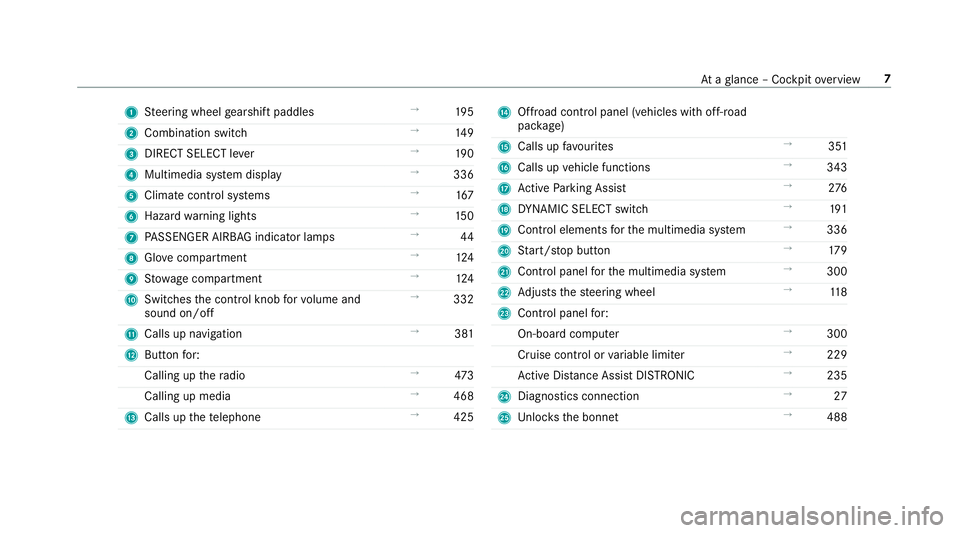
1
Steering wheel gearshift paddles →
19 5
2 Combination swit ch →
14 9
3 DIRECT SELECT le ver →
19 0
4 Multimedia sy stem display →
336
5 Climate control sy stems →
167
6 Haza rdwa rning lights →
15 0
7 PASSENGER AIRB AGindicator lamps →
44
8 Glovecompa rtment →
124
9 Stow age compartment →
124
A Switches the control knob forvo lume and
sound on/off →
332
B Calls up navigation →
381
C Buttonfo r:
Calling up thera dio →
473
Calling up media →
468
D Calls up thete lephone →
425 E
Offroad control panel (vehicles with off- road
pac kage)
F Calls up favo urites →
351
G Calls up vehicle functions →
343
H Active Parking Assist →
276
I DYNA MIC SELECT switch →
191
J Control elements forth e multimedia sy stem →
336
K Start/ stop button →
17 9
L Control panel forth e multimedia sy stem →
300
M Adjusts thesteering wheel →
11 8
N Control panel for:
On-board computer →
300
Cruise contro l orvariable limiter →
229
Ac tive Dis tance Assi stDISTRONIC →
235
O Diagno stics connection →
27
P Unloc ksthe bonn et →
488 At
aglance – Cockpit overview 7
Page 89 of 681
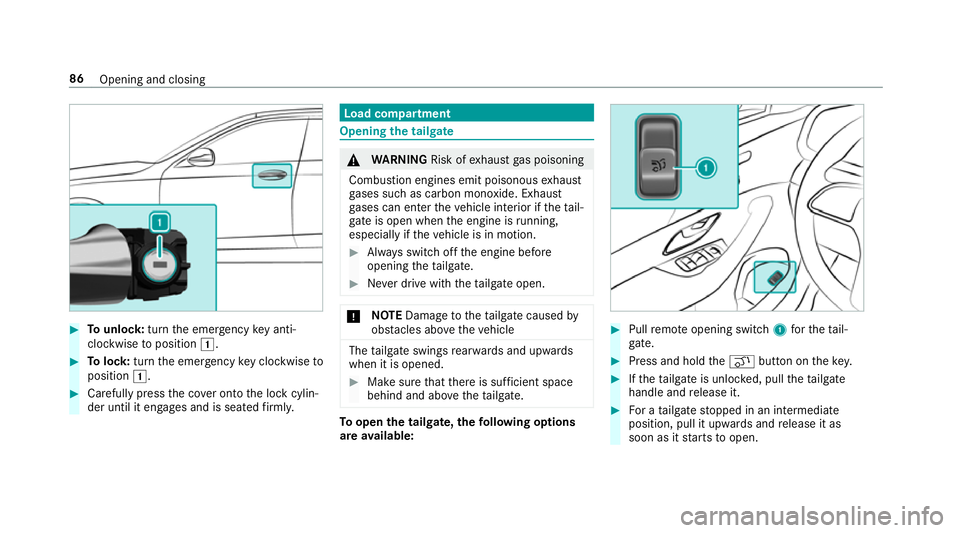
#
Tounlo ck:turn the emer gency key anti-
clo ckwise toposition 1. #
Tolock: turnthe emer gency key clo ckwise to
position 1. #
Carefully press the co ver onto the lock cylin‐
der until it engages and is seated firm ly. Load compa
rtment Opening the tail
gate &
WARNING Risk ofexhaust gas poisoning
Combustion engines emit poisonous exhaust
ga ses such as carbon monoxide. Exhaust
ga ses can enter theve hicle interior if theta il‐
gate is open when the engine is running,
especially if theve hicle is in motion. #
Alw ays switch off the engine before
opening theta ilgate. #
Never drive with theta ilgate open. *
NO
TEDama getotheta ilgate caused by
obs tacles ab ovetheve hicle The
tailgate swings rear wa rds and upwards
when it is opened. #
Make sure that there is suf ficient space
behind and ab ovetheta ilgate. To
open the tailgate, thefo llowing options
are available: #
Pull remo teopening switch 1forth eta il‐
ga te. #
Press and hold theq button on thekey. #
Ifth eta ilgate is unloc ked, pull theta ilgate
handle and release it. #
For a tailgate stopped in an intermediate
position, pull it upwards and release it as
soon as it starts toopen. 86
Opening and closing
Page 94 of 681
Ro
ller sunblinds Extending or
retracting the roller sunblinds
on there ar side windo ws &
WARNING Risk of entrapment when
ex tending or retracting thero ller sun‐
blind
Body parts could become ent rapped in the
sweep of thero ller sunblind when it is being
ex tended or retracted. #
Makesure that no body parts are in the
sweep of thero ller sunblind when it is
being extended or retracted. #
If someone becomes trapped, brie fly
press the button again.
The opening or closing process is
brief lystopped. The roller sun blind
th en returns toits starting position. *
NO
TEDama gecaused byobjects #
Make sure that thero ller sunblind can
mo vefreely. The
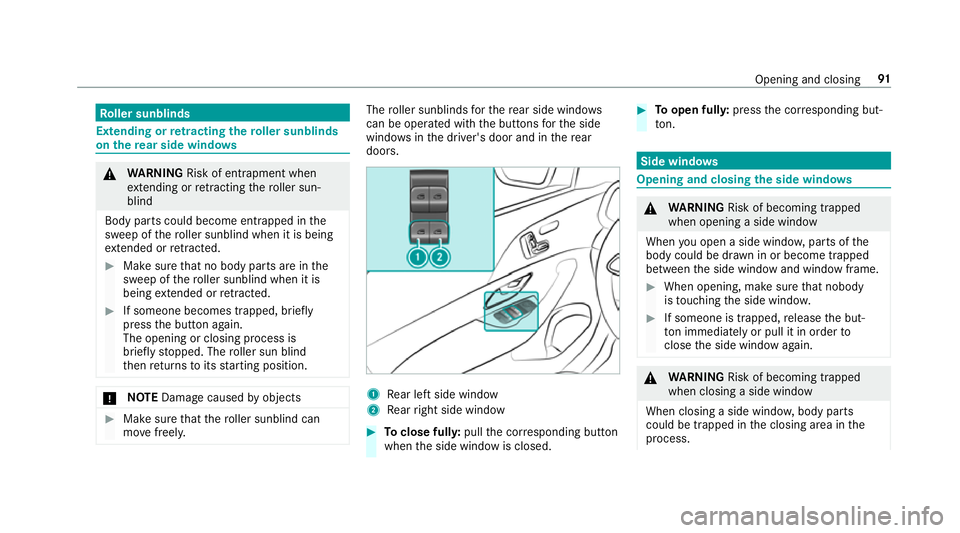
roller sunblinds forth ere ar side wind ows
can be ope rated with the buttons forth e side
windo wsinthe driver's door and in there ar
doors. 1
Rear left side wind ow
2 Rear right side window #
Toclose full y:pull the cor responding button
when the side window is closed. #
Toopen ful ly:press the cor responding but‐
to n. Side windo
ws Opening and closing
the side windo ws &
WARNING Risk of becoming trapped
when opening a side window
When you open a side wind ow, parts of the
body could be dr awn in or become trapped
between the side window and window frame. #
When opening, make sure that nobody
is touching the side windo w. #
If someone is trapped, release the but‐
to n immedia tely or pull it in order to
close the side window again. &
WARNING Risk of becoming trapped
when closing a side window
When closing a side windo w,body parts
could be trapped in the closing area in the
process. Opening and closing
91
Page 99 of 681
Sliding sunroof
Operating
the panoramic roof's roller sun‐
blind &
WARNING Risk of becoming trapped
when opening and closing thero ller sun‐
blinds
Body parts can become trapped between the
ro ller sunblind and frame when opening or
closing. #
When opening or closing, make sure
that no body parts are in thera nge of
mo vement of thero ller sunblind. #
Release the button immediately if
somebody becomes trapped.
or #
Brief lypress the button in any direction
during automatic operation.
The opening/closing process is stop‐
ped. Re
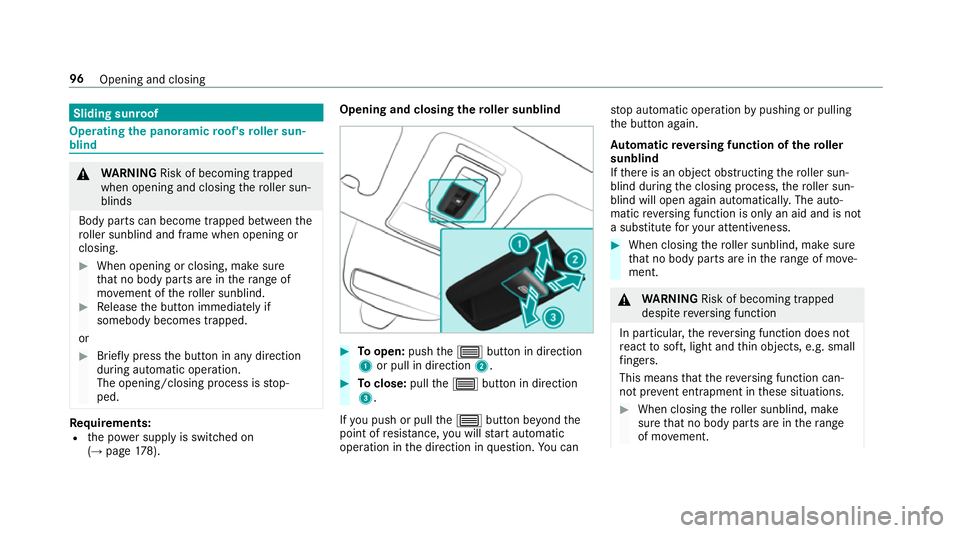
quirements:
R the po wer supp lyis switched on
(→ page 178). Opening an
d closing the roller sunblind #
Toopen: pushthe3 button in direction
1 or pull in direction 2. #
Toclose: pullthe3 button in direction
3.
If yo u push or pull the3 button be yond the
point of resis tance, you will start automatic
operation in the direction in question. You can st
op automatic operation bypushing or pulling
th e button again.
Au tomatic reve rsing function of thero ller
sunblind
If th ere is an object obstructing thero ller sun‐
blind during the closing process, thero ller sun‐
blind will open again automaticall y.The auto‐
matic reve rsing function is only an aid and is not
a substitute foryo ur attentiveness. #
When closing thero ller sunblind, make sure
th at no body parts are in thera nge of mo ve‐
ment. &
WARNING Risk of becoming trapped
despi tereve rsing function
In particular, there ve rsing function does not
re act tosoft, light and thin objects, e.g. small
fi ngers.
This means that there ve rsing function can‐
not pr event entrapment in these situations. #
When closing thero ller sunblind, make
sure that no body parts are in thera nge
of mo vement. 96
Opening and closing
Page 102 of 681
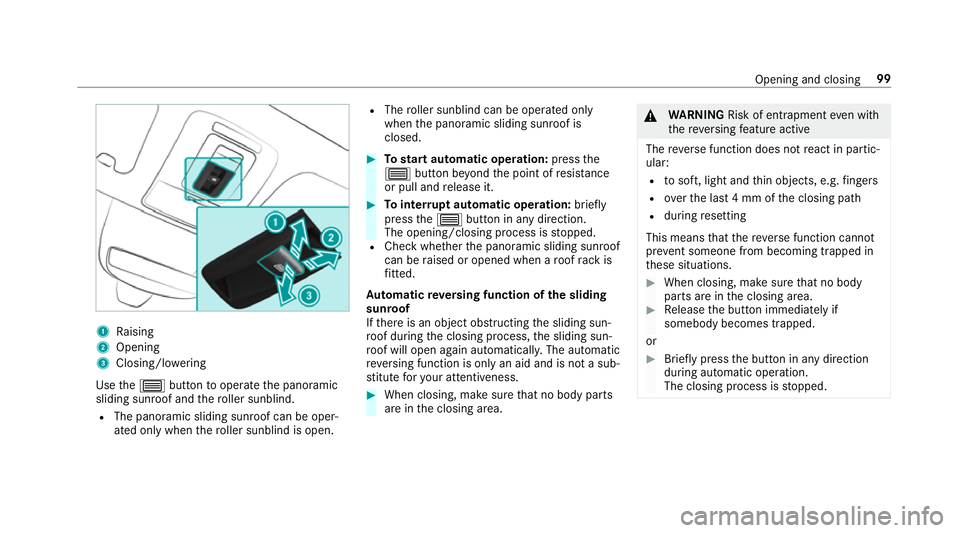
1
Raising
2 Opening
3 Closing/lo wering
Use the3 button tooperate the panoramic
sliding sunroof and thero ller sunblind.
R The panoramic sliding sunroof can be oper‐
ated only when thero ller sunblind is open. R
The roller sunblind can be opera ted only
when the panoramic sliding sunroof is
closed. #
Tostart automatic operation: pressthe
3 button be yond the point of resis tance
or pull and release it. #
Tointer rupt automatic operation: briefly
press the3 button in any direction.
The opening/closing process is stopped.
R Check whe ther the panoramic sliding sunroof
can be raised or opened when a roof rack is
fi tted.
Au tomatic reve rsing function of the sliding
sunroof
If th ere is an object obstructing the sliding sun‐
ro of during the closing process, the sliding sun‐
ro of will open again automatically. The automatic
re ve rsing function is only an aid and is not a sub‐
st itute foryo ur attentiveness. #
When closing, make sure that no body parts
are in the closing area. &
WARNING Risk of entrapment even wi th
th ere ve rsing feature active
The reve rse function does not react in partic‐
ular:
R tosoft, light and thin objects, e.g. fingers
R overth e last 4 mm of the closing path
R during resetting
This means that there ve rse function cann ot
pr eve nt someone from becoming trapped in
th ese situations. #
When closing, make sure that no body
parts are in the closing area. #
Release the button immediately if
somebody becomes trapped.
or #
Brief lypress the button in any direction
during automatic operation.
The closing process is stopped. Opening and closing
99
Page 103 of 681
Au
tomatic reve rsing function of thero ller
sunblind
If th ere is an object obstructing thero ller sun‐
blind during the closing process, thero ller sun‐
blind will open again automaticall y.The auto‐
matic reve rsing function is only an aid and is not
a substitute foryo ur attentiveness. #
When closing thero ller sunblind, make sure
th at no body parts are in thera nge of mo ve‐
ment. &
WARNING Risk of becoming trapped
despi tereve rsing function
In particular, there ve rsing function does not
re act tosoft, light and thin objects, e.g. fin‐
ge rs.
This means that there ve rsing function can‐
not pr event entrapment in these situations. #
When closing thero ller sunblind, make
sure that no body parts are in thera nge
of mo vement. #
Release the button immediately if
somebody becomes trapped. or
#
Press the button in any direction during
th e automatic closing process.
The closing process is stopped. Au
tomatic functions of the sliding sun roof %
The term "sliding sun roof" also refers to the
panoramic sliding sunroof.
By pushing or pulling the3 button, you can
inter rupt the automatic functions: "Rain closing
function when driving" and "Automatic lo wer‐
ing".
The sliding sunroof is auto maticallyclosed when
th eve hicle has been switched off:
R if it starts torain (de tection bythera in sen‐
sor on the windscreen)
R intheeve nt of extreme outside temp eratures
R afte r six hours
R ifth ere is a malfunction in the po wer supp ly
The sliding sunroof then rises at there ar in order
to continue ventilating theve hicle interior. If
th e sliding sunroof is bloc ked during an auto‐
matic closing procedure, thero of is opened
slightly again. The automatic function forthe
sliding sunroof and the side windo wsisthen
deactivated.
Ra in closing function when driving
Ve hicles with a panoramic sliding sunroof: if
it starts torain, thera ised sliding sunroof is
automatically lo wered while theve hicle is in
motion.
Au tomatic lo wering function
Ve hicles with a panoramic sliding sunroof: if
th e sliding sunroof is raised at there ar, it is
automatically lo wered slightly at higher speeds.
At low speeds, it is raised again automaticall y. &
WARNING Risk of entrapment byauto‐
matic lo wering of the sliding sunroof
At high speeds thera ised sliding sunroof
automatically lo wersslightly at there ar.
This could trap you or other persons. 100
Opening and closing
Page 183 of 681
R
theve hicle is equipped with the "Digital Vehi‐
cle Key" function.
R the "Digital Vehicle Key" function is activated
via Mercedes me connec t:http://
www.mercedes.me.
R the mobile phone is suf ficiently charge d.
% You can check the suitability of your mobile
phone byentering the phone number at
http://www.mercedes.me.
Information about suitable mobile phones
can be obtained from your Mercedes-Benz
service centre or at http://www.mercedes-
benz.com/connect.
% Mercedes-Benz recommends that you car ry
th e emer gency key in case of function
re strictions.
% The function is only available in combination
with Mercedes me connect and on lyin cer‐
ta in countries.
% Protective cases around the mobile phone
can impair thera nge of functions. Using the Digital
Vehicle Keyfo r the first
time #
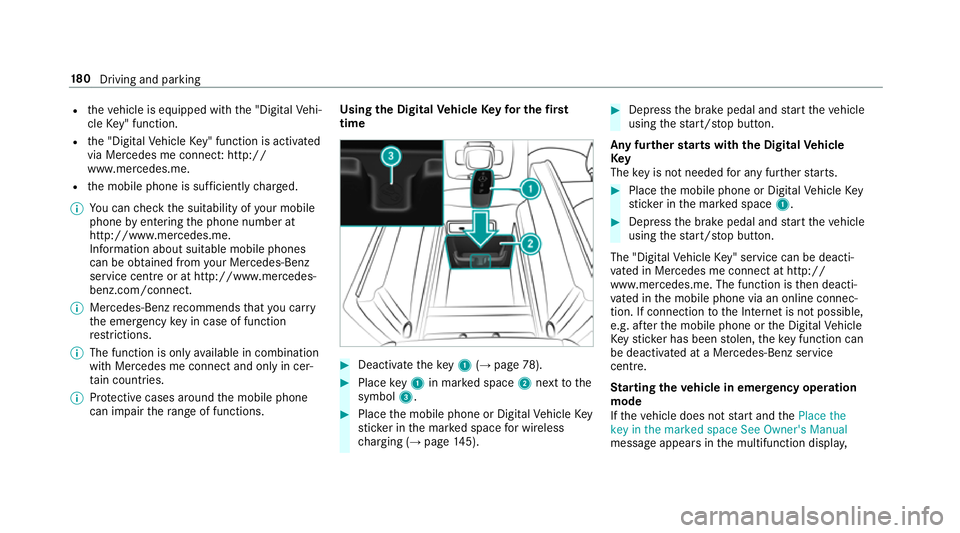
Deactivate theke y1 (→page 78). #
Place key1 in mar ked space 2next tothe
symbol 3. #
Place the mobile phone or Digital Vehicle Key
st icke r in the mar ked space for wireless
ch arging (→ page145). #
Depress the brake pedal and start theve hicle
using thest art/ stop button.
Any fur ther starts with th e DigitalVehicle
Key
The key is not needed for any fur ther starts. #
Place the mobile phone or Digital Vehicle Key
st icke r in the mar ked space 1. #
Depress the brake pedal and start theve hicle
using thest art/ stop button.
The "Digital Vehicle Key" service can be deacti‐
va ted in Mercedes me connect at http://
www.mercedes.me. The function is then deacti‐
va ted in the mobile phone via an online connec‐
tion. If connection tothe Internet is not possible,
e.g. af terth e mobile phone or the Digital Vehicle
Ke yst icke r has been stolen, theke y function can
be deacti vated at a Mercedes-Benz service
centre.
St arting theve hicle in emer gency operation
mode
If th eve hicle does not start and thePlace the
key in the marked space See Owner's Manual
message appears in the multifunction displa y,18 0
Driving and pa rking
Page 184 of 681
yo
u can start theve hicle in emer gency operation
mode. #
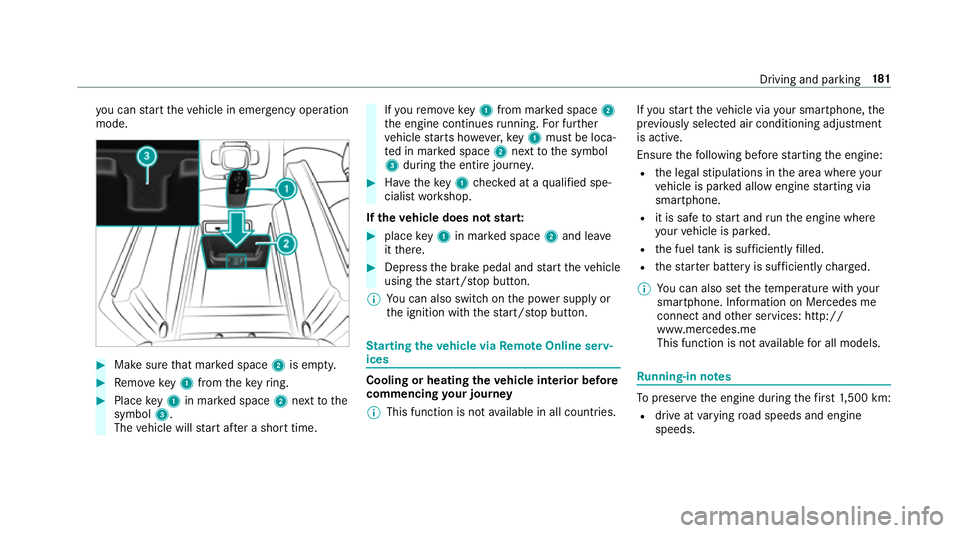
Makesure that mar ked space 2is em pty. #
Remo vekey1 from theke yring. #
Place key1 in mar ked space 2next tothe
symbol 3.
The vehicle will start af ter a short time. If
yo ure mo vekey1 from mar ked space 2
th e engine continues running. For fur ther
ve hicle starts ho wever,ke y1 must be loca‐
te d in mar ked space 2next tothe symbol
3 during the entire journe y. #
Have theke y1 checked at a qualified spe‐
cialist workshop.
If th eve hicle does not star t: #
place key1 in mar ked space 2and lea ve
it th ere. #
Depress the brake pedal and start theve hicle
using thest art/ stop button.
% You can also swit chon the po wer supp lyor
th e ignition with thest art/ stop button. St
arting theve hicle via Remo teOnline serv‐
ices Cooling or heating
theve hicle interior before
commencing your journey
% This function is not available in all countries. If
yo ustart theve hicle via your smartphone, the
pr ev iously selec ted air conditioning adjustment
is active.
Ensure thefo llowing before starting the engine:
R the legal stipulations in the area where your
ve hicle is par ked allow engine starting via
smartphone.
R it is safe tostart and runth e engine where
yo ur vehicle is par ked.
R the fuel tank is su fficiently filled.
R thest ar ter battery is suf ficiently charge d.
% You can also set thete mp erature with your
smartphone. In form ation on Mercedes me
connect and other services: http://
www.mercedes.me
This function is not available for all models. Ru
nning-in no tes To
preser vethe engine during thefirs t1, 500 km:
R drive at varying road speeds and engine
speeds. Driving and parking
181
Page 191 of 681
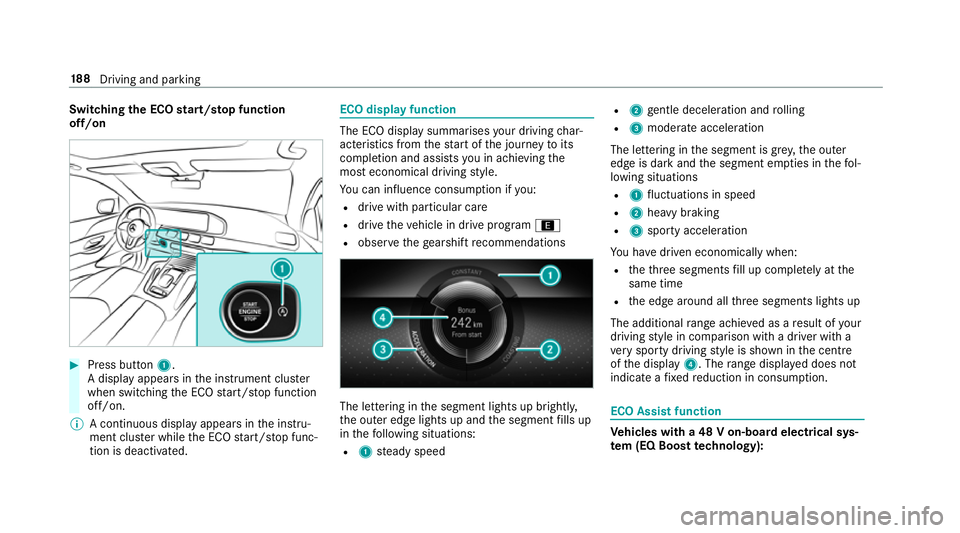
Switching
the ECO start/s top function
off/on #
Press button 1.
A displ ayappears in the instrument clus ter
when swit ching the ECO start/ stop function
off/on.
% A continuous display appears in the instru‐
ment clus ter while the ECO start/ stop func‐
tion is deactivated. ECO display function
The ECO display summarises
your driving char‐
acteristics from thest art of the journey toits
completion and assists you in achieving the
most economical driving style.
Yo u can influence consum ption if you:
R drive with particular care
R drive theve hicle in drive program ;
R obser vethege arshift recommendations The lettering in
the segment lights up brightl y,
th e outer edge lights up and the segment fills up
in thefo llowing situations:
R 1 steady speed R
2 gentle deceleration and rolling
R 3 moderate acceleration
The lettering in the segment is gr ey,th e outer
edge is dark and the segment em pties in thefo l‐
lowing situations
R 1 fluctuations in speed
R 2 heavy braking
R 3 sporty acceleration
Yo u ha vedriven economically when:
R theth re e segments fill up comple tely at the
same time
R the edge around all thre e segments lights up
The additional range achi eved as a result of your
driving style in comparison with a driver with a
ve ry sporty driving style is shown in the cent re
of the display 4. Therange displ ayed does not
indicate a fixe dre duction in consum ption. ECO Assist function
Ve
hicles with a 48 V on-board electrical sys‐
te m (EQ Boo sttech nology): 18 8
Driving and pa rking
Page 281 of 681
On completion of
the parking procedure, the
Active Parking Assist finished, take control of
the vehicle. displaymessa geappears. Further
manoeuvring may still be necessar y.#
After completion of the parking procedure,
safeguard theve hicle against rolling away.
When requ ired bylegal requirements or local
conditions: turn the wheels towa rdsth eke rb.
% You can stop theve hicle and change the
transmission position du ring the parking pro‐
cedure. The sy stem then calculates a new
ve hicle path. The parking procedure can
th en be continued. If no new vehicle path is
av ailable, the transmission position will be
ch anged again. If theve hicle has not yet
re ached the parking space, the parking pro‐
cedure will be cancelled, should a gear be
ch anged.
Exiting a pa rking space with Active Parking
Assist
Re quirement:
Yo u can on lyex it a parking space with Active
Pa rking Assist if you ha veprev iously par kedthe
ve hicle with Active Parking Assist. Please no
tethat you are responsible forth eve hi‐
cle and sur roundings during the entire parking
procedure. #
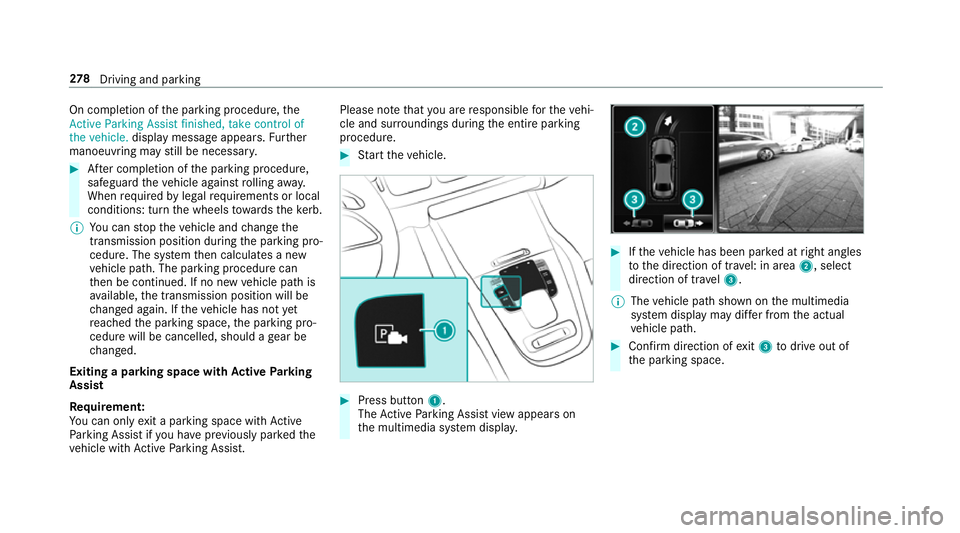
Start theve hicle. #
Press button 1.
The Active Parking Assist view appears on
th e multimedia sy stem displa y. #
Ifth eve hicle has been par ked at right angles
to the direction of tra vel: in area 2, select
direction of tra vel3.
% The vehicle path shown on the multimedia
sy stem display may dif fer from the actual
ve hicle path. #
Confirm direction of exit3 todrive out of
th e parking space. 278
Driving and pa rking