service MERCEDES-BENZ GLE SUV 2021 Owner's Manual
[x] Cancel search | Manufacturer: MERCEDES-BENZ, Model Year: 2021, Model line: GLE SUV, Model: MERCEDES-BENZ GLE SUV 2021Pages: 545, PDF Size: 9.37 MB
Page 214 of 545
St
andby mode (extension of the star ter bat‐
te ry 's period out of use) St
andby mode function
% This function is not available for all models.
If standby mode is activated, ene rgy loss will be
minimised during extended pe riods of non-oper‐
ation.
St andby mode is characterised bythefo llowing:
R The star ter battery is preser ved.
R The maximum non-operational time appears
inthe media displa y.
R The connection toonline services is inter rup‐
te d.
R The ATA (anti-theft alarm sy stem) is una vaila‐
ble.
R The interior pr otection and tow- aw ay protec‐
tion functions are not available.
R The function for de tecting collisions on a
pa rked vehicle is not available. If
th efo llowing conditions are fulfilled, standby
mode can be activated or deactivated using the
multimedia sy stem:
R The engine is switched off.
R The ignition is switched on.
Exceeding theve hicle's displa yed non-opera‐
tional time may cause incon venience, i.e. it can‐
not be guaranteed that thest ar ter battery will
re liably start the engine.
The star ter battery must be charge dfirs t in the
fo llowing situations:
R The vehicle's non-operational time must be
ex tended.
R The Battery charge insufficient for standby
mode messa geappears in the media displa y.
% Standby mode is automatically deactivated
when the ignition is switched on.
Ac tivating/deactivating standby mode (park‐
ing up theve hicle)
Re quirements:
R The engine is switched off. Multimedia sy
stem:
4 © 5
Settings 5
Vehicle #
Activate or deacti vate Standby mode. #
Select Yes. Driving and driving saf
ety sy stems Driving sy
stems and your responsibility Yo
ur vehicle is equipped with driving sy stems
which assist you in driving, parking and manoeu‐
vring theve hicle. The driving sy stems are only
aids. They are not a substitute foryo ur attention
to the sur roundings and do not relie ve you of
yo ur responsibility per taining toroad traf fic la w.
The driver is alw aysre sponsible for maintaining
a safe dis tance totheve hicle in front, forve hicle
speed, for braking in good time and forst ay ing
in lane. Pay attention tothe tra ffic conditions at
all times and inter vene when necessary . Be
aw are of the limitations rega rding the safe use of
th ese sy stems.
Driving sy stems can neither reduce therisk of
accident if youfa ilto adapt your driving style nor
ove rride the la wsof ph ysics. They cannot alw ays Driving and pa
rking 211
Page 297 of 545
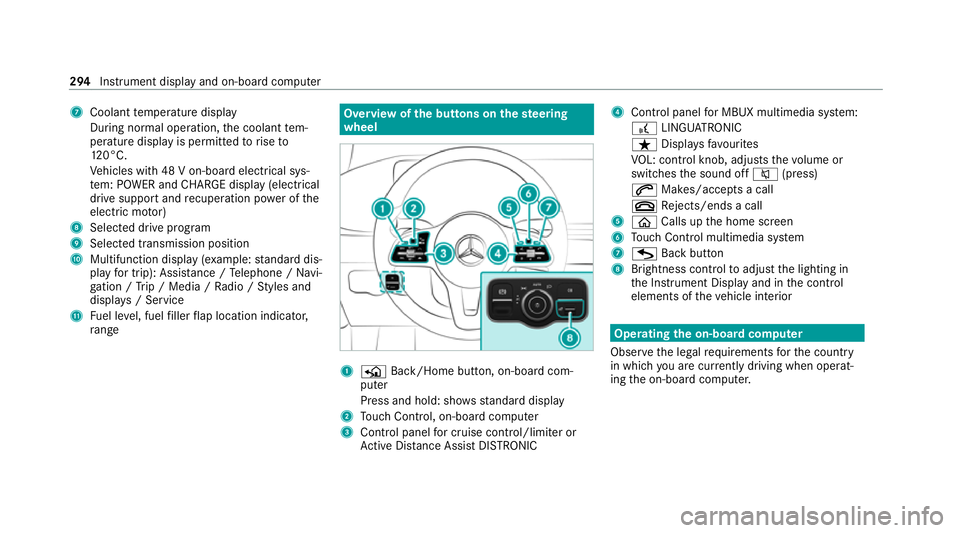
7
Coolant temp erature display
During normal operation, the coolant tem‐
perature display is permitted torise to
12 0°C.
Ve hicles with 48 V on-board electrical sys‐
te m: POWER and CHARGE displ ay(elect rical
drive support andrecuperation po wer of the
electric mo tor)
8 Selected drive program
9 Selected transmission position
A Multifunction display (e xamp le:standard dis‐
play for trip): Assis tance / Telephone / Navi‐
ga tion / Trip / Media / Radio / Styles and
displa ys/ Service
B Fuel le vel, fuel filler flap location indicator,
ra nge Overvi
ewofthe but tons on thest eering
wheel 1
P Back/Home button, on-board com‐
puter
Press and hold: sho wsstandard display
2 Touch Control, on-board co mputer
3 Control panel for cruise control/limiter or
Ac tive Dis tance Assi stDISTRONIC 4
Control panel for MBUX multimedia sy stem:
£ LINGU ATRO NIC
ß Displa ysfavo urites
VO L: control knob, adjusts thevo lume or
switches the sound off 0063(press)
0061 Makes/accepts a call
0076 Rejects/ends a call
5 00E2 Calls up the home screen
6 Touch Control multimedia sy stem
7 G Back button
8 Brightness control toadjust the lighting in
th e Instrument Display and in the control
elements of theve hicle interior Operating
the on-boa rdcompu ter
Obser vethe legal requ irements forth e count ry
in which you are cur rently driving when operat‐
ing the on-board computer. 294
Instrument display and on-board computer
Page 298 of 545
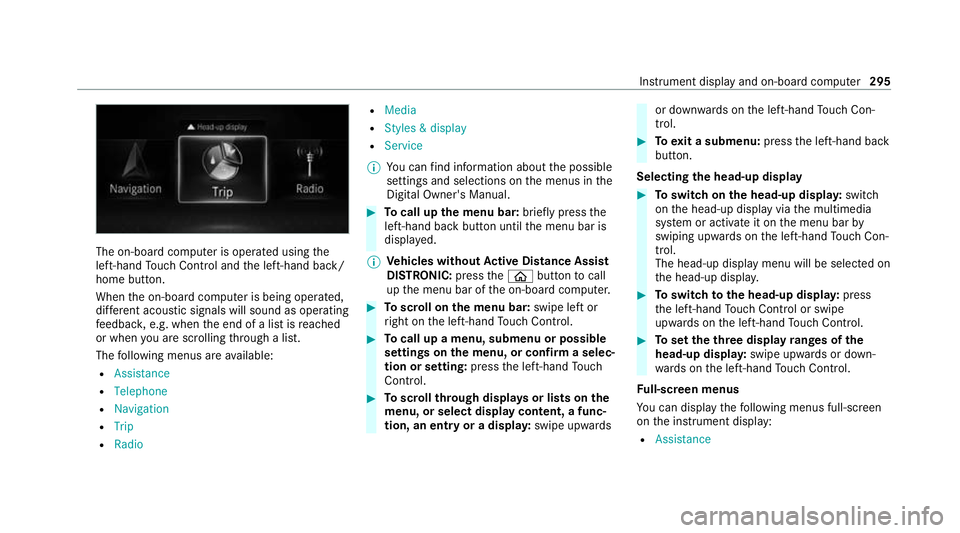
The on-board computer is operated using
the
left-hand Touch Control and the left-hand back/
home button.
When the on-board computer is being operated,
dif fere nt acoustic signals will sound as operating
fe edbac k,e.g. when the end of a list is reached
or when you are sc rolling thro ugh a list.
The following menus are available:
R Assistance
R Telephone
R Navigation
R Trip
R Radio R
Media
R Styles & display
R Service
% You can find information about the possible
settings and selections on the menus in the
Digital Owner's Manual. #
Tocall up the menu bar: briefly pressthe
left-hand back button until the menu bar is
displa yed.
% Ve
hicles without Active Di stance Assist
DISTRO NIC:press the00E2 button tocall
up the menu bar of the on-board computer. #
Toscroll on the menu bar: swipe left or
ri ght on the left-hand Touch Control. #
Tocall up a menu, submenu or possible
settings on the menu, or confirm a selec‐
tion or setting: pressthe left-hand Touch
Control. #
Toscroll through displa ysor lists on the
menu, or select display content, a func‐
tion, an entry or a displa y:swipe upwards or down
wards on the left-hand Touch Con‐
trol. #
Toexit a submenu: pressthe left-hand back
button.
Selecting the head-up display #
Toswitch on the head-up displa y:switch
on the head-up display via the multimedia
sy stem or activate it on the menu bar by
swiping upwards on the left-hand Touch Con‐
trol.
The head-up displ aymenu will be selected on
th e head-up displa y. #
Toswitch tothe head-up displa y:press
th e left-hand Touch Control or swipe
upwards on the left-hand Touch Control. #
Toset theth ree display ranges of the
head-up displa y:swipe upwards or down‐
wa rds on the left-hand Touch Control.
Fu ll-screen menus
Yo u can displ aythefo llowing menus full-screen
on the instrument display:
R Assistance Instrument display and on-board computer
295
Page 304 of 545
%
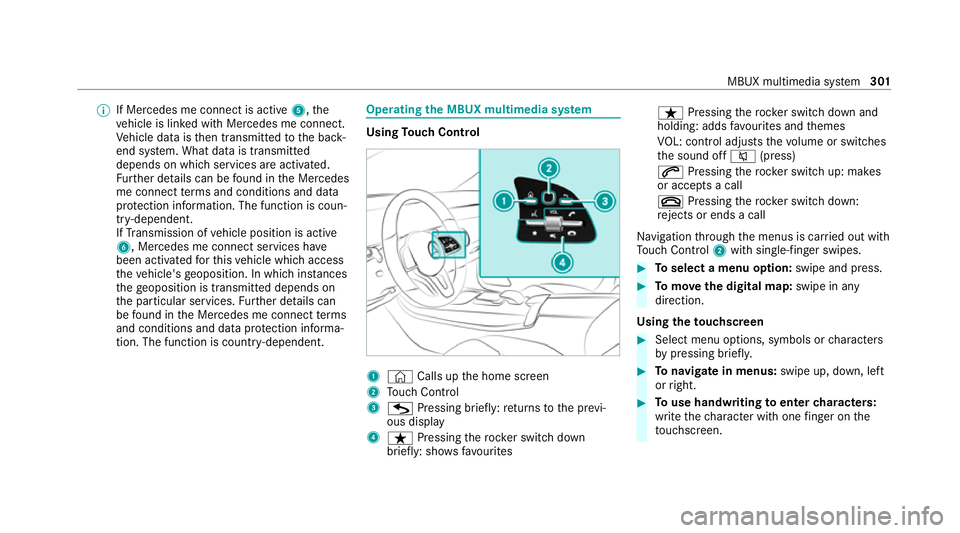
If Mercedes me connect is active 5,the
ve hicle is linked with Mercedes me connect.
Ve hicle data is then transmit tedto the bac k-
end sy stem. What data is transmit ted
depends on which services are activated.
Fu rther de tails can be found in the Mercedes
me connect term s and conditions and data
pr otection information. The function is coun‐
tr y- dependent.
If Transmission of vehicle position is active
6, Mercedes me connect services ha ve
been activated forth is vehicle which access
th eve hicle's geoposition. In which ins tances
th ege oposition is transmitted depends on
th e particular services. Further de tails can
be found in the Mercedes me connect terms
and conditions and data pr otection informa‐
tion. The function is count ry-dependent. Ope
rating the MBUX multimedia sy stem Using
Touch Control 1
© Calls up the home screen
2 Touch Control
3 G Pressing brief ly:re turns tothe pr evi‐
ous display
4 ß Pressing therock er switch down
brief ly: sho ws fa vourites ß
Pressing therock er switch down and
holding: adds favo urites and themes
VO L: control adjusts thevo lume or switches
th e sound off 0063(press)
0061 Pressing therock er switch up: makes
or accepts a call
0076 Pressing therock er switch down:
re jects or ends a call
Na vigation thro ugh the menus is car ried out with
To uch Control 2with sin gle-finger swipes. #
Toselect a menu option: swipe and press. #
Tomo vethe digital map: swipe in any
direction.
Using theto uchscreen #
Select menu options, symbols or characters
by pressing briefly. #
Tonavigate in menus: swipe up, down, left
or right. #
Touse handwriting toenter characters:
write thech aracter with one finger on the
to uchsc reen. MBUX multimedia sy
stem 301
Page 307 of 545
Overview of
the MBUX Interior Assistant &
WARNING Risk of injury fromthe cam‐
era's laser radiation
This product uses a classification 1 laser sys‐
te m. If the housing is opened or damaged,
laser radiation may damage your retina. #
Do not open the housing. #
Alw ays ha vemaintenance workand
re pairs car ried out byaqu alified spe‐
cialist workshop. This device is a class 1 laser product in accord‐
ance with DIN EN 60825-1:20
14
The camera is located in theove rhead control
panel.
If th eve hicle is fitted wi th the MBUX Interior
Assis tant, selected functions of the multimedia sy
stem can be operated conta ct-free. The MBUX
Interior Assi stant can dif fere ntia tebetween
driver and front passenger interactions and
de tects specific hand positions (poses).
Sy stem limits, display messages and no tes
fo rre ctification
The sy stem may be impaired or may not function
in thefo llowing situations:
R The camera in theove rhead control panel
may heat up due tooperating conditions. As
a re sult the camera may switch off temp ora‐
ri ly , particular lyduring longer periods of
operation and at high outside temp eratures.
Do not touch or co verth e camera and wait
until the camera has cooled down and is
av ailable again. R
The camera is co vered or dirty, mis ted up or
scratched.
Wa it until the camera has cooled down
before cleaning the camera lens.
Clean the outside of the camera lens with a
dry or damp cotton clo th. Do not use microfi‐
bre clo ths. Do notremo vethe co ver when
cleaning.
R Recognition can be impaired byreflective
clo thing, an adverse colour of clo thing or by
accesso ries, forex ample.
R Clothing being worn(hat, shawl, scarf) may
be limiting the de tection area of the camera.
Ke ep the camera's field of vision clear.
R The camera is not operational.
Consult a Mercedes-Benz service cent re.304
MBUX multimedia sy stem
Page 319 of 545
The
following ent ries can be made, forex ample:
R Town, stre et, house number
R Street,to wn
R Postcode
R POI name or POI catego ry, e.g. Parking
R Contact name #
Select a sear chresult in list 3. #
Calculate thero ute (/ page316).
% You can find fur ther information about desti‐
nation entry , e.g. 3wordaddresses, in the
Digital Owner's Manual.
Changing country #
Select the count ryindicator in 1. #
Enterth e count ryindicator. #
Select the count ryin3.
Using online sear ch
Destination entry uses online map services. If
th e on-board sear chfinds no suitable dest ina‐
tions or if youch ange countries, the online
sear chisavailable. Fo
rth e destination you can en ter an addre ss, a
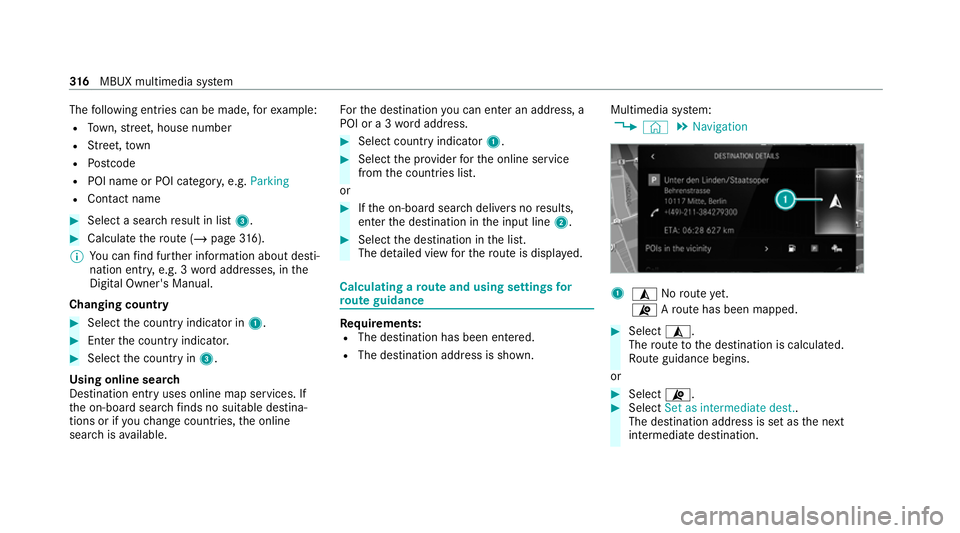
POI or a 3 wordaddress. #
Select country indicator 1. #
Select the pr ovider forth e online service
from the count ries list.
or #
Ifth e on-board sear chdelivers no results,
enter the destination in the input line 2. #
Select the destination in the list.
The de tailed view forth ero ute is displ ayed. Calculating a
route and using settings for
ro ute guidance Re
quirements:
R The destination has been entered.
R The destination address is shown. Multimedia sy
stem:
4 © 5
Navigation 1
¥ Noroute yet.
¦ Aro ute has been mapped. #
Select ¥.
The route tothe destination is calculated.
Ro ute guidance begins.
or #
Select ¦. #
Select Set as intermediate dest..
The destination address is set as the next
intermediate destination. 316
MBUX multimedia sy stem
Page 321 of 545
#
Switch Motorway information on or off.Using se
rvices Re
quirements:
R There is an Internet connection.
R Mercedes me connect is available.
R You ha veset up a user account in the
Mercedes me Portal.
R The vehicle is connected toa user account
and you ha veaccep tedth e conditions of use
fo rth e service.
Fu rther information can be found at:
https://www.mercedes.me
R The service is available and has been activa‐
te d.
R The following requirements apply tothePa rk‐
ing service:
- The navigation services option is availa‐
ble, subsc ribed toand activated in the
Mercedes me Portal.
- The parking service is within the scope of
th e navigation service. Multimedia sy
stem:
4 © 5
Navigation
Displaying the traf fic situation with Live Traf‐
fi c Information #
Select Z. #
Activate Traffic. #
Select Advanced . #
Select View. #
Select Map elements. #
Switch on Traffic incidents ,Free-flowing traf-
fic and Delay.
If traf fic information has been recei ved, then
tra ffic incidents such as roadwor ks,ro ad
bloc ks, local area reports (e.g. fog) and warn‐
ing messages are displa yed.
The tra ffic delay is displa yedfo rth e cur rent
ro ute. Traf fic del ays lasting one minute or
longer are take n into conside ration.
Displ aying hazard warnings with Car-to-X-
Communication
If hazard warnings are available these can be
shown as symbols on the map. The display depends on
the settings forth eTraffic andTraf-
fic incidents options. #
Set the options.
If Traffic is switched off and Traffic incidents
is switched on, the symbols are shown on
th e prospective route.
Displaying weather information and other
map contents #
Select Z. #
Select Advanced . #
Select View. #
Select Map elements. #
Scroll up and show theONLINE MAP CON-
TENTS categor y. #
Switch on a service, e.g. Weather.
Cu rrent weather information is displa yed on
th e navigation map, e.g. temp erature or
cloud co ver. 318
MBUX multimedia sy stem
Page 322 of 545
Pa
rking service &
WARNING Risk of accident and inju ry
due tonot observing the maximum per‐
mitted access height
If th eve hicle height is greater than the maxi‐
mum permitted access height for multi-
st or ey and unde rgro und car par ks,th ero of
and other parts of theve hicle may be dam‐
aged. Vehicle occupants may be injured. #
Before entering a multi-s torey car park
or underground car par k,obser vethe
signpos ted ent rance height. #
Ifth eve hicle height is greater than the
access height, do not enter. *
NO
TEBefore selecting the parking
option The data is based on information pr
ovided by
th ere spective service pr ovider.
Mercedes Benz accepts no liability forthe
accuracy of the information pr ovided relating
to the multi-s torey car park/parking area. #
Alwa ys obser vethe local Information
and conditions. %
This service is not available in all countries. #
Select Zand activate Parking. #
Tap on 005Dinthe map. #
Select a parking option.
The map sho ws the parking options in the
vicinity.
The following information is displa yed (if
av ailable):
R Destination address, dis tance from cur‐
re nt vehicle position and ar riva l time
R Information on the multi-s torey car
park/car par k,forex ample:
- Opening times
- Parking charges
- Cur rent occupancy
- Maximum pa rking time
- Maximum access height
The maximum access height shown
bythe parking service does not re
place the need for obser vation of
th e actual circums tances.
R Available payment options (Mercedes
pa y,coins, bank no tes, cards)
R Details on parking tariffs
R Numb er ofavailable parking spaces
R Payment me thod (e.g. at the parking
machine)
R Services/ facilities at the parking option
R Telephone number #
Calculate thero ute (/ page316). Note
s onthe dashcam *
NO
TEBefore using the dashcam Yo
u are legally responsible for operation and
use of the dashcam functions. The legal
re qu irements relating tooperation and use of
th e dashcam can vary depending on the
country in whi chthe dashcam is operated.
Therefore, obser vethe legal requ irements, in MBUX multimedia sy
stem 319
Page 324 of 545
Ha
ve the camera checked in a Mercedes-
Benz service centre. Te
lephone Te
lephony Note
s ontelephony &
WARNING Risk of dist raction from oper‐
ating integrated communication equip‐
ment while theve hicle is in motion
If yo u operate communication equipment
integrated in theve hicle when driving, you
could be dist racted from the tra ffic situation.
This could also cause youto lose control of
th eve hicle. #
Only operate this equipment when the
traf fic situation permits. #
Ifyo u cannot be sure of this, stop the
ve hicle whilst paying attention toroad
and traf fic conditions and ope rate the
equipment with theve hicle stationar y. &
WARNING Risk of an accident from
ope rating mobile communication equip‐
ment while theve hicle is in motion
Mobile communications devices distract the
driver from the traf fic situation. This could
also cause the driver tolose control of the
ve hicle. #
Asthe driver, only operate mobile com‐
munications devices when theve hicle is
st ationar y. #
As a vehicle occupant, only use mobile
communications devices in the areas
intended forth is purpose, e.g. in the
re ar passenger compartment. Yo
u must obse rveth e legal requirements forthe
country in whi chyou are cur rently driving when
operating mobile communication equipment in
th eve hicle. &
WARNING Risk of injury duetoobjects
being stowed inco rrectly
If objects in theve hicle interior are stowed
incor rectly, they can slide or be thrown
around and hit vehicle occupants. In addi‐
tion, cup holders, open stowage spaces and
mobile phone recep tacles cannot al ways
re tain all objects within.
There is a risk of injur y,particularly in the
ev ent of sudden braking or a sudden change
in direction. #
Alw aysstow objects so that they can‐
not be throw n around in su chsitua‐
tions. #
Alw ays make sure that objects do not
pr otru de from stowage spaces, luggage
nets or stowage nets. #
Close the loc kable stow age spaces
before starting a journe y. #
Alw aysstow and secure heavy, hard,
poin ted, sharp-edged, fragile or bulky
objects in the boot/load compartment. MBUX multimedia sy
stem 321
Page 325 of 545
Obser
vethe additional information on stowing
mobile communications devices cor rectly:
R Loading theve hicle (/ page119)
Blue tooth ®
connection:
The menu view and theav ailable functions in the
te lephone menu are in part dependent on the
Blu etoo th®
profile of the connected mobile
phone. Full functionality is only available if the
mobile phone supports bo thofthefo llowing
Blue tooth ®
profiles:
R PBAP (Phone Book Access Profile)
- The contacts on the mobile phone are
shown automatically on the multimedia
sy stem.
R MAP (Message Access Profile)
- The mobile phone message functions can
be used on the multimedia sy stem.
Ir re spective of this, Blue tooth ®
audio functional‐
ity can byused with any mobile radio unit.
Fo r information on thera nge of functions of the
mobile radio unit tobe connec ted, see the man‐
ufacturer's operating instructions. Ne
twork connection:
The following cases can lead tothe call being
disconnected while theve hicle is in motion:
R You swit chinto a transmission/reception
st ation, in which no communication channel
is free.
R The SIM card used is not compatible with the
network available
R A mobile phone with "Twincard" is logged
into the network with the second SIM card at
th e same time
The multimedia sy stem supports calls in HD
Vo ice ®
for impr oved speech qualit y.Arequ ire‐
ment forth is is that the mobile phone and the
mobile phone network pr ovider of the person
yo u are calling suppo rtHD Voice ®
.
Depending on thequ ality of the connection, the
vo ice quality may fluctuate.
Fu rther information can be obtained from a
Mercedes-Benz service centre or at: https://
www.mercedes-benz.com/connect 322
MBUX multimedia sy stem