sensor MERCEDES-BENZ GLE SUV 2021 Owner's Guide
[x] Cancel search | Manufacturer: MERCEDES-BENZ, Model Year: 2021, Model line: GLE SUV, Model: MERCEDES-BENZ GLE SUV 2021Pages: 545, PDF Size: 9.37 MB
Page 276 of 545
If a
warning tone also sounds for appro ximately
two seconds everytime theve hicle is star ted, it
may be due toone of thefo llowing causes:
R The sensors are dirty: cleanthe sensors
and obser vethe no tes on care of vehicle
parts (/ page 361).
R Parking Assist PARKTRONIC has been
deactivated due toa malfunction: restart
th eve hicle. If the problem persists, consult a
qu alified specialist workshop.
Fu nction of the passive side impact pr otec‐
tion
Pa ssive side impact pr otection is an additional
Pa rking Assist PARKTRONIC function which
wa rnsth e driver about obs tacles at the side of
th eve hicle. A warning is issued when obs tacles
are de tected between the front and rear de tec‐
tion range. In order for an object on the side to
be de tected, the sensors in the front and rear
bumper must firs t de tect the object while you
are driving past it.
During the parking procedure or manoeuvring,
objects are de tected as theve hicle drives past.
If yo usteer in the direction of a de tected obs ta‐cle and
there is a risk of a lateral collision, a
wa rning is issued and the segments light up in
colour in the displa y.
The segment colour changes depending on the
dis tance tothe de tected obs tacle:
R Yello w: appr oximately 30 - 60 cm
R Red:less than appr oximately 30 cm
In order for lateral front or rear segments tobe
displa yed, theve hicle must firs t tr ave l a dis tance
of at least half of theve hicle length. Once the
ve hicle has tr avelled the length of theve hicle, all
of the lateral front and rear segments can be dis‐
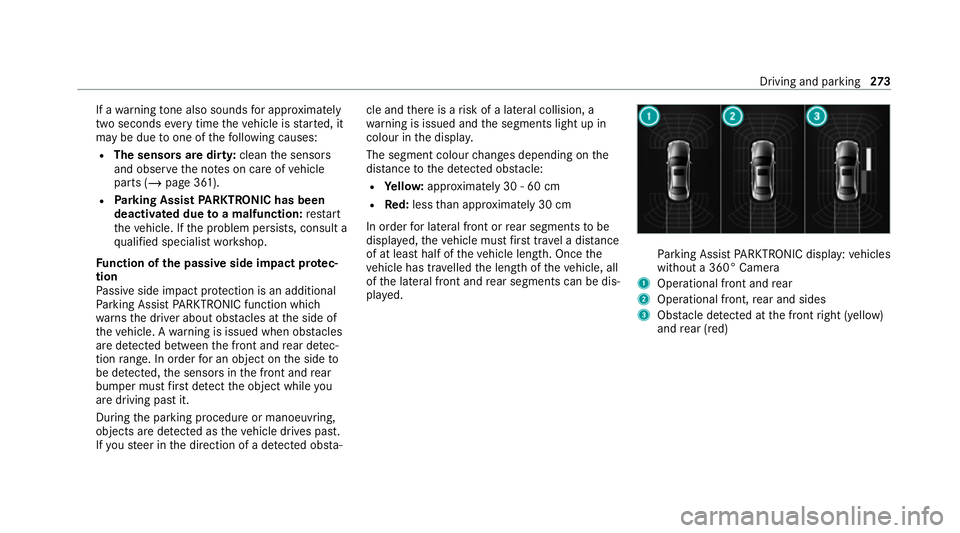
pla yed. Pa
rking Assist PARKTRONIC display: vehicles
without a 360° Camera
1 Operational front and rear
2 Operational front, rear and sides
3 Obstacle de tected at the front right (yellow)
and rear (red) Driving and parking
273
Page 277 of 545
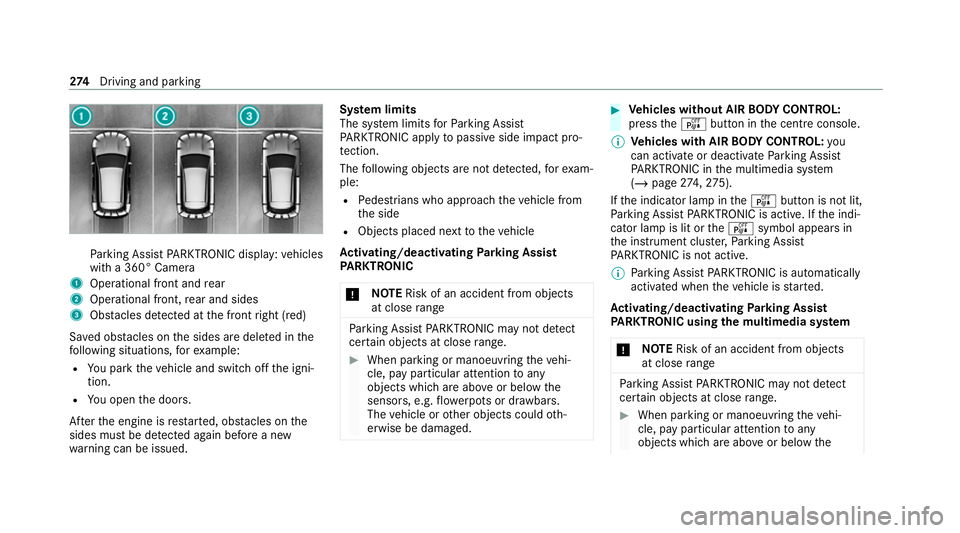
Pa
rking Assist PARKTRONIC display: vehicles
with a 360° Camera
1 Operational front and rear
2 Operational front, rear and sides
3 Obstacles de tected at the front right (red)
Sa ved obs tacles on the sides are dele ted in the
fo llowing situations, forex ample:
R You park theve hicle and switch off the igni‐
tion.
R You open the doors.
Af terth e engine is restar ted, obs tacles on the
sides must be de tected again before a new
wa rning can be issued. Sy
stem limits
The sy stem limits forPa rking Assist
PA RKTRONIC apply topassive side impact pro‐
te ction.
The following objects are not de tected, forex am‐
ple:
R Pedestrians who approach theve hicle from
th e side
R Objects placed next totheve hicle
Ac tivating/deactivating Parking Assist
PA RKTRONIC
* NO
TERisk of an accident from objects
at close range Pa
rking Assist PARKTRONIC may not de tect
cer tain objects at close range. #
When pa rking or manoeuvring theve hi‐
cle, pay particular attention toany
objects which are abo veor below the
sensors, e.g. flowe rpots or dr awbars.
The vehicle or other objects could oth‐
erwise be damaged. #
Vehicles without AIR BODY CONT ROL:
press theé button in the cent reconsole.
% Vehicles with AIR BODY CONT ROL:you
can acti vate or deactivate Parking Assist
PA RKTRONIC in the multimedia sy stem
(/ page 274, 275).
If th e indicator lamp in theé button is not lit,
Pa rking Assist PARKTRONIC is active. If the indi‐
cator lamp is lit or theé symbol appears in
th e instrument clus ter,Pa rking Assist
PA RKTRONIC is not active.
% Parking Assist PARKTRONIC is automatical ly
activated when theve hicle is star ted.
Ac tivating/deactivating Parking Assist
PA RKTRONIC using the multimedia sy stem
* NO
TERisk of an accident from objects
at close range Pa
rking Assist PARKTRONIC may not de tect
cer tain objects at close range. #
When pa rking or manoeuvring theve hi‐
cle, pay particular attention toany
objects which are abo veor below the 274
Driving and pa rking
Page 278 of 545
sensors, e.g.
flowe rpots or dr awbars.
The vehicle or other objects could oth‐
erwise be damaged. Re
quirements:
R The camera menu is open.
R Or: Active Parking Assist is active.
R Or: thePA RKTRONIC pop-up window
appears. #
Tap= inthe media displa y.
If th e indicator lamp is lit, Parking Assist
PA RKTRONIC is active. If the indicator lamp is
not lit or theé symbol appears in the instru‐
ment clus ter,Pa rking Assist PARKTRONIC is not
active.
% Parking Assist PARKTRONIC is automatical ly
activated when the engine is star ted. Ac
tivating/deactivating Parking Assist
PA RKTRONIC using the multimedia sy stem
* NO
TERisk of an accident from objects
at close range Pa
rking Assist PARKTRONIC may not de tect
cer tain objects at close range. #
When pa rking or manoeuvring theve hi‐
cle, pay particular attention toany
objects which are abo veor below the
sensors, e.g. flowe rpots or dr awbars.
The vehicle or other objects could oth‐
erwise be damaged. Re
quirements:
R The camera menu is open.
R Or: Active Parking Assist is active.
R Or: thePA RKTRONIC pop-up window
appears. #
Tap= inthe media displa y.
If th e indicator lamp is lit, Parking Assist
PA RKTRONIC is active. If the indicator lamp is
not lit or theé symbol appears in the instru‐ ment clus
ter,Pa rking Assist PARKTRONIC is not
active.
% Parking Assist PARKTRONIC is automatical ly
activated when the engine is star ted.
Alternatively, Parking Assist PARKTRONIC can be
activated or deacti vated in thequ ick access
menu.
Setting thewa rning tones of Parking Assist
PA RKTRONIC
Multimedia sy stem:
4 © 5
Settings 5
Assistance
5 Camera & parking
Ad justing the volume of thewa rning tones #
Select Warning tone volume. #
Set a value.
Ad justing the pitch of the warning tones #
Select Warning tone pitch. #
Set a value. Driving and parking
275
Page 280 of 545
Sy
stem limits
If th eex terior lighting is malfunctioning, Active
Pa rking Assist is not available.
Objects located abo veor below the de tection
ra nge of the sensors, e.g. overhanging loads,
ove rhangs or loading ramp s of goods vehicles, or
th e borders of parking spaces, are not de tected
du ring measu rement of the parking space. These
are also then not take n into account when calcu‐
lating the parking procedure. In some circum‐
st ances, Active Parking Assist may therefore
guide you into the parking space incor rectly. &
WARNING Risk of accident due to
objects located abo veor below the
de tection range of Active Parking Assist
If th ere are objects abo veor below the
de tection range, thefo llowing situations may
arise:
R Active Parking Assist may steer too ear ly.
R The vehicle may not stop in front of these
objects.
This could cause a collision. #
Inthese situations, do not use Active
Pa rking Assist. Extreme
weather conditions, such as sn owor
heavy rain, may lead toa parking space being
measured inaccuratel y.Pa rking spaces that are
partial ly occupied bytrailer dr awbars might not
be identified as such or be measured incor rectly.
Only use Active Parking Assist on le vel, high- grip
ground.
Do not use Active Parking Assist in thefo llowing
situations:
R Inextreme weather conditions such as ice,
pac ked snow or in heavy rain.
R When transporting a load that pr otru des
be yond theve hicle.
R Onsteep uphill or downhill gradients of more
th an appr oximately 15%.
R When snow chains are fitted.
R When a trailer or bicycle rack is attached.
R Direct lyafte r a tyre change or when spare
tyres are fitted.
R Ifth e tyre pressure is too low or too high. R
Ifth e suspension is out of alignment, e.g.
af te r bottoming out on a kerb.
Ac tive Parking Assist may also display parking
spaces that are not suitable for parking, such as:
R Parking spaces where parking is prohibited.
R Parking spaces on unsuitable sur faces.
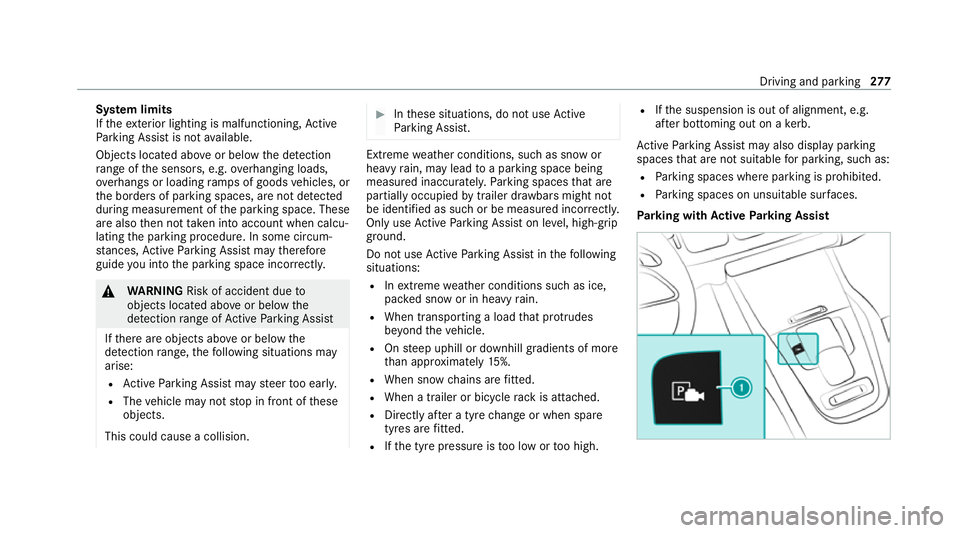
Park ing with Active Parking Assist Driving and parking
277
Page 284 of 545
R
If an incor rect transmission position is
engaged.
Drive AwayAssi stis active under thefo llowing
conditions:
R IfPa rking Assist PARKTRONIC is activated.
R Ifyo u shift the transmission position to005E or
005B when theve hicle is stationar y.
R Ifth e de tected obs tacle is less than appr ox.
1. 0 m away.
R Ifth e manoeuvring assis tant function is acti‐
va ted in the multimedia sy stem.
Sy stem limits
The per form ance of Drive AwayAssi stis limited
on inclines.
When driving with a trailer, Drive AwayAssi stis
not available.
% Also obse rveth e sy stem limits of Parking
Assist PARKTRONIC (/ page271).
Fu nction of Cross Traf fic Alert
% Cross Traf fic Alert is only available forve hi‐
cles with Blind Spot Assist or Active Blind
Spot Assi st. Cross
Traf fic Alert can warndrivers of any cross‐
ing tra ffic when reve rsing and manoeuvring out
of a parking space. The radar sensors in the
bumper also monitor the area adjacent tothe
ve hicle. If a critical situation is de tected, the
L symbol appears inthe media display and
th eve hicle can be braked automatically.
If th era dar sensors are obstructed byvehicles
or other objects, de tection is not possible.
Cross Traf fic Alert is acti veunder thefo llowing
conditions:
R ifth eve hicle is reve rsing at a walking pace.
R manoeuvring assis tance is acti vated
( / page 281).
% Also obser vethe instructions on Blind Spot
Assist and Active Blind Spot Assi st
( / page 245).
Sy stem limits
Cross Traf fic Alert is not available on inclines.
Cross Traf fic Alert is not available when driving
with a trailer. Ac
tivating/deactivating manoeuv ring assis‐
tant
Multimedia sy stem:
4 © 5
Settings 5
Assistance
5 Camera & parking #
Activate/deactivate Manoeuvring assistance.
% Manoeuv ring assi stant must be active forthe
function of Drive AwayAssi st (/ page 280)
and Cross Traf fic Alert (/ page 281). Tr
ailer Manoeuvring Assist Fu
nction of Trailer Manoeuvring Assist &
WARNING Risk of accident due to
unsuitable trailers
Tr ailers with a steered axle or a fift h wheel
cannot be used with Trailer Manoeuvring
Assist.
Due tothis, the trailer cann otbe man‐
oeuvred in the desired direction and you can
cause a collision or the trailer can overturn. Driving and parking
281
Page 285 of 545
#
Only use Trailer Manoeuv ring Assi st
with trailers with fixe d dr awbars and
axles. *
NO
TEDama getotraile rswith a stabilisa‐
tion device against swerving In
the case of trailers with a stabilisation
device against swerving, the trailer or trailer
to w hit chcould be damaged. #
If a trailer coupling with Trailer Manoeu‐
vring Assist is used, on lyuse trailers
without a stabilisation device against
swerving. *
NO
TEDama gedue to ov erhanging loads
in front or draw bar installations The
vehicle and the trailer may be damaged
during manoeuvring due toove rhanging
loads at the front of the trailer or dr awbar
ins tallations. #
Pay attention to overhanging loads or
dr aw bar ins tallations while manoeu‐
vring. Tr
ailer Manoeuv ring Assi stassists you when
re ve rsing with a trailer. By means of a turning
angle sensor in the trailer coupling, Trailer
Manoeuv ring Assi stmonitors the articulation
angle between theve hicle and trailer and
adjusts it toa specified value.
Tr ailer Manoeuv ring Assi stis only an aid. It is not
a substitute foryo ur attention tothe sur round‐
ings. The responsibility for safe manoeuvring and
parking remains with you. Make sure that there
are no persons, animals or objects in the
manoeuvring area while manoeuvring and park‐
ing in/exiting parking spaces.
Yo u can either en terth e articulation angle value
directly via the multimedia sy stem or use a
st ra ightening manoeuvre. When car rying out a
st ra ightening manoeuvre, the sy stem calculates
th e articulation angle automatically and stra ight‐
ens theve hicle/trailer combination tothe trail‐
er's cur rent di rection.
Tr ailer Manoeuv ring Assi stmust be taught-in
before it can adjust the articulation angle
(/ page 282). Obser
vethe no tes on towing a trailer
(/ page 283).
Sy stem limits
Obser vethe sy stem limits of thefo llowing func‐
tions:
R Active Parking Assist (/ page276)
R 360° Camera (/ page 267)
R Reversing camera (/ page 264)
The sy stem may be impaired or may not function
in thefo llowing situations:
R The gradient is greater than appr oximately
15 %.
Using Trailer Manoeuvring Assist
Requ irements:
R The vehicle has been star ted and is station‐
ar y.
R A trailer has been de tected.
R The gradient is less than appr oximately 15%.
R The elect ric pa rking brake is not applied. 282
Driving and parking
Page 356 of 545
On-board computer:
4 Service 5
Engine oil level
One of thefo llowing messages will appear on
th e multifunction display:
R Engine oil level Measuring now : measure‐
ment of the oil le vel is not yet possible. #
Repeat there qu est af ter a maximum of
30 minutes' driving.
R Engine oil level OK andthe bar display for
indicating the oil le vel on the multifunction
display is green and is between "min" and
"max": the oil le vel is cor rect.
R Engine oil level Add 1,0 l andthe bar display
fo r indicating the oil le vel on the multifunc‐
tion display is orange and is below "min": #
Add 1 l of engine oil.
R Reduce engine oil level andthe bar display
fo r indicating the oil le vel on the multifunc‐
tion display is orange and is abo ve"max": #
Drain off any excess engine oil that has been
added. Todo so, consult a qualified specialist
wo rkshop.
R For engine oil level turn on ignition #
Switch on the ignition tocheck the engine oil
le ve l.
R Engine oil level System inoperative : The oil
le ve l sensor is defective or not connecte d. #
Consult a qualified specialist workshop.
R Engine oil level System currently unavail. #
Close the bonn et.
To pping up engine oil &
WARNING Risk of burn s from hot com‐
ponent parts in the engine compartment
Cer tain component parts in the engine com‐
partment can be very hot, e.g. the engine,
th e cooler and parts of theex haust sy stem. #
Allow the engine tocool down and only
to uch co mponent parts described in
th efo llowing. &
WARNING Risk offire and injury from
engine oil
If engine oil comes into con tact with hot
component parts in the engine compart‐
ment, it may ignite. #
Make sure that no engine oil is spilled
next tothefiller opening. #
Allow the engine tocool off and thor‐
oughly clean the engine oil from compo‐
nent parts before starting theve hicle. *
NO
TEEngine damage causedbyan
incor rect oil filter, incor rect oil or addi‐
tives #
Do not use engine oils or oil filters
which do not cor respond tothe specifi‐
cations explicitly prescribed forthe
service inter vals. #
Follow the instructions on the service
inter val display forch anging the engine
oil and obser vethe prescribed change
inter vals. Maintenance and care
353
Page 361 of 545
Preparation for car wash incomplete See
media display. Af
ter some time, theve hicle
automatically continues rising.
R Vehicles with E- ACTIVE BODY CONT ROL:
th eve hicle is raised tothe maximum possi‐
ble chassis le vel(/ page 261).
If rising takes longer than 25 seconds, the
fo llowing message appears on the multifunc‐
tion display:
Preparation for car wash incomplete See
media display . After some time, theve hicle
automatically continues rising.
If one of the settings cann otbe selected, this is
displa yedby a% behind there spective set‐
ting.
Ab ove a speed of 20 km/h Car wash mode is
automatically deactivated.
The following settings are reset when car wash
mode is deactivated:
R The outside mir rors are folded out.
R The rain sensor is activated.
R The rear wind owwiper is activated. R
The air conditioning sy stem is set tofresh air
mode.
R Parking Assist PARKTRONIC is reset tothe
pr ev iously selec ted setting.
R The windo wsand the sliding sunroof remain
closed.
R Vehicles with 360° Camera: the front
image is deactivated at speeds abo ve
18 km/h.
R Vehicles with AIRMATIC: theve hicle is low‐
ered tothe pr eviously set chassis le vel.
R Vehicles with E- ACTIVE BODY CONT ROL:
th eve hicle is lo weredto the pr eviously set
ch assis le vel. Ac
tivating/deactivating automatic car wash
mode Re
quirements:
R theve hicle is stationar y.
R the engine is running. Multimedia sy
stem:
4 © 5
Settings 5
Quick access
Ac tivating automatic car wash mode #
Select Car wash mode . #
Select Start.
If one of the settings cann otbe selected, this is
displa yedby a% behind there spective set‐
ting.
% For an overview of the settings made when
activating automatic car wash mode
(/ page 356).
Deactivating automatic car wash mode #
Select Stop.
The automatic car wash settings are reset.
% The automatic car wash mode is automati‐
cally deactivated as soon as a speed of
20 km/h is exceeded. 358
Maintenance and care
Page 363 of 545
R
Tree resin, oils, fuels and greases: remo veby
ru bbing gently wi tha clo thsoaked in petro‐
leum ether or lighter fluid.
R Coolant and brake fluid: remo vewith a damp
clo thand clean water.
R Tarst ains: use tarre mo ver.
R Wax: use silicone remo ver.
R Do not attach sticke rs,fi lms or similar mate‐
ri als. Only have film attached tothe bumper
at a qualified specialist workshop.
R Remo vedirt immediately, where possible.
Matt finish
R Only use care products appr ovedfor
Mercedes-Benz.
R Do not attach sticke rs,fi lms or similar mate‐
ri als. Only ha vefilm attached tothe bumper
at a qualified specialist workshop.
R Do not polish theve hicle and light-alloy
wheels.
R Only use car washes that cor respond tothe
latest engineering standards. R
Do not use car wash programmes with a final
hot wax treatment.
R Do not use paint cleane rs, buf fing or polish‐
ing products, gloss preser vers, e.g. wax.
In theev ent of paintwork damage:
R Alw ays ha vepaintwork repairs car ried out at
a qu alified specialist workshop.
R Make sure thera dar sensors function
(/ page 212). Note
s on cleaning decorative foils Obser
vethe no tes on matt finish care in the
ch ap ter "No tes on paintwork/matt finish paint‐
wo rkcare" (/ page 359). They also app lyto
matt decorative foils.
Obser vethe no tes on cleaning decorative foils to
avo idvehicle damage.
Cleaning R For cleaning, use plenty of water and a mild
cleaning agent without additives or abrasive
subs tances, e.g. a car sha mpoo appr ovedfor
Mercedes-Benz. R
Remo vedirt immediatel y,where possible,
whilst avoiding rubbing too hard. There is
ot herwise a risk of damaging the decorative
fo il ir reparably.
R Ifth ere is dirt on thefinish or if the decora‐
tive foil is dull: use thePa int Cleaner recom‐
mended and appr ovedfo r Mercedes-Benz.
R Insect remains: soak with insect remo ver and
ri nse off the treated areas af terw ards.
R Bird droppings: soak with water and rinse off
af te rw ards.
R Topreve ntwate rst ains, dry a foil-wrapped
ve hicle with a soft, absorbent clo thafter
eve rycar wash.
Av oiding dama getothe decorative foil
R The service life and colouring of decorative
foils are impaired by:
- sunlight
- temp erature, e.g. hot air blo wer
- weather conditions
- stone chippings and dirt
- chemical cleaning agents 360
Maintenance and care
Page 365 of 545
%
Afterch anging the wiper blades or treating
th eve hicle with wax, clean the windscreen
th oroughly with cleaning agents recommen‐
ded for Mercedes-Benz. Failure toobser ve
th e application instructions may result in
damage, smear mar ksor dazzling spots.
% Remo veextern al fogging or dirt on the wind‐
screen in front of the multifunction camera.
Otherwise, driving sy stems and driving
saf ety sy stems may be impaired or not avail‐
able (/ page212).
Wi per blades
R Movethe wiper arms into there placement
position (/ page153).
R With th e wiper arms folded out, clean the
wiper blades with a damp clo th.
% Make sure that the wiper blades are coated.
The coating can lea veresidues on a clo th.
Do not rubth e wiper blades excessively or
clean them too of ten.
Ex terior lighting
R Clean the lenses with a wet sponge and mild
cleaning agent, e.g. car sha mpoo. R
Only use cleaning agents or cleaning clo ths
th at are suitable for plast ic lenses.
Sensors
R Clean the sensors in the front and rear
bumpers with a soft clo thand car shampoo
(/ page 212).
R When using a high-pressure cleaner,maintain
a minimum dis tance of 30 cm.
Ru nning boards
R Use water and acid-free cleaning agents.
R Do not clean the aluminium trim insert of the
ru nning board wi thalkaline or acidic cleaning
agents such as wheel cleaners. Do not use
acidic alloy wheel cleaners toremo vebrake
dust. The aluminium trim inserts could other‐
wise be damaged.
Re versing camera and 360° Camera
R Open the camera co ver with the multimedia
sy stem (/ page270).
R Use clean water and a soft clo thtoclean the
came ralens.
R Do not use a high-pressure cleaner. Ta
ilpipes
R Clean with a cleaning agent recommended
fo r Mercedes-Benz, especially in the winter
and af terwa shing theve hicle.
R Do not use acidic cleaning agents.
Tr ailer hitch
R Obse rveth e no tes on care in the trailer hitch
manufacturer's operating instructions.
R Do not clean the ball neck with a high-pres‐
sure cleaner or solvent.
R Remo vetraces of rust on the ball, forex am‐
ple, with a wire brush.
R Remo vedirt with a lint-free clo th.
R After cleaning, lightly oil or grease the ball
head.
% Before using trailers with anti- torsional cou‐
pling, obser vethe manufacturer's operating
instructions. 362
Maintenance and care